CCNA Routing and Switching 
Routing and Switching Essentials 
RSE Chapter 6 SIC Practice Skills Assessment - 
Packet Tracer 
A few things to keep in mind while completing this activity: 
1. Do not use the browser Back button or close or reload any exam 
windows during the exam. 
2. Do not close Packet Tracer when you are done. It will close 
automatically. 
3. Click the Submit Assessment button in the browser window to 
submit your work. 
Objectives 
· Design an IP addressing scheme to provide connectivity to end 
users in a small to medium-sized business network 
· Configure static routes to enable connectivity in a small to 
medium-sized business network. 
· Configure summary and floating static routes. 
All IOS device configurations should be completed from a 
direct terminal connection to the device console. 
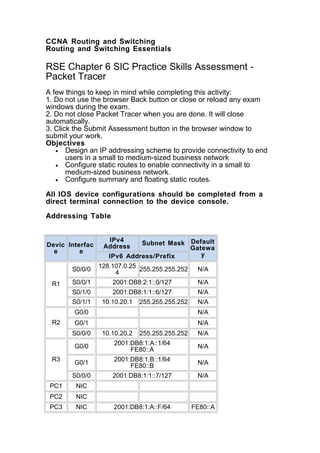
Addressing Table 
Devic 
e 
Interfac 
e 
IPv4 
Address Subnet Mask Default 
Gatewa 
IPv6 Address/Prefix y 
R1 
S0/0/0 128.107.0.25 
4 255.255.255.252 N/A 
S0/0/1 2001:DB8:2:1::0/127 N/A 
S0/1/0 2001:DB8:1:1::6/127 N/A 
S0/1/1 10.10.20.1 255.255.255.252 N/A 
R2 
G0/0 N/A 
G0/1 N/A 
S0/0/0 10.10.20.2 255.255.255.252 N/A 
R3 
G0/0 2001:DB8:1:A::1/64 
FE80::A N/A 
G0/1 2001:DB8:1:B::1/64 
FE80::B N/A 
S0/0/0 2001:DB8:1:1::7/127 N/A 
PC1 NIC 
PC2 NIC 
PC3 NIC 2001:DB8:1:A::F/64 FE80::A
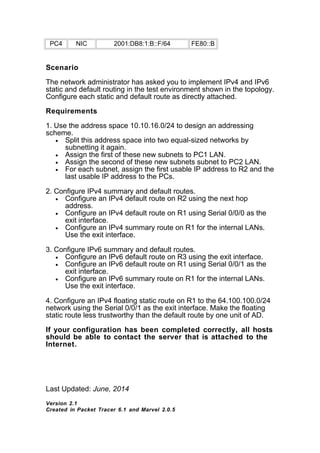
PC4 NIC 2001:DB8:1:B::F/64 FE80::B 
Scenario 
The network administrator has asked you to implement IPv4 and IPv6 
static and default routing in the test environment shown in the topology. 
Configure each static and default route as directly attached. 
Requirements 
1. Use the address space 10.10.16.0/24 to design an addressing 
scheme. 
· Split this address space into two equal-sized networks by 
subnetting it again. 
· Assign the first of these new subnets to PC1 LAN. 
· Assign the second of these new subnets subnet to PC2 LAN. 
· For each subnet, assign the first usable IP address to R2 and the 
last usable IP address to the PCs. 
2. Configure IPv4 summary and default routes. 
· Configure an IPv4 default route on R2 using the next hop 
address. 
· Configure an IPv4 default route on R1 using Serial 0/0/0 as the 
exit interface. 
· Configure an IPv4 summary route on R1 for the internal LANs. 
Use the exit interface. 
3. Configure IPv6 summary and default routes. 
· Configure an IPv6 default route on R3 using the exit interface. 
· Configure an IPv6 default route on R1 using Serial 0/0/1 as the 
exit interface. 
· Configure an IPv6 summary route on R1 for the internal LANs. 
Use the exit interface. 
4. Configure an IPv4 floating static route on R1 to the 64.100.100.0/24 
network using the Serial 0/0/1 as the exit interface. Make the floating 
static route less trustworthy than the default route by one unit of AD. 
If your configuration has been completed correctly, all hosts 
should be able to contact the server that is attached to the 
Internet. 
Last Updated: June, 2014 
Version 2.1 
Created in Packet Tracer 6.1 and Marvel 2.0.5
All contents are Copyright © 1992 - 2014 Cisco Systems, Inc. All rights 
reserved. This document is Cisco Public Information.

Ccna routing and switching

  • 1.
    CCNA Routing andSwitching Routing and Switching Essentials RSE Chapter 6 SIC Practice Skills Assessment - Packet Tracer A few things to keep in mind while completing this activity: 1. Do not use the browser Back button or close or reload any exam windows during the exam. 2. Do not close Packet Tracer when you are done. It will close automatically. 3. Click the Submit Assessment button in the browser window to submit your work. Objectives · Design an IP addressing scheme to provide connectivity to end users in a small to medium-sized business network · Configure static routes to enable connectivity in a small to medium-sized business network. · Configure summary and floating static routes. All IOS device configurations should be completed from a direct terminal connection to the device console. Addressing Table Devic e Interfac e IPv4 Address Subnet Mask Default Gatewa IPv6 Address/Prefix y R1 S0/0/0 128.107.0.25 4 255.255.255.252 N/A S0/0/1 2001:DB8:2:1::0/127 N/A S0/1/0 2001:DB8:1:1::6/127 N/A S0/1/1 10.10.20.1 255.255.255.252 N/A R2 G0/0 N/A G0/1 N/A S0/0/0 10.10.20.2 255.255.255.252 N/A R3 G0/0 2001:DB8:1:A::1/64 FE80::A N/A G0/1 2001:DB8:1:B::1/64 FE80::B N/A S0/0/0 2001:DB8:1:1::7/127 N/A PC1 NIC PC2 NIC PC3 NIC 2001:DB8:1:A::F/64 FE80::A
  • 2.
    PC4 NIC 2001:DB8:1:B::F/64FE80::B Scenario The network administrator has asked you to implement IPv4 and IPv6 static and default routing in the test environment shown in the topology. Configure each static and default route as directly attached. Requirements 1. Use the address space 10.10.16.0/24 to design an addressing scheme. · Split this address space into two equal-sized networks by subnetting it again. · Assign the first of these new subnets to PC1 LAN. · Assign the second of these new subnets subnet to PC2 LAN. · For each subnet, assign the first usable IP address to R2 and the last usable IP address to the PCs. 2. Configure IPv4 summary and default routes. · Configure an IPv4 default route on R2 using the next hop address. · Configure an IPv4 default route on R1 using Serial 0/0/0 as the exit interface. · Configure an IPv4 summary route on R1 for the internal LANs. Use the exit interface. 3. Configure IPv6 summary and default routes. · Configure an IPv6 default route on R3 using the exit interface. · Configure an IPv6 default route on R1 using Serial 0/0/1 as the exit interface. · Configure an IPv6 summary route on R1 for the internal LANs. Use the exit interface. 4. Configure an IPv4 floating static route on R1 to the 64.100.100.0/24 network using the Serial 0/0/1 as the exit interface. Make the floating static route less trustworthy than the default route by one unit of AD. If your configuration has been completed correctly, all hosts should be able to contact the server that is attached to the Internet. Last Updated: June, 2014 Version 2.1 Created in Packet Tracer 6.1 and Marvel 2.0.5
  • 3.
    All contents areCopyright © 1992 - 2014 Cisco Systems, Inc. All rights reserved. This document is Cisco Public Information.