


Copyright © www.networkel.com
5- DYNAMIC ROUTING
5.1 Dynamic Routing Protocols
5.2 Distance Vector Dynamic Routing / RIP and RIPng
5.3 Link State Dynamic Routing
5.4 Routing Table
Copyright © www.networkel.com
5.1 Dynamic Routing Protocols
Copyright © www.networkel.com
STATICROUTINGvs DYNAMICROUTING
STATIC ROUTING DYNAMIC ROUTING
• Manually configured routing
entry
• Must be manually updated if
topology changes
• Suitable for very small networks
• Less CPU usage
• May be fine to use to or from a
stub network
• Easy to implement
• Uses Routing Protocols that
dynamically discover network
destinations and how to get to
them
• Automatically updated if
topology changes
• Suitable for large networks
• Rapid convergence
• May require more CPU
Copyright © www.networkel.com
BONUSSLIDE( PROMOTIONOFFER!)
• To get our CCNA 200-125 Full Video Training with %90 discount
click the link below now !
CCNA 200-125 VIDEO TRAINING (GET WITH %90 DISCOUNT)
Copyright © www.networkel.com
DYNAMICROUTINGPROTOCOLS
• Create and maintain data
structures (Neighbor table,
topology table etc.)
• Exchange messages ( Hello,
update etc. )
• Use algorithms to determine
best path to the distance (i.e.
DUAL for EIGRP )
Copyright © www.networkel.com
HOWDYNAMICPROTOCOLSWORK?
• Router sends & receives routing
messages on its interfaces
• Router shares messages with other
routers using same protocol
• Routers exchange router information
each other
• If router detects a topology change,
advertises this to others
Copyright © www.networkel.com
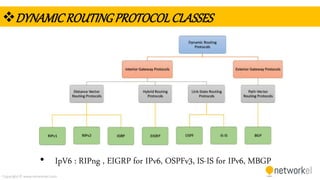
DYNAMICROUTINGPROTOCOLCLASSES
• IpV6 : RIPng , EIGRP for IPv6, OSPFv3, IS-IS for IPv6, MBGP
Copyright © www.networkel.com
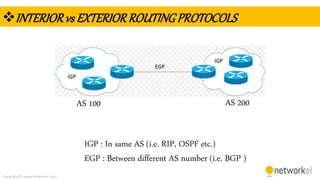
INTERIORvs EXTERIORROUTINGPROTOCOLS
AS 200AS 100
IGP : In same AS (i.e. RIP, OSPF etc.)
EGP : Between different AS number (i.e. BGP )
Copyright © www.networkel.com
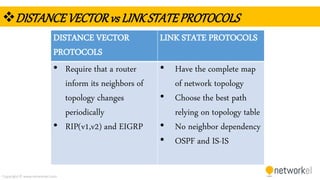
DISTANCEVECTORvs LINKSTATEPROTOCOLS
DISTANCE VECTOR
PROTOCOLS
LINK STATE PROTOCOLS
• Require that a router
inform its neighbors of
topology changes
periodically
• RIP(v1,v2) and EIGRP
• Have the complete map
of network topology
• Choose the best path
relying on topology table
• No neighbor dependency
• OSPF and IS-IS
Copyright © www.networkel.com
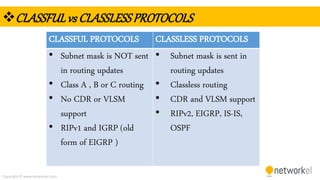
CLASSFULvs CLASSLESSPROTOCOLS
CLASSFUL PROTOCOLS CLASSLESS PROTOCOLS
• Subnet mask is NOT sent
in routing updates
• Class A , B or C routing
• No CDR or VLSM
support
• RIPv1 and IGRP (old
form of EIGRP )
• Subnet mask is sent in
routing updates
• Classless routing
• CDR and VLSM support
• RIPv2, EIGRP, IS-IS,
OSPF
Copyright © www.networkel.com
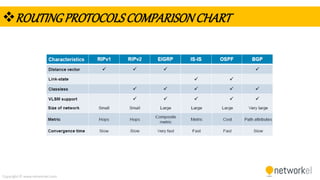
ROUTINGPROTOCOLSCOMPARISONCHART
Copyright © www.networkel.com
5.2 Distance Vector Dynamic Routing / RIP and RIPng
Copyright © www.networkel.com
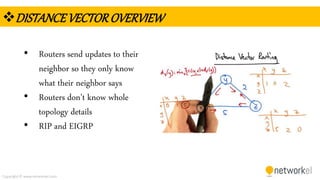
DISTANCEVECTOROVERVIEW
• Routers send updates to their
neighbor so they only know
what their neighbor says
• Routers don’t know whole
topology details
• RIP and EIGRP
Copyright © www.networkel.com
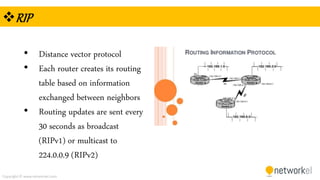
RIP
• Distance vector protocol
• Each router creates its routing
table based on information
exchanged between neighbors
• Routing updates are sent every
30 seconds as broadcast
(RIPv1) or multicast to
224.0.0.9 (RIPv2)
Copyright © www.networkel.com
RIP(cont)
• Bellman Ford Algorithm for
metric calculation
• Uses hop count as metric
• Maximum hop count = 15
Copyright © www.networkel.com
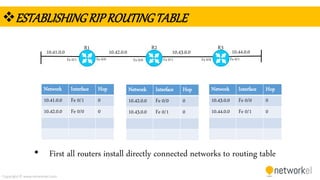
ESTABLISHINGRIPROUTINGTABLE
10.42.0.0 10.43.0.010.41.0.0 10.44.0.0
R1 R2 R3
Network Interface Hop
10.41.0.0 Fe 0/1 0
10.42.0.0 Fe 0/0 0
Network Interface Hop
10.42.0.0 Fe 0/0 0
10.43.0.0 Fe 0/1 0
Network Interface Hop
10.43.0.0 Fe 0/0 0
10.44.0.0 Fe 0/1 0
Fa 0/1 Fa 0/1 Fa 0/1Fa 0/0 Fa 0/0 Fa 0/0
• First all routers install directly connected networks to routing table
Copyright © www.networkel.com
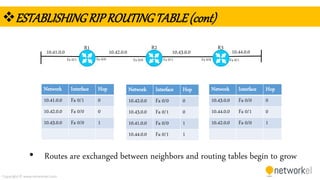
ESTABLISHINGRIPROUTINGTABLE(cont)
10.42.0.0 10.43.0.010.41.0.0 10.44.0.0
R1 R2 R3
Network Interface Hop
10.41.0.0 Fa 0/1 0
10.42.0.0 Fa 0/0 0
10.43.0.0 Fa 0/0 1
Network Interface Hop
10.42.0.0 Fa 0/0 0
10.43.0.0 Fa 0/1 0
10.41.0.0 Fa 0/0 1
10.44.0.0 Fa 0/1 1
Network Interface Hop
10.43.0.0 Fa 0/0 0
10.44.0.0 Fa 0/1 0
10.42.0.0 Fa 0/0 1
Fa 0/1 Fa 0/1 Fa 0/1Fa 0/0 Fa 0/0 Fa 0/0
• Routes are exchanged between neighbors and routing tables begin to grow
Copyright © www.networkel.com
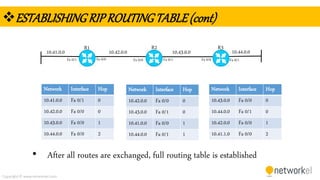
ESTABLISHINGRIPROUTINGTABLE(cont)
10.42.0.0 10.43.0.010.41.0.0 10.44.0.0
R1 R2 R3
Network Interface Hop
10.41.0.0 Fa 0/1 0
10.42.0.0 Fa 0/0 0
10.43.0.0 Fa 0/0 1
10.44.0.0 Fa 0/0 2
Network Interface Hop
10.42.0.0 Fa 0/0 0
10.43.0.0 Fa 0/1 0
10.41.0.0 Fa 0/0 1
10.44.0.0 Fa 0/1 1
Network Interface Hop
10.43.0.0 Fa 0/0 0
10.44.0.0 Fa 0/1 0
10.42.0.0 Fa 0/0 1
10.41.1.0 Fa 0/0 2
Fa 0/1 Fa 0/1 Fa 0/1Fa 0/0 Fa 0/0 Fa 0/0
• After all routes are exchanged, full routing table is established
Copyright © www.networkel.com
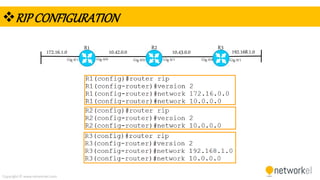
RIPCONFIGURATION
10.42.0.0 10.43.0.0172.16.1.0 192.168.1.0
R1 R2 R3
Gig 0/1 Gig 0/1 Gig 0/1Gig 0/0 Gig 0/0 Gig 0/0
Copyright © www.networkel.com
BONUSSLIDE( PROMOTIONOFFER!)
• To get our CCNA 200-125 Full Video Training with %90 discount
click the link below now !
CCNA 200-125 VIDEO TRAINING (GET WITH %90 DISCOUNT)
Copyright © www.networkel.com
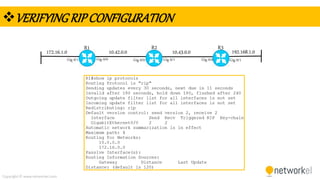
VERIFYINGRIPCONFIGURATION
10.42.0.0 10.43.0.0172.16.1.0 192.168.1.0
R1 R2 R3
Gig 0/1 Gig 0/1 Gig 0/1Gig 0/0 Gig 0/0 Gig 0/0
Copyright © www.networkel.com
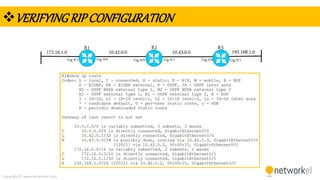
VERIFYINGRIPCONFIGURATION
10.42.0.0 10.43.0.0172.16.1.0 192.168.1.0
R1 R2 R3
Gig 0/1 Gig 0/1 Gig 0/1Gig 0/0 Gig 0/0 Gig 0/0
Copyright © www.networkel.com
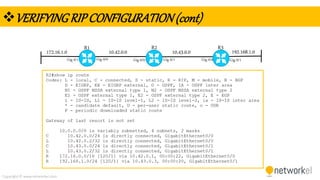
VERIFYINGRIPCONFIGURATION(cont)
10.42.0.0 10.43.0.0172.16.1.0 192.168.1.0
R1 R2 R3
Gig 0/1 Gig 0/1 Gig 0/1Gig 0/0 Gig 0/0 Gig 0/0
Copyright © www.networkel.com
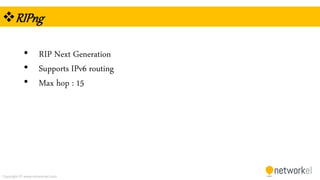
RIPng
• RIP Next Generation
• Supports IPv6 routing
• Max hop : 15
Copyright © www.networkel.com
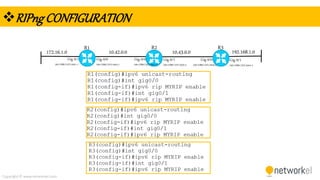
RIPngCONFIGURATION
10.42.0.0 10.43.0.0172.16.1.0 192.168.1.0
R1 R2 R3
Gig 0/1
2001:DB8:CAFE:A001::1
Gig 0/0
2001:DB8:CAFE:A002::1
Gig 0/0
2001:DB8:CAFE:A001::2
Gig 0/1
2001:DB8:CAFE:A003::2
Gig 0/0
2001:DB8:CAFE:A003::3
Gig 0/1
2001:DB8:CAFE:A004::3
Copyright © www.networkel.com
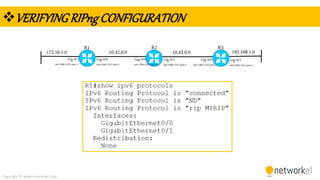
VERIFYINGRIPngCONFIGURATION
10.42.0.0 10.43.0.0172.16.1.0 192.168.1.0
R1 R2 R3
Gig 0/1
2001:DB8:CAFE:A001::1
Gig 0/0
2001:DB8:CAFE:A002::1
Gig 0/0
2001:DB8:CAFE:A001::2
Gig 0/1
2001:DB8:CAFE:A003::2
Gig 0/0
2001:DB8:CAFE:A003::3
Gig 0/1
2001:DB8:CAFE:A004::3
Copyright © www.networkel.com
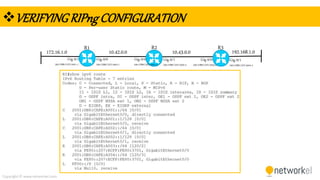
VERIFYINGRIPngCONFIGURATION
10.42.0.0 10.43.0.0172.16.1.0 192.168.1.0
R1 R2 R3
Gig 0/1
2001:DB8:CAFE:A003::2
Gig 0/1
2001:DB8:CAFE:A004::3
Gig 0/0
2001:DB8:CAFE:A001::2
Gig 0/0
2001:DB8:CAFE:A003::3
Gig 0/1
2001:DB8:CAFE:A001::1
Gig 0/0
2001:DB8:CAFE:A002::1
Copyright © www.networkel.com
5.3 Link State Routing
Copyright © www.networkel.com
LINKSTATEROUTINGOVERVIEW
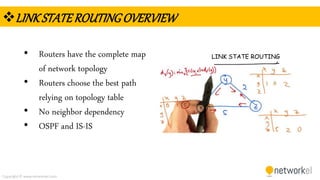
• Routers have the complete map
of network topology
• Routers choose the best path
relying on topology table
• No neighbor dependency
• OSPF and IS-IS
LINK STATE ROUTING
Copyright © www.networkel.com
DJIKSTRAALGORITHM
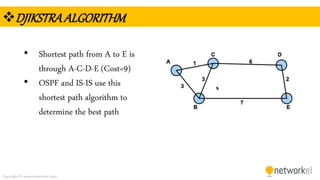
• Shortest path from A to E is
through A-C-D-E (Cost=9)
• OSPF and IS-IS use this
shortest path algorithm to
determine the best path
Copyright © www.networkel.com
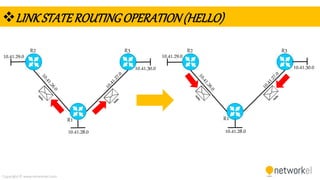
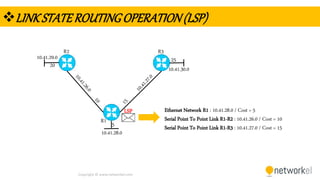
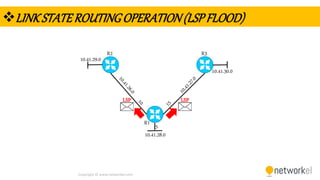
LINKSTATEROUTINGOPERATION
1. Routers discover their directly connected neighbors and
send hello packets
2. Routers build Link State Packet (LSP) which has the link
state of directly connected links
3. LSPs are flooded to all neighbors and stored in a database
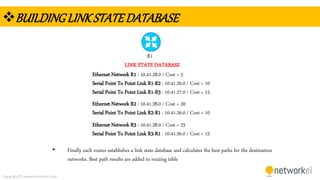
4. Database is used for constructing a full map of topology
Copyright © www.networkel.com
LINKSTATEROUTINGOPERATION(HELLO)
R1
R2 R3
R1
R2 R3
10.41.28.0 10.41.28.0
10.41.29.0 10.41.29.0
10.41.30.0 10.41.30.0
Copyright © www.networkel.com
LINKSTATEROUTINGOPERATION(LSP)
R1
R2 R3
10.41.28.0
10.41.29.0
10.41.30.0
LSP Ethernet Network R1 : 10.41.28.0 / Cost = 5
Serial Point To Point Link R1-R2 : 10.41.26.0 / Cost = 10
Serial Point To Point Link R1-R3 : 10.41.27.0 / Cost = 155
20
25
Copyright © www.networkel.com
LINKSTATEROUTINGOPERATION(LSPFLOOD)
R1
R2 R3
10.41.28.0
10.41.29.0
10.41.30.0
LSP
5
LSP
Copyright © www.networkel.com
BUILDINGLINKSTATEDATABASE
Ethernet Network R1 : 10.41.28.0 / Cost = 5
Serial Point To Point Link R1-R2 : 10.41.26.0 / Cost = 10
Serial Point To Point Link R1-R3 : 10.41.27.0 / Cost = 15
Ethernet Network R2 : 10.41.28.0 / Cost = 20
Serial Point To Point Link R2-R1 : 10.41.26.0 / Cost = 10
Ethernet Network R3 : 10.41.28.0 / Cost = 25
Serial Point To Point Link R3-R1 : 10.41.26.0 / Cost = 15
R1
LINK STATE DATABASE
• Finally each router establishes a link state database and calculates the best paths for the destination
networks. Best path results are added to routing table
Copyright © www.networkel.com
5.4 Routing Table
Copyright © www.networkel.com
ROUTINGTABLE
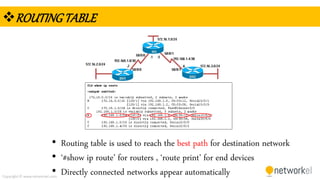
• Routing table is used to reach the best path for destination network
• ‘#show ip route’ for routers , ‘route print’ for end devices
• Directly connected networks appear automatically
Copyright © www.networkel.com
ETHERNETOVERVIEW
Copyright © www.networkel.com
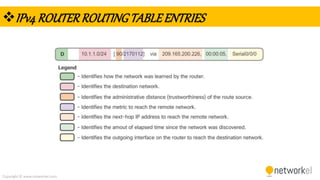
IPv4ROUTERROUTINGTABLEENTRIES
Copyright © www.networkel.com
ETHERNETOVERVIEW
Copyright © www.networkel.com
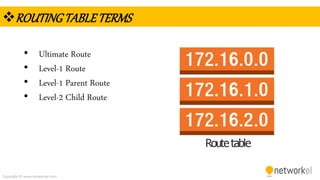
ROUTINGTABLETERMS
• Ultimate Route
• Level-1 Route
• Level-1 Parent Route
• Level-2 Child Route
Copyright © www.networkel.com
ETHERNETOVERVIEW
Copyright © www.networkel.com
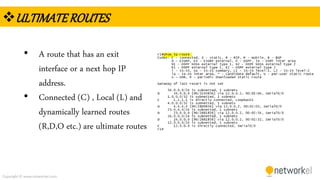
ULTIMATEROUTES
• A route that has an exit
interface or a next hop IP
address.
• Connected (C) , Local (L) and
dynamically learned routes
(R,D,O etc.) are ultimate routes
Copyright © www.networkel.com
BONUSSLIDE( PROMOTIONOFFER!)
• To get our CCNA 200-125 Full Video Training with %90 discount
click the link below now !
CCNA 200-125 VIDEO TRAINING (GET WITH %90 DISCOUNT)
Copyright © www.networkel.com
ETHERNETOVERVIEW
Copyright © www.networkel.com
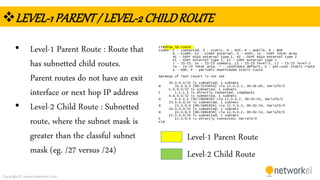
LEVEL-1PARENT/ LEVEL-2CHILDROUTE
• Level-1 Parent Route : Route that
has subnetted child routes.
Parent routes do not have an exit
interface or next hop IP address
• Level-2 Child Route : Subnetted
route, where the subnet mask is
greater than the classful subnet
mask (eg. /27 versus /24)
Level-1 Parent Route
Level-2 Child Route

CCNA Dynamic Routing