Copyright © www.networkel.com
3- Link Aggregation
3.1 Link Aggregation Overview
3.2 Link Aggregation Configuration
Copyright © www.networkel.com
3.1 Link Aggregation Overview
Copyright © www.networkel.com
LINKAGGREGATIONBASICS
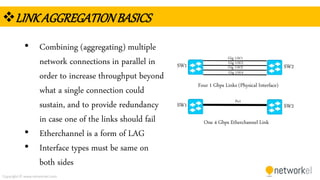
• Combining (aggregating) multiple
network connections in parallel in
order to increase throughput beyond
what a single connection could
sustain, and to provide redundancy
in case one of the links should fail
• Etherchannel is a form of LAG
• Interface types must be same on
both sides
SW1 SW2
SW1 SW2
Four 1 Gbps Links (Physical Interface)
One 4 Gbps Etherchannel Link
Gig 1/0/1
Gig 1/0/2
Gig 1/0/3
Gig 1/0/4
Po1
Copyright © www.networkel.com
BONUSSLIDE( PROMOTIONOFFER!)
• To get our CCNA 200-125 Full Video Training with %90 discount
click the link below now !
CCNA 200-125 VIDEO TRAINING (GET WITH %90 DISCOUNT)
Copyright © www.networkel.com
LINKAGGREGATIONBENEFITS
• Configure just a Po (Port
Channel) interface instead of
configuring 4 seperate links
• One logical link for STP (i.e. If
gig1/0/1 is down, STP
recalculation is not made again
• Load-balancing
• Up to 8Gbps BW
SW1 SW2
SW1 SW2
Four 1 Gbps Links (Physical Interface)
One 4 Gbps Etherchannel Link
Gig 1/0/1
Gig 1/0/2
Gig 1/0/3
Gig 1/0/4
Po1
Copyright © www.networkel.com
PAGP
• Cisco Systems proprietary networking
protocol, which is used for etherchannel
• Can be configured to operate in three
different modes :
 Auto : Passive negotiation of the channel
 Desirable : Active negotiation of the channel
 On : No protocols are used, it assumes the
other side has enabled link aggregation
Channel
Mode
Auto Desirable On
Auto NO YES NO
Desirable YES YES NO
On NO NO YES
Copyright © www.networkel.com
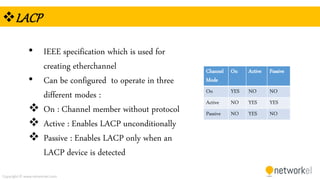
LACP
• IEEE specification which is used for
creating etherchannel
• Can be configured to operate in three
different modes :
 On : Channel member without protocol
 Active : Enables LACP unconditionally
 Passive : Enables LACP only when an
LACP device is detected
Channel
Mode
On Active Passive
On YES NO NO
Active NO YES YES
Passive NO YES NO
Copyright © www.networkel.com
3.1 Link Aggregation Configuration
Copyright © www.networkel.com
ETHERCHANNELCONFIGURATIONSTEPS
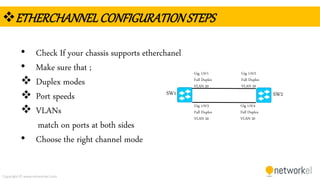
• Check If your chassis supports etherchanel
• Make sure that ;
 Duplex modes
 Port speeds
 VLANs
match on ports at both sides
• Choose the right channel mode
SW1 SW2
Gig 1/0/1
Full Duplex
VLAN 20
Gig 1/0/2
Full Duplex
VLAN 20
Gig 1/0/3
Full Duplex
VLAN 20
Gig 1/0/4
Full Duplex
VLAN 20
Copyright © www.networkel.com
ETHERCHANNELCONFIGURATION
SW1 SW2
Fa0/1 Fa0/1
Fa0/2 Fa0/2
Copyright © www.networkel.com
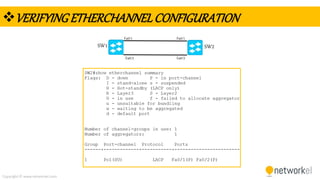
VERIFYINGETHERCHANNELCONFIGURATION
SW1
SW1 SW2
Fa0/1 Fa0/1
Fa0/2 Fa0/2
Copyright © www.networkel.com
BONUSSLIDE( PROMOTIONOFFER!)
• To get our CCNA 200-125 Full Video Training with %90 discount
click the link below now !
CCNA 200-125 VIDEO TRAINING (GET WITH %90 DISCOUNT)

CCNA link aggregation