Cassandra
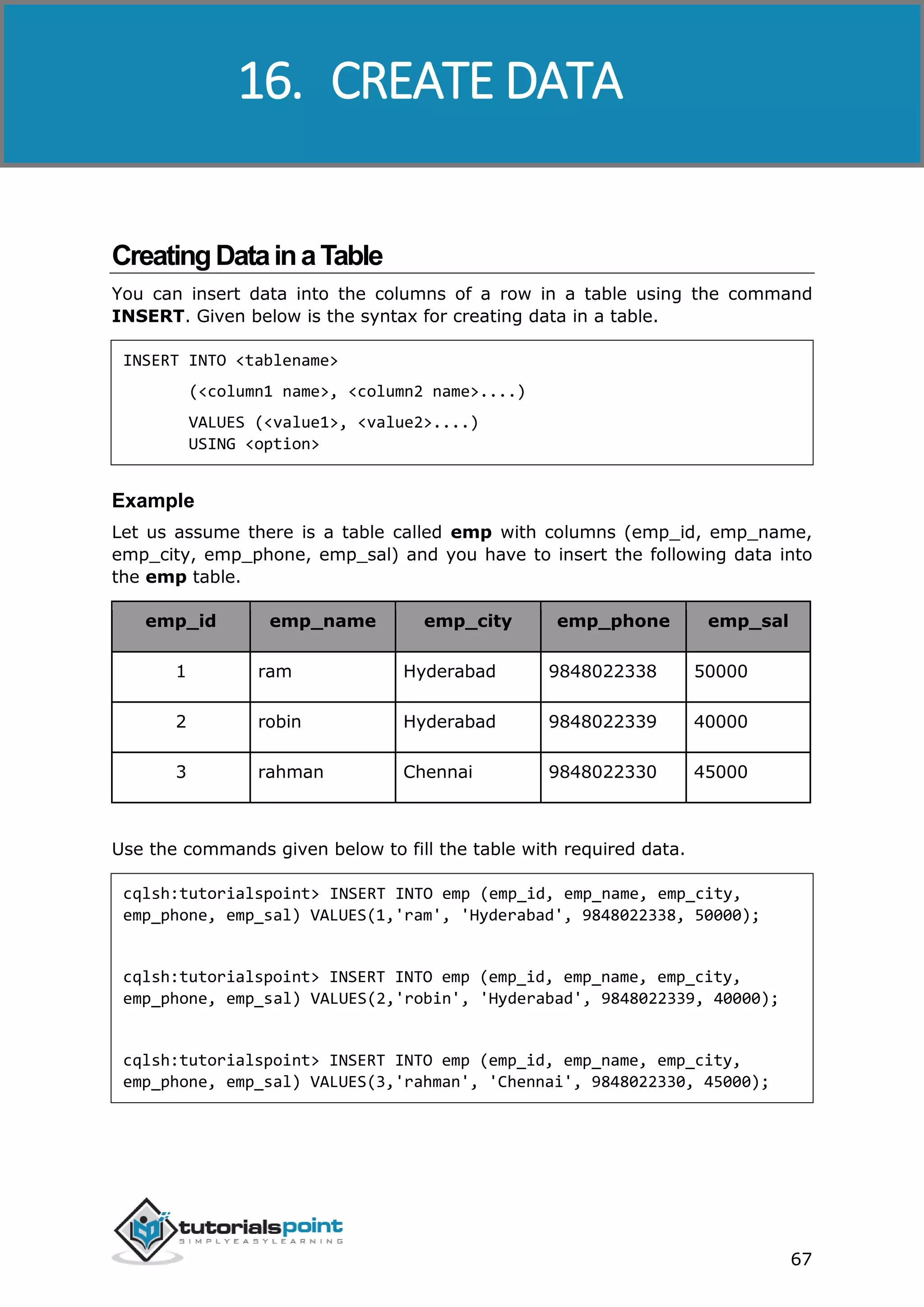
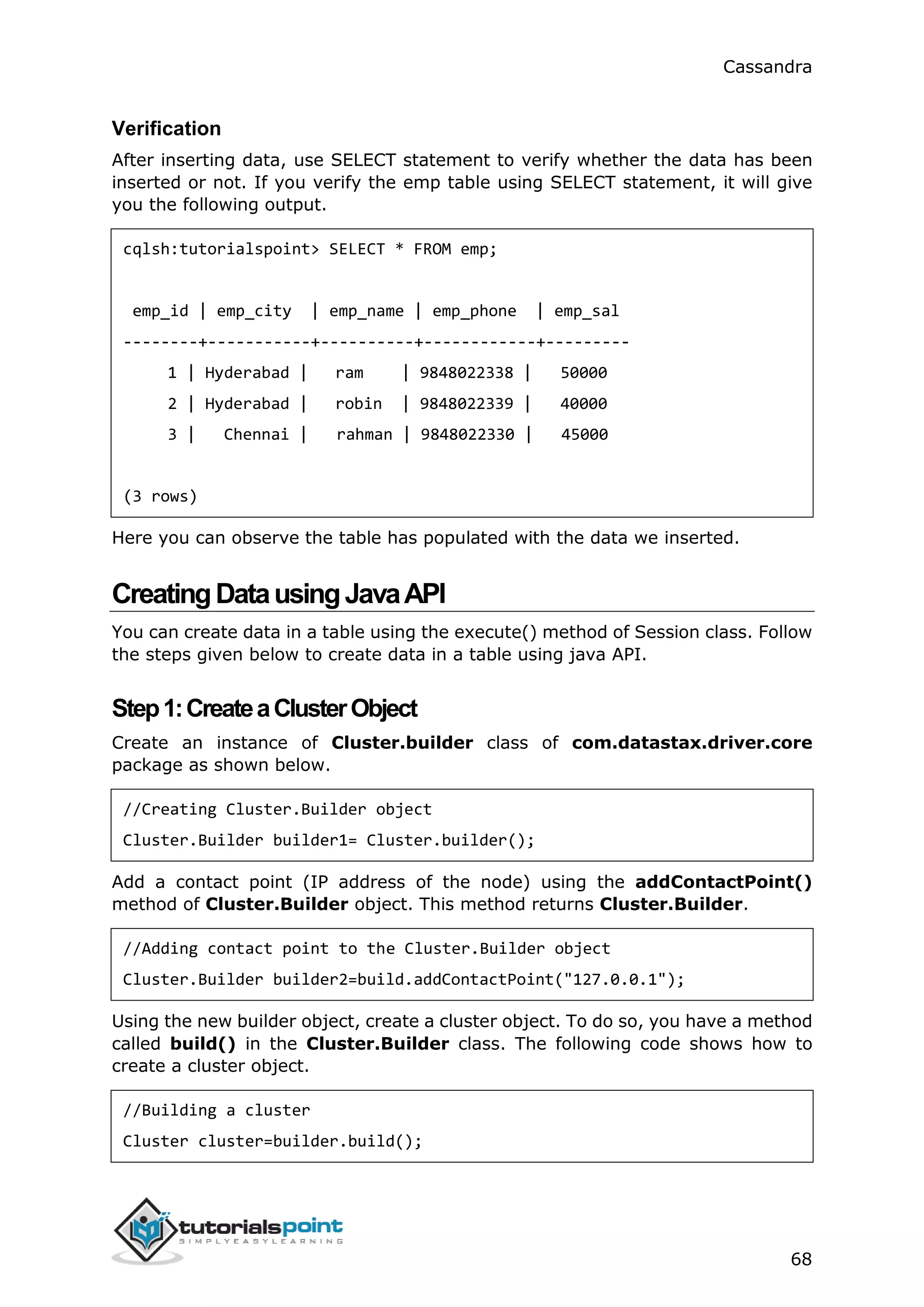
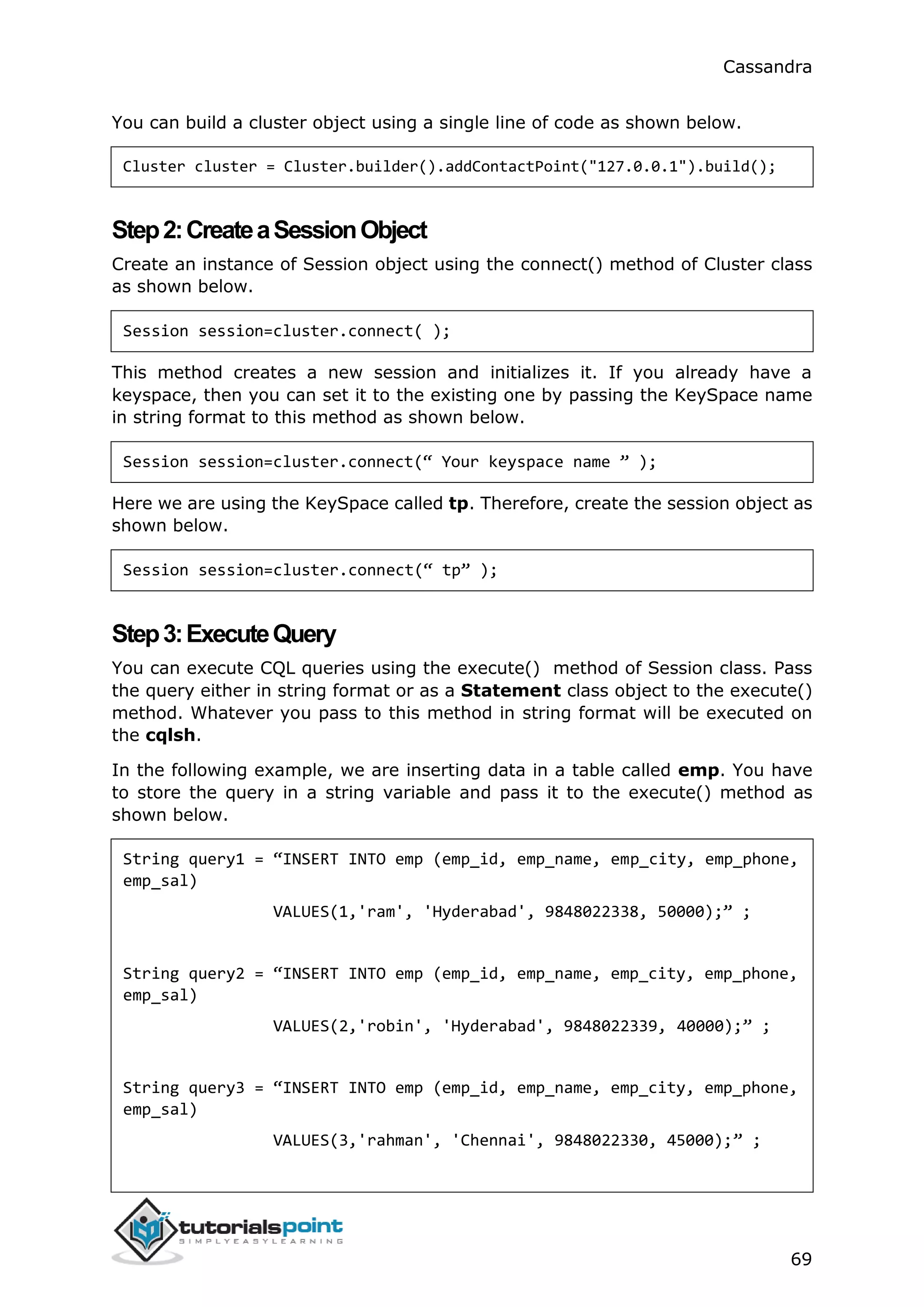
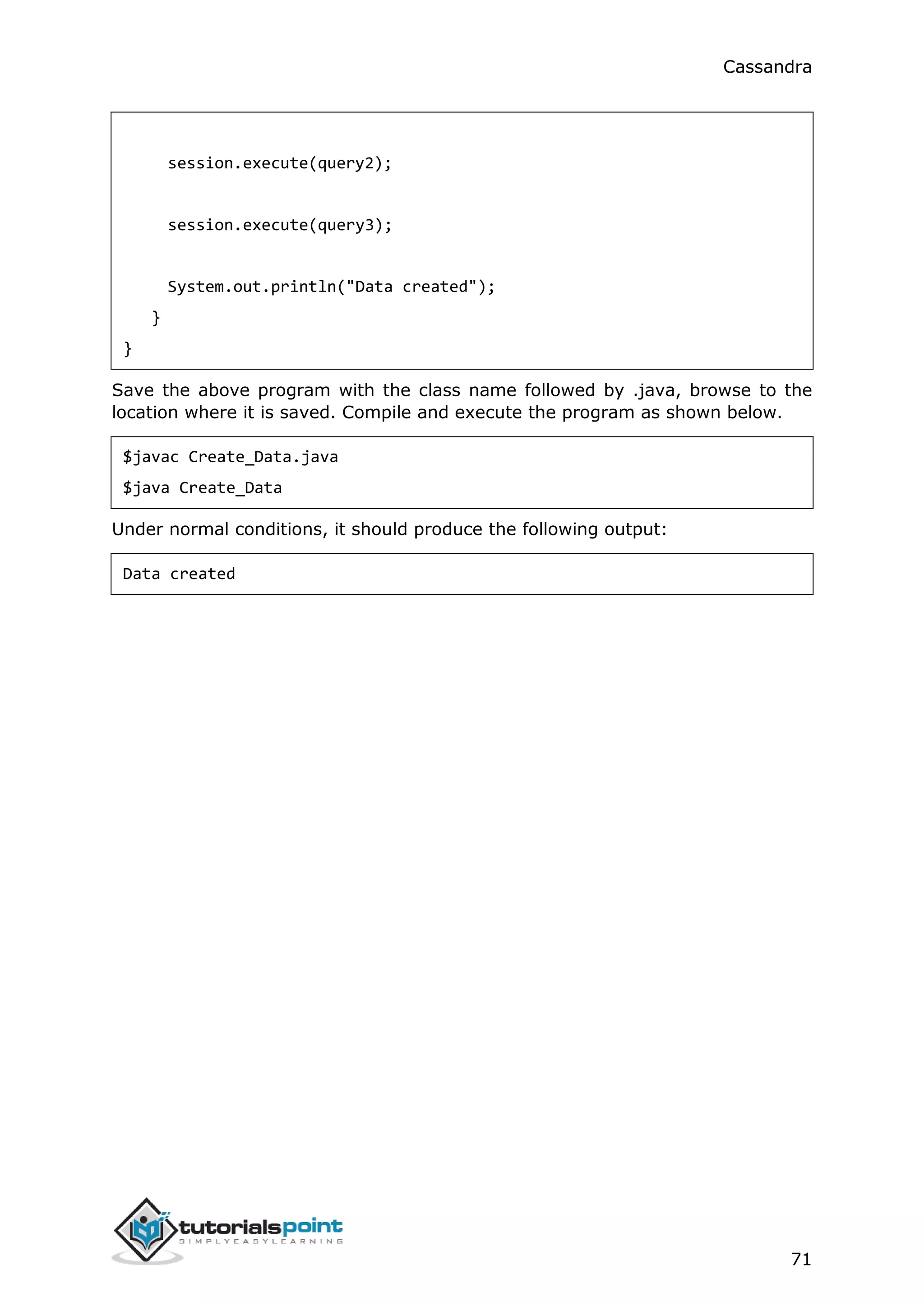
i
Cassandra
i
AbouttheTutorial
Cassandra is a distributed database from Apache that is highly scalable and
designed to manage very large amounts of structured data. It provides high
availability with no single point of failure.
The tutorial starts off with a basic introduction of Cassandra followed by its
architecture, installation, and important classes and interfaces. Thereafter, it
proceeds to cover how to perform operations such as create, alter, update, and
delete on keyspaces, tables, and indexes using CQLSH as well as Java API. The
tutorial also has dedicated chapters to explain the data types and collections
available in CQL and how to make use of user-defined data types.
Audience
This tutorial will be extremely useful for software professionals in particular who
aspire to learn the ropes of Cassandra and implement it in practice.
Prerequisites
It is an elementary tutorial and you can easily understand the concepts explained
here with a basic knowledge of Java programming. However, it will help if you
have some prior exposure to database concepts and any of the Linux flavors.
Copyright&Disclaimer
 Copyright 2015 by Tutorials Point (I) Pvt. Ltd.
All the content and graphics published in this e-book are the property of Tutorials
Point (I) Pvt. Ltd. The user of this e-book is prohibited to reuse, retain, copy,
distribute or republish any contents or a part of contents of this e-book in any
manner without written consent of the publisher.
We strive to update the contents of our website and tutorials as timely and as
precisely as possible, however, the contents may contain inaccuracies or errors.
Tutorials Point (I) Pvt. Ltd. provides no guarantee regarding the accuracy,
timeliness or completeness of our website or its contents including this tutorial. If
you discover any errors on our website or in this tutorial, please notify us at
contact@tutorialspoint.com
Cassandra
ii
TableofContents
About the Tutorial .....................................................................................................................................i
Audience....................................................................................................................................................i
Prerequisites..............................................................................................................................................i
Copyright & Disclaimer ..............................................................................................................................i
Table of Contents......................................................................................................................................ii
1. INTRODUCTION.....................................................................................................................1
NoSQL Database .......................................................................................................................................1
NoSQL vs. Relational Database .................................................................................................................1
What is Apache Cassandra? ......................................................................................................................2
Features of Cassandra...............................................................................................................................2
History of Cassandra .................................................................................................................................3
2. ARCHITECTURE AND DATA MODEL.......................................................................................4
Components of Cassandra ........................................................................................................................4
Data Model...............................................................................................................................................5
Data Models of Cassandra and RDBMS.....................................................................................................8
3. INSTALLATION.......................................................................................................................9
Pre-Installation Setup ...............................................................................................................................9
Download Cassandra ..............................................................................................................................12
Configure Cassandra ...............................................................................................................................12
Start Cassandra.......................................................................................................................................13
Programming Environment.....................................................................................................................13
Eclipse Environment ...............................................................................................................................14
Maven Dependencies .............................................................................................................................15
4. REFERENCED API.................................................................................................................18
Cluster ....................................................................................................................................................18
Cassandra
iii
Cluster.Builder ........................................................................................................................................18
Session....................................................................................................................................................18
5. CASSANDRA CQLSH.............................................................................................................20
Starting cqlsh ..........................................................................................................................................20
Cqlsh Commands ....................................................................................................................................21
6. SHELL COMMANDS.............................................................................................................23
HELP........................................................................................................................................................23
CAPTURE.................................................................................................................................................23
CONSISTENCY..........................................................................................................................................24
COPY.......................................................................................................................................................24
DESCRIBE ................................................................................................................................................25
DESCRIBE TYPE........................................................................................................................................26
DESCRIBE TYPES......................................................................................................................................27
Expand....................................................................................................................................................27
EXIT.........................................................................................................................................................28
SHOW .....................................................................................................................................................29
SOURCE...................................................................................................................................................29
7. CREATE KEYSPACE...............................................................................................................30
Creating a Keyspace................................................................................................................................30
Replication..............................................................................................................................................30
Durable_writes .......................................................................................................................................31
Using a Keyspace ....................................................................................................................................32
Creating a Keyspace using Java API.........................................................................................................32
8. ALTER KEYSPACE.................................................................................................................36
Altering a KeySpace ................................................................................................................................36
Replication..............................................................................................................................................36
Cassandra
iv
Durable_writes .......................................................................................................................................36
Altering a KeySpace using Java API .........................................................................................................38
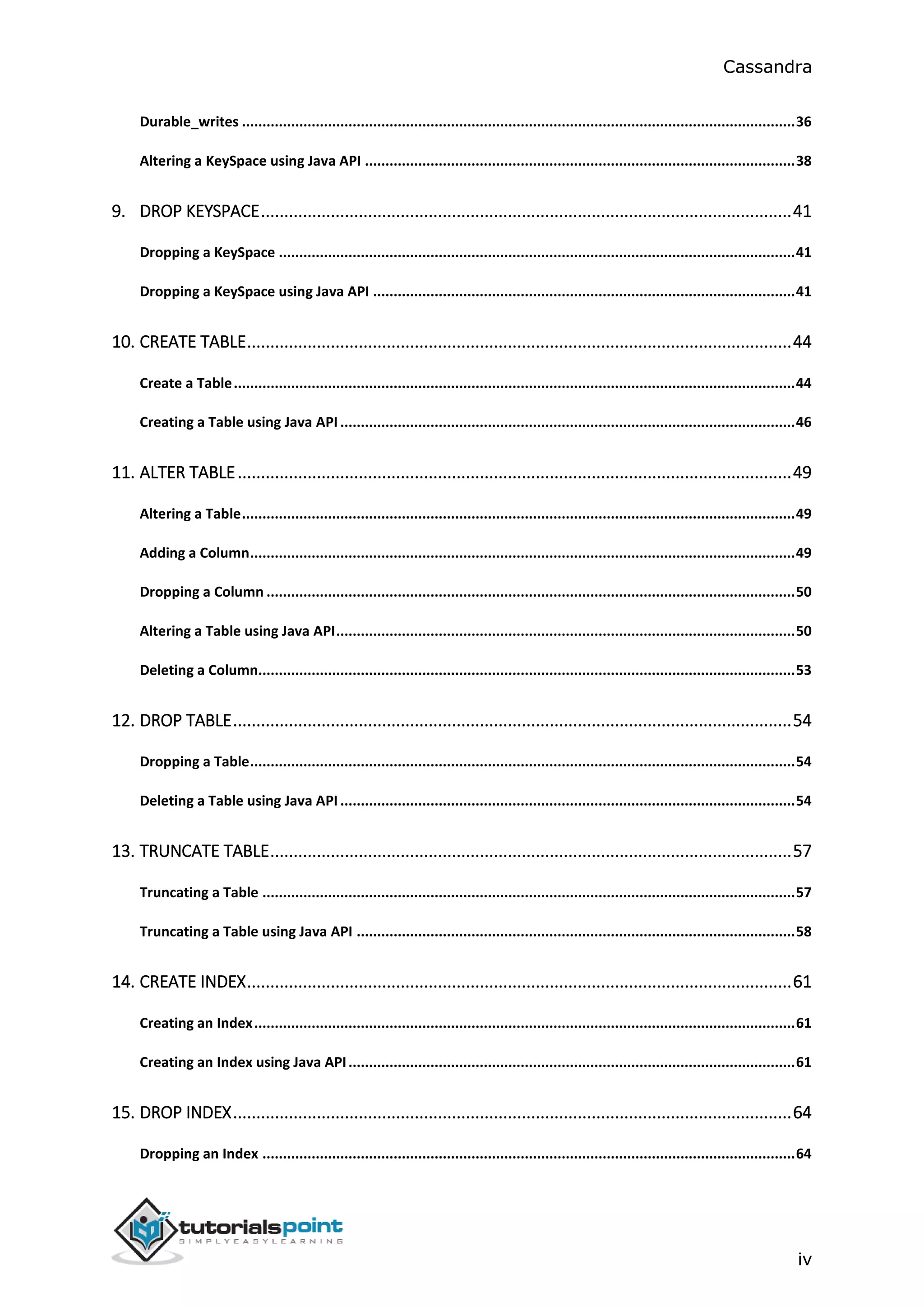
9. DROP KEYSPACE..................................................................................................................41
Dropping a KeySpace ..............................................................................................................................41
Dropping a KeySpace using Java API .......................................................................................................41
10. CREATE TABLE.....................................................................................................................44
Create a Table.........................................................................................................................................44
Creating a Table using Java API ...............................................................................................................46
11. ALTER TABLE.......................................................................................................................49
Altering a Table.......................................................................................................................................49
Adding a Column.....................................................................................................................................49
Dropping a Column .................................................................................................................................50
Altering a Table using Java API................................................................................................................50
Deleting a Column...................................................................................................................................53
12. DROP TABLE........................................................................................................................54
Dropping a Table.....................................................................................................................................54
Deleting a Table using Java API ...............................................................................................................54
13. TRUNCATE TABLE................................................................................................................57
Truncating a Table ..................................................................................................................................57
Truncating a Table using Java API ...........................................................................................................58
14. CREATE INDEX.....................................................................................................................61
Creating an Index....................................................................................................................................61
Creating an Index using Java API.............................................................................................................61
15. DROP INDEX........................................................................................................................64
Dropping an Index ..................................................................................................................................64
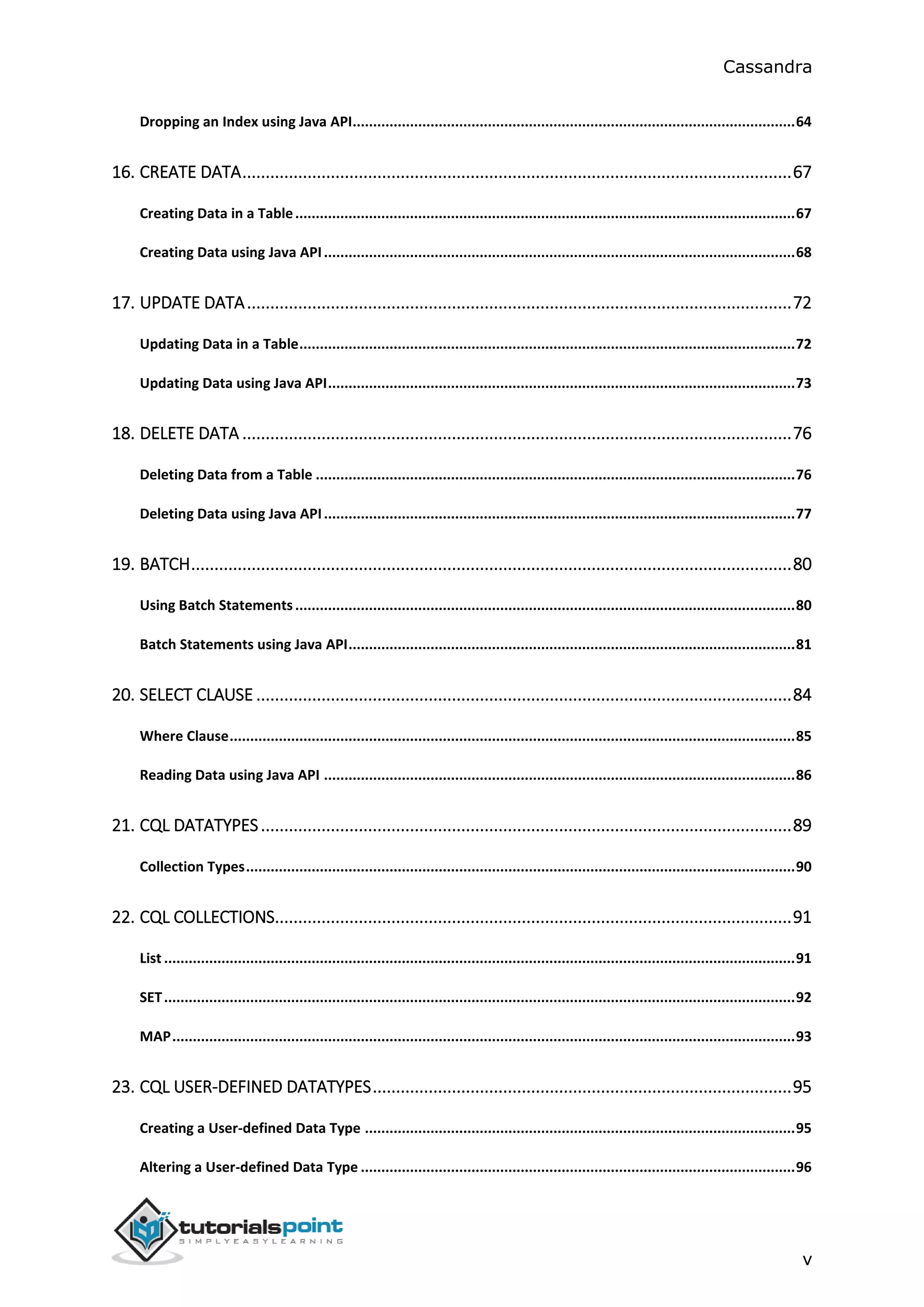
Cassandra
v
Dropping an Index using Java API............................................................................................................64
16. CREATE DATA......................................................................................................................67
Creating Data in a Table..........................................................................................................................67
Creating Data using Java API...................................................................................................................68
17. UPDATE DATA.....................................................................................................................72
Updating Data in a Table.........................................................................................................................72
Updating Data using Java API..................................................................................................................73
18. DELETE DATA ......................................................................................................................76
Deleting Data from a Table .....................................................................................................................76
Deleting Data using Java API...................................................................................................................77
19. BATCH.................................................................................................................................80
Using Batch Statements..........................................................................................................................80
Batch Statements using Java API.............................................................................................................81
20. SELECT CLAUSE ...................................................................................................................84
Where Clause..........................................................................................................................................85
Reading Data using Java API ...................................................................................................................86
21. CQL DATATYPES..................................................................................................................89
Collection Types......................................................................................................................................90
22. CQL COLLECTIONS...............................................................................................................91
List ..........................................................................................................................................................91
SET..........................................................................................................................................................92
MAP........................................................................................................................................................93
23. CQL USER-DEFINED DATATYPES..........................................................................................95
Creating a User-defined Data Type .........................................................................................................95
Altering a User-defined Data Type ..........................................................................................................96
Cassandra
vi
Deleting a User-defined Data Type .........................................................................................................97
Cassandra
1
Apache Cassandra is a highly scalable, high-performance distributed database
designed to handle large amounts of data across many commodity servers,
providing high availability with no single point of failure. It is a type of NoSQL
database. Let us first understand what a NoSQL database does.
NoSQLDatabase
A NoSQL database (sometimes called as Not Only SQL) is a database that provides
a mechanism to store and retrieve data other than the tabular relations used in
relational databases. These databases are schema-free, support easy replication,
have simple API, eventually consistent, and can handle huge amounts of data.
The primary objective of a NoSQL database is to have
 simplicity of design,
 horizontal scaling, and
 finer control over availability.
NoSql databases use different data structures compared to relational databases.
It makes some operations faster in NoSQL. The suitability of a given NoSQL
database depends on the problem it must solve.
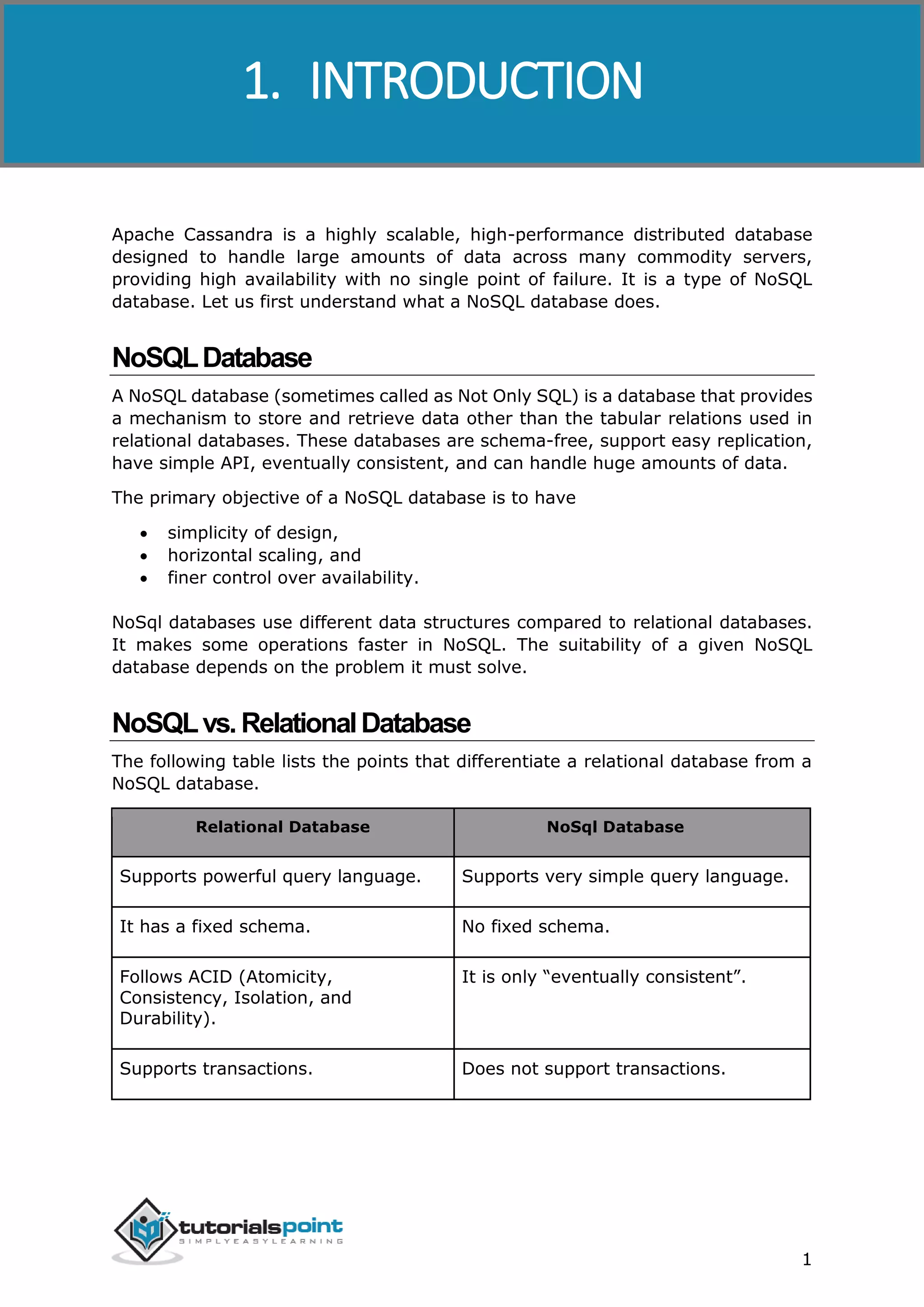
NoSQLvs.RelationalDatabase
The following table lists the points that differentiate a relational database from a
NoSQL database.
Relational Database NoSql Database
Supports powerful query language. Supports very simple query language.
It has a fixed schema. No fixed schema.
Follows ACID (Atomicity,
Consistency, Isolation, and
Durability).
It is only “eventually consistent”.
Supports transactions. Does not support transactions.
1. INTRODUCTION
Cassandra
2
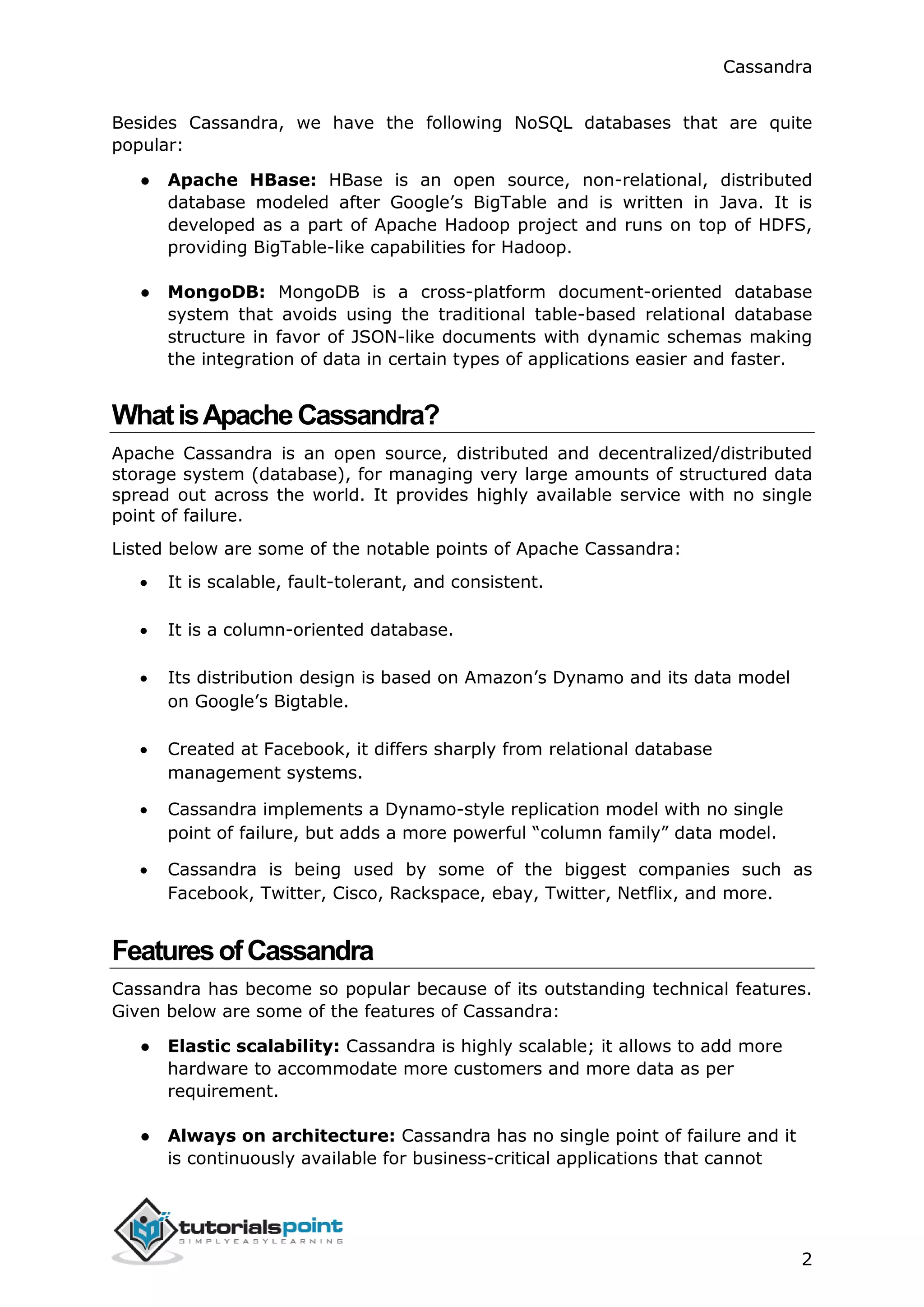
Besides Cassandra, we have the following NoSQL databases that are quite
popular:
● Apache HBase: HBase is an open source, non-relational, distributed
database modeled after Google’s BigTable and is written in Java. It is
developed as a part of Apache Hadoop project and runs on top of HDFS,
providing BigTable-like capabilities for Hadoop.
● MongoDB: MongoDB is a cross-platform document-oriented database
system that avoids using the traditional table-based relational database
structure in favor of JSON-like documents with dynamic schemas making
the integration of data in certain types of applications easier and faster.
WhatisApacheCassandra?
Apache Cassandra is an open source, distributed and decentralized/distributed
storage system (database), for managing very large amounts of structured data
spread out across the world. It provides highly available service with no single
point of failure.
Listed below are some of the notable points of Apache Cassandra:
 It is scalable, fault-tolerant, and consistent.
 It is a column-oriented database.
 Its distribution design is based on Amazon’s Dynamo and its data model
on Google’s Bigtable.
 Created at Facebook, it differs sharply from relational database
management systems.
 Cassandra implements a Dynamo-style replication model with no single
point of failure, but adds a more powerful “column family” data model.
 Cassandra is being used by some of the biggest companies such as
Facebook, Twitter, Cisco, Rackspace, ebay, Twitter, Netflix, and more.
FeaturesofCassandra
Cassandra has become so popular because of its outstanding technical features.
Given below are some of the features of Cassandra:
● Elastic scalability: Cassandra is highly scalable; it allows to add more
hardware to accommodate more customers and more data as per
requirement.
● Always on architecture: Cassandra has no single point of failure and it
is continuously available for business-critical applications that cannot
Cassandra
3
afford a failure.
● Fast linear-scale performance: Cassandra is linearly scalable, i.e., it
increases your throughput as you increase the number of nodes in the
cluster. Therefore it maintains a quick response time.
● Flexible data storage: Cassandra accommodates all possible data
formats including: structured, semi-structured, and unstructured. It can
dynamically accommodate changes to your data structures according to
your need.
● Easy data distribution: Cassandra provides the flexibility to distribute
data where you need by replicating data across multiple datacenters.
● Transaction support: Cassandra supports properties like Atomicity,
Consistency, Isolation, and Durability (ACID).
● Fast writes: Cassandra was designed to run on cheap commodity
hardware. It performs blazingly fast writes and can store hundreds of
terabytes of data, without sacrificing the read efficiency.
HistoryofCassandra
 Cassandra was developed at Facebook for inbox search.
 It was open-sourced by Facebook in July 2008.
 Cassandra was accepted into Apache Incubator in March 2009.
 It was made an Apache top-level project since February 2010.
Cassandra
4
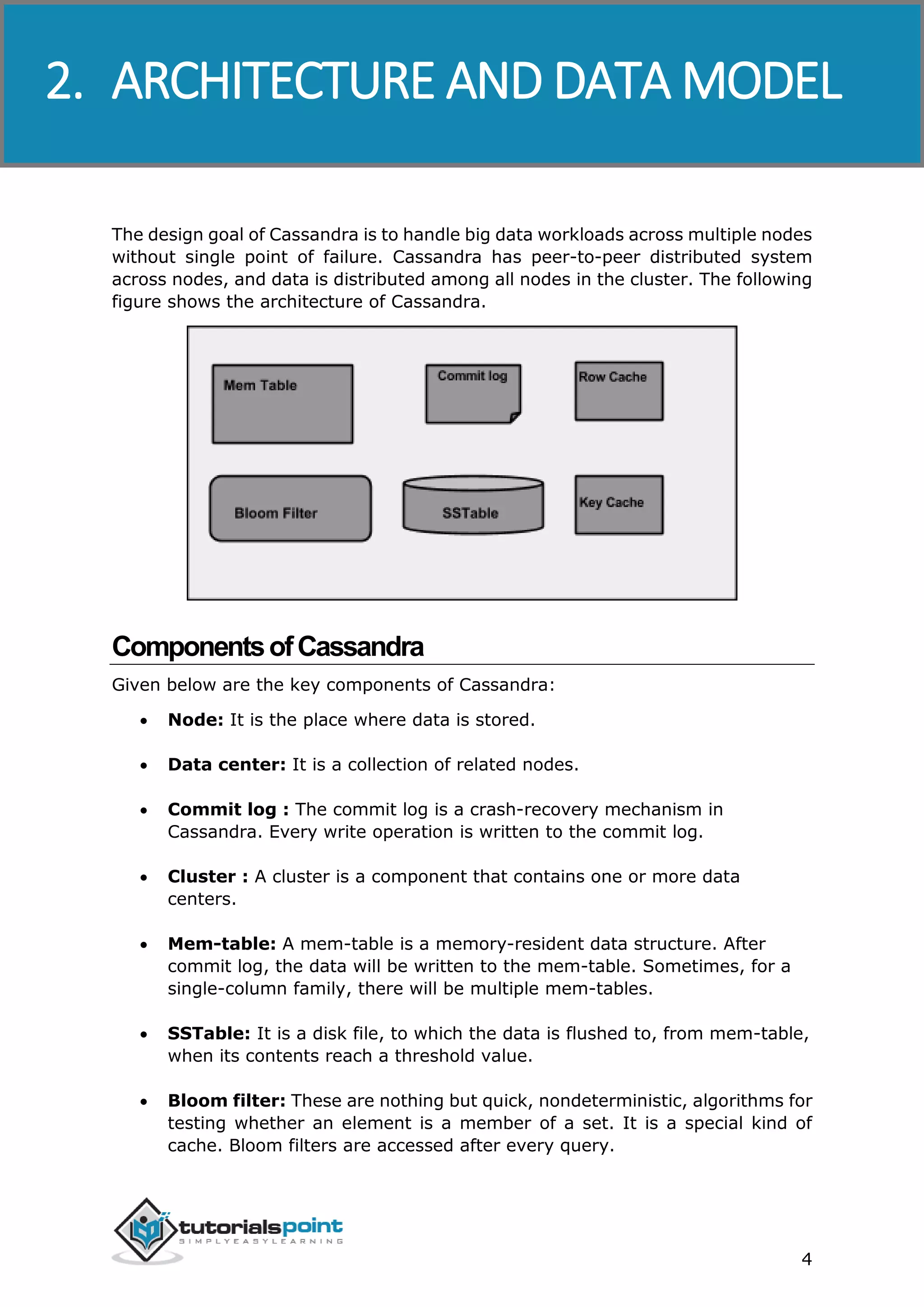
The design goal of Cassandra is to handle big data workloads across multiple nodes
without single point of failure. Cassandra has peer-to-peer distributed system
across nodes, and data is distributed among all nodes in the cluster. The following
figure shows the architecture of Cassandra.
ComponentsofCassandra
Given below are the key components of Cassandra:
 Node: It is the place where data is stored.
 Data center: It is a collection of related nodes.
 Commit log : The commit log is a crash-recovery mechanism in
Cassandra. Every write operation is written to the commit log.
 Cluster : A cluster is a component that contains one or more data
centers.
 Mem-table: A mem-table is a memory-resident data structure. After
commit log, the data will be written to the mem-table. Sometimes, for a
single-column family, there will be multiple mem-tables.
 SSTable: It is a disk file, to which the data is flushed to, from mem-table,
when its contents reach a threshold value.
 Bloom filter: These are nothing but quick, nondeterministic, algorithms for
testing whether an element is a member of a set. It is a special kind of
cache. Bloom filters are accessed after every query.
2. ARCHITECTURE AND DATA MODEL
Cassandra
5
 Compaction: The process of freeing up space by merging large
accumulated data files is called compaction. During compaction, the data is
merged, indexed, sorted, and stored in a new SSTable. Compaction also
reduces the number of required seeks.
Users can access Cassandra through nodes using Cassandra Query Language.
CQL treats the database (Keyspace) as a container of tables. Programmers use
cqlsh: a prompt to work with CQL or separate application language drivers.
Clients approach any of the nodes for their read-write operations. That node
(coordinator) plays a proxy between the client and the nodes holding the data.
Write Operations
Every write activity of nodes is captured by the commit logs written in the nodes.
Later the data will be captured and stored in the mem-table. Whenever the mem-
table is full, data will be written into the SStable data file. All writes are
automatically partitioned and replicated throughout the cluster. Cassandra
periodically consolidates SSTables, discarding unnecessary data.
Read Operations
During read operations, Cassandra gets values from the mem-table, checks bloom
filter to find appropriate SSTables, and gets values from SSTables.
DataModel
Cluster: Cassandra database is distributed over several machines that operate
together. The outermost container is known as the Cluster. For failure handling,
every node contains a replica; in case of a failure, replica takes charge. Cassandra
arranges the nodes in a cluster, in a ring format, and assigns data to them.
Keyspace
Keyspace is the outermost container for data in Cassandra. The basic attributes
of Keyspace in Cassandra are:
● Replication factor: It is the number of machines in the cluster that will
receive copies of the same data.
● Replica placement strategy: It is nothing but the strategy to place
replicas in the ring. We have strategies such as simple strategy (rack-
aware strategy), old network topology strategy (rack-aware strategy),
and network topology strategy (datacenter-shared strategy).
● Column families: Keyspace is a container for a list of one or more column
families. A column family, in turn, is a container of a collection of rows. Each
row contains ordered columns. Column families represent the structure of
your data. Each keyspace has at least one and often many column families.
Cassandra
6
The syntax of creating a Keyspace is as follows:
CREATE KEYSPACE Keyspace name
WITH replication = {'class': 'SimpleStrategy', 'replication_factor' : 3};
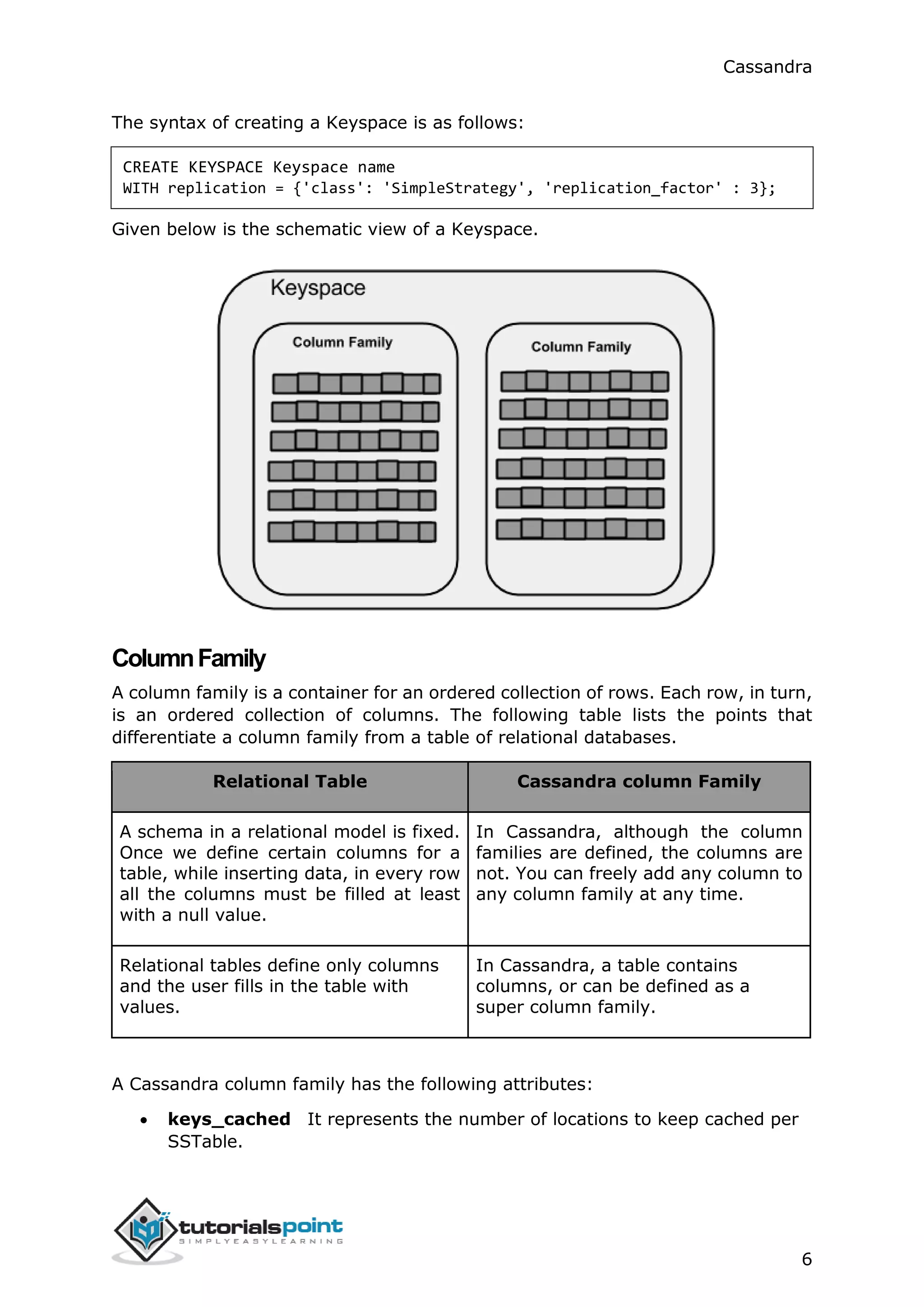
Given below is the schematic view of a Keyspace.
ColumnFamily
A column family is a container for an ordered collection of rows. Each row, in turn,
is an ordered collection of columns. The following table lists the points that
differentiate a column family from a table of relational databases.
Relational Table Cassandra column Family
A schema in a relational model is fixed.
Once we define certain columns for a
table, while inserting data, in every row
all the columns must be filled at least
with a null value.
In Cassandra, although the column
families are defined, the columns are
not. You can freely add any column to
any column family at any time.
Relational tables define only columns
and the user fills in the table with
values.
In Cassandra, a table contains
columns, or can be defined as a
super column family.
A Cassandra column family has the following attributes:
 keys_cached It represents the number of locations to keep cached per
SSTable.
Cassandra
7
 rows_cached It represents the number of rows whose entire contents
will be cached in memory.
 preload_row_cache It specifies whether you want to pre-populate the
row cache.
Note: Unlike relational tables where a column family’s schema is not fixed,
Cassandra does not force individual rows to have all the columns.
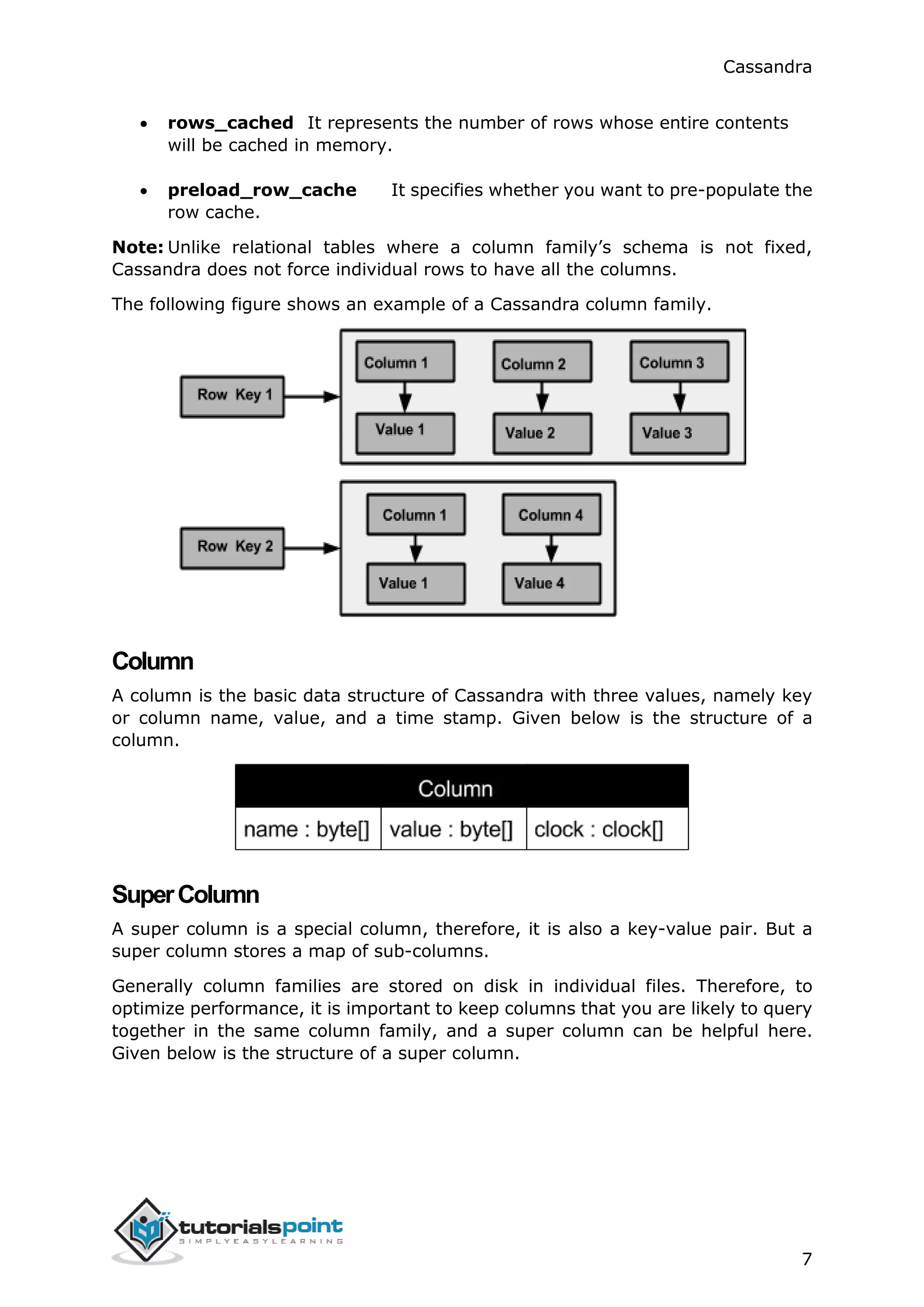
The following figure shows an example of a Cassandra column family.
Column
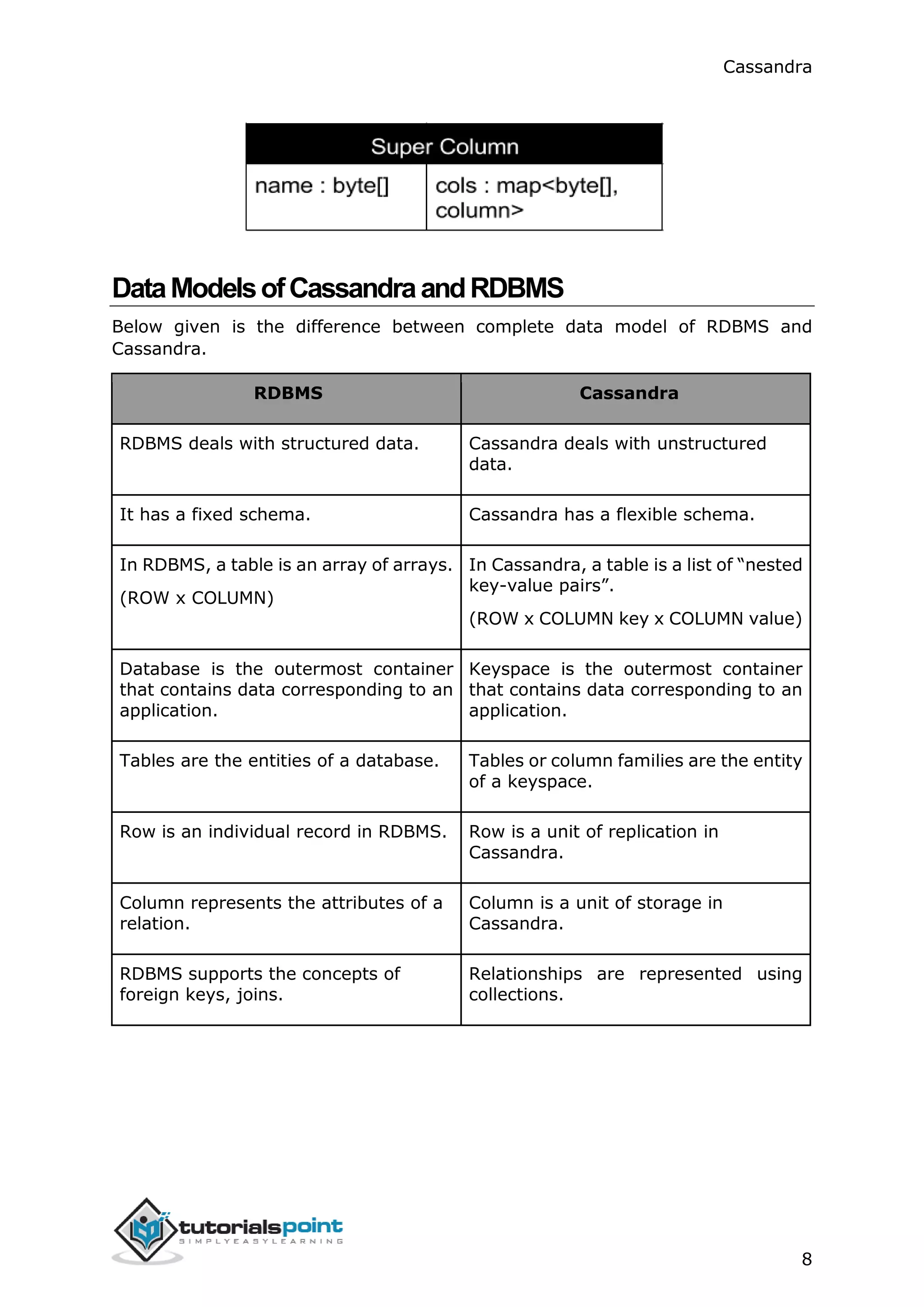
A column is the basic data structure of Cassandra with three values, namely key
or column name, value, and a time stamp. Given below is the structure of a
column.
SuperColumn
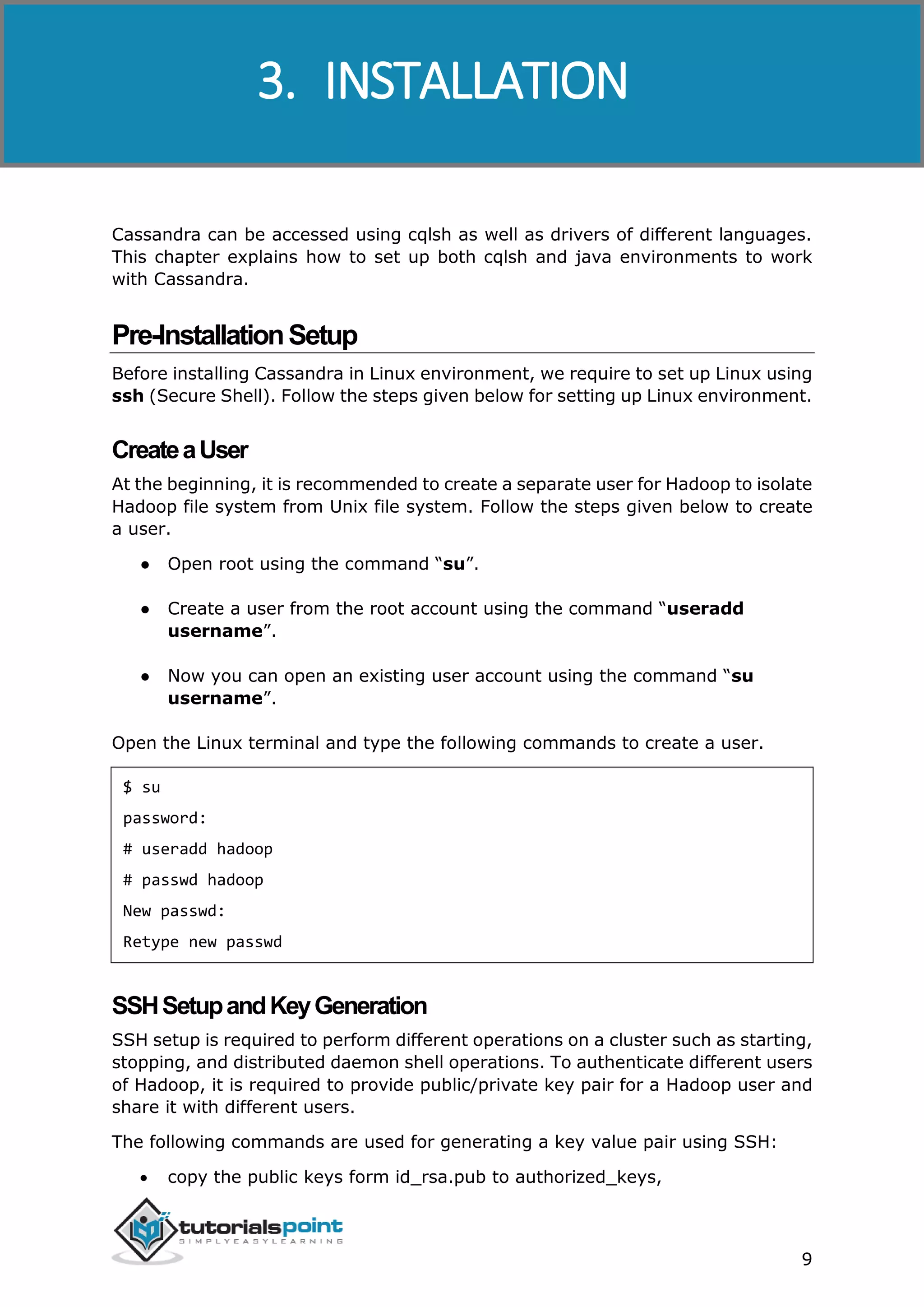
A super column is a special column, therefore, it is also a key-value pair. But a
super column stores a map of sub-columns.
Generally column families are stored on disk in individual files. Therefore, to
optimize performance, it is important to keep columns that you are likely to query
together in the same column family, and a super column can be helpful here.
Given below is the structure of a super column.
Cassandra
8
DataModelsofCassandraandRDBMS
Below given is the difference between complete data model of RDBMS and
Cassandra.
RDBMS Cassandra
RDBMS deals with structured data. Cassandra deals with unstructured
data.
It has a fixed schema. Cassandra has a flexible schema.
In RDBMS, a table is an array of arrays.
(ROW x COLUMN)
In Cassandra, a table is a list of “nested
key-value pairs”.
(ROW x COLUMN key x COLUMN value)
Database is the outermost container
that contains data corresponding to an
application.
Keyspace is the outermost container
that contains data corresponding to an
application.
Tables are the entities of a database. Tables or column families are the entity
of a keyspace.
Row is an individual record in RDBMS. Row is a unit of replication in
Cassandra.
Column represents the attributes of a
relation.
Column is a unit of storage in
Cassandra.
RDBMS supports the concepts of
foreign keys, joins.
Relationships are represented using
collections.
Cassandra
9
Cassandra can be accessed using cqlsh as well as drivers of different languages.
This chapter explains how to set up both cqlsh and java environments to work
with Cassandra.
Pre-InstallationSetup
Before installing Cassandra in Linux environment, we require to set up Linux using
ssh (Secure Shell). Follow the steps given below for setting up Linux environment.
CreateaUser
At the beginning, it is recommended to create a separate user for Hadoop to isolate
Hadoop file system from Unix file system. Follow the steps given below to create
a user.
● Open root using the command “su”.
● Create a user from the root account using the command “useradd
username”.
● Now you can open an existing user account using the command “su
username”.
Open the Linux terminal and type the following commands to create a user.
$ su
password:
# useradd hadoop
# passwd hadoop
New passwd:
Retype new passwd
SSHSetupandKeyGeneration
SSH setup is required to perform different operations on a cluster such as starting,
stopping, and distributed daemon shell operations. To authenticate different users
of Hadoop, it is required to provide public/private key pair for a Hadoop user and
share it with different users.
The following commands are used for generating a key value pair using SSH:
 copy the public keys form id_rsa.pub to authorized_keys,
3. INSTALLATION
Cassandra
10
 and provide owner,
 read and write permissions to authorized_keys file respectively.
$ ssh-keygen -t rsa
$ cat ~/.ssh/id_rsa.pub >> ~/.ssh/authorized_keys
$ chmod 0600 ~/.ssh/authorized_keys
 Verify ssh:
ssh localhost
InstallingJava
Java is the main prerequisite for Cassandra. First of all, you should verify the
existence of Java in your system using the following command:
$ java -version
If everything works fine it will give you the following output.
java version "1.7.0_71"
Java(TM) SE Runtime Environment (build 1.7.0_71-b13)
Java HotSpot(TM) Client VM (build 25.0-b02, mixed mode)
If you don’t have Java in your system, then follow the steps given below for
installing Java.
Step 1
Download java (JDK <latest version> - X64.tar.gz) from the following link:
http://www.oracle.com/technetwork/java/javase/downloads/jdk7-downloads-
1880260.html.
Then jdk-7u71-linux-x64.tar.gz will be downloaded onto your system.
Step 2
Generally you will find the downloaded java file in the Downloads folder. Verify it
and extract the jdk-7u71-linux-x64.gz file using the following commands.
$ cd Downloads/
$ ls
jdk-7u71-linux-x64.gz
$ tar zxf jdk-7u71-linux-x64.gz
Cassandra
11
$ ls
jdk1.7.0_71 jdk-7u71-linux-x64.gz
Step 3
To make Java available to all users, you have to move it to the location
“/usr/local/”. Open root, and type the following commands.
$ su
password:
# mv jdk1.7.0_71 /usr/local/
# exit
Step 4
For setting up PATH and JAVA_HOME variables, add the following commands to
~/.bashrc file.
export JAVA_HOME=/usr/local/jdk1.7.0_71
export PATH= $PATH:$JAVA_HOME/bin
Now apply all the changes into the current running system.
$ source ~/.bashrc
Step 5
Use the following commands to configure java alternatives.
# alternatives --install /usr/bin/java java usr/local/java/bin/java 2
# alternatives --install /usr/bin/javac javac usr/local/java/bin/javac 2
# alternatives --install /usr/bin/jar jar usr/local/java/bin/jar 2
# alternatives --set java usr/local/java/bin/java
# alternatives --set javac usr/local/java/bin/javac
# alternatives --set jar usr/local/java/bin/jar
Now use the java -version command from the terminal as explained above.
SettingthePath
Set the path of Cassandra path in “/.bahrc” as shown below.
Cassandra
12
[hadoop@linux ~]$ gedit ~/.bashrc
export CASSANDRA_HOME=~/cassandra
export PATH=$PATH:$CASSANDRA_HOME/bin
DownloadCassandra
Apache Cassandra is available at http://cassandra.apache.org/download/.
Download Cassandra using the following command.
$ wget http://supergsego.com/apache/cassandra/2.1.2/apache-cassandra-
2.1.2-bin.tar.gz
Unzip Cassandra using the command zxvf as shown below.
$ tar zxvf apache-cassandra-2.1.2-bin.tar.gz.
Create a new directory named cassandra and move the contents of the
downloaded file to it as shown below.
$ mkdir Cassandra
$ mv apache-cassandra-2.1.2/* cassandra.
ConfigureCassandra
Open the cassandra.yaml: file, which will be available in the bin directory of
Cassandra.
$ gedit cassandra.yaml
Note: If you have installed Cassandra from a deb or rpm package, the
configuration files will be located in /etc/cassandra directory of Cassandra.
The above command opens the cassandra.yaml file. Verify the following
configurations. By default, these values will be set to the specified directories.
 data_file_directories “/var/lib/cassandra/data”
 commitlog_directory “/var/lib/cassandra/commitlog”
 saved_caches_directory “/var/lib/cassandra/saved_caches”
Make sure these directories exist and can be written to, as shown below.
CreateDirectories
As super-user, create the two directories /var/lib/cassandra and
/var./lib/cassandra into which Cassandra writes its data.
Cassandra
13
[root@linux cassandra]# mkdir /var/lib/cassandra
[root@linux cassandra]# mkdir /var/log/cassandra
GivePermissionstoFolders
Give read-write permissions to the newly created folders as shown below.
[root@linux /]# chmod 777 /var/lib/cassandra
[root@linux /]# chmod 777 /var/log/cassandra
StartCassandra
To start Cassandra, open the terminal window, navigate to Cassandra home
directory/home, where you unpacked Cassandra, and run the following command
to start your Cassandra server.
$ cd $CASSANDRA_HOME
$./bin/cassandra -f
Using the –f option tells Cassandra to stay in the foreground instead of running as
a background process. If everything goes fine, you can see the Cassandra server
starting.
ProgrammingEnvironment
To set up Cassandra programmatically, download the following jar files:
● slf4j-api-1.7.5.jar
● cassandra-driver-core-2.0.2.jar
● guava-16.0.1.jar
● metrics-core-3.0.2.jar
● netty-3.9.0.Final.jar
Place them in a separate folder. For example, we are downloading these jars to a
folder named “Cassandra_jars”.
Set the classpath for this folder in “.bashrc” file as shown below.
[hadoop@linux ~]$ gedit ~/.bashrc
//Set the following class path in the .bashrc file.
export CLASSPATH=$CLASSPATH:/home/hadoop/Cassandra_jars/*
Cassandra
14
EclipseEnvironment
Open Eclipse and create a new project called Cassandra _Examples.
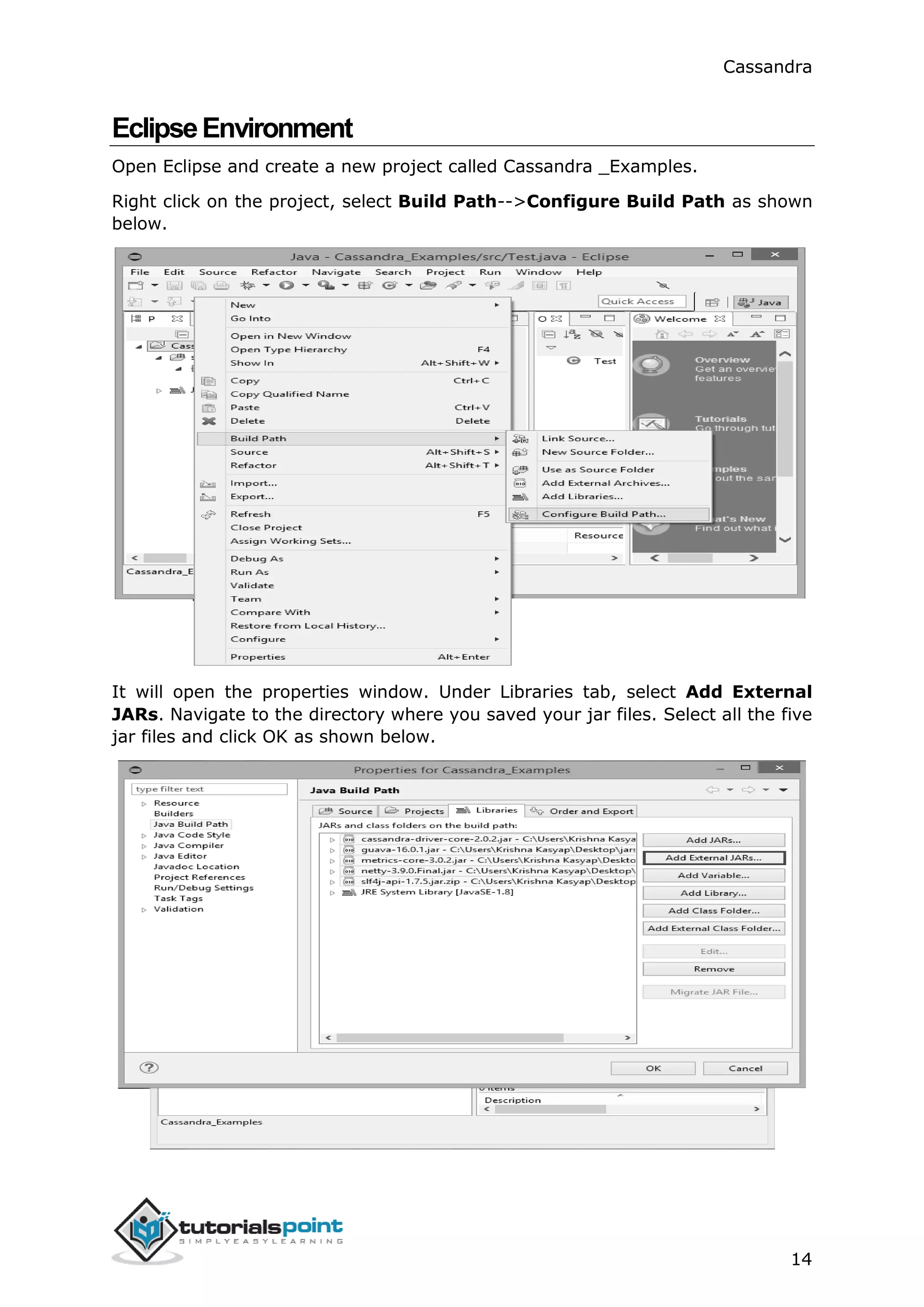
Right click on the project, select Build Path-->Configure Build Path as shown
below.
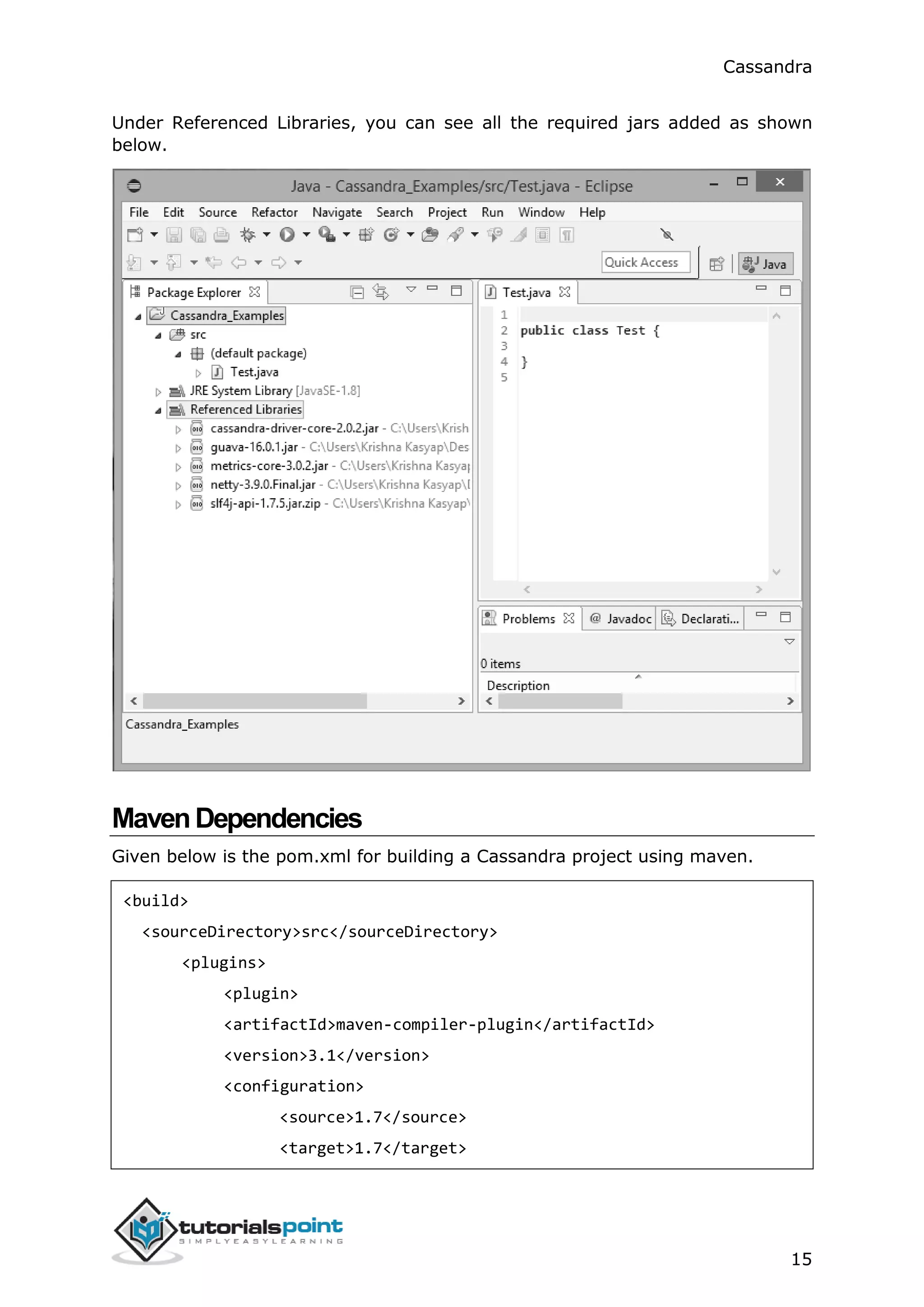
It will open the properties window. Under Libraries tab, select Add External
JARs. Navigate to the directory where you saved your jar files. Select all the five
jar files and click OK as shown below.
Cassandra
15
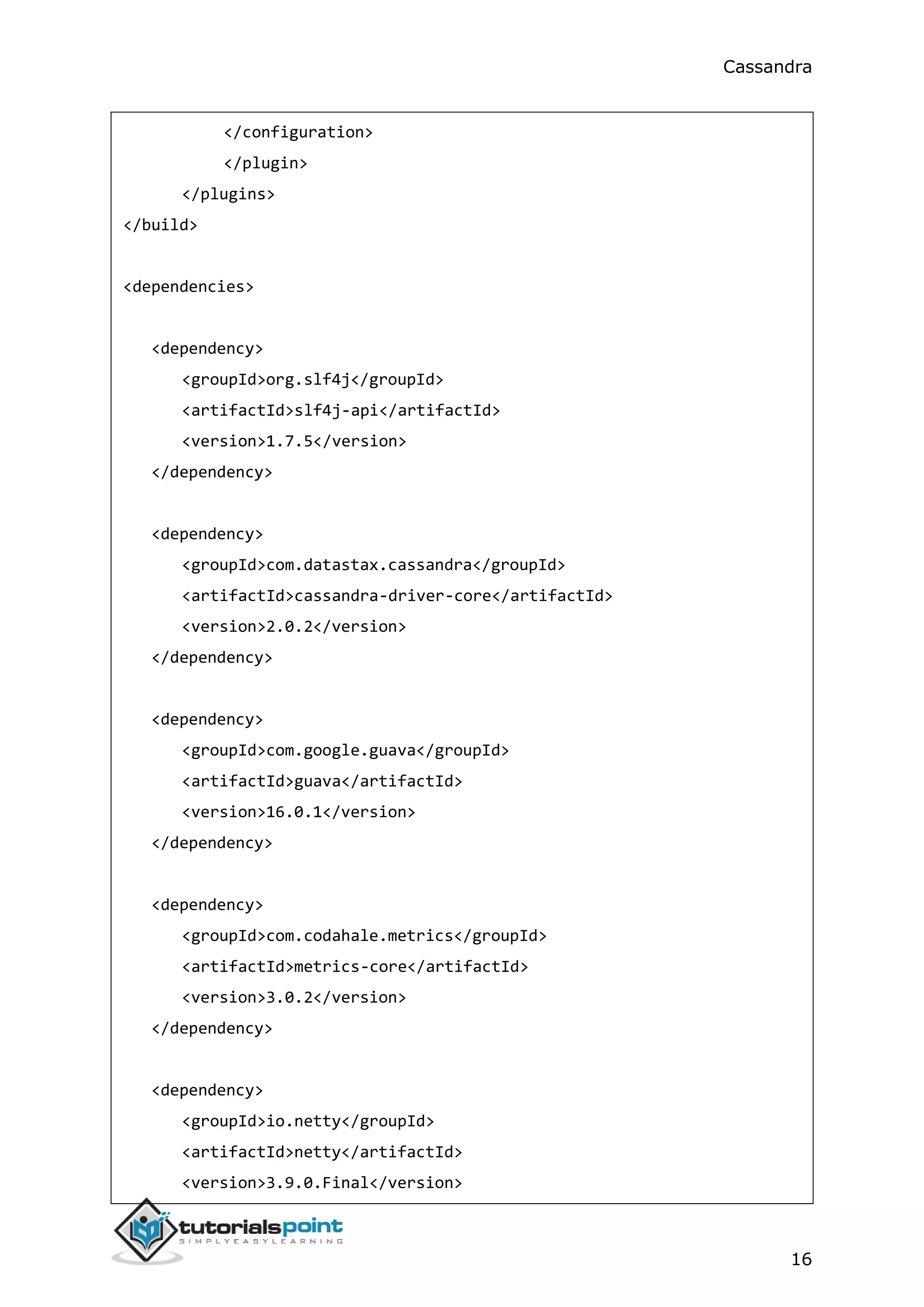
Under Referenced Libraries, you can see all the required jars added as shown
below.
MavenDependencies
Given below is the pom.xml for building a Cassandra project using maven.
<build>
<sourceDirectory>src</sourceDirectory>
<plugins>
<plugin>
<artifactId>maven-compiler-plugin</artifactId>
<version>3.1</version>
<configuration>
<source>1.7</source>
<target>1.7</target>
Cassandra
16
</configuration>
</plugin>
</plugins>
</build>
<dependencies>
<dependency>
<groupId>org.slf4j</groupId>
<artifactId>slf4j-api</artifactId>
<version>1.7.5</version>
</dependency>
<dependency>
<groupId>com.datastax.cassandra</groupId>
<artifactId>cassandra-driver-core</artifactId>
<version>2.0.2</version>
</dependency>
<dependency>
<groupId>com.google.guava</groupId>
<artifactId>guava</artifactId>
<version>16.0.1</version>
</dependency>
<dependency>
<groupId>com.codahale.metrics</groupId>
<artifactId>metrics-core</artifactId>
<version>3.0.2</version>
</dependency>
<dependency>
<groupId>io.netty</groupId>
<artifactId>netty</artifactId>
<version>3.9.0.Final</version>
Cassandra
17
</dependency>
</dependencies>
</project>
Cassandra
18
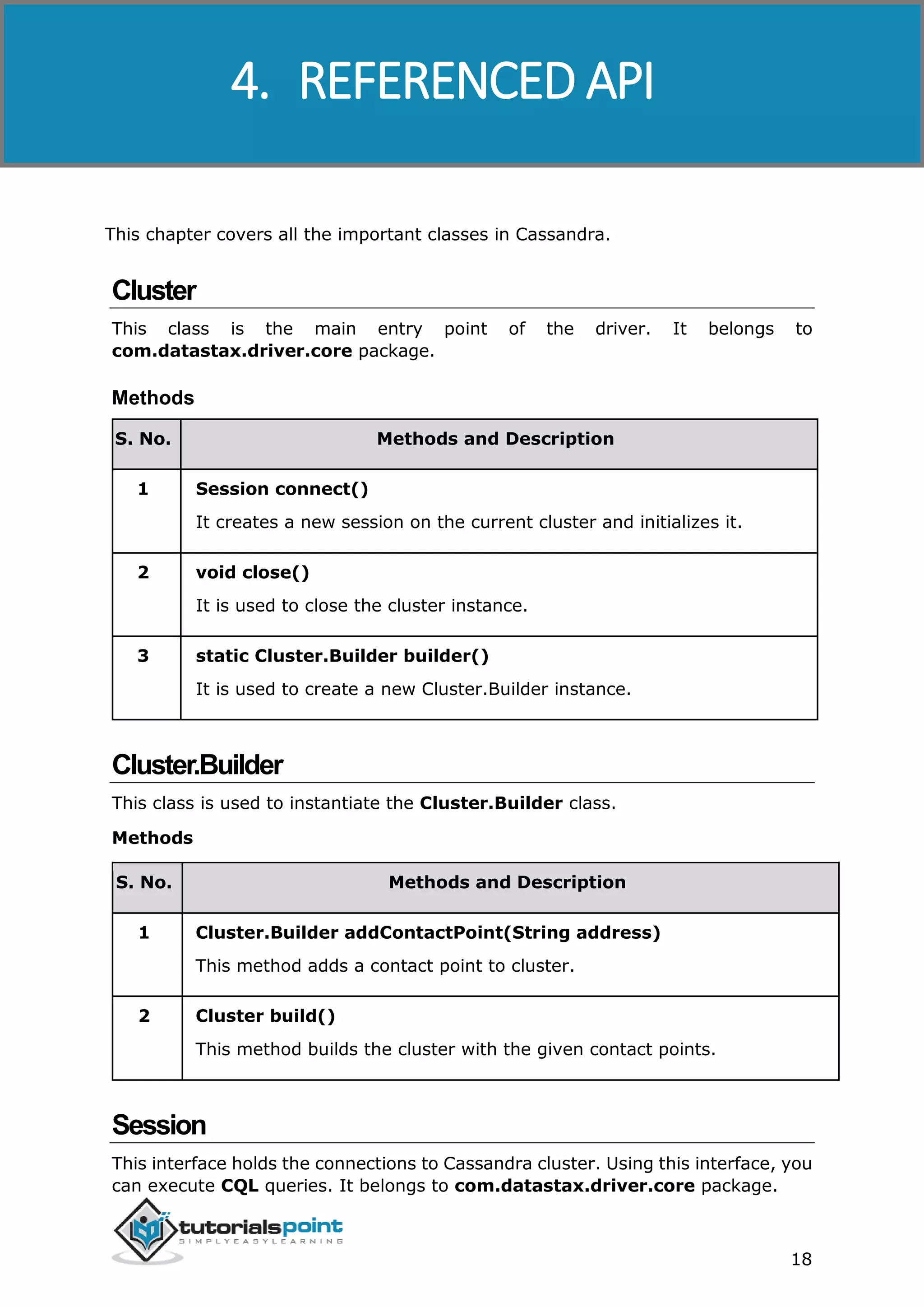
This chapter covers all the important classes in Cassandra.
Cluster
This class is the main entry point of the driver. It belongs to
com.datastax.driver.core package.
Methods
S. No. Methods and Description
1 Session connect()
It creates a new session on the current cluster and initializes it.
2 void close()
It is used to close the cluster instance.
3 static Cluster.Builder builder()
It is used to create a new Cluster.Builder instance.
Cluster.Builder
This class is used to instantiate the Cluster.Builder class.
Methods
S. No. Methods and Description
1 Cluster.Builder addContactPoint(String address)
This method adds a contact point to cluster.
2 Cluster build()
This method builds the cluster with the given contact points.
Session
This interface holds the connections to Cassandra cluster. Using this interface, you
can execute CQL queries. It belongs to com.datastax.driver.core package.
4. REFERENCED API
Cassandra
19
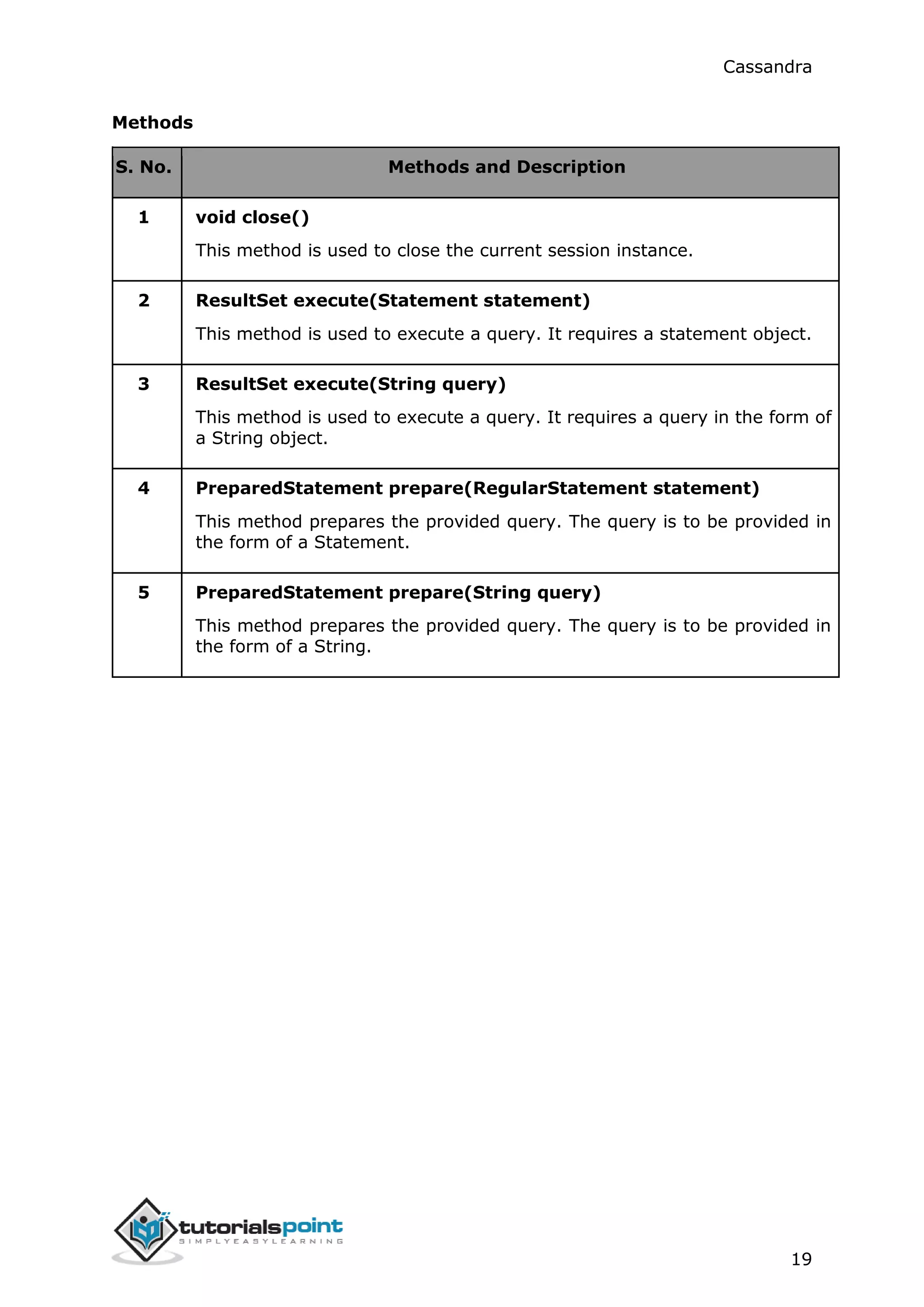
Methods
S. No. Methods and Description
1 void close()
This method is used to close the current session instance.
2 ResultSet execute(Statement statement)
This method is used to execute a query. It requires a statement object.
3 ResultSet execute(String query)
This method is used to execute a query. It requires a query in the form of
a String object.
4 PreparedStatement prepare(RegularStatement statement)
This method prepares the provided query. The query is to be provided in
the form of a Statement.
5 PreparedStatement prepare(String query)
This method prepares the provided query. The query is to be provided in
the form of a String.
Cassandra
20
This chapter introduces the Cassandra query language shell and explains how to
use its commands.
By default, Cassandra provides a prompt Cassandra query language shell (cqlsh)
that allows users to communicate with it. Using this shell, you can execute
Cassandra Query Language (CQL).
Using cqlsh, you can
● define a schema,
● insert data, and
● execute a query.
Startingcqlsh
Start cqlsh using the command cqlsh as shown below. It gives the Cassandra
cqlsh prompt as output.
[hadoop@linux bin]$ cqlsh
Connected to Test Cluster at 127.0.0.1:9042.
[cqlsh 5.0.1 | Cassandra 2.1.2 | CQL spec 3.2.0 | Native protocol v3]
Use HELP for help.
cqlsh>
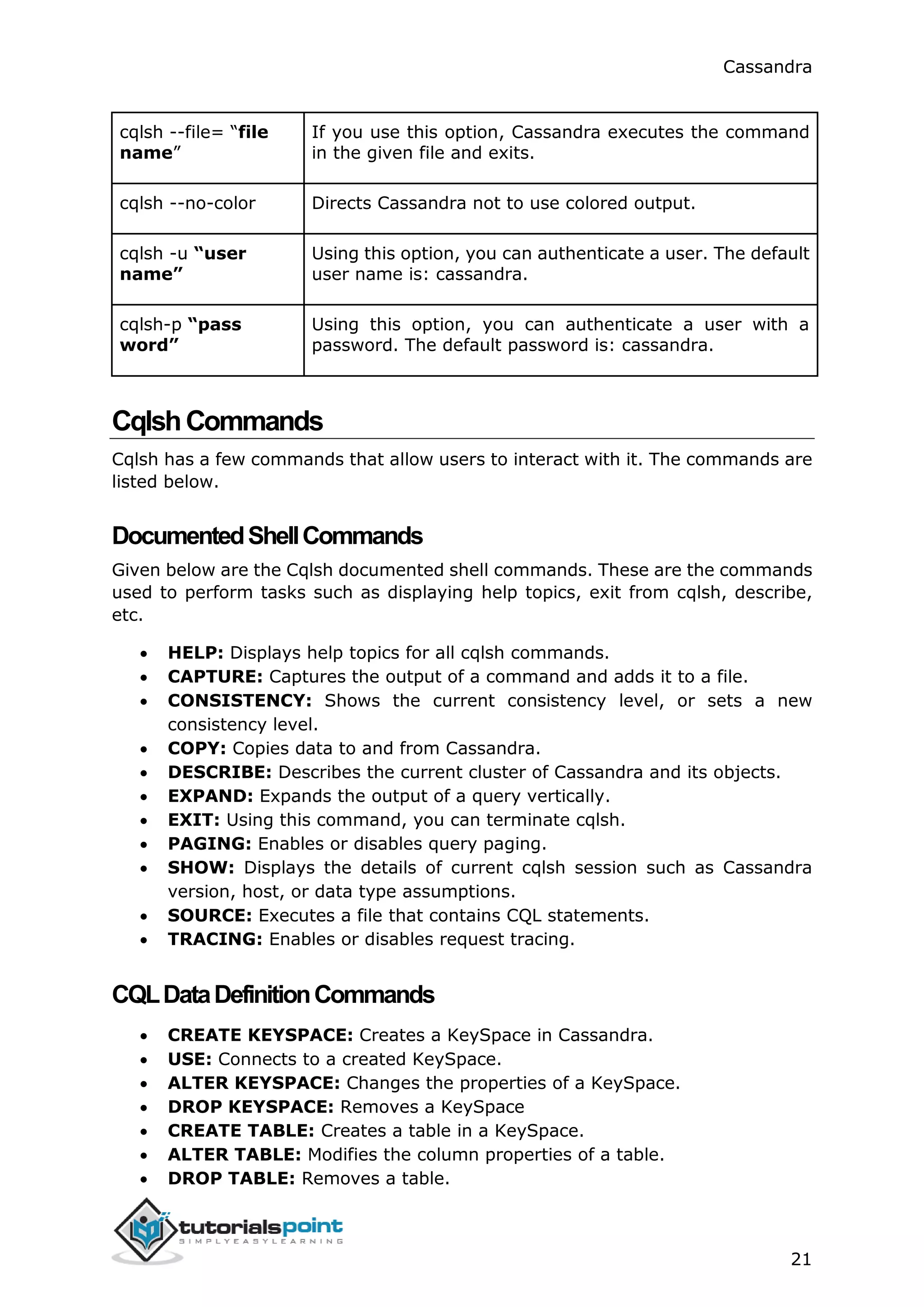
Cqlsh: As discussed above, this command is used to start the cqlsh prompt. In
addition, it supports a few more options as well. The following table explains all
the options of cqlsh and their usage.
Options Usage
cqlsh --help Shows help topics about the options of cqlsh commands.
cqlsh --version Provides the version of the cqlsh you are using.
cqlsh --color Directs the shell to use colored output.
cqlsh --debug Shows additional debugging information.
cqlsh --execute
cql_statement
Directs the shell to accept and execute a CQL command.
5. CASSANDRA CQLSH
Cassandra
21
cqlsh --file= “file
name”
If you use this option, Cassandra executes the command
in the given file and exits.
cqlsh --no-color Directs Cassandra not to use colored output.
cqlsh -u “user
name”
Using this option, you can authenticate a user. The default
user name is: cassandra.
cqlsh-p “pass
word”
Using this option, you can authenticate a user with a
password. The default password is: cassandra.
CqlshCommands
Cqlsh has a few commands that allow users to interact with it. The commands are
listed below.
DocumentedShellCommands
Given below are the Cqlsh documented shell commands. These are the commands
used to perform tasks such as displaying help topics, exit from cqlsh, describe,
etc.
 HELP: Displays help topics for all cqlsh commands.
 CAPTURE: Captures the output of a command and adds it to a file.
 CONSISTENCY: Shows the current consistency level, or sets a new
consistency level.
 COPY: Copies data to and from Cassandra.
 DESCRIBE: Describes the current cluster of Cassandra and its objects.
 EXPAND: Expands the output of a query vertically.
 EXIT: Using this command, you can terminate cqlsh.
 PAGING: Enables or disables query paging.
 SHOW: Displays the details of current cqlsh session such as Cassandra
version, host, or data type assumptions.
 SOURCE: Executes a file that contains CQL statements.
 TRACING: Enables or disables request tracing.
CQLDataDefinitionCommands
 CREATE KEYSPACE: Creates a KeySpace in Cassandra.
 USE: Connects to a created KeySpace.
 ALTER KEYSPACE: Changes the properties of a KeySpace.
 DROP KEYSPACE: Removes a KeySpace
 CREATE TABLE: Creates a table in a KeySpace.
 ALTER TABLE: Modifies the column properties of a table.
 DROP TABLE: Removes a table.
Cassandra
22
 TRUNCATE: Removes all the data from a table.
 CREATE INDEX: Defines a new index on a single column of a table.
 DROP INDEX: Deletes a named index.
CQLDataManipulationCommands
 INSERT: Adds columns for a row in a table.
 UPDATE: Updates a column of a row.
 DELETE: Deletes data from a table.
 BATCH: Executes multiple DML statements at once.
CQLClauses
 SELECT: This clause reads data from a table.
 WHERE: The where clause is used along with select to read a specific data.
 ORDERBY: The orderby clause is used along with select to read a specific
data in a specific order.
Cassandra
23
Cassandra provides documented shell commands in addition to CQL commands.
Given below are the Cassandra documented shell commands.
HELP
The HELP command displays a synopsis and a brief description of all cqlsh
commands. Given below is the usage of help command.
cqlsh> help
Documented shell commands:
===========================
CAPTURE COPY DESCRIBE EXPAND PAGING SOURCE
CONSISTENCY DESC EXIT HELP SHOW TRACING
CQL help topics:
================
ALTER CREATE_TABLE_OPTIONS SELECT
ALTER_ADD CREATE_TABLE_TYPES SELECT_COLUMNFAMILY
ALTER_ALTER CREATE_USER SELECT_EXPR
ALTER_DROP DELETE SELECT_LIMIT
ALTER_RENAME DELETE_COLUMNS SELECT_TABLE
CAPTURE
This command captures the output of a command and adds it to a file. For
example, take a look at the following code that captures the output to a file named
Outputfile.
cqlsh> CAPTURE '/home/hadoop/CassandraProgs/Outputfile'
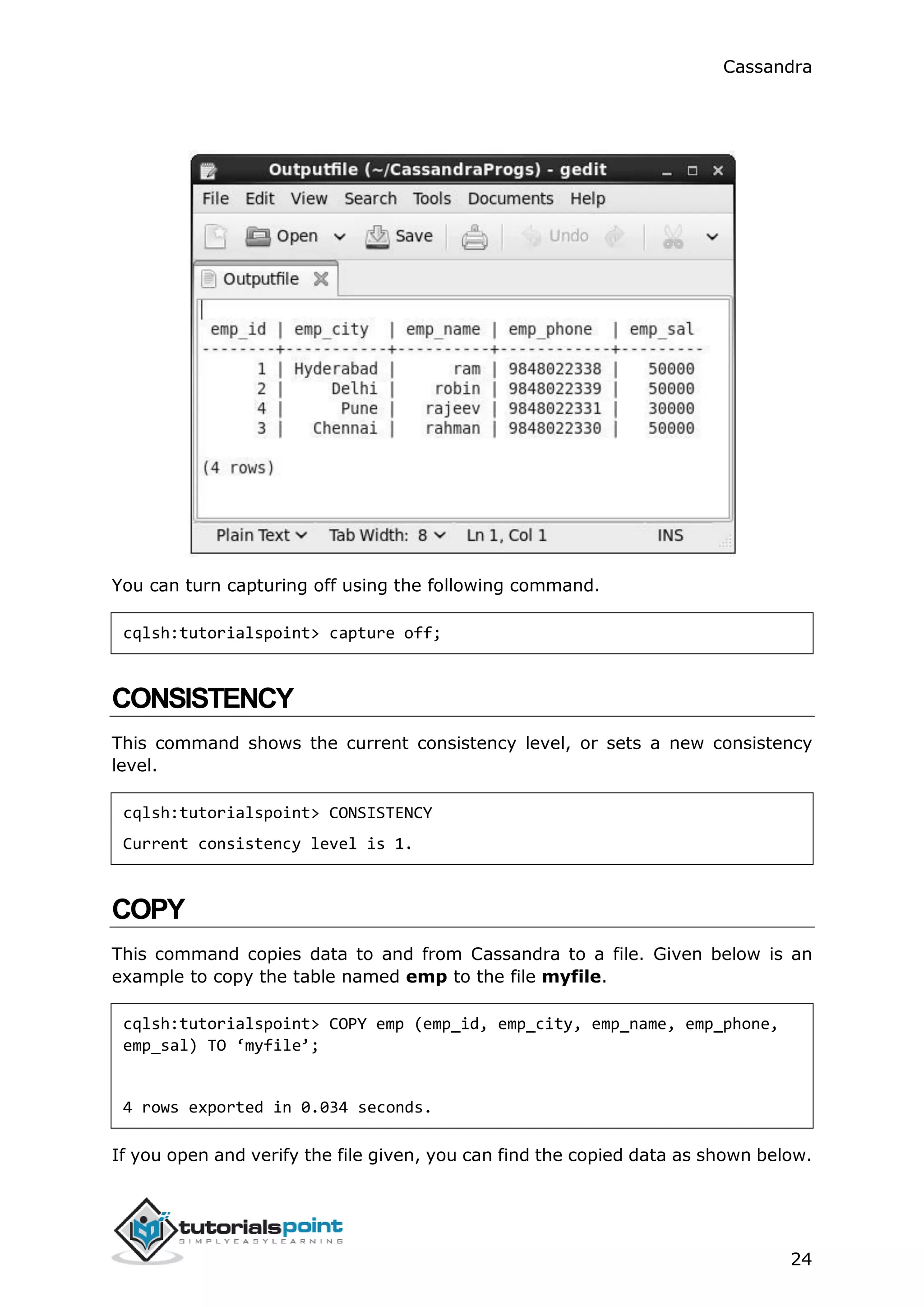
When we type any command in the terminal, the output will be captured by the
file given. Given below is the command used and the snapshot of the output file.
cqlsh:tutorialspoint> select * from emp;
6. SHELL COMMANDS
Cassandra
24
You can turn capturing off using the following command.
cqlsh:tutorialspoint> capture off;
CONSISTENCY
This command shows the current consistency level, or sets a new consistency
level.
cqlsh:tutorialspoint> CONSISTENCY
Current consistency level is 1.
COPY
This command copies data to and from Cassandra to a file. Given below is an
example to copy the table named emp to the file myfile.
cqlsh:tutorialspoint> COPY emp (emp_id, emp_city, emp_name, emp_phone,
emp_sal) TO ‘myfile’;
4 rows exported in 0.034 seconds.
If you open and verify the file given, you can find the copied data as shown below.
Cassandra
25
DESCRIBE
This command describes the current cluster of Cassandra and its objects. The
variants of this command are explained below.
Describe cluster: This command provides information about the cluster.
cqlsh:tutorialspoint> describe cluster;
Cluster: Test Cluster
Partitioner: Murmur3Partitioner
Range ownership:
-658380912249644557 [127.0.0.1]
-2833890865268921414 [127.0.0.1]
-6792159006375935836 [127.0.0.1]
Describe Keyspaces: This command lists all the keyspaces in a cluster. Given
below is the usage of this command.
cqlsh:tutorialspoint> describe keyspaces;
system_traces system tp tutorialspoint
Describe tables: This command lists all the tables in a keyspace. Given below is
the usage of this command.
Cassandra
26
cqlsh:tutorialspoint> describe tables;
emp
Describe table: This command provides the description of a table. Given below
is the usage of this command.
cqlsh:tutorialspoint> describe table emp;
CREATE TABLE tutorialspoint.emp (
emp_id int PRIMARY KEY,
emp_city text,
emp_name text,
emp_phone varint,
emp_sal varint
) WITH bloom_filter_fp_chance = 0.01
AND caching = '{"keys":"ALL", "rows_per_partition":"NONE"}'
AND comment = ''
AND compaction = {'min_threshold': '4', 'class':
'org.apache.cassandra.db.compaction.SizeTieredCompactionStrategy',
'max_threshold': '32'}
AND compression = {'sstable_compression':
'org.apache.cassandra.io.compress.LZ4Compressor'}
AND dclocal_read_repair_chance = 0.1
AND default_time_to_live = 0
AND gc_grace_seconds = 864000
AND max_index_interval = 2048
AND memtable_flush_period_in_ms = 0
AND min_index_interval = 128
AND read_repair_chance = 0.0
AND speculative_retry = '99.0PERCENTILE';
CREATE INDEX emp_emp_sal_idx ON tutorialspoint.emp (emp_sal);
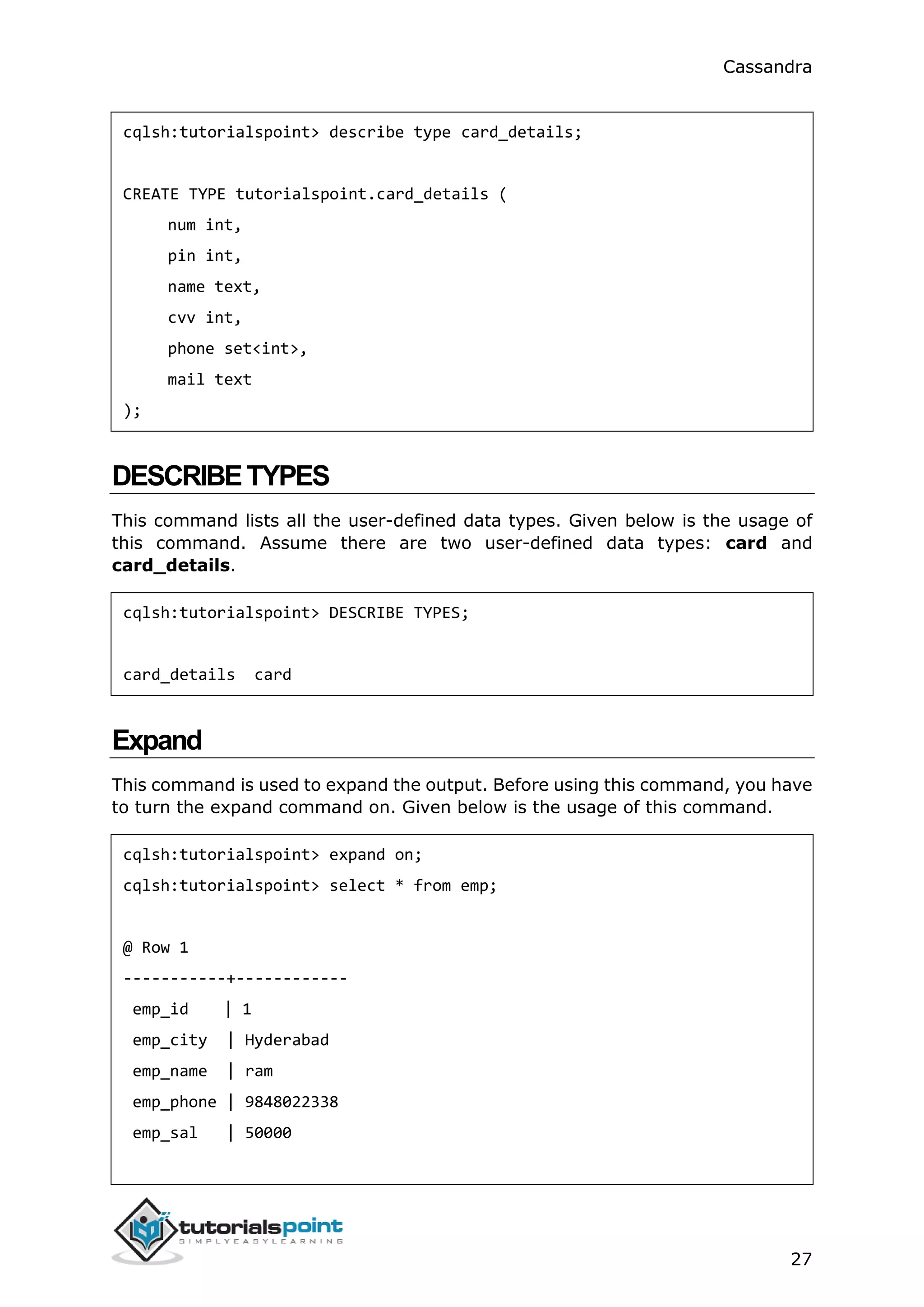
DESCRIBETYPE
This command is used to describe a user-defined data type. Given below is the
usage of this command.
Cassandra
27
cqlsh:tutorialspoint> describe type card_details;
CREATE TYPE tutorialspoint.card_details (
num int,
pin int,
name text,
cvv int,
phone set<int>,
mail text
);
DESCRIBETYPES
This command lists all the user-defined data types. Given below is the usage of
this command. Assume there are two user-defined data types: card and
card_details.
cqlsh:tutorialspoint> DESCRIBE TYPES;
card_details card
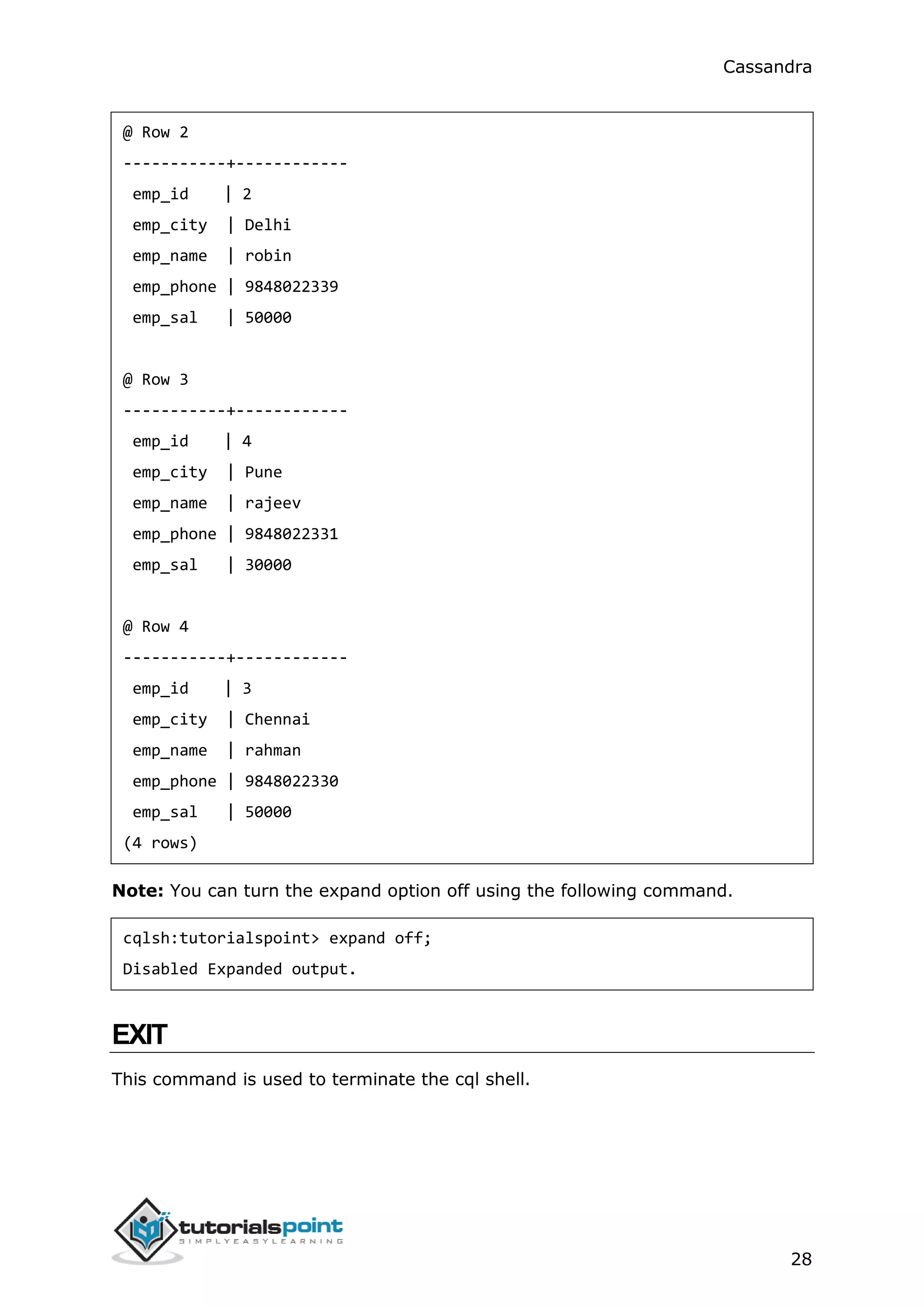
Expand
This command is used to expand the output. Before using this command, you have
to turn the expand command on. Given below is the usage of this command.
cqlsh:tutorialspoint> expand on;
cqlsh:tutorialspoint> select * from emp;
@ Row 1
-----------+------------
emp_id | 1
emp_city | Hyderabad
emp_name | ram
emp_phone | 9848022338
emp_sal | 50000
Cassandra
28
@ Row 2
-----------+------------
emp_id | 2
emp_city | Delhi
emp_name | robin
emp_phone | 9848022339
emp_sal | 50000
@ Row 3
-----------+------------
emp_id | 4
emp_city | Pune
emp_name | rajeev
emp_phone | 9848022331
emp_sal | 30000
@ Row 4
-----------+------------
emp_id | 3
emp_city | Chennai
emp_name | rahman
emp_phone | 9848022330
emp_sal | 50000
(4 rows)
Note: You can turn the expand option off using the following command.
cqlsh:tutorialspoint> expand off;
Disabled Expanded output.
EXIT
This command is used to terminate the cql shell.
Cassandra
29
SHOW
This command displays the details of current cqlsh session such as Cassandra
version, host, or data type assumptions. Given below is the usage of this
command.
cqlsh:tutorialspoint> show host;
Connected to Test Cluster at 127.0.0.1:9042.
cqlsh:tutorialspoint> show version;
[cqlsh 5.0.1 | Cassandra 2.1.2 | CQL spec 3.2.0 | Native protocol v3]
SOURCE
Using this command, you can execute the commands in a file. Suppose our input
file is as follows:
Then you can execute the file containing the commands as shown below.
cqlsh:tutorialspoint> source '/home/hadoop/CassandraProgs/inputfile';
emp_id | emp_city | emp_name | emp_phone | emp_sal
--------+-----------+----------+------------+---------
1 | Hyderabad | ram | 9848022338 | 50000
2 | Delhi | robin | 9848022339 | 50000
3 | Pune | rajeev | 9848022331 | 30000
4 | Chennai | rahman | 9848022330 | 50000
(4 rows)
Cassandra
30
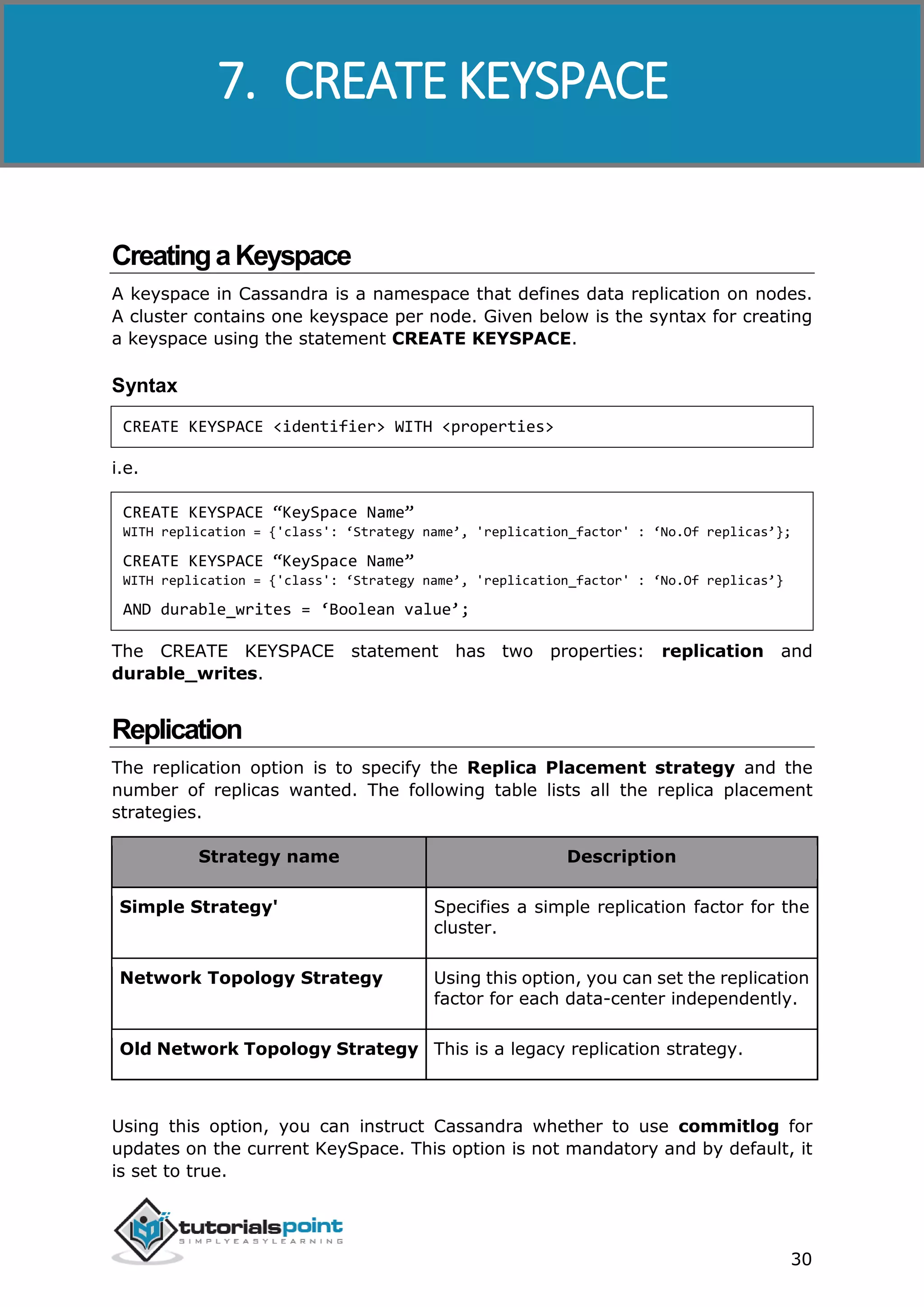
CreatingaKeyspace
A keyspace in Cassandra is a namespace that defines data replication on nodes.
A cluster contains one keyspace per node. Given below is the syntax for creating
a keyspace using the statement CREATE KEYSPACE.
Syntax
CREATE KEYSPACE <identifier> WITH <properties>
i.e.
CREATE KEYSPACE “KeySpace Name”
WITH replication = {'class': ‘Strategy name’, 'replication_factor' : ‘No.Of replicas’};
CREATE KEYSPACE “KeySpace Name”
WITH replication = {'class': ‘Strategy name’, 'replication_factor' : ‘No.Of replicas’}
AND durable_writes = ‘Boolean value’;
The CREATE KEYSPACE statement has two properties: replication and
durable_writes.
Replication
The replication option is to specify the Replica Placement strategy and the
number of replicas wanted. The following table lists all the replica placement
strategies.
Strategy name Description
Simple Strategy' Specifies a simple replication factor for the
cluster.
Network Topology Strategy Using this option, you can set the replication
factor for each data-center independently.
Old Network Topology Strategy This is a legacy replication strategy.
Using this option, you can instruct Cassandra whether to use commitlog for
updates on the current KeySpace. This option is not mandatory and by default, it
is set to true.
7. CREATE KEYSPACE
Cassandra
31
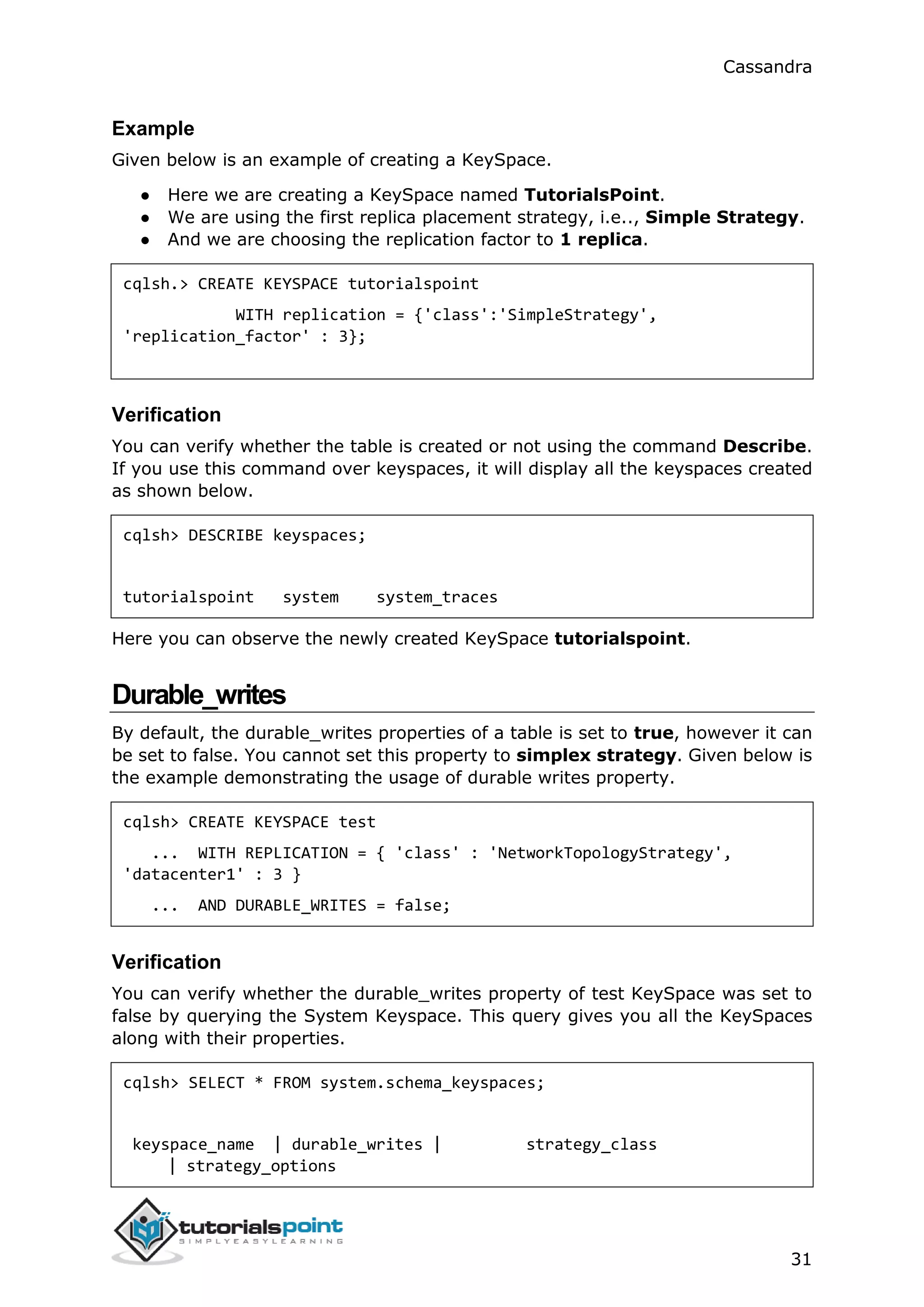
Example
Given below is an example of creating a KeySpace.
● Here we are creating a KeySpace named TutorialsPoint.
● We are using the first replica placement strategy, i.e.., Simple Strategy.
● And we are choosing the replication factor to 1 replica.
cqlsh.> CREATE KEYSPACE tutorialspoint
WITH replication = {'class':'SimpleStrategy',
'replication_factor' : 3};
Verification
You can verify whether the table is created or not using the command Describe.
If you use this command over keyspaces, it will display all the keyspaces created
as shown below.
cqlsh> DESCRIBE keyspaces;
tutorialspoint system system_traces
Here you can observe the newly created KeySpace tutorialspoint.
Durable_writes
By default, the durable_writes properties of a table is set to true, however it can
be set to false. You cannot set this property to simplex strategy. Given below is
the example demonstrating the usage of durable writes property.
cqlsh> CREATE KEYSPACE test
... WITH REPLICATION = { 'class' : 'NetworkTopologyStrategy',
'datacenter1' : 3 }
... AND DURABLE_WRITES = false;
Verification
You can verify whether the durable_writes property of test KeySpace was set to
false by querying the System Keyspace. This query gives you all the KeySpaces
along with their properties.
cqlsh> SELECT * FROM system.schema_keyspaces;
keyspace_name | durable_writes | strategy_class
| strategy_options
Cassandra
32
----------------+----------------+--------------------------------------
----------------+----------------------------
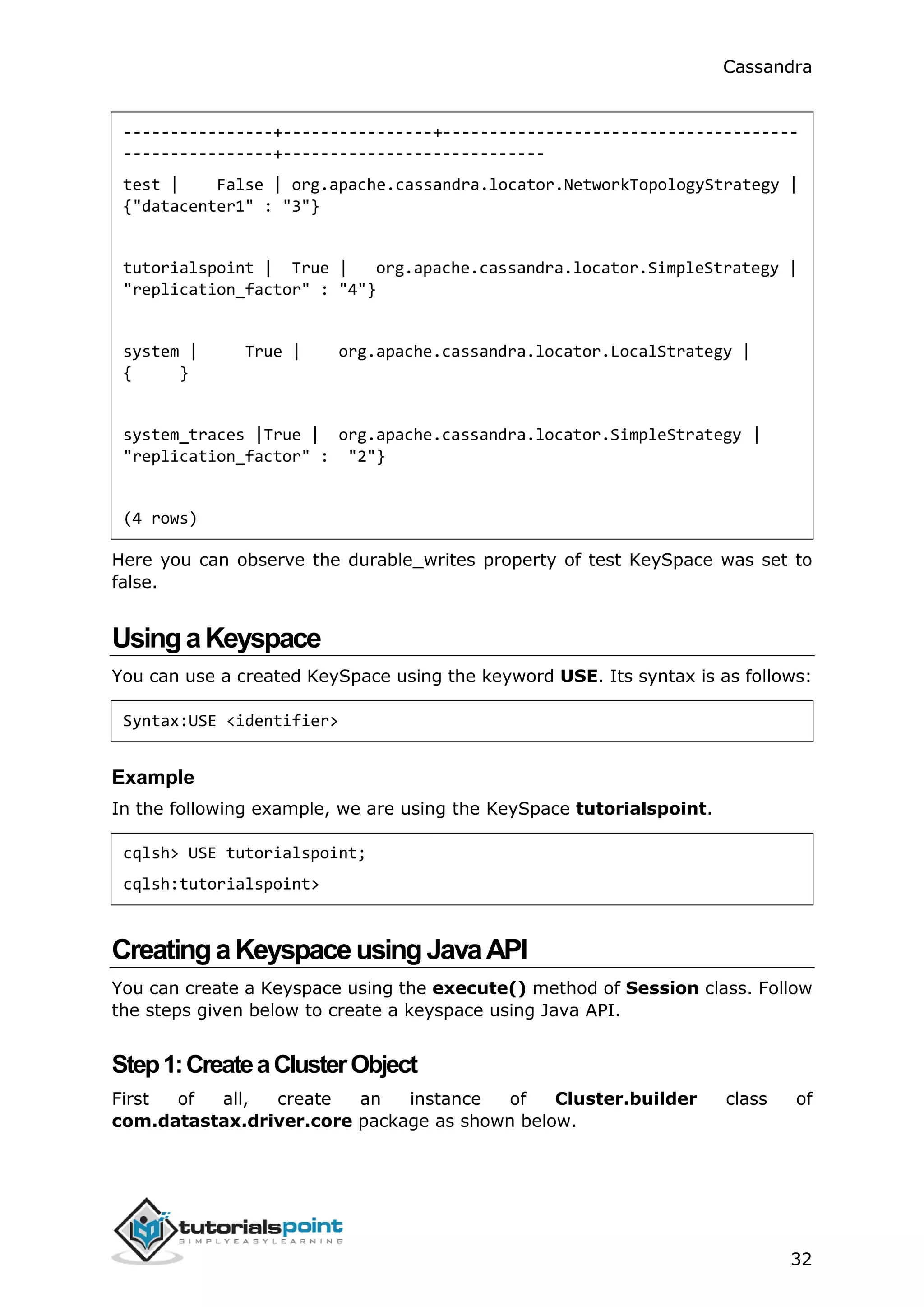
test | False | org.apache.cassandra.locator.NetworkTopologyStrategy |
{"datacenter1" : "3"}
tutorialspoint | True | org.apache.cassandra.locator.SimpleStrategy |
"replication_factor" : "4"}
system | True | org.apache.cassandra.locator.LocalStrategy |
{ }
system_traces |True | org.apache.cassandra.locator.SimpleStrategy |
"replication_factor" : "2"}
(4 rows)
Here you can observe the durable_writes property of test KeySpace was set to
false.
UsingaKeyspace
You can use a created KeySpace using the keyword USE. Its syntax is as follows:
Syntax:USE <identifier>
Example
In the following example, we are using the KeySpace tutorialspoint.
cqlsh> USE tutorialspoint;
cqlsh:tutorialspoint>
CreatingaKeyspaceusingJavaAPI
You can create a Keyspace using the execute() method of Session class. Follow
the steps given below to create a keyspace using Java API.
Step1:CreateaClusterObject
First of all, create an instance of Cluster.builder class of
com.datastax.driver.core package as shown below.
Cassandra
33
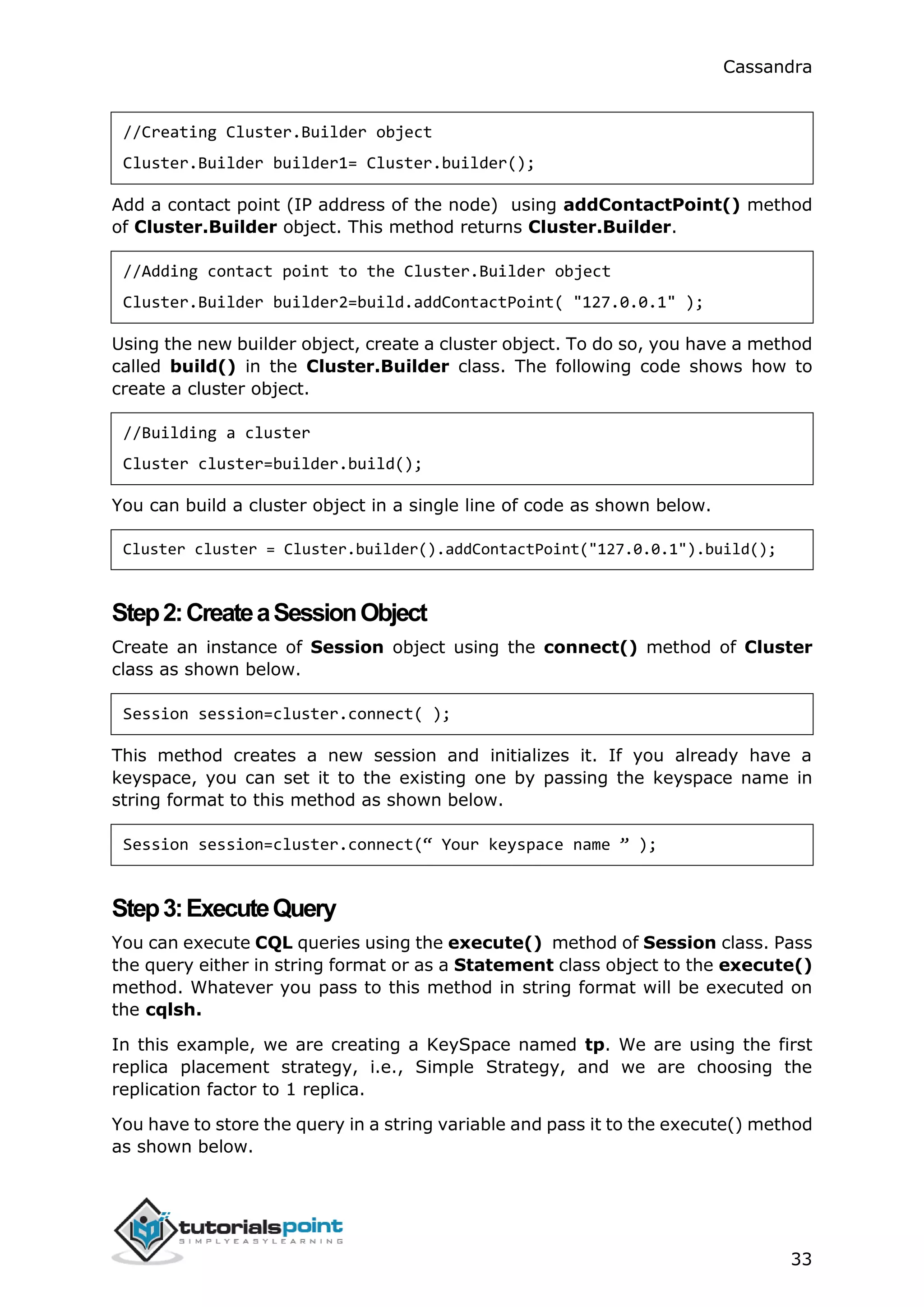
//Creating Cluster.Builder object
Cluster.Builder builder1= Cluster.builder();
Add a contact point (IP address of the node) using addContactPoint() method
of Cluster.Builder object. This method returns Cluster.Builder.
//Adding contact point to the Cluster.Builder object
Cluster.Builder builder2=build.addContactPoint( "127.0.0.1" );
Using the new builder object, create a cluster object. To do so, you have a method
called build() in the Cluster.Builder class. The following code shows how to
create a cluster object.
//Building a cluster
Cluster cluster=builder.build();
You can build a cluster object in a single line of code as shown below.
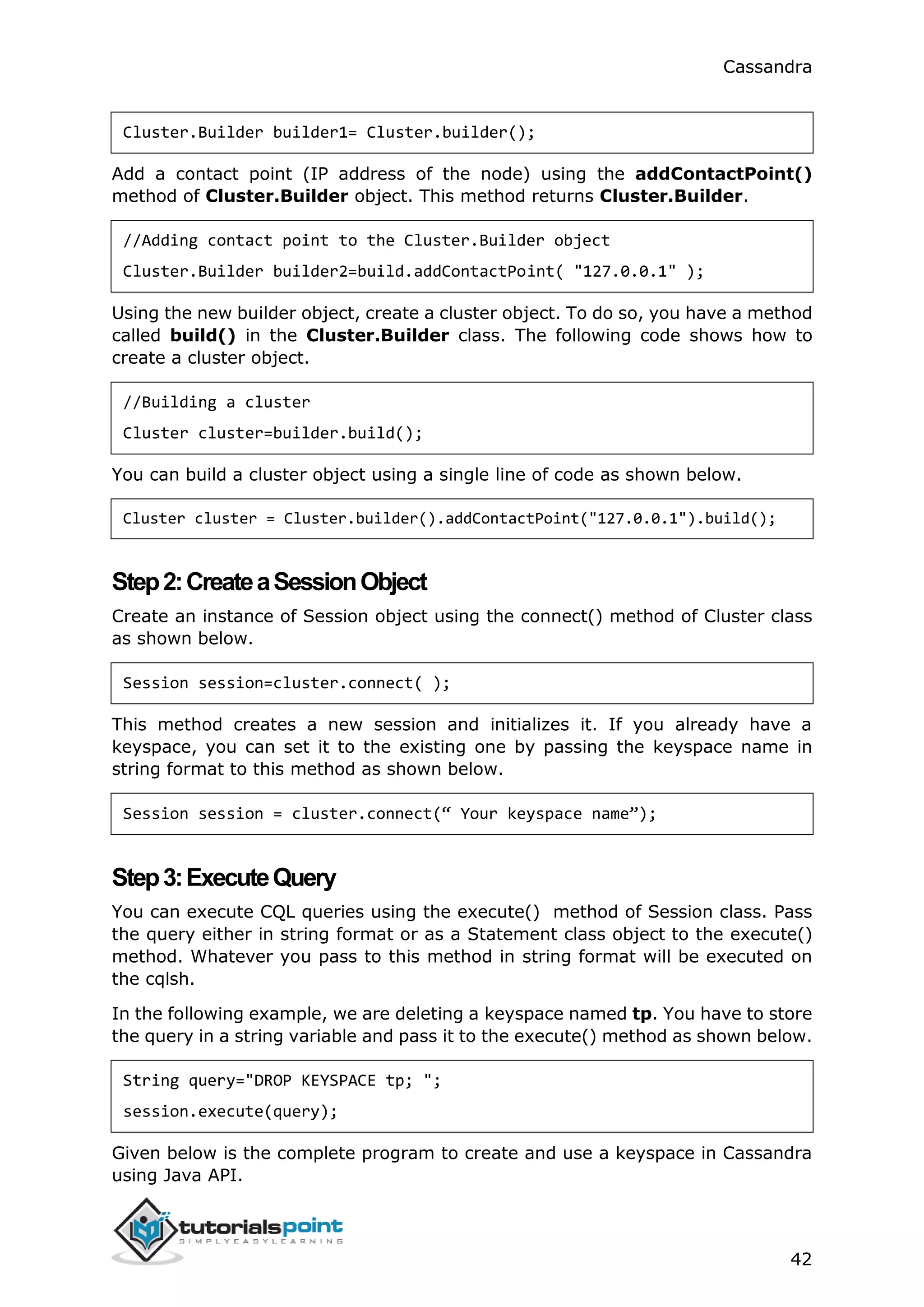
Cluster cluster = Cluster.builder().addContactPoint("127.0.0.1").build();
Step2:CreateaSessionObject
Create an instance of Session object using the connect() method of Cluster
class as shown below.
Session session=cluster.connect( );
This method creates a new session and initializes it. If you already have a
keyspace, you can set it to the existing one by passing the keyspace name in
string format to this method as shown below.
Session session=cluster.connect(“ Your keyspace name ” );
Step3:ExecuteQuery
You can execute CQL queries using the execute() method of Session class. Pass
the query either in string format or as a Statement class object to the execute()
method. Whatever you pass to this method in string format will be executed on
the cqlsh.
In this example, we are creating a KeySpace named tp. We are using the first
replica placement strategy, i.e., Simple Strategy, and we are choosing the
replication factor to 1 replica.
You have to store the query in a string variable and pass it to the execute() method
as shown below.
Cassandra
34
String query="CREATE KEYSPACE tp WITH replication "
+ "= {'class':'SimpleStrategy',
'replication_factor':1}; ";
session.execute(query);
Step4:UsetheKeySpace
You can use a created KeySpace using the execute() method as shown below.
execute(“ USE tp ” );
Given below is the complete program to create and use a keyspace in Cassandra
using Java API.
import com.datastax.driver.core.Cluster;
import com.datastax.driver.core.Session;
public class Create_KeySpace {
public static void main(String args[]){
//Query
String query="CREATE KEYSPACE tp WITH replication "
+ "= {'class':'SimpleStrategy',
'replication_factor':1};";
//creating Cluster object
Cluster cluster = Cluster.builder().addContactPoint("127.0.0.1").build();
//Creating Session object
Session session=cluster.connect();
//Executing the query
session.execute(query);
//using the KeySpace
session.execute("USE tp");
System.out.println("Keyspace created");
Cassandra
35
}
}
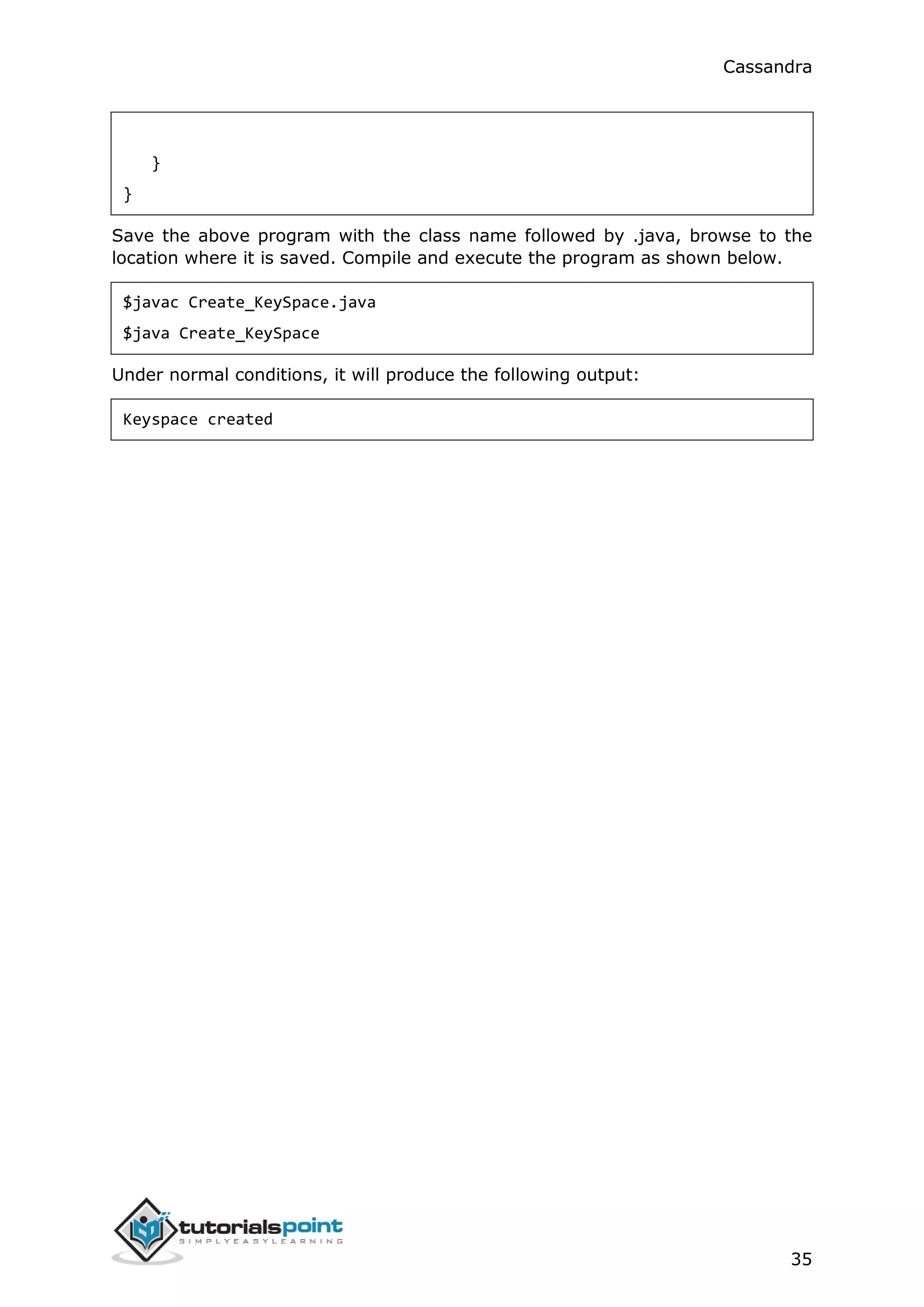
Save the above program with the class name followed by .java, browse to the
location where it is saved. Compile and execute the program as shown below.
$javac Create_KeySpace.java
$java Create_KeySpace
Under normal conditions, it will produce the following output:
Keyspace created
Cassandra
36
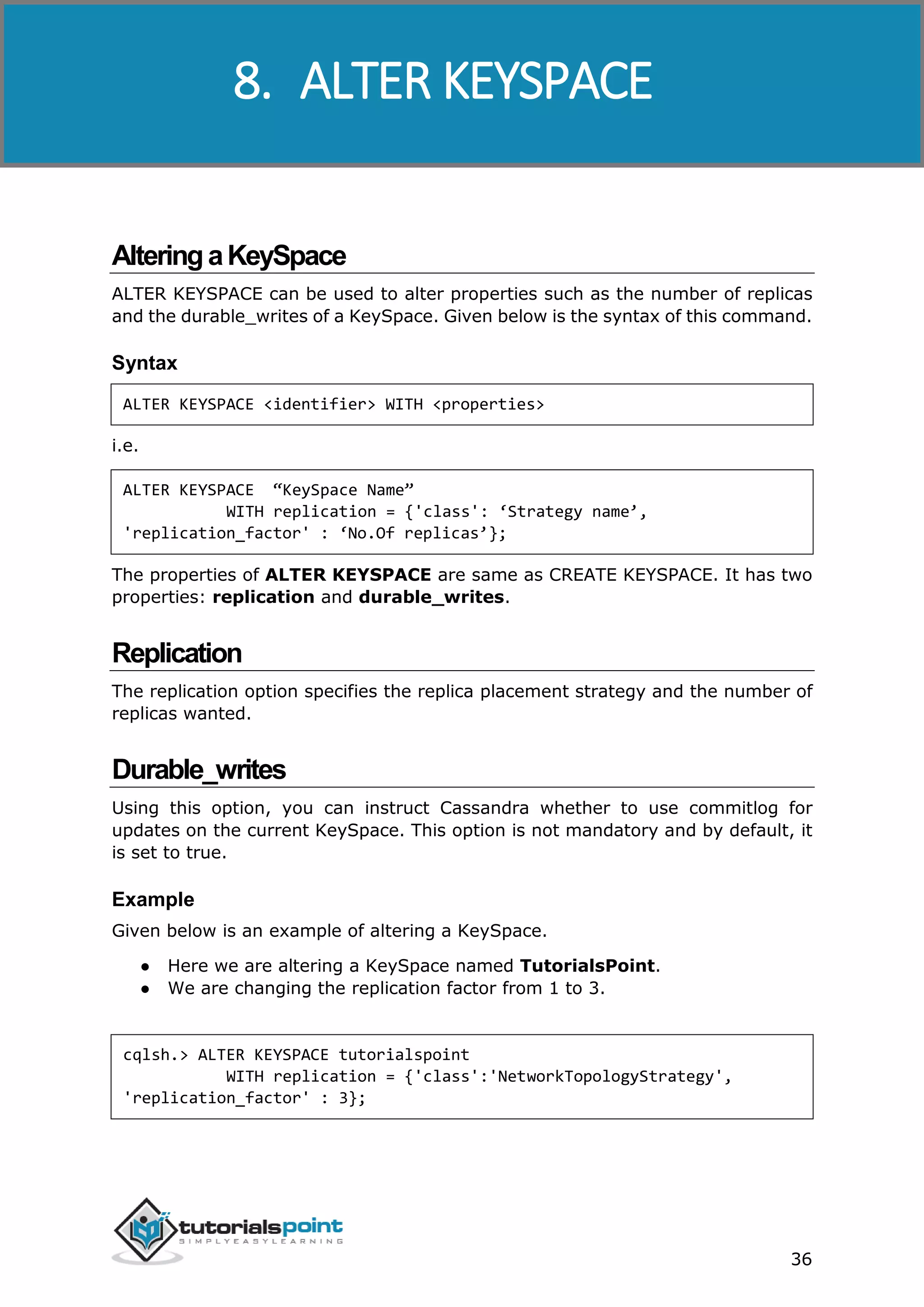
AlteringaKeySpace
ALTER KEYSPACE can be used to alter properties such as the number of replicas
and the durable_writes of a KeySpace. Given below is the syntax of this command.
Syntax
ALTER KEYSPACE <identifier> WITH <properties>
i.e.
ALTER KEYSPACE “KeySpace Name”
WITH replication = {'class': ‘Strategy name’,
'replication_factor' : ‘No.Of replicas’};
The properties of ALTER KEYSPACE are same as CREATE KEYSPACE. It has two
properties: replication and durable_writes.
Replication
The replication option specifies the replica placement strategy and the number of
replicas wanted.
Durable_writes
Using this option, you can instruct Cassandra whether to use commitlog for
updates on the current KeySpace. This option is not mandatory and by default, it
is set to true.
Example
Given below is an example of altering a KeySpace.
● Here we are altering a KeySpace named TutorialsPoint.
● We are changing the replication factor from 1 to 3.
cqlsh.> ALTER KEYSPACE tutorialspoint
WITH replication = {'class':'NetworkTopologyStrategy',
'replication_factor' : 3};
8. ALTER KEYSPACE
Cassandra
37
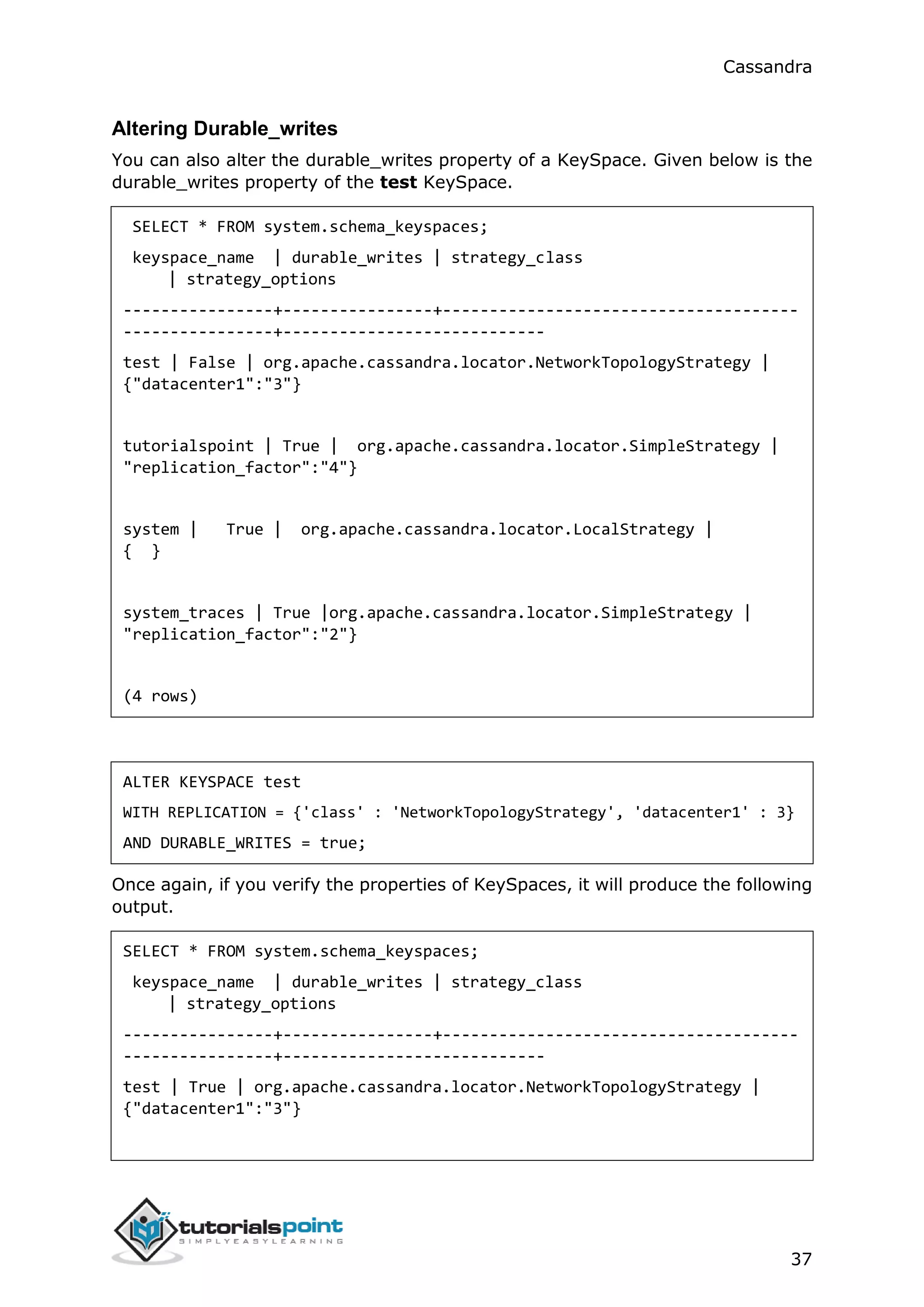
Altering Durable_writes
You can also alter the durable_writes property of a KeySpace. Given below is the
durable_writes property of the test KeySpace.
SELECT * FROM system.schema_keyspaces;
keyspace_name | durable_writes | strategy_class
| strategy_options
----------------+----------------+--------------------------------------
----------------+----------------------------
test | False | org.apache.cassandra.locator.NetworkTopologyStrategy |
{"datacenter1":"3"}
tutorialspoint | True | org.apache.cassandra.locator.SimpleStrategy |
"replication_factor":"4"}
system | True | org.apache.cassandra.locator.LocalStrategy |
{ }
system_traces | True |org.apache.cassandra.locator.SimpleStrategy |
"replication_factor":"2"}
(4 rows)
ALTER KEYSPACE test
WITH REPLICATION = {'class' : 'NetworkTopologyStrategy', 'datacenter1' : 3}
AND DURABLE_WRITES = true;
Once again, if you verify the properties of KeySpaces, it will produce the following
output.
SELECT * FROM system.schema_keyspaces;
keyspace_name | durable_writes | strategy_class
| strategy_options
----------------+----------------+--------------------------------------
----------------+----------------------------
test | True | org.apache.cassandra.locator.NetworkTopologyStrategy |
{"datacenter1":"3"}
Cassandra
38
tutorialspoint | True | org.apache.cassandra.locator.SimpleStrategy |
"replication_factor":"4"}
system | True | org.apache.cassandra.locator.LocalStrategy |
{ }
system_traces | True |org.apache.cassandra.locator.SimpleStrategy |
"replication_factor":"2"}
(4 rows)
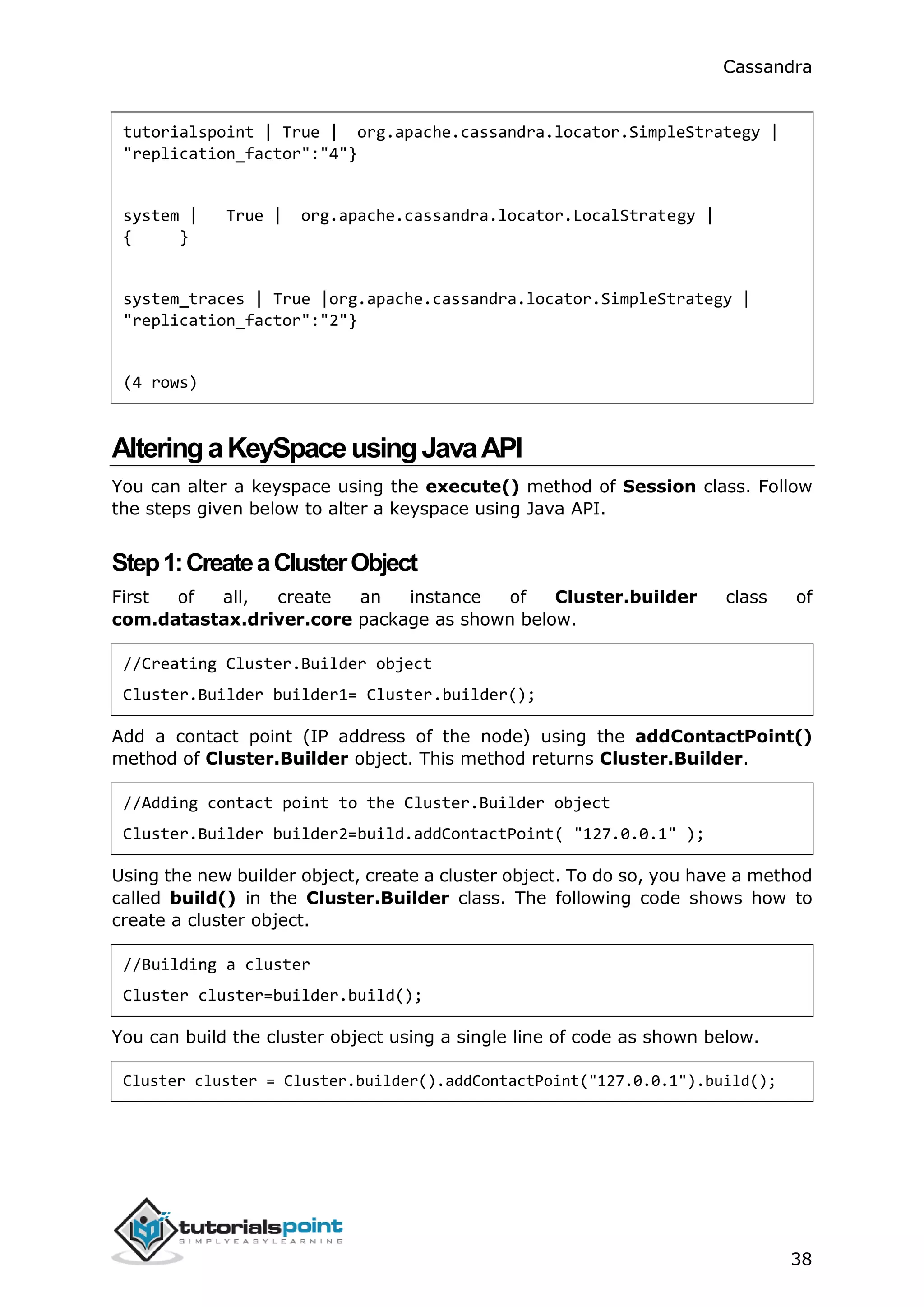
AlteringaKeySpaceusingJavaAPI
You can alter a keyspace using the execute() method of Session class. Follow
the steps given below to alter a keyspace using Java API.
Step1:CreateaClusterObject
First of all, create an instance of Cluster.builder class of
com.datastax.driver.core package as shown below.
//Creating Cluster.Builder object
Cluster.Builder builder1= Cluster.builder();
Add a contact point (IP address of the node) using the addContactPoint()
method of Cluster.Builder object. This method returns Cluster.Builder.
//Adding contact point to the Cluster.Builder object
Cluster.Builder builder2=build.addContactPoint( "127.0.0.1" );
Using the new builder object, create a cluster object. To do so, you have a method
called build() in the Cluster.Builder class. The following code shows how to
create a cluster object.
//Building a cluster
Cluster cluster=builder.build();
You can build the cluster object using a single line of code as shown below.
Cluster cluster = Cluster.builder().addContactPoint("127.0.0.1").build();
Cassandra
39
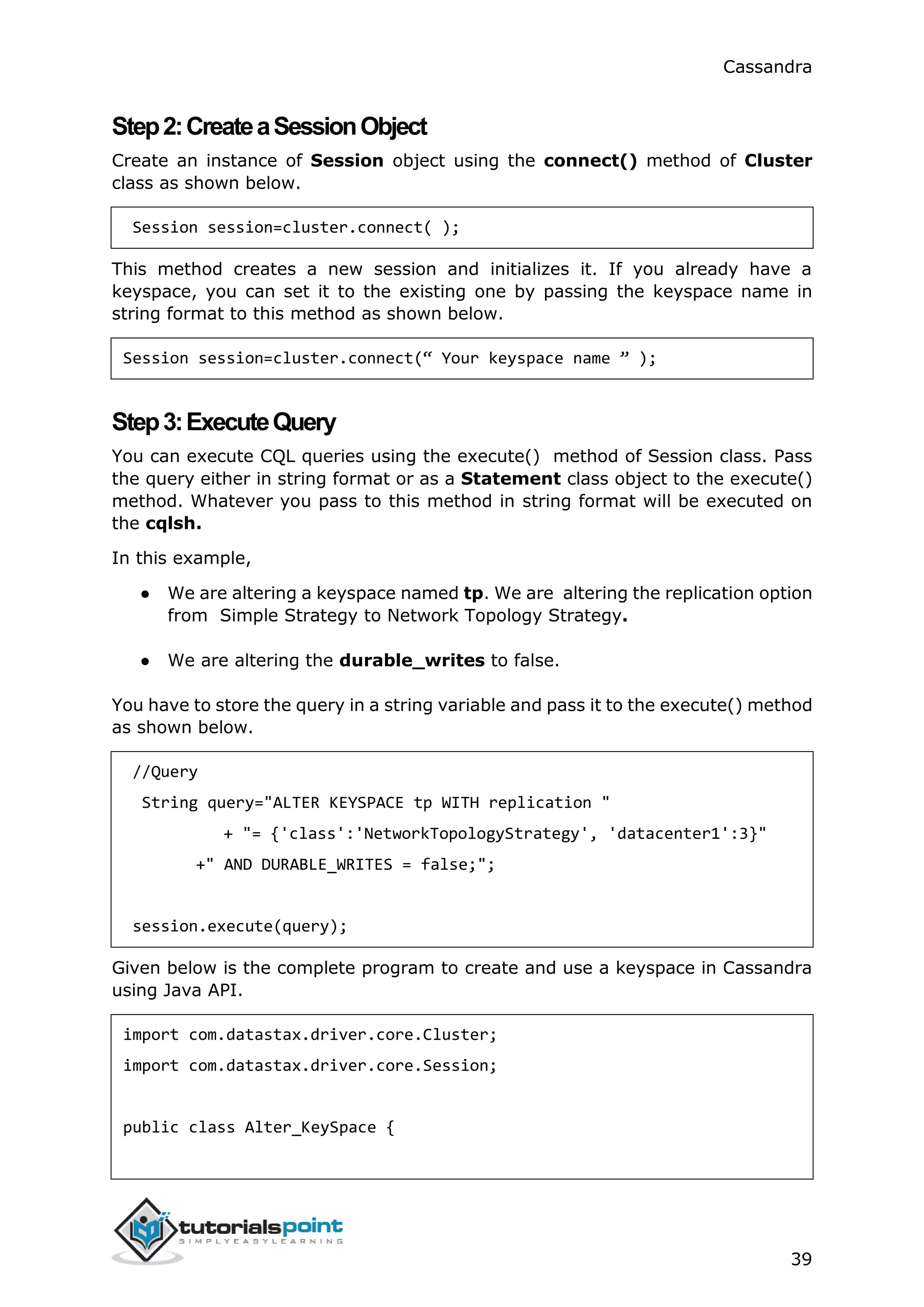
Step2:CreateaSessionObject
Create an instance of Session object using the connect() method of Cluster
class as shown below.
Session session=cluster.connect( );
This method creates a new session and initializes it. If you already have a
keyspace, you can set it to the existing one by passing the keyspace name in
string format to this method as shown below.
Session session=cluster.connect(“ Your keyspace name ” );
Step3:ExecuteQuery
You can execute CQL queries using the execute() method of Session class. Pass
the query either in string format or as a Statement class object to the execute()
method. Whatever you pass to this method in string format will be executed on
the cqlsh.
In this example,
● We are altering a keyspace named tp. We are altering the replication option
from Simple Strategy to Network Topology Strategy.
● We are altering the durable_writes to false.
You have to store the query in a string variable and pass it to the execute() method
as shown below.
//Query
String query="ALTER KEYSPACE tp WITH replication "
+ "= {'class':'NetworkTopologyStrategy', 'datacenter1':3}"
+" AND DURABLE_WRITES = false;";
session.execute(query);
Given below is the complete program to create and use a keyspace in Cassandra
using Java API.
import com.datastax.driver.core.Cluster;
import com.datastax.driver.core.Session;
public class Alter_KeySpace {
Cassandra
40
public static void main(String args[]){
//Query
String query="ALTER KEYSPACE tp WITH replication "
+ "= {'class':'NetworkTopologyStrategy', 'datacenter1':3}"
+ "AND DURABLE_WRITES = false;";
//Creating Cluster object
Cluster cluster = Cluster.builder().addContactPoint("127.0.0.1").build();
//Creating Session object
Session session=cluster.connect();
//Executing the query
session.execute(query);
System.out.println("Keyspace altered");
}
}
Save the above program with the class name followed by .java, browse to the
location where it is saved. Compile and execute the program as shown below.
$javac Alter_KeySpace.java
$java Alter_KeySpace
Under normal conditions, it produces the following output:
Keyspace Altered
Cassandra
41
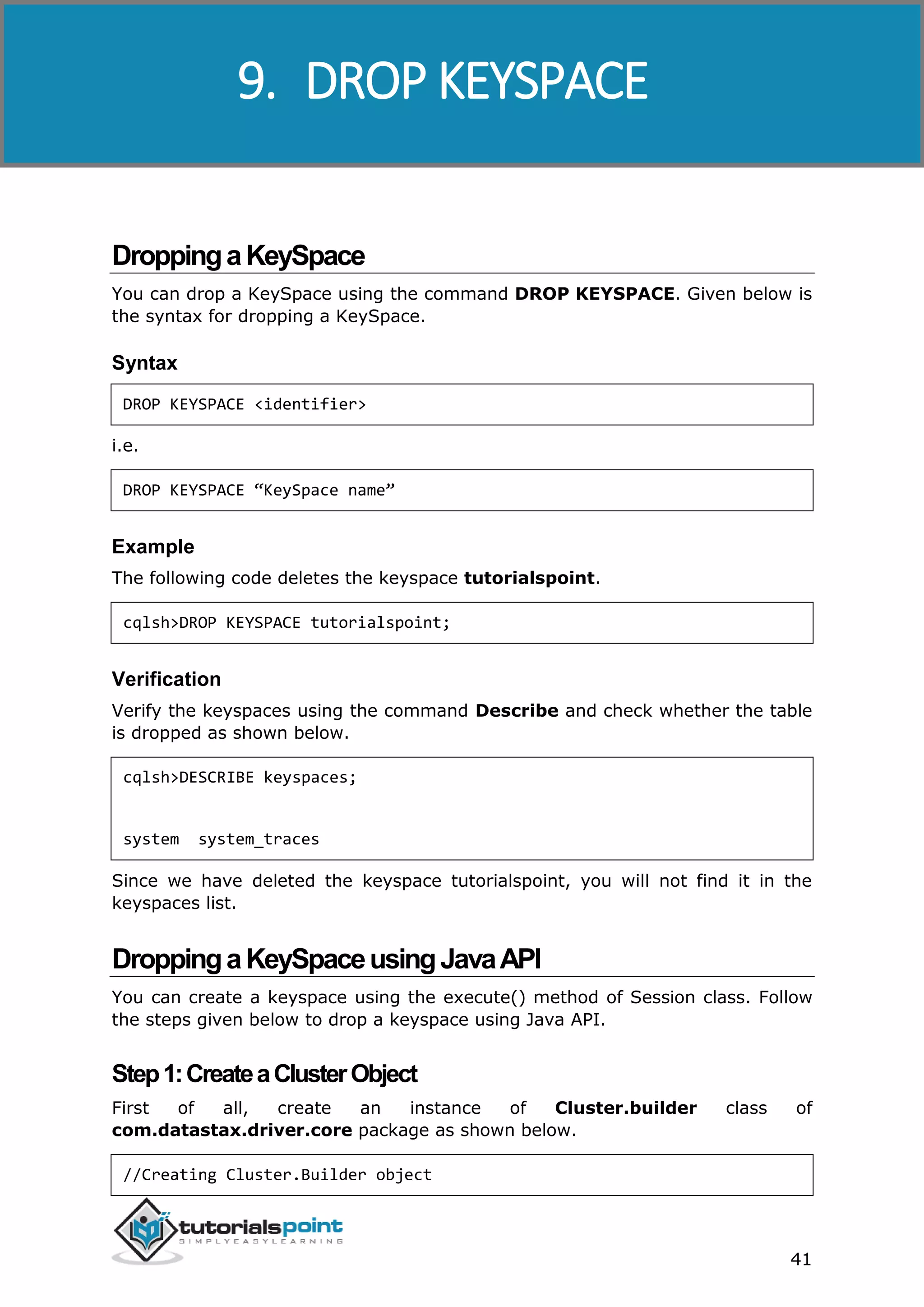
DroppingaKeySpace
You can drop a KeySpace using the command DROP KEYSPACE. Given below is
the syntax for dropping a KeySpace.
Syntax
DROP KEYSPACE <identifier>
i.e.
DROP KEYSPACE “KeySpace name”
Example
The following code deletes the keyspace tutorialspoint.
cqlsh>DROP KEYSPACE tutorialspoint;
Verification
Verify the keyspaces using the command Describe and check whether the table
is dropped as shown below.
cqlsh>DESCRIBE keyspaces;
system system_traces
Since we have deleted the keyspace tutorialspoint, you will not find it in the
keyspaces list.
DroppingaKeySpaceusingJavaAPI
You can create a keyspace using the execute() method of Session class. Follow
the steps given below to drop a keyspace using Java API.
Step1:CreateaClusterObject
First of all, create an instance of Cluster.builder class of
com.datastax.driver.core package as shown below.
//Creating Cluster.Builder object
9. DROP KEYSPACE
Cassandra
42
Cluster.Builder builder1= Cluster.builder();
Add a contact point (IP address of the node) using the addContactPoint()
method of Cluster.Builder object. This method returns Cluster.Builder.
//Adding contact point to the Cluster.Builder object
Cluster.Builder builder2=build.addContactPoint( "127.0.0.1" );
Using the new builder object, create a cluster object. To do so, you have a method
called build() in the Cluster.Builder class. The following code shows how to
create a cluster object.
//Building a cluster
Cluster cluster=builder.build();
You can build a cluster object using a single line of code as shown below.
Cluster cluster = Cluster.builder().addContactPoint("127.0.0.1").build();
Step2:CreateaSessionObject
Create an instance of Session object using the connect() method of Cluster class
as shown below.
Session session=cluster.connect( );
This method creates a new session and initializes it. If you already have a
keyspace, you can set it to the existing one by passing the keyspace name in
string format to this method as shown below.
Session session = cluster.connect(“ Your keyspace name”);
Step3:ExecuteQuery
You can execute CQL queries using the execute() method of Session class. Pass
the query either in string format or as a Statement class object to the execute()
method. Whatever you pass to this method in string format will be executed on
the cqlsh.
In the following example, we are deleting a keyspace named tp. You have to store
the query in a string variable and pass it to the execute() method as shown below.
String query="DROP KEYSPACE tp; ";
session.execute(query);
Given below is the complete program to create and use a keyspace in Cassandra
using Java API.
Cassandra
43
import com.datastax.driver.core.Cluster;
import com.datastax.driver.core.Session;
public class Drop_KeySpace {
public static void main(String args[]){
//Query
String query="Drop KEYSPACE tp";
//creating Cluster object
Cluster cluster = Cluster.builder().addContactPoint("127.0.0.1").build();
//Creating Session object
Session session=cluster.connect();
//Executing the query
session.execute(query);
System.out.println("Keyspace deleted");
}
}
Save the above program with the class name followed by .java, browse to the
location where it is saved. Compile and execute the program as shown below.
$javac Delete_KeySpace.java
$java Delete_KeySpace
Under normal conditions, it should produce the following output:
Keyspace deleted
Cassandra
44
CreateaTable
You can create a table using the command CREATE TABLE. Given below is the
syntax for creating a table.
Syntax
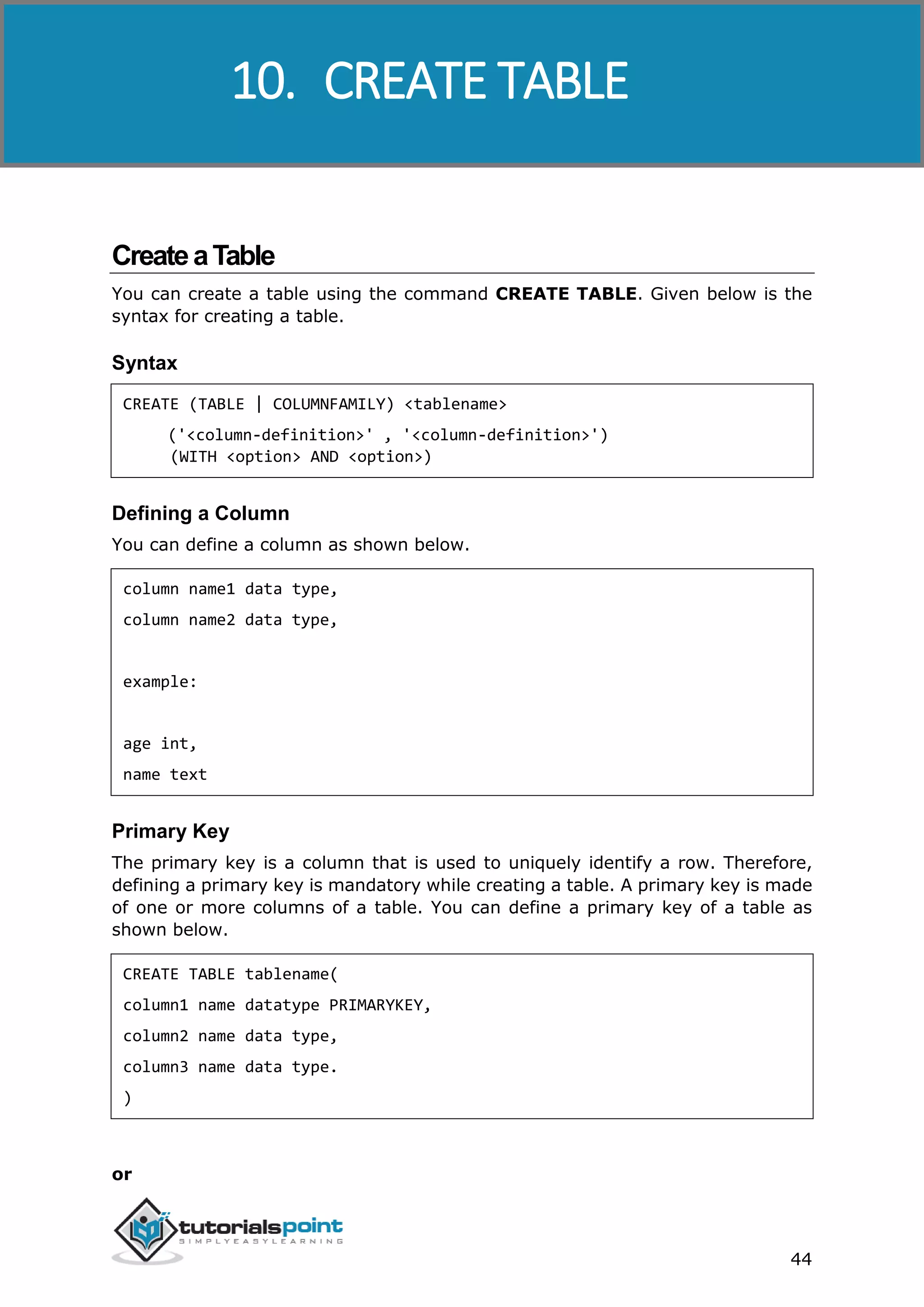
CREATE (TABLE | COLUMNFAMILY) <tablename>
('<column-definition>' , '<column-definition>')
(WITH <option> AND <option>)
Defining a Column
You can define a column as shown below.
column name1 data type,
column name2 data type,
example:
age int,
name text
Primary Key
The primary key is a column that is used to uniquely identify a row. Therefore,
defining a primary key is mandatory while creating a table. A primary key is made
of one or more columns of a table. You can define a primary key of a table as
shown below.
CREATE TABLE tablename(
column1 name datatype PRIMARYKEY,
column2 name data type,
column3 name data type.
)
or
10. CREATE TABLE
Cassandra
45
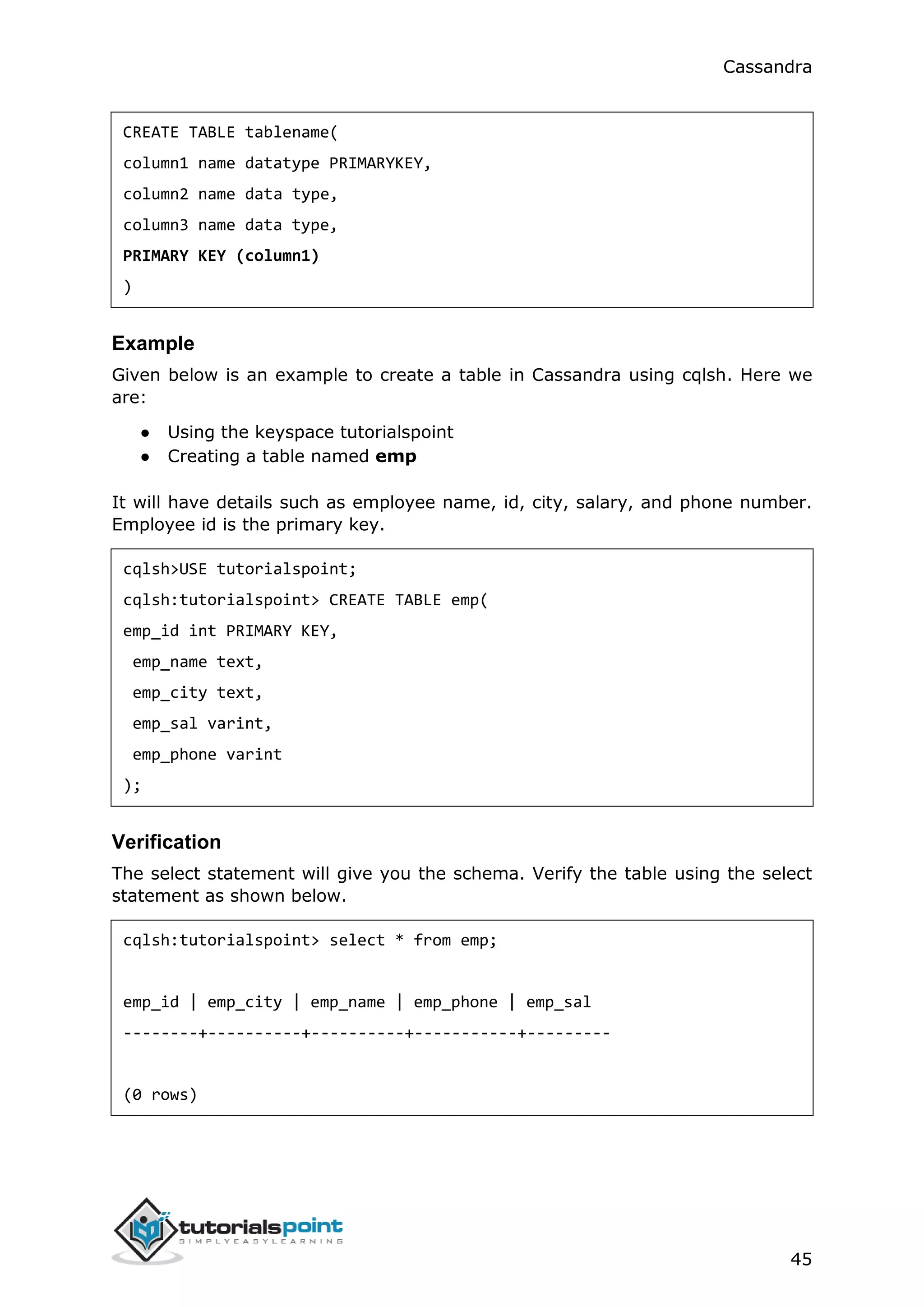
CREATE TABLE tablename(
column1 name datatype PRIMARYKEY,
column2 name data type,
column3 name data type,
PRIMARY KEY (column1)
)
Example
Given below is an example to create a table in Cassandra using cqlsh. Here we
are:
● Using the keyspace tutorialspoint
● Creating a table named emp
It will have details such as employee name, id, city, salary, and phone number.
Employee id is the primary key.
cqlsh>USE tutorialspoint;
cqlsh:tutorialspoint> CREATE TABLE emp(
emp_id int PRIMARY KEY,
emp_name text,
emp_city text,
emp_sal varint,
emp_phone varint
);
Verification
The select statement will give you the schema. Verify the table using the select
statement as shown below.
cqlsh:tutorialspoint> select * from emp;
emp_id | emp_city | emp_name | emp_phone | emp_sal
--------+----------+----------+-----------+---------
(0 rows)
Cassandra
46
Here you can observe the table created with the given columns. Since we have
deleted the keyspace tutorialspoint, you will not find it in the keyspaces list.
CreatingaTableusingJavaAPI
You can create a table using the execute() method of Session class. Follow the
steps given below to create a table using Java API.
Step1:CreateaClusterObject
First of all, create an instance of the Cluster.builder class of
com.datastax.driver.core package as shown below.
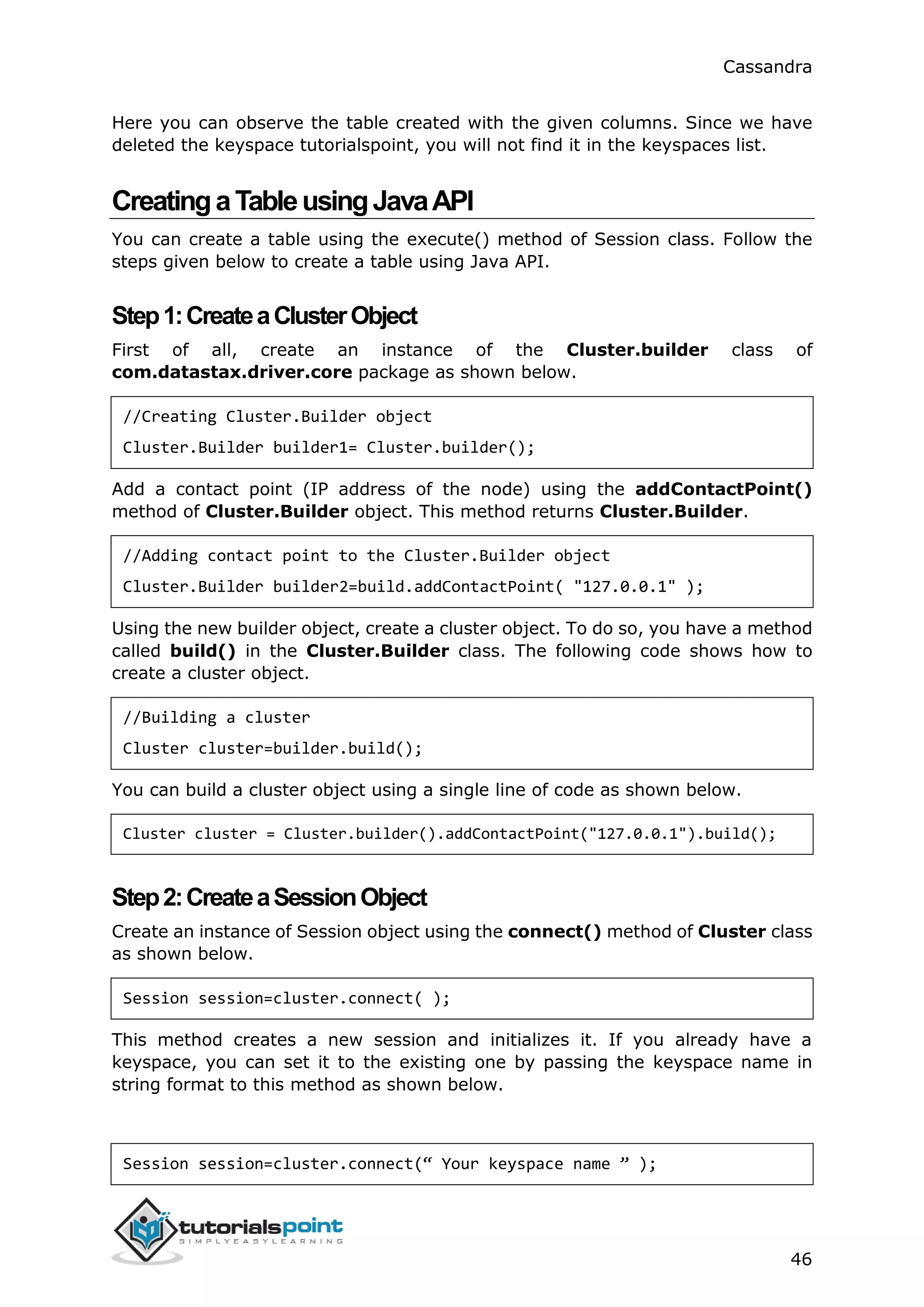
//Creating Cluster.Builder object
Cluster.Builder builder1= Cluster.builder();
Add a contact point (IP address of the node) using the addContactPoint()
method of Cluster.Builder object. This method returns Cluster.Builder.
//Adding contact point to the Cluster.Builder object
Cluster.Builder builder2=build.addContactPoint( "127.0.0.1" );
Using the new builder object, create a cluster object. To do so, you have a method
called build() in the Cluster.Builder class. The following code shows how to
create a cluster object.
//Building a cluster
Cluster cluster=builder.build();
You can build a cluster object using a single line of code as shown below.
Cluster cluster = Cluster.builder().addContactPoint("127.0.0.1").build();
Step2:CreateaSessionObject
Create an instance of Session object using the connect() method of Cluster class
as shown below.
Session session=cluster.connect( );
This method creates a new session and initializes it. If you already have a
keyspace, you can set it to the existing one by passing the keyspace name in
string format to this method as shown below.
Session session=cluster.connect(“ Your keyspace name ” );
Cassandra
47
Here we are using the keyspace named tp . Therefore, create the session object
as shown below.
Session session=cluster.connect(“ tp” );
Step3:ExecuteQuery
You can execute CQL queries using the execute() method of Session class. Pass
the query either in string format or as a Statement class object to the execute()
method. Whatever you pass to this method in string format will be executed on
the cqlsh.
In the following example, we are creating a table named emp. You have to store
the query in a string variable and pass it to the execute() method as shown below.
//Query
String query="CREATE TABLE emp(emp_id int PRIMARY KEY, "
+ "emp_name text, "
+ "emp_city text, "
+ "emp_sal varint, "
+ "emp_phone varint );";
session.execute(query);
Given below is the complete program to create and use a keyspace in Cassandra
using Java API.
import com.datastax.driver.core.Cluster;
import com.datastax.driver.core.Session;
public class Create_Table {
public static void main(String args[]){
//Query
String query="CREATE TABLE emp(emp_id int PRIMARY KEY, "
+ "emp_name text, "
+ "emp_city text, "
+ "emp_sal varint, "
+ "emp_phone varint );";
Cassandra
48
//Creating Cluster object
Cluster cluster = Cluster.builder().addContactPoint("127.0.0.1").build();
//Creating Session object
Session session=cluster.connect("tp");
//Executing the query
session.execute(query);
System.out.println("Table created");
}
}
Save the above program with the class name followed by .java, browse to the
location where it is saved. Compile and execute the program as shown below.
$javac Create_Table.java
$java Create_Table
Under normal conditions, it should produce the following output:
Table created
Cassandra
49
AlteringaTable
You can alter a table using the command ALTER TABLE. Given below is the syntax
for creating a table.
Syntax
ALTER (TABLE | COLUMNFAMILY) <tablename> <instruction>
Using ALTER command, you can perform the following operations:
● Add a column
● Drop a column
● Update the options of a table using with keyword
AddingaColumn
Using ALTER command, you can add a column to a table. While adding columns,
you have to take care that the column name is not conflicting with the existing
column names and that the table is not defined with compact storage option. Given
below is the syntax to add a column to a table.
ALTER TABLE table name
ADD newcolumn datatype;
Example
Given below is an example to add a column to an existing table. Here we are
adding a column called emp_email of text datatype to the table named emp.
cqlsh:tutorialspoint> ALTER TABLE emp
... ADD emp_email text;
Verification
Use the SELECT statement to verify whether the column is added or not. Here you
can observe the newly added column emp_email.
cqlsh:tutorialspoint> select * from emp;
emp_id | emp_city | emp_email | emp_name | emp_phone | emp_sal
11. ALTER TABLE
Cassandra
50
--------+----------+-----------+----------+-----------+---------
DroppingaColumn
Using ALTER command, you can delete a column from a table. Before dropping a
column from a table, check that the table is not defined with compact storage
option. Given below is the syntax to delete a column from a table using ALTER
command.
ALTER table name
DROP column name;
Example
Given below is an example to drop a column from a table. Here we are deleting
the column named emp_email.
cqlsh:tutorialspoint> ALTER TABLE emp DROP emp_email;
Verification
Verify whether the column is deleted using the select statement, as shown below.
cqlsh:tutorialspoint> select * from emp;
emp_id | emp_city | emp_name | emp_phone | emp_sal
--------+----------+----------+-----------+---------
(0 rows)
Since emp_email column has been deleted, you cannot find it anymore.
AlteringaTableusingJavaAPI
You can create a table using the execute() method of Session class. Follow the
steps given below to alter a table using Java API.
Step1:CreateaClusterObject
First of all, create an instance of Cluster.builder class of
com.datastax.driver.core package as shown below.
//Creating Cluster.Builder object
Cluster.Builder builder1= Cluster.builder();
Cassandra
51
Add a contact point (IP address of the node) using the addContactPoint()
method of Cluster.Builder object. This method returns Cluster.Builder.
//Adding contact point to the Cluster.Builder object
Cluster.Builder builder2=build.addContactPoint( "127.0.0.1" );
Using the new builder object, create a cluster object. To do so, you have a method
called build() in the Cluster.Builder class. The following code shows how to
create a cluster object.
//Building a cluster
Cluster cluster=builder.build();
You can build a cluster object using a single line of code as shown below.
Cluster cluster = Cluster.builder().addContactPoint("127.0.0.1").build();
Step2:CreateaSessionObject
Create an instance of Session object using the connect() method of Cluster class
as shown below.
Session session=cluster.connect( );
This method creates a new session and initializes it. If you already have a
keyspace, you can set it to the existing one by passing the KeySpace name in
string format to this method as shown below.
Session session=cluster.connect(“ Your keyspace name ” );
Session session=cluster.connect(“ tp” );
Here we are using the KeySpace named tp. Therefore, create the session object
as shown below.
Step3:ExecuteQuery
You can execute CQL queries using the execute() method of Session class. Pass
the query either in string format or as a Statement class object to the execute()
method. Whatever you pass to this method in string format will be executed on
the cqlsh.
In the following example, we are adding a column to a table named emp. To do
so, you have to store the query in a string variable and pass it to the execute()
method as shown below.
//Query
String query1="ALTER TABLE emp ADD emp_email text";
Cassandra
52
session.execute(query);
Given below is the complete program to add a column to an existing table.
import com.datastax.driver.core.Cluster;
import com.datastax.driver.core.Session;
public class Add_column {
public static void main(String args[]){
//Query
String query="ALTER TABLE emp ADD emp_email text";
//Creating Cluster object
Cluster cluster = Cluster.builder().addContactPoint("127.0.0.1").build();
//Creating Session object
Session session=cluster.connect("tp");
//Executing the query
session.execute(query);
System.out.println("Column added");
}
}
Save the above program with the class name followed by .java, browse to the
location where it is saved. Compile and execute the program as shown below.
$javac Add_Column.java
$java Add_Column
Under normal conditions, it should produce the following output:
Column added
Cassandra
53
DeletingaColumn
Given below is the complete program to delete a column from an existing table.
import com.datastax.driver.core.Cluster;
import com.datastax.driver.core.Session;
public class Delete_Column {
public static void main(String args[]){
//Query
String query="ALTER TABLE emp DROP emp_email;";
//Creating Cluster object
Cluster cluster = Cluster.builder().addContactPoint("127.0.0.1").build();
//Creating Session object
Session session=cluster.connect("tp");
//executing the query
session.execute(query);
System.out.println("Column deleted");
}
}
Save the above program with the class name followed by .java, browse to the
location where it is saved. Compile and execute the program as shown below.
$javac Delete_Column.java
$java Delete_Column
Under normal conditions, it should produce the following output:
Column deleted
Cassandra
54
DroppingaTable
You can drop a table using the command Drop Table. Its syntax is as follows:
Syntax
DROP TABLE <tablename>
Example
The following code drops an existing table from a KeySpace.
cqlsh:tutorialspoint> DROP TABLE emp;
Verification
Use the Describe command to verify whether the table is deleted or not. Since the
emp table has been deleted, you will not find it in the column families list.
cqlsh:tutorialspoint> DESCRIBE COLUMNFAMILIES;
employee
DeletingaTableusingJavaAPI
You can delete a table using the execute() method of Session class. Follow the
steps given below to delete a table using Java API.
Step1:CreateaClusterObject
First of all, create an instance of Cluster.builder class of
com.datastax.driver.core package as shown below.
//Creating Cluster.Builder object
Cluster.Builder builder1= Cluster.builder();
Add a contact point (IP address of the node) using addContactPoint() method
of Cluster.Builder object. This method returns Cluster.Builder.
//Adding contact point to the Cluster.Builder object
12. DROP TABLE
Cassandra
55
Cluster.Builder builder2=build.addContactPoint( "127.0.0.1" );
Using the new builder object, create a cluster object. To do so, you have a method
called build() in the Cluster.Builder class. The following code shows how to
create a cluster object.
//Building a cluster
Cluster cluster=builder.build();
You can build a cluster object using a single line of code as shown below.
Cluster cluster = Cluster.builder().addContactPoint("127.0.0.1").build();
Step2:CreateaSessionObject
Create an instance of Session object using the connect() method of Cluster class
as shown below.
Session session=cluster.connect( );
This method creates a new session and initializes it. If you already have a
keyspace, you can set it to the existing one by passing the KeySpace name in
string format to this method as shown below.
Session session=cluster.connect(“Your keyspace name”);
Here we are using the keyspace named tp. Therefore, create the session object
as shown below.
Session session=cluster.connect(“tp”);
Step3:ExecuteQuery
You can execute CQL queries using execute() method of Session class. Pass the
query either in string format or as a Statement class object to the execute()
method. Whatever you pass to this method in string format will be executed on
the cqlsh.
In the following example, we are deleting a table named emp. You have to store
the query in a string variable and pass it to the execute() method as shown below.
// Query
String query="DROP TABLE emp1;”;
session.execute(query);
Given below is the complete program to drop a table in Cassandra using Java API.
Cassandra
56
import com.datastax.driver.core.Cluster;
import com.datastax.driver.core.Session;
public class Drop_Table {
public static void main(String args[]){
//Query
String query="DROP TABLE emp1;";
Cluster cluster = Cluster.builder().addContactPoint("127.0.0.1").build();
//Creating Session object
Session session=cluster.connect("tp");
//Executing the query
session.execute(query);
System.out.println("Table dropped");
}
}
Save the above program with the class name followed by .java, browse to the
location where it is saved. Compile and execute the program as shown below.
$javac Drop_Table.java
$java Drop_Table
Under normal conditions, it should produce the following output:
Table dropped
Cassandra
57
TruncatingaTable
You can truncate a table using the TRUNCATE command. When you truncate a
table, all the rows of the table are deleted permanently. Given below is the syntax
of this command.
Syntax
TRUNCATE <tablename>
Example
Let us assume there is a table called student with the following data.
s_id s_name s_branch s_aggregate
1 ram IT 70
2 rahman EEE 75
3 robbin Mech 72
When you execute the select statement to get the table student, it will give you
the following output.
cqlsh:tp> select * from student;
s_id | s_aggregate | s_branch | s_name
------+-------------+----------+--------
1 | 70 | IT | ram
2 | 75 | EEE | rahman
3 | 72 | MECH | robbin
(3 rows)
Now truncate the table using the TRUNCATE command.
cqlsh:tp> TRUNCATE student;
13. TRUNCATE TABLE
Cassandra
58
Verification
Verify whether the table is truncated by executing the select statement. Given
below is the output of the select statement on the student table after truncating.
cqlsh:tp> select * from student;
s_id | s_aggregate | s_branch | s_name
------+-------------+----------+--------
(0 rows)
TruncatingaTableusingJavaAPI
You can truncate a table using the execute() method of Session class. Follow the
steps given below to truncate a table.
Step1:CreateaClusterObject
First of all, create an instance of Cluster.builder class of
com.datastax.driver.core package as shown below.
//Creating Cluster.Builder object
Cluster.Builder builder1= Cluster.builder();
Add a contact point (IP address of the node) using the addContactPoint()
method of Cluster.Builder object. This method returns Cluster.Builder.
//Adding contact point to the Cluster.Builder object
Cluster.Builder builder2=build.addContactPoint( "127.0.0.1" );
Using the new builder object, create a cluster object. To do so, you have a method
called build() in the Cluster.Builder class. The following code shows how to
create a cluster object.
//Building a cluster
Cluster cluster=builder.build();
You can build a cluster object using a single line of code as shown below.
Cluster cluster = Cluster.builder().addContactPoint("127.0.0.1").build();
Cassandra
59
Step2:CreatingaSessionObject
Create an instance of Session object using the connect() method of Cluster class
as shown below.
Session session=cluster.connect( );
This method creates a new session and initializes it. If you already have a
keyspace, then you can set it to the existing one by passing the KeySpace name
in string format to this method as shown below.
Session session=cluster.connect(“ Your keyspace name ” );
Session session=cluster.connect(“ tp” );
Here we are using the keyspace named tp. Therefore, create the session object
as shown below.
Step3:ExecuteQuery
You can execute CQL queries using the execute() method of Session class. Pass
the query either in string format or as a Statement class object to the execute()
method. Whatever you pass to this method in string format will be executed on
the cqlsh.
In the following example, we are truncating a table named emp. You have to store
the query in a string variable and pass it to the execute() method as shown
below.
//Query
String query="TRUNCATE emp;;”;
session.execute(query);
Given below is the complete program to truncate a table in Cassandra using Java
API.
import com.datastax.driver.core.Cluster;
import com.datastax.driver.core.Session;
public class Truncate_Table {
public static void main(String args[]){
//Query
String query="Truncate student;";
Cassandra
60
//Creating Cluster object
Cluster cluster = Cluster.builder().addContactPoint("127.0.0.1").build();
//Creating Session object
Session session=cluster.connect("tp");
//Executing the query
session.execute(query);
System.out.println("Table truncated");
}
}
Save the above program with the class name followed by .java, browse to the
location where it is saved. Compile and execute the program as shown below.
$javac Truncate_Table.java
$java Truncate_Table
Under normal conditions, it should produce the following output:
Table truncated
Cassandra
61
CreatinganIndex
You can create an index in Cassandra using the command CREATE INDEX. Its
syntax is as follows:
CREATE INDEX <identifier> ON <tablename>
Given below is an example to create an index to a column. Here we are creating
an index to a column ‘emp_name’ in a table named emp.
cqlsh:tutorialspoint> CREATE INDEX name ON emp1 (emp_name);
CreatinganIndexusingJavaAPI
You can create an index to a column of a table using the execute() method of
Session class. Follow the steps given below to create an index to a column in a
table.
Step1:CreateaClusterObject
First of all, create an instance of Cluster.builder class of
com.datastax.driver.core package as shown below.
//Creating Cluster.Builder object
Cluster.Builder builder1= Cluster.builder();
Add a contact point (IP address of the node) using the addContactPoint()
method of Cluster.Builder object. This method returns Cluster.Builder.
//Adding contact point to the Cluster.Builder object
Cluster.Builder builder2=build.addContactPoint( "127.0.0.1" );
Using the new builder object, create a cluster object. To do so, you have a method
called build() in the Cluster.Builder class. The following code shows how to
create a cluster object.
//Building a cluster
Cluster cluster=builder.build();
14. CREATE INDEX
Cassandra
62
You can build the cluster object using a single line of code as shown below.
Cluster cluster = Cluster.builder().addContactPoint("127.0.0.1").build();
Step2:CreateaSessionObject
Create an instance of Session object using the connect() method of Cluster class
as shown below.
Session session=cluster.connect( );
This method creates a new session and initializes it. If you already have a
keyspace, then you can set it to the existing one by passing the KeySpace name
in string format to this method as shown below.
Session session=cluster.connect(“ Your keyspace name ” );
Here we are using the KeySpace called tp. Therefore, create the session object as
shown below.
Session session=cluster.connect(“ tp” );
Step3:ExecuteQuery
You can execute CQL queries using the execute() method of Session class. Pass
the query either in string format or as a Statement class object to the execute()
method. Whatever you pass to this method in string format will be executed on
the cqlsh.
In the following example, we are creating an index to a column called emp_name,
in a table named emp. You have to store the query in a string variable and pass
it to the execute() method as shown below.
//Query
String query="CREATE INDEX name ON emp1 (emp_name);";
session.execute(query);
Given below is the complete program to create an index of a column in a table in
Cassandra using Java API.
import com.datastax.driver.core.Cluster;
import com.datastax.driver.core.Session;
public class Create_Index {
Cassandra
63
public static void main(String args[]){
//Query
String query="CREATE INDEX name ON emp1 (emp_name);";
Cluster cluster = Cluster.builder().addContactPoint("127.0.0.1").build();
//Creating Session object
Session session=cluster.connect("tp");
//Executing the query
session.execute(query);
System.out.println("Index created");
}
}
Save the above program with the class name followed by .java, browse to the
location where it is saved. Compile and execute the program as shown below.
$javac Create_Index.java
$java Create_Index
Under normal conditions, it should produce the following output:
Index created
Cassandra
64
DroppinganIndex
You can drop an index using the command DROP INDEX. Its syntax is as follows:
DROP INDEX <identifier>
Given below is an example to drop an index of a column in a table. Here we are
dropping the index of the column name in the table emp.
cqlsh:tp> drop index name;
DroppinganIndexusingJavaAPI
You can drop an index of a table using the execute() method of Session class.
Follow the steps given below to drop an index from a table.
Step1:CreateaClusterObject
Create an instance of Cluster.builder class of com.datastax.driver.core
package as shown below.
//Creating Cluster.Builder object
Cluster.Builder builder1= Cluster.builder();
Add a contact point (IP address of the node) using the addContactPoint()
method of Cluster.Builder object. This method returns Cluster.Builder.
//Adding contact point to the Cluster.Builder object
Cluster.Builder builder2=build.addContactPoint( "127.0.0.1" );
Using the new builder object, create a cluster object. To do so, you have a method
called build() in the Cluster.Builder class. The following code shows how to
create a cluster object.
//Building a cluster
Cluster cluster=builder.build();
You can build a cluster object using a single line of code as shown below.
Cluster cluster = Cluster.builder().addContactPoint("127.0.0.1").build();
15. DROP INDEX
Cassandra
65
Step2:CreateaSessionObject
Create an instance of Session object using the connect() method of Cluster class
as shown below.
Session session=cluster.connect( );
This method creates a new session and initializes it. If you already have a
keyspace, then you can set it to the existing one by passing the KeySpace name
in string format to this method as shown below.
Session session=cluster.connect(“ Your keyspace name ” );
Here we are using the KeySpace named tp. Therefore, create the session object
as shown below.
Session session=cluster.connect(“ tp” );
Step3:ExecuteQuery
You can execute CQL queries using the execute() method of Session class. Pass
the query either in string format or as a Statement class object to the execute()
method. Whatever you pass to this method in string format will be executed on
the cqlsh.
In the following example, we are dropping an index “name” of emp table. You
have to store the query in a string variable and pass it to the execute() method
as shown below.
//Query
String query="DROP INDEX user_name;";
session.execute(query);
Given below is the complete program to drop an index in Cassandra using Java
API.
import com.datastax.driver.core.Cluster;
import com.datastax.driver.core.Session;
public class Drop_Index {
public static void main(String args[]){
//Query
String query="DROP INDEX user_name;";
Cassandra
66
//Creating cluster object
Cluster cluster = Cluster.builder().addContactPoint("127.0.0.1").build();
//Creating Session object
Session session=cluster.connect("tp");
//Executing the query
session.execute(query);
System.out.println("Index dropped");
}
}
Save the above program with the class name followed by .java, browse to the
location where it is saved. Compile and execute the program as shown below.
$javac Drop_index.java
$java Drop_index
Under normal conditions, it should produce the following output:
Index dropped
Cassandra
67
CreatingDatainaTable
You can insert data into the columns of a row in a table using the command
INSERT. Given below is the syntax for creating data in a table.
INSERT INTO <tablename>
(<column1 name>, <column2 name>....)
VALUES (<value1>, <value2>....)
USING <option>
Example
Let us assume there is a table called emp with columns (emp_id, emp_name,
emp_city, emp_phone, emp_sal) and you have to insert the following data into
the emp table.
emp_id emp_name emp_city emp_phone emp_sal
1 ram Hyderabad 9848022338 50000
2 robin Hyderabad 9848022339 40000
3 rahman Chennai 9848022330 45000
Use the commands given below to fill the table with required data.
cqlsh:tutorialspoint> INSERT INTO emp (emp_id, emp_name, emp_city,
emp_phone, emp_sal) VALUES(1,'ram', 'Hyderabad', 9848022338, 50000);
cqlsh:tutorialspoint> INSERT INTO emp (emp_id, emp_name, emp_city,
emp_phone, emp_sal) VALUES(2,'robin', 'Hyderabad', 9848022339, 40000);
cqlsh:tutorialspoint> INSERT INTO emp (emp_id, emp_name, emp_city,
emp_phone, emp_sal) VALUES(3,'rahman', 'Chennai', 9848022330, 45000);
16. CREATE DATA
Cassandra
68
Verification
After inserting data, use SELECT statement to verify whether the data has been
inserted or not. If you verify the emp table using SELECT statement, it will give
you the following output.
cqlsh:tutorialspoint> SELECT * FROM emp;
emp_id | emp_city | emp_name | emp_phone | emp_sal
--------+-----------+----------+------------+---------
1 | Hyderabad | ram | 9848022338 | 50000
2 | Hyderabad | robin | 9848022339 | 40000
3 | Chennai | rahman | 9848022330 | 45000
(3 rows)
Here you can observe the table has populated with the data we inserted.
CreatingDatausingJavaAPI
You can create data in a table using the execute() method of Session class. Follow
the steps given below to create data in a table using java API.
Step1:CreateaClusterObject
Create an instance of Cluster.builder class of com.datastax.driver.core
package as shown below.
//Creating Cluster.Builder object
Cluster.Builder builder1= Cluster.builder();
Add a contact point (IP address of the node) using the addContactPoint()
method of Cluster.Builder object. This method returns Cluster.Builder.
//Adding contact point to the Cluster.Builder object
Cluster.Builder builder2=build.addContactPoint("127.0.0.1");
Using the new builder object, create a cluster object. To do so, you have a method
called build() in the Cluster.Builder class. The following code shows how to
create a cluster object.
//Building a cluster
Cluster cluster=builder.build();
Cassandra
69
You can build a cluster object using a single line of code as shown below.
Cluster cluster = Cluster.builder().addContactPoint("127.0.0.1").build();
Step2:CreateaSessionObject
Create an instance of Session object using the connect() method of Cluster class
as shown below.
Session session=cluster.connect( );
This method creates a new session and initializes it. If you already have a
keyspace, then you can set it to the existing one by passing the KeySpace name
in string format to this method as shown below.
Session session=cluster.connect(“ Your keyspace name ” );
Here we are using the KeySpace called tp. Therefore, create the session object as
shown below.
Session session=cluster.connect(“ tp” );
Step3:ExecuteQuery
You can execute CQL queries using the execute() method of Session class. Pass
the query either in string format or as a Statement class object to the execute()
method. Whatever you pass to this method in string format will be executed on
the cqlsh.
In the following example, we are inserting data in a table called emp. You have
to store the query in a string variable and pass it to the execute() method as
shown below.
String query1 = “INSERT INTO emp (emp_id, emp_name, emp_city, emp_phone,
emp_sal)
VALUES(1,'ram', 'Hyderabad', 9848022338, 50000);” ;
String query2 = “INSERT INTO emp (emp_id, emp_name, emp_city, emp_phone,
emp_sal)
VALUES(2,'robin', 'Hyderabad', 9848022339, 40000);” ;
String query3 = “INSERT INTO emp (emp_id, emp_name, emp_city, emp_phone,
emp_sal)
VALUES(3,'rahman', 'Chennai', 9848022330, 45000);” ;
Cassandra
70
session.execute(query1);
session.execute(query2);
session.execute(query3);
Given below is the complete program to insert data into a table in Cassandra using
Java API.
import com.datastax.driver.core.Cluster;
import com.datastax.driver.core.Session;
public class Create_Data {
public static void main(String args[]){
//queries
String query1="INSERT INTO emp (emp_id, emp_name, emp_city,
emp_phone, emp_sal)"
+ " VALUES(1,'ram', 'Hyderabad', 9848022338, 50000);" ;
String query2="INSERT INTO emp (emp_id, emp_name, emp_city,
emp_phone, emp_sal)"
+ " VALUES(2,'robin', 'Hyderabad', 9848022339, 40000);" ;
String query3="INSERT INTO emp (emp_id, emp_name, emp_city,
emp_phone, emp_sal)"
+ " VALUES(3,'rahman', 'Chennai', 9848022330, 45000);" ;
//Creating Cluster object
Cluster cluster = Cluster.builder().addContactPoint("127.0.0.1").build();
//Creating Session object
Session session=cluster.connect("tp");
//Executing the query
session.execute(query1);
Cassandra
71
session.execute(query2);
session.execute(query3);
System.out.println("Data created");
}
}
Save the above program with the class name followed by .java, browse to the
location where it is saved. Compile and execute the program as shown below.
$javac Create_Data.java
$java Create_Data
Under normal conditions, it should produce the following output:
Data created
Cassandra
72
UpdatingDatainaTable
UPDATE is the command used to update data in a table. The following keywords
are used while updating data in a table:
● Where: This clause is used to select the row to be updated.
● Set: Set the value using this keyword.
● Must: Includes all the columns composing the primary key.
While updating rows, if a given row is unavailable, then UPDATE creates a fresh
row. Given below is the syntax of UPDATE command:
UPDATE <tablename>
SET <column name> = <new value>
<column name> = <value>....
WHERE <condition>
Example
Assume there is a table named emp. This table stores the details of employees of
a certain company, and it has the following details:
emp_id emp_name emp_city emp_phone emp_sal
1 ram Hyderabad 9848022338 50000
2 robin Hyderabad 9848022339 40000
3 rahman Chennai 9848022330 45000
Let us now update emp_city of robin to Delhi, and his salary to 50000. Given
below is the query to perform the required updates.
cqlsh:tutorialspoint> UPDATE emp SET emp_city='Delhi',emp_sal=50000
WHERE emp_id=2;
17. UPDATE DATA
Cassandra
73
Verification
Use SELECT statement to verify whether the data has been updated or not. If you
verify the emp table using SELECT statement, it will produce the following output.
cqlsh:tutorialspoint> select * from emp;
emp_id | emp_city | emp_name | emp_phone | emp_sal
--------+-----------+----------+------------+---------
1 | Hyderabad | ram | 9848022338 | 50000
2 | Delhi | robin | 9848022339 | 50000
3 | Chennai | rahman | 9848022330 | 45000
(3 rows)
Here you can observe the table data has got updated.
UpdatingDatausingJavaAPI
You can update data in a table using the execute() method of Session class. Follow
the steps given below to update data in a table using Java API.
Step1:CreateaClusterObject
Create an instance of Cluster.builder class of com.datastax.driver.core
package as shown below.
//Creating Cluster.Builder object
Cluster.Builder builder1= Cluster.builder();
Add a contact point (IP address of the node) using the addContactPoint()
method of Cluster.Builder object. This method returns Cluster.Builder.
//Adding contact point to the Cluster.Builder object
Cluster.Builder builder2=build.addContactPoint("127.0.0.1");
Using the new builder object, create a cluster object. To do so, you have a method
called build() in the Cluster.Builder class. Use the following code to create the
cluster object.
//Building a cluster
Cluster cluster = builder.build();
Cassandra
74
You can build the cluster object using a single line of code as shown below.
Cluster cluster = Cluster.builder().addContactPoint("127.0.0.1").build();
Step2:CreateaSessionObject
Create an instance of Session object using the connect() method of Cluster class
as shown below.
Session session = cluster.connect( );
This method creates a new session and initializes it. If you already have a
keyspace, then you can set it to the existing one by passing the KeySpace name
in string format to this method as shown below.
Session session=cluster.connect(“ Your keyspace name”);
Here we are using the KeySpace named tp. Therefore, create the session object
as shown below.
Session session=cluster.connect(“tp”);
Step3:ExecuteQuery
You can execute CQL queries using the execute() method of Session class. Pass
the query either in string format or as a Statement class object to the execute()
method. Whatever you pass to this method in string format will be executed on
the cqlsh.
In the following example, we are updating the emp table. You have to store the
query in a string variable and pass it to the execute() method as shown below.
String query = “ UPDATE emp SET emp_city='Delhi',emp_sal=50000
WHERE emp_id=2;” ;
Given below is the complete program to update data in a table using Java API.
import com.datastax.driver.core.Cluster;
import com.datastax.driver.core.Session;
public class Update_Data {
public static void main(String args[]){
//query
String query = " UPDATE emp SET emp_city='Delhi',emp_sal=50000"
Cassandra
75
+ " WHERE emp_id=2;" ;
//Creating Cluster object
Cluster cluster = Cluster.builder().addContactPoint("127.0.0.1").build();
//Creating Session object
Session session=cluster.connect("tp");
//Executing the query
session.execute(query);
System.out.println("Data updated");
}
}
Save the above program with the class name followed by .java, browse to the
location where it is saved. Compile and execute the program as shown below.
$javac Update_Data.java
$java Update_Data
Under normal conditions, it should produce the following output:
Data updated
Cassandra
76
DeletingDatafromaTable
You can delete data from a table using the command DELETE. Its syntax is as
follows:
DELETE FROM <identifier> WHERE <condition>;
Example
Let us assume there is a table in Cassandra called emp having the following data:
emp_id emp_name emp_city emp_phone emp_sal
1 ram Hyderabad 9848022338 50000
2 robin Hyderabad 9848022339 40000
3 rahman Chennai 9848022330 45000
The following statement deletes the emp_sal column of last row:
cqlsh:tutorialspoint> DELETE emp_sal FROM emp WHERE emp_id=3;
Verification
Use SELECT statement to verify whether the data has been deleted or not. If you
verify the emp table using SELECT, it will produce the following output:
cqlsh:tutorialspoint> select * from emp;
emp_id | emp_city | emp_name | emp_phone | emp_sal
--------+-----------+----------+------------+---------
1 | Hyderabad | ram | 9848022338 | 50000
2 | Delhi | robin | 9848022339 | 50000
3 | Chennai | rahman | 9848022330 | null
(3 rows)
Since we have deleted the salary of Rahman, you will observe a null value in place
of salary.
18. DELETE DATA
Cassandra
77
DeletinganEntireRow
The following command deletes an entire row from a table.
cqlsh:tutorialspoint> DELETE FROM emp WHERE emp_id=3;
Verification
Use SELECT statement to verify whether the data has been deleted or not. If you
verify the emp table using SELECT, it will produce the following output:
cqlsh:tutorialspoint> select * from emp;
emp_id | emp_city | emp_name | emp_phone | emp_sal
--------+-----------+----------+------------+---------
1 | Hyderabad | ram | 9848022338 | 50000
2 | Delhi | robin | 9848022339 | 50000
(2 rows)
Since we have deleted the last row, there are only two rows left in the table.
DeletingDatausingJavaAPI
You can delete data in a table using the execute() method of Session class. Follow
the steps given below to delete data from a table using java API.
Step1:CreateaClusterObject
Create an instance of Cluster.builder class of com.datastax.driver.core
package as shown below.
//Creating Cluster.Builder object
Cluster.Builder builder1= Cluster.builder();
Add a contact point (IP address of the node) using the addContactPoint()
method of Cluster.Builder object. This method returns Cluster.Builder.
//Adding contact point to the Cluster.Builder object
Cluster.Builder builder2=build.addContactPoint( "127.0.0.1" );
Using the new builder object, create a cluster object. To do so, you have a method
called build() in the Cluster.Builder class. Use the following code to create a
cluster object.
Cassandra
78
//Building a cluster
Cluster cluster=builder.build();
You can build the cluster object using a single line of code as shown below.
Cluster cluster = Cluster.builder().addContactPoint("127.0.0.1").build();
Step2:CreateaSessionObject
Create an instance of Session object using the connect() method of Cluster class
as shown below.
Session session=cluster.connect();
This method creates a new session and initializes it. If you already have a
keyspace, then you can set it to the existing one by passing the KeySpace name
in string format to this method as shown below.
Session session=cluster.connect(“ Your keyspace name ”);
Here we are using the KeySpace called tp. Therefore, create the session object as
shown below.
Session session=cluster.connect(“tp”);
Step3:ExecuteQuery
You can execute CQL queries using the execute() method of Session class. Pass
the query either in string format or as a Statement class object to the execute()
method. Whatever you pass to this method in string format will be executed on
the cqlsh.
In the following example, we are deleting data from a table named emp. You have
to store the query in a string variable and pass it to the execute() method as
shown below.
String query1= ”DELETE FROM emp WHERE emp_id=3; ”;
session.execute(query);
Given below is the complete program to delete data from a table in Cassandra
using Java API.
Cassandra
79
import com.datastax.driver.core.Cluster;
import com.datastax.driver.core.Session;
public class Delete_Data {
public static void main(String args[]){
//query
String query = "DELETE FROM emp WHERE emp_id=3;";
//Creating Cluster object
Cluster cluster = Cluster.builder().addContactPoint("127.0.0.1").build();
//Creating Session object
Session session=cluster.connect("tp");
//Executing the query
session.execute(query);
System.out.println("Data deleted");
}
}
Save the above program with the class name followed by .java, browse to the
location where it is saved. Compile and execute the program as shown below.
$javac Delete_Data.java
$java Delete_Data
Under normal conditions, it should produce the following output:
Data deleted
Cassandra
80
UsingBatchStatements
Using BATCH, you can execute multiple modification statements (insert, update,
delete) simultaneiously. Its syntax is as follows:
BEGIN BATCH
<insert-stmt>/ <update-stmt>/ <delete-stmt>
APPLY BATCH
Example
Assume there is a table in Cassandra called emp having the following data:
emp_id emp_name emp_city emp_phone emp_sal
1 ram Hyderabad 9848022338 50000
2 robin Delhi 9848022339 50000
3 rahman Chennai 9848022330 45000
In this example, we will perform the following operations:
● Insert a new row with the following details (4, rajeev, pune, 9848022331,
30000).
● Update the salary of employee with row id 3 to 50000.
● Delete city of the employee with row id 2.
To perform the above operations in one go, use the following BATCH command:
cqlsh:tutorialspoint> BEGIN BATCH
... INSERT INTO emp (emp_id, emp_city, emp_name,
emp_phone, emp_sal) values( 4,'Pune','rajeev',9848022331, 30000);
... UPDATE emp SET emp_sal = 50000 WHERE emp_id =3;
... DELETE emp_city FROM emp WHERE emp_id = 2;
... APPLY BATCH;
19. BATCH
Cassandra
81
Verification
After making changes, verify the table using the SELECT statement. It should
produce the following output:
cqlsh:tutorialspoint> select * from emp;
emp_id | emp_city | emp_name | emp_phone | emp_sal
--------+-----------+----------+------------+---------
1 | Hyderabad | ram | 9848022338 | 50000
2 | null | robin | 9848022339 | 50000
3 | Chennai | rahman | 9848022330 | 50000
4 | Pune | rajeev | 9848022331 | 30000
(4 rows)
Here you can observe the table with modified data.
BatchStatementsusingJavaAPI
Batch statements can be written programmatically in a table using the execute()
method of Session class. Follow the steps given below to execute multiple
statements using batch statement with the help of Java API.
Step1:CreateaClusterObject
Create an instance of Cluster.builder class of com.datastax.driver.core
package as shown below.
//Creating Cluster.Builder object
Cluster.Builder builder1= Cluster.builder();
Add a contact point (IP address of the node) using the addContactPoint()
method of Cluster.Builder object. This method returns Cluster.Builder.
//Adding contact point to the Cluster.Builder object
Cluster.Builder builder2=build.addContactPoint( "127.0.0.1" );
Using the new builder object, create a cluster object. To do so, you have a method
called build() in the Cluster.Builder class. Use the following code to create the
cluster object:
//Building a cluster
Cluster cluster=builder.build();
You can build the cluster object using a single line of code as shown below.
Cassandra
82
Cluster cluster = Cluster.builder().addContactPoint("127.0.0.1").build();
Step2:CreateaSessionObject
Create an instance of Session object using the connect() method of Cluster class
as shown below.
Session session=cluster.connect( );
This method creates a new session and initializes it. If you already have a
keyspace, then you can set it to the existing one by passing the KeySpace name
in string format to this method as shown below.
Session session=cluster.connect(“ Your keyspace name ”);
Here we are using the KeySpace named tp. Therefore, create the session object
as shown below.
Session session=cluster.connect(“tp”);
Step3:ExecuteQuery
You can execute CQL queries using the execute() method of Session class. Pass
the query either in string format or as a Statement class object to the execute()
method. Whatever you pass to this method in string format will be executed on
the cqlsh.
In this example, we will perform the following operations:
● Insert a new row with the following details (4, rajeev, pune, 9848022331,
30000).
● Update the salary of employee with row id 3 to 50000.
● Delete the city of the employee with row id 2.
You have to store the query in a string variable and pass it to the execute() method
as shown below.
String query1= ” BEGIN BATCH INSERT INTO emp (emp_id, emp_city,
emp_name, emp_phone, emp_sal) values( 4,'Pune','rajeev',9848022331,
30000);
UPDATE emp SET emp_sal = 50000 WHERE emp_id =3;
DELETE emp_city FROM emp WHERE emp_id = 2;
APPLY BATCH;”;
Given below is the complete program to execute multiple statements
simultaneously on a table in Cassandra using Java API.
Cassandra
83
import com.datastax.driver.core.Cluster;
import com.datastax.driver.core.Session;
public class Batch {
public static void main(String args[]){
//query
String query=" BEGIN BATCH INSERT INTO emp (emp_id, emp_city,
emp_name, emp_phone, emp_sal) values( 4,'Pune','rajeev',9848022331,
30000);"
+ "UPDATE emp SET emp_sal = 50000 WHERE emp_id =3;"
+ "DELETE emp_city FROM emp WHERE emp_id = 2;"
+ "APPLY BATCH;";
//Creating Cluster object
Cluster cluster = Cluster.builder().addContactPoint("127.0.0.1").build();
//Creating Session object
Session session=cluster.connect("tp");
//Executing the query
session.execute(query);
System.out.println("Changes done");
}
}
Save the above program with the class name followed by .java, browse to the
location where it is saved. Compile and execute the program as shown below.
$javac Batch.java
$java Batch
Under normal conditions, it should produce the following output:
Changes done
Cassandra
84
SELECT clause is used to read data from a table in Cassandra. Using this clause,
you can read a whole table, a single column, or a particular cell. Given below is
the syntax of SELECT clause.
SELECT FROM <tablename>
Example
Assume there is a table in the keyspace named emp with the following details:
emp_id emp_name emp_city emp_phone emp_sal
1 ram Hyderabad 9848022338 50000
2 robin null 9848022339 50000
3 rahman Chennai 9848022330 50000
4 rajeev Pune 9848022331 30000
The following example shows how to read a whole table using SELECT clause. Here
we are reading a table called emp.
cqlsh:tutorialspoint> select * from emp;
emp_id | emp_city | emp_name | emp_phone | emp_sal
--------+-----------+----------+------------+---------
1 | Hyderabad | ram | 9848022338 | 50000
2 | null | robin | 9848022339 | 50000
3 | Chennai | rahman | 9848022330 | 50000
4 | Pune | rajeev | 9848022331 | 30000
(4 rows)
20. SELECT CLAUSE
Cassandra
85
Reading Required Columns
The following example shows how to read a particular column in a table.
cqlsh:tutorialspoint> SELECT emp_name, emp_sal from emp;
emp_name | emp_sal
----------+---------
ram | 50000
robin | 50000
rajeev | 30000
rahman | 50000
(4 rows)
WhereClause
Using WHERE clause, you can put a constraint on the required columns. Its syntax
is as follows:
SELECT FROM <table name> WHERE <condition>;
Note: A WHERE clause can be used only on the columns that are a part of primary
key or have a secondary index on them.
In the following example, we are reading the details of an employee whose salary
is 50000. First of all, set secondary index to the column emp_sal.
cqlsh:tutorialspoint> CREATE INDEX ON emp(emp_sal);
cqlsh:tutorialspoint> SELECT * FROM emp WHERE emp_sal=50000;
emp_id | emp_city | emp_name | emp_phone | emp_sal
--------+-----------+----------+------------+---------
1 | Hyderabad | ram | 9848022338 | 50000
2 | null | robin | 9848022339 | 50000
3 | Chennai | rahman | 9848022330 | 50000
Cassandra
86
ReadingDatausingJavaAPI
You can read data from a table using the execute() method of Session class. Follow
the steps given below to execute multiple statements using batch statement with
the help of Java API.
Step1:CreateaClusterObject
Create an instance of Cluster.builder class of com.datastax.driver.core
package as shown below.
//Creating Cluster.Builder object
Cluster.Builder builder1= Cluster.builder();
Add a contact point (IP address of the node) using the addContactPoint()
method of Cluster.Builder object. This method returns Cluster.Builder.
//Adding contact point to the Cluster.Builder object
Cluster.Builder builder2=build.addContactPoint( "127.0.0.1" );
Using the new builder object, create a cluster object. To do so, you have a method
called build() in the Cluster.Builder class. Use the following code to create the
cluster object.
//Building a cluster
Cluster cluster=builder.build();
You can build the cluster object using a single line of code as shown below.
Cluster cluster = Cluster.builder().addContactPoint("127.0.0.1").build();
Step2:CreateaSessionObject
Create an instance of Session object using the connect() method of Cluster class
as shown below.
Session session=cluster.connect( );
This method creates a new session and initializes it. If you already have a
keyspace, then you can set it to the existing one by passing the KeySpace name
in string format to this method as shown below.
Session session=cluster.connect(“Your keyspace name”);
Here we are using the KeySpace called tp. Therefore, create the session object as
shown below.
Cassandra
87
Session session=cluster.connect(“tp”);
Step3:ExecuteQuery
You can execute CQL queries using execute() method of Session class. Pass the
query either in string format or as a Statement class object to the execute()
method. Whatever you pass to this method in string format will be executed on
the cqlsh.
In this example, we are retrieving the data from emp table. Store the query in a
string and pass it to the execute() method of session class as shown below.
String query=”SELECT 8 FROM emp”;
session.execute(query);
Execute the query using the execute() method of Session class.
Step4:GettheResultSetObject
The select queries will return the result in the form of a ResultSet object,
therefore store the result in the object of RESULTSET class as shown below.
ResultSet result=session.execute( );
Given below is the complete program to read data from a table.
import com.datastax.driver.core.Cluster;
import com.datastax.driver.core.ResultSet;
import com.datastax.driver.core.Session;
public class Read_Data {
public static void main(String args[])throws Exception{
//queries
String query="SELECT * FROM emp";
//Creating Cluster object
Cluster cluster = Cluster.builder().addContactPoint("127.0.0.1").build();
//Creating Session object
Session session=cluster.connect("tutorialspoint");
Cassandra
88
//Getting the ResultSet
ResultSet result=session.execute(query);
System.out.println(result.all());
}
}
Save the above program with the class name followed by .java, browse to the
location where it is saved. Compile and execute the program as shown below.
$javac Read_Data.java
$java Read_Data
Under normal conditions, it should produce the following output:
[Row[1, Hyderabad, ram, 9848022338, 50000], Row[2, Delhi, robin,
9848022339, 50000], Row[4, Pune, rajeev, 9848022331, 30000], Row[3,
Chennai, rahman, 9848022330, 50000]]
Cassandra
89
CQL provides a rich set of built-in data types, including collection types. Along with
these data types, users can also create their own custom data types. The following
table provides a list of built-in data types available in CQL.
Data Type Constants Description
ascii strings Represents ASCII character
string
bigint integers Represents 64-bit signed long
blob blobs Represents arbitrary bytes
Boolean booleans Represents true or false
counter integers Represents counter column
decimal integers, floats Represents variable-precision
decimal
double integers Represents 64-bit IEEE-754
floating point
float integers, floats Represents 32-bit IEEE-754
floating point
inet strings Represents an IP address, IPv4
or IPv6
int integers Represents 32-bit signed int
text strings Represents UTF8 encoded
string
timestamp integers, strings Represents a timestamp
timeuuid uuids Represents type 1 UUID
uuid uuids Represents type 1 or type 4
21. CQL DATATYPES
Cassandra
90
UUID
varchar strings Represents uTF8 encoded
string
varint integers Represents arbitrary-precision
integer
CollectionTypes
Cassandra Query Language also provides a collection data types. The following
table provides a list of Collections available in CQL.
Collection Description
list A list is a collection of one or more ordered elements.
map A map is a collection of key-value pairs.
set A set is a collection of one or more elements.
User-defined datatypes: Cqlsh provides users a facility of creating their own
data types. Given below are the commands used while dealing with user defined
datatypes.
 CREATE TYPE: Creates a user-defined datatype.
 ALTER TYPE: Modifies a user-defined datatype.
 DROP TYPE: Drops a user-defined datatype.
 DESCRIBE TYPE: Describes a user-defined datatype.
 DESCRIBE TYPES: Describes user-defined datatypes.
Cassandra
91
CQL provides the facility of using Collection data types. Using these Collection
types, you can store multiple values in a single variable. This chapter explains how
to use Collections in Cassandra.
List
List is used in the cases where
● the order of the elements is to be maintained, and
● a value is to be stored multiple times.
You can get the values of a list data type using the index of the elements in the
list.
CreatingaTablewithList
Given below is an example to create a sample table with two columns, name and
email. To store multiple emails, we are using list.
cqlsh:tutorialspoint> CREATE TABLE data(name text PRIMARY KEY, email
list<text>);
InsertingDataintoaList
While inserting data into the elements in a list, enter all the values separated by
comma within square braces [ ] as shown below.
cqlsh:tutorialspoint> INSERT INTO data(name, email) VALUES ('ramu',
['abc@gmail.com','cba@yahoo.com']);
UpdatingaList
Given below is an example to update the list data type in a table called data. Here
we are adding another email to the list.
cqlsh:tutorialspoint> UPDATE data
... SET email = email +['xyz@tutorialspoint.com']
... where name = 'ramu';
Verification
If you verify the table using SELECT statement, you will get the following result:
22. CQL COLLECTIONS
Cassandra
92
cqlsh:tutorialspoint> SELECT * FROM data;
name | email
------+--------------------------------------------------------------
ramu | ['abc@gmail.com', 'cba@yahoo.com', 'xyz@tutorialspoint.com']
(1 rows)
SET
Set is a data type that is used to store a group of elements. The elements of a set
will be returned in a sorted order.
CreatingaTablewithSet
The following example creates a sample table with two columns, name and phone.
For storing multiple phone numbers, we are using set.
cqlsh:tutorialspoint> CREATE TABLE data2 (name text PRIMARY KEY, phone
set<varint>);
InsertingDataintoaSet
While inserting data into the elements in a set, enter all the values separated by
comma within curly braces { } as shown below.
cqlsh:tutorialspoint> INSERT INTO data2(name, phone)VALUES ('rahman',
{9848022338,9848022339});
UpdatingaSet
The following code shows how to update a set in a table named data2. Here we
are adding another phone number to the set.
cqlsh:tutorialspoint> UPDATE data2
... SET phone = phone + {9848022330}
... where name='rahman';
Cassandra
93
Verification
If you verify the table using SELECT statement, you will get the following result:
cqlsh:tutorialspoint> SELECT * FROM data2;
name | phone
--------+--------------------------------------
rahman | {9848022330, 9848022338, 9848022339}
(1 rows)
MAP
Map is a data type that is used to store a key-value pair of elements.
CreatingaTablewithMap
The following example shows how to create a sample table with two columns,
name and address. For storing multiple address values, we are using map.
cqlsh:tutorialspoint> CREATE TABLE data3 (name text PRIMARY KEY, address
map<timestamp, text>);
InsertingDataintoaMap
While inserting data into the elements in a map, enter all the key : value pairs
separated by comma within curly braces { } as shown below.
cqlsh:tutorialspoint> INSERT INTO data3 (name, address)
VALUES ('robin', {'home' : 'hyderabad' , 'office'
: 'Delhi' } );
UpdatingaSet
The following code shows how to update the map data type in a table named
data3. Here we are changing the value of the key office, that is, we are changing
the office address of a person named robin.
cqlsh:tutorialspoint> UPDATE data3
... SET address = address+{'office':'mumbai'}
... WHERE name = 'robin';
Cassandra
94
Verification
If you verify the table using SELECT statement, you will get the following result:
cqlsh:tutorialspoint> select * from data3;
name | address
-------+-------------------------------------------
robin | {'home': 'hyderabad', 'office': 'mumbai'}
(1 rows)
Cassandra
95
CQL provides the facility of creating and using user-defined data types. You can
create a data type to handle multiple fields. This chapter explains how to create,
alter, and delete a user-defined data type.
CreatingaUser-definedDataType
The command CREATE TYPE is used to create a user-defined data type. Its
syntax is as follows:
CREATE TYPE <keyspace name > . <data typename>
( variable1, variable2).
Example
Given below is an example for creating a user-defined data type. In this example,
we are creating a card_details data type containing the following details.
Field Field name Data type
credit card no num int
credit card pin pin int
name on credit card name text
cvv cvv int
Contact details of card holder phone set
cqlsh:tutorialspoint> CREATE TYPE card_details (
... num int,
... pin int,
... name text,
... cvv int,
... phone set<int>
... );
23. CQL USER-DEFINED DATATYPES
Cassandra
96
Note: The name used for user-defined data type should not coincide with reserved
type names.
Verification
Use the DESCRIBE command to verify whether the type created has been created
or not.
CREATE TYPE tutorialspoint.card_details (
num int,
pin int,
name text,
cvv int,
phone set<int>
);
AlteringaUser-definedDataType
ALTER TYPE command is used to alter an existing data type. Using ALTER, you
can add a new field or rename an existing field.
AddingaFieldtoaType
Use the following syntax to add a new field to an existing user-defined data type.
ALTER TYPE typename
ADD field_name field_type;
The following code adds a new field to the Card_details data type. Here we are
adding a new field called email.
cqlsh:tutorialspoint> ALTER TYPE card_details ADD email text;
Verification
Use the DESCRIBE command to verify whether the new field is added or not.
cqlsh:tutorialspoint> describe type card_details;
CREATE TYPE tutorialspoint.card_details (
num int,
pin int,
name text,
cvv int,
Cassandra
97
phone set<int>,
);
RenamingaFieldinaType
Use the following syntax to rename an existing user-defined data type.
ALTER TYPE typename
RENAME existing_name TO new_name;
The following code changes the name of the field in a type. Here we are renaming
the field email to mail.
cqlsh:tutorialspoint> ALTER TYPE card_details RENAME email TO mail;
Verification
Use the DESCRIBE command to verify whether the type name changed or not.
cqlsh:tutorialspoint> describe type card_details;
CREATE TYPE tutorialspoint.card_details (
num int,
pin int,
name text,
cvv int,
phone set<int>,
mail text
);
DeletingaUser-definedDataType
DROP TYPE is the command used to delete a user-defined data type. Given below
is an example to delete a user-defined data type.
Example
Before deleting, verify the list of all user-defined data types using
DESCRIBE_TYPES command as shown below.
cqlsh:tutorialspoint> DESCRIBE TYPES;
card_details card
Cassandra
98
From the two types, delete the type named card as shown below.
cqlsh:tutorialspoint> drop type card;
Use the DESCRIBE command to verify whether the data type dropped or not.
cqlsh:tutorialspoint> describe types;
card_details

Cassandra tutorial

  • 1.
  • 2.
    Cassandra i AbouttheTutorial Cassandra is adistributed database from Apache that is highly scalable and designed to manage very large amounts of structured data. It provides high availability with no single point of failure. The tutorial starts off with a basic introduction of Cassandra followed by its architecture, installation, and important classes and interfaces. Thereafter, it proceeds to cover how to perform operations such as create, alter, update, and delete on keyspaces, tables, and indexes using CQLSH as well as Java API. The tutorial also has dedicated chapters to explain the data types and collections available in CQL and how to make use of user-defined data types. Audience This tutorial will be extremely useful for software professionals in particular who aspire to learn the ropes of Cassandra and implement it in practice. Prerequisites It is an elementary tutorial and you can easily understand the concepts explained here with a basic knowledge of Java programming. However, it will help if you have some prior exposure to database concepts and any of the Linux flavors. Copyright&Disclaimer  Copyright 2015 by Tutorials Point (I) Pvt. Ltd. All the content and graphics published in this e-book are the property of Tutorials Point (I) Pvt. Ltd. The user of this e-book is prohibited to reuse, retain, copy, distribute or republish any contents or a part of contents of this e-book in any manner without written consent of the publisher. We strive to update the contents of our website and tutorials as timely and as precisely as possible, however, the contents may contain inaccuracies or errors. Tutorials Point (I) Pvt. Ltd. provides no guarantee regarding the accuracy, timeliness or completeness of our website or its contents including this tutorial. If you discover any errors on our website or in this tutorial, please notify us at contact@tutorialspoint.com
  • 3.
    Cassandra ii TableofContents About the Tutorial.....................................................................................................................................i Audience....................................................................................................................................................i Prerequisites..............................................................................................................................................i Copyright & Disclaimer ..............................................................................................................................i Table of Contents......................................................................................................................................ii 1. INTRODUCTION.....................................................................................................................1 NoSQL Database .......................................................................................................................................1 NoSQL vs. Relational Database .................................................................................................................1 What is Apache Cassandra? ......................................................................................................................2 Features of Cassandra...............................................................................................................................2 History of Cassandra .................................................................................................................................3 2. ARCHITECTURE AND DATA MODEL.......................................................................................4 Components of Cassandra ........................................................................................................................4 Data Model...............................................................................................................................................5 Data Models of Cassandra and RDBMS.....................................................................................................8 3. INSTALLATION.......................................................................................................................9 Pre-Installation Setup ...............................................................................................................................9 Download Cassandra ..............................................................................................................................12 Configure Cassandra ...............................................................................................................................12 Start Cassandra.......................................................................................................................................13 Programming Environment.....................................................................................................................13 Eclipse Environment ...............................................................................................................................14 Maven Dependencies .............................................................................................................................15 4. REFERENCED API.................................................................................................................18 Cluster ....................................................................................................................................................18
  • 4.
    Cassandra iii Cluster.Builder ........................................................................................................................................18 Session....................................................................................................................................................18 5. CASSANDRACQLSH.............................................................................................................20 Starting cqlsh ..........................................................................................................................................20 Cqlsh Commands ....................................................................................................................................21 6. SHELL COMMANDS.............................................................................................................23 HELP........................................................................................................................................................23 CAPTURE.................................................................................................................................................23 CONSISTENCY..........................................................................................................................................24 COPY.......................................................................................................................................................24 DESCRIBE ................................................................................................................................................25 DESCRIBE TYPE........................................................................................................................................26 DESCRIBE TYPES......................................................................................................................................27 Expand....................................................................................................................................................27 EXIT.........................................................................................................................................................28 SHOW .....................................................................................................................................................29 SOURCE...................................................................................................................................................29 7. CREATE KEYSPACE...............................................................................................................30 Creating a Keyspace................................................................................................................................30 Replication..............................................................................................................................................30 Durable_writes .......................................................................................................................................31 Using a Keyspace ....................................................................................................................................32 Creating a Keyspace using Java API.........................................................................................................32 8. ALTER KEYSPACE.................................................................................................................36 Altering a KeySpace ................................................................................................................................36 Replication..............................................................................................................................................36
  • 5.
    Cassandra iv Durable_writes .......................................................................................................................................36 Altering aKeySpace using Java API .........................................................................................................38 9. DROP KEYSPACE..................................................................................................................41 Dropping a KeySpace ..............................................................................................................................41 Dropping a KeySpace using Java API .......................................................................................................41 10. CREATE TABLE.....................................................................................................................44 Create a Table.........................................................................................................................................44 Creating a Table using Java API ...............................................................................................................46 11. ALTER TABLE.......................................................................................................................49 Altering a Table.......................................................................................................................................49 Adding a Column.....................................................................................................................................49 Dropping a Column .................................................................................................................................50 Altering a Table using Java API................................................................................................................50 Deleting a Column...................................................................................................................................53 12. DROP TABLE........................................................................................................................54 Dropping a Table.....................................................................................................................................54 Deleting a Table using Java API ...............................................................................................................54 13. TRUNCATE TABLE................................................................................................................57 Truncating a Table ..................................................................................................................................57 Truncating a Table using Java API ...........................................................................................................58 14. CREATE INDEX.....................................................................................................................61 Creating an Index....................................................................................................................................61 Creating an Index using Java API.............................................................................................................61 15. DROP INDEX........................................................................................................................64 Dropping an Index ..................................................................................................................................64
  • 6.
    Cassandra v Dropping an Indexusing Java API............................................................................................................64 16. CREATE DATA......................................................................................................................67 Creating Data in a Table..........................................................................................................................67 Creating Data using Java API...................................................................................................................68 17. UPDATE DATA.....................................................................................................................72 Updating Data in a Table.........................................................................................................................72 Updating Data using Java API..................................................................................................................73 18. DELETE DATA ......................................................................................................................76 Deleting Data from a Table .....................................................................................................................76 Deleting Data using Java API...................................................................................................................77 19. BATCH.................................................................................................................................80 Using Batch Statements..........................................................................................................................80 Batch Statements using Java API.............................................................................................................81 20. SELECT CLAUSE ...................................................................................................................84 Where Clause..........................................................................................................................................85 Reading Data using Java API ...................................................................................................................86 21. CQL DATATYPES..................................................................................................................89 Collection Types......................................................................................................................................90 22. CQL COLLECTIONS...............................................................................................................91 List ..........................................................................................................................................................91 SET..........................................................................................................................................................92 MAP........................................................................................................................................................93 23. CQL USER-DEFINED DATATYPES..........................................................................................95 Creating a User-defined Data Type .........................................................................................................95 Altering a User-defined Data Type ..........................................................................................................96
  • 7.
    Cassandra vi Deleting a User-definedData Type .........................................................................................................97
  • 8.
    Cassandra 1 Apache Cassandra isa highly scalable, high-performance distributed database designed to handle large amounts of data across many commodity servers, providing high availability with no single point of failure. It is a type of NoSQL database. Let us first understand what a NoSQL database does. NoSQLDatabase A NoSQL database (sometimes called as Not Only SQL) is a database that provides a mechanism to store and retrieve data other than the tabular relations used in relational databases. These databases are schema-free, support easy replication, have simple API, eventually consistent, and can handle huge amounts of data. The primary objective of a NoSQL database is to have  simplicity of design,  horizontal scaling, and  finer control over availability. NoSql databases use different data structures compared to relational databases. It makes some operations faster in NoSQL. The suitability of a given NoSQL database depends on the problem it must solve. NoSQLvs.RelationalDatabase The following table lists the points that differentiate a relational database from a NoSQL database. Relational Database NoSql Database Supports powerful query language. Supports very simple query language. It has a fixed schema. No fixed schema. Follows ACID (Atomicity, Consistency, Isolation, and Durability). It is only “eventually consistent”. Supports transactions. Does not support transactions. 1. INTRODUCTION
  • 9.
    Cassandra 2 Besides Cassandra, wehave the following NoSQL databases that are quite popular: ● Apache HBase: HBase is an open source, non-relational, distributed database modeled after Google’s BigTable and is written in Java. It is developed as a part of Apache Hadoop project and runs on top of HDFS, providing BigTable-like capabilities for Hadoop. ● MongoDB: MongoDB is a cross-platform document-oriented database system that avoids using the traditional table-based relational database structure in favor of JSON-like documents with dynamic schemas making the integration of data in certain types of applications easier and faster. WhatisApacheCassandra? Apache Cassandra is an open source, distributed and decentralized/distributed storage system (database), for managing very large amounts of structured data spread out across the world. It provides highly available service with no single point of failure. Listed below are some of the notable points of Apache Cassandra:  It is scalable, fault-tolerant, and consistent.  It is a column-oriented database.  Its distribution design is based on Amazon’s Dynamo and its data model on Google’s Bigtable.  Created at Facebook, it differs sharply from relational database management systems.  Cassandra implements a Dynamo-style replication model with no single point of failure, but adds a more powerful “column family” data model.  Cassandra is being used by some of the biggest companies such as Facebook, Twitter, Cisco, Rackspace, ebay, Twitter, Netflix, and more. FeaturesofCassandra Cassandra has become so popular because of its outstanding technical features. Given below are some of the features of Cassandra: ● Elastic scalability: Cassandra is highly scalable; it allows to add more hardware to accommodate more customers and more data as per requirement. ● Always on architecture: Cassandra has no single point of failure and it is continuously available for business-critical applications that cannot
  • 10.
    Cassandra 3 afford a failure. ●Fast linear-scale performance: Cassandra is linearly scalable, i.e., it increases your throughput as you increase the number of nodes in the cluster. Therefore it maintains a quick response time. ● Flexible data storage: Cassandra accommodates all possible data formats including: structured, semi-structured, and unstructured. It can dynamically accommodate changes to your data structures according to your need. ● Easy data distribution: Cassandra provides the flexibility to distribute data where you need by replicating data across multiple datacenters. ● Transaction support: Cassandra supports properties like Atomicity, Consistency, Isolation, and Durability (ACID). ● Fast writes: Cassandra was designed to run on cheap commodity hardware. It performs blazingly fast writes and can store hundreds of terabytes of data, without sacrificing the read efficiency. HistoryofCassandra  Cassandra was developed at Facebook for inbox search.  It was open-sourced by Facebook in July 2008.  Cassandra was accepted into Apache Incubator in March 2009.  It was made an Apache top-level project since February 2010.
  • 11.
    Cassandra 4 The design goalof Cassandra is to handle big data workloads across multiple nodes without single point of failure. Cassandra has peer-to-peer distributed system across nodes, and data is distributed among all nodes in the cluster. The following figure shows the architecture of Cassandra. ComponentsofCassandra Given below are the key components of Cassandra:  Node: It is the place where data is stored.  Data center: It is a collection of related nodes.  Commit log : The commit log is a crash-recovery mechanism in Cassandra. Every write operation is written to the commit log.  Cluster : A cluster is a component that contains one or more data centers.  Mem-table: A mem-table is a memory-resident data structure. After commit log, the data will be written to the mem-table. Sometimes, for a single-column family, there will be multiple mem-tables.  SSTable: It is a disk file, to which the data is flushed to, from mem-table, when its contents reach a threshold value.  Bloom filter: These are nothing but quick, nondeterministic, algorithms for testing whether an element is a member of a set. It is a special kind of cache. Bloom filters are accessed after every query. 2. ARCHITECTURE AND DATA MODEL
  • 12.
    Cassandra 5  Compaction: Theprocess of freeing up space by merging large accumulated data files is called compaction. During compaction, the data is merged, indexed, sorted, and stored in a new SSTable. Compaction also reduces the number of required seeks. Users can access Cassandra through nodes using Cassandra Query Language. CQL treats the database (Keyspace) as a container of tables. Programmers use cqlsh: a prompt to work with CQL or separate application language drivers. Clients approach any of the nodes for their read-write operations. That node (coordinator) plays a proxy between the client and the nodes holding the data. Write Operations Every write activity of nodes is captured by the commit logs written in the nodes. Later the data will be captured and stored in the mem-table. Whenever the mem- table is full, data will be written into the SStable data file. All writes are automatically partitioned and replicated throughout the cluster. Cassandra periodically consolidates SSTables, discarding unnecessary data. Read Operations During read operations, Cassandra gets values from the mem-table, checks bloom filter to find appropriate SSTables, and gets values from SSTables. DataModel Cluster: Cassandra database is distributed over several machines that operate together. The outermost container is known as the Cluster. For failure handling, every node contains a replica; in case of a failure, replica takes charge. Cassandra arranges the nodes in a cluster, in a ring format, and assigns data to them. Keyspace Keyspace is the outermost container for data in Cassandra. The basic attributes of Keyspace in Cassandra are: ● Replication factor: It is the number of machines in the cluster that will receive copies of the same data. ● Replica placement strategy: It is nothing but the strategy to place replicas in the ring. We have strategies such as simple strategy (rack- aware strategy), old network topology strategy (rack-aware strategy), and network topology strategy (datacenter-shared strategy). ● Column families: Keyspace is a container for a list of one or more column families. A column family, in turn, is a container of a collection of rows. Each row contains ordered columns. Column families represent the structure of your data. Each keyspace has at least one and often many column families.
  • 13.
    Cassandra 6 The syntax ofcreating a Keyspace is as follows: CREATE KEYSPACE Keyspace name WITH replication = {'class': 'SimpleStrategy', 'replication_factor' : 3}; Given below is the schematic view of a Keyspace. ColumnFamily A column family is a container for an ordered collection of rows. Each row, in turn, is an ordered collection of columns. The following table lists the points that differentiate a column family from a table of relational databases. Relational Table Cassandra column Family A schema in a relational model is fixed. Once we define certain columns for a table, while inserting data, in every row all the columns must be filled at least with a null value. In Cassandra, although the column families are defined, the columns are not. You can freely add any column to any column family at any time. Relational tables define only columns and the user fills in the table with values. In Cassandra, a table contains columns, or can be defined as a super column family. A Cassandra column family has the following attributes:  keys_cached It represents the number of locations to keep cached per SSTable.
  • 14.
    Cassandra 7  rows_cached Itrepresents the number of rows whose entire contents will be cached in memory.  preload_row_cache It specifies whether you want to pre-populate the row cache. Note: Unlike relational tables where a column family’s schema is not fixed, Cassandra does not force individual rows to have all the columns. The following figure shows an example of a Cassandra column family. Column A column is the basic data structure of Cassandra with three values, namely key or column name, value, and a time stamp. Given below is the structure of a column. SuperColumn A super column is a special column, therefore, it is also a key-value pair. But a super column stores a map of sub-columns. Generally column families are stored on disk in individual files. Therefore, to optimize performance, it is important to keep columns that you are likely to query together in the same column family, and a super column can be helpful here. Given below is the structure of a super column.
  • 15.
    Cassandra 8 DataModelsofCassandraandRDBMS Below given isthe difference between complete data model of RDBMS and Cassandra. RDBMS Cassandra RDBMS deals with structured data. Cassandra deals with unstructured data. It has a fixed schema. Cassandra has a flexible schema. In RDBMS, a table is an array of arrays. (ROW x COLUMN) In Cassandra, a table is a list of “nested key-value pairs”. (ROW x COLUMN key x COLUMN value) Database is the outermost container that contains data corresponding to an application. Keyspace is the outermost container that contains data corresponding to an application. Tables are the entities of a database. Tables or column families are the entity of a keyspace. Row is an individual record in RDBMS. Row is a unit of replication in Cassandra. Column represents the attributes of a relation. Column is a unit of storage in Cassandra. RDBMS supports the concepts of foreign keys, joins. Relationships are represented using collections.
  • 16.
    Cassandra 9 Cassandra can beaccessed using cqlsh as well as drivers of different languages. This chapter explains how to set up both cqlsh and java environments to work with Cassandra. Pre-InstallationSetup Before installing Cassandra in Linux environment, we require to set up Linux using ssh (Secure Shell). Follow the steps given below for setting up Linux environment. CreateaUser At the beginning, it is recommended to create a separate user for Hadoop to isolate Hadoop file system from Unix file system. Follow the steps given below to create a user. ● Open root using the command “su”. ● Create a user from the root account using the command “useradd username”. ● Now you can open an existing user account using the command “su username”. Open the Linux terminal and type the following commands to create a user. $ su password: # useradd hadoop # passwd hadoop New passwd: Retype new passwd SSHSetupandKeyGeneration SSH setup is required to perform different operations on a cluster such as starting, stopping, and distributed daemon shell operations. To authenticate different users of Hadoop, it is required to provide public/private key pair for a Hadoop user and share it with different users. The following commands are used for generating a key value pair using SSH:  copy the public keys form id_rsa.pub to authorized_keys, 3. INSTALLATION
  • 17.
    Cassandra 10  and provideowner,  read and write permissions to authorized_keys file respectively. $ ssh-keygen -t rsa $ cat ~/.ssh/id_rsa.pub >> ~/.ssh/authorized_keys $ chmod 0600 ~/.ssh/authorized_keys  Verify ssh: ssh localhost InstallingJava Java is the main prerequisite for Cassandra. First of all, you should verify the existence of Java in your system using the following command: $ java -version If everything works fine it will give you the following output. java version "1.7.0_71" Java(TM) SE Runtime Environment (build 1.7.0_71-b13) Java HotSpot(TM) Client VM (build 25.0-b02, mixed mode) If you don’t have Java in your system, then follow the steps given below for installing Java. Step 1 Download java (JDK <latest version> - X64.tar.gz) from the following link: http://www.oracle.com/technetwork/java/javase/downloads/jdk7-downloads- 1880260.html. Then jdk-7u71-linux-x64.tar.gz will be downloaded onto your system. Step 2 Generally you will find the downloaded java file in the Downloads folder. Verify it and extract the jdk-7u71-linux-x64.gz file using the following commands. $ cd Downloads/ $ ls jdk-7u71-linux-x64.gz $ tar zxf jdk-7u71-linux-x64.gz
  • 18.
    Cassandra 11 $ ls jdk1.7.0_71 jdk-7u71-linux-x64.gz Step3 To make Java available to all users, you have to move it to the location “/usr/local/”. Open root, and type the following commands. $ su password: # mv jdk1.7.0_71 /usr/local/ # exit Step 4 For setting up PATH and JAVA_HOME variables, add the following commands to ~/.bashrc file. export JAVA_HOME=/usr/local/jdk1.7.0_71 export PATH= $PATH:$JAVA_HOME/bin Now apply all the changes into the current running system. $ source ~/.bashrc Step 5 Use the following commands to configure java alternatives. # alternatives --install /usr/bin/java java usr/local/java/bin/java 2 # alternatives --install /usr/bin/javac javac usr/local/java/bin/javac 2 # alternatives --install /usr/bin/jar jar usr/local/java/bin/jar 2 # alternatives --set java usr/local/java/bin/java # alternatives --set javac usr/local/java/bin/javac # alternatives --set jar usr/local/java/bin/jar Now use the java -version command from the terminal as explained above. SettingthePath Set the path of Cassandra path in “/.bahrc” as shown below.
  • 19.
    Cassandra 12 [hadoop@linux ~]$ gedit~/.bashrc export CASSANDRA_HOME=~/cassandra export PATH=$PATH:$CASSANDRA_HOME/bin DownloadCassandra Apache Cassandra is available at http://cassandra.apache.org/download/. Download Cassandra using the following command. $ wget http://supergsego.com/apache/cassandra/2.1.2/apache-cassandra- 2.1.2-bin.tar.gz Unzip Cassandra using the command zxvf as shown below. $ tar zxvf apache-cassandra-2.1.2-bin.tar.gz. Create a new directory named cassandra and move the contents of the downloaded file to it as shown below. $ mkdir Cassandra $ mv apache-cassandra-2.1.2/* cassandra. ConfigureCassandra Open the cassandra.yaml: file, which will be available in the bin directory of Cassandra. $ gedit cassandra.yaml Note: If you have installed Cassandra from a deb or rpm package, the configuration files will be located in /etc/cassandra directory of Cassandra. The above command opens the cassandra.yaml file. Verify the following configurations. By default, these values will be set to the specified directories.  data_file_directories “/var/lib/cassandra/data”  commitlog_directory “/var/lib/cassandra/commitlog”  saved_caches_directory “/var/lib/cassandra/saved_caches” Make sure these directories exist and can be written to, as shown below. CreateDirectories As super-user, create the two directories /var/lib/cassandra and /var./lib/cassandra into which Cassandra writes its data.
  • 20.
    Cassandra 13 [root@linux cassandra]# mkdir/var/lib/cassandra [root@linux cassandra]# mkdir /var/log/cassandra GivePermissionstoFolders Give read-write permissions to the newly created folders as shown below. [root@linux /]# chmod 777 /var/lib/cassandra [root@linux /]# chmod 777 /var/log/cassandra StartCassandra To start Cassandra, open the terminal window, navigate to Cassandra home directory/home, where you unpacked Cassandra, and run the following command to start your Cassandra server. $ cd $CASSANDRA_HOME $./bin/cassandra -f Using the –f option tells Cassandra to stay in the foreground instead of running as a background process. If everything goes fine, you can see the Cassandra server starting. ProgrammingEnvironment To set up Cassandra programmatically, download the following jar files: ● slf4j-api-1.7.5.jar ● cassandra-driver-core-2.0.2.jar ● guava-16.0.1.jar ● metrics-core-3.0.2.jar ● netty-3.9.0.Final.jar Place them in a separate folder. For example, we are downloading these jars to a folder named “Cassandra_jars”. Set the classpath for this folder in “.bashrc” file as shown below. [hadoop@linux ~]$ gedit ~/.bashrc //Set the following class path in the .bashrc file. export CLASSPATH=$CLASSPATH:/home/hadoop/Cassandra_jars/*
  • 21.
    Cassandra 14 EclipseEnvironment Open Eclipse andcreate a new project called Cassandra _Examples. Right click on the project, select Build Path-->Configure Build Path as shown below. It will open the properties window. Under Libraries tab, select Add External JARs. Navigate to the directory where you saved your jar files. Select all the five jar files and click OK as shown below.
  • 22.
    Cassandra 15 Under Referenced Libraries,you can see all the required jars added as shown below. MavenDependencies Given below is the pom.xml for building a Cassandra project using maven. <build> <sourceDirectory>src</sourceDirectory> <plugins> <plugin> <artifactId>maven-compiler-plugin</artifactId> <version>3.1</version> <configuration> <source>1.7</source> <target>1.7</target>
  • 23.
  • 24.
  • 25.
    Cassandra 18 This chapter coversall the important classes in Cassandra. Cluster This class is the main entry point of the driver. It belongs to com.datastax.driver.core package. Methods S. No. Methods and Description 1 Session connect() It creates a new session on the current cluster and initializes it. 2 void close() It is used to close the cluster instance. 3 static Cluster.Builder builder() It is used to create a new Cluster.Builder instance. Cluster.Builder This class is used to instantiate the Cluster.Builder class. Methods S. No. Methods and Description 1 Cluster.Builder addContactPoint(String address) This method adds a contact point to cluster. 2 Cluster build() This method builds the cluster with the given contact points. Session This interface holds the connections to Cassandra cluster. Using this interface, you can execute CQL queries. It belongs to com.datastax.driver.core package. 4. REFERENCED API
  • 26.
    Cassandra 19 Methods S. No. Methodsand Description 1 void close() This method is used to close the current session instance. 2 ResultSet execute(Statement statement) This method is used to execute a query. It requires a statement object. 3 ResultSet execute(String query) This method is used to execute a query. It requires a query in the form of a String object. 4 PreparedStatement prepare(RegularStatement statement) This method prepares the provided query. The query is to be provided in the form of a Statement. 5 PreparedStatement prepare(String query) This method prepares the provided query. The query is to be provided in the form of a String.
  • 27.
    Cassandra 20 This chapter introducesthe Cassandra query language shell and explains how to use its commands. By default, Cassandra provides a prompt Cassandra query language shell (cqlsh) that allows users to communicate with it. Using this shell, you can execute Cassandra Query Language (CQL). Using cqlsh, you can ● define a schema, ● insert data, and ● execute a query. Startingcqlsh Start cqlsh using the command cqlsh as shown below. It gives the Cassandra cqlsh prompt as output. [hadoop@linux bin]$ cqlsh Connected to Test Cluster at 127.0.0.1:9042. [cqlsh 5.0.1 | Cassandra 2.1.2 | CQL spec 3.2.0 | Native protocol v3] Use HELP for help. cqlsh> Cqlsh: As discussed above, this command is used to start the cqlsh prompt. In addition, it supports a few more options as well. The following table explains all the options of cqlsh and their usage. Options Usage cqlsh --help Shows help topics about the options of cqlsh commands. cqlsh --version Provides the version of the cqlsh you are using. cqlsh --color Directs the shell to use colored output. cqlsh --debug Shows additional debugging information. cqlsh --execute cql_statement Directs the shell to accept and execute a CQL command. 5. CASSANDRA CQLSH
  • 28.
    Cassandra 21 cqlsh --file= “file name” Ifyou use this option, Cassandra executes the command in the given file and exits. cqlsh --no-color Directs Cassandra not to use colored output. cqlsh -u “user name” Using this option, you can authenticate a user. The default user name is: cassandra. cqlsh-p “pass word” Using this option, you can authenticate a user with a password. The default password is: cassandra. CqlshCommands Cqlsh has a few commands that allow users to interact with it. The commands are listed below. DocumentedShellCommands Given below are the Cqlsh documented shell commands. These are the commands used to perform tasks such as displaying help topics, exit from cqlsh, describe, etc.  HELP: Displays help topics for all cqlsh commands.  CAPTURE: Captures the output of a command and adds it to a file.  CONSISTENCY: Shows the current consistency level, or sets a new consistency level.  COPY: Copies data to and from Cassandra.  DESCRIBE: Describes the current cluster of Cassandra and its objects.  EXPAND: Expands the output of a query vertically.  EXIT: Using this command, you can terminate cqlsh.  PAGING: Enables or disables query paging.  SHOW: Displays the details of current cqlsh session such as Cassandra version, host, or data type assumptions.  SOURCE: Executes a file that contains CQL statements.  TRACING: Enables or disables request tracing. CQLDataDefinitionCommands  CREATE KEYSPACE: Creates a KeySpace in Cassandra.  USE: Connects to a created KeySpace.  ALTER KEYSPACE: Changes the properties of a KeySpace.  DROP KEYSPACE: Removes a KeySpace  CREATE TABLE: Creates a table in a KeySpace.  ALTER TABLE: Modifies the column properties of a table.  DROP TABLE: Removes a table.
  • 29.
    Cassandra 22  TRUNCATE: Removesall the data from a table.  CREATE INDEX: Defines a new index on a single column of a table.  DROP INDEX: Deletes a named index. CQLDataManipulationCommands  INSERT: Adds columns for a row in a table.  UPDATE: Updates a column of a row.  DELETE: Deletes data from a table.  BATCH: Executes multiple DML statements at once. CQLClauses  SELECT: This clause reads data from a table.  WHERE: The where clause is used along with select to read a specific data.  ORDERBY: The orderby clause is used along with select to read a specific data in a specific order.
  • 30.
    Cassandra 23 Cassandra provides documentedshell commands in addition to CQL commands. Given below are the Cassandra documented shell commands. HELP The HELP command displays a synopsis and a brief description of all cqlsh commands. Given below is the usage of help command. cqlsh> help Documented shell commands: =========================== CAPTURE COPY DESCRIBE EXPAND PAGING SOURCE CONSISTENCY DESC EXIT HELP SHOW TRACING CQL help topics: ================ ALTER CREATE_TABLE_OPTIONS SELECT ALTER_ADD CREATE_TABLE_TYPES SELECT_COLUMNFAMILY ALTER_ALTER CREATE_USER SELECT_EXPR ALTER_DROP DELETE SELECT_LIMIT ALTER_RENAME DELETE_COLUMNS SELECT_TABLE CAPTURE This command captures the output of a command and adds it to a file. For example, take a look at the following code that captures the output to a file named Outputfile. cqlsh> CAPTURE '/home/hadoop/CassandraProgs/Outputfile' When we type any command in the terminal, the output will be captured by the file given. Given below is the command used and the snapshot of the output file. cqlsh:tutorialspoint> select * from emp; 6. SHELL COMMANDS
  • 31.
    Cassandra 24 You can turncapturing off using the following command. cqlsh:tutorialspoint> capture off; CONSISTENCY This command shows the current consistency level, or sets a new consistency level. cqlsh:tutorialspoint> CONSISTENCY Current consistency level is 1. COPY This command copies data to and from Cassandra to a file. Given below is an example to copy the table named emp to the file myfile. cqlsh:tutorialspoint> COPY emp (emp_id, emp_city, emp_name, emp_phone, emp_sal) TO ‘myfile’; 4 rows exported in 0.034 seconds. If you open and verify the file given, you can find the copied data as shown below.
  • 32.
    Cassandra 25 DESCRIBE This command describesthe current cluster of Cassandra and its objects. The variants of this command are explained below. Describe cluster: This command provides information about the cluster. cqlsh:tutorialspoint> describe cluster; Cluster: Test Cluster Partitioner: Murmur3Partitioner Range ownership: -658380912249644557 [127.0.0.1] -2833890865268921414 [127.0.0.1] -6792159006375935836 [127.0.0.1] Describe Keyspaces: This command lists all the keyspaces in a cluster. Given below is the usage of this command. cqlsh:tutorialspoint> describe keyspaces; system_traces system tp tutorialspoint Describe tables: This command lists all the tables in a keyspace. Given below is the usage of this command.
  • 33.
    Cassandra 26 cqlsh:tutorialspoint> describe tables; emp Describetable: This command provides the description of a table. Given below is the usage of this command. cqlsh:tutorialspoint> describe table emp; CREATE TABLE tutorialspoint.emp ( emp_id int PRIMARY KEY, emp_city text, emp_name text, emp_phone varint, emp_sal varint ) WITH bloom_filter_fp_chance = 0.01 AND caching = '{"keys":"ALL", "rows_per_partition":"NONE"}' AND comment = '' AND compaction = {'min_threshold': '4', 'class': 'org.apache.cassandra.db.compaction.SizeTieredCompactionStrategy', 'max_threshold': '32'} AND compression = {'sstable_compression': 'org.apache.cassandra.io.compress.LZ4Compressor'} AND dclocal_read_repair_chance = 0.1 AND default_time_to_live = 0 AND gc_grace_seconds = 864000 AND max_index_interval = 2048 AND memtable_flush_period_in_ms = 0 AND min_index_interval = 128 AND read_repair_chance = 0.0 AND speculative_retry = '99.0PERCENTILE'; CREATE INDEX emp_emp_sal_idx ON tutorialspoint.emp (emp_sal); DESCRIBETYPE This command is used to describe a user-defined data type. Given below is the usage of this command.
  • 34.
    Cassandra 27 cqlsh:tutorialspoint> describe typecard_details; CREATE TYPE tutorialspoint.card_details ( num int, pin int, name text, cvv int, phone set<int>, mail text ); DESCRIBETYPES This command lists all the user-defined data types. Given below is the usage of this command. Assume there are two user-defined data types: card and card_details. cqlsh:tutorialspoint> DESCRIBE TYPES; card_details card Expand This command is used to expand the output. Before using this command, you have to turn the expand command on. Given below is the usage of this command. cqlsh:tutorialspoint> expand on; cqlsh:tutorialspoint> select * from emp; @ Row 1 -----------+------------ emp_id | 1 emp_city | Hyderabad emp_name | ram emp_phone | 9848022338 emp_sal | 50000
  • 35.
    Cassandra 28 @ Row 2 -----------+------------ emp_id| 2 emp_city | Delhi emp_name | robin emp_phone | 9848022339 emp_sal | 50000 @ Row 3 -----------+------------ emp_id | 4 emp_city | Pune emp_name | rajeev emp_phone | 9848022331 emp_sal | 30000 @ Row 4 -----------+------------ emp_id | 3 emp_city | Chennai emp_name | rahman emp_phone | 9848022330 emp_sal | 50000 (4 rows) Note: You can turn the expand option off using the following command. cqlsh:tutorialspoint> expand off; Disabled Expanded output. EXIT This command is used to terminate the cql shell.
  • 36.
    Cassandra 29 SHOW This command displaysthe details of current cqlsh session such as Cassandra version, host, or data type assumptions. Given below is the usage of this command. cqlsh:tutorialspoint> show host; Connected to Test Cluster at 127.0.0.1:9042. cqlsh:tutorialspoint> show version; [cqlsh 5.0.1 | Cassandra 2.1.2 | CQL spec 3.2.0 | Native protocol v3] SOURCE Using this command, you can execute the commands in a file. Suppose our input file is as follows: Then you can execute the file containing the commands as shown below. cqlsh:tutorialspoint> source '/home/hadoop/CassandraProgs/inputfile'; emp_id | emp_city | emp_name | emp_phone | emp_sal --------+-----------+----------+------------+--------- 1 | Hyderabad | ram | 9848022338 | 50000 2 | Delhi | robin | 9848022339 | 50000 3 | Pune | rajeev | 9848022331 | 30000 4 | Chennai | rahman | 9848022330 | 50000 (4 rows)
  • 37.
    Cassandra 30 CreatingaKeyspace A keyspace inCassandra is a namespace that defines data replication on nodes. A cluster contains one keyspace per node. Given below is the syntax for creating a keyspace using the statement CREATE KEYSPACE. Syntax CREATE KEYSPACE <identifier> WITH <properties> i.e. CREATE KEYSPACE “KeySpace Name” WITH replication = {'class': ‘Strategy name’, 'replication_factor' : ‘No.Of replicas’}; CREATE KEYSPACE “KeySpace Name” WITH replication = {'class': ‘Strategy name’, 'replication_factor' : ‘No.Of replicas’} AND durable_writes = ‘Boolean value’; The CREATE KEYSPACE statement has two properties: replication and durable_writes. Replication The replication option is to specify the Replica Placement strategy and the number of replicas wanted. The following table lists all the replica placement strategies. Strategy name Description Simple Strategy' Specifies a simple replication factor for the cluster. Network Topology Strategy Using this option, you can set the replication factor for each data-center independently. Old Network Topology Strategy This is a legacy replication strategy. Using this option, you can instruct Cassandra whether to use commitlog for updates on the current KeySpace. This option is not mandatory and by default, it is set to true. 7. CREATE KEYSPACE
  • 38.
    Cassandra 31 Example Given below isan example of creating a KeySpace. ● Here we are creating a KeySpace named TutorialsPoint. ● We are using the first replica placement strategy, i.e.., Simple Strategy. ● And we are choosing the replication factor to 1 replica. cqlsh.> CREATE KEYSPACE tutorialspoint WITH replication = {'class':'SimpleStrategy', 'replication_factor' : 3}; Verification You can verify whether the table is created or not using the command Describe. If you use this command over keyspaces, it will display all the keyspaces created as shown below. cqlsh> DESCRIBE keyspaces; tutorialspoint system system_traces Here you can observe the newly created KeySpace tutorialspoint. Durable_writes By default, the durable_writes properties of a table is set to true, however it can be set to false. You cannot set this property to simplex strategy. Given below is the example demonstrating the usage of durable writes property. cqlsh> CREATE KEYSPACE test ... WITH REPLICATION = { 'class' : 'NetworkTopologyStrategy', 'datacenter1' : 3 } ... AND DURABLE_WRITES = false; Verification You can verify whether the durable_writes property of test KeySpace was set to false by querying the System Keyspace. This query gives you all the KeySpaces along with their properties. cqlsh> SELECT * FROM system.schema_keyspaces; keyspace_name | durable_writes | strategy_class | strategy_options
  • 39.
    Cassandra 32 ----------------+----------------+-------------------------------------- ----------------+---------------------------- test | False| org.apache.cassandra.locator.NetworkTopologyStrategy | {"datacenter1" : "3"} tutorialspoint | True | org.apache.cassandra.locator.SimpleStrategy | "replication_factor" : "4"} system | True | org.apache.cassandra.locator.LocalStrategy | { } system_traces |True | org.apache.cassandra.locator.SimpleStrategy | "replication_factor" : "2"} (4 rows) Here you can observe the durable_writes property of test KeySpace was set to false. UsingaKeyspace You can use a created KeySpace using the keyword USE. Its syntax is as follows: Syntax:USE <identifier> Example In the following example, we are using the KeySpace tutorialspoint. cqlsh> USE tutorialspoint; cqlsh:tutorialspoint> CreatingaKeyspaceusingJavaAPI You can create a Keyspace using the execute() method of Session class. Follow the steps given below to create a keyspace using Java API. Step1:CreateaClusterObject First of all, create an instance of Cluster.builder class of com.datastax.driver.core package as shown below.
  • 40.
    Cassandra 33 //Creating Cluster.Builder object Cluster.Builderbuilder1= Cluster.builder(); Add a contact point (IP address of the node) using addContactPoint() method of Cluster.Builder object. This method returns Cluster.Builder. //Adding contact point to the Cluster.Builder object Cluster.Builder builder2=build.addContactPoint( "127.0.0.1" ); Using the new builder object, create a cluster object. To do so, you have a method called build() in the Cluster.Builder class. The following code shows how to create a cluster object. //Building a cluster Cluster cluster=builder.build(); You can build a cluster object in a single line of code as shown below. Cluster cluster = Cluster.builder().addContactPoint("127.0.0.1").build(); Step2:CreateaSessionObject Create an instance of Session object using the connect() method of Cluster class as shown below. Session session=cluster.connect( ); This method creates a new session and initializes it. If you already have a keyspace, you can set it to the existing one by passing the keyspace name in string format to this method as shown below. Session session=cluster.connect(“ Your keyspace name ” ); Step3:ExecuteQuery You can execute CQL queries using the execute() method of Session class. Pass the query either in string format or as a Statement class object to the execute() method. Whatever you pass to this method in string format will be executed on the cqlsh. In this example, we are creating a KeySpace named tp. We are using the first replica placement strategy, i.e., Simple Strategy, and we are choosing the replication factor to 1 replica. You have to store the query in a string variable and pass it to the execute() method as shown below.
  • 41.
    Cassandra 34 String query="CREATE KEYSPACEtp WITH replication " + "= {'class':'SimpleStrategy', 'replication_factor':1}; "; session.execute(query); Step4:UsetheKeySpace You can use a created KeySpace using the execute() method as shown below. execute(“ USE tp ” ); Given below is the complete program to create and use a keyspace in Cassandra using Java API. import com.datastax.driver.core.Cluster; import com.datastax.driver.core.Session; public class Create_KeySpace { public static void main(String args[]){ //Query String query="CREATE KEYSPACE tp WITH replication " + "= {'class':'SimpleStrategy', 'replication_factor':1};"; //creating Cluster object Cluster cluster = Cluster.builder().addContactPoint("127.0.0.1").build(); //Creating Session object Session session=cluster.connect(); //Executing the query session.execute(query); //using the KeySpace session.execute("USE tp"); System.out.println("Keyspace created");
  • 42.
    Cassandra 35 } } Save the aboveprogram with the class name followed by .java, browse to the location where it is saved. Compile and execute the program as shown below. $javac Create_KeySpace.java $java Create_KeySpace Under normal conditions, it will produce the following output: Keyspace created
  • 43.
    Cassandra 36 AlteringaKeySpace ALTER KEYSPACE canbe used to alter properties such as the number of replicas and the durable_writes of a KeySpace. Given below is the syntax of this command. Syntax ALTER KEYSPACE <identifier> WITH <properties> i.e. ALTER KEYSPACE “KeySpace Name” WITH replication = {'class': ‘Strategy name’, 'replication_factor' : ‘No.Of replicas’}; The properties of ALTER KEYSPACE are same as CREATE KEYSPACE. It has two properties: replication and durable_writes. Replication The replication option specifies the replica placement strategy and the number of replicas wanted. Durable_writes Using this option, you can instruct Cassandra whether to use commitlog for updates on the current KeySpace. This option is not mandatory and by default, it is set to true. Example Given below is an example of altering a KeySpace. ● Here we are altering a KeySpace named TutorialsPoint. ● We are changing the replication factor from 1 to 3. cqlsh.> ALTER KEYSPACE tutorialspoint WITH replication = {'class':'NetworkTopologyStrategy', 'replication_factor' : 3}; 8. ALTER KEYSPACE
  • 44.
    Cassandra 37 Altering Durable_writes You canalso alter the durable_writes property of a KeySpace. Given below is the durable_writes property of the test KeySpace. SELECT * FROM system.schema_keyspaces; keyspace_name | durable_writes | strategy_class | strategy_options ----------------+----------------+-------------------------------------- ----------------+---------------------------- test | False | org.apache.cassandra.locator.NetworkTopologyStrategy | {"datacenter1":"3"} tutorialspoint | True | org.apache.cassandra.locator.SimpleStrategy | "replication_factor":"4"} system | True | org.apache.cassandra.locator.LocalStrategy | { } system_traces | True |org.apache.cassandra.locator.SimpleStrategy | "replication_factor":"2"} (4 rows) ALTER KEYSPACE test WITH REPLICATION = {'class' : 'NetworkTopologyStrategy', 'datacenter1' : 3} AND DURABLE_WRITES = true; Once again, if you verify the properties of KeySpaces, it will produce the following output. SELECT * FROM system.schema_keyspaces; keyspace_name | durable_writes | strategy_class | strategy_options ----------------+----------------+-------------------------------------- ----------------+---------------------------- test | True | org.apache.cassandra.locator.NetworkTopologyStrategy | {"datacenter1":"3"}
  • 45.
    Cassandra 38 tutorialspoint | True| org.apache.cassandra.locator.SimpleStrategy | "replication_factor":"4"} system | True | org.apache.cassandra.locator.LocalStrategy | { } system_traces | True |org.apache.cassandra.locator.SimpleStrategy | "replication_factor":"2"} (4 rows) AlteringaKeySpaceusingJavaAPI You can alter a keyspace using the execute() method of Session class. Follow the steps given below to alter a keyspace using Java API. Step1:CreateaClusterObject First of all, create an instance of Cluster.builder class of com.datastax.driver.core package as shown below. //Creating Cluster.Builder object Cluster.Builder builder1= Cluster.builder(); Add a contact point (IP address of the node) using the addContactPoint() method of Cluster.Builder object. This method returns Cluster.Builder. //Adding contact point to the Cluster.Builder object Cluster.Builder builder2=build.addContactPoint( "127.0.0.1" ); Using the new builder object, create a cluster object. To do so, you have a method called build() in the Cluster.Builder class. The following code shows how to create a cluster object. //Building a cluster Cluster cluster=builder.build(); You can build the cluster object using a single line of code as shown below. Cluster cluster = Cluster.builder().addContactPoint("127.0.0.1").build();
  • 46.
    Cassandra 39 Step2:CreateaSessionObject Create an instanceof Session object using the connect() method of Cluster class as shown below. Session session=cluster.connect( ); This method creates a new session and initializes it. If you already have a keyspace, you can set it to the existing one by passing the keyspace name in string format to this method as shown below. Session session=cluster.connect(“ Your keyspace name ” ); Step3:ExecuteQuery You can execute CQL queries using the execute() method of Session class. Pass the query either in string format or as a Statement class object to the execute() method. Whatever you pass to this method in string format will be executed on the cqlsh. In this example, ● We are altering a keyspace named tp. We are altering the replication option from Simple Strategy to Network Topology Strategy. ● We are altering the durable_writes to false. You have to store the query in a string variable and pass it to the execute() method as shown below. //Query String query="ALTER KEYSPACE tp WITH replication " + "= {'class':'NetworkTopologyStrategy', 'datacenter1':3}" +" AND DURABLE_WRITES = false;"; session.execute(query); Given below is the complete program to create and use a keyspace in Cassandra using Java API. import com.datastax.driver.core.Cluster; import com.datastax.driver.core.Session; public class Alter_KeySpace {
  • 47.
    Cassandra 40 public static voidmain(String args[]){ //Query String query="ALTER KEYSPACE tp WITH replication " + "= {'class':'NetworkTopologyStrategy', 'datacenter1':3}" + "AND DURABLE_WRITES = false;"; //Creating Cluster object Cluster cluster = Cluster.builder().addContactPoint("127.0.0.1").build(); //Creating Session object Session session=cluster.connect(); //Executing the query session.execute(query); System.out.println("Keyspace altered"); } } Save the above program with the class name followed by .java, browse to the location where it is saved. Compile and execute the program as shown below. $javac Alter_KeySpace.java $java Alter_KeySpace Under normal conditions, it produces the following output: Keyspace Altered
  • 48.
    Cassandra 41 DroppingaKeySpace You can dropa KeySpace using the command DROP KEYSPACE. Given below is the syntax for dropping a KeySpace. Syntax DROP KEYSPACE <identifier> i.e. DROP KEYSPACE “KeySpace name” Example The following code deletes the keyspace tutorialspoint. cqlsh>DROP KEYSPACE tutorialspoint; Verification Verify the keyspaces using the command Describe and check whether the table is dropped as shown below. cqlsh>DESCRIBE keyspaces; system system_traces Since we have deleted the keyspace tutorialspoint, you will not find it in the keyspaces list. DroppingaKeySpaceusingJavaAPI You can create a keyspace using the execute() method of Session class. Follow the steps given below to drop a keyspace using Java API. Step1:CreateaClusterObject First of all, create an instance of Cluster.builder class of com.datastax.driver.core package as shown below. //Creating Cluster.Builder object 9. DROP KEYSPACE
  • 49.
    Cassandra 42 Cluster.Builder builder1= Cluster.builder(); Adda contact point (IP address of the node) using the addContactPoint() method of Cluster.Builder object. This method returns Cluster.Builder. //Adding contact point to the Cluster.Builder object Cluster.Builder builder2=build.addContactPoint( "127.0.0.1" ); Using the new builder object, create a cluster object. To do so, you have a method called build() in the Cluster.Builder class. The following code shows how to create a cluster object. //Building a cluster Cluster cluster=builder.build(); You can build a cluster object using a single line of code as shown below. Cluster cluster = Cluster.builder().addContactPoint("127.0.0.1").build(); Step2:CreateaSessionObject Create an instance of Session object using the connect() method of Cluster class as shown below. Session session=cluster.connect( ); This method creates a new session and initializes it. If you already have a keyspace, you can set it to the existing one by passing the keyspace name in string format to this method as shown below. Session session = cluster.connect(“ Your keyspace name”); Step3:ExecuteQuery You can execute CQL queries using the execute() method of Session class. Pass the query either in string format or as a Statement class object to the execute() method. Whatever you pass to this method in string format will be executed on the cqlsh. In the following example, we are deleting a keyspace named tp. You have to store the query in a string variable and pass it to the execute() method as shown below. String query="DROP KEYSPACE tp; "; session.execute(query); Given below is the complete program to create and use a keyspace in Cassandra using Java API.
  • 50.
    Cassandra 43 import com.datastax.driver.core.Cluster; import com.datastax.driver.core.Session; publicclass Drop_KeySpace { public static void main(String args[]){ //Query String query="Drop KEYSPACE tp"; //creating Cluster object Cluster cluster = Cluster.builder().addContactPoint("127.0.0.1").build(); //Creating Session object Session session=cluster.connect(); //Executing the query session.execute(query); System.out.println("Keyspace deleted"); } } Save the above program with the class name followed by .java, browse to the location where it is saved. Compile and execute the program as shown below. $javac Delete_KeySpace.java $java Delete_KeySpace Under normal conditions, it should produce the following output: Keyspace deleted
  • 51.
    Cassandra 44 CreateaTable You can createa table using the command CREATE TABLE. Given below is the syntax for creating a table. Syntax CREATE (TABLE | COLUMNFAMILY) <tablename> ('<column-definition>' , '<column-definition>') (WITH <option> AND <option>) Defining a Column You can define a column as shown below. column name1 data type, column name2 data type, example: age int, name text Primary Key The primary key is a column that is used to uniquely identify a row. Therefore, defining a primary key is mandatory while creating a table. A primary key is made of one or more columns of a table. You can define a primary key of a table as shown below. CREATE TABLE tablename( column1 name datatype PRIMARYKEY, column2 name data type, column3 name data type. ) or 10. CREATE TABLE
  • 52.
    Cassandra 45 CREATE TABLE tablename( column1name datatype PRIMARYKEY, column2 name data type, column3 name data type, PRIMARY KEY (column1) ) Example Given below is an example to create a table in Cassandra using cqlsh. Here we are: ● Using the keyspace tutorialspoint ● Creating a table named emp It will have details such as employee name, id, city, salary, and phone number. Employee id is the primary key. cqlsh>USE tutorialspoint; cqlsh:tutorialspoint> CREATE TABLE emp( emp_id int PRIMARY KEY, emp_name text, emp_city text, emp_sal varint, emp_phone varint ); Verification The select statement will give you the schema. Verify the table using the select statement as shown below. cqlsh:tutorialspoint> select * from emp; emp_id | emp_city | emp_name | emp_phone | emp_sal --------+----------+----------+-----------+--------- (0 rows)
  • 53.
    Cassandra 46 Here you canobserve the table created with the given columns. Since we have deleted the keyspace tutorialspoint, you will not find it in the keyspaces list. CreatingaTableusingJavaAPI You can create a table using the execute() method of Session class. Follow the steps given below to create a table using Java API. Step1:CreateaClusterObject First of all, create an instance of the Cluster.builder class of com.datastax.driver.core package as shown below. //Creating Cluster.Builder object Cluster.Builder builder1= Cluster.builder(); Add a contact point (IP address of the node) using the addContactPoint() method of Cluster.Builder object. This method returns Cluster.Builder. //Adding contact point to the Cluster.Builder object Cluster.Builder builder2=build.addContactPoint( "127.0.0.1" ); Using the new builder object, create a cluster object. To do so, you have a method called build() in the Cluster.Builder class. The following code shows how to create a cluster object. //Building a cluster Cluster cluster=builder.build(); You can build a cluster object using a single line of code as shown below. Cluster cluster = Cluster.builder().addContactPoint("127.0.0.1").build(); Step2:CreateaSessionObject Create an instance of Session object using the connect() method of Cluster class as shown below. Session session=cluster.connect( ); This method creates a new session and initializes it. If you already have a keyspace, you can set it to the existing one by passing the keyspace name in string format to this method as shown below. Session session=cluster.connect(“ Your keyspace name ” );
  • 54.
    Cassandra 47 Here we areusing the keyspace named tp . Therefore, create the session object as shown below. Session session=cluster.connect(“ tp” ); Step3:ExecuteQuery You can execute CQL queries using the execute() method of Session class. Pass the query either in string format or as a Statement class object to the execute() method. Whatever you pass to this method in string format will be executed on the cqlsh. In the following example, we are creating a table named emp. You have to store the query in a string variable and pass it to the execute() method as shown below. //Query String query="CREATE TABLE emp(emp_id int PRIMARY KEY, " + "emp_name text, " + "emp_city text, " + "emp_sal varint, " + "emp_phone varint );"; session.execute(query); Given below is the complete program to create and use a keyspace in Cassandra using Java API. import com.datastax.driver.core.Cluster; import com.datastax.driver.core.Session; public class Create_Table { public static void main(String args[]){ //Query String query="CREATE TABLE emp(emp_id int PRIMARY KEY, " + "emp_name text, " + "emp_city text, " + "emp_sal varint, " + "emp_phone varint );";
  • 55.
    Cassandra 48 //Creating Cluster object Clustercluster = Cluster.builder().addContactPoint("127.0.0.1").build(); //Creating Session object Session session=cluster.connect("tp"); //Executing the query session.execute(query); System.out.println("Table created"); } } Save the above program with the class name followed by .java, browse to the location where it is saved. Compile and execute the program as shown below. $javac Create_Table.java $java Create_Table Under normal conditions, it should produce the following output: Table created
  • 56.
    Cassandra 49 AlteringaTable You can altera table using the command ALTER TABLE. Given below is the syntax for creating a table. Syntax ALTER (TABLE | COLUMNFAMILY) <tablename> <instruction> Using ALTER command, you can perform the following operations: ● Add a column ● Drop a column ● Update the options of a table using with keyword AddingaColumn Using ALTER command, you can add a column to a table. While adding columns, you have to take care that the column name is not conflicting with the existing column names and that the table is not defined with compact storage option. Given below is the syntax to add a column to a table. ALTER TABLE table name ADD newcolumn datatype; Example Given below is an example to add a column to an existing table. Here we are adding a column called emp_email of text datatype to the table named emp. cqlsh:tutorialspoint> ALTER TABLE emp ... ADD emp_email text; Verification Use the SELECT statement to verify whether the column is added or not. Here you can observe the newly added column emp_email. cqlsh:tutorialspoint> select * from emp; emp_id | emp_city | emp_email | emp_name | emp_phone | emp_sal 11. ALTER TABLE
  • 57.
    Cassandra 50 --------+----------+-----------+----------+-----------+--------- DroppingaColumn Using ALTER command,you can delete a column from a table. Before dropping a column from a table, check that the table is not defined with compact storage option. Given below is the syntax to delete a column from a table using ALTER command. ALTER table name DROP column name; Example Given below is an example to drop a column from a table. Here we are deleting the column named emp_email. cqlsh:tutorialspoint> ALTER TABLE emp DROP emp_email; Verification Verify whether the column is deleted using the select statement, as shown below. cqlsh:tutorialspoint> select * from emp; emp_id | emp_city | emp_name | emp_phone | emp_sal --------+----------+----------+-----------+--------- (0 rows) Since emp_email column has been deleted, you cannot find it anymore. AlteringaTableusingJavaAPI You can create a table using the execute() method of Session class. Follow the steps given below to alter a table using Java API. Step1:CreateaClusterObject First of all, create an instance of Cluster.builder class of com.datastax.driver.core package as shown below. //Creating Cluster.Builder object Cluster.Builder builder1= Cluster.builder();
  • 58.
    Cassandra 51 Add a contactpoint (IP address of the node) using the addContactPoint() method of Cluster.Builder object. This method returns Cluster.Builder. //Adding contact point to the Cluster.Builder object Cluster.Builder builder2=build.addContactPoint( "127.0.0.1" ); Using the new builder object, create a cluster object. To do so, you have a method called build() in the Cluster.Builder class. The following code shows how to create a cluster object. //Building a cluster Cluster cluster=builder.build(); You can build a cluster object using a single line of code as shown below. Cluster cluster = Cluster.builder().addContactPoint("127.0.0.1").build(); Step2:CreateaSessionObject Create an instance of Session object using the connect() method of Cluster class as shown below. Session session=cluster.connect( ); This method creates a new session and initializes it. If you already have a keyspace, you can set it to the existing one by passing the KeySpace name in string format to this method as shown below. Session session=cluster.connect(“ Your keyspace name ” ); Session session=cluster.connect(“ tp” ); Here we are using the KeySpace named tp. Therefore, create the session object as shown below. Step3:ExecuteQuery You can execute CQL queries using the execute() method of Session class. Pass the query either in string format or as a Statement class object to the execute() method. Whatever you pass to this method in string format will be executed on the cqlsh. In the following example, we are adding a column to a table named emp. To do so, you have to store the query in a string variable and pass it to the execute() method as shown below. //Query String query1="ALTER TABLE emp ADD emp_email text";
  • 59.
    Cassandra 52 session.execute(query); Given below isthe complete program to add a column to an existing table. import com.datastax.driver.core.Cluster; import com.datastax.driver.core.Session; public class Add_column { public static void main(String args[]){ //Query String query="ALTER TABLE emp ADD emp_email text"; //Creating Cluster object Cluster cluster = Cluster.builder().addContactPoint("127.0.0.1").build(); //Creating Session object Session session=cluster.connect("tp"); //Executing the query session.execute(query); System.out.println("Column added"); } } Save the above program with the class name followed by .java, browse to the location where it is saved. Compile and execute the program as shown below. $javac Add_Column.java $java Add_Column Under normal conditions, it should produce the following output: Column added
  • 60.
    Cassandra 53 DeletingaColumn Given below isthe complete program to delete a column from an existing table. import com.datastax.driver.core.Cluster; import com.datastax.driver.core.Session; public class Delete_Column { public static void main(String args[]){ //Query String query="ALTER TABLE emp DROP emp_email;"; //Creating Cluster object Cluster cluster = Cluster.builder().addContactPoint("127.0.0.1").build(); //Creating Session object Session session=cluster.connect("tp"); //executing the query session.execute(query); System.out.println("Column deleted"); } } Save the above program with the class name followed by .java, browse to the location where it is saved. Compile and execute the program as shown below. $javac Delete_Column.java $java Delete_Column Under normal conditions, it should produce the following output: Column deleted
  • 61.
    Cassandra 54 DroppingaTable You can dropa table using the command Drop Table. Its syntax is as follows: Syntax DROP TABLE <tablename> Example The following code drops an existing table from a KeySpace. cqlsh:tutorialspoint> DROP TABLE emp; Verification Use the Describe command to verify whether the table is deleted or not. Since the emp table has been deleted, you will not find it in the column families list. cqlsh:tutorialspoint> DESCRIBE COLUMNFAMILIES; employee DeletingaTableusingJavaAPI You can delete a table using the execute() method of Session class. Follow the steps given below to delete a table using Java API. Step1:CreateaClusterObject First of all, create an instance of Cluster.builder class of com.datastax.driver.core package as shown below. //Creating Cluster.Builder object Cluster.Builder builder1= Cluster.builder(); Add a contact point (IP address of the node) using addContactPoint() method of Cluster.Builder object. This method returns Cluster.Builder. //Adding contact point to the Cluster.Builder object 12. DROP TABLE
  • 62.
    Cassandra 55 Cluster.Builder builder2=build.addContactPoint( "127.0.0.1"); Using the new builder object, create a cluster object. To do so, you have a method called build() in the Cluster.Builder class. The following code shows how to create a cluster object. //Building a cluster Cluster cluster=builder.build(); You can build a cluster object using a single line of code as shown below. Cluster cluster = Cluster.builder().addContactPoint("127.0.0.1").build(); Step2:CreateaSessionObject Create an instance of Session object using the connect() method of Cluster class as shown below. Session session=cluster.connect( ); This method creates a new session and initializes it. If you already have a keyspace, you can set it to the existing one by passing the KeySpace name in string format to this method as shown below. Session session=cluster.connect(“Your keyspace name”); Here we are using the keyspace named tp. Therefore, create the session object as shown below. Session session=cluster.connect(“tp”); Step3:ExecuteQuery You can execute CQL queries using execute() method of Session class. Pass the query either in string format or as a Statement class object to the execute() method. Whatever you pass to this method in string format will be executed on the cqlsh. In the following example, we are deleting a table named emp. You have to store the query in a string variable and pass it to the execute() method as shown below. // Query String query="DROP TABLE emp1;”; session.execute(query); Given below is the complete program to drop a table in Cassandra using Java API.
  • 63.
    Cassandra 56 import com.datastax.driver.core.Cluster; import com.datastax.driver.core.Session; publicclass Drop_Table { public static void main(String args[]){ //Query String query="DROP TABLE emp1;"; Cluster cluster = Cluster.builder().addContactPoint("127.0.0.1").build(); //Creating Session object Session session=cluster.connect("tp"); //Executing the query session.execute(query); System.out.println("Table dropped"); } } Save the above program with the class name followed by .java, browse to the location where it is saved. Compile and execute the program as shown below. $javac Drop_Table.java $java Drop_Table Under normal conditions, it should produce the following output: Table dropped
  • 64.
    Cassandra 57 TruncatingaTable You can truncatea table using the TRUNCATE command. When you truncate a table, all the rows of the table are deleted permanently. Given below is the syntax of this command. Syntax TRUNCATE <tablename> Example Let us assume there is a table called student with the following data. s_id s_name s_branch s_aggregate 1 ram IT 70 2 rahman EEE 75 3 robbin Mech 72 When you execute the select statement to get the table student, it will give you the following output. cqlsh:tp> select * from student; s_id | s_aggregate | s_branch | s_name ------+-------------+----------+-------- 1 | 70 | IT | ram 2 | 75 | EEE | rahman 3 | 72 | MECH | robbin (3 rows) Now truncate the table using the TRUNCATE command. cqlsh:tp> TRUNCATE student; 13. TRUNCATE TABLE
  • 65.
    Cassandra 58 Verification Verify whether thetable is truncated by executing the select statement. Given below is the output of the select statement on the student table after truncating. cqlsh:tp> select * from student; s_id | s_aggregate | s_branch | s_name ------+-------------+----------+-------- (0 rows) TruncatingaTableusingJavaAPI You can truncate a table using the execute() method of Session class. Follow the steps given below to truncate a table. Step1:CreateaClusterObject First of all, create an instance of Cluster.builder class of com.datastax.driver.core package as shown below. //Creating Cluster.Builder object Cluster.Builder builder1= Cluster.builder(); Add a contact point (IP address of the node) using the addContactPoint() method of Cluster.Builder object. This method returns Cluster.Builder. //Adding contact point to the Cluster.Builder object Cluster.Builder builder2=build.addContactPoint( "127.0.0.1" ); Using the new builder object, create a cluster object. To do so, you have a method called build() in the Cluster.Builder class. The following code shows how to create a cluster object. //Building a cluster Cluster cluster=builder.build(); You can build a cluster object using a single line of code as shown below. Cluster cluster = Cluster.builder().addContactPoint("127.0.0.1").build();
  • 66.
    Cassandra 59 Step2:CreatingaSessionObject Create an instanceof Session object using the connect() method of Cluster class as shown below. Session session=cluster.connect( ); This method creates a new session and initializes it. If you already have a keyspace, then you can set it to the existing one by passing the KeySpace name in string format to this method as shown below. Session session=cluster.connect(“ Your keyspace name ” ); Session session=cluster.connect(“ tp” ); Here we are using the keyspace named tp. Therefore, create the session object as shown below. Step3:ExecuteQuery You can execute CQL queries using the execute() method of Session class. Pass the query either in string format or as a Statement class object to the execute() method. Whatever you pass to this method in string format will be executed on the cqlsh. In the following example, we are truncating a table named emp. You have to store the query in a string variable and pass it to the execute() method as shown below. //Query String query="TRUNCATE emp;;”; session.execute(query); Given below is the complete program to truncate a table in Cassandra using Java API. import com.datastax.driver.core.Cluster; import com.datastax.driver.core.Session; public class Truncate_Table { public static void main(String args[]){ //Query String query="Truncate student;";
  • 67.
    Cassandra 60 //Creating Cluster object Clustercluster = Cluster.builder().addContactPoint("127.0.0.1").build(); //Creating Session object Session session=cluster.connect("tp"); //Executing the query session.execute(query); System.out.println("Table truncated"); } } Save the above program with the class name followed by .java, browse to the location where it is saved. Compile and execute the program as shown below. $javac Truncate_Table.java $java Truncate_Table Under normal conditions, it should produce the following output: Table truncated
  • 68.
    Cassandra 61 CreatinganIndex You can createan index in Cassandra using the command CREATE INDEX. Its syntax is as follows: CREATE INDEX <identifier> ON <tablename> Given below is an example to create an index to a column. Here we are creating an index to a column ‘emp_name’ in a table named emp. cqlsh:tutorialspoint> CREATE INDEX name ON emp1 (emp_name); CreatinganIndexusingJavaAPI You can create an index to a column of a table using the execute() method of Session class. Follow the steps given below to create an index to a column in a table. Step1:CreateaClusterObject First of all, create an instance of Cluster.builder class of com.datastax.driver.core package as shown below. //Creating Cluster.Builder object Cluster.Builder builder1= Cluster.builder(); Add a contact point (IP address of the node) using the addContactPoint() method of Cluster.Builder object. This method returns Cluster.Builder. //Adding contact point to the Cluster.Builder object Cluster.Builder builder2=build.addContactPoint( "127.0.0.1" ); Using the new builder object, create a cluster object. To do so, you have a method called build() in the Cluster.Builder class. The following code shows how to create a cluster object. //Building a cluster Cluster cluster=builder.build(); 14. CREATE INDEX
  • 69.
    Cassandra 62 You can buildthe cluster object using a single line of code as shown below. Cluster cluster = Cluster.builder().addContactPoint("127.0.0.1").build(); Step2:CreateaSessionObject Create an instance of Session object using the connect() method of Cluster class as shown below. Session session=cluster.connect( ); This method creates a new session and initializes it. If you already have a keyspace, then you can set it to the existing one by passing the KeySpace name in string format to this method as shown below. Session session=cluster.connect(“ Your keyspace name ” ); Here we are using the KeySpace called tp. Therefore, create the session object as shown below. Session session=cluster.connect(“ tp” ); Step3:ExecuteQuery You can execute CQL queries using the execute() method of Session class. Pass the query either in string format or as a Statement class object to the execute() method. Whatever you pass to this method in string format will be executed on the cqlsh. In the following example, we are creating an index to a column called emp_name, in a table named emp. You have to store the query in a string variable and pass it to the execute() method as shown below. //Query String query="CREATE INDEX name ON emp1 (emp_name);"; session.execute(query); Given below is the complete program to create an index of a column in a table in Cassandra using Java API. import com.datastax.driver.core.Cluster; import com.datastax.driver.core.Session; public class Create_Index {
  • 70.
    Cassandra 63 public static voidmain(String args[]){ //Query String query="CREATE INDEX name ON emp1 (emp_name);"; Cluster cluster = Cluster.builder().addContactPoint("127.0.0.1").build(); //Creating Session object Session session=cluster.connect("tp"); //Executing the query session.execute(query); System.out.println("Index created"); } } Save the above program with the class name followed by .java, browse to the location where it is saved. Compile and execute the program as shown below. $javac Create_Index.java $java Create_Index Under normal conditions, it should produce the following output: Index created
  • 71.
    Cassandra 64 DroppinganIndex You can dropan index using the command DROP INDEX. Its syntax is as follows: DROP INDEX <identifier> Given below is an example to drop an index of a column in a table. Here we are dropping the index of the column name in the table emp. cqlsh:tp> drop index name; DroppinganIndexusingJavaAPI You can drop an index of a table using the execute() method of Session class. Follow the steps given below to drop an index from a table. Step1:CreateaClusterObject Create an instance of Cluster.builder class of com.datastax.driver.core package as shown below. //Creating Cluster.Builder object Cluster.Builder builder1= Cluster.builder(); Add a contact point (IP address of the node) using the addContactPoint() method of Cluster.Builder object. This method returns Cluster.Builder. //Adding contact point to the Cluster.Builder object Cluster.Builder builder2=build.addContactPoint( "127.0.0.1" ); Using the new builder object, create a cluster object. To do so, you have a method called build() in the Cluster.Builder class. The following code shows how to create a cluster object. //Building a cluster Cluster cluster=builder.build(); You can build a cluster object using a single line of code as shown below. Cluster cluster = Cluster.builder().addContactPoint("127.0.0.1").build(); 15. DROP INDEX
  • 72.
    Cassandra 65 Step2:CreateaSessionObject Create an instanceof Session object using the connect() method of Cluster class as shown below. Session session=cluster.connect( ); This method creates a new session and initializes it. If you already have a keyspace, then you can set it to the existing one by passing the KeySpace name in string format to this method as shown below. Session session=cluster.connect(“ Your keyspace name ” ); Here we are using the KeySpace named tp. Therefore, create the session object as shown below. Session session=cluster.connect(“ tp” ); Step3:ExecuteQuery You can execute CQL queries using the execute() method of Session class. Pass the query either in string format or as a Statement class object to the execute() method. Whatever you pass to this method in string format will be executed on the cqlsh. In the following example, we are dropping an index “name” of emp table. You have to store the query in a string variable and pass it to the execute() method as shown below. //Query String query="DROP INDEX user_name;"; session.execute(query); Given below is the complete program to drop an index in Cassandra using Java API. import com.datastax.driver.core.Cluster; import com.datastax.driver.core.Session; public class Drop_Index { public static void main(String args[]){ //Query String query="DROP INDEX user_name;";
  • 73.
    Cassandra 66 //Creating cluster object Clustercluster = Cluster.builder().addContactPoint("127.0.0.1").build(); //Creating Session object Session session=cluster.connect("tp"); //Executing the query session.execute(query); System.out.println("Index dropped"); } } Save the above program with the class name followed by .java, browse to the location where it is saved. Compile and execute the program as shown below. $javac Drop_index.java $java Drop_index Under normal conditions, it should produce the following output: Index dropped
  • 74.
    Cassandra 67 CreatingDatainaTable You can insertdata into the columns of a row in a table using the command INSERT. Given below is the syntax for creating data in a table. INSERT INTO <tablename> (<column1 name>, <column2 name>....) VALUES (<value1>, <value2>....) USING <option> Example Let us assume there is a table called emp with columns (emp_id, emp_name, emp_city, emp_phone, emp_sal) and you have to insert the following data into the emp table. emp_id emp_name emp_city emp_phone emp_sal 1 ram Hyderabad 9848022338 50000 2 robin Hyderabad 9848022339 40000 3 rahman Chennai 9848022330 45000 Use the commands given below to fill the table with required data. cqlsh:tutorialspoint> INSERT INTO emp (emp_id, emp_name, emp_city, emp_phone, emp_sal) VALUES(1,'ram', 'Hyderabad', 9848022338, 50000); cqlsh:tutorialspoint> INSERT INTO emp (emp_id, emp_name, emp_city, emp_phone, emp_sal) VALUES(2,'robin', 'Hyderabad', 9848022339, 40000); cqlsh:tutorialspoint> INSERT INTO emp (emp_id, emp_name, emp_city, emp_phone, emp_sal) VALUES(3,'rahman', 'Chennai', 9848022330, 45000); 16. CREATE DATA
  • 75.
    Cassandra 68 Verification After inserting data,use SELECT statement to verify whether the data has been inserted or not. If you verify the emp table using SELECT statement, it will give you the following output. cqlsh:tutorialspoint> SELECT * FROM emp; emp_id | emp_city | emp_name | emp_phone | emp_sal --------+-----------+----------+------------+--------- 1 | Hyderabad | ram | 9848022338 | 50000 2 | Hyderabad | robin | 9848022339 | 40000 3 | Chennai | rahman | 9848022330 | 45000 (3 rows) Here you can observe the table has populated with the data we inserted. CreatingDatausingJavaAPI You can create data in a table using the execute() method of Session class. Follow the steps given below to create data in a table using java API. Step1:CreateaClusterObject Create an instance of Cluster.builder class of com.datastax.driver.core package as shown below. //Creating Cluster.Builder object Cluster.Builder builder1= Cluster.builder(); Add a contact point (IP address of the node) using the addContactPoint() method of Cluster.Builder object. This method returns Cluster.Builder. //Adding contact point to the Cluster.Builder object Cluster.Builder builder2=build.addContactPoint("127.0.0.1"); Using the new builder object, create a cluster object. To do so, you have a method called build() in the Cluster.Builder class. The following code shows how to create a cluster object. //Building a cluster Cluster cluster=builder.build();
  • 76.
    Cassandra 69 You can builda cluster object using a single line of code as shown below. Cluster cluster = Cluster.builder().addContactPoint("127.0.0.1").build(); Step2:CreateaSessionObject Create an instance of Session object using the connect() method of Cluster class as shown below. Session session=cluster.connect( ); This method creates a new session and initializes it. If you already have a keyspace, then you can set it to the existing one by passing the KeySpace name in string format to this method as shown below. Session session=cluster.connect(“ Your keyspace name ” ); Here we are using the KeySpace called tp. Therefore, create the session object as shown below. Session session=cluster.connect(“ tp” ); Step3:ExecuteQuery You can execute CQL queries using the execute() method of Session class. Pass the query either in string format or as a Statement class object to the execute() method. Whatever you pass to this method in string format will be executed on the cqlsh. In the following example, we are inserting data in a table called emp. You have to store the query in a string variable and pass it to the execute() method as shown below. String query1 = “INSERT INTO emp (emp_id, emp_name, emp_city, emp_phone, emp_sal) VALUES(1,'ram', 'Hyderabad', 9848022338, 50000);” ; String query2 = “INSERT INTO emp (emp_id, emp_name, emp_city, emp_phone, emp_sal) VALUES(2,'robin', 'Hyderabad', 9848022339, 40000);” ; String query3 = “INSERT INTO emp (emp_id, emp_name, emp_city, emp_phone, emp_sal) VALUES(3,'rahman', 'Chennai', 9848022330, 45000);” ;
  • 77.
    Cassandra 70 session.execute(query1); session.execute(query2); session.execute(query3); Given below isthe complete program to insert data into a table in Cassandra using Java API. import com.datastax.driver.core.Cluster; import com.datastax.driver.core.Session; public class Create_Data { public static void main(String args[]){ //queries String query1="INSERT INTO emp (emp_id, emp_name, emp_city, emp_phone, emp_sal)" + " VALUES(1,'ram', 'Hyderabad', 9848022338, 50000);" ; String query2="INSERT INTO emp (emp_id, emp_name, emp_city, emp_phone, emp_sal)" + " VALUES(2,'robin', 'Hyderabad', 9848022339, 40000);" ; String query3="INSERT INTO emp (emp_id, emp_name, emp_city, emp_phone, emp_sal)" + " VALUES(3,'rahman', 'Chennai', 9848022330, 45000);" ; //Creating Cluster object Cluster cluster = Cluster.builder().addContactPoint("127.0.0.1").build(); //Creating Session object Session session=cluster.connect("tp"); //Executing the query session.execute(query1);
  • 78.
    Cassandra 71 session.execute(query2); session.execute(query3); System.out.println("Data created"); } } Save theabove program with the class name followed by .java, browse to the location where it is saved. Compile and execute the program as shown below. $javac Create_Data.java $java Create_Data Under normal conditions, it should produce the following output: Data created
  • 79.
    Cassandra 72 UpdatingDatainaTable UPDATE is thecommand used to update data in a table. The following keywords are used while updating data in a table: ● Where: This clause is used to select the row to be updated. ● Set: Set the value using this keyword. ● Must: Includes all the columns composing the primary key. While updating rows, if a given row is unavailable, then UPDATE creates a fresh row. Given below is the syntax of UPDATE command: UPDATE <tablename> SET <column name> = <new value> <column name> = <value>.... WHERE <condition> Example Assume there is a table named emp. This table stores the details of employees of a certain company, and it has the following details: emp_id emp_name emp_city emp_phone emp_sal 1 ram Hyderabad 9848022338 50000 2 robin Hyderabad 9848022339 40000 3 rahman Chennai 9848022330 45000 Let us now update emp_city of robin to Delhi, and his salary to 50000. Given below is the query to perform the required updates. cqlsh:tutorialspoint> UPDATE emp SET emp_city='Delhi',emp_sal=50000 WHERE emp_id=2; 17. UPDATE DATA
  • 80.
    Cassandra 73 Verification Use SELECT statementto verify whether the data has been updated or not. If you verify the emp table using SELECT statement, it will produce the following output. cqlsh:tutorialspoint> select * from emp; emp_id | emp_city | emp_name | emp_phone | emp_sal --------+-----------+----------+------------+--------- 1 | Hyderabad | ram | 9848022338 | 50000 2 | Delhi | robin | 9848022339 | 50000 3 | Chennai | rahman | 9848022330 | 45000 (3 rows) Here you can observe the table data has got updated. UpdatingDatausingJavaAPI You can update data in a table using the execute() method of Session class. Follow the steps given below to update data in a table using Java API. Step1:CreateaClusterObject Create an instance of Cluster.builder class of com.datastax.driver.core package as shown below. //Creating Cluster.Builder object Cluster.Builder builder1= Cluster.builder(); Add a contact point (IP address of the node) using the addContactPoint() method of Cluster.Builder object. This method returns Cluster.Builder. //Adding contact point to the Cluster.Builder object Cluster.Builder builder2=build.addContactPoint("127.0.0.1"); Using the new builder object, create a cluster object. To do so, you have a method called build() in the Cluster.Builder class. Use the following code to create the cluster object. //Building a cluster Cluster cluster = builder.build();
  • 81.
    Cassandra 74 You can buildthe cluster object using a single line of code as shown below. Cluster cluster = Cluster.builder().addContactPoint("127.0.0.1").build(); Step2:CreateaSessionObject Create an instance of Session object using the connect() method of Cluster class as shown below. Session session = cluster.connect( ); This method creates a new session and initializes it. If you already have a keyspace, then you can set it to the existing one by passing the KeySpace name in string format to this method as shown below. Session session=cluster.connect(“ Your keyspace name”); Here we are using the KeySpace named tp. Therefore, create the session object as shown below. Session session=cluster.connect(“tp”); Step3:ExecuteQuery You can execute CQL queries using the execute() method of Session class. Pass the query either in string format or as a Statement class object to the execute() method. Whatever you pass to this method in string format will be executed on the cqlsh. In the following example, we are updating the emp table. You have to store the query in a string variable and pass it to the execute() method as shown below. String query = “ UPDATE emp SET emp_city='Delhi',emp_sal=50000 WHERE emp_id=2;” ; Given below is the complete program to update data in a table using Java API. import com.datastax.driver.core.Cluster; import com.datastax.driver.core.Session; public class Update_Data { public static void main(String args[]){ //query String query = " UPDATE emp SET emp_city='Delhi',emp_sal=50000"
  • 82.
    Cassandra 75 + " WHEREemp_id=2;" ; //Creating Cluster object Cluster cluster = Cluster.builder().addContactPoint("127.0.0.1").build(); //Creating Session object Session session=cluster.connect("tp"); //Executing the query session.execute(query); System.out.println("Data updated"); } } Save the above program with the class name followed by .java, browse to the location where it is saved. Compile and execute the program as shown below. $javac Update_Data.java $java Update_Data Under normal conditions, it should produce the following output: Data updated
  • 83.
    Cassandra 76 DeletingDatafromaTable You can deletedata from a table using the command DELETE. Its syntax is as follows: DELETE FROM <identifier> WHERE <condition>; Example Let us assume there is a table in Cassandra called emp having the following data: emp_id emp_name emp_city emp_phone emp_sal 1 ram Hyderabad 9848022338 50000 2 robin Hyderabad 9848022339 40000 3 rahman Chennai 9848022330 45000 The following statement deletes the emp_sal column of last row: cqlsh:tutorialspoint> DELETE emp_sal FROM emp WHERE emp_id=3; Verification Use SELECT statement to verify whether the data has been deleted or not. If you verify the emp table using SELECT, it will produce the following output: cqlsh:tutorialspoint> select * from emp; emp_id | emp_city | emp_name | emp_phone | emp_sal --------+-----------+----------+------------+--------- 1 | Hyderabad | ram | 9848022338 | 50000 2 | Delhi | robin | 9848022339 | 50000 3 | Chennai | rahman | 9848022330 | null (3 rows) Since we have deleted the salary of Rahman, you will observe a null value in place of salary. 18. DELETE DATA
  • 84.
    Cassandra 77 DeletinganEntireRow The following commanddeletes an entire row from a table. cqlsh:tutorialspoint> DELETE FROM emp WHERE emp_id=3; Verification Use SELECT statement to verify whether the data has been deleted or not. If you verify the emp table using SELECT, it will produce the following output: cqlsh:tutorialspoint> select * from emp; emp_id | emp_city | emp_name | emp_phone | emp_sal --------+-----------+----------+------------+--------- 1 | Hyderabad | ram | 9848022338 | 50000 2 | Delhi | robin | 9848022339 | 50000 (2 rows) Since we have deleted the last row, there are only two rows left in the table. DeletingDatausingJavaAPI You can delete data in a table using the execute() method of Session class. Follow the steps given below to delete data from a table using java API. Step1:CreateaClusterObject Create an instance of Cluster.builder class of com.datastax.driver.core package as shown below. //Creating Cluster.Builder object Cluster.Builder builder1= Cluster.builder(); Add a contact point (IP address of the node) using the addContactPoint() method of Cluster.Builder object. This method returns Cluster.Builder. //Adding contact point to the Cluster.Builder object Cluster.Builder builder2=build.addContactPoint( "127.0.0.1" ); Using the new builder object, create a cluster object. To do so, you have a method called build() in the Cluster.Builder class. Use the following code to create a cluster object.
  • 85.
    Cassandra 78 //Building a cluster Clustercluster=builder.build(); You can build the cluster object using a single line of code as shown below. Cluster cluster = Cluster.builder().addContactPoint("127.0.0.1").build(); Step2:CreateaSessionObject Create an instance of Session object using the connect() method of Cluster class as shown below. Session session=cluster.connect(); This method creates a new session and initializes it. If you already have a keyspace, then you can set it to the existing one by passing the KeySpace name in string format to this method as shown below. Session session=cluster.connect(“ Your keyspace name ”); Here we are using the KeySpace called tp. Therefore, create the session object as shown below. Session session=cluster.connect(“tp”); Step3:ExecuteQuery You can execute CQL queries using the execute() method of Session class. Pass the query either in string format or as a Statement class object to the execute() method. Whatever you pass to this method in string format will be executed on the cqlsh. In the following example, we are deleting data from a table named emp. You have to store the query in a string variable and pass it to the execute() method as shown below. String query1= ”DELETE FROM emp WHERE emp_id=3; ”; session.execute(query); Given below is the complete program to delete data from a table in Cassandra using Java API.
  • 86.
    Cassandra 79 import com.datastax.driver.core.Cluster; import com.datastax.driver.core.Session; publicclass Delete_Data { public static void main(String args[]){ //query String query = "DELETE FROM emp WHERE emp_id=3;"; //Creating Cluster object Cluster cluster = Cluster.builder().addContactPoint("127.0.0.1").build(); //Creating Session object Session session=cluster.connect("tp"); //Executing the query session.execute(query); System.out.println("Data deleted"); } } Save the above program with the class name followed by .java, browse to the location where it is saved. Compile and execute the program as shown below. $javac Delete_Data.java $java Delete_Data Under normal conditions, it should produce the following output: Data deleted
  • 87.
    Cassandra 80 UsingBatchStatements Using BATCH, youcan execute multiple modification statements (insert, update, delete) simultaneiously. Its syntax is as follows: BEGIN BATCH <insert-stmt>/ <update-stmt>/ <delete-stmt> APPLY BATCH Example Assume there is a table in Cassandra called emp having the following data: emp_id emp_name emp_city emp_phone emp_sal 1 ram Hyderabad 9848022338 50000 2 robin Delhi 9848022339 50000 3 rahman Chennai 9848022330 45000 In this example, we will perform the following operations: ● Insert a new row with the following details (4, rajeev, pune, 9848022331, 30000). ● Update the salary of employee with row id 3 to 50000. ● Delete city of the employee with row id 2. To perform the above operations in one go, use the following BATCH command: cqlsh:tutorialspoint> BEGIN BATCH ... INSERT INTO emp (emp_id, emp_city, emp_name, emp_phone, emp_sal) values( 4,'Pune','rajeev',9848022331, 30000); ... UPDATE emp SET emp_sal = 50000 WHERE emp_id =3; ... DELETE emp_city FROM emp WHERE emp_id = 2; ... APPLY BATCH; 19. BATCH
  • 88.
    Cassandra 81 Verification After making changes,verify the table using the SELECT statement. It should produce the following output: cqlsh:tutorialspoint> select * from emp; emp_id | emp_city | emp_name | emp_phone | emp_sal --------+-----------+----------+------------+--------- 1 | Hyderabad | ram | 9848022338 | 50000 2 | null | robin | 9848022339 | 50000 3 | Chennai | rahman | 9848022330 | 50000 4 | Pune | rajeev | 9848022331 | 30000 (4 rows) Here you can observe the table with modified data. BatchStatementsusingJavaAPI Batch statements can be written programmatically in a table using the execute() method of Session class. Follow the steps given below to execute multiple statements using batch statement with the help of Java API. Step1:CreateaClusterObject Create an instance of Cluster.builder class of com.datastax.driver.core package as shown below. //Creating Cluster.Builder object Cluster.Builder builder1= Cluster.builder(); Add a contact point (IP address of the node) using the addContactPoint() method of Cluster.Builder object. This method returns Cluster.Builder. //Adding contact point to the Cluster.Builder object Cluster.Builder builder2=build.addContactPoint( "127.0.0.1" ); Using the new builder object, create a cluster object. To do so, you have a method called build() in the Cluster.Builder class. Use the following code to create the cluster object: //Building a cluster Cluster cluster=builder.build(); You can build the cluster object using a single line of code as shown below.
  • 89.
    Cassandra 82 Cluster cluster =Cluster.builder().addContactPoint("127.0.0.1").build(); Step2:CreateaSessionObject Create an instance of Session object using the connect() method of Cluster class as shown below. Session session=cluster.connect( ); This method creates a new session and initializes it. If you already have a keyspace, then you can set it to the existing one by passing the KeySpace name in string format to this method as shown below. Session session=cluster.connect(“ Your keyspace name ”); Here we are using the KeySpace named tp. Therefore, create the session object as shown below. Session session=cluster.connect(“tp”); Step3:ExecuteQuery You can execute CQL queries using the execute() method of Session class. Pass the query either in string format or as a Statement class object to the execute() method. Whatever you pass to this method in string format will be executed on the cqlsh. In this example, we will perform the following operations: ● Insert a new row with the following details (4, rajeev, pune, 9848022331, 30000). ● Update the salary of employee with row id 3 to 50000. ● Delete the city of the employee with row id 2. You have to store the query in a string variable and pass it to the execute() method as shown below. String query1= ” BEGIN BATCH INSERT INTO emp (emp_id, emp_city, emp_name, emp_phone, emp_sal) values( 4,'Pune','rajeev',9848022331, 30000); UPDATE emp SET emp_sal = 50000 WHERE emp_id =3; DELETE emp_city FROM emp WHERE emp_id = 2; APPLY BATCH;”; Given below is the complete program to execute multiple statements simultaneously on a table in Cassandra using Java API.
  • 90.
    Cassandra 83 import com.datastax.driver.core.Cluster; import com.datastax.driver.core.Session; publicclass Batch { public static void main(String args[]){ //query String query=" BEGIN BATCH INSERT INTO emp (emp_id, emp_city, emp_name, emp_phone, emp_sal) values( 4,'Pune','rajeev',9848022331, 30000);" + "UPDATE emp SET emp_sal = 50000 WHERE emp_id =3;" + "DELETE emp_city FROM emp WHERE emp_id = 2;" + "APPLY BATCH;"; //Creating Cluster object Cluster cluster = Cluster.builder().addContactPoint("127.0.0.1").build(); //Creating Session object Session session=cluster.connect("tp"); //Executing the query session.execute(query); System.out.println("Changes done"); } } Save the above program with the class name followed by .java, browse to the location where it is saved. Compile and execute the program as shown below. $javac Batch.java $java Batch Under normal conditions, it should produce the following output: Changes done
  • 91.
    Cassandra 84 SELECT clause isused to read data from a table in Cassandra. Using this clause, you can read a whole table, a single column, or a particular cell. Given below is the syntax of SELECT clause. SELECT FROM <tablename> Example Assume there is a table in the keyspace named emp with the following details: emp_id emp_name emp_city emp_phone emp_sal 1 ram Hyderabad 9848022338 50000 2 robin null 9848022339 50000 3 rahman Chennai 9848022330 50000 4 rajeev Pune 9848022331 30000 The following example shows how to read a whole table using SELECT clause. Here we are reading a table called emp. cqlsh:tutorialspoint> select * from emp; emp_id | emp_city | emp_name | emp_phone | emp_sal --------+-----------+----------+------------+--------- 1 | Hyderabad | ram | 9848022338 | 50000 2 | null | robin | 9848022339 | 50000 3 | Chennai | rahman | 9848022330 | 50000 4 | Pune | rajeev | 9848022331 | 30000 (4 rows) 20. SELECT CLAUSE
  • 92.
    Cassandra 85 Reading Required Columns Thefollowing example shows how to read a particular column in a table. cqlsh:tutorialspoint> SELECT emp_name, emp_sal from emp; emp_name | emp_sal ----------+--------- ram | 50000 robin | 50000 rajeev | 30000 rahman | 50000 (4 rows) WhereClause Using WHERE clause, you can put a constraint on the required columns. Its syntax is as follows: SELECT FROM <table name> WHERE <condition>; Note: A WHERE clause can be used only on the columns that are a part of primary key or have a secondary index on them. In the following example, we are reading the details of an employee whose salary is 50000. First of all, set secondary index to the column emp_sal. cqlsh:tutorialspoint> CREATE INDEX ON emp(emp_sal); cqlsh:tutorialspoint> SELECT * FROM emp WHERE emp_sal=50000; emp_id | emp_city | emp_name | emp_phone | emp_sal --------+-----------+----------+------------+--------- 1 | Hyderabad | ram | 9848022338 | 50000 2 | null | robin | 9848022339 | 50000 3 | Chennai | rahman | 9848022330 | 50000
  • 93.
    Cassandra 86 ReadingDatausingJavaAPI You can readdata from a table using the execute() method of Session class. Follow the steps given below to execute multiple statements using batch statement with the help of Java API. Step1:CreateaClusterObject Create an instance of Cluster.builder class of com.datastax.driver.core package as shown below. //Creating Cluster.Builder object Cluster.Builder builder1= Cluster.builder(); Add a contact point (IP address of the node) using the addContactPoint() method of Cluster.Builder object. This method returns Cluster.Builder. //Adding contact point to the Cluster.Builder object Cluster.Builder builder2=build.addContactPoint( "127.0.0.1" ); Using the new builder object, create a cluster object. To do so, you have a method called build() in the Cluster.Builder class. Use the following code to create the cluster object. //Building a cluster Cluster cluster=builder.build(); You can build the cluster object using a single line of code as shown below. Cluster cluster = Cluster.builder().addContactPoint("127.0.0.1").build(); Step2:CreateaSessionObject Create an instance of Session object using the connect() method of Cluster class as shown below. Session session=cluster.connect( ); This method creates a new session and initializes it. If you already have a keyspace, then you can set it to the existing one by passing the KeySpace name in string format to this method as shown below. Session session=cluster.connect(“Your keyspace name”); Here we are using the KeySpace called tp. Therefore, create the session object as shown below.
  • 94.
    Cassandra 87 Session session=cluster.connect(“tp”); Step3:ExecuteQuery You canexecute CQL queries using execute() method of Session class. Pass the query either in string format or as a Statement class object to the execute() method. Whatever you pass to this method in string format will be executed on the cqlsh. In this example, we are retrieving the data from emp table. Store the query in a string and pass it to the execute() method of session class as shown below. String query=”SELECT 8 FROM emp”; session.execute(query); Execute the query using the execute() method of Session class. Step4:GettheResultSetObject The select queries will return the result in the form of a ResultSet object, therefore store the result in the object of RESULTSET class as shown below. ResultSet result=session.execute( ); Given below is the complete program to read data from a table. import com.datastax.driver.core.Cluster; import com.datastax.driver.core.ResultSet; import com.datastax.driver.core.Session; public class Read_Data { public static void main(String args[])throws Exception{ //queries String query="SELECT * FROM emp"; //Creating Cluster object Cluster cluster = Cluster.builder().addContactPoint("127.0.0.1").build(); //Creating Session object Session session=cluster.connect("tutorialspoint");
  • 95.
    Cassandra 88 //Getting the ResultSet ResultSetresult=session.execute(query); System.out.println(result.all()); } } Save the above program with the class name followed by .java, browse to the location where it is saved. Compile and execute the program as shown below. $javac Read_Data.java $java Read_Data Under normal conditions, it should produce the following output: [Row[1, Hyderabad, ram, 9848022338, 50000], Row[2, Delhi, robin, 9848022339, 50000], Row[4, Pune, rajeev, 9848022331, 30000], Row[3, Chennai, rahman, 9848022330, 50000]]
  • 96.
    Cassandra 89 CQL provides arich set of built-in data types, including collection types. Along with these data types, users can also create their own custom data types. The following table provides a list of built-in data types available in CQL. Data Type Constants Description ascii strings Represents ASCII character string bigint integers Represents 64-bit signed long blob blobs Represents arbitrary bytes Boolean booleans Represents true or false counter integers Represents counter column decimal integers, floats Represents variable-precision decimal double integers Represents 64-bit IEEE-754 floating point float integers, floats Represents 32-bit IEEE-754 floating point inet strings Represents an IP address, IPv4 or IPv6 int integers Represents 32-bit signed int text strings Represents UTF8 encoded string timestamp integers, strings Represents a timestamp timeuuid uuids Represents type 1 UUID uuid uuids Represents type 1 or type 4 21. CQL DATATYPES
  • 97.
    Cassandra 90 UUID varchar strings RepresentsuTF8 encoded string varint integers Represents arbitrary-precision integer CollectionTypes Cassandra Query Language also provides a collection data types. The following table provides a list of Collections available in CQL. Collection Description list A list is a collection of one or more ordered elements. map A map is a collection of key-value pairs. set A set is a collection of one or more elements. User-defined datatypes: Cqlsh provides users a facility of creating their own data types. Given below are the commands used while dealing with user defined datatypes.  CREATE TYPE: Creates a user-defined datatype.  ALTER TYPE: Modifies a user-defined datatype.  DROP TYPE: Drops a user-defined datatype.  DESCRIBE TYPE: Describes a user-defined datatype.  DESCRIBE TYPES: Describes user-defined datatypes.
  • 98.
    Cassandra 91 CQL provides thefacility of using Collection data types. Using these Collection types, you can store multiple values in a single variable. This chapter explains how to use Collections in Cassandra. List List is used in the cases where ● the order of the elements is to be maintained, and ● a value is to be stored multiple times. You can get the values of a list data type using the index of the elements in the list. CreatingaTablewithList Given below is an example to create a sample table with two columns, name and email. To store multiple emails, we are using list. cqlsh:tutorialspoint> CREATE TABLE data(name text PRIMARY KEY, email list<text>); InsertingDataintoaList While inserting data into the elements in a list, enter all the values separated by comma within square braces [ ] as shown below. cqlsh:tutorialspoint> INSERT INTO data(name, email) VALUES ('ramu', ['abc@gmail.com','cba@yahoo.com']); UpdatingaList Given below is an example to update the list data type in a table called data. Here we are adding another email to the list. cqlsh:tutorialspoint> UPDATE data ... SET email = email +['xyz@tutorialspoint.com'] ... where name = 'ramu'; Verification If you verify the table using SELECT statement, you will get the following result: 22. CQL COLLECTIONS
  • 99.
    Cassandra 92 cqlsh:tutorialspoint> SELECT *FROM data; name | email ------+-------------------------------------------------------------- ramu | ['abc@gmail.com', 'cba@yahoo.com', 'xyz@tutorialspoint.com'] (1 rows) SET Set is a data type that is used to store a group of elements. The elements of a set will be returned in a sorted order. CreatingaTablewithSet The following example creates a sample table with two columns, name and phone. For storing multiple phone numbers, we are using set. cqlsh:tutorialspoint> CREATE TABLE data2 (name text PRIMARY KEY, phone set<varint>); InsertingDataintoaSet While inserting data into the elements in a set, enter all the values separated by comma within curly braces { } as shown below. cqlsh:tutorialspoint> INSERT INTO data2(name, phone)VALUES ('rahman', {9848022338,9848022339}); UpdatingaSet The following code shows how to update a set in a table named data2. Here we are adding another phone number to the set. cqlsh:tutorialspoint> UPDATE data2 ... SET phone = phone + {9848022330} ... where name='rahman';
  • 100.
    Cassandra 93 Verification If you verifythe table using SELECT statement, you will get the following result: cqlsh:tutorialspoint> SELECT * FROM data2; name | phone --------+-------------------------------------- rahman | {9848022330, 9848022338, 9848022339} (1 rows) MAP Map is a data type that is used to store a key-value pair of elements. CreatingaTablewithMap The following example shows how to create a sample table with two columns, name and address. For storing multiple address values, we are using map. cqlsh:tutorialspoint> CREATE TABLE data3 (name text PRIMARY KEY, address map<timestamp, text>); InsertingDataintoaMap While inserting data into the elements in a map, enter all the key : value pairs separated by comma within curly braces { } as shown below. cqlsh:tutorialspoint> INSERT INTO data3 (name, address) VALUES ('robin', {'home' : 'hyderabad' , 'office' : 'Delhi' } ); UpdatingaSet The following code shows how to update the map data type in a table named data3. Here we are changing the value of the key office, that is, we are changing the office address of a person named robin. cqlsh:tutorialspoint> UPDATE data3 ... SET address = address+{'office':'mumbai'} ... WHERE name = 'robin';
  • 101.
    Cassandra 94 Verification If you verifythe table using SELECT statement, you will get the following result: cqlsh:tutorialspoint> select * from data3; name | address -------+------------------------------------------- robin | {'home': 'hyderabad', 'office': 'mumbai'} (1 rows)
  • 102.
    Cassandra 95 CQL provides thefacility of creating and using user-defined data types. You can create a data type to handle multiple fields. This chapter explains how to create, alter, and delete a user-defined data type. CreatingaUser-definedDataType The command CREATE TYPE is used to create a user-defined data type. Its syntax is as follows: CREATE TYPE <keyspace name > . <data typename> ( variable1, variable2). Example Given below is an example for creating a user-defined data type. In this example, we are creating a card_details data type containing the following details. Field Field name Data type credit card no num int credit card pin pin int name on credit card name text cvv cvv int Contact details of card holder phone set cqlsh:tutorialspoint> CREATE TYPE card_details ( ... num int, ... pin int, ... name text, ... cvv int, ... phone set<int> ... ); 23. CQL USER-DEFINED DATATYPES
  • 103.
    Cassandra 96 Note: The nameused for user-defined data type should not coincide with reserved type names. Verification Use the DESCRIBE command to verify whether the type created has been created or not. CREATE TYPE tutorialspoint.card_details ( num int, pin int, name text, cvv int, phone set<int> ); AlteringaUser-definedDataType ALTER TYPE command is used to alter an existing data type. Using ALTER, you can add a new field or rename an existing field. AddingaFieldtoaType Use the following syntax to add a new field to an existing user-defined data type. ALTER TYPE typename ADD field_name field_type; The following code adds a new field to the Card_details data type. Here we are adding a new field called email. cqlsh:tutorialspoint> ALTER TYPE card_details ADD email text; Verification Use the DESCRIBE command to verify whether the new field is added or not. cqlsh:tutorialspoint> describe type card_details; CREATE TYPE tutorialspoint.card_details ( num int, pin int, name text, cvv int,
  • 104.
    Cassandra 97 phone set<int>, ); RenamingaFieldinaType Use thefollowing syntax to rename an existing user-defined data type. ALTER TYPE typename RENAME existing_name TO new_name; The following code changes the name of the field in a type. Here we are renaming the field email to mail. cqlsh:tutorialspoint> ALTER TYPE card_details RENAME email TO mail; Verification Use the DESCRIBE command to verify whether the type name changed or not. cqlsh:tutorialspoint> describe type card_details; CREATE TYPE tutorialspoint.card_details ( num int, pin int, name text, cvv int, phone set<int>, mail text ); DeletingaUser-definedDataType DROP TYPE is the command used to delete a user-defined data type. Given below is an example to delete a user-defined data type. Example Before deleting, verify the list of all user-defined data types using DESCRIBE_TYPES command as shown below. cqlsh:tutorialspoint> DESCRIBE TYPES; card_details card
  • 105.
    Cassandra 98 From the twotypes, delete the type named card as shown below. cqlsh:tutorialspoint> drop type card; Use the DESCRIBE command to verify whether the data type dropped or not. cqlsh:tutorialspoint> describe types; card_details