Odle 1
Proposed Computer Network Upgrade for Healthmark Medical
Chris Odle
IIT48900 Undergraduate Information Technology Capstone
Friday, July 24, 2015
Karen Quagliata, PhD, PMP, CISA, CISSP
Odle 2
Table of Contents
Physical security............................................................................................................40
Logical security..............................................................................................................41
Data security..................................................................................................................41
Admin and user controls................................................................................................41
Odle 3
a. Problem Definition
Healthmark Medical has been a staple to the medical community and the metro east area since
1969. Their founder, Ralph A. Basile, was fascinated with the wonders of the field of medicine from a
very young age. As a result of this, he decided to pursue a career within the medical technology field
as a product sales representative for Johnson & Johnson. As a product sales representative Ralph
witnessed sub-par business practices and a quality of service he did not quite agree with. For these
reasons, he created and launched Healthmark Medical in the St. Louis area. Healthmark Medical
originally started out as a rental and processing business of endoscopic equipment for the utilization of
in-office procedures, which would normally cost both patient and doctor a great deal more in a hospital
setting. They provided a much more cost effective option for patients and physicians with regards to
procedures that were transitioning from the operating room to an office setting, due to a large influence
from health insurance providers to support in-office outpatient procedures. This business model has
been extremely effective. In fact, throughout the years, Healthmark Medical has expanded the product
lines and services to include: storage products, biological protective equipment, instrument care
systems, surgical trays, sterilization products, medical security products, cleaning verification, and
various medical labeling product lines.
To this day, Healthmark Medical continues to grow their business exponentially in every arena,
and is in need of an entire computer and communications network overhaul. The majority of their
business is supported through a mix of internet sales, phone sales, and outside sales. Unfortunately, the
livelihoods of these valuable employees are at stake as a result of using sub-standard computer
hardware. They currently have over two hundred employees and hundreds of thousands of customers
who have been affected by such issues as: account information loss, ordering and shipping issues due
to software errors, loss of business due to network connectivity issues, and constant PC crashing.
While their longstanding financial growth has been a positive experience, the company’s archaic
network architecture and outdated computing hardware has made it nearly impossible to keep up with
Odle 4
the high technological business demands of this day and age. These technical issues have been found
to be a severe detriment to their business financially. For these particular reasons, Healthmark Medical
is seeking a solution in the form of a new computer network layout. The company is interested in
hearing proposals with regards to internal or external solutions with mixed constraints, which are
defined as speed and project completion. Budget is a concern, but as they have not done any legitimate
computer upgrades within the last fifteen years, the stakeholders understand the financial responsibility
that may come along with a project of this nature. Security is also of importance to them, due to the
fact that they have gathered large amounts of sensitive client information over the years that can
include patient and doctor information associated with their various equipment rental departments. It is
imperative for Healthmark Medical to find a solution that would solve their current technical issues, as
well as, set them up for success in their future business endeavors. They plan to review and expedite
our approved project plan and expect that all of the agreed upon requirements are met within a timely
and efficient manner.
b. Scope Analysis and Statement
Healthmark Medical will continue to grow as a company, and to do so, it is imperative they stay
current with the technological needs of their growing industry. It is the primary objective of this
project to upgrade their communication and network systems of their three story, two hundred
employee facility in St. Louis. This project will predominately be created and implemented via the
project manager, Chris Odle, of Network Solutions Inc. The project team will be responsible for
devising a network and communications layout that will be able to accommodate Healthmark's current
business needs and to alleviate any near future issues of falling to the wayside with regards to up-to-
date workplace technologies. This plan will be implemented in a structured WBS and take place in
phases when the work packages are limited to successor activities. However, there will be many burst
activities that may take place at the same time to ensure maximum efficiency and these will be
addressed in further detail in the work breakdown structure.
Odle 5
When the project plan is authorized per the appointed board of directors, the Network Solutions
team will be responsible for delivering a comprehensive list of products and services that are agreed
upon by both parties. Overall, this will include the installation, layout, and preliminary maintenance of
all network components. Network Solutions Inc. will also plan, design, analyze, and provide initial
support for the Healthmark Medical staff of users. Network Solutions will conduct research on
hardware and software, and make informed recommendations to Healthmark Medical with regards to
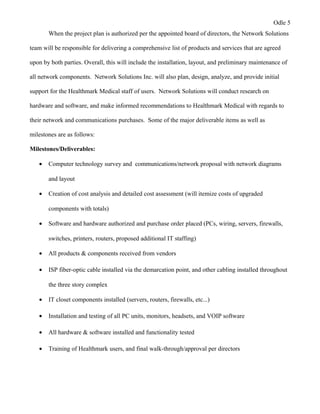
their network and communications purchases. Some of the major deliverable items as well as
milestones are as follows:
Milestones/Deliverables:
• Computer technology survey and communications/network proposal with network diagrams
and layout
• Creation of cost analysis and detailed cost assessment (will itemize costs of upgraded
components with totals)
• Software and hardware authorized and purchase order placed (PCs, wiring, servers, firewalls,
switches, printers, routers, proposed additional IT staffing)
• All products & components received from vendors
• ISP fiber-optic cable installed via the demarcation point, and other cabling installed throughout
the three story complex
• IT closet components installed (servers, routers, firewalls, etc...)
• Installation and testing of all PC units, monitors, headsets, and VOIP software
• All hardware & software installed and functionality tested
• Training of Healthmark users, and final walk-through/approval per directors
Odle 6
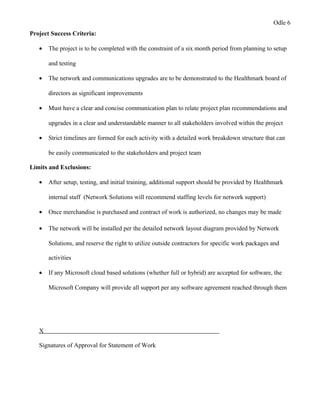
Project Success Criteria:
• The project is to be completed with the constraint of a six month period from planning to setup
and testing
• The network and communications upgrades are to be demonstrated to the Healthmark board of
directors as significant improvements
• Must have a clear and concise communication plan to relate project plan recommendations and
upgrades in a clear and understandable manner to all stakeholders involved within the project
• Strict timelines are formed for each activity with a detailed work breakdown structure that can
be easily communicated to the stakeholders and project team
Limits and Exclusions:
• After setup, testing, and initial training, additional support should be provided by Healthmark
internal staff (Network Solutions will recommend staffing levels for network support)
• Once merchandise is purchased and contract of work is authorized, no changes may be made
• The network will be installed per the detailed network layout diagram provided by Network
Solutions, and reserve the right to utilize outside contractors for specific work packages and
activities
• If any Microsoft cloud based solutions (whether full or hybrid) are accepted for software, the
Microsoft Company will provide all support per any software agreement reached through them
X
Signatures of Approval for Statement of Work
Odle 7
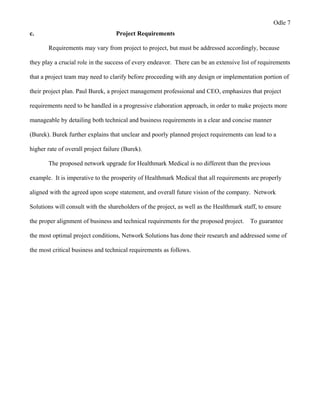
c. Project Requirements
Requirements may vary from project to project, but must be addressed accordingly, because
they play a crucial role in the success of every endeavor. There can be an extensive list of requirements
that a project team may need to clarify before proceeding with any design or implementation portion of
their project plan. Paul Burek, a project management professional and CEO, emphasizes that project
requirements need to be handled in a progressive elaboration approach, in order to make projects more
manageable by detailing both technical and business requirements in a clear and concise manner
(Burek). Burek further explains that unclear and poorly planned project requirements can lead to a
higher rate of overall project failure (Burek).
The proposed network upgrade for Healthmark Medical is no different than the previous
example. It is imperative to the prosperity of Healthmark Medical that all requirements are properly
aligned with the agreed upon scope statement, and overall future vision of the company. Network
Solutions will consult with the shareholders of the project, as well as the Healthmark staff, to ensure
the proper alignment of business and technical requirements for the proposed project. To guarantee
the most optimal project conditions, Network Solutions has done their research and addressed some of
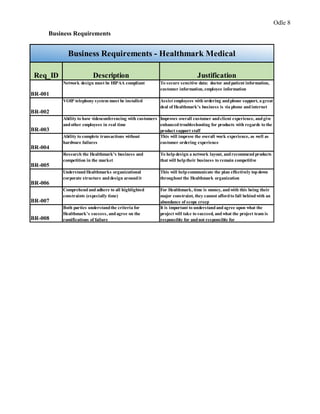
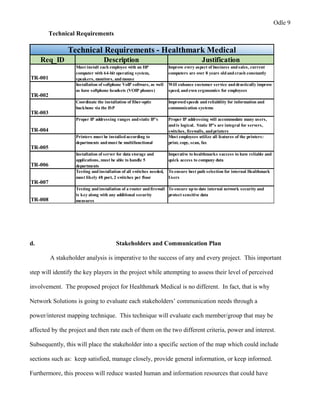
the most critical business and technical requirements as follows.
Odle 8
Business Requirements
Req_ID Description Justification
BR-001
Network design must be HIPAA compliant To secure sensitive data: doctor andpatient information,
customer information, employee information
BR-002
VOIP telephony system must be installed Assist employees with ordering andphone support, a great
deal of Healthmark's business is via phone and internet
BR-003
Ability to have videoconferencing with customers
andother employees in real time
Improves overall customer andclient experience, andgive
enhancedtroubleshooting for products with regards to the
product support staff
BR-004
Ability to complete transactions without
hardware failures
This will improve the overall work experience, as well as
customer ordering experience
BR-005
Research the Healthmark's business and
competition in the market
To helpdesign a network layout, andrecommendproducts
that will helptheir business to remain competitive
BR-006
UnderstandHealthmarks organizational
corporate structure anddesign aroundit
This will helpcommunicate the plan effectively topdown
throughout the Healthmark organization
BR-007
Comprehend and adhere to all highlighted
constraints (especially time)
For Healthmark, time is money, andwith this being their
major constraint, they cannot affordto fall behindwith an
abundance of scope creep
BR-008
Both parties understandthe criteria for
Healthmark's success, andagree on the
ramifications of failure
It is important to understandandagree upon what the
project will take to succeed, andwhat the project team is
responsible for andnot responsible for
Business Requirements - Healthmark Medical
Odle 9
Technical Requirements
Req_ID Description Justification
TR-001
Must install each employee with an HP
computer with 64-bit operating system,
speakers, monitors, andmouse
Improve every aspect of business andsales, current
computers are over 8 years oldandcrash constantly
TR-002
Installation of softphone VoIP software, as well
as have softphone headsets (VOIP phones)
Will enhance customer service anddrastically improve
speed, andeven ergonomics for employees
TR-003
Coordinate the installation of fiber-optic
backbone via the ISP
Improvedspeeds andreliability for information and
communication systems
TR-004
Proper IP addressing ranges andstatic IP's Proper IP addressing will accommodate many users,
andis logical. Static IP's are integral for servers,
switches, firewalls, andprinters
TR-005
Printers must be installedaccording to
departments andmust be multifunctional
Most employees utilize all features of the printers:
print, copy, scan, fax
TR-006
Installation of server for data storage and
applications, must be able to handle 5
departments
Imperative to healthmarks success to have reliable and
quick access to company data
TR-007
Testing andinstallation of all switches needed,
most likely 48 port, 2 switches per floor
To ensure best path selection for internal Healthmark
Users
TR-008
Testing andinstallation of a router andfirewall
is key along with any additional security
measures
To ensure upto date internal network security and
protect sensitive data
Technical Requirements - Healthmark Medical
d. Stakeholders and Communication Plan
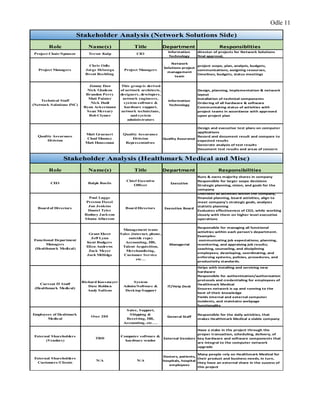
A stakeholder analysis is imperative to the success of any and every project. This important
step will identify the key players in the project while attempting to assess their level of perceived
involvement. The proposed project for Healthmark Medical is no different. In fact, that is why
Network Solutions is going to evaluate each stakeholders’ communication needs through a
power/interest mapping technique. This technique will evaluate each member/group that may be
affected by the project and then rate each of them on the two different criteria, power and interest.
Subsequently, this will place the stakeholder into a specific section of the map which could include
sections such as: keep satisfied, manage closely, provide general information, or keep informed.
Furthermore, this process will reduce wasted human and information resources that could have
Odle 10
otherwise been utilized in another aspect of the project. In any venture there may be different target
audience members and groups with different influences on the project in question. By assessing each
individual’s importance and needs, the project team is permitted to create a much more effective
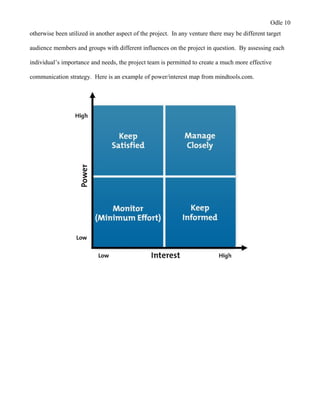
communication strategy. Here is an example of power/interest map from mindtools.com.
Odle 11
Role Name(s) Title Department Responsiblities
Project Chair/Sponsor Trevor Kulp CIO
Information
Technology
director of projects for Network Solutions
final approval,
Project Managers
Chris Odle
Jorge Delavega
Brent Rechling
Project Managers
Network
Solutions project
management
team
project scope, plan, analysis, budgets,
communications, assigning resourses,
timelines, budgets, status meetings
Technical Staff
(Network Solutions INC)
Jimmy Daw
Nick Gladson
Brandon Perry
Matt Painter
Nick Dodt
Ryan Ackermann
Sean Mcreary
Bob Clymer
This group is derived
of network architects,
designers, developers,
network engineers,
system software &
hardware support,
network technicians,
and system
administrators
Information
Technology
Design, planning, implementation & network
layout
Installation of technical components
Ordering of all hardware & software
Communicating status of activities with
project teams in accordance with approved
upon project plan
Quality Assurance
Division
Matt Gruenert
Chad Mooney
Matt Houseman
Quality Assurance
Division
Representatives
Quality Assurance
Design and executive test plans on computer
applications
Record and document result and compare to
expected results
Generate analysis of test results
Document test results and areas of concern
Role Name(s) Title Department Responsibilities
CEO Ralph Basile
Chief Executive
Officer
Executive
Runs & owns majority shares in company
Responsible for larger scope decisions
Strategic planning, vision, and goals for the
company
Board of Directors
Paul Lugge
Preston Fiesel
Jon Jenkins
Daniel Tyler
Rodney Jackson
Shana Alberson
Board Directors Executive Board
Oversees all activities within the company,
financial planning, board activities, align to
meet company's strategic goals, analyzes
statistic planning
Evaluates effectiveness of CEO, while working
closely with them on higher level executive
operations
Functional Department
Managers
(Healthmark Medical)
Grant Ehret
Jeff Lynn
Kent Rodgers
Ellen Andrews
Zack Meyer
Josh Millidge
Management team:
Sales (internet, phone,
outside reps)
Accounting, HR,
Talent Acquisition,
Merchandising,
Customer Service
etc…
Managerial
Responsible for managing all functional
activities within each person's department.
Examples:
communicating job expectations; planning,
monitoring, and appraising job results;
coaching, counseling, and disciplining
employees; developing, coordinating, and
enforcing systems, policies, procedures, and
productivity standards.
Current IT Staff
(Healthmark Medical)
Richard Kossmeyer
Dave Robben
Andy Sullens
System
Admin/Software &
Desktop Support
IT/Help Desk
Helps with installing and servicing new
hardware
Responsible for authentication/authorization
protocols and credentialing for employees of
Healthmark Medical
Ensures network is up and running to the
best of their knowledge
Fields internal and external computer
incidents, and maintains webpage
functionality
Employees of Healtmark
Medical
Over 200
Sales, Support,
Shipping &
Receiving, HR,
Accounting, etc….
General Staff
Responsible for the daily activities, that
makes Healthmark Medical a viable company
External Shareholders
(Vendors)
TBD
Computer software &
hardware vendor
External Vendors
Have a stake in the project through the
proper transaction, scheduling, delivery, of
key hardware and software components that
are integral to the computer network
upgrade
External Shareholders
Customers/Clients
N/A N/A
Doctors, patients,
hospitals, hospital
employees
Many people rely on Healthmark Medical for
their product and business needs, in turn,
they have an external share in the success of
this project
Stakeholder Analysis (Network Solutions Side)
Stakeholder Analysis (Healthmark Medical and Misc)
Odle 12
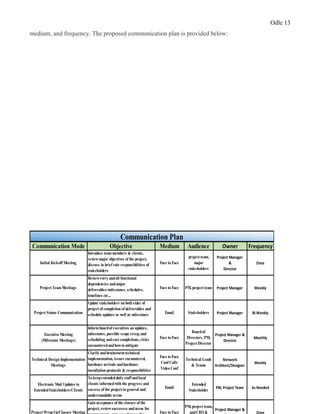
Following the clarification of an in-depth stakeholder analysis, Network Solutions plans to
further evaluate the best methods of disseminating information throughout the project's stakeholders by
the means of a well-structured communication plan. Erik Larson and Clifford Gray state that, "having a
robust communication plan can go a long way toward mitigating project problems and can ensure that
customer, team members, and other stakeholders have the information to do their jobs" (118). It is the
aim of Network Solutions to avoid project failure by coordinating and addressing the content of
information and methods of delivery for critical project updates and actionable items. Some of the key
areas of focus that may be addressed within the communication plan may be: audience, objective,
Odle 13
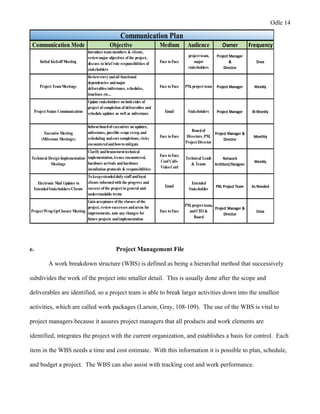
medium, and frequency. The proposed communication plan is provided below:
Communication Mode Objective Medium Audience Owner Frequency
Initial Kickoff Meeting
Introduce team members & clients,
reviewmajor objectives of the project,
discuss in brief role responsibilities of
stakeholders
Face to Face
project team,
major
stakeholders
Project Manager
&
Director
Once
Project TeamMeetings
Reviewevery andall functional
dependencies andmajor
deliverables/milestones, schedules,
timelines etc...
Face to Face PM, project team Project Manager Weekly
Project Status Communication
Update stakeholders on both sides of
project of completion of deliverables and
schedule updates as well as milestones Email Stakeholders Project Manager Bi-Weekly
Executive Meeting
(Milestone Meetings)
Informboardof executives on updates,
milestones, possible scope creep, and
scheduling andcost completions, risks
encounteredandhowto mitigate
Face to Face
Boardof
Directors, PM,
Project Director
Project Manager &
Director
Monthly
Technical Design Implementation
Meetings
Clarify andbrainstormtechnical
implementation, issues encountered,
hardware arrivals andhardware
installation protocols & responsibilities
Face to Face
Conf Calls
Video Conf
Technical Leads
& Teams
Network
Architect/Designer
Weekly
Electronic Mail Updates to
ExtendedStakeholders/Clients
To keepextendeddaily staff andloyal
clients informedwith the progress and
success of the project in general and
understandable terms
Email
Extended
Stakeholder
PM, Project Team As Needed
Project WrapUp/Closure Meeting
Gain acceptance of the closure of the
project, reviewsuccesses andareas for
Face to Face
PM, project team,
andCEO &
Project Manager &
Once
Communication Plan
Odle 14
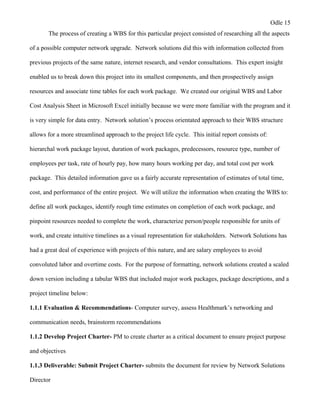
Communication Mode Objective Medium Audience Owner Frequency
Initial Kickoff Meeting
Introduce team members & clients,
reviewmajor objectives of the project,
discuss in brief role responsibilities of
stakeholders
Face to Face
project team,
major
stakeholders
Project Manager
&
Director
Once
Project TeamMeetings
Reviewevery andall functional
dependencies andmajor
deliverables/milestones, schedules,
timelines etc...
Face to Face PM, project team Project Manager Weekly
Project Status Communication
Update stakeholders on both sides of
project of completion of deliverables and
schedule updates as well as milestones Email Stakeholders Project Manager Bi-Weekly
Executive Meeting
(Milestone Meetings)
Informboardof executives on updates,
milestones, possible scope creep, and
scheduling andcost completions, risks
encounteredandhowto mitigate
Face to Face
Boardof
Directors, PM,
Project Director
Project Manager &
Director
Monthly
Technical Design Implementation
Meetings
Clarify andbrainstormtechnical
implementation, issues encountered,
hardware arrivals andhardware
installation protocols & responsibilities
Face to Face
Conf Calls
Video Conf
Technical Leads
& Teams
Network
Architect/Designer
Weekly
Electronic Mail Updates to
ExtendedStakeholders/Clients
To keepextendeddaily staff andloyal
clients informedwith the progress and
success of the project in general and
understandable terms
Email
Extended
Stakeholder
PM, Project Team As Needed
Project WrapUp/Closure Meeting
Gain acceptance of the closure of the
project, reviewsuccesses andareas for
improvements, note any changes for
future projects andimplementation
Face to Face
PM, project team,
andCEO &
Board
Project Manager &
Director
Once
Communication Plan
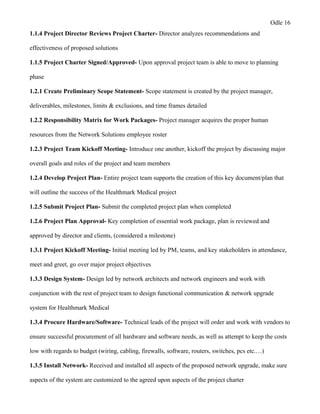
e. Project Management File
A work breakdown structure (WBS) is defined as being a hierarchal method that successively
subdivides the work of the project into smaller detail. This is usually done after the scope and
deliverables are identified, so a project team is able to break larger activities down into the smallest
activities, which are called work packages (Larson, Gray, 108-109). The use of the WBS is vital to
project managers because it assures project managers that all products and work elements are
identified, integrates the project with the current organization, and establishes a basis for control. Each
item in the WBS needs a time and cost estimate. With this information it is possible to plan, schedule,
and budget a project. The WBS can also assist with tracking cost and work performance.
Odle 15
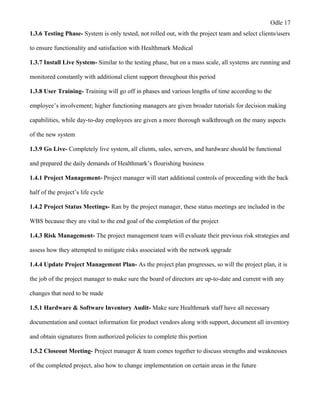
The process of creating a WBS for this particular project consisted of researching all the aspects
of a possible computer network upgrade. Network solutions did this with information collected from
previous projects of the same nature, internet research, and vendor consultations. This expert insight
enabled us to break down this project into its smallest components, and then prospectively assign
resources and associate time tables for each work package. We created our original WBS and Labor
Cost Analysis Sheet in Microsoft Excel initially because we were more familiar with the program and it
is very simple for data entry. Network solution’s process orientated approach to their WBS structure
allows for a more streamlined approach to the project life cycle. This initial report consists of:
hierarchal work package layout, duration of work packages, predecessors, resource type, number of
employees per task, rate of hourly pay, how many hours working per day, and total cost per work
package. This detailed information gave us a fairly accurate representation of estimates of total time,
cost, and performance of the entire project. We will utilize the information when creating the WBS to:
define all work packages, identify rough time estimates on completion of each work package, and
pinpoint resources needed to complete the work, characterize person/people responsible for units of
work, and create intuitive timelines as a visual representation for stakeholders. Network Solutions has
had a great deal of experience with projects of this nature, and are salary employees to avoid
convoluted labor and overtime costs. For the purpose of formatting, network solutions created a scaled
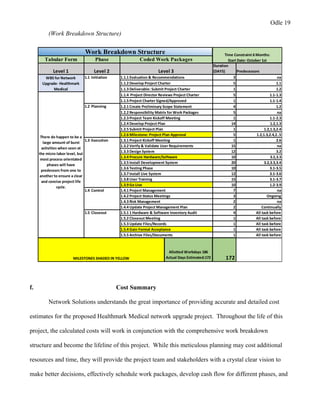
down version including a tabular WBS that included major work packages, package descriptions, and a
project timeline below:
1.1.1 Evaluation & Recommendations- Computer survey, assess Healthmark’s networking and
communication needs, brainstorm recommendations
1.1.2 Develop Project Charter- PM to create charter as a critical document to ensure project purpose
and objectives
1.1.3 Deliverable: Submit Project Charter- submits the document for review by Network Solutions
Director
Odle 16
1.1.4 Project Director Reviews Project Charter- Director analyzes recommendations and
effectiveness of proposed solutions
1.1.5 Project Charter Signed/Approved- Upon approval project team is able to move to planning
phase
1.2.1 Create Preliminary Scope Statement- Scope statement is created by the project manager,
deliverables, milestones, limits & exclusions, and time frames detailed
1.2.2 Responsibility Matrix for Work Packages- Project manager acquires the proper human
resources from the Network Solutions employee roster
1.2.3 Project Team Kickoff Meeting- Introduce one another, kickoff the project by discussing major
overall goals and roles of the project and team members
1.2.4 Develop Project Plan- Entire project team supports the creation of this key document/plan that
will outline the success of the Healthmark Medical project
1.2.5 Submit Project Plan- Submit the completed project plan when completed
1.2.6 Project Plan Approval- Key completion of essential work package, plan is reviewed and
approved by director and clients, (considered a milestone)
1.3.1 Project Kickoff Meeting- Initial meeting led by PM, teams, and key stakeholders in attendance,
meet and greet, go over major project objectives
1.3.3 Design System- Design led by network architects and network engineers and work with
conjunction with the rest of project team to design functional communication & network upgrade
system for Healthmark Medical
1.3.4 Procure Hardware/Software- Technical leads of the project will order and work with vendors to
ensure successful procurement of all hardware and software needs, as well as attempt to keep the costs
low with regards to budget (wiring, cabling, firewalls, software, routers, switches, pcs etc.…)
1.3.5 Install Network- Received and installed all aspects of the proposed network upgrade, make sure
aspects of the system are customized to the agreed upon aspects of the project charter
Odle 17
1.3.6 Testing Phase- System is only tested, not rolled out, with the project team and select clients/users
to ensure functionality and satisfaction with Healthmark Medical
1.3.7 Install Live System- Similar to the testing phase, but on a mass scale, all systems are running and
monitored constantly with additional client support throughout this period
1.3.8 User Training- Training will go off in phases and various lengths of time according to the
employee’s involvement; higher functioning managers are given broader tutorials for decision making
capabilities, while day-to-day employees are given a more thorough walkthrough on the many aspects
of the new system
1.3.9 Go Live- Completely live system, all clients, sales, servers, and hardware should be functional
and prepared the daily demands of Healthmark’s flourishing business
1.4.1 Project Management- Project manager will start additional controls of proceeding with the back
half of the project’s life cycle
1.4.2 Project Status Meetings- Ran by the project manager, these status meetings are included in the
WBS because they are vital to the end goal of the completion of the project
1.4.3 Risk Management- The project management team will evaluate their previous risk strategies and
assess how they attempted to mitigate risks associated with the network upgrade
1.4.4 Update Project Management Plan- As the project plan progresses, so will the project plan, it is
the job of the project manager to make sure the board of directors are up-to-date and current with any
changes that need to be made
1.5.1 Hardware & Software Inventory Audit- Make sure Healthmark staff have all necessary
documentation and contact information for product vendors along with support, document all inventory
and obtain signatures from authorized policies to complete this portion
1.5.2 Closeout Meeting- Project manager & team comes together to discuss strengths and weaknesses
of the completed project, also how to change implementation on certain areas in the future
Odle 18
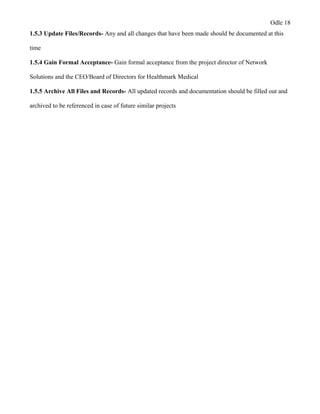
1.5.3 Update Files/Records- Any and all changes that have been made should be documented at this
time
1.5.4 Gain Formal Acceptance- Gain formal acceptance from the project director of Network
Solutions and the CEO/Board of Directors for Healthmark Medical
1.5.5 Archive All Files and Records- All updated records and documentation should be filled out and
archived to be referenced in case of future similar projects
Odle 19
(Work Breakdown Structure)
Tabular Form Phase
Level 1 Level 2
Duration
(DAYS) Predecessors
3 na
5 1.1
1 1.2
5 1.1-1.3
1 1.1-1.4
4 1.2
5 na
1 1.1-2.3
14 1.2,1.3
1 1.2,1.3,2.4
5 1.2,1.3,2.4,2..5
1 2.6
15 na
12 3.2
10 3.2,3.3
20 3.2,3.3,3.4
10 3.1-3.5
12 3.1-3.6
15 3.1-3.7
10 1.2-3.9
7 na
3 Ongoing
2 na
2 Continually
4 All task before
1 All task before
1 All task before
1 All task before
1 All task before
Allotted Workdays 186
Actual Days Estimated:172 172
1.3 Execution
1.4 Control
There do happen to be a
large amount of burst
activities when seen at
the micro-labor level, but
most process orientated
phases will have
predessors from one to
another to ensure a clear
and concise project life
cycle.
1.2.5 Submit Project Plan
Work Breakdown Structure
Coded Work Packages
WBS for Network
Upgrade- Healthmark
Medical
Level 3
1.1.1 Evaluation & Recommendations
1.1.2 Develop Project Charter
1.1.3 Deliverable: Submit Project Charter
1.1.4 Project Director Reviews Project Charter
1.1 Initiation
1.2 Planning
1.1.5 Project Charter Signed/Approved
1.2.1 Create Preliminary Scope Statement
1.2.2 Responsibility Matrix for Work Packages
1.2.3 Project Team Kickoff Meeting
1.2.4 Develop Project Plan
1.3.9 Go Live
1.4.1 Project Management
1.3.1 Project Kickoff Meeting
1.3.2 Verify & Validate User Requirements
1.3.3 Design System
1.3.4 Procure Hardware/Software
1.3.5 Install Development System
1.5.5 Archive Files/Documents
Time Constraint 6 Months:
Start Date: October 1st
1.4.3 Risk Management
1.4.4 Update Project Management Plan
1.5.1 1 Hardware & Software Inventory Audit
1.5.2 Closeout Meeting
1.5.3 Update Files/Records
1.5.4 Gain Formal Acceptance
1.3.6 Testing Phase
1.3.7 Install Live System
1.3.8 User Training
1.4.2 Project Status Meetings
1.2.6 Milestone: Project Plan Approval
MILESTONES SHADED IN YELLOW
1.5 Closeout
f. Cost Summary
Network Solutions understands the great importance of providing accurate and detailed cost
estimates for the proposed Healthmark Medical network upgrade project. Throughout the life of this
project, the calculated costs will work in conjunction with the comprehensive work breakdown
structure and become the lifeline of this project. While this meticulous planning may cost additional
resources and time, they will provide the project team and stakeholders with a crystal clear vision to
make better decisions, effectively schedule work packages, develop cash flow for different phases, and
Odle 20
will keep the project on course and within scope. It is imperative that the cost summary remains clear
and understandable for all stakeholders; therefore, additional technical requirements will be added in
further sections. All sections of the cost analysis have been researched from vendor websites and
referenced from previous projects to give an in depth account for cost estimations. All references can
be found in the works cited portion of the project plan.
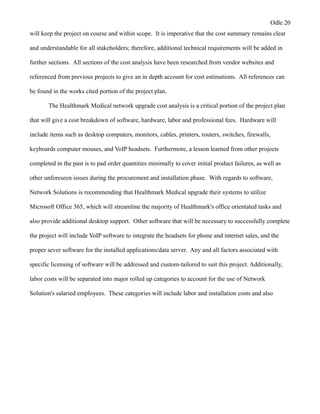
The Healthmark Medical network upgrade cost analysis is a critical portion of the project plan
that will give a cost breakdown of software, hardware, labor and professional fees. Hardware will
include items such as desktop computers, monitors, cables, printers, routers, switches, firewalls,
keyboards computer mouses, and VoIP headsets. Furthermore, a lesson learned from other projects
completed in the past is to pad order quantities minimally to cover initial product failures, as well as
other unforeseen issues during the procurement and installation phase. With regards to software,
Network Solutions is recommending that Healthmark Medical upgrade their systems to utilize
Microsoft Office 365, which will streamline the majority of Healthmark's office orientated tasks and
also provide additional desktop support. Other software that will be necessary to successfully complete
the project will include VoIP software to integrate the headsets for phone and internet sales, and the
proper sever software for the installed applications/data server. Any and all factors associated with
specific licensing of software will be addressed and custom-tailored to suit this project. Additionally,
labor costs will be separated into major rolled up categories to account for the use of Network
Solution's salaried employees. These categories will include labor and installation costs and also
Odle 21
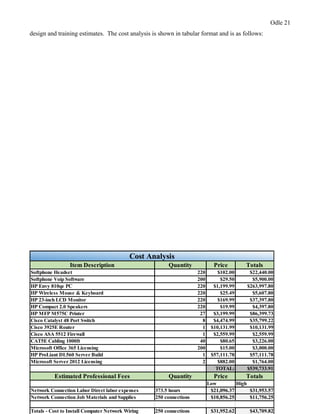
design and training estimates. The cost analysis is shown in tabular format and is as follows:
Item Description Quantity Price Totals
Softphone Headset 220 $102.00 $22,440.00
Softphone Voip Software 200 $29.50 $5,900.00
HP Envy 810qe PC 220 $1,199.99 $263,997.80
HP Wireless Mouse & Keyboard 220 $25.49 $5,607.80
HP 23-inch LCD Monitor 220 $169.99 $37,397.80
HP Compact 2.0 Speakers 220 $19.99 $4,397.80
HP MFP M575C Printer 27 $3,199.99 $86,399.73
Cisco Catalyst 48 Port Switch 8 $4,474.99 $35,799.22
Cisco 3925E Router 1 $10,131.99 $10,131.99
Cisco ASA 5512 Firewall 1 $2,559.99 $2,559.99
CAT5E Cabling 1000ft 40 $80.65 $3,226.00
Microsoft Office 365 Licensing 200 $15.00 $3,000.00
HP ProLiant DL560 Server Build 1 $57,111.78 $57,111.78
Microsoft Server 2012 Licensing 2 $882.00 $1,764.00
TOTAL: $539,733.91
Estimated Professional Fees Quantity Price Totals
Low High
Network Connection Labor Direct labor expenses 373.5 hours $21,096.37 $31,953.57
Network Connection Job Materials and Supplies 250 connections $10,856.25 $11,756.25
Totals - Cost to Install Computer Network Wiring 250 connections $31,952.62 $43,709.82
Cost Analysis
Odle 22
X
Signatures of Approval for Cost Analysis
g. Technical Implementation Approach
For the purpose of clarity, Network Solutions has chosen to split this section into more clear
and manageable subsections. This approach will systematically define and expand on the strategic
choices that were made throughout the planning of the project, as well as describe the hardware,
software, security, and the different technologies that will be implemented to reach the agreed upon
goals for the Healthmark network upgrade. A detailed custom built network diagram will also be
designed by our network engineer so that all stakeholders may easily visualize the intended result of the
project.
Demarcation Point: A demarcation point, or demarc, is the point of division between the internet
service provider’s (ISP) network, and Healthmark Medical’s computer and communication network.
Fiber-optic cable is being provided and installed by the local ISP and will be installed externally
completing the connection to the secure data center. Some of the reasons network solution chose fiber
optic cabling for the demarcation connection is:
• Digital signals: Optical fibers are ideally suited for carrying digital information, which is
especially useful in computer networks.
• Higher carrying capacity: Because optical fibers are thinner than copper wires, more fibers can
be bundled into a given-diameter cable than copper wires. This allows more phone lines to go
over the same cable or more channels to come through the cable into your business or home
• Less signal degradation: The loss of signal in optical fiber is less than in copper wire.
• Thinner: Optical fibers can be drawn to smaller diameters than copper wire.
Odle 23
• Light signals: Unlike electrical signals in copper wires, light signals from one fiber do not
interfere with those of other fibers in the same cable. This means clearer phone conversations or
TV reception.
• Low power: Because signals in optical fibers degrade less, lower-power transmitters can be
used instead of the high-voltage electrical transmitters needed for copper wires. Again, this
saves your provider and you money (researchgate.net).
Network Backbone: This is the part of the installed network which segments and interconnects
significant shared devices, while taking on the majority of the network traffic. Network Solutions
plans to install and utilize a hybrid star-wired bus topology stacking 48 port switches from floor to
floor, resulting in a simple distributed backbone. This setup is ideal for its ease of use, as well as the
network’s scalability.
IP Addressing: Proper IP addressing with regards to network design, can be critical when attempting
to design the Healthmark Medical network. IP addressing will effectively ensure proper
communication between devices, as well as assist in the proper transportation of important data packets
throughout the network. Network designers and architects will map out and analyze the best solution
for the proposed network architecture.
◦ Gateway: 10.12.1.1/24
◦ Subnet Mask: 255.255.255.0
◦ Range was chosen due to size needs
◦ Static IP's delegated to server, switches, firewall, and printers to make them easily accessible,
all other workstations will be DHCP for ease of use
Server: For the server, amongst other hardware, Network Solutions will procure a custom built server
that will be ordered through CDW.com. They have reliable products, along with superior customer
Odle 24
service. The choice to purchase the customized server might be a larger cost upfront, but over time will
enable Healthmark Medical to cut costs dramatically via centralizing most of their computer and data
needs in-house. The specified server will be designated to run software applications associated with
the functions of the separate departments of the company, as well as retain sensitive company and
client data. An additional benefit could also be the reduced risks of security threats. Network
Solutions will install and configure all hardware and software associated with the server. Additional
servers will be outsourced virtually through Microsoft Office 365 for miscellaneous office related tasks
such as email, online conferencing, admin, active directory, non- sensitive file storage if needed. Here
is a description of the proposed in house server below with item number and a rough overview from
CDW.com.
HP Proliant D560 Server
The HP ProLiant DL560 Gen8 server, latest server in the ProLiant Scale-up x86 portfolio, that
redefines density-optimized 4-socket rack server technology without compromising on performance,
scalability, and expandability. Built on the latest Gen8 innovative and intuitive hardware and software
features and supporting the new high-density and cost effective Intel Xeon E5-4600v2 processors, the
DL560 Gen8 is ideal for virtualization, server consolidation, database, business processing, and general
Odle 25
4P data-intensive applications where optimization of data center space and price/performance is
paramount (CDW.com)
Main Features
• Server
• rack-mountable
• 2U
• 4-way
• 4 x Xeon E5-4640 / 2.4 GHz
• RAM 64 GB
• SAS
• hot-swap 2.5"
• no HDD
• Matrox G200
• GigE
• 10 GigE
Switches: The network architecture will end up supporting 6 managed switches total per the entire
building. These will be stacked 2 per floor and linked with CAT5E cabling to individual drops to
connect each work station and device to the network. We chose 48 port switches to handle the amount
of users per floor, while having a large amount of scalability in the future. Here is a description of the
switches that will be used from (CDW.com).
Odle 26
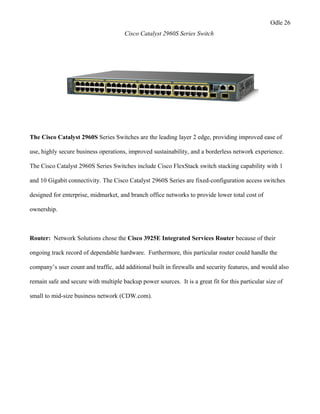
Cisco Catalyst 2960S Series Switch
The Cisco Catalyst 2960S Series Switches are the leading layer 2 edge, providing improved ease of
use, highly secure business operations, improved sustainability, and a borderless network experience.
The Cisco Catalyst 2960S Series Switches include Cisco FlexStack switch stacking capability with 1
and 10 Gigabit connectivity. The Cisco Catalyst 2960S Series are fixed-configuration access switches
designed for enterprise, midmarket, and branch office networks to provide lower total cost of
ownership.
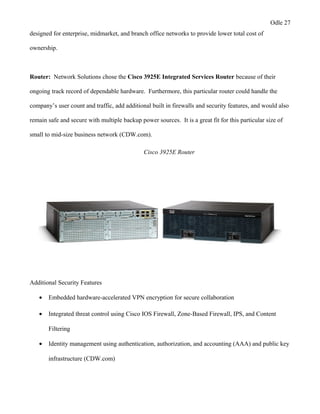
Router: Network Solutions chose the Cisco 3925E Integrated Services Router because of their
ongoing track record of dependable hardware. Furthermore, this particular router could handle the
company’s user count and traffic, add additional built in firewalls and security features, and would also
remain safe and secure with multiple backup power sources. It is a great fit for this particular size of
small to mid-size business network (CDW.com).
Odle 27
designed for enterprise, midmarket, and branch office networks to provide lower total cost of
ownership.
Router: Network Solutions chose the Cisco 3925E Integrated Services Router because of their
ongoing track record of dependable hardware. Furthermore, this particular router could handle the
company’s user count and traffic, add additional built in firewalls and security features, and would also
remain safe and secure with multiple backup power sources. It is a great fit for this particular size of
small to mid-size business network (CDW.com).
Cisco 3925E Router
Additional Security Features
• Embedded hardware-accelerated VPN encryption for secure collaboration
• Integrated threat control using Cisco IOS Firewall, Zone-Based Firewall, IPS, and Content
Filtering
• Identity management using authentication, authorization, and accounting (AAA) and public key
infrastructure (CDW.com)
Odle 28
Firewall: A proper firewall, in combination with the added security measures of our Cisco router, will
be the frontline against threats on our newly created network. Without substantial security measures,
Healthmark Medical could stand to lose a great deal. Network Solutions will integrate a Cisco ASA
5500-X firewall as the frontline against intrusions, malware, and a slew of other miscellaneous threats.
This firewall is perfect for small to mid-size businesses and provides VPN and URL filtering, and is
also very scalable.
Cisco ASA 5500-X Firewall
(From Cisco) The Cisco ASA 5500-X Series Next-Generation Firewalls help you to balance security
effectiveness with productivity. This solution offers the combination of the industry's most deployed
firewall with a comprehensive range of next-generation network security services, including:
•Granular visibility and control
•Robust web security onsite or in the cloud
•Industry-leading intrusion prevention system (IPS) to protect against known threats
•Comprehensive protection from threats and advanced malware
•World's most widely deployed ASA firewall with highly secure Cisco AnyConnect remote access
(Cisco.com)
Odle 29
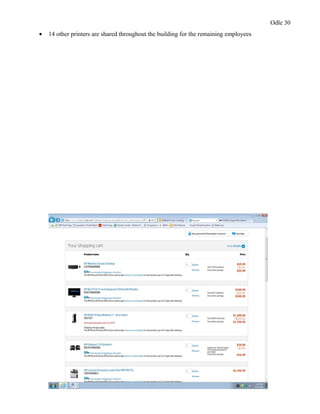
Desktop Computers/Printers/Additional Hardware: All of these items will be installed once the
backbone of the network is setup, and wiring and drops are in place. At the bottom of this section there
will also be a screen shot of all basic hardware items and cabling, along with software considerations.
All items will be sourced and ordered from Hewlett Packard’s website.
• Each employee will be supplied an HP desktop computer system running Windows 7 64-bit OS
• Speaker system, LCD monitor, and keyboard and mouse also provided
• Each PC will be setup to run softphone software as well as have softphone headsets included as
a replacement for their POTS phones
• 27 printers total per 3 story building
• All are multifunctional machines (print, fax, copy, scan)
• 13 printers are private for higher level employees and departments
Odle 30
• 14 other printers are shared throughout the building for the remaining employees
Odle 31
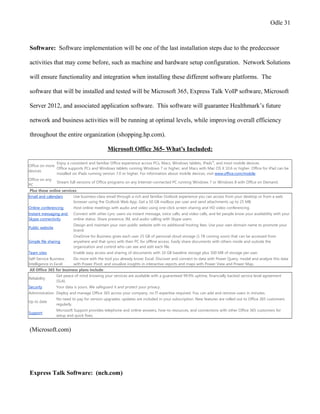
Software: Software implementation will be one of the last installation steps due to the predecessor
activities that may come before, such as machine and hardware setup configuration. Network Solutions
will ensure functionality and integration when installing these different software platforms. The
software that will be installed and tested will be Microsoft 365, Express Talk VoIP software, Microsoft
Server 2012, and associated application software. This software will guarantee Healthmark’s future
network and business activities will be running at optimal levels, while improving overall efficiency
throughout the entire organization (shopping.hp.com).
Microsoft Office 365- What’s Included:
Office on more
devices
Enjoy a consistent and familiar Office experience across PCs, Macs, Windows tablets, iPads®
, and most mobile devices.
Office supports PCs and Windows tablets running Windows 7 or higher, and Macs with Mac OS X 10.6 or higher. Office for iPad can be
installed on iPads running version 7.0 or higher. For information about mobile devices, visit www.office.com/mobile.
Office on any
PC
Stream full versions of Office programs on any Internet-connected PC running Windows 7 or Windows 8 with Office on Demand.
Plus these online services:
Email and calendars Use business-class email through a rich and familiar Outlook experience you can access from your desktop or from a web
browser using the Outlook Web App. Get a 50 GB mailbox per user and send attachments up to 25 MB.
Online conferencing Host online meetings with audio and video using one-click screen sharing and HD video conferencing.
Instant messaging and
Skype connectivity
Connect with other Lync users via instant message, voice calls, and video calls, and let people know your availability with your
online status. Share presence, IM, and audio calling with Skype users.
Public website
Design and maintain your own public website with no additional hosting fees. Use your own domain name to promote your
brand.
Simple file sharing
OneDrive for Business gives each user 25 GB of personal cloud storage (1 TB coming soon) that can be accessed from
anywhere and that syncs with their PC for offline access. Easily share documents with others inside and outside the
organization and control who can see and edit each file.
Team sites Enable easy access and sharing of documents with 10 GB baseline storage plus 500 MB of storage per user.
Self-Service Business
Intelligence in Excel
Do more with the tool you already know: Excel. Discover and connect to data with Power Query, model and analyze this data
with Power Pivot, and visualize insights in interactive reports and maps with Power View and Power Map.
All Office 365 for business plans include:
Reliability
Get peace of mind knowing your services are available with a guaranteed 99.9% uptime, financially backed service level agreement
(SLA).
Security Your data is yours. We safeguard it and protect your privacy.
Administration Deploy and manage Office 365 across your company, no IT expertise required. You can add and remove users in minutes.
Up to date
No need to pay for version upgrades; updates are included in your subscription. New features are rolled out to Office 365 customers
regularly.
Support
Microsoft Support provides telephone and online answers, how-to resources, and connections with other Office 365 customers for
setup and quick fixes.
(Microsoft.com)
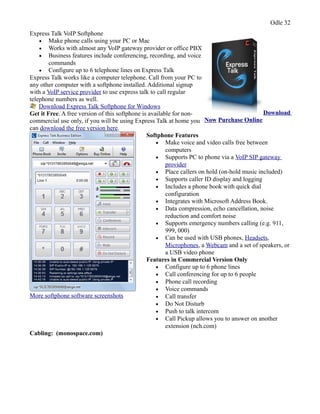
Express Talk Software: (nch.com)
Odle 32
Express Talk VoIP Softphone
• Make phone calls using your PC or Mac
• Works with almost any VoIP gateway provider or office PBX
• Business features include conferencing, recording, and voice
commands
• Configure up to 6 telephone lines on Express Talk
Express Talk works like a computer telephone. Call from your PC to
any other computer with a softphone installed. Additional signup
with a VoIP service provider to use express talk to call regular
telephone numbers as well.
Download Express Talk Softphone for Windows
Get it Free. A free version of this softphone is available for non-
commercial use only, if you will be using Express Talk at home you
can download the free version here.
Download
Now Purchase Online
More softphone software screenshots
Softphone Features
• Make voice and video calls free between
computers
• Supports PC to phone via a VoIP SIP gateway
provider
• Place callers on hold (on-hold music included)
• Supports caller ID display and logging
• Includes a phone book with quick dial
configuration
• Integrates with Microsoft Address Book.
• Data compression, echo cancellation, noise
reduction and comfort noise
• Supports emergency numbers calling (e.g. 911,
999, 000)
• Can be used with USB phones, Headsets,
Microphones, a Webcam and a set of speakers, or
a USB video phone
Features in Commercial Version Only
• Configure up to 6 phone lines
• Call conferencing for up to 6 people
• Phone call recording
• Voice commands
• Call transfer
• Do Not Disturb
• Push to talk intercom
• Call Pickup allows you to answer on another
extension (nch.com)
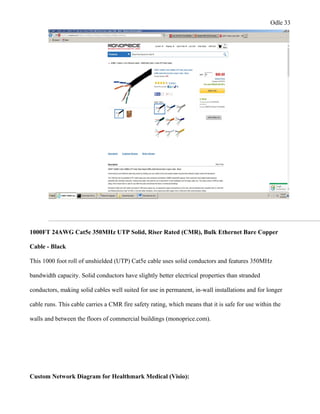
Cabling: (monospace.com)
Odle 33
1000FT 24AWG Cat5e 350MHz UTP Solid, Riser Rated (CMR), Bulk Ethernet Bare Copper
Cable - Black
This 1000 foot roll of unshielded (UTP) Cat5e cable uses solid conductors and features 350MHz
bandwidth capacity. Solid conductors have slightly better electrical properties than stranded
conductors, making solid cables well suited for use in permanent, in-wall installations and for longer
cable runs. This cable carries a CMR fire safety rating, which means that it is safe for use within the
walls and between the floors of commercial buildings (monoprice.com).
Custom Network Diagram for Healthmark Medical (Visio):
Odle 34
1st
Floor network diagram has detailed the demarcation point in the top right corner, along with
the data center/IT room. This room will consist of the server, router, firewall, and 2 base switches.
There are also parallel smaller IT closets in the same position on each level of the building to provide
easier access to important hardware. This diagram shows how Network Solutions plans to interconnect
workstations and also who has privileges over shard devices and printers.
Odle 35
2nd
and 3rd
floor diagrams simply illustrate the plan to stack multiple 48 port cisco switches and
run CAT5E drops down to each workstation and additional device. There is space for all employee
departments, as well as conference rooms, restrooms, and executive offices.
Odle 36
h. Risks/Concerns
Project Related
A risk is an uncertain event or condition that, if it occurs, has a positive or negative effect on
project objectives (Larson, Gray 205). It is the goal of Network Solutions to identify and assess these
risks, so that the project team is able to plan for possible events that may affect the project's life cycle.
The risk management strategy will identify as many project orientated risks as possible, while
minimizing their impact and also detailing responses that may happen to materialize. This section will
Odle 37
analyze some of the various risks and concerns associated with this network upgrade, and categorize
these as: project related, legal/regulatory, security, and privacy.
Network Solutions had multiple brainstorming meetings and reviewed lessons learned from
previous projects of this nature to construct a well-organized risk assessment plan. With any project, it
is imperative to address these risks and concerns early; therefore, enabling the team to foresee
triggering events that will lead to the materialization of these risks. There are a variety of approaches
to risks once they have been identified such as mitigating, avoiding, transferring, sharing, or retaining.
For the purpose of this project, the project team chose to gravitate towards a risk mitigation strategy,
which enabled Network Solutions to prepare for these occurrences, or to at least reduce the impacts of
these risks. Some of the associated project related risks and mitigation strategies can be found in the
accompanied chart.
Odle 38
Likelihood Impact
1 (rare)-5 (very
probable)
1 (rare)-5 (very
probable)
Design errors and
omissions 3 5
Made sure there is clear communication of design plans and
identifiable/agreeable scope requirements
Stakeholders request
changes 3 3
Have reviewedandagreedupon terms anddeliverables with minimal changes,
explain the severity of scope creepto stakeholders
Laws andLocal
standards change 1 4
Stay upto date on regulations for network upgrade andparameters for this
industry
Environmental Issues 1 2
Very unlikely environmental factors will affect this project
Inexperiencedproject
team 1 4
Only use experiencedstaffing, andrequire the same from our participating
vendors
Delayedproduct
orders 4 3
Ensure proper/trustworthy vendor relations andhave backup plans
Injuries during
installation 1 3
Make sure all safety standards are being adheredto
Scheduling error and
delays 3 4
Communication plan controls set in place to deter scheduling conflicts, detailed
WBS
Project team conflicts 2 3
Team meetings where individuals can voice their input andfeelings, choose team
members that compliment one another andcreate andpromote positive team
synergy
Cost estimate issues 2 4
Make sure of ongoing flowof accurate estimates andexpectations between
shareholders, vendors, andproject management team
Issues with diagrams
or blueprints 1 2
Do extremely thorough site survey andinterviewcurrent IT staff to investigate
further to discover any surprises with the network plan
Scope Creep(Time) 4 4
Create and agree upon accurate andattainable expectations anddeliverables with
limitations on last minute changes
Hardware//Software
Problems 4 3
Researchedall compatibility requirements andreviewedsuch criteria with all
vendor managers, inquired into warranties andadditional product support to
integrate to network upgrades
Project Related Risk Assessment
Risk Events
Identified
Mitigation Strategy
-
Odle 39
-
Legal/Regulatory
Portions of Healthmark Medical's business can be extremely regulated, as it can be seen that
they are a medical sales company with important patient and client data. They have done an excellent
job with their policies and practices in the past, which has solidified them as a compliant and trusted
organization. Healthmark Medical adheres to various regulatory requirements such as Stark, Anti-
Kickback laws, HIPAA, and other miscellaneous privacy issues regarding the medical field. Even
before the proposed Network Solutions upgrade project, Heathmark was implementing compliance and
HIPAA training, along with non-disclosure agreements issued to their employees that handle sensitive
data. To remain compliant no major changes will take place to their already proven compliance and
privacy plan.
Security
Due to the sensitive nature of Healthmark's data, security is of the utmost importance to the
organization. Any type of breach or sensitive data loss could be detrimental to the company's long-
standing reputation, while incurring damaging financial losses. Network Solutions will configure and
test every aspect of firewalls, servers, routers, and run an internal network audit to ensure that the
network is secured. Any information that could be seen as confidential will be stored and secured
directly on Healthmark's internal data server. For non-sensitive data and normal office tasks,
Healthmark will help integrate Microsoft Office 365. This service is supported through Microsoft and
has various security features that accompany the software. Numerous security features provided by
Microsoft can be found detailed below, along with additional hardware security measures
(Microsoft.com).
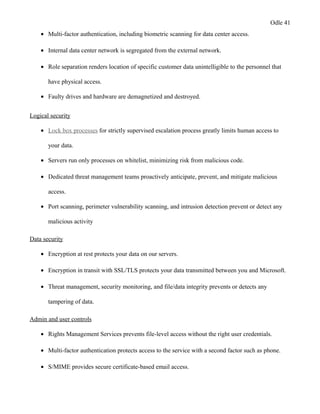
Physical security
• 24-hour monitoring of data centers.
Odle 40
-
Legal/Regulatory
Portions of Healthmark Medical's business can be extremely regulated, as it can be seen that
they are a medical sales company with important patient and client data. They have done an excellent
job with their policies and practices in the past, which has solidified them as a compliant and trusted
organization. Healthmark Medical adheres to various regulatory requirements such as Stark, Anti-
Kickback laws, HIPAA, and other miscellaneous privacy issues regarding the medical field. Even
before the proposed Network Solutions upgrade project, Heathmark was implementing compliance and
HIPAA training, along with non-disclosure agreements issued to their employees that handle sensitive
data. To remain compliant no major changes will take place to their already proven compliance and
privacy plan.
Security
Due to the sensitive nature of Healthmark's data, security is of the utmost importance to the
organization. Any type of breach or sensitive data loss could be detrimental to the company's long-
standing reputation, while incurring damaging financial losses. Network Solutions will configure and
test every aspect of firewalls, servers, routers, and run an internal network audit to ensure that the
network is secured. Any information that could be seen as confidential will be stored and secured
directly on Healthmark's internal data server. For non-sensitive data and normal office tasks,
Healthmark will help integrate Microsoft Office 365. This service is supported through Microsoft and
has various security features that accompany the software. Numerous security features provided by
Microsoft can be found detailed below, along with additional hardware security measures
(Microsoft.com).
Physical security
• 24-hour monitoring of data centers.
Odle 41
• Multi-factor authentication, including biometric scanning for data center access.
• Internal data center network is segregated from the external network.
• Role separation renders location of specific customer data unintelligible to the personnel that
have physical access.
• Faulty drives and hardware are demagnetized and destroyed.
Logical security
• Lock box processes for strictly supervised escalation process greatly limits human access to
your data.
• Servers run only processes on whitelist, minimizing risk from malicious code.
• Dedicated threat management teams proactively anticipate, prevent, and mitigate malicious
access.
• Port scanning, perimeter vulnerability scanning, and intrusion detection prevent or detect any
malicious activity
Data security
• Encryption at rest protects your data on our servers.
• Encryption in transit with SSL/TLS protects your data transmitted between you and Microsoft.
• Threat management, security monitoring, and file/data integrity prevents or detects any
tampering of data.
Admin and user controls
• Rights Management Services prevents file-level access without the right user credentials.
• Multi-factor authentication protects access to the service with a second factor such as phone.
• S/MIME provides secure certificate-based email access.
Odle 42
• Office 365 Message Encryption allows you to send encrypted email to anyone.
• Data loss prevention prevents sensitive data from leaking either inside or outside the
organization.
• Data loss prevention can be combined with Rights Management and Office 365 Message
Encryption to give greater controls to your admins to apply appropriate policies to protect
sensitive data.
(products.office.com)
Additional Hardware Security (Firewall/Router)
• SecurityEmbedded hardware-accelerated VPN encryption for secure collaboration
• Integrated threat control using Cisco IOS Firewall, Zone-Based Firewall, IPS, and Content
Filtering
• Identity management using authentication, authorization, and accounting (AAA) and public key
infrastructure
• Exceptional next-generation firewall services provide the visibility and detailed control that
your enterprise needs to safely take advantage of new applications and devices.[1]
• Cisco AVC controls specific behaviors within allowed microapplications.
• Cisco Web Security Essentials (WSE) restricts web and web application use based on the
reputation of a site.
• Broad and deep network security through an array of integrated cloud- and software-based next-
generation firewall services is backed by Cisco Security Intelligence Operations (SIO).
• A highly effective intrusion prevention system (IPS) is provided with Cisco Global Correlation.
• A high-performance VPN and always-on remote access are included.
Odle 43
• Additional security services can be implemented quickly and easily in response to changing
needs.
(Cisco.com)
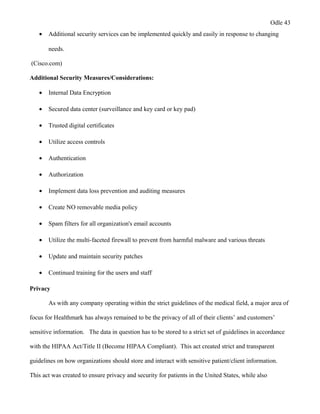
Additional Security Measures/Considerations:
• Internal Data Encryption
• Secured data center (surveillance and key card or key pad)
• Trusted digital certificates
• Utilize access controls
• Authentication
• Authorization
• Implement data loss prevention and auditing measures
• Create NO removable media policy
• Spam filters for all organization's email accounts
• Utilize the multi-faceted firewall to prevent from harmful malware and various threats
• Update and maintain security patches
• Continued training for the users and staff
Privacy
As with any company operating within the strict guidelines of the medical field, a major area of
focus for Healthmark has always remained to be the privacy of all of their clients’ and customers’
sensitive information. The data in question has to be stored to a strict set of guidelines in accordance
with the HIPAA Act/Title II (Become HIPAA Compliant). This act created strict and transparent
guidelines on how organizations should store and interact with sensitive patient/client information.
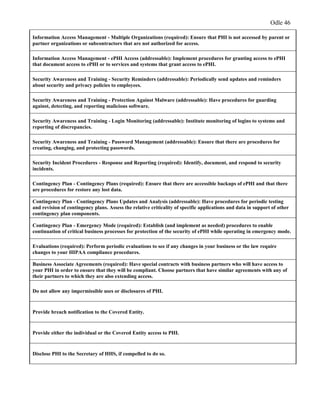
This act was created to ensure privacy and security for patients in the United States, while also
Odle 44
providing opportunities for medical organizations to acquire more technologically savvy means of
assisting their patients/clients (Become HIPAA Compliant). To become compliant an entity must meet
certain criteria with regards to a few specific points of interest: privacy, security, enforcement, and
breach notification. Below are some key points and guidelines of this act, and Network Solutions
compliance and risk mitigation recommendations. These key areas will make the organization
compliant, as well as ensuring their customers’ privacy remains intact for years to come.
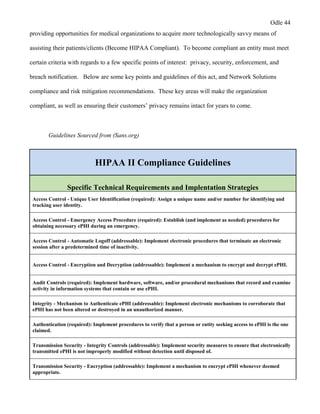
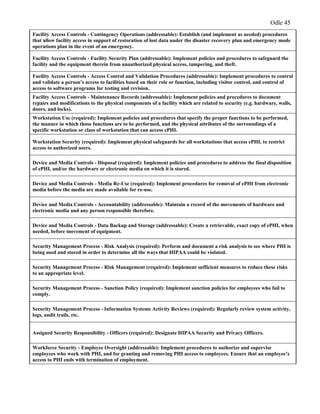
Guidelines Sourced from (Sans.org)
HIPAA II Compliance Guidelines
Specific Technical Requirements and Implentation Strategies
Access Control - Unique User Identification (required): Assign a unique name and/or number for identifying and
tracking user identity.
Access Control - Emergency Access Procedure (required): Establish (and implement as needed) procedures for
obtaining necessary ePHI during an emergency.
Access Control - Automatic Logoff (addressable): Implement electronic procedures that terminate an electronic
session after a predetermined time of inactivity.
Access Control - Encryption and Decryption (addressable): Implement a mechanism to encrypt and decrypt ePHI.
Audit Controls (required): Implement hardware, software, and/or procedural mechanisms that record and examine
activity in information systems that contain or use ePHI.
Integrity - Mechanism to Authenticate ePHI (addressable): Implement electronic mechanisms to corroborate that
ePHI has not been altered or destroyed in an unauthorized manner.
Authentication (required): Implement procedures to verify that a person or entity seeking access to ePHI is the one
claimed.
Transmission Security - Integrity Controls (addressable): Implement security measures to ensure that electronically
transmitted ePHI is not improperly modified without detection until disposed of.
Transmission Security - Encryption (addressable): Implement a mechanism to encrypt ePHI whenever deemed
appropriate.
Odle 45
Facility Access Controls - Contingency Operations (addressable): Establish (and implement as needed) procedures
that allow facility access in support of restoration of lost data under the disaster recovery plan and emergency mode
operations plan in the event of an emergency.
Facility Access Controls - Facility Security Plan (addressable): Implement policies and procedures to safeguard the
facility and the equipment therein from unauthorized physical access, tampering, and theft.
Facility Access Controls - Access Control and Validation Procedures (addressable): Implement procedures to control
and validate a person’s access to facilities based on their role or function, including visitor control, and control of
access to software programs for testing and revision.
Facility Access Controls - Maintenance Records (addressable): Implement policies and procedures to document
repairs and modifications to the physical components of a facility which are related to security (e.g. hardware, walls,
doors, and locks).
Workstation Use (required): Implement policies and procedures that specify the proper functions to be performed,
the manner in which those functions are to be performed, and the physical attributes of the surroundings of a
specific workstation or class of workstation that can access ePHI.
Workstation Security (required): Implement physical safeguards for all workstations that access ePHI, to restrict
access to authorized users.
Device and Media Controls - Disposal (required): Implement policies and procedures to address the final disposition
of ePHI, and/or the hardware or electronic media on which it is stored.
Device and Media Controls - Media Re-Use (required): Implement procedures for removal of ePHI from electronic
media before the media are made available for re-use.
Device and Media Controls - Accountability (addressable): Maintain a record of the movements of hardware and
electronic media and any person responsible therefore.
Device and Media Controls - Data Backup and Storage (addressable): Create a retrievable, exact copy of ePHI, when
needed, before movement of equipment.
Security Management Process - Risk Analysis (required): Perform and document a risk analysis to see where PHI is
being used and stored in order to determine all the ways that HIPAA could be violated.
Security Management Process - Risk Management (required): Implement sufficient measures to reduce these risks
to an appropriate level.
Security Management Process - Sanction Policy (required): Implement sanction policies for employees who fail to
comply.
Security Management Process - Information Systems Activity Reviews (required): Regularly review system activity,
logs, audit trails, etc.
Assigned Security Responsibility - Officers (required): Designate HIPAA Security and Privacy Officers.
Workforce Security - Employee Oversight (addressable): Implement procedures to authorize and supervise
employees who work with PHI, and for granting and removing PHI access to employees. Ensure that an employee’s
access to PHI ends with termination of employment.
Odle 46
Information Access Management - Multiple Organizations (required): Ensure that PHI is not accessed by parent or
partner organizations or subcontractors that are not authorized for access.
Information Access Management - ePHI Access (addressable): Implement procedures for granting access to ePHI
that document access to ePHI or to services and systems that grant access to ePHI.
Security Awareness and Training - Security Reminders (addressable): Periodically send updates and reminders
about security and privacy policies to employees.
Security Awareness and Training - Protection Against Malware (addressable): Have procedures for guarding
against, detecting, and reporting malicious software.
Security Awareness and Training - Login Monitoring (addressable): Institute monitoring of logins to systems and
reporting of discrepancies.
Security Awareness and Training - Password Management (addressable): Ensure that there are procedures for
creating, changing, and protecting passwords.
Security Incident Procedures - Response and Reporting (required): Identify, document, and respond to security
incidents.
Contingency Plan - Contingency Plans (required): Ensure that there are accessible backups of ePHI and that there
are procedures for restore any lost data.
Contingency Plan - Contingency Plans Updates and Analysis (addressable): Have procedures for periodic testing
and revision of contingency plans. Assess the relative criticality of specific applications and data in support of other
contingency plan components.
Contingency Plan - Emergency Mode (required): Establish (and implement as needed) procedures to enable
continuation of critical business processes for protection of the security of ePHI while operating in emergency mode.
Evaluations (required): Perform periodic evaluations to see if any changes in your business or the law require
changes to your HIPAA compliance procedures.
Business Associate Agreements (required): Have special contracts with business partners who will have access to
your PHI in order to ensure that they will be compliant. Choose partners that have similar agreements with any of
their partners to which they are also extending access.
Do not allow any impermissible uses or disclosures of PHI.
Provide breach notification to the Covered Entity.
Provide either the individual or the Covered Entity access to PHI.
Disclose PHI to the Secretary of HHS, if compelled to do so.
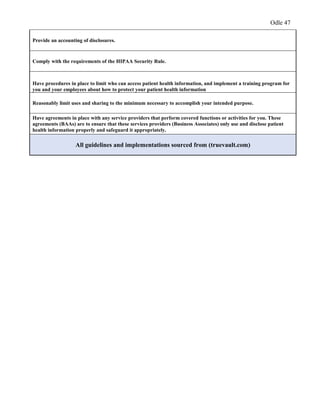
Odle 47
Provide an accounting of disclosures.
Comply with the requirements of the HIPAA Security Rule.
Have procedures in place to limit who can access patient health information, and implement a training program for
you and your employees about how to protect your patient health information
Reasonably limit uses and sharing to the minimum necessary to accomplish your intended purpose.
Have agreements in place with any service providers that perform covered functions or activities for you. These
agreements (BAAs) are to ensure that these services providers (Business Associates) only use and disclose patient
health information properly and safeguard it appropriately.
All guidelines and implementations sourced from (truevault.com)
Odle 48
Works Cited
Burek, Paul. "Creating Clear Project Requirements." Pmi.org. N.p., n.d. Web. 2 Aug. 2015.
"Cisco ASA 5500-X Series Next-Generation Firewalls - Products & Services." Cisco. N.p., n.d.
Web. 16 Aug. 2015.
Cook, Liz. "Stakeholder Analysis: Winning Support for Your Projects." Stakeholder Analysis.
N.p., n.d. Web. 16 Sept. 2015.
"HDMI Cable, Home Theater Accessories, HDMI Products, Cables, Adapters, Video/Audio
Switch, Networking, USB, Firewire, Printer Toner, and More! - Monoprice.com." HDMI
Cable, Home Theater Accessories, HDMI Products, Cables, Adapters, Video/Audio
Switch, Networking, USB, Firewire, Printer Toner, and More! - Monoprice.com. N.p.,
n.d. Web. 12 Aug. 2015.
"HIPAA-compliant Configuration Guidelines for." Sans.org. N.p., n.d. Web. 6 Aug. 2015.
"How to Become HIPAA Compliant." Truevault.com. N.p., n.d. Web. 2 Sept. 2015.
"HP® Official Store | Laptops, Tablets, PCs, Monitors, Servers, Printers, and More." HP®
Official Store | Laptops, Tablets, PCs, Monitors, Servers, Printers, and More. N.p., n.d.
Web. 24 Aug. 2015.
"Microsoft – Official Home Page." Microsoft – Official Home Page. N.p., n.d. Web. 22 Aug.
2015.
"Planning a Network Upgrade." (n.d.): n. pag. Pearsonhighered.com. Web. 4 Aug. 2015.
Siebrasse, Kathy. "How Fiber Works." N.p., n.d. Web. 15 Aug. 2015.
"WELCOME TO CDW." CDW. N.p., n.d. Web. 26 Aug. 2015.
Wireless Headsets, Wired Headsets, & Office Headsets. N.p., n.d. Web. 16 Sept. 2015.
Odle 49
"Work Breakdown Structure (WBS)." Work Breakdown Structure Template (WBS). N.p., n.d.
Web. 1 Sept. 2015.

Capstone Final Project

  • 1.
    Odle 1 Proposed ComputerNetwork Upgrade for Healthmark Medical Chris Odle IIT48900 Undergraduate Information Technology Capstone Friday, July 24, 2015 Karen Quagliata, PhD, PMP, CISA, CISSP
  • 2.
    Odle 2 Table ofContents Physical security............................................................................................................40 Logical security..............................................................................................................41 Data security..................................................................................................................41 Admin and user controls................................................................................................41
  • 3.
    Odle 3 a. ProblemDefinition Healthmark Medical has been a staple to the medical community and the metro east area since 1969. Their founder, Ralph A. Basile, was fascinated with the wonders of the field of medicine from a very young age. As a result of this, he decided to pursue a career within the medical technology field as a product sales representative for Johnson & Johnson. As a product sales representative Ralph witnessed sub-par business practices and a quality of service he did not quite agree with. For these reasons, he created and launched Healthmark Medical in the St. Louis area. Healthmark Medical originally started out as a rental and processing business of endoscopic equipment for the utilization of in-office procedures, which would normally cost both patient and doctor a great deal more in a hospital setting. They provided a much more cost effective option for patients and physicians with regards to procedures that were transitioning from the operating room to an office setting, due to a large influence from health insurance providers to support in-office outpatient procedures. This business model has been extremely effective. In fact, throughout the years, Healthmark Medical has expanded the product lines and services to include: storage products, biological protective equipment, instrument care systems, surgical trays, sterilization products, medical security products, cleaning verification, and various medical labeling product lines. To this day, Healthmark Medical continues to grow their business exponentially in every arena, and is in need of an entire computer and communications network overhaul. The majority of their business is supported through a mix of internet sales, phone sales, and outside sales. Unfortunately, the livelihoods of these valuable employees are at stake as a result of using sub-standard computer hardware. They currently have over two hundred employees and hundreds of thousands of customers who have been affected by such issues as: account information loss, ordering and shipping issues due to software errors, loss of business due to network connectivity issues, and constant PC crashing. While their longstanding financial growth has been a positive experience, the company’s archaic network architecture and outdated computing hardware has made it nearly impossible to keep up with
  • 4.
    Odle 4 the hightechnological business demands of this day and age. These technical issues have been found to be a severe detriment to their business financially. For these particular reasons, Healthmark Medical is seeking a solution in the form of a new computer network layout. The company is interested in hearing proposals with regards to internal or external solutions with mixed constraints, which are defined as speed and project completion. Budget is a concern, but as they have not done any legitimate computer upgrades within the last fifteen years, the stakeholders understand the financial responsibility that may come along with a project of this nature. Security is also of importance to them, due to the fact that they have gathered large amounts of sensitive client information over the years that can include patient and doctor information associated with their various equipment rental departments. It is imperative for Healthmark Medical to find a solution that would solve their current technical issues, as well as, set them up for success in their future business endeavors. They plan to review and expedite our approved project plan and expect that all of the agreed upon requirements are met within a timely and efficient manner. b. Scope Analysis and Statement Healthmark Medical will continue to grow as a company, and to do so, it is imperative they stay current with the technological needs of their growing industry. It is the primary objective of this project to upgrade their communication and network systems of their three story, two hundred employee facility in St. Louis. This project will predominately be created and implemented via the project manager, Chris Odle, of Network Solutions Inc. The project team will be responsible for devising a network and communications layout that will be able to accommodate Healthmark's current business needs and to alleviate any near future issues of falling to the wayside with regards to up-to- date workplace technologies. This plan will be implemented in a structured WBS and take place in phases when the work packages are limited to successor activities. However, there will be many burst activities that may take place at the same time to ensure maximum efficiency and these will be addressed in further detail in the work breakdown structure.
  • 5.
    Odle 5 When theproject plan is authorized per the appointed board of directors, the Network Solutions team will be responsible for delivering a comprehensive list of products and services that are agreed upon by both parties. Overall, this will include the installation, layout, and preliminary maintenance of all network components. Network Solutions Inc. will also plan, design, analyze, and provide initial support for the Healthmark Medical staff of users. Network Solutions will conduct research on hardware and software, and make informed recommendations to Healthmark Medical with regards to their network and communications purchases. Some of the major deliverable items as well as milestones are as follows: Milestones/Deliverables: • Computer technology survey and communications/network proposal with network diagrams and layout • Creation of cost analysis and detailed cost assessment (will itemize costs of upgraded components with totals) • Software and hardware authorized and purchase order placed (PCs, wiring, servers, firewalls, switches, printers, routers, proposed additional IT staffing) • All products & components received from vendors • ISP fiber-optic cable installed via the demarcation point, and other cabling installed throughout the three story complex • IT closet components installed (servers, routers, firewalls, etc...) • Installation and testing of all PC units, monitors, headsets, and VOIP software • All hardware & software installed and functionality tested • Training of Healthmark users, and final walk-through/approval per directors
  • 6.
    Odle 6 Project SuccessCriteria: • The project is to be completed with the constraint of a six month period from planning to setup and testing • The network and communications upgrades are to be demonstrated to the Healthmark board of directors as significant improvements • Must have a clear and concise communication plan to relate project plan recommendations and upgrades in a clear and understandable manner to all stakeholders involved within the project • Strict timelines are formed for each activity with a detailed work breakdown structure that can be easily communicated to the stakeholders and project team Limits and Exclusions: • After setup, testing, and initial training, additional support should be provided by Healthmark internal staff (Network Solutions will recommend staffing levels for network support) • Once merchandise is purchased and contract of work is authorized, no changes may be made • The network will be installed per the detailed network layout diagram provided by Network Solutions, and reserve the right to utilize outside contractors for specific work packages and activities • If any Microsoft cloud based solutions (whether full or hybrid) are accepted for software, the Microsoft Company will provide all support per any software agreement reached through them X Signatures of Approval for Statement of Work
  • 7.
    Odle 7 c. ProjectRequirements Requirements may vary from project to project, but must be addressed accordingly, because they play a crucial role in the success of every endeavor. There can be an extensive list of requirements that a project team may need to clarify before proceeding with any design or implementation portion of their project plan. Paul Burek, a project management professional and CEO, emphasizes that project requirements need to be handled in a progressive elaboration approach, in order to make projects more manageable by detailing both technical and business requirements in a clear and concise manner (Burek). Burek further explains that unclear and poorly planned project requirements can lead to a higher rate of overall project failure (Burek). The proposed network upgrade for Healthmark Medical is no different than the previous example. It is imperative to the prosperity of Healthmark Medical that all requirements are properly aligned with the agreed upon scope statement, and overall future vision of the company. Network Solutions will consult with the shareholders of the project, as well as the Healthmark staff, to ensure the proper alignment of business and technical requirements for the proposed project. To guarantee the most optimal project conditions, Network Solutions has done their research and addressed some of the most critical business and technical requirements as follows.
  • 8.
    Odle 8 Business Requirements Req_IDDescription Justification BR-001 Network design must be HIPAA compliant To secure sensitive data: doctor andpatient information, customer information, employee information BR-002 VOIP telephony system must be installed Assist employees with ordering andphone support, a great deal of Healthmark's business is via phone and internet BR-003 Ability to have videoconferencing with customers andother employees in real time Improves overall customer andclient experience, andgive enhancedtroubleshooting for products with regards to the product support staff BR-004 Ability to complete transactions without hardware failures This will improve the overall work experience, as well as customer ordering experience BR-005 Research the Healthmark's business and competition in the market To helpdesign a network layout, andrecommendproducts that will helptheir business to remain competitive BR-006 UnderstandHealthmarks organizational corporate structure anddesign aroundit This will helpcommunicate the plan effectively topdown throughout the Healthmark organization BR-007 Comprehend and adhere to all highlighted constraints (especially time) For Healthmark, time is money, andwith this being their major constraint, they cannot affordto fall behindwith an abundance of scope creep BR-008 Both parties understandthe criteria for Healthmark's success, andagree on the ramifications of failure It is important to understandandagree upon what the project will take to succeed, andwhat the project team is responsible for andnot responsible for Business Requirements - Healthmark Medical
  • 9.
    Odle 9 Technical Requirements Req_IDDescription Justification TR-001 Must install each employee with an HP computer with 64-bit operating system, speakers, monitors, andmouse Improve every aspect of business andsales, current computers are over 8 years oldandcrash constantly TR-002 Installation of softphone VoIP software, as well as have softphone headsets (VOIP phones) Will enhance customer service anddrastically improve speed, andeven ergonomics for employees TR-003 Coordinate the installation of fiber-optic backbone via the ISP Improvedspeeds andreliability for information and communication systems TR-004 Proper IP addressing ranges andstatic IP's Proper IP addressing will accommodate many users, andis logical. Static IP's are integral for servers, switches, firewalls, andprinters TR-005 Printers must be installedaccording to departments andmust be multifunctional Most employees utilize all features of the printers: print, copy, scan, fax TR-006 Installation of server for data storage and applications, must be able to handle 5 departments Imperative to healthmarks success to have reliable and quick access to company data TR-007 Testing andinstallation of all switches needed, most likely 48 port, 2 switches per floor To ensure best path selection for internal Healthmark Users TR-008 Testing andinstallation of a router andfirewall is key along with any additional security measures To ensure upto date internal network security and protect sensitive data Technical Requirements - Healthmark Medical d. Stakeholders and Communication Plan A stakeholder analysis is imperative to the success of any and every project. This important step will identify the key players in the project while attempting to assess their level of perceived involvement. The proposed project for Healthmark Medical is no different. In fact, that is why Network Solutions is going to evaluate each stakeholders’ communication needs through a power/interest mapping technique. This technique will evaluate each member/group that may be affected by the project and then rate each of them on the two different criteria, power and interest. Subsequently, this will place the stakeholder into a specific section of the map which could include sections such as: keep satisfied, manage closely, provide general information, or keep informed. Furthermore, this process will reduce wasted human and information resources that could have
  • 10.
    Odle 10 otherwise beenutilized in another aspect of the project. In any venture there may be different target audience members and groups with different influences on the project in question. By assessing each individual’s importance and needs, the project team is permitted to create a much more effective communication strategy. Here is an example of power/interest map from mindtools.com.
  • 11.
    Odle 11 Role Name(s)Title Department Responsiblities Project Chair/Sponsor Trevor Kulp CIO Information Technology director of projects for Network Solutions final approval, Project Managers Chris Odle Jorge Delavega Brent Rechling Project Managers Network Solutions project management team project scope, plan, analysis, budgets, communications, assigning resourses, timelines, budgets, status meetings Technical Staff (Network Solutions INC) Jimmy Daw Nick Gladson Brandon Perry Matt Painter Nick Dodt Ryan Ackermann Sean Mcreary Bob Clymer This group is derived of network architects, designers, developers, network engineers, system software & hardware support, network technicians, and system administrators Information Technology Design, planning, implementation & network layout Installation of technical components Ordering of all hardware & software Communicating status of activities with project teams in accordance with approved upon project plan Quality Assurance Division Matt Gruenert Chad Mooney Matt Houseman Quality Assurance Division Representatives Quality Assurance Design and executive test plans on computer applications Record and document result and compare to expected results Generate analysis of test results Document test results and areas of concern Role Name(s) Title Department Responsibilities CEO Ralph Basile Chief Executive Officer Executive Runs & owns majority shares in company Responsible for larger scope decisions Strategic planning, vision, and goals for the company Board of Directors Paul Lugge Preston Fiesel Jon Jenkins Daniel Tyler Rodney Jackson Shana Alberson Board Directors Executive Board Oversees all activities within the company, financial planning, board activities, align to meet company's strategic goals, analyzes statistic planning Evaluates effectiveness of CEO, while working closely with them on higher level executive operations Functional Department Managers (Healthmark Medical) Grant Ehret Jeff Lynn Kent Rodgers Ellen Andrews Zack Meyer Josh Millidge Management team: Sales (internet, phone, outside reps) Accounting, HR, Talent Acquisition, Merchandising, Customer Service etc… Managerial Responsible for managing all functional activities within each person's department. Examples: communicating job expectations; planning, monitoring, and appraising job results; coaching, counseling, and disciplining employees; developing, coordinating, and enforcing systems, policies, procedures, and productivity standards. Current IT Staff (Healthmark Medical) Richard Kossmeyer Dave Robben Andy Sullens System Admin/Software & Desktop Support IT/Help Desk Helps with installing and servicing new hardware Responsible for authentication/authorization protocols and credentialing for employees of Healthmark Medical Ensures network is up and running to the best of their knowledge Fields internal and external computer incidents, and maintains webpage functionality Employees of Healtmark Medical Over 200 Sales, Support, Shipping & Receiving, HR, Accounting, etc…. General Staff Responsible for the daily activities, that makes Healthmark Medical a viable company External Shareholders (Vendors) TBD Computer software & hardware vendor External Vendors Have a stake in the project through the proper transaction, scheduling, delivery, of key hardware and software components that are integral to the computer network upgrade External Shareholders Customers/Clients N/A N/A Doctors, patients, hospitals, hospital employees Many people rely on Healthmark Medical for their product and business needs, in turn, they have an external share in the success of this project Stakeholder Analysis (Network Solutions Side) Stakeholder Analysis (Healthmark Medical and Misc)
  • 12.
    Odle 12 Following theclarification of an in-depth stakeholder analysis, Network Solutions plans to further evaluate the best methods of disseminating information throughout the project's stakeholders by the means of a well-structured communication plan. Erik Larson and Clifford Gray state that, "having a robust communication plan can go a long way toward mitigating project problems and can ensure that customer, team members, and other stakeholders have the information to do their jobs" (118). It is the aim of Network Solutions to avoid project failure by coordinating and addressing the content of information and methods of delivery for critical project updates and actionable items. Some of the key areas of focus that may be addressed within the communication plan may be: audience, objective,
  • 13.
    Odle 13 medium, andfrequency. The proposed communication plan is provided below: Communication Mode Objective Medium Audience Owner Frequency Initial Kickoff Meeting Introduce team members & clients, reviewmajor objectives of the project, discuss in brief role responsibilities of stakeholders Face to Face project team, major stakeholders Project Manager & Director Once Project TeamMeetings Reviewevery andall functional dependencies andmajor deliverables/milestones, schedules, timelines etc... Face to Face PM, project team Project Manager Weekly Project Status Communication Update stakeholders on both sides of project of completion of deliverables and schedule updates as well as milestones Email Stakeholders Project Manager Bi-Weekly Executive Meeting (Milestone Meetings) Informboardof executives on updates, milestones, possible scope creep, and scheduling andcost completions, risks encounteredandhowto mitigate Face to Face Boardof Directors, PM, Project Director Project Manager & Director Monthly Technical Design Implementation Meetings Clarify andbrainstormtechnical implementation, issues encountered, hardware arrivals andhardware installation protocols & responsibilities Face to Face Conf Calls Video Conf Technical Leads & Teams Network Architect/Designer Weekly Electronic Mail Updates to ExtendedStakeholders/Clients To keepextendeddaily staff andloyal clients informedwith the progress and success of the project in general and understandable terms Email Extended Stakeholder PM, Project Team As Needed Project WrapUp/Closure Meeting Gain acceptance of the closure of the project, reviewsuccesses andareas for Face to Face PM, project team, andCEO & Project Manager & Once Communication Plan
  • 14.
    Odle 14 Communication ModeObjective Medium Audience Owner Frequency Initial Kickoff Meeting Introduce team members & clients, reviewmajor objectives of the project, discuss in brief role responsibilities of stakeholders Face to Face project team, major stakeholders Project Manager & Director Once Project TeamMeetings Reviewevery andall functional dependencies andmajor deliverables/milestones, schedules, timelines etc... Face to Face PM, project team Project Manager Weekly Project Status Communication Update stakeholders on both sides of project of completion of deliverables and schedule updates as well as milestones Email Stakeholders Project Manager Bi-Weekly Executive Meeting (Milestone Meetings) Informboardof executives on updates, milestones, possible scope creep, and scheduling andcost completions, risks encounteredandhowto mitigate Face to Face Boardof Directors, PM, Project Director Project Manager & Director Monthly Technical Design Implementation Meetings Clarify andbrainstormtechnical implementation, issues encountered, hardware arrivals andhardware installation protocols & responsibilities Face to Face Conf Calls Video Conf Technical Leads & Teams Network Architect/Designer Weekly Electronic Mail Updates to ExtendedStakeholders/Clients To keepextendeddaily staff andloyal clients informedwith the progress and success of the project in general and understandable terms Email Extended Stakeholder PM, Project Team As Needed Project WrapUp/Closure Meeting Gain acceptance of the closure of the project, reviewsuccesses andareas for improvements, note any changes for future projects andimplementation Face to Face PM, project team, andCEO & Board Project Manager & Director Once Communication Plan e. Project Management File A work breakdown structure (WBS) is defined as being a hierarchal method that successively subdivides the work of the project into smaller detail. This is usually done after the scope and deliverables are identified, so a project team is able to break larger activities down into the smallest activities, which are called work packages (Larson, Gray, 108-109). The use of the WBS is vital to project managers because it assures project managers that all products and work elements are identified, integrates the project with the current organization, and establishes a basis for control. Each item in the WBS needs a time and cost estimate. With this information it is possible to plan, schedule, and budget a project. The WBS can also assist with tracking cost and work performance.
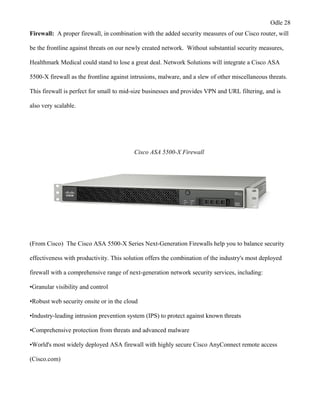
  • 15.
    Odle 15 The processof creating a WBS for this particular project consisted of researching all the aspects of a possible computer network upgrade. Network solutions did this with information collected from previous projects of the same nature, internet research, and vendor consultations. This expert insight enabled us to break down this project into its smallest components, and then prospectively assign resources and associate time tables for each work package. We created our original WBS and Labor Cost Analysis Sheet in Microsoft Excel initially because we were more familiar with the program and it is very simple for data entry. Network solution’s process orientated approach to their WBS structure allows for a more streamlined approach to the project life cycle. This initial report consists of: hierarchal work package layout, duration of work packages, predecessors, resource type, number of employees per task, rate of hourly pay, how many hours working per day, and total cost per work package. This detailed information gave us a fairly accurate representation of estimates of total time, cost, and performance of the entire project. We will utilize the information when creating the WBS to: define all work packages, identify rough time estimates on completion of each work package, and pinpoint resources needed to complete the work, characterize person/people responsible for units of work, and create intuitive timelines as a visual representation for stakeholders. Network Solutions has had a great deal of experience with projects of this nature, and are salary employees to avoid convoluted labor and overtime costs. For the purpose of formatting, network solutions created a scaled down version including a tabular WBS that included major work packages, package descriptions, and a project timeline below: 1.1.1 Evaluation & Recommendations- Computer survey, assess Healthmark’s networking and communication needs, brainstorm recommendations 1.1.2 Develop Project Charter- PM to create charter as a critical document to ensure project purpose and objectives 1.1.3 Deliverable: Submit Project Charter- submits the document for review by Network Solutions Director
  • 16.
    Odle 16 1.1.4 ProjectDirector Reviews Project Charter- Director analyzes recommendations and effectiveness of proposed solutions 1.1.5 Project Charter Signed/Approved- Upon approval project team is able to move to planning phase 1.2.1 Create Preliminary Scope Statement- Scope statement is created by the project manager, deliverables, milestones, limits & exclusions, and time frames detailed 1.2.2 Responsibility Matrix for Work Packages- Project manager acquires the proper human resources from the Network Solutions employee roster 1.2.3 Project Team Kickoff Meeting- Introduce one another, kickoff the project by discussing major overall goals and roles of the project and team members 1.2.4 Develop Project Plan- Entire project team supports the creation of this key document/plan that will outline the success of the Healthmark Medical project 1.2.5 Submit Project Plan- Submit the completed project plan when completed 1.2.6 Project Plan Approval- Key completion of essential work package, plan is reviewed and approved by director and clients, (considered a milestone) 1.3.1 Project Kickoff Meeting- Initial meeting led by PM, teams, and key stakeholders in attendance, meet and greet, go over major project objectives 1.3.3 Design System- Design led by network architects and network engineers and work with conjunction with the rest of project team to design functional communication & network upgrade system for Healthmark Medical 1.3.4 Procure Hardware/Software- Technical leads of the project will order and work with vendors to ensure successful procurement of all hardware and software needs, as well as attempt to keep the costs low with regards to budget (wiring, cabling, firewalls, software, routers, switches, pcs etc.…) 1.3.5 Install Network- Received and installed all aspects of the proposed network upgrade, make sure aspects of the system are customized to the agreed upon aspects of the project charter
  • 17.
    Odle 17 1.3.6 TestingPhase- System is only tested, not rolled out, with the project team and select clients/users to ensure functionality and satisfaction with Healthmark Medical 1.3.7 Install Live System- Similar to the testing phase, but on a mass scale, all systems are running and monitored constantly with additional client support throughout this period 1.3.8 User Training- Training will go off in phases and various lengths of time according to the employee’s involvement; higher functioning managers are given broader tutorials for decision making capabilities, while day-to-day employees are given a more thorough walkthrough on the many aspects of the new system 1.3.9 Go Live- Completely live system, all clients, sales, servers, and hardware should be functional and prepared the daily demands of Healthmark’s flourishing business 1.4.1 Project Management- Project manager will start additional controls of proceeding with the back half of the project’s life cycle 1.4.2 Project Status Meetings- Ran by the project manager, these status meetings are included in the WBS because they are vital to the end goal of the completion of the project 1.4.3 Risk Management- The project management team will evaluate their previous risk strategies and assess how they attempted to mitigate risks associated with the network upgrade 1.4.4 Update Project Management Plan- As the project plan progresses, so will the project plan, it is the job of the project manager to make sure the board of directors are up-to-date and current with any changes that need to be made 1.5.1 Hardware & Software Inventory Audit- Make sure Healthmark staff have all necessary documentation and contact information for product vendors along with support, document all inventory and obtain signatures from authorized policies to complete this portion 1.5.2 Closeout Meeting- Project manager & team comes together to discuss strengths and weaknesses of the completed project, also how to change implementation on certain areas in the future
  • 18.
    Odle 18 1.5.3 UpdateFiles/Records- Any and all changes that have been made should be documented at this time 1.5.4 Gain Formal Acceptance- Gain formal acceptance from the project director of Network Solutions and the CEO/Board of Directors for Healthmark Medical 1.5.5 Archive All Files and Records- All updated records and documentation should be filled out and archived to be referenced in case of future similar projects
  • 19.
    Odle 19 (Work BreakdownStructure) Tabular Form Phase Level 1 Level 2 Duration (DAYS) Predecessors 3 na 5 1.1 1 1.2 5 1.1-1.3 1 1.1-1.4 4 1.2 5 na 1 1.1-2.3 14 1.2,1.3 1 1.2,1.3,2.4 5 1.2,1.3,2.4,2..5 1 2.6 15 na 12 3.2 10 3.2,3.3 20 3.2,3.3,3.4 10 3.1-3.5 12 3.1-3.6 15 3.1-3.7 10 1.2-3.9 7 na 3 Ongoing 2 na 2 Continually 4 All task before 1 All task before 1 All task before 1 All task before 1 All task before Allotted Workdays 186 Actual Days Estimated:172 172 1.3 Execution 1.4 Control There do happen to be a large amount of burst activities when seen at the micro-labor level, but most process orientated phases will have predessors from one to another to ensure a clear and concise project life cycle. 1.2.5 Submit Project Plan Work Breakdown Structure Coded Work Packages WBS for Network Upgrade- Healthmark Medical Level 3 1.1.1 Evaluation & Recommendations 1.1.2 Develop Project Charter 1.1.3 Deliverable: Submit Project Charter 1.1.4 Project Director Reviews Project Charter 1.1 Initiation 1.2 Planning 1.1.5 Project Charter Signed/Approved 1.2.1 Create Preliminary Scope Statement 1.2.2 Responsibility Matrix for Work Packages 1.2.3 Project Team Kickoff Meeting 1.2.4 Develop Project Plan 1.3.9 Go Live 1.4.1 Project Management 1.3.1 Project Kickoff Meeting 1.3.2 Verify & Validate User Requirements 1.3.3 Design System 1.3.4 Procure Hardware/Software 1.3.5 Install Development System 1.5.5 Archive Files/Documents Time Constraint 6 Months: Start Date: October 1st 1.4.3 Risk Management 1.4.4 Update Project Management Plan 1.5.1 1 Hardware & Software Inventory Audit 1.5.2 Closeout Meeting 1.5.3 Update Files/Records 1.5.4 Gain Formal Acceptance 1.3.6 Testing Phase 1.3.7 Install Live System 1.3.8 User Training 1.4.2 Project Status Meetings 1.2.6 Milestone: Project Plan Approval MILESTONES SHADED IN YELLOW 1.5 Closeout f. Cost Summary Network Solutions understands the great importance of providing accurate and detailed cost estimates for the proposed Healthmark Medical network upgrade project. Throughout the life of this project, the calculated costs will work in conjunction with the comprehensive work breakdown structure and become the lifeline of this project. While this meticulous planning may cost additional resources and time, they will provide the project team and stakeholders with a crystal clear vision to make better decisions, effectively schedule work packages, develop cash flow for different phases, and
  • 20.
    Odle 20 will keepthe project on course and within scope. It is imperative that the cost summary remains clear and understandable for all stakeholders; therefore, additional technical requirements will be added in further sections. All sections of the cost analysis have been researched from vendor websites and referenced from previous projects to give an in depth account for cost estimations. All references can be found in the works cited portion of the project plan. The Healthmark Medical network upgrade cost analysis is a critical portion of the project plan that will give a cost breakdown of software, hardware, labor and professional fees. Hardware will include items such as desktop computers, monitors, cables, printers, routers, switches, firewalls, keyboards computer mouses, and VoIP headsets. Furthermore, a lesson learned from other projects completed in the past is to pad order quantities minimally to cover initial product failures, as well as other unforeseen issues during the procurement and installation phase. With regards to software, Network Solutions is recommending that Healthmark Medical upgrade their systems to utilize Microsoft Office 365, which will streamline the majority of Healthmark's office orientated tasks and also provide additional desktop support. Other software that will be necessary to successfully complete the project will include VoIP software to integrate the headsets for phone and internet sales, and the proper sever software for the installed applications/data server. Any and all factors associated with specific licensing of software will be addressed and custom-tailored to suit this project. Additionally, labor costs will be separated into major rolled up categories to account for the use of Network Solution's salaried employees. These categories will include labor and installation costs and also
  • 21.
    Odle 21 design andtraining estimates. The cost analysis is shown in tabular format and is as follows: Item Description Quantity Price Totals Softphone Headset 220 $102.00 $22,440.00 Softphone Voip Software 200 $29.50 $5,900.00 HP Envy 810qe PC 220 $1,199.99 $263,997.80 HP Wireless Mouse & Keyboard 220 $25.49 $5,607.80 HP 23-inch LCD Monitor 220 $169.99 $37,397.80 HP Compact 2.0 Speakers 220 $19.99 $4,397.80 HP MFP M575C Printer 27 $3,199.99 $86,399.73 Cisco Catalyst 48 Port Switch 8 $4,474.99 $35,799.22 Cisco 3925E Router 1 $10,131.99 $10,131.99 Cisco ASA 5512 Firewall 1 $2,559.99 $2,559.99 CAT5E Cabling 1000ft 40 $80.65 $3,226.00 Microsoft Office 365 Licensing 200 $15.00 $3,000.00 HP ProLiant DL560 Server Build 1 $57,111.78 $57,111.78 Microsoft Server 2012 Licensing 2 $882.00 $1,764.00 TOTAL: $539,733.91 Estimated Professional Fees Quantity Price Totals Low High Network Connection Labor Direct labor expenses 373.5 hours $21,096.37 $31,953.57 Network Connection Job Materials and Supplies 250 connections $10,856.25 $11,756.25 Totals - Cost to Install Computer Network Wiring 250 connections $31,952.62 $43,709.82 Cost Analysis
  • 22.
    Odle 22 X Signatures ofApproval for Cost Analysis g. Technical Implementation Approach For the purpose of clarity, Network Solutions has chosen to split this section into more clear and manageable subsections. This approach will systematically define and expand on the strategic choices that were made throughout the planning of the project, as well as describe the hardware, software, security, and the different technologies that will be implemented to reach the agreed upon goals for the Healthmark network upgrade. A detailed custom built network diagram will also be designed by our network engineer so that all stakeholders may easily visualize the intended result of the project. Demarcation Point: A demarcation point, or demarc, is the point of division between the internet service provider’s (ISP) network, and Healthmark Medical’s computer and communication network. Fiber-optic cable is being provided and installed by the local ISP and will be installed externally completing the connection to the secure data center. Some of the reasons network solution chose fiber optic cabling for the demarcation connection is: • Digital signals: Optical fibers are ideally suited for carrying digital information, which is especially useful in computer networks. • Higher carrying capacity: Because optical fibers are thinner than copper wires, more fibers can be bundled into a given-diameter cable than copper wires. This allows more phone lines to go over the same cable or more channels to come through the cable into your business or home • Less signal degradation: The loss of signal in optical fiber is less than in copper wire. • Thinner: Optical fibers can be drawn to smaller diameters than copper wire.
  • 23.
    Odle 23 • Lightsignals: Unlike electrical signals in copper wires, light signals from one fiber do not interfere with those of other fibers in the same cable. This means clearer phone conversations or TV reception. • Low power: Because signals in optical fibers degrade less, lower-power transmitters can be used instead of the high-voltage electrical transmitters needed for copper wires. Again, this saves your provider and you money (researchgate.net). Network Backbone: This is the part of the installed network which segments and interconnects significant shared devices, while taking on the majority of the network traffic. Network Solutions plans to install and utilize a hybrid star-wired bus topology stacking 48 port switches from floor to floor, resulting in a simple distributed backbone. This setup is ideal for its ease of use, as well as the network’s scalability. IP Addressing: Proper IP addressing with regards to network design, can be critical when attempting to design the Healthmark Medical network. IP addressing will effectively ensure proper communication between devices, as well as assist in the proper transportation of important data packets throughout the network. Network designers and architects will map out and analyze the best solution for the proposed network architecture. ◦ Gateway: 10.12.1.1/24 ◦ Subnet Mask: 255.255.255.0 ◦ Range was chosen due to size needs ◦ Static IP's delegated to server, switches, firewall, and printers to make them easily accessible, all other workstations will be DHCP for ease of use Server: For the server, amongst other hardware, Network Solutions will procure a custom built server that will be ordered through CDW.com. They have reliable products, along with superior customer
  • 24.
    Odle 24 service. Thechoice to purchase the customized server might be a larger cost upfront, but over time will enable Healthmark Medical to cut costs dramatically via centralizing most of their computer and data needs in-house. The specified server will be designated to run software applications associated with the functions of the separate departments of the company, as well as retain sensitive company and client data. An additional benefit could also be the reduced risks of security threats. Network Solutions will install and configure all hardware and software associated with the server. Additional servers will be outsourced virtually through Microsoft Office 365 for miscellaneous office related tasks such as email, online conferencing, admin, active directory, non- sensitive file storage if needed. Here is a description of the proposed in house server below with item number and a rough overview from CDW.com. HP Proliant D560 Server The HP ProLiant DL560 Gen8 server, latest server in the ProLiant Scale-up x86 portfolio, that redefines density-optimized 4-socket rack server technology without compromising on performance, scalability, and expandability. Built on the latest Gen8 innovative and intuitive hardware and software features and supporting the new high-density and cost effective Intel Xeon E5-4600v2 processors, the DL560 Gen8 is ideal for virtualization, server consolidation, database, business processing, and general
  • 25.
    Odle 25 4P data-intensiveapplications where optimization of data center space and price/performance is paramount (CDW.com) Main Features • Server • rack-mountable • 2U • 4-way • 4 x Xeon E5-4640 / 2.4 GHz • RAM 64 GB • SAS • hot-swap 2.5" • no HDD • Matrox G200 • GigE • 10 GigE Switches: The network architecture will end up supporting 6 managed switches total per the entire building. These will be stacked 2 per floor and linked with CAT5E cabling to individual drops to connect each work station and device to the network. We chose 48 port switches to handle the amount of users per floor, while having a large amount of scalability in the future. Here is a description of the switches that will be used from (CDW.com).
  • 26.
    Odle 26 Cisco Catalyst2960S Series Switch The Cisco Catalyst 2960S Series Switches are the leading layer 2 edge, providing improved ease of use, highly secure business operations, improved sustainability, and a borderless network experience. The Cisco Catalyst 2960S Series Switches include Cisco FlexStack switch stacking capability with 1 and 10 Gigabit connectivity. The Cisco Catalyst 2960S Series are fixed-configuration access switches designed for enterprise, midmarket, and branch office networks to provide lower total cost of ownership. Router: Network Solutions chose the Cisco 3925E Integrated Services Router because of their ongoing track record of dependable hardware. Furthermore, this particular router could handle the company’s user count and traffic, add additional built in firewalls and security features, and would also remain safe and secure with multiple backup power sources. It is a great fit for this particular size of small to mid-size business network (CDW.com).

  • 27.
    Odle 27 designed forenterprise, midmarket, and branch office networks to provide lower total cost of ownership. Router: Network Solutions chose the Cisco 3925E Integrated Services Router because of their ongoing track record of dependable hardware. Furthermore, this particular router could handle the company’s user count and traffic, add additional built in firewalls and security features, and would also remain safe and secure with multiple backup power sources. It is a great fit for this particular size of small to mid-size business network (CDW.com). Cisco 3925E Router Additional Security Features • Embedded hardware-accelerated VPN encryption for secure collaboration • Integrated threat control using Cisco IOS Firewall, Zone-Based Firewall, IPS, and Content Filtering • Identity management using authentication, authorization, and accounting (AAA) and public key infrastructure (CDW.com)
  • 28.
    Odle 28 Firewall: Aproper firewall, in combination with the added security measures of our Cisco router, will be the frontline against threats on our newly created network. Without substantial security measures, Healthmark Medical could stand to lose a great deal. Network Solutions will integrate a Cisco ASA 5500-X firewall as the frontline against intrusions, malware, and a slew of other miscellaneous threats. This firewall is perfect for small to mid-size businesses and provides VPN and URL filtering, and is also very scalable. Cisco ASA 5500-X Firewall (From Cisco) The Cisco ASA 5500-X Series Next-Generation Firewalls help you to balance security effectiveness with productivity. This solution offers the combination of the industry's most deployed firewall with a comprehensive range of next-generation network security services, including: •Granular visibility and control •Robust web security onsite or in the cloud •Industry-leading intrusion prevention system (IPS) to protect against known threats •Comprehensive protection from threats and advanced malware •World's most widely deployed ASA firewall with highly secure Cisco AnyConnect remote access (Cisco.com)
  • 29.
    Odle 29 Desktop Computers/Printers/AdditionalHardware: All of these items will be installed once the backbone of the network is setup, and wiring and drops are in place. At the bottom of this section there will also be a screen shot of all basic hardware items and cabling, along with software considerations. All items will be sourced and ordered from Hewlett Packard’s website. • Each employee will be supplied an HP desktop computer system running Windows 7 64-bit OS • Speaker system, LCD monitor, and keyboard and mouse also provided • Each PC will be setup to run softphone software as well as have softphone headsets included as a replacement for their POTS phones • 27 printers total per 3 story building • All are multifunctional machines (print, fax, copy, scan) • 13 printers are private for higher level employees and departments
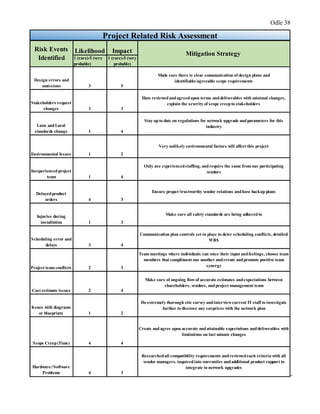
  • 30.
    Odle 30 • 14other printers are shared throughout the building for the remaining employees
  • 31.
    Odle 31 Software: Softwareimplementation will be one of the last installation steps due to the predecessor activities that may come before, such as machine and hardware setup configuration. Network Solutions will ensure functionality and integration when installing these different software platforms. The software that will be installed and tested will be Microsoft 365, Express Talk VoIP software, Microsoft Server 2012, and associated application software. This software will guarantee Healthmark’s future network and business activities will be running at optimal levels, while improving overall efficiency throughout the entire organization (shopping.hp.com). Microsoft Office 365- What’s Included: Office on more devices Enjoy a consistent and familiar Office experience across PCs, Macs, Windows tablets, iPads® , and most mobile devices. Office supports PCs and Windows tablets running Windows 7 or higher, and Macs with Mac OS X 10.6 or higher. Office for iPad can be installed on iPads running version 7.0 or higher. For information about mobile devices, visit www.office.com/mobile. Office on any PC Stream full versions of Office programs on any Internet-connected PC running Windows 7 or Windows 8 with Office on Demand. Plus these online services: Email and calendars Use business-class email through a rich and familiar Outlook experience you can access from your desktop or from a web browser using the Outlook Web App. Get a 50 GB mailbox per user and send attachments up to 25 MB. Online conferencing Host online meetings with audio and video using one-click screen sharing and HD video conferencing. Instant messaging and Skype connectivity Connect with other Lync users via instant message, voice calls, and video calls, and let people know your availability with your online status. Share presence, IM, and audio calling with Skype users. Public website Design and maintain your own public website with no additional hosting fees. Use your own domain name to promote your brand. Simple file sharing OneDrive for Business gives each user 25 GB of personal cloud storage (1 TB coming soon) that can be accessed from anywhere and that syncs with their PC for offline access. Easily share documents with others inside and outside the organization and control who can see and edit each file. Team sites Enable easy access and sharing of documents with 10 GB baseline storage plus 500 MB of storage per user. Self-Service Business Intelligence in Excel Do more with the tool you already know: Excel. Discover and connect to data with Power Query, model and analyze this data with Power Pivot, and visualize insights in interactive reports and maps with Power View and Power Map. All Office 365 for business plans include: Reliability Get peace of mind knowing your services are available with a guaranteed 99.9% uptime, financially backed service level agreement (SLA). Security Your data is yours. We safeguard it and protect your privacy. Administration Deploy and manage Office 365 across your company, no IT expertise required. You can add and remove users in minutes. Up to date No need to pay for version upgrades; updates are included in your subscription. New features are rolled out to Office 365 customers regularly. Support Microsoft Support provides telephone and online answers, how-to resources, and connections with other Office 365 customers for setup and quick fixes. (Microsoft.com) Express Talk Software: (nch.com)
  • 32.
    Odle 32 Express TalkVoIP Softphone • Make phone calls using your PC or Mac • Works with almost any VoIP gateway provider or office PBX • Business features include conferencing, recording, and voice commands • Configure up to 6 telephone lines on Express Talk Express Talk works like a computer telephone. Call from your PC to any other computer with a softphone installed. Additional signup with a VoIP service provider to use express talk to call regular telephone numbers as well. Download Express Talk Softphone for Windows Get it Free. A free version of this softphone is available for non- commercial use only, if you will be using Express Talk at home you can download the free version here. Download Now Purchase Online More softphone software screenshots Softphone Features • Make voice and video calls free between computers • Supports PC to phone via a VoIP SIP gateway provider • Place callers on hold (on-hold music included) • Supports caller ID display and logging • Includes a phone book with quick dial configuration • Integrates with Microsoft Address Book. • Data compression, echo cancellation, noise reduction and comfort noise • Supports emergency numbers calling (e.g. 911, 999, 000) • Can be used with USB phones, Headsets, Microphones, a Webcam and a set of speakers, or a USB video phone Features in Commercial Version Only • Configure up to 6 phone lines • Call conferencing for up to 6 people • Phone call recording • Voice commands • Call transfer • Do Not Disturb • Push to talk intercom • Call Pickup allows you to answer on another extension (nch.com) Cabling: (monospace.com)
  • 33.
    Odle 33 1000FT 24AWGCat5e 350MHz UTP Solid, Riser Rated (CMR), Bulk Ethernet Bare Copper Cable - Black This 1000 foot roll of unshielded (UTP) Cat5e cable uses solid conductors and features 350MHz bandwidth capacity. Solid conductors have slightly better electrical properties than stranded conductors, making solid cables well suited for use in permanent, in-wall installations and for longer cable runs. This cable carries a CMR fire safety rating, which means that it is safe for use within the walls and between the floors of commercial buildings (monoprice.com). Custom Network Diagram for Healthmark Medical (Visio):
  • 34.
    Odle 34 1st Floor networkdiagram has detailed the demarcation point in the top right corner, along with the data center/IT room. This room will consist of the server, router, firewall, and 2 base switches. There are also parallel smaller IT closets in the same position on each level of the building to provide easier access to important hardware. This diagram shows how Network Solutions plans to interconnect workstations and also who has privileges over shard devices and printers.
  • 35.
    Odle 35 2nd and 3rd floordiagrams simply illustrate the plan to stack multiple 48 port cisco switches and run CAT5E drops down to each workstation and additional device. There is space for all employee departments, as well as conference rooms, restrooms, and executive offices.
  • 36.
    Odle 36 h. Risks/Concerns ProjectRelated A risk is an uncertain event or condition that, if it occurs, has a positive or negative effect on project objectives (Larson, Gray 205). It is the goal of Network Solutions to identify and assess these risks, so that the project team is able to plan for possible events that may affect the project's life cycle. The risk management strategy will identify as many project orientated risks as possible, while minimizing their impact and also detailing responses that may happen to materialize. This section will
  • 37.
    Odle 37 analyze someof the various risks and concerns associated with this network upgrade, and categorize these as: project related, legal/regulatory, security, and privacy. Network Solutions had multiple brainstorming meetings and reviewed lessons learned from previous projects of this nature to construct a well-organized risk assessment plan. With any project, it is imperative to address these risks and concerns early; therefore, enabling the team to foresee triggering events that will lead to the materialization of these risks. There are a variety of approaches to risks once they have been identified such as mitigating, avoiding, transferring, sharing, or retaining. For the purpose of this project, the project team chose to gravitate towards a risk mitigation strategy, which enabled Network Solutions to prepare for these occurrences, or to at least reduce the impacts of these risks. Some of the associated project related risks and mitigation strategies can be found in the accompanied chart.
  • 38.
    Odle 38 Likelihood Impact 1(rare)-5 (very probable) 1 (rare)-5 (very probable) Design errors and omissions 3 5 Made sure there is clear communication of design plans and identifiable/agreeable scope requirements Stakeholders request changes 3 3 Have reviewedandagreedupon terms anddeliverables with minimal changes, explain the severity of scope creepto stakeholders Laws andLocal standards change 1 4 Stay upto date on regulations for network upgrade andparameters for this industry Environmental Issues 1 2 Very unlikely environmental factors will affect this project Inexperiencedproject team 1 4 Only use experiencedstaffing, andrequire the same from our participating vendors Delayedproduct orders 4 3 Ensure proper/trustworthy vendor relations andhave backup plans Injuries during installation 1 3 Make sure all safety standards are being adheredto Scheduling error and delays 3 4 Communication plan controls set in place to deter scheduling conflicts, detailed WBS Project team conflicts 2 3 Team meetings where individuals can voice their input andfeelings, choose team members that compliment one another andcreate andpromote positive team synergy Cost estimate issues 2 4 Make sure of ongoing flowof accurate estimates andexpectations between shareholders, vendors, andproject management team Issues with diagrams or blueprints 1 2 Do extremely thorough site survey andinterviewcurrent IT staff to investigate further to discover any surprises with the network plan Scope Creep(Time) 4 4 Create and agree upon accurate andattainable expectations anddeliverables with limitations on last minute changes Hardware//Software Problems 4 3 Researchedall compatibility requirements andreviewedsuch criteria with all vendor managers, inquired into warranties andadditional product support to integrate to network upgrades Project Related Risk Assessment Risk Events Identified Mitigation Strategy -
  • 39.
    Odle 39 - Legal/Regulatory Portions ofHealthmark Medical's business can be extremely regulated, as it can be seen that they are a medical sales company with important patient and client data. They have done an excellent job with their policies and practices in the past, which has solidified them as a compliant and trusted organization. Healthmark Medical adheres to various regulatory requirements such as Stark, Anti- Kickback laws, HIPAA, and other miscellaneous privacy issues regarding the medical field. Even before the proposed Network Solutions upgrade project, Heathmark was implementing compliance and HIPAA training, along with non-disclosure agreements issued to their employees that handle sensitive data. To remain compliant no major changes will take place to their already proven compliance and privacy plan. Security Due to the sensitive nature of Healthmark's data, security is of the utmost importance to the organization. Any type of breach or sensitive data loss could be detrimental to the company's long- standing reputation, while incurring damaging financial losses. Network Solutions will configure and test every aspect of firewalls, servers, routers, and run an internal network audit to ensure that the network is secured. Any information that could be seen as confidential will be stored and secured directly on Healthmark's internal data server. For non-sensitive data and normal office tasks, Healthmark will help integrate Microsoft Office 365. This service is supported through Microsoft and has various security features that accompany the software. Numerous security features provided by Microsoft can be found detailed below, along with additional hardware security measures (Microsoft.com). Physical security • 24-hour monitoring of data centers.
  • 40.
    Odle 40 - Legal/Regulatory Portions ofHealthmark Medical's business can be extremely regulated, as it can be seen that they are a medical sales company with important patient and client data. They have done an excellent job with their policies and practices in the past, which has solidified them as a compliant and trusted organization. Healthmark Medical adheres to various regulatory requirements such as Stark, Anti- Kickback laws, HIPAA, and other miscellaneous privacy issues regarding the medical field. Even before the proposed Network Solutions upgrade project, Heathmark was implementing compliance and HIPAA training, along with non-disclosure agreements issued to their employees that handle sensitive data. To remain compliant no major changes will take place to their already proven compliance and privacy plan. Security Due to the sensitive nature of Healthmark's data, security is of the utmost importance to the organization. Any type of breach or sensitive data loss could be detrimental to the company's long- standing reputation, while incurring damaging financial losses. Network Solutions will configure and test every aspect of firewalls, servers, routers, and run an internal network audit to ensure that the network is secured. Any information that could be seen as confidential will be stored and secured directly on Healthmark's internal data server. For non-sensitive data and normal office tasks, Healthmark will help integrate Microsoft Office 365. This service is supported through Microsoft and has various security features that accompany the software. Numerous security features provided by Microsoft can be found detailed below, along with additional hardware security measures (Microsoft.com). Physical security • 24-hour monitoring of data centers.
  • 41.
    Odle 41 • Multi-factorauthentication, including biometric scanning for data center access. • Internal data center network is segregated from the external network. • Role separation renders location of specific customer data unintelligible to the personnel that have physical access. • Faulty drives and hardware are demagnetized and destroyed. Logical security • Lock box processes for strictly supervised escalation process greatly limits human access to your data. • Servers run only processes on whitelist, minimizing risk from malicious code. • Dedicated threat management teams proactively anticipate, prevent, and mitigate malicious access. • Port scanning, perimeter vulnerability scanning, and intrusion detection prevent or detect any malicious activity Data security • Encryption at rest protects your data on our servers. • Encryption in transit with SSL/TLS protects your data transmitted between you and Microsoft. • Threat management, security monitoring, and file/data integrity prevents or detects any tampering of data. Admin and user controls • Rights Management Services prevents file-level access without the right user credentials. • Multi-factor authentication protects access to the service with a second factor such as phone. • S/MIME provides secure certificate-based email access.
  • 42.
    Odle 42 • Office365 Message Encryption allows you to send encrypted email to anyone. • Data loss prevention prevents sensitive data from leaking either inside or outside the organization. • Data loss prevention can be combined with Rights Management and Office 365 Message Encryption to give greater controls to your admins to apply appropriate policies to protect sensitive data. (products.office.com) Additional Hardware Security (Firewall/Router) • SecurityEmbedded hardware-accelerated VPN encryption for secure collaboration • Integrated threat control using Cisco IOS Firewall, Zone-Based Firewall, IPS, and Content Filtering • Identity management using authentication, authorization, and accounting (AAA) and public key infrastructure • Exceptional next-generation firewall services provide the visibility and detailed control that your enterprise needs to safely take advantage of new applications and devices.[1] • Cisco AVC controls specific behaviors within allowed microapplications. • Cisco Web Security Essentials (WSE) restricts web and web application use based on the reputation of a site. • Broad and deep network security through an array of integrated cloud- and software-based next- generation firewall services is backed by Cisco Security Intelligence Operations (SIO). • A highly effective intrusion prevention system (IPS) is provided with Cisco Global Correlation. • A high-performance VPN and always-on remote access are included.
  • 43.
    Odle 43 • Additionalsecurity services can be implemented quickly and easily in response to changing needs. (Cisco.com) Additional Security Measures/Considerations: • Internal Data Encryption • Secured data center (surveillance and key card or key pad) • Trusted digital certificates • Utilize access controls • Authentication • Authorization • Implement data loss prevention and auditing measures • Create NO removable media policy • Spam filters for all organization's email accounts • Utilize the multi-faceted firewall to prevent from harmful malware and various threats • Update and maintain security patches • Continued training for the users and staff Privacy As with any company operating within the strict guidelines of the medical field, a major area of focus for Healthmark has always remained to be the privacy of all of their clients’ and customers’ sensitive information. The data in question has to be stored to a strict set of guidelines in accordance with the HIPAA Act/Title II (Become HIPAA Compliant). This act created strict and transparent guidelines on how organizations should store and interact with sensitive patient/client information. This act was created to ensure privacy and security for patients in the United States, while also
  • 44.
    Odle 44 providing opportunitiesfor medical organizations to acquire more technologically savvy means of assisting their patients/clients (Become HIPAA Compliant). To become compliant an entity must meet certain criteria with regards to a few specific points of interest: privacy, security, enforcement, and breach notification. Below are some key points and guidelines of this act, and Network Solutions compliance and risk mitigation recommendations. These key areas will make the organization compliant, as well as ensuring their customers’ privacy remains intact for years to come. Guidelines Sourced from (Sans.org) HIPAA II Compliance Guidelines Specific Technical Requirements and Implentation Strategies Access Control - Unique User Identification (required): Assign a unique name and/or number for identifying and tracking user identity. Access Control - Emergency Access Procedure (required): Establish (and implement as needed) procedures for obtaining necessary ePHI during an emergency. Access Control - Automatic Logoff (addressable): Implement electronic procedures that terminate an electronic session after a predetermined time of inactivity. Access Control - Encryption and Decryption (addressable): Implement a mechanism to encrypt and decrypt ePHI. Audit Controls (required): Implement hardware, software, and/or procedural mechanisms that record and examine activity in information systems that contain or use ePHI. Integrity - Mechanism to Authenticate ePHI (addressable): Implement electronic mechanisms to corroborate that ePHI has not been altered or destroyed in an unauthorized manner. Authentication (required): Implement procedures to verify that a person or entity seeking access to ePHI is the one claimed. Transmission Security - Integrity Controls (addressable): Implement security measures to ensure that electronically transmitted ePHI is not improperly modified without detection until disposed of. Transmission Security - Encryption (addressable): Implement a mechanism to encrypt ePHI whenever deemed appropriate.
  • 45.
    Odle 45 Facility AccessControls - Contingency Operations (addressable): Establish (and implement as needed) procedures that allow facility access in support of restoration of lost data under the disaster recovery plan and emergency mode operations plan in the event of an emergency. Facility Access Controls - Facility Security Plan (addressable): Implement policies and procedures to safeguard the facility and the equipment therein from unauthorized physical access, tampering, and theft. Facility Access Controls - Access Control and Validation Procedures (addressable): Implement procedures to control and validate a person’s access to facilities based on their role or function, including visitor control, and control of access to software programs for testing and revision. Facility Access Controls - Maintenance Records (addressable): Implement policies and procedures to document repairs and modifications to the physical components of a facility which are related to security (e.g. hardware, walls, doors, and locks). Workstation Use (required): Implement policies and procedures that specify the proper functions to be performed, the manner in which those functions are to be performed, and the physical attributes of the surroundings of a specific workstation or class of workstation that can access ePHI. Workstation Security (required): Implement physical safeguards for all workstations that access ePHI, to restrict access to authorized users. Device and Media Controls - Disposal (required): Implement policies and procedures to address the final disposition of ePHI, and/or the hardware or electronic media on which it is stored. Device and Media Controls - Media Re-Use (required): Implement procedures for removal of ePHI from electronic media before the media are made available for re-use. Device and Media Controls - Accountability (addressable): Maintain a record of the movements of hardware and electronic media and any person responsible therefore. Device and Media Controls - Data Backup and Storage (addressable): Create a retrievable, exact copy of ePHI, when needed, before movement of equipment. Security Management Process - Risk Analysis (required): Perform and document a risk analysis to see where PHI is being used and stored in order to determine all the ways that HIPAA could be violated. Security Management Process - Risk Management (required): Implement sufficient measures to reduce these risks to an appropriate level. Security Management Process - Sanction Policy (required): Implement sanction policies for employees who fail to comply. Security Management Process - Information Systems Activity Reviews (required): Regularly review system activity, logs, audit trails, etc. Assigned Security Responsibility - Officers (required): Designate HIPAA Security and Privacy Officers. Workforce Security - Employee Oversight (addressable): Implement procedures to authorize and supervise employees who work with PHI, and for granting and removing PHI access to employees. Ensure that an employee’s access to PHI ends with termination of employment.
  • 46.
    Odle 46 Information AccessManagement - Multiple Organizations (required): Ensure that PHI is not accessed by parent or partner organizations or subcontractors that are not authorized for access. Information Access Management - ePHI Access (addressable): Implement procedures for granting access to ePHI that document access to ePHI or to services and systems that grant access to ePHI. Security Awareness and Training - Security Reminders (addressable): Periodically send updates and reminders about security and privacy policies to employees. Security Awareness and Training - Protection Against Malware (addressable): Have procedures for guarding against, detecting, and reporting malicious software. Security Awareness and Training - Login Monitoring (addressable): Institute monitoring of logins to systems and reporting of discrepancies. Security Awareness and Training - Password Management (addressable): Ensure that there are procedures for creating, changing, and protecting passwords. Security Incident Procedures - Response and Reporting (required): Identify, document, and respond to security incidents. Contingency Plan - Contingency Plans (required): Ensure that there are accessible backups of ePHI and that there are procedures for restore any lost data. Contingency Plan - Contingency Plans Updates and Analysis (addressable): Have procedures for periodic testing and revision of contingency plans. Assess the relative criticality of specific applications and data in support of other contingency plan components. Contingency Plan - Emergency Mode (required): Establish (and implement as needed) procedures to enable continuation of critical business processes for protection of the security of ePHI while operating in emergency mode. Evaluations (required): Perform periodic evaluations to see if any changes in your business or the law require changes to your HIPAA compliance procedures. Business Associate Agreements (required): Have special contracts with business partners who will have access to your PHI in order to ensure that they will be compliant. Choose partners that have similar agreements with any of their partners to which they are also extending access. Do not allow any impermissible uses or disclosures of PHI. Provide breach notification to the Covered Entity. Provide either the individual or the Covered Entity access to PHI. Disclose PHI to the Secretary of HHS, if compelled to do so.
  • 47.
    Odle 47 Provide anaccounting of disclosures. Comply with the requirements of the HIPAA Security Rule. Have procedures in place to limit who can access patient health information, and implement a training program for you and your employees about how to protect your patient health information Reasonably limit uses and sharing to the minimum necessary to accomplish your intended purpose. Have agreements in place with any service providers that perform covered functions or activities for you. These agreements (BAAs) are to ensure that these services providers (Business Associates) only use and disclose patient health information properly and safeguard it appropriately. All guidelines and implementations sourced from (truevault.com)
  • 48.
    Odle 48 Works Cited Burek,Paul. "Creating Clear Project Requirements." Pmi.org. N.p., n.d. Web. 2 Aug. 2015. "Cisco ASA 5500-X Series Next-Generation Firewalls - Products & Services." Cisco. N.p., n.d. Web. 16 Aug. 2015. Cook, Liz. "Stakeholder Analysis: Winning Support for Your Projects." Stakeholder Analysis. N.p., n.d. Web. 16 Sept. 2015. "HDMI Cable, Home Theater Accessories, HDMI Products, Cables, Adapters, Video/Audio Switch, Networking, USB, Firewire, Printer Toner, and More! - Monoprice.com." HDMI Cable, Home Theater Accessories, HDMI Products, Cables, Adapters, Video/Audio Switch, Networking, USB, Firewire, Printer Toner, and More! - Monoprice.com. N.p., n.d. Web. 12 Aug. 2015. "HIPAA-compliant Configuration Guidelines for." Sans.org. N.p., n.d. Web. 6 Aug. 2015. "How to Become HIPAA Compliant." Truevault.com. N.p., n.d. Web. 2 Sept. 2015. "HP® Official Store | Laptops, Tablets, PCs, Monitors, Servers, Printers, and More." HP® Official Store | Laptops, Tablets, PCs, Monitors, Servers, Printers, and More. N.p., n.d. Web. 24 Aug. 2015. "Microsoft – Official Home Page." Microsoft – Official Home Page. N.p., n.d. Web. 22 Aug. 2015. "Planning a Network Upgrade." (n.d.): n. pag. Pearsonhighered.com. Web. 4 Aug. 2015. Siebrasse, Kathy. "How Fiber Works." N.p., n.d. Web. 15 Aug. 2015. "WELCOME TO CDW." CDW. N.p., n.d. Web. 26 Aug. 2015. Wireless Headsets, Wired Headsets, & Office Headsets. N.p., n.d. Web. 16 Sept. 2015.
  • 49.
    Odle 49 "Work BreakdownStructure (WBS)." Work Breakdown Structure Template (WBS). N.p., n.d. Web. 1 Sept. 2015.