Call ringout setup in local
Hi Folks, In this presentation I’m going to show, how to create a call ring out application in your
local machine using Spring tool suite or Eclipse. As we can run the ring central applications in
normal standalone applications or web applications.
We can create and implement ring central applications using below any programming languages.
● Java
● PHP
● Javascript
● Python
● C#
● Ruby
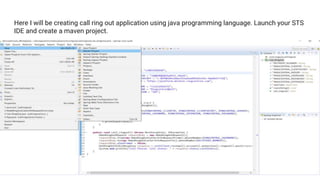
Here I will be creating call ring out application using java programming language. Launch your STS
IDE and create a maven project.
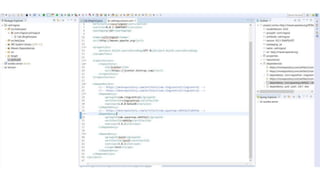
Once your done with creation of maven project then you need to add ring
central dependencies in your pom.xml file.
Go to maven repository
https://mvnrepository.com/artifact/com.ringcentral/ringcentral/0.3.5 and
copy ring central dependency and add in your pom.xml file.
After that we need to create a main java class to run our call ring out
application. Before going to execute your application. First you need to
create call ring out app in your developer account as we are going to client
id, client secret and server url in our client application to execute.
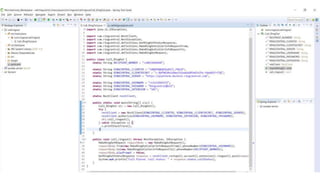
First we need to create object com.ringcentral.RestClient class by passing
RINGCENTRAL_CLIENTID, RINGCENTRAL_CLIENTSECRET,
RINGCENTRAL_SERVER
then we need to authorize our application using RINGCENTRAL_USERNAME,
RINGCENTRAL_EXTENSION, RINGCENTRAL_PASSWORD to consume any
ring central APIs.
In the block of code is used to make a cal for one user.
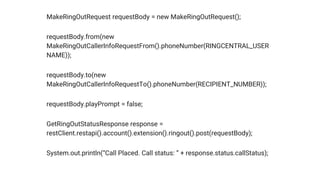
MakeRingOutRequest requestBody = new MakeRingOutRequest();
requestBody.from(new
MakeRingOutCallerInfoRequestFrom().phoneNumber(RINGCENTRAL_USER
NAME));
requestBody.to(new
MakeRingOutCallerInfoRequestTo().phoneNumber(RECIPIENT_NUMBER));
requestBody.playPrompt = false;
GetRingOutStatusResponse response =
restClient.restapi().account().extension().ringout().post(requestBody);
System.out.println(“Call Placed. Call status: ” + response.status.callStatus);
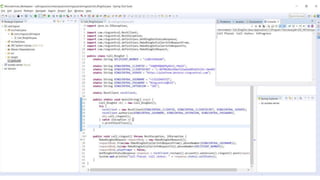
Now, we are ready to execute call ring out application. If we run the above application it will give
the status of call ring out application as shown below.
That’s all about create application and make a call to recipient. Thank you for reading !

Call ringout app

  • 1.
    Call ringout setupin local Hi Folks, In this presentation I’m going to show, how to create a call ring out application in your local machine using Spring tool suite or Eclipse. As we can run the ring central applications in normal standalone applications or web applications.
  • 2.
    We can createand implement ring central applications using below any programming languages. ● Java ● PHP ● Javascript ● Python ● C# ● Ruby
  • 3.
    Here I willbe creating call ring out application using java programming language. Launch your STS IDE and create a maven project.
  • 4.
    Once your donewith creation of maven project then you need to add ring central dependencies in your pom.xml file. Go to maven repository https://mvnrepository.com/artifact/com.ringcentral/ringcentral/0.3.5 and copy ring central dependency and add in your pom.xml file.
  • 6.
    After that weneed to create a main java class to run our call ring out application. Before going to execute your application. First you need to create call ring out app in your developer account as we are going to client id, client secret and server url in our client application to execute.
  • 7.
    First we needto create object com.ringcentral.RestClient class by passing RINGCENTRAL_CLIENTID, RINGCENTRAL_CLIENTSECRET, RINGCENTRAL_SERVER then we need to authorize our application using RINGCENTRAL_USERNAME, RINGCENTRAL_EXTENSION, RINGCENTRAL_PASSWORD to consume any ring central APIs. In the block of code is used to make a cal for one user.
  • 8.
    MakeRingOutRequest requestBody =new MakeRingOutRequest(); requestBody.from(new MakeRingOutCallerInfoRequestFrom().phoneNumber(RINGCENTRAL_USER NAME)); requestBody.to(new MakeRingOutCallerInfoRequestTo().phoneNumber(RECIPIENT_NUMBER)); requestBody.playPrompt = false; GetRingOutStatusResponse response = restClient.restapi().account().extension().ringout().post(requestBody); System.out.println(“Call Placed. Call status: ” + response.status.callStatus);
  • 10.
    Now, we areready to execute call ring out application. If we run the above application it will give the status of call ring out application as shown below.
  • 11.
    That’s all aboutcreate application and make a call to recipient. Thank you for reading !