CakePHP Cookbook Documentation
Release 2.x
Cake Software Foundation
March 06, 2013
Contents
1 Getting Started 1
Blog Tutorial . . . . . . . . . . . . . . . . . . . . . . . . . . . . . . . . . . . . . . . . . . . . . 1
Blog Tutorial - Adding a layer . . . . . . . . . . . . . . . . . . . . . . . . . . . . . . . . . . . . 8
2 Installation 27
Requirements . . . . . . . . . . . . . . . . . . . . . . . . . . . . . . . . . . . . . . . . . . . . . 27
License . . . . . . . . . . . . . . . . . . . . . . . . . . . . . . . . . . . . . . . . . . . . . . . . 27
Downloading CakePHP . . . . . . . . . . . . . . . . . . . . . . . . . . . . . . . . . . . . . . . . 28
Permissions . . . . . . . . . . . . . . . . . . . . . . . . . . . . . . . . . . . . . . . . . . . . . . 28
Setup . . . . . . . . . . . . . . . . . . . . . . . . . . . . . . . . . . . . . . . . . . . . . . . . . 28
Development . . . . . . . . . . . . . . . . . . . . . . . . . . . . . . . . . . . . . . . . . . . . . 28
Production . . . . . . . . . . . . . . . . . . . . . . . . . . . . . . . . . . . . . . . . . . . . . . . 29
Advanced Installation and URL Rewriting . . . . . . . . . . . . . . . . . . . . . . . . . . . . . . 30
Fire It Up . . . . . . . . . . . . . . . . . . . . . . . . . . . . . . . . . . . . . . . . . . . . . . . 35
3 CakePHP Overview 37
What is CakePHP? Why Use it? . . . . . . . . . . . . . . . . . . . . . . . . . . . . . . . . . . . 37
Understanding Model-View-Controller . . . . . . . . . . . . . . . . . . . . . . . . . . . . . . . . 38
Where to Get Help . . . . . . . . . . . . . . . . . . . . . . . . . . . . . . . . . . . . . . . . . . 40
4 Controllers 43
The App Controller . . . . . . . . . . . . . . . . . . . . . . . . . . . . . . . . . . . . . . . . . . 43
Request parameters . . . . . . . . . . . . . . . . . . . . . . . . . . . . . . . . . . . . . . . . . . 44
Controller actions . . . . . . . . . . . . . . . . . . . . . . . . . . . . . . . . . . . . . . . . . . . 44
Request Life-cycle callbacks . . . . . . . . . . . . . . . . . . . . . . . . . . . . . . . . . . . . . 45
Controller Methods . . . . . . . . . . . . . . . . . . . . . . . . . . . . . . . . . . . . . . . . . . 46
Controller Attributes . . . . . . . . . . . . . . . . . . . . . . . . . . . . . . . . . . . . . . . . . 53
More on controllers . . . . . . . . . . . . . . . . . . . . . . . . . . . . . . . . . . . . . . . . . . 54
5 Views 75
i
View Templates . . . . . . . . . . . . . . . . . . . . . . . . . . . . . . . . . . . . . . . . . . . . 75
Using view blocks . . . . . . . . . . . . . . . . . . . . . . . . . . . . . . . . . . . . . . . . . . . 77
Layouts . . . . . . . . . . . . . . . . . . . . . . . . . . . . . . . . . . . . . . . . . . . . . . . . 79
Elements . . . . . . . . . . . . . . . . . . . . . . . . . . . . . . . . . . . . . . . . . . . . . . . . 81
Creating your own view classes . . . . . . . . . . . . . . . . . . . . . . . . . . . . . . . . . . . . 84
View API . . . . . . . . . . . . . . . . . . . . . . . . . . . . . . . . . . . . . . . . . . . . . . . 85
More about Views . . . . . . . . . . . . . . . . . . . . . . . . . . . . . . . . . . . . . . . . . . . 87
6 Models 97
Understanding Models . . . . . . . . . . . . . . . . . . . . . . . . . . . . . . . . . . . . . . . . 97
More on models . . . . . . . . . . . . . . . . . . . . . . . . . . . . . . . . . . . . . . . . . . . . 99
7 Core Libraries 197
General Purpose . . . . . . . . . . . . . . . . . . . . . . . . . . . . . . . . . . . . . . . . . . . . 197
Behaviors . . . . . . . . . . . . . . . . . . . . . . . . . . . . . . . . . . . . . . . . . . . . . . . 235
Components . . . . . . . . . . . . . . . . . . . . . . . . . . . . . . . . . . . . . . . . . . . . . . 261
Helpers . . . . . . . . . . . . . . . . . . . . . . . . . . . . . . . . . . . . . . . . . . . . . . . . 311
Utilities . . . . . . . . . . . . . . . . . . . . . . . . . . . . . . . . . . . . . . . . . . . . . . . . 399
8 Plugins 509
Installing a Plugin . . . . . . . . . . . . . . . . . . . . . . . . . . . . . . . . . . . . . . . . . . . 509
Plugin configuration . . . . . . . . . . . . . . . . . . . . . . . . . . . . . . . . . . . . . . . . . . 509
Advanced bootstrapping . . . . . . . . . . . . . . . . . . . . . . . . . . . . . . . . . . . . . . . 510
Using a Plugin . . . . . . . . . . . . . . . . . . . . . . . . . . . . . . . . . . . . . . . . . . . . . 511
Creating Your Own Plugins . . . . . . . . . . . . . . . . . . . . . . . . . . . . . . . . . . . . . . 511
Plugin Controllers . . . . . . . . . . . . . . . . . . . . . . . . . . . . . . . . . . . . . . . . . . . 512
Plugin Models . . . . . . . . . . . . . . . . . . . . . . . . . . . . . . . . . . . . . . . . . . . . . 513
Plugin Views . . . . . . . . . . . . . . . . . . . . . . . . . . . . . . . . . . . . . . . . . . . . . 513
Plugin assets . . . . . . . . . . . . . . . . . . . . . . . . . . . . . . . . . . . . . . . . . . . . . . 514
Components, Helpers and Behaviors . . . . . . . . . . . . . . . . . . . . . . . . . . . . . . . . . 515
Expand Your Plugin . . . . . . . . . . . . . . . . . . . . . . . . . . . . . . . . . . . . . . . . . . 515
Plugin Tips . . . . . . . . . . . . . . . . . . . . . . . . . . . . . . . . . . . . . . . . . . . . . . 516
9 Console and Shells 517
The CakePHP console . . . . . . . . . . . . . . . . . . . . . . . . . . . . . . . . . . . . . . . . . 517
Creating a shell . . . . . . . . . . . . . . . . . . . . . . . . . . . . . . . . . . . . . . . . . . . . 519
Shell tasks . . . . . . . . . . . . . . . . . . . . . . . . . . . . . . . . . . . . . . . . . . . . . . . 520
Invoking other shells from your shell . . . . . . . . . . . . . . . . . . . . . . . . . . . . . . . . . 522
Console output levels . . . . . . . . . . . . . . . . . . . . . . . . . . . . . . . . . . . . . . . . . 522
Styling output . . . . . . . . . . . . . . . . . . . . . . . . . . . . . . . . . . . . . . . . . . . . . 523
Configuring options and generating help . . . . . . . . . . . . . . . . . . . . . . . . . . . . . . . 524
Shell API . . . . . . . . . . . . . . . . . . . . . . . . . . . . . . . . . . . . . . . . . . . . . . . 531
More topics . . . . . . . . . . . . . . . . . . . . . . . . . . . . . . . . . . . . . . . . . . . . . . 534
10 Development 547
Configuration . . . . . . . . . . . . . . . . . . . . . . . . . . . . . . . . . . . . . . . . . . . . . 547
Routing . . . . . . . . . . . . . . . . . . . . . . . . . . . . . . . . . . . . . . . . . . . . . . . . 559
Sessions . . . . . . . . . . . . . . . . . . . . . . . . . . . . . . . . . . . . . . . . . . . . . . . . 576
ii
Exceptions . . . . . . . . . . . . . . . . . . . . . . . . . . . . . . . . . . . . . . . . . . . . . . . 582
Error Handling . . . . . . . . . . . . . . . . . . . . . . . . . . . . . . . . . . . . . . . . . . . . 589
Debugging . . . . . . . . . . . . . . . . . . . . . . . . . . . . . . . . . . . . . . . . . . . . . . . 591
Testing . . . . . . . . . . . . . . . . . . . . . . . . . . . . . . . . . . . . . . . . . . . . . . . . . 594
REST . . . . . . . . . . . . . . . . . . . . . . . . . . . . . . . . . . . . . . . . . . . . . . . . . 616
Dispatcher Filters . . . . . . . . . . . . . . . . . . . . . . . . . . . . . . . . . . . . . . . . . . . 619
Vendor packages . . . . . . . . . . . . . . . . . . . . . . . . . . . . . . . . . . . . . . . . . . . 623
11 Deployment 625
Check your security . . . . . . . . . . . . . . . . . . . . . . . . . . . . . . . . . . . . . . . . . . 625
Set document root . . . . . . . . . . . . . . . . . . . . . . . . . . . . . . . . . . . . . . . . . . . 625
Update core.php . . . . . . . . . . . . . . . . . . . . . . . . . . . . . . . . . . . . . . . . . . . . 625
Multiple CakePHP applications using the same core . . . . . . . . . . . . . . . . . . . . . . . . . 626
Improve your application’s performance . . . . . . . . . . . . . . . . . . . . . . . . . . . . . . . 626
12 Tutorials & Examples 627
Blog Tutorial . . . . . . . . . . . . . . . . . . . . . . . . . . . . . . . . . . . . . . . . . . . . . 627
Blog Tutorial - Adding a layer . . . . . . . . . . . . . . . . . . . . . . . . . . . . . . . . . . . . 634
Simple Authentication and Authorization Application . . . . . . . . . . . . . . . . . . . . . . . . 645
Simple Acl controlled Application . . . . . . . . . . . . . . . . . . . . . . . . . . . . . . . . . . 652
Simple Acl controlled Application - part 2 . . . . . . . . . . . . . . . . . . . . . . . . . . . . . . 658
13 Appendices 663
2.3 Migration Guide . . . . . . . . . . . . . . . . . . . . . . . . . . . . . . . . . . . . . . . . . . 663
2.2 Migration Guide . . . . . . . . . . . . . . . . . . . . . . . . . . . . . . . . . . . . . . . . . . 669
2.1 Migration Guide . . . . . . . . . . . . . . . . . . . . . . . . . . . . . . . . . . . . . . . . . . 675
2.0 Migration Guide . . . . . . . . . . . . . . . . . . . . . . . . . . . . . . . . . . . . . . . . . . 686
Migration from 1.2 to 1.3 . . . . . . . . . . . . . . . . . . . . . . . . . . . . . . . . . . . . . . . 719
General Information . . . . . . . . . . . . . . . . . . . . . . . . . . . . . . . . . . . . . . . . . . 738
14 Indices and tables 741
Index 743
iii
iv
CHAPTER 1
Getting Started
The CakePHP framework provides a robust base for your application. It can handle every aspect, from the
user’s initial request all the way to the final rendering of a web page. And since the framework follows the
principles of MVC, it allows you to easily customize and extend most aspects of your application.
The framework also provides a basic organizational structure, from filenames to database table names, keep-
ing your entire application consistent and logical. This concept is simple but powerful. Follow the conven-
tions and you’ll always know exactly where things are and how they’re organized.
The best way to experience and learn CakePHP is to sit down and build something. To start off we’ll build
a simple blog application.
Blog Tutorial
Welcome to CakePHP. You’re probably checking out this tutorial because you want to learn more about how
CakePHP works. It’s our aim to increase productivity and make coding more enjoyable: we hope you’ll see
this as you dive into the code.
This tutorial will walk you through the creation of a simple blog application. We’ll be getting and installing
Cake, creating and configuring a database, and creating enough application logic to list, add, edit, and delete
blog posts.
Here’s what you’ll need:
1. A running web server. We’re going to assume you’re using Apache, though the instructions for using
other servers should be very similar. We might have to play a little with the server configuration, but
most folks can get Cake up and running without any configuration at all. Make sure you have PHP
5.2.8 or greater.
2. A database server. We’re going to be using MySQL server in this tutorial. You’ll need to know enough
about SQL in order to create a database: Cake will be taking the reins from there. Since we’re using
MySQL, also make sure that you have pdo_mysql enabled in PHP.
3. Basic PHP knowledge. The more object-oriented programming you’ve done, the better: but fear not
if you’re a procedural fan.
1
CakePHP Cookbook Documentation, Release 2.x
4. Finally, you’ll need a basic knowledge of the MVC programming pattern. A quick overview can be
found in Understanding Model-View-Controller. Don’t worry, it’s only a half a page or so.
Let’s get started!
Getting Cake
First, let’s get a copy of fresh Cake code.
To get a fresh download, visit the CakePHP project on GitHub:
http://github.com/cakephp/cakephp/downloads and download the latest release of 2.0
You can also clone the repository using git (http://git-scm.com/). git clone
git://github.com/cakephp/cakephp.git
Regardless of how you downloaded it, place the code inside of your DocumentRoot. Once finished, your
directory setup should look something like the following:
/path_to_document_root
/app
/lib
/plugins
/vendors
.htaccess
index.php
README
Now might be a good time to learn a bit about how Cake’s directory structure works: check out CakePHP
Folder Structure section.
Creating the Blog Database
Next, let’s set up the underlying database for our blog. If you haven’t already done so, create an empty
database for use in this tutorial, with a name of your choice. Right now, we’ll just create a single table to
store our posts. We’ll also throw in a few posts right now to use for testing purposes. Execute the following
SQL statements into your database:
/* First, create our posts table: */
CREATE TABLE posts (
id INT UNSIGNED AUTO_INCREMENT PRIMARY KEY,
title VARCHAR(50),
body TEXT,
created DATETIME DEFAULT NULL,
modified DATETIME DEFAULT NULL
);
/* Then insert some posts for testing: */
INSERT INTO posts (title,body,created)
VALUES (’The title’, ’This is the post body.’, NOW());
INSERT INTO posts (title,body,created)
VALUES (’A title once again’, ’And the post body follows.’, NOW());
2 Chapter 1. Getting Started
CakePHP Cookbook Documentation, Release 2.x
INSERT INTO posts (title,body,created)
VALUES (’Title strikes back’, ’This is really exciting! Not.’, NOW());
The choices on table and column names are not arbitrary. If you follow Cake’s database naming conven-
tions, and Cake’s class naming conventions (both outlined in CakePHP Conventions), you’ll be able to take
advantage of a lot of free functionality and avoid configuration. Cake is flexible enough to accommodate
even the worst legacy database schema, but adhering to convention will save you time.
Check out CakePHP Conventions for more information, but suffice it to say that naming our table ‘posts’
automatically hooks it to our Post model, and having fields called ‘modified’ and ‘created’ will be automag-
ically managed by Cake.
Cake Database Configuration
Onward and upward: let’s tell Cake where our database is and how to connect to it. For many, this is the
first and last time you configure anything.
A copy of CakePHP’s database configuration file is found in
/app/Config/database.php.default. Make a copy of this file in the same directory, but
name it database.php.
The config file should be pretty straightforward: just replace the values in the $default array with those
that apply to your setup. A sample completed configuration array might look something like the following:
public $default = array(
’datasource’ => ’Database/Mysql’,
’persistent’ => false,
’host’ => ’localhost’,
’port’ => ’’,
’login’ => ’cakeBlog’,
’password’ => ’c4k3-rUl3Z’,
’database’ => ’cake_blog_tutorial’,
’schema’ => ’’,
’prefix’ => ’’,
’encoding’ => ’’
);
Once you’ve saved your new database.php file, you should be able to open your browser and see the
Cake welcome page. It should also tell you that your database connection file was found, and that Cake can
successfully connect to the database.
Note: Remember that you’ll need to have PDO, and pdo_mysql enabled in your php.ini.
Optional Configuration
There are three other items that can be configured. Most developers complete these laundry-list items, but
they’re not required for this tutorial. One is defining a custom string (or “salt”) for use in security hashes.
The second is defining a custom number (or “seed”) for use in encryption. The third item is allowing
CakePHP write access to its tmp folder.
Blog Tutorial 3
CakePHP Cookbook Documentation, Release 2.x
The security salt is used for generating hashes. Change the default salt value by editing
/app/Config/core.php line 187. It doesn’t much matter what the new value is, as long as it’s not
easily guessed:
/**
* A random string used in security hashing methods.
*/
Configure::write(’Security.salt’, ’pl345e-P45s_7h3*S@l7!’);
The cipher seed is used for encrypt/decrypt strings. Change the default seed value by editing
/app/Config/core.php line 192. It doesn’t much matter what the new value is, as long as it’s not
easily guessed:
/**
* A random numeric string (digits only) used to encrypt/decrypt strings.
*/
Configure::write(’Security.cipherSeed’, ’7485712659625147843639846751’);
The final task is to make the app/tmp directory web-writable. The best way to do this is to find out what
user your webserver runs as (<?php echo ‘whoami‘; ?>) and change the ownership of the app/tmp
directory to that user. The final command you run (in *nix) might look something like this:
$ chown -R www-data app/tmp
If for some reason CakePHP can’t write to that directory, you’ll be informed by a warning while not in
production mode.
A Note on mod_rewrite
Occasionally a new user will run into mod_rewrite issues. For example if the CakePHP welcome page looks
a little funny (no images or css styles), it probably means mod_rewrite isn’t functioning on your system.
Please refer to one of the sections below about url rewriting for your webserver to get you up and running:
URL Rewriting
Apache and mod_rewrite (and .htaccess)
While CakePHP is built to work with mod_rewrite out of the box–and usually does–we’ve noticed that a
few users struggle with getting everything to play nicely on their systems.
Here are a few things you might try to get it running correctly. First look at your httpd.conf (Make sure you
are editing the system httpd.conf rather than a user- or site-specific httpd.conf).
1. Make sure that an .htaccess override is allowed and that AllowOverride is set to All for the correct
DocumentRoot. You should see something similar to:
# Each directory to which Apache has access can be configured with respect
# to which services and features are allowed and/or disabled in that
# directory (and its subdirectories).
#
4 Chapter 1. Getting Started
CakePHP Cookbook Documentation, Release 2.x
# First, we configure the "default" to be a very restrictive set of
# features.
#
<Directory />
Options FollowSymLinks
AllowOverride All
# Order deny,allow
# Deny from all
</Directory>
2. Make sure you are loading up mod_rewrite correctly. You should see something like:
LoadModule rewrite_module libexec/apache2/mod_rewrite.so
In many systems these will be commented out (by being prepended with a #) by default, so you may
just need to remove those leading # symbols.
After you make changes, restart Apache to make sure the settings are active.
Verify that you your .htaccess files are actually in the right directories.
This can happen during copying because some operating systems treat files that start with ‘.’ as hidden
and therefore won’t see them to copy.
3. Make sure your copy of CakePHP is from the downloads section of the site or our GIT repository, and
has been unpacked correctly by checking for .htaccess files.
Cake root directory (needs to be copied to your document, this redirects everything to your Cake app):
<IfModule mod_rewrite.c>
RewriteEngine on
RewriteRule ^ $ app/webroot/ [L]
RewriteRule (.*) app/webroot/ $ 1 [L]
</IfModule>
Cake app directory (will be copied to the top directory of your application by bake):
<IfModule mod_rewrite.c>
RewriteEngine on
RewriteRule ^ $ webroot/ [L]
RewriteRule (.*) webroot/ $ 1 [L]
</IfModule>
Cake webroot directory (will be copied to your application’s web root by bake):
<IfModule mod_rewrite.c>
RewriteEngine On
RewriteCond %{REQUEST_FILENAME} !-d
RewriteCond %{REQUEST_FILENAME} !-f
RewriteRule ^(.*) $ index.php [QSA,L]
</IfModule>
If your CakePHP site still has problems with mod_rewrite you might want to try and modify settings
for virtualhosts. If on ubuntu, edit the file /etc/apache2/sites-available/default (location is distribu-
Blog Tutorial 5
CakePHP Cookbook Documentation, Release 2.x
tion dependent). In this file, ensure that AllowOverride None is changed to AllowOverride
All, so you have:
<Directory />
Options FollowSymLinks
AllowOverride All
</Directory>
<Directory /var/www>
Options Indexes FollowSymLinks MultiViews
AllowOverride All
Order Allow,Deny
Allow from all
</Directory>
If on Mac OSX, another solution is to use the tool virtualhostx to make a virtual host to point to your
folder.
For many hosting services (GoDaddy, 1and1), your web server is actually being served from a
user directory that already uses mod_rewrite. If you are installing CakePHP into a user direc-
tory (http://example.com/~username/cakephp/), or any other URL structure that already utilizes
mod_rewrite, you’ll need to add RewriteBase statements to the .htaccess files CakePHP uses (/.htac-
cess, /app/.htaccess, /app/webroot/.htaccess).
This can be added to the same section with the RewriteEngine directive, so for example your webroot
.htaccess file would look like:
<IfModule mod_rewrite.c>
RewriteEngine On
RewriteBase /path/to/cake/app
RewriteCond %{REQUEST_FILENAME} !-d
RewriteCond %{REQUEST_FILENAME} !-f
RewriteRule ^(.*) $ index.php [QSA,L]
</IfModule>
The details of those changes will depend on your setup, and can include additional things that are not
Cake related. Please refer to Apache’s online documentation for more information.
Pretty URLs on nginx
nginx is a popular server that uses less system resources than Apache. Its drawback is that it does not make
use of .htaccess files like Apache, so it is necessary to create those rewritten URLs in the site-available
configuration. Depending upon your setup, you will have to modify this, but at the very least, you will need
PHP running as a FastCGI instance.
server {
listen 80;
server_name www.example.com;
rewrite ^(.*) http://example.com $ 1 permanent;
}
server {
listen 80;
6 Chapter 1. Getting Started
CakePHP Cookbook Documentation, Release 2.x
server_name example.com;
# root directive should be global
root /var/www/example.com/public/app/webroot/;
index index.php;
access_log /var/www/example.com/log/access.log;
error_log /var/www/example.com/log/error.log;
location / {
try_files $uri $uri/ /index.php?$uri&$args;
}
location ~ .php $ {
try_files $uri =404;
include /etc/nginx/fastcgi_params;
fastcgi_pass 127.0.0.1:9000;
fastcgi_index index.php;
fastcgi_param SCRIPT_FILENAME $document_root$fastcgi_script_name;
}
}
URL Rewrites on IIS7 (Windows hosts)
IIS7 does not natively support .htaccess files. While there are add-ons that can add this support, you can
also import htaccess rules into IIS to use CakePHP’s native rewrites. To do this, follow these steps:
1. Use Microsoft’s Web Platform Installer (http://www.microsoft.com/web/downloads/platform.aspx) to
install the URL Rewrite Module 2.0 (http://www.iis.net/downloads/microsoft/url-rewrite) or down-
load it directly (32-bit (http://www.microsoft.com/en-us/download/details.aspx?id=5747) / 64-bit
(http://www.microsoft.com/en-us/download/details.aspx?id=7435)).
2. Create a new file in your CakePHP root folder, called web.config.
3. Using Notepad or any XML-safe editor and copy the following code into your new web.config file...
<?xml version="1.0" encoding="UTF-8"?>
<configuration>
<system.webServer>
<rewrite>
<rules>
<clear/>
<rule name="Imported Rule 0" stopProcessing="true">
<match url="^(img|css|files|js)(.*)$"></match>
<action type="Rewrite" url="app/webroot/{R:1}{R:2}" appendQueryString="
</rule>
<rule name="Imported Rule 1" stopProcessing="true">
<match url="^(.*)$" ignoreCase="false" />
<conditions logicalGrouping="MatchAll">
<add input="{REQUEST_FILENAME}" matchType="IsDirectory" negate="tru
<add input="{REQUEST_FILENAME}" matchType="IsFile" negate="true" />
</conditions>
Blog Tutorial 7
CakePHP Cookbook Documentation, Release 2.x
<action type="Rewrite" url="index.php?url={R:1}" appendQueryString="tru
</rule>
<rule name="Imported Rule 2" stopProcessing="true">
<match url="^$" ignoreCase="false" />
<action type="Rewrite" url="app/webroot/" />
</rule>
<rule name="Imported Rule 3" stopProcessing="true">
<match url="(.*)" ignoreCase="false" />
<action type="Rewrite" url="app/webroot/{R:1}" />
</rule>
<rule name="Imported Rule 4" stopProcessing="true">
<match url="^(.*)$" ignoreCase="false" />
<conditions logicalGrouping="MatchAll">
<add input="{REQUEST_FILENAME}" matchType="IsDirectory" negate="tru
<add input="{REQUEST_FILENAME}" matchType="IsFile" negate="true" />
</conditions>
<action type="Rewrite" url="index.php?url={R:1}" appendQueryString="tru
</rule>
</rules>
</rewrite>
</system.webServer>
</configuration>
It is also possible to use the Import functionality in IIS’s URL Rewrite module to import rules directly
from CakePHP’s .htaccess files in root, /app/, and /app/webroot/ - although some editing within IIS may
be necessary to get these to work. When Importing the rules this way, IIS will automatically create your
web.config file for you (in the currently selected folder within IIS).
Once the web.config file is created with the correct IIS-friendly rewrite rules, CakePHP’s links, css, js, and
rerouting should work correctly.
I don’t / can’t use URL rewriting
If you don’t want to or can’t use URL rewriting on your webserver, refer to the core configuration.
Now continue to Blog Tutorial - Adding a layer to start building your first CakePHP application.
Blog Tutorial - Adding a layer
Create a Post Model
The Model class is the bread and butter of CakePHP applications. By creating a CakePHP model that will
interact with our database, we’ll have the foundation in place needed to do our view, add, edit, and delete
operations later.
CakePHP’s model class files go in /app/Model, and the file we’ll be creating will be saved to
/app/Model/Post.php. The completed file should look like this:
8 Chapter 1. Getting Started
CakePHP Cookbook Documentation, Release 2.x
class Post extends AppModel {
}
Naming convention is very important in CakePHP. By naming our model Post, CakePHP can automatically
infer that this model will be used in the PostsController, and will be tied to a database table called posts.
Note: CakePHP will dynamically create a model object for you if it cannot find a corresponding file in
/app/Model. This also means that if you accidentally name your file wrong (i.e. post.php or posts.php),
CakePHP will not recognize any of your settings and will use the defaults instead.
For more on models, such as table prefixes, callbacks, and validation, check out the Models chapter of the
Manual.
Create a Posts Controller
Next, we’ll create a controller for our posts. The controller is where all the business logic for post interaction
will happen. In a nutshell, it’s the place where you play with the models and get post-related work done.
We’ll place this new controller in a file called PostsController.php inside the /app/Controller
directory. Here’s what the basic controller should look like:
class PostsController extends AppController {
public $helpers = array(’Html’, ’Form’);
}
Now, lets add an action to our controller. Actions often represent a single function or interface in an
application. For example, when users request www.example.com/posts/index (which is also the same as
www.example.com/posts/), they might expect to see a listing of posts. The code for that action would look
something like this:
class PostsController extends AppController {
public $helpers = array(’Html’, ’Form’);
public function index() {
$this->set(’posts’, $this->Post->find(’all’));
}
}
Let me explain the action a bit. By defining function index() in our PostsController, users can now access
the logic there by requesting www.example.com/posts/index. Similarly, if we were to define a function
called foobar(), users would be able to access that at www.example.com/posts/foobar.
Warning: You may be tempted to name your controllers and actions a certain way to obtain a certain
URL. Resist that temptation. Follow CakePHP conventions (plural controller names, etc.) and create
readable, understandable action names. You can map URLs to your code using “routes” covered later
on.
The single instruction in the action uses set() to pass data from the controller to the view (which we’ll
create next). The line sets the view variable called ‘posts’ equal to the return value of the find(’all’)
Blog Tutorial - Adding a layer 9
CakePHP Cookbook Documentation, Release 2.x
method of the Post model. Our Post model is automatically available at $this->Post because we’ve
followed Cake’s naming conventions.
To learn more about Cake’s controllers, check out the Controllers chapter.
Creating Post Views
Now that we have our data flowing to our model, and our application logic and flow defined by our controller,
let’s create a view for the index action we created above.
Cake views are just presentation-flavored fragments that fit inside an application’s layout. For most applica-
tions they’re HTML mixed with PHP, but they may end up as XML, CSV, or even binary data.
Layouts are presentation code that is wrapped around a view, and can be defined and switched between, but
for now, let’s just use the default.
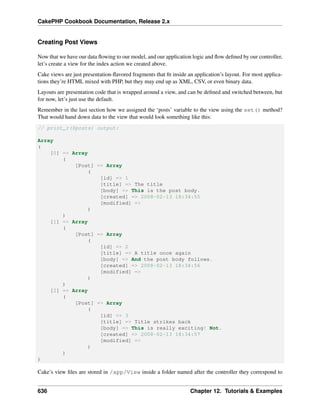
Remember in the last section how we assigned the ‘posts’ variable to the view using the set() method?
That would hand down data to the view that would look something like this:
// print_r($posts) output:
Array
(
[0] => Array
(
[Post] => Array
(
[id] => 1
[title] => The title
[body] => This is the post body.
[created] => 2008-02-13 18:34:55
[modified] =>
)
)
[1] => Array
(
[Post] => Array
(
[id] => 2
[title] => A title once again
[body] => And the post body follows.
[created] => 2008-02-13 18:34:56
[modified] =>
)
)
[2] => Array
(
[Post] => Array
(
[id] => 3
[title] => Title strikes back
[body] => This is really exciting! Not.
[created] => 2008-02-13 18:34:57
10 Chapter 1. Getting Started
CakePHP Cookbook Documentation, Release 2.x
[modified] =>
)
)
)
Cake’s view files are stored in /app/View inside a folder named after the controller they correspond to
(we’ll have to create a folder named ‘Posts’ in this case). To format this post data in a nice table, our view
code might look something like this
<!-- File: /app/View/Posts/index.ctp -->
<h1>Blog posts</h1>
<table>
<tr>
<th>Id</th>
<th>Title</th>
<th>Created</th>
</tr>
<!-- Here is where we loop through our $posts array, printing out post info -->
<?php foreach ($posts as $post): ?>
<tr>
<td><?php echo $post[’Post’][’id’]; ?></td>
<td>
<?php echo $this->Html->link($post[’Post’][’title’],
array(’controller’ => ’posts’, ’action’ => ’view’, $post[’Post’][’id’])); ?>
</td>
<td><?php echo $post[’Post’][’created’]; ?></td>
</tr>
<?php endforeach; ?>
<?php unset($post); ?>
</table>
Hopefully this should look somewhat simple.
You might have noticed the use of an object called $this->Html. This is an instance of the CakePHP
HtmlHelper class. CakePHP comes with a set of view helpers that make things like linking, form output,
JavaScript and Ajax a snap. You can learn more about how to use them in Helpers, but what’s important to
note here is that the link() method will generate an HTML link with the given title (the first parameter)
and URL (the second parameter).
When specifying URLs in Cake, it is recommended that you use the array format. This is explained in more
detail in the section on Routes. Using the array format for URLs allows you to take advantage of CakePHP’s
reverse routing capabilities. You can also specify URLs relative to the base of the application in the form of
/controller/action/param1/param2.
At this point, you should be able to point your browser to http://www.example.com/posts/index. You should
see your view, correctly formatted with the title and table listing of the posts.
If you happened to have clicked on one of the links we created in this view (that link a post’s title to a URL
/posts/view/some_id), you were probably informed by CakePHP that the action hasn’t yet been defined. If
you were not so informed, either something has gone wrong, or you actually did define it already, in which
Blog Tutorial - Adding a layer 11
CakePHP Cookbook Documentation, Release 2.x
case you are very sneaky. Otherwise, we’ll create it in the PostsController now:
class PostsController extends AppController {
public $helpers = array(’Html’, ’Form’);
public function index() {
$this->set(’posts’, $this->Post->find(’all’));
}
public function view($id = null) {
if (!$id) {
throw new NotFoundException(__(’Invalid post’));
}
$post = $this->Post->findById($id);
if (!$post) {
throw new NotFoundException(__(’Invalid post’));
}
$this->set(’post’, $post);
}
}
The set() call should look familiar. Notice we’re using findById() rather than find(’all’) be-
cause we only really want a single post’s information.
Notice that our view action takes a parameter: the ID of the post we’d like to see. This parameter is handed
to the action through the requested URL. If a user requests /posts/view/3, then the value ‘3’ is passed
as $id.
We also do a bit of error checking to ensure a user is actually accessing a record. If a user requests
/posts/view, we will throw a NotFoundException and let the CakePHP ErrorHandler take over.
We also perform a similar check to make sure the user has accessed a record that exists.
Now let’s create the view for our new ‘view’ action and place it in /app/View/Posts/view.ctp
<!-- File: /app/View/Posts/view.ctp -->
<h1><?php echo h($post[’Post’][’title’]); ?></h1>
<p><small>Created: <?php echo $post[’Post’][’created’]; ?></small></p>
<p><?php echo h($post[’Post’][’body’]); ?></p>
Verify that this is working by trying the links at /posts/index or manually requesting a post by accessing
/posts/view/1.
Adding Posts
Reading from the database and showing us the posts is a great start, but let’s allow for the adding of new
posts.
First, start by creating an add() action in the PostsController:
12 Chapter 1. Getting Started
CakePHP Cookbook Documentation, Release 2.x
class PostsController extends AppController {
public $helpers = array(’Html’, ’Form’, ’Session’);
public $components = array(’Session’);
public function index() {
$this->set(’posts’, $this->Post->find(’all’));
}
public function view($id) {
if (!$id) {
throw new NotFoundException(__(’Invalid post’));
}
$post = $this->Post->findById($id);
if (!$post) {
throw new NotFoundException(__(’Invalid post’));
}
$this->set(’post’, $post);
}
public function add() {
if ($this->request->is(’post’)) {
$this->Post->create();
if ($this->Post->save($this->request->data)) {
$this->Session->setFlash(’Your post has been saved.’);
$this->redirect(array(’action’ => ’index’));
} else {
$this->Session->setFlash(’Unable to add your post.’);
}
}
}
}
Note: You need to include the SessionComponent - and SessionHelper - in any controller where you will
use it. If necessary, include it in your AppController.
Here’s what the add() action does: if the HTTP method of the request was POST, try to save the data using
the Post model. If for some reason it doesn’t save, just render the view. This gives us a chance to show the
user validation errors or other warnings.
Every CakePHP request includes a CakeRequest object which is accessible using $this->request.
The request object contains useful information regarding the request that was just received, and can be used
to control the flow of your application. In this case, we use the CakeRequest::is() method to check
that the request is a HTTP POST request.
When a user uses a form to POST data to your application, that information is available in
$this->request->data. You can use the pr() or debug() functions to print it out if you want
to see what it looks like.
We use the SessionComponent’s SessionComponent::setFlash() method to set a message
to a session variable to be displayed on the page after redirection. In the layout we have
Blog Tutorial - Adding a layer 13
CakePHP Cookbook Documentation, Release 2.x
SessionHelper::flash which displays the message and clears the corresponding session vari-
able. The controller’s Controller::redirect function redirects to another URL. The param
array(’action’ => ’index’) translates to URL /posts i.e the index action of posts controller. You
can refer to Router::url() function on the API (http://api20.cakephp.org) to see the formats in which
you can specify a URL for various Cake functions.
Calling the save() method will check for validation errors and abort the save if any occur. We’ll discuss
how those errors are handled in the following sections.
Data Validation
Cake goes a long way in taking the monotony out of form input validation. Everyone hates coding up endless
forms and their validation routines. CakePHP makes it easier and faster.
To take advantage of the validation features, you’ll need to use Cake’s FormHelper in your views. The
FormHelper is available by default to all views at $this->Form.
Here’s our add view:
<!-- File: /app/View/Posts/add.ctp -->
<h1>Add Post</h1>
<?php
echo $this->Form->create(’Post’);
echo $this->Form->input(’title’);
echo $this->Form->input(’body’, array(’rows’ => ’3’));
echo $this->Form->end(’Save Post’);
?>
Here, we use the FormHelper to generate the opening tag for an HTML form. Here’s the HTML that
$this->Form->create() generates:
<form id="PostAddForm" method="post" action="/posts/add">
If create() is called with no parameters supplied, it assumes you are building a form that submits to the
current controller’s add() action (or edit() action when id is included in the form data), via POST.
The $this->Form->input() method is used to create form elements of the same name. The first
parameter tells CakePHP which field they correspond to, and the second parameter allows you to specify a
wide array of options - in this case, the number of rows for the textarea. There’s a bit of introspection and
automagic here: input() will output different form elements based on the model field specified.
The $this->Form->end() call generates a submit button and ends the form. If a string is supplied as
the first parameter to end(), the FormHelper outputs a submit button named accordingly along with the
closing form tag. Again, refer to Helpers for more on helpers.
Now let’s go back and update our /app/View/Posts/index.ctp view to include a new “Add Post”
link. Before the <table>, add the following line:
<?php echo $this->Html->link(
’Add Post’,
array(’controller’ => ’posts’, ’action’ => ’add’)
); ?>
14 Chapter 1. Getting Started
CakePHP Cookbook Documentation, Release 2.x
You may be wondering: how do I tell CakePHP about my validation requirements? Validation rules are
defined in the model. Let’s look back at our Post model and make a few adjustments:
class Post extends AppModel {
public $validate = array(
’title’ => array(
’rule’ => ’notEmpty’
),
’body’ => array(
’rule’ => ’notEmpty’
)
);
}
The $validate array tells CakePHP how to validate your data when the save() method is called. Here,
I’ve specified that both the body and title fields must not be empty. CakePHP’s validation engine is strong,
with a number of pre-built rules (credit card numbers, email addresses, etc.) and flexibility for adding your
own validation rules. For more information on that setup, check the Data Validation.
Now that you have your validation rules in place, use the app to try to add a post with an empty title or body
to see how it works. Since we’ve used the FormHelper::input() method of the FormHelper to create
our form elements, our validation error messages will be shown automatically.
Editing Posts
Post editing: here we go. You’re a CakePHP pro by now, so you should have picked up a pattern. Make the
action, then the view. Here’s what the edit() action of the PostsController would look like:
public function edit($id = null) {
if (!$id) {
throw new NotFoundException(__(’Invalid post’));
}
$post = $this->Post->findById($id);
if (!$post) {
throw new NotFoundException(__(’Invalid post’));
}
if ($this->request->is(’post’) || $this->request->is(’put’)) {
$this->Post->id = $id;
if ($this->Post->save($this->request->data)) {
$this->Session->setFlash(’Your post has been updated.’);
$this->redirect(array(’action’ => ’index’));
} else {
$this->Session->setFlash(’Unable to update your post.’);
}
}
if (!$this->request->data) {
$this->request->data = $post;
}
}
Blog Tutorial - Adding a layer 15
CakePHP Cookbook Documentation, Release 2.x
This action first ensures that the user has tried to access an existing record. If they haven’t passed in a passed
in an $id parameter, or the post does not exist, we throw a NotFoundException for the CakePHP
ErrorHandler to take care of.
Next the action checks that the request is a POST request. If it is, then we use the POST data to update our
Post record, or kick back and show the user validation errors.
If there is no data set to $this->request->data, we simply set it to the previously retrieved post.
The edit view might look something like this:
<!-- File: /app/View/Posts/edit.ctp -->
<h1>Edit Post</h1>
<?php
echo $this->Form->create(’Post’);
echo $this->Form->input(’title’);
echo $this->Form->input(’body’, array(’rows’ => ’3’));
echo $this->Form->input(’id’, array(’type’ => ’hidden’));
echo $this->Form->end(’Save Post’);
This view outputs the edit form (with the values populated), along with any necessary validation error
messages.
One thing to note here: CakePHP will assume that you are editing a model if the ‘id’ field is present in the
data array. If no ‘id’ is present (look back at our add view), Cake will assume that you are inserting a new
model when save() is called.
You can now update your index view with links to edit specific posts:
<!-- File: /app/View/Posts/index.ctp (edit links added) -->
<h1>Blog posts</h1>
<p><?php echo $this->Html->link("Add Post", array(’action’ => ’add’)); ?></p>
<table>
<tr>
<th>Id</th>
<th>Title</th>
<th>Action</th>
<th>Created</th>
</tr>
<!-- Here’s where we loop through our $posts array, printing out post info -->
<?php foreach ($posts as $post): ?>
<tr>
<td><?php echo $post[’Post’][’id’]; ?></td>
<td>
<?php echo $this->Html->link($post[’Post’][’title’], array(’action’ => ’view’,
</td>
<td>
<?php echo $this->Html->link(’Edit’, array(’action’ => ’edit’, $post[’Post’][’i
</td>
<td>
<?php echo $post[’Post’][’created’]; ?>
16 Chapter 1. Getting Started
CakePHP Cookbook Documentation, Release 2.x
</td>
</tr>
<?php endforeach; ?>
</table>
Deleting Posts
Next, let’s make a way for users to delete posts. Start with a delete() action in the PostsController:
public function delete($id) {
if ($this->request->is(’get’)) {
throw new MethodNotAllowedException();
}
if ($this->Post->delete($id)) {
$this->Session->setFlash(’The post with id: ’ . $id . ’ has been deleted.’);
$this->redirect(array(’action’ => ’index’));
}
}
This logic deletes the post specified by $id, and uses $this->Session->setFlash() to show the
user a confirmation message after redirecting them on to /posts. If the user attempts to do a delete using a
GET request, we throw an Exception. Uncaught exceptions are captured by CakePHP’s exception handler,
and a nice error page is displayed. There are many built-in Exceptions that can be used to indicate the
various HTTP errors your application might need to generate.
Because we’re just executing some logic and redirecting, this action has no view. You might want to update
your index view with links that allow users to delete posts, however:
<!-- File: /app/View/Posts/index.ctp -->
<h1>Blog posts</h1>
<p><?php echo $this->Html->link(’Add Post’, array(’action’ => ’add’)); ?></p>
<table>
<tr>
<th>Id</th>
<th>Title</th>
<th>Actions</th>
<th>Created</th>
</tr>
<!-- Here’s where we loop through our $posts array, printing out post info -->
<?php foreach ($posts as $post): ?>
<tr>
<td><?php echo $post[’Post’][’id’]; ?></td>
<td>
<?php echo $this->Html->link($post[’Post’][’title’], array(’action’ => ’view’,
</td>
<td>
<?php echo $this->Form->postLink(
Blog Tutorial - Adding a layer 17
CakePHP Cookbook Documentation, Release 2.x
’Delete’,
array(’action’ => ’delete’, $post[’Post’][’id’]),
array(’confirm’ => ’Are you sure?’));
?>
<?php echo $this->Html->link(’Edit’, array(’action’ => ’edit’, $post[’Post’][’i
</td>
<td>
<?php echo $post[’Post’][’created’]; ?>
</td>
</tr>
<?php endforeach; ?>
</table>
Using postLink() will create a link that uses Javascript to do a POST request deleting our post. Allowing
content to be deleted using GET requests is dangerous, as web crawlers could accidentally delete all your
content.
Note: This view code also uses the FormHelper to prompt the user with a JavaScript confirmation dialog
before they attempt to delete a post.
Routes
For some, CakePHP’s default routing works well enough. Developers who are sensitive to user-friendliness
and general search engine compatibility will appreciate the way that CakePHP’s URLs map to specific
actions. So we’ll just make a quick change to routes in this tutorial.
For more information on advanced routing techniques, see Routes Configuration.
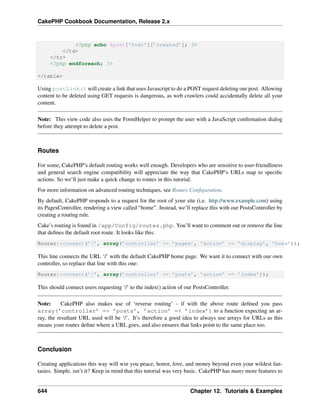
By default, CakePHP responds to a request for the root of your site (i.e. http://www.example.com) using
its PagesController, rendering a view called “home”. Instead, we’ll replace this with our PostsController by
creating a routing rule.
Cake’s routing is found in /app/Config/routes.php. You’ll want to comment out or remove the line
that defines the default root route. It looks like this:
Router::connect(’/’, array(’controller’ => ’pages’, ’action’ => ’display’, ’home’));
This line connects the URL ‘/’ with the default CakePHP home page. We want it to connect with our own
controller, so replace that line with this one:
Router::connect(’/’, array(’controller’ => ’posts’, ’action’ => ’index’));
This should connect users requesting ‘/’ to the index() action of our PostsController.
Note: CakePHP also makes use of ‘reverse routing’ - if with the above route defined you pass
array(’controller’ => ’posts’, ’action’ => ’index’) to a function expecting an ar-
ray, the resultant URL used will be ‘/’. It’s therefore a good idea to always use arrays for URLs as this
means your routes define where a URL goes, and also ensures that links point to the same place too.
18 Chapter 1. Getting Started
CakePHP Cookbook Documentation, Release 2.x
Conclusion
Creating applications this way will win you peace, honor, love, and money beyond even your wildest fan-
tasies. Simple, isn’t it? Keep in mind that this tutorial was very basic. CakePHP has many more features to
offer, and is flexible in ways we didn’t wish to cover here for simplicity’s sake. Use the rest of this manual
as a guide for building more feature-rich applications.
Now that you’ve created a basic Cake application you’re ready for the real thing. Start your own project,
read the rest of the Cookbook and API (http://api20.cakephp.org).
If you need help, come see us in #cakephp. Welcome to CakePHP!
Suggested Follow-up Reading
These are common tasks people learning CakePHP usually want to study next:
1. Layouts: Customizing your website layout
2. Elements Including and reusing view snippets
3. Scaffolding: Prototyping before creating code
4. Code Generation with Bake Generating basic CRUD code
5. Simple Authentication and Authorization Application: User authentication and authorization tutorial
Additional Reading
A Typical CakePHP Request
We’ve covered the basic ingredients in CakePHP, so let’s look at how objects work together to complete
a basic request. Continuing with our original request example, let’s imagine that our friend Ricardo just
clicked on the “Buy A Custom Cake Now!” link on a CakePHP application’s landing page.
Figure: 2. Typical Cake Request.
Black = required element, Gray = optional element, Blue = callback
1. Ricardo clicks the link pointing to http://www.example.com/cakes/buy, and his browser makes a re-
quest to your web server.
2. The Router parses the URL in order to extract the parameters for this request: the controller, action,
and any other arguments that will affect the business logic during this request.
3. Using routes, a request URL is mapped to a controller action (a method in a specific controller class).
In this case, it’s the buy() method of the CakesController. The controller’s beforeFilter() callback is
called before any controller action logic is executed.
4. The controller may use models to gain access to the application’s data. In this example, the controller
uses a model to fetch Ricardo’s last purchases from the database. Any applicable model callbacks,
behaviors, and DataSources may apply during this operation. While model usage is not required, all
CakePHP controllers initially require at least one model.
Blog Tutorial - Adding a layer 19
CakePHP Cookbook Documentation, Release 2.x
Figure 1.1: Flow diagram showing a typical CakePHP request
20 Chapter 1. Getting Started
CakePHP Cookbook Documentation, Release 2.x
5. After the model has retrieved the data, it is returned to the controller. Model callbacks may apply.
6. The controller may use components to further refine the data or perform other operations (session
manipulation, authentication, or sending emails, for example).
7. Once the controller has used models and components to prepare the data sufficiently, that data is
handed to the view using the controller’s set() method. Controller callbacks may be applied before
the data is sent. The view logic is performed, which may include the use of elements and/or helpers.
By default, the view is rendered inside of a layout.
8. Additional controller callbacks (like afterFilter) may be applied. The complete, rendered view code
is sent to Ricardo’s browser.
CakePHP Conventions
We are big fans of convention over configuration. While it takes a bit of time to learn CakePHP’s con-
ventions, you save time in the long run: by following convention, you get free functionality, and you free
yourself from the maintenance nightmare of tracking config files. Convention also makes for a very uniform
system development, allowing other developers to jump in and help more easily.
CakePHP’s conventions have been distilled out of years of web development experience and best practices.
While we suggest you use these conventions while developing with CakePHP, we should mention that many
of these tenets are easily overridden – something that is especially handy when working with legacy systems.
Controller Conventions
Controller classnames are plural, CamelCased, and end in Controller. PeopleController and
LatestArticlesController are both examples of conventional controller names.
The first method you write for a controller might be the index() method. When a request specifies a
controller but not an action, the default CakePHP behavior is to execute the index() method of that
controller. For example, a request for http://www.example.com/apples/ maps to a call on the index()
method of the ApplesController, whereas http://www.example.com/apples/view/ maps to a call on
the view() method of the ApplesController.
You can also change the visibility of controller methods in CakePHP by prefixing controller method names
with underscores. If a controller method has been prefixed with an underscore, the method will not be
accessible directly from the web but is available for internal use. For example:
class NewsController extends AppController {
public function latest() {
$this->_findNewArticles();
}
protected function _findNewArticles() {
// Logic to find latest news articles
}
}
Blog Tutorial - Adding a layer 21
CakePHP Cookbook Documentation, Release 2.x
While the page http://www.example.com/news/latest/ would be accessible to the user as usual, someone
trying to get to the page http://www.example.com/news/_findNewArticles/ would get an error, because the
method is preceded with an underscore. You can also use PHP’s visibility keywords to indicate whether or
not a method can be accessed from a url. Non-public methods cannot be accessed.
URL Considerations for Controller Names As you’ve just seen, single word controllers map easily to
a simple lower case URL path. For example, ApplesController (which would be defined in the file
name ‘ApplesController.php’) is accessed from http://example.com/apples.
Multiple word controllers can be any ‘inflected’ form which equals the controller name so:
• /redApples
• /RedApples
• /Red_apples
• /red_apples
will all resolve to the index of the RedApples controller. However, the convention is that your
urls are lowercase and underscored, therefore /red_apples/go_pick is the correct form to access the
RedApplesController::go_pick action.
For more information on CakePHP URLs and parameter handling, see Routes Configuration.
File and Classname Conventions
In general, filenames match the classnames, which are CamelCased. So if you have a class MyNiftyClass,
then in Cake, the file should be named MyNiftyClass.php. Below are examples of how to name the file for
each of the different types of classes you would typically use in a CakePHP application:
• The Controller class KissesAndHugsController would be found in a file named KissesAnd-
HugsController.php
• The Component class MyHandyComponent would be found in a file named MyHandyCompo-
nent.php
• The Model class OptionValue would be found in a file named OptionValue.php
• The Behavior class EspeciallyFunkableBehavior would be found in a file named EspeciallyFunk-
ableBehavior.php
• The View class SuperSimpleView would be found in a file named SuperSimpleView.php
• The Helper class BestEverHelper would be found in a file named BestEverHelper.php
Each file would be located in the appropriate folder in your app folder.
Model and Database Conventions
Model classnames are singular and CamelCased. Person, BigPerson, and ReallyBigPerson are all examples
of conventional model names.
22 Chapter 1. Getting Started
CakePHP Cookbook Documentation, Release 2.x
Table names corresponding to CakePHP models are plural and underscored. The underlying tables for the
above mentioned models would be people, big_people, and really_big_people, respectively.
You can use the utility library Inflector to check the singular/plural of words. See the Inflector for more
information.
Field names with two or more words are underscored like, first_name.
Foreign keys in hasMany, belongsTo or hasOne relationships are recognized by default as the (singular)
name of the related table followed by _id. So if a Baker hasMany Cake, the cakes table will refer to the
bakers table via a baker_id foreign key. For a multiple worded table like category_types, the foreign key
would be category_type_id.
Join tables, used in hasAndBelongsToMany (HABTM) relationships between models should be named after
the model tables they will join in alphabetical order (apples_zebras rather than zebras_apples).
All tables with which CakePHP models interact (with the exception of join tables), require a singular primary
key to uniquely identify each row. If you wish to model a table which does not have a single-field primary
key, CakePHP’s convention is that a single-field primary key is added to the table. You have to add a
single-field primary key if you want to use that table’s model.
CakePHP does not support composite primary keys. If you want to directly manipulate your join table data,
use direct query calls or add a primary key to act on it as a normal model. E.g.:
CREATE TABLE posts_tags (
id INT(10) NOT NULL AUTO_INCREMENT,
post_id INT(10) NOT NULL,
tag_id INT(10) NOT NULL,
PRIMARY KEY(id));
Rather than using an auto-increment key as the primary key, you may also use char(36). Cake will then use
a unique 36 character uuid (String::uuid) whenever you save a new record using the Model::save method.
View Conventions
View template files are named after the controller functions they display, in an underscored
form. The getReady() function of the PeopleController class will look for a view template in
/app/View/People/get_ready.ctp.
The basic pattern is /app/View/Controller/underscored_function_name.ctp.
By naming the pieces of your application using CakePHP conventions, you gain functionality without the
hassle and maintenance tethers of configuration. Here’s a final example that ties the conventions
• Database table: “people”
• Model class: “Person”, found at /app/Model/Person.php
• Controller class: “PeopleController”, found at /app/Controller/PeopleController.php
• View template, found at /app/View/People/index.ctp
Using these conventions, CakePHP knows that a request to http://example.com/people/ maps to a call on the
index() function of the PeopleController, where the Person model is automatically available (and automati-
Blog Tutorial - Adding a layer 23
CakePHP Cookbook Documentation, Release 2.x
cally tied to the ‘people’ table in the database), and renders to a file. None of these relationships have been
configured by any means other than by creating classes and files that you’d need to create anyway.
Now that you’ve been introduced to CakePHP’s fundamentals, you might try a run through the Blog Tutorial
to see how things fit together.
CakePHP Folder Structure
After you’ve downloaded and extracted CakePHP, these are the files and folders you should see:
• app
• lib
• vendors
• plugins
• .htaccess
• index.php
• README
You’ll notice three main folders:
• The app folder will be where you work your magic: it’s where your application’s files will be placed.
• The lib folder is where we’ve worked our magic. Make a personal commitment not to edit files in this
folder. We can’t help you if you’ve modified the core.
• Finally, the vendors folder is where you’ll place third-party PHP libraries you need to use with your
CakePHP applications.
The App Folder
CakePHP’s app folder is where you will do most of your application development. Let’s look a little closer
at the folders inside of app.
Config Holds the (few) configuration files CakePHP uses. Database connection details, bootstrapping, core
configuration files and more should be stored here.
Controller Contains your application’s controllers and their components.
Lib Contains 1st party libraries that do not come from 3rd parties or external vendors. This allows you to
separate your organization’s internal libraries from vendor libraries.
Locale Stores string files for internationalization.
Model Contains your application’s models, behaviors, and datasources.
Plugin Contains plugin packages.
tmp This is where CakePHP stores temporary data. The actual data it stores depends on how you have
CakePHP configured, but this folder is usually used to store model descriptions, logs, and sometimes
session information.
24 Chapter 1. Getting Started
CakePHP Cookbook Documentation, Release 2.x
Make sure that this folder exists and that it is writable, otherwise the performance of your application
will be severely impacted. In debug mode, CakePHP will warn you if it is not the case.
Vendor Any third-party classes or libraries should be placed here. Doing so makes them easy to access
using the App::import(‘vendor’, ‘name’) function. Keen observers will note that this seems redundant,
as there is also a vendors folder at the top level of our directory structure. We’ll get into the differences
between the two when we discuss managing multiple applications and more complex system setups.
View Presentational files are placed here: elements, error pages, helpers, layouts, and view files.
webroot In a production setup, this folder should serve as the document root for your application. Folders
here also serve as holding places for CSS stylesheets, images, and JavaScript files.
CakePHP Structure
CakePHP features Controller, Model, and View classes, but it also features some additional classes and
objects that make development in MVC a little quicker and more enjoyable. Components, Behaviors, and
Helpers are classes that provide extensibility and reusability to quickly add functionality to the base MVC
classes in your applications. Right now we’ll stay at a higher level, so look for the details on how to use
these tools later on.
Application Extensions
Controllers, helpers and models each have a parent class you can use to define application-
wide changes. AppController (located at /app/Controller/AppController.php), Ap-
pHelper (located at /app/View/Helper/AppHelper.php) and AppModel (located at
/app/Model/AppModel.php) are great places to put methods you want to share between all
controllers, helpers or models.
Although they aren’t classes or files, routes play a role in requests made to CakePHP. Route defini-
tions tell CakePHP how to map URLs to controller actions. The default behavior assumes that the URL
/controller/action/var1/var2 maps to Controller::action($var1, $var2), but you can use routes
to customize URLs and how they are interpreted by your application.
Some features in an application merit packaging as a whole. A plugin is a package of models, controllers
and views that accomplishes a specific purpose that can span multiple applications. A user management
system or a simplified blog might be a good fit for CakePHP plugins.
Controller Extensions (“Components”)
A Component is a class that aids in controller logic. If you have some logic you want to share between
controllers (or applications), a component is usually a good fit. As an example, the core EmailComponent
class makes creating and sending emails a snap. Rather than writing a controller method in a single controller
that performs this logic, you can package the logic so it can be shared.
Controllers are also fitted with callbacks. These callbacks are available for your use, just in case you need
to insert some logic between CakePHP’s core operations. Callbacks available include:
• beforeFilter(), executed before any controller action logic
Blog Tutorial - Adding a layer 25
CakePHP Cookbook Documentation, Release 2.x
• beforeRender(), executed after controller logic, but before the view is rendered
• afterFilter(), executed after all controller logic, including the view render. There may be no
difference between afterRender() and afterFilter() unless you’ve manually made a call
to render() in your controller action and have included some logic after that call.
Model Extensions (“Behaviors”)
Similarly, Behaviors work as ways to add common functionality between models. For example, if you
store user data in a tree structure, you can specify your User model as behaving like a tree, and gain free
functionality for removing, adding, and shifting nodes in your underlying tree structure.
Models also are supported by another class called a DataSource. DataSources are an abstraction that enable
models to manipulate different types of data consistently. While the main source of data in a CakePHP
application is often a database, you might write additional DataSources that allow your models to represent
RSS feeds, CSV files, LDAP entries, or iCal events. DataSources allow you to associate records from
different sources: rather than being limited to SQL joins, DataSources allow you to tell your LDAP model
that it is associated to many iCal events.
Just like controllers, models are featured with callbacks as well:
• beforeFind()
• afterFind()
• beforeValidate()
• beforeSave()
• afterSave()
• beforeDelete()
• afterDelete()
The names of these methods should be descriptive enough to let you know what they do. You can find the
details in the models chapter.
View Extensions (“Helpers”)
A Helper is a class that aids in view logic. Much like a component used among controllers, helpers allow
presentational logic to be accessed and shared between views. One of the core helpers, JsHelper, makes Ajax
requests within views much easier and comes with support for jQuery (default), Prototype and Mootools.
Most applications have pieces of view code that are used repeatedly. CakePHP facilitates view code reuse
with layouts and elements. By default, every view rendered by a controller is placed inside a layout. Ele-
ments are used when small snippets of content need to be reused in multiple views.
26 Chapter 1. Getting Started
CHAPTER 2
Installation
CakePHP is fast and easy to install. The minimum requirements are a webserver and a copy of Cake, that’s
it! While this manual focuses primarily on setting up with Apache (because it’s the most common), you can
configure Cake to run on a variety of web servers such as LightHTTPD or Microsoft IIS.
Requirements
• HTTP Server. For example: Apache. mod_rewrite is preferred, but by no means required.
• PHP 5.2.8 or greater.
Technically a database engine isn’t required, but we imagine that most applications will utilize one.
CakePHP supports a variety of database storage engines:
• MySQL (4 or greater)
• PostgreSQL
• Microsoft SQL Server
• SQLite
Note: The built-in drivers all require PDO. You should make sure you have the correct PDO extensions
installed.
License
CakePHP is licensed under the MIT license. This means that you are free to modify, distribute and republish
the source code on the condition that the copyright notices are left intact. You are also free to incorporate
CakePHP into any Commercial or closed source application.
27
CakePHP Cookbook Documentation, Release 2.x
Downloading CakePHP
There are two main ways to get a fresh copy of CakePHP. You can either download an archive copy
(zip/tar.gz/tar.bz2) from the main website, or check out the code from the git repository.
To download the latest major release of CakePHP. Visit the main website http://www.cakephp.org and follow
the “Download Now” link.
All current releases of CakePHP are hosted on Github (http://github.com/cakephp/cakephp). Github houses
both CakePHP itself as well as many other plugins for CakePHP. The CakePHP releases are available at
Github downloads (http://github.com/cakephp/cakephp/downloads).
Alternatively you can get fresh off the press code, with all the bug-fixes and up to the minute enhancements.
These can be accessed from github by cloning the Github (http://github.com/cakephp/cakephp) repository:
git clone git://github.com/cakephp/cakephp.git
Permissions
CakePHP uses the app/tmp directory for a number of different operations. Model descriptions, cached
views, and session information are just a few examples.
As such, make sure the directory app/tmp and all its subdirectories in your cake installation are writable
by the web server user.
Setup
Setting up CakePHP can be as simple as slapping it in your web server’s document root, or as complex and
flexible as you wish. This section will cover the three main installation types for CakePHP: development,
production, and advanced.
• Development: easy to get going, URLs for the application include the CakePHP installation directory
name, and less secure.
• Production: Requires the ability to configure the web server’s document root, clean URLs, very se-
cure.
• Advanced: With some configuration, allows you to place key CakePHP directories in different parts
of the filesystem, possibly sharing a single CakePHP core library folder amongst many CakePHP
applications.
Development
A development installation is the fastest method to setup Cake. This example will help you install a
CakePHP application and make it available at http://www.example.com/cake_2_0/. We assume for the pur-
poses of this example that your document root is set to /var/www/html.
28 Chapter 2. Installation
CakePHP Cookbook Documentation, Release 2.x
Unpack the contents of the Cake archive into /var/www/html. You now have a folder in your document
root named after the release you’ve downloaded (e.g. cake_2.0.0). Rename this folder to cake_2_0. Your
development setup will look like this on the file system:
/var/www/html/
cake_2_0/
app/
lib/
plugins/
vendors/
.htaccess
index.php
README
If your web server is configured correctly, you should now find your Cake application accessible at
http://www.example.com/cake_2_0/.
Using one CakePHP checkout for multiple applications
If you are developing a number of applications, it often makes sense to have them share the same CakePHP
core checkout. There are a few ways in which you can accomplish this. Often the easiest is to use PHP’s
include_path. To start off, clone CakePHP into a directory. For this example, we’ll use ~/projects:
git clone git://github.com/cakephp/cakephp.git ~/projects/cakephp
This will clone CakePHP into your ~/projects directory. If you don’t want to use git, you can download
a zipball and the remaining steps will be the same. Next you’ll have to locate and modify your php.ini.
On *nix systems this is often in /etc/php.ini, but using php -i and looking for ‘Loaded Configu-
ration File’. Once you’ve found the correct ini file, modify the include_path configuration to include
~/projects/cakephp/lib. An example would look like:
include_path = .:/home/mark/projects/cakephp/lib:/usr/local/php/lib/php
After restarting your webserver, you should see the changes reflected in phpinfo().
Note: If you are on windows, separate include paths with ; instead of :
Having finished setting up your include_path your applications should be able to find CakePHP auto-
matically.
Production
A production installation is a more flexible way to setup Cake. Using this method allows an entire domain to
act as a single CakePHP application. This example will help you install Cake anywhere on your filesystem
and make it available at http://www.example.com. Note that this installation may require the rights to change
the DocumentRoot on Apache webservers.
Production 29
CakePHP Cookbook Documentation, Release 2.x
Unpack the contents of the Cake archive into a directory of your choosing. For the purposes of this example,
we assume you choose to install Cake into /cake_install. Your production setup will look like this on the
filesystem:
/cake_install/
app/
webroot/ (this directory is set as the ‘‘DocumentRoot‘‘
directive)
lib/
plugins/
vendors/
.htaccess
index.php
README
Developers using Apache should set the DocumentRoot directive for the domain to:
DocumentRoot /cake_install/app/webroot
If your web server is configured correctly, you should now find your Cake application accessible at
http://www.example.com.
Advanced Installation and URL Rewriting
Advanced Installation
There may be some situations where you wish to place CakePHP’s directories on different places on the
filesystem. This may be due to a shared host restriction, or maybe you just want a few of your apps to share
the same Cake libraries. This section describes how to spread your CakePHP directories across a filesystem.
First, realize that there are three main parts to a Cake application:
1. The core CakePHP libraries, in /lib/Cake.
2. Your application code, in /app.
3. The application’s webroot, usually in /app/webroot.
Each of these directories can be located anywhere on your file system, with the exception of the webroot,
which needs to be accessible by your web server. You can even move the webroot folder out of the app
folder as long as you tell Cake where you’ve put it.
To configure your Cake installation, you’ll need to make some changes to the following files.
• /app/webroot/index.php
• /app/webroot/test.php (if you use the Testing feature.)
There are three constants that you’ll need to edit: ROOT, APP_DIR, and CAKE_CORE_INCLUDE_PATH.
• ROOT should be set to the path of the directory that contains your app folder.
• APP_DIR should be set to the (base)name of your app folder.
• CAKE_CORE_INCLUDE_PATH should be set to the path of your CakePHP libraries folder.
30 Chapter 2. Installation
CakePHP Cookbook Documentation, Release 2.x
Let’s run through an example so you can see what an advanced installation might look like in practice.
Imagine that I wanted to set up CakePHP to work as follows:
• The CakePHP core libraries will be placed in /usr/lib/cake.
• My application’s webroot directory will be /var/www/mysite/.
• My application’s app directory will be /home/me/myapp.
Given this type of setup, I would need to edit my webroot/index.php file (which will end up at
/var/www/mysite/index.php, in this example) to look like the following:
// /app/webroot/index.php (partial, comments removed)
if (!defined(’ROOT’)) {
define(’ROOT’, DS . ’home’ . DS . ’me’);
}
if (!defined(’APP_DIR’)) {
define (’APP_DIR’, ’myapp’);
}
if (!defined(’CAKE_CORE_INCLUDE_PATH’)) {
define(’CAKE_CORE_INCLUDE_PATH’, DS . ’usr’ . DS . ’lib’);
}
It is recommended to use the DS constant rather than slashes to delimit file paths. This prevents any missing
file errors you might get as a result of using the wrong delimiter, and it makes your code more portable.
Apache and mod_rewrite (and .htaccess)
This section was moved to URL rewriting.
URL Rewriting
Apache and mod_rewrite (and .htaccess)
While CakePHP is built to work with mod_rewrite out of the box–and usually does–we’ve noticed that a
few users struggle with getting everything to play nicely on their systems.
Here are a few things you might try to get it running correctly. First look at your httpd.conf (Make sure you
are editing the system httpd.conf rather than a user- or site-specific httpd.conf).
1. Make sure that an .htaccess override is allowed and that AllowOverride is set to All for the correct
DocumentRoot. You should see something similar to:
# Each directory to which Apache has access can be configured with respect
# to which services and features are allowed and/or disabled in that
# directory (and its subdirectories).
#
# First, we configure the "default" to be a very restrictive set of
# features.
Advanced Installation and URL Rewriting 31
CakePHP Cookbook Documentation, Release 2.x
#
<Directory />
Options FollowSymLinks
AllowOverride All
# Order deny,allow
# Deny from all
</Directory>
2. Make sure you are loading up mod_rewrite correctly. You should see something like:
LoadModule rewrite_module libexec/apache2/mod_rewrite.so
In many systems these will be commented out (by being prepended with a #) by default, so you may
just need to remove those leading # symbols.
After you make changes, restart Apache to make sure the settings are active.
Verify that you your .htaccess files are actually in the right directories.
This can happen during copying because some operating systems treat files that start with ‘.’ as hidden
and therefore won’t see them to copy.
3. Make sure your copy of CakePHP is from the downloads section of the site or our GIT repository, and
has been unpacked correctly by checking for .htaccess files.
Cake root directory (needs to be copied to your document, this redirects everything to your Cake app):
<IfModule mod_rewrite.c>
RewriteEngine on
RewriteRule ^ $ app/webroot/ [L]
RewriteRule (.*) app/webroot/ $ 1 [L]
</IfModule>
Cake app directory (will be copied to the top directory of your application by bake):
<IfModule mod_rewrite.c>
RewriteEngine on
RewriteRule ^ $ webroot/ [L]
RewriteRule (.*) webroot/ $ 1 [L]
</IfModule>
Cake webroot directory (will be copied to your application’s web root by bake):
<IfModule mod_rewrite.c>
RewriteEngine On
RewriteCond %{REQUEST_FILENAME} !-d
RewriteCond %{REQUEST_FILENAME} !-f
RewriteRule ^(.*) $ index.php [QSA,L]
</IfModule>
If your CakePHP site still has problems with mod_rewrite you might want to try and modify settings
for virtualhosts. If on ubuntu, edit the file /etc/apache2/sites-available/default (location is distribu-
tion dependent). In this file, ensure that AllowOverride None is changed to AllowOverride
All, so you have:
32 Chapter 2. Installation
CakePHP Cookbook Documentation, Release 2.x
<Directory />
Options FollowSymLinks
AllowOverride All
</Directory>
<Directory /var/www>
Options Indexes FollowSymLinks MultiViews
AllowOverride All
Order Allow,Deny
Allow from all
</Directory>
If on Mac OSX, another solution is to use the tool virtualhostx to make a virtual host to point to your
folder.
For many hosting services (GoDaddy, 1and1), your web server is actually being served from a
user directory that already uses mod_rewrite. If you are installing CakePHP into a user direc-
tory (http://example.com/~username/cakephp/), or any other URL structure that already utilizes
mod_rewrite, you’ll need to add RewriteBase statements to the .htaccess files CakePHP uses (/.htac-
cess, /app/.htaccess, /app/webroot/.htaccess).
This can be added to the same section with the RewriteEngine directive, so for example your webroot
.htaccess file would look like:
<IfModule mod_rewrite.c>
RewriteEngine On
RewriteBase /path/to/cake/app
RewriteCond %{REQUEST_FILENAME} !-d
RewriteCond %{REQUEST_FILENAME} !-f
RewriteRule ^(.*) $ index.php [QSA,L]
</IfModule>
The details of those changes will depend on your setup, and can include additional things that are not
Cake related. Please refer to Apache’s online documentation for more information.
Pretty URLs on nginx
nginx is a popular server that uses less system resources than Apache. Its drawback is that it does not make
use of .htaccess files like Apache, so it is necessary to create those rewritten URLs in the site-available
configuration. Depending upon your setup, you will have to modify this, but at the very least, you will need
PHP running as a FastCGI instance.
server {
listen 80;
server_name www.example.com;
rewrite ^(.*) http://example.com $ 1 permanent;
}
server {
listen 80;
server_name example.com;
# root directive should be global
Advanced Installation and URL Rewriting 33
CakePHP Cookbook Documentation, Release 2.x
root /var/www/example.com/public/app/webroot/;
index index.php;
access_log /var/www/example.com/log/access.log;
error_log /var/www/example.com/log/error.log;
location / {
try_files $uri $uri/ /index.php?$uri&$args;
}
location ~ .php $ {
try_files $uri =404;
include /etc/nginx/fastcgi_params;
fastcgi_pass 127.0.0.1:9000;
fastcgi_index index.php;
fastcgi_param SCRIPT_FILENAME $document_root$fastcgi_script_name;
}
}
URL Rewrites on IIS7 (Windows hosts)
IIS7 does not natively support .htaccess files. While there are add-ons that can add this support, you can
also import htaccess rules into IIS to use CakePHP’s native rewrites. To do this, follow these steps:
1. Use Microsoft’s Web Platform Installer (http://www.microsoft.com/web/downloads/platform.aspx) to
install the URL Rewrite Module 2.0 (http://www.iis.net/downloads/microsoft/url-rewrite) or down-
load it directly (32-bit (http://www.microsoft.com/en-us/download/details.aspx?id=5747) / 64-bit
(http://www.microsoft.com/en-us/download/details.aspx?id=7435)).
2. Create a new file in your CakePHP root folder, called web.config.
3. Using Notepad or any XML-safe editor and copy the following code into your new web.config file...
<?xml version="1.0" encoding="UTF-8"?>
<configuration>
<system.webServer>
<rewrite>
<rules>
<clear/>
<rule name="Imported Rule 0" stopProcessing="true">
<match url="^(img|css|files|js)(.*)$"></match>
<action type="Rewrite" url="app/webroot/{R:1}{R:2}" appendQueryString="
</rule>
<rule name="Imported Rule 1" stopProcessing="true">
<match url="^(.*)$" ignoreCase="false" />
<conditions logicalGrouping="MatchAll">
<add input="{REQUEST_FILENAME}" matchType="IsDirectory" negate="tru
<add input="{REQUEST_FILENAME}" matchType="IsFile" negate="true" />
</conditions>
<action type="Rewrite" url="index.php?url={R:1}" appendQueryString="tru
</rule>
<rule name="Imported Rule 2" stopProcessing="true">
34 Chapter 2. Installation
CakePHP Cookbook Documentation, Release 2.x
<match url="^$" ignoreCase="false" />
<action type="Rewrite" url="app/webroot/" />
</rule>
<rule name="Imported Rule 3" stopProcessing="true">
<match url="(.*)" ignoreCase="false" />
<action type="Rewrite" url="app/webroot/{R:1}" />
</rule>
<rule name="Imported Rule 4" stopProcessing="true">
<match url="^(.*)$" ignoreCase="false" />
<conditions logicalGrouping="MatchAll">
<add input="{REQUEST_FILENAME}" matchType="IsDirectory" negate="tru
<add input="{REQUEST_FILENAME}" matchType="IsFile" negate="true" />
</conditions>
<action type="Rewrite" url="index.php?url={R:1}" appendQueryString="tru
</rule>
</rules>
</rewrite>
</system.webServer>
</configuration>
It is also possible to use the Import functionality in IIS’s URL Rewrite module to import rules directly
from CakePHP’s .htaccess files in root, /app/, and /app/webroot/ - although some editing within IIS may
be necessary to get these to work. When Importing the rules this way, IIS will automatically create your
web.config file for you (in the currently selected folder within IIS).
Once the web.config file is created with the correct IIS-friendly rewrite rules, CakePHP’s links, css, js, and
rerouting should work correctly.
I don’t / can’t use URL rewriting
If you don’t want to or can’t use URL rewriting on your webserver, refer to the core configuration.
Fire It Up
Alright, let’s see CakePHP in action. Depending on which setup you used, you should point your browser to
http://example.com/ or http://example.com/cake_install/. At this point, you’ll be presented with CakePHP’s
default home, and a message that tells you the status of your current database connection.
Congratulations! You are ready to create your first CakePHP application.
Not working? If you’re getting timezone related error from PHP uncomment one line in
app/Config/core.php:
/**
* Uncomment this line and correct your server timezone to fix
* any date & time related errors.
*/
date_default_timezone_set(’UTC’);
Fire It Up 35
CakePHP Cookbook Documentation, Release 2.x
36 Chapter 2. Installation
CHAPTER 3
CakePHP Overview
Welcome to the Cookbook, the manual for the CakePHP web application framework that makes developing
a piece of cake!
This manual assumes that you have a general understanding of PHP and a basic understanding of object-
oriented programming (OOP). Different functionality within the framework makes use of different technolo-
gies – such as SQL, JavaScript, and XML – and this manual does not attempt to explain those technologies,
only how they are used in context.
What is CakePHP? Why Use it?
CakePHP (http://www.cakephp.org/) is a free (http://en.wikipedia.org/wiki/MIT_License),
open-source (http://en.wikipedia.org/wiki/Open_source), rapid develop-
ment (http://en.wikipedia.org/wiki/Rapid_application_development) framework
(http://en.wikipedia.org/wiki/Application_framework) for PHP (http://www.php.net/). It’s a founda-
tional structure for programmers to create web applications. Our primary goal is to enable you to work in a
structured and rapid manner–without loss of flexibility.
CakePHP takes the monotony out of web development. We provide you with all the tools you need to get
started coding what you really need to get done: the logic specific to your application. Instead of reinventing
the wheel every time you sit down to a new project, check out a copy of CakePHP and get started with the
real guts of your application.
CakePHP has an active developer team (https://github.com/cakephp?tab=members) and community, bring-
ing great value to the project. In addition to keeping you from wheel-reinventing, using CakePHP means
your application’s core is well tested and is being constantly improved.
Here’s a quick list of features you’ll enjoy when using CakePHP:
• Active, friendly community (http://cakephp.org/feeds)
• Flexible licensing (http://en.wikipedia.org/wiki/MIT_License)
• Compatible with versions PHP 5.2.8 and greater.
37
CakePHP Cookbook Documentation, Release 2.x
• Integrated CRUD (http://en.wikipedia.org/wiki/Create,_read,_update_and_delete) for database inter-
action.
• Application scaffolding (http://en.wikipedia.org/wiki/Scaffold_(programming)).
• Code generation.
• MVC (http://en.wikipedia.org/wiki/Model-view-controller) architecture.
• Request dispatcher with clean, custom URLs and routes.
• Built-in validation (http://en.wikipedia.org/wiki/Data_validation).
• Fast and flexible templating (http://en.wikipedia.org/wiki/Web_template_system) (PHP syntax, with
helpers).
• View Helpers for AJAX, JavaScript, HTML Forms and more.
• Email, Cookie, Security, Session, and Request Handling Components.
• Flexible ACL (http://en.wikipedia.org/wiki/Access_control_list).
• Data Sanitization.
• Flexible Caching (http://en.wikipedia.org/wiki/Web_cache).
• Localization.
• Works from any web site directory, with little to no Apache (http://httpd.apache.org/) configuration
involved.
Understanding Model-View-Controller
CakePHP follows the MVC (http://en.wikipedia.org/wiki/Model-view-controller) software design pattern.
Programming using MVC separates your application into three main parts:
The Model layer
The Model layer represents the part of your application that implements the business logic. It is responsible
for retrieving data and converting it into meaningful concepts for your application. This includes processing,
validating, associating or other tasks related to handling data.
At a first glance, Model objects can be looked at as the first layer of interaction with any database you might
be using for your application. But in general they stand for the major concepts around which you implement
your application.
In the case of a social network, the Model layer would take care of tasks such as Saving the user data, saving
friends associations, storing and retrieving user photos, finding new friends for suggestions, etc. While the
model objects can be thought as “Friend”, “User”, “Comment”, or “Photo”.
38 Chapter 3. CakePHP Overview
CakePHP Cookbook Documentation, Release 2.x
The View layer
The View renders a presentation of modeled data. Being separated from the Model objects, it is responsible
for using the information it has available to produce any presentational interface your application might
need.
For example, as the Model layer returns a set of data, the view would use it to render a HTML page contain-
ing it. Or a XML formatted result for others to consume.
The View layer is not only limited to HTML or text representation of the data, it can be used to deliver a
wide variety of formats depending on your needs, such as videos, music, documents and any other format
you can think of.
The Controller layer
The Controller layer handles requests from users. It’s responsible for rendering back a response with the aid
of both the Model and the View Layer.
Controllers can be seen as managers taking care that all needed resources for completing a task are delegated
to the correct workers. It waits for petitions from clients, checks their validity according to authentication
or authorization rules, delegates data fetching or processing to the model, and selects the correct type of
presentational data that the client is accepting, to finally delegate this rendering process to the View layer.
CakePHP request cycle
Figure: 1: A typical MVC Request in CakePHP
The typical CakePHP request cycle starts with a user requesting a page or resource in your application. This
request is first processed by a dispatcher which will select the correct controller object to handle it.
Once the request arrives at the controller, it will communicate with the Model layer to process any data
fetching or saving operation that might be needed. After this communication is over, the controller will
Understanding Model-View-Controller 39
CakePHP Cookbook Documentation, Release 2.x
proceed at delegating to the correct view object the task of generating an output resulting from the data
provided by the model.
Finally, when this output is generated, it is immediately rendered to the user
Almost every request to your application will follow this basic pattern. We’ll add some details later on
which are specific to CakePHP, so keep this in mind as we proceed.
Benefits
Why use MVC? Because it is a tried and true software design pattern that turns an application into a main-
tainable, modular, rapidly developed package. Crafting application tasks into separate models, views, and
controllers makes your application very light on its feet. New features are easily added, and new faces on old
features are a snap. The modular and separate design also allows developers and designers to work simul-
taneously, including the ability to rapidly prototype (http://en.wikipedia.org/wiki/Software_prototyping).
Separation also allows developers to make changes in one part of the application without affecting the oth-
ers.
If you’ve never built an application this way, it takes some time getting used to, but we’re confident that
once you’ve built your first application using CakePHP, you won’t want to do it any other way.
To get started on your first CakePHP application, try the blog tutorial now
Where to Get Help
The Official CakePHP website
http://www.cakephp.org
The Official CakePHP website is always a great place to visit. It features links to oft-used developer tools,
screencasts, donation opportunities, and downloads.
The Cookbook
http://book.cakephp.org
This manual should probably be the first place you go to get answers. As with many other open source
projects, we get new folks regularly. Try your best to answer your questions on your own first. Answers
may come slower, but will remain longer – and you’ll also be lightening our support load. Both the manual
and the API have an online component.
The Bakery
http://bakery.cakephp.org
The CakePHP Bakery is a clearing house for all things CakePHP. Check it out for tutorials, case studies,
and code examples. Once you’re acquainted with CakePHP, log on and share your knowledge with the
community and gain instant fame and fortune.
40 Chapter 3. CakePHP Overview
CakePHP Cookbook Documentation, Release 2.x
The API
http://api20.cakephp.org/
Straight to the point and straight from the core developers, the CakePHP API (Application Programming
Interface) is the most comprehensive documentation around for all the nitty gritty details of the internal
workings of the framework. It’s a straight forward code reference, so bring your propeller hat.
The Test Cases
If you ever feel the information provided in the API is not sufficient, check out the code of the test cases
provided with CakePHP. They can serve as practical examples for function and data member usage for a
class.:
lib/Cake/Test/Case
The IRC channel
IRC Channels on irc.freenode.net:
• #cakephp – General Discussion
• #cakephp-docs – Documentation
• #cakephp-bakery – Bakery
If you’re stumped, give us a holler in the CakePHP IRC channel. Someone from the development team
(https://github.com/cakephp?tab=members) is usually there, especially during the daylight hours for North
and South America users. We’d love to hear from you, whether you need some help, want to find users in
your area, or would like to donate your brand new sports car.
The Google Group
http://groups.google.com/group/cake-php
CakePHP also has a very active Google Group. It can be a great resource for finding archived answers,
frequently asked questions, and getting answers to immediate problems.
CakePHP Questions
http://ask.cakephp.org/
Simply register/login and ask a question. Wait until you’ve got some answers and pick the correct answer.
You can view, comment and vote on previously asked and solved questions as well.
Where to Get Help 41
CakePHP Cookbook Documentation, Release 2.x
42 Chapter 3. CakePHP Overview
CHAPTER 4
Controllers
Controllers are the ‘C’ in MVC. After routing has been applied and the correct controller has been found,
your controller’s action is called. Your controller should handle interpreting the request data, making sure
the correct models are called, and the right response or view is rendered. Controllers can be thought of as
middle man between the Model and View. You want to keep your controllers thin, and your models fat. This
will help you more easily reuse your code and makes your code easier to test.
Commonly, controllers are used to manage the logic around a single model. For example, if you were
building a site for an on-line bakery, you might have a RecipesController and an IngredientsController
managing your recipes and their ingredients. In CakePHP, controllers are named after the primary model
they handle. It’s totally possible to have controllers work with more than one model as well.
Your application’s controllers extend AppController class, which in turn ex-
tends the core Controller class. The AppController class can be defined in
/app/Controller/AppController.php and it should contain methods that are shared between all
of your application’s controllers.
Controllers provide a number of methods which are called actions. Actions are methods on a controller
that handle requests. By default all public methods on a controller are an action, and accessible from a url.
Actions are responsible for interpreting the request and creating the response. Usually responses are in the
form of a rendered view, but there are other ways to create responses as well.
The App Controller
As stated in the introduction, the AppController class is the parent class to all of your application’s con-
trollers. AppController itself extends the Controller class included in the CakePHP core library. As such,
AppController is defined in /app/Controller/AppController.php like so:
class AppController extends Controller {
}
Controller attributes and methods created in your AppController will be available to all of your application’s
controllers. It is the ideal place to create code that is common to all of your controllers. Components (which
you’ll learn about later) are best used for code that is used in many (but not necessarily all) controllers.
43
CakePHP Cookbook Documentation, Release 2.x
While normal object-oriented inheritance rules apply, CakePHP does a bit of extra work when it comes to
special controller attributes. The list of components and helpers used by a controller are treated specially.
In these cases, AppController value arrays are merged with child controller class arrays. The values in the
child class will always override those in AppController.
Note: CakePHP merges the following variables from the AppController to your application’s controllers:
• $components
• $helpers
• $uses
Remember to add the default Html and Form helpers, if you define var $helpers in your AppController
Please also remember to call AppController’s callbacks within child controller callbacks for best results:
public function beforeFilter() {
parent::beforeFilter();
}
Request parameters
When a request is made to a CakePHP application, CakePHP’s Router and Dispatcher classes use
Routes Configuration to find and create the correct controller. The request data is encapsulated into a request
object. CakePHP puts all of the important request information into the $this->request property. See
the section on CakeRequest for more information on the CakePHP request object.
Controller actions
Controller actions are responsible for converting the request parameters into a response for the browser/user
making the request. CakePHP uses conventions to automate this process and remove some boiler-plate code
you would otherwise need to write.
By convention CakePHP renders a view with an inflected version of the action name. Returning to our online
bakery example, our RecipesController might contain the view(), share(), and search() actions.
The controller would be found in /app/Controller/RecipesController.php and contain:
# /app/Controller/RecipesController.php
class RecipesController extends AppController {
public function view($id) {
//action logic goes here..
}
public function share($customerId, $recipeId) {
//action logic goes here..
}
44 Chapter 4. Controllers
CakePHP Cookbook Documentation, Release 2.x
public function search($query) {
//action logic goes here..
}
}
The view files for these actions would be app/View/Recipes/view.ctp,
app/View/Recipes/share.ctp, and app/View/Recipes/search.ctp. The conventional
view file name is the lower cased and underscored version of the action name.
Controller actions generally use set() to create a context that View uses to render the view. Because of
the conventions that CakePHP uses, you don’t need to create and render the view manually. Instead once a
controller action has completed, CakePHP will handle rendering and delivering the View.
If for some reason you’d like to skip the default behavior. Both of the following techniques will by-pass the
default view rendering behavior.
• If you return a string, or an object that can be converted to a string from your controller action, it will
be used as the response body.
• You can return a CakeResponse object with the completely created response.
When controller methods are used with requestAction() you will often want to return data that isn’t
a string. If you have controller methods that are used for normal web requests + requestAction you should
check the request type before returning:
class RecipesController extends AppController {
public function popular() {
$popular = $this->Recipe->popular();
if (!empty($this->request->params[’requested’])) {
return $popular;
}
$this->set(’popular’, $popular);
}
}
The above controller action is an example of how a method can be used with requestAction()
and normal requests. Returning an array data to a non-requestAction request will cause errors and
should be avoided. See the section on Controller::requestAction() for more tips on using
requestAction()
In order for you to use a controller effectively in your own application, we’ll cover some of the core attributes
and methods provided by CakePHP’s controllers.
Request Life-cycle callbacks
class Controller
CakePHP controllers come fitted with callbacks you can use to insert logic around the request life-cycle:
Controller::beforeFilter()
This function is executed before every action in the controller. It’s a handy place to check for an active
session or inspect user permissions.
Request Life-cycle callbacks 45
CakePHP Cookbook Documentation, Release 2.x
Note: The beforeFilter() method will be called for missing actions, and scaffolded actions.
Controller::beforeRender()
Called after controller action logic, but before the view is rendered. This callback is not used often,
but may be needed if you are calling render() manually before the end of a given action.
Controller::afterFilter()
Called after every controller action, and after rendering is complete. This is the last controller method
to run.
In addition to controller life-cycle callbacks, Components also provide a similar set of callbacks.
Controller Methods
For a complete list of controller methods and their descriptions visit the CakePHP API. Check out
http://api20.cakephp.org/class/controller.
Interacting with Views
Controllers interact with the view in a number of ways. First they are able to pass data to the views, using
set(). You can also decide which view class to use, and which view file should be rendered from the
controller.
Controller::set(string $var, mixed $value)
The set() method is the main way to send data from your controller to your view. Once you’ve
used set(), the variable can be accessed in your view:
// First you pass data from the controller:
$this->set(’color’, ’pink’);
// Then, in the view, you can utilize the data:
?>
You have selected <?php echo $color; ?> icing for the cake.
The set() method also takes an associative array as its first parameter. This can often be a quick
way to assign a set of information to the view. Changed in version 1.3: Array keys will no longer be
inflected before they are assigned to the view (‘underscored_key’ does not become ‘underscoredKey’
anymore, etc.):
$data = array(
’color’ => ’pink’,
’type’ => ’sugar’,
’base_price’ => 23.95
);
// make $color, $type, and $base_price
46 Chapter 4. Controllers
CakePHP Cookbook Documentation, Release 2.x
// available to the view:
$this->set($data);
The attribute $pageTitle no longer exists, use set() to set the title:
$this->set(’title_for_layout’, ’This is the page title’);
Controller::render(string $view, string $layout)
The render() method is automatically called at the end of each requested controller action. This
method performs all the view logic (using the data you’ve given in using the set() method), places
the view inside its layout and serves it back to the end user.
The default view file used by render is determined by convention. If the search() action of the
RecipesController is requested, the view file in /app/View/Recipes/search.ctp will be rendered:
class RecipesController extends AppController {
// ...
public function search() {
// Render the view in /View/Recipes/search.ctp
$this->render();
}
// ...
}
Although CakePHP will automatically call it (unless you’ve set $this->autoRender to false)
after every action’s logic, you can use it to specify an alternate view file by specifying an action name
in the controller using $action.
If $view starts with ‘/’ it is assumed to be a view or element file relative to the /app/View folder.
This allows direct rendering of elements, very useful in ajax calls.
// Render the element in /View/Elements/ajaxreturn.ctp
$this->render(’/Elements/ajaxreturn’);
The $layout parameter allows you to specify the layout the view is rendered in.
Rendering a specific view
In your controller you may want to render a different view than what would conventionally be done. You can
do this by calling render() directly. Once you have called render() CakePHP will not try to re-render
the view:
class PostsController extends AppController {
public function my_action() {
$this->render(’custom_file’);
}
}
This would render app/View/Posts/custom_file.ctp instead of
app/View/Posts/my_action.ctp
Controller Methods 47
CakePHP Cookbook Documentation, Release 2.x
Flow Control
Controller::redirect(mixed $url, integer $status, boolean $exit)
The flow control method you’ll use most often is redirect(). This method takes its first parameter
in the form of a CakePHP-relative URL. When a user has successfully placed an order, you might wish
to redirect them to a receipt screen.:
public function place_order() {
// Logic for finalizing order goes here
if ($success) {
$this->redirect(array(’controller’ => ’orders’, ’action’ => ’thanks’));
} else {
$this->redirect(array(’controller’ => ’orders’, ’action’ => ’confirm’));
}
}
You can also use a relative or absolute URL as the $url argument:
$this->redirect(’/orders/thanks’));
$this->redirect(’http://www.example.com’);
You can also pass data to the action:
$this->redirect(array(’action’ => ’edit’, $id));
The second parameter of redirect() allows you to define an HTTP status code to accompany the
redirect. You may want to use 301 (moved permanently) or 303 (see other), depending on the nature
of the redirect.
The method will issue an exit() after the redirect unless you set the third parameter to false.
If you need to redirect to the referer page you can use:
$this->redirect($this->referer());
The method also supports name based parameters. If you want to redirect to a URL
like: http://www.example.com/orders/confirm/product:pizza/quantity:5
you can use:
$this->redirect(array(’controller’ => ’orders’, ’action’ => ’confirm’, ’product’ => ’p
Controller::flash(string $message, string|array $url, integer $pause, string $layout)
Like redirect(), the flash() method is used to direct a user to a new page after an operation.
The flash() method is different in that it shows a message before passing the user on to another
URL.
The first parameter should hold the message to be displayed, and the second parameter is a CakePHP-
relative URL. CakePHP will display the $message for $pause seconds before forwarding the user
on.
If there’s a particular template you’d like your flashed message to use, you may specify the name of
that layout in the $layout parameter.
For in-page flash messages, be sure to check out SessionComponent’s setFlash() method.
48 Chapter 4. Controllers
CakePHP Cookbook Documentation, Release 2.x
Callbacks
In addition to the Request Life-cycle callbacks. CakePHP also supports callbacks related to scaffolding.
Controller::beforeScaffold($method)
$method name of method called example index, edit, etc.
Controller::afterScaffoldSave($method)
$method name of method called either edit or update.
Controller::afterScaffoldSaveError($method)
$method name of method called either edit or update.
Controller::scaffoldError($method)
$method name of method called example index, edit, etc.
Other Useful Methods
Controller::constructClasses()
This method loads the models required by the controller. This loading process is done by CakePHP
normally, but this method is handy to have when accessing controllers from a different perspective. If
you need CakePHP in a command-line script or some other outside use, constructClasses() may come
in handy.
Controller::referer(mixed $default = null, boolean $local = false)
Returns the referring URL for the current request. Parameter $default can be used to supply a
default URL to use if HTTP_REFERER cannot be read from headers. So, instead of doing this:
class UserController extends AppController {
public function delete($id) {
// delete code goes here, and then...
if ($this->referer() != ’/’) {
$this->redirect($this->referer());
} else {
$this->redirect(array(’action’ => ’index’));
}
}
}
you can do this:
class UserController extends AppController {
public function delete($id) {
// delete code goes here, and then...
$this->redirect($this->referer(array(’action’ => ’index’)));
}
}
If $default is not set, the function defaults to the root of your domain - ‘/’.
Parameter $local if set to true, restricts referring URLs to local server.
Controller Methods 49
CakePHP Cookbook Documentation, Release 2.x
Controller::disableCache()
Used to tell the user’s browser not to cache the results of the current request. This is different than
view caching, covered in a later chapter.
The headers sent to this effect are:
Expires: Mon, 26 Jul 1997 05:00:00 GMT
Last-Modified: [current datetime] GMT
Cache-Control: no-store, no-cache, must-revalidate
Cache-Control: post-check=0, pre-check=0
Pragma: no-cache
Controller::postConditions(array $data, mixed $op, string $bool, boolean $exclusive)
Use this method to turn a set of POSTed model data (from HtmlHelper-compatible inputs) into a set
of find conditions for a model. This function offers a quick shortcut on building search logic. For
example, an administrative user may want to be able to search orders in order to know which items
need to be shipped. You can use CakePHP’s FormHelper and HtmlHelper to create a quick form
based on the Order model. Then a controller action can use the data posted from that form to craft
find conditions:
public function index() {
$conditions = $this->postConditions($this->request->data);
$orders = $this->Order->find(’all’, compact(’conditions’));
$this->set(’orders’, $orders);
}
If $this->request->data[’Order’][’destination’] equals “Old Towne Bakery”,
postConditions converts that condition to an array compatible for use in a Model->find() method.
In this case, array(’Order.destination’ => ’Old Towne Bakery’).
If you want to use a different SQL operator between terms, supply them using the second parameter:
/*
Contents of $this->request->data
array(
’Order’ => array(
’num_items’ => ’4’,
’referrer’ => ’Ye Olde’
)
)
*/
// Let’s get orders that have at least 4 items and contain ’Ye Olde’
$conditions = $this->postConditions(
$this->request->data,
array(
’num_items’ => ’>=’,
’referrer’ => ’LIKE’
)
);
$orders = $this->Order->find(’all’, compact(’conditions’));
The third parameter allows you to tell CakePHP what SQL boolean operator to use between the find
conditions. Strings like ‘AND’, ‘OR’ and ‘XOR’ are all valid values.
50 Chapter 4. Controllers
CakePHP Cookbook Documentation, Release 2.x
Finally, if the last parameter is set to true, and the $op parameter is an array, fields not included in $op
will not be included in the returned conditions.
Controller::paginate()
This method is used for paginating results fetched by your models. You can specify page sizes, model
find conditions and more. See the pagination section for more details on how to use paginate.
Controller::requestAction(string $url, array $options)
This function calls a controller’s action from any location and returns data from the action. The $url
passed is a CakePHP-relative URL (/controllername/actionname/params). To pass extra data to the
receiving controller action add to the $options array.
Note: You can use requestAction() to retrieve a fully rendered view by passing ‘return’ in the
options: requestAction($url, array(’return’));. It is important to note that making
a requestAction using ‘return’ from a controller method can cause script and css tags to not work
correctly.
Warning: If used without caching requestAction can lead to poor performance. It is rarely
appropriate to use in a controller or model.
requestAction is best used in conjunction with (cached) elements – as a way to fetch data for an
element before rendering. Let’s use the example of putting a “latest comments” element in the layout.
First we need to create a controller function that will return the data:
// Controller/CommentsController.php
class CommentsController extends AppController {
public function latest() {
if (empty($this->request->params[’requested’])) {
throw new ForbiddenException();
}
return $this->Comment->find(’all’, array(’order’ => ’Comment.created DESC’, ’l
}
}
You should always include checks to make sure your requestAction methods are actually originating
from requestAction. Failing to do so will allow requestAction methods to be directly accessible
from a URL, which is generally undesirable.
If we now create a simple element to call that function:
// View/Elements/latest_comments.ctp
$comments = $this->requestAction(’/comments/latest’);
foreach ($comments as $comment) {
echo $comment[’Comment’][’title’];
}
We can then place that element anywhere to get the output using:
echo $this->element(’latest_comments’);
Controller Methods 51
CakePHP Cookbook Documentation, Release 2.x
Written in this way, whenever the element is rendered, a request will be made to the controller to get
the data, the data will be processed, and returned. However in accordance with the warning above it’s
best to make use of element caching to prevent needless processing. By modifying the call to element
to look like this:
echo $this->element(’latest_comments’, array(’cache’ => ’+1 hour’));
The requestAction call will not be made while the cached element view file exists and is valid.
In addition, requestAction now takes array based cake style urls:
echo $this->requestAction(
array(’controller’ => ’articles’, ’action’ => ’featured’),
array(’return’)
);
This allows the requestAction call to bypass the usage of Router::url which can increase performance.
The url based arrays are the same as the ones that HtmlHelper::link() uses with one difference
- if you are using named or passed parameters, you must put them in a second array and wrap them
with the correct key. This is because requestAction merges the named args array (requestAction’s 2nd
parameter) with the Controller::params member array and does not explicitly place the named args
array into the key ‘named’; Additional members in the $option array will also be made available in
the requested action’s Controller::params array:
echo $this->requestAction(’/articles/featured/limit:3’);
echo $this->requestAction(’/articles/view/5’);
As an array in the requestAction would then be:
echo $this->requestAction(
array(’controller’ => ’articles’, ’action’ => ’featured’),
array(’named’ => array(’limit’ => 3))
);
echo $this->requestAction(
array(’controller’ => ’articles’, ’action’ => ’view’),
array(’pass’ => array(5))
);
Note: Unlike other places where array urls are analogous to string urls, requestAction treats them
differently.
When using an array url in conjunction with requestAction() you must specify all parameters that you
will need in the requested action. This includes parameters like $this->request->data. In
addition to passing all required parameters, named and pass parameters must be done in the second
array as seen above.
Controller::loadModel(string $modelClass, mixed $id)
The loadModel function comes handy when you need to use a model which is not the controller’s
default model or its associated model:
52 Chapter 4. Controllers
CakePHP Cookbook Documentation, Release 2.x
$this->loadModel(’Article’);
$recentArticles = $this->Article->find(’all’, array(’limit’ => 5, ’order’ => ’Article.
$this->loadModel(’User’, 2);
$user = $this->User->read();
Controller Attributes
For a complete list of controller attributes and their descriptions visit the CakePHP API. Check out
http://api20.cakephp.org/class/controller.
property Controller::$name
The $name attribute should be set to the name of the controller. Usually this is just the plural form
of the primary model the controller uses. This property can be omitted, but saves CakePHP from
inflecting it:
// $name controller attribute usage example
class RecipesController extends AppController {
public $name = ’Recipes’;
}
$components, $helpers and $uses
The next most often used controller attributes tell CakePHP what helpers, components, and mod-
els you’ll be using in conjunction with the current controller. Using these attributes make
MVC classes given by $components and $uses available to the controller as class variables
($this->ModelName, for example) and those given by $helpers to the view as an object reference
variable ($this->{$helpername}).
Note: Each controller has some of these classes available by default, so you may not need to configure your
controller at all.
property Controller::$uses
Controllers have access to their primary model available by default. Our RecipesController will have
the Recipe model class available at $this->Recipe, and our ProductsController also features the
Product model at $this->Product. However, when allowing a controller to access additional
models through the $uses variable, the name of the current controller’s model must also be included.
This is illustrated in the example below.
If you do not wish to use a Model in your controller, set public $uses = array(). This will
allow you to use a controller without a need for a corresponding Model file. However, the models
defined in the AppController will still be loaded. You can also use false to not load any
models at all. Even those defined in the AppController Changed in version 2.1: Uses now has a
new default value, it also handles false differently.
property Controller::$helpers
The Html, Form, and Session Helpers are available by default, as is the SessionComponent. But if you
Controller Attributes 53
CakePHP Cookbook Documentation, Release 2.x
choose to define your own $helpers array in AppController, make sure to include Html and Form
if you want them still available by default in your Controllers. To learn more about these classes, be
sure to check out their respective sections later in this manual.
Let’s look at how to tell a CakePHP controller that you plan to use additional MVC classes:
class RecipesController extends AppController {
public $uses = array(’Recipe’, ’User’);
public $helpers = array(’Js’);
public $components = array(’RequestHandler’);
}
Each of these variables are merged with their inherited values, therefore it is not necessary (for exam-
ple) to redeclare the Form helper, or anything that is declared in your App controller.
property Controller::$components
The components array allows you to set which Components a controller will use. Like $helpers
and $uses components in your controllers are merged with those in AppController. As with
$helpers you can pass settings into components. See Configuring Components for more informa-
tion.
Other Attributes
While you can check out the details for all controller attributes in the API, there are other controller attributes
that merit their own sections in the manual.
More on controllers
Request and Response objects
New in CakePHP 2.0 are request and response objects. In previous versions these objects were represented
through arrays, and the related methods were spread across RequestHandlerComponent, Router,
Dispatcher and Controller. There was no authoritative object on what information the request
contained. For 2.0, CakeRequest and CakeResponse are used for this purpose.
CakeRequest
CakeRequest is the default request object used in CakePHP. It centralizes a number of features for in-
terrogating and interacting with request data. On each request one CakeRequest is created and then passed
by reference to the various layers of an application that use request data. By default CakeRequest is
assigned to $this->request, and is available in Controller, Views and Helpers. You can also access it
in Components by using the controller reference. Some of the duties CakeRequest performs include:
• Process the GET, POST, and FILES arrays into the data structures you are familiar with.
• Provide environment introspection pertaining to the request. Things like the headers sent, the client’s
IP address, and the subdomain/domain information about the application the server is running on.
54 Chapter 4. Controllers
CakePHP Cookbook Documentation, Release 2.x
• Provide access to request parameters both as array indices and object properties.
Accessing request parameters
CakeRequest exposes several interfaces for accessing request parameters. The first is as object properties,
the second is array indexes, and the third is through $this->request->params:
$this->request->controller;
$this->request[’controller’];
$this->request->params[’controller’];
All of the above will both access the same value. Multiple ways of accessing the parameters was done to
ease migration for existing applications. All Route elements are accessed through this interface.
In addition to Route elements you also often need access to Passed arguments and Named parameters. These
are both available on the request object as well:
// Passed arguments
$this->request->pass;
$this->request[’pass’];
$this->request->params[’pass’];
// named parameters
$this->request->named;
$this->request[’named’];
$this->request->params[’named’];
Will all provide you access to the passed arguments and named parameters. There are several impor-
tant/useful parameters that CakePHP uses internally, these are also all found in the request parameters:
• plugin The plugin handling the request, will be null for no plugin.
• controller The controller handling the current request.
• action The action handling the current request.
• prefix The prefix for the current action. See Prefix Routing for more information.
• bare Present when the request came from requestAction() and included the bare option. Bare re-
quests do not have layouts rendered.
• requested Present and set to true when the action came from requestAction.
Accessing Querystring parameters
Querystring parameters can be read from using CakeRequest::$query:
// url is /posts/index?page=1&sort=title
$this->request->query[’page’];
// You can also access it via array access
$this->request[’url’][’page’]; // BC accessor, will be deprecated in future versions
More on controllers 55
CakePHP Cookbook Documentation, Release 2.x
You can either directly access the query property, or you can use CakeRequest::query() to read the
url query array in an error free manner. Any keys that do not exist will return null:
$foo = $this->request->query(’value_that_does_not_exist’);
// $foo === null
Accessing POST data
All POST data can be accessed using CakeRequest::$data. Any form data that contains a data
prefix, will have that data prefix removed. For example:
// An input with a name attribute equal to ’data[MyModel][title]’ is accessible at
$this->request->data[’MyModel’][’title’];
You can either directly access the data property, or you can use CakeRequest::data() to read the data
array in an error free manner. Any keys that do not exist will return null:
$foo = $this->request->data(’Value.that.does.not.exist’);
// $foo == null
Accessing PUT or POST data
New in version 2.2. When building REST services you often accept request data on PUT and DELETE re-
quests. As of 2.2 any application/x-www-form-urlencoded request body data will automatically
be parsed and set to $this->data for PUT and DELETE requests. If you are accepting JSON or XML
data, see below for how you can access those request bodies.
Accessing XML or JSON data
Applications employing REST often exchange data in non URL encoded post bodies. You can read input
data in any format using CakeRequest::input(). By providing a decoding function you can receive
the content in a deserialized format:
// Get JSON encoded data submitted to a PUT/POST action
$data = $this->request->input(’json_decode’);
Since some deserializing methods require additional parameters when being called, such as the ‘as
array’ parameter on json_decode or if you want XML converted into a DOMDocument object,
CakeRequest::input() supports passing in additional parameters as well:
// Get Xml encoded data submitted to a PUT/POST action
$data = $this->request->input(’Xml::build’, array(’return’ => ’domdocument’));
Accessing path information
CakeRequest also provides useful information about the paths in your application.
CakeRequest::$base and CakeRequest::$webroot are useful for generating urls, and
determining whether or not your application is in a subdirectory.
56 Chapter 4. Controllers
CakePHP Cookbook Documentation, Release 2.x
Inspecting the request
Detecting various request conditions used to require using RequestHandlerComponent. These meth-
ods have been moved to CakeRequest, and offer a new interface alongside a more backwards compatible
usage:
$this->request->is(’post’);
$this->request->isPost();
Both method calls will return the same value. For the time being the methods are still available on Re-
questHandler, but are deprecated and still might be removed before the final release. You can also easily
extend the request detectors that are available, by using CakeRequest::addDetector() to create
new kinds of detectors. There are four different types of detectors that you can create:
• Environment value comparison - An environment value comparison, compares a value fetched from
env() to a known value the environment value is equality checked against the provided value.
• Pattern value comparison - Pattern value comparison allows you to compare a value fetched from
env() to a regular expression.
• Option based comparison - Option based comparisons use a list of options to create a regular expres-
sion. Subsequent calls to add an already defined options detector will merge the options.
• Callback detectors - Callback detectors allow you to provide a ‘callback’ type to handle the check.
The callback will receive the request object as its only parameter.
Some examples would be:
// Add an environment detector.
$this->request->addDetector(’post’, array(’env’ => ’REQUEST_METHOD’, ’value’ => ’POST’));
// Add a pattern value detector.
$this->request->addDetector(’iphone’, array(’env’ => ’HTTP_USER_AGENT’, ’pattern’ => ’/iPho
// Add an option detector
$this->request->addDetector(’internalIp’, array(
’env’ => ’CLIENT_IP’,
’options’ => array(’192.168.0.101’, ’192.168.0.100’)
));
// Add a callback detector. Can either be an anonymous function or a regular callable.
$this->request->addDetector(’awesome’, array(’callback’ => function ($request) {
return isset($request->awesome);
}));
CakeRequest also includes methods like CakeRequest::domain(),
CakeRequest::subdomains() and CakeRequest::host() to help applications with sub-
domains, have a slightly easier life.
There are several built-in detectors that you can use:
• is(’get’) Check to see if the current request is a GET.
• is(’put’) Check to see if the current request is a PUT.
More on controllers 57
CakePHP Cookbook Documentation, Release 2.x
• is(’post’) Check to see if the current request is a POST.
• is(’delete’) Check to see if the current request is a DELETE.
• is(’head’) Check to see if the current request is HEAD.
• is(’options’) Check to see if the current request is OPTIONS.
• is(’ajax’) Check to see of the current request came with X-Requested-with = XmlHttpRequest.
• is(’ssl’) Check to see if the request is via SSL
• is(’flash’) Check to see if the request has a User-Agent of Flash
• is(’mobile’) Check to see if the request came from a common list of mobile agents.
CakeRequest and RequestHandlerComponent
Since many of the features CakeRequest offers used to be the realm of RequestHandlerComponent
some rethinking was required to figure out how it still fits into the picture. For 2.0,
RequestHandlerComponent acts as a sugar daddy. Providing a layer of sugar on top of the utility
CakeRequest affords. Sugar like switching layout and views based on content types or ajax is the domain
of RequestHandlerComponent. This separation of utility and sugar between the two classes lets you
more easily pick and choose what you want and what you need.
Interacting with other aspects of the request
You can use CakeRequest to introspect a variety of things about the request. Beyond the detectors, you can
also find out other information from various properties and methods.
• $this->request->webroot contains the webroot directory.
• $this->request->base contains the base path.
• $this->request->here contains the full address to the current request
• $this->request->query contains the query string parameters.
CakeRequest API
class CakeRequest
CakeRequest encapsulates request parameter handling, and introspection.
CakeRequest::domain($tldLength = 1)
Returns the domain name your application is running on.
CakeRequest::subdomains($tldLength = 1)
Returns the subdomains your application is running on as an array.
CakeRequest::host()
Returns the host your application is on.
58 Chapter 4. Controllers
CakePHP Cookbook Documentation, Release 2.x
CakeRequest::method()
Returns the HTTP method the request was made with.
CakeRequest::onlyAllow($methods)
Set allowed HTTP methods, if not matched will throw MethodNotAllowedException The 405 re-
sponse will include the required ‘Allow’ header with the passed methods New in version 2.3.
CakeRequest::referer($local = false)
Returns the referring address for the request.
CakeRequest::clientIp($safe = true)
Returns the current visitor’s IP address.
CakeRequest::header($name)
Allows you to access any of the HTTP_* headers that were used for the request:
$this->request->header(’User-Agent’);
Would return the user agent used for the request.
CakeRequest::input($callback[, $options])
Retrieve the input data for a request, and optionally pass it through a decoding function. Additional
parameters for the decoding function can be passed as arguments to input().
CakeRequest::data($name)
Provides dot notation access to request data. Allows for reading and modification of request data,
calls can be chained together as well:
// Modify some request data, so you can prepopulate some form fields.
$this->request->data(’Post.title’, ’New post’)
->data(’Comment.1.author’, ’Mark’);
// You can also read out data.
$value = $this->request->data(’Post.title’);
CakeRequest::query($name)
Provides dot notation access to url query data:
// url is /posts/index?page=1&sort=title
$value = $this->request->query(’page’);
New in version 2.3.
CakeRequest::is($type)
Check whether or not a Request matches a certain criteria. Uses the built-in detection rules as well as
any additional rules defined with CakeRequest::addDetector().
CakeRequest::addDetector($name, $options)
Add a detector to be used with is(). See Inspecting the request for more information.
CakeRequest::accepts($type = null)
Find out which content types the client accepts or check if they accept a particular type of content.
Get all types:
More on controllers 59
CakePHP Cookbook Documentation, Release 2.x
$this->request->accepts();
Check for a single type:
$this->request->accepts(’application/json’);
static CakeRequest::acceptLanguage($language = null)
Get either all the languages accepted by the client, or check if a specific language is accepted.
Get the list of accepted languages:
CakeRequest::acceptLanguage();
Check if a specific language is accepted:
CakeRequest::acceptLanguage(’es-es’);
property CakeRequest::$data
An array of POST data. You can use CakeRequest::data() to read this property in a way that
suppresses notice errors.
property CakeRequest::$query
An array of query string parameters.
property CakeRequest::$params
An array of route elements and request parameters.
property CakeRequest::$here
Returns the current request uri.
property CakeRequest::$base
The base path to the application, usually / unless your application is in a subdirectory.
property CakeRequest::$webroot
The current webroot.
CakeResponse
CakeResponse is the default response class in CakePHP. It encapsulates a number of features and
functionality for generating HTTP responses in your application. It also assists in testing, as it can be
mocked/stubbed allowing you to inspect headers that will be sent. Like CakeRequest, CakeResponse
consolidates a number of methods previously found on Controller, RequestHandlerComponent
and Dispatcher. The old methods are deprecated in favour of using CakeResponse.
CakeResponse provides an interface to wrap the common response related tasks such as:
• Sending headers for redirects.
• Sending content type headers.
• Sending any header.
• Sending the response body.
60 Chapter 4. Controllers
CakePHP Cookbook Documentation, Release 2.x
Changing the response class
CakePHP uses CakeResponse by default. CakeResponse is a flexible and transparent to use class. But
if you need to replace it with an application specific class, you can override and replace CakeResponse
with your own class. By replacing the CakeResponse used in index.php.
This will make all the controllers in your application use CustomResponse instead of CakeResponse.
You can also replace the response instance used by setting $this->response in your controllers. Over-
riding the response object is handy during testing, as it allows you to stub out the methods that interact with
header(). See the section on CakeResponse and testing for more information.
Dealing with content types
You can control the Content-Type of your application’s responses with using CakeResponse::type().
If your application needs to deal with content types that are not built into CakeResponse, you can map those
types with type() as well:
// Add a vCard type
$this->response->type(array(’vcf’ => ’text/v-card’));
// Set the response Content-Type to vcard.
$this->response->type(’vcf’);
Usually you’ll want to map additional content types in your controller’s beforeFilter callback, so you
can leverage the automatic view switching features of RequestHandlerComponent if you are using it.
Sending files
There are times when you want to send files as responses for your requests. Prior to version 2.3
you could use Media Views to accomplish that. As of 2.3 MediaView is deprecated and you can use
CakeResponse::file() to send a file as response:
public function sendFile($id) {
$file = $this->Attachment->getFile($id);
$this->response->file($file[’path’]);
//Return reponse object to prevent controller from trying to render a view
return $this->response;
}
As shown in above example as expected you have to pass the file path to the method. Cake will send proper
content type header if it’s a known file type listed in CakeReponse::$_mimeTypes. You can add new types
prior to calling CakeResponse::file() by using the CakeResponse::type() method.
If you want you can also force a file to be downloaded instead of being displayed in the browser by specifying
the options:
$this->response->file($file[’path’], array(’download’ => true, ’name’ => ’foo’));
More on controllers 61
CakePHP Cookbook Documentation, Release 2.x
Setting headers
Setting headers is done with the CakeResponse::header() method. It can be called with a few
different parameter configurations:
// Set a single header
$this->response->header(’Location’, ’http://example.com’);
// Set multiple headers
$this->response->header(array(’Location’ => ’http://example.com’, ’X-Extra’ => ’My header’)
$this->response->header(array(’WWW-Authenticate: Negotiate’, ’Content-type: application/pdf
Setting the same header multiple times will result in overwriting the previous values, just like regular header
calls. Headers are not sent when CakeResponse::header() is called either. They are just buffered
until the response is actually sent.
Interacting with browser caching
You sometimes need to force browsers to not cache the results of a controller action.
CakeResponse::disableCache() is intended for just that:
public function index() {
// do something.
$this->response->disableCache();
}
Warning: Using disableCache() with downloads from SSL domains while trying to send files to Internet
Explorer can result in errors.
You can also tell clients that you want them to cache responses. By using CakeResponse::cache():
public function index() {
//do something
$this->response->cache(’-1 minute’, ’+5 days’);
}
The above would tell clients to cache the resulting response for 5 days, hopefully speeding up your visitors’
experience. cache() sets the Last-Modified value to the first argument. Expires, and Max-age are set
based on the second parameter. Cache-Control is set to public as well.
Fine tuning HTTP cache
One of the best and easiest ways of speeding up your application is using HTTP cache. Under this caching
model you are only required to help clients decide if they should use a cached copy of the response by setting
a few headers such as modified time, response entity tag and others.
Opposed to having to code the logic for caching and for invalidating (refreshing) it once the data has
changed, HTTP uses two models, expiration and validation which usually are a lot simpler than having
to manage the cache yourself.
62 Chapter 4. Controllers
CakePHP Cookbook Documentation, Release 2.x
Apart from using CakeResponse::cache() you can also use many other methods to fine tune HTTP
cache headers to take advantage of browser or reverse proxy caching.
The Cache Control header
New in version 2.1. Used under the expiration model, this header contains multiple indicators which can
change the way browsers or proxies use the cached content. A Cache-Control header can look like this:
Cache-Control: private, max-age=3600, must-revalidate
CakeResponse class helps you set this header with some utility methods that will produce a final
valid Cache-Control header. First of them is CakeResponse::sharable() method, which indicates
whether a response in to be considered sharable across different users or clients or users. This method actu-
ally controls the public or private part of this header. Setting a response as private indicates that all or part
of it is intended for a single user. To take advantage of shared caches it is needed to set the control directive
as public
Second parameter of this method is used to specify a max-age for the cache, which is the number of seconds
after which the response is no longer considered fresh.:
public function view() {
...
// set the Cache-Control as public for 3600 seconds
$this->response->sharable(true, 3600);
}
public function my_data() {
...
// set the Cache-Control as private for 3600 seconds
$this->response->sharable(false, 3600);
}
CakeResponse exposes separate methods for setting each of the components in the Cache-Control header.
The Expiration header
New in version 2.1. Also under the cache expiration model, you can set the Expires header, which according
to the HTTP specification is the date/time after which the response is no longer considered fresh. This
header can be set using the CakeResponse::expires() method:
public function view() {
$this->response->expires(’+5 days’);
}
This method also accepts a DateTime or any string that can be parsed by the DateTime class.
More on controllers 63
CakePHP Cookbook Documentation, Release 2.x
The Etag header
New in version 2.1. Cache validation in HTTP is often used when content is constantly changing, and asks
the application to only generate the response contents if the cache is no longer fresh. Under this model, the
client continues to store pages in the cache, but instead of using it directly, it asks the application every time
whether the resources changed or not. This is commonly used with static resources such as images and other
assets.
The Etag header (called entity tag) is string that uniquely identifies the requested resource. It is very much
like the checksum of a file, caching will compare checksums to tell whether they match or not.
To actually get advantage of using this header you have to either call manually
CakeResponse::checkNotModified() method or have the RequestHandlerComponent
included in your controller:
public function index() {
$articles = $this->Article->find(’all’);
$this->response->etag($this->Article->generateHash($articles));
if ($this->response->checkNotModified($this->request)) {
return $this->response;
}
...
}
The Last Modified header
New in version 2.1. Also under the HTTP cache validation model, you can set the Last-Modified header to
indicate the date and time at which the resource was modified for the last time. Setting this header helps
CakePHP respond to caching clients whether the response was modified or not based on the client cache.
To actually get advantage of using this header you have to either call manually
CakeResponse::checkNotModified() method or have the RequestHandlerComponent
included in your controller:
public function view() {
$article = $this->Article->find(’first’);
$this->response->modified($article[’Article’][’modified’]);
if ($this->response->checkNotModified($this->request)) {
return $this->response;
}
...
}
The Vary header
In some cases you might want to serve different contents using the same url. This is often the case when
you have a multilingual page or respond with different HTML according to the browser that is requesting
the resource. For such circumstances, you use the Vary header:
64 Chapter 4. Controllers
CakePHP Cookbook Documentation, Release 2.x
$this->response->vary(’User-Agent’);
$this->response->vary(’Accept-Encoding’, ’User-Agent’);
$this->response->vary(’Accept-Language’);
CakeResponse and testing
Probably one of the biggest wins from CakeResponse comes from how it makes testing controllers and
components easier. Instead of methods spread across several objects, you only have a single object to mock
as controllers and components delegate to CakeResponse. This helps you get closer to a ‘unit’ test and
makes testing controllers easier:
public function testSomething() {
$this->controller->response = $this->getMock(’CakeResponse’);
$this->controller->response->expects($this->once())->method(’header’);
// ...
}
Additionally you can more easily run tests from the command line, as you can use mocks to avoid the
‘headers sent’ errors that can come up from trying to set headers in CLI.
CakeResponse API
class CakeResponse
CakeResponse provides a number of useful methods for interacting with the response you are sending
to a client.
CakeResponse::header($header = null, $value = null)
Allows you to directly set one or many headers to be sent with the response.
CakeResponse::charset($charset = null)
Sets the charset that will be used in the response.
CakeResponse::type($contentType = null)
Sets the content type for the response. You can either use a known content type alias or the full content
type name.
CakeResponse::cache($since, $time = ‘+1 day’)
Allows you to set caching headers in the response.
CakeResponse::disableCache()
Sets the headers to disable client caching for the response.
CakeResponse::sharable($public = null, $time = null)
Sets the Cache-Control header to be either public or private and optionally sets a max-age directive
of the resource New in version 2.1.
CakeResponse::expires($time = null)
Allows to set the Expires header to a specific date. New in version 2.1.
CakeResponse::etag($tag = null, $weak = false)
Sets the Etag header to uniquely identify a response resource. New in version 2.1.
More on controllers 65
CakePHP Cookbook Documentation, Release 2.x
CakeResponse::modified($time = null)
Sets the Last-Modified header to a specific date and time in the correct format. New in version 2.1.
CakeResponse::checkNotModified(CakeRequest $request)
Compares the cache headers for the request object with the cache header from the response and deter-
mines if it can still be considered fresh. In that case deletes any response contents and sends the 304
Not Modified header. New in version 2.1.
CakeResponse::compress()
Turns on gzip compression for the request.
CakeResponse::download($filename)
Allows you to send the response as an attachment and set the filename.
CakeResponse::statusCode($code = null)
Allows you to set the status code for the response.
CakeResponse::body($content = null)
Set the content body for the response.
CakeResponse::send()
Once you are done creating a response, calling send() will send all the set headers as well as the body.
This is done automatically at the end of each request by Dispatcher
CakeResponse::file($path, $options = array())
Allows you to set a file for display or download New in version 2.3.
Scaffolding
Application scaffolding is a technique that allows a developer to define and create a basic application that
can create, retrieve, update and delete objects. Scaffolding in CakePHP also allows developers to define how
objects are related to each other, and to create and break those links.
All that’s needed to create a scaffold is a model and its controller. Once you set the $scaffold variable in the
controller, you’re up and running.
CakePHP’s scaffolding is pretty cool. It allows you to get a basic CRUD application up and going in minutes.
It’s so cool that you’ll want to use it in production apps. Now, we think it’s cool too, but please realize that
scaffolding is... well... just scaffolding. It’s a loose structure you throw up real quick during the beginning
of a project in order to get started. It isn’t meant to be completely flexible, it’s meant as a temporary way
to get up and going. If you find yourself really wanting to customize your logic and your views, it’s time
to pull your scaffolding down in order to write some code. CakePHP’s Bake console, covered in the next
section, is a great next step: it generates all the code that would produce the same result as the most current
scaffold.
Scaffolding is a great way of getting the early parts of developing a web application started. Early database
schemas are subject to change, which is perfectly normal in the early part of the design process. This has
a downside: a web developer hates creating forms that never will see real use. To reduce the strain on the
developer, scaffolding has been included in CakePHP. Scaffolding analyzes your database tables and creates
standard lists with add, delete and edit buttons, standard forms for editing and standard views for inspecting
a single item in the database.
66 Chapter 4. Controllers
CakePHP Cookbook Documentation, Release 2.x
To add scaffolding to your application, in the controller, add the $scaffold variable:
class CategoriesController extends AppController {
public $scaffold;
}
Assuming you’ve created even the most basic Category model class file (in /app/Model/Category.php),
you’re ready to go. Visit http://example.com/categories to see your new scaffold.
Note: Creating methods in controllers that are scaffolded can cause unwanted results. For example, if
you create an index() method in a scaffolded controller, your index method will be rendered rather than the
scaffolding functionality.
Scaffolding is knowledgeable about model associations, so if your Category model belongsTo a User, you’ll
see related User IDs in the Category listings. While scaffolding “knows” about model associations, you will
not see any related records in the scaffold views until you manually add the association code to the model.
For example, if Group hasMany User and User belongsTo Group, you have to manually add the following
code in your User and Group models. Before you add the following code, the view displays an empty select
input for Group in the New User form. After you add the following code, the view displays a select input
populated with IDs or names from the Group table in the New User form:
// In Group.php
public $hasMany = ’User’;
// In User.php
public $belongsTo = ’Group’;
If you’d rather see something besides an ID (like the user’s first name), you can set the $displayField variable
in the model. Let’s set the $displayField variable in our User class so that users related to categories will be
shown by first name rather than just an ID in scaffolding. This feature makes scaffolding more readable in
many instances:
class User extends AppModel {
public $displayField = ’first_name’;
}
Creating a simple admin interface with scaffolding
If you have enabled admin routing in your app/Config/core.php, with
Configure::write(’Routing.prefixes’, array(’admin’)); you can use scaffold-
ing to generate an admin interface.
Once you have enabled admin routing assign your admin prefix to the scaffolding variable:
public $scaffold = ’admin’;
You will now be able to access admin scaffolded actions:
http://example.com/admin/controller/index
http://example.com/admin/controller/view
http://example.com/admin/controller/edit
More on controllers 67
CakePHP Cookbook Documentation, Release 2.x
http://example.com/admin/controller/add
http://example.com/admin/controller/delete
This is an easy way to create a simple backend interface quickly. Keep in mind that you cannot have both
admin and non-admin methods scaffolded at the same time. As with normal scaffolding you can override
individual methods and replace them with your own:
public function admin_view($id = null) {
// custom code here
}
Once you have replaced a scaffolded action you will need to create a view file for the action as well.
Customizing Scaffold Views
If you’re looking for something a little different in your scaffolded views, you can create templates. We still
don’t recommend using this technique for production applications, but such a customization may be useful
during prototyping iterations.
Custom scaffolding views for a specific controller (PostsController in this example) should be placed like
so:
/app/View/Posts/scaffold.index.ctp
/app/View/Posts/scaffold.form.ctp
/app/View/Posts/scaffold.view.ctp
Custom scaffolding views for all controllers should be placed like so:
/app/View/Scaffolds/index.ctp
/app/View/Scaffolds/form.ctp
/app/View/Scaffolds/view.ctp
The Pages Controller
CakePHP ships with a default controller PagesController.php. This is a simple and optional con-
troller for serving up static content. The home page you see after installation is generated using this con-
troller. If you make the view file app/View/Pages/about_us.ctp you can access it using the url
http://example.com/pages/about_us. You are free to modify the Pages Controller to meet your
needs.
When you “bake” an app using CakePHP’s console utility the Pages Controller is
created in your app/Controller/ folder. You can also copy the file from
lib/Cake/Console/Templates/skel/Controller/PagesController.php.
Changed in version 2.1: With CakePHP 2.0 the Pages Controller was part of lib/Cake.
Since 2.1 the Pages Controller is no longer part of the core but ships in the app folder.
Warning: Do not directly modify ANY file under the lib/Cake folder to avoid issues when updating
the core in future.
68 Chapter 4. Controllers
CakePHP Cookbook Documentation, Release 2.x
Components
Components are packages of logic that are shared between controllers. If you find yourself wanting to copy
and paste things between controllers, you might consider wrapping some functionality in a component.
CakePHP also comes with a fantastic set of core components you can use to aid in:
• Security
• Sessions
• Access control lists
• Emails
• Cookies
• Authentication
• Request handling
• Pagination
Each of these core components are detailed in their own chapters. For now, we’ll show you how to create
your own components. Creating components keeps controller code clean and allows you to reuse code
between projects.
Configuring Components
Many of the core components require configuration. Some examples of components requiring configuration
are Authentication, Cookie and EmailComponent. Configuration for these components, and for components
in general, is usually done in the $components array or your controller’s beforeFilter() method:
class PostsController extends AppController {
public $components = array(
’Auth’ => array(
’authorize’ => array(’controller’),
’loginAction’ => array(’controller’ => ’users’, ’action’ => ’login’)
),
’Cookie’ => array(’name’ => ’CookieMonster’)
);
Would be an example of configuring a component with the $components array. All core components
allow their configuration settings to be set in this way. In addition you can configure components in your
controller’s beforeFilter() method. This is useful when you need to assign the results of a function
to a component property. The above could also be expressed as:
public function beforeFilter() {
$this->Auth->authorize = array(’controller’);
$this->Auth->loginAction = array(’controller’ => ’users’, ’action’ => ’login’);
$this->Cookie->name = ’CookieMonster’;
}
More on controllers 69
CakePHP Cookbook Documentation, Release 2.x
It’s possible, however, that a component requires certain configuration options to be set before the con-
troller’s beforeFilter() is run. To this end, some components allow configuration options be set in the
$components array:
public $components = array(
’DebugKit.Toolbar’ => array(’panels’ => array(’history’, ’session’))
);
Consult the relevant documentation to determine what configuration options each component provides.
One common setting to use is the className option, which allows you to alias components. This feature
is useful when you want to replace $this->Auth or another common Component reference with a custom
implementation:
// app/Controller/PostsController.php
class PostsController extends AppController {
public $components = array(
’Auth’ => array(
’className’ => ’MyAuth’
)
);
}
// app/Controller/Component/MyAuthComponent.php
App::uses(’AuthComponent’, ’Controller/Component’);
class MyAuthComponent extends AuthComponent {
// Add your code to override the core AuthComponent
}
The above would alias MyAuthComponent to $this->Auth in your controllers.
Note: Aliasing a component replaces that instance anywhere that component is used, including inside other
Components.
Using Components
Once you’ve included some components in your controller, using them is pretty simple. Each component
you use is exposed as a property on your controller. If you had loaded up the SessionComponent and
the CookieComponent in your controller, you could access them like so:
class PostsController extends AppController {
public $components = array(’Session’, ’Cookie’);
public function delete() {
if ($this->Post->delete($this->request->data(’Post.id’)) {
$this->Session->setFlash(’Post deleted.’);
$this->redirect(array(’action’ => ’index’));
}
}
70 Chapter 4. Controllers
CakePHP Cookbook Documentation, Release 2.x
Note: Since both Models and Components are added to Controllers as properties they share the same
‘namespace’. Be sure to not give a component and a model the same name.
Loading components on the fly
You might not need all of your components available on every controller action. In situations like this you
can load a component at runtime using the Component Collection. From inside a controller you can do the
following:
$this->OneTimer = $this->Components->load(’OneTimer’);
$this->OneTimer->getTime();
Component Callbacks
Components also offer a few request life-cycle callbacks that allow them to augment the request cycle. See
the base Component API for more information on the callbacks components offer.
Creating a Component
Suppose our online application needs to perform a complex mathematical operation in many different parts
of the application. We could create a component to house this shared logic for use in many different con-
trollers.
The first step is to create a new component file and class. Create the file in
/app/Controller/Component/MathComponent.php. The basic structure for the compo-
nent would look something like this:
App::uses(’Component’, ’Controller’);
class MathComponent extends Component {
public function doComplexOperation($amount1, $amount2) {
return $amount1 + $amount2;
}
}
Note: All components must extend Component. Failing to do this will trigger an exception.
Including your component in your controllers
Once our component is finished, we can use it in the application’s controllers by placing the component’s
name (minus the “Component” part) in the controller’s $components array. The controller will auto-
matically be given a new attribute named after the component, through which we can access an instance of
it:
More on controllers 71
CakePHP Cookbook Documentation, Release 2.x
/* Make the new component available at $this->Math,
as well as the standard $this->Session */
public $components = array(’Math’, ’Session’);
Components declared in AppController will be merged with those in your other controllers. So there is
no need to re-declare the same component twice.
When including Components in a Controller you can also declare a set of parameters that will be passed on
to the Component’s constructor. These parameters can then be handled by the Component:
public $components = array(
’Math’ => array(
’precision’ => 2,
’randomGenerator’ => ’srand’
),
’Session’, ’Auth’
);
The above would pass the array containing precision and randomGenerator to
MathComponent::__construct() as the second parameter. By convention, any settings that
have been passed that are also public properties on your component will have the values set based on the
settings.
Using other Components in your Component
Sometimes one of your components may need to use another component. In this case you can include
other components in your component the exact same way you include them in controllers - using the
$components var:
// app/Controller/Component/CustomComponent.php
App::uses(’Component’, ’Controller’);
class CustomComponent extends Component {
// the other component your component uses
public $components = array(’Existing’);
public function initialize(Controller $controller) {
$this->Existing->foo();
}
public function bar() {
// ...
}
}
// app/Controller/Component/ExistingComponent.php
App::uses(’Component’, ’Controller’);
class ExistingComponent extends Component {
public function foo() {
// ...
}
}
72 Chapter 4. Controllers
CakePHP Cookbook Documentation, Release 2.x
Component API
class Component
The base Component class offers a few methods for lazily loading other Components through
ComponentCollection as well as dealing with common handling of settings. It also provides
prototypes for all the component callbacks.
Component::__construct(ComponentCollection $collection, $settings = array())
Constructor for the base component class. All $settings that are also public properties will have
their values changed to the matching value in $settings.
Callbacks
Component::initialize(Controller $controller)
The initialize method is called before the controller’s beforeFilter method.
Component::startup(Controller $controller)
The startup method is called after the controller’s beforeFilter method but before the controller exe-
cutes the current action handler.
Component::beforeRender(Controller $controller)
The beforeRender method is called after the controller executes the requested action’s logic but before
the controller’s renders views and layout.
Component::shutdown(Controller $controller)
The shutdown method is called before output is sent to browser.
Component::beforeRedirect(Controller $controller, $url, $status=null, $exit=true)
The beforeRedirect method is invoked when the controller’s redirect method is called but before any
further action. If this method returns false the controller will not continue on to redirect the request.
The $url, $status and $exit variables have same meaning as for the controller’s method. You can also
return a string which will be interpreted as the url to redirect to or return associative array with key
‘url’ and optionally ‘status’ and ‘exit’.
More on controllers 73
CakePHP Cookbook Documentation, Release 2.x
74 Chapter 4. Controllers
CHAPTER 5
Views
Views are the V in MVC. Views are responsible for generating the specific output required for the request.
Often this is in the form of HTML, XML, or JSON, but streaming files and creating PDF’s that users can
download are also responsibilities of the View Layer.
CakePHP comes with a few built-in View classes for handling the most common rendering scenarios:
• To create XML or JSON webservices you can use the JSON and XML views.
• To serve protected files, or dynamically generated files, you can use Media Views
• To create multiple themed views, you can use Themes
View Templates
The view layer of CakePHP is how you speak to your users. Most of the time your views will be showing
(X)HTML documents to browsers, but you might also need to serve AMF data to a Flash object, reply to a
remote application via SOAP, or output a CSV file for a user.
By default CakePHP view files are written in plain PHP and have a default extension of .ctp (CakePHP Tem-
plate). These files contain all the presentational logic needed to get the data it received from the controller
in a format that is ready for the audience you’re serving to. If you’d prefer using a templating language like
Twig, or Smarty, a subclass of View will bridge your templating language and CakePHP
View files are stored in /app/View/, in a folder named after the controller that uses the files, and named
after the action it corresponds to. For example, the view file for the Products controller’s “view()” action,
would normally be found in /app/View/Products/view.ctp.
The view layer in CakePHP can be made up of a number of different parts. Each part has different uses, and
will be covered in this chapter:
• views: Views are the part of the page that is unique to the action being run. They form the meat of
your application’s response.
• elements: smaller, reusable bits of view code. Elements are usually rendered inside of views.
75
CakePHP Cookbook Documentation, Release 2.x
• layouts: view files that contain presentational code that is found wrapping many interfaces in your
application. Most views are rendered inside of a layout.
• helpers: these classes encapsulate view logic that is needed in many places in the view layer. Among
other things, helpers in CakePHP can help you build forms, build AJAX functionality, paginate model
data, or serve RSS feeds.
Extending Views
New in version 2.1. View extending allows you to wrap one view in another. Combining this with view
blocks gives you a powerful way to keep your views DRY. For example, your application has a sidebar that
needs to change depending on the specific view being rendered. By extending a common view file you can
avoid repeating the common markup for your sidebar, and only define the parts that change:
// app/View/Common/view.ctp
<h1><?php echo $this->fetch(’title’); ?></h1>
<?php echo $this->fetch(’content’); ?>
<div class="actions">
<h3>Related actions</h3>
<ul>
<?php echo $this->fetch(’sidebar’); ?>
</ul>
</div>
The above view file could be used as a parent view. It expects that the view extending it will define the
sidebar and title blocks. The content block is a special block that CakePHP creates. It will contain
all the un-captured content from the extending view. Assuming our view file has a $posts variable with
the data about our post. Our view could look like:
<?php
// app/View/Posts/view.ctp
$this->extend(’/Common/view’);
$this->assign(’title’, $post);
$this->start(’sidebar’);
?>
<li>
<?php
echo $this->Html->link(’edit’, array(
’action’ => ’edit’,
$post[’Post’][’id’]
)); ?>
</li>
<?php $this->end(); ?>
// The remaining content will be available as the ’content’ block
// in the parent view.
<?php echo h($post[’Post’][’body’]);
The post view above shows how you can extend a view, and populate a set of blocks. Any content not already
76 Chapter 5. Views
CakePHP Cookbook Documentation, Release 2.x
in a defined block will captured and put into a special block named content. When a view contains a call
to extend() execution continues to the bottom of the current view file. Once its complete, the extended
view will be rendered. Calling extend() more than once in a view file will override the parent view that
will be processed next:
$this->extend(’/Common/view’);
$this->extend(’/Common/index’);
The above will result in /Common/index.ctp being rendered as the parent view to the current view.
You can nest extended views as many times as necessary. Each view can extend another view if desired.
Each parent view will get the previous view’s content as the content block.
Note: You should avoid using content as a block name in your application. CakePHP uses this for
un-captured content in extended views.
Using view blocks
New in version 2.1. View blocks replace $scripts_for_layout and provide a flexible API that allows
you to define slots or blocks in your views/layouts that will be defined elsewhere. For example blocks are
ideal for implementing things such as sidebars, or regions to load assets at the bottom/top of the layout.
Blocks can be defined in two ways. Either as a capturing block, or by direct assignment. The start(),
append() and end() methods allow to work with capturing blocks:
// create the sidebar block.
$this->start(’sidebar’);
echo $this->element(’sidebar/recent_topics’);
echo $this->element(’sidebar/recent_comments’);
$this->end();
// Append into the sidebar later on.
$this->append(’sidebar’);
echo $this->element(’sidebar/popular_topics’);
$this->end();
You can also append into a block using start() multiple times. assign() can be used to clear or
overwrite a block at any time:
// Clear the previous content from the sidebar block.
$this->assign(’sidebar’, ’’);
In 2.3, a few new methods were added for working with blocks. The prepend() to prepend content to an
existing block:
// Prepend to sidebar
$this->prepend(’sidebar’, ’this content goes on top of sidebar’);
The method startIfEmpty() can be used to start a block only if its empty or undefined. If the block
already exists the captured content will be discarded. This is useful when you want to conditionally define
Using view blocks 77
CakePHP Cookbook Documentation, Release 2.x
default content for a block should it not already exist:
// In a view file.
// Create a navbar block
$this->startIfEmpty(’navbar’);
echo $this->element(’navbar’);
echo $this->element(’notifications’);
$this->end();
// In a parent view/layout
$this->startIfEmpty(’navbar’);
Default content
$this->end();
echo $this->fetch(’navbar’);
In the above example, the navbar block will only contain the content added in the first section. Since the
block was defined in the child view, the default content will be discarded.
Note: You should avoid using content as a block name. This is used by CakePHP internally for extended
views, and view content in the layout.
Displaying blocks
New in version 2.1. You can display blocks using the fetch() method. fetch() will safely output a
block, returning ‘’ if a block does not exist:
echo $this->fetch(’sidebar’);
You can also use fetch to conditionally show content that should surround a block should it exist. This is
helpful in layouts, or extended views where you want to conditionally show headings or other markup:
// in app/View/Layouts/default.ctp
<?php if ($this->fetch(’menu’)): ?>
<div class="menu">
<h3>Menu options</h3>
<?php echo $this->fetch(’menu’); ?>
</div>
<?php endif; ?>
As of 2.3.0 you can also provide a default value for a block should it not have any content. This allows you
to easily add placeholder content, for empty states. You can provide a default value using the 2nd argument:
<div class="shopping-cart">
<h3>Your Cart</h3>
<?php echo $this->fetch(’cart’, ’Your cart is empty’); ?>
</div>
Changed in version 2.3: The $default argument was added in 2.3.
78 Chapter 5. Views
CakePHP Cookbook Documentation, Release 2.x
Using blocks for script and CSS files
New in version 2.1. Blocks replace the deprecated $scripts_for_layout layout variable. Instead you
should use blocks. The HtmlHelper ties into view blocks, and its script(), css(), and meta()
methods each update a block with the same name when used with the inline = false option:
<?php
// in your view file
$this->Html->script(’carousel’, array(’inline’ => false));
$this->Html->css(’carousel’, null, array(’inline’ => false));
?>
// In your layout file.
<!DOCTYPE html>
<html lang="en">
<head>
<title><?php echo $this->fetch(’title’); ?></title>
<?php echo $this->fetch(’script’); ?>
<?php echo $this->fetch(’css’); ?>
</head>
// rest of the layout follows
The HtmlHelper also allows you to control which block the scripts and CSS go to:
// in your view
$this->Html->script(’carousel’, array(’block’ => ’scriptBottom’));
// in your layout
echo $this->fetch(’scriptBottom’);
Layouts
A layout contains presentation code that wraps around a view. Anything you want to see in all of your views
should be placed in a layout.
Layout files should be placed in /app/View/Layouts. CakePHP’s default layout can be overridden by
creating a new default layout at /app/View/Layouts/default.ctp. Once a new default layout has
been created, controller-rendered view code is placed inside of the default layout when the page is rendered.
When you create a layout, you need to tell CakePHP where to place the code for your views. To do so, make
sure your layout includes a place for $this->fetch(’content’) Here’s an example of what a default
layout might look like:
<!DOCTYPE html>
<html lang="en">
<head>
<title><?php echo $title_for_layout?></title>
<link rel="shortcut icon" href="favicon.ico" type="image/x-icon">
<!-- Include external files and scripts here (See HTML helper for more info.) -->
<?php
echo $this->fetch(’meta’);
Layouts 79
CakePHP Cookbook Documentation, Release 2.x
echo $this->fetch(’css’);
echo $this->fetch(’script’);
?>
</head>
<body>
<!-- If you’d like some sort of menu to
show up on all of your views, include it here -->
<div id="header">
<div id="menu">...</div>
</div>
<!-- Here’s where I want my views to be displayed -->
<?php echo $this->fetch(’content’); ?>
<!-- Add a footer to each displayed page -->
<div id="footer">...</div>
</body>
</html>
Note: Prior to version 2.1, method fetch() was not available, fetch(’content’) is a replacement for
$content_for_layout and lines fetch(’meta’), fetch(’css’) and fetch(’script’)
are contained in the $scripts_for_layout variable in version 2.0
The script, css and meta blocks contain any content defined in the views using the built-in HTML
helper. Useful for including javascript and CSS files from views.
Note: When using HtmlHelper::css() or HtmlHelper::script() in view files, specify ‘false’
for the ‘inline’ option to place the html source in a block with the same name. (See API for more details on
usage).
The content block contains the contents of the rendered view.
$title_for_layout contains the page title. This variable is generated automatically, but you can
override it by setting it in your controller/view.
To set the title for the layout, it’s easiest to do so in the controller, setting the $title_for_layout
variable:
class UsersController extends AppController {
public function view_active() {
$this->set(’title_for_layout’, ’View Active Users’);
}
}
You can also set the title_for_layout variable from inside the view file:
$this->set(’title_for_layout’, $titleContent);
80 Chapter 5. Views
CakePHP Cookbook Documentation, Release 2.x
You can create as many layouts as you wish: just place them in the app/View/Layouts directory, and
switch between them inside of your controller actions using the controller or view’s $layout property:
// from a controller
public function admin_view() {
// stuff
$this->layout = ’admin’;
}
// from a view file
$this->layout = ’loggedin’;
For example, if a section of my site included a smaller ad banner space, I might create a new layout with the
smaller advertising space and specify it as the layout for all controllers’ actions using something like:
class UsersController extends AppController {
public function view_active() {
$this->set(’title_for_layout’, ’View Active Users’);
$this->layout = ’default_small_ad’;
}
public function view_image() {
$this->layout = ’image’;
//output user image
}
}
CakePHP features two core layouts (besides CakePHP’s default layout) you can use in your own application:
‘ajax’ and ‘flash’. The Ajax layout is handy for crafting Ajax responses - it’s an empty layout (most ajax
calls only require a bit of markup in return, rather than a fully-rendered interface). The flash layout is used
for messages shown by Controller::flash() method.
Three other layouts, xml, js, and rss, exist in the core for a quick and easy way to serve up content that isn’t
text/html.
Using layouts from plugins
New in version 2.1. If you want to use a layout that exists in a plugin, you can use plugin syntax. For
example to use the contact layout from the Contacts plugin:
class UsersController extends AppController {
public function view_active() {
$this->layout = ’Contacts.contact’;
}
}
Elements
Many applications have small blocks of presentation code that need to be repeated from page to page,
sometimes in different places in the layout. CakePHP can help you repeat parts of your website that need to
Elements 81
CakePHP Cookbook Documentation, Release 2.x
be reused. These reusable parts are called Elements. Ads, help boxes, navigational controls, extra menus,
login forms, and callouts are often implemented in CakePHP as elements. An element is basically a mini-
view that can be included in other views, in layouts, and even within other elements. Elements can be used
to make a view more readable, placing the rendering of repeating elements in its own file. They can also
help you re-use content fragments in your application.
Elements live in the /app/View/Elements/ folder, and have the .ctp filename extension. They are
output using the element method of the view:
echo $this->element(’helpbox’);
Passing Variables into an Element
You can pass data to an element through the element’s second argument:
echo $this->element(’helpbox’, array(
"helptext" => "Oh, this text is very helpful."
));
Inside the element file, all the passed variables are available as members of the parameter array (in the
same way that Controller::set() in the controller works with view files). In the above example, the
/app/View/Elements/helpbox.ctp file can use the $helptext variable:
// inside app/View/Elements/helpbox.ctp
echo $helptext; //outputs "Oh, this text is very helpful."
The View::element() method also supports options for the element. The options supported are ‘cache’
and ‘callbacks’. An example:
echo $this->element(’helpbox’, array(
"helptext" => "This is passed to the element as $helptext",
"foobar" => "This is passed to the element as $foobar",
),
array(
"cache" => "long_view", // uses the "long_view" cache configuration
"callbacks" => true // set to true to have before/afterRender called for the elemen
)
);
Element caching is facilitated through the Cache class. You can configure elements to be stored in any
Cache configuration you’ve setup. This gives you a great amount of flexibility to decide where and for how
long elements are stored. To cache different versions of the same element in an application, provide a unique
cache key value using the following format:
$this->element(’helpbox’, array(), array(
"cache" => array(’config’ => ’short’, ’key’ => ’unique value’)
)
);
You can take full advantage of elements by using requestAction(). The requestAction() func-
tion fetches view variables from a controller action and returns them as an array. This enables your elements
to perform in true MVC style. Create a controller action that prepares the view variables for your elements,
82 Chapter 5. Views
CakePHP Cookbook Documentation, Release 2.x
then call requestAction() inside the second parameter of element() to feed the element the view
variables from your controller.
To do this, in your controller add something like the following for the Post example:
class PostsController extends AppController {
// ...
public function index() {
$posts = $this->paginate();
if ($this->request->is(’requested’)) {
return $posts;
} else {
$this->set(’posts’, $posts);
}
}
}
And then in the element we can access the paginated posts model. To get the latest five posts in an ordered
list we would do something like the following:
<h2>Latest Posts</h2>
<?php $posts = $this->requestAction(’posts/index/sort:created/direction:asc/limit:5’); ?>
<ol>
<?php foreach ($posts as $post): ?>
<li><?php echo $post[’Post’][’title’]; ?></li>
<?php endforeach; ?>
</ol>
Caching Elements
You can take advantage of CakePHP view caching if you supply a cache parameter. If set to true, it will
cache the element in the ‘default’ Cache configuration. Otherwise, you can set which cache configuration
should be used. See Caching for more information on configuring Cache. A simple example of caching an
element would be:
echo $this->element(’helpbox’, array(), array(’cache’ => true));
If you render the same element more than once in a view and have caching enabled be sure to set the ‘key’
parameter to a different name each time. This will prevent each successive call from overwriting the previous
element() call’s cached result. E.g.:
echo $this->element(
’helpbox’,
array(’var’ => $var),
array(’cache’ => array(’key’ => ’first_use’, ’config’ => ’view_long’)
);
echo $this->element(
’helpbox’,
array(’var’ => $differenVar),
array(’cache’ => array(’key’ => ’second_use’, ’config’ => ’view_long’)
);
Elements 83
CakePHP Cookbook Documentation, Release 2.x
The above will ensure that both element results are cached separately. If you want all element caching to
use the same cache configuration, you can save some repetition, by setting View::$elementCache to
the cache configuration you want to use. CakePHP will use this configuration, when none is given.
Requesting Elements from a Plugin
2.0
To load an element from a plugin, use the plugin option (moved out of the data option in 1.x):
echo $this->element(’helpbox’, array(), array(’plugin’ => ’Contacts’));
2.1
If you are using a plugin and wish to use elements from within the plugin, just use the familiar plugin syntax.
If the view is being rendered for a plugin controller/action, the plugin name will automatically be prefixed
onto all elements used, unless another plugin name is present. If the element doesn’t exist in the plugin, it
will look in the main APP folder.:
echo $this->element(’Contacts.helpbox’);
If your view is a part of a plugin you can omit the plugin name. For example, if you are in the
ContactsController of the Contacts plugin:
echo $this->element(’helpbox’);
// and
echo $this->element(’Contacts.helpbox’);
Are equivalent and will result in the same element being rendered. Changed in version 2.1: The
$options[plugin] option was deprecated and support for Plugin.element was added.
Creating your own view classes
You may need to create custom view classes to enable new types of data views, or add additional custom
view rendering logic to your application. Like most components of CakePHP view classes have a few
conventions:
• View class files should be put in App/View. For example App/View/PdfView.php
• View classes should be suffixed with View. For example PdfView.
• When referencing view class names you should omit the View suffix. For example
$this->viewClass = ’Pdf’;.
You’ll also want to extend View to ensure things work correctly:
// in App/View/PdfView.php
App::uses(’View’, ’View’);
84 Chapter 5. Views
CakePHP Cookbook Documentation, Release 2.x
class PdfView extends View {
public function render($view = null, $layout = null) {
// custom logic here.
}
}
Replacing the render method lets you take full control over how your content is rendered.
View API
class View
View methods are accessible in all view, element and layout files. To call any view method use
$this->method()
View::set(string $var, mixed $value)
Views have a set() method that is analogous to the set() found in Controller objects. Using set()
from your view file will add the variables to the layout and elements that will be rendered later. See
Controller Methods for more information on using set().
In your view file you can do:
$this->set(’activeMenuButton’, ’posts’);
Then in your layout the $activeMenuButton variable will be available and contain the value
‘posts’.
View::getVar(string $var)
Gets the value of the viewVar with the name $var
View::getVars()
Gets a list of all the available view variables in the current rendering scope. Returns an array of
variable names.
View::element(string $elementPath, array $data, array $options = array())
Renders an element or view partial. See the section on Elements for more information and examples.
View::uuid(string $object, mixed $url)
Generates a unique non-random DOM ID for an object, based on the object type and url. This method
is often used by helpers that need to generate unique DOM ID’s for elements such as the JsHelper:
$uuid = $this->uuid(’form’, array(’controller’ => ’posts’, ’action’ => ’index’));
//$uuid contains ’form0425fe3bad’
View::addScript(string $name, string $content)
Adds content to the internal scripts buffer. This buffer is made available in the layout as
$scripts_for_layout. This method is helpful when creating helpers that need to add javascript
or css directly to the layout. Keep in mind that scripts added from the layout, or elements in the layout
will not be added to $scripts_for_layout. This method is most often used from inside helpers,
like the JsHelper and HtmlHelper Helpers. Deprecated since version 2.1: Use the Using view blocks
features instead.
View API 85
CakePHP Cookbook Documentation, Release 2.x
View::blocks()
Get the names of all defined blocks as an array.
View::start($name)
Start a capturing block for a view block. See the section on Using view blocks for examples. New in
version 2.1.
View::end()
End the top most open capturing block. See the section on Using view blocks for examples. New in
version 2.1.
View::append($name, $content)
Append into the block with $name. See the section on Using view blocks for examples. New in
version 2.1.
View::prepend($name, $content)
Prepend into the block with $name. See the section on Using view blocks for examples. New in
version 2.3.
View::startIfEmpty($name)
Conditionally start a block, only if its empty. All content in the block will be captured and discarded
if the block is already defined. New in version 2.3.
View::assign($name, $content)
Assign the value of a block. This will overwrite any existing content. See the section on Using view
blocks for examples. New in version 2.1.
View::fetch($name)
Fetch the value of a block. ‘’ Will be returned for blocks that are not defined. See the section on Using
view blocks for examples. New in version 2.1.
View::extend($name)
Extend the current view/element/layout with the named one. See the section on Extending Views for
examples. New in version 2.1.
property View::$layout
Set the layout the current view will be wrapped in.
property View::$elementCache
The cache configuration used to cache elements. Setting this property will change the default config-
uration used to cache elements. This default can be overridden using the ‘cache’ option in the element
method.
property View::$request
An instance of CakeRequest. Use this instance to access information about the current request.
property View::$output
Contains the last rendered content from a view, either the view file, or the layout content. Deprecated
since version 2.1: Use $view->Blocks->get(’content’); instead.
property View::$Blocks
An instance of ViewBlock. Used to provide view block functionality in view rendering. New in
version 2.1.
86 Chapter 5. Views
CakePHP Cookbook Documentation, Release 2.x
More about Views
Themes
You can take advantage of themes, making it easy to switch the look and feel of your page quickly and
easily.
To use themes, specify the theme name in your controller:
class ExampleController extends AppController {
public $theme = ’Example’;
}
Changed in version 2.1: Versions previous to 2.1 required setting the $this->viewClass =
’Theme’. 2.1 removes this requirement as the normal View class supports themes You can also set or
change the theme name within an action or within the beforeFilter or beforeRender callback
functions:
$this->theme = ’AnotherExample’;
Theme view files need to be within the /app/View/Themed/ folder. Within the themed folder, cre-
ate a folder using the same name as your theme name. For example, the above theme would be found in
/app/View/Themed/AnotherExample. Its important to remember that CakePHP expects Camel-
Case theme names. Beyond that, the folder structure within the /app/View/Themed/Example/ folder
is exactly the same as /app/View/.
For example, the view file for an edit action of a Posts controller would reside at
/app/View/Themed/Example/Posts/edit.ctp. Layout files would reside in
/app/View/Themed/Example/Layouts/.
If a view file can’t be found in the theme, CakePHP will try to locate the view file in the /app/View/
folder. This way, you can create master view files and simply override them on a case-by-case basis within
your theme folder.
Theme assets
Themes can contain static assets as well as view files. A theme can include any necessary assets in its web-
root directory. This allows for easy packaging and distribution of themes. While in development, requests
for theme assets will be handled by Dispatcher. To improve performance for production environments,
it’s recommended that you either symlink or copy theme assets into the application’s webroot. See below
for more information.
To use the new theme webroot create directories like app/View/Themed/<themeName>/webroot<path_to_file
in your theme. The Dispatcher will handle finding the correct theme assets in your view paths.
All of CakePHP’s built-in helpers are aware of themes and will create the correct paths automatically. Like
view files, if a file isn’t in the theme folder, it will default to the main webroot folder:
//When in a theme with the name of ’purple_cupcake’
$this->Html->css(’main.css’);
More about Views 87
CakePHP Cookbook Documentation, Release 2.x
//creates a path like
/theme/purple_cupcake/css/main.css
//and links to
app/View/Themed/PurpleCupcake/webroot/css/main.css
Increasing performance of plugin and theme assets
It’s a well known fact that serving assets through PHP is guaranteed to be slower than serving those assets
without invoking PHP. And while the core team has taken steps to make plugin and theme asset serving
as fast as possible, there may be situations where more performance is required. In these situations it’s
recommended that you either symlink or copy out plugin/theme assets to directories in app/webroot
with paths matching those used by CakePHP.
• app/Plugin/DebugKit/webroot/js/my_file.js becomes
app/webroot/debug_kit/js/my_file.js
• app/View/Themed/Navy/webroot/css/navy.css becomes
app/webroot/theme/Navy/css/navy.css
Media Views
class MediaView
Deprecated since version 2.3: Use Sending files instead. Media views allow you to send binary files to the
user. For example, you may wish to have a directory of files outside of the webroot to prevent users from
direct linking them. You can use the Media view to pull the file from a special folder within /app/, allowing
you to perform authentication before delivering the file to the user.
To use the Media view, you need to tell your controller to use the MediaView class instead of the default
View class. After that, just pass in additional parameters to specify where your file is located:
class ExampleController extends AppController {
public function download() {
$this->viewClass = ’Media’;
// Download app/outside_webroot_dir/example.zip
$params = array(
’id’ => ’example.zip’,
’name’ => ’example’,
’download’ => true,
’extension’ => ’zip’,
’path’ => APP . ’outside_webroot_dir’ . DS
);
$this->set($params);
}
}
Here’s an example of rendering a file whose mime type is not included in the MediaView’s $mimeType
array. We are also using a relative path which will default to your app/webroot folder:
88 Chapter 5. Views
CakePHP Cookbook Documentation, Release 2.x
public function download() {
$this->viewClass = ’Media’;
// Render app/webroot/files/example.docx
$params = array(
’id’ => ’example.docx’,
’name’ => ’example’,
’extension’ => ’docx’,
’mimeType’ => array(
’docx’ => ’application/vnd.openxmlformats-officedocument.wordprocessingml.docum
),
’path’ => ’files’ . DS
);
$this->set($params);
}
Settable Parameters
id The ID is the file name as it resides on the file server including the file extension.
name The name allows you to specify an alternate file name to be sent to the user. Specify the name without
the file extension.
download A boolean value indicating whether headers should be set to force download.
extension The file extension. This is matched against an internal list of acceptable mime types. If the
mime type specified is not in the list (or sent in the mimeType parameter array), the file will not be
downloaded.
path The folder name, including the final directory separator. The path should be absolute but can be
relative to the app/webroot folder.
mimeType An array with additional mime types to be merged with MediaView internal list of acceptable
mime types.
cache A boolean or integer value - If set to true it will allow browsers to cache the file (defaults to false if
not set); otherwise set it to the number of seconds in the future for when the cache should expire.
JSON and XML views
New in CakePHP 2.1 are two new view classes. The XmlView and JsonView let you easily create XML
and JSON responses, and integrate with the RequestHandlerComponent.
By enabling RequestHandlerComponent in your application, and enabling support for the xml and
or json extensions, you can automatically leverage the new view classes. XmlView and JsonView will
be referred to as data views for the rest of this page.
There are two ways you can generate data views. The first is by using the _serialize key, and the second
is by creating normal view files.
More about Views 89
CakePHP Cookbook Documentation, Release 2.x
Enabling data views in your application
Before you can use the data view classes, you’ll need to do a bit of setup:
1. Enable the json and or xml extensions with Router::parseExtensions(). This will enable
Router to handle multiple extensions.
2. Add the RequestHandlerComponent to your controller’s list of components. This will en-
able automatic view class switching on content types. You can also set the component up with the
viewClassMap setting, to map types to your custom classes and/or map other data types.
New in version 2.3: RequestHandlerComponent::viewClassMap() method has been added
to map types to viewClasses. The viewClassMap setting will not work on earlier versions. Af-
ter adding Router::parseExtensions(’json’); to your routes file, CakePHP will automati-
cally switch view classes when a request is done with the .json extension, or the Accept header is
application/json.
Using data views with the serialize key
The _serialize key is a special view variable that indicates which other view variable(s) should be
serialized when using a data view. This lets you skip defining view files for your controller actions if you
don’t need to do any custom formatting before your data is converted into json/xml.
If you need to do any formatting or manipulation of your view variables before generating the response, you
should use view files. The value of _serialize can be either a string or an array of view variables to
serialize:
class PostsController extends AppController {
public function index() {
$this->set(’posts’, $this->paginate());
$this->set(’_serialize’, array(’posts’));
}
}
You can also define _serialize as an array of view variables to combine:
class PostsController extends AppController {
public function index() {
// some code that created $posts and $comments
$this->set(compact(’posts’, ’comments’));
$this->set(’_serialize’, array(’posts’, ’comments’));
}
}
Defining _serialize as an array has the added benefit of automatically appending a top-level
<response> element when using XmlView. If you use a string value for _serialize and XmlView,
make sure that your view variable has a single top-level element. Without a single top-level element the Xml
will fail to generate.
90 Chapter 5. Views
CakePHP Cookbook Documentation, Release 2.x
Using a data view with view files
You should use view files if you need to do some manipulation of your view content before creating the final
output. For example if we had posts, that had a field containing generated HTML, we would probably want
to omit that from a JSON response. This is a situation where a view file would be useful:
// Controller code
class PostsController extends AppController {
public function index() {
$this->set(compact(’posts’, ’comments’));
}
}
// View code - app/View/Posts/json/index.ctp
foreach ($posts as &$post) {
unset($post[’Post’][’generated_html’]);
}
echo json_encode(compact(’posts’, ’comments’));
You can do more more complex manipulations, or use helpers to do formatting as well.
Note: The data view classes don’t support layouts. They assume that the view file will output the serialized
content.
class XmlView
A view class for generating Xml view data. See above for how you can use XmlView in your appli-
cation.
By default when using _serialize the XmlView will wrap your serialized view variables with a
<response> node. You can set a custom name for this node using the _rootNode view variable.
New in version 2.3: The _rootNode feature was added.
class JsonView
A view class for generating Json view data. See above for how you can use JsonView in your appli-
cation.
Helpers
Helpers are the component-like classes for the presentation layer of your application. They contain presen-
tational logic that is shared between many views, elements, or layouts. This chapter will show you how to
create your own helpers, and outline the basic tasks CakePHP’s core helpers can help you accomplish.
CakePHP features a number of helpers that aid in view creation. They assist in creating well-formed markup
(including forms), aid in formatting text, times and numbers, and can even speed up Ajax functionality. For
more information on the helpers included in CakePHP, check out Helpers.
More about Views 91
CakePHP Cookbook Documentation, Release 2.x
Using and Configuring Helpers
You enable helpers in CakePHP by making a controller aware of them. Each controller has a $helpers
property that lists the helpers to be made available in the view. To enable a helper in your view, add the
name of the helper to the controller’s $helpers array:
class BakeriesController extends AppController {
public $helpers = array(’Form’, ’Html’, ’Js’, ’Time’);
}
Adding helpers from plugins uses the plugin syntax used elsewhere in CakePHP:
class BakeriesController extends AppController {
public $helpers = array(’Blog.Comment’);
}
You can also add helpers from within an action, so they will only be available to that action and not the other
actions in the controller. This saves processing power for the other actions that do not use the helper as well
as help keep the controller better organized:
class BakeriesController extends AppController {
public function bake {
$this->helpers[] = ’Time’;
}
public function mix {
// The Time helper is not loaded here and thus not available
}
}
If you need to enable a helper for all controllers add the name of the helper to the $helpers array in
/app/Controller/AppController.php (or create if not present). Remember to include the default
Html and Form helpers:
class AppController extends Controller {
public $helpers = array(’Form’, ’Html’, ’Js’, ’Time’);
}
You can pass options to helpers. These options can be used to set attribute values or modify behavior of a
helper:
class AwesomeHelper extends AppHelper {
public function __construct(View $view, $settings = array()) {
parent::__construct($view, $settings);
debug($settings);
}
}
class AwesomeController extends AppController {
public $helpers = array(’Awesome’ => array(’option1’ => ’value1’));
}
As of 2.3 the options are merged with the Helper::$settings property of the helper.
One common setting to use is the className option, which allows you to create aliased helpers in your
92 Chapter 5. Views
CakePHP Cookbook Documentation, Release 2.x
views. This feature is useful when you want to replace $this->Html or another common Helper reference
with a custom implementation:
// app/Controller/PostsController.php
class PostsController extends AppController {
public $helpers = array(
’Html’ => array(
’className’ => ’MyHtml’
)
);
}
// app/View/Helper/MyHtmlHelper.php
App::uses(’HtmlHelper’, ’View/Helper’);
class MyHtmlHelper extends HtmlHelper {
// Add your code to override the core HtmlHelper
}
The above would alias MyHtmlHelper to $this->Html in your views.
Note: Aliasing a helper replaces that instance anywhere that helper is used, including inside other Helpers.
Tip: Aliasing the Html or Session Helper while using the core PagesController will not work. It is better
to copy lib/Cake/Controller/PagesController.php into your app/Controller/ folder.
Using helper settings allows you to declaratively configure your helpers and keep configuration logic out
of your controller actions. If you have configuration options that cannot be included as part of a class
declaration, you can set those in your controller’s beforeRender callback:
class PostsController extends AppController {
public function beforeRender() {
parent::beforeRender();
$this->helpers[’CustomStuff’] = $this->_getCustomStuffSettings();
}
}
Using Helpers
Once you’ve configured which helpers you want to use in your controller, each helper is exposed as a public
property in the view. For example, if you were using the HtmlHelper you would be able to access it by
doing the following:
echo $this->Html->css(’styles’);
The above would call the css method on the HtmlHelper. You can access any loaded helper using
$this->{$helperName}. There may come a time where you need to dynamically load a helper from
inside a view. You can use the view’s HelperCollection to do this:
More about Views 93
CakePHP Cookbook Documentation, Release 2.x
$mediaHelper = $this->Helpers->load(’Media’, $mediaSettings);
The HelperCollection is a collection and supports the collection API used elsewhere in CakePHP.
Callback methods
Helpers feature several callbacks that allow you to augment the view rendering process. See the Helper API
and the Collections documentation for more information.
Creating Helpers
If a core helper (or one showcased on github or the Bakery) doesn’t fit your needs, helpers are easy to create.
Let’s say we wanted to create a helper that could be used to output a specifically crafted CSS-styled link you
needed many different places in your application. In order to fit your logic in to CakePHP’s existing helper
structure, you’ll need to create a new class in /app/View/Helper. Let’s call our helper LinkHelper. The
actual PHP class file would look something like this:
/* /app/View/Helper/LinkHelper.php */
App::uses(’AppHelper’, ’View/Helper’);
class LinkHelper extends AppHelper {
public function makeEdit($title, $url) {
// Logic to create specially formatted link goes here...
}
}
Note: Helpers must extend either AppHelper or Helper or implement all the callbacks in the Helper
API.
Including other Helpers
You may wish to use some functionality already existing in another helper. To do so, you can specify helpers
you wish to use with a $helpers array, formatted just as you would in a controller:
/* /app/View/Helper/LinkHelper.php (using other helpers) */
App::uses(’AppHelper’, ’View/Helper’);
class LinkHelper extends AppHelper {
public $helpers = array(’Html’);
public function makeEdit($title, $url) {
// Use the HTML helper to output
// formatted data:
$link = $this->Html->link($title, $url, array(’class’ => ’edit’));
94 Chapter 5. Views
CakePHP Cookbook Documentation, Release 2.x
return ’<div class="editOuter">’ . $link . ’</div>’;
}
}
Using your Helper
Once you’ve created your helper and placed it in /app/View/Helper/, you’ll be able to include it in
your controllers using the special variable $helpers:
class PostsController extends AppController {
public $helpers = array(’Link’);
}
Once your controller has been made aware of this new class, you can use it in your views by accessing an
object named after the helper:
<!-- make a link using the new helper -->
<?php echo $this->Link->makeEdit(’Change this Recipe’, ’/recipes/edit/5’); ?>
Creating Functionality for All Helpers
All helpers extend a special class, AppHelper (just like models extend AppModel and controllers
extend AppController). To create functionality that would be available to all helpers, create
/app/View/Helper/AppHelper.php:
App::uses(’Helper’, ’View’);
class AppHelper extends Helper {
public function customMethod() {
}
}
Helper API
class Helper
The base class for Helpers. It provides a number of utility methods and features for loading other
helpers.
Helper::webroot($file)
Resolve a file name to the webroot of the application. If a theme is active and the file exists in the
current theme’s webroot, the path to the themed file will be returned.
Helper::url($url, $full = false)
Generates an HTML escaped URL, delegates to Router::url().
Helper::value($options = array(), $field = null, $key = ‘value’)
Get the value for a given input name.
More about Views 95
CakePHP Cookbook Documentation, Release 2.x
Helper::domId($options = null, $id = ‘id’)
Generate a CamelCased id value for the currently selected field. Overriding this method in your
AppHelper will allow you to change how CakePHP generates ID attributes.
Callbacks
Helper::beforeRenderFile($viewFile)
Is called before each view file is rendered. This includes elements, views, parent views and layouts.
Helper::afterRenderFile($viewFile, $content)
Is called after each view file is rendered. This includes elements, views, parent views and layouts. A
callback can modify and return $content to change how the rendered content will be displayed in
the browser.
Helper::beforeRender($viewFile)
The beforeRender method is called after the controller’s beforeRender method but before the con-
troller renders view and layout. Receives the file being rendered as an argument.
Helper::afterRender($viewFile)
Is called after the view has been rendered but before layout rendering has started.
Helper::beforeLayout($layoutFile)
Is called before layout rendering starts. Receives the layout filename as an argument.
Helper::afterLayout($layoutFile)
Is called after layout rendering is complete. Receives the layout filename as an argument.
Core Helpers
CacheHelper Used by the core to cache view content.
FormHelper Creates HTML forms and form elements that self populate and handle validation problems.
HtmlHelper Convenience methods for crafting well-formed markup. Images, links, tables, header tags and
more.
JsHelper Used to create Javascript compatible with various Javascript libraries.
NumberHelper Number and currency formatting.
Paginator Model data pagination and sorting.
RSS Convenience methods for outputting RSS feed XML data.
SessionHelper Access for reading session values in views.
TextHelper Smart linking, highlighting, word smart truncation.
TimeHelper Proximity detection (is this next year?), nice string formatting(Today, 10:30 am) and time zone
conversion.
96 Chapter 5. Views
CHAPTER 6
Models
Models are the classes that sit as the business layer in your application. This means that they should be
responsible for managing almost everything that happens regarding your data, its validity, interactions and
evolution of the information workflow in your domain of work.
Usually model classes represent data and are used in CakePHP applications for data access, more specifically
they represent a database table but they are not limited to this, but can be used to access anything that
manipulates data such as files, external web services, iCal events, or rows in a CSV file.
A model can be associated with other models. For example, a Recipe may be associated with the Author of
the recipe as well as the Ingredient in the recipe.
This section will explain what features of the model can be automated, how to override those features, and
what methods and properties a model can have. It’ll explain the different ways to associate your data. It’ll
describe how to find, save, and delete data. Finally, it’ll look at Datasources.
Understanding Models
A Model represents your data model. In object-oriented programming a data model is an object that rep-
resents a “thing”, like a car, a person, or a house. A blog, for example, may have many blog posts and
each blog post may have many comments. The Blog, Post, and Comment are all examples of models, each
associated with another.
Here is a simple example of a model definition in CakePHP:
App::uses(’AppModel’, ’Model’);
class Ingredient extends AppModel {
public $name = ’Ingredient’;
}
With just this simple declaration, the Ingredient model is bestowed with all the functionality you need to
create queries along with saving and deleting data. These magic methods come from CakePHP’s Model
class by the magic of inheritance. The Ingredient model extends the application model, AppModel, which
extends CakePHP’s internal Model class. It is this core Model class that bestows the functionality onto
97
CakePHP Cookbook Documentation, Release 2.x
your Ingredient model. App::uses(’AppModel’, ’Model’) ensures that the model is lazy loaded
in every instance of its usage.
This intermediate class, AppModel, is empty and if you haven’t created your own, is taken from within the
CakePHP core folder. Overriding the AppModel allows you to define functionality that should be made
available to all models within your application. To do so, you need to create your own AppModel.php
file that resides in the Model folder, as all other models in your application. Creating a project using Bake
will automatically generate this file for you.
See also Behaviors for more information on how to apply similar logic to multiple models.
Back to our Ingredient model, in order to work on it, create the PHP file in the /app/Model/ directory.
By convention it should have the same name as the class; for this example Ingredient.php.
Note: CakePHP will dynamically create a model object for you if it cannot find a corresponding file in
/app/Model. This also means that if your model file isn’t named correctly (i.e. ingredient.php or Ingredi-
ents.php) CakePHP will use an instance of AppModel rather than your missing (from CakePHP’s perspec-
tive) model file. If you’re trying to use a method you’ve defined in your model, or a behavior attached to
your model and you’re getting SQL errors that are the name of the method you’re calling - it’s a sure sign
CakePHP can’t find your model and you either need to check the file names, your application cache, or both.
Note: Some class names are not usable for model names. For instance “File” cannot be used as “File” is a
class already existing in the CakePHP core.
With your model defined, it can be accessed from within your Controller. CakePHP will automatically
make the model available for access when its name matches that of the controller. For example, a controller
named IngredientsController will automatically initialize the Ingredient model and attach it to the controller
at $this->Ingredient:
class IngredientsController extends AppController {
public function index() {
//grab all ingredients and pass it to the view:
$ingredients = $this->Ingredient->find(’all’);
$this->set(’ingredients’, $ingredients);
}
}
Associated models are available through the main model. In the following example, Recipe has an associa-
tion with the Ingredient model:
class Recipe extends AppModel {
public function steakRecipes() {
$ingredient = $this->Ingredient->findByName(’Steak’);
return $this->findAllByMainIngredient($ingredient[’Ingredient’][’id’]);
}
}
This shows how to use models that are already linked. To understand how associations are defined take a
look at the Associations section
98 Chapter 6. Models
CakePHP Cookbook Documentation, Release 2.x
More on models
Associations: Linking Models Together
One of the most powerful features of CakePHP is the ability to link relational mapping provided by the
model. In CakePHP, the links between models are handled through associations.
Defining relations between different objects in your application should be a natural process. For example:
in a recipe database, a recipe may have many reviews, reviews have a single author, and authors may have
many recipes. Defining the way these relations work allows you to access your data in an intuitive and
powerful way.
The purpose of this section is to show you how to plan for, define, and utilize associations between models
in CakePHP.
While data can come from a variety of sources, the most common form of storage in web applications is a
relational database. Most of what this section covers will be in that context.
For information on associations with Plugin models, see Plugin Models.
Relationship Types
The four association types in CakePHP are: hasOne, hasMany, belongsTo, and hasAndBelongsToMany
(HABTM).
Relationship Association Type Example
one to one hasOne A user has one profile.
one to many hasMany A user can have multiple recipes.
many to one belongsTo Many recipes belong to a user.
many to many hasAndBelongsToMany Recipes have, and belong to many ingredients.
Associations are defined by creating a class variable named after the association you are defining. The class
variable can sometimes be as simple as a string, but can be as complete as a multidimensional array used to
define association specifics.
class User extends AppModel {
public $hasOne = ’Profile’;
public $hasMany = array(
’Recipe’ => array(
’className’ => ’Recipe’,
’conditions’ => array(’Recipe.approved’ => ’1’),
’order’ => ’Recipe.created DESC’
)
);
}
In the above example, the first instance of the word ‘Recipe’ is what is termed an ‘Alias’. This is an identifier
for the relationship and can be anything you choose. Usually, you will choose the same name as the class
that it references. However, aliases for each model must be unique app wide. For example it is appropriate
to have:
More on models 99
CakePHP Cookbook Documentation, Release 2.x
class User extends AppModel {
public $hasMany = array(
’MyRecipe’ => array(
’className’ => ’Recipe’,
)
);
public $hasAndBelongsToMany = array(
’MemberOf’ => array(
’className’ => ’Group’,
)
);
}
class Group extends AppModel {
public $hasMany = array(
’MyRecipe’ => array(
’className’ => ’Recipe’,
)
);
public $hasAndBelongsToMany = array(
’Member’ => array(
’className’ => ’User’,
)
);
}
but the following will not work well in all circumstances:
class User extends AppModel {
public $hasMany = array(
’MyRecipe’ => array(
’className’ => ’Recipe’,
)
);
public $hasAndBelongsToMany = array(
’Member’ => array(
’className’ => ’Group’,
)
);
}
class Group extends AppModel {
public $hasMany = array(
’MyRecipe’ => array(
’className’ => ’Recipe’,
)
);
public $hasAndBelongsToMany = array(
’Member’ => array(
’className’ => ’User’,
)
);
}
100 Chapter 6. Models
CakePHP Cookbook Documentation, Release 2.x
because here we have the alias ‘Member’ referring to both the User (in Group) and the Group (in User)
model in the HABTM associations. Choosing non-unique names for model aliases across models can cause
unexpected behavior.
Cake will automatically create links between associated model objects. So for example in your User model
you can access the Recipe model as:
$this->Recipe->someFunction();
Similarly in your controller you can access an associated model simply by following your model associa-
tions:
$this->User->Recipe->someFunction();
Note: Remember that associations are defined ‘one way’. If you define User hasMany Recipe that has no
effect on the Recipe Model. You need to define Recipe belongsTo User to be able to access the User model
from your Recipe model
hasOne
Let’s set up a User model with a hasOne relationship to a Profile model.
First, your database tables need to be keyed correctly. For a hasOne relationship to work, one table has to
contain a foreign key that points to a record in the other. In this case the profiles table will contain a field
called user_id. The basic pattern is:
hasOne: the other model contains the foreign key.
Relation Schema
Apple hasOne Banana bananas.apple_id
User hasOne Profile profiles.user_id
Doctor hasOne Mentor mentors.doctor_id
Note: It is not mandatory to follow CakePHP conventions, you can easily override the use of any for-
eignKey in your associations definitions. Nevertheless sticking to conventions will make your code less
repetitive, easier to read and to maintain.
The User model file will be saved in /app/Model/User.php. To define the ‘User hasOne Profile’ association,
add the $hasOne property to the model class. Remember to have a Profile model in /app/Model/Profile.php,
or the association won’t work:
class User extends AppModel {
public $hasOne = ’Profile’;
}
There are two ways to describe this relationship in your model files. The simplest method is to set the
$hasOne attribute to a string containing the classname of the associated model, as we’ve done above.
If you need more control, you can define your associations using array syntax. For example, you might want
to limit the association to include only certain records.
More on models 101
CakePHP Cookbook Documentation, Release 2.x
class User extends AppModel {
public $hasOne = array(
’Profile’ => array(
’className’ => ’Profile’,
’conditions’ => array(’Profile.published’ => ’1’),
’dependent’ => true
)
);
}
Possible keys for hasOne association arrays include:
• className: the classname of the model being associated to the current model. If you’re defining a
‘User hasOne Profile’ relationship, the className key should equal ‘Profile.’
• foreignKey: the name of the foreign key found in the other model. This is especially handy if you need
to define multiple hasOne relationships. The default value for this key is the underscored, singular
name of the current model, suffixed with ‘_id’. In the example above it would default to ‘user_id’.
• conditions: an array of find() compatible conditions or SQL strings such as array(‘Profile.approved’
=> true)
• fields: A list of fields to be retrieved when the associated model data is fetched. Returns all fields by
default.
• order: an array of find() compatible order clauses or SQL strings such as array(‘Profile.last_name’
=> ‘ASC’)
• dependent: When the dependent key is set to true, and the model’s delete() method is called with the
cascade parameter set to true, associated model records are also deleted. In this case we set it true so
that deleting a User will also delete her associated Profile.
Once this association has been defined, find operations on the User model will also fetch a related Profile
record if it exists:
//Sample results from a $this->User->find() call.
Array
(
[User] => Array
(
[id] => 121
[name] => Gwoo the Kungwoo
[created] => 2007-05-01 10:31:01
)
[Profile] => Array
(
[id] => 12
[user_id] => 121
[skill] => Baking Cakes
[created] => 2007-05-01 10:31:01
)
)
102 Chapter 6. Models
CakePHP Cookbook Documentation, Release 2.x
belongsTo
Now that we have Profile data access from the User model, let’s define a belongsTo association in the Profile
model in order to get access to related User data. The belongsTo association is a natural complement to the
hasOne and hasMany associations: it allows us to see the data from the other direction.
When keying your database tables for a belongsTo relationship, follow this convention:
belongsTo: the current model contains the foreign key.
Relation Schema
Banana belongsTo Apple bananas.apple_id
Profile belongsTo User profiles.user_id
Mentor belongsTo Doctor mentors.doctor_id
Tip: If a model(table) contains a foreign key, it belongsTo the other model(table).
We can define the belongsTo association in our Profile model at /app/Model/Profile.php using the string
syntax as follows:
class Profile extends AppModel {
public $belongsTo = ’User’;
}
We can also define a more specific relationship using array syntax:
class Profile extends AppModel {
public $belongsTo = array(
’User’ => array(
’className’ => ’User’,
’foreignKey’ => ’user_id’
)
);
}
Possible keys for belongsTo association arrays include:
• className: the classname of the model being associated to the current model. If you’re defining a
‘Profile belongsTo User’ relationship, the className key should equal ‘User.’
• foreignKey: the name of the foreign key found in the current model. This is especially handy if you
need to define multiple belongsTo relationships. The default value for this key is the underscored,
singular name of the other model, suffixed with _id.
• conditions: an array of find() compatible conditions or SQL strings such as
array(’User.active’ => true)
• type: the type of the join to use in the SQL query, default is LEFT which may not fit your needs in all
situations, INNER may be helpful when you want everything from your main and associated models
or nothing at all! (effective when used with some conditions of course). (NB: type value is in lower
case - i.e. left, inner)
• fields: A list of fields to be retrieved when the associated model data is fetched. Returns all fields by
default.
More on models 103
CakePHP Cookbook Documentation, Release 2.x
• order: an array of find() compatible order clauses or SQL strings such as
array(’User.username’ => ’ASC’)
• counterCache: If set to true the associated Model will automatically increase or decrease the “[singu-
lar_model_name]_count” field in the foreign table whenever you do a save() or delete(). If it’s
a string then it’s the field name to use. The value in the counter field represents the number of related
rows. You can also specify multiple counter caches by defining an array, see Multiple counterCache
• counterScope: Optional conditions array to use for updating counter cache field.
Once this association has been defined, find operations on the Profile model will also fetch a related User
record if it exists:
//Sample results from a $this->Profile->find() call.
Array
(
[Profile] => Array
(
[id] => 12
[user_id] => 121
[skill] => Baking Cakes
[created] => 2007-05-01 10:31:01
)
[User] => Array
(
[id] => 121
[name] => Gwoo the Kungwoo
[created] => 2007-05-01 10:31:01
)
)
hasMany
Next step: defining a “User hasMany Comment” association. A hasMany association will allow us to fetch
a user’s comments when we fetch a User record.
When keying your database tables for a hasMany relationship, follow this convention:
hasMany: the other model contains the foreign key.
Relation Schema
User hasMany Comment Comment.user_id
Cake hasMany Virtue Virtue.cake_id
Product hasMany Option Option.product_id
We can define the hasMany association in our User model at /app/Model/User.php using the string syntax
as follows:
class User extends AppModel {
public $hasMany = ’Comment’;
}
104 Chapter 6. Models
CakePHP Cookbook Documentation, Release 2.x
We can also define a more specific relationship using array syntax:
class User extends AppModel {
public $hasMany = array(
’Comment’ => array(
’className’ => ’Comment’,
’foreignKey’ => ’user_id’,
’conditions’ => array(’Comment.status’ => ’1’),
’order’ => ’Comment.created DESC’,
’limit’ => ’5’,
’dependent’ => true
)
);
}
Possible keys for hasMany association arrays include:
• className: the classname of the model being associated to the current model. If you’re defining a
‘User hasMany Comment’ relationship, the className key should equal ‘Comment.’
• foreignKey: the name of the foreign key found in the other model. This is especially handy if you
need to define multiple hasMany relationships. The default value for this key is the underscored,
singular name of the actual model, suffixed with ‘_id’.
• conditions: an array of find() compatible conditions or SQL strings such as array(‘Comment.visible’
=> true)
• order: an array of find() compatible order clauses or SQL strings such as array(‘Profile.last_name’
=> ‘ASC’)
• limit: The maximum number of associated rows you want returned.
• offset: The number of associated rows to skip over (given the current conditions and order) before
fetching and associating.
• dependent: When dependent is set to true, recursive model deletion is possible. In this example,
Comment records will be deleted when their associated User record has been deleted.
• exclusive: When exclusive is set to true, recursive model deletion does the delete with a deleteAll()
call, instead of deleting each entity separately. This greatly improves performance, but may not be
ideal for all circumstances.
• finderQuery: A complete SQL query CakePHP can use to fetch associated model records. This
should be used in situations that require very custom results. If a query you’re building re-
quires a reference to the associated model ID, use the special {$__cakeID__$} marker in the
query. For example, if your Apple model hasMany Orange, the query should look something
like this: SELECT Orange.* from oranges as Orange WHERE Orange.apple_id
= {$__cakeID__$};
Once this association has been defined, find operations on the User model will also fetch related Comment
records if they exist:
//Sample results from a $this->User->find() call.
Array
More on models 105
CakePHP Cookbook Documentation, Release 2.x
(
[User] => Array
(
[id] => 121
[name] => Gwoo the Kungwoo
[created] => 2007-05-01 10:31:01
)
[Comment] => Array
(
[0] => Array
(
[id] => 123
[user_id] => 121
[title] => On Gwoo the Kungwoo
[body] => The Kungwooness is not so Gwooish
[created] => 2006-05-01 10:31:01
)
[1] => Array
(
[id] => 124
[user_id] => 121
[title] => More on Gwoo
[body] => But what of the ‘ Nut?
[created] => 2006-05-01 10:41:01
)
)
)
One thing to remember is that you’ll need a complimentary Comment belongsTo User association in order
to get the data from both directions. What we’ve outlined in this section empowers you to get Comment data
from the User. Adding the Comment belongsTo User association in the Comment model empowers you to
get User data from the Comment model - completing the connection and allowing the flow of information
from either model’s perspective.
counterCache - Cache your count()
This function helps you cache the count of related data. Instead of counting the records manually via
find(’count’), the model itself tracks any addition/deleting towards the associated $hasMany model
and increases/decreases a dedicated integer field within the parent model table.
The name of the field consists of the singular model name followed by a underscore and the word “count”:
my_model_count
Let’s say you have a model called ImageComment and a model called Image, you would add a new
INT-field to the images table and name it image_comment_count.
Here are some more examples:
106 Chapter 6. Models
CakePHP Cookbook Documentation, Release 2.x
Model Associated Model Example
User Image users.image_count
Image ImageComment images.image_comment_count
BlogEntry BlogEntryComment blog_entries.blog_entry_comment_count
Once you have added the counter field you are good to go. Activate counter-cache in your association by
adding a counterCache key and set the value to true:
class ImageComment extends AppModel {
public $belongsTo = array(
’Image’ => array(
’counterCache’ => true,
)
);
}
From now on, every time you add or remove a ImageComment associated to Image, the number within
image_comment_count is adjusted automatically.
counterScope
You can also specify counterScope. It allows you to specify a simple condition which tells the model
when to update (or when not to, depending on how you look at it) the counter value.
Using our Image model example, we can specify it like so:
class ImageComment extends AppModel {
public $belongsTo = array(
’Image’ => array(
’counterCache’ => true,
’counterScope’ => array(’Image.active’ => 1) // only count if "Image" is active
)
);
}
Multiple counterCache
Since 2.0 CakePHP supports having multiple counterCache in a single model relation. It is also pos-
sible to define a counterScope for each counterCache. Assuming you have a User model and a
Message model and you want to be able to count the amount of read and unread messages for each user.
Model Field Description
User users.messages_read Count read Message
User users.messages_unread Count unread Message
Message messages.is_read Determines if a Message is read or not.
With this setup your belongsTo would look like this:
class Message extends AppModel {
public $belongsTo = array(
’User’ => array(
More on models 107
CakePHP Cookbook Documentation, Release 2.x
’counterCache’ => array(
’messages_read’ => array(’Message.is_read’ => 1),
’messages_unread’ => array(’Message.is_read’ => 0)
)
)
);
}
hasAndBelongsToMany (HABTM)
Alright. At this point, you can already call yourself a CakePHP model associations professional. You’re
already well versed in the three associations that take up the bulk of object relations.
Let’s tackle the final relationship type: hasAndBelongsToMany, or HABTM. This association is used when
you have two models that need to be joined up, repeatedly, many times, in many different ways.
The main difference between hasMany and HABTM is that a link between models in HABTM is not exclu-
sive. For example, we’re about to join up our Recipe model with an Ingredient model using HABTM. Using
tomatoes as an Ingredient for my grandma’s spaghetti recipe doesn’t “use up” the ingredient. I can also use
it for a salad Recipe.
Links between hasMany associated objects are exclusive. If my User hasMany Comments, a comment is
only linked to a specific user. It’s no longer up for grabs.
Moving on. We’ll need to set up an extra table in the database to handle HABTM associations. This new
join table’s name needs to include the names of both models involved, in alphabetical order, and separated
with an underscore ( _ ). The contents of the table should be two fields, each foreign keys (which should
be integers) pointing to both of the primary keys of the involved models. To avoid any issues - don’t define
a combined primary key for these two fields, if your application requires it you can define a unique index.
If you plan to add any extra information to this table, or use a ‘with’ model, you should add an additional
primary key field (by convention ‘id’).
HABTM requires a separate join table that includes both model names.
Relationship HABTM Table Fields
Recipe HABTM
Ingredient
ingredients_recipes.id, ingredients_recipes.ingredient_id,
ingredients_recipes.recipe_id
Cake HABTM Fan cakes_fans.id, cakes_fans.cake_id, cakes_fans.fan_id
Foo HABTM Bar bars_foos.id, bars_foos.foo_id, bars_foos.bar_id
Note: Table names are by convention in alphabetical order. It is possible to define a custom table name in
association definition
Make sure primary keys in tables cakes and recipes have “id” fields as assumed by convention. If they’re
different than assumed, it has to be changed in model’s primaryKey
Once this new table has been created, we can define the HABTM association in the model files. We’re gonna
skip straight to the array syntax this time:
class Recipe extends AppModel {
public $hasAndBelongsToMany = array(
108 Chapter 6. Models
CakePHP Cookbook Documentation, Release 2.x
’Ingredient’ =>
array(
’className’ => ’Ingredient’,
’joinTable’ => ’ingredients_recipes’,
’foreignKey’ => ’recipe_id’,
’associationForeignKey’ => ’ingredient_id’,
’unique’ => true,
’conditions’ => ’’,
’fields’ => ’’,
’order’ => ’’,
’limit’ => ’’,
’offset’ => ’’,
’finderQuery’ => ’’,
’deleteQuery’ => ’’,
’insertQuery’ => ’’
)
);
}
Possible keys for HABTM association arrays include:
• className: the classname of the model being associated to the current model. If you’re defining a
‘Recipe HABTM Ingredient’ relationship, the className key should equal ‘Ingredient.’
• joinTable: The name of the join table used in this association (if the current table doesn’t adhere to
the naming convention for HABTM join tables).
• with: Defines the name of the model for the join table. By default CakePHP will auto-create a model
for you. Using the example above it would be called IngredientsRecipe. By using this key you can
override this default name. The join table model can be used just like any “regular” model to access
the join table directly. By creating a model class with such name and filename you can add any custom
behavior to the join table searches, such as adding more information/columns to it
• foreignKey: the name of the foreign key found in the current model. This is especially handy if
you need to define multiple HABTM relationships. The default value for this key is the underscored,
singular name of the current model, suffixed with ‘_id’.
• associationForeignKey: the name of the foreign key found in the other model. This is especially
handy if you need to define multiple HABTM relationships. The default value for this key is the
underscored, singular name of the other model, suffixed with ‘_id’.
• unique: boolean or string keepExisting.
– If true (default value) cake will first delete existing relationship records in the foreign keys
table before inserting new ones. Existing associations need to be passed again when updat-
ing.
– When false, cake will insert the relationship record, and that no join records are deleted
during a save operation.
– When set to keepExisting, the behavior is similar to true, but existing associations are
not deleted.
• conditions: an array of find() compatible conditions or SQL string. If you have conditions on an
More on models 109
CakePHP Cookbook Documentation, Release 2.x
associated table, you should use a ‘with’ model, and define the necessary belongsTo associations on
it.
• fields: A list of fields to be retrieved when the associated model data is fetched. Returns all fields by
default.
• order: an array of find() compatible order clauses or SQL strings
• limit: The maximum number of associated rows you want returned.
• offset: The number of associated rows to skip over (given the current conditions and order) before
fetching and associating.
• finderQuery, deleteQuery, insertQuery: A complete SQL query CakePHP can use to fetch, delete,
or create new associated model records. This should be used in situations that require very custom
results.
Once this association has been defined, find operations on the Recipe model will also fetch related Tag
records if they exist:
// Sample results from a $this->Recipe->find() call.
Array
(
[Recipe] => Array
(
[id] => 2745
[name] => Chocolate Frosted Sugar Bombs
[created] => 2007-05-01 10:31:01
[user_id] => 2346
)
[Ingredient] => Array
(
[0] => Array
(
[id] => 123
[name] => Chocolate
)
[1] => Array
(
[id] => 124
[name] => Sugar
)
[2] => Array
(
[id] => 125
[name] => Bombs
)
)
)
Remember to define a HABTM association in the Ingredient model if you’d like to fetch Recipe data when
using the Ingredient model.
110 Chapter 6. Models
CakePHP Cookbook Documentation, Release 2.x
Note: HABTM data is treated like a complete set, each time a new data association is added the complete
set of associated rows in database is dropped and created again so you will always need to pass the whole
data set for saving. For an alternative to using HABTM see hasMany through (The Join Model)
Tip: For more information on saving HABTM objects see Saving Related Model Data (HABTM)
hasMany through (The Join Model)
It is sometimes desirable to store additional data with a many to many association. Consider the following
Student hasAndBelongsToMany Course
Course hasAndBelongsToMany Student
In other words, a Student can take many Courses and a Course can be taken by many Students. This is a
simple many to many association demanding a table such as this:
id | student_id | course_id
Now what if we want to store the number of days that were attended by the student on the course and their
final grade? The table we’d want would be:
id | student_id | course_id | days_attended | grade
The trouble is, hasAndBelongsToMany will not support this type of scenario because when hasAndBe-
longsToMany associations are saved, the association is deleted first. You would lose the extra data in the
columns as it is not replaced in the new insert.
Changed in version 2.1. You can set unique setting to keepExisting circumvent losing
extra data during the save operation. See unique key in HABTM association arrays.
The way to implement our requirement is to use a join model, otherwise known as a hasMany through
association. That is, the association is a model itself. So, we can create a new model CourseMembership.
Take a look at the following models.:
// Student.php
class Student extends AppModel {
public $hasMany = array(
’CourseMembership’
);
}
// Course.php
class Course extends AppModel {
public $hasMany = array(
’CourseMembership’
);
}
// CourseMembership.php
More on models 111
CakePHP Cookbook Documentation, Release 2.x
class CourseMembership extends AppModel {
public $belongsTo = array(
’Student’, ’Course’
);
}
The CourseMembership join model uniquely identifies a given Student’s participation on a Course in addi-
tion to extra meta-information.
Join models are pretty useful things to be able to use and Cake makes it easy to do so with its built-in
hasMany and belongsTo associations and saveAll feature.
Creating and Destroying Associations on the Fly
Sometimes it becomes necessary to create and destroy model associations on the fly. This may be for any
number of reasons:
• You want to reduce the amount of associated data fetched, but all your associations are on the first
level of recursion.
• You want to change the way an association is defined in order to sort or filter associated data.
This association creation and destruction is done using the CakePHP model bindModel() and unbindModel()
methods. (There is also a very helpful behavior called “Containable”, please refer to manual section about
Built-in behaviors for more information). Let’s set up a few models so we can see how bindModel() and
unbindModel() work. We’ll start with two models:
class Leader extends AppModel {
public $hasMany = array(
’Follower’ => array(
’className’ => ’Follower’,
’order’ => ’Follower.rank’
)
);
}
class Follower extends AppModel {
public $name = ’Follower’;
}
Now, in the LeadersController, we can use the find() method in the Leader model to fetch a Leader and its
associated followers. As you can see above, the association array in the Leader model defines a “Leader
hasMany Followers” relationship. For demonstration purposes, let’s use unbindModel() to remove that
association in a controller action:
public function some_action() {
// This fetches Leaders, and their associated Followers
$this->Leader->find(’all’);
// Let’s remove the hasMany...
$this->Leader->unbindModel(
array(’hasMany’ => array(’Follower’))
112 Chapter 6. Models
CakePHP Cookbook Documentation, Release 2.x
);
// Now using a find function will return
// Leaders, with no Followers
$this->Leader->find(’all’);
// NOTE: unbindModel only affects the very next
// find function. An additional find call will use
// the configured association information.
// We’ve already used find(’all’) after unbindModel(),
// so this will fetch Leaders with associated
// Followers once again...
$this->Leader->find(’all’);
}
Note: Removing or adding associations using bind- and unbindModel() only works for the next find oper-
ation only unless the second parameter has been set to false. If the second parameter has been set to false,
the bind remains in place for the remainder of the request.
Here’s the basic usage pattern for unbindModel():
$this->Model->unbindModel(
array(’associationType’ => array(’associatedModelClassName’))
);
Now that we’ve successfully removed an association on the fly, let’s add one. Our as-of-yet unprincipled
Leader needs some associated Principles. The model file for our Principle model is bare, except for the
public $name statement. Let’s associate some Principles to our Leader on the fly (but remember–only for
just the following find operation). This function appears in the LeadersController:
public function another_action() {
// There is no Leader hasMany Principles in
// the leader.php model file, so a find here,
// only fetches Leaders.
$this->Leader->find(’all’);
// Let’s use bindModel() to add a new association
// to the Leader model:
$this->Leader->bindModel(
array(’hasMany’ => array(
’Principle’ => array(
’className’ => ’Principle’
)
)
)
);
// Now that we’re associated correctly,
// we can use a single find function to fetch
// Leaders with their associated principles:
More on models 113
CakePHP Cookbook Documentation, Release 2.x
$this->Leader->find(’all’);
}
There you have it. The basic usage for bindModel() is the encapsulation of a normal association array inside
an array whose key is named after the type of association you are trying to create:
$this->Model->bindModel(
array(’associationName’ => array(
’associatedModelClassName’ => array(
// normal association keys go here...
)
)
)
);
Even though the newly bound model doesn’t need any sort of association definition in its model file, it will
still need to be correctly keyed in order for the new association to work properly.
Multiple relations to the same model
There are cases where a Model has more than one relation to another Model. For example you might have a
Message model that has two relations to the User model. One relation to the user that sends a message, and
a second to the user that receives the message. The messages table will have a field user_id, but also a field
recipient_id. Now your Message model can look something like:
class Message extends AppModel {
public $belongsTo = array(
’Sender’ => array(
’className’ => ’User’,
’foreignKey’ => ’user_id’
),
’Recipient’ => array(
’className’ => ’User’,
’foreignKey’ => ’recipient_id’
)
);
}
Recipient is an alias for the User model. Now let’s see what the User model would look like:
class User extends AppModel {
public $hasMany = array(
’MessageSent’ => array(
’className’ => ’Message’,
’foreignKey’ => ’user_id’
),
’MessageReceived’ => array(
’className’ => ’Message’,
’foreignKey’ => ’recipient_id’
)
);
}
114 Chapter 6. Models
CakePHP Cookbook Documentation, Release 2.x
It is also possible to create self associations as shown below:
class Post extends AppModel {
public $belongsTo = array(
’Parent’ => array(
’className’ => ’Post’,
’foreignKey’ => ’parent_id’
)
);
public $hasMany = array(
’Children’ => array(
’className’ => ’Post’,
’foreignKey’ => ’parent_id’
)
);
}
Fetching a nested array of associated records:
If your table has parent_id field you can also use find(‘threaded’) to fetch nested array of records using
a single query without setting up any associations.
Joining tables
In SQL you can combine related tables using the JOIN statement. This allows you to perform complex
searches across multiples tables (i.e: search posts given several tags).
In CakePHP some associations (belongsTo and hasOne) performs automatic joins to retrieve data, so you
can issue queries to retrieve models based on data in the related one.
But this is not the case with hasMany and hasAndBelongsToMany associations. Here is where forcing joins
comes to the rescue. You only have to define the necessary joins to combine tables and get the desired results
for your query.
Note: Remember you need to set the recursion to -1 for this to work. I.e: $this->Channel->recursive = -1;
To force a join between tables you need to use the “modern” syntax for Model::find(), adding a ‘joins’ key
to the $options array. For example:
$options[’joins’] = array(
array(’table’ => ’channels’,
’alias’ => ’Channel’,
’type’ => ’LEFT’,
’conditions’ => array(
’Channel.id = Item.channel_id’,
)
)
);
$Item->find(’all’, $options);
More on models 115
CakePHP Cookbook Documentation, Release 2.x
Note: Note that the ‘join’ arrays are not keyed.
In the above example, a model called Item is left joined to the channels table. You can alias the table with
the Model name, so the retrieved data complies with the CakePHP data structure.
The keys that define the join are the following:
• table: The table for the join.
• alias: An alias to the table. The name of the model associated with the table is the best bet.
• type: The type of join: inner, left or right.
• conditions: The conditions to perform the join.
With joins, you could add conditions based on Related model fields:
$options[’joins’] = array(
array(’table’ => ’channels’,
’alias’ => ’Channel’,
’type’ => ’LEFT’,
’conditions’ => array(
’Channel.id = Item.channel_id’,
)
)
);
$options[’conditions’] = array(
’Channel.private’ => 1
);
$privateItems = $Item->find(’all’, $options);
You could perform several joins as needed in hasAndBelongsToMany:
Suppose a Book hasAndBelongsToMany Tag association. This relation uses a books_tags table as join table,
so you need to join the books table to the books_tags table, and this with the tags table:
$options[’joins’] = array(
array(’table’ => ’books_tags’,
’alias’ => ’BooksTag’,
’type’ => ’inner’,
’conditions’ => array(
’Books.id = BooksTag.books_id’
)
),
array(’table’ => ’tags’,
’alias’ => ’Tag’,
’type’ => ’inner’,
’conditions’ => array(
’BooksTag.tag_id = Tag.id’
)
)
);
116 Chapter 6. Models
CakePHP Cookbook Documentation, Release 2.x
$options[’conditions’] = array(
’Tag.tag’ => ’Novel’
);
$books = $Book->find(’all’, $options);
Using joins allows you to have a maximum flexibility in how CakePHP handles associations and fetch the
data, however in most cases you can use other tools to achieve the same results such as correctly defining
associations, binding models on the fly and using the Containable behavior. This feature should be used
with care because it could lead, in a few cases, into bad formed SQL queries if combined with any of the
former techniques described for associating models.
Retrieving Your Data
As stated before, one of the roles of the Model layer is to get data from multiple types of storage. The
CakePHP Model class comes with some functions that will help you search for this data, sort it, paginate it,
and filter it. The most common function you will use in models is Model::find()
find
find(string $type = ’first’, array $params = array())
Find is the multifunctional workhorse of all model data-retrieval functions. $type can be either ’all’,
’first’, ’count’, ’list’, ’neighbors’ or ’threaded’ or any custom finder you can define.
Keep in mind that $type is case sensitive. Using an upper case character (for example All) will not
produce the expected results.
$params is used to pass all parameters to the various finds, and has the following possible keys by default
- all of which are optional:
array(
’conditions’ => array(’Model.field’ => $thisValue), //array of conditions
’recursive’ => 1, //int
’fields’ => array(’Model.field1’, ’DISTINCT Model.field2’), //array of field names
’order’ => array(’Model.created’, ’Model.field3 DESC’), //string or array defining orde
’group’ => array(’Model.field’), //fields to GROUP BY
’limit’ => n, //int
’page’ => n, //int
’offset’ => n, //int
’callbacks’ => true //other possible values are false, ’before’, ’after’
)
It’s also possible to add and use other parameters, as is made use of by some find types, behaviors and of
course possibly with your own model methods.
find(‘first’)
find(’first’, $params) will return one result, you’d use this for any case where you expect only
one result. Below are a couple of simple (controller code) examples:
More on models 117
CakePHP Cookbook Documentation, Release 2.x
public function some_function() {
// ...
$semiRandomArticle = $this->Article->find(’first’);
$lastCreated = $this->Article->find(’first’, array(
’order’ => array(’Article.created’ => ’desc’)
));
$specificallyThisOne = $this->Article->find(’first’, array(
’conditions’ => array(’Article.id’ => 1)
));
// ...
}
In the first example, no parameters at all are passed to find - therefore no conditions or sort order will be
used. The format returned from find(’first’) call is of the form:
Array
(
[ModelName] => Array
(
[id] => 83
[field1] => value1
[field2] => value2
[field3] => value3
)
[AssociatedModelName] => Array
(
[id] => 1
[field1] => value1
[field2] => value2
[field3] => value3
)
)
find(‘count’)
find(’count’, $params) returns an integer value. Below are a couple of simple (controller code)
examples:
public function some_function() {
// ...
$total = $this->Article->find(’count’);
$pending = $this->Article->find(’count’, array(
’conditions’ => array(’Article.status’ => ’pending’)
));
$authors = $this->Article->User->find(’count’);
$publishedAuthors = $this->Article->find(’count’, array(
’fields’ => ’DISTINCT Article.user_id’,
’conditions’ => array(’Article.status !=’ => ’pending’)
));
// ...
}
118 Chapter 6. Models
CakePHP Cookbook Documentation, Release 2.x
Note: Don’t pass fields as an array to find(’count’). You would only need to specify fields for a
DISTINCT count (since otherwise, the count is always the same - dictated by the conditions).
find(‘all’)
find(’all’, $params) returns an array of (potentially multiple) results. It is in fact the mechanism
used by all find() variants, as well as paginate. Below are a couple of simple (controller code)
examples:
public function some_function() {
// ...
$allArticles = $this->Article->find(’all’);
$pending = $this->Article->find(’all’, array(
’conditions’ => array(’Article.status’ => ’pending’)
));
$allAuthors = $this->Article->User->find(’all’);
$allPublishedAuthors = $this->Article->User->find(’all’, array(
’conditions’ => array(’Article.status !=’ => ’pending’)
));
// ...
}
Note: In the above example $allAuthors will contain every user in the users table. There will be no
condition applied to the find as none were passed.
The results of a call to find(’all’) will be of the following form:
Array
(
[0] => Array
(
[ModelName] => Array
(
[id] => 83
[field1] => value1
[field2] => value2
[field3] => value3
)
[AssociatedModelName] => Array
(
[id] => 1
[field1] => value1
[field2] => value2
[field3] => value3
)
)
More on models 119
CakePHP Cookbook Documentation, Release 2.x
)
find(‘list’)
find(’list’, $params) returns an indexed array, useful for any place where you would want a list
such as for populating input select boxes. Below are a couple of simple (controller code) examples:
public function some_function() {
// ...
$allArticles = $this->Article->find(’list’);
$pending = $this->Article->find(’list’, array(
’conditions’ => array(’Article.status’ => ’pending’)
));
$allAuthors = $this->Article->User->find(’list’);
$allPublishedAuthors = $this->Article->find(’list’, array(
’fields’ => array(’User.id’, ’User.name’),
’conditions’ => array(’Article.status !=’ => ’pending’),
’recursive’ => 0
));
// ...
}
Note: In the above example $allAuthors will contain every user in the users table. There will be no
condition applied to the find as none were passed.
The results of a call to find(’list’) will be in the following form:
Array
(
//[id] => ’displayValue’,
[1] => ’displayValue1’,
[2] => ’displayValue2’,
[4] => ’displayValue4’,
[5] => ’displayValue5’,
[6] => ’displayValue6’,
[3] => ’displayValue3’,
)
When calling find(’list’) the fields passed are used to determine what should be used as the array
key, value and optionally what to group the results by. By default the primary key for the model is used for
the key, and the display field (which can be configured using the model attribute displayField) is used for
the value. Some further examples to clarify:
public function some_function() {
// ...
$justusernames = $this->Article->User->find(’list’, array(
’fields’ => array(’User.username’)
));
$usernameMap = $this->Article->User->find(’list’, array(
’fields’ => array(’User.username’, ’User.first_name’)
120 Chapter 6. Models
CakePHP Cookbook Documentation, Release 2.x
));
$usernameGroups = $this->Article->User->find(’list’, array(
’fields’ => array(’User.username’, ’User.first_name’, ’User.group’)
));
// ...
}
With the above code example, the resultant vars would look something like this:
$justusernames = Array
(
//[id] => ’username’,
[213] => ’AD7six’,
[25] => ’_psychic_’,
[1] => ’PHPNut’,
[2] => ’gwoo’,
[400] => ’jperras’,
)
$usernameMap = Array
(
//[username] => ’firstname’,
[’AD7six’] => ’Andy’,
[’_psychic_’] => ’John’,
[’PHPNut’] => ’Larry’,
[’gwoo’] => ’Gwoo’,
[’jperras’] => ’Joël’,
)
$usernameGroups = Array
(
[’User’] => Array
(
[’PHPNut’] => ’Larry’,
[’gwoo’] => ’Gwoo’,
)
[’Admin’] => Array
(
[’_psychic_’] => ’John’,
[’AD7six’] => ’Andy’,
[’jperras’] => ’Joël’,
)
)
find(‘threaded’)
find(’threaded’, $params) returns a nested array, and is appropriate if you want to use the
parent_id field of your model data to build nested results. Below are a couple of simple (controller
code) examples:
More on models 121
CakePHP Cookbook Documentation, Release 2.x
public function some_function() {
// ...
$allCategories = $this->Category->find(’threaded’);
$comments = $this->Comment->find(’threaded’, array(
’conditions’ => array(’article_id’ => 50)
));
// ...
}
Tip: A better way to deal with nested data is using the Tree behavior
In the above code example, $allCategories will contain a nested array representing the whole category
structure. The results of a call to find(’threaded’) will be of the following form:
Array
(
[0] => Array
(
[ModelName] => Array
(
[id] => 83
[parent_id] => null
[field1] => value1
[field2] => value2
[field3] => value3
)
[AssociatedModelName] => Array
(
[id] => 1
[field1] => value1
[field2] => value2
[field3] => value3
)
[children] => Array
(
[0] => Array
(
[ModelName] => Array
(
[id] => 42
[parent_id] => 83
[field1] => value1
[field2] => value2
[field3] => value3
)
[AssociatedModelName] => Array
(
[id] => 2
[field1] => value1
122 Chapter 6. Models
CakePHP Cookbook Documentation, Release 2.x
[field2] => value2
[field3] => value3
)
[children] => Array
(
)
)
...
)
)
)
The order results appear can be changed as it is influenced by the order of processing. For example, if
’order’ => ’name ASC’ is passed in the params to find(’threaded’), the results will appear
in name order. Likewise any order can be used, there is no inbuilt requirement of this method for the top
result to be returned first.
Warning: If you specify fields, you need to always include the parent_id (or its current alias):
public function some_function() {
$categories = $this->Category->find(’threaded’, array(
’fields’ => array(’id’, ’name’, ’parent_id’)
));
}
Otherwise the returned array will not be of the expected nested structure from above.
find(‘neighbors’)
find(’neighbors’, $params) will perform a find similar to ‘first’, but will return the row before
and after the one you request. Below is a simple (controller code) example:
public function some_function() {
$neighbors = $this->Article->find(’neighbors’, array(’field’ => ’id’, ’value’ => 3));
}
You can see in this example the two required elements of the $params array: field and value. Other
elements are still allowed as with any other find (Ex: If your model acts as containable, then you can specify
‘contain’ in $params). The format returned from a find(’neighbors’) call is in the form:
Array
(
[prev] => Array
(
[ModelName] => Array
(
[id] => 2
[field1] => value1
[field2] => value2
...
More on models 123
CakePHP Cookbook Documentation, Release 2.x
)
[AssociatedModelName] => Array
(
[id] => 151
[field1] => value1
[field2] => value2
...
)
)
[next] => Array
(
[ModelName] => Array
(
[id] => 4
[field1] => value1
[field2] => value2
...
)
[AssociatedModelName] => Array
(
[id] => 122
[field1] => value1
[field2] => value2
...
)
)
)
Note: Note how the result always contains only two root elements: prev and next. This function does not
honor a model’s default recursive var. The recursive setting must be passed in the parameters on each call.
Creating custom find types
The find method is flexible enough to accept your custom finders, this is done by declaring your own types
in a model variable and by implementing a special function in your model class.
A Model Find Type is a shortcut to find options. For example, the following two finds are equivalent
$this->User->find(’first’);
$this->User->find(’all’, array(’limit’ => 1));
The following are core find types:
• first
• all
• count
• list
• threaded
124 Chapter 6. Models
CakePHP Cookbook Documentation, Release 2.x
• neighbors
But what about other types? Let’s say you want a finder for all published articles in your database. The first
change you need to do is add your type to the Model::$findMethods variable in the model
class Article extends AppModel {
public $findMethods = array(’available’ => true);
}
Basically this is just telling CakePHP to accept the value available as the first argument of the find
function. Next step is to implement the function _findAvailable. This is done by convention, if you
wanted to implement a finder called myFancySearch then the method to implement would be named
_findMyFancySearch.
class Article extends AppModel {
public $findMethods = array(’available’ => true);
protected function _findAvailable($state, $query, $results = array()) {
if ($state == ’before’) {
$query[’conditions’][’Article.published’] = true;
return $query;
}
return $results;
}
}
This all comes together in the following example (controller code):
class ArticlesController extends AppController {
// Will find all published articles and order them by the created column
public function index() {
$articles = $this->Article->find(’available’, array(
’order’ => array(’created’ => ’desc’)
));
}
}
The special _find[Type] methods receive 3 arguments as shown above. The first one means the state of
the query execution, which could be either before or after. It is done this way because this function
is just a sort of callback function that has the ability to modify the query before it is done, or to modify the
results after they are fetched.
Typically the first thing to check in our custom find function is the state of the query. The before state
is the moment to modify the query, bind new associations, apply more behaviors, and interpret any special
key that is passed in the second argument of find. This state requires you to return the $query argument
(modified or not).
The after state is the perfect place to inspect the results, inject new data, process it to return it in another
format, or do whatever you like to the recently fetched data. This state requires you to return the $results
array (modified or not).
You can create as many custom finders as you like, and they are a great way of reusing code in your
More on models 125
CakePHP Cookbook Documentation, Release 2.x
application across models.
It is also possible to paginate via a custom find type as follows:
class ArticlesController extends AppController {
// Will paginate all published articles
public function index() {
$this->paginate = array(’available’);
$articles = $this->paginate();
$this->set(compact(’articles’));
}
}
Setting the $this->paginate property as above on the controller will result in the type of the find
becoming available, and will also allow you to continue to modify the find results.
If your pagination page count is becoming corrupt, it may be necessary to add the following code to your
AppModel, which should fix pagination count:
class AppModel extends Model {
/**
* Removes ’fields’ key from count query on custom finds when it is an array,
* as it will completely break the Model::_findCount() call
*
* @param string $state Either "before" or "after"
* @param array $query
* @param array $results
* @return int The number of records found, or false
* @access protected
* @see Model::find()
*/
protected function _findCount($state, $query, $results = array()) {
if ($state === ’before’) {
if (isset($query[’type’]) && isset($this->findMethods[$query[’type’]])) {
$query = $this->{’_find’ . ucfirst($query[’type’])}(’before’, $query);
if (!empty($query[’fields’]) && is_array($query[’fields’])) {
if (!preg_match(’/^count/i’, current($query[’fields’]))) {
unset($query[’fields’]);
}
}
}
}
return parent::_findCount($state, $query, $results);
}
}
?>
Changed in version 2.2. You no longer need to override _findCount for fixing incorrect count results.
The ’before’ state of your custom finder will now be called again with $query[’operation’] = ‘count’.
The returned $query will be used in _findCount() If needed you can distinguish by checking for
126 Chapter 6. Models
CakePHP Cookbook Documentation, Release 2.x
’operation’ key and return a different $query:
protected function _findAvailable($state, $query, $results = array()) {
if ($state == ’before’) {
$query[’conditions’][’Article.published’] = true;
if (!empty($query[’operation’]) && $query[’operation’] == ’count’) {
return $query;
}
$query[’joins’] = array(
//array of required joins
);
return $query;
}
return $results;
}
Magic Find Types
These magic functions can be used as a shortcut to search your tables by a certain field. Just add the name
of the field (in CamelCase format) to the end of these functions, and supply the criteria for that field as the
first parameter.
findAllBy() functions will return results in a format like find(’all’), while findBy() return in the same
format as find(’first’)
findAllBy
findAllBy<fieldName>(string $value, array $fields, array $order, int
$limit, int $page, int $recursive)
findAllBy<x> Example Corresponding SQL Fragment
$this->Product->findAllByOrderStatus(’3’); Product.order_status = 3
$this->Recipe->findAllByType(’Cookie’); Recipe.type = ’Cookie’
$this->User->findAllByLastName(’Anderson’);User.last_name =
’Anderson’
$this->Cake->findAllById(7); Cake.id = 7
$this->User->findAllByEmailOrUsername(’jhon’,
’jhon’);
User.email = ’jhon’ OR
User.username = ’jhon’;
$this->User->findAllByUsernameAndPassword(’jhon’,
’123’);
User.username = ’jhon’ AND
User.password = ’123’;
$this->User->findAllByLastName(’psychic’,
array(), array(’User.user_name =>
’asc’));
User.last_name = ’psychic’
ORDER BY User.user_name
ASC
The returned result is an array formatted just as it would be from find(’all’).
findBy
findBy<fieldName>(string $value);
More on models 127
CakePHP Cookbook Documentation, Release 2.x
The findBy magic functions also accept some optional parameters:
findBy<fieldName>(string $value[, mixed $fields[, mixed $order]]);
findBy<x> Example Corresponding SQL Fragment
$this->Product->findByOrderStatus(’3’);Product.order_status = 3
$this->Recipe->findByType(’Cookie’); Recipe.type = ’Cookie’
$this->User->findByLastName(’Anderson’);User.last_name = ’Anderson’;
$this->User->findByEmailOrUsername(’jhon’,
’jhon’);
User.email = ’jhon’ OR
User.username = ’jhon’;
$this->User->findByUsernameAndPassword(’jhon’,
’123’);
User.username = ’jhon’ AND
User.password = ’123’;
$this->Cake->findById(7); Cake.id = 7
findBy() functions return results like find(’first’)
Model::query()
query(string $query)
SQL calls that you can’t or don’t want to make via other model methods (this should only rarely be neces-
sary) can be made using the model’s query() method.
If you’re ever using this method in your application, be sure to check out CakePHP’s Data Sanitization,
which aids in cleaning up user-provided data from injection and cross-site scripting attacks.
Note: query() does not honor $Model->cacheQueries as its functionality is inherently disjoint from
that of the calling model. To avoid caching calls to query, supply a second argument of false, ie:
query($query, $cachequeries = false)
query() uses the table name in the query as the array key for the returned data, rather than the model
name. For example:
$this->Picture->query("SELECT * FROM pictures LIMIT 2;");
might return:
Array
(
[0] => Array
(
[pictures] => Array
(
[id] => 1304
[user_id] => 759
)
)
[1] => Array
(
[pictures] => Array
128 Chapter 6. Models
CakePHP Cookbook Documentation, Release 2.x
(
[id] => 1305
[user_id] => 759
)
)
)
To use the model name as the array key, and get a result consistent with that returned by the Find methods,
the query can be rewritten:
$this->Picture->query("SELECT * FROM pictures AS Picture LIMIT 2;");
which returns:
Array
(
[0] => Array
(
[Picture] => Array
(
[id] => 1304
[user_id] => 759
)
)
[1] => Array
(
[Picture] => Array
(
[id] => 1305
[user_id] => 759
)
)
)
Note: This syntax and the corresponding array structure is valid for MySQL only. Cake does not provide
any data abstraction when running queries manually, so exact results will vary between databases.
Model::field()
field(string $name, array $conditions = null, string $order = null)
Returns the value of a single field, specified as $name, from the first record matched by $conditions as
ordered by $order. If no conditions are passed and the model id is set, will return the field value for the
current model result. If no matching record is found returns false.
$this->Post->id = 22;
echo $this->Post->field(’name’); // echo the name for row id 22
echo $this->Post->field(’name’, array(’created <’ => date(’Y-m-d H:i:s’)), ’created DESC’);
// echo the name of the last created instance
More on models 129
CakePHP Cookbook Documentation, Release 2.x
Model::read()
read($fields, $id)
read() is a method used to set the current model data (Model::$data)–such as during edits–but it can
also be used in other circumstances to retrieve a single record from the database.
$fields is used to pass a single field name, as a string, or an array of field names; if left empty, all fields
will be fetched.
$id specifies the ID of the record to be read. By default, the currently selected record, as specified by
Model::$id, is used. Passing a different value to $id will cause that record to be selected.
read() always returns an array (even if only a single field name is requested). Use field to retrieve the
value of a single field.
Warning: As the read method overwrites any information stored in the data and id property of
the model, you should be very careful when using this function in general, especially using it in the
model callback functions such as beforeValidate and beforeSave. Generally the find function
provides a more robust and easy to work with API than the read method.
Complex Find Conditions
Most of the model’s find calls involve passing sets of conditions in one way or another. In general CakePHP
prefers using arrays for expressing any conditions that needs to be put after the WHERE clause in any SQL
query.
Using arrays is clearer and easier to read, and also makes it very easy to build queries. This syntax also
breaks out the elements of your query (fields, values, operators, etc.) into discrete, manipulatable parts.
This allows CakePHP to generate the most efficient query possible, ensure proper SQL syntax, and properly
escape each individual part of the query. Using the array syntax also enables CakePHP to secure your queries
against any SQL injection attack
At its most basic, an array-based query looks like this:
$conditions = array("Post.title" => "This is a post", "Post.author_id" => 1);
// Example usage with a model:
$this->Post->find(’first’, array(’conditions’ => $conditions));
The structure here is fairly self-explanatory: it will find any post where the title equals “This is a post”. Note
that we could have used just “title” as the field name, but when building queries, it is good practice to always
specify the model name, as it improves the clarity of the code, and helps prevent collisions in the future,
should you choose to change your schema.
What about other types of matches? These are equally simple. Let’s say we wanted to find all the posts
where the title is not “This is a post”:
array("Post.title !=" => "This is a post")
Notice the ‘!=’ that follows the field name. CakePHP can parse out any valid SQL comparison operator,
including match expressions using LIKE, BETWEEN, or REGEX, as long as you leave a space between
130 Chapter 6. Models
CakePHP Cookbook Documentation, Release 2.x
field name and the operator. The one exception here is IN (...)-style matches. Let’s say you wanted to find
posts where the title was in a given set of values:
array(
"Post.title" => array("First post", "Second post", "Third post")
)
To do a NOT IN(...) match to find posts where the title is not in the given set of values:
array(
"NOT" => array("Post.title" => array("First post", "Second post", "Third post"))
)
Adding additional filters to the conditions is as simple as adding additional key/value pairs to the array:
array (
"Post.title" => array("First post", "Second post", "Third post"),
"Post.created >" => date(’Y-m-d’, strtotime("-2 weeks"))
)
You can also create finds that compare two fields in the database:
array("Post.created = Post.modified")
This above example will return posts where the created date is equal to the modified date (ie it will return
posts that have never been modified).
Remember that if you find yourself unable to form a WHERE clause in this method (ex. boolean operations),
you can always specify it as a string like:
array(
’Model.field & 8 = 1’,
// other conditions as usual
)
By default, CakePHP joins multiple conditions with boolean AND; which means, the snippet above would
only match posts that have been created in the past two weeks, and have a title that matches one in the given
set. However, we could just as easily find posts that match either condition:
array("OR" => array(
"Post.title" => array("First post", "Second post", "Third post"),
"Post.created >" => date(’Y-m-d’, strtotime("-2 weeks"))
))
Cake accepts all valid SQL boolean operations, including AND, OR, NOT, XOR, etc., and they can be
upper or lower case, whichever you prefer. These conditions are also infinitely nest-able. Let’s say you
had a belongsTo relationship between Posts and Authors. Let’s say you wanted to find all the posts that
contained a certain keyword (“magic”) or were created in the past two weeks, but you want to restrict your
search to posts written by Bob:
array(
"Author.name" => "Bob",
"OR" => array(
"Post.title LIKE" => "%magic%",
More on models 131
CakePHP Cookbook Documentation, Release 2.x
"Post.created >" => date(’Y-m-d’, strtotime("-2 weeks"))
)
)
If you need to set multiple conditions on the same field, like when you want to do a LIKE search with
multiple terms, you can do so by using conditions similar to:
array(’OR’ => array(
array(’Post.title LIKE’ => ’%one%’),
array(’Post.title LIKE’ => ’%two%’)
))
Cake can also check for null fields. In this example, the query will return records where the post title is not
null:
array("NOT" => array(
"Post.title" => null
)
)
To handle BETWEEN queries, you can use the following:
array(’Post.read_count BETWEEN ? AND ?’ => array(1,10))
Note: CakePHP will quote the numeric values depending on the field type in your DB.
How about GROUP BY?:
array(
’fields’ => array(
’Product.type’,
’MIN(Product.price) as price’
),
’group’ => ’Product.type’
)
The data returned for this would be in the following format:
Array
(
[0] => Array
(
[Product] => Array
(
[type] => Clothing
)
[0] => Array
(
[price] => 32
)
)
[1] => Array
...
132 Chapter 6. Models
CakePHP Cookbook Documentation, Release 2.x
A quick example of doing a DISTINCT query. You can use other operators, such as MIN(), MAX(), etc., in
a similar fashion:
array(
’fields’ => array(’DISTINCT (User.name) AS my_column_name’),
’order’ = >array(’User.id DESC’)
)
You can create very complex conditions, by nesting multiple condition arrays:
array(
’OR’ => array(
array(’Company.name’ => ’Future Holdings’),
array(’Company.city’ => ’CA’)
),
’AND’ => array(
array(
’OR’ => array(
array(’Company.status’ => ’active’),
’NOT’ => array(
array(’Company.status’ => array(’inactive’, ’suspended’))
)
)
)
)
)
Which produces the following SQL:
SELECT ‘Company‘.‘id‘, ‘Company‘.‘name‘,
‘Company‘.‘description‘, ‘Company‘.‘location‘,
‘Company‘.‘created‘, ‘Company‘.‘status‘, ‘Company‘.‘size‘
FROM
‘companies‘ AS ‘Company‘
WHERE
((‘Company‘.‘name‘ = ’Future Holdings’)
OR
(‘Company‘.‘name‘ = ’Steel Mega Works’))
AND
((‘Company‘.‘status‘ = ’active’)
OR (NOT (‘Company‘.‘status‘ IN (’inactive’, ’suspended’))))
Sub-queries
For this example, imagine we have a “users” table with “id”, “name” and “status”. The status can be “A”,
“B” or “C”. And we want to get all the users that have status other than “B” using sub-query.
In order to achieve that we are going to get the model data source and ask it to build the query as if we were
calling a find method, but it will just return the SQL statement. After that we make an expression and add it
to the conditions array:
More on models 133
CakePHP Cookbook Documentation, Release 2.x
$conditionsSubQuery[’"User2"."status"’] = ’B’;
$db = $this->User->getDataSource();
$subQuery = $db->buildStatement(
array(
’fields’ => array(’"User2"."id"’),
’table’ => $db->fullTableName($this->User),
’alias’ => ’User2’,
’limit’ => null,
’offset’ => null,
’joins’ => array(),
’conditions’ => $conditionsSubQuery,
’order’ => null,
’group’ => null
),
$this->User
);
$subQuery = ’ "User"."id" NOT IN (’ . $subQuery . ’) ’;
$subQueryExpression = $db->expression($subQuery);
$conditions[] = $subQueryExpression;
$this->User->find(’all’, compact(’conditions’));
This should generate the following SQL:
SELECT
"User"."id" AS "User__id",
"User"."name" AS "User__name",
"User"."status" AS "User__status"
FROM
"users" AS "User"
WHERE
"User"."id" NOT IN (
SELECT
"User2"."id"
FROM
"users" AS "User2"
WHERE
"User2"."status" = ’B’
)
Also, if you need to pass just part of your query as raw SQL as the above, datasource expressions with raw
SQL work for any part of the find query.
Prepared Statements
Should you need even more control over your queries, you can make use of prepared statements. This allows
you to talk directly to the database driver and send any custom query you like:
$db = $this->getDataSource();
$db->fetchAll(
134 Chapter 6. Models
CakePHP Cookbook Documentation, Release 2.x
’SELECT * from users where username = ? AND password = ?’,
array(’jhon’, ’12345’)
);
$db->fetchAll(
’SELECT * from users where username = :username AND password = :password’,
array(’username’ => ’jhon’,’password’ => ’12345’)
);
Saving Your Data
CakePHP makes saving model data a snap. Data ready to be saved should be passed to the model’s save()
method using the following basic format:
Array
(
[ModelName] => Array
(
[fieldname1] => ’value’
[fieldname2] => ’value’
)
)
Most of the time you won’t even need to worry about this format: CakePHP’s FormHelper, and model find
methods all package data in this format. If you’re using either of the helpers, the data is also conveniently
available in $this->request->data for quick usage.
Here’s a quick example of a controller action that uses a CakePHP model to save data to a database table:
public function edit($id) {
// Has any form data been POSTed?
if ($this->request->is(’post’)) {
// If the form data can be validated and saved...
if ($this->Recipe->save($this->request->data)) {
// Set a session flash message and redirect.
$this->Session->setFlash(’Recipe Saved!’);
$this->redirect(’/recipes’);
}
}
// If no form data, find the recipe to be edited
// and hand it to the view.
$this->set(’recipe’, $this->Recipe->findById($id));
}
When save is called, the data passed to it in the first parameter is validated using CakePHP validation
mechanism (see Data Validation chapter for more information). If for some reason your data isn’t saving,
be sure to check to see if some validation rules are being broken. You can debug this situation by outputting
Model::$validationErrors:
if ($this->Recipe->save($this->request->data)) {
// handle the success.
More on models 135
CakePHP Cookbook Documentation, Release 2.x
}
debug($this->Recipe->validationErrors);
There are a few other save-related methods in the model that you’ll find useful:
Model::set($one, $two = null)
Model::set() can be used to set one or many fields of data to the data array inside a model. This is
useful when using models with the ActiveRecord features offered by Model:
$this->Post->read(null, 1);
$this->Post->set(’title’, ’New title for the article’);
$this->Post->save();
Is an example of how you can use set() to update and save single fields, in an ActiveRecord approach.
You can also use set() to assign new values to multiple fields:
$this->Post->read(null, 1);
$this->Post->set(array(
’title’ => ’New title’,
’published’ => false
));
$this->Post->save();
The above would update the title and published fields and save them to the database.
Model::save(array $data = null, boolean $validate = true, array
$fieldList = array())
Featured above, this method saves array-formatted data. The second parameter allows you to sidestep val-
idation, and the third allows you to supply a list of model fields to be saved. For added security, you can
limit the saved fields to those listed in $fieldList.
Note: If $fieldList is not supplied, a malicious user can add additional fields to the form data (if you
are not using SecurityComponent), and by this change fields that were not originally intended to be
changed.
The save method also has an alternate syntax:
save(array $data = null, array $params = array())
$params array can have any of the following available options as keys:
• validate Set to true/false to enable disable validation.
• fieldList An array of fields you want to allow for saving.
• callbacks Set to false to disable callbacks. Using ‘before’ or ‘after’ will enable only those call-
backs.
136 Chapter 6. Models
CakePHP Cookbook Documentation, Release 2.x
More information about model callbacks is available here
Tip: If you don’t want the updated field to be updated when saving some data add ’updated’ =>
false to your $data array
Once a save has been completed, the ID for the object can be found in the $id attribute of the model object
- something especially handy when creating new objects.
$this->Ingredient->save($newData);
$newIngredientId = $this->Ingredient->id;
Creating or updating is controlled by the model’s id field. If $Model->id is set, the record with this
primary key is updated. Otherwise a new record is created:
// Create: id isn’t set or is null
$this->Recipe->create();
$this->Recipe->save($this->request->data);
// Update: id is set to a numerical value
$this->Recipe->id = 2;
$this->Recipe->save($this->request->data);
Tip: When calling save in a loop, don’t forget to call create().
If you want to update a value, rather than create a new one, make sure your are passing the primary key field
into the data array:
$data = array(’id’ => 10, ’title’ => ’My new title’);
// This will update Recipe with id 10
$this->Recipe->save($data);
Model::create(array $data = array())
This method resets the model state for saving new information. It does not actually create a record in the
database but clears Model::$id if previously set and sets the default values in Model::$data based on your
database field defaults.
If the $data parameter (using the array format outlined above) is passed, the model instance will be ready
to save with that data (accessible at $this->data).
If false is passed instead of an array, the model instance will not initialize fields from the model schema
that are not already set, it will only reset fields that have already been set, and leave the rest unset. Use this
to avoid updating fields in the database that were already set.
Tip: If you want to insert a new row instead of updating an existing one you should always call create()
first. This avoids conflicts with possible prior save calls in callbacks or other places.
More on models 137
CakePHP Cookbook Documentation, Release 2.x
Model::saveField(string $fieldName, string $fieldValue, $validate =
false)
Used to save a single field value. Set the ID of the model ($this->ModelName->id = $id) just
before calling saveField(). When using this method, $fieldName should only contain the name of
the field, not the name of the model and field.
For example, to update the title of a blog post, the call to saveField from a controller might look some-
thing like this:
$this->Post->saveField(’title’, ’A New Title for a New Day’);
Warning: You can’t stop the updated field being updated with this method, you need to use the save()
method.
The saveField method also has an alternate syntax:
saveField(string $fieldName, string $fieldValue, array $params = array())
$params array can have any of the following available options as keys:
• validate Set to true/false to enable disable validation.
• callbacks Set to false to disable callbacks. Using ‘before’ or ‘after’ will enable only those call-
backs.
Model::updateAll(array $fields, array $conditions)
Updates one or more records in a single call. Records to be updated are identified by the $conditions
array, and fields to be updated, along with their values, are identified by the $fields array.
For example, to approve all bakers who have been members for over a year, the update call might look
something like:
$this_year = date(’Y-m-d h:i:s’, strtotime(’-1 year’));
$this->Baker->updateAll(
array(’Baker.approved’ => true),
array(’Baker.created <=’ => $this_year)
);
Tip: The $fields array accepts SQL expressions. Literal values should be quoted manually using
Sanitize::escape().
Note: Even if the modified field exists for the model being updated, it is not going to be updated automati-
cally by the ORM. Just add it manually to the array if you need it to be updated.
For example, to close all tickets that belong to a certain customer:
138 Chapter 6. Models
CakePHP Cookbook Documentation, Release 2.x
$this->Ticket->updateAll(
array(’Ticket.status’ => "’closed’"),
array(’Ticket.customer_id’ => 453)
);
By default, updateAll() will automatically join any belongsTo association for databases that support joins.
To prevent this, temporarily unbind the associations.
Model::saveMany(array $data = null, array $options = array())
Method used to save multiple rows of the same model at once. The following options may be used:
• validate: Set to false to disable validation, true to validate each record before saving, ‘first’ to
validate all records before any are saved (default),
• atomic: If true (default), will attempt to save all records in a single transaction. Should be set to
false if database/table does not support transactions.
• fieldList: Equivalent to the $fieldList parameter in Model::save()
• deep: (since 2.1) If set to true, also associated data is saved, see also saveAssociated
For saving multiple records of single model, $data needs to be a numerically indexed array of records like
this:
$data = array(
array(’title’ => ’title 1’),
array(’title’ => ’title 2’),
);
Note: Note that we are passing numerical indices instead of usual $data containing the Article key. When
saving multiple records of same model the records arrays should be just numerically indexed without the
model key.
It is also acceptable to have the data in the following format:
$data = array(
array(’Article’ => array(’title’ => ’title 1’)),
array(’Article’ => array(’title’ => ’title 2’)),
);
To save also associated data with $options[’deep’] = true (since 2.1), the two above examples
would look like:
$data = array(
array(’title’ => ’title 1’, ’Assoc’ => array(’field’ => ’value’)),
array(’title’ => ’title 2’),
);
$data = array(
array(’Article’ => array(’title’ => ’title 1’), ’Assoc’ => array(’field’ => ’value’)),
array(’Article’ => array(’title’ => ’title 2’)),
More on models 139
CakePHP Cookbook Documentation, Release 2.x
);
$Model->saveMany($data, array(’deep’ => true));
Keep in mind that if you want to update a record instead of creating a new one you just need to add the
primary key index to the data row:
$data = array(
array(’Article’ => array(’title’ => ’New article’)), // This creates a new row
array(’Article’ => array(’id’ => 2, ’title’ => ’title 2’)), // This updates an existing
);
Model::saveAssociated(array $data = null, array $options = array())
Method used to save multiple model associations at once. The following options may be used:
• validate: Set to false to disable validation, true to validate each record before saving, ‘first’ to
validate all records before any are saved (default),
• atomic: If true (default), will attempt to save all records in a single transaction. Should be set to
false if database/table does not support transactions.
• fieldList: Equivalent to the $fieldList parameter in Model::save()
• deep: (since 2.1) If set to true, not only directly associated data is saved, but deeper nested associated
data as well. Defaults to false.
For saving a record along with its related record having a hasOne or belongsTo association, the data array
should be like this:
$data = array(
’User’ => array(’username’ => ’billy’),
’Profile’ => array(’sex’ => ’Male’, ’occupation’ => ’Programmer’),
);
For saving a record along with its related records having hasMany association, the data array should be like
this:
$data = array(
’Article’ => array(’title’ => ’My first article’),
’Comment’ => array(
array(’body’ => ’Comment 1’, ’user_id’ => 1),
array(’body’ => ’Comment 2’, ’user_id’ => 12),
array(’body’ => ’Comment 3’, ’user_id’ => 40),
),
);
And for saving a record along with its related records having hasMany with more than two levels deep
associations, the data array should be as follow:
$data = array(
’User’ => array(’email’ => ’john-doe@cakephp.org’),
’Cart’ => array(
array(
140 Chapter 6. Models
CakePHP Cookbook Documentation, Release 2.x
’payment_status_id’ => 2,
’total_cost’ => 250,
’CartItem’ => array(
array(
’cart_product_id’ => 3,
’quantity’ => 1,
’cost’ => 100,
),
array(
’cart_product_id’ => 5,
’quantity’ => 1,
’cost’ => 150,
)
)
)
)
);
Note: If successful, the foreign key of the main model will be stored in the related models’ id field, i.e.
$this->RelatedModel->id.
Warning: Be careful when checking saveAssociated calls with atomic option set to false. It returns an
array instead of boolean.
Changed in version 2.1: You can now save deeper associated data as well with setting
$options[’deep’] = true; For saving a record along with its related records having hasMany as-
sociation and deeper associated Comment belongsTo User data as well, the data array should be like this:
$data = array(
’Article’ => array(’title’ => ’My first article’),
’Comment’ => array(
array(’body’ => ’Comment 1’, ’user_id’ => 1),
array(’body’ => ’Save a new user as well’, ’User’ => array(’first’ => ’mad’, ’last’
),
);
And save this data with:
$Article->saveAssociated($data, array(’deep’ => true));
Changed in version 2.1: Model::saveAll() and friends now support passing the fieldList for multiple
models. Example of using fieldList with multiple models:
$this->SomeModel->saveAll($data, array(
’fieldList’ => array(
’SomeModel’ => array(’field_1’),
’AssociatedModel’ => array(’field_2’, ’field_3’)
)
));
The fieldList will be an array of model aliases as keys and arrays with fields as values. The model names
are not nested like in the data to be saved.
More on models 141
CakePHP Cookbook Documentation, Release 2.x
Model::saveAll(array $data = null, array $options = array())
The saveAll function is just a wrapper around the saveMany and saveAssociated methods. it will
inspect the data and determine what type of save it should perform. If data is formatted in a numerical
indexed array, saveMany will be called, otherwise saveAssociated is used.
This function receives the same options as the former two, and is generally a backwards compatible function.
It is recommended using either saveMany or saveAssociated depending on the case.
Saving Related Model Data (hasOne, hasMany, belongsTo)
When working with associated models, it is important to realize that saving model data should always be
done by the corresponding CakePHP model. If you are saving a new Post and its associated Comments, then
you would use both Post and Comment models during the save operation.
If neither of the associated model records exists in the system yet (for example, you want to save a new User
and their related Profile records at the same time), you’ll need to first save the primary, or parent model.
To get an idea of how this works, let’s imagine that we have an action in our UsersController that handles
the saving of a new User and a related Profile. The example action shown below will assume that you’ve
POSTed enough data (using the FormHelper) to create a single User and a single Profile:
public function add() {
if (!empty($this->request->data)) {
// We can save the User data:
// it should be in $this->request->data[’User’]
$user = $this->User->save($this->request->data);
// If the user was saved, Now we add this information to the data
// and save the Profile.
if (!empty($user)) {
// The ID of the newly created user has been set
// as $this->User->id.
$this->request->data[’Profile’][’user_id’] = $this->User->id;
// Because our User hasOne Profile, we can access
// the Profile model through the User model:
$this->User->Profile->save($this->request->data);
}
}
}
As a rule, when working with hasOne, hasMany, and belongsTo associations, it’s all about keying. The
basic idea is to get the key from one model and place it in the foreign key field on the other. Sometimes
this might involve using the $id attribute of the model class after a save(), but other times it might just
involve gathering the ID from a hidden input on a form that’s just been POSTed to a controller action.
To supplement the basic approach used above, CakePHP also offers a very handy method
saveAssociated(), which allows you to validate and save multiple models in one shot. In addition,
142 Chapter 6. Models
CakePHP Cookbook Documentation, Release 2.x
saveAssociated() provides transactional support to ensure data integrity in your database (i.e. if one
model fails to save, the other models will not be saved either).
Note: For transactions to work correctly in MySQL your tables must use InnoDB engine. Remember that
MyISAM tables do not support transactions.
Let’s see how we can use saveAssociated() to save Company and Account models at the same time.
First, you need to build your form for both Company and Account models (we’ll assume that Company
hasMany Account):
echo $this->Form->create(’Company’, array(’action’ => ’add’));
echo $this->Form->input(’Company.name’, array(’label’ => ’Company name’));
echo $this->Form->input(’Company.description’);
echo $this->Form->input(’Company.location’);
echo $this->Form->input(’Account.0.name’, array(’label’ => ’Account name’));
echo $this->Form->input(’Account.0.username’);
echo $this->Form->input(’Account.0.email’);
echo $this->Form->end(’Add’);
Take a look at the way we named the form fields for the Account model. If Company is our main model,
saveAssociated() will expect the related model’s (Account) data to arrive in a specific format. And
having Account.0.fieldName is exactly what we need.
Note: The above field naming is required for a hasMany association. If the association between the models
is hasOne, you have to use ModelName.fieldName notation for the associated model.
Now, in our CompaniesController we can create an add() action:
public function add() {
if (!empty($this->request->data)) {
// Use the following to avoid validation errors:
unset($this->Company->Account->validate[’company_id’]);
$this->Company->saveAssociated($this->request->data);
}
}
That’s all there is to it. Now our Company and Account models will be validated and saved all at the same
time. By default saveAssociated will validate all values passed and then try to perform a save for each.
Saving hasMany through data
Let’s see how data stored in a join table for two models is saved. As shown in the hasMany through (The
Join Model) section, the join table is associated to each model using a hasMany type of relationship. Our
example involves the Head of Cake School asking us to write an application that allows him to log a student’s
attendance on a course with days attended and grade. Take a look at the following code.:
More on models 143
CakePHP Cookbook Documentation, Release 2.x
// Controller/CourseMembershipController.php
class CourseMembershipsController extends AppController {
public $uses = array(’CourseMembership’);
public function index() {
$this->set(’courseMembershipsList’, $this->CourseMembership->find(’all’));
}
public function add() {
if ($this->request->is(’post’)) {
if ($this->CourseMembership->saveAssociated($this->request->data)) {
$this->redirect(array(’action’ => ’index’));
}
}
}
}
// View/CourseMemberships/add.ctp
<?php echo $this->Form->create(’CourseMembership’); ?>
<?php echo $this->Form->input(’Student.first_name’); ?>
<?php echo $this->Form->input(’Student.last_name’); ?>
<?php echo $this->Form->input(’Course.name’); ?>
<?php echo $this->Form->input(’CourseMembership.days_attended’); ?>
<?php echo $this->Form->input(’CourseMembership.grade’); ?>
<button type="submit">Save</button>
<?php echo $this->Form->end(); ?>
The data array will look like this when submitted.:
Array
(
[Student] => Array
(
[first_name] => Joe
[last_name] => Bloggs
)
[Course] => Array
(
[name] => Cake
)
[CourseMembership] => Array
(
[days_attended] => 5
[grade] => A
)
)
Cake will happily be able to save the lot together and assign the foreign keys of the Student and Course into
CourseMembership with a saveAssociated call with this data structure. If we run the index action of our
144 Chapter 6. Models
CakePHP Cookbook Documentation, Release 2.x
CourseMembershipsController the data structure received now from a find(‘all’) is:
Array
(
[0] => Array
(
[CourseMembership] => Array
(
[id] => 1
[student_id] => 1
[course_id] => 1
[days_attended] => 5
[grade] => A
)
[Student] => Array
(
[id] => 1
[first_name] => Joe
[last_name] => Bloggs
)
[Course] => Array
(
[id] => 1
[name] => Cake
)
)
)
There are of course many ways to work with a join model. The version above assumes you want to save
everything at-once. There will be cases where you want to create the Student and Course independently and
at a later point associate the two together with a CourseMembership. So you might have a form that allows
selection of existing students and courses from pick lists or ID entry and then the two meta-fields for the
CourseMembership, e.g.:
// View/CourseMemberships/add.ctp
<?php echo $this->Form->create(’CourseMembership’); ?>
<?php echo $this->Form->input(’Student.id’, array(’type’ => ’text’, ’label’ => ’Student
<?php echo $this->Form->input(’Course.id’, array(’type’ => ’text’, ’label’ => ’Course I
<?php echo $this->Form->input(’CourseMembership.days_attended’); ?>
<?php echo $this->Form->input(’CourseMembership.grade’); ?>
<button type="submit">Save</button>
<?php echo $this->Form->end(); ?>
And the resultant POST:
Array
(
[Student] => Array
(
[id] => 1
)
More on models 145
CakePHP Cookbook Documentation, Release 2.x
[Course] => Array
(
[id] => 1
)
[CourseMembership] => Array
(
[days_attended] => 10
[grade] => 5
)
)
Again Cake is good to us and pulls the Student id and Course id into the CourseMembership with the
saveAssociated.
Saving Related Model Data (HABTM)
Saving models that are associated by hasOne, belongsTo, and hasMany is pretty simple: you just populate
the foreign key field with the ID of the associated model. Once that’s done, you just call the save()
method on the model, and everything gets linked up correctly. An example of the required format for the
data array passed to save() for the Tag model is shown below:
Array
(
[Recipe] => Array
(
[id] => 42
)
[Tag] => Array
(
[name] => Italian
)
)
You can also use this format to save several records and their HABTM associations with saveAll(),
using an array like the following:
Array
(
[0] => Array
(
[Recipe] => Array
(
[id] => 42
)
[Tag] => Array
(
[name] => Italian
)
)
[1] => Array
146 Chapter 6. Models
CakePHP Cookbook Documentation, Release 2.x
(
[Recipe] => Array
(
[id] => 42
)
[Tag] => Array
(
[name] => Pasta
)
)
[2] => Array
(
[Recipe] => Array
(
[id] => 51
)
[Tag] => Array
(
[name] => Mexican
)
)
[3] => Array
(
[Recipe] => Array
(
[id] => 17
)
[Tag] => Array
(
[name] => American (new)
)
)
)
Passing the above array to saveAll() will create the contained tags, each associated with their respective
recipes.
As an example, we’ll build a form that creates a new tag and generates the proper data array to associate it
on the fly with some recipe.
The simplest form might look something like this (we’ll assume that $recipe_id is already set to some-
thing):
<?php echo $this->Form->create(’Tag’); ?>
<?php echo $this->Form->input(
’Recipe.id’,
array(’type’ => ’hidden’, ’value’ => $recipe_id)
); ?>
<?php echo $this->Form->input(’Tag.name’); ?>
<?php echo $this->Form->end(’Add Tag’); ?>
In this example, you can see the Recipe.id hidden field whose value is set to the ID of the recipe we
want to link the tag to.
More on models 147
CakePHP Cookbook Documentation, Release 2.x
When the save() method is invoked within the controller, it’ll automatically save the HABTM data to the
database:
public function add() {
// Save the association
if ($this->Tag->save($this->request->data)) {
// do something on success
}
}
With the preceding code, our new Tag is created and associated with a Recipe, whose ID was set in
$this->request->data[’Recipe’][’id’].
Other ways we might want to present our associated data can include a select drop down list. The data can
be pulled from the model using the find(’list’) method and assigned to a view variable of the model
name. An input with the same name will automatically pull in this data into a <select>:
// in the controller:
$this->set(’tags’, $this->Recipe->Tag->find(’list’));
// in the view:
$this->Form->input(’tags’);
A more likely scenario with a HABTM relationship would include a <select> set to allow multiple
selections. For example, a Recipe can have multiple Tags assigned to it. In this case, the data is pulled out
of the model the same way, but the form input is declared slightly different. The tag name is defined using
the ModelName convention:
// in the controller:
$this->set(’tags’, $this->Recipe->Tag->find(’list’));
// in the view:
$this->Form->input(’Tag’);
Using the preceding code, a multiple select drop down is created, allowing for multiple choices to automat-
ically be saved to the existing Recipe being added or saved to the database.
Self HABTM Normally HABTM is used to bring 2 models together but it can also be used with only 1
model, though it requires some extra attention.
The key is in the model setup the className. Simply adding a Project HABTM Project relation
causes issues saving data. By setting the className to the models name and use the alias as key we avoid
those issues.:
class Project extends AppModel {
public $hasAndBelongsToMany = array(
’RelatedProject’ => array(
’className’ => ’Project’,
’foreignKey’ => ’projects_a_id’,
’associationForeignKey’ => ’projects_b_id’,
),
);
}
148 Chapter 6. Models
CakePHP Cookbook Documentation, Release 2.x
Creating form elements and saving the data works the same as before but you use the alias instead. This:
$this->set(’projects’, $this->Project->find(’list’));
$this->Form->input(’Project’);
Becomes this:
$this->set(’relatedProjects’, $this->Project->find(’list’));
$this->Form->input(’RelatedProject’);
What to do when HABTM becomes complicated? By default when saving a HasAndBelongsToMany
relationship, Cake will delete all rows on the join table before saving new ones. For example if you have a
Club that has 10 Children associated. You then update the Club with 2 children. The Club will only have 2
Children, not 12.
Also note that if you want to add more fields to the join (when it was created or meta information) this is
possible with HABTM join tables, but it is important to understand that you have an easy option.
HasAndBelongsToMany between two models is in reality shorthand for three models associated through
both a hasMany and a belongsTo association.
Consider this example:
Child hasAndBelongsToMany Club
Another way to look at this is adding a Membership model:
Child hasMany Membership
Membership belongsTo Child, Club
Club hasMany Membership.
These two examples are almost the exact same. They use the same amount of named fields in the database
and the same amount of models. The important differences are that the “join” model is named differently
and its behavior is more predictable.
Tip: When your join table contains extra fields besides two foreign keys, you can prevent losing the
extra field values by setting ’unique’ array key to ’keepExisting’. You could think of this similar
to ‘unique’ => true, but without losing data from the extra fields during save operation. See: HABTM
association arrays.
However, in most cases it’s easier to make a model for the join table and setup hasMany, belongsTo associ-
ations as shown in example above instead of using HABTM association.
Datatables
While CakePHP can have datasources that aren’t database driven, most of the time, they are. CakePHP is
designed to be agnostic and will work with MySQL, MSSQL, PostgreSQL and others. You can create your
database tables as you normally would. When you create your Model classes, they’ll automatically map
to the tables that you’ve created. Table names are by convention lowercase and pluralized with multi-word
More on models 149
CakePHP Cookbook Documentation, Release 2.x
table names separated by underscores. For example, a Model name of Ingredient expects the table name in-
gredients. A Model name of EventRegistration would expect a table name of event_registrations. CakePHP
will inspect your tables to determine the data type of each field and uses this information to automate various
features such as outputting form fields in the view. Field names are by convention lowercase and separated
by underscores.
Using created and modified
By defining a created and/or modified field in your database table as datetime fields (default null),
CakePHP will recognize those fields and populate them automatically whenever a record is created or saved
to the database (unless the data being saved already contains a value for these fields).
The created and modified fields will be set to the current date and time when the record is initially added.
The modified field will be updated with the current date and time whenever the existing record is saved.
If you have updated, created or modified data in your $this->data (e.g. from a Model::read or Model::set)
before a Model::save() then the values will be taken from $this->data and not automagically updated. Ei-
ther use unset($this->data[’Model’][’modified’]), etc. Alternatively you can override the
Model::save() to always do it for you:
class AppModel extends Model {
public function save($data = null, $validate = true, $fieldList = array()) {
// Clear modified field value before each save
$this->set($data);
if (isset($this->data[$this->alias][’modified’])) {
unset($this->data[$this->alias][’modified’]);
}
return parent::save($this->data, $validate, $fieldList);
}
}
Deleting Data
CakePHP’s Model class offers a few ways to delete records from your database.
delete
delete(int $id = null, boolean $cascade = true);
Deletes the record identified by $id. By default, also deletes records dependent on the record specified to be
deleted.
For example, when deleting a User record that is tied to many Recipe records (User ‘hasMany’ or ‘hasAnd-
BelongsToMany’ Recipes):
• if $cascade is set to true, the related Recipe records are also deleted if the model’s dependent-value is
set to true.
150 Chapter 6. Models
CakePHP Cookbook Documentation, Release 2.x
• if $cascade is set to false, the Recipe records will remain after the User has been deleted.
If your database supports foreign keys and cascading deletes, it’s often more efficient to rely on that feature
than CakePHP’s cascading. The one benefit to using the cascade feature of Model::delete() is that it
allows you to leverage behaviors and model callbacks:
$this->Comment->delete($this->request->data(’Comment.id’));
You can hook custom logic into the delete process using the beforeDelete and afterDelete call-
backs present in both Models and Behaviors. See Callback Methods for more information.
deleteAll
deleteAll(mixed $conditions, $cascade = true, $callbacks = false)
deleteAll() is similar to delete(), except that deleteAll() will delete all records that match the
supplied conditions. The $conditions array should be supplied as a SQL fragment or array.
• conditions Conditions to match
• cascade Boolean, Set to true to delete records that depend on this record
• callbacks Boolean, Run callbacks
Return boolean True on success, false on failure.
Example:
// Delete with array conditions similar to find()
$this->Comment->deleteAll(array(’Comment.spam’ => true), false);
If you delete with either callbacks and/or cascade, rows will be found and then deleted. This will often result
in more queries being issued.
Note: deleteAll() will return true even if no records are deleted, as the conditions for the delete query were
successful and no matching records remain.
Data Validation
Data validation is an important part of any application, as it helps to make sure that the data in a Model
conforms to the business rules of the application. For example, you might want to make sure that passwords
are at least eight characters long, or ensure that usernames are unique. Defining validation rules makes form
handling much, much easier.
There are many different aspects to the validation process. What we’ll cover in this section is the model side
of things. Essentially: what happens when you call the save() method of your model. For more information
about how to handle the displaying of validation errors, check out FormHelper.
The first step to data validation is creating the validation rules in the Model. To do that, use the
Model::validate array in the Model definition, for example:
More on models 151
CakePHP Cookbook Documentation, Release 2.x
class User extends AppModel {
public $validate = array();
}
In the example above, the $validate array is added to the User Model, but the array contains no validation
rules. Assuming that the users table has login, password, email and born fields, the example below shows
some simple validation rules that apply to those fields:
class User extends AppModel {
public $validate = array(
’login’ => ’alphaNumeric’,
’email’ => ’email’,
’born’ => ’date’
);
}
This last example shows how validation rules can be added to model fields. For the login field, only letters
and numbers will be accepted, the email should be valid, and born should be a valid date. Defining validation
rules enables CakePHP’s automagic showing of error messages in forms if the data submitted does not follow
the defined rules.
CakePHP has many validation rules and using them can be quite easy. Some of the built-in rules allow you
to verify the formatting of emails, URLs, and credit card numbers – but we’ll cover these in detail later on.
Here is a more complex validation example that takes advantage of some of these built-in validation rules:
class User extends AppModel {
public $validate = array(
’login’ => array(
’alphaNumeric’ => array(
’rule’ => ’alphaNumeric’,
’required’ => true,
’message’ => ’Alphabets and numbers only’
),
’between’ => array(
’rule’ => array(’between’, 5, 15),
’message’ => ’Between 5 to 15 characters’
)
),
’password’ => array(
’rule’ => array(’minLength’, ’8’),
’message’ => ’Minimum 8 characters long’
),
’email’ => ’email’,
’born’ => array(
’rule’ => ’date’,
’message’ => ’Enter a valid date’,
’allowEmpty’ => true
)
);
}
Two validation rules are defined for login: it should contain letters and numbers only, and its length should
be between 5 and 15. The password field should be a minimum of 8 characters long. The email should
152 Chapter 6. Models
CakePHP Cookbook Documentation, Release 2.x
be a valid email address, and born should be a valid date. Also, notice how you can define specific error
messages that CakePHP will use when these validation rules fail.
As the example above shows, a single field can have multiple validation rules. And if the built-in rules do
not match your criteria, you can always add your own validation rules as required.
Now that you’ve seen the big picture on how validation works, let’s look at how these rules are defined in
the model. There are three different ways that you can define validation rules: simple arrays, single rule per
field, and multiple rules per field.
Simple Rules
As the name suggests, this is the simplest way to define a validation rule. The general syntax for defining
rules this way is:
public $validate = array(’fieldName’ => ’ruleName’);
Where, ‘fieldName’ is the name of the field the rule is defined for, and ‘ruleName’ is a pre-defined rule
name, such as ‘alphaNumeric’, ‘email’ or ‘isUnique’.
For example, to ensure that the user is giving a well formatted email address, you could use this rule:
public $validate = array(’user_email’ => ’email’);
One Rule Per Field
This definition technique allows for better control of how the validation rules work. But before we discuss
that, let’s see the general usage pattern adding a rule for a single field:
public $validate = array(
’fieldName1’ => array(
’rule’ => ’ruleName’, // or: array(’ruleName’, ’param1’, ’param2’ ...)
’required’ => true,
’allowEmpty’ => false,
’on’ => ’create’, // or: ’update’
’message’ => ’Your Error Message’
)
);
The ‘rule’ key is required. If you only set ‘required’ => true, the form validation will not function correctly.
This is because ‘required’ is not actually a rule.
As you can see here, each field (only one field shown above) is associated with an array that contains five
keys: ‘rule’, ‘required’, ‘allowEmpty’, ‘on’ and ‘message’. Let’s have a closer look at these keys.
rule
The ‘rule’ key defines the validation method and takes either a single value or an array. The specified ‘rule’
may be the name of a method in your model, a method of the core Validation class, or a regular expression.
For more information on the rules available by default, see Core Validation Rules.
More on models 153
CakePHP Cookbook Documentation, Release 2.x
If the rule does not require any parameters, ‘rule’ can be a single value e.g.:
public $validate = array(
’login’ => array(
’rule’ => ’alphaNumeric’
)
);
If the rule requires some parameters (like the max, min or range), ‘rule’ should be an array:
public $validate = array(
’password’ => array(
’rule’ => array(’minLength’, 8)
)
);
Remember, the ‘rule’ key is required for array-based rule definitions.
required
This key accepts either a boolean, or create or update. Setting this key to true will make the field
always required. While setting it to create or update will make the field required only for update or
create operations. If ‘required’ is evaluated to true, the field must be present in the data array. For example,
if the validation rule has been defined as follows:
public $validate = array(
’login’ => array(
’rule’ => ’alphaNumeric’,
’required’ => true
)
);
The data sent to the model’s save() method must contain data for the login field. If it doesn’t, validation will
fail. The default value for this key is boolean false.
required => true does not mean the same as the validation rule notEmpty(). required =>
true indicates that the array key must be present - it does not mean it must have a value. Therefore
validation will fail if the field is not present in the dataset, but may (depending on the rule) succeed if the
value submitted is empty (‘’). Changed in version 2.1: Support for create and update were added.
allowEmpty
If set to false, the field value must be nonempty, where “nonempty” is defined as !empty($value)
|| is_numeric($value). The numeric check is so that CakePHP does the right thing when $value
is zero.
The difference between required and allowEmpty can be confusing. ’required’ => true
means that you cannot save the model without the key for this field being present in $this->data (the
check is performed with isset); whereas, ’allowEmpty’ => false makes sure that the current field
value is nonempty, as described above.
154 Chapter 6. Models
CakePHP Cookbook Documentation, Release 2.x
on
The ‘on’ key can be set to either one of the following values: ‘update’ or ‘create’. This provides a mechanism
that allows a certain rule to be applied either during the creation of a new record, or during update of a record.
If a rule has defined ‘on’ => ‘create’, the rule will only be enforced during the creation of a new record.
Likewise, if it is defined as ‘on’ => ‘update’, it will only be enforced during the updating of a record.
The default value for ‘on’ is null. When ‘on’ is null, the rule will be enforced during both creation and
update.
message
The message key allows you to define a custom validation error message for the rule:
public $validate = array(
’password’ => array(
’rule’ => array(’minLength’, 8),
’message’ => ’Password must be at least 8 characters long’
)
);
Multiple Rules per Field
The technique outlined above gives us much more flexibility than simple rules assignment, but there’s an
extra step we can take in order to gain more fine-grained control of data validation. The next technique we’ll
outline allows us to assign multiple validation rules per model field.
If you would like to assign multiple validation rules to a single field, this is basically how it should look:
public $validate = array(
’fieldName’ => array(
’ruleName’ => array(
’rule’ => ’ruleName’,
// extra keys like on, required, etc. go here...
),
’ruleName2’ => array(
’rule’ => ’ruleName2’,
// extra keys like on, required, etc. go here...
)
)
);
As you can see, this is quite similar to what we did in the previous section. There, for each field we had only
one array of validation parameters. In this case, each ‘fieldName’ consists of an array of rule indices. Each
‘ruleName’ contains a separate array of validation parameters.
This is better explained with a practical example:
public $validate = array(
’login’ => array(
More on models 155
CakePHP Cookbook Documentation, Release 2.x
’loginRule-1’ => array(
’rule’ => ’alphaNumeric’,
’message’ => ’Only alphabets and numbers allowed’,
),
’loginRule-2’ => array(
’rule’ => array(’minLength’, 8),
’message’ => ’Minimum length of 8 characters’
)
)
);
The above example defines two rules for the login field: loginRule-1 and loginRule-2. As you can see, each
rule is identified with an arbitrary name.
When using multiple rules per field the ‘required’ and ‘allowEmpty’ keys need to be used only once in the
first rule.
last
In case of multiple rules per field by default if a particular rule fails error message for that rule is returned
and the following rules for that field are not processed. If you want validation to continue in spite of a rule
failing set key last to false for that rule.
In the following example even if “rule1” fails “rule2” will be processed and error messages for both failing
rules will be returned if “rule2” also fails:
public $validate = array(
’login’ => array(
’rule1’ => array(
’rule’ => ’alphaNumeric’,
’message’ => ’Only alphabets and numbers allowed’,
’last’ => false
),
’rule2’ => array(
’rule’ => array(’minLength’, 8),
’message’ => ’Minimum length of 8 characters’
)
)
);
When specifying validation rules in this array form its possible to avoid providing the message key. Con-
sider this example:
public $validate = array(
’login’ => array(
’Only alphabets and numbers allowed’ => array(
’rule’ => ’alphaNumeric’,
),
)
);
156 Chapter 6. Models
CakePHP Cookbook Documentation, Release 2.x
If the alphaNumeric rules fails the array key for this rule ‘Only alphabets and numbers allowed’ will be
returned as error message since the message key is not set.
Custom Validation Rules
If you haven’t found what you need thus far, you can always create your own validation rules. There are two
ways you can do this: by defining custom regular expressions, or by creating custom validation methods.
Custom Regular Expression Validation
If the validation technique you need to use can be completed by using regular expression matching, you can
define a custom expression as a field validation rule:
public $validate = array(
’login’ => array(
’rule’ => ’/^[a-z0-9]{3,}$/i’,
’message’ => ’Only letters and integers, min 3 characters’
)
);
The example above checks if the login contains only letters and integers, with a minimum of three characters.
The regular expression in the rule must be delimited by slashes. The optional trailing ‘i’ after the last slash
means the reg-exp is case insensitive.
Adding your own Validation Methods
Sometimes checking data with regular expression patterns is not enough. For example, if you want to ensure
that a promotional code can only be used 25 times, you need to add your own validation function, as shown
below:
class User extends AppModel {
public $validate = array(
’promotion_code’ => array(
’rule’ => array(’limitDuplicates’, 25),
’message’ => ’This code has been used too many times.’
)
);
public function limitDuplicates($check, $limit) {
// $check will have value: array(’promotion_code’ => ’some-value’)
// $limit will have value: 25
$existing_promo_count = $this->find(’count’, array(
’conditions’ => $check,
’recursive’ => -1
));
return $existing_promo_count < $limit;
}
}
More on models 157
CakePHP Cookbook Documentation, Release 2.x
The current field to be validated is passed into the function as first parameter as an associated array with
field name as key and posted data as value.
If you want to pass extra parameters to your validation function, add elements onto the ‘rule’ array, and
handle them as extra params (after the main $check param) in your function.
Your validation function can be in the model (as in the example above), or in a behavior that the model
implements. This includes mapped methods.
Model/behavior methods are checked first, before looking for a method on the Validation class. This
means that you can override existing validation methods (such as alphaNumeric()) at an application
level (by adding the method to AppModel), or at model level.
When writing a validation rule which can be used by multiple fields, take care to extract the field value from
the $check array. The $check array is passed with the form field name as its key and the field value as its
value. The full record being validated is stored in $this->data member variable:
class Post extends AppModel {
public $validate = array(
’slug’ => array(
’rule’ => ’alphaNumericDashUnderscore’,
’message’ => ’Slug can only be letters, numbers, dash and underscore’
)
);
public function alphaNumericDashUnderscore($check) {
// $data array is passed using the form field name as the key
// have to extract the value to make the function generic
$value = array_values($check);
$value = $value[0];
return preg_match(’|^[0-9a-zA-Z_-]*$|’, $value);
}
}
Note: Your own validation methods must have public visibility. Validation methods that are
protected and private are not supported.
The method should return true if the value is valid. If the validation failed, return false. The other valid
return value are strings which will be shown as the error message. Returning a string means the validation
failed. The string will overwrite the message set in the $validate array and be shown in the view’s form as
the reason why the field was not valid.
Dynamically change validation rules
Using $validate property to declare validation rules is a good ways of defining statically rules for each
model. Nevertheless there are cases when you want to dynamically add, change or remove validation rules
from the predefined set.
158 Chapter 6. Models
CakePHP Cookbook Documentation, Release 2.x
All validation rules are stored in a ModelValidator object, which holds every rule set for each field in
your model. Defining new validation rules is as easy as telling this object to store new validation methods
for the fields you want to.
Adding new validation rules
New in version 2.2. The ModelValidator objects allows several ways for adding new fields to the set.
The first one is using the add method:
// Inside a model class
$this->validator()->add(’password’, ’required’, array(
’rule’ => ’notEmpty’,
’required’ => ’create’
));
This will add a single rule to the password field in the model. You can chain multiple calls to add to create
as many rules as you like:
// Inside a model class
$this->validator()
->add(’password’, ’required’, array(
’rule’ => ’notEmpty’,
’required’ => ’create’
))
->add(’password’, ’size’, array(
’rule’ => array(’between’, 8, 20),
’message’ => ’Password should be at least 8 chars long’
));
It is also possible to add multiple rules at once for a single field:
$this->validator()->add(’password’, array(
’required’ => array(
’rule’ => ’notEmpty’,
’required’ => ’create’
),
’size’ => array(
’rule’ => array(’between’, 8, 20),
’message’ => ’Password should be at least 8 chars long’
)
));
Alternatively, you can use the validator object to set rules directly to fields using the array interface:
$validator = $this->validator();
$validator[’username’] = array(
’unique’ => array(
’rule’ => ’isUnique’,
’required’ => ’create’
),
’alphanumeric’ => array(
’rule’ => ’alphanumeric’
More on models 159
CakePHP Cookbook Documentation, Release 2.x
)
);
Modifying current validation rules
New in version 2.2. Modifying current validation rules is also possible using the validator object, there are
several ways in which you can alter current rules, append methods to a field or completely remove a rule
from a field rule set:
// In a model class
$this->validator()->getField(’password’)->setRule(’required’, array(
’rule’ => ’required’,
’required’ => true
));
You can also completely replace all the rules for a field using a similar method:
// In a model class
$this->validator()->getField(’password’)->setRules(array(
’required’ => array(...),
’otherRule’ => array(...)
));
If you wish to just modify a single property in a rule you can set properties directly into the
CakeValidationRule object:
// In a model class
$this->validator()->getField(’password’)
->getRule(’required’)->message = ’This field cannot be left blank’;
Properties in any CakeValidationRule are named as the valid array keys you can use for defining such
rules using the $validate property in the model.
As with adding new rule to the set, it is also possible to modify existing rules using the array interface:
$validator = $this->validator();
$validator[’username’][’unique’] = array(
’rule’ => ’isUnique’,
’required’ => ’create’
);
$validator[’username’][’unique’]->last = true;
$validator[’username’][’unique’]->message = ’Name already taken’;
Removing rules from the set
New in version 2.2. It is possible to both completely remove all rules for a field and to delete a single rule
in a field’s rule set:
160 Chapter 6. Models
CakePHP Cookbook Documentation, Release 2.x
// Completely remove all rules for a field
$this->validator()->remove(’username’);
// Remove ’required’ rule from password
$this->validator()->remove(’password’, ’required’);
Optionally, you can use the array interface to delete rules from the set:
$validator = $this->validator();
// Completely remove all rules for a field
unset($validator[’username’]);
// Remove ’required’ rule from password
unset($validator[’password’][’required’]);
Core Validation Rules
class Validation
The Validation class in CakePHP contains many validation rules that can make model data validation much
easier. This class contains many oft-used validation techniques you won’t need to write on your own. Below,
you’ll find a complete list of all the rules, along with usage examples.
static Validation::alphaNumeric(mixed $check)
The data for the field must only contain letters and numbers.:
public $validate = array(
’login’ => array(
’rule’ => ’alphaNumeric’,
’message’ => ’Usernames must only contain letters and numbers.’
)
);
static Validation::between(string $check, integer $min, integer $max)
The length of the data for the field must fall within the specified numeric range. Both minimum and
maximum values must be supplied. Uses = not.:
public $validate = array(
’password’ => array(
’rule’ => array(’between’, 5, 15),
’message’ => ’Passwords must be between 5 and 15 characters long.’
)
);
The length of data is “the number of bytes in the string representation of the data”. Be careful that it
may be larger than the number of characters when handling non-ASCII characters.
static Validation::blank(mixed $check)
This rule is used to make sure that the field is left blank or only white space characters are present in
its value. White space characters include space, tab, carriage return, and newline.:
More on models 161
CakePHP Cookbook Documentation, Release 2.x
public $validate = array(
’id’ => array(
’rule’ => ’blank’,
’on’ => ’create’
)
);
static Validation::boolean(string $check)
The data for the field must be a boolean value. Valid values are true or false, integers 0 or 1 or strings
‘0’ or ‘1’.:
public $validate = array(
’myCheckbox’ => array(
’rule’ => array(’boolean’),
’message’ => ’Incorrect value for myCheckbox’
)
);
static Validation::cc(mixed $check, mixed $type = ‘fast’, boolean $deep = false, string $regex
= null)
This rule is used to check whether the data is a valid credit card number. It takes three parameters:
‘type’, ‘deep’ and ‘regex’.
The ‘type’ key can be assigned to the values of ‘fast’, ‘all’ or any of the following:
•amex
•bankcard
•diners
•disc
•electron
•enroute
•jcb
•maestro
•mc
•solo
•switch
•visa
•voyager
If ‘type’ is set to ‘fast’, it validates the data against the major credit cards’ numbering formats. Setting
‘type’ to ‘all’ will check with all the credit card types. You can also set ‘type’ to an array of the types
you wish to match.
The ‘deep’ key should be set to a boolean value. If it is set to true, the validation will check the Luhn
algorithm of the credit card (http://en.wikipedia.org/wiki/Luhn_algorithm). It defaults to false.
162 Chapter 6. Models
CakePHP Cookbook Documentation, Release 2.x
The ‘regex’ key allows you to supply your own regular expression that will be used to validate the
credit card number:
public $validate = array(
’ccnumber’ => array(
’rule’ => array(’cc’, array(’visa’, ’maestro’), false, null),
’message’ => ’The credit card number you supplied was invalid.’
)
);
static Validation::comparison(mixed $check1, string $operator = null, integer $check2 =
null)
Comparison is used to compare numeric values. It supports “is greater”, “is less”, “greater or equal”,
“less or equal”, “equal to”, and “not equal”. Some examples are shown below:
public $validate = array(
’age’ => array(
’rule’ => array(’comparison’, ’>=’, 18),
’message’ => ’Must be at least 18 years old to qualify.’
)
);
public $validate = array(
’age’ => array(
’rule’ => array(’comparison’, ’greater or equal’, 18),
’message’ => ’Must be at least 18 years old to qualify.’
)
);
static Validation::custom(mixed $check, string $regex = null)
Used when a custom regular expression is needed:
public $validate = array(
’infinite’ => array(
’rule’ => array(’custom’, ’u221E’),
’message’ => ’Please enter an infinite number.’
)
);
static Validation::date(string $check, mixed $format = ‘ymd’, string $regex = null)
This rule ensures that data is submitted in valid date formats. A single parameter (which can be an
array) can be passed that will be used to check the format of the supplied date. The value of the
parameter can be one of the following:
•‘dmy’ e.g. 27-12-2006 or 27-12-06 (separators can be a space, period, dash, forward slash)
•‘mdy’ e.g. 12-27-2006 or 12-27-06 (separators can be a space, period, dash, forward slash)
•‘ymd’ e.g. 2006-12-27 or 06-12-27 (separators can be a space, period, dash, forward slash)
•‘dMy’ e.g. 27 December 2006 or 27 Dec 2006
•‘Mdy’ e.g. December 27, 2006 or Dec 27, 2006 (comma is optional)
•‘My’ e.g. (December 2006 or Dec 2006)
More on models 163
CakePHP Cookbook Documentation, Release 2.x
•‘my’ e.g. 12/2006 or 12/06 (separators can be a space, period, dash, forward slash)
If no keys are supplied, the default key that will be used is ‘ymd’:
public $validate = array(
’born’ => array(
’rule’ => array(’date’, ’ymd’),
’message’ => ’Enter a valid date in YY-MM-DD format.’,
’allowEmpty’ => true
)
);
While many data stores require a certain date format, you might consider doing the heavy lifting by
accepting a wide-array of date formats and trying to convert them, rather than forcing users to supply
a given format. The more work you can do for your users, the better.
static Validation::datetime(array $check, mixed $dateFormat = ‘ymd’, string $regex =
null)
This rule ensures that the data is a valid datetime format. A parameter (which can be an array) can
be passed to specify the format of the date. The value of the parameter can be one or more of the
following:
•‘dmy’ e.g. 27-12-2006 or 27-12-06 (separators can be a space, period, dash, forward slash)
•‘mdy’ e.g. 12-27-2006 or 12-27-06 (separators can be a space, period, dash, forward slash)
•‘ymd’ e.g. 2006-12-27 or 06-12-27 (separators can be a space, period, dash, forward slash)
•‘dMy’ e.g. 27 December 2006 or 27 Dec 2006
•‘Mdy’ e.g. December 27, 2006 or Dec 27, 2006 (comma is optional)
•‘My’ e.g. (December 2006 or Dec 2006)
•‘my’ e.g. 12/2006 or 12/06 (separators can be a space, period, dash, forward slash)
If no keys are supplied, the default key that will be used is ‘ymd’:
public $validate = array(
’birthday’ => array(
’rule’ => array(’datetime’, ’dmy’),
’message’ => ’Please enter a valid date and time.’
)
);
Also a second parameter can be passed to specify a custom regular expression. If this parameter is
used, this will be the only validation that will occur.
Note that unlike date(), datetime() will validate a date and a time.
static Validation::decimal(integer $check, integer $places = null, string $regex = null)
This rule ensures that the data is a valid decimal number. A parameter can be passed to specify the
number of digits required after the decimal point. If no parameter is passed, the data will be validated
as a scientific float, which will cause validation to fail if no digits are found after the decimal point:
public $validate = array(
’price’ => array(
164 Chapter 6. Models
CakePHP Cookbook Documentation, Release 2.x
’rule’ => array(’decimal’, 2)
)
);
static Validation::email(string $check, boolean $deep = false, string $regex = null)
This checks whether the data is a valid email address. Passing a boolean true as the second parameter
for this rule will also attempt to verify that the host for the address is valid:
public $validate = array(’email’ => array(’rule’ => ’email’));
public $validate = array(
’email’ => array(
’rule’ => array(’email’, true),
’message’ => ’Please supply a valid email address.’
)
);
static Validation::equalTo(mixed $check, mixed $compareTo)
This rule will ensure that the value is equal to, and of the same type as the given value.
public $validate = array(
’food’ => array(
’rule’ => array(’equalTo’, ’cake’),
’message’ => ’This value must be the string cake’
)
);
static Validation::extension(mixed $check, array $extensions = array(‘gif’, ‘jpeg’, ‘png’,
‘jpg’))
This rule checks for valid file extensions like .jpg or .png. Allow multiple extensions by passing them
in array form.
public $validate = array(
’image’ => array(
’rule’ => array(’extension’, array(’gif’, ’jpeg’, ’png’, ’jpg’)),
’message’ => ’Please supply a valid image.’
)
);
static Validation::fileSize($check, $operator = null, $size = null)
This rule allows you to check filesizes. You can use $operator to decide the type of comparison
you want to use. All the operators supported by comparison() are supported here as well. This
method will automatically handle array values from $_FILES by reading from the tmp_name key
if $check is an array an contains that key:
public $validate = array(
’image’ => array(
’rule’ => array(’filesize’, ’<=’, ’1MB’),
’message’ => ’Image must be less than 1MB’
)
);
New in version 2.3: This method was added in 2.3
More on models 165
CakePHP Cookbook Documentation, Release 2.x
static Validation::inList(string $check, array $list)
This rule will ensure that the value is in a given set. It needs an array of values. The field is valid if
the field’s value matches one of the values in the given array.
Example:
public $validate = array(
’function’ => array(
’allowedChoice’ => array(
’rule’ => array(’inList’, array(’Foo’, ’Bar’)),
’message’ => ’Enter either Foo or Bar.’
)
)
);
static Validation::ip(string $check, string $type = ‘both’)
This rule will ensure that a valid IPv4 or IPv6 address has been submitted. Accepts as option ‘both’
(default), ‘IPv4’ or ‘IPv6’.
public $validate = array(
’clientip’ => array(
’rule’ => array(’ip’, ’IPv4’), // or ’IPv6’ or ’both’ (default)
’message’ => ’Please supply a valid IP address.’
)
);
Model::isUnique()
The data for the field must be unique, it cannot be used by any other rows.
public $validate = array(
’login’ => array(
’rule’ => ’isUnique’,
’message’ => ’This username has already been taken.’
)
);
static Validation::luhn(string|array $check, boolean $deep = false)
The Luhn algorithm: A checksum formula to validate a variety of identification numbers. See
http://en.wikipedia.org/wiki/Luhn_algorithm for more information.
static Validation::maxLength(string $check, integer $max)
This rule ensures that the data stays within a maximum length requirement.
public $validate = array(
’login’ => array(
’rule’ => array(’maxLength’, 15),
’message’ => ’Usernames must be no larger than 15 characters long.’
)
);
The length here is “the number of bytes in the string representation of the data”. Be careful that it
may be larger than the number of characters when handling non-ASCII characters.
static Validation::mimeType(mixed $check, array $mimeTypes)
166 Chapter 6. Models
CakePHP Cookbook Documentation, Release 2.x
New in version 2.2. This rule checks for valid mimeType
public $validate = array(
’image’ => array(
’rule’ => array(’mimeType’, array(’image/gif’)),
’message’ => ’Invalid mime type.’
),
);
static Validation::minLength(string $check, integer $min)
This rule ensures that the data meets a minimum length requirement.
public $validate = array(
’login’ => array(
’rule’ => array(’minLength’, 8),
’message’ => ’Usernames must be at least 8 characters long.’
)
);
The length here is “the number of bytes in the string representation of the data”. Be careful that it
may be larger than the number of characters when handling non-ASCII characters.
static Validation::money(string $check, string $symbolPosition = ‘left’)
This rule will ensure that the value is in a valid monetary amount.
Second parameter defines where symbol is located (left/right).
public $validate = array(
’salary’ => array(
’rule’ => array(’money’, ’left’),
’message’ => ’Please supply a valid monetary amount.’
)
);
static Validation::multiple(mixed $check, mixed $options = array())
Use this for validating a multiple select input. It supports parameters “in”, “max” and “min”.
public $validate = array(
’multiple’ => array(
’rule’ => array(’multiple’, array(
’in’ => array(’do’, ’ray’, ’me’, ’fa’, ’so’, ’la’, ’ti’),
’min’ => 1,
’max’ => 3
)),
’message’ => ’Please select one, two or three options’
)
);
static Validation::notEmpty(mixed $check)
The basic rule to ensure that a field is not empty.:
public $validate = array(
’title’ => array(
’rule’ => ’notEmpty’,
’message’ => ’This field cannot be left blank’
More on models 167
CakePHP Cookbook Documentation, Release 2.x
)
);
Do not use this for a multiple select input as it will cause an error. Instead, use “multiple”.
static Validation::numeric(string $check)
Checks if the data passed is a valid number.:
public $validate = array(
’cars’ => array(
’rule’ => ’numeric’,
’message’ => ’Please supply the number of cars.’
)
);
static Validation::naturalNumber(mixed $check, boolean $allowZero = false)
New in version 2.2. This rule checks if the data passed is a valid natural number. If $allowZero is
set to true, zero is also accepted as a value.
public $validate = array(
’wheels’ => array(
’rule’ => ’naturalNumber’,
’message’ => ’Please supply the number of wheels.’
),
’airbags’ => array(
’rule’ => array(’naturalNumber’, true),
’message’ => ’Please supply the number of airbags.’
),
);
static Validation::phone(mixed $check, string $regex = null, string $country = ‘all’)
Phone validates US phone numbers. If you want to validate non-US phone numbers, you can provide
a regular expression as the second parameter to cover additional number formats.
public $validate = array(
’phone’ => array(
’rule’ => array(’phone’, null, ’us’)
)
);
static Validation::postal(mixed $check, string $regex = null, string $country = ‘us’)
Postal is used to validate ZIP codes from the U.S. (us), Canada (ca), U.K (uk), Italy (it), Germany (de)
and Belgium (be). For other ZIP code formats, you may provide a regular expression as the second
parameter.
public $validate = array(
’zipcode’ => array(
’rule’ => array(’postal’, null, ’us’)
)
);
static Validation::range(string $check, integer $lower = null, integer $upper = null)
This rule ensures that the value is in a given range. If no range is supplied, the rule will check to
168 Chapter 6. Models
CakePHP Cookbook Documentation, Release 2.x
ensure the value is a legal finite on the current platform.
public $validate = array(
’number’ => array(
’rule’ => array(’range’, -1, 11),
’message’ => ’Please enter a number between 0 and 10’
)
);
The above example will accept any value which is larger than 0 (e.g., 0.01) and less than 10 (e.g.,
9.99).
Note: The range lower/upper are not inclusive
static Validation::ssn(mixed $check, string $regex = null, string $country = null)
Ssn validates social security numbers from the U.S. (us), Denmark (dk), and the Netherlands (nl). For
other social security number formats, you may provide a regular expression.
public $validate = array(
’ssn’ => array(
’rule’ => array(’ssn’, null, ’us’)
)
);
static Validation::time(string $check)
Time validation, determines if the string passed is a valid time. Validates time as 24hr (HH:MM) or
am/pm ([H]H:MM[a|p]m) Does not allow/validate seconds.
static Validation::uploadError(mixed $check)
New in version 2.2. This rule checks if a file upload has an error.
public $validate = array(
’image’ => array(
’rule’ => ’uploadError’,
’message’ => ’Something went wrong with the upload.’
),
);
static Validation::url(string $check, boolean $strict = false)
This rule checks for valid URL formats. Supports http(s), ftp(s), file, news, and gopher protocols:
public $validate = array(
’website’ => array(
’rule’ => ’url’
)
);
To ensure that a protocol is in the url, strict mode can be enabled like so:
public $validate = array(
’website’ => array(
’rule’ => array(’url’, true)
More on models 169
CakePHP Cookbook Documentation, Release 2.x
)
);
static Validation::userDefined(mixed $check, object $object, string $method, array $args
= null)
Runs an user-defined validation.
static Validation::uuid(string $check)
Checks that a value is a valid uuid: http://tools.ietf.org/html/rfc4122
Localized Validation
The validation rules phone() and postal() will pass off any country prefix they do not know how to handle
to another class with the appropriate name. For example if you lived in the Netherlands you would create a
class like:
class NlValidation {
public static function phone($check) {
// ...
}
public static function postal($check) {
// ...
}
}
This file could be placed in APP/Validation/ or App/PluginName/Validation/, but must be
imported via App::uses() before attempting to use it. In your model validation you could use your NlVali-
dation class by doing the following:
public $validate = array(
’phone_no’ => array(’rule’ => array(’phone’, null, ’nl’)),
’postal_code’ => array(’rule’ => array(’postal’, null, ’nl’)),
);
When your model data is validated, Validation will see that it cannot handle the nl locale and will attempt to
delegate out to NlValidation::postal() and the return of that method will be used as the pass/fail
for the validation. This approach allows you to create classes that handle a subset or group of locales,
something that a large switch would not have. The usage of the individual validation methods has not
changed, the ability to pass off to another validator has been added.
Tip: The Localized Plugin already contains a lot of rules ready to use: https://github.com/cakephp/localized
Also feel free to contribute with your localized validation rules.
Validating Data from the Controller
While normally you would just use the save method of the model, there may be times where you wish to
validate the data without saving it. For example, you may wish to display some additional information to
170 Chapter 6. Models
CakePHP Cookbook Documentation, Release 2.x
the user before actually saving the data to the database. Validating data requires a slightly different process
than just saving the data.
First, set the data to the model:
$this->ModelName->set($this->request->data);
Then, to check if the data validates, use the validates method of the model, which will return true if it
validates and false if it doesn’t:
if ($this->ModelName->validates()) {
// it validated logic
} else {
// didn’t validate logic
$errors = $this->ModelName->validationErrors;
}
It may be desirable to validate your model only using a subset of the validations specified in your model.
For example say you had a User model with fields for first_name, last_name, email and password. In this
instance when creating or editing a user you would want to validate all 4 field rules. Yet when a user logs in
you would validate just email and password rules. To do this you can pass an options array specifying the
fields to validate:
if ($this->User->validates(array(’fieldList’ => array(’email’, ’password’)))) {
// valid
} else {
// invalid
}
The validates method invokes the invalidFields method which populates the validationErrors property of the
model. The invalidFields method also returns that data as the result:
$errors = $this->ModelName->invalidFields(); // contains validationErrors array
The validation errors list is not cleared between successive calls to invalidFields() So if you are
validating in a loop and want each set of errors separately don’t use invalidFields(). Instead use
validates() and access the validationErrors model property.
It is important to note that the data must be set to the model before the data can be validated. This is different
from the save method which allows the data to be passed in as a parameter. Also, keep in mind that it is
not required to call validates prior to calling save as save will automatically validate the data before actually
saving.
To validate multiple models, the following approach should be used:
if ($this->ModelName->saveAll($this->request->data, array(’validate’ => ’only’))) {
// validates
} else {
// does not validate
}
If you have validated data before save, you can turn off validation to avoid second check:
More on models 171
CakePHP Cookbook Documentation, Release 2.x
if ($this->ModelName->saveAll($this->request->data, array(’validate’ => false))) {
// saving without validation
}
Callback Methods
If you want to sneak in some logic just before or after a CakePHP model operation, use model callbacks.
These functions can be defined in model classes (including your AppModel) class. Be sure to note the
expected return values for each of these special functions.
When using callback methods you should remember that behavior callbacks are fired before model callbacks
are.
beforeFind
beforeFind(array $queryData)
Called before any find-related operation. The $queryData passed to this callback contains information
about the current query: conditions, fields, etc.
If you do not wish the find operation to begin (possibly based on a decision relating to the $queryData
options), return false. Otherwise, return the possibly modified $queryData, or anything you want to get
passed to find and its counterparts.
You might use this callback to restrict find operations based on a user’s role, or make caching decisions
based on the current load.
afterFind
afterFind(array $results, boolean $primary = false)
Use this callback to modify results that have been returned from a find operation, or to perform any other
post-find logic. The $results parameter passed to this callback contains the returned results from the model’s
find operation, i.e. something like:
$results = array(
0 => array(
’ModelName’ => array(
’field1’ => ’value1’,
’field2’ => ’value2’,
),
),
);
The return value for this callback should be the (possibly modified) results for the find operation that trig-
gered this callback.
The $primary parameter indicates whether or not the current model was the model that the query origi-
nated on or whether or not this model was queried as an association. If a model is queried as an association
172 Chapter 6. Models
CakePHP Cookbook Documentation, Release 2.x
the format of $results can differ; instead of the result you would normally get from a find operation, you
may get this:
$results = array(
’field_1’ => ’value1’,
’field_2’ => ’value2’
);
Warning: Code expecting $primary to be true will probably get a “Cannot use string offset as an
array” fatal error from PHP if a recursive find is used.
Below is an example of how afterfind can be used for date formatting:
public function afterFind($results, $primary = false) {
foreach ($results as $key => $val) {
if (isset($val[’Event’][’begindate’])) {
$results[$key][’Event’][’begindate’] = $this->dateFormatAfterFind($val[’Event’]
}
}
return $results;
}
public function dateFormatAfterFind($dateString) {
return date(’d-m-Y’, strtotime($dateString));
}
beforeValidate
beforeValidate(array $options = array())
Use this callback to modify model data before it is validated, or to modify validation rules if required. This
function must also return true, otherwise the current save() execution will abort.
beforeSave
beforeSave(array $options = array())
Place any pre-save logic in this function. This function executes immediately after model data has been
successfully validated, but just before the data is saved. This function should also return true if you want the
save operation to continue.
This callback is especially handy for any data-massaging logic that needs to happen before your data is
stored. If your storage engine needs dates in a specific format, access it at $this->data and modify it.
Below is an example of how beforeSave can be used for date conversion. The code in the example is used
for an application with a begindate formatted like YYYY-MM-DD in the database and is displayed like
DD-MM-YYYY in the application. Of course this can be changed very easily. Use the code below in the
appropriate model.
More on models 173
CakePHP Cookbook Documentation, Release 2.x
public function beforeSave($options = array()) {
if (!empty($this->data[’Event’][’begindate’]) && !empty($this->data[’Event’][’enddate’]
$this->data[’Event’][’begindate’] = $this->dateFormatBeforeSave($this->data[’Event’
$this->data[’Event’][’enddate’] = $this->dateFormatBeforeSave($this->data[’Event’][
}
return true;
}
public function dateFormatBeforeSave($dateString) {
return date(’Y-m-d’, strtotime($dateString));
}
Tip: Be sure that beforeSave() returns true, or your save is going to fail.
afterSave
afterSave(boolean $created)
If you have logic you need to be executed just after every save operation, place it in this callback method.
The value of $created will be true if a new record was created (rather than an update).
beforeDelete
beforeDelete(boolean $cascade = true)
Place any pre-deletion logic in this function. This function should return true if you want the deletion to
continue, and false if you want to abort.
The value of $cascade will be true if records that depend on this record will also be deleted.
Tip: Be sure that beforeDelete() returns true, or your delete is going to fail.
// using app/Model/ProductCategory.php
// In the following example, do not let a product category be deleted if it still contains
// A call of $this->Product->delete($id) from ProductsController.php has set $this->id .
// Assuming ’ProductCategory hasMany Product’, we can access $this->Product in the model.
public function beforeDelete($cascade = true) {
$count = $this->Product->find("count", array(
"conditions" => array("product_category_id" => $this->id)
));
if ($count == 0) {
return true;
} else {
return false;
}
}
174 Chapter 6. Models
CakePHP Cookbook Documentation, Release 2.x
afterDelete
afterDelete()
Place any logic that you want to be executed after every deletion in this callback method.
onError
onError()
Called if any problems occur.
Behaviors
Model behaviors are a way to organize some of the functionality defined in CakePHP models. They allow
us to separate and reuse logic that creates a type of behavior, and they do this without requiring inheritance.
For example creating tree structures. By providing a simple yet powerful way to enhance models, behaviors
allow us to attach functionality to models by defining a simple class variable. That’s how behaviors allow
models to get rid of all the extra weight that might not be part of the business contract they are modeling, or
that is also needed in different models and can then be extrapolated.
As an example, consider a model that gives us access to a database table which stores structural information
about a tree. Removing, adding, and migrating nodes in the tree is not as simple as deleting, inserting, and
editing rows in the table. Many records may need to be updated as things move around. Rather than creating
those tree-manipulation methods on a per model basis (for every model that needs that functionality), we
could simply tell our model to use the TreeBehavior, or in more formal terms, we tell our model to
behave as a Tree. This is known as attaching a behavior to a model. With just one line of code, our
CakePHP model takes on a whole new set of methods that allow it to interact with the underlying structure.
CakePHP already includes behaviors for tree structures, translated content, access control list interac-
tion, not to mention the community-contributed behaviors already available in the CakePHP Bakery
(http://bakery.cakephp.org). In this section, we’ll cover the basic usage pattern for adding behaviors to
models, how to use CakePHP’s built-in behaviors, and how to create our own.
In essence, Behaviors are Mixins (http://en.wikipedia.org/wiki/Mixin) with callbacks.
Using Behaviors
Behaviors are attached to models through the $actsAs model class variable:
class Category extends AppModel {
public $actsAs = array(’Tree’);
}
This example shows how a Category model could be managed in a tree structure using the TreeBehavior.
Once a behavior has been specified, use the methods added by the behavior as if they always existed as part
of the original model:
More on models 175
CakePHP Cookbook Documentation, Release 2.x
// Set ID
$this->Category->id = 42;
// Use behavior method, children():
$kids = $this->Category->children();
Some behaviors may require or allow settings to be defined when the behavior is attached to the model.
Here, we tell our TreeBehavior the names of the “left” and “right” fields in the underlying database table:
class Category extends AppModel {
public $actsAs = array(’Tree’ => array(
’left’ => ’left_node’,
’right’ => ’right_node’
));
}
We can also attach several behaviors to a model. There’s no reason why, for example, our Category model
should only behave as a tree, it may also need internationalization support:
class Category extends AppModel {
public $actsAs = array(
’Tree’ => array(
’left’ => ’left_node’,
’right’ => ’right_node’
),
’Translate’
);
}
So far we have been adding behaviors to models using a model class variable. That means that our behaviors
will be attached to our models throughout the model’s lifetime. However, we may need to “detach” behaviors
from our models at runtime. Let’s say that on our previous Category model, which is acting as a Tree and a
Translate model, we need for some reason to force it to stop acting as a Translate model:
// Detach a behavior from our model:
$this->Category->Behaviors->unload(’Translate’);
That will make our Category model stop behaving as a Translate model from thereon. We may need, instead,
to just disable the Translate behavior from acting upon our normal model operations: our finds, our saves,
etc. In fact, we are looking to disable the behavior from acting upon our CakePHP model callbacks. Instead
of detaching the behavior, we then tell our model to stop informing of these callbacks to the Translate
behavior:
// Stop letting the behavior handle our model callbacks
$this->Category->Behaviors->disable(’Translate’);
We may also need to find out if our behavior is handling those model callbacks, and if not we then restore
its ability to react to them:
// If our behavior is not handling model callbacks
if (!$this->Category->Behaviors->enabled(’Translate’)) {
// Tell it to start doing so
176 Chapter 6. Models
CakePHP Cookbook Documentation, Release 2.x
$this->Category->Behaviors->enable(’Translate’);
}
Just as we could completely detach a behavior from a model at runtime, we can also attach new behaviors.
Say that our familiar Category model needs to start behaving as a Christmas model, but only on Christmas
day:
// If today is Dec 25
if (date(’m/d’) == ’12/25’) {
// Our model needs to behave as a Christmas model
$this->Category->Behaviors->load(’Christmas’);
}
We can also use the load method to override behavior settings:
// We will change one setting from our already attached behavior
$this->Category->Behaviors->load(’Tree’, array(’left’ => ’new_left_node’));
There’s also a method to obtain the list of behaviors a model has attached. If we pass the name of a behavior
to the method, it will tell us if that behavior is attached to the model, otherwise it will give us the list of
attached behaviors:
// If the Translate behavior is not attached
if (!$this->Category->Behaviors->loaded(’Translate’)) {
// Get the list of all behaviors the model has attached
$behaviors = $this->Category->Behaviors->loaded();
}
Creating Behaviors
Behaviors that are attached to Models get their callbacks called automatically. The callbacks are similar
to those found in Models: beforeFind, afterFind, beforeSave, afterSave, beforeDelete,
afterDelete and onError - see Callback Methods.
Your behaviors should be placed in app/Model/Behavior. They are named in CamelCase and postfixed
by Behavior, ex. NameBehavior.php. It’s often helpful to use a core behavior as a template when creating
your own. Find them in lib/Cake/Model/Behavior/.
Every callback and behavior method takes a reference to the model it is being called from as the first
parameter.
Besides implementing the callbacks, you can add settings per behavior and/or model behavior attachment.
Information about specifying settings can be found in the chapters about core behaviors and their configu-
ration.
A quick example that illustrates how behavior settings can be passed from the model to the behavior:
class Post extends AppModel {
public $actsAs = array(
’YourBehavior’ => array(
’option1_key’ => ’option1_value’
)
More on models 177
CakePHP Cookbook Documentation, Release 2.x
);
}
Since behaviors are shared across all the model instances that use them, it’s a good practice to store the
settings per alias/model name that is using the behavior. When created behaviors will have their setup()
method called:
public function setup(Model $Model, $settings = array()) {
if (!isset($this->settings[$Model->alias])) {
$this->settings[$Model->alias] = array(
’option1_key’ => ’option1_default_value’,
’option2_key’ => ’option2_default_value’,
’option3_key’ => ’option3_default_value’,
);
}
$this->settings[$Model->alias] = array_merge(
$this->settings[$Model->alias], (array)$settings);
}
Creating behavior methods
Behavior methods are automatically available on any model acting as the behavior. For example if you had:
class Duck extends AppModel {
public $actsAs = array(’Flying’);
}
You would be able to call FlyingBehavior methods as if they were methods on your Duck model.
When creating behavior methods you automatically get passed a reference of the calling model as the first
parameter. All other supplied parameters are shifted one place to the right. For example:
$this->Duck->fly(’toronto’, ’montreal’);
Although this method takes two parameters, the method signature should look like:
public function fly(Model $Model, $from, $to) {
// Do some flying.
}
Keep in mind that methods called in a $this->doIt() fashion from inside a behavior method will not
get the $model parameter automatically appended.
Mapped methods
In addition to providing ‘mixin’ methods, behaviors can also provide pattern matching methods. Behaviors
can also define mapped methods. Mapped methods use pattern matching for method invocation. This allows
you to create methods similar to Model::findAllByXXX methods on your behaviors. Mapped methods
need to be declared in your behaviors $mapMethods array. The method signature for a mapped method is
slightly different than a normal behavior mixin method:
178 Chapter 6. Models
CakePHP Cookbook Documentation, Release 2.x
class MyBehavior extends ModelBehavior {
public $mapMethods = array(’/do(w+)/’ => ’doSomething’);
public function doSomething(Model $model, $method, $arg1, $arg2) {
debug(func_get_args());
//do something
}
}
The above will map every doXXX() method call to the behavior. As you can see, the model is still the first
parameter, but the called method name will be the 2nd parameter. This allows you to munge the method
name for additional information, much like Model::findAllByXX. If the above behavior was attached
to a model the following would happen:
$model->doReleaseTheHounds(’homer’, ’lenny’);
// would output
’ReleaseTheHounds’, ’homer’, ’lenny’
Behavior callbacks
Model Behaviors can define a number of callbacks that are triggered before/after the model callbacks of the
same name. Behavior callbacks allow your behaviors to capture events in attached models and augment the
parameters or splice in additional behavior.
The available callbacks are:
• beforeValidate is fired before a model’s beforeValidate
• beforeFind is fired before a model’s beforeFind
• afterFind is fired before a model’s afterFind
• beforeSave is fired before a model’s beforeSave
• afterSave is fired before a model’s afterSave
• beforeDelete is fired after a model’s beforeDelete
• afterDelete is fired before a model’s afterDelete
Creating a behavior callback
class ModelBehavior
Model behavior callbacks are defined as simple methods in your behavior class. Much like regular behavior
methods, they receive a $Model parameter as the first argument. This parameter is the model that the
behavior method was invoked on.
ModelBehavior::setup(Model $Model, array $settings = array())
Called when a behavior is attached to a model. The settings come from the attached model’s
$actsAs property.
More on models 179
CakePHP Cookbook Documentation, Release 2.x
ModelBehavior::cleanup(Model $Model)
Called when a behavior is detached from a model. The base method removes model settings based on
$model->alias. You can override this method and provide custom cleanup functionality.
ModelBehavior::beforeFind(Model $Model, array $query)
If a behavior’s beforeFind return’s false it will abort the find(). Returning an array will augment the
query parameters used for the find operation.
ModelBehavior::afterFind(Model $Model, mixed $results, boolean $primary)
You can use the afterFind to augment the results of a find. The return value will be passed on as the
results to either the next behavior in the chain or the model’s afterFind.
ModelBehavior::beforeDelete(Model $Model, boolean $cascade = true)
You can return false from a behavior’s beforeDelete to abort the delete. Return true to allow it con-
tinue.
ModelBehavior::afterDelete(Model $Model)
You can use afterDelete to perform clean up operations related to your behavior.
ModelBehavior::beforeSave(Model $Model)
You can return false from a behavior’s beforeSave to abort the save. Return true to allow it continue.
ModelBehavior::afterSave(Model $Model, boolean $created)
You can use afterSave to perform clean up operations related to your behavior. $created will be true
when a record is created, and false when a record is updated.
ModelBehavior::beforeValidate(Model $Model)
You can use beforeValidate to modify a model’s validate array or handle any other pre-validation
logic. Returning false from a beforeValidate callback will abort the validation and cause it to fail.
DataSources
DataSources are the link between models and the source of data that models represent. In
many cases, the data is retrieved from a relational database such as MySQL, PostgreSQL or
MSSQL. CakePHP is distributed with several database-specific datasources (see the class files in
lib/Cake/Model/Datasource/Database), a summary of which is listed here for your conve-
nience:
• MySql
• Postgres
• Sqlite
• Sqlserver
Note: You can find additional community contributed datasources in the CakePHP DataSources repository
at github (https://github.com/cakephp/datasources/tree/2.0).
When specifying a database connection configuration in app/Config/database.php, CakePHP trans-
parently uses the corresponding database datasource for all model operations. So, even though you might
not have known about datasources, you’ve been using them all along.
180 Chapter 6. Models
CakePHP Cookbook Documentation, Release 2.x
All of the above sources derive from a base DboSource class, which aggregates some logic that is common
to most relational databases. If you decide to write a RDBMS datasource, working from one of these (e.g.
Mysql, or Sqlite is your best bet.)
Most people, however, are interested in writing datasources for external sources of data, such as remote
REST APIs or even an LDAP server. So that’s what we’re going to look at now.
Basic API For DataSources
A datasource can, and should implement at least one of the following methods: create, read, update
and/or delete (the actual method signatures & implementation details are not important for the moment,
and will be described later). You need not implement more of the methods listed above than necessary - if
you need a read-only datasource, there’s no reason to implement create, update, and delete.
Methods that must be implemented for all CRUD methods:
• describe($model)
• listSources($data = null)
• calculate($model, $func, $params)
• At least one of:
– create(Model $model, $fields = null, $values = null)
– read(Model $model, $queryData = array(), $recursive = null)
– update(Model $model, $fields = null, $values = null,
$conditions = null)
– delete(Model $model, $id = null)
It is also possible (and sometimes quite useful) to define the $_schema class attribute inside the datasource
itself, instead of in the model.
And that’s pretty much all there is to it. By coupling this datasource to a model, you are then able to use
Model::find()/save()/delete() as you would normally, and the appropriate data and/or parame-
ters used to call those methods will be passed on to the datasource itself, where you can decide to implement
whichever features you need (e.g. Model::find options such as ’conditions’ parsing, ’limit’ or even
your own custom parameters).
An Example
A common reason you would want to write your own datasource is when you would like to access a 3rd
party API using the usual Model::find()/save()/delete() methods. Let’s write a datasource
that will access a fictitious remote JSON based API. We’ll call it FarAwaySource and we’ll put it in
app/Model/Datasource/FarAwaySource.php:
App::uses(’HttpSocket’, ’Network/Http’);
class FarAwaySource extends DataSource {
More on models 181
CakePHP Cookbook Documentation, Release 2.x
/**
* An optional description of your datasource
*/
public $description = ’A far away datasource’;
/**
* Our default config options. These options will be customized in our
* ‘‘app/Config/database.php‘‘ and will be merged in the ‘‘__construct()‘‘.
*/
public $config = array(
’apiKey’ => ’’,
);
/**
* If we want to create() or update() we need to specify the fields
* available. We use the same array keys as we do with CakeSchema, eg.
* fixtures and schema migrations.
*/
protected $_schema = array(
’id’ => array(
’type’ => ’integer’,
’null’ => false,
’key’ => ’primary’,
’length’ => 11,
),
’name’ => array(
’type’ => ’string’,
’null’ => true,
’length’ => 255,
),
’message’ => array(
’type’ => ’text’,
’null’ => true,
),
);
/**
* Create our HttpSocket and handle any config tweaks.
*/
public function __construct($config) {
parent::__construct($config);
$this->Http = new HttpSocket();
}
/**
* Since datasources normally connect to a database there are a few things
* we must change to get them to work without a database.
*/
/**
* listSources() is for caching. You’ll likely want to implement caching in
* your own way with a custom datasource. So just ‘‘return null‘‘.
*/
182 Chapter 6. Models
CakePHP Cookbook Documentation, Release 2.x
public function listSources($data = null) {
return null;
}
/**
* describe() tells the model your schema for ‘‘Model::save()‘‘.
*
* You may want a different schema for each model but still use a single
* datasource. If this is your case then set a ‘‘schema‘‘ property on your
* models and simply return ‘‘$model->schema‘‘ here instead.
*/
public function describe($model) {
return $this->_schema;
}
/**
* calculate() is for determining how we will count the records and is
* required to get ‘‘update()‘‘ and ‘‘delete()‘‘ to work.
*
* We don’t count the records here but return a string to be passed to
* ‘‘read()‘‘ which will do the actual counting. The easiest way is to just
* return the string ’COUNT’ and check for it in ‘‘read()‘‘ where
* ‘‘$data[’fields’] == ’COUNT’‘‘.
*/
public function calculate(Model $model, $func, $params = array()) {
return ’COUNT’;
}
/**
* Implement the R in CRUD. Calls to ‘‘Model::find()‘‘ arrive here.
*/
public function read(Model $model, $queryData = array(), $recursive = null) {
/**
* Here we do the actual count as instructed by our calculate()
* method above. We could either check the remote source or some
* other way to get the record count. Here we’ll simply return 1 so
* ‘‘update()‘‘ and ‘‘delete()‘‘ will assume the record exists.
*/
if ($queryData[’fields’] == ’COUNT’) {
return array(array(array(’count’ => 1)));
}
/**
* Now we get, decode and return the remote data.
*/
$queryData[’conditions’][’apiKey’] = $this->config[’apiKey’];
$json = $this->Http->get(’http://example.com/api/list.json’, $queryData[’conditions
$res = json_decode($json, true);
if (is_null($res)) {
$error = json_last_error();
throw new CakeException($error);
}
return array($model->alias => $res);
}
More on models 183
CakePHP Cookbook Documentation, Release 2.x
/**
* Implement the C in CRUD. Calls to ‘‘Model::save()‘‘ without $model->id
* set arrive here.
*/
public function create(Model $model, $fields = null, $values = null) {
$data = array_combine($fields, $values);
$data[’apiKey’] = $this->config[’apiKey’];
$json = $this->Http->post(’http://example.com/api/set.json’, $data);
$res = json_decode($json, true);
if (is_null($res)) {
$error = json_last_error();
throw new CakeException($error);
}
return true;
}
/**
* Implement the U in CRUD. Calls to ‘‘Model::save()‘‘ with $Model->id
* set arrive here. Depending on the remote source you can just call
* ‘‘$this->create()‘‘.
*/
public function update(Model $model, $fields = null, $values = null, $conditions = null
return $this->create($model, $fields, $values);
}
/**
* Implement the D in CRUD. Calls to ‘‘Model::delete()‘‘ arrive here.
*/
public function delete(Model $model, $id = null) {
$json = $this->Http->get(’http://example.com/api/remove.json’, array(
’id’ => $id[$model->alias . ’.id’],
’apiKey’ => $this->config[’apiKey’],
));
$res = json_decode($json, true);
if (is_null($res)) {
$error = json_last_error();
throw new CakeException($error);
}
return true;
}
}
We can then configure the datasource in our app/Config/database.php file by adding something
like this:
public $faraway = array(
’datasource’ => ’FarAwaySource’,
’apiKey’ => ’1234abcd’,
);
Then use the database config in our models like this:
184 Chapter 6. Models
CakePHP Cookbook Documentation, Release 2.x
class MyModel extends AppModel {
public $useDbConfig = ’faraway’;
}
We can retrieve data from our remote source using the familiar model methods:
// Get all messages from ’Some Person’
$messages = $this->MyModel->find(’all’, array(
’conditions’ => array(’name’ => ’Some Person’),
));
Similarly we can save a new message:
$this->MyModel->save(array(
’name’ => ’Some Person’,
’message’ => ’New Message’,
));
Update the previous message:
$this->MyModel->id = 42;
$this->MyModel->save(array(
’message’ => ’Updated message’,
));
And delete the message:
$this->MyModel->delete(42);
Plugin DataSources
You can also package Datasources into plugins.
Simply place your datasource file into Plugin/[YourPlugin]/Model/Datasource/[YourSource].php
and refer to it using the plugin notation:
public $faraway = array(
’datasource’ => ’MyPlugin.FarAwaySource’,
’apiKey’ => ’abcd1234’,
);
Model Attributes
Model attributes allow you to set properties that can override the default model behavior.
For a complete list of model attributes and their descriptions visit the CakePHP API. Check out
http://api20.cakephp.org/class/model.
More on models 185
CakePHP Cookbook Documentation, Release 2.x
useDbConfig
The useDbConfig property is a string that specifies the name of the database connection to use
to bind your model class to the related database table. You can set it to any of the database con-
nections defined within your database configuration file. The database configuration file is stored in
/app/Config/database.php.
The useDbConfig property is defaulted to the ‘default’ database connection.
Example usage:
class Example extends AppModel {
public $useDbConfig = ’alternate’;
}
useTable
The useTable property specifies the database table name. By default, the model uses the lowercase, plural
form of the model’s class name. Set this attribute to the name of an alternate table, or set it to false if you
wish the model to use no database table.
Example usage:
class Example extends AppModel {
public $useTable = false; // This model does not use a database table
}
Alternatively:
class Example extends AppModel {
public $useTable = ’exmp’; // This model uses a database table ’exmp’
}
tablePrefix
The name of the table prefix used for the model. The table prefix is initially set in the database connection
file at /app/Config/database.php. The default is no prefix. You can override the default by setting the
tablePrefix attribute in the model.
Example usage:
class Example extends AppModel {
public $tablePrefix = ’alternate_’; // will look for ’alternate_examples’
}
primaryKey
Each table normally has a primary key, id. You may change which field name the model uses as its primary
key. This is common when setting CakePHP to use an existing database table.
186 Chapter 6. Models
CakePHP Cookbook Documentation, Release 2.x
Example usage:
class Example extends AppModel {
public $primaryKey = ’example_id’; // example_id is the field name in the database
}
displayField
The displayField attribute specifies which database field should be used as a label for the record. The
label is used in scaffolding and in find(’list’) calls. The model will use name or title, by default.
For example, to use the username field:
class User extends AppModel {
public $displayField = ’username’;
}
Multiple field names cannot be combined into a single display field. For example, you cannot specify,
array(’first_name’, ’last_name’) as the display field. Instead create a virtual field with the
Model attribute virtualFields
recursive
The recursive property defines how deep CakePHP should go to fetch associated model data via find(),
and read() methods.
Imagine your application features Groups which belong to a domain and have many Users which in turn
have many Articles. You can set $recursive to different values based on the amount of data you want back
from a $this->Group->find() call:
• -1 Cake fetches Group data only, no joins.
• 0 Cake fetches Group data and its domain
• 1 Cake fetches a Group, its domain and its associated Users
• 2 Cake fetches a Group, its domain, its associated Users, and the Users’ associated Articles
Set it no higher than you need. Having CakePHP fetch data you aren’t going to use slows your app unnec-
essarily. Also note that the default recursive level is 1.
Note: If you want to combine $recursive with the fields functionality, you will have to add the columns
containing the required foreign keys to the fields array manually. In the example above, this could mean
adding domain_id.
Tip: The recommended recursive level for your application should be -1. This avoids retrieving related
data where that is unnecessary or even unwanted. This is most likely the case for most of your find() calls.
Raise it only when needed or use Containable behavior.
You can achieve that by adding it to the AppModel:
More on models 187
CakePHP Cookbook Documentation, Release 2.x
public $recursive = -1;
order
The default ordering of data for any find operation. Possible values include:
$order = "field"
$order = "Model.field";
$order = "Model.field asc";
$order = "Model.field ASC";
$order = "Model.field DESC";
$order = array("Model.field" => "asc", "Model.field2" => "DESC");
data
The container for the model’s fetched data. While data returned from a model class is normally used as
returned from a find() call, you may need to access information stored in $data inside of model callbacks.
_schema
Contains metadata describing the model’s database table fields. Each field is described by:
• name
• type (integer, string, datetime, etc.)
• null
• default value
• length
Example Usage:
public $_schema = array(
’first_name’ => array(
’type’ => ’string’,
’length’ => 30
),
’last_name’ => array(
’type’ => ’string’,
’length’ => 30
),
’email’ => array(
’type’ => ’string’,
’length’ => 30
),
’message’ => array(’type’ => ’text’)
);
188 Chapter 6. Models
CakePHP Cookbook Documentation, Release 2.x
validate
This attribute holds rules that allow the model to make data validation decisions before saving. Keys named
after fields hold regex values allowing the model to try to make matches.
Note: It is not necessary to call validate() before save() as save() will automatically validate your data
before actually saving.
For more information on validation, see the Data Validation later on in this manual.
virtualFields
Array of virtual fields this model has. Virtual fields are aliased SQL expressions. Fields added to this
property will be read as other fields in a model but will not be saveable.
Example usage for MySQL:
public $virtualFields = array(
’name’ => "CONCAT(User.first_name, ’ ’, User.last_name)"
);
In subsequent find operations, your User results would contain a name key with the result of the concate-
nation. It is not advisable to create virtual fields with the same names as columns on the database, this can
cause SQL errors.
For more information on the virtualFields property, its proper usage, as well as limitations, see Virtual
fields.
name
Name of the model. If you do not specify it in your model file it will be set to the class name by constructor.
Example usage:
class Example extends AppModel {
public $name = ’Example’;
}
cacheQueries
If set to true, data fetched by the model during a single request is cached. This caching is in-memory only,
and only lasts for the duration of the request. Any duplicate requests for the same data is handled by the
cache.
More on models 189
CakePHP Cookbook Documentation, Release 2.x
Additional Methods and Properties
While CakePHP’s model functions should get you where you need to go, don’t forget that model classes are
just that: classes that allow you to write your own methods or define your own properties.
Any operation that handles the saving and fetching of data is best housed in your model classes. This concept
is often referred to as the fat model.
class Example extends AppModel {
public function getRecent() {
$conditions = array(
’created BETWEEN (curdate() - interval 7 day) and (curdate() - interval 0 day))
);
return $this->find(’all’, compact(’conditions’));
}
}
This getRecent() method can now be used within the controller.
$recent = $this->Example->getRecent();
Model::associations()
Get associations:
$result = $this->Example->associations();
// $result equals array(’belongsTo’, ’hasOne’, ’hasMany’, ’hasAndBelongsToMany’)
Model::buildQuery(string $type = ’first’, array $query = array())
Builds the query array that is used by the data source to generate the query to fetch the data.
Model::deconstruct(string $field, mixed $data)
Deconstructs a complex data type (array or object) into a single field value.
Model::escapeField(string $field = null, string $alias = null)
Escapes the field name and prepends the model name. Escaping is done according to the current database
driver’s rules.
Model::exists($id)
Returns true if a record with the particular ID exists.
If ID is not provided it calls Model::getID() to obtain the current record ID to verify, and then performs
a Model::find(’count’) on the currently configured datasource to ascertain the existence of the
record in persistent storage.
190 Chapter 6. Models
CakePHP Cookbook Documentation, Release 2.x
Note: Parameter $id was added in 2.1. Prior to that it does not take any parameter.
$this->Example->id = 9;
if ($this->Example->exists()) {
// ...
}
$exists = $this->Foo->exists(2);
Model::getAffectedRows()
Returns the number of rows affected by the last query.
Model::getAssociated(string $type = null)
Gets all the models with which this model is associated.
Model::getColumnType(string $column)
Returns the column type of a column in the model.
Model::getColumnTypes()
Returns an associative array of field names and column types.
Model::getID(integer $list = 0)
Returns the current record’s ID.
Model::getInsertID()
Returns the ID of the last record this model inserted.
Model::getLastInsertID()
Alias to getInsertID().
Virtual fields
Virtual fields allow you to create arbitrary SQL expressions and assign them as fields in a Model. These
fields cannot be saved, but will be treated like other model fields for read operations. They will be indexed
under the model’s key alongside other model fields.
More on models 191
CakePHP Cookbook Documentation, Release 2.x
Creating virtual fields
Creating virtual fields is easy. In each model you can define a $virtualFields property that contains
an array of field => expressions. An example of a virtual field definition using MySQL would be:
public $virtualFields = array(
’name’ => ’CONCAT(User.first_name, " ", User.last_name)’
);
And with PostgreSQL:
public $virtualFields = array(
’name’ => ’User.first_name || ’ ’ || User.last_name’
);
In subsequent find operations, your User results would contain a name key with the result of the concate-
nation. It is not advisable to create virtual fields with the same names as columns on the database, this can
cause SQL errors.
It is not always useful to have User.first_name fully qualified. If you do not follow the convention (i.e. you
have multiple relations to other tables) this would result in an error. In this case it may be better to just use
first_name || ’ ’ || last_name without the Model Name.
Using virtual fields
Creating virtual fields is straightforward and easy, interacting with virtual fields can be done through a few
different methods.
Model::hasField()
Model::hasField() will return true if the model has a concrete field passed by the first parameter. By setting
the second parameter of hasField() to true, virtualFields will also be checked when checking if a model has
a field. Using the example field above:
$this->User->hasField(’name’); // Will return false, as there is no concrete field called n
$this->User->hasField(’name’, true); // Will return true as there is a virtual field called
Model::isVirtualField()
This method can be used to check if a field/column is a virtual field or a concrete field. Will return true if
the column is virtual:
$this->User->isVirtualField(’name’); //true
$this->User->isVirtualField(’first_name’); //false
192 Chapter 6. Models
CakePHP Cookbook Documentation, Release 2.x
Model::getVirtualField()
This method can be used to access the SQL expression that comprises a virtual field. If no argument is
supplied it will return all virtual fields in a Model:
$this->User->getVirtualField(’name’); //returns ’CONCAT(User.first_name, ’ ’, User.last_nam
Model::find() and virtual fields
As stated earlier Model::find() will treat virtual fields much like any other field in a model. The value
of a virtual field will be placed under the model’s key in the resultset:
$results = $this->User->find(’first’);
// results contains the following
array(
’User’ => array(
’first_name’ => ’Mark’,
’last_name’ => ’Story’,
’name’ => ’Mark Story’,
//more fields.
)
);
Pagination and virtual fields
Since virtual fields behave much like regular fields when doing find’s, Controller::paginate() will
be able to sort by virtual fields too.
Virtual fields and model aliases
When you are using virtualFields and models with aliases that are not the same as their name, you can run
into problems as virtualFields do not update to reflect the bound alias. If you are using virtualFields in
models that have more than one alias it is best to define the virtualFields in your model’s constructor:
public function __construct($id = false, $table = null, $ds = null) {
parent::__construct($id, $table, $ds);
$this->virtualFields[’name’] = sprintf(’CONCAT(%s.first_name, " ", %s.last_name)’, $thi
}
This will allow your virtualFields to work for any alias you give a model.
Virtual fields in SQL queries
Using functions in direct SQL queries will prevent data from being returned in the same array as your
model’s data. For example this:
More on models 193
CakePHP Cookbook Documentation, Release 2.x
$this->Timelog->query("SELECT project_id, SUM(id) as TotalHours FROM timelogs AS Timelog GR
would return something like this:
Array
(
[0] => Array
(
[Timelog] => Array
(
[project_id] => 1234
)
[0] => Array
(
[TotalHours] => 25.5
)
)
)
If we want to group TotalHours into our Timelog array we should specify a virtual field for our aggregate
column. We can add this new virtual field on the fly rather than permanently declaring it in the model. We
will provide a default value of 0 in case another query attempts to use this virtual field. If that were to occur,
0 would be returned in the TotalHours column:
$this->Timelog->virtualFields[’TotalHours’] = 0;
In addition to adding the virtual field we also need to alias our column using the form of
MyModel__MyField like this:
$this->Timelog->query("SELECT project_id, SUM(id) as Timelog__TotalHours FROM timelogs AS T
Running the query again after specifying the virtual field should result in a cleaner grouping of values:
Array
(
[0] => Array
(
[Timelog] => Array
(
[project_id] => 1234
[TotalHours] => 25.5
)
)
)
Limitations of virtualFields
The implementation of virtualFields has a few limitations. First you cannot use virtualFields
on associated models for conditions, order, or fields arrays. Doing so will generally result in an SQL error
as the fields are not replaced by the ORM. This is because it difficult to estimate the depth at which an
associated model might be found.
194 Chapter 6. Models
CakePHP Cookbook Documentation, Release 2.x
A common workaround for this implementation issue is to copy virtualFields from one model to
another at runtime when you need to access them:
$this->virtualFields[’name’] = $this->Author->virtualFields[’name’];
or:
$this->virtualFields += $this->Author->virtualFields;
Transactions
To perform a transaction, a model’s tables must be of a type that supports transactions.
All transaction methods must be performed on a model’s DataSource object. To get a model’s DataSource
from within the model, use:
$dataSource = $this->getDataSource();
You can then use the data source to start, commit, or roll back transactions.
$dataSource->begin();
// Perform some tasks
if (/*all’s well*/) {
$dataSource->commit();
} else {
$dataSource->rollback();
}
Nested Transactions
It is possible to start a transaction several times using the Datasource::begin() method. The trans-
action will finish only when the number of commit and rollback match with begin’s.
$dataSource->begin();
// Perform some tasks
$dataSource->begin();
// More few tasks
if (/*latest task ok*/) {
$dataSource->commit();
} else {
$dataSource->rollback();
// Change something in main task
}
$dataSource->commit();
This will perform the real nested transaction if your database supports it and it is enabled in the datasource.
The methods will always return true when in transaction mode and the nested is not supported or disabled.
If you want to use multiple begin’s but not use the nested transaction from database, disable it using
$dataSource->useNestedTransactions = false;. It will use only the global transaction.
More on models 195
CakePHP Cookbook Documentation, Release 2.x
The real nested transaction is disabled by default. Enable it using
$dataSource->useNestedTransactions = true;.
196 Chapter 6. Models
CHAPTER 7
Core Libraries
CakePHP comes with a plethora of built-in functions and classes. These classes and functions try to cover
some of the most common features required in web applications.
General Purpose
General purpose libraries are available and reused in many places across CakePHP.
General Purpose
Global Constants and Functions
While most of your day-to-day work in CakePHP will be utilizing core classes and methods, CakePHP
features a number of global convenience functions that may come in handy. Many of these functions are
for use with CakePHP classes (loading model or component classes), but many others make working with
arrays or strings a little easier.
We’ll also cover some of the constants available in CakePHP applications. Using these constants will help
make upgrades more smooth, but are also convenient ways to point to certain files or directories in your
CakePHP application.
Global Functions
Here are CakePHP’s globally available functions. Most of them are just convenience wrappers for other
CakePHP functionality, such as debugging and translating content.
__(string $string_id[, $formatArgs])
This function handles localization in CakePHP applications. The $string_id identifies the ID for
a translation. Strings used for translations are treated as format strings for sprintf(). You can
supply additional arguments to replace placeholders in your string:
197
CakePHP Cookbook Documentation, Release 2.x
__(’You have %s unread messages’, $number);
Note: Check out the Internationalization & Localization section for more information.
__c(string $msg, integer $category, mixed $args = null)
Note that the category must be specified with a numeric value, instead of the constant name. The
values are:
•0 - LC_ALL
•1 - LC_COLLATE
•2 - LC_CTYPE
•3 - LC_MONETARY
•4 - LC_NUMERIC
•5 - LC_TIME
•6 - LC_MESSAGES
__d(string $domain, string $msg, mixed $args = null)
Allows you to override the current domain for a single message lookup.
Useful when internationalizing a plugin: echo __d(’PluginName’, ’This is my
plugin’);
__dc(string $domain, string $msg, integer $category, mixed $args = null)
Allows you to override the current domain for a single message lookup. It also allows you to specify
a category.
Note that the category must be specified with a numeric value, instead of the constant name. The
values are:
•0 - LC_ALL
•1 - LC_COLLATE
•2 - LC_CTYPE
•3 - LC_MONETARY
•4 - LC_NUMERIC
•5 - LC_TIME
•6 - LC_MESSAGES
__dcn(string $domain, string $singular, string $plural, integer $count, integer $category, mixed
$args = null)
Allows you to override the current domain for a single plural message lookup. It also allows you to
specify a category. Returns correct plural form of message identified by $singular and $plural for
count $count from domain $domain.
198 Chapter 7. Core Libraries
CakePHP Cookbook Documentation, Release 2.x
Note that the category must be specified with a numeric value, instead of the constant name. The
values are:
•0 - LC_ALL
•1 - LC_COLLATE
•2 - LC_CTYPE
•3 - LC_MONETARY
•4 - LC_NUMERIC
•5 - LC_TIME
•6 - LC_MESSAGES
__dn(string $domain, string $singular, string $plural, integer $count, mixed $args = null)
Allows you to override the current domain for a single plural message lookup. Returns correct plural
form of message identified by $singular and $plural for count $count from domain $domain.
__n(string $singular, string $plural, integer $count, mixed $args = null)
Returns correct plural form of message identified by $singular and $plural for count $count. Some
languages have more than one form for plural messages dependent on the count.
am(array $one, $two, $three...)
Merges all the arrays passed as parameters and returns the merged array.
config()
Can be used to load files from your application config-folder via include_once. Function checks
for existence before include and returns boolean. Takes an optional number of arguments.
Example: config(’some_file’, ’myconfig’);
convertSlash(string $string)
Converts forward slashes to underscores and removes the first and last underscores in a string. Returns
the converted string.
debug(mixed $var, boolean $showHtml = null, $showFrom = true)
If the application’s DEBUG level is non-zero, $var is printed out. If $showHTML is true or left as
null, the data is rendered to be browser-friendly. If $showFrom is not set to false, the debug output
will start with the line from which it was called Also see Debugging
env(string $key)
Gets an environment variable from available sources. Used as a backup if $_SERVER or $_ENV are
disabled.
This function also emulates PHP_SELF and DOCUMENT_ROOT on unsupporting servers. In fact,
it’s a good idea to always use env() instead of $_SERVER or getenv() (especially if you plan to
distribute the code), since it’s a full emulation wrapper.
fileExistsInPath(string $file)
Checks to make sure that the supplied file is within the current PHP include_path. Returns a boolean
result.
h(string $text, boolean $double = true, string $charset = null)
Convenience wrapper for htmlspecialchars().
General Purpose 199
CakePHP Cookbook Documentation, Release 2.x
LogError(string $message)
Shortcut to Log::write().
pluginSplit(string $name, boolean $dotAppend = false, string $plugin = null)
Splits a dot syntax plugin name into its plugin and classname. If $name does not have a dot, then
index 0 will be null.
Commonly used like list($plugin, $name) = pluginSplit(’Users.User’);
pr(mixed $var)
Convenience wrapper for print_r(), with the addition of wrapping <pre> tags around the output.
sortByKey(array &$array, string $sortby, string $order = ‘asc’, integer $type =
SORT_NUMERIC)
Sorts given $array by key $sortby.
stripslashes_deep(array $value)
Recursively strips slashes from the supplied $value. Returns the modified array.
Core Definition Constants
Most of the following constants refer to paths in your application.
constant APP
Path to the application’s directory.
constant APP_DIR
Equals app or the name of your application directory.
constant APPLIBS
Path to the application’s Lib directory.
constant CACHE
Path to the cache files directory. It can be shared between hosts in a multi-server setup.
constant CAKE
Path to the cake directory.
constant CAKE_CORE_INCLUDE_PATH
Path to the root lib directory.
constant CORE_PATH
Path to the root directory with ending directory slash.
constant CSS
Path to the public CSS directory.
constant CSS_URL
Web path to the CSS files directory.
constant DS
Short for PHP’s DIRECTORY_SEPARATOR, which is / on Linux and  on windows.
constant FULL_BASE_URL
Full url prefix. Such as https://example.com
200 Chapter 7. Core Libraries
CakePHP Cookbook Documentation, Release 2.x
constant IMAGES
Path to the public images directory.
constant IMAGES_URL
Web path to the public images directory.
constant JS
Path to the public JavaScript directory.
constant JS_URL
Web path to the js files directory.
constant LOGS
Path to the logs directory.
constant ROOT
Path to the root directory.
constant TESTS
Path to the tests directory.
constant TMP
Path to the temporary files directory.
constant VENDORS
Path to the vendors directory.
constant WEBROOT_DIR
Equals webroot or the name of your webroot directory.
constant WWW_ROOT
Full path to the webroot.
Timing Definition Constants
constant TIME_START
Unix timestamp in microseconds as a float from when the application started.
constant SECOND
Equals 1
constant MINUTE
Equals 60
constant HOUR
Equals 3600
constant DAY
Equals 86400
constant WEEK
Equals 604800
constant MONTH
Equals 2592000
General Purpose 201
CakePHP Cookbook Documentation, Release 2.x
constant YEAR
Equals 31536000
App Class
class App
The app class is responsible for path management, class location and class loading. Make sure you follow
the File and Classname Conventions.
Packages
CakePHP is organized around the idea of packages, each class belongs to a package or folder
where other classes reside. You can configure each package location in your application using
App::build(’APackage/SubPackage’, $paths) to inform the framework where should each
class be loaded. Almost every class in the CakePHP framework can be swapped with your own compatible
implementation. If you wish to use you own class instead of the classes the framework provides, just add
the class to your libs folder emulating the directory location of where CakePHP expects to find it.
For instance if you’d like to use your own HttpSocket class, put it under:
app/Lib/Network/Http/HttpSocket.php
Once you’ve done this App will load your override file instead of the file inside CakePHP.
Loading classes
static App::uses(string $class, string $package)
Return type void
Classes are lazily loaded in CakePHP, however before the autoloader can find your classes you need
to tell App, where it can find the files. By telling App which package a class can be found in, it can
properly locate the file and load it the first time a class is used.
Some examples for common types of classes are:
Controller App::uses(’PostsController’, ’Controller’);
Component App::uses(’AuthComponent’, ’Controller/Component’);
Model App::uses(’MyModel’, ’Model’);
Behaviors App::uses(’TreeBehavior’, ’Model/Behavior’);
Views App::uses(’ThemeView’, ’View’);
Helpers App::uses(’HtmlHelper’, ’View/Helper’);
Libs App::uses(’PaymentProcessor’, ’Lib’);
Vendors App::uses(’Textile’, ’Vendor’);
202 Chapter 7. Core Libraries
CakePHP Cookbook Documentation, Release 2.x
Utility App::uses(’String’, ’Utility’);
So basically the second param should simply match the folder path of the class file in core or app.
Note: Loading vendors usually means you are loading packages that do not follow conventions. For most
vendor packages using App::import() is recommended.
Loading files from plugins Loading classes in plugins works much the same as loading app and core
classes except you must specify the plugin you are loading from:
// Load the class Comment in app/Plugin/PluginName/Model/Comment.php
App::uses(’Comment’, ’PluginName.Model’);
// Load the class CommentComponent in app/Plugin/PluginName/Controller/Component/CommentCom
App::uses(’CommentComponent’, ’PluginName.Controller/Component’);
Finding paths to packages using App::path()
static App::path(string $package, string $plugin = null)
Return type array
Used to read information stored path:
// return the model paths in your application
App::path(’Model’);
This can be done for all packages that are apart of your application. You can also fetch paths for a
plugin:
// return the component paths in DebugKit
App::path(’Component’, ’DebugKit’);
static App::paths()
Return type array
Get all the currently loaded paths from App. Useful for inspecting or storing all paths App knows
about. For a paths to a specific package use App::path()
static App::core(string $package)
Return type array
Used for finding the path to a package inside CakePHP:
// Get the path to Cache engines.
App::core(’Cache/Engine’);
static App::location(string $className)
Return type string
General Purpose 203
CakePHP Cookbook Documentation, Release 2.x
Returns the package name where a class was defined to be located at.
Adding paths for App to find packages in
static App::build(array $paths = array(), mixed $mode = App::PREPEND)
Return type void
Sets up each package location on the file system. You can configure multiple search paths for each
package, those will be used to look for files one folder at a time in the specified order. All paths should
be terminated with a directory separator.
Adding additional controller paths for example would alter where CakePHP looks for controllers.
This allows you to split your application up across the filesystem.
Usage:
//will setup a new search path for the Model package
App::build(array(’Model’ => array(’/a/full/path/to/models/’)));
//will setup the path as the only valid path for searching models
App::build(array(’Model’ => array(’/path/to/models/’)), App::RESET);
//will setup multiple search paths for helpers
App::build(array(’View/Helper’ => array(’/path/to/helpers/’, ’/another/path/’)));
If reset is set to true, all loaded plugins will be forgotten and they will be needed to be loaded again.
Examples:
App::build(array(’controllers’ => array(’/full/path/to/controllers’)));
//becomes
App::build(array(’Controller’ => array(’/full/path/to/Controller’)));
App::build(array(’helpers’ => array(’/full/path/to/views/helpers’)));
//becomes
App::build(array(’View/Helper’ => array(’/full/path/to/View/Helper’)));
Changed in version 2.0: App::build() will not merge app paths with core paths anymore.
Add new packages to an application App::build() can be used to add new package locations. This
is useful when you want to add new top level packages or, sub-packages to your application:
App::build(array(
’Service’ => array(’%s’ . ’Service’ . DS)
), App::REGISTER);
The %s in newly registered packages will be replaced with the APP path. You must include a trailing / in
registered packages. Once packages are registered, you can use App::build() to append/prepend/reset
paths like any other package. Changed in version 2.1: Registering packages was added in 2.1
204 Chapter 7. Core Libraries
CakePHP Cookbook Documentation, Release 2.x
Finding which objects CakePHP knows about
static App::objects(string $type, mixed $path = null, boolean $cache = true)
Return type mixed Returns an array of objects of the given type or false if incorrect.
You can find out which objects App knows about using App::objects(’Controller’) for
example to find which application controllers App knows about.
Example usage:
//returns array(’DebugKit’, ’Blog’, ’User’);
App::objects(’plugin’);
//returns array(’PagesController’, ’BlogController’);
App::objects(’Controller’);
You can also search only within a plugin’s objects by using the plugin dot syntax.:
// returns array(’MyPluginPost’, ’MyPluginComment’);
App::objects(’MyPlugin.Model’);
Changed in version 2.0.
1.Returns array() instead of false for empty results or invalid types
2.Does not return core objects anymore, App::objects(’core’) will return array().
3.Returns the complete class name
Locating plugins
static App::pluginPath(string $plugin)
Return type string
Plugins can be located with App as well. Using App::pluginPath(’DebugKit’); for exam-
ple, will give you the full path to the DebugKit plugin:
$path = App::pluginPath(’DebugKit’);
Locating themes
static App::themePath(string $theme)
Return type string
Themes can be found App::themePath(’purple’);, would give the full path to the purple
theme.
General Purpose 205
CakePHP Cookbook Documentation, Release 2.x
Including files with App::import()
static App::import(mixed $type = null, string $name = null, mixed $parent = true, array $search
= array(), string $file = null, boolean $return = false)
Return type boolean
At first glance App::import seems complex, however in most use cases only 2 arguments are
required.
Note: This method is equivalent to require‘ing the file. It is important to realize that the class
subsequently needs to be initialized.
// The same as require(’Controller/UsersController.php’);
App::import(’Controller’, ’Users’);
// We need to load the class
$Users = new UsersController();
// If we want the model associations, components, etc to be loaded
$Users->constructClasses();
All classes that were loaded in the past using App::import(‘Core’, $class) will need to be loaded
using App::uses() referring to the correct package. This change has provided large performance
gains to the framework. Changed in version 2.0.
•The method no longer looks for classes recursively, it strictly uses the values for the paths defined
in App::build()
•It will not be able to load App::import(’Component’, ’Component’) use
App::uses(’Component’, ’Controller’);.
•Using App::import(’Lib’, ’CoreClass’); to load core classes is no longer possible.
•Importing a non-existent file, supplying a wrong type or package name, or null values for $name
and $file parameters will result in a false return value.
•App::import(’Core’, ’CoreClass’) is no longer supported, use App::uses() in-
stead and let the class autoloading do the rest.
•Loading Vendor files does not look recursively in the vendors folder, it will also not convert the
file to underscored anymore as it did in the past.
Overriding classes in CakePHP
You can override almost every class in the framework, exceptions are the App and Configure classes.
Whenever you like to perform such overriding, just add your class to your app/Lib folder mimicking the
internal structure of the framework. Some examples to follow
• To override the Dispatcher class, create app/Lib/Routing/Dispatcher.php
• To override the CakeRoute class, create app/Lib/Routing/Route/CakeRoute.php
206 Chapter 7. Core Libraries
CakePHP Cookbook Documentation, Release 2.x
• To override the Model class, create app/Lib/Model/Model.php
When you load the replaced files, the app/Lib files will be loaded instead of the built-in core classes.
Loading Vendor Files
You can use App::uses() to load classes in vendors directories. It follows the same conventions as
loading other files:
// Load the class Geshi in app/Vendor/Geshi.php
App::uses(’Geshi’, ’Vendor’);
To load classes in subdirectories, you’ll need to add those paths with App::build():
// Load the class ClassInSomePackage in app/Vendor/SomePackage/ClassInSomePackage.php
App::build(array(’Vendor’ => array(APP . ’Vendor’ . DS . ’SomePackage’)));
App::uses(’ClassInSomePackage’, ’Vendor’);
Your vendor files may not follow conventions, have a class that differs from the file name or does not contain
classes. You can load those files using App::import(). The following examples illustrate how to load
vendor files from a number of path structures. These vendor files could be located in any of the vendor
folders.
To load app/Vendor/geshi.php:
App::import(’Vendor’, ’geshi’);
Note: The geshi file must be a lower-case file name as Cake will not find it otherwise.
To load app/Vendor/flickr/flickr.php:
App::import(’Vendor’, ’flickr/flickr’);
To load app/Vendor/some.name.php:
App::import(’Vendor’, ’SomeName’, array(’file’ => ’some.name.php’));
To load app/Vendor/services/well.named.php:
App::import(’Vendor’, ’WellNamed’, array(’file’ => ’services’ . DS . ’well.named.php’));
It wouldn’t make a difference if your vendor files are inside your /vendors directory. Cake will automatically
find it.
To load vendors/vendorName/libFile.php:
App::import(’Vendor’, ’aUniqueIdentifier’, array(’file’ => ’vendorName’ . DS . ’libFile.php
App Init/Load/Shutdown Methods
static App::init()
General Purpose 207
CakePHP Cookbook Documentation, Release 2.x
Return type void
Initializes the cache for App, registers a shutdown function.
static App::load(string $className)
Return type boolean
Method to handle the automatic class loading. It will look for each class’ package defined using
App::uses() and with this information it will resolve the package name to a full path to load the
class from. File name for each class should follow the class name. For instance, if a class is name
MyCustomClass the file name should be MyCustomClass.php
static App::shutdown()
Return type void
Object destructor. Writes cache file if changes have been made to the $_map.
Events System
New in version 2.1. Creating maintainable applications is both a science and an art. It is well-known that a
key for having good quality code is making your objects loosely coupled and strongly cohesive at the same
time. Cohesion means that all methods and properties for a class are strongly related to the class itself and it
is not trying to do the job other objects should be doing, while loosely coupling is the measure of how little
a class is “wired” to external objects, and how much that class is depending on them.
While most of the CakePHP structure and default libraries will help you achieve this goal, there are cer-
tain cases where you need to cleanly communicate with other parts in the system without having to hard
code those dependencies, thus losing cohesion and increasing class coupling. A very successful design pat-
tern in software engineering is the Observer pattern, where objects can generate events and notify possibly
anonymous listeners about changes in the internal state.
Listeners in the observer pattern can subscribe to such events and choose to act upon them, modify the
subject state or simply log stuff. If you have used javascript in the past, the chances are that you are already
familiar with event driven programming.
CakePHP emulates several aspects of how events are triggered and managed in popular javascript frame-
works such as jQuery, while remaining loyal to its object oriented design. In this implementation, an event
object is carried across all listeners holding the information and the ability to stop the event propagation at
any point. Listeners can register themselves or can delegate this task to other objects and have the chance to
alter the state and the event itself for the rest of the callbacks.
Interacting with the event managers
Let’s suppose you are building a Cart plugin, but you don’t really want to mess with shipping logic, emailing
the user or decrementing the item from the stock, it is your wish to handle those things separately in another
plugin or in app code. Typically, when not directly using the observer pattern you would do this by attaching
behaviors on the fly to your models, and perhaps some components to the controllers.
Doing so represents a challenge most of the time, since you would have to come up with the code for
externally loading those behaviors or attaching hooks to your plugin controllers. Prior to CakePHP 2.1
208 Chapter 7. Core Libraries
CakePHP Cookbook Documentation, Release 2.x
some developers chose to implement generic event systems to solve this problem, and some of those system
were offered as plugins. Now, you can benefit from a standard general purpose event system that will let
you cleanly separate the concerns of your plugins and application code with the built in events manager.
Dispatching events So back to our example, we would have an Order model that will manage the buying
logic, and probably a place method to save the order details and do any other logic:
// Cart/Model/Order.php
class Order extends AppModel {
public function place($order) {
if ($this->save($order)) {
$this->Cart->remove($order);
$this->sendNotificationEmail();
$this->decrementFromStock();
$this->updateUserStatistics();
// ...
return true;
}
return false;
}
}
Well, that does not look right at all. A plugin should not make any assumption about sending emails, and
may not even have the inventory data to decrement the item from it, and definitely tracking usage statistics
is not the best place to do it. So we need another solution, let’s rewrite that using the event manager:
// Cart/Model/Order.php
App::uses(’CakeEvent’, ’Event’);
class Order extends AppModel {
public function place($order) {
if ($this->save($order)) {
$this->Cart->remove($order);
$this->getEventManager()->dispatch(new CakeEvent(’Model.Order.afterPlace’, $thi
’order’ => $order
)));
return true;
}
return false;
}
}
That looks a lot cleaner, at gives us the opportunity to introduce the event classes and methods. The first
thing you may notice is the call to getEventManager() this is a method that is available by default in all
Models, Controller and Views. This method will not return the same manager instance across models, and it
is not shared between controllers and models, but they are between controllers and views, nevertheless. We
will review later how to overcome this implementation detail.
The getEventManager method returns an instance of CakeEventManager, and to dispatch events
you use CakeEventManager::dispatch() which receives an instance of the CakeEvent class.
Let’s dissect now the process of dispatching an event:
General Purpose 209
CakePHP Cookbook Documentation, Release 2.x
new CakeEvent(’Model.Order.afterPlace’, $this, array(
’order’ => $order
));
CakeEvent receives 3 arguments in its constructor. The first one is the event name, you should
try to keep this name as unique as possible, while making it readable. We suggest a convention
as follows: Layer.eventName for general events happening at a layer level (e.g. Controller.startup,
View.beforeRender) and Layer.Class.eventName for events happening in specific classes on a layer, for ex-
ample Model.User.afterRegister or Controller.Courses.invalidAccess.
The second argument is the subject, meaning the object associated to the event, usually when it is the same
class triggering events about itself, using $this will be the most common case. Although a Component
could trigger controller events too. The subject class is important because listeners will get immediate
access to the object properties and have the chance to inspect or change them on the fly.
Finally, the third argument is the event’s params. This can be any data you consider useful to pass around so
listeners can act upon it. While this can be an argument of any type, we recommend passing an associative
array, to make inspection easier.
CakeEventManager::dispatch() method accepts the event object as argument and notifies all lis-
tener and callbacks passing this object along. So the listeners will handle all the extra logic around the
afterPlace event, you can log the time, send emails, update user statistics possibly in separate objects and
even delegating it to offline tasks if you have the need.
Registering callbacks How do we register callbacks or observers to our new afterPlace event?
This is subject to a wide variety of different implementations, but they all have to call the
CakeEventManager::attach() method to register new actors. For simplicity’s sake, let’s imagine
we know in the plugin what the callbacks are available in the controller, and say this controller is responsible
for attaching them. The possible code would look like this:
// Listeners configured somewhere else, maybe a config file:
Configure::write(’Order.afterPlace’, array(
’email-sending’ => ’EmailSender::sendBuyEmail’,
’inventory’ => array($this->InventoryManager, ’decrement’),
’logger’ => function($event) {
// Anonymous function are only available in PHP 5.3+
CakeLog::write(’info’, ’A new order was placed with id: ’ . $event->subject()->id);
}
));
// Cart/Controller/OrdersController.php
class OrdersController extends AppController {
public function finish() {
foreach (Configure::read(’Order.afterPlace’) as $l) {
$this->Order->getEventManager()->attach($l, ’Model.Order.afterPlace’);
}
if ($this->Order->place($this->Cart->items())) {
// ...
}
}
210 Chapter 7. Core Libraries
CakePHP Cookbook Documentation, Release 2.x
}
This may not be the cleanest way to do it, so you can come up with your own ways for attaching listeners
to an object’s event manager. This simple way of defining them using the Configure class is intended for
didactic purposes only. This little example allows us to showcase what type of callbacks can be attached to
the manager. As you may already have figured out, the attach method takes any valid PHP callback type, this
is a string representing a static function call, an array having a class instance and a method, an anonymous
function if you use PHP 5.3, etc. Attached callbacks will all receive the event object as first argument
CakeEventManager::attach() Accepts three arguments. The leftmost one is the callback itself,
anything that PHP can treat as a callable function. The second argument is the event name, and the callback
will only get fired if the CakeEvent object dispatched has a matching name. The last argument is an array of
options to configure the callback priority, and the preference of arguments to be passed.
Registering listeners Listeners are an alternative, and often cleaner way of registering callbacks for an
event. This is done by implementing the CakeEventListener interface in any class you wish to register
some callbacks. Classes implementing it need to provide the implementedEvents() method and return
an associative array with all event names that the class will handle.
To keep up with our previous example, let’s imagine we have a UserStatistic class responsible for calculating
useful information and compiling into the global site statistics. It would be natural to pass an instance of this
class as a callback, instead of implementing a custom static function or converting any other workaround to
trigger methods in this class. A listener is created as follows:
App::uses(’CakeEventListener’, ’Event’);
class UserStatistic implements CakeEventListener {
public function implementedEvents() {
return array(
’Model.Order.afterPlace’ => ’updateBuyStatistic’,
);
}
public function updateBuyStatistic($event) {
// Code to update statistics
}
}
// Attach the UserStatistic object to the Order’s event manager
$statistics = new UserStatistic();
$this->Order->getEventManager()->attach($statistics);
As you can see in the above code, the attach function can handle instances of the CakeEventListener inter-
face. Internally, the event manager will read the array returned by implementedEvents method and wire the
callbacks accordingly.
Establishing priorities In some cases you’d want to run a callback and make sure it gets executed before,
or after all the other callbacks have been run. For instance, think again about our user statistics example.
It would make sense to run this method only when we can make sure the event was not cancelled, there
General Purpose 211
CakePHP Cookbook Documentation, Release 2.x
were no errors and the other callbacks did not change the state of the order itself. For those cases you use
priorities.
Priorities are handled using a number associated to the callback itself. The higher the number, the later the
method will be fired. Default priority for all callbacks and listener methods are set to 10. If you need your
method to be run before, then using any value below this default will help you do it, even setting the priority
to 1 or a negative value should work. On the other hand if you desire to run the callback after the others,
using a number above 10 will do.
If two callbacks happen to be allocated in the same priority queue, they will be executed with a FIFO policy,
the first listener method to be attached is called first and so on. You set priorities using the attach method
for callbacks, and declaring it in the implementedEvents function for event listeners:
// Setting priority for a callback
$callback = array($this, ’doSomething’);
$this->getEventManager()->attach($callback, ’Model.Order.afterPlace’, array(’priority’ => 2
// Setting priority for a listener
class UserStatistic implements CakeEventListener {
public function implementedEvents() {
return array(
’Model.Order.afterPlace’ => array(’callable’ => ’updateBuyStatistic’, ’priority
);
}
}
As you see, the main difference for CakeEventListener objects is that you need to use an array for specifying
the callable method and the priority preference. The callable key is an special array entry that the manager
will read to know what function in the class it should be calling.
Getting event data as function params Some developers might prefer having the event data passed as
function parameters instead of receiving the event object. While this is an odd preference and using the
event object is a lot more powerful, this was needed to provide backwards compatibility with the previous
event system and to offer seasoned developers an alternative to what they were used to.
In order to toggle this option you have to add the passParams option to the third argument of the attach
method, or declare it in the implementedEvents returned array similar to what you do with priorities:
// Setting priority for a callback
$callback = array($this, ’doSomething’);
$this->getEventManager()->attach($callback, ’Model.Order.afterPlace’, array(’passParams’ =>
// Setting priority for a listener
class UserStatistic implements CakeEventListener {
public function implementedEvents() {
return array(
’Model.Order.afterPlace’ => array(’callable’ => ’updateBuyStatistic’, ’passPara
);
}
public function updateBuyStatistic($orderData) {
// ...
212 Chapter 7. Core Libraries
CakePHP Cookbook Documentation, Release 2.x
}
}
In the above code the doSomething function and updateBuyStatistic method will receive $orderData instead
of the $event object. This is so, because in our previous example we trigger the Model.Order.afterPlace
event with some data:
$this->getEventManager()->dispatch(new CakeEvent(’Model.Order.afterPlace’, $this, array(
’order’ => $order
)));
Note: The params can only be passed as function arguments if the event data is an array. Any other data
type cannot be converted to function parameters, thus not using this option is often the most adequate choice.
Stopping events There are circumstances where you will need to stop events so the operation that started
it is cancelled. You see examples of this in the model callbacks (e.g. beforeSave) in which it is possible to
stop the saving operation if the code detects it cannot proceed any further.
In order to stop events you can either return false in your callbacks or call the stopPropagation method on
the event object:
public function doSomething($event) {
// ...
return false; // stops the event
}
public function updateBuyStatistic($event) {
// ...
$event->stopPropagation();
}
Stopping an event can have two different effects. The first one can always be expected: any callback after
the event was stopped will not be called. The second consequence is optional and it depends on the code
triggering the event, for instance, in our afterPlace example it would not make any sense to cancel the
operation since the data was already saved and the cart emptied. Nevertheless, if we had a beforePlace
stopping the event would have a valid meaning.
To check if an event was stopped, you call the isStopped() method in the event object:
public function place($order) {
$event = new CakeEvent(’Model.Order.beforePlace’, $this, array(’order’ => $order));
$this->getEventManager()->dispatch($event);
if ($event->isStopped()) {
return false;
}
if ($this->Order->save($order)) {
// ...
}
// ...
}
General Purpose 213
CakePHP Cookbook Documentation, Release 2.x
In the previous example the order would not get saved if the event is stopped during the beforePlace process.
Getting event results Every time a callback returns a value, it gets stored in the $result property of the
event object. This is useful in some cases where letting callbacks modify the main process params enhances
the ability of altering the execution aspect of any process. Let’s take again our beforePlace example and let
callbacks modify the $order data.
Event results can be altered either using the event object result property directly or returning the value in the
callback itself:
// A listener callback
public function doSomething($event) {
// ...
$alteredData = $event->data[’order’] + $moreData;
return $alteredData;
}
// Another listener callback
public function doSomethingElse($event) {
// ...
$event->result[’order’] = $alteredData;
}
// Using the event result
public function place($order) {
$event = new CakeEvent(’Model.Order.beforePlace’, $this, array(’order’ => $order));
$this->getEventManager()->dispatch($event);
if (!empty($event->result[’order’])) {
$order = $event->result[’order’];
}
if ($this->Order->save($order)) {
// ...
}
// ...
}
As you also may have noticed it is possible to alter any event object property and be sure that this new
data will get passed to the next callback. In most of the cases, providing objects as event data or result and
directly altering the object is the best solution as the reference is kept the same and modifications are shared
across all callback calls.
Removing callbacks and listeners If for any reason you want to remove any callback from the event
manager just call the CakeEventManager::detach() method using as arguments the first two params
you used for attaching it:
// Attaching a function
$this->getEventManager()->attach(array($this, ’doSomething’), ’My.event’);
// Detaching the function
$this->getEventManager()->detach(array($this, ’doSomething’), ’My.event’);
214 Chapter 7. Core Libraries
CakePHP Cookbook Documentation, Release 2.x
// Attaching an anonymous function (PHP 5.3+ only);
$myFunction = function($event) { ... };
$this->getEventManager()->attach($myFunction, ’My.event’);
// Detaching the anonymous function
$this->getEventManager()->detach($myFunction, ’My.event’);
// Attaching a CakeEventListener
$listener = new MyCakeEventLister();
$this->getEventManager()->attach($listener);
// Detaching a single event key from a listener
$this->getEventManager()->detach($listener, ’My.event’);
// Detaching all callbacks implemented by a listener
$this->getEventManager()->detach($listener);
The global event manager
As previously noted, it might get hard to attach observers to a particular event manager in an object. There
are certain cases where having the ability to attach callbacks for an event is needed without having access to
the object instance that will trigger it. Also, to prevent people from implementing each of them a different
mechanism for loading callbacks into managers based on configuration, CakePHP provides the concept of
the global event manager.
The global manager is a singleton instance of a CakeEventManager class that receives every event that
any event manager in the app dispatches. This is both powerful and flexible, but if you use it you need to
take more precautions when dealing with events.
To set the concept right once again, and using our beforePlace example let’s recall that we were using the
local event manager that is returned by the getEventManager function. Internally this local event manager
dispatches the event into the global one before it triggers the internal attached callbacks. The priority for
each manager is independent, the global callbacks will fire in their own priority queue and then the local
callbacks will get called in the respective priority order.
Accessing the global event manager is as easy as calling a static function, the following example will attach
a global event to the beforePlace event:
// In any configuration file or piece of code that executes before the event
App::uses(’CakeEventManager’, ’Event’);
CakeEventManager::instance()->attach($aCallback, ’Model.Order.beforePlace’);
As you can see, we just change how we get access to an event manager instance, and we can apply the same
concepts we learned before about triggering, attaching, detaching, stopping events, etc.
One important thing you should consider is that there are events that will be triggered having the same name
but different subjects, so checking it in the event object is usually required in any function that gets attached
globally in order to prevent some bugs. Remember that extreme flexibility implies extreme complexity.
Consider this callback that wants to listen for all Model beforeFinds but in reality, it cannot do its logic if
the model is the Cart:
General Purpose 215
CakePHP Cookbook Documentation, Release 2.x
App::uses(’CakeEventManager’, ’Event’);
CakeEventManager::instance()->attach(’myCallback’, ’Model.beforeFind’);
function myCallback($event) {
if ($event->subject() instanceof Cart) {
return;
}
return array(’conditions’ => ...);
}
Conclusion
Events are a great way of separating concerns in your application and make classes both cohesive and de-
coupled from each other, nevertheless using events is not the solution to all problems. Most applications
actually won’t need this feature at all, we recommend looking into other options when it comes to imple-
menting callbacks such as using behaviors, components or helpers.
Keep in mind that with great power comes great responsibility, decoupling your classes this way also means
that you need to perform more and better integration testing on your code. Abusing this tool won’t make
your apps have a better architecture, quite the opposite, it will make the code harder to read. Whereas in
contrast, if you use it wisely, only for the stuff your really need, it will make you code easier to work with,
test and integrate.
Additional Reading
Collections Components, Helpers, Behaviors and Tasks all share a similar structure and set of behaviors.
For 2.0, they were given a unified API for interacting with collections of similar objects. The collection
objects in CakePHP, give you a uniform way to interact with several different kinds of objects in your
application.
While the examples below, will use Components, the same behavior can be expected for Helpers, Behaviors,
and Tasks in addition to Components.
Loading and unloading objects Loading objects on every kind of collection can be done using the
load() method:
$this->Prg = $this->Components->load(’Prg’);
$this->Prg->process();
When loading a component, if the component is not currently loaded into the collection, a new instance
will be created. If the component is already loaded, another instance will not be created. When loading
components, you can also provide additional configuration for them:
$this->Cookie = $this->Components->load(’Cookie’, array(’name’ => ’sweet’));
Any keys & values provided will be passed to the Component’s constructor. The one exception to this rule
is className. ClassName is a special key that is used to alias objects in a collection. This allows you
216 Chapter 7. Core Libraries
CakePHP Cookbook Documentation, Release 2.x
to have component names that do not reflect the classnames, which can be helpful when extending core
components:
$this->Auth = $this->Components->load(’Auth’, array(’className’ => ’MyCustomAuth’));
$this->Auth->user(); // Actually using MyCustomAuth::user();
The inverse of loading an object, is unloading it. Unloaded objects are removed from memory, and will not
have additional callbacks triggered on them:
$this->Components->unload(’Cookie’);
$this->Cookie->read(); // Fatal error.
Triggering callbacks Callbacks are supported by collection objects. When a collection has a callback
triggered, that method will be called on all enabled objects in the collection. You can pass parameters to the
callback loop as well:
$this->Behaviors->trigger(’afterFind’, array($this, $results, $primary));
In the above $viewFile would be passed as the first argument to every helper’s beforeRender method.
There are several options that can be used to control how callbacks are fired:
• breakOn Set to the value or values you want the callback propagation to stop on. Can either be a
scalar value, or an array of values to break on. Defaults to false.
• break Set to true to enabled breaking. When a trigger is broken, the last returned value will be re-
turned. If used in combination with collectReturn the collected results will be returned. Defaults
to false.
• collectReturn Set to true to collect the return of each object into an array. This array of return
values will be returned from the trigger() call. Defaults to false.
• triggerDisabled Will trigger the callback on all objects in the collection even the non-enabled
objects. Defaults to false.
• modParams Allows each object the callback gets called on to modify the parameters to the next
object. Setting modParams to an integer value will allow you to modify the parameter with that index.
Any non-null value will modify the parameter index indicated. Defaults to false.
Canceling a callback loop Using the break and breakOn options you can cancel a callback loop
midway similar to stopping event propagation in JavaScript:
$this->Behaviors->trigger(
’beforeFind’,
array($this, $query),
array(’break’ => true, ’breakOn’ => false),
);
In the above example, if any behavior returns false from its beforeFind method, no further callbacks will
be called. In addition, the return of trigger() will be false.
General Purpose 217
CakePHP Cookbook Documentation, Release 2.x
Enabling and disabling objects Once an object is loaded into a collection you may need to disable it.
Disabling an object in a collection prevents future callbacks from being fired on that object unless the
triggerDisabled option is used:
// Disable the HtmlHelper
$this->Helpers->disable(’Html’);
// Re-enable the helper later on
$this->Helpers->enable(’Html’);
Disabled objects can still have their normal methods and properties used. The primary difference between an
enabled and disabled object is with regards to callbacks. You can interrogate a collection about the enabled
objects, or check if a specific object is still enabled using enabled():
// Check whether or not a specific helper is enabled.
$this->Helpers->enabled(’Html’);
// $enabled will contain an array of helper currently enabled.
$enabled = $this->Helpers->enabled();
Object callback priorities You can prioritize the triggering object callbacks similar to event callbacks.
The handling of priority values and order of triggering is the same as explained here. Here’s how you can
specify priority at declaration time:
class SomeController {
public $components = array(
’Foo’, //Foo gets default priority 10
’Bar’ => array(’priority’ => 9) //Bar’s callbacks are triggered before Foo’s
);
public $helpers = array(
’Cache’ => array(’priority’ => 12), //Cache’s callbacks will be triggered last
’Asset’,
’Utility’ //Utility has priority 10 same as Asset and its callbacks are trigger
//after Asset’s
);
}
class Post {
public $actsAs = array(
’DoFirst’ => array(’priority’ => 1),
’Media’
);
}
When dynamically loading objects to a collection you can specify the priority like this:
$this->MyComponent = $this->Components->load(’MyComponent’, array(’priority’ => 9));
You can also change priorities at run time using the ObjectCollection::setPriority() function:
218 Chapter 7. Core Libraries
CakePHP Cookbook Documentation, Release 2.x
//For a single object
$this->Components->setPriority(’Foo’, 2);
//For multiple objects
$this->Behaviors->setPriority(array(’Object1’ => 8, ’Object2’ => 9));
Behaviors Model behaviors are a way to organize some of the functionality defined in CakePHP models.
They allow us to separate and reuse logic that creates a type of behavior, and they do this without requiring
inheritance. For example creating tree structures. By providing a simple yet powerful way to enhance
models, behaviors allow us to attach functionality to models by defining a simple class variable. That’s how
behaviors allow models to get rid of all the extra weight that might not be part of the business contract they
are modeling, or that is also needed in different models and can then be extrapolated.
As an example, consider a model that gives us access to a database table which stores structural information
about a tree. Removing, adding, and migrating nodes in the tree is not as simple as deleting, inserting, and
editing rows in the table. Many records may need to be updated as things move around. Rather than creating
those tree-manipulation methods on a per model basis (for every model that needs that functionality), we
could simply tell our model to use the TreeBehavior, or in more formal terms, we tell our model to
behave as a Tree. This is known as attaching a behavior to a model. With just one line of code, our
CakePHP model takes on a whole new set of methods that allow it to interact with the underlying structure.
CakePHP already includes behaviors for tree structures, translated content, access control list interac-
tion, not to mention the community-contributed behaviors already available in the CakePHP Bakery
(http://bakery.cakephp.org). In this section, we’ll cover the basic usage pattern for adding behaviors to
models, how to use CakePHP’s built-in behaviors, and how to create our own.
In essence, Behaviors are Mixins (http://en.wikipedia.org/wiki/Mixin) with callbacks.
Using Behaviors Behaviors are attached to models through the $actsAs model class variable:
class Category extends AppModel {
public $actsAs = array(’Tree’);
}
This example shows how a Category model could be managed in a tree structure using the TreeBehavior.
Once a behavior has been specified, use the methods added by the behavior as if they always existed as part
of the original model:
// Set ID
$this->Category->id = 42;
// Use behavior method, children():
$kids = $this->Category->children();
Some behaviors may require or allow settings to be defined when the behavior is attached to the model.
Here, we tell our TreeBehavior the names of the “left” and “right” fields in the underlying database table:
class Category extends AppModel {
public $actsAs = array(’Tree’ => array(
’left’ => ’left_node’,
General Purpose 219
CakePHP Cookbook Documentation, Release 2.x
’right’ => ’right_node’
));
}
We can also attach several behaviors to a model. There’s no reason why, for example, our Category model
should only behave as a tree, it may also need internationalization support:
class Category extends AppModel {
public $actsAs = array(
’Tree’ => array(
’left’ => ’left_node’,
’right’ => ’right_node’
),
’Translate’
);
}
So far we have been adding behaviors to models using a model class variable. That means that our behaviors
will be attached to our models throughout the model’s lifetime. However, we may need to “detach” behaviors
from our models at runtime. Let’s say that on our previous Category model, which is acting as a Tree and a
Translate model, we need for some reason to force it to stop acting as a Translate model:
// Detach a behavior from our model:
$this->Category->Behaviors->unload(’Translate’);
That will make our Category model stop behaving as a Translate model from thereon. We may need, instead,
to just disable the Translate behavior from acting upon our normal model operations: our finds, our saves,
etc. In fact, we are looking to disable the behavior from acting upon our CakePHP model callbacks. Instead
of detaching the behavior, we then tell our model to stop informing of these callbacks to the Translate
behavior:
// Stop letting the behavior handle our model callbacks
$this->Category->Behaviors->disable(’Translate’);
We may also need to find out if our behavior is handling those model callbacks, and if not we then restore
its ability to react to them:
// If our behavior is not handling model callbacks
if (!$this->Category->Behaviors->enabled(’Translate’)) {
// Tell it to start doing so
$this->Category->Behaviors->enable(’Translate’);
}
Just as we could completely detach a behavior from a model at runtime, we can also attach new behaviors.
Say that our familiar Category model needs to start behaving as a Christmas model, but only on Christmas
day:
// If today is Dec 25
if (date(’m/d’) == ’12/25’) {
// Our model needs to behave as a Christmas model
$this->Category->Behaviors->load(’Christmas’);
}
220 Chapter 7. Core Libraries
CakePHP Cookbook Documentation, Release 2.x
We can also use the load method to override behavior settings:
// We will change one setting from our already attached behavior
$this->Category->Behaviors->load(’Tree’, array(’left’ => ’new_left_node’));
There’s also a method to obtain the list of behaviors a model has attached. If we pass the name of a behavior
to the method, it will tell us if that behavior is attached to the model, otherwise it will give us the list of
attached behaviors:
// If the Translate behavior is not attached
if (!$this->Category->Behaviors->loaded(’Translate’)) {
// Get the list of all behaviors the model has attached
$behaviors = $this->Category->Behaviors->loaded();
}
Creating Behaviors Behaviors that are attached to Models get their callbacks called automatically.
The callbacks are similar to those found in Models: beforeFind, afterFind, beforeSave,
afterSave, beforeDelete, afterDelete and onError - see Callback Methods.
Your behaviors should be placed in app/Model/Behavior. They are named in CamelCase and postfixed
by Behavior, ex. NameBehavior.php. It’s often helpful to use a core behavior as a template when creating
your own. Find them in lib/Cake/Model/Behavior/.
Every callback and behavior method takes a reference to the model it is being called from as the first
parameter.
Besides implementing the callbacks, you can add settings per behavior and/or model behavior attachment.
Information about specifying settings can be found in the chapters about core behaviors and their configu-
ration.
A quick example that illustrates how behavior settings can be passed from the model to the behavior:
class Post extends AppModel {
public $actsAs = array(
’YourBehavior’ => array(
’option1_key’ => ’option1_value’
)
);
}
Since behaviors are shared across all the model instances that use them, it’s a good practice to store the
settings per alias/model name that is using the behavior. When created behaviors will have their setup()
method called:
public function setup(Model $Model, $settings = array()) {
if (!isset($this->settings[$Model->alias])) {
$this->settings[$Model->alias] = array(
’option1_key’ => ’option1_default_value’,
’option2_key’ => ’option2_default_value’,
’option3_key’ => ’option3_default_value’,
);
}
$this->settings[$Model->alias] = array_merge(
General Purpose 221
CakePHP Cookbook Documentation, Release 2.x
$this->settings[$Model->alias], (array)$settings);
}
Creating behavior methods Behavior methods are automatically available on any model acting as the
behavior. For example if you had:
class Duck extends AppModel {
public $actsAs = array(’Flying’);
}
You would be able to call FlyingBehavior methods as if they were methods on your Duck model.
When creating behavior methods you automatically get passed a reference of the calling model as the first
parameter. All other supplied parameters are shifted one place to the right. For example:
$this->Duck->fly(’toronto’, ’montreal’);
Although this method takes two parameters, the method signature should look like:
public function fly(Model $Model, $from, $to) {
// Do some flying.
}
Keep in mind that methods called in a $this->doIt() fashion from inside a behavior method will not
get the $model parameter automatically appended.
Mapped methods In addition to providing ‘mixin’ methods, behaviors can also provide pattern matching
methods. Behaviors can also define mapped methods. Mapped methods use pattern matching for method
invocation. This allows you to create methods similar to Model::findAllByXXX methods on your
behaviors. Mapped methods need to be declared in your behaviors $mapMethods array. The method
signature for a mapped method is slightly different than a normal behavior mixin method:
class MyBehavior extends ModelBehavior {
public $mapMethods = array(’/do(w+)/’ => ’doSomething’);
public function doSomething(Model $model, $method, $arg1, $arg2) {
debug(func_get_args());
//do something
}
}
The above will map every doXXX() method call to the behavior. As you can see, the model is still the first
parameter, but the called method name will be the 2nd parameter. This allows you to munge the method
name for additional information, much like Model::findAllByXX. If the above behavior was attached
to a model the following would happen:
$model->doReleaseTheHounds(’homer’, ’lenny’);
// would output
’ReleaseTheHounds’, ’homer’, ’lenny’
222 Chapter 7. Core Libraries
CakePHP Cookbook Documentation, Release 2.x
Behavior callbacks Model Behaviors can define a number of callbacks that are triggered before/after the
model callbacks of the same name. Behavior callbacks allow your behaviors to capture events in attached
models and augment the parameters or splice in additional behavior.
The available callbacks are:
• beforeValidate is fired before a model’s beforeValidate
• beforeFind is fired before a model’s beforeFind
• afterFind is fired before a model’s afterFind
• beforeSave is fired before a model’s beforeSave
• afterSave is fired before a model’s afterSave
• beforeDelete is fired after a model’s beforeDelete
• afterDelete is fired before a model’s afterDelete
Creating a behavior callback
class ModelBehavior
Model behavior callbacks are defined as simple methods in your behavior class. Much like regular behavior
methods, they receive a $Model parameter as the first argument. This parameter is the model that the
behavior method was invoked on.
ModelBehavior::setup(Model $Model, array $settings = array())
Called when a behavior is attached to a model. The settings come from the attached model’s
$actsAs property.
ModelBehavior::cleanup(Model $Model)
Called when a behavior is detached from a model. The base method removes model settings based on
$model->alias. You can override this method and provide custom cleanup functionality.
ModelBehavior::beforeFind(Model $Model, array $query)
If a behavior’s beforeFind return’s false it will abort the find(). Returning an array will augment the
query parameters used for the find operation.
ModelBehavior::afterFind(Model $Model, mixed $results, boolean $primary)
You can use the afterFind to augment the results of a find. The return value will be passed on as the
results to either the next behavior in the chain or the model’s afterFind.
ModelBehavior::beforeDelete(Model $Model, boolean $cascade = true)
You can return false from a behavior’s beforeDelete to abort the delete. Return true to allow it con-
tinue.
ModelBehavior::afterDelete(Model $Model)
You can use afterDelete to perform clean up operations related to your behavior.
ModelBehavior::beforeSave(Model $Model)
You can return false from a behavior’s beforeSave to abort the save. Return true to allow it continue.
ModelBehavior::afterSave(Model $Model, boolean $created)
You can use afterSave to perform clean up operations related to your behavior. $created will be true
when a record is created, and false when a record is updated.
General Purpose 223
CakePHP Cookbook Documentation, Release 2.x
ModelBehavior::beforeValidate(Model $Model)
You can use beforeValidate to modify a model’s validate array or handle any other pre-validation
logic. Returning false from a beforeValidate callback will abort the validation and cause it to fail.
Components Components are packages of logic that are shared between controllers. If you find yourself
wanting to copy and paste things between controllers, you might consider wrapping some functionality in a
component.
CakePHP also comes with a fantastic set of core components you can use to aid in:
• Security
• Sessions
• Access control lists
• Emails
• Cookies
• Authentication
• Request handling
• Pagination
Each of these core components are detailed in their own chapters. For now, we’ll show you how to create
your own components. Creating components keeps controller code clean and allows you to reuse code
between projects.
Configuring Components Many of the core components require configuration. Some examples of com-
ponents requiring configuration are Authentication, Cookie and EmailComponent. Configuration for these
components, and for components in general, is usually done in the $components array or your controller’s
beforeFilter() method:
class PostsController extends AppController {
public $components = array(
’Auth’ => array(
’authorize’ => array(’controller’),
’loginAction’ => array(’controller’ => ’users’, ’action’ => ’login’)
),
’Cookie’ => array(’name’ => ’CookieMonster’)
);
Would be an example of configuring a component with the $components array. All core components
allow their configuration settings to be set in this way. In addition you can configure components in your
controller’s beforeFilter() method. This is useful when you need to assign the results of a function
to a component property. The above could also be expressed as:
public function beforeFilter() {
$this->Auth->authorize = array(’controller’);
$this->Auth->loginAction = array(’controller’ => ’users’, ’action’ => ’login’);
224 Chapter 7. Core Libraries
CakePHP Cookbook Documentation, Release 2.x
$this->Cookie->name = ’CookieMonster’;
}
It’s possible, however, that a component requires certain configuration options to be set before the con-
troller’s beforeFilter() is run. To this end, some components allow configuration options be set in the
$components array:
public $components = array(
’DebugKit.Toolbar’ => array(’panels’ => array(’history’, ’session’))
);
Consult the relevant documentation to determine what configuration options each component provides.
One common setting to use is the className option, which allows you to alias components. This feature
is useful when you want to replace $this->Auth or another common Component reference with a custom
implementation:
// app/Controller/PostsController.php
class PostsController extends AppController {
public $components = array(
’Auth’ => array(
’className’ => ’MyAuth’
)
);
}
// app/Controller/Component/MyAuthComponent.php
App::uses(’AuthComponent’, ’Controller/Component’);
class MyAuthComponent extends AuthComponent {
// Add your code to override the core AuthComponent
}
The above would alias MyAuthComponent to $this->Auth in your controllers.
Note: Aliasing a component replaces that instance anywhere that component is used, including inside other
Components.
Using Components Once you’ve included some components in your controller, using them is pretty
simple. Each component you use is exposed as a property on your controller. If you had loaded up the
SessionComponent and the CookieComponent in your controller, you could access them like so:
class PostsController extends AppController {
public $components = array(’Session’, ’Cookie’);
public function delete() {
if ($this->Post->delete($this->request->data(’Post.id’)) {
$this->Session->setFlash(’Post deleted.’);
$this->redirect(array(’action’ => ’index’));
}
}
General Purpose 225
CakePHP Cookbook Documentation, Release 2.x
Note: Since both Models and Components are added to Controllers as properties they share the same
‘namespace’. Be sure to not give a component and a model the same name.
Loading components on the fly You might not need all of your components available on every controller
action. In situations like this you can load a component at runtime using the Component Collection. From
inside a controller you can do the following:
$this->OneTimer = $this->Components->load(’OneTimer’);
$this->OneTimer->getTime();
Component Callbacks Components also offer a few request life-cycle callbacks that allow them to aug-
ment the request cycle. See the base Component API for more information on the callbacks components
offer.
Creating a Component Suppose our online application needs to perform a complex mathematical opera-
tion in many different parts of the application. We could create a component to house this shared logic for
use in many different controllers.
The first step is to create a new component file and class. Create the file in
/app/Controller/Component/MathComponent.php. The basic structure for the compo-
nent would look something like this:
App::uses(’Component’, ’Controller’);
class MathComponent extends Component {
public function doComplexOperation($amount1, $amount2) {
return $amount1 + $amount2;
}
}
Note: All components must extend Component. Failing to do this will trigger an exception.
Including your component in your controllers Once our component is finished, we can use it in the
application’s controllers by placing the component’s name (minus the “Component” part) in the controller’s
$components array. The controller will automatically be given a new attribute named after the compo-
nent, through which we can access an instance of it:
/* Make the new component available at $this->Math,
as well as the standard $this->Session */
public $components = array(’Math’, ’Session’);
Components declared in AppController will be merged with those in your other controllers. So there is
no need to re-declare the same component twice.
When including Components in a Controller you can also declare a set of parameters that will be passed on
to the Component’s constructor. These parameters can then be handled by the Component:
226 Chapter 7. Core Libraries
CakePHP Cookbook Documentation, Release 2.x
public $components = array(
’Math’ => array(
’precision’ => 2,
’randomGenerator’ => ’srand’
),
’Session’, ’Auth’
);
The above would pass the array containing precision and randomGenerator to
MathComponent::__construct() as the second parameter. By convention, any settings that
have been passed that are also public properties on your component will have the values set based on the
settings.
Using other Components in your Component Sometimes one of your components may need to use
another component. In this case you can include other components in your component the exact same way
you include them in controllers - using the $components var:
// app/Controller/Component/CustomComponent.php
App::uses(’Component’, ’Controller’);
class CustomComponent extends Component {
// the other component your component uses
public $components = array(’Existing’);
public function initialize(Controller $controller) {
$this->Existing->foo();
}
public function bar() {
// ...
}
}
// app/Controller/Component/ExistingComponent.php
App::uses(’Component’, ’Controller’);
class ExistingComponent extends Component {
public function foo() {
// ...
}
}
Component API
class Component
The base Component class offers a few methods for lazily loading other Components through
ComponentCollection as well as dealing with common handling of settings. It also provides
prototypes for all the component callbacks.
Component::__construct(ComponentCollection $collection, $settings = array())
Constructor for the base component class. All $settings that are also public properties will have
their values changed to the matching value in $settings.
General Purpose 227
CakePHP Cookbook Documentation, Release 2.x
Callbacks
Component::initialize(Controller $controller)
The initialize method is called before the controller’s beforeFilter method.
Component::startup(Controller $controller)
The startup method is called after the controller’s beforeFilter method but before the controller exe-
cutes the current action handler.
Component::beforeRender(Controller $controller)
The beforeRender method is called after the controller executes the requested action’s logic but before
the controller’s renders views and layout.
Component::shutdown(Controller $controller)
The shutdown method is called before output is sent to browser.
Component::beforeRedirect(Controller $controller, $url, $status=null, $exit=true)
The beforeRedirect method is invoked when the controller’s redirect method is called but before any
further action. If this method returns false the controller will not continue on to redirect the request.
The $url, $status and $exit variables have same meaning as for the controller’s method. You can also
return a string which will be interpreted as the url to redirect to or return associative array with key
‘url’ and optionally ‘status’ and ‘exit’.
Helpers Helpers are the component-like classes for the presentation layer of your application. They con-
tain presentational logic that is shared between many views, elements, or layouts. This chapter will show
you how to create your own helpers, and outline the basic tasks CakePHP’s core helpers can help you
accomplish.
CakePHP features a number of helpers that aid in view creation. They assist in creating well-formed markup
(including forms), aid in formatting text, times and numbers, and can even speed up Ajax functionality. For
more information on the helpers included in CakePHP, check out Helpers.
Using and Configuring Helpers You enable helpers in CakePHP by making a controller aware of them.
Each controller has a $helpers property that lists the helpers to be made available in the view. To enable
a helper in your view, add the name of the helper to the controller’s $helpers array:
class BakeriesController extends AppController {
public $helpers = array(’Form’, ’Html’, ’Js’, ’Time’);
}
Adding helpers from plugins uses the plugin syntax used elsewhere in CakePHP:
class BakeriesController extends AppController {
public $helpers = array(’Blog.Comment’);
}
You can also add helpers from within an action, so they will only be available to that action and not the other
actions in the controller. This saves processing power for the other actions that do not use the helper as well
as help keep the controller better organized:
class BakeriesController extends AppController {
public function bake {
$this->helpers[] = ’Time’;
228 Chapter 7. Core Libraries
CakePHP Cookbook Documentation, Release 2.x
}
public function mix {
// The Time helper is not loaded here and thus not available
}
}
If you need to enable a helper for all controllers add the name of the helper to the $helpers array in
/app/Controller/AppController.php (or create if not present). Remember to include the default
Html and Form helpers:
class AppController extends Controller {
public $helpers = array(’Form’, ’Html’, ’Js’, ’Time’);
}
You can pass options to helpers. These options can be used to set attribute values or modify behavior of a
helper:
class AwesomeHelper extends AppHelper {
public function __construct(View $view, $settings = array()) {
parent::__construct($view, $settings);
debug($settings);
}
}
class AwesomeController extends AppController {
public $helpers = array(’Awesome’ => array(’option1’ => ’value1’));
}
As of 2.3 the options are merged with the Helper::$settings property of the helper.
One common setting to use is the className option, which allows you to create aliased helpers in your
views. This feature is useful when you want to replace $this->Html or another common Helper reference
with a custom implementation:
// app/Controller/PostsController.php
class PostsController extends AppController {
public $helpers = array(
’Html’ => array(
’className’ => ’MyHtml’
)
);
}
// app/View/Helper/MyHtmlHelper.php
App::uses(’HtmlHelper’, ’View/Helper’);
class MyHtmlHelper extends HtmlHelper {
// Add your code to override the core HtmlHelper
}
The above would alias MyHtmlHelper to $this->Html in your views.
Note: Aliasing a helper replaces that instance anywhere that helper is used, including inside other Helpers.
General Purpose 229
CakePHP Cookbook Documentation, Release 2.x
Tip: Aliasing the Html or Session Helper while using the core PagesController will not work. It is better
to copy lib/Cake/Controller/PagesController.php into your app/Controller/ folder.
Using helper settings allows you to declaratively configure your helpers and keep configuration logic out
of your controller actions. If you have configuration options that cannot be included as part of a class
declaration, you can set those in your controller’s beforeRender callback:
class PostsController extends AppController {
public function beforeRender() {
parent::beforeRender();
$this->helpers[’CustomStuff’] = $this->_getCustomStuffSettings();
}
}
Using Helpers Once you’ve configured which helpers you want to use in your controller, each helper is
exposed as a public property in the view. For example, if you were using the HtmlHelper you would be
able to access it by doing the following:
echo $this->Html->css(’styles’);
The above would call the css method on the HtmlHelper. You can access any loaded helper using
$this->{$helperName}. There may come a time where you need to dynamically load a helper from
inside a view. You can use the view’s HelperCollection to do this:
$mediaHelper = $this->Helpers->load(’Media’, $mediaSettings);
The HelperCollection is a collection and supports the collection API used elsewhere in CakePHP.
Callback methods Helpers feature several callbacks that allow you to augment the view rendering pro-
cess. See the Helper API and the Collections documentation for more information.
Creating Helpers If a core helper (or one showcased on github or the Bakery) doesn’t fit your needs,
helpers are easy to create.
Let’s say we wanted to create a helper that could be used to output a specifically crafted CSS-styled link you
needed many different places in your application. In order to fit your logic in to CakePHP’s existing helper
structure, you’ll need to create a new class in /app/View/Helper. Let’s call our helper LinkHelper. The
actual PHP class file would look something like this:
/* /app/View/Helper/LinkHelper.php */
App::uses(’AppHelper’, ’View/Helper’);
class LinkHelper extends AppHelper {
public function makeEdit($title, $url) {
// Logic to create specially formatted link goes here...
}
}
230 Chapter 7. Core Libraries
CakePHP Cookbook Documentation, Release 2.x
Note: Helpers must extend either AppHelper or Helper or implement all the callbacks in the Helper
API.
Including other Helpers You may wish to use some functionality already existing in another helper. To
do so, you can specify helpers you wish to use with a $helpers array, formatted just as you would in a
controller:
/* /app/View/Helper/LinkHelper.php (using other helpers) */
App::uses(’AppHelper’, ’View/Helper’);
class LinkHelper extends AppHelper {
public $helpers = array(’Html’);
public function makeEdit($title, $url) {
// Use the HTML helper to output
// formatted data:
$link = $this->Html->link($title, $url, array(’class’ => ’edit’));
return ’<div class="editOuter">’ . $link . ’</div>’;
}
}
Using your Helper Once you’ve created your helper and placed it in /app/View/Helper/, you’ll be
able to include it in your controllers using the special variable $helpers:
class PostsController extends AppController {
public $helpers = array(’Link’);
}
Once your controller has been made aware of this new class, you can use it in your views by accessing an
object named after the helper:
<!-- make a link using the new helper -->
<?php echo $this->Link->makeEdit(’Change this Recipe’, ’/recipes/edit/5’); ?>
Creating Functionality for All Helpers All helpers extend a special class, AppHelper (just like models
extend AppModel and controllers extend AppController). To create functionality that would be available to
all helpers, create /app/View/Helper/AppHelper.php:
App::uses(’Helper’, ’View’);
class AppHelper extends Helper {
public function customMethod() {
}
}
General Purpose 231
CakePHP Cookbook Documentation, Release 2.x
Helper API
class Helper
The base class for Helpers. It provides a number of utility methods and features for loading other
helpers.
Helper::webroot($file)
Resolve a file name to the webroot of the application. If a theme is active and the file exists in the
current theme’s webroot, the path to the themed file will be returned.
Helper::url($url, $full = false)
Generates an HTML escaped URL, delegates to Router::url().
Helper::value($options = array(), $field = null, $key = ‘value’)
Get the value for a given input name.
Helper::domId($options = null, $id = ‘id’)
Generate a CamelCased id value for the currently selected field. Overriding this method in your
AppHelper will allow you to change how CakePHP generates ID attributes.
Callbacks
Helper::beforeRenderFile($viewFile)
Is called before each view file is rendered. This includes elements, views, parent views and layouts.
Helper::afterRenderFile($viewFile, $content)
Is called after each view file is rendered. This includes elements, views, parent views and layouts. A
callback can modify and return $content to change how the rendered content will be displayed in
the browser.
Helper::beforeRender($viewFile)
The beforeRender method is called after the controller’s beforeRender method but before the con-
troller renders view and layout. Receives the file being rendered as an argument.
Helper::afterRender($viewFile)
Is called after the view has been rendered but before layout rendering has started.
Helper::beforeLayout($layoutFile)
Is called before layout rendering starts. Receives the layout filename as an argument.
Helper::afterLayout($layoutFile)
Is called after layout rendering is complete. Receives the layout filename as an argument.
Core Helpers
CacheHelper Used by the core to cache view content.
FormHelper Creates HTML forms and form elements that self populate and handle validation problems.
HtmlHelper Convenience methods for crafting well-formed markup. Images, links, tables, header tags and
more.
JsHelper Used to create Javascript compatible with various Javascript libraries.
NumberHelper Number and currency formatting.
Paginator Model data pagination and sorting.
232 Chapter 7. Core Libraries
CakePHP Cookbook Documentation, Release 2.x
RSS Convenience methods for outputting RSS feed XML data.
SessionHelper Access for reading session values in views.
TextHelper Smart linking, highlighting, word smart truncation.
TimeHelper Proximity detection (is this next year?), nice string formatting(Today, 10:30 am) and time zone
conversion.
Collections
Components, Helpers, Behaviors and Tasks all share a similar structure and set of behaviors. For 2.0,
they were given a unified API for interacting with collections of similar objects. The collection objects in
CakePHP, give you a uniform way to interact with several different kinds of objects in your application.
While the examples below, will use Components, the same behavior can be expected for Helpers, Behaviors,
and Tasks in addition to Components.
Loading and unloading objects
Loading objects on every kind of collection can be done using the load() method:
$this->Prg = $this->Components->load(’Prg’);
$this->Prg->process();
When loading a component, if the component is not currently loaded into the collection, a new instance
will be created. If the component is already loaded, another instance will not be created. When loading
components, you can also provide additional configuration for them:
$this->Cookie = $this->Components->load(’Cookie’, array(’name’ => ’sweet’));
Any keys & values provided will be passed to the Component’s constructor. The one exception to this rule
is className. ClassName is a special key that is used to alias objects in a collection. This allows you
to have component names that do not reflect the classnames, which can be helpful when extending core
components:
$this->Auth = $this->Components->load(’Auth’, array(’className’ => ’MyCustomAuth’));
$this->Auth->user(); // Actually using MyCustomAuth::user();
The inverse of loading an object, is unloading it. Unloaded objects are removed from memory, and will not
have additional callbacks triggered on them:
$this->Components->unload(’Cookie’);
$this->Cookie->read(); // Fatal error.
Triggering callbacks
Callbacks are supported by collection objects. When a collection has a callback triggered, that method will
be called on all enabled objects in the collection. You can pass parameters to the callback loop as well:
General Purpose 233
CakePHP Cookbook Documentation, Release 2.x
$this->Behaviors->trigger(’afterFind’, array($this, $results, $primary));
In the above $viewFile would be passed as the first argument to every helper’s beforeRender method.
There are several options that can be used to control how callbacks are fired:
• breakOn Set to the value or values you want the callback propagation to stop on. Can either be a
scalar value, or an array of values to break on. Defaults to false.
• break Set to true to enabled breaking. When a trigger is broken, the last returned value will be re-
turned. If used in combination with collectReturn the collected results will be returned. Defaults
to false.
• collectReturn Set to true to collect the return of each object into an array. This array of return
values will be returned from the trigger() call. Defaults to false.
• triggerDisabled Will trigger the callback on all objects in the collection even the non-enabled
objects. Defaults to false.
• modParams Allows each object the callback gets called on to modify the parameters to the next
object. Setting modParams to an integer value will allow you to modify the parameter with that index.
Any non-null value will modify the parameter index indicated. Defaults to false.
Canceling a callback loop Using the break and breakOn options you can cancel a callback loop
midway similar to stopping event propagation in JavaScript:
$this->Behaviors->trigger(
’beforeFind’,
array($this, $query),
array(’break’ => true, ’breakOn’ => false),
);
In the above example, if any behavior returns false from its beforeFind method, no further callbacks will
be called. In addition, the return of trigger() will be false.
Enabling and disabling objects
Once an object is loaded into a collection you may need to disable it. Disabling an object in a collection
prevents future callbacks from being fired on that object unless the triggerDisabled option is used:
// Disable the HtmlHelper
$this->Helpers->disable(’Html’);
// Re-enable the helper later on
$this->Helpers->enable(’Html’);
Disabled objects can still have their normal methods and properties used. The primary difference between an
enabled and disabled object is with regards to callbacks. You can interrogate a collection about the enabled
objects, or check if a specific object is still enabled using enabled():
// Check whether or not a specific helper is enabled.
$this->Helpers->enabled(’Html’);
234 Chapter 7. Core Libraries
CakePHP Cookbook Documentation, Release 2.x
// $enabled will contain an array of helper currently enabled.
$enabled = $this->Helpers->enabled();
Object callback priorities
You can prioritize the triggering object callbacks similar to event callbacks. The handling of priority values
and order of triggering is the same as explained here. Here’s how you can specify priority at declaration
time:
class SomeController {
public $components = array(
’Foo’, //Foo gets default priority 10
’Bar’ => array(’priority’ => 9) //Bar’s callbacks are triggered before Foo’s
);
public $helpers = array(
’Cache’ => array(’priority’ => 12), //Cache’s callbacks will be triggered last
’Asset’,
’Utility’ //Utility has priority 10 same as Asset and its callbacks are trigger
//after Asset’s
);
}
class Post {
public $actsAs = array(
’DoFirst’ => array(’priority’ => 1),
’Media’
);
}
When dynamically loading objects to a collection you can specify the priority like this:
$this->MyComponent = $this->Components->load(’MyComponent’, array(’priority’ => 9));
You can also change priorities at run time using the ObjectCollection::setPriority() function:
//For a single object
$this->Components->setPriority(’Foo’, 2);
//For multiple objects
$this->Behaviors->setPriority(array(’Object1’ => 8, ’Object2’ => 9));
Behaviors
Behaviors add extra functionality to your models. CakePHP comes with a number of built-in behaviors such
as TreeBehavior and ContainableBehavior.
To learn about creating and using behaviors, read the section on Behaviors.
Behaviors 235
CakePHP Cookbook Documentation, Release 2.x
Behaviors
ACL
class AclBehavior
The Acl behavior provides a way to seamlessly integrate a model with your ACL system. It can create both
AROs or ACOs transparently.
To use the new behavior, you can add it to the $actsAs property of your model. When adding it to the actsAs
array you choose to make the related Acl entry an ARO or an ACO. The default is to create ACOs:
class User extends AppModel {
public $actsAs = array(’Acl’ => array(’type’ => ’requester’));
}
This would attach the Acl behavior in ARO mode. To join the ACL behavior in ACO mode use:
class Post extends AppModel {
public $actsAs = array(’Acl’ => array(’type’ => ’controlled’));
}
For User and Group models it is common to have both ACO and ARO nodes, to achieve this use:
class User extends AppModel {
public $actsAs = array(’Acl’ => array(’type’ => ’both’));
}
You can also attach the behavior on the fly like so:
$this->Post->Behaviors->load(’Acl’, array(’type’ => ’controlled’));
Changed in version 2.1: You can now safely attach AclBehavior to AppModel. Aco, Aro and AclNode now
extend Model instead of AppModel, which would cause an infinite loop. If your application depends on
having those models to extend AppModel for some reason, then copy AclNode to your application and have
it extend AppModel again.
Using the AclBehavior
Most of the AclBehavior works transparently on your Model’s afterSave(). However, using it requires that
your Model has a parentNode() method defined. This is used by the AclBehavior to determine parent->child
relationships. A model’s parentNode() method must return null or return a parent Model reference:
function parentNode() {
return null;
}
If you want to set an ACO or ARO node as the parent for your Model, parentNode() must return the alias of
the ACO or ARO node:
function parentNode() {
return ’root_node’;
}
236 Chapter 7. Core Libraries
CakePHP Cookbook Documentation, Release 2.x
A more complete example. Using an example User Model, where User belongsTo Group:
function parentNode() {
if (!$this->id && empty($this->data)) {
return null;
}
$data = $this->data;
if (empty($this->data)) {
$data = $this->read();
}
if (!$data[’User’][’group_id’]) {
return null;
} else {
return array(’Group’ => array(’id’ => $data[’User’][’group_id’]));
}
}
In the above example the return is an array that looks similar to the results of a model find. It is important
to have the id value set or the parentNode relation will fail. The AclBehavior uses this data to construct its
tree structure.
node()
The AclBehavior also allows you to retrieve the Acl node associated with a model record. After setting
$model->id. You can use $model->node() to retrieve the associated Acl node.
You can also retrieve the Acl Node for any row, by passing in a data array:
$this->User->id = 1;
$node = $this->User->node();
$user = array(’User’ => array(
’id’ => 1
));
$node = $this->User->node($user);
Will both return the same Acl Node information.
If you had setup AclBehavior to create both ACO and ARO nodes, you need to specify which node type you
want:
$this->User->id = 1;
$node = $this->User->node(null, ’Aro’);
$user = array(’User’ => array(
’id’ => 1
));
$node = $this->User->node($user, ’Aro’);
Containable
class ContainableBehavior
Behaviors 237
CakePHP Cookbook Documentation, Release 2.x
A new addition to the CakePHP 1.2 core is the ContainableBehavior. This model behavior allows
you to filter and limit model find operations. Using Containable will help you cut down on needless wear
and tear on your database, increasing the speed and overall performance of your application. The class will
also help you search and filter your data for your users in a clean and consistent way.
Containable allows you to streamline and simplify operations on your model bindings. It works by temporar-
ily or permanently altering the associations of your models. It does this by using supplied the containments
to generate a series of bindModel and unbindModel calls.
To use the new behavior, you can add it to the $actsAs property of your model:
class Post extends AppModel {
public $actsAs = array(’Containable’);
}
You can also attach the behavior on the fly:
$this->Post->Behaviors->load(’Containable’);
Using Containable
To see how Containable works, let’s look at a few examples. First, we’ll start off with a find() call on a model
named Post. Let’s say that Post hasMany Comment, and Post hasAndBelongsToMany Tag. The amount of
data fetched in a normal find() call is rather extensive:
debug($this->Post->find(’all’));
[0] => Array
(
[Post] => Array
(
[id] => 1
[title] => First article
[content] => aaa
[created] => 2008-05-18 00:00:00
)
[Comment] => Array
(
[0] => Array
(
[id] => 1
[post_id] => 1
[author] => Daniel
[email] => dan@example.com
[website] => http://example.com
[comment] => First comment
[created] => 2008-05-18 00:00:00
)
[1] => Array
(
[id] => 2
[post_id] => 1
238 Chapter 7. Core Libraries
CakePHP Cookbook Documentation, Release 2.x
[author] => Sam
[email] => sam@example.net
[website] => http://example.net
[comment] => Second comment
[created] => 2008-05-18 00:00:00
)
)
[Tag] => Array
(
[0] => Array
(
[id] => 1
[name] => Awesome
)
[1] => Array
(
[id] => 2
[name] => Baking
)
)
)
[1] => Array
(
[Post] => Array
(...
For some interfaces in your application, you may not need that much information from the Post model. One
thing the ContainableBehavior does is help you cut down on what find() returns.
For example, to get only the post-related information, you can do the following:
$this->Post->contain();
$this->Post->find(’all’);
You can also invoke Containable’s magic from inside the find() call:
$this->Post->find(’all’, array(’contain’ => false));
Having done that, you end up with something a lot more concise:
[0] => Array
(
[Post] => Array
(
[id] => 1
[title] => First article
[content] => aaa
[created] => 2008-05-18 00:00:00
)
)
[1] => Array
(
[Post] => Array
(
Behaviors 239
CakePHP Cookbook Documentation, Release 2.x
[id] => 2
[title] => Second article
[content] => bbb
[created] => 2008-05-19 00:00:00
)
)
This sort of help isn’t new: in fact, you can do that without the ContainableBehavior doing something
like this:
$this->Post->recursive = -1;
$this->Post->find(’all’);
Containable really shines when you have complex associations, and you want to pare down things that sit
at the same level. The model’s $recursive property is helpful if you want to hack off an entire level of
recursion, but not when you want to pick and choose what to keep at each level. Let’s see how it works by
using the contain() method.
The contain method’s first argument accepts the name, or an array of names, of the models to keep in the
find operation. If we wanted to fetch all posts and their related tags (without any comment information),
we’d try something like this:
$this->Post->contain(’Tag’);
$this->Post->find(’all’);
Again, we can use the contain key inside a find() call:
$this->Post->find(’all’, array(’contain’ => ’Tag’));
Without Containable, you’d end up needing to use the unbindModel() method of the model, multiple
times if you’re paring off multiple models. Containable creates a cleaner way to accomplish this same task.
Containing deeper associations
Containable also goes a step deeper: you can filter the data of the associated models. If you look at the
results of the original find() call, notice the author field in the Comment model. If you are interested in
the posts and the names of the comment authors — and nothing else — you could do something like the
following:
$this->Post->contain(’Comment.author’);
$this->Post->find(’all’);
// or..
$this->Post->find(’all’, array(’contain’ => ’Comment.author’));
Here, we’ve told Containable to give us our post information, and just the author field of the associated
Comment model. The output of the find call might look something like this:
[0] => Array
(
[Post] => Array
240 Chapter 7. Core Libraries
CakePHP Cookbook Documentation, Release 2.x
(
[id] => 1
[title] => First article
[content] => aaa
[created] => 2008-05-18 00:00:00
)
[Comment] => Array
(
[0] => Array
(
[author] => Daniel
[post_id] => 1
)
[1] => Array
(
[author] => Sam
[post_id] => 1
)
)
)
[1] => Array
(...
As you can see, the Comment arrays only contain the author field (plus the post_id which is needed by
CakePHP to map the results).
You can also filter the associated Comment data by specifying a condition:
$this->Post->contain(’Comment.author = "Daniel"’);
$this->Post->find(’all’);
//or...
$this->Post->find(’all’, array(’contain’ => ’Comment.author = "Daniel"’));
This gives us a result that gives us posts with comments authored by Daniel:
[0] => Array
(
[Post] => Array
(
[id] => 1
[title] => First article
[content] => aaa
[created] => 2008-05-18 00:00:00
)
[Comment] => Array
(
[0] => Array
(
[id] => 1
[post_id] => 1
[author] => Daniel
[email] => dan@example.com
Behaviors 241
CakePHP Cookbook Documentation, Release 2.x
[website] => http://example.com
[comment] => First comment
[created] => 2008-05-18 00:00:00
)
)
)
Additional filtering can be performed by supplying the standard find options:
$this->Post->find(’all’, array(’contain’ => array(
’Comment’ => array(
’conditions’ => array(’Comment.author =’ => "Daniel"),
’order’ => ’Comment.created DESC’
)
)));
Here’s an example of using the ContainableBehavior when you’ve got deep and complex model
relationships.
Let’s consider the following model associations:
User->Profile
User->Account->AccountSummary
User->Post->PostAttachment->PostAttachmentHistory->HistoryNotes
User->Post->Tag
This is how we retrieve the above associations with Containable:
$this->User->find(’all’, array(
’contain’ => array(
’Profile’,
’Account’ => array(
’AccountSummary’
),
’Post’ => array(
’PostAttachment’ => array(
’fields’ => array(’id’, ’name’),
’PostAttachmentHistory’ => array(
’HistoryNotes’ => array(
’fields’ => array(’id’, ’note’)
)
)
),
’Tag’ => array(
’conditions’ => array(’Tag.name LIKE’ => ’%happy%’)
)
)
)
));
Keep in mind that contain key is only used once in the main model, you don’t need to use ‘contain’ again
for related models
Note: When using ‘fields’ and ‘contain’ options - be careful to include all foreign keys that your query
242 Chapter 7. Core Libraries
CakePHP Cookbook Documentation, Release 2.x
directly or indirectly requires. Please also note that because Containable must to be attached to all models
used in containment, you may consider attaching it to your AppModel.
ContainableBehavior options
The ContainableBehavior has a number of options that can be set when the Behavior is attached to a
model. The settings allow you to fine tune the behavior of Containable and work with other behaviors more
easily.
• recursive (boolean, optional) set to true to allow containable to automatically determine the recur-
siveness level needed to fetch specified models, and set the model recursiveness to this level. setting
it to false disables this feature. The default value is true.
• notices (boolean, optional) issues E_NOTICES for bindings referenced in a containable call that are
not valid. The default value is true.
• autoFields: (boolean, optional) auto-add needed fields to fetch requested bindings. The default value
is true.
You can change ContainableBehavior settings at run time by reattaching the behavior as seen in Additional
Methods and Properties
ContainableBehavior can sometimes cause issues with other behaviors or queries that use aggregate func-
tions and/or GROUP BY statements. If you get invalid SQL errors due to mixing of aggregate and non-
aggregate fields, try disabling the autoFields setting.:
$this->Post->Behaviors->load(’Containable’, array(’autoFields’ => false));
Using Containable with pagination By including the ‘contain’ parameter in the $paginate property
it will apply to both the find(‘count’) and the find(‘all’) done on the model
See the section Using Containable for further details.
Here’s an example of how to contain associations when paginating:
$this->paginate[’User’] = array(
’contain’ => array(’Profile’, ’Account’),
’order’ => ’User.username’
);
$users = $this->paginate(’User’);
Translate
class TranslateBehavior
TranslateBehavior is actually quite easy to setup and works out of the box with very little configuration. In
this section, you will learn how to add and setup the behavior to use in any model.
Behaviors 243
CakePHP Cookbook Documentation, Release 2.x
If you are using TranslateBehavior in alongside containable issue, be sure to set the ‘fields’ key for your
queries. Otherwise you could end up with invalid SQL generated.
Initializing the i18n Database Tables
You can either use the CakePHP console or you can manually create it. It is advised to use the console for
this, because it might happen that the layout changes in future versions of CakePHP. Sticking to the console
will make sure that you have the correct layout.:
./cake i18n
Select [I] which will run the i18n database initialization script. You will be asked if you want to drop any
existing and if you want to create it. Answer with yes if you are sure there is no i18n table already, and
answer with yes again to create the table.
Attaching the Translate Behavior to your Models
Add it to your model by using the $actsAs property like in the following example.:
class Post extends AppModel {
public $actsAs = array(
’Translate’
);
}
This will do nothing yet, because it expects a couple of options before it begins to work. You need to define
which fields of the current model should be tracked in the translation table we’ve created in the first step.
Defining the Fields
You can set the fields by simply extending the ’Translate’ value with another array, like so:
class Post extends AppModel {
public $actsAs = array(
’Translate’ => array(
’fieldOne’, ’fieldTwo’, ’and_so_on’
)
);
}
After you have done that (for example putting “title” as one of the fields) you already finished the basic
setup. Great! According to our current example the model should now look something like this:
class Post extends AppModel {
public $actsAs = array(
’Translate’ => array(
’title’
)
);
}
244 Chapter 7. Core Libraries
CakePHP Cookbook Documentation, Release 2.x
When defining fields for TranslateBehavior to translate, be sure to omit those fields from the translated
model’s schema. If you leave the fields in, there can be issues when retrieving data with fallback locales.
Conclusion
From now on each record update/creation will cause TranslateBehavior to copy the value of “title” to the
translation table (default: i18n) along with the current locale. A locale is the identifier of the language, so to
speak.
Reading translated content
By default the TranslateBehavior will automatically fetch and add in data based on the current locale.
The current locale is read from Configure::read(’Config.language’) which is assigned by
the L10n class. You can override this default on the fly using $Model->locale.
Retrieve translated fields in a specific locale By setting $Model->locale you can read translations
for a specific locale:
// Read the spanish locale data.
$this->Post->locale = ’es’;
$results = $this->Post->find(’first’, array(
’conditions’ => array(’Post.id’ => $id)
));
// $results will contain the spanish translation.
Retrieve all translation records for a field If you want to have all translation records attached to the
current model record you simply extend the field array in your behavior setup as shown below. The naming
is completely up to you.:
class Post extends AppModel {
public $actsAs = array(
’Translate’ => array(
’title’ => ’titleTranslation’
)
);
}
With this setup the result of $this->Post->find() should look something like this:
Array
(
[Post] => Array
(
[id] => 1
[title] => Beispiel Eintrag
[body] => lorem ipsum...
[locale] => de_de
)
Behaviors 245
CakePHP Cookbook Documentation, Release 2.x
[titleTranslation] => Array
(
[0] => Array
(
[id] => 1
[locale] => en_us
[model] => Post
[foreign_key] => 1
[field] => title
[content] => Example entry
)
[1] => Array
(
[id] => 2
[locale] => de_de
[model] => Post
[foreign_key] => 1
[field] => title
[content] => Beispiel Eintrag
)
)
)
Note: The model record contains a virtual field called “locale”. It indicates which locale is used in this
result.
Note that only fields of the model you are directly doing ‘find‘ on will be translated. Models attached via as-
sociations won’t be translated because triggering callbacks on associated models is currently not supported.
Using the bindTranslation method You can also retrieve all translations, only when you need them, using
the bindTranslation method
TranslateBehavior::bindTranslation($fields, $reset)
$fields is a named-key array of field and association name, where the key is the translatable field and the
value is the fake association name.:
$this->Post->bindTranslation(array(’title’ => ’titleTranslation’));
$this->Post->find(’all’, array(’recursive’ => 1)); // need at least recursive 1 for this to
With this setup the result of your find() should look something like this:
Array
(
[Post] => Array
(
[id] => 1
[title] => Beispiel Eintrag
[body] => lorem ipsum...
246 Chapter 7. Core Libraries
CakePHP Cookbook Documentation, Release 2.x
[locale] => de_de
)
[titleTranslation] => Array
(
[0] => Array
(
[id] => 1
[locale] => en_us
[model] => Post
[foreign_key] => 1
[field] => title
[content] => Example entry
)
[1] => Array
(
[id] => 2
[locale] => de_de
[model] => Post
[foreign_key] => 1
[field] => title
[content] => Beispiel Eintrag
)
)
)
Saving in another language
You can force the model which is using the TranslateBehavior to save in a language other than the on
detected.
To tell a model in what language the content is going to be you simply change the value of the $locale
property on the model before you save the data to the database. You can do that either in your controller or
you can define it directly in the model.
Example A: In your controller:
class PostsController extends AppController {
public function add() {
if (!empty($this->request->data)) {
$this->Post->locale = ’de_de’; // we are going to save the german version
$this->Post->create();
if ($this->Post->save($this->request->data)) {
$this->redirect(array(’action’ => ’index’));
}
}
}
}
Behaviors 247
CakePHP Cookbook Documentation, Release 2.x
Example B: In your model:
class Post extends AppModel {
public $actsAs = array(
’Translate’ => array(
’title’
)
);
// Option 1) just define the property directly
public $locale = ’en_us’;
// Option 2) create a simple method
public function setLanguage($locale) {
$this->locale = $locale;
}
}
Multiple Translation Tables
If you expect a lot entries you probably wonder how to deal with a rapidly growing database table. There are
two properties introduced by TranslateBehavior that allow to specify which “Model” to bind as the model
containing the translations.
These are $translateModel and $translateTable.
Lets say we want to save our translations for all posts in the table “post_i18ns” instead of the default “i18n”
table. To do so you need to setup your model like this:
class Post extends AppModel {
public $actsAs = array(
’Translate’ => array(
’title’
)
);
// Use a different model (and table)
public $translateModel = ’PostI18n’;
}
Note: It is important that you to pluralize the table. It is now a usual model and can be treated as such and
thus comes with the conventions involved. The table schema itself must be identical with the one generated
by the CakePHP console script. To make sure it fits one could just initialize a empty i18n table using the
console and rename the table afterwards.
Create the TranslateModel For this to work you need to create the actual model file in your models
folder. Reason is that there is no property to set the displayField directly in the model using this behavior
yet.
Make sure that you change the $displayField to ’field’.:
248 Chapter 7. Core Libraries
CakePHP Cookbook Documentation, Release 2.x
class PostI18n extends AppModel {
public $displayField = ’field’; // important
}
// filename: PostI18n.php
That’s all it takes. You can also add all other model stuff here like $useTable. But for better consis-
tency we could do that in the model which actually uses this translation model. This is where the optional
$translateTable comes into play.
Changing the Table If you want to change the name of the table you simply define $translateTable in
your model, like so:
class Post extends AppModel {
public $actsAs = array(
’Translate’ => array(
’title’
)
);
// Use a different model
public $translateModel = ’PostI18n’;
// Use a different table for translateModel
public $translateTable = ’post_translations’;
}
Please note that you can’t use $translateTable alone. If you don’t intend to use a custom
$translateModel then leave this property untouched. Reason is that it would break your setup and
show you a “Missing Table” message for the default I18n model which is created in runtime.
Tree
class TreeBehavior
It’s fairly common to want to store hierarchical data in a database table. Examples of such data might be
categories with unlimited subcategories, data related to a multilevel menu system or a literal representation
of hierarchy such as is used to store access control objects with ACL logic.
For small trees of data, or where the data is only a few levels deep it is simple to add a parent_id
field to your database table and use this to keep track of which item is the parent of what. Bun-
dled with cake however, is a powerful behavior which allows you to use the benefits of MPTT logic
(http://www.sitepoint.com/hierarchical-data-database-2/) without worrying about any of the intricacies of
the technique - unless you want to ;).
Requirements
To use the tree behavior, your database table needs 3 fields as listed below (all are ints):
• parent - default fieldname is parent_id, to store the id of the parent object
Behaviors 249
CakePHP Cookbook Documentation, Release 2.x
• left - default fieldname is lft, to store the lft value of the current row.
• right - default fieldname is rght, to store the rght value of the current row.
If you are familiar with MPTT logic you may wonder why a parent field exists - quite simply it’s easier to
do certain tasks if a direct parent link is stored on the database - such as finding direct children.
Note: The parent field must be able to have a NULL value! It might seem to work if you just give the
top elements a parent value of zero, but reordering the tree (and possible other operations) will fail.
Basic Usage
The tree behavior has a lot packed into it, but let’s start with a simple example - create the following database
table and put some data in it:
CREATE TABLE categories (
id INTEGER(10) UNSIGNED NOT NULL AUTO_INCREMENT,
parent_id INTEGER(10) DEFAULT NULL,
lft INTEGER(10) DEFAULT NULL,
rght INTEGER(10) DEFAULT NULL,
name VARCHAR(255) DEFAULT ’’,
PRIMARY KEY (id)
);
INSERT INTO ‘categories‘ (‘id‘, ‘name‘, ‘parent_id‘, ‘lft‘, ‘rght‘) VALUES(1, ’My Categorie
INSERT INTO ‘categories‘ (‘id‘, ‘name‘, ‘parent_id‘, ‘lft‘, ‘rght‘) VALUES(2, ’Fun’, 1, 2,
INSERT INTO ‘categories‘ (‘id‘, ‘name‘, ‘parent_id‘, ‘lft‘, ‘rght‘) VALUES(3, ’Sport’, 2, 3
INSERT INTO ‘categories‘ (‘id‘, ‘name‘, ‘parent_id‘, ‘lft‘, ‘rght‘) VALUES(4, ’Surfing’, 3,
INSERT INTO ‘categories‘ (‘id‘, ‘name‘, ‘parent_id‘, ‘lft‘, ‘rght‘) VALUES(5, ’Extreme knit
INSERT INTO ‘categories‘ (‘id‘, ‘name‘, ‘parent_id‘, ‘lft‘, ‘rght‘) VALUES(6, ’Friends’, 2,
INSERT INTO ‘categories‘ (‘id‘, ‘name‘, ‘parent_id‘, ‘lft‘, ‘rght‘) VALUES(7, ’Gerald’, 6,
INSERT INTO ‘categories‘ (‘id‘, ‘name‘, ‘parent_id‘, ‘lft‘, ‘rght‘) VALUES(8, ’Gwendolyn’,
INSERT INTO ‘categories‘ (‘id‘, ‘name‘, ‘parent_id‘, ‘lft‘, ‘rght‘) VALUES(9, ’Work’, 1, 16
INSERT INTO ‘categories‘ (‘id‘, ‘name‘, ‘parent_id‘, ‘lft‘, ‘rght‘) VALUES(10, ’Reports’, 9
INSERT INTO ‘categories‘ (‘id‘, ‘name‘, ‘parent_id‘, ‘lft‘, ‘rght‘) VALUES(11, ’Annual’, 10
INSERT INTO ‘categories‘ (‘id‘, ‘name‘, ‘parent_id‘, ‘lft‘, ‘rght‘) VALUES(12, ’Status’, 10
INSERT INTO ‘categories‘ (‘id‘, ‘name‘, ‘parent_id‘, ‘lft‘, ‘rght‘) VALUES(13, ’Trips’, 9,
INSERT INTO ‘categories‘ (‘id‘, ‘name‘, ‘parent_id‘, ‘lft‘, ‘rght‘) VALUES(14, ’National’,
INSERT INTO ‘categories‘ (‘id‘, ‘name‘, ‘parent_id‘, ‘lft‘, ‘rght‘) VALUES(15, ’Internation
For the purpose of checking that everything is setup correctly, we can create a test method and output the
contents of our category tree to see what it looks like. With a simple controller:
class CategoriesController extends AppController {
public function index() {
$data = $this->Category->generateTreeList(null, null, null, ’&nbsp;&nbsp;&nbsp;’);
debug($data); die;
}
}
250 Chapter 7. Core Libraries
CakePHP Cookbook Documentation, Release 2.x
and an even simpler model definition:
// app/Model/Category.php
class Category extends AppModel {
public $actsAs = array(’Tree’);
}
We can check what our category tree data looks like by visiting /categories You should see something like
this:
• My Categories
– Fun
* Sport
· Surfing
· Extreme knitting
* Friends
· Gerald
· Gwendolyn
– Work
* Reports
· Annual
· Status
* Trips
· National
· International
Adding data In the previous section, we used existing data and checked that it looked hierarchal via the
method generateTreeList. However, usually you would add your data in exactly the same way as you
would for any model. For example:
// pseudo controller code
$data[’Category’][’parent_id’] = 3;
$data[’Category’][’name’] = ’Skating’;
$this->Category->save($data);
When using the tree behavior it’s not necessary to do any more than set the parent_id, and the tree behavior
will take care of the rest. If you don’t set the parent_id, the tree behavior will add to the tree making your
new addition a new top level entry:
// pseudo controller code
$data = array();
$data[’Category’][’name’] = ’Other People’s Categories’;
$this->Category->save($data);
Behaviors 251
CakePHP Cookbook Documentation, Release 2.x
Running the above two code snippets would alter your tree as follows:
• My Categories
– Fun
* Sport
· Surfing
· Extreme knitting
· Skating New
* Friends
· Gerald
· Gwendolyn
– Work
* Reports
· Annual
· Status
* Trips
· National
· International
• Other People’s Categories New
Modifying data Modifying data is as transparent as adding new data. If you modify something, but do
not change the parent_id field - the structure of your data will remain unchanged. For example:
// pseudo controller code
$this->Category->id = 5; // id of Extreme knitting
$this->Category->save(array(’name’ => ’Extreme fishing’));
The above code did not affect the parent_id field - even if the parent_id is included in the data that is passed
to save if the value doesn’t change, neither does the data structure. Therefore the tree of data would now
look like:
• My Categories
• Fun
• Sport
– Surfing
– Extreme fishing Updated
– Skating
• Friends
252 Chapter 7. Core Libraries
CakePHP Cookbook Documentation, Release 2.x
– Gerald
– Gwendolyn
• Work
• Reports
– Annual
– Status
• Trips
– National
– International
• Other People’s Categories
Moving data around in your tree is also a simple affair. Let’s say that Extreme fishing does not belong under
Sport, but instead should be located under Other People’s Categories. With the following code:
// pseudo controller code
$this->Category->id = 5; // id of Extreme fishing
$newParentId = $this->Category->field(’id’, array(’name’ => ’Other People’s Categories’));
$this->Category->save(array(’parent_id’ => $newParentId));
As would be expected the structure would be modified to:
• My Categories
• Fun
– Sport
* Surfing
* Skating
– Friends
* Gerald
* Gwendolyn
• Work
– Reports
* Annual
* Status
– Trips
* National
* International
• Other People’s Categories
Behaviors 253
CakePHP Cookbook Documentation, Release 2.x
• Extreme fishing Moved
Deleting data The tree behavior provides a number of ways to manage deleting data. To start with the
simplest example; let’s say that the reports category is no longer useful. To remove it and any children it
may have just call delete as you would for any model. For example with the following code:
// pseudo controller code
$this->Category->id = 10;
$this->Category->delete();
The category tree would be modified as follows:
• My Categories
• Fun
– Sport
* Surfing
* Skating
– Friends
* Gerald
* Gwendolyn
• Work
– Trips
* National
* International
• Other People’s Categories
• Extreme fishing
Querying and using your data Using and manipulating hierarchical data can be a tricky business. In
addition to the core find methods, with the tree behavior there are a few more tree-orientated permutations
at your disposal.
Note: Most tree behavior methods return and rely on data being sorted by the lft field. If you call
find() and do not order by lft, or call a tree behavior method and pass a sort order, you may get
undesirable results.
class TreeBehavior
children($id = null, $direct = false, $fields = null, $order = null, $limit = null, $page = 1,
$recursive = null)
254 Chapter 7. Core Libraries
CakePHP Cookbook Documentation, Release 2.x
Parameters
• $id – The ID of the record to look up
• $direct – Set to true to return only the direct descendants
• $fields – Single string field name or array of fields to include in the return
• $order – SQL string of ORDER BY conditions
• $limit – SQL LIMIT statement
• $page – for accessing paged results
• $recursive – Number of levels deep for recursive associated Models
The children method takes the primary key value (the id) of a row and returns the children, by
default in the order they appear in the tree. The second optional parameter defines whether or not only
direct children should be returned. Using the example data from the previous section:
$allChildren = $this->Category->children(1); // a flat array with 11 items
// -- or --
$this->Category->id = 1;
$allChildren = $this->Category->children(); // a flat array with 11 items
// Only return direct children
$directChildren = $this->Category->children(1, true); // a flat array with 2 items
Note: If you want a recursive array use find(’threaded’)
childCount($id = null, $direct = false)
As with the method children, childCount takes the primary key value (the id) of a row and
returns how many children it has. The second optional parameter defines whether or not only direct
children are counted. Using the example data from the previous section:
$totalChildren = $this->Category->childCount(1); // will output 11
// -- or --
$this->Category->id = 1;
$directChildren = $this->Category->childCount(); // will output 11
// Only counts the direct descendants of this category
$numChildren = $this->Category->childCount(1, true); // will output 2
generateTreeList($conditions=null, $keyPath=null, $valuePath=null, $spacer= ‘_’,
$recursive=null)
Parameters
• $conditions – Uses the same conditional options as find().
• $keyPath – Path to the field to use for the key.
• $valuePath – Path to the field to use for the label.
Behaviors 255
CakePHP Cookbook Documentation, Release 2.x
• $spacer – The string to use in front of each item to indicate depth.
• $recursive – The number of levels deep to fetch associated records
This method will return data similar to find(‘list’), with an indented prefix to show the structure of
your data. Below is an example of what you can expect this method to return:
$treelist = $this->Category->generateTreeList();
Output:
array(
[1] => "My Categories",
[2] => "_Fun",
[3] => "__Sport",
[4] => "___Surfing",
[16] => "___Skating",
[6] => "__Friends",
[7] => "___Gerald",
[8] => "___Gwendolyn",
[9] => "_Work",
[13] => "__Trips",
[14] => "___National",
[15] => "___International",
[17] => "Other People’s Categories",
[5] => "_Extreme fishing"
)
getParentNode()
This convenience function will, as the name suggests, return the parent node for any node, or false if
the node has no parent (it’s the root node). For example:
$parent = $this->Category->getParentNode(2); //<- id for fun
// $parent contains All categories
getPath($id = null, $fields = null, $recursive = null)
The ‘path’ when referring to hierarchal data is how you get from where you are to the top. So for
example the path from the category “International” is:
•My Categories
•...
•Work
–Trips
*...
*International
Using the id of “International” getPath will return each of the parents in turn (starting from the top).:
256 Chapter 7. Core Libraries
CakePHP Cookbook Documentation, Release 2.x
$parents = $this->Category->getPath(15);
// contents of $parents
array(
[0] => array(’Category’ => array(’id’ => 1, ’name’ => ’My Categories’, ..)),
[1] => array(’Category’ => array(’id’ => 9, ’name’ => ’Work’, ..)),
[2] => array(’Category’ => array(’id’ => 13, ’name’ => ’Trips’, ..)),
[3] => array(’Category’ => array(’id’ => 15, ’name’ => ’International’, ..)),
)
Advanced Usage
The tree behavior doesn’t only work in the background, there are a number of specific meth-
ods defined in the behavior to cater for all your hierarchical data needs, and any unexpected
problems that might arise in the process.
TreeBehavior::moveDown()
Used to move a single node down the tree. You need to provide the ID of the element to be
moved and a positive number of how many positions the node should be moved down. All
child nodes for the specified node will also be moved.
Here is an example of a controller action (in a controller named Categories) that moves a spec-
ified node down the tree:
public function movedown($id = null, $delta = null) {
$this->Category->id = $id;
if (!$this->Category->exists()) {
throw new NotFoundException(__(’Invalid category’));
}
if ($delta > 0) {
$this->Category->moveDown($this->Category->id, abs($delta));
} else {
$this->Session->setFlash(’Please provide the number of positions the field sho
}
$this->redirect(array(’action’ => ’index’), null, true);
}
For example, if you’d like to move the “Sport” ( id of 3 ) category one position down, you would
request: /categories/movedown/3/1.
TreeBehavior::moveUp()
Used to move a single node up the tree. You need to provide the ID of the element to be moved
and a positive number of how many positions the node should be moved up. All child nodes
will also be moved.
Here’s an example of a controller action (in a controller named Categories) that moves a node
up the tree:
Behaviors 257
CakePHP Cookbook Documentation, Release 2.x
public function moveup($id = null, $delta = null) {
$this->Category->id = $id;
if (!$this->Category->exists()) {
throw new NotFoundException(__(’Invalid category’));
}
if ($delta > 0) {
$this->Category->moveUp($this->Category->id, abs($delta));
} else {
$this->Session->setFlash(’Please provide a number of positions the category sh
}
$this->redirect(array(’action’ => ’index’), null, true);
}
For example, if you would like to move the category “Gwendolyn” ( id of 8 ) up one position you
would request /categories/moveup/8/1. Now the order of Friends will be Gwendolyn, Gerald.
TreeBehavior::removeFromTree($id = null, $delete = false)
Using this method will either delete or move a node but retain its sub-tree, which will be re-
parented one level higher. It offers more control than delete, which for a model using the tree
behavior will remove the specified node and all of its children.
Taking the following tree as a starting point:
• My Categories
– Fun
* Sport
· Surfing
· Extreme knitting
· Skating
Running the following code with the id for ‘Sport’:
$this->Node->removeFromTree($id);
The Sport node will be become a top level node:
• My Categories
– Fun
* Surfing
* Extreme knitting
* Skating
• Sport Moved
This demonstrates the default behavior of removeFromTree of moving the node to have no
parent, and re-parenting all children.
258 Chapter 7. Core Libraries
CakePHP Cookbook Documentation, Release 2.x
If however the following code snippet was used with the id for ‘Sport’:
$this->Node->removeFromTree($id, true);
The tree would become
• My Categories
– Fun
* Surfing
* Extreme knitting
* Skating
This demonstrates the alternate use for removeFromTree, the children have been reparented
and ‘Sport’ has been deleted.
TreeBehavior::reorder(array(‘id’ => null, ‘field’ => $Model->displayField,
‘order’ => ‘ASC’, ‘verify’ => true))
Reorders the nodes (and child nodes) of the tree according to the field and direction specified in
the parameters. This method does not change the parent of any node.:
$model->reorder(array(
’id’ => , //id of record to use as top node for reordering, default: $Model->id
’field’ => , //which field to use in reordering, default: $Model->displayField
’order’ => , //direction to order, default: ’ASC’
’verify’ => //whether or not to verify the tree before reorder, default: true
));
Note: If you have saved your data or made other operations on the model, you might want
to set $model->id = null before calling reorder. Otherwise only the current node and
it’s children will be reordered.
Data Integrity
Due to the nature of complex self referential data structures such as trees and linked lists, they
can occasionally become broken by a careless call. Take heart, for all is not lost! The Tree
Behavior contains several previously undocumented features designed to recover from such
situations.
TreeBehavior::recover($mode = ‘parent’, $missingParentAction = null)
The mode parameter is used to specify the source of info that is valid/correct. The opposite
source of data will be populated based upon that source of info. E.g. if the MPTT fields are
corrupt or empty, with the $mode ’parent’ the values of the parent_id field will be used
to populate the left and right fields. The missingParentAction parameter only applies to
“parent” mode and determines what to do if the parent field contains an id that is not present.
Available $mode options:
Behaviors 259
CakePHP Cookbook Documentation, Release 2.x
• ’parent’ - use the existing parent_id‘s to update the lft and rght fields
• ’tree’ - use the existing lft and rght fields to update parent_id
Available missingParentActions options when using mode=’parent’:
• null - do nothing and carry on
• ’return’ - do nothing and return
• ’delete’ - delete the node
• int - set the parent_id to this id
Example:
// Rebuild all the left and right fields based on the parent_id
$this->Category->recover();
// or
$this->Category->recover(’parent’);
// Rebuild all the parent_id’s based on the lft and rght fields
$this->Category->recover(’tree’);
TreeBehavior::reorder($options = array())
Reorders the nodes (and child nodes) of the tree according to the field and direction specified in
the parameters. This method does not change the parent of any node.
Reordering affects all nodes in the tree by default, however the following options can affect the
process:
• ’id’ - only reorder nodes below this node.
• ’field‘ - field to use for sorting, default is the displayField for the model.
• ’order’ - ’ASC’ for ascending, ’DESC’ for descending sort.
• ’verify’ - whether or not to verify the tree prior to resorting.
$options is used to pass all extra parameters, and has the following possible keys by default,
all of which are optional:
array(
’id’ => null,
’field’ => $model->displayField,
’order’ => ’ASC’,
’verify’ => true
)
TreeBehavior::verify()
Returns true if the tree is valid otherwise an array of errors, with fields for type, incorrect
index and message.
Each record in the output array is an array of the form (type, id, message)
• type is either ’index’ or ’node’
260 Chapter 7. Core Libraries
CakePHP Cookbook Documentation, Release 2.x
• ’id’ is the id of the erroneous node.
• ’message’ depends on the error
Example Use:
$this->Category->verify();
Example output:
Array
(
[0] => Array
(
[0] => node
[1] => 3
[2] => left and right values identical
)
[1] => Array
(
[0] => node
[1] => 2
[2] => The parent node 999 doesn ’ t exist
)
[10] => Array
(
[0] => index
[1] => 123
[2] => missing
)
[99] => Array
(
[0] => node
[1] => 163
[2] => left greater than right
)
)
Components
CakePHP has a selection of components to help take care of basic tasks in your controllers. See the section
on Components for how to configure and use components.
Components
Access Control Lists
class AclComponent(ComponentCollection $collection, array $settings = array())
Components 261
CakePHP Cookbook Documentation, Release 2.x
CakePHP’s access control list functionality is one of the most oft-discussed, most likely because it is the
most sought after, but also because it can be the most confusing. If you’re looking for a good way to get
started with ACLs in general, read on.
Be brave and stick with it, even if the going gets rough. Once you get the hang of it, it’s an extremely
powerful tool to have on hand when developing your application.
Understanding How ACL Works
Powerful things require access control. Access control lists are a way to manage application permissions in
a fine-grained, yet easily maintainable and manageable way.
Access control lists, or ACL, handle two main things: things that want stuff, and things that are wanted. In
ACL lingo, things (most often users) that want to use stuff are called access request objects, or AROs. Things
in the system that are wanted (most often actions or data) are called access control objects, or ACOs. The
entities are called ‘objects’ because sometimes the requesting object isn’t a person - sometimes you might
want to limit the access certain Cake controllers have to initiate logic in other parts of your application.
ACOs could be anything you want to control, from a controller action, to a web service, to a line on your
grandma’s online diary.
To review:
• ACO - Access Control Object - Something that is wanted
• ARO - Access Request Object - Something that wants something
Essentially, ACL is what is used to decide when an ARO can have access to an ACO.
In order to help you understand how everything works together, let’s use a semi-practical example. Imagine,
for a moment, a computer system used by a familiar group of fantasy novel adventurers from the Lord of
the Rings. The leader of the group, Gandalf, wants to manage the party’s assets while maintaining a healthy
amount of privacy and security for the other members of the party. The first thing he needs to do is create a
list of the AROs involved:
• Gandalf
• Aragorn
• Bilbo
• Frodo
• Gollum
• Legolas
• Gimli
• Pippin
• Merry
262 Chapter 7. Core Libraries
CakePHP Cookbook Documentation, Release 2.x
Note: Realize that ACL is not the same as authentication. ACL is what happens after a user has been
authenticated. Although the two are usually used in concert, it’s important to realize the difference between
knowing who someone is (authentication) and knowing what they can do (ACL).
The next thing Gandalf needs to do is make an initial list of things, or ACOs, the system will handle. His
list might look something like:
• Weapons
• The One Ring
• Salted Pork
• Diplomacy
• Ale
Traditionally, systems were managed using a sort of matrix, that showed a basic set of users and permissions
relating to objects. If this information were stored in a table, it might look like the following table:
x Weapons The Ring Salted Pork Diplomacy Ale
Gandalf Allow Allow Allow
Aragorn Allow Allow Allow Allow
Bilbo Allow
Frodo Allow Allow
Gollum Allow
Legolas Allow Allow Allow Allow
Gimli Allow Allow
Pippin Allow Allow
Merry Allow Allow
At first glance, it seems that this sort of system could work rather well. Assignments can be made to protect
security (only Frodo can access the ring) and protect against accidents (keeping the hobbits out of the salted
pork and weapons). It seems fine grained enough, and easy enough to read, right?
For a small system like this, maybe a matrix setup would work. But for a growing system, or a system
with a large amount of resources (ACOs) and users (AROs), a table can become unwieldy rather quickly.
Imagine trying to control access to the hundreds of war encampments and trying to manage them by unit.
Another drawback to matrices is that you can’t really logically group sections of users or make cascading
permissions changes to groups of users based on those logical groupings. For example, it would sure be nice
to automatically allow the hobbits access to the ale and pork once the battle is over: Doing it on an individual
user basis would be tedious and error prone. Making a cascading permissions change to all ‘hobbits’ would
be easy.
ACL is most usually implemented in a tree structure. There is usually a tree of AROs and a tree of ACOs.
By organizing your objects in trees, permissions can still be dealt out in a granular fashion, while still
maintaining a good grip on the big picture. Being the wise leader he is, Gandalf elects to use ACL in his
new system, and organizes his objects along the following lines:
• Fellowship of the Ring™
– Warriors
* Aragorn
Components 263
CakePHP Cookbook Documentation, Release 2.x
* Legolas
* Gimli
– Wizards
* Gandalf
– Hobbits
* Frodo
* Bilbo
* Merry
* Pippin
– Visitors
* Gollum
Using a tree structure for AROs allows Gandalf to define permissions that apply to entire groups of users at
once. So, using our ARO tree, Gandalf can tack on a few group-based permissions:
• Fellowship of the Ring (Deny: all)
– Warriors (Allow: Weapons, Ale, Elven Rations, Salted Pork)
* Aragorn
* Legolas
* Gimli
– Wizards (Allow: Salted Pork, Diplomacy, Ale)
* Gandalf
– Hobbits (Allow: Ale)
* Frodo
* Bilbo
* Merry
* Pippin
– Visitors (Allow: Salted Pork)
* Gollum
If we wanted to use ACL to see if the Pippin was allowed to access the ale, we’d first get his path in the tree,
which is Fellowship->Hobbits->Pippin. Then we see the different permissions that reside at each of those
points, and use the most specific permission relating to Pippin and the Ale.
ARO Node Permission Info Result
Fellowship of the Ring Deny all Denying access to ale.
Hobbits Allow ‘ale’ Allowing access to ale!
Pippin – Still allowing ale!
264 Chapter 7. Core Libraries
CakePHP Cookbook Documentation, Release 2.x
Note: Since the ‘Pippin’ node in the ACL tree doesn’t specifically deny access to the ale ACO, the final
result is that we allow access to that ACO.
The tree also allows us to make finer adjustments for more granular control - while still keeping the ability
to make sweeping changes to groups of AROs:
• Fellowship of the Ring (Deny: all)
– Warriors (Allow: Weapons, Ale, Elven Rations, Salted Pork)
* Aragorn (Allow: Diplomacy)
* Legolas
* Gimli
– Wizards (Allow: Salted Pork, Diplomacy, Ale)
* Gandalf
– Hobbits (Allow: Ale)
* Frodo (Allow: Ring)
* Bilbo
* Merry (Deny: Ale)
* Pippin (Allow: Diplomacy)
– Visitors (Allow: Salted Pork)
* Gollum
This approach allows us both the ability to make wide-reaching permissions changes, but also fine-grained
adjustments. This allows us to say that all hobbits can have access to ale, with one exception—Merry. To
see if Merry can access the Ale, we’d find his path in the tree: Fellowship->Hobbits->Merry and work our
way down, keeping track of ale-related permissions:
ARO Node Permission Info Result
Fellowship of the Ring Deny all Denying access to ale.
Hobbits Allow ‘ale’ Allowing access to ale!
Merry Deny Ale Denying ale.
Defining Permissions: Cake’s INI-based ACL
Cake’s first ACL implementation was based on INI files stored in the Cake installation. While it’s useful
and stable, we recommend that you use the database backed ACL solution, mostly because of its ability to
create new ACOs and AROs on the fly. We meant it for usage in simple applications - and especially for
those folks who might not be using a database for some reason.
By default, CakePHP’s ACL is database-driven. To enable INI-based ACL, you’ll need to tell CakePHP
what system you’re using by updating the following lines in app/Config/core.php
Components 265
CakePHP Cookbook Documentation, Release 2.x
// Change these lines:
Configure::write(’Acl.classname’, ’DbAcl’);
Configure::write(’Acl.database’, ’default’);
// To look like this:
Configure::write(’Acl.classname’, ’IniAcl’);
//Configure::write(’Acl.database’, ’default’);
ARO/ACO permissions are specified in /app/Config/acl.ini.php. The basic idea is that AROs are specified
in an INI section that has three properties: groups, allow, and deny.
• groups: names of ARO groups this ARO is a member of.
• allow: names of ACOs this ARO has access to
• deny: names of ACOs this ARO should be denied access to
ACOs are specified in INI sections that only include the allow and deny properties.
As an example, let’s see how the Fellowship ARO structure we’ve been crafting would look like in INI
syntax:
;-------------------------------------
; AROs
;-------------------------------------
[aragorn]
groups = warriors
allow = diplomacy
[legolas]
groups = warriors
[gimli]
groups = warriors
[gandalf]
groups = wizards
[frodo]
groups = hobbits
allow = ring
[bilbo]
groups = hobbits
[merry]
groups = hobbits
deny = ale
[pippin]
groups = hobbits
[gollum]
groups = visitors
266 Chapter 7. Core Libraries
CakePHP Cookbook Documentation, Release 2.x
;-------------------------------------
; ARO Groups
;-------------------------------------
[warriors]
allow = weapons, ale, salted_pork
[wizards]
allow = salted_pork, diplomacy, ale
[hobbits]
allow = ale
[visitors]
allow = salted_pork
Now that you’ve got your permissions defined, you can skip along to the section on checking permissions
using the ACL component.
Defining Permissions: Cake’s Database ACL
Now that we’ve covered INI-based ACL permissions, let’s move on to the (more commonly used) database
ACL.
Getting Started The default ACL permissions implementation is database powered. Cake’s database
ACL consists of a set of core models, and a console application that comes with your Cake installation. The
models are used by Cake to interact with your database in order to store and retrieve nodes in tree format.
The console application is used to initialize your database and interact with your ACO and ARO trees.
To get started, first you’ll need to make sure your /app/Config/database.php is present and cor-
rectly configured. See section 4.1 for more information on database configuration.
Once you’ve done that, use the CakePHP console to create your ACL database tables:
$ cake schema create DbAcl
Running this command will drop and re-create the tables necessary to store ACO and ARO information in
tree format. The output of the console application should look something like the following:
---------------------------------------------------------------
Cake Schema Shell
---------------------------------------------------------------
The following tables will be dropped.
acos
aros
aros_acos
Are you sure you want to drop the tables? (y/n)
[n] > y
Dropping tables.
acos updated.
Components 267
CakePHP Cookbook Documentation, Release 2.x
aros updated.
aros_acos updated.
The following tables will be created.
acos
aros
aros_acos
Are you sure you want to create the tables? (y/n)
[y] > y
Creating tables.
acos updated.
aros updated.
aros_acos updated.
End create.
Note: This replaces an older deprecated command, “initdb”.
You can also use the SQL file found in app/Config/Schema/db_acl.sql, but that’s nowhere near
as fun.
When finished, you should have three new database tables in your system: acos, aros, and aros_acos (the
join table to create permissions information between the two trees).
Note: If you’re curious about how Cake stores tree information in these tables, read up on modified database
tree traversal. The ACL component uses CakePHP’s Tree to manage the trees’ inheritances. The model class
files for ACL can be found in lib/Cake/Model/.
Now that we’re all set up, let’s work on creating some ARO and ACO trees.
Creating Access Request Objects (AROs) and Access Control Objects (ACOs) In creating new ACL
objects (ACOs and AROs), realize that there are two main ways to name and access nodes. The first method
is to link an ACL object directly to a record in your database by specifying a model name and foreign key
value. The second method can be used when an object has no direct relation to a record in your database -
you can provide a textual alias for the object.
Note: In general, when you’re creating a group or higher level object, use an alias. If you’re managing
access to a specific item or record in the database, use the model/foreign key method.
You create new ACL objects using the core CakePHP ACL models. In doing so, there are a number of fields
you’ll want to use when saving data: model, foreign_key, alias, and parent_id.
The model and foreign_key fields for an ACL object allows you to link up the object to its corre-
sponding model record (if there is one). For example, many AROs will have corresponding User records in
the database. Setting an ARO’s foreign_key to the User’s ID will allow you to link up ARO and User
information with a single User model find() call if you’ve set up the correct model associations. Conversely,
268 Chapter 7. Core Libraries
CakePHP Cookbook Documentation, Release 2.x
if you want to manage edit operation on a specific blog post or recipe listing, you may choose to link an
ACO to that specific model record.
The alias for an ACL object is just a human-readable label you can use to identify an ACL object that has
no direct model record correlation. Aliases are usually useful in naming user groups or ACO collections.
The parent_id for an ACL object allows you to fill out the tree structure. Supply the ID of the parent
node in the tree to create a new child.
Before we can create new ACL objects, we’ll need to load up their respective classes. The easiest way to do
this is to include Cake’s ACL Component in your controller’s $components array:
public $components = array(’Acl’);
Once we’ve got that done, let’s see what some examples of creating these objects might look like. The
following code could be placed in a controller action somewhere:
Note: While the examples here focus on ARO creation, the same techniques can be used to create an ACO
tree.
Keeping with our Fellowship setup, let’s first create our ARO groups. Because our groups won’t really have
specific records tied to them, we’ll use aliases to create these ACL objects. What we’re doing here is from
the perspective of a controller action, but could be done elsewhere. What we’ll cover here is a bit of an
artificial approach, but you should feel comfortable using these techniques to build AROs and ACOs on the
fly.
This shouldn’t be anything drastically new - we’re just using models to save data like we always do:
function any_action() {
$aro = $this->Acl->Aro;
// Here’s all of our group info in an array we can iterate through
$groups = array(
0 => array(
’alias’ => ’warriors’
),
1 => array(
’alias’ => ’wizards’
),
2 => array(
’alias’ => ’hobbits’
),
3 => array(
’alias’ => ’visitors’
),
);
// Iterate and create ARO groups
foreach ($groups as $data) {
// Remember to call create() when saving in loops...
$aro->create();
// Save data
Components 269
CakePHP Cookbook Documentation, Release 2.x
$aro->save($data);
}
// Other action logic goes here...
}
Once we’ve got them in there, we can use the ACL console application to verify the tree structure.
$ cake acl view aro
Aro tree:
---------------------------------------------------------------
[1]warriors
[2]wizards
[3]hobbits
[4]visitors
---------------------------------------------------------------
I suppose it’s not much of a tree at this point, but at least we’ve got some verification that we’ve got four
top-level nodes. Let’s add some children to those ARO nodes by adding our specific user AROs under these
groups. Every good citizen of Middle Earth has an account in our new system, so we’ll tie these ARO
records to specific model records in our database.
Note: When adding child nodes to a tree, make sure to use the ACL node ID, rather than a foreign_key
value.
function any_action() {
$aro = new Aro();
// Here are our user records, ready to be linked up to new ARO records
// This data could come from a model and modified, but we’re using static
// arrays here for demonstration purposes.
$users = array(
0 => array(
’alias’ => ’Aragorn’,
’parent_id’ => 1,
’model’ => ’User’,
’foreign_key’ => 2356,
),
1 => array(
’alias’ => ’Legolas’,
’parent_id’ => 1,
’model’ => ’User’,
’foreign_key’ => 6342,
),
2 => array(
270 Chapter 7. Core Libraries
CakePHP Cookbook Documentation, Release 2.x
’alias’ => ’Gimli’,
’parent_id’ => 1,
’model’ => ’User’,
’foreign_key’ => 1564,
),
3 => array(
’alias’ => ’Gandalf’,
’parent_id’ => 2,
’model’ => ’User’,
’foreign_key’ => 7419,
),
4 => array(
’alias’ => ’Frodo’,
’parent_id’ => 3,
’model’ => ’User’,
’foreign_key’ => 7451,
),
5 => array(
’alias’ => ’Bilbo’,
’parent_id’ => 3,
’model’ => ’User’,
’foreign_key’ => 5126,
),
6 => array(
’alias’ => ’Merry’,
’parent_id’ => 3,
’model’ => ’User’,
’foreign_key’ => 5144,
),
7 => array(
’alias’ => ’Pippin’,
’parent_id’ => 3,
’model’ => ’User’,
’foreign_key’ => 1211,
),
8 => array(
’alias’ => ’Gollum’,
’parent_id’ => 4,
’model’ => ’User’,
’foreign_key’ => 1337,
),
);
// Iterate and create AROs (as children)
foreach ($users as $data) {
// Remember to call create() when saving in loops...
$aro->create();
//Save data
$aro->save($data);
}
// Other action logic goes here...
Components 271
CakePHP Cookbook Documentation, Release 2.x
}
Note: Typically you won’t supply both an alias and a model/foreign_key, but we’re using both here to make
the structure of the tree easier to read for demonstration purposes.
The output of that console application command should now be a little more interesting. Let’s give it a try:
$ cake acl view aro
Aro tree:
---------------------------------------------------------------
[1]warriors
[5]Aragorn
[6]Legolas
[7]Gimli
[2]wizards
[8]Gandalf
[3]hobbits
[9]Frodo
[10]Bilbo
[11]Merry
[12]Pippin
[4]visitors
[13]Gollum
---------------------------------------------------------------
Now that we’ve got our ARO tree setup properly, let’s discuss a possible approach for structuring an ACO
tree. While we can structure more of an abstract representation of our ACO’s, it’s often more practical to
model an ACO tree after Cake’s Controller/Action setup. We’ve got five main objects we’re handling in this
Fellowship scenario, and the natural setup for that in a Cake application is a group of models, and ultimately
the controllers that manipulate them. Past the controllers themselves, we’ll want to control access to specific
actions in those controllers.
Based on that idea, let’s set up an ACO tree that will mimic a Cake app setup. Since we have five ACOs,
we’ll create an ACO tree that should end up looking something like the following:
• Weapons
• Rings
272 Chapter 7. Core Libraries
CakePHP Cookbook Documentation, Release 2.x
• PorkChops
• DiplomaticEfforts
• Ales
One nice thing about a Cake ACL setup is that each ACO automatically contains four properties related to
CRUD (create, read, update, and delete) actions. You can create children nodes under each of these five
main ACOs, but using Cake’s built in action management covers basic CRUD operations on a given object.
Keeping this in mind will make your ACO trees smaller and easier to maintain. We’ll see how these are
used later on when we discuss how to assign permissions.
Since you’re now a pro at adding AROs, use those same techniques to create this ACO tree. Create these
upper level groups using the core Aco model.
Assigning Permissions After creating our ACOs and AROs, we can finally assign permissions between
the two groups. This is done using Cake’s core Acl component. Let’s continue on with our example.
Here we’ll work in the context of a controller action. We do that because permissions are managed by the
Acl Component.
class SomethingsController extends AppController {
// You might want to place this in the AppController
// instead, but here works great too.
public $components = array(’Acl’);
}
Let’s set up some basic permissions using the AclComponent in an action inside this controller.
function index() {
// Allow warriors complete access to weapons
// Both these examples use the alias syntax
$this->Acl->allow(’warriors’, ’Weapons’);
// Though the King may not want to let everyone
// have unfettered access
$this->Acl->deny(’warriors/Legolas’, ’Weapons’, ’delete’);
$this->Acl->deny(’warriors/Gimli’, ’Weapons’, ’delete’);
die(print_r(’done’, 1));
}
The first call we make to the AclComponent allows any user under the ‘warriors’ ARO group full access to
anything under the ‘Weapons’ ACO group. Here we’re just addressing ACOs and AROs by their aliases.
Notice the usage of the third parameter? That’s where we use those handy actions that are in-built for all
Cake ACOs. The default options for that parameter are create, read, update, and delete but you
can add a column in the aros_acos database table (prefixed with _ - for example _admin) and use it
alongside the defaults.
The second set of calls is an attempt to make a more fine-grained permission decision. We want Aragorn to
keep his full-access privileges, but deny other warriors in the group the ability to delete Weapons records.
Components 273
CakePHP Cookbook Documentation, Release 2.x
We’re using the alias syntax to address the AROs above, but you might want to use the model/foreign key
syntax yourself. What we have above is equivalent to this:
// 6342 = Legolas
// 1564 = Gimli
$this->Acl->deny(array(’model’ => ’User’, ’foreign_key’ => 6342), ’Weapons’, ’delete’);
$this->Acl->deny(array(’model’ => ’User’, ’foreign_key’ => 1564), ’Weapons’, ’delete’);
Note: Addressing a node using the alias syntax uses a slash-delimited string
(‘/users/employees/developers’). Addressing a node using model/foreign key syntax uses an array
with two parameters: array(’model’ => ’User’, ’foreign_key’ => 8282).
The next section will help us validate our setup by using the AclComponent to check the permissions we’ve
just set up.
Checking Permissions: The ACL Component Let’s use the AclComponent to make sure dwarves and
elves can’t remove things from the armory. At this point, we should be able to use the AclComponent to
make a check between the ACOs and AROs we’ve created. The basic syntax for making a permissions
check is:
$this->Acl->check($aro, $aco, $action = ’*’);
Let’s give it a try inside a controller action:
function index() {
// These all return true:
$this->Acl->check(’warriors/Aragorn’, ’Weapons’);
$this->Acl->check(’warriors/Aragorn’, ’Weapons’, ’create’);
$this->Acl->check(’warriors/Aragorn’, ’Weapons’, ’read’);
$this->Acl->check(’warriors/Aragorn’, ’Weapons’, ’update’);
$this->Acl->check(’warriors/Aragorn’, ’Weapons’, ’delete’);
// Remember, we can use the model/id syntax
// for our user AROs
$this->Acl->check(array(’User’ => array(’id’ => 2356)), ’Weapons’);
// These also return true:
$result = $this->Acl->check(’warriors/Legolas’, ’Weapons’, ’create’);
$result = $this->Acl->check(’warriors/Gimli’, ’Weapons’, ’read’);
// But these return false:
$result = $this->Acl->check(’warriors/Legolas’, ’Weapons’, ’delete’);
$result = $this->Acl->check(’warriors/Gimli’, ’Weapons’, ’delete’);
}
The usage here is demonstrational, but hopefully you can see how checking like this can be used to decide
whether or not to allow something to happen, show an error message, or redirect the user to a login.
274 Chapter 7. Core Libraries
CakePHP Cookbook Documentation, Release 2.x
Authentication
class AuthComponent(ComponentCollection $collection, array $settings = array())
Identifying, authenticating and authorizing users is a common part of almost every web application. In
CakePHP AuthComponent provides a pluggable way to do these tasks. AuthComponent allows you to
combine authentication objects, and authorization objects to create flexible ways of identifying and checking
user authorization.
Authentication
Authentication is the process of identifying users by provided credentials and ensuring that users are who
they say they are. Generally this is done through a username and password, that are checked against a known
list of users. In CakePHP, there are several built in ways of authenticating users stored in your application.
• FormAuthenticate allows you to authenticate users based on form POST data. Usually this is a
login form that users enter information into.
• BasicAuthenticate allows you to authenticate users using Basic HTTP authentication.
• DigestAuthenticate allows you to authenticate users using Digest HTTP authentication.
By default AuthComponent uses FormAuthenticate.
Choosing an Authentication type Generally you’ll want to offer form based authentication. It is the
easiest for users using a web-browser to use. If you are building an API or webservice, you may want
to consider basic authentication or digest authentication. The key differences between digest and basic
authentication are mostly related to how passwords are handled. In basic authentication, the username
and password are transmitted as plain-text to the server. This makes basic authentication un-suitable for
applications without SSL, as you would end up exposing sensitive passwords. Digest authentication uses
a digest hash of the username, password, and a few other details. This makes digest authentication more
appropriate for applications without SSL encryption.
You can also use authentication systems like openid as well, however openid is not part of CakePHP core.
Configuring Authentication handlers You configure authentication handlers using
$this->Auth->authenticate. You can configure one or many handlers for authentication.
Using multiple handlers allows you to support different ways of logging users in. When logging users in,
authentication handlers are checked in the order they are declared. Once one handler is able to identify
the user, no other handlers will be checked. Conversely you can halt all authentication by throwing an
exception. You will need to catch any thrown exceptions, and handle them as needed.
You can configure authentication handlers in your controller’s beforeFilter or, in the $components
array. You can pass configuration information into each authentication object, using an array:
// Basic setup
$this->Auth->authenticate = array(’Form’);
// Pass settings in
$this->Auth->authenticate = array(
Components 275
CakePHP Cookbook Documentation, Release 2.x
’Form’ => array(’userModel’ => ’Member’),
’Basic’ => array(’userModel’ => ’Member’)
);
In the second example you’ll notice that we had to declare the userModel key twice. To help you keep
your code DRY, you can use the all key. This special key allows you to set settings that are passed to every
attached object. The all key is also exposed as AuthComponent::ALL:
// Pass settings in using ’all’
$this->Auth->authenticate = array(
AuthComponent::ALL => array(’userModel’ => ’Member’),
’Form’,
’Basic’
);
In the above example, both Form and Basic will get the settings defined for the ‘all’ key. Any settings
passed to a specific authentication object will override the matching key in the ‘all’ key. The core authenti-
cation objects support the following configuration keys.
• fields The fields to use to identify a user by.
• userModel The model name of the User, defaults to User.
• scope Additional conditions to use when looking up and authenticating users, i.e.
array(’User.is_active’ => 1).
• contain Containable options for when the user record is loaded. New in version 2.2.
To configure different fields for user in $components array:
// Pass settings in $components array
public $components = array(
’Auth’ => array(
’authenticate’ => array(
’Form’ => array(
’fields’ => array(’username’ => ’email’)
)
)
)
);
Do not put other Auth configuration keys (like authError, loginAction etc) within the authenticate or Form
element. They should be at the same level as the authenticate key. The setup above with other Auth config-
uration should look like:
// Pass settings in $components array
public $components = array(
’Auth’ => array(
’loginAction’ => array(
’controller’ => ’users’,
’action’ => ’login’,
’plugin’ => ’users’
),
’authError’ => ’Did you really think you are allowed to see that?’,
276 Chapter 7. Core Libraries
CakePHP Cookbook Documentation, Release 2.x
’authenticate’ => array(
’Form’ => array(
’fields’ => array(’username’ => ’email’)
)
)
)
);
In addition to the common configuration, Basic authentication supports the following keys:
• realm The realm being authenticated. Defaults to env(’SERVER_NAME’).
In addition to the common configuration Digest authentication supports the following keys:
• realm The realm authentication is for, Defaults to the servername.
• nonce A nonce used for authentication. Defaults to uniqid().
• qop Defaults to auth, no other values are supported at this time.
• opaque A string that must be returned unchanged by clients. Defaults to
md5($settings[’realm’])
Creating Custom Authentication objects Because authentication objects are pluggable, you can create
custom authentication objects in your application or plugins. If for example you wanted to create an OpenID
authentication object. In app/Controller/Component/Auth/OpenidAuthenticate.php you
could put the following:
App::uses(’BaseAuthenticate’, ’Controller/Component/Auth’);
class OpenidAuthenticate extends BaseAuthenticate {
public function authenticate(CakeRequest $request, CakeResponse $response) {
// Do things for openid here.
}
}
Authentication objects should return false if they cannot identify the user. And an array of user infor-
mation if they can. It’s not required that you extend BaseAuthenticate, only that your authentication
object implements an authenticate() method. The BaseAuthenticate class provides a number
of helpful methods that are commonly used. You can also implement a getUser() method if your authen-
tication object needs to support stateless or cookie-less authentication. See the sections on basic and digest
authentication below for more information.
Using custom authentication objects Once you’ve created your custom authentication object, you can
use them by including them in AuthComponents authenticate array:
$this->Auth->authenticate = array(
’Openid’, // app authentication object.
’AuthBag.Combo’, // plugin authentication object.
);
Components 277
CakePHP Cookbook Documentation, Release 2.x
Identifying users and logging them in In the past AuthComponent auto-magically logged users in.
This was confusing for many people, and made using AuthComponent a bit difficult at times. For 2.0, you’ll
need to manually call $this->Auth->login() to log a user in.
When authenticating users, attached authentication objects are checked in the order they are attached. Once
one of the objects can identify the user, no other objects are checked. A sample login function for working
with a login form could look like:
public function login() {
if ($this->request->is(’post’)) {
if ($this->Auth->login()) {
return $this->redirect($this->Auth->redirectUrl());
// Prior to 2.3 use ‘return $this->redirect($this->Auth->redirect());‘
} else {
$this->Session->setFlash(__(’Username or password is incorrect’), ’default’, ar
}
}
}
The above code (without any data passed to the login method), will attempt to log a user in us-
ing the POST data, and if successful redirect the user to either the last page they were visiting, or
AuthComponent::$loginRedirect. If the login is unsuccessful, a flash message is set.
Warning: In 2.0 $this->Auth->login($this->request->data) will log the user in with
whatever data is posted, whereas in 1.3 $this->Auth->login($this->data) would try to iden-
tify the user first and only log in when successful.
Using Digest and Basic Authentication for logging in Because basic and digest authentication don’t
require an initial POST to be performed before they initiate the login sequence, your login() function
will look a bit different than when using FormAuthentication:
public function login() {
if ($this->Auth->login()) {
return $this->redirect($this->Auth->redirectUrl());
// Prior to 2.3 use ‘return $this->redirect($this->Auth->redirect());‘
} else {
$this->Session->setFlash(__(’Username or password is incorrect’), ’default’, array(
}
}
Once logged in, users using digest and basic auth are not required to have cookies. In fact, all authentication
objects are able to provide stateless authentication through implementing the getUser() method. If the
client supports cookies, basic and digest auth will store a user in session much like any other authentication
object. If a client doesn’t support cookies, (such as a simple HTTP client built on top of CURL) stateless
authentication is also supported. Stateless authentication will re-verify the user’s credentials on each request,
this creates a small amount of additional overhead, but allows clients that cannot or do not support cookies
to login in.
Creating stateless authentication systems Authentication objects can implement a getUser() method
that can be used to support user login systems that don’t rely on cookies. A typical getUser method looks at
278 Chapter 7. Core Libraries
CakePHP Cookbook Documentation, Release 2.x
the request/environment and uses the information there to confirm the identity of the user. HTTP Basic au-
thentication for example uses $_SERVER[’PHP_AUTH_USER’] and $_SERVER[’PHP_AUTH_PW’]
for the username and password fields. On each request, if a client doesn’t support cookies, these val-
ues are used to re-identify the user and ensure they are valid user. As with authentication object’s
authenticate() method the getUser() method should return an array of user information on suc-
cess, and false on failure.:
public function getUser($request) {
$username = env(’PHP_AUTH_USER’);
$pass = env(’PHP_AUTH_PW’);
if (empty($username) || empty($pass)) {
return false;
}
return $this->_findUser($username, $pass);
}
The above is how you could implement getUser method for HTTP basic authentication. The
_findUser() method is part of BaseAuthenticate and identifies a user based on a username and
password.
Displaying auth related flash messages In order to display the session error messages that Auth
generates, you need to add the following code to your layout. Add the following two lines to the
app/View/Layouts/default.ctp file in the body section preferable before the content_for_layout
line.:
echo $this->Session->flash();
echo $this->Session->flash(’auth’);
You can customize the error messages, and flash settings AuthComponent uses. Using
$this->Auth->flash you can configure the parameters AuthComponent uses for setting flash mes-
sages. The available keys are
• element - The element to use, defaults to ‘default’.
• key - The key to use, defaults to ‘auth’
• params - The array of additional params to use, defaults to array()
In addition to the flash message settings you can customize other error messages AuthComponent uses. In
your controller’s beforeFilter, or component settings you can use authError to customize the error used
for when authorization fails:
$this->Auth->authError = "This error shows up with the user tries to access a part of the w
Hashing passwords AuthComponent no longer automatically hashes every password it can find. This was
removed because it made a number of common tasks like validation difficult. You should never store plain
text passwords, and before saving a user record you should always hash the password. You can use the static
AuthComponent::password() to hash passwords before saving them. This will use the configured
hashing strategy for your application.
Components 279
CakePHP Cookbook Documentation, Release 2.x
After validating the password, you can hash a password in the beforeSave callback of your model:
class User extends AppModel {
public function beforeSave($options = array()) {
if (isset($this->data[’User’][’password’])) {
$this->data[’User’][’password’] = AuthComponent::password($this->data[’User’][’
}
return true;
}
}
You don’t need to hash passwords before calling $this->Auth->login(). The various authentica-
tion objects will hash passwords individually. If you are using Digest authentication, you should not use
AuthComponent::password() for generating passwords. See below for how to generate digest hashes.
Hashing passwords for digest authentication Because Digest authentication requires a password hashed
in the format defined by the RFC, in order to correctly hash a password for use with Digest authentication
you should use the special password hashing function on DigestAuthenticate. If you are going to
be combining digest authentication with any other authentication strategies, it’s also recommended that you
store the digest password in a separate column, from the normal password hash:
class User extends AppModel {
public function beforeSave($options = array()) {
// make a password for digest auth.
$this->data[’User’][’digest_hash’] = DigestAuthenticate::password(
$this->data[’User’][’username’], $this->data[’User’][’password’], env(’SERVER_N
);
return true;
}
}
Passwords for digest authentication need a bit more information than other password hashes, based on the
RFC for digest authentication. If you use AuthComponent::password() for digest hashes you will not be
able to login.
Note: The third parameter of DigestAuthenticate::password() must match the ‘realm’ config value
defined when DigestAuthentication was configured in AuthComponent::$authenticate. This defaults to
env(’SCRIPT_NAME). You may wish to use a static string if you want consistent hashes in multiple
environments.
Using bcrypt for passwords New in version 2.3. As of CakePHP 2.3.0 you can use bcrypt
(https://en.wikipedia.org/wiki/Bcrypt) a.k.a Blowfish to hash passwords. Bcrypt hashes are much harder
to brute force than passwords stored with sha1. Even though the default hashing strategy is sha - for back-
wards compatibility reasons. It is recommended that new applications use bcrypt for passwords. Bcrypt
provides improved security. reasons. To use bcrpyt you’ll need to enable the Blowfish authentication
adapter:
280 Chapter 7. Core Libraries
CakePHP Cookbook Documentation, Release 2.x
public $components = array(
’Auth’ => array(
’authenticate’ => array(
’Blowfish’ => array(
’scope’ => array(’User.is_active’ => true)
)
)
)
);
Other than how passwords are hashed and stored BlowfishAuthenticate works the
same as FormAuthenticate, and supports all the same options. Instead of using
AuthComponent::password() to generate password hashes you should use the following:
App::uses(’Security’, ’Utility’);
class User extends AppModel {
public function beforeSave($options = array()) {
// Use bcrypt
if (isset($this->data[’User’][’password’])) {
$hash = Security::hash($this->data[’User’][’password’], ’blowfish’);
$this->data[’User’][’password’] = $hash;
}
return true;
}
}
Manually logging users in Sometimes the need arises where you need to manually log a user in, such as
just after they registered for your application. You can do this by calling $this->Auth->login() with
the user data you want to ‘login’:
public function register() {
if ($this->User->save($this->request->data)) {
$id = $this->User->id;
$this->request->data[’User’] = array_merge($this->request->data[’User’], array(’id’
$this->Auth->login($this->request->data[’User’]);
$this->redirect(’/users/home’);
}
}
Warning: Be sure to manually add the new User id to the array passed to the login method. Otherwise
you won’t have the user id available.
Accessing the logged in user Once a user is logged in, you will often need some particular information
about the current user. You can access the currently logged in user using AuthComponent::user().
This method is static, and can be used globally after the AuthComponent has been loaded. You can access
it both as an instance method or as a static method:
Components 281
CakePHP Cookbook Documentation, Release 2.x
// Use anywhere
AuthComponent::user(’id’)
// From inside a controller
$this->Auth->user(’id’);
Logging users out Eventually you’ll want a quick way to de-authenticate someone, and redirect them
to where they need to go. This method is also useful if you want to provide a ‘Log me out’ link inside a
members’ area of your application:
public function logout() {
$this->redirect($this->Auth->logout());
}
Logging out users that logged in with Digest or Basic auth is difficult to accomplish for all clients. Most
browsers will retain credentials for the duration they are still open. Some clients can be forced to logout
by sending a 401 status code. Changing the authentication realm is another solution that works for some
clients.
Authorization
Authorization is the process of ensuring that an identified/authenticated user is allowed to access the re-
sources they are requesting. If enabled AuthComponent can automatically check authorization handlers
and ensure that logged in users are allowed to access the resources they are requesting. There are several
built-in authorization handlers, and you can create custom ones for your application, or as part of a plugin.
• ActionsAuthorize Uses the AclComponent to check for permissions on an action level.
• CrudAuthorize Uses the AclComponent and action -> CRUD mappings to check permissions for
resources.
• ControllerAuthorize Calls isAuthorized() on the active controller, and uses the return
of that to authorize a user. This is often the most simple way to authorize users.
Configuring Authorization handlers You configure authorization handlers using
$this->Auth->authorize. You can configure one or many handlers for authorization. Using
multiple handlers allows you to support different ways of checking authorization. When authorization
handlers are checked, they will be called in the order they are declared. Handlers should return false, if they
are unable to check authorization, or the check has failed. Handlers should return true if they were able to
check authorization successfully. Handlers will be called in sequence until one passes. If all checks fail, the
user will be redirected to the page they came from. Additionally you can halt all authorization by throwing
an exception. You will need to catch any thrown exceptions, and handle them.
You can configure authorization handlers in your controller’s beforeFilter or, in the $components
array. You can pass configuration information into each authorization object, using an array:
// Basic setup
$this->Auth->authorize = array(’Controller’);
282 Chapter 7. Core Libraries
CakePHP Cookbook Documentation, Release 2.x
// Pass settings in
$this->Auth->authorize = array(
’Actions’ => array(’actionPath’ => ’controllers/’),
’Controller’
);
Much like Auth->authenticate, Auth->authorize, helps you keep your code DRY, by using the
all key. This special key allows you to set settings that are passed to every attached object. The all key is
also exposed as AuthComponent::ALL:
// Pass settings in using ’all’
$this->Auth->authorize = array(
AuthComponent::ALL => array(’actionPath’ => ’controllers/’),
’Actions’,
’Controller’
);
In the above example, both the Actions and Controller will get the settings defined for the ‘all’ key.
Any settings passed to a specific authorization object will override the matching key in the ‘all’ key. The
core authorize objects support the following configuration keys.
• actionPath Used by ActionsAuthorize to locate controller action ACO’s in the ACO tree.
• actionMap Action -> CRUD mappings. Used by CrudAuthorize and authorization objects that
want to map actions to CRUD roles.
• userModel The name of the ARO/Model node user information can be found under. Used with
ActionsAuthorize.
Creating Custom Authorize objects Because authorize objects are pluggable, you can create custom au-
thorize objects in your application or plugins. If for example you wanted to create an LDAP authorize object.
In app/Controller/Component/Auth/LdapAuthorize.php you could put the following:
App::uses(’BaseAuthorize’, ’Controller/Component/Auth’);
class LdapAuthorize extends BaseAuthorize {
public function authorize($user, CakeRequest $request) {
// Do things for ldap here.
}
}
Authorize objects should return false if the user is denied access, or if the object is unable to perform a
check. If the object is able to verify the user’s access, true should be returned. It’s not required that you
extend BaseAuthorize, only that your authorize object implements an authorize() method. The
BaseAuthorize class provides a number of helpful methods that are commonly used.
Using custom authorize objects Once you’ve created your custom authorize object, you can use them by
including them in your AuthComponent’s authorize array:
$this->Auth->authorize = array(
’Ldap’, // app authorize object.
Components 283
CakePHP Cookbook Documentation, Release 2.x
’AuthBag.Combo’, // plugin authorize object.
);
Using no authorization If you’d like to not use any of the built-in authorization objects, and want to han-
dle things entirely outside of AuthComponent you can set $this->Auth->authorize = false;.
By default AuthComponent starts off with authorize = false. If you don’t use an authorization
scheme, make sure to check authorization yourself in your controller’s beforeFilter, or with another compo-
nent.
Making actions public There are often times controller actions that you wish to remain entirely public,
or that don’t require users to be logged in. AuthComponent is pessimistic, and defaults to denying access.
You can mark actions as public actions by using AuthComponent::allow(). By marking actions as
public, AuthComponent, will not check for a logged in user, nor will authorize objects be checked:
// Allow all actions. CakePHP 2.0
$this->Auth->allow(’*’);
// Allow all actions. CakePHP 2.1
$this->Auth->allow();
// Allow only the view and index actions.
$this->Auth->allow(’view’, ’index’);
// Allow only the view and index actions.
$this->Auth->allow(array(’view’, ’index’));
Warning: If you’re using scaffolding, allow all will not identify and allow the scaffolded methods. You
have to specify their action names.
You can provide as many action names as you need to allow(). You can also supply an array containing
all the action names.
Making actions require authorization By default all actions require authorization. However,
after making actions public, you want to revoke the public access. You can do so using
AuthComponent::deny():
// remove one action
$this->Auth->deny(’add’);
// remove all the actions.
$this->Auth->deny();
// remove a group of actions.
$this->Auth->deny(’add’, ’edit’);
$this->Auth->deny(array(’add’, ’edit’));
You can provide as many action names as you need to deny(). You can also supply an array containing all
the action names.
284 Chapter 7. Core Libraries
CakePHP Cookbook Documentation, Release 2.x
Using ControllerAuthorize ControllerAuthorize allows you to handle authorization checks in a controller
callback. This is ideal when you have very simple authorization, or you need to use a combination of models
+ components to do your authorization, and don’t want to create a custom authorize object.
The callback is always called isAuthorized() and it should return a boolean as to whether or not the
user is allowed to access resources in the request. The callback is passed the active user, so it can be checked:
class AppController extends Controller {
public $components = array(
’Auth’ => array(’authorize’ => ’Controller’),
);
public function isAuthorized($user = null) {
// Any registered user can access public functions
if (empty($this->request->params[’admin’])) {
return true;
}
// Only admins can access admin functions
if (isset($this->request->params[’admin’])) {
return (bool)($user[’role’] === ’admin’);
}
// Default deny
return false;
}
}
The above callback would provide a very simple authorization system where, only users with role = admin
could access actions that were in the admin prefix.
Using ActionsAuthorize ActionsAuthorize integrates with the AclComponent, and provides a fine
grained per action ACL check on each request. ActionsAuthorize is often paired with DbAcl to give dynamic
and flexible permission systems that can be edited by admin users through the application. It can however,
be combined with other Acl implementations such as IniAcl and custom application Acl backends.
Using CrudAuthorize CrudAuthorize integrates with AclComponent, and provides the ability to map
requests to CRUD operations. Provides the ability to authorize using CRUD mappings. These mapped
results are then checked in the AclComponent as specific permissions.
For example, taking /posts/index as the current request. The default mapping for index, is a read
permission check. The Acl check would then be for the posts controller with the read permission. This
allows you to create permission systems that focus more on what is being done to resources, rather than the
specific actions being visited.
Mapping actions when using CrudAuthorize When using CrudAuthorize or any other authorize objects
that use action mappings, it might be necessary to map additional methods. You can map actions -> CRUD
permissions using mapAction(). Calling this on AuthComponent will delegate to all the of the configured
authorize objects, so you can be sure the settings were applied every where:
Components 285
CakePHP Cookbook Documentation, Release 2.x
$this->Auth->mapActions(array(
’create’ => array(’register’),
’view’ => array(’show’, ’display’)
));
The keys for mapActions should be the CRUD permissions you want to set, while the values should be an
array of all the actions that are mapped to the CRUD permission.
AuthComponent API
AuthComponent is the primary interface to the built-in authorization and authentication mechanics in
CakePHP.
property AuthComponent::$ajaxLogin
The name of an optional view element to render when an Ajax request is made with an invalid or
expired session.
property AuthComponent::$authenticate
Set to an array of Authentication objects you want to use when logging users in. There are several
core authentication objects, see the section on Authentication.
property AuthComponent::$authError
Error to display when user attempts to access an object or action to which they do not have access.
property AuthComponent::$authorize
Set to an array of Authorization objects you want to use when authorizing users on each request, see
the section on Authorization.
property AuthComponent::$components
Other components utilized by AuthComponent
property AuthComponent::$flash
Settings to use when Auth needs to do a flash message with SessionComponent::setFlash().
Available keys are:
•element - The element to use, defaults to ‘default’.
•key - The key to use, defaults to ‘auth’
•params - The array of additional params to use, defaults to array()
property AuthComponent::$loginAction
A URL (defined as a string or array) to the controller action that handles logins. Defaults to
/users/login
property AuthComponent::$loginRedirect
The URL (defined as a string or array) to the controller action users should be redirected to after
logging in. This value will be ignored if the user has an Auth.redirect value in their session.
property AuthComponent::$logoutRedirect
The default action to redirect to after the user is logged out. While AuthComponent does not han-
dle post-logout redirection, a redirect URL will be returned from AuthComponent::logout().
Defaults to AuthComponent::$loginAction.
286 Chapter 7. Core Libraries
CakePHP Cookbook Documentation, Release 2.x
property AuthComponent::$unauthorizedRedirect
Controls handling of unauthorized access. By default unauthorized user is redirected to the referrer
url or AuthComponent::$loginAction or ‘/’. If set to false a ForbiddenException exception
is thrown instead of redirecting.
property AuthComponent::$request
Request object
property AuthComponent::$response
Response object
property AuthComponent::$sessionKey
The session key name where the record of the current user is stored. If unspecified, it will be
“Auth.User”.
AuthComponent::allow($action[, $action, ...])
Set one or more actions as public actions, this means that no authorization checks will be performed
for the specified actions. The special value of ’*’ will mark all the current controllers actions as
public. Best used in your controller’s beforeFilter method.
AuthComponent::constructAuthenticate()
Loads the configured authentication objects.
AuthComponent::constructAuthorize()
Loads the authorization objects configured.
AuthComponent::deny($action[, $action, ...])
Toggle one more more actions previously declared as public actions, as non-public methods. These
methods will now require authorization. Best used inside your controller’s beforeFilter method.
AuthComponent::flash($message)
Set a flash message. Uses the Session component, and values from AuthComponent::$flash.
AuthComponent::identify($request, $response)
Parameters
• $request (CakeRequest) – The request to use.
• $response (CakeResponse) – The response to use, headers can be sent if authen-
tication fails.
This method is used by AuthComponent to identify a user based on the information contained in the
current request.
AuthComponent::initialize($Controller)
Initializes AuthComponent for use in the controller.
AuthComponent::isAuthorized($user = null, $request = null)
Uses the configured Authorization adapters to check whether or not a user is authorized. Each adapter
will be checked in sequence, if any of them return true, then the user will be authorized for the request.
AuthComponent::loggedIn()
Returns true if the current client is a logged in user, or false if they are not.
AuthComponent::login($user)
Components 287
CakePHP Cookbook Documentation, Release 2.x
Parameters
• $user (array) – Array of logged in user data.
Takes an array of user data to login with. Allows for manual logging of users. Calling user() will
populate the session value with the provided information. If no user is provided, AuthComponent will
try to identify a user using the current request information. See AuthComponent::identify()
AuthComponent::logout()
Returns A string url to redirect the logged out user to.
Logs out the current user.
AuthComponent::mapActions($map = array())
Maps action names to CRUD operations. Used for controller-based authentication. Make sure to
configure the authorize property before calling this method. As it delegates $map to all the attached
authorize objects.
static AuthComponent::password($pass)
Hash a password with the application’s salt value.
AuthComponent::redirect($url = null)
Deprecated since 2.3. See AuthComponent::redirectUrl() for description.
AuthComponent::redirectUrl($url = null)
If no parameter is passed, gets the authentication redirect URL. Pass a url in to set the destination a user
should be redirected to upon logging in. Will fallback to AuthComponent::$loginRedirect
if there is no stored redirect value.
New in version 2.3.
AuthComponent::shutdown($Controller)
Component shutdown. If user is logged in, wipe out redirect.
AuthComponent::startup($Controller)
Main execution method. Handles redirecting of invalid users, and processing of login form data.
static AuthComponent::user($key = null)
Parameters
• $key (string) – The user data key you want to fetch if null, all user data will be
returned. Can also be called as an instance method.
Get data concerning the currently logged in user, you can use a property key to fetch specific data
about the user:
$id = $this->Auth->user(’id’);
If the current user is not logged in or the key doesn’t exist, null will be returned.
Cookie
class CookieComponent(ComponentCollection $collection, array $settings = array())
288 Chapter 7. Core Libraries
CakePHP Cookbook Documentation, Release 2.x
The CookieComponent is a wrapper around the native PHP setcookie method. It also includes a host
of delicious icing to make coding cookies in your controllers very convenient. Before attempting to use the
CookieComponent, you must make sure that ‘Cookie’ is listed in your controllers’ $components array.
Controller Setup
There are a number of controller variables that allow you to configure the way cookies are created and
managed. Defining these special variables in the beforeFilter() method of your controller allows you to
define how the CookieComponent works.
Cookie
variable
de-
fault
description
string
$name
‘Cake-
Cookie’
The name of the cookie.
string
$key
null This string is used to encrypt the value written to the cookie. This string should be
random and difficult to guess.
When using rijndael encryption this value must be longer than 32 bytes.
string
$domain
‘’ The domain name allowed to access the cookie. e.g. Use ‘.yourdomain.com’ to
allow access from all your subdomains.
int or
string
$time
‘5
Days’
The time when your cookie will expire. Integers are Interpreted as seconds and a
value of 0 is equivalent to a ‘session cookie’: i.e. the cookie expires when the
browser is closed. If a string is set, this will be interpreted with PHP function
strtotime(). You can set this directly within the write() method.
string
$path
‘/’ The server path on which the cookie will be applied. If $cookiePath is set to
‘/foo/’, the cookie will only be available within the /foo/ directory and all
sub-directories such as /foo/bar/ of your domain. The default value is the entire
domain. You can set this directly within the write() method.
boolean
$secure
false Indicates that the cookie should only be transmitted over a secure HTTPS
connection. When set to true, the cookie will only be set if a secure connection
exists. You can set this directly within the write() method.
boolean
$httpOnly
false Set to true to make HTTP only cookies. Cookies that are HTTP only are not
accessible in Javascript.
The following snippet of controller code shows how to include the CookieComponent and set up the con-
troller variables needed to write a cookie named ‘baker_id’ for the domain ‘example.com’ which needs a
secure connection, is available on the path ‘/bakers/preferences/’, expires in one hour and is HTTP only:
public $components = array(’Cookie’);
public function beforeFilter() {
parent::beforeFilter();
$this->Cookie->name = ’baker_id’;
$this->Cookie->time = 3600; // or ’1 hour’
$this->Cookie->path = ’/bakers/preferences/’;
$this->Cookie->domain = ’example.com’;
$this->Cookie->secure = true; // i.e. only sent if using secure HTTPS
$this->Cookie->key = ’qSI232qs*&sXOw!adre@34SAv!@*(XSL#$%)asGb$@11~_+!@#HKis~#^’;
$this->Cookie->httpOnly = true;
}
Next, let’s look at how to use the different methods of the Cookie Component.
Components 289
CakePHP Cookbook Documentation, Release 2.x
Using the Component
The CookieComponent offers a number of methods for working with Cookies.
CookieComponent::write(mixed $key, mixed $value = null, boolean $encrypt = true, mixed
$expires = null)
The write() method is the heart of cookie component, $key is the cookie variable name you want, and
the $value is the information to be stored:
$this->Cookie->write(’name’, ’Larry’);
You can also group your variables by supplying dot notation in the key parameter:
$this->Cookie->write(’User.name’, ’Larry’);
$this->Cookie->write(’User.role’, ’Lead’);
If you want to write more than one value to the cookie at a time, you can pass an array:
$this->Cookie->write(’User’,
array(’name’ => ’Larry’, ’role’ => ’Lead’)
);
All values in the cookie are encrypted by default. If you want to store the values as plain-text, set the
third parameter of the write() method to false. The encryption performed on cookie values is fairly
uncomplicated encryption system. It uses Security.salt and a predefined Configure class var
Security.cipherSeed to encrypt values. To make your cookies more secure you should change
Security.cipherSeed in app/Config/core.php to ensure a better encryption.:
$this->Cookie->write(’name’, ’Larry’, false);
The last parameter to write is $expires – the number of seconds before your cookie will expire. For
convenience, this parameter can also be passed as a string that the php strtotime() function under-
stands:
// Both cookies expire in one hour.
$this->Cookie->write(’first_name’, ’Larry’, false, 3600);
$this->Cookie->write(’last_name’, ’Masters’, false, ’1 hour’);
CookieComponent::read(mixed $key = null)
This method is used to read the value of a cookie variable with the name specified by $key.:
// Outputs “Larry”
echo $this->Cookie->read(’name’);
// You can also use the dot notation for read
echo $this->Cookie->read(’User.name’);
// To get the variables which you had grouped
// using the dot notation as an array use something like
$this->Cookie->read(’User’);
// this outputs something like array(’name’ => ’Larry’, ’role’ => ’Lead’)
CookieComponent::check($key)
290 Chapter 7. Core Libraries
CakePHP Cookbook Documentation, Release 2.x
Parameters
• $key (string) – The key to check.
Used to check if a key/path exists and has not-null value. New in version 2.3:
CookieComponent::check() was added in 2.3
CookieComponent::delete(mixed $key)
Deletes a cookie variable of the name in $key. Works with dot notation:
// Delete a variable
$this->Cookie->delete(’bar’);
// Delete the cookie variable bar, but not all under foo
$this->Cookie->delete(’foo.bar’);
CookieComponent::destroy()
Destroys the current cookie.
CookieComponent::type($type)
Allows you to change the encryption scheme. By default the ‘cipher’ scheme is used. However, you
should use the ‘rijndael’ scheme for improved security. Changed in version 2.2: The ‘rijndael’ type
was added.
EmailComponent
EmailComponent is now deprecated, but it will keep working. Internally this class is using CakeEmail
to send emails. Unfortunately, you will need to move your files from app/views/elements/emails
to app/View/Emails. Also, rename the directory email to Emails in the layouts path. If it affects
others places in your application, we recommend to you create symbolic links.
We recommend to you upgrade your code to use CakeEmail class instead of the EmailComponent.
Below some tips about the migration.
• The headers are not changed to be X-... What you set is what is used. So, remember to put X- in your
custom headers.
• The send() method receives only the message content. The template and layout should be set using
CakeEmail::template() method.
• The list of attachments should be an array of filenames (that will appear in email) as key and value
the full path to real file.
• At any error, CakeEmail will throw an exception instead of return false. We recommend to you use
try/catch to ensure your messages are delivered correctly.
Below some examples of using EmailComponent ($component) and now with CakeEmail
($lib):
• From $component->to = ’some@example.com’; to $lib->to(’some@example.com’);
• From $component->to = ’Alias <some@example.com>’; to
$lib->to(’some@example.com’, ’Alias’); or $lib->to(array(’some@example.com’
=> ’Alias’));
Components 291
CakePHP Cookbook Documentation, Release 2.x
• From $component->subject = ’My subject’; to $lib->subject(’My
subject’);
• From $component->date = ’Sun, 25 Apr 2011 01:00:00 -0300’; to
$lib->addHeaders(array(’Date’ => ’Sun, 25 Apr 2011 01:00:00
-0300’));
• From $component->header[’Custom’] = ’only my’; to
$lib->addHeaders(array(’X-Custom’ => ’only my’));
• From $component->send(null, ’template’, ’layout’); to
$lib->template(’template’, ’layout’)->send();
• From $component->delivery = ’smtp’; to $lib->transport(’smtp’);
• From $component->smtpOptions = array(’host’ => ’smtp.example.com’);
to $lib->config(array(’host’ => ’smtp.example.com’));
• From $sent = $component->httpMessage; to $sent =
$lib->message(CakeEmail::MESSAGE_HTML);
For more information you should read the CakeEmail documentation.
Request Handling
class RequestHandlerComponent(ComponentCollection $collection, array $settings = ar-
ray())
The Request Handler component is used in CakePHP to obtain additional information about the HTTP
requests that are made to your applications. You can use it to inform your controllers about Ajax as well as
gain additional insight into content types that the client accepts and automatically changes to the appropriate
layout when file extensions are enabled.
By default RequestHandler will automatically detect Ajax requests based on the HTTP-X-
Requested-With header that many javascript libraries use. When used in conjunction with
Router::parseExtensions() RequestHandler will automatically switch the layout and view files
to those that match the requested type. Furthermore, if a helper with the same name as the requested exten-
sion exists, it will be added to the Controllers Helper array. Lastly, if XML/JSON data is POST’ed to your
Controllers, it will be parsed into an array which is assigned to $this->request->data, and can then
be saved as model data. In order to make use of RequestHandler it must be included in your $components
array:
class WidgetController extends AppController {
public $components = array(’RequestHandler’);
// Rest of controller
}
Obtaining Request Information
Request Handler has several methods that provide information about the client and its request.
292 Chapter 7. Core Libraries
CakePHP Cookbook Documentation, Release 2.x
RequestHandlerComponent::accepts($type = null)
$type can be a string, or an array, or null. If a string, accepts will return true if the client accepts the
content type. If an array is specified, accepts return true if any one of the content types is accepted by
the client. If null returns an array of the content-types that the client accepts. For example:
class PostsController extends AppController {
public $components = array(’RequestHandler’);
public function beforeFilter() {
if ($this->RequestHandler->accepts(’html’)) {
// Execute code only if client accepts an HTML (text/html) response
} elseif ($this->RequestHandler->accepts(’xml’)) {
// Execute XML-only code
}
if ($this->RequestHandler->accepts(array(’xml’, ’rss’, ’atom’))) {
// Executes if the client accepts any of the above: XML, RSS or Atom
}
}
}
Other request ‘type’ detection methods include:
RequestHandlerComponent::isXml()
Returns true if the current request accepts XML as a response.
RequestHandlerComponent::isRss()
Returns true if the current request accepts RSS as a response.
RequestHandlerComponent::isAtom()
Returns true if the current call accepts an Atom response, false otherwise.
RequestHandlerComponent::isMobile()
Returns true if user agent string matches a mobile web browser, or if the client accepts WAP content.
The supported Mobile User Agent strings are:
•Android
•AvantGo
•BlackBerry
•DoCoMo
•Fennec
•iPad
•iPhone
•iPod
•J2ME
•MIDP
•NetFront
Components 293
CakePHP Cookbook Documentation, Release 2.x
•Nokia
•Opera Mini
•Opera Mobi
•PalmOS
•PalmSource
•portalmmm
•Plucker
•ReqwirelessWeb
•SonyEricsson
•Symbian
•UP.Browser
•webOS
•Windows CE
•Windows Phone OS
•Xiino
RequestHandlerComponent::isWap()
Returns true if the client accepts WAP content.
All of the above request detection methods can be used in a similar fashion to filter functionality intended
for specific content types. For example when responding to Ajax requests, you often will want to disable
browser caching, and change the debug level. However, you want to allow caching for non-ajax requests.
The following would accomplish that:
if ($this->request->is(’ajax’)) {
$this->disableCache();
}
// Continue Controller action
Obtaining Additional Client Information
RequestHandlerComponent::getAjaxVersion()
Gets Prototype version if call is Ajax, otherwise empty string. The Prototype library sets a special
“Prototype version” HTTP header.
Automatically decoding request data
RequestHandlerComponent::addInputType($type, $handler)
Parameters
294 Chapter 7. Core Libraries
CakePHP Cookbook Documentation, Release 2.x
• $type (string) – The content type alias this attached decoder is for. e.g. ‘json’ or
‘xml’
• $handler (array) – The handler information for the type.
Add a request data decoder. The handler should contain a callback, and any additional arguments for
the callback. The callback should return an array of data contained in the request input. For example
adding a CSV handler in your controllers’ beforeFilter could look like:
$parser = function ($data) {
$rows = str_getcsv($data, "n");
foreach ($rows as &$row) {
$row = str_getcsv($row, ’,’);
}
return $rows;
};
$this->RequestHandler->addInputType(’csv’, array($parser));
The above example requires PHP 5.3, however you can use any callable (http://php.net/callback) for
the handling function. You can also pass additional arguments to the callback, this is useful for
callbacks like json_decode:
$this->RequestHandler->addInputType(’json’, array(’json_decode’, true));
The above will make $this->request->data an array of the JSON input data, without the
additional true you’d get a set of StdClass objects.
Responding To Requests
In addition to request detection RequestHandler also provides easy access to altering the output and content
type mappings for your application.
RequestHandlerComponent::setContent($name, $type = null)
•$name string - The name or file extension of the Content-type ie. html, css, json, xml.
•$type mixed - The mime-type(s) that the Content-type maps to.
setContent adds/sets the Content-types for the given name. Allows content-types to be mapped to
friendly aliases and or extensions. This allows RequestHandler to automatically respond to requests
of each type in its startup method. If you are using Router::parseExtension, you should use the file
extension as the name of the Content-type. Furthermore, these content types are used by prefers() and
accepts().
setContent is best used in the beforeFilter() of your controllers, as this will best leverage the automag-
icness of content-type aliases.
The default mappings are:
•javascript text/javascript
•js text/javascript
•json application/json
Components 295
CakePHP Cookbook Documentation, Release 2.x
•css text/css
•html text/html, */*
•text text/plain
•txt text/plain
•csv application/vnd.ms-excel, text/plain
•form application/x-www-form-urlencoded
•file multipart/form-data
•xhtml application/xhtml+xml, application/xhtml, text/xhtml
•xhtml-mobile application/vnd.wap.xhtml+xml
•xml application/xml, text/xml
•rss application/rss+xml
•atom application/atom+xml
•amf application/x-amf
•wap text/vnd.wap.wml, text/vnd.wap.wmlscript, image/vnd.wap.wbmp
•wml text/vnd.wap.wml
•wmlscript text/vnd.wap.wmlscript
•wbmp image/vnd.wap.wbmp
•pdf application/pdf
•zip application/x-zip
•tar application/x-tar
RequestHandlerComponent::prefers($type = null)
Determines which content-types the client prefers. If no parameter is given the most likely content
type is returned. If $type is an array the first type the client accepts will be returned. Preference is
determined primarily by the file extension parsed by Router if one has been provided, and secondly
by the list of content-types in HTTP_ACCEPT.
RequestHandlerComponent::renderAs($controller, $type)
Parameters
• $controller (Controller) – Controller Reference
• $type (string) – friendly content type name to render content for ex. xml, rss.
Change the render mode of a controller to the specified type. Will also append the appropriate helper
to the controller’s helper array if available and not already in the array.
RequestHandlerComponent::respondAs($type, $options)
Parameters
296 Chapter 7. Core Libraries
CakePHP Cookbook Documentation, Release 2.x
• $type (string) – Friendly content type name ex. xml, rss or a full content type like
application/x-shockwave
• $options (array) – If $type is a friendly type name that has more than one content
association, $index is used to select the content type.
Sets the response header based on content-type map names.
RequestHandlerComponent::responseType()
Returns the current response type Content-type header or null if one has yet to be set.
Taking advantage of HTTP cache validation
New in version 2.1. The HTTP cache validation model is one of the processes used for cache gateways, also
known as reverse proxies, to determine if they can serve a stored copy of a response to the client. Under
this model, you mostly save bandwidth, but when used correctly you can also save some CPU processing,
reducing this way response times.
Enabling the RequestHandlerComponent in your controller automatically activates a check done before
rendering the view. This check compares the response object against the original request to determine
whether the response was not modified since the last time the client asked for it.
If response is evaluated as not modified, then the view rendering process is stopped, saving processing time
an no content is returned to the client, saving bandwidth. The response status code is then set to 304 Not
Modified.
You can opt-out this automatic checking by setting the checkHttpCache setting to false:
public components = array(
’RequestHandler’ => array(
’checkHttpCache’ => false
));
Using custom ViewClasses
New in version 2.3. When using JsonView/XmlView you might want to override the default serialization
with a custom View class, or add View classes for other types.
You can map existing and new types to your custom classes.
RequestHandlerComponent::viewClassMap($type, $viewClass)
Parameters
• $type (string|array) – The type string or map array with format array(’json’
=> ’MyJson’)
• $viewClass (string) – The viewClass to be used for the type without View ap-
pended
You can also set this automatically by using the viewClassMap setting:
Components 297
CakePHP Cookbook Documentation, Release 2.x
public components = array(
’RequestHandler’ => array(
’viewClassMap’ => array(
’json’ => ’ApiKit.MyJson’,
’xml’ => ’ApiKit.MyXml’,
’csv’ => ’ApiKit.Csv’
)
));
Pagination
class PaginatorComponent(ComponentCollection $collection, array $settings = array())
One of the main obstacles of creating flexible and user-friendly web applications is designing an intuitive
UI. Many applications tend to grow in size and complexity quickly, and designers and programmers alike
find they are unable to cope with displaying hundreds or thousands of records. Refactoring takes time, and
performance and user satisfaction can suffer.
Displaying a reasonable number of records per page has always been a critical part of every application and
used to cause many headaches for developers. CakePHP eases the burden on the developer by providing a
quick, easy way to paginate data.
Pagination in CakePHP is offered by a Component in the controller, to make building paginated queries
easier. In the View PaginatorHelper is used to make the generation of pagination links & buttons
simple.
Query Setup
In the controller, we start by defining the query conditions pagination will use by default in the $paginate
controller variable. These conditions, serve as the basis of your pagination queries. They are augmented
by the sort, direction limit, and page parameters passed in from the url. It is important to note here that the
order key must be defined in an array structure like below:
class PostsController extends AppController {
public $paginate = array(
’limit’ => 25,
’order’ => array(
’Post.title’ => ’asc’
)
);
}
You can also include other find() options, such as fields:
class PostsController extends AppController {
public $paginate = array(
’fields’ => array(’Post.id’, ’Post.created’),
’limit’ => 25,
298 Chapter 7. Core Libraries
CakePHP Cookbook Documentation, Release 2.x
’order’ => array(
’Post.title’ => ’asc’
)
);
}
Other keys that can be included in the $paginate array are similar to the parameters of the
Model->find(’all’) method, that is: conditions, fields, order, limit, page, contain,
joins, and recursive. In addition to the aforementioned keys, any additional keys will also
be passed directly to the model find methods. This makes it very simple to use behaviors like
ContainableBehavior with pagination:
class RecipesController extends AppController {
public $paginate = array(
’limit’ => 25,
’contain’ => array(’Article’)
);
}
In addition to defining general pagination values, you can define more than one set of pagination defaults in
the controller, you just name the keys of the array after the model you wish to configure:
class PostsController extends AppController {
public $paginate = array(
’Post’ => array (...),
’Author’ => array (...)
);
}
The values of the Post and Author keys could contain all the properties that a model/key less
$paginate array could.
Once the $paginate variable has been defined, we can call the paginate() method in a controller ac-
tion. This method will dynamically load the PaginatorComponent, and call its paginate() method. This
will return find() results from the model. It also sets some additional paging statistics, which are added
to the request object. The additional information is set to $this->request->params[’paging’],
and is used by PaginatorHelper for creating links. Controller::paginate() also adds Pagina-
torHelper to the list of helpers in your controller, if it has not been added already.:
public function list_recipes() {
// similar to findAll(), but fetches paged results
$data = $this->paginate(’Recipe’);
$this->set(’data’, $data);
}
You can filter the records by passing conditions as second parameter to the paginate() function.:
$data = $this->paginate(’Recipe’, array(’Recipe.title LIKE’ => ’a%’));
Or you can also set conditions and other keys in the $paginate array inside your action.:
Components 299
CakePHP Cookbook Documentation, Release 2.x
public function list_recipes() {
$this->paginate = array(
’conditions’ => array(’Recipe.title LIKE’ => ’a%’),
’limit’ => 10
);
$data = $this->paginate(’Recipe’);
$this->set(compact(’data’));
);
Custom Query Pagination
If you’re not able to use the standard find options to create the query you need to display your data,
there are a few options. You can use a custom find type. You can also implement the paginate()
and paginateCount() methods on your model, or include them in a behavior attached to your model.
Behaviors implementing paginate and/or paginateCount should implement the method signatures
defined below with the normal additional first parameter of $model:
// paginate and paginateCount implemented on a behavior.
public function paginate(Model $model, $conditions, $fields, $order, $limit, $page = 1, $re
// method content
}
public function paginateCount(Model $model, $conditions = null, $recursive = 0, $extra = ar
// method body
}
It’s seldom you’ll need to implement paginate() and paginateCount(). You should make sure you can’t
achieve your goal with the core model methods, or a custom finder. To paginate with a custom find type,
you should set the 0‘th element, or the findType key as of 2.3:
public $paginate = array(
’popular’
);
Since the 0th index is difficult to manage, in 2.3 the findType option was added:
public $paginate = array(
’findType’ => ’popular’
);
The paginate() method should implement the following method signature. To use your own
method/logic override it in the model you wish to get the data from:
/**
* Overridden paginate method - group by week, away_team_id and home_team_id
*/
public function paginate($conditions, $fields, $order, $limit, $page = 1, $recursive = null
$recursive = -1;
$group = $fields = array(’week’, ’away_team_id’, ’home_team_id’);
return $this->find(’all’, compact(’conditions’, ’fields’, ’order’, ’limit’, ’page’, ’re
}
300 Chapter 7. Core Libraries
CakePHP Cookbook Documentation, Release 2.x
You also need to override the core paginateCount(), this method expects the same arguments as
Model::find(’count’). The example below uses some Postgres-specifc features, so please adjust
accordingly depending on what database you are using:
/**
* Overridden paginateCount method
*/
public function paginateCount($conditions = null, $recursive = 0, $extra = array()) {
$sql = "SELECT DISTINCT ON(week, home_team_id, away_team_id) week, home_team_id, away_t
$this->recursive = $recursive;
$results = $this->query($sql);
return count($results);
}
The observant reader will have noticed that the paginate method we’ve defined wasn’t actually necessary -
All you have to do is add the keyword in controller’s $paginate class variable:
/**
* Add GROUP BY clause
*/
public $paginate = array(
’MyModel’ => array(
’limit’ => 20,
’order’ => array(’week’ => ’desc’),
’group’ => array(’week’, ’home_team_id’, ’away_team_id’)
)
);
/**
* Or on-the-fly from within the action
*/
public function index() {
$this->paginate = array(
’MyModel’ => array(
’limit’ => 20,
’order’ => array(’week’ => ’desc’),
’group’ => array(’week’, ’home_team_id’, ’away_team_id’)
)
);
}
In CakePHP 2.0, you no longer need to implement paginateCount() when using group clauses. The
core find(’count’) will correctly count the total number of rows.
Control which fields used for ordering
By default sorting can be done with any column on a model. This is sometimes undesirable as it can allow
users to sort on un-indexed columns, or virtual fields that can be expensive to calculate. You can use the 3rd
parameter of Controller::paginate() to restrict the columns sorting will be done on:
$this->paginate(’Post’, array(), array(’title’, ’slug’));
This would allow sorting on the title and slug columns only. A user that sets sort to any other value will be
Components 301
CakePHP Cookbook Documentation, Release 2.x
ignored.
Limit the maximum number of rows that can be fetched
The number of results that are fetched is exposed to the user as the limit parameter. It is generally
undesirable to allow users to fetch all rows in a paginated set. By default CakePHP limits the maximum
number of rows that can be fetched to 100. If this default is not appropriate for your application, you can
adjust it as part of the pagination options:
public $paginate = array(
// other keys here.
’maxLimit’ => 10
);
If the request’s limit param is greater than this value, it will be reduced to the maxLimit value.
Pagination with GET parameters
In previous versions of CakePHP you could only generate pagination links using named parameters. But
if pages were requested with GET parameters they would still work. For 2.0, we decided to make how
you generate pagination parameters more controlled and consistent. You can choose to use either querys-
tring or named parameters in the component. Incoming requests will accept only the chosen type, and the
PaginatorHelper will generate links with the chosen type of parameter:
public $paginate = array(
’paramType’ => ’querystring’
);
The above would enable querystring parameter parsing and generation. You can also modify the
$settings property on the PaginatorComponent:
$this->Paginator->settings[’paramType’] = ’querystring’;
By default all of the typical paging parameters will be converted into GET arguments.
Note: You can run into a situation where assigning a value to a nonexistent property will throw errors:
$this->paginate[’limit’] = 10;
will throw the error “Notice: Indirect modification of overloaded property $paginate has no effect”. Assign-
ing an initial value to the property solves the issue:
$this->paginate = array();
$this->paginate[’limit’] = 10;
//or
$this->paginate = array(’limit’ => 10);
Or just declare the property in the controller class:
302 Chapter 7. Core Libraries
CakePHP Cookbook Documentation, Release 2.x
class PostsController {
public $paginate = array();
}
Or use $this->Paginator->settings = array(’limit’ => 10);
Make sure you have added the Paginator component to your $components array if you want to modify the
$settings property of the PaginatorComponent.
Either of these approaches will solve the notice errors.
Out of range page requests
As of 2.3 the PaginatorComponent will throw a NotFoundException when trying to access a non-existent
page, i.e. page number requested is greater than total page count.
So you could either let the normal error page be rendered or use a try catch block and take appropriate action
when a NotFoundException is caught:
public function index() {
try {
$this->paginate();
} catch (NotFoundException $e) {
//Do something here like redirecting to first or last page.
//$this->request->params[’paging’] will give you required info.
}
}
AJAX Pagination
It’s very easy to incorporate Ajax functionality into pagination. Using the JsHelper and
RequestHandlerComponent you can easily add Ajax pagination to your application. See Ajax Pagi-
nation for more information.
Pagination in the view
Check the PaginatorHelper documentation for how to create links for pagination navigation.
Security
class SecurityComponent(ComponentCollection $collection, array $settings = array())
The Security Component creates an easy way to integrate tighter security in your application. It provides
methods for various tasks like:
• Restricting which HTTP methods your application accepts.
• CSRF protection.
Components 303
CakePHP Cookbook Documentation, Release 2.x
• Form tampering protection
• Requiring that SSL be used.
• Limiting cross controller communication.
Like all components it is configured through several configurable parameters. All of these properties can be
set directly or through setter methods of the same name in your controller’s beforeFilter.
By using the Security Component you automatically get CSRF (http://en.wikipedia.org/wiki/Cross-
site_request_forgery) and form tampering protection. Hidden token fields will automatically be inserted
into forms and checked by the Security component. Among other things, a form submission will not be
accepted after a certain period of inactivity, which is controlled by the csrfExpires time.
If you are using Security component’s form protection features and other components that process form
data in their startup() callbacks, be sure to place Security Component before those components in your
$components array.
Note: When using the Security Component you must use the FormHelper to create your forms. In addition,
you must not override any of the fields’ “name” attributes. The Security Component looks for certain indica-
tors that are created and managed by the FormHelper (especially those created in create() and end()).
Dynamically altering the fields that are submitted in a POST request (e.g. disabling, deleting or creating
new fields via JavaScript) is likely to trigger a black-holing of the request. See the $validatePost or
$disabledFields configuration parameters.
Handling blackhole callbacks
If an action is restricted by the Security Component it is black-holed as an invalid request
which will result in a 404 error by default. You can configure this behavior by setting the
$this->Security->blackHoleCallback property to a callback function in the controller.
SecurityComponent::blackHole(object $controller, string $error)
Black-hole an invalid request with a 404 error or a custom callback. With no callback, the request will
be exited. If a controller callback is set to SecurityComponent::blackHoleCallback, it will be called
and passed any error information.
property SecurityComponent::$blackHoleCallback
A Controller callback that will handle and requests that are blackholed. A blackhole callback can be
any public method on a controllers. The callback should expect an parameter indicating the type of
error:
public function beforeFilter() {
$this->Security->blackHoleCallback = ’blackhole’;
}
public function blackhole($type) {
// handle errors.
}
The $type parameter can have the following values:
304 Chapter 7. Core Libraries
CakePHP Cookbook Documentation, Release 2.x
•‘auth’ Indicates a form validation error, or a controller/action mismatch error.
•‘csrf’ Indicates a CSRF error.
•‘get’ Indicates an HTTP method restriction failure.
•‘post’ Indicates an HTTP method restriction failure.
•‘put’ Indicates an HTTP method restriction failure.
•‘delete’ Indicates an HTTP method restriction failure.
•‘secure’ Indicates an SSL method restriction failure.
Restricting HTTP methods
SecurityComponent::requirePost()
Sets the actions that require a POST request. Takes any number of arguments. Can be called with no
arguments to force all actions to require a POST.
SecurityComponent::requireGet()
Sets the actions that require a GET request. Takes any number of arguments. Can be called with no
arguments to force all actions to require a GET.
SecurityComponent::requirePut()
Sets the actions that require a PUT request. Takes any number of arguments. Can be called with no
arguments to force all actions to require a PUT.
SecurityComponent::requireDelete()
Sets the actions that require a DELETE request. Takes any number of arguments. Can be called with
no arguments to force all actions to require a DELETE.
Restrict actions to SSL
SecurityComponent::requireSecure()
Sets the actions that require a SSL-secured request. Takes any number of arguments. Can be called
with no arguments to force all actions to require a SSL-secured.
SecurityComponent::requireAuth()
Sets the actions that require a valid Security Component generated token. Takes any number of
arguments. Can be called with no arguments to force all actions to require a valid authentication.
Restricting cross controller communication
property SecurityComponent::$allowedControllers
A List of Controller from which the actions of the current controller are allowed to receive requests
from. This can be used to control cross controller requests.
property SecurityComponent::$allowedActions
Actions from which actions of the current controller are allowed to receive requests. This can be used
to control cross controller requests.
Components 305
CakePHP Cookbook Documentation, Release 2.x
Form tampering prevention
By default SecurityComponent prevents users from tampering with forms. It does this by working with
FormHelper and tracking which files are in a form. It also keeps track of the values of hidden input elements.
All of this data is combined and turned into a hash. When a form is submitted, SecurityComponent will use
the POST data to build the same structure and compare the hash.
property SecurityComponent::$unlockedFields
Set to a list of form fields to exclude from POST validation. Fields can be unlocked either in the
Component, or with FormHelper::unlockField(). Fields that have been unlocked are not
required to be part of the POST and hidden unlocked fields do not have their values checked.
property SecurityComponent::$validatePost
Set to false to completely skip the validation of POST requests, essentially turning off form valida-
tion.
CSRF configuration
property SecurityComponent::$csrfCheck
Whether to use CSRF protected forms. Set to false to disable CSRF protection on forms.
property SecurityComponent::$csrfExpires
The duration from when a CSRF token is created that it will expire on. Each form/page request will
generate a new token that can only be submitted once unless it expires. Can be any value compatible
with strtotime(). The default is +30 minutes.
property SecurityComponent::$csrfUseOnce
Controls whether or not CSRF tokens are use and burn. Set to false to not generate new tokens
on each request. One token will be reused until it expires. This reduces the chances of users getting
invalid requests because of token consumption. It has the side effect of making CSRF less secure, as
tokens are reusable.
Usage
Using the security component is generally done in the controller beforeFilter(). You would specify the
security restrictions you want and the Security Component will enforce them on its startup:
class WidgetController extends AppController {
public $components = array(’Security’);
public function beforeFilter() {
$this->Security->requirePost(’delete’);
}
}
In this example the delete action can only be successfully triggered if it receives a POST request:
306 Chapter 7. Core Libraries
CakePHP Cookbook Documentation, Release 2.x
class WidgetController extends AppController {
public $components = array(’Security’);
public function beforeFilter() {
if (isset($this->request->params[’admin’])) {
$this->Security->requireSecure();
}
}
}
This example would force all actions that had admin routing to require secure SSL requests:
class WidgetController extends AppController {
public $components = array(’Security’);
public function beforeFilter() {
if (isset($this->params[’admin’])) {
$this->Security->blackHoleCallback = ’forceSSL’;
$this->Security->requireSecure();
}
}
public function forceSSL() {
$this->redirect(’https://’ . env(’SERVER_NAME’) . $this->here);
}
}
This example would force all actions that had admin routing to require secure SSL requests. When the
request is black holed, it will call the nominated forceSSL() callback which will redirect non-secure requests
to secure requests automatically.
CSRF protection
CSRF or Cross Site Request Forgery is a common vulnerability in web applications. It allows an attacker to
capture and replay a previous request, and sometimes submit data requests using image tags or resources on
other domains.
Double submission and replay attacks are handled by the SecurityComponent’s CSRF features. They work
by adding a special token to each form request. This token once used cannot be used again. If an attempt is
made to re-use an expired token the request will be blackholed.
Using CSRF protection Simply by adding the SecurityComponent to your components array, you
can benefit from the CSRF protection it provides. By default CSRF tokens are valid for 30 minutes and
expire on use. You can control how long tokens last by setting csrfExpires on the component.:
public $components = array(
’Security’ => array(
’csrfExpires’ => ’+1 hour’
Components 307
CakePHP Cookbook Documentation, Release 2.x
)
);
You can also set this property in your controller’s beforeFilter:
public function beforeFilter() {
$this->Security->csrfExpires = ’+1 hour’;
// ...
}
The csrfExpires property can be any value that is compatible with strtotime()
(http://php.net/manual/en/function.strtotime.php). By default the FormHelper will add a
data[_Token][key] containing the CSRF token to every form when the component is enabled.
Handling missing or expired tokens Missing or expired tokens are handled similar to other security
violations. The SecurityComponent’s blackHoleCallback will be called with a ‘csrf’ parameter. This helps
you filter out CSRF token failures, from other warnings.
Using per-session tokens instead of one-time use tokens By default a new CSRF token is generated for
each request, and each token can only be used one. If a token is used twice, it will be blackholed. Sometimes,
this behaviour is not desirable, as it can create issues with single page applications. You can toggle on longer,
multi-use tokens by setting csrfUseOnce to false. This can be done in the components array, or in the
beforeFilter of your controller:
public $components = array(
’Security’ => array(
’csrfUseOnce’ => false
)
);
This will tell the component that you want to re-use a CSRF token until it expires - which is controlled by
the csrfExpires value. If you are having issues with expired tokens, this is a good balance between
security and ease of use.
Disabling the CSRF protection There may be cases where you want to disable CSRF protec-
tion on your forms for some reason. If you do want to disable this feature, you can set
$this->Security->csrfCheck = false; in your beforeFilter or use the components ar-
ray. By default CSRF protection is enabled, and configured to use one-use tokens.
Disabling Security Component For Specific Actions
There may be cases where you want to disable all security checks for an action (ex. ajax request). You
may “unlock” these actions by listing them in $this->Security->unlockedActions in your
beforeFilter. New in version 2.3.
308 Chapter 7. Core Libraries
CakePHP Cookbook Documentation, Release 2.x
Sessions
class SessionComponent(ComponentCollection $collection, array $settings = array())
The CakePHP SessionComponent provides a way to persist client data between page requests. It acts as a
wrapper for the $_SESSION as well as providing convenience methods for several $_SESSION related
functions.
Sessions can be configured in a number of ways in CakePHP. For more information, you should see the
Session configuration documentation.
Interacting with Session data
The Session component is used to interact with session information. It includes basic CRUD functions as
well as features for creating feedback messages to users.
It should be noted that Array structures can be created in the Session by using dot notation. So
User.username would reference the following:
array(’User’ => array(
’username’ => ’clark-kent@dailyplanet.com’
));
Dots are used to indicate nested arrays. This notation is used for all Session component methods wherever
a name/key is used.
SessionComponent::write($name, $value)
Write to the Session puts $value into $name. $name can be a dot separated array. For example:
$this->Session->write(’Person.eyeColor’, ’Green’);
This writes the value ‘Green’ to the session under Person => eyeColor.
SessionComponent::read($name)
Returns the value at $name in the Session. If $name is null the entire session will be returned. E.g:
$green = $this->Session->read(’Person.eyeColor’);
Retrieve the value Green from the session. Reading data that does not exist will return null.
SessionComponent::check($name)
Used to check if a Session variable has been set. Returns true on existence and false on non-existence.
SessionComponent::delete($name)
Clear the session data at $name. E.g:
$this->Session->delete(’Person.eyeColor’);
Our session data no longer has the value ‘Green’, or the index eyeColor set. However, Person is still
in the Session. To delete the entire Person information from the session use:
$this->Session->delete(’Person’);
Components 309
CakePHP Cookbook Documentation, Release 2.x
SessionComponent::destroy()
The destroy method will delete the session cookie and all session data stored in the temporary file
system. It will then destroy the PHP session and then create a fresh session:
$this->Session->destroy();
Creating notification messages
SessionComponent::setFlash(string $message, string $element = ‘default’, array $params
= array(), string $key = ‘flash’)
Return type void
Often in web applications, you will need to display a one-time notification message to the user
after processing a form or acknowledging data. In CakePHP, these are referred to as “flash
messages”. You can set flash message with the SessionComponent and display them with the
SessionHelper::flash(). To set a message, use setFlash:
// In the controller.
$this->Session->setFlash(’Your stuff has been saved.’);
This will create a one-time message that can be displayed to the user, using the SessionHelper:
// In the view.
echo $this->Session->flash();
// The above will output.
<div id="flashMessage" class="message">
Your stuff has been saved.
</div>
You can use the additional parameters of setFlash() to create different kinds of flash messages.
For example, error and positive notifications may look differently. CakePHP gives you a way to do
that. Using the $key parameter you can store multiple messages, which can be output separately:
// set a bad message.
$this->Session->setFlash(’Something bad.’, ’default’, array(), ’bad’);
// set a good message.
$this->Session->setFlash(’Something good.’, ’default’, array(), ’good’);
In the view, these messages can be output and styled differently:
// in a view.
echo $this->Session->flash(’good’);
echo $this->Session->flash(’bad’);
The $element parameter allows you to control which element (located in
/app/View/Elements) should be used to render the message in. In the element the mes-
sage is available as $message. First we set the flash in our controller:
310 Chapter 7. Core Libraries
CakePHP Cookbook Documentation, Release 2.x
$this->Session->setFlash(’Something custom!’, ’flash_custom’);
Then we create the file app/View/Elements/flash_custom.ctp and build our custom flash
element:
<div id="myCustomFlash"><?php echo $message; ?></div>
$params allows you to pass additional view variables to the rendered layout. Parameters can be
passed affecting the rendered div, for example adding “class” in the $params array will apply a class
to the div output using $this->Session->flash() in your layout or view.:
$this->Session->setFlash(’Example message text’, ’default’, array(’class’ => ’example_
The output from using $this->Session->flash() with the above example would be:
<div id="flashMessage" class="example_class">Example message text</div>
To use an element from a plugin just specify the plugin in the $params:
// Will use /app/Plugin/Comment/View/Elements/flash_no_spam.ctp
$this->Session->setFlash(’Message!’, ’flash_no_spam’, array(’plugin’ => ’Comment’));
Helpers
CakePHP features a number of helpers that aid in view creation. They assist in creating well-formed markup
(including forms), aid in formatting text, times and numbers, and can even integrate with popular javascript
libraries. Here is a summary of the built-in helpers.
Read Helpers to learn more about helpers, their api, and how you can create and use your own helpers.
Helpers
CacheHelper
class CacheHelper(View $view, array $settings = array())
The Cache helper assists in caching entire layouts and views, saving time repetitively retrieving data. View
Caching in Cake temporarily stores parsed layouts and views as simple PHP + HTML files It should be
noted that the Cache helper works quite differently than other helpers. It does not have methods that are
directly called. Instead a view is marked with cache tags indicating which blocks of content should not be
cached. The CacheHelper then uses helper callbacks to process the file and output to generate the cache file.
When a URL is requested, CakePHP checks to see if that request string has already been cached. If it has,
the rest of the url dispatching process is skipped. Any nocache blocks are processed normally and the view
is served. This creates a big savings in processing time for each request to a cached URL as minimal code
is executed. If Cake doesn’t find a cached view, or the cache has expired for the requested URL it continues
to process the request normally.
Helpers 311
CakePHP Cookbook Documentation, Release 2.x
Using the Helper
There are two steps you have to take before you can use the CacheHelper. First in your
APP/Config/core.php uncomment the Configure write call for Cache.check. This will tell
CakePHP to check for, and generate view cache files when handling requests.
Once you’ve uncommented the Cache.check line you will need to add the helper to your controller’s
$helpers array:
class PostsController extends AppController {
public $helpers = array(’Cache’);
}
You will also need to add the CacheDispatcher to your dispatcher filters in your bootstrap:
Configure::write(’Dispatcher.filters’, array(
’CacheDispatcher’
));
New in version 2.3: If you have a setup with multiple domains or languages you can use Config-
ure::write(‘Cache.viewPrefix’, ‘YOURPREFIX’); to store the view cache files prefixed.
Additional configuration options CacheHelper has a few additional configuration options you can use
to tune and tweak its behavior. This is done through the $cacheAction variable in your controllers.
$cacheAction should be set to an array which contains the actions you want cached, and the duration in
seconds you want those views cached. The time value can be expressed in a strtotime() format. (ie. “1
hour”, or “3 minutes”).
Using the example of an ArticlesController, that receives a lot of traffic that needs to be cached:
public $cacheAction = array(
’view’ => 36000,
’index’ => 48000
);
This will cache the view action 10 hours, and the index action 13 hours. By making $cacheAction a
strtotime() friendly value you can cache every action in the controller:
public $cacheAction = "1 hour";
You can also enable controller/component callbacks for cached views created with CacheHelper. To do
so you must use the array format for $cacheAction and create an array like the following:
public $cacheAction = array(
’view’ => array(’callbacks’ => true, ’duration’ => 21600),
’add’ => array(’callbacks’ => true, ’duration’ => 36000),
’index’ => array(’callbacks’ => true, ’duration’ => 48000)
);
By setting callbacks => true you tell CacheHelper that you want the generated files to create the
components and models for the controller. Additionally, fire the component initialize, controller beforeFilter,
and component startup callbacks.
312 Chapter 7. Core Libraries
CakePHP Cookbook Documentation, Release 2.x
Note: Setting callbacks => true partly defeats the purpose of caching. This is also the reason it is
disabled by default.
Marking Non-Cached Content in Views
There will be times when you don’t want an entire view cached. For example, certain parts of the page may
look different whether a user is currently logged in or browsing your site as a guest.
To indicate blocks of content that are not to be cached, wrap them in <!--nocache-->
<!--/nocache--> like so:
<!--nocache-->
<?php if ($this->Session->check(’User.name’)): ?>
Welcome, <?php echo h($this->Session->read(’User.name’)); ?>.
<?php else: ?>
<?php echo $this->Html->link(’Login’, ’users/login’); ?>
<?php endif; ?>
<!--/nocache-->
Note: You cannot use nocache tags in elements. Since there are no callbacks around elements, they
cannot be cached.
It should be noted that once an action is cached, the controller method for the action will not be called. When
a cache file is created, the request object, and view variables are serialized with PHP’s serialize().
Warning: If you have view variables that contain un-serializable content such as SimpleXML objects,
resource handles, or closures you might not be able to use view caching.
Clearing the Cache
It is important to remember that the CakePHP will clear a cached view if a model used in the cached view
is modified. For example, if a cached view uses data from the Post model, and there has been an INSERT,
UPDATE, or DELETE query made to a Post, the cache for that view is cleared, and new content is generated
on the next request.
Note: This automatic cache clearing requires the controller/model name to be part of the URL. If you’ve
used routing to change your urls this feature will not work.
If you need to manually clear the cache, you can do so by calling Cache::clear(). This will clear all cached
data, excluding cached view files. If you need to clear the cached view files, use clearCache().
Helpers 313
CakePHP Cookbook Documentation, Release 2.x
FormHelper
class FormHelper(View $view, array $settings = array())
The FormHelper does most of the heavy lifting in form creation. The FormHelper focuses on creating forms
quickly, in a way that will streamline validation, re-population and layout. The FormHelper is also flexible
- it will do almost everything for you using conventions, or you can use specific methods to get only what
you need.
Creating Forms
The first method you’ll need to use in order to take advantage of the FormHelper is create(). This special
method outputs an opening form tag.
FormHelper::create(string $model = null, array $options = array())
All parameters are optional. If create() is called with no parameters supplied, it assumes you are
building a form that submits to the current controller, via the current URL. The default method for
form submission is POST. The form element is also returned with a DOM ID. The ID is generated
using the name of the model, and the name of the controller action, CamelCased. If I were to call
create() inside a UsersController view, I’d see something like the following output in the rendered
view:
<form id="UserAddForm" method="post" action="/users/add">
Note: You can also pass false for $model. This will place your form
data into the array: $this->request->data (instead of in the sub-array:
$this->request->data[’Model’]). This can be handy for short forms that may not
represent anything in your database.
The create() method allows us to customize much more using the parameters, however. First, you
can specify a model name. By specifying a model for a form, you are creating that form’s context.
All fields are assumed to belong to this model (unless otherwise specified), and all models referenced
are assumed to be associated with it. If you do not specify a model, then it assumes you are using the
default model for the current controller:
// If you are on /recipes/add
echo $this->Form->create(’Recipe’);
Output:
<form id="RecipeAddForm" method="post" action="/recipes/add">
This will POST the form data to the add() action of RecipesController. However, you can also use
the same logic to create an edit form. The FormHelper uses the $this->request->data prop-
erty to automatically detect whether to create an add or edit form. If $this->request->data
contains an array element named after the form’s model, and that array contains a non-empty value of
the model’s primary key, then the FormHelper will create an edit form for that record. For example,
if we browse to http://site.com/recipes/edit/5, we would get the following:
314 Chapter 7. Core Libraries
CakePHP Cookbook Documentation, Release 2.x
// Controller/RecipesController.php:
public function edit($id = null) {
if (empty($this->request->data)) {
$this->request->data = $this->Recipe->findById($id);
} else {
// Save logic goes here
}
}
// View/Recipes/edit.ctp:
// Since $this->request->data[’Recipe’][’id’] = 5, we will get an edit form
<?php echo $this->Form->create(’Recipe’); ?>
Output:
<form id="RecipeEditForm" method="post" action="/recipes/edit/5">
<input type="hidden" name="_method" value="PUT" />
Note: Since this is an edit form, a hidden input field is generated to override the default HTTP
method.
When creating forms for models in plugins, you should always use plugin syntax when creating a
form. This will ensure the form is correctly generated:
echo $this->Form->create(’ContactManager.Contact’);
The $options array is where most of the form configuration happens. This special array can contain
a number of different key-value pairs that affect the way the form tag is generated. Changed in version
2.0: The default url for all forms, is now the current url including passed, named, and querystring
parameters. You can override this default by supplying $options[’url’] in the second parameter
of $this->Form->create().
Options for create() There are a number of options for create():
• $options[’type’] This key is used to specify the type of form to be created. Valid values include
‘post’, ‘get’, ‘file’, ‘put’ and ‘delete’.
Supplying either ‘post’ or ‘get’ changes the form submission method accordingly:
echo $this->Form->create(’User’, array(’type’ => ’get’));
Output:
<form id="UserAddForm" method="get" action="/users/add">
Specifying ‘file’ changes the form submission method to ‘post’, and includes an enctype of
“multipart/form-data” on the form tag. This is to be used if there are any file elements inside the
form. The absence of the proper enctype attribute will cause the file uploads not to function:
echo $this->Form->create(’User’, array(’type’ => ’file’));
Helpers 315
CakePHP Cookbook Documentation, Release 2.x
Output:
<form id="UserAddForm" enctype="multipart/form-data" method="post" action="/users/add"
When using ‘put’ or ‘delete’, your form will be functionally equivalent to a ‘post’ form, but when
submitted, the HTTP request method will be overridden with ‘PUT’ or ‘DELETE’, respectively. This
allows CakePHP to emulate proper REST support in web browsers.
• $options[’action’] The action key allows you to point the form to a specific action in your
current controller. For example, if you’d like to point the form to the login() action of the current
controller, you would supply an $options array like the following:
echo $this->Form->create(’User’, array(’action’ => ’login’));
Output:
<form id="UserLoginForm" method="post" action="/users/login">
• $options[’url’] If the desired form action isn’t in the current controller, you can specify a URL
for the form action using the ‘url’ key of the $options array. The supplied URL can be relative to your
CakePHP application:
echo $this->Form->create(null, array(’url’ => ’/recipes/add’));
// or
echo $this->Form->create(null, array(
’url’ => array(’controller’ => ’recipes’, ’action’ => ’add’)
));
Output:
<form method="post" action="/recipes/add">
or can point to an external domain:
echo $this->Form->create(null, array(
’url’ => ’http://www.google.com/search’,
’type’ => ’get’
));
Output:
<form method="get" action="http://www.google.com/search">
Also check HtmlHelper::url() method for more examples of different types of urls.
• $options[’default’] If ‘default’ has been set to boolean false, the form’s submit action is
changed so that pressing the submit button does not submit the form. If the form is meant to be
submitted via AJAX, setting ‘default’ to false suppresses the form’s default behavior so you can grab
the data and submit it via AJAX instead.
• $options[’inputDefaults’] You can declare a set of default options for input() with the
inputDefaults key to customize your default input creation:
echo $this->Form->create(’User’, array(
’inputDefaults’ => array(
316 Chapter 7. Core Libraries
CakePHP Cookbook Documentation, Release 2.x
’label’ => false,
’div’ => false
)
));
All inputs created from that point forward would inherit the options declared in inputDefaults. You
can override the defaultOptions by declaring the option in the input() call:
echo $this->Form->input(’password’); // No div, no label
echo $this->Form->input(’username’, array(’label’ => ’Username’)); // has a label elem
Closing the Form
FormHelper::end($options = null)
The FormHelper includes an end() method that completes the form. Often, end() only outputs a
closing form tag, but using end() also allows the FormHelper to insert needed hidden form elements
that SecurityComponent requires:
<?php echo $this->Form->create(); ?>
<!-- Form elements go here -->
<?php echo $this->Form->end(); ?>
If a string is supplied as the first parameter to end(), the FormHelper outputs a submit button named
accordingly along with the closing form tag:
<?php echo $this->Form->end(’Finish’); ?>
Will output:
<div class="submit">
<input type="submit" value="Finish" />
</div>
</form>
You can specify detail settings by passing an array to end():
$options = array(
’label’ => ’Update’,
’div’ => array(
’class’ => ’glass-pill’,
)
);
echo $this->Form->end($options);
Will output:
<div class="glass-pill"><input type="submit" value="Update" name="Update"></div>
See the API (http://api20.cakephp.org) for further details.
Helpers 317
CakePHP Cookbook Documentation, Release 2.x
Note: If you are using SecurityComponent in your application you should always end your
forms with end().
Creating form elements
There are a few ways to create form inputs with the FormHelper. We’ll start by looking at input(). This
method will automatically inspect the model field it has been supplied in order to create an appropriate input
for that field. Internally input() delegates to other methods in FormHelper.
FormHelper::input(string $fieldName, array $options = array())
Creates the following elements given a particular Model.field:
•Wrapping div.
•Label element
•Input element(s)
•Error element with message if applicable.
The type of input created depends on the column datatype:
Column Type Resulting Form Field
string (char, varchar, etc.) text
boolean, tinyint(1) checkbox
text textarea
text, with name of password, passwd, or psword password
text, with name of email email
text, with name of tel, telephone, or phone tel
date day, month, and year selects
datetime, timestamp day, month, year, hour, minute, and meridian selects
time hour, minute, and meridian selects
The $options parameter allows you to customize how input() works, and finely control what is
generated.
The wrapping div will have a required classname appended if the validation rules for the
Model’s field do not specify allowEmpty => true. One limitation of this behavior is the
field’s model must have been loaded during this request. Or be directly associated to the
model supplied to create(). New in version 2.3. Since 2.3 the HTML5 required attribute
will also be added to the input based on validation rules. You can explicitly set required
key in options array to override it for a field. To skip browser validation triggering for the
whole form you can set option ’formnovalidate’ => true for the input button you
generate using FormHelper::submit() or set ’novalidate’ => true in options for
FormHelper::create().
318 Chapter 7. Core Libraries
CakePHP Cookbook Documentation, Release 2.x
For example, let’s assume that your User model includes fields for a username (varchar), password
(varchar), approved (datetime) and quote (text). You can use the input() method of the FormHelper to
create appropriate inputs for all of these form fields:
echo $this->Form->create();
echo $this->Form->input(’username’); //text
echo $this->Form->input(’password’); //password
echo $this->Form->input(’approved’); //day, month, year, hour, minute, meridian
echo $this->Form->input(’quote’); //textarea
echo $this->Form->end(’Add’);
A more extensive example showing some options for a date field:
echo $this->Form->input(’birth_dt’, array(
’label’ => ’Date of birth’,
’dateFormat’ => ’DMY’,
’minYear’ => date(’Y’) - 70,
’maxYear’ => date(’Y’) - 18,
));
Besides the specific options for input() found below, you can specify any option for the in-
put type & any html attribute (for instance onfocus). For more information on $options and
$htmlAttributes see HtmlHelper.
Assuming that User hasAndBelongsToMany Group. In your controller, set a camelCase plural vari-
able (group -> groups in this case, or ExtraFunkyModel -> extraFunkyModels) with the select options.
In the controller action you would put the following:
$this->set(’groups’, $this->User->Group->find(’list’));
And in the view a multiple select can be created with this simple code:
echo $this->Form->input(’Group’);
If you want to create a select field while using a belongsTo - or hasOne - Relation, you can add the
following to your Users-controller (assuming your User belongsTo Group):
$this->set(’groups’, $this->User->Group->find(’list’));
Afterwards, add the following to your form-view:
echo $this->Form->input(’group_id’);
If your model name consists of two or more words, e.g., “UserGroup”, when passing the data using
set() you should name your data in a pluralised and camelCased format as follows:
$this->set(’userGroups’, $this->UserGroup->find(’list’));
// or
$this->set(’reallyInappropriateModelNames’, $this->ReallyInappropriateModelName->find(
Note: Try to avoid using FormHelper::input() to generate submit buttons. Use
FormHelper::submit() instead.
Helpers 319
CakePHP Cookbook Documentation, Release 2.x
FormHelper::inputs(mixed $fields = null, array $blacklist = null)
Generate a set of inputs for $fields. If $fields is null the current model will be used.
In addition to controller fields output, $fields can be used to control legend and fieldset render-
ing with the fieldset and legend keys. $this->Form->inputs(array(’legend’ =>
’My legend’)); Would generate an input set with a custom legend. You can customize individual
inputs through $fields as well.:
echo $this->Form->inputs(array(
’name’ => array(’label’ => ’custom label’)
));
In addition to fields control, inputs() allows you to use a few additional options.
•fieldset Set to false to disable the fieldset. If a string is supplied it will be used as the
classname for the fieldset element.
•legend Set to false to disable the legend for the generated input set. Or supply a string to
customize the legend text.
Field naming conventions The Form helper is pretty smart. Whenever you specify a field name with the
form helper methods, it’ll automatically use the current model name to build an input with a format like the
following:
<input type="text" id="ModelnameFieldname" name="data[Modelname][fieldname]">
This allows you to omit the model name when generating inputs for the model that the form was created for.
You can create inputs for associated models, or arbitrary models by passing in Modelname.fieldname as the
first parameter:
echo $this->Form->input(’Modelname.fieldname’);
If you need to specify multiple fields using the same field name, thus creating an array that can be saved in
one shot with saveAll(), use the following convention:
echo $this->Form->input(’Modelname.0.fieldname’);
echo $this->Form->input(’Modelname.1.fieldname’);
Output:
<input type="text" id="Modelname0Fieldname" name="data[Modelname][0][fieldname]">
<input type="text" id="Modelname1Fieldname" name="data[Modelname][1][fieldname]">
FormHelper uses several field-suffixes internally for datetime input creation. If you are using fields named
year, month, day, hour, minute, or meridian and having issues getting the correct input, you can
set the name attribute to override the default behavior:
echo $this->Form->input(’Model.year’, array(
’type’ => ’text’,
’name’ => ’data[Model][year]’
));
320 Chapter 7. Core Libraries
CakePHP Cookbook Documentation, Release 2.x
Options FormHelper::input() supports a large number of options. In addition to its own options
input() accepts options for the generated input types, as well as html attributes. The following will cover
the options specific to FormHelper::input().
• $options[’type’] You can force the type of an input, overriding model introspection, by spec-
ifying a type. In addition to the field types found in the Creating form elements, you can also create
‘file’, ‘password’, and any type supported by HTML5:
echo $this->Form->input(’field’, array(’type’ => ’file’));
echo $this->Form->input(’email’, array(’type’ => ’email’));
Output:
<div class="input file">
<label for="UserField">Field</label>
<input type="file" name="data[User][field]" value="" id="UserField" />
</div>
<div class="input email">
<label for="UserEmail">Email</label>
<input type="email" name="data[User][email]" value="" id="UserEmail" />
</div>
• $options[’div’] Use this option to set attributes of the input’s containing div. Using a string
value will set the div’s class name. An array will set the div’s attributes to those specified by the
array’s keys/values. Alternatively, you can set this key to false to disable the output of the div.
Setting the class name:
echo $this->Form->input(’User.name’, array(
’div’ => ’class_name’
));
Output:
<div class="class_name">
<label for="UserName">Name</label>
<input name="data[User][name]" type="text" value="" id="UserName" />
</div>
Setting multiple attributes:
echo $this->Form->input(’User.name’, array(
’div’ => array(
’id’ => ’mainDiv’,
’title’ => ’Div Title’,
’style’ => ’display:block’
)
));
Output:
<div class="input text" id="mainDiv" title="Div Title" style="display:block">
<label for="UserName">Name</label>
<input name="data[User][name]" type="text" value="" id="UserName" />
</div>
Helpers 321
CakePHP Cookbook Documentation, Release 2.x
Disabling div output:
echo $this->Form->input(’User.name’, array(’div’ => false)); ?>
Output:
<label for="UserName">Name</label>
<input name="data[User][name]" type="text" value="" id="UserName" />
• $options[’label’] Set this key to the string you would like to be displayed within the label that
usually accompanies the input:
echo $this->Form->input(’User.name’, array(
’label’ => ’The User Alias’
));
Output:
<div class="input">
<label for="UserName">The User Alias</label>
<input name="data[User][name]" type="text" value="" id="UserName" />
</div>
Alternatively, set this key to false to disable the output of the label:
echo $this->Form->input(’User.name’, array(’label’ => false));
Output:
<div class="input">
<input name="data[User][name]" type="text" value="" id="UserName" />
</div>
Set this to an array to provide additional options for the label element. If you do this, you can use
a text key in the array to customize the label text:
echo $this->Form->input(’User.name’, array(
’label’ => array(
’class’ => ’thingy’,
’text’ => ’The User Alias’
)
));
Output:
<div class="input">
<label for="UserName" class="thingy">The User Alias</label>
<input name="data[User][name]" type="text" value="" id="UserName" />
</div>
• $options[’error’] Using this key allows you to override the default model error messages and
can be used, for example, to set i18n messages. It has a number of suboptions which control the
wrapping element, wrapping element class name, and whether HTML in the error message will be
escaped.
322 Chapter 7. Core Libraries
CakePHP Cookbook Documentation, Release 2.x
To disable error message output & field classes set the error key to false:
$this->Form->input(’Model.field’, array(’error’ => false));
To disable only the error message, but retain the field classes, set the errorMessage key to false:
$this->Form->input(’Model.field’, array(’errorMessage’ => false));
To modify the wrapping element type and its class, use the following format:
$this->Form->input(’Model.field’, array(
’error’ => array(’attributes’ => array(’wrap’ => ’span’, ’class’ => ’bzzz’))
));
To prevent HTML being automatically escaped in the error message output, set the escape suboption
to false:
$this->Form->input(’Model.field’, array(
’error’ => array(
’attributes’ => array(’escape’ => false)
)
));
To override the model error messages use an array with the keys matching the validation rule names:
$this->Form->input(’Model.field’, array(
’error’ => array(’tooShort’ => __(’This is not long enough’))
));
As seen above you can set the error message for each validation rule you have in your models.
In addition you can provide i18n messages for your forms. New in version 2.3: Support for the
errorMessage option was added in 2.3
• $options[’before’], $options[’between’], $options[’separator’], and
$options[’after’]
Use these keys if you need to inject some markup inside the output of the input() method:
echo $this->Form->input(’field’, array(
’before’ => ’--before--’,
’after’ => ’--after--’,
’between’ => ’--between---’
));
Output:
<div class="input">
--before--
<label for="UserField">Field</label>
--between---
<input name="data[User][field]" type="text" value="" id="UserField" />
--after--
</div>
For radio inputs the ‘separator’ attribute can be used to inject markup to separate each input/label pair:
Helpers 323
CakePHP Cookbook Documentation, Release 2.x
echo $this->Form->input(’field’, array(
’before’ => ’--before--’,
’after’ => ’--after--’,
’between’ => ’--between---’,
’separator’ => ’--separator--’,
’options’ => array(’1’, ’2’)
));
Output:
<div class="input">
--before--
<input name="data[User][field]" type="radio" value="1" id="UserField1" />
<label for="UserField1">1</label>
--separator--
<input name="data[User][field]" type="radio" value="2" id="UserField2" />
<label for="UserField2">2</label>
--between---
--after--
</div>
For date and datetime type elements the ‘separator’ attribute can be used to change the string
between select elements. Defaults to ‘-‘.
• $options[’format’] The ordering of the html generated FormHelper is controllable as well.
The ‘format’ options supports an array of strings describing the template you would like said ele-
ment to follow. The supported array keys are: array(’before’, ’input’, ’between’,
’label’, ’after’,’error’).
• $options[’inputDefaults’] If you find yourself repeating the same options in multiple in-
put() calls, you can use inputDefaults‘ to keep your code dry:
echo $this->Form->create(’User’, array(
’inputDefaults’ => array(
’label’ => false,
’div’ => false
)
));
All inputs created from that point forward would inherit the options declared in inputDefaults. You
can override the defaultOptions by declaring the option in the input() call:
// No div, no label
echo $this->Form->input(’password’);
// has a label element
echo $this->Form->input(’username’, array(’label’ => ’Username’));
If you need to later change the defaults you can use FormHelper::inputDefaults().
324 Chapter 7. Core Libraries
CakePHP Cookbook Documentation, Release 2.x
Generating specific types of inputs
In addition to the generic input() method, FormHelper has specific methods for generating a number
of different types of inputs. These can be used to generate just the input widget itself, and combined with
other methods like label() and error() to generate fully custom form layouts.
Common options Many of the various input element methods support a common set of options. All of
these options are also supported by input(). To reduce repetition the common options shared by all input
methods are as follows:
• $options[’class’] You can set the classname for an input:
echo $this->Form->input(’title’, array(’class’ => ’custom-class’));
• $options[’id’] Set this key to force the value of the DOM id for the input.
• $options[’default’] Used to set a default value for the input field. The value is used if the
data passed to the form does not contain a value for the field (or if no data is passed at all).
Example usage:
echo $this->Form->input(’ingredient’, array(’default’ => ’Sugar’));
Example with select field (Size “Medium” will be selected as default):
$sizes = array(’s’ => ’Small’, ’m’ => ’Medium’, ’l’ => ’Large’);
echo $this->Form->input(’size’, array(’options’ => $sizes, ’default’ => ’m’));
Note: You cannot use default to check a checkbox - instead you might set the value in
$this->request->data in your controller, or set the input option checked to true.
Date and datetime fields’ default values can be set by using the ‘selected’ key.
Beware of using false to assign a default value. A false value is used to disable/exclude options of
an input field, so ’default’ => false would not set any value at all. Instead use ’default’
=> 0.
In addition to the above options, you can mixin any html attribute you wish to use. Any non-special option
name will be treated as an HTML attribute, and applied to the generated HTML input element.
Options for select, checkbox and radio inputs
• $options[’selected’] Used in combination with a select-type input (i.e. For types select,
date, time, datetime). Set ‘selected’ to the value of the item you wish to be selected by default when
the input is rendered:
echo $this->Form->input(’close_time’, array(
’type’ => ’time’,
’selected’ => ’13:30:00’
));
Helpers 325
CakePHP Cookbook Documentation, Release 2.x
Note: The selected key for date and datetime inputs may also be a UNIX timestamp.
• $options[’empty’] If set to true, forces the input to remain empty.
When passed to a select list, this creates a blank option with an empty value in your drop down list. If
you want to have a empty value with text displayed instead of just a blank option, pass in a string to
empty:
echo $this->Form->input(’field’, array(
’options’ => array(1, 2, 3, 4, 5),
’empty’ => ’(choose one)’
));
Output:
<div class="input">
<label for="UserField">Field</label>
<select name="data[User][field]" id="UserField">
<option value="">(choose one)</option>
<option value="0">1</option>
<option value="1">2</option>
<option value="2">3</option>
<option value="3">4</option>
<option value="4">5</option>
</select>
</div>
Note: If you need to set the default value in a password field to blank, use ‘value’ => ‘’ instead.
Options can also supplied as key-value pairs.
• $options[’hiddenField’] For certain input types (checkboxes, radios) a hidden input is cre-
ated so that the key in $this->request->data will exist even without a value specified:
<input type="hidden" name="data[Post][Published]" id="PostPublished_" value="0" />
<input type="checkbox" name="data[Post][Published]" value="1" id="PostPublished" />
This can be disabled by setting the $options[’hiddenField’] = false:
echo $this->Form->checkbox(’published’, array(’hiddenField’ => false));
Which outputs:
<input type="checkbox" name="data[Post][Published]" value="1" id="PostPublished" />
If you want to create multiple blocks of inputs on a form that are all grouped together, you should use
this parameter on all inputs except the first. If the hidden input is on the page in multiple places, only
the last group of input’s values will be saved
In this example, only the tertiary colors would be passed, and the primary colors would be overridden:
326 Chapter 7. Core Libraries
CakePHP Cookbook Documentation, Release 2.x
<h2>Primary Colors</h2>
<input type="hidden" name="data[Color][Color]" id="Colors_" value="0" />
<input type="checkbox" name="data[Color][Color][]" value="5" id="ColorsRed" />
<label for="ColorsRed">Red</label>
<input type="checkbox" name="data[Color][Color][]" value="5" id="ColorsBlue" />
<label for="ColorsBlue">Blue</label>
<input type="checkbox" name="data[Color][Color][]" value="5" id="ColorsYellow" />
<label for="ColorsYellow">Yellow</label>
<h2>Tertiary Colors</h2>
<input type="hidden" name="data[Color][Color]" id="Colors_" value="0" />
<input type="checkbox" name="data[Color][Color][]" value="5" id="ColorsGreen" />
<label for="ColorsGreen">Green</label>
<input type="checkbox" name="data[Color][Color][]" value="5" id="ColorsPurple" />
<label for="ColorsPurple">Purple</label>
<input type="checkbox" name="data[Addon][Addon][]" value="5" id="ColorsOrange" />
<label for="ColorsOrange">Orange</label>
Disabling the ’hiddenField’ on the second input group would prevent this behavior.
You can set a different hidden field value other than 0 such as ‘N’:
echo $this->Form->checkbox(’published’, array(
’value’ => ’Y’,
’hiddenField’ => ’N’,
));
Datetime options
• $options[’timeFormat’] Used to specify the format of the select inputs for a time-related set
of inputs. Valid values include ‘12’, ‘24’, and null.
• $options[’dateFormat’] Used to specify the format of the select inputs for a date-related set
of inputs. Valid values include any combination of ‘D’, ‘M’ and ‘Y’ or null. The inputs will be put
in the order defined by the dateFormat option.
• $options[’minYear’], $options[’maxYear’] Used in combination with a
date/datetime input. Defines the lower and/or upper end of values shown in the years select
field.
• $options[’orderYear’] Used in combination with a date/datetime input. Defines the order in
which the year values will be set. Valid values include ‘asc’, ‘desc’. The default value is ‘desc’.
• $options[’interval’] This option specifies the number of minutes between each option in the
minutes select box:
echo $this->Form->input(’Model.time’, array(
’type’ => ’time’,
’interval’ => 15
));
Would create 4 options in the minute select. One for each 15 minutes.
Helpers 327
CakePHP Cookbook Documentation, Release 2.x
Form Element-Specific Methods
FormHelper::label(string $fieldName, string $text, array $options)
Create a label element. $fieldName is used for generating the DOM id. If $text is undefined,
$fieldName will be used to inflect the label’s text:
echo $this->Form->label(’User.name’);
echo $this->Form->label(’User.name’, ’Your username’);
Output:
<label for="UserName">Name</label>
<label for="UserName">Your username</label>
$options can either be an array of html attributes, or a string that will be used as a classname:
echo $this->Form->label(’User.name’, null, array(’id’ => ’user-label’));
echo $this->Form->label(’User.name’, ’Your username’, ’highlight’);
Output:
<label for="UserName" id="user-label">Name</label>
<label for="UserName" class="highlight">Your username</label>
FormHelper::text(string $name, array $options)
The rest of the methods available in the FormHelper are for creating specific form elements. Many of
these methods also make use of a special $options parameter. In this case, however, $options is used
primarily to specify HTML tag attributes (such as the value or DOM id of an element in the form):
echo $this->Form->text(’username’, array(’class’ => ’users’));
Will output:
<input name="data[User][username]" type="text" class="users" id="UserUsername" />
FormHelper::password(string $fieldName, array $options)
Creates a password field.:
echo $this->Form->password(’password’);
Will output:
<input name="data[User][password]" value="" id="UserPassword" type="password" />
FormHelper::hidden(string $fieldName, array $options)
Creates a hidden form input. Example:
echo $this->Form->hidden(’id’);
Will output:
<input name="data[User][id]" value="10" id="UserId" type="hidden" />
Changed in version 2.0: Hidden fields no longer remove the class attribute. This means that if there
are validation errors on hidden fields, the error-field classname will be applied.
328 Chapter 7. Core Libraries
CakePHP Cookbook Documentation, Release 2.x
FormHelper::textarea(string $fieldName, array $options)
Creates a textarea input field.:
echo $this->Form->textarea(’notes’);
Will output:
<textarea name="data[User][notes]" id="UserNotes"></textarea>
Note: The textarea input type allows for the $options attribute of ’escape’ which deter-
mines whether or not the contents of the textarea should be escaped. Defaults to true.
echo $this->Form->textarea(’notes’, array(’escape’ => false);
// OR....
echo $this->Form->input(’notes’, array(’type’ => ’textarea’, ’escape’ => false);
Options
In addition to the Common options, textarea() supports a few specific options:
•$options[’rows’], $options[’cols’] These two keys specify the number of rows
and columns:
echo $this->Form->textarea(’textarea’, array(’rows’ => ’5’, ’cols’ => ’5’));
Output:
<textarea name="data[Form][textarea]" cols="5" rows="5" id="FormTextarea">
</textarea>
FormHelper::checkbox(string $fieldName, array $options)
Creates a checkbox form element. This method also generates an associated hidden form input to
force the submission of data for the specified field.:
echo $this->Form->checkbox(’done’);
Will output:
<input type="hidden" name="data[User][done]" value="0" id="UserDone_" />
<input type="checkbox" name="data[User][done]" value="1" id="UserDone" />
It is possible to specify the value of the checkbox by using the $options array:
echo $this->Form->checkbox(’done’, array(’value’ => 555));
Will output:
<input type="hidden" name="data[User][done]" value="0" id="UserDone_" />
<input type="checkbox" name="data[User][done]" value="555" id="UserDone" />
If you don’t want the Form helper to create a hidden input:
Helpers 329
CakePHP Cookbook Documentation, Release 2.x
echo $this->Form->checkbox(’done’, array(’hiddenField’ => false));
Will output:
<input type="checkbox" name="data[User][done]" value="1" id="UserDone" />
FormHelper::radio(string $fieldName, array $options, array $attributes)
Creates a set of radio button inputs.
Options
•$attributes[’value’] to set which value should be selected default.
•$attributes[’separator’] to specify HTML in between radio buttons (e.g. <br />).
•$attributes[’between’] specify some content to be inserted between the legend and
first element.
•$attributes[’disabled’] Setting this to true or ’disabled’ will disable all of the
generated radio buttons.
•$attributes[’legend’] Radio elements are wrapped with a label and fieldset by default.
Set $attributes[’legend’] to false to remove them.:
$options = array(’M’ => ’Male’, ’F’ => ’Female’);
$attributes = array(’legend’ => false);
echo $this->Form->radio(’gender’, $options, $attributes);
Will output:
<input name="data[User][gender]" id="UserGender_" value="" type="hidden" />
<input name="data[User][gender]" id="UserGenderM" value="M" type="radio" />
<label for="UserGenderM">Male</label>
<input name="data[User][gender]" id="UserGenderF" value="F" type="radio" />
<label for="UserGenderF">Female</label>
If for some reason you don’t want the hidden input, setting $attributes[’value’]
to a selected value or boolean false will do just that. Changed in version 2.1: The
$attributes[’disabled’] option was added in 2.1.
FormHelper::select(string $fieldName, array $options, array $attributes)
Creates a select element, populated with the items in $options, with the option specified by
$attributes[’value’] shown as selected by default. Set to false the the ‘empty’ key in the
$attributes variable to turn off the default empty option:
$options = array(’M’ => ’Male’, ’F’ => ’Female’);
echo $this->Form->select(’gender’, $options);
Will output:
<select name="data[User][gender]" id="UserGender">
<option value=""></option>
<option value="M">Male</option>
<option value="F">Female</option>
</select>
330 Chapter 7. Core Libraries
CakePHP Cookbook Documentation, Release 2.x
The select input type allows for a special $option attribute called ’escape’ which accepts a
bool and determines whether to HTML entity encode the contents of the select options. Defaults to
true:
$options = array(’M’ => ’Male’, ’F’ => ’Female’);
echo $this->Form->select(’gender’, $options, array(’escape’ => false));
•$attributes[’options’] This key allows you to manually specify options for a select
input, or for a radio group. Unless the ‘type’ is specified as ‘radio’, the FormHelper will assume
that the target output is a select input:
echo $this->Form->select(’field’, array(1,2,3,4,5));
Output:
<select name="data[User][field]" id="UserField">
<option value="0">1</option>
<option value="1">2</option>
<option value="2">3</option>
<option value="3">4</option>
<option value="4">5</option>
</select>
Options can also be supplied as key-value pairs:
echo $this->Form->select(’field’, array(
’Value 1’ => ’Label 1’,
’Value 2’ => ’Label 2’,
’Value 3’ => ’Label 3’
));
Output:
<select name="data[User][field]" id="UserField">
<option value="Value 1">Label 1</option>
<option value="Value 2">Label 2</option>
<option value="Value 3">Label 3</option>
</select>
If you would like to generate a select with optgroups, just pass data in hierarchical format. This
works on multiple checkboxes and radio buttons too, but instead of optgroups wraps elements in
fieldsets:
$options = array(
’Group 1’ => array(
’Value 1’ => ’Label 1’,
’Value 2’ => ’Label 2’
),
’Group 2’ => array(
’Value 3’ => ’Label 3’
)
);
echo $this->Form->select(’field’, $options);
Helpers 331
CakePHP Cookbook Documentation, Release 2.x
Output:
<select name="data[User][field]" id="UserField">
<optgroup label="Group 1">
<option value="Value 1">Label 1</option>
<option value="Value 2">Label 2</option>
</optgroup>
<optgroup label="Group 2">
<option value="Value 3">Label 3</option>
</optgroup>
</select>
•$options[’multiple’] If ‘multiple’ has been set to true for an input that outputs a select,
the select will allow multiple selections:
echo $this->Form->select(’Model.field’, $options, array(’multiple’ => true));
Alternatively set ‘multiple’ to ‘checkbox’ to output a list of related check boxes:
$options = array(
’Value 1’ => ’Label 1’,
’Value 2’ => ’Label 2’
);
echo $this->Form->select(’Model.field’, $options, array(
’multiple’ => ’checkbox’
));
Output:
<div class="input select">
<label for="ModelField">Field</label>
<input name="data[Model][field]" value="" id="ModelField" type="hidden">
<div class="checkbox">
<input name="data[Model][field][]" value="Value 1" id="ModelField1" type="ch
<label for="ModelField1">Label 1</label>
</div>
<div class="checkbox">
<input name="data[Model][field][]" value="Value 2" id="ModelField2" type="ch
<label for="ModelField2">Label 2</label>
</div>
</div>
•$options[’disabled’] When creating checkboxes, this option can be set to disable all or
some checkboxes. To disable all checkboxes set disabled to true:
$options = array(
’Value 1’ => ’Label 1’,
’Value 2’ => ’Label 2’
);
echo $this->Form->select(’Model.field’, $options, array(
’multiple’ => ’checkbox’,
’disabled’ => array(’Value 1’)
));
Output:
332 Chapter 7. Core Libraries
CakePHP Cookbook Documentation, Release 2.x
<div class="input select">
<label for="ModelField">Field</label>
<input name="data[Model][field]" value="" id="ModelField" type="hidden">
<div class="checkbox">
<input name="data[Model][field][]" disabled="disabled" value="Value 1" id="M
<label for="ModelField1">Label 1</label>
</div>
<div class="checkbox">
<input name="data[Model][field][]" value="Value 2" id="ModelField2" type="ch
<label for="ModelField2">Label 2</label>
</div>
</div>
Changed in version 2.3: Support for arrays in $options[’disabled’] was added in 2.3.
FormHelper::file(string $fieldName, array $options)
To add a file upload field to a form, you must first make sure that the form enctype is set to
“multipart/form-data”, so start off with a create function such as the following:
echo $this->Form->create(’Document’, array(’enctype’ => ’multipart/form-data’));
// OR
echo $this->Form->create(’Document’, array(’type’ => ’file’));
Next add either of the two lines to your form view file:
echo $this->Form->input(’Document.submittedfile’, array(
’between’ => ’<br />’,
’type’ => ’file’
));
// OR
echo $this->Form->file(’Document.submittedfile’);
Due to the limitations of HTML itself, it is not possible to put default values into input fields of type
‘file’. Each time the form is displayed, the value inside will be empty.
Upon submission, file fields provide an expanded data array to the script receiving the form data.
For the example above, the values in the submitted data array would be organized as follows, if
the CakePHP was installed on a Windows server. ‘tmp_name’ will have a different path in a Unix
environment:
$this->request->data[’Document’][’submittedfile’] = array(
’name’ => ’conference_schedule.pdf’,
’type’ => ’application/pdf’,
’tmp_name’ => ’C:/WINDOWS/TEMP/php1EE.tmp’,
’error’ => 0,
’size’ => 41737,
);
This array is generated by PHP itself, so for more detail on the way PHP handles data passed via file
fields read the PHP manual section on file uploads (http://php.net/features.file-upload).
Helpers 333
CakePHP Cookbook Documentation, Release 2.x
Validating Uploads Below is an example validation method you could define in your model to validate
whether a file has been successfully uploaded:
public function isUploadedFile($params) {
$val = array_shift($params);
if ((isset($val[’error’]) && $val[’error’] == 0) ||
(!empty( $val[’tmp_name’]) && $val[’tmp_name’] != ’none’)
) {
return is_uploaded_file($val[’tmp_name’]);
}
return false;
}
Creates a file input:
echo $this->Form->create(’User’, array(’type’ => ’file’));
echo $this->Form->file(’avatar’);
Will output:
<form enctype="multipart/form-data" method="post" action="/users/add">
<input name="data[User][avatar]" value="" id="UserAvatar" type="file">
Note: When using $this->Form->file(), remember to set the form encoding-type, by setting the
type option to ‘file’ in $this->Form->create()
Creating buttons and submit elements
FormHelper::submit(string $caption, array $options)
Creates a submit button with caption $caption. If the supplied $caption is a URL to an image
(it contains a ‘.’ character), the submit button will be rendered as an image.
It is enclosed between div tags by default; you can avoid this by declaring $options[’div’] =
false:
echo $this->Form->submit();
Will output:
<div class="submit"><input value="Submit" type="submit"></div>
You can also pass a relative or absolute url to an image for the caption parameter instead of caption
text.:
echo $this->Form->submit(’ok.png’);
Will output:
<div class="submit"><input type="image" src="/img/ok.png"></div>
334 Chapter 7. Core Libraries
CakePHP Cookbook Documentation, Release 2.x
FormHelper::button(string $title, array $options = array())
Creates an HTML button with the specified title and a default type of “button”. Setting
$options[’type’] will output one of the three possible button types:
1.submit: Same as the $this->Form->submit method - (the default).
2.reset: Creates a form reset button.
3.button: Creates a standard push button.
echo $this->Form->button(’A Button’);
echo $this->Form->button(’Another Button’, array(’type’ => ’button’));
echo $this->Form->button(’Reset the Form’, array(’type’ => ’reset’));
echo $this->Form->button(’Submit Form’, array(’type’ => ’submit’));
Will output:
<button type="submit">A Button</button>
<button type="button">Another Button</button>
<button type="reset">Reset the Form</button>
<button type="submit">Submit Form</button>
The button input type supports the escape option, which accepts a bool and determines whether
to HTML entity encode the $title of the button. Defaults to false:
echo $this->Form->button(’Submit Form’, array(’type’ => ’submit’, ’escape’ => true));
FormHelper::postButton(string $title, mixed $url, array $options = array ())
Create a <button> tag with a surrounding <form> that submits via POST.
This method creates a <form> element. So do not use this method in some opened form. Instead
use FormHelper::submit() or FormHelper::button() to create buttons inside opened
forms.
FormHelper::postLink(string $title, mixed $url = null, array $options = array (), string $con-
firmMessage = false)
Creates an HTML link, but access the url using method POST. Requires javascript to be enabled in
browser.
This method creates a <form> element. So do not use this method inside an existing form. Instead
you should add a submit button using FormHelper::submit() Changed in version 2.3: The
method option was added.
Creating date and time inputs
FormHelper::dateTime($fieldName, $dateFormat = ‘DMY’, $timeFormat = ‘12’, $attributes
= array())
Creates a set of select inputs for date and time. Valid values for $dateformat are ‘DMY’, ‘MDY’,
‘YMD’ or ‘NONE’. Valid values for $timeFormat are ‘12’, ‘24’, and null.
You can specify not to display empty values by setting “array(‘empty’ => false)” in the attributes
parameter. It will also pre-select the fields with the current datetime.
Helpers 335
CakePHP Cookbook Documentation, Release 2.x
FormHelper::year(string $fieldName, int $minYear, int $maxYear, array $attributes)
Creates a select element populated with the years from $minYear to $maxYear. HTML attributes
may be supplied in $attributes. If $attributes[’empty’] is false, the select will not include an
empty option:
echo $this->Form->year(’purchased’, 2000, date(’Y’));
Will output:
<select name="data[User][purchased][year]" id="UserPurchasedYear">
<option value=""></option>
<option value="2009">2009</option>
<option value="2008">2008</option>
<option value="2007">2007</option>
<option value="2006">2006</option>
<option value="2005">2005</option>
<option value="2004">2004</option>
<option value="2003">2003</option>
<option value="2002">2002</option>
<option value="2001">2001</option>
<option value="2000">2000</option>
</select>
FormHelper::month(string $fieldName, array $attributes)
Creates a select element populated with month names:
echo $this->Form->month(’mob’);
Will output:
<select name="data[User][mob][month]" id="UserMobMonth">
<option value=""></option>
<option value="01">January</option>
<option value="02">February</option>
<option value="03">March</option>
<option value="04">April</option>
<option value="05">May</option>
<option value="06">June</option>
<option value="07">July</option>
<option value="08">August</option>
<option value="09">September</option>
<option value="10">October</option>
<option value="11">November</option>
<option value="12">December</option>
</select>
You can pass in your own array of months to be used by setting the ‘monthNames’ attribute, or have
months displayed as numbers by passing false. (Note: the default months are internationalized and
can be translated using localization.):
echo $this->Form->month(’mob’, null, array(’monthNames’ => false));
FormHelper::day(string $fieldName, array $attributes)
Creates a select element populated with the (numerical) days of the month.
336 Chapter 7. Core Libraries
CakePHP Cookbook Documentation, Release 2.x
To create an empty option with prompt text of your choosing (e.g. the first option is ‘Day’), you can
supply the text as the final parameter as follows:
echo $this->Form->day(’created’);
Will output:
<select name="data[User][created][day]" id="UserCreatedDay">
<option value=""></option>
<option value="01">1</option>
<option value="02">2</option>
<option value="03">3</option>
...
<option value="31">31</option>
</select>
FormHelper::hour(string $fieldName, boolean $format24Hours, array $attributes)
Creates a select element populated with the hours of the day.
FormHelper::minute(string $fieldName, array $attributes)
Creates a select element populated with the minutes of the hour.
FormHelper::meridian(string $fieldName, array $attributes)
Creates a select element populated with ‘am’ and ‘pm’.
Displaying and checking errors
FormHelper::error(string $fieldName, mixed $text, array $options)
Shows a validation error message, specified by $text, for the given field, in the event that a validation
error has occurred.
Options:
•‘escape’ bool Whether or not to html escape the contents of the error.
•‘wrap’ mixed Whether or not the error message should be wrapped in a div. If a string, will be
used as the HTML tag to use.
•‘class’ string The classname for the error message
FormHelper::isFieldError(string $fieldName)
Returns true if the supplied $fieldName has an active validation error.:
if ($this->Form->isFieldError(’gender’)) {
echo $this->Form->error(’gender’);
}
Note: When using FormHelper::input(), errors are rendered by default.
FormHelper::tagIsInvalid()
Returns false if given form field described by the current entity has no errors. Otherwise it returns the
validation message.
Helpers 337
CakePHP Cookbook Documentation, Release 2.x
Setting Defaults for all fields
New in version 2.2. You can declare a set of default options for input() using
FormHelper::inputDefaults(). Changing the default options allows you to consolidate
repeated options into a single method call:
echo $this->Form->inputDefaults(array(
’label’ => false,
’div’ => false,
’class’ => ’fancy’
)
));
All inputs created from that point forward will inherit the options declared in inputDefaults. You can override
the default options by declaring the option in the input() call:
echo $this->Form->input(’password’); // No div, no label with class ’fancy’
echo $this->Form->input(’username’, array(’label’ => ’Username’)); // has a label element s
Working with SecurityComponent
SecurityComponent offers several features that make your forms safer and more secure. By simply
including the SecurityComponent in your controller, you’ll automatically benefit from CSRF and form
tampering features.
As mentioned previously when using SecurityComponent, you should always close your forms using
FormHelper::end(). This will ensure that the special _Token inputs are generated.
FormHelper::unlockField($name)
Unlocks a field making it exempt from the SecurityComponent field hashing. This also allows
the fields to be manipulated by Javascript. The $name parameter should be the entity name for the
input:
$this->Form->unlockField(’User.id’);
FormHelper::secure(array $fields = array())
Generates a hidden field with a security hash based on the fields used in the form.
2.0 updates
$selected parameter removed
The $selected parameter was removed from several methods in FormHelper. All methods now support
a $attributes[’value’] key now which should be used in place of $selected. This change
simplifies the FormHelper methods, reducing the number of arguments, and reduces the duplication that
$selected created. The effected methods are:
• FormHelper::select()
• FormHelper::dateTime()
338 Chapter 7. Core Libraries
CakePHP Cookbook Documentation, Release 2.x
• FormHelper::year()
• FormHelper::month()
• FormHelper::day()
• FormHelper::hour()
• FormHelper::minute()
• FormHelper::meridian()
Default urls on forms is the current action
The default url for all forms, is now the current url including passed, named, and querystring param-
eters. You can override this default by supplying $options[’url’] in the second parameter of
$this->Form->create()
FormHelper::hidden()
Hidden fields no longer remove the class attribute. This means that if there are validation errors on hidden
fields, the error-field classname will be applied.
HtmlHelper
class HtmlHelper(View $view, array $settings = array())
The role of the HtmlHelper in CakePHP is to make HTML-related options easier, faster, and more resilient
to change. Using this helper will enable your application to be more light on its feet, and more flexible on
where it is placed in relation to the root of a domain.
Many HtmlHelper methods include a $htmlAttributes parameter, that allow you to tack on any extra
attributes on your tags. Here are a few examples of how to use the $htmlAttributes parameter:
Desired attributes: <tag class="someClass" />
Array parameter: array(’class’ => ’someClass’)
Desired attributes: <tag name="foo" value="bar" />
Array parameter: array(’name’ => ’foo’, ’value’ => ’bar’)
Note: The HtmlHelper is available in all views by default. If you’re getting an error informing you that
it isn’t there, it’s usually due to its name being missing from a manually configured $helpers controller
variable.
Inserting Well-Formatted elements
The most important task the HtmlHelper accomplishes is creating well formed markup. Don’t be afraid to
use it often - you can cache views in CakePHP in order to save some CPU cycles when views are being
rendered and delivered. This section will cover some of the methods of the HtmlHelper and how to use
them.
HtmlHelper::charset($charset=null)
Helpers 339
CakePHP Cookbook Documentation, Release 2.x
Parameters
• $charset (string) – Desired character set. If null, the value of App.encoding
will be used.
Used to create a meta tag specifying the document’s character. Defaults to UTF-8
Example use:
echo $this->Html->charset();
Will output:
<meta http-equiv="Content-Type" content="text/html; charset=utf-8" />
Alternatively,
echo $this->Html->charset(’ISO-8859-1’);
Will output:
<meta http-equiv="Content-Type" content="text/html; charset=ISO-8859-1" />
HtmlHelper::css(mixed $path, string $rel = null, array $options = array())
Parameters
• $path (mixed) – Either a string of the css file to link, or an array with multiple
files
• $rel (string) – The value of the generated tag’s rel attribute. If null, ‘stylesheet’
will be used.
• $options (array) – An array of html attributes.
Creates a link(s) to a CSS style-sheet. If key ‘inline’ is set to false in $options parameter, the link
tags are added to the css block which you can print inside the head tag of the document.
You can use the block option to control which block the link element will be appended to. By default
it will append to the css block.
This method of CSS inclusion assumes that the CSS file specified resides inside the /app/webroot/css
directory.:
echo $this->Html->css(’forms’);
Will output:
<link rel="stylesheet" type="text/css" href="/css/forms.css" />
The first parameter can be an array to include multiple files.:
echo $this->Html->css(array(’forms’, ’tables’, ’menu’));
Will output:
340 Chapter 7. Core Libraries
CakePHP Cookbook Documentation, Release 2.x
<link rel="stylesheet" type="text/css" href="/css/forms.css" />
<link rel="stylesheet" type="text/css" href="/css/tables.css" />
<link rel="stylesheet" type="text/css" href="/css/menu.css" />
You can include css files from any loaded plugin using plugin syntax. To include
app/Plugin/DebugKit/webroot/css/toolbar.css You could use the following:
echo $this->Html->css(’DebugKit.toolbar.css’);
If you want to include a css file which shares a name with a loaded plugin you can
do the following. For example if you had a Blog plugin, and also wanted to include
app/webroot/css/Blog.common.css, you would:
echo $this->Html->css(’Blog.common.css’, null, array(’plugin’ => false));
Changed in version 2.1: The block option was added. Support for plugin syntax was added.
HtmlHelper::meta(string $type, string $url = null, array $options = array())
Parameters
• $type (string) – The type meta tag you want.
• $url (mixed) – The url for the meta tag, either a string or a routing array.
• $options (array) – An array of html attributes.
This method is handy for linking to external resources like RSS/Atom feeds and favicons. Like css(),
you can specify whether or not you’d like this tag to appear inline or appended to the meta block by
setting the ‘inline’ key in the $attributes parameter to false, ie - array(’inline’ => false).
If you set the “type” attribute using the $attributes parameter, CakePHP contains a few shortcuts:
type translated value
html text/html
rss application/rss+xml
atom application/atom+xml
icon image/x-icon
<?php
echo $this->Html->meta(
’favicon.ico’,
’/favicon.ico’,
array(’type’ => ’icon’)
);
?>
// Output (line breaks added)
<link
href="http://example.com/favicon.ico"
title="favicon.ico" type="image/x-icon"
rel="alternate"
/>
<?php
echo $this->Html->meta(
’Comments’,
Helpers 341
CakePHP Cookbook Documentation, Release 2.x
’/comments/index.rss’,
array(’type’ => ’rss’)
);
?>
// Output (line breaks added)
<link
href="http://example.com/comments/index.rss"
title="Comments"
type="application/rss+xml"
rel="alternate"
/>
This method can also be used to add the meta keywords and descriptions. Example:
<?php
echo $this->Html->meta(
’keywords’,
’enter any meta keyword here’
);
?>
// Output
<meta name="keywords" content="enter any meta keyword here" />
<?php
echo $this->Html->meta(
’description’,
’enter any meta description here’
);
?>
// Output
<meta name="description" content="enter any meta description here" />
If you want to add a custom meta tag then the first parameter should be set to an array. To output a
robots noindex tag use the following code:
echo $this->Html->meta(array(’name’ => ’robots’, ’content’ => ’noindex’));
Changed in version 2.1: The block option was added.
HtmlHelper::docType(string $type = ‘xhtml-strict’)
Parameters
• $type (string) – The type of doctype being made.
Returns a (X)HTML doctype tag. Supply the doctype according to the following table:
342 Chapter 7. Core Libraries
CakePHP Cookbook Documentation, Release 2.x
type translated value
html4-strict HTML4 Strict
html4-trans HTML4 Transitional
html4-frame HTML4 Frameset
html5 HTML5
xhtml-strict XHTML1 Strict
xhtml-trans XHTML1 Transitional
xhtml-frame XHTML1 Frameset
xhtml11 XHTML1.1
echo $this->Html->docType();
// Outputs: <!DOCTYPE html PUBLIC "-//W3C//DTD XHTML 1.0 Strict//EN" "http://www.w3.or
echo $this->Html->docType(’html5’);
// Outputs: <!DOCTYPE html>
echo $this->Html->docType(’html4-trans’);
// Outputs: <!DOCTYPE HTML PUBLIC "-//W3C//DTD HTML 4.01 Transitional//EN" "http://www
Changed in version 2.1: The default doctype is html5 in 2.1.
HtmlHelper::style(array $data, boolean $oneline = true)
Parameters
• $data (array) – A set of key => values with CSS properties.
• $oneline (boolean) – Should the contents be on one line.
Builds CSS style definitions based on the keys and values of the array passed to the method. Especially
handy if your CSS file is dynamic.:
echo $this->Html->style(array(
’background’ => ’#633’,
’border-bottom’ => ’1px solid #000’,
’padding’ => ’10px’
));
Will output:
background:#633; border-bottom:1px solid #000; padding:10px;
HtmlHelper::image(string $path, array $options = array())
Parameters
• $path (string) – Path to the image.
• $options (array) – An array of html attributes.
Creates a formatted image tag. The path supplied should be relative to /app/webroot/img/.:
echo $this->Html->image(’cake_logo.png’, array(’alt’ => ’CakePHP’));
Will output:
Helpers 343
CakePHP Cookbook Documentation, Release 2.x
<img src="/img/cake_logo.png" alt="CakePHP" />
To create an image link specify the link destination using the url option in $htmlAttributes.:
echo $this->Html->image("recipes/6.jpg", array(
"alt" => "Brownies",
’url’ => array(’controller’ => ’recipes’, ’action’ => ’view’, 6)
));
Will output:
<a href="/recipes/view/6">
<img src="/img/recipes/6.jpg" alt="Brownies" />
</a>
If you are creating images in emails, or want absolute paths to images you can use the fullBase
option:
echo $this->Html->image("logo.png", array(’fullBase’ => true));
Will output:
<img src="http://example.com/img/logo.jpg" alt="" />
You can include image files from any loaded plugin using plugin syntax. To include
app/Plugin/DebugKit/webroot/img/icon.png You could use the following:
echo $this->Html->image(’DebugKit.icon.png’);
If you want to include a image file which shares a name with a loaded plugin you can
do the following. For example if you had a Blog plugin, and also wanted to include
app/webroot/js/Blog.icon.png, you would:
echo $this->Html->image(’Blog.icon.png’, array(’plugin’ => false));
Changed in version 2.1: The fullBase option was added. Support for plugin syntax was added.
HtmlHelper::link(string $title, mixed $url = null, array $options = array(), string $confir-
mMessage = false)
Parameters
• $title (string) – The text to display as the body of the link.
• $url (mixed) – Either the string location, or a routing array.
• $options (array) – An array of html attributes.
General purpose method for creating HTML links. Use $options to specify attributes for the
element and whether or not the $title should be escaped.:
echo $this->Html->link(’Enter’, ’/pages/home’, array(’class’ => ’button’, ’target’ =>
Will output:
344 Chapter 7. Core Libraries
CakePHP Cookbook Documentation, Release 2.x
<a href="/pages/home" class="button" target="_blank">Enter</a>
Use ’full_base’=>true option for absolute URLs:
echo $this->Html->link(
’Dashboard’,
array(’controller’ => ’dashboards’, ’action’ => ’index’, ’full_base’ => true)
);
Will output:
<a href="http://www.yourdomain.com/dashboards/index">Dashboard</a>
Specify $confirmMessage to display a javascript confirm() dialog:
echo $this->Html->link(
’Delete’,
array(’controller’ => ’recipes’, ’action’ => ’delete’, 6),
array(),
"Are you sure you wish to delete this recipe?"
);
Will output:
<a href="/recipes/delete/6" onclick="return confirm(’Are you sure you wish to delete t
Query strings can also be created with link().:
echo $this->Html->link(’View image’, array(
’controller’ => ’images’,
’action’ => ’view’,
1,
’?’ => array(’height’ => 400, ’width’ => 500))
);
Will output:
<a href="/images/view/1?height=400&width=500">View image</a>
HTML special characters in $title will be converted to HTML entities. To disable this conversion,
set the escape option to false in the $options array.:
<?php
echo $this->Html->link(
$this->Html->image("recipes/6.jpg", array("alt" => "Brownies")),
"recipes/view/6",
array(’escape’ => false)
);
Will output:
<a href="/recipes/view/6">
<img src="/img/recipes/6.jpg" alt="Brownies" />
</a>
Helpers 345
CakePHP Cookbook Documentation, Release 2.x
Also check HtmlHelper::url method for more examples of different types of urls.
HtmlHelper::media(string|array $path, array $options)
Parameters
• $path (string|array) – Path to the video file, relative to the web-
root/{$options[’pathPrefix’]} directory. Or an array where each item itself can
be a path string or an associate array containing keys src and type.
• $options (array) – Array of HTML attributes, and special options.
Options:
– type Type of media element to generate, valid values are “audio” or “video”. If
type is not provided media type is guessed based on file’s mime type.
– text Text to include inside the video tag
– pathPrefix Path prefix to use for relative urls, defaults to ‘files/’
– fullBase If provided the src attribute will get a full address including domain
name
New in version 2.1. Returns a formatted audio/video tag:
<?php echo $this->Html->media(’audio.mp4’); ?>
// Output
<video src="/files/audio.mp3"></audio>
<?php echo $this->Html->media(’video.mp4’, array(
’fullBase’ => true,
’text’ => ’Fallback text’
)); ?>
// Output
<video src="http://www.somehost.com/files/video.mp4">Fallback text</video>
<?php echo $this->Html->media(
array(’video.mp4’, array(’src’ => ’video.ogg’, ’type’ => "video/ogg; codecs=’theo
array(’autoplay’)
); ?>
// Output
<video autoplay="autoplay">
<source src="/files/video.mp4" type="video/mp4"/>
<source src="/files/video.ogg" type="video/ogg; codecs=’theora, vorbis’"/>
</video>
HtmlHelper::tag(string $tag, string $text, array $htmlAttributes)
Parameters
• $tag (string) – The tag name being generated.
• $text (string) – The contents for the tag.
346 Chapter 7. Core Libraries
CakePHP Cookbook Documentation, Release 2.x
• $options (array) – An array of html attributes.
Returns text wrapped in a specified tag. If no text is specified then only the opening <tag> is returned.:
<?php
echo $this->Html->tag(’span’, ’Hello World.’, array(’class’ => ’welcome’));
?>
// Output
<span class="welcome">Hello World</span>
// No text specified.
<?php
echo $this->Html->tag(’span’, null, array(’class’ => ’welcome’));
?>
// Output
<span class="welcome">
Note: Text is not escaped by default but you may use $htmlOptions[’escape’] = true
to escape your text. This replaces a fourth parameter boolean $escape = false that was
available in previous versions.
HtmlHelper::div(string $class, string $text, array $options)
Parameters
• $class (string) – The classname for the div.
• $text (string) – The content inside the div.
• $options (array) – An array of html attributes.
Used for creating div-wrapped sections of markup. The first parameter specifies a CSS class, and the
second is used to supply the text to be wrapped by div tags. If the last parameter has been set to true,
$text will be printed HTML-escaped.
If no text is specified, only an opening div tag is returned.:
<?php
echo $this->Html->div(’error’, ’Please enter your credit card number.’);
?>
// Output
<div class="error">Please enter your credit card number.</div>
HtmlHelper::para(string $class, string $text, array $options)
Parameters
• $class (string) – The classname for the paragraph.
• $text (string) – The content inside the paragraph.
• $options (array) – An array of html attributes.
Helpers 347
CakePHP Cookbook Documentation, Release 2.x
Returns a text wrapped in a CSS-classed <p> tag. If no text is supplied, only a starting <p> tag is
returned.:
<?php
echo $this->Html->para(null, ’Hello World.’);
?>
// Output
<p>Hello World.</p>
HtmlHelper::script(mixed $url, mixed $options)
Parameters
• $url (mixed) – Either a string to a single Javascript file, or an array of strings for
multiple files.
• $options (array) – An array of html attributes.
Include a script file(s), contained either locally or as a remote url. If key inline is set to false in
$options, the script tags are added to the script block which you can print inside the head tag of
the document. $options[’once’] controls, whether or not you want to include this script once
per request or more than once. $options[’block’] allows you to control which block the script
tag is appended to. This is useful when you want to place some scripts at the bottom of the layout.
You can use $options to set additional properties to the generated script tag. If an array of script tags
is used, the attributes will be applied to all of the generated script tags.
This method of javascript file inclusion assumes that the javascript file specified resides inside the
/app/webroot/js directory:
echo $this->Html->script(’scripts’);
Will output:
<script type="text/javascript" href="/js/scripts.js"></script>
You can link to files with absolute paths as well to link files that are not in app/webroot/js:
echo $this->Html->script(’/otherdir/script_file’);
You can also link to a remote URL:
echo $this->Html->script(’http://code.jquery.com/jquery.min.js’);
Will output:
<script type="text/javascript" href="http://code.jquery.com/jquery.min.js"></script>
The first parameter can be an array to include multiple files.:
echo $this->Html->script(array(’jquery’, ’wysiwyg’, ’scripts’));
Will output:
348 Chapter 7. Core Libraries
CakePHP Cookbook Documentation, Release 2.x
<script type="text/javascript" href="/js/jquery.js"></script>
<script type="text/javascript" href="/js/wysiwyg.js"></script>
<script type="text/javascript" href="/js/scripts.js"></script>
You can append the script tag to a specific block using the block option:
echo $this->Html->script(’wysiwyg’, array(’block’ => ’scriptBottom’));
In your layout you can output all the script tags added to ‘scriptBottom’:
echo $this->fetch(’scriptBottom’);
You can include script files from any loaded plugin using plugin syntax. To include
app/Plugin/DebugKit/webroot/js/toolbar.js You could use the following:
echo $this->Html->script(’DebugKit.toolbar.js’);
If you want to include a script file which shares a name with a loaded plugin you can
do the following. For example if you had a Blog plugin, and also wanted to include
app/webroot/js/Blog.plugins.js, you would:
echo $this->Html->script(’Blog.plugins.js’, array(’plugin’ => false));
Changed in version 2.1: The block option was added. Support for plugin syntax was added.
HtmlHelper::scriptBlock($code, $options = array())
Parameters
• $code (string) – The code to go in the script tag.
• $options (array) – An array of html attributes.
Generate a code block containing $code set $options[’inline’] to false to have the script
block appear in the script view block. Other options defined will be added as attributes to
script tags. $this->html->scriptBlock(’stuff’, array(’defer’ => true));
will create a script tag with defer="defer" attribute.
HtmlHelper::scriptStart($options = array())
Parameters
• $options (array) – An array of html attributes to be used when scriptEnd is called.
Begin a buffering code block. This code block will capture all output between scriptStart()
and scriptEnd() and create an script tag. Options are the same as scriptBlock()
HtmlHelper::scriptEnd()
End a buffering script block, returns the generated script element or null if the script block was opened
with inline = false.
An example of using scriptStart() and scriptEnd() would be:
$this->Html->scriptStart(array(’inline’ => false));
echo $this->Js->alert(’I am in the javascript’);
Helpers 349
CakePHP Cookbook Documentation, Release 2.x
$this->Html->scriptEnd();
HtmlHelper::nestedList(array $list, array $options = array(), array $itemOptions = ar-
ray(), string $tag = ‘ul’)
Parameters
• $list (array) – Set of elements to list.
• $options (array) – Additional HTML attributes of the list (ol/ul) tag or if ul/ol use
that as tag.
• $itemOptions (array) – Additional HTML attributes of the list item (LI) tag.
• $tag (string) – Type of list tag to use (ol/ul).
Build a nested list (UL/OL) out of an associative array:
$list = array(
’Languages’ => array(
’English’ => array(
’American’,
’Canadian’,
’British’,
),
’Spanish’,
’German’,
)
);
echo $this->Html->nestedList($list);
Output:
// Output (minus the whitespace)
<ul>
<li>Languages
<ul>
<li>English
<ul>
<li>American</li>
<li>Canadian</li>
<li>British</li>
</ul>
</li>
<li>Spanish</li>
<li>German</li>
</ul>
</li>
</ul>
HtmlHelper::tableHeaders(array $names, array $trOptions = null, array $thOptions =
null)
Parameters
• $names (array) – An array of strings to create table headings.
350 Chapter 7. Core Libraries
CakePHP Cookbook Documentation, Release 2.x
• $trOptions (array) – An array of html attributes for the <tr>
• $thOptions (array) – An array of html attributes for the <th> elements
Creates a row of table header cells to be placed inside of <table> tags.:
echo $this->Html->tableHeaders(array(’Date’, ’Title’, ’Active’));
Output:
<tr>
<th>Date</th>
<th>Title</th>
<th>Active</th>
</tr>
echo $this->Html->tableHeaders(
array(’Date’,’Title’,’Active’),
array(’class’ => ’status’),
array(’class’ => ’product_table’)
);
Output:
<tr class="status">
<th class="product_table">Date</th>
<th class="product_table">Title</th>
<th class="product_table">Active</th>
</tr>
Changed in version 2.2: tableHeaders() now accepts attributes per cell, see below. As of 2.2 you
can set attributes per column, these are used instead of the defaults provided in the $thOptions:
echo $this->Html->tableHeaders(array(
’id’,
array(’Name’ => array(’class’ => ’highlight’)),
array(’Date’ => array(’class’ => ’sortable’))
));
Output:
<tr>
<th>id</th>
<th class="highlight">Name</th>
<th class="sortable">Date</th>
</tr>
HtmlHelper::tableCells(array $data, array $oddTrOptions = null, array $evenTrOptions =
null, $useCount = false, $continueOddEven = true)
Parameters
• $data (array) – A two dimensional array with data for the rows.
• $oddTrOptions (array) – An array of html attributes for the odd <tr>’s.
• $evenTrOptions (array) – An array of html attributes for the even <tr>’s.
Helpers 351
CakePHP Cookbook Documentation, Release 2.x
• $useCount (boolean) – Adds class “column-$i”.
• $continueOddEven (boolean) – If false, will use a non-static $count variable, so
that the odd/even count is reset to zero just for that call.
Creates table cells, in rows, assigning <tr> attributes differently for odd- and even-numbered rows.
Wrap a single table cell within an array() for specific <td>-attributes.
echo $this->Html->tableCells(array(
array(’Jul 7th, 2007’, ’Best Brownies’, ’Yes’),
array(’Jun 21st, 2007’, ’Smart Cookies’, ’Yes’),
array(’Aug 1st, 2006’, ’Anti-Java Cake’, ’No’),
));
Output:
<tr><td>Jul 7th, 2007</td><td>Best Brownies</td><td>Yes</td></tr>
<tr><td>Jun 21st, 2007</td><td>Smart Cookies</td><td>Yes</td></tr>
<tr><td>Aug 1st, 2006</td><td>Anti-Java Cake</td><td>No</td></tr>
echo $this->Html->tableCells(array(
array(’Jul 7th, 2007’, array(’Best Brownies’, array(’class’ => ’highlight’)) , ’Ye
array(’Jun 21st, 2007’, ’Smart Cookies’, ’Yes’),
array(’Aug 1st, 2006’, ’Anti-Java Cake’, array(’No’, array(’id’ => ’special’))),
));
Output:
<tr><td>Jul 7th, 2007</td><td class="highlight">Best Brownies</td><td>Yes</td></tr>
<tr><td>Jun 21st, 2007</td><td>Smart Cookies</td><td>Yes</td></tr>
<tr><td>Aug 1st, 2006</td><td>Anti-Java Cake</td><td id="special">No</td></tr>
echo $this->Html->tableCells(
array(
array(’Red’, ’Apple’),
array(’Orange’, ’Orange’),
array(’Yellow’, ’Banana’),
),
array(’class’ => ’darker’)
);
Output:
<tr class="darker"><td>Red</td><td>Apple</td></tr>
<tr><td>Orange</td><td>Orange</td></tr>
<tr class="darker"><td>Yellow</td><td>Banana</td></tr>
HtmlHelper::url(mixed $url = NULL, boolean $full = false)
Parameters
• $url (mixed) – A routing array.
• $full (mixed) – Either a boolean to indicate whether or not the base path should
be included on an array of options for Router::url()
352 Chapter 7. Core Libraries
CakePHP Cookbook Documentation, Release 2.x
Returns an URL pointing to a combination of controller and action. If $url is empty, it returns the
REQUEST_URI, otherwise it generates the url for the controller and action combo. If full is true, the
full base URL will be prepended to the result:
echo $this->Html->url(array(
"controller" => "posts",
"action" => "view",
"bar"
));
// Output
/posts/view/bar
Here are a few more usage examples:
URL with named parameters:
echo $this->Html->url(array(
"controller" => "posts",
"action" => "view",
"foo" => "bar"
));
// Output
/posts/view/foo:bar
URL with extension:
echo $this->Html->url(array(
"controller" => "posts",
"action" => "list",
"ext" => "rss"
));
// Output
/posts/list.rss
URL (starting with ‘/’) with the full base URL prepended:
echo $this->Html->url(’/posts’, true);
// Output
http://somedomain.com/posts
URL with GET params and named anchor:
echo $this->Html->url(array(
"controller" => "posts",
"action" => "search",
"?" => array("foo" => "bar"),
"#" => "first"
));
// Output
/posts/search?foo=bar#first
Helpers 353
CakePHP Cookbook Documentation, Release 2.x
For further information check Router::url (http://api20.cakephp.org/class/router#method-Routerurl)
in the API.
HtmlHelper::useTag(string $tag)
Returns a formatted existent block of $tag:
$this->Html->useTag(
’form’,
’http://example.com’,
array(’method’ => ’post’, ’class’ => ’myform’)
);
Output:
<form action="http://example.com" method="post" class="myform">
Changing the tags output by HtmlHelper
HtmlHelper::loadConfig(mixed $configFile, string $path = null)
The built in tag sets for HtmlHelper are XHTML compliant, however if you need to generate
HTML for HTML5 you will need to create and load a new tags config file containing the tags you’d
like to use. To change the tags used create app/Config/html5_tags.php containing:
$config = array(’tags’ => array(
’css’ => ’<link rel="%s" href="%s" %s>’,
’style’ => ’<style%s>%s</style>’,
’charset’ => ’<meta charset="%s">’,
’javascriptblock’ => ’<script%s>%s</script>’,
’javascriptstart’ => ’<script>’,
’javascriptlink’ => ’<script src="%s"%s></script>’,
// ...
));
You can then load this tag set by calling $this->Html->loadConfig(’html5_tags’);
Creating breadcrumb trails with HtmlHelper
HtmlHelper::getCrumbs(string $separator = ‘&raquo;’, string $startText = false)
CakePHP has the built in ability to automatically create a breadcrumb trail in your app. To set this up,
first add something similar to the following in your layout template:
echo $this->Html->getCrumbs(’ > ’, ’Home’);
The $startText option can also accept an array. This gives more control over the generated first
link:
echo $this->Html->getCrumbs(’ > ’, array(
’text’ => $this->Html->image(’home.png’),
’url’ => array(’controller’ => ’pages’, ’action’ => ’display’, ’home’),
’escape’ => false
));
354 Chapter 7. Core Libraries
CakePHP Cookbook Documentation, Release 2.x
Any keys that are not text or url will be passed to link() as the $options parameter. Changed
in version 2.1: The $startText parameter now accepts an array.
HtmlHelper::addCrumb(string $name, string $link = null, mixed $options = null)
Now, in your view you’ll want to add the following to start the breadcrumb trails on each of the pages:
$this->Html->addCrumb(’Users’, ’/users’);
$this->Html->addCrumb(’Add User’, ’/users/add’);
This will add the output of “Home > Users > Add User” in your layout where getCrumbs was added.
HtmlHelper::getCrumbList(array $options = array(), mixed $startText)
Parameters
• $options (array) – An array of html attributes for the containing <ul> element.
Can also contain the ‘separator’, ‘firstClass’ and ‘lastClass’ options.
• $startText (string|array) – The text or element that precedes the ul.
Returns breadcrumbs as a (x)html list.
This method uses HtmlHelper::tag() to generate list and its elements. Works similar
to getCrumbs(), so it uses options which every crumb was added with. You can use the
$startText parameter to provide the first breadcrumb link/text. This is useful when you al-
ways want to include a root link. This option works the same as the $startText option for
getCrumbs(). Changed in version 2.1: The $startText parameter was added.Changed in ver-
sion 2.3: The ‘separator’, ‘firstClass’ and ‘lastClass’ options were added.
JsHelper
class JsHelper(View $view, array $settings = array())
Since the beginning CakePHP’s support for Javascript has been with Prototype/Scriptaculous. While we
still think these are an excellent Javascript library, the community has been asking for support for other
libraries. Rather than drop Prototype in favour of another Javascript library. We created an Adapter based
helper, and included 3 of the most requested libraries. Prototype/Scriptaculous, Mootools/Mootools-more,
and jQuery/jQuery UI. And while the API is not as expansive as the previous AjaxHelper we feel that the
adapter based solution allows for a more extensible solution giving developers the power and flexibility they
need to address their specific application needs.
Javascript Engines form the backbone of the new JsHelper. A Javascript engine translates an abstract
Javascript element into concrete Javascript code specific to the Javascript library being used. In addition
they create an extensible system for others to use.
Using a specific Javascript engine
First of all download your preferred javascript library and place it in app/webroot/js
Then you must include the library in your page. To include it in all pages, add this
line to the <head> section of app/View/Layouts/default.ctp (copy this file from
lib/Cake/View/Layouts/default.ctp if you have not created your own):
Helpers 355
CakePHP Cookbook Documentation, Release 2.x
echo $this->Html->script(’jquery’); // Include jQuery library
Replace jquery with the name of your library file (.js will be added to the name).
By default scripts are cached, and you must explicitly print out the cache. To do this at the end of each page,
include this line just before the ending </body> tag:
echo $this->Js->writeBuffer(); // Write cached scripts
Warning: You must include the library in your page and print the cache for the helper to function.
Javascript engine selection is declared when you include the helper in your controller:
public $helpers = array(’Js’ => array(’Jquery’));
The above would use the Jquery Engine in the instances of JsHelper in your views. If you do not declare a
specific engine, the jQuery engine will be used as the default. As mentioned before, there are three engines
implemented in the core, but we encourage the community to expand the library compatibility.
Using jQuery with other libraries The jQuery library, and virtually all of its plugins are constrained
within the jQuery namespace. As a general rule, “global” objects are stored inside the jQuery namespace as
well, so you shouldn’t get a clash between jQuery and any other library (like Prototype, MooTools, or YUI).
That said, there is one caveat: By default, jQuery uses “$” as a shortcut for “jQuery”
To override the “$” shortcut, use the jQueryObject variable:
$this->Js->JqueryEngine->jQueryObject = ’$j’;
echo $this->Html->scriptBlock(
’var $j = jQuery.noConflict();’,
array(’inline’ => false)
);
// Tell jQuery to go into noconflict mode
Using the JsHelper inside customHelpers Declare the JsHelper in the $helpers array in your cus-
tomHelper:
public $helpers = array(’Js’);
Note: It is not possible to declare a javascript engine inside a custom helper. Doing that will have no effect.
If you are willing to use an other javascript engine than the default, do the helper setup in your controller as
follows:
public $helpers = array(
’Js’ => array(’Prototype’),
’CustomHelper’
);
356 Chapter 7. Core Libraries
CakePHP Cookbook Documentation, Release 2.x
Warning: Be sure to declare the JsHelper and its engine on top of the $helpers array in your
controller.
The selected javascript engine may disappear (replaced by the default) from the jsHelper object in your
helper, if you miss to do so and you will get code that does not fit your javascript library.
Creating a Javascript Engine
Javascript engine helpers follow normal helper conventions, with a few additional restrictions. They must
have the Engine suffix. DojoHelper is not good, DojoEngineHelper is correct. Furthermore, they
should extend JsBaseEngineHelper in order to leverage the most of the new API.
Javascript engine usage
The JsHelper provides a few methods, and acts as a facade for the the Engine helper. You should not
directly access the Engine helper except in rare occasions. Using the facade features of the JsHelper
allows you to leverage the buffering and method chaining features built-in; (method chaining only works in
PHP5).
The JsHelper by default buffers almost all script code generated, allowing you to collect scripts through-
out the view, elements and layout, and output it in one place. Outputting buffered scripts is done with
$this->Js->writeBuffer(); this will return the buffer contents in a script tag. You can disable
buffering wholesale with the $bufferScripts property or setting buffer => false in methods
taking $options.
Since most methods in Javascript begin with a selection of elements in the DOM, $this->Js->get()
returns a $this, allowing you to chain the methods using the selection. Method chaining allows you to write
shorter, more expressive code:
$this->Js->get(’#foo’)->event(’click’, $eventCode);
Is an example of method chaining. Method chaining is not possible in PHP4 and the above sample would
be written like:
$this->Js->get(’#foo’);
$this->Js->event(’click’, $eventCode);
Common options In attempts to simplify development where Js libraries can change, a common set of
options is supported by JsHelper, these common options will be mapped out to the library specific options
internally. If you are not planning on switching Javascript libraries, each library also supports all of its native
callbacks and options.
Callback wrapping By default all callback options are wrapped with the an anonymous function with the
correct arguments. You can disable this behavior by supplying the wrapCallbacks = false in your
options array.
Helpers 357
CakePHP Cookbook Documentation, Release 2.x
Working with buffered scripts One drawback to previous implementation of ‘Ajax’ type features was
the scattering of script tags throughout your document, and the inability to buffer scripts added by elements
in the layout. The new JsHelper if used correctly avoids both of those issues. It is recommended that you
place $this->Js->writeBuffer() at the bottom of your layout file above the </body> tag. This
will allow all scripts generated in layout elements to be output in one place. It should be noted that buffered
scripts are handled separately from included script files.
JsHelper::writeBuffer($options = array())
Writes all Javascript generated so far to a code block or caches them to a file and returns a linked script.
Options
• inline - Set to true to have scripts output as a script block inline if cache is also true, a script link
tag will be generated. (default true)
• cache - Set to true to have scripts cached to a file and linked in (default false)
• clear - Set to false to prevent script cache from being cleared (default true)
• onDomReady - wrap cached scripts in domready event (default true)
• safe - if an inline block is generated should it be wrapped in <![CDATA[ ... ]]> (default true)
Creating a cache file with writeBuffer() requires that webroot/js be world writable and allows a
browser to cache generated script resources for any page.
JsHelper::buffer($content)
Add $content to the internal script buffer.
JsHelper::getBuffer($clear = true)
Get the contents of the current buffer. Pass in false to not clear the buffer at the same time.
Buffering methods that are not normally buffered
Some methods in the helpers are buffered by default. The engines buffer the following methods by default:
• event
• sortable
• drag
• drop
• slider
Additionally you can force any other method in JsHelper to use the buffering. By appending an boolean
to the end of the arguments you can force other methods to go into the buffer. For example the each()
method does not normally buffer:
$this->Js->each(’alert("whoa!");’, true);
The above would force the each() method to use the buffer. Conversely if you want a method that does
buffer to not buffer, you can pass a false in as the last argument:
358 Chapter 7. Core Libraries
CakePHP Cookbook Documentation, Release 2.x
$this->Js->event(’click’, ’alert("whoa!");’, false);
This would force the event function which normally buffers to return its result.
Other Methods
The core Javascript Engines provide the same feature set across all libraries, there is also a subset of common
options that are translated into library specific options. This is done to provide end developers with as unified
an API as possible. The following list of methods are supported by all the Engines included in the CakePHP
core. Whenever you see separate lists for Options and Event Options both sets of parameters are
supplied in the $options array for the method.
JsHelper::object($data, $options = array())
Serializes $data into JSON. This method is a proxy for json_encode() with a few extra features
added via the $options parameter.
Options:
•prefix - String prepended to the returned data.
•postfix - String appended to the returned data.
Example Use:
$json = $this->Js->object($data);
JsHelper::sortable($options = array())
Sortable generates a javascript snippet to make a set of elements (usually a list) drag and drop sortable.
The normalized options are:
Options
•containment - Container for move action
•handle - Selector to handle element. Only this element will start sort action.
•revert - Whether or not to use an effect to move sortable into final position.
•opacity - Opacity of the placeholder
•distance - Distance a sortable must be dragged before sorting starts.
Event Options
•start - Event fired when sorting starts
•sort - Event fired during sorting
•complete - Event fired when sorting completes.
Other options are supported by each Javascript library, and you should check the documentation for
your javascript library for more detailed information on its options and parameters.
Example Use:
Helpers 359
CakePHP Cookbook Documentation, Release 2.x
$this->Js->get(’#my-list’);
$this->Js->sortable(array(
’distance’ => 5,
’containment’ => ’parent’,
’start’ => ’onStart’,
’complete’ => ’onStop’,
’sort’ => ’onSort’,
’wrapCallbacks’ => false
));
Assuming you were using the jQuery engine, you would get the following code in your generated
Javascript block
$("#myList").sortable({containment:"parent", distance:5, sort:onSort, start:onStart, s
JsHelper::request($url, $options = array())
Generate a javascript snippet to create an XmlHttpRequest or ‘AJAX’ request.
Event Options
•complete - Callback to fire on complete.
•success - Callback to fire on success.
•before - Callback to fire on request initialization.
•error - Callback to fire on request failure.
Options
•method - The method to make the request with defaults to GET in more libraries
•async - Whether or not you want an asynchronous request.
•data - Additional data to send.
•update - Dom id to update with the content of the response.
•type - Data type for response. ‘json’ and ‘html’ are supported. Default is html for most
libraries.
•evalScripts - Whether or not <script> tags should be eval’ed.
•dataExpression - Should the data key be treated as a callback. Useful for supplying
$options[’data’] as another Javascript expression.
Example use:
$this->Js->event(
’click’,
$this->Js->request(
array(’action’ => ’foo’, ’param1’),
array(’async’ => true, ’update’ => ’#element’)
)
);
360 Chapter 7. Core Libraries
CakePHP Cookbook Documentation, Release 2.x
JsHelper::get($selector)
Set the internal ‘selection’ to a CSS selector. The active selection is used in subsequent operations
until a new selection is made:
$this->Js->get(’#element’);
The JsHelper now will reference all other element based methods on the selection of #element.
To change the active selection, call get() again with a new element.
JsHelper::set(mixed $one, mixed $two = null)
Pass variables into Javascript. Allows you to set variables that will be output when the buffer is
fetched with JsHelper::getBuffer() or JsHelper::writeBuffer(). The Javascript
variable used to output set variables can be controlled with JsHelper::$setVariable.
JsHelper::drag($options = array())
Make an element draggable.
Options
•handle - selector to the handle element.
•snapGrid - The pixel grid that movement snaps to, an array(x, y)
•container - The element that acts as a bounding box for the draggable element.
Event Options
•start - Event fired when the drag starts
•drag - Event fired on every step of the drag
•stop - Event fired when dragging stops (mouse release)
Example use:
$this->Js->get(’#element’);
$this->Js->drag(array(
’container’ => ’#content’,
’start’ => ’onStart’,
’drag’ => ’onDrag’,
’stop’ => ’onStop’,
’snapGrid’ => array(10, 10),
’wrapCallbacks’ => false
));
If you were using the jQuery engine the following code would be added to the buffer
$("#element").draggable({containment:"#content", drag:onDrag, grid:[10,10], start:onSt
JsHelper::drop($options = array())
Make an element accept draggable elements and act as a dropzone for dragged elements.
Options
•accept - Selector for elements this droppable will accept.
•hoverclass - Class to add to droppable when a draggable is over.
Helpers 361
CakePHP Cookbook Documentation, Release 2.x
Event Options
•drop - Event fired when an element is dropped into the drop zone.
•hover - Event fired when a drag enters a drop zone.
•leave - Event fired when a drag is removed from a drop zone without being dropped.
Example use:
$this->Js->get(’#element’);
$this->Js->drop(array(
’accept’ => ’.items’,
’hover’ => ’onHover’,
’leave’ => ’onExit’,
’drop’ => ’onDrop’,
’wrapCallbacks’ => false
));
If you were using the jQuery engine the following code would be added to the buffer
$("#element").droppable({accept:".items", drop:onDrop, out:onExit, over:onHover});
Note: Droppables in Mootools function differently from other libraries. Droppables are implemented
as an extension of Drag. So in addition to making a get() selection for the droppable element. You
must also provide a selector rule to the draggable element. Furthermore, Mootools droppables inherit
all options from Drag.
JsHelper::slider($options = array())
Create snippet of Javascript that converts an element into a slider ui widget. See your libraries imple-
mentation for additional usage and features.
Options
•handle - The id of the element used in sliding.
•direction - The direction of the slider either ‘vertical’ or ‘horizontal’
•min - The min value for the slider.
•max - The max value for the slider.
•step - The number of steps or ticks the slider will have.
•value - The initial offset of the slider.
Events
•change - Fired when the slider’s value is updated
•complete - Fired when the user stops sliding the handle
Example use:
$this->Js->get(’#element’);
$this->Js->slider(array(
362 Chapter 7. Core Libraries
CakePHP Cookbook Documentation, Release 2.x
’complete’ => ’onComplete’,
’change’ => ’onChange’,
’min’ => 0,
’max’ => 10,
’value’ => 2,
’direction’ => ’vertical’,
’wrapCallbacks’ => false
));
If you were using the jQuery engine the following code would be added to the buffer
$("#element").slider({change:onChange, max:10, min:0, orientation:"vertical", stop:onC
JsHelper::effect($name, $options = array())
Creates a basic effect. By default this method is not buffered and returns its result.
Supported effect names
The following effects are supported by all JsEngines
•show - reveal an element.
•hide - hide an element.
•fadeIn - Fade in an element.
•fadeOut - Fade out an element.
•slideIn - Slide an element in.
•slideOut - Slide an element out.
Options
•speed - Speed at which the animation should occur. Accepted values are ‘slow’, ‘fast’. Not all
effects use the speed option.
Example use
If you were using the jQuery engine:
$this->Js->get(’#element’);
$result = $this->Js->effect(’fadeIn’);
// $result contains $("#foo").fadeIn();
JsHelper::event($type, $content, $options = array())
Bind an event to the current selection. $type can be any of the normal DOM events or a custom
event type if your library supports them. $content should contain the function body for the call-
back. Callbacks will be wrapped with function (event) { ... } unless disabled with the
$options.
Options
•wrap - Whether you want the callback wrapped in an anonymous function. (defaults to true)
•stop - Whether you want the event to stop. (defaults to true)
Helpers 363
CakePHP Cookbook Documentation, Release 2.x
Example use:
$this->Js->get(’#some-link’);
$this->Js->event(’click’, $this->Js->alert(’hey you!’));
If you were using the jQuery library you would get the following Javascript code:
$(’#some-link’).bind(’click’, function (event) {
alert(’hey you!’);
return false;
});
You can remove the return false; by passing setting the stop option to false:
$this->Js->get(’#some-link’);
$this->Js->event(’click’, $this->Js->alert(’hey you!’), array(’stop’ => false));
If you were using the jQuery library you would the following Javascript code would be added to the
buffer. Note that the default browser event is not cancelled:
$(’#some-link’).bind(’click’, function (event) {
alert(’hey you!’);
});
JsHelper::domReady($callback)
Creates the special ‘DOM ready’ event. JsHelper::writeBuffer() automatically wraps the
buffered scripts in a domReady method.
JsHelper::each($callback)
Create a snippet that iterates over the currently selected elements, and inserts $callback.
Example:
$this->Js->get(’div.message’);
$this->Js->each(’$(this).css({color: "red"});’);
Using the jQuery engine would create the following Javascript:
$(’div.message’).each(function () { $(this).css({color: "red"}); });
JsHelper::alert($message)
Create a javascript snippet containing an alert() snippet. By default, alert does not buffer, and
returns the script snippet.:
$alert = $this->Js->alert(’Hey there’);
JsHelper::confirm($message)
Create a javascript snippet containing a confirm() snippet. By default, confirm does not buffer,
and returns the script snippet.:
$alert = $this->Js->confirm(’Are you sure?’);
JsHelper::prompt($message, $default)
Create a javascript snippet containing a prompt() snippet. By default, prompt does not buffer,
and returns the script snippet.:
364 Chapter 7. Core Libraries
CakePHP Cookbook Documentation, Release 2.x
$prompt = $this->Js->prompt(’What is your favorite color?’, ’blue’);
JsHelper::submit($caption = null, $options = array())
Create a submit input button that enables XmlHttpRequest submitted forms. Options can include
both those for FormHelper::submit() and JsBaseEngine::request(), JsBaseEngine::event();
Forms submitting with this method, cannot send files. Files do not transfer over XmlHttpRequest
and require an iframe, or other more specialized setups that are beyond the scope of this helper.
Options
•url - The url you wish the XHR request to submit to.
•confirm - Confirm message displayed before sending the request. Using confirm, does not
replace any before callback methods in the generated XmlHttpRequest.
•buffer - Disable the buffering and return a script tag in addition to the link.
•wrapCallbacks - Set to false to disable automatic callback wrapping.
Example use:
echo $this->Js->submit(’Save’, array(’update’ => ’#content’));
Will create a submit button with an attached onclick event. The click event will be buffered by default.:
echo $this->Js->submit(’Save’, array(
’update’ => ’#content’,
’div’ => false,
’type’ => ’json’,
’async’ => false
));
Shows how you can combine options that both FormHelper::submit() and
JsHelper::request() when using submit.
JsHelper::link($title, $url = null, $options = array())
Create an html anchor element that has a click event bound to it. Options can include both those for
HtmlHelper::link() and JsHelper::request(), JsHelper::event(), $options
is a html attributes array that are appended to the generated anchor element. If an option is not part
of the standard attributes or $htmlAttributes it will be passed to JsHelper::request() as
an option. If an id is not supplied, a randomly generated one will be created for each link generated.
Options
•confirm - Generate a confirm() dialog before sending the event.
•id - use a custom id.
•htmlAttributes - additional non-standard htmlAttributes. Standard attributes are class, id,
rel, title, escape, onblur and onfocus.
•buffer - Disable the buffering and return a script tag in addition to the link.
Example use:
Helpers 365
CakePHP Cookbook Documentation, Release 2.x
echo $this->Js->link(’Page 2’, array(’page’ => 2), array(’update’ => ’#content’));
Will create a link pointing to /page:2 and updating #content with the response.
You can use the htmlAttributes option to add in additional custom attributes.:
echo $this->Js->link(’Page 2’, array(’page’ => 2), array(
’update’ => ’#content’,
’htmlAttributes’ => array(’other’ => ’value’)
));
Outputs the following html:
<a href="/posts/index/page:2" other="value">Page 2</a>
JsHelper::serializeForm($options = array())
Serialize the form attached to $selector. Pass true for $isForm if the current selection is a form
element. Converts the form or the form element attached to the current selection into a string/json
object (depending on the library implementation) for use with XHR operations.
Options
•isForm - is the current selection a form, or an input? (defaults to false)
•inline - is the rendered statement going to be used inside another JS statement? (defaults to
false)
Setting inline == false allows you to remove the trailing ;. This is useful when you need to serialize a
form element as part of another Javascript operation, or use the serialize method in an Object literal.
JsHelper::redirect($url)
Redirect the page to $url using window.location.
JsHelper::value($value)
Converts a PHP-native variable of any type to a JSON-equivalent representation. Escapes any string
values into JSON compatible strings. UTF-8 characters will be escaped.
Ajax Pagination
Much like Ajax Pagination in 1.2, you can use the JsHelper to handle the creation of Ajax pagination links
instead of plain HTML links.
Making Ajax Links Before you can create ajax links you must include the Javascript library that
matches the adapter you are using with JsHelper. By default the JsHelper uses jQuery. So
in your layout include jQuery (or whichever library you are using). Also make sure to include
RequestHandlerComponent in your components. Add the following to your controller:
public $components = array(’RequestHandler’);
public $helpers = array(’Js’);
Next link in the javascript library you want to use. For this example we’ll be using jQuery:
366 Chapter 7. Core Libraries
CakePHP Cookbook Documentation, Release 2.x
echo $this->Html->script(’jquery’);
Similar to 1.2 you need to tell the PaginatorHelper that you want to make Javascript enhanced links
instead of plain HTML ones. To do so you use options():
$this->Paginator->options(array(
’update’ => ’#content’,
’evalScripts’ => true
));
The PaginatorHelper now knows to make javascript enhanced links, and that those links should
update the #content element. Of course this element must exist, and often times you want to wrap
$content_for_layout with a div matching the id used for the update option. You also should set
evalScripts to true if you are using the Mootools or Prototype adapters, without evalScripts these
libraries will not be able to chain requests together. The indicator option is not supported by JsHelper
and will be ignored.
You then create all the links as needed for your pagination features. Since the JsHelper automatically
buffers all generated script content to reduce the number of <script> tags in your source code you must
call write the buffer out. At the bottom of your view file. Be sure to include:
echo $this->Js->writeBuffer();
If you omit this you will not be able to chain ajax pagination links. When you write the buffer, it is also
cleared, so you don’t have worry about the same Javascript being output twice.
Adding effects and transitions Since indicator is no longer supported, you must add any indicator
effects yourself:
<!DOCTYPE html>
<html>
<head>
<?php echo $this->Html->script(’jquery’); ?>
//more stuff here.
</head>
<body>
<div id="content">
<?php echo $content_for_layout; ?>
</div>
<?php echo $this->Html->image(’indicator.gif’, array(’id’ => ’busy-indicator’)); ?>
</body>
</html>
Remember to place the indicator.gif file inside app/webroot/img folder. You may see a situation where the
indicator.gif displays immediately upon the page load. You need to put in this css #busy-indicator {
display:none; } in your main css file.
With the above layout, we’ve included an indicator image file, that will display a busy indicator animation
that we will show and hide with the JsHelper. To do that we need to update our options() function:
$this->Paginator->options(array(
’update’ => ’#content’,
Helpers 367
CakePHP Cookbook Documentation, Release 2.x
’evalScripts’ => true,
’before’ => $this->Js->get(’#busy-indicator’)->effect(’fadeIn’, array(’buffer’ => false
’complete’ => $this->Js->get(’#busy-indicator’)->effect(’fadeOut’, array(’buffer’ => fa
));
This will show/hide the busy-indicator element before and after the #content div is updated. Although
indicator has been removed, the new features offered by JsHelper allow for more control and more
complex effects to be created.
NumberHelper
class NumberHelper(View $view, array $settings = array())
The NumberHelper contains convenience methods that enable display numbers in common formats in your
views. These methods include ways to format currency, percentages, data sizes, format numbers to spe-
cific precisions and also to give you more flexibility with formatting numbers. Changed in version 2.1:
NumberHelper have been refactored into CakeNumber class to allow easier use outside of the View
layer. Within a view, these methods are accessible via the NumberHelper class and you can call it as
you would call a normal helper method: $this->Number->method($args);. All of these functions
return the formatted number; They do not automatically echo the output into the view.
NumberHelper::currency(mixed $number, string $currency = ‘USD’, array $options = ar-
ray())
Parameters
• $number (float) – The value to covert.
• $currency (string) – The known currency format to use.
• $options (array) – Options, see below.
This method is used to display a number in common currency formats (EUR,GBP,USD). Usage in a
view looks like:
// called as NumberHelper
echo $this->Number->currency($number, $currency);
// called as CakeNumber
App::uses(’CakeNumber’, ’Utility’);
echo CakeNumber::currency($number, $currency);
The first parameter, $number, should be a floating point number that represents the amount of money
you are expressing. The second parameter is used to choose a predefined currency formatting scheme:
$currency 1234.56, formatted by currency type
EUR C 1.236,33
GBP £ 1,236.33
USD $ 1,236.33
The third parameter is an array of options for further defining the output. The following options are
available:
368 Chapter 7. Core Libraries
CakePHP Cookbook Documentation, Release 2.x
Option Description
before The currency symbol to place before whole numbers ie. ‘$’
after The currency symbol to place after decimal numbers ie. ‘c’. Set to boolean false to
use no decimal symbol. eg. 0.35 => $0.35.
zero The text to use for zero values, can be a string or a number. ie. 0, ‘Free!’
places Number of decimal places to use. ie. 2
thousands Thousands separator ie. ‘,’
decimals Decimal separator symbol ie. ‘.’
negative Symbol for negative numbers. If equal to ‘()’, the number will be wrapped with (
and )
escape Should the output be htmlentity escaped? Defaults to true
wholeSym-
bol
String to use for whole numbers ie. ‘ dollars’
wholePo-
sition
Either ‘before’ or ‘after’ to place the whole symbol
fraction-
Symbol
String to use for fraction numbers ie. ‘ cents’
fraction-
Position
Either ‘before’ or ‘after’ to place the fraction symbol
If a non-recognized $currency value is supplied, it is prepended to a USD formatted number. For
example:
// called as NumberHelper
echo $this->Number->currency(’1234.56’, ’FOO’);
// Outputs
FOO 1,234.56
// called as CakeNumber
App::uses(’CakeNumber’, ’Utility’);
echo CakeNumber::currency(’1234.56’, ’FOO’);
NumberHelper::defaultCurrency(string $currency)
Parameters
• $currency (string) – Set a known currency for CakeNumber::currency().
Setter/getter for default currency. This removes the need always passing the currency to
CakeNumber::currency() and change all currency outputs by setting other default. New in
version 2.3: This method was added in 2.3
NumberHelper::addFormat(string $formatName, array $options)
Parameters
• $formatName (string) – The format name to be used in the future
• $options (array) – The array of options for this format. Uses the same
$options keys as CakeNumber::currency().
Add a currency format to the Number helper. Makes reusing currency formats easier:
Helpers 369
CakePHP Cookbook Documentation, Release 2.x
// called as NumberHelper
$this->Number->addFormat(’BRR’, array(’before’ => ’R$ ’));
// called as CakeNumber
App::uses(’CakeNumber’, ’Utility’);
CakeNumber::addFormat(’BRR’, array(’before’ => ’R$ ’));
You can now use BRR as a short form when formatting currency amounts:
// called as NumberHelper
echo $this->Number->currency($value, ’BRR’);
// called as CakeNumber
App::uses(’CakeNumber’, ’Utility’);
echo CakeNumber::currency($value, ’BRR’);
Added formats are merged with the following defaults:
array(
’wholeSymbol’ => ’’,
’wholePosition’ => ’before’,
’fractionSymbol’ => ’’,
’fractionPosition’ => ’after’,
’zero’ => 0,
’places’ => 2,
’thousands’ => ’,’,
’decimals’ => ’.’,
’negative’ => ’()’,
’escape’ => true
)
NumberHelper::precision(mixed $number, int $precision = 3)
Parameters
• $number (float) – The value to covert
• $precision (integer) – The number of decimal places to display
This method displays a number with the specified amount of precision (decimal places). It will round
in order to maintain the level of precision defined.:
// called as NumberHelper
echo $this->Number->precision(456.91873645, 2);
// Outputs
456.92
// called as CakeNumber
App::uses(’CakeNumber’, ’Utility’);
echo CakeNumber::precision(456.91873645, 2);
NumberHelper::toPercentage(mixed $number, int $precision = 2)
Parameters
370 Chapter 7. Core Libraries
CakePHP Cookbook Documentation, Release 2.x
• $number (float) – The value to covert
• $precision (integer) – The number of decimal places to display
Like precision(), this method formats a number according to the supplied precision (where numbers
are rounded to meet the given precision). This method also expresses the number as a percentage and
prepends the output with a percent sign.:
// called as NumberHelper
echo $this->Number->toPercentage(45.691873645);
// Outputs
45.69%
// called as CakeNumber
App::uses(’CakeNumber’, ’Utility’);
echo CakeNumber::toPercentage(45.691873645);
NumberHelper::fromReadableSize(string $size, $default)
Parameters
• $size (string) – The formatted human readable value.
This method unformats a number from a human readable byte size to an integer number of bytes. New
in version 2.3: This method was added in 2.3
NumberHelper::toReadableSize(string $dataSize)
Parameters
• $dataSize (string) – The number of bytes to make readable.
This method formats data sizes in human readable forms. It provides a shortcut way to convert bytes
to KB, MB, GB, and TB. The size is displayed with a two-digit precision level, according to the size
of data supplied (i.e. higher sizes are expressed in larger terms):
// called as NumberHelper
echo $this->Number->toReadableSize(0); // 0 Bytes
echo $this->Number->toReadableSize(1024); // 1 KB
echo $this->Number->toReadableSize(1321205.76); // 1.26 MB
echo $this->Number->toReadableSize(5368709120); // 5.00 GB
// called as CakeNumber
App::uses(’CakeNumber’, ’Utility’);
echo CakeNumber::toReadableSize(0); // 0 Bytes
echo CakeNumber::toReadableSize(1024); // 1 KB
echo CakeNumber::toReadableSize(1321205.76); // 1.26 MB
echo CakeNumber::toReadableSize(5368709120); // 5.00 GB
NumberHelper::format(mixed $number, mixed $options=false)
This method gives you much more control over the formatting of numbers for use in your views (and
is used as the main method by most of the other NumberHelper methods). Using this method might
looks like:
Helpers 371
CakePHP Cookbook Documentation, Release 2.x
// called as NumberHelper
$this->Number->format($number, $options);
// called as CakeNumber
CakeNumber::format($number, $options);
The $number parameter is the number that you are planning on formatting for output. With no $op-
tions supplied, the number 1236.334 would output as 1,236. Note that the default precision is zero
decimal places.
The $options parameter is where the real magic for this method resides.
•If you pass an integer then this becomes the amount of precision or places for the function.
•If you pass an associated array, you can use the following keys:
–places (integer): the amount of desired precision
–before (string): to be put before the outputted number
–escape (boolean): if you want the value in before to be escaped
–decimals (string): used to delimit the decimal places in a number
–thousands (string): used to mark off thousand, millions, ... places
Example:
// called as NumberHelper
echo $this->Number->format(’123456.7890’, array(
’places’ => 2,
’before’ => ’¥ ’,
’escape’ => false,
’decimals’ => ’.’,
’thousands’ => ’,’
));
// output ’¥ 123,456.79’
// called as CakeNumber
App::uses(’CakeNumber’, ’Utility’);
echo CakeNumber::format(’123456.7890’, array(
’places’ => 2,
’before’ => ’¥ ’,
’escape’ => false,
’decimals’ => ’.’,
’thousands’ => ’,’
));
// output ’¥ 123,456.79’
NumberHelper::formatDelta(mixed $number, mixed $options=array())
This method displays differences in value as a signed number:
// called as NumberHelper
$this->Number->formatDelta($number, $options);
372 Chapter 7. Core Libraries
CakePHP Cookbook Documentation, Release 2.x
// called as CakeNumber
CakeNumber::formatDelta($number, $options);
The $number parameter is the number that you are planning on formatting for output. With no $op-
tions supplied, the number 1236.334 would output as 1,236. Note that the default precision is zero
decimal places.
The $options parameter takes the same keys as CakeNumber::format() itself:
•places (integer): the amount of desired precision
•before (string): to be put before the outputted number
•after (string): to be put after the outputted number
•decimals (string): used to delimit the decimal places in a number
•thousands (string): used to mark off thousand, millions, ... places
Example:
// called as NumberHelper
echo $this->Number->formatDelta(’123456.7890’, array(
’places’ => 2,
’decimals’ => ’.’,
’thousands’ => ’,’
));
// output ’+123,456.79’
// called as CakeNumber
App::uses(’CakeNumber’, ’Utility’);
echo CakeNumber::formatDelta(’123456.7890’, array(
’places’ => 2,
’decimals’ => ’.’,
’thousands’ => ’,’
));
// output ’+123,456.79’
New in version 2.3: This method was added in 2.3
Paginator
class PaginatorHelper(View $view, array $settings = array())
The Pagination helper is used to output pagination controls such as page numbers and next/previous links.
It works in tandem with PaginatorComponent.
See also Pagination for information on how to create paginated datasets and do paginated queries.
Creating sort links
PaginatorHelper::sort($key, $title = null, $options = array())
Parameters
Helpers 373
CakePHP Cookbook Documentation, Release 2.x
• $key (string) – The name of the key that the recordset should be sorted.
• $title (string) – Title for the link. If $title is null $key will be used for the title and
will be generated by inflection.
• $options (array) – Options for sorting link.
Generates a sorting link. Sets named or querystring parameters for the sort and direction. Links will default
to sorting by asc. After the first click, links generated with sort() will handle direction switching auto-
matically. Link sorting default by ‘asc’. If the resultset is sorted ‘asc’ by the specified key the returned link
will sort by ‘desc’.
Accepted keys for $options:
• escape Whether you want the contents html entity encoded, defaults to true.
• model The model to use, defaults to PaginatorHelper::defaultModel().
Assuming you are paginating some posts, and are on page one:
echo $this->Paginator->sort(’user_id’);
Output:
<a href="/posts/index/page:1/sort:user_id/direction:asc/">User Id</a>
You can use the title parameter to create custom text for your link:
echo $this->Paginator->sort(’user_id’, ’User account’);
Output:
<a href="/posts/index/page:1/sort:user_id/direction:asc/">User account</a>
If you are using HTML like images in your links remember to set escaping off:
echo $this->Paginator->sort(’user_id’, ’<em>User account</em>’, array(’escape’ => false));
Output:
<a href="/posts/index/page:1/sort:user_id/direction:asc/"><em>User account</em></a>
The direction option can be used to set the default direction for a link. Once a link is active, it will automat-
ically switch directions like normal:
echo $this->Paginator->sort(’user_id’, null, array(’direction’ => ’desc’));
Output:
<a href="/posts/index/page:1/sort:user_id/direction:desc/">User Id</a>
PaginatorHelper::sortDir(string $model = null, mixed $options = array())
Gets the current direction the recordset is sorted.
PaginatorHelper::sortKey(string $model = null, mixed $options = array())
Gets the current key by which the recordset is sorted.
374 Chapter 7. Core Libraries
CakePHP Cookbook Documentation, Release 2.x
Creating page number links
PaginatorHelper::numbers($options = array())
Returns a set of numbers for the paged result set. Uses a modulus to decide how many numbers to show on
each side of the current page By default 8 links on either side of the current page will be created if those
pages exist. Links will not be generated for pages that do not exist. The current page is also not a link.
Supported options are:
• before Content to be inserted before the numbers.
• after Content to be inserted after the numbers.
• model Model to create numbers for, defaults to PaginatorHelper::defaultModel().
• modulus how many numbers to include on either side of the current page, defaults to 8.
• separator Separator content defaults to ‘‘ | ‘‘
• tag The tag to wrap links in, defaults to ‘span’.
• first Whether you want first links generated, set to an integer to define the number of ‘first’ links
to generate. Defaults to false. If a string is set a link to the first page will be generated with the value
as the title:
echo $this->Paginator->numbers(array(’first’ => ’First page’));
• last Whether you want last links generated, set to an integer to define the number of ‘last’ links
to generate. Defaults to false. Follows the same logic as the first option. There is a last()‘
method to be used separately as well if you wish.
• ellipsis Ellipsis content, defaults to ‘...’
• class The classname used on the wrapping tag.
• currentClass The classname to use on the current/active link. Defaults to current.
• currentTag Tag to use for current page number, defaults to null. This allows you to generate for
example Twitter Bootstrap like links with the current page number wrapped in extra ‘a’ or ‘span’ tag.
While this method allows a lot of customization for its output. It is also ok to just call the method without
any params.:
echo $this->Paginator->numbers();
Using the first and last options you can create links to the beginning and end of the page set. The following
would create a set of page links that include links to the first 2 and last 2 pages in the paged results:
echo $this->Paginator->numbers(array(’first’ => 2, ’last’ => 2));
New in version 2.1: The currentClass option was added in 2.1.New in version 2.3: The currentTag
option was added in 2.3.
Helpers 375
CakePHP Cookbook Documentation, Release 2.x
Creating jump links
In addition to generating links that go directly to specific page numbers, you’ll often want links that go to
the previous and next links, first and last pages in the paged data set.
PaginatorHelper::prev($title = ‘<< Previous’, $options = array(), $disabledTitle = null,
$disabledOptions = array())
Parameters
• $title (string) – Title for the link.
• $options (mixed) – Options for pagination link.
• $disabledTitle (string) – Title when the link is disabled, as when you’re already
on the first page, no previous page to go.
• $disabledOptions (mixed) – Options for the disabled pagination link.
Generates a link to the previous page in a set of paged records.
$options and $disabledOptions supports the following keys:
•tag The tag wrapping tag you want to use, defaults to ‘span’. Set this to false to disable this
option.
•escape Whether you want the contents html entity encoded, defaults to true.
•model The model to use, defaults to PaginatorHelper::defaultModel().
•disabledTag Tag to use instead of A tag when there is no previous page
A simple example would be:
echo $this->Paginator->prev(’ << ’ . __(’previous’), array(), null, array(’class’ => ’
If you were currently on the second page of posts, you would get the following:
<span class="prev"><a rel="prev" href="/posts/index/page:1/sort:title/order:desc"><< p
If there were no previous pages you would get:
<span class="prev disabled"><< previous</span>
You can change the wrapping tag using the tag option:
echo $this->Paginator->prev(__(’previous’), array(’tag’ => ’li’));
Output:
<li class="prev"><a rel="prev" href="/posts/index/page:1/sort:title/order:desc">previo
You can also disable the wrapping tag:
echo $this->Paginator->prev(__(’previous’), array(’tag’ => false));
Output:
376 Chapter 7. Core Libraries
CakePHP Cookbook Documentation, Release 2.x
<a class="prev" rel="prev" href="/posts/index/page:1/sort:title/order:desc">previous</
Changed in version 2.3: For methods: PaginatorHelper::prev() and
PaginatorHelper::next() it is now possible to set the tag option to false to disable the
wrapper. New options disabledTag has been added. If you leave the $disabledOptions empty the
$options parameter will be used. This can save some additional typing if both sets of options are the
same.
PaginatorHelper::next($title = ‘Next >>’, $options = array(), $disabledTitle = null, $dis-
abledOptions = array())
This method is identical to prev() with a few exceptions. It creates links pointing to the next page
instead of the previous one. It also uses next as the rel attribute value instead of prev
PaginatorHelper::first($first = ‘<< first’, $options = array())
Returns a first or set of numbers for the first pages. If a string is given, then only a link to the first
page with the provided text will be created:
echo $this->Paginator->first(’< first’);
The above creates a single link for the first page. Will output nothing if you are on the first page. You
can also use an integer to indicate how many first paging links you want generated:
echo $this->Paginator->first(3);
The above will create links for the first 3 pages, once you get to the third or greater page. Prior to that
nothing will be output.
The options parameter accepts the following:
•tag The tag wrapping tag you want to use, defaults to ‘span’
•after Content to insert after the link/tag
•model The model to use defaults to PaginatorHelper::defaultModel()
•separator Content between the generated links, defaults to ‘ | ‘
•ellipsis Content for ellipsis, defaults to ‘...’
PaginatorHelper::last($last = ‘last >>’, $options = array())
This method works very much like the first() method. It has a few differences though. It will not
generate any links if you are on the last page for a string values of $last. For an integer value of
$last no links will be generated once the user is inside the range of last pages.
PaginatorHelper::current(string $model = null)
Gets the current page of the recordset for the given model:
// Our url is: http://example.com/comments/view/page:3
echo $this->Paginator->current(’Comment’);
// Output is 3
PaginatorHelper::hasNext(string $model = null)
Returns true if the given result set is not at the last page.
Helpers 377
CakePHP Cookbook Documentation, Release 2.x
PaginatorHelper::hasPrev(string $model = null)
Returns true if the given result set is not at the first page.
PaginatorHelper::hasPage(string $model = null, integer $page = 1)
Returns true if the given result set has the page number given by $page.
Creating a page counter
PaginatorHelper::counter($options = array())
Returns a counter string for the paged result set. Using a provided format string and a number of options
you can create localized and application specific indicators of where a user is in the paged data set.
There are a number of options for counter(). The supported ones are:
• format Format of the counter. Supported formats are ‘range’, ‘pages’ and custom. Defaults to pages
which would output like ‘1 of 10’. In the custom mode the supplied string is parsed and tokens are
replaced with actual values. The available tokens are:
– {:page} - the current page displayed.
– {:pages} - total number of pages.
– {:current} - current number of records being shown.
– {:count} - the total number of records in the result set.
– {:start} - number of the first record being displayed.
– {:end} - number of the last record being displayed.
– {:model} - The pluralized human form of the model name. If your model was ‘RecipePage’,
{:model} would be ‘recipe pages’. This option was added in 2.0.
You could also supply only a string to the counter method using the tokens available. For example:
echo $this->Paginator->counter(
’Page {:page} of {:pages}, showing {:current} records out of
{:count} total, starting on record {:start}, ending on {:end}’
);
Setting ‘format’ to range would output like ‘1 - 3 of 13’:
echo $this->Paginator->counter(array(
’format’ => ’range’
));
• separator The separator between the actual page and the number of pages. Defaults to ‘ of ‘. This
is used in conjunction with ‘format’ = ‘pages’ which is ‘format’ default value:
echo $this->Paginator->counter(array(
’separator’ => ’ of a total of ’
));
378 Chapter 7. Core Libraries
CakePHP Cookbook Documentation, Release 2.x
• model The name of the model being paginated, defaults to
PaginatorHelper::defaultModel(). This is used in conjunction with the custom
string on ‘format’ option.
Modifying the options PaginatorHelper uses
PaginatorHelper::options($options = array())
Parameters
• $options (mixed) – Default options for pagination links. If a string is supplied - it
is used as the DOM id element to update.
Sets all the options for the Paginator Helper. Supported options are:
• url The url of the paginating action. url has a few sub options as well:
– sort The key that the records are sorted by.
– direction The direction of the sorting. Defaults to ‘ASC’.
– page The page number to display.
The above mentioned options can be used to force particular pages/directions. You can also append
additional url content into all urls generated in the helper:
$this->Paginator->options(array(
’url’ => array(
’sort’ => ’email’, ’direction’ => ’desc’, ’page’ => 6,
’lang’ => ’en’
)
));
The above adds the en route parameter to all links the helper will generate. It will also create links
with specific sort, direction and page values. By default PaginatorHelper will merge in all of the
current pass and named parameters. So you don’t have to do that in each view file.
• escape Defines if the title field for links should be HTML escaped. Defaults to true.
• update The CSS selector of the element to update with the results of AJAX pagination calls. If not
specified, regular links will be created:
$this->Paginator->options(array(’update’ => ’#content’));
This is useful when doing Ajax Pagination. Keep in mind that the value of update can be any valid
CSS selector, but most often is simpler to use an id selector.
• model The name of the model being paginated, defaults to
PaginatorHelper::defaultModel().
Using GET parameters for pagination Normally Pagination in CakePHP uses Named parameters. There
are times you want to use GET parameters instead. While the main configuration option for this feature is
in PaginatorComponent, you have some additional control in the view. You can use options() to
indicate that you want other named parameters to be converted:
Helpers 379
CakePHP Cookbook Documentation, Release 2.x
$this->Paginator->options(array(’convertKeys’ => array(’your’, ’keys’, ’here’)));
Configuring the PaginatorHelper to use a javascript helper By default the PaginatorHelper uses
JsHelper to do ajax features. However, if you don’t want that and want to use a custom helper for ajax
links, you can do so by changing the $helpers array in your controller. After running paginate() do
the following:
// In your controller action.
$this->set(’posts’, $this->paginate());
$this->helpers[’Paginator’] = array(’ajax’ => ’CustomJs’);
Will change the PaginatorHelper to use the CustomJs for ajax operations. You could also set
the ‘ajax’ key to be any helper, as long as that class implements a link() method that behaves like
HtmlHelper::link()
Pagination in Views
It’s up to you to decide how to show records to the user, but most often this will be done inside HTML
tables. The examples below assume a tabular layout, but the PaginatorHelper available in views doesn’t
always need to be restricted as such.
See the details on PaginatorHelper (http://api20.cakephp.org/class/paginator-helper) in the API. As men-
tioned, the PaginatorHelper also offers sorting features which can be easily integrated into your table column
headers:
// app/View/Posts/index.ctp
<table>
<tr>
<th><?php echo $this->Paginator->sort(’id’, ’ID’); ?></th>
<th><?php echo $this->Paginator->sort(’title’, ’Title’); ?></th>
</tr>
<?php foreach ($data as $recipe): ?>
<tr>
<td><?php echo $recipe[’Recipe’][’id’]; ?> </td>
<td><?php echo h($recipe[’Recipe’][’title’]); ?> </td>
</tr>
<?php endforeach; ?>
</table>
The links output from the sort() method of the PaginatorHelper allow users to click on table headers
to toggle the sorting of the data by a given field.
It is also possible to sort a column based on associations:
<table>
<tr>
<th><?php echo $this->Paginator->sort(’title’, ’Title’); ?></th>
<th><?php echo $this->Paginator->sort(’Author.name’, ’Author’); ?></th>
</tr>
<?php foreach ($data as $recipe): ?>
380 Chapter 7. Core Libraries
CakePHP Cookbook Documentation, Release 2.x
<tr>
<td><?php echo h($recipe[’Recipe’][’title’]); ?> </td>
<td><?php echo h($recipe[’Author’][’name’]); ?> </td>
</tr>
<?php endforeach; ?>
</table>
The final ingredient to pagination display in views is the addition of page navigation, also supplied by the
PaginationHelper:
// Shows the page numbers
echo $this->Paginator->numbers();
// Shows the next and previous links
echo $this->Paginator->prev(’« Previous’, null, null, array(’class’ => ’disabled’));
echo $this->Paginator->next(’Next »’, null, null, array(’class’ => ’disabled’));
// prints X of Y, where X is current page and Y is number of pages
echo $this->Paginator->counter();
The wording output by the counter() method can also be customized using special markers:
echo $this->Paginator->counter(array(
’format’ => ’Page {:page} of {:pages}, showing {:current} records out of
{:count} total, starting on record {:start}, ending on {:end}’
));
Other Methods
PaginatorHelper::link($title, $url = array(), $options = array())
Parameters
• $title (string) – Title for the link.
• $url (mixed) – Url for the action. See Router::url()
• $options (array) – Options for the link. See options() for list of keys.
Accepted keys for $options:
•update The Id of the DOM element you wish to update. Creates Ajax enabled links.
•escape Whether you want the contents html entity encoded, defaults to true.
•model The model to use, defaults to PaginatorHelper::defaultModel().
Creates a regular or AJAX link with pagination parameters:
echo $this->Paginator->link(’Sort by title on page 5’,
array(’sort’ => ’title’, ’page’ => 5, ’direction’ => ’desc’));
If created in the view for /posts/index Would create a link pointing at
‘/posts/index/page:5/sort:title/direction:desc’
Helpers 381
CakePHP Cookbook Documentation, Release 2.x
PaginatorHelper::url($options = array(), $asArray = false, $model = null)
Parameters
• $options (array) – Pagination/URL options array. As used on options() or
link() method.
• $asArray (boolean) – Return the url as an array, or a URI string. Defaults to
false.
• $model (string) – Which model to paginate on
By default returns a full pagination URL string for use in non-standard contexts (i.e. JavaScript).:
echo $this->Paginator->url(array(’sort’ => ’title’), true);
PaginatorHelper::defaultModel()
Gets the default model of the paged sets or null if pagination is not initialized.
PaginatorHelper::params(string $model = null)
Gets the current paging parameters from the resultset for the given model:
debug($this->Paginator->params());
/*
Array
(
[page] => 2
[current] => 2
[count] => 43
[prevPage] => 1
[nextPage] => 3
[pageCount] => 3
[order] =>
[limit] => 20
[options] => Array
(
[page] => 2
[conditions] => Array
(
)
)
[paramType] => named
)
*/
RSS
class RssHelper(View $view, array $settings = array())
The RSS helper makes generating XML for RSS feeds easy.
382 Chapter 7. Core Libraries
CakePHP Cookbook Documentation, Release 2.x
Creating an RSS feed with the RssHelper
This example assumes you have a Posts Controller and Post Model already created and want to make an
alternative view for RSS.
Creating an xml/rss version of posts/index is a snap with CakePHP. After a few simple steps you can simply
append the desired extension .rss to posts/index making your URL posts/index.rss. Before
we jump too far ahead trying to get our webservice up and running we need to do a few things. First
parseExtensions needs to be activated, this is done in app/Config/routes.php:
Router::parseExtensions(’rss’);
In the call above we’ve activated the .rss extension. When using Router::parseExtensions() you
can pass as many arguments or extensions as you want. This will activate each extension/content-type for
use in your application. Now when the address posts/index.rss is requested you will get an xml
version of your posts/index. However, first we need to edit the controller to add in the rss-specific
code.
Controller Code It is a good idea to add RequestHandler to your PostsController’s $components array.
This will allow a lot of automagic to occur:
public $components = array(’RequestHandler’);
Our view will also use the TextHelper for formatting, so that should be added to the controller as well:
public $helpers = array(’Text’);
Before we can make an RSS version of our posts/index we need to get a few things in order. It may
be tempting to put the channel metadata in the controller action and pass it to your view using the
Controller::set() method but this is inappropriate. That information can also go in the view. That
will come later though, for now if you have a different set of logic for the data used to make the RSS feed
and the data for the html view you can use the RequestHandler::isRss() method, otherwise your
controller can stay the same:
// Modify the Posts Controller action that corresponds to
// the action which deliver the rss feed, which is the
// index action in our example
public function index() {
if ($this->RequestHandler->isRss() ) {
$posts = $this->Post->find(’all’, array(’limit’ => 20, ’order’ => ’Post.created DES
return $this->set(compact(’posts’));
}
// this is not an Rss request, so deliver
// data used by website’s interface
$this->paginate[’Post’] = array(’order’ => ’Post.created DESC’, ’limit’ => 10);
$posts = $this->paginate();
$this->set(compact(’posts’));
}
Helpers 383
CakePHP Cookbook Documentation, Release 2.x
With all the View variables set we need to create an rss layout.
Layout An Rss layout is very simple, put the following contents in
app/View/Layouts/rss/default.ctp:
if (!isset($documentData)) {
$documentData = array();
}
if (!isset($channelData)) {
$channelData = array();
}
if (!isset($channelData[’title’])) {
$channelData[’title’] = $title_for_layout;
}
$channel = $this->Rss->channel(array(), $channelData, $content_for_layout);
echo $this->Rss->document($documentData, $channel);
It doesn’t look like much but thanks to the power in the RssHelper it’s doing a lot of lifting for us. We
haven’t set $documentData or $channelData in the controller, however in CakePHP your views can
pass variables back to the layout. Which is where our $channelData array will come from setting all of
the meta data for our feed.
Next up is view file for my posts/index. Much like the layout file we created, we need to create a
View/Posts/rss/ directory and create a new index.ctp inside that folder. The contents of the file
are below.
View Our view, located at app/View/Posts/rss/index.ctp, begins by setting the
$documentData and $channelData variables for the layout, these contain all the metadata for
our RSS feed. This is done by using the View::set()‘ method which is analogous to the Con-
troller::set() method. Here though we are passing the channel’s metadata back to the layout:
$this->set(’channelData’, array(
’title’ => __("Most Recent Posts"),
’link’ => $this->Html->url(’/’, true),
’description’ => __("Most recent posts."),
’language’ => ’en-us’
));
The second part of the view generates the elements for the actual records of the feed. This is accomplished
by looping through the data that has been passed to the view ($items) and using the RssHelper::item()
method. The other method you can use, RssHelper::items() which takes a callback and an ar-
ray of items for the feed. (The method I have seen used for the callback has always been called
transformRss(). There is one downfall to this method, which is that you cannot use any of the other
helper classes to prepare your data inside the callback method because the scope inside the method does not
include anything that is not passed inside, thus not giving access to the TimeHelper or any other helper that
you may need. The RssHelper::item() transforms the associative array into an element for each key
value pair.
Note: You will need to modify the $postLink variable as appropriate to your application.
384 Chapter 7. Core Libraries
CakePHP Cookbook Documentation, Release 2.x
// You should import Sanitize
App::uses(’Sanitize’, ’Utility’);
foreach ($posts as $post) {
$postTime = strtotime($post[’Post’][’created’]);
$postLink = array(
’controller’ => ’posts’,
’action’ => ’view’,
’year’ => date(’Y’, $postTime),
’month’ => date(’m’, $postTime),
’day’ => date(’d’, $postTime),
$post[’Post’][’slug’]
);
// This is the part where we clean the body text for output as the description
// of the rss item, this needs to have only text to make sure the feed validates
$bodyText = preg_replace(’=(.*?)=is’, ’’, $post[’Post’][’body’]);
$bodyText = $this->Text->stripLinks($bodyText);
$bodyText = Sanitize::stripAll($bodyText);
$bodyText = $this->Text->truncate($bodyText, 400, array(
’ending’ => ’...’,
’exact’ => true,
’html’ => true,
));
echo $this->Rss->item(array(), array(
’title’ => $post[’Post’][’title’],
’link’ => $postLink,
’guid’ => array(’url’ => $postLink, ’isPermaLink’ => ’true’),
’description’ => $bodyText,
’pubDate’ => $post[’Post’][’created’]
));
}
You can see above that we can use the loop to prepare the data to be transformed into XML elements. It
is important to filter out any non-plain text characters out of the description, especially if you are using a
rich text editor for the body of your blog. In the code above we use the TextHelper::stripLinks()
method and a few methods from the Sanitize class, but we recommend writing a comprehensive text cleaning
helper to really scrub the text clean. Once we have set up the data for the feed, we can then use the
RssHelper::item() method to create the XML in RSS format. Once you have all this setup, you can
test your RSS feed by going to your site /posts/index.rss and you will see your new feed. It is
always important that you validate your RSS feed before making it live. This can be done by visiting sites
that validate the XML such as Feed Validator or the w3c site at http://validator.w3.org/feed/.
Note: You may need to set the value of ‘debug’ in your core configuration to 1 or to 0 to get a valid feed,
because of the various debug information added automagically under higher debug settings that break XML
syntax or feed validation rules.
Helpers 385
CakePHP Cookbook Documentation, Release 2.x
Rss Helper API
property RssHelper::$action
Current action
property RssHelper::$base
Base URL
property RssHelper::$data
POSTed model data
property RssHelper::$field
Name of the current field
property RssHelper::$helpers
Helpers used by the RSS Helper
property RssHelper::$here
URL to current action
property RssHelper::$model
Name of current model
property RssHelper::$params
Parameter array
property RssHelper::$version
Default spec version of generated RSS.
RssHelper::channel(array $attrib = array (), array $elements = array (), mixed $content =
null)
Return type string
Returns an RSS <channel /> element.
RssHelper::document(array $attrib = array (), string $content = null)
Return type string
Returns an RSS document wrapped in <rss /> tags.
RssHelper::elem(string $name, array $attrib = array (), mixed $content = null, boolean $end-
Tag = true)
Return type string
Generates an XML element.
RssHelper::item(array $att = array (), array $elements = array ())
Return type string
Converts an array into an <item /> element and its contents.
RssHelper::items(array $items, mixed $callback = null)
Return type string
386 Chapter 7. Core Libraries
CakePHP Cookbook Documentation, Release 2.x
Transforms an array of data using an optional callback, and maps it to a set of <item /> tags.
RssHelper::time(mixed $time)
Return type string
Converts a time in any format to an RSS time. See TimeHelper::toRSS().
SessionHelper
class SessionHelper(View $view, array $settings = array())
As a natural counterpart to the Session Component, the Session Helper replicates most of the components
functionality and makes it available in your view.
The major difference between the Session Helper and the Session Component is that the helper does not
have the ability to write to the session.
As with the Session Component, data is read by using dot notation array structures:
array(’User’ => array(
’username’ => ’super@example.com’
));
Given the previous array structure, the node would be accessed by User.username, with the dot indicat-
ing the nested array. This notation is used for all Session helper methods wherever a $key is used.
SessionHelper::read(string $key)
Return type mixed
Read from the Session. Returns a string or array depending on the contents of the session.
SessionHelper::check(string $key)
Return type boolean
Check to see if a key is in the Session. Returns a boolean on the key’s existence.
SessionHelper::error()
Return type string
Returns last error encountered in a session.
SessionHelper::valid()
Return type boolean
Used to check is a session is valid in a view.
Displaying notifications or flash messages
SessionHelper::flash(string $key = ‘flash’, array $params = array())
Return type string
Helpers 387
CakePHP Cookbook Documentation, Release 2.x
As explained in Creating notification messages you can create one-time notifications for feedback. Af-
ter creating messages with SessionComponent::setFlash() you will want to display them.
Once a message is displayed, it will be removed and not displayed again:
echo $this->Session->flash();
The above will output a simple message, with the following html:
<div id="flashMessage" class="message">
Your stuff has been saved.
</div>
As with the component method you can set additional properties and customize which element is
used. In the controller you might have code like:
// in a controller
$this->Session->setFlash(’The user could not be deleted.’);
When outputting this message, you can choose the element used to display this message:
// in a layout.
echo $this->Session->flash(’flash’, array(’element’ => ’failure’));
This would use View/Elements/failure.ctp to render the message. The message text would
be available as $message in the element.
Inside the failure element file would be something like this:
<div class="flash flash-failure">
<?php echo $message; ?>
</div>
You can also pass additional parameters into the flash() method, which allow you to generate
customized messages:
// In the controller
$this->Session->setFlash(’Thanks for your payment %s’);
// In the layout.
echo $this->Session->flash(’flash’, array(
’params’ => array(’name’ => $user[’User’][’name’])
’element’ => ’payment’
));
// View/Elements/payment.ctp
<div class="flash payment">
<?php printf($message, h($name)); ?>
</div>
TextHelper
class TextHelper(View $view, array $settings = array())
388 Chapter 7. Core Libraries
CakePHP Cookbook Documentation, Release 2.x
The TextHelper contains methods to make text more usable and friendly in your views. It aids in enabling
links, formatting urls, creating excerpts of text around chosen words or phrases, highlighting key words
in blocks of text, and to gracefully truncating long stretches of text. Changed in version 2.1: Several of
TextHelper methods have been moved into String class to allow easier use outside of the View layer.
Within a view, these methods are accessible via the TextHelper class and you can called it as you would call
a normal helper method: $this->Text->method($args);.
TextHelper::autoLinkEmails(string $text, array $options=array())
Parameters
• $text (string) – The text to convert.
• $options (array) – An array of html attributes for the generated links.
Adds links to the well-formed email addresses in $text, according to any options defined in
$htmlOptions (see HtmlHelper::link()).:
$myText = ’For more information regarding our world-famous pastries and desserts, cont
$linkedText = $this->Text->autoLinkEmails($myText);
Output:
For more information regarding our world-famous pastries and desserts,
contact <a href="mailto:info@example.com">info@example.com</a>
Changed in version 2.1: In 2.1 this method automatically escapes its input. Use the escape option
to disable this if necessary.
TextHelper::autoLinkUrls(string $text, array $htmlOptions=array())
Parameters
• $text (string) – The text to convert.
• $htmlOptions (array) – An array html attributes for the generated links
Same as in autoLinkEmails(), only this method searches for strings that start with https, http,
ftp, or nntp and links them appropriately. Changed in version 2.1: In 2.1 this method automatically
escapes its input. Use the escape option to disable this if necessary.
TextHelper::autoLink(string $text, array $htmlOptions=array())
Parameters
• $text (string) – The text to autolink.
• $htmlOptions (array) – An array html attributes for the generated links
Performs the functionality in both autoLinkUrls() and autoLinkEmails() on the supplied
$text. All URLs and emails are linked appropriately given the supplied $htmlOptions. Changed
in version 2.1: In 2.1 this method automatically escapes its input. Use the escape option to disable
this if necessary.
TextHelper::highlight(string $haystack, string $needle, array $options = array())
Parameters
Helpers 389
CakePHP Cookbook Documentation, Release 2.x
• $haystack (string) – The string to search.
• $needle (string) – The string to find.
• $options (array) – An array of options, see below.
Highlights $needle in $haystack using the $options[’format’] string specified or a de-
fault string.
Options:
•‘format’ - string The piece of html with that the phrase will be highlighted
•‘html’ - bool If true, will ignore any HTML tags, ensuring that only the correct text is highlighted
Example:
// called as TextHelper
echo $this->Text->highlight($lastSentence, ’using’, array(’format’ => ’<span class="hi
// called as String
App::uses(’String’, ’Utility’);
echo String::highlight($lastSentence, ’using’, array(’format’ => ’<span class="highlig
Output:
Highlights $needle in $haystack <span class="highlight">using</span>
the $options[’format’] string specified or a default string.
TextHelper::stripLinks($text)
Strips the supplied $text of any HTML links.
TextHelper::truncate(string $text, int $length=100, array $options)
Parameters
• $text (string) – The text to truncate.
• $length (int) – The length to trim to.
• $options (array) – An array of options to use.
Cuts a string to the $length and adds a suffix with ’ellipsis’ if the text is longer than
$length. If ’exact’ is passed as false, the truncation will occur after the next word ending. If
’html’ is passed as true, html tags will be respected and will not be cut off.
$options is used to pass all extra parameters, and has the following possible keys by default, all of
which are optional:
array(
’ellipsis’ => ’...’,
’exact’ => true,
’html’ => false
)
Example:
390 Chapter 7. Core Libraries
CakePHP Cookbook Documentation, Release 2.x
// called as TextHelper
echo $this->Text->truncate(
’The killer crept forward and tripped on the rug.’,
22,
array(
’ellipsis’ => ’...’,
’exact’ => false
)
);
// called as String
App::uses(’String’, ’Utility’);
echo String::truncate(
’The killer crept forward and tripped on the rug.’,
22,
array(
’ellipsis’ => ’...’,
’exact’ => false
)
);
Output:
The killer crept...
Changed in version 2.3: ending has been replaced by ellipsis. ending is still used in 2.2.1
TextHelper::tail(string $text, int $length=100, array $options)
Parameters
• $text (string) – The text to truncate.
• $length (int) – The length to trim to.
• $options (array) – An array of options to use.
Cuts a string to the $length and adds a prefix with ’ellipsis’ if the text is longer than
$length. If ’exact’ is passed as false, the truncation will occur before the next word end-
ing.
$options is used to pass all extra parameters, and has the following possible keys by default, all of
which are optional:
array(
’ellipsis’ => ’...’,
’exact’ => true
)
New in version 2.3. Example:
// called as TextHelper
echo $this->Text->tail(
’I packed my bag and in it I put a PSP, a PS3, a TV, a C# program that can divide
70,
array(
Helpers 391
CakePHP Cookbook Documentation, Release 2.x
’ellipsis’ => ’...’,
’exact’ => false
)
);
// called as String
App::uses(’String’, ’Utility’);
echo String::tail(
’I packed my bag and in it I put a PSP, a PS3, a TV, a C# program that can divide
70,
array(
’ellipsis’ => ’...’,
’exact’ => false
)
);
Output:
...a TV, a C# program that can divide by zero, death metal t-shirts
TextHelper::excerpt(string $haystack, string $needle, integer $radius=100, string $ellip-
sis=”...”)
Parameters
• $haystack (string) – The string to search.
• $needle (string) – The string to excerpt around.
• $radius (int) – The number of characters on either side of $needle you want to
include.
• $ellipsis (string) – Text to append/prepend to the beginning or end of the result.
Extracts an excerpt from $haystack surrounding the $needle with a number of characters on
each side determined by $radius, and prefix/suffix with $ellipsis. This method is especially
handy for search results. The query string or keywords can be shown within the resulting document.:
// called as TextHelper
echo $this->Text->excerpt($lastParagraph, ’method’, 50, ’...’);
// called as String
App::uses(’String’, ’Utility’);
echo String::excerpt($lastParagraph, ’method’, 50, ’...’);
Output:
... by $radius, and prefix/suffix with $ellipsis. This method is
especially handy for search results. The query...
TextHelper::toList(array $list, $and=’and’)
Parameters
• $list (array) – Array of elements to combine into a list sentence.
• $and (string) – The word used for the last join.
392 Chapter 7. Core Libraries
CakePHP Cookbook Documentation, Release 2.x
Creates a comma-separated list where the last two items are joined with ‘and’.:
// called as TextHelper
echo $this->Text->toList($colors);
// called as String
App::uses(’String’, ’Utility’);
echo String::toList($colors);
Output:
red, orange, yellow, green, blue, indigo and violet
TimeHelper
class TimeHelper(View $view, array $settings = array())
The Time Helper does what it says on the tin: saves you time. It allows for the quick processing of time
related information. The Time Helper has two main tasks that it can perform:
1. It can format time strings.
2. It can test time (but cannot bend time, sorry).
Changed in version 2.1: TimeHelper have been refactored into CakeTime class to allow easier use
outside of the View layer. Within a view, these methods are accessible via the TimeHelper class and you
can called it as you would call a normal helper method: $this->Time->method($args);.
Using the Helper
A common use of the Time Helper is to offset the date and time to match a user’s time zone. Lets use a
forum as an example. Your forum has many users who may post messages at any time from any part of the
world. An easy way to manage the time is to save all dates and times as GMT+0 or UTC. Uncomment the
line date_default_timezone_set(’UTC’); in app/Config/core.php to ensure your appli-
cation’s time zone is set to GMT+0.
Next add a time zone field to your users table and make the necessary modifications to allow your users to
set their time zone. Now that we know the time zone of the logged in user we can correct the date and time
on our posts using the Time Helper:
echo $this->Time->format(’F jS, Y h:i A’, $post[’Post’][’created’], null, $user[’User’][’ti
// Will display August 22nd, 2011 11:53 PM for a user in GMT+0
// August 22nd, 2011 03:53 PM for a user in GMT-8
// and August 23rd, 2011 09:53 AM GMT+10
Most of the Time Helper methods have a $timezone parameter. The $timezone parameter accepts a valid
timezone identifier string or an instance of DateTimeZone class.
Formatting
TimeHelper::convert($serverTime, $timezone = NULL)
Helpers 393
CakePHP Cookbook Documentation, Release 2.x
Return type integer
Converts given time (in server’s time zone) to user’s local time, given his/her timezone.:
// called via TimeHelper
echo $this->Time->convert(time(), ’Asia/Jakarta’);
// 1321038036
// called as CakeTime
App::uses(’CakeTime’, ’Utility’);
echo CakeTime::convert(time(), new DateTimeZone(’Asia/Jakarta’));
Changed in version 2.2: $timezone parameter replaces $userOffset parameter used in 2.1 and
below.
TimeHelper::convertSpecifiers($format, $time = NULL)
Return type string
Converts a string representing the format for the function strftime and returns a windows safe and
i18n aware format.
TimeHelper::dayAsSql($dateString, $field_name, $timezone = NULL)
Return type string
Creates a string in the same format as daysAsSql but only needs a single date object:
// called via TimeHelper
echo $this->Time->dayAsSql(’Aug 22, 2011’, ’modified’);
// (modified >= ’2011-08-22 00:00:00’) AND (modified <= ’2011-08-22 23:59:59’)
// called as CakeTime
App::uses(’CakeTime’, ’Utility’);
echo CakeTime::dayAsSql(’Aug 22, 2011’, ’modified’);
Changed in version 2.2: $timezone parameter replaces $userOffset parameter used in 2.1 and
below.New in version 2.2: $dateString parameter now also accepts a DateTime object.
TimeHelper::daysAsSql($begin, $end, $fieldName, $timezone = NULL)
Return type string
Returns a string in the format “($field_name >= ‘2008-01-21 00:00:00’) AND ($field_name <= ‘2008-
01-25 23:59:59’)”. This is handy if you need to search for records between two dates inclusively:
// called via TimeHelper
echo $this->Time->daysAsSql(’Aug 22, 2011’, ’Aug 25, 2011’, ’created’);
// (created >= ’2011-08-22 00:00:00’) AND (created <= ’2011-08-25 23:59:59’)
// called as CakeTime
App::uses(’CakeTime’, ’Utility’);
echo CakeTime::daysAsSql(’Aug 22, 2011’, ’Aug 25, 2011’, ’created’);
Changed in version 2.2: $timezone parameter replaces $userOffset parameter used in 2.1 and
below.New in version 2.2: $dateString parameter now also accepts a DateTime object.
394 Chapter 7. Core Libraries
CakePHP Cookbook Documentation, Release 2.x
TimeHelper::format($format, $dateString = NULL, $invalid = false, $timezone = NULL)
Return type string
Will return a string formatted to the given format using the PHP date() formatting options
(http://www.php.net/manual/en/function.date.php):
// called via TimeHelper
echo $this->Time->format(’Y-m-d H:i:s’);
// The Unix Epoch as 1970-01-01 00:00:00
echo $this->Time->format(’F jS, Y h:i A’, ’2011-08-22 11:53:00’);
// August 22nd, 2011 11:53 AM
echo $this->Time->format(’r’, ’+2 days’, true);
// 2 days from now formatted as Sun, 13 Nov 2011 03:36:10 +0800
// called as CakeTime
App::uses(’CakeTime’, ’Utility’);
echo CakeTime::format(’Y-m-d H:i:s’);
echo CakeTime::format(’F jS, Y h:i A’, ’2011-08-22 11:53:00’);
echo CakeTime::format(’r’, ’+2 days’, true);
Changed in version 2.2: $timezone parameter replaces $userOffset parameter used in 2.1 and
below.New in version 2.2: $dateString parameter now also accepts a DateTime object.
TimeHelper::fromString($dateString, $timezone = NULL)
Return type string
Takes a string and uses strtotime (http://us.php.net/manual/en/function.date.php) to convert it into a
date integer:
// called via TimeHelper
echo $this->Time->fromString(’Aug 22, 2011’);
// 1313971200
echo $this->Time->fromString(’+1 days’);
// 1321074066 (+1 day from current date)
// called as CakeTime
App::uses(’CakeTime’, ’Utility’);
echo CakeTime::fromString(’Aug 22, 2011’);
echo CakeTime::fromString(’+1 days’);
Changed in version 2.2: $timezone parameter replaces $userOffset parameter used in 2.1 and
below.New in version 2.2: $dateString parameter now also accepts a DateTime object.
TimeHelper::gmt($dateString = NULL)
Return type integer
Will return the date as an integer set to Greenwich Mean Time (GMT).:
// called via TimeHelper
echo $this->Time->gmt(’Aug 22, 2011’);
Helpers 395
CakePHP Cookbook Documentation, Release 2.x
// 1313971200
// called as CakeTime
App::uses(’CakeTime’, ’Utility’);
echo CakeTime::gmt(’Aug 22, 2011’);
TimeHelper::i18nFormat($date, $format = NULL, $invalid = false, $timezone = NULL)
Return type string
Returns a formatted date string, given either a UNIX timestamp or a valid strtotime() date string. It
take in account the default date format for the current language if a LC_TIME file is used. Changed
in version 2.2: $timezone parameter replaces $userOffset parameter used in 2.1 and below.
TimeHelper::nice($dateString = NULL, $timezone = NULL)
Return type string
Takes a date string and outputs it in the format “Tue, Jan 1st 2008, 19:25”:
// called via TimeHelper
echo $this->Time->nice(’2011-08-22 11:53:00’);
// Mon, Aug 22nd 2011, 11:53
// called as CakeTime
App::uses(’CakeTime’, ’Utility’);
echo CakeTime::nice(’2011-08-22 11:53:00’);
TimeHelper::niceShort($dateString = NULL, $timezone = NULL)
Return type string
Takes a date string and outputs it in the format “Jan 1st 2008, 19:25”. If the date object is today, the
format will be “Today, 19:25”. If the date object is yesterday, the format will be “Yesterday, 19:25”:
// called via TimeHelper
echo $this->Time->niceShort(’2011-08-22 11:53:00’);
// Aug 22nd, 11:53
// called as CakeTime
App::uses(’CakeTime’, ’Utility’);
echo CakeTime::niceShort(’2011-08-22 11:53:00’);
Changed in version 2.2: $timezone parameter replaces $userOffset parameter used in 2.1 and
below.New in version 2.2: $dateString parameter now also accepts a DateTime object.
TimeHelper::serverOffset()
Return type integer
Returns server’s offset from GMT in seconds.
TimeHelper::timeAgoInWords($dateString, $options = array())
Return type string
396 Chapter 7. Core Libraries
CakePHP Cookbook Documentation, Release 2.x
Will take a datetime string (anything that is parsable by PHP’s strtotime() function or MySQL’s date-
time format) and convert it into a friendly word format like, “3 weeks, 3 days ago”:
// called via TimeHelper
echo $this->Time->timeAgoInWords(’Aug 22, 2011’);
// on 22/8/11
echo $this->Time->timeAgoInWords(’Aug 22, 2011’, array(’format’ => ’F jS, Y’));
// on August 22nd, 2011
// called as CakeTime
App::uses(’CakeTime’, ’Utility’);
echo CakeTime::timeAgoInWords(’Aug 22, 2011’);
echo CakeTime::timeAgoInWords(’Aug 22, 2011’, array(’format’ => ’F jS, Y’));
Use the ‘end’ option to determine the cutoff point to no longer will use words; default ‘+1 month’:
// called via TimeHelper
echo $this->Time->timeAgoInWords(’Aug 22, 2011’, array(’format’ => ’F jS, Y’, ’end’ =>
// On Nov 10th, 2011 it would display: 2 months, 2 weeks, 6 days ago
// called as CakeTime
App::uses(’CakeTime’, ’Utility’);
echo CakeTime::timeAgoInWords(’Aug 22, 2011’, array(’format’ => ’F jS, Y’, ’end’ => ’+
Use the ‘accuracy’ option to determine how precise the output should be. You can use this to limit the
output:
// If $timestamp is 1 month, 1 week, 5 days and 6 hours ago
echo CakeTime::timeAgoInWords($timestamp, array(
’accuracy’ => array(’month’ => ’month’),
’end’ => ’1 year’
));
// Outputs ’1 month ago’
Changed in version 2.2: The accuracy option was added.New in version 2.2: $dateString
parameter now also accepts a DateTime object.
TimeHelper::toAtom($dateString, $timezone = NULL)
Return type string
Will return a date string in the Atom format “2008-01-12T00:00:00Z” Changed in version 2.2:
$timezone parameter replaces $userOffset parameter used in 2.1 and below.New in version
2.2: $dateString parameter now also accepts a DateTime object.
TimeHelper::toQuarter($dateString, $range = false)
Return type mixed
Will return 1, 2, 3 or 4 depending on what quarter of the year the date falls in. If range is set to true, a
two element array will be returned with start and end dates in the format “2008-03-31”:
// called via TimeHelper
echo $this->Time->toQuarter(’Aug 22, 2011’);
Helpers 397
CakePHP Cookbook Documentation, Release 2.x
// Would print 3
$arr = $this->Time->toQuarter(’Aug 22, 2011’, true);
/*
Array
(
[0] => 2011-07-01
[1] => 2011-09-30
)
*/
// called as CakeTime
App::uses(’CakeTime’, ’Utility’);
echo CakeTime::toQuarter(’Aug 22, 2011’);
$arr = CakeTime::toQuarter(’Aug 22, 2011’, true);
New in version 2.2: $dateString parameter now also accepts a DateTime object.
TimeHelper::toRSS($dateString, $timezone = NULL)
Return type string
Will return a date string in the RSS format “Sat, 12 Jan 2008 00:00:00 -0500” Changed in version 2.2:
$timezone parameter replaces $userOffset parameter used in 2.1 and below.New in version
2.2: $dateString parameter now also accepts a DateTime object.
TimeHelper::toUnix($dateString, $timezone = NULL)
Return type integer
A wrapper for fromString. Changed in version 2.2: $timezone parameter replaces $userOffset
parameter used in 2.1 and below.New in version 2.2: $dateString parameter now also accepts a
DateTime object.
TimeHelper::toServer($dateString, $timezone = NULL, $format = ‘Y-m-d H:i:s’)
Return type mixed
New in version 2.2: Returns a formatted date in server’s timezone.
TimeHelper::timezone($timezone = NULL)
Return type DateTimeZone
New in version 2.2: Returns a timezone object from a string or the user’s timezone object. If the
function is called without a parameter it tries to get timezone from ‘Config.timezone’ configuration
variable.
TimeHelper::listTimezones($filter = null, $country = null, $group = true)
Return type array
New in version 2.2: Returns a list of timezone identifiers.
398 Chapter 7. Core Libraries
CakePHP Cookbook Documentation, Release 2.x
Testing Time
TimeHelper::isToday($dateString, $timezone = NULL)
TimeHelper::isThisWeek($dateString, $timezone = NULL)
TimeHelper::isThisMonth($dateString, $timezone = NULL)
TimeHelper::isThisYear($dateString, $timezone = NULL)
TimeHelper::wasYesterday($dateString, $timezone = NULL)
TimeHelper::isTomorrow($dateString, $timezone = NULL)
TimeHelper::wasWithinLast($timeInterval, $dateString, $timezone = NULL)
Changed in version 2.2: $timezone parameter replaces $userOffset parameter used in 2.1 and
below.New in version 2.2: $dateString parameter now also accepts a DateTime object. All of the
above functions return true or false when passed a date string. wasWithinLast takes an additional
$timeInterval option:
// called via TimeHelper
$this->Time->wasWithinLast($timeInterval, $dateString);
// called as CakeTime
App::uses(’CakeTime’, ’Utility’);
CakeTime::wasWithinLast($timeInterval, $dateString);
wasWithinLast takes a time interval which is a string in the format “3 months” and accepts a time
interval of seconds, minutes, hours, days, weeks, months and years (plural and not). If a time interval
is not recognized (for example, if it is mistyped) then it will default to days.
Utilities
Beyond the core MVC components, CakePHP includes a great selection of utility classes that help you do
everything from webservice requests, to caching, to logging, internationalization and more.
Utilities
Caching
Caching is frequently used to reduce the time it takes to create or read from other resources. Caching is
often used to make reading from expensive resources less expensive. You can easily store the results of
expensive queries, or remote webservice access that doesn’t frequently change in a cache. Once in the
cache, re-reading the stored resource from the cache is much cheaper than accessing the remote resource.
Caching in CakePHP is primarily facilitated by the Cache class. This class provides a set of static methods
that provide a uniform API to dealing with all different types of Caching implementations. CakePHP comes
with several cache engines built-in, and provides an easy system to implement your own caching systems.
The built-in caching engines are:
Utilities 399
CakePHP Cookbook Documentation, Release 2.x
• FileCache File cache is a simple cache that uses local files, it is the slowest cache engine, and
doesn’t provide as many features for atomic operations. However, since disk storage is often quite
cheap, storing large objects, or elements that are infrequently written work well in files.
• ApcCache APC cache uses the PHP APC (http://php.net/apc) extension This extension uses shared
memory on the webserver to store objects. This makes it very fast, and able to provide atomic
read/write features. By default CakePHP will use this cache engine if it’s available.
• Wincache Wincache uses the Wincache (http://php.net/wincache) extension. Wincache is similar to
APC in features and performance, but optimized for windows and IIS.
• XcacheEngine Similar to APC, Xcache (http://xcache.lighttpd.net/) is a PHP extension that pro-
vides similar features to APC.
• MemcacheEngine Uses the Memcache (http://php.net/memcache) extension. Memcache provides
a very fast cache system that can be distributed across many servers, and provides atomic operations.
• RedisEngine Uses the phpredis (https://github.com/nicolasff/phpredis) extension. Redis provides
a fast and persistent cache system similar to memcached, also provides atomic operations.
Regardless of the CacheEngine you choose to use, your application interacts with Cache in a consistent
manner. This means you can easily swap cache engines as your application grows. In addition to the Cache
class, the CacheHelper allows for full page caching, which can greatly improve performance as well.
Configuring Cache class
Configuring the Cache class can be done anywhere, but generally you will want to configure Cache in
app/Config/bootstrap.php. You can configure as many cache configurations as you need, and use
any mixture of cache engines. CakePHP uses two cache configurations internally, which are configured in
app/Config/core.php. If you are using APC or Memcache you should make sure to set unique keys
for the core caches. This will prevent multiple applications from overwriting each other’s cached data.
Using multiple cache configurations can help reduce the number of times you need to use Cache::set()
as well as centralize all your cache settings. Using multiple configurations also lets you incrementally
change the storage as needed.
Note: You must specify which engine to use. It does not default to File.
Example:
Cache::config(’short’, array(
’engine’ => ’File’,
’duration’ => ’+1 hours’,
’path’ => CACHE,
’prefix’ => ’cake_short_’
));
// long
Cache::config(’long’, array(
’engine’ => ’File’,
’duration’ => ’+1 week’,
400 Chapter 7. Core Libraries
CakePHP Cookbook Documentation, Release 2.x
’probability’ => 100,
’path’ => CACHE . ’long’ . DS,
));
By placing the above code in your app/Config/bootstrap.php you will have two additional Cache
configurations. The name of these configurations ‘short’ or ‘long’ is used as the $config parameter for
Cache::write() and Cache::read().
Note: When using the FileEngine you might need to use the mask option to ensure cache files are made
with the correct permissions.
Creating a storage engine for Cache
You can provide custom Cache adapters in app/Lib as well as in plugins using $plugin/Lib.
App/plugin cache engines can also override the core engines. Cache adapters must be in a
cache directory. If you had a cache engine named MyCustomCacheEngine it would be
placed in either app/Lib/Cache/Engine/MyCustomCacheEngine.php as an app/libs. Or in
$plugin/Lib/Cache/Engine/MyCustomCacheEngine.php as part of a plugin. Cache configs
from plugins need to use the plugin dot syntax.:
Cache::config(’custom’, array(
’engine’ => ’CachePack.MyCustomCache’,
// ...
));
Note: App and Plugin cache engines should be configured in app/Config/bootstrap.php. If you
try to configure them in core.php they will not work correctly.
Custom Cache engines must extend CacheEngine which defines a number of abstract methods as well as
provides a few initialization methods.
The required API for a CacheEngine is
class CacheEngine
The base class for all cache engines used with Cache.
CacheEngine::write($key, $value, $config = ‘default’)
Returns boolean for success.
Write value for a key into cache, optional string $config specifies configuration name to write to.
CacheEngine::read($key)
Returns The cached value or false for failure.
Read a key from the cache. Return false to indicate the entry has expired or does not exist.
CacheEngine::delete($key)
Returns Boolean true on success.
Utilities 401
CakePHP Cookbook Documentation, Release 2.x
Delete a key from the cache. Return false to indicate that the entry did not exist or could not be
deleted.
CacheEngine::clear($check)
Returns Boolean true on success.
Delete all keys from the cache. If $check is true, you should validate that each value is actually
expired.
CacheEngine::clearGroup($group)
Returns Boolean true on success.
Delete all keys from the cache belonging to the same group.
CacheEngine::decrement($key, $offset = 1)
Returns Boolean true on success.
Decrement a number under the key and return decremented value
CacheEngine::increment($key, $offset = 1)
Returns Boolean true on success.
Increment a number under the key and return incremented value
CacheEngine::gc()
Not required, but used to do clean up when resources expire. FileEngine uses this to delete files
containing expired content.
Using Cache to store common query results
You can greatly improve the performance of your application by putting results that infrequently change,
or that are subject to heavy reads into the cache. A perfect example of this are the results from
Model::find() A method that uses Cache to store results could look like:
class Post extends AppModel {
public function newest() {
$result = Cache::read(’newest_posts’, ’longterm’);
if (!$result) {
$result = $this->find(’all’, array(’order’ => ’Post.updated DESC’, ’limit’ => 1
Cache::write(’newest_posts’, $result, ’longterm’);
}
return $result;
}
}
You could improve the above code by moving the cache reading logic into a behavior, that read from the
cache, or ran the associated model method. That is an exercise you can do though.
402 Chapter 7. Core Libraries
CakePHP Cookbook Documentation, Release 2.x
Using Cache to store counters
Counters for various things are easily stored in a cache. For example a simple countdown for remaining
‘slots’ in a contest could be store in Cache. The Cache class exposes atomic ways to increment/decrement
counter values in an easy way. Atomic operations are important for these values as it reduces the risk of
contention, and ability for two users to simultaneously lower the value by one resulting in an incorrect value.
After setting an integer value you can manipulate it using Cache::increment() and
Cache::decrement():
Cache::write(’initial_count’, 10);
// Later on
Cache::decrement(’initial_count’);
// or
Cache::increment(’initial_count’);
Note: Incrementing and decrementing do not work with FileEngine. You should use APC, Redis or
Memcache instead.
Using groups
New in version 2.2. Sometimes you will want to mark multiple cache entries to belong to certain group or
namespace. This is a common requirement for mass-invalidating keys whenever some information changes
that is shared among all entries in the same group. This is possible by declaring the groups in cache config-
uration:
Cache::config(’site_home’, array(
’engine’ => ’Redis’,
’duration’ => ’+999 days’,
’groups’ => array(’comment’, ’post’)
));
Let’s say you want to store the html generated for your homepage in cache, but would also want to au-
tomatically invalidate this cache every time a comment or post is added to your database. By adding the
groups comment and post we have effectively tagged any key stored into this cache configuration with
both group names.
For instance whenever a new post is added, we could tell the Cache engine to remove all entries associated
to the post group:
// Model/Post.php
public function afterSave($created) {
if ($created) {
Cache::clearGroup(’post’, ’site_home’);
}
}
Utilities 403
CakePHP Cookbook Documentation, Release 2.x
Groups are shared across all cache configs using the same engine and same prefix. If you are using groups
and what to take advantage of group deletion, choose a common prefix for all your configs.
Cache API
class Cache
The Cache class in CakePHP provides a generic frontend for several backend caching systems. Dif-
ferent Cache configurations and engines can be setup in your app/Config/core.php
static Cache::config($name = null, $settings = array())
Cache::config() is used to create additional Cache configurations. These additional configura-
tions can have different duration, engines, paths, or prefixes than your default cache config.
static Cache::read($key, $config = ‘default’)
Cache::read() is used to read the cached value stored under $key from the $config. If $config is
null the default config will be used. Cache::read() will return the cached value if it is a valid
cache or false if the cache has expired or doesn’t exist. The contents of the cache might evaluate
false, so make sure you use the strict comparison operator === or !==.
For example:
$cloud = Cache::read(’cloud’);
if ($cloud !== false) {
return $cloud;
}
// generate cloud data
// ...
// store data in cache
Cache::write(’cloud’, $cloud);
return $cloud;
static Cache::write($key, $value, $config = ‘default’)
Cache::write() will write a $value to the Cache. You can read or delete this value later by referring to
it by $key. You may specify an optional configuration to store the cache in as well. If no $config
is specified default will be used. Cache::write() can store any type of object and is ideal for storing
results of model finds.:
if (($posts = Cache::read(’posts’)) === false) {
$posts = $this->Post->find(’all’);
Cache::write(’posts’, $posts);
}
Using Cache::write() and Cache::read() to easily reduce the number of trips made to the database to
fetch posts.
static Cache::delete($key, $config = ‘default’)
Cache::delete() will allow you to completely remove a cached object from the Cache store.
404 Chapter 7. Core Libraries
CakePHP Cookbook Documentation, Release 2.x
static Cache::set($settings = array(), $value = null, $config = ‘default’)
Cache::set() allows you to temporarily override a cache configs settings for one operation (usu-
ally a read or write). If you use Cache::set() to change the settings for a write, you should also
use Cache::set() before reading the data back in. If you fail to do so, the default settings will be
used when the cache key is read.:
Cache::set(array(’duration’ => ’+30 days’));
Cache::write(’results’, $data);
// Later on
Cache::set(array(’duration’ => ’+30 days’));
$results = Cache::read(’results’);
If you find yourself repeatedly calling Cache::set() perhaps you should create a new
Cache::config(). This will remove the need to call Cache::set().
static Cache::increment($key, $offset = 1, $config = ‘default’)
Atomically increment a value stored in the cache engine. Ideal for modifying counters or semaphore
type values.
static Cache::decrement($key, $offset = 1, $config = ‘default’)
Atomically decrement a value stored in the cache engine. Ideal for modifying counters or semaphore
type values.
static Cache::clear($check, $config = ‘default’)
Destroy all cached values for a cache configuration. In engines like Apc, Memcache and Wincache,
the cache configuration’s prefix is used to remove cache entries. Make sure that different cache con-
figurations have different prefixes.
Cache::clearGroup($group, $config = ‘default’)
Returns Boolean true on success.
Delete all keys from the cache belonging to the same group.
static Cache::gc($config)
Garbage collects entries in the cache configuration. This is primarily used by FileEngine. It should
be implemented by any Cache engine that requires manual eviction of cached data.
CakeEmail
class CakeEmail(mixed $config = null)
CakeEmail is a new class to send email. With this class you can send email from any place of your
application. In addition to using the EmailComponent from your controller, you can also send mail from
Shells, and Models.
This class replaces the EmailComponent and gives more flexibility in sending emails. For example, you
can create your own transports to send email instead of using the provided smtp and mail.
Utilities 405
CakePHP Cookbook Documentation, Release 2.x
Basic usage
First of all, you should ensure the class is loaded using App::uses():
App::uses(’CakeEmail’, ’Network/Email’);
Using CakeEmail is similar to using EmailComponent. But instead of using attributes you must use
methods. Example:
$email = new CakeEmail();
$email->from(array(’me@example.com’ => ’My Site’));
$email->to(’you@example.com’);
$email->subject(’About’);
$email->send(’My message’);
To simplify things, all of the setter methods return the instance of class. You can re-write the above code as:
$email = new CakeEmail();
$email->from(array(’me@example.com’ => ’My Site’))
->to(’you@example.com’)
->subject(’About’)
->send(’My message’);
Choosing the sender When sending email on behalf of other people it’s often a good idea to define the
original sender using the Sender header. You can do so using sender():
$email = new CakeEmail();
$email->sender(’app@example.com’, ’MyApp emailer’);
Note: It’s also a good idea to set the envelope sender when sending mail on another person’s behalf. This
prevents them from getting any messages about deliverability.
Configuration
Similar of database configuration, emails can have a class to centralize all the configuration.
Create the file app/Config/email.php with the class EmailConfig. The
app/Config/email.php.default has an example of this file.
CakeEmail will create an instance of the EmailConfig class to access the config. If you have dynamic
data to put in the configs, you can use the constructor to do that:
class EmailConfig {
public function __construct() {
// Do conditional assignments here.
}
}
It is not required to create app/Config/email.php, CakeEmail can be used without it and use
respective methods to set all configurations separately or load an array of configs.
406 Chapter 7. Core Libraries
CakePHP Cookbook Documentation, Release 2.x
To load a config from EmailConfig you can use the config() method or pass it to the constructor of
CakeEmail:
$email = new CakeEmail();
$email->config(’default’);
//or in constructor::
$email = new CakeEmail(’default’);
Instead of passing a string which matches the configuration name in EmailConfig you can also just load
an array of configs:
$email = new CakeEmail();
$email->config(array(’from’ => ’me@example.org’, ’transport’ => ’MyCustom’));
//or in constructor::
$email = new CakeEmail(array(’from’ => ’me@example.org’, ’transport’ => ’MyCustom’));
You can configure SSL SMTP servers, like GMail. To do so, put the ’ssl://’ at prefix in the host and
configure the port value accordingly. Example:
class EmailConfig {
public $gmail = array(
’host’ => ’ssl://smtp.gmail.com’,
’port’ => 465,
’username’ => ’my@gmail.com’,
’password’ => ’secret’,
’transport’ => ’Smtp’
);
}
Note: To use this feature, you will need to have the SSL configured in your PHP install.
As of 2.3.0 you can also enable TLS SMTP using the tls option:
class EmailConfig {
public $gmail = array(
’host’ => ’smtp.gmail.com’,
’port’ => 465,
’username’ => ’my@gmail.com’,
’password’ => ’secret’,
’transport’ => ’Smtp’,
’tls’ => true
);
}
The above configuration would enable TLS communication for email messages.
Configurations The following configuration keys are used:
• ’from’: Email or array of sender. See CakeEmail::from().
• ’sender’: Email or array of real sender. See CakeEmail::sender().
Utilities 407
CakePHP Cookbook Documentation, Release 2.x
• ’to’: Email or array of destination. See CakeEmail::to().
• ’cc’: Email or array of carbon copy. See CakeEmail::cc().
• ’bcc’: Email or array of blind carbon copy. See CakeEmail::bcc().
• ’replyTo’: Email or array to reply the e-mail. See CakeEmail::replyTo().
• ’readReceipt’: Email address or an array of addresses to receive the receipt of read. See
CakeEmail::readReceipt().
• ’returnPath’: Email address or and array of addresses to return if have some error. See
CakeEmail::returnPath().
• ’messageId’: Message ID of e-mail. See CakeEmail::messageId().
• ’subject’: Subject of the message. See CakeEmail::subject().
• ’message’: Content of message. Do not set this field if you are using rendered content.
• ’headers’: Headers to be included. See CakeEmail::setHeaders().
• ’viewRender’: If you are using rendered content, set the view classname. See
CakeEmail::viewRender().
• ’template’: If you are using rendered content, set the template name. See
CakeEmail::template().
• ’theme’: Theme used when rendering template. See CakeEmail::theme().
• ’layout’: If you are using rendered content, set the layout to render. If you want to render a
template without layout, set this field to null. See CakeEmail::template().
• ’viewVars’: If you are using rendered content, set the array with variables to be used in the view.
See CakeEmail::viewVars().
• ’attachments’: List of files to attach. See CakeEmail::attachments().
• ’emailFormat’: Format of email (html, text or both). See CakeEmail::emailFormat().
• ’transport’: Transport name. See CakeEmail::transport().
• ’log’: Log level to log the email headers and message. true will use LOG_DEBUG. See also
CakeLog::write()
All these configurations are optional, except ’from’. If you put more configuration in this array, the
configurations will be used in the CakeEmail::config() method and passed to the transport class
config(). For example, if you are using smtp transport, you should pass the host, port and other config-
urations.
Note: The values of above keys using Email or array, like from, to, cc, etc will be passed as first param-
eter of corresponding methods. The equivalent for: CakeEmail::from(’my@example.com’, ’My
Site’) would be defined as ’from’ => array(’my@example.com’ => ’My Site’) in your
config
408 Chapter 7. Core Libraries
CakePHP Cookbook Documentation, Release 2.x
Setting headers In CakeEmail you are free to set whatever headers you want. When migrating to use
CakeEmail, do not forget to put the X- prefix in your headers.
See CakeEmail::setHeaders() and CakeEmail::addHeaders()
Sending templated emails Emails are often much more than just a simple text message. In order to
facilitate that, CakePHP provides a way to send emails using CakePHP’s view layer.
The templates for emails reside in a special folder in your applications View directory. Email views can
also use layouts, and elements just like normal views:
$email = new CakeEmail();
$email->template(’welcome’, ’fancy’)
->emailFormat(’html’)
->to(’bob@example.com’)
->from(’app@domain.com’)
->send();
The above would use app/View/Emails/html/welcome.ctp for the view, and
app/View/Layouts/Emails/html/fancy.ctp for the layout. You can send multipart tem-
plated email messages as well:
$email = new CakeEmail();
$email->template(’welcome’, ’fancy’)
->emailFormat(’both’)
->to(’bob@example.com’)
->from(’app@domain.com’)
->send();
This would use the following view files:
• app/View/Emails/text/welcome.ctp
• app/View/Layouts/Emails/text/fancy.ctp
• app/View/Emails/html/welcome.ctp
• app/View/Layouts/Emails/html/fancy.ctp
When sending templated emails you have the option of sending either text, html or both.
You can set view variables with CakeEmail::viewVars():
$email = new CakeEmail(’templated’);
$email->viewVars(array(’value’ => 12345));
In your email templates you can use these with:
<p>Here is your value: <b><?php echo $value; ?></b></p>
You can use helpers in emails as well, much like you can in normal view files. By default only the
HtmlHelper is loaded. You can load additional helpers using the helpers() method:
$email->helpers(array(’Html’, ’Custom’, ’Text’));
Utilities 409
CakePHP Cookbook Documentation, Release 2.x
When setting helpers be sure to include ‘Html’ or it will be removed from the helpers loaded in your email
template.
If you want to send email using templates in a plugin you can use the familiar plugin syntax to do so:
$email = new CakeEmail();
$email->template(’Blog.new_comment’, ’Blog.auto_message’);
The above would use templates from the Blog plugin as an example.
In some cases, you might need to override the default template provided by plugins. You can do this using
themes by telling CakeEmail to use appropriate theme using CakeEmail::theme() method:
$email = new CakeEmail();
$email->template(’Blog.new_comment’, ’Blog.auto_message’);
$email->theme(’TestTheme’);
This allows you to override the new_comment template in your theme without modi-
fying the Blog plugin. The template file needs to be created in the following path:
APP/View/Themed/TestTheme/Blog/Emails/text/new_comment.ctp.
Sending attachments
CakeEmail::attachments($attachments = null)
You can attach files to email messages as well. There are a few different formats depending on what kind of
files you have, and how you want the filenames to appear in the recipient’s mail client:
1. String: $email->attachments(’/full/file/path/file.png’) will attach this file
with the name file.png.
2. Array: $email->attachments(array(’/full/file/path/file.png’) will have the
same behavior as using a string.
3. Array with key: $email->attachments(array(’photo.png’ =>
’/full/some_hash.png’)) will attach some_hash.png with the name photo.png. The
recipient will see photo.png, not some_hash.png.
4. Nested arrays:
$email->attachments(array(
’photo.png’ => array(
’file’ => ’/full/some_hash.png’,
’mimetype’ => ’image/png’,
’contentId’ => ’my-unique-id’
)
));
The above will attach the file with different mimetype and with custom Content ID (when set the
content ID the attachment is transformed to inline). The mimetype and contentId are optional in this
form.
4.1. When you are using the contentId, you can use the file in the html body like <img
src="cid:my-content-id">.
410 Chapter 7. Core Libraries
CakePHP Cookbook Documentation, Release 2.x
4.2. You can use the contentDisposition option to disable the Content-Disposition
header for an attachment. This is useful when sending ical invites to clients using outlook.
Changed in version 2.3: The contentDisposition option was added in 2.3
Using transports Transports are classes designed to send the e-mail over some protocol or method.
CakePHP support the Mail (default), Debug and Smtp transports.
To configure your method, you must use the CakeEmail::transport() method or have the transport
in your configuration
Creating custom Transports You are able to create your custom transports to integrate
with others email systems (like SwiftMailer). To create your transport, first create the file
app/Lib/Network/Email/ExampleTransport.php (where Example is the name of your trans-
port). To start off your file should look like:
App::uses(’AbstractTransport’, ’Network/Email’);
class ExampleTransport extends AbstractTransport {
public function send(CakeEmail $email) {
// magic inside!
}
}
You must implement the method send(CakeEmail $email) with your custom logic. Optionally, you
can implement the config($config) method. config() is called before send() and allows you to
accept user configurations. By default, this method puts the configuration in protected attribute $_config.
If you need to call additional methods on the transport before send, you can use
CakeEmail::transportClass() to get an instance of the transport. Example:
$yourInstance = $email->transport(’your’)->transportClass();
$yourInstance->myCustomMethod();
$email->send();
Sending messages quickly
Sometimes you need a quick way to fire off an email, and you don’t necessarily want do setup a bunch of
configuration ahead of time. CakeEmail::deliver() is intended for that purpose.
You can create your configuration in EmailConfig, or use an array with all options that you need and use
the static method CakeEmail::deliver(). Example:
CakeEmail::deliver(’you@example.com’, ’Subject’, ’Message’, array(’from’ => ’me@example.com
This method will send an email to you@example.com (you@example.com), from me@example.com
(me@example.com) with subject Subject and content Message.
Utilities 411
CakePHP Cookbook Documentation, Release 2.x
The return of deliver() is a CakeEmail instance with all configurations set. If you do not want to send
the email right away, and wish to configure a few things before sending, you can pass the 5th parameter as
false.
The 3rd parameter is the content of message or an array with variables (when using rendered content).
The 4th parameter can be an array with the configurations or a string with the name of configuration in
EmailConfig.
If you want, you can pass the to, subject and message as null and do all configurations in the 4th parameter
(as array or using EmailConfig). Check the list of configurations to see all accepted configs.
Sending emails from CLI
Changed in version 2.2: The domain() method was added in 2.2 When sending emails within a CLI script
(Shells, Tasks, ...) you should manually set the domain name for CakeEmail to use. It will serve as the host
name for the message id (since there is no host name in a CLI environment):
$email->domain(’www.example.org’);
// Results in message ids like ‘‘<UUID@www.example.org>‘‘ (valid)
// instead of ‘<UUID@>‘‘ (invalid)
A valid message id can help to prevent emails ending up in spam folders.
CakeNumber
class CakeNumber
If you need NumberHelper functionalities outside of a View, use the CakeNumber class:
class UsersController extends AppController {
public $components = array(’Auth’);
public function afterLogin() {
App::uses(’CakeNumber’, ’Utility’);
$storageUsed = $this->Auth->user(’storage_used’);
if ($storageUsed > 5000000) {
// notify users of quota
$this->Session->setFlash(__(’You are using %s storage’, CakeNumber::toReadableS
}
}
}
New in version 2.1: CakeNumber has been factored out from NumberHelper. All of these functions
return the formatted number; They do not automatically echo the output into the view.
CakeNumber::currency(mixed $number, string $currency = ‘USD’, array $options = array())
Parameters
• $number (float) – The value to covert.
412 Chapter 7. Core Libraries
CakePHP Cookbook Documentation, Release 2.x
• $currency (string) – The known currency format to use.
• $options (array) – Options, see below.
This method is used to display a number in common currency formats (EUR,GBP,USD). Usage in a
view looks like:
// called as NumberHelper
echo $this->Number->currency($number, $currency);
// called as CakeNumber
App::uses(’CakeNumber’, ’Utility’);
echo CakeNumber::currency($number, $currency);
The first parameter, $number, should be a floating point number that represents the amount of money
you are expressing. The second parameter is used to choose a predefined currency formatting scheme:
$currency 1234.56, formatted by currency type
EUR C 1.236,33
GBP £ 1,236.33
USD $ 1,236.33
The third parameter is an array of options for further defining the output. The following options are
available:
Option Description
before The currency symbol to place before whole numbers ie. ‘$’
after The currency symbol to place after decimal numbers ie. ‘c’. Set to boolean false to
use no decimal symbol. eg. 0.35 => $0.35.
zero The text to use for zero values, can be a string or a number. ie. 0, ‘Free!’
places Number of decimal places to use. ie. 2
thousands Thousands separator ie. ‘,’
decimals Decimal separator symbol ie. ‘.’
negative Symbol for negative numbers. If equal to ‘()’, the number will be wrapped with (
and )
escape Should the output be htmlentity escaped? Defaults to true
wholeSym-
bol
String to use for whole numbers ie. ‘ dollars’
wholePo-
sition
Either ‘before’ or ‘after’ to place the whole symbol
fraction-
Symbol
String to use for fraction numbers ie. ‘ cents’
fraction-
Position
Either ‘before’ or ‘after’ to place the fraction symbol
If a non-recognized $currency value is supplied, it is prepended to a USD formatted number. For
example:
// called as NumberHelper
echo $this->Number->currency(’1234.56’, ’FOO’);
// Outputs
FOO 1,234.56
Utilities 413
CakePHP Cookbook Documentation, Release 2.x
// called as CakeNumber
App::uses(’CakeNumber’, ’Utility’);
echo CakeNumber::currency(’1234.56’, ’FOO’);
CakeNumber::defaultCurrency(string $currency)
Parameters
• $currency (string) – Set a known currency for CakeNumber::currency().
Setter/getter for default currency. This removes the need always passing the currency to
CakeNumber::currency() and change all currency outputs by setting other default. New in
version 2.3: This method was added in 2.3
CakeNumber::addFormat(string $formatName, array $options)
Parameters
• $formatName (string) – The format name to be used in the future
• $options (array) – The array of options for this format. Uses the same
$options keys as CakeNumber::currency().
Add a currency format to the Number helper. Makes reusing currency formats easier:
// called as NumberHelper
$this->Number->addFormat(’BRR’, array(’before’ => ’R$ ’));
// called as CakeNumber
App::uses(’CakeNumber’, ’Utility’);
CakeNumber::addFormat(’BRR’, array(’before’ => ’R$ ’));
You can now use BRR as a short form when formatting currency amounts:
// called as NumberHelper
echo $this->Number->currency($value, ’BRR’);
// called as CakeNumber
App::uses(’CakeNumber’, ’Utility’);
echo CakeNumber::currency($value, ’BRR’);
Added formats are merged with the following defaults:
array(
’wholeSymbol’ => ’’,
’wholePosition’ => ’before’,
’fractionSymbol’ => ’’,
’fractionPosition’ => ’after’,
’zero’ => 0,
’places’ => 2,
’thousands’ => ’,’,
’decimals’ => ’.’,
’negative’ => ’()’,
’escape’ => true
)
414 Chapter 7. Core Libraries
CakePHP Cookbook Documentation, Release 2.x
CakeNumber::precision(mixed $number, int $precision = 3)
Parameters
• $number (float) – The value to covert
• $precision (integer) – The number of decimal places to display
This method displays a number with the specified amount of precision (decimal places). It will round
in order to maintain the level of precision defined.:
// called as NumberHelper
echo $this->Number->precision(456.91873645, 2);
// Outputs
456.92
// called as CakeNumber
App::uses(’CakeNumber’, ’Utility’);
echo CakeNumber::precision(456.91873645, 2);
CakeNumber::toPercentage(mixed $number, int $precision = 2)
Parameters
• $number (float) – The value to covert
• $precision (integer) – The number of decimal places to display
Like precision(), this method formats a number according to the supplied precision (where numbers
are rounded to meet the given precision). This method also expresses the number as a percentage and
prepends the output with a percent sign.:
// called as NumberHelper
echo $this->Number->toPercentage(45.691873645);
// Outputs
45.69%
// called as CakeNumber
App::uses(’CakeNumber’, ’Utility’);
echo CakeNumber::toPercentage(45.691873645);
CakeNumber::fromReadableSize(string $size, $default)
Parameters
• $size (string) – The formatted human readable value.
This method unformats a number from a human readable byte size to an integer number of bytes. New
in version 2.3: This method was added in 2.3
CakeNumber::toReadableSize(string $dataSize)
Parameters
• $dataSize (string) – The number of bytes to make readable.
Utilities 415
CakePHP Cookbook Documentation, Release 2.x
This method formats data sizes in human readable forms. It provides a shortcut way to convert bytes
to KB, MB, GB, and TB. The size is displayed with a two-digit precision level, according to the size
of data supplied (i.e. higher sizes are expressed in larger terms):
// called as NumberHelper
echo $this->Number->toReadableSize(0); // 0 Bytes
echo $this->Number->toReadableSize(1024); // 1 KB
echo $this->Number->toReadableSize(1321205.76); // 1.26 MB
echo $this->Number->toReadableSize(5368709120); // 5.00 GB
// called as CakeNumber
App::uses(’CakeNumber’, ’Utility’);
echo CakeNumber::toReadableSize(0); // 0 Bytes
echo CakeNumber::toReadableSize(1024); // 1 KB
echo CakeNumber::toReadableSize(1321205.76); // 1.26 MB
echo CakeNumber::toReadableSize(5368709120); // 5.00 GB
CakeNumber::format(mixed $number, mixed $options=false)
This method gives you much more control over the formatting of numbers for use in your views (and
is used as the main method by most of the other NumberHelper methods). Using this method might
looks like:
// called as NumberHelper
$this->Number->format($number, $options);
// called as CakeNumber
CakeNumber::format($number, $options);
The $number parameter is the number that you are planning on formatting for output. With no $op-
tions supplied, the number 1236.334 would output as 1,236. Note that the default precision is zero
decimal places.
The $options parameter is where the real magic for this method resides.
•If you pass an integer then this becomes the amount of precision or places for the function.
•If you pass an associated array, you can use the following keys:
–places (integer): the amount of desired precision
–before (string): to be put before the outputted number
–escape (boolean): if you want the value in before to be escaped
–decimals (string): used to delimit the decimal places in a number
–thousands (string): used to mark off thousand, millions, ... places
Example:
// called as NumberHelper
echo $this->Number->format(’123456.7890’, array(
’places’ => 2,
’before’ => ’¥ ’,
’escape’ => false,
’decimals’ => ’.’,
416 Chapter 7. Core Libraries
CakePHP Cookbook Documentation, Release 2.x
’thousands’ => ’,’
));
// output ’¥ 123,456.79’
// called as CakeNumber
App::uses(’CakeNumber’, ’Utility’);
echo CakeNumber::format(’123456.7890’, array(
’places’ => 2,
’before’ => ’¥ ’,
’escape’ => false,
’decimals’ => ’.’,
’thousands’ => ’,’
));
// output ’¥ 123,456.79’
CakeNumber::formatDelta(mixed $number, mixed $options=array())
This method displays differences in value as a signed number:
// called as NumberHelper
$this->Number->formatDelta($number, $options);
// called as CakeNumber
CakeNumber::formatDelta($number, $options);
The $number parameter is the number that you are planning on formatting for output. With no $op-
tions supplied, the number 1236.334 would output as 1,236. Note that the default precision is zero
decimal places.
The $options parameter takes the same keys as CakeNumber::format() itself:
•places (integer): the amount of desired precision
•before (string): to be put before the outputted number
•after (string): to be put after the outputted number
•decimals (string): used to delimit the decimal places in a number
•thousands (string): used to mark off thousand, millions, ... places
Example:
// called as NumberHelper
echo $this->Number->formatDelta(’123456.7890’, array(
’places’ => 2,
’decimals’ => ’.’,
’thousands’ => ’,’
));
// output ’+123,456.79’
// called as CakeNumber
App::uses(’CakeNumber’, ’Utility’);
echo CakeNumber::formatDelta(’123456.7890’, array(
’places’ => 2,
’decimals’ => ’.’,
Utilities 417
CakePHP Cookbook Documentation, Release 2.x
’thousands’ => ’,’
));
// output ’+123,456.79’
New in version 2.3: This method was added in 2.3
CakeTime
class CakeTime
If you need TimeHelper functionalities outside of a View, use the CakeTime class:
class UsersController extends AppController {
public $components = array(’Auth’);
public function afterLogin() {
App::uses(’CakeTime’, ’Utility’);
if (CakeTime::isToday($this->Auth->user(’date_of_birth’]))) {
// greet user with a happy birthday message
$this->Session->setFlash(__(’Happy birthday you...’));
}
}
}
New in version 2.1: CakeTime has been factored out from TimeHelper.
Formatting
CakeTime::convert($serverTime, $timezone = NULL)
Return type integer
Converts given time (in server’s time zone) to user’s local time, given his/her timezone.:
// called via TimeHelper
echo $this->Time->convert(time(), ’Asia/Jakarta’);
// 1321038036
// called as CakeTime
App::uses(’CakeTime’, ’Utility’);
echo CakeTime::convert(time(), new DateTimeZone(’Asia/Jakarta’));
Changed in version 2.2: $timezone parameter replaces $userOffset parameter used in 2.1 and
below.
CakeTime::convertSpecifiers($format, $time = NULL)
Return type string
Converts a string representing the format for the function strftime and returns a windows safe and
i18n aware format.
418 Chapter 7. Core Libraries
CakePHP Cookbook Documentation, Release 2.x
CakeTime::dayAsSql($dateString, $field_name, $timezone = NULL)
Return type string
Creates a string in the same format as daysAsSql but only needs a single date object:
// called via TimeHelper
echo $this->Time->dayAsSql(’Aug 22, 2011’, ’modified’);
// (modified >= ’2011-08-22 00:00:00’) AND (modified <= ’2011-08-22 23:59:59’)
// called as CakeTime
App::uses(’CakeTime’, ’Utility’);
echo CakeTime::dayAsSql(’Aug 22, 2011’, ’modified’);
Changed in version 2.2: $timezone parameter replaces $userOffset parameter used in 2.1 and
below.New in version 2.2: $dateString parameter now also accepts a DateTime object.
CakeTime::daysAsSql($begin, $end, $fieldName, $timezone = NULL)
Return type string
Returns a string in the format “($field_name >= ‘2008-01-21 00:00:00’) AND ($field_name <= ‘2008-
01-25 23:59:59’)”. This is handy if you need to search for records between two dates inclusively:
// called via TimeHelper
echo $this->Time->daysAsSql(’Aug 22, 2011’, ’Aug 25, 2011’, ’created’);
// (created >= ’2011-08-22 00:00:00’) AND (created <= ’2011-08-25 23:59:59’)
// called as CakeTime
App::uses(’CakeTime’, ’Utility’);
echo CakeTime::daysAsSql(’Aug 22, 2011’, ’Aug 25, 2011’, ’created’);
Changed in version 2.2: $timezone parameter replaces $userOffset parameter used in 2.1 and
below.New in version 2.2: $dateString parameter now also accepts a DateTime object.
CakeTime::format($format, $dateString = NULL, $invalid = false, $timezone = NULL)
Return type string
Will return a string formatted to the given format using the PHP date() formatting options
(http://www.php.net/manual/en/function.date.php):
// called via TimeHelper
echo $this->Time->format(’Y-m-d H:i:s’);
// The Unix Epoch as 1970-01-01 00:00:00
echo $this->Time->format(’F jS, Y h:i A’, ’2011-08-22 11:53:00’);
// August 22nd, 2011 11:53 AM
echo $this->Time->format(’r’, ’+2 days’, true);
// 2 days from now formatted as Sun, 13 Nov 2011 03:36:10 +0800
// called as CakeTime
App::uses(’CakeTime’, ’Utility’);
echo CakeTime::format(’Y-m-d H:i:s’);
Utilities 419
CakePHP Cookbook Documentation, Release 2.x
echo CakeTime::format(’F jS, Y h:i A’, ’2011-08-22 11:53:00’);
echo CakeTime::format(’r’, ’+2 days’, true);
Changed in version 2.2: $timezone parameter replaces $userOffset parameter used in 2.1 and
below.New in version 2.2: $dateString parameter now also accepts a DateTime object.
CakeTime::fromString($dateString, $timezone = NULL)
Return type string
Takes a string and uses strtotime (http://us.php.net/manual/en/function.date.php) to convert it into a
date integer:
// called via TimeHelper
echo $this->Time->fromString(’Aug 22, 2011’);
// 1313971200
echo $this->Time->fromString(’+1 days’);
// 1321074066 (+1 day from current date)
// called as CakeTime
App::uses(’CakeTime’, ’Utility’);
echo CakeTime::fromString(’Aug 22, 2011’);
echo CakeTime::fromString(’+1 days’);
Changed in version 2.2: $timezone parameter replaces $userOffset parameter used in 2.1 and
below.New in version 2.2: $dateString parameter now also accepts a DateTime object.
CakeTime::gmt($dateString = NULL)
Return type integer
Will return the date as an integer set to Greenwich Mean Time (GMT).:
// called via TimeHelper
echo $this->Time->gmt(’Aug 22, 2011’);
// 1313971200
// called as CakeTime
App::uses(’CakeTime’, ’Utility’);
echo CakeTime::gmt(’Aug 22, 2011’);
CakeTime::i18nFormat($date, $format = NULL, $invalid = false, $timezone = NULL)
Return type string
Returns a formatted date string, given either a UNIX timestamp or a valid strtotime() date string. It
take in account the default date format for the current language if a LC_TIME file is used. Changed
in version 2.2: $timezone parameter replaces $userOffset parameter used in 2.1 and below.
CakeTime::nice($dateString = NULL, $timezone = NULL)
Return type string
Takes a date string and outputs it in the format “Tue, Jan 1st 2008, 19:25”:
420 Chapter 7. Core Libraries
CakePHP Cookbook Documentation, Release 2.x
// called via TimeHelper
echo $this->Time->nice(’2011-08-22 11:53:00’);
// Mon, Aug 22nd 2011, 11:53
// called as CakeTime
App::uses(’CakeTime’, ’Utility’);
echo CakeTime::nice(’2011-08-22 11:53:00’);
CakeTime::niceShort($dateString = NULL, $timezone = NULL)
Return type string
Takes a date string and outputs it in the format “Jan 1st 2008, 19:25”. If the date object is today, the
format will be “Today, 19:25”. If the date object is yesterday, the format will be “Yesterday, 19:25”:
// called via TimeHelper
echo $this->Time->niceShort(’2011-08-22 11:53:00’);
// Aug 22nd, 11:53
// called as CakeTime
App::uses(’CakeTime’, ’Utility’);
echo CakeTime::niceShort(’2011-08-22 11:53:00’);
Changed in version 2.2: $timezone parameter replaces $userOffset parameter used in 2.1 and
below.New in version 2.2: $dateString parameter now also accepts a DateTime object.
CakeTime::serverOffset()
Return type integer
Returns server’s offset from GMT in seconds.
CakeTime::timeAgoInWords($dateString, $options = array())
Return type string
Will take a datetime string (anything that is parsable by PHP’s strtotime() function or MySQL’s date-
time format) and convert it into a friendly word format like, “3 weeks, 3 days ago”:
// called via TimeHelper
echo $this->Time->timeAgoInWords(’Aug 22, 2011’);
// on 22/8/11
echo $this->Time->timeAgoInWords(’Aug 22, 2011’, array(’format’ => ’F jS, Y’));
// on August 22nd, 2011
// called as CakeTime
App::uses(’CakeTime’, ’Utility’);
echo CakeTime::timeAgoInWords(’Aug 22, 2011’);
echo CakeTime::timeAgoInWords(’Aug 22, 2011’, array(’format’ => ’F jS, Y’));
Use the ‘end’ option to determine the cutoff point to no longer will use words; default ‘+1 month’:
// called via TimeHelper
echo $this->Time->timeAgoInWords(’Aug 22, 2011’, array(’format’ => ’F jS, Y’, ’end’ =>
// On Nov 10th, 2011 it would display: 2 months, 2 weeks, 6 days ago
Utilities 421
CakePHP Cookbook Documentation, Release 2.x
// called as CakeTime
App::uses(’CakeTime’, ’Utility’);
echo CakeTime::timeAgoInWords(’Aug 22, 2011’, array(’format’ => ’F jS, Y’, ’end’ => ’+
Use the ‘accuracy’ option to determine how precise the output should be. You can use this to limit the
output:
// If $timestamp is 1 month, 1 week, 5 days and 6 hours ago
echo CakeTime::timeAgoInWords($timestamp, array(
’accuracy’ => array(’month’ => ’month’),
’end’ => ’1 year’
));
// Outputs ’1 month ago’
Changed in version 2.2: The accuracy option was added.New in version 2.2: $dateString
parameter now also accepts a DateTime object.
CakeTime::toAtom($dateString, $timezone = NULL)
Return type string
Will return a date string in the Atom format “2008-01-12T00:00:00Z” Changed in version 2.2:
$timezone parameter replaces $userOffset parameter used in 2.1 and below.New in version
2.2: $dateString parameter now also accepts a DateTime object.
CakeTime::toQuarter($dateString, $range = false)
Return type mixed
Will return 1, 2, 3 or 4 depending on what quarter of the year the date falls in. If range is set to true, a
two element array will be returned with start and end dates in the format “2008-03-31”:
// called via TimeHelper
echo $this->Time->toQuarter(’Aug 22, 2011’);
// Would print 3
$arr = $this->Time->toQuarter(’Aug 22, 2011’, true);
/*
Array
(
[0] => 2011-07-01
[1] => 2011-09-30
)
*/
// called as CakeTime
App::uses(’CakeTime’, ’Utility’);
echo CakeTime::toQuarter(’Aug 22, 2011’);
$arr = CakeTime::toQuarter(’Aug 22, 2011’, true);
New in version 2.2: $dateString parameter now also accepts a DateTime object.
CakeTime::toRSS($dateString, $timezone = NULL)
Return type string
422 Chapter 7. Core Libraries
CakePHP Cookbook Documentation, Release 2.x
Will return a date string in the RSS format “Sat, 12 Jan 2008 00:00:00 -0500” Changed in version 2.2:
$timezone parameter replaces $userOffset parameter used in 2.1 and below.New in version
2.2: $dateString parameter now also accepts a DateTime object.
CakeTime::toUnix($dateString, $timezone = NULL)
Return type integer
A wrapper for fromString. Changed in version 2.2: $timezone parameter replaces $userOffset
parameter used in 2.1 and below.New in version 2.2: $dateString parameter now also accepts a
DateTime object.
CakeTime::toServer($dateString, $timezone = NULL, $format = ‘Y-m-d H:i:s’)
Return type mixed
New in version 2.2: Returns a formatted date in server’s timezone.
CakeTime::timezone($timezone = NULL)
Return type DateTimeZone
New in version 2.2: Returns a timezone object from a string or the user’s timezone object. If the
function is called without a parameter it tries to get timezone from ‘Config.timezone’ configuration
variable.
CakeTime::listTimezones($filter = null, $country = null, $group = true)
Return type array
New in version 2.2: Returns a list of timezone identifiers.
Testing Time
CakeTime::isToday($dateString, $timezone = NULL)
CakeTime::isThisWeek($dateString, $timezone = NULL)
CakeTime::isThisMonth($dateString, $timezone = NULL)
CakeTime::isThisYear($dateString, $timezone = NULL)
CakeTime::wasYesterday($dateString, $timezone = NULL)
CakeTime::isTomorrow($dateString, $timezone = NULL)
CakeTime::wasWithinLast($timeInterval, $dateString, $timezone = NULL)
Changed in version 2.2: $timezone parameter replaces $userOffset parameter used in 2.1 and
below.New in version 2.2: $dateString parameter now also accepts a DateTime object. All of the
above functions return true or false when passed a date string. wasWithinLast takes an additional
$timeInterval option:
// called via TimeHelper
$this->Time->wasWithinLast($timeInterval, $dateString);
// called as CakeTime
Utilities 423
CakePHP Cookbook Documentation, Release 2.x
App::uses(’CakeTime’, ’Utility’);
CakeTime::wasWithinLast($timeInterval, $dateString);
wasWithinLast takes a time interval which is a string in the format “3 months” and accepts a time
interval of seconds, minutes, hours, days, weeks, months and years (plural and not). If a time interval
is not recognized (for example, if it is mistyped) then it will default to days.
Data Sanitization
class Sanitize
The CakePHP Sanitize class can be used to rid user-submitted data of malicious data and other unwanted
information. Sanitize is a core library, so it can be used anywhere inside of your code, but is probably best
used in controllers or models.
CakePHP already protects you against SQL Injection if you use CakePHP’s ORM methods (such as find()
and save()) and proper array notation (ie. array(‘field’ => $value)) instead of raw SQL. For sanitization
against XSS it’s generally better to save raw HTML in database without modification and sanitize at the
time of output/display.
All you need to do is include the Sanitize core library (e.g. before the controller class definition):
App::uses(’Sanitize’, ’Utility’);
class MyController extends AppController {
...
...
}
Once you’ve done that, you can make calls to Sanitize statically.
static Sanitize::clean($data, $options)
Parameters
• $data (mixed) – Data to clean.
• $options (mixed) – Options to use when cleaning, see below.
This function is an industrial-strength, multi-purpose cleaner, meant to be used on entire arrays (like
$this->data, for example). The function takes an array (or string) and returns the clean version. The
following cleaning operations are performed on each element in the array (recursively):
•Odd spaces (including 0xCA) are replaced with regular spaces.
•Double-checking special chars and removal of carriage returns for increased SQL security.
•Adding of slashes for SQL (just calls the sql function outlined above).
•Swapping of user-inputted backslashes with trusted backslashes.
The $options argument can either be a string or an array. When a string is provided it’s the database
connection name. If an array is provided it will be merged with the following options:
•connection
424 Chapter 7. Core Libraries
CakePHP Cookbook Documentation, Release 2.x
•odd_spaces
•encode
•dollar
•carriage
•unicode
•escape
•backslash
•remove_html (must be used in conjunction with the encode parameter)
Usage of clean() with options looks something like the following:
$this->data = Sanitize::clean($this->data, array(’encode’ => false));
static Sanitize::escape($string, $connection)
Parameters
• $string (string) – Data to clean.
• $connection (string) – The name of the database to quote the string for, as named
in your app/Config/database.php file.
Used to escape SQL statements by adding slashes, depending on the system’s current
magic_quotes_gpc setting,
static Sanitize::html($string, $options = array())
Parameters
• $string (string) – Data to clean.
• $options (array) – An array of options to use, see below.
This method prepares user-submitted data for display inside HTML. This is especially useful if you
don’t want users to be able to break your layouts or insert images or scripts inside of your HTML
pages. If the $remove option is set to true, HTML content detected is removed rather than rendered
as HTML entities:
$badString = ’<font size="99" color="#FF0000">HEY</font><script>...</script>’;
echo Sanitize::html($badString);
// output: &lt;font size=&quot;99&quot; color=&quot;#FF0000&quot;&gt;HEY&lt;/font&gt;&
echo Sanitize::html($badString, array(’remove’ => true));
// output: HEY...
Escaping is often a better strategy than stripping, as it has less room for error, and isn’t vulnerable to
new types of attacks, the stripping function does not know about.
static Sanitize::paranoid($string, $allowedChars)
Parameters
• $string (string) – Data to clean.
Utilities 425
CakePHP Cookbook Documentation, Release 2.x
• $allowedChars (array) – An array of non alpha numeric characters allowed.
This function strips anything out of the target $string that is not a plain-jane alphanumeric character.
The function can be made to overlook certain characters by passing them in $allowedChars array:
$badString = ";:<script><html>< // >@@#";
echo Sanitize::paranoid($badString);
// output: scripthtml
echo Sanitize::paranoid($badString, array(’ ’, ’@’));
// output: scripthtml @@
Folder & File
The Folder and File utilities are convenience classes to help you read, write, and append to files; list files
within a folder and other common directory related tasks.
Basic usage
Ensure the classes are loaded using App::uses():
<?php
App::uses(’Folder’, ’Utility’);
App::uses(’File’, ’Utility’);
Then we can setup a new folder instance:
<?php
$dir = new Folder(’/path/to/folder’);
and search for all .ctp files within that folder using regex:
<?php
$files = $dir->find(’.*.ctp’);
Now we can loop through the files and read, write or append to the contents or simply delete the file:
<?php
foreach ($files as $file) {
$file = new File($dir->pwd() . DS . $file);
$contents = $file->read();
// $file->write(’I am overwriting the contents of this file’);
// $file->append(’I am adding to the bottom of this file.’);
// $file->delete(); // I am deleting this file
$file->close(); // Be sure to close the file when you’re done
}
Folder API
class Folder(string $path = false, boolean $create = false, mixed $mode = false)
426 Chapter 7. Core Libraries
CakePHP Cookbook Documentation, Release 2.x
<?php
// Create a new folder with 0755 permissions
$dir = new Folder(’/path/to/folder’, true, 0755);
property Folder::$path
Current path to the folder. Folder::pwd() will return the same information.
property Folder::$sort
Whether or not the list results should be sorted by name.
property Folder::$mode
Mode to be used when creating folders. Defaults to 0755. Does nothing on windows machines.
static Folder::addPathElement($path, $element)
Return type string
Returns $path with $element added, with correct slash in-between:
<?php
$path = Folder::addPathElement(’/a/path/for’, ’testing’);
// $path equals /a/path/for/testing
Folder::cd($path)
Return type string
Change directory to $path. Returns false on failure:
<?php
$folder = new Folder(’/foo’);
echo $folder->path; // Prints /foo
$folder->cd(’/bar’);
echo $folder->path; // Prints /bar
$false = $folder->cd(’/non-existent-folder’);
Folder::chmod($path, $mode = false, $recursive = true, $exceptions = array ( ))
Return type boolean
Change the mode on a directory structure recursively. This includes changing the mode on files as
well:
<?php
$dir = new Folder();
$dir->chmod(’/path/to/folder’, 0755, true, array(’skip_me.php’));
Folder::copy($options = array ( ))
Return type boolean
Recursively copy a directory. The only parameter $options can either be a path into copy to or an
array of options:
<?php
$folder1 = new Folder(’/path/to/folder1’);
$folder1->copy(’/path/to/folder2’);
Utilities 427
CakePHP Cookbook Documentation, Release 2.x
// Will put folder1 and all its contents into folder2
$folder = new Folder(’/path/to/folder’);
$folder->copy(array(
’to’ => ’/path/to/new/folder’,
’from’ => ’/path/to/copy/from’, // will cause a cd() to occur
’mode’ => 0755,
’skip’ => array(’skip-me.php’, ’.git’),
’scheme’ => Folder::SKIP // Skip directories/files that already exist.
));
There are 3 supported schemes:
•Folder::SKIP skip copying/moving files & directories that exist in the destination directory.
•Folder::MERGE merge the source/destination directories. Files in the source directory will
replace files in the target directory. Directory contents will be merged.
•Folder::OVERWRITE overwrite existing files & directories in the target directory with those
in the source directory. If both the target and destination contain the same subdirectory, the
target directory’s contents will be removed and replaced with the source’s.
Changed in version 2.3: The merge, skip and overwrite schemes were added to copy()
static Folder::correctSlashFor($path)
Return type string
Returns a correct set of slashes for given $path. ( for Windows paths and / for other paths.)
Folder::create($pathname, $mode = false)
Return type boolean
Create a directory structure recursively. Can be used to create deep path structures like
/foo/bar/baz/shoe/horn:
<?php
$folder = new Folder();
if ($folder->create(’foo’ . DS . ’bar’ . DS . ’baz’ . DS . ’shoe’ . DS . ’horn’)) {
// Successfully created the nested folders
}
Folder::delete($path = NULL)
Return type boolean
Recursively remove directories if the system allows:
<?php
$folder = new Folder(’foo’);
if ($folder->delete()) {
// Successfully deleted foo its nested folders
}
Folder::dirsize()
428 Chapter 7. Core Libraries
CakePHP Cookbook Documentation, Release 2.x
Return type integer
Returns the size in bytes of this Folder and its contents.
Folder::errors()
Return type array
Get error from latest method.
Folder::find($regexpPattern = ‘.*’, $sort = false)
Return type array
Returns an array of all matching files in current directory:
<?php
// Find all .png in your app/webroot/img/ folder and sort the results
$dir = new Folder(WWW_ROOT . ’img’);
$files = $dir->find(’.*.png’, true);
/*
Array
(
[0] => cake.icon.png
[1] => test-error-icon.png
[2] => test-fail-icon.png
[3] => test-pass-icon.png
[4] => test-skip-icon.png
)
*/
Note: The folder find and findRecursive methods will only find files. If you would like to get folders and
files see Folder::read() or Folder::tree()
Folder::findRecursive($pattern = ‘.*’, $sort = false)
Return type array
Returns an array of all matching files in and below current directory:
<?php
// Recursively find files beginning with test or index
$dir = new Folder(WWW_ROOT);
$files = $dir->findRecursive(’(test|index).*’);
/*
Array
(
[0] => /var/www/cake/app/webroot/index.php
[1] => /var/www/cake/app/webroot/test.php
[2] => /var/www/cake/app/webroot/img/test-skip-icon.png
[3] => /var/www/cake/app/webroot/img/test-fail-icon.png
[4] => /var/www/cake/app/webroot/img/test-error-icon.png
[5] => /var/www/cake/app/webroot/img/test-pass-icon.png
)
*/
Utilities 429
CakePHP Cookbook Documentation, Release 2.x
Folder::inCakePath($path = ‘’)
Return type boolean
Returns true if the File is in a given CakePath.
Folder::inPath($path = ‘’, $reverse = false)
Return type boolean
Returns true if the File is in given path:
<?php
$Folder = new Folder(WWW_ROOT);
$result = $Folder->inPath(APP);
// $result = true, /var/www/example/app/ is in /var/www/example/app/webroot/
$result = $Folder->inPath(WWW_ROOT . ’img’ . DS, true);
// $result = true, /var/www/example/app/webroot/ is in /var/www/example/app/webroot/im
static Folder::isAbsolute($path)
Return type boolean
Returns true if given $path is an absolute path.
static Folder::isSlashTerm($path)
Return type boolean
Returns true if given $path ends in a slash (i.e. is slash-terminated):
<?php
$result = Folder::isSlashTerm(’/my/test/path’);
// $result = false
$result = Folder::isSlashTerm(’/my/test/path/’);
// $result = true
static Folder::isWindowsPath($path)
Return type boolean
Returns true if given $path is a Windows path.
Folder::messages()
Return type array
Get messages from latest method.
Folder::move($options)
Return type boolean
Recursive directory move.
static Folder::normalizePath($path)
Return type string
Returns a correct set of slashes for given $path. ( for Windows paths and / for other paths.)
430 Chapter 7. Core Libraries
CakePHP Cookbook Documentation, Release 2.x
Folder::pwd()
Return type string
Return current path.
Folder::read($sort = true, $exceptions = false, $fullPath = false)
Return type mixed
Parameters
• $sort (boolean) – If true will sort results.
• $exceptions (mixed) – An array of files and folder names to ignore. If true or ‘.’
this method will ignore hidden or dot files.
• $fullPath (boolean) – If true will return results using absolute paths.
Returns an array of the contents of the current directory. The returned array holds two arrays: One of
directories and one of files:
<?php
$dir = new Folder(WWW_ROOT);
$files = $dir->read(true, array(’files’, ’index.php’));
/*
Array
(
[0] => Array
(
[0] => css
[1] => img
[2] => js
)
[1] => Array
(
[0] => .htaccess
[1] => favicon.ico
[2] => test.php
)
)
*/
Folder::realpath($path)
Return type string
Get the real path (taking ”..” and such into account).
static Folder::slashTerm($path)
Return type string
Returns $path with added terminating slash (corrected for Windows or other OS).
Folder::tree($path = NULL, $exceptions = true, $type = NULL)
Return type mixed
Utilities 431
CakePHP Cookbook Documentation, Release 2.x
Returns an array of nested directories and files in each directory.
File API
class File(string $path, boolean $create = false, integer $mode = 493)
<?php
// Create a new file with 0644 permissions
$file = new File(’/path/to/file.php’, true, 0644);
property File::$Folder
The Folder object of the file.
property File::$name
The name of the file with the extension. Differs from File::name() which returns the name
without the extension.
property File::$info
An array of file info. Use File::info() instead.
property File::$handle
Holds the file handler resource if the file is opened.
property File::$lock
Enable locking for file reading and writing.
property File::$path
Current file’s absolute path.
File::append($data, $force = false)
Return type boolean
Append given data string to this File.
File::close()
Return type boolean
Closes the current file if it is opened.
File::copy($dest, $overwrite = true)
Return type boolean
Copy the File to $dest
File::create()
Return type boolean
Creates the File.
File::delete()
Return type boolean
Deletes the File.
432 Chapter 7. Core Libraries
CakePHP Cookbook Documentation, Release 2.x
File::executable()
Return type boolean
Returns true if the File is executable.
File::exists()
Return type boolean
Returns true if the File exists.
File::ext()
Return type string
Returns the File extension.
File::Folder()
Return type Folder
Returns the current folder.
File::group()
Return type integer
Returns the File’s group.
File::info()
Return type string
Returns the File info. Changed in version 2.1: File::info() now includes filesize & mimetype
information.
File::lastAccess()
Return type integer
Returns last access time.
File::lastChange()
Return type integer
Returns last modified time.
File::md5($maxsize = 5)
Return type string
Get md5 Checksum of file with previous check of Filesize
File::name()
Return type string
Returns the File name without extension.
File::offset($offset = false, $seek = 0)
Utilities 433
CakePHP Cookbook Documentation, Release 2.x
Return type mixed
Sets or gets the offset for the currently opened file.
File::open($mode = ‘r’, $force = false)
Return type boolean
Opens the current file with a given $mode
File::owner()
Return type integer
Returns the File’s owner.
File::perms()
Return type string
Returns the “chmod” (permissions) of the File.
static File::prepare($data, $forceWindows = false)
Return type string
Prepares a ascii string for writing. Converts line endings to the correct terminator for the current
platform. If windows “rn” will be used all other platforms will use “n”
File::pwd()
Return type string
Returns the full path of the File.
File::read($bytes = false, $mode = ‘rb’, $force = false)
Return type mixed
Return the contents of this File as a string or return false on failure.
File::readable()
Return type boolean
Returns true if the File is readable.
File::safe($name = NULL, $ext = NULL)
Return type string
Makes filename safe for saving.
File::size()
Return type integer
Returns the Filesize.
File::writable()
Return type boolean
434 Chapter 7. Core Libraries
CakePHP Cookbook Documentation, Release 2.x
Returns true if the File is writable.
File::write($data, $mode = ‘w’, $force = false)
Return type boolean
Write given data to this File.
New in version 2.1: File::mime()
File::mime()
Return type mixed
Get the file’s mimetype, returns false on failure.
HttpSocket
class HttpSocket(mixed $config = array())
CakePHP includes an HttpSocket class which can be used easily for making requests. It is a great way to
communicate with external webservices, or remote apis.
Making a request
You can use HttpSocket to create most kinds of HTTP requests with the different HTTP methods.
HttpSocket::get($uri, $query, $request)
The $query parameter, can either be a query string, or an array of keys and values. The get method
makes a simple HTTP GET request returning the results:
App::uses(’HttpSocket’, ’Network/Http’);
$HttpSocket = new HttpSocket();
// string query
$results = $HttpSocket->get(’http://www.google.com/search’, ’q=cakephp’);
// array query
$results = $HttpSocket->get(’http://www.google.com/search’, array(’q’ => ’cakephp’));
HttpSocket::post($uri, $data, $request)
The post method makes a simple HTTP POST request returning the results.
The parameters for the post method are almost the same as the get method, $uri is the web address
where the request is being made; $query is the data to be posted, either as s string, or as an array of
keys and values:
App::uses(’HttpSocket’, ’Network/Http’);
$HttpSocket = new HttpSocket();
// string data
$results = $HttpSocket->post(
Utilities 435
CakePHP Cookbook Documentation, Release 2.x
’http://example.com/add’,
’name=test&type=user’
);
// array data
$data = array(’name’ => ’test’, ’type’ => ’user’);
$results = $HttpSocket->post(’http://example.com/add’, $data);
HttpSocket::put($uri, $data, $request)
The put method makes a simple HTTP PUT request returning the results.
The parameters for the put method is the same as the post() method.
HttpSocket::delete($uri, $query, $request)
The put method makes a simple HTTP PUT request returning the results.
The parameters for the delete method is the same as the get() method. The $query parameter
can either be a string or an array of query string arguments for the request.
HttpSocket::request($request)
The base request method, which is called from all the wrappers (get, post, put, delete). Returns the
results of the request.
$request is a keyed array of various options. Here is the format and default settings:
public $request = array(
’method’ => ’GET’,
’uri’ => array(
’scheme’ => ’http’,
’host’ => null,
’port’ => 80,
’user’ => null,
’pass’ => null,
’path’ => null,
’query’ => null,
’fragment’ => null
),
’auth’ => array(
’method’ => ’Basic’,
’user’ => null,
’pass’ => null
),
’version’ => ’1.1’,
’body’ => ’’,
’line’ => null,
’header’ => array(
’Connection’ => ’close’,
’User-Agent’ => ’CakePHP’
),
’raw’ => null,
’redirect’ => false,
’cookies’ => array()
);
436 Chapter 7. Core Libraries
CakePHP Cookbook Documentation, Release 2.x
Handling the response
Responses from requests made with HttpSocket are instances of HttpResponse. This ob-
ject gives you a few accessor methods to access the contents of an HTTP response. This
class implements the ArrayAccess (http://php.net/manual/en/class.arrayaccess.php) and __toString()
(http://www.php.net/manual/en/language.oop5.magic.php#language.oop5.magic.tostring), so you can con-
tinue using the $http->response as array and the return of request methods as string:
App::uses(’HttpSocket’, ’Network/Http’);
$http = new HttpSocket();
$response = $http->get(’http://www.cakephp.org’);
// Check the body for the presence of a title tag.
$titlePos = strpos($response->body, ’<title>’);
// Get the status code for the response.
$code = $response->code;
The HttpResponse has the following attributes:
• body returns body of HTTP response (normally the HTML).
• headers returns array with headers.
• cookies returns array with new cookies (cookies from others request are not stored here).
• httpVersion returns string with HTTP version (from first line in response).
• code returns the integer with HTTP code.
• reasonPhrase returns the string with HTTP code response.
• raw returns the unchanged response from server.
The HttpResponse also exposes the following methods:
• body() returns the body
• isOk() returns if code is 200;
• isRedirect() returns if code is 301, 302, 303 or 307 and the Location header is set.
• getHeader() allows you to fetch headers, see the next section.
Getting headers from a response Following others places in core, the HttpSocket does not change the
casing of headers. RFC 2616 (http://tools.ietf.org/html/rfc2616.html) states that headers are case insensitive,
and HttpSocket preserves the values the remote host sends:
HTTP/1.1 200 OK
Date: Mon, 16 Apr 2007 04:14:16 GMT
server: CakeHttp Server
content-tyPe: text/html
Utilities 437
CakePHP Cookbook Documentation, Release 2.x
Your $response->headers (or $response[’header’]) will contain the exact keys sent. In order
to safely access the header fields, it’s best to use getHeader(). If your headers looks like:
Date: Mon, 16 Apr 2007 04:14:16 GMT
server: CakeHttp Server
content-tyPe: text/html
You could fetch the above headers by calling:
// $response is an instance of HttpResponse
// get the Content-Type header.
$response->getHeader(’Content-Type’);
// get the date
$response->getHeader(’date’);
Headers can be fetched case-insensitively.
Automatically handling a redirect response When the response has a valid redirect status code (see
HttpResponse::isRedirect), an extra request can be automatically done according to the received
Location header:
<?php
App::uses(’HttpSocket’, ’Network/Http’);
$HttpSocket = new HttpSocket();
$response = $HttpSocket->get(’http://example.com/redirecting_url’, array(), array(’redirect
The redirect option can take the following values
• true : all redirecting responses will fire a consequent new request
• integer : the set value is the maximum number of redirections allowed (after reaching it, the redirect
value is considered as false)
• false (default) : no consequent request will be fired
The returned $response will be the final one, according to the settings.
Handling SSL certificates When making requests to SSL services HttpSocket will attempt to validate the
SSL certifcate using peer validation. If the certificate fails peer validation or does not match the hostname
being accessed the connection will fail, and an exception will be thrown. By default HttpSocket will use the
mozilla certificate authority file to verify SSL certificates. You can use the following options to configure
how SSL certificates are handled:
• ssl_verify_peer Set to false to disable SSL verification. This is not recommended.
• ssl_verify_host Set to false if you wish to ignore hostname match errors when validating cer-
tificates.
• ssl_allow_self_signed Set to true to enable self-signed certificates to be accepted. This re-
quires ssl_verify_peer to be enabled.
438 Chapter 7. Core Libraries
CakePHP Cookbook Documentation, Release 2.x
• ssl_cafile Set to the absolute path of the Certificate Authority file that you wish to use for veri-
fying SSL certificates.
These options are provided as constructor arguments:
$socket = new HttpSocket(array(
’ssl_allow_self_signed’ => true
));
Would allow self-signed certificates for all requests made with the created socket. New in version 2.3: SSL
certificate validation was added in 2.3.
Creating a custom response class You can create your own response class to use with HttpSocket. You
could create the file app/Lib/Network/Http/YourResponse.php with the content:
App::uses(’HttpResponse’, ’Network/Http’);
class YourResponse extends HttpResponse {
public function parseResponse($message) {
parent::parseResponse($message);
// Make what you want
}
}
Before your request you’ll need to change the responseClass property:
App::uses(’HttpSocket’, ’Network/Http’);
$http = new HttpSocket();
$http->responseClass = ’YourResponse’;
Changed in version 2.3: As of 2.3.0 you should extend HttpSocketResponse instead. This avoids a
common issue with the http pecl extension.
Downloading the results HttpSocket has a new method called setContentResource(). By setting a re-
source with this method, the content will be written to this resource, using fwrite(). To you download a file,
you can do:
App::uses(’HttpSocket’, ’Network/Http’);
$http = new HttpSocket();
$f = fopen(TMP . ’bakery.xml’, ’w’);
$http->setContentResource($f);
$http->get(’http://bakery.cakephp.org/comments.rss’);
fclose($f);
Note: The headers are not included in file, you will only get the body content written to your resource. To
disable saving into the resource, use $http->setContentResource(false).
Utilities 439
CakePHP Cookbook Documentation, Release 2.x
Using authentication
HttpSocket supports a HTTP Basic and Digest authentication methods out of the box. You can also create
custom authentication objects to support protocols like OAuth. To use any authentication system you need
to configure the HttpSocket instance:
App::uses(’HttpSocket’, ’Network/Http’);
$http = new HttpSocket();
$http->configAuth(’Basic’, ’user’, ’password’);
The above would configure the HttpSocket instance to use Basic authentication using user and
password as the credentials.
Creating a custom authentication object You can now create your own au-
thentication method to use with HttpSocket. You could create the file
app/Lib/Network/Http/YourMethodAuthentication.php with the content:
class YourMethodAuthentication {
/**
* Authentication
*
* @param HttpSocket $http
* @param array $authInfo
* @return void
*/
public static function authentication(HttpSocket $http, &$authInfo) {
// Do something, for example set $http->request[’header’][’Authentication’] value
}
}
To configure HttpSocket to use your auth configuration, you can use the new method configAuth():
$http->configAuth(’YourMethod’, array(’config1’ => ’value1’, ’config2’ => ’value2’));
$http->get(’http://secure.your-site.com’);
The authentication() method will be called to append the request headers.
Using a HttpSocket with a proxy As part of auth configuration, you can configure proxy authentication.
You can create your customized method to proxy authentication in the same class of authentication. For
example:
class YourMethodAuthentication {
/**
* Authentication
*
* @param HttpSocket $http
* @param array $authInfo
440 Chapter 7. Core Libraries
CakePHP Cookbook Documentation, Release 2.x
* @return void
*/
public static function authentication(HttpSocket $http, &$authInfo) {
// Do something, for example set $http->request[’header’][’Authentication’] value
}
/**
* Proxy Authentication
*
* @param HttpSocket $http
* @param array $proxyInfo
* @return void
*/
public static function proxyAuthentication(HttpSocket $http, &$proxyInfo) {
// Do something, for example set $http->request[’header’][’Proxy-Authentication’] v
}
}
Note: To use a proxy, you must call the HttpSocket::configProxy() similar to
HttpSocket::configAuth().
Inflector
class Inflector
The Inflector class takes a string and can manipulate it to handle word variations such as pluralizations
or camelizing and is normally accessed statically. Example: Inflector::pluralize(’example’)
returns “examples”.
static Inflector::pluralize($singular)
•Input: Apple, Orange, Person, Man
•Output: Apples, Oranges, People, Men
static Inflector::singularize($plural)
Input: Apples, Oranges, People, Men Output: Apple, Orange, Person, Man
static Inflector::camelize($underscored)
•Input: Apple_pie, some_thing, people_person
•Output: ApplePie, SomeThing, PeoplePerson
static Inflector::underscore($camelCase)
It should be noted that underscore will only convert camelCase formatted words. Words that contains
spaces will be lower-cased, but will not contain an underscore.
•Input: applePie, someThing
•Output: apple_pie, some_thing
Utilities 441
CakePHP Cookbook Documentation, Release 2.x
static Inflector::humanize($underscored)
•Input: apple_pie, some_thing, people_person
•Output: Apple Pie, Some Thing, People Person
static Inflector::tableize($camelCase)
•Input: Apple, UserProfileSetting, Person
•Output: apples, user_profile_settings, people
static Inflector::classify($underscored)
•Input: apples, user_profile_settings, people
•Output: Apple, UserProfileSetting, Person
static Inflector::variable($underscored)
•Input: apples, user_result, people_people
•Output: apples, userResult, peoplePeople
static Inflector::slug($word, $replacement = ‘_’)
Slug converts special characters into latin versions and converting unmatched characters and spaces
to underscores. The slug method expects UTF-8 encoding.
•Input: apple purée
•Output: apple_puree
static Inflector::reset
Resets Inflector back to its initial state, useful in testing.
static Inflector::rules($type, $rules, $reset = false)
Define new inflection and transliteration rules for Inflector to use. See Inflection Configuration for
more information.
Internationalization & Localization
One of the best ways for your applications to reach a larger audience is to cater for multiple languages.
This can often prove to be a daunting task, but the internationalization and localization features in CakePHP
make it much easier.
First, it’s important to understand some terminology. Internationalization refers to the ability of an applica-
tion to be localized. The term localization refers to the adaptation of an application to meet specific language
(or culture) requirements (i.e., a “locale”). Internationalization and localization are often abbreviated as i18n
and l10n respectively; 18 and 10 are the number of characters between the first and last character.
Internationalizing Your Application
There are only a few steps to go from a single-language application to a multi-lingual application, the first
of which is to make use of the __() function in your code. Below is an example of some code for a
single-language application:
442 Chapter 7. Core Libraries
CakePHP Cookbook Documentation, Release 2.x
<h2>Posts</h2>
To internationalize your code, all you need to do is to wrap strings in __() like so:
<h2><?php echo __(’Posts’); ?></h2>
If you do nothing further, these two code examples are functionally identical - they will both send the same
content to the browser. The __() function will translate the passed string if a translation is available, or re-
turn it unmodified. It works similar to other Gettext (http://en.wikipedia.org/wiki/Gettext) implementations
(as do the other translate functions, such as __d() , __n() etc)
With your code ready to be multilingual, the next step is to create your pot file
(http://en.wikipedia.org/wiki/Gettext), which is the template for all translatable strings in your appli-
cation. To generate your pot file(s), all you need to do is run the i18n console task, which will look for
where you’ve used a translate function in your code and generate your pot file(s) for you. You can and
should re-run this console task any time you change the translations in your code.
The pot file(s) themselves are not used by CakePHP, they are the templates used to create or update your po
files (http://en.wikipedia.org/wiki/Gettext), which contain the translations. Cake will look for your po files
in the following location:
/app/Locale/<locale>/LC_MESSAGES/<domain>.po
The default domain is ‘default’, therefore your locale folder would look something like this:
/app/Locale/eng/LC_MESSAGES/default.po (English)
/app/Locale/fre/LC_MESSAGES/default.po (French)
/app/Locale/por/LC_MESSAGES/default.po (Portuguese)
To create or edit your po files it’s recommended that you do not use your favorite editor. To create a po file
for the first time it is possible to copy the pot file to the correct location and change the extension however
unless you’re familiar with their format, it’s quite easy to create an invalid po file or to save it as the wrong
charset (if you’re editing manually, use UTF-8 to avoid problems). There are free tools such as PoEdit
(http://www.poedit.net) which make editing and updating your po files an easy task; especially for updating
an existing po file with a newly updated pot file.
The three-character locale codes conform to the ISO 639-2 (http://www.loc.gov/standards/iso639-
2/php/code_list.php) standard, although if you create regional locales (en_US, en_GB, etc.) cake will use
them if appropriate.
Remember that po files are useful for short messages, if you find you want to translate long paragraphs, or
even whole pages - you should consider implementing a different solution. e.g.:
// App Controller Code.
public function beforeFilter() {
$locale = Configure::read(’Config.language’);
if ($locale && file_exists(VIEWS . $locale . DS . $this->viewPath)) {
// e.g. use /app/View/fre/Pages/tos.ctp instead of /app/View/Pages/tos.ctp
$this->viewPath = $locale . DS . $this->viewPath;
}
}
or:
Utilities 443
CakePHP Cookbook Documentation, Release 2.x
// View code
echo $this->element(Configure::read(’Config.language’) . ’/tos’);
Internationalizing CakePHP Plugins
If you want to include translation files within your application you’ll need to follow a few conventions.
Instead of __() and __n() you will have to use __d() and __dn(). The D means domain. So if you have a
plugin called ‘DebugKit’ you would have to do this:
__d(’debug_kit’, ’My example text’);
Using the underscored syntax is important, if you don’t use it CakePHP won’t find your translation file.
Your translation file for this example should go into:
/app/Plugin/DebugKit/Locale/<locale>/LC_MESSAGES/<domain>.po
And for other languages than the default:
/app/Plugin/DebugKit/Locale/eng/LC_MESSAGES/debug_kit.po (English)
/app/Plugin/DebugKit/Locale/fre/LC_MESSAGES/debug_kit.po (French)
/app/Plugin/DebugKit/Locale/por/LC_MESSAGES/debug_kit.po (Portuguese)
The reason for that is that CakePHP will use the lower cased and underscored plugin name to compare it to
the translation domain and is going to look into the plugin if there is a match for the given translation file.
Localization in CakePHP
To change or set the language for your application, all you need to do is the following:
Configure::write(’Config.language’, ’fre’);
This tells Cake which locale to use (if you use a regional locale, such as fr_FR, it will use the ISO 639-2
(http://www.loc.gov/standards/iso639-2/php/code_list.php) locale as a fallback if it doesn’t exist), you can
change the language at any time during a request. e.g. in your bootstrap if you’re setting the application
default language, in your (app) controller beforeFilter if it’s specific to the request or user, or in fact anytime
at all before you want a message in a different language. To set the language for the current user, you can
store the setting in the Session object, like this:
$this->Session->write(’Config.language’, ’fre’);
At the beginning of each request in your controller’s beforeFilter you should configure Configure
as well:
class AppController extends Controller {
public function beforeFilter() {
if ($this->Session->check(’Config.language’)) {
Configure::write(’Config.language’, $this->Session->read(’Config.language’));
}
444 Chapter 7. Core Libraries
CakePHP Cookbook Documentation, Release 2.x
}
}
Doing this will ensure that both I18n and TranslateBehavior access the same language value.
It’s a good idea to serve up public content available in multiple languages from a unique url - this makes
it easy for users (and search engines) to find what they’re looking for in the language they are expect-
ing. There are several ways to do this, it can be by using language specific subdomains (en.example.com,
fra.example.com, etc.), or using a prefix to the url such as is done with this application. You may also wish
to glean the information from the browser’s user-agent, among other things.
As mentioned in the previous section, displaying localized content is done using the __() convenience
function, or one of the other translation functions all of which are globally available, but probably be best
utilized in your views. The first parameter of the function is used as the msgid defined in the .po files.
CakePHP will automatically assume that all model validation error messages in your $validate array are
intended to be localized. When running the i18n shell these strings will also be extracted.
There’s one other aspect of localizing your application which is not covered by the use of the translate
functions, and that is date/money formats. Don’t forget that CakePHP is PHP :), therefore to set the formats
for these things you need to use setlocale (http://www.php.net/setlocale).
If you pass a locale that doesn’t exist on your computer to setlocale (http://www.php.net/setlocale) it will
have no effect. You can find the list of available locales by running the command locale -a in a terminal.
Translating model validation errors
CakePHP will automatically extract the validation error when you are using the i18n console task. By
default, the default domain is used. This can be overwritten by setting the $validationDomain property
in your model:
class User extends AppModel {
public $validationDomain = ’validation_errors’;
}
Additional parameters defined in the validation rule are passed to the translation function. This allows you
to create dynamic validation messages:
class User extends AppModel {
public $validationDomain = ’validation’;
public $validate = array(
’username’ => array(
’length’ => array(
’rule’ => array(’between’, 2, 10),
’message’ => ’Username should be between %d and %d characters’
)
)
)
}
Utilities 445
CakePHP Cookbook Documentation, Release 2.x
Which will do the following internal call:
__d(’validation’, ’Username should be between %d and %d characters’, array(2, 10));
Logging
While CakePHP core Configure Class settings can really help you see what’s happening under the hood,
there are certain times that you’ll need to log data to the disk in order to find out what’s going on. In a world
that is becoming more dependent on technologies like SOAP and AJAX, debugging can be rather difficult.
Logging can also be a way to find out what’s been going on in your application over time. What search
terms are being used? What sorts of errors are my users being shown? How often is a particular query being
executed?
Logging data in CakePHP is easy - the log() function is a part of the Object class, which is the common
ancestor for almost all CakePHP classes. If the context is a CakePHP class (Model, Controller, Component...
almost anything), you can log your data. You can also use CakeLog::write() directly. See Writing to
logs
Creating and configuring log streams
Log stream handlers can be part of your application, or part of plugins. If for example you
had a database logger called DatabaseLogger. As part of your application it would be placed
in app/Lib/Log/Engine/DatabaseLogger.php. As part of a plugin it would be placed
in app/Plugin/LoggingPack/Lib/Log/Engine/DatabaseLogger.php. When configured
CakeLog will attempt to load Configuring log streams is done by calling CakeLog::config(). Con-
figuring our DataBaseLogger would look like:
// for app/Lib
CakeLog::config(’otherFile’, array(
’engine’ => ’DatabaseLogger’,
’model’ => ’LogEntry’,
// ...
));
// for plugin called LoggingPack
CakeLog::config(’otherFile’, array(
’engine’ => ’LoggingPack.DatabaseLogger’,
’model’ => ’LogEntry’,
// ...
));
When configuring a log stream the engine parameter is used to locate and load the log handler. All of the
other configuration properties are passed to the log stream’s constructor as an array.:
App::uses(’CakeLogInterface’, ’Log’);
class DatabaseLogger implements CakeLogInterface {
public function __construct($options = array()) {
// ...
446 Chapter 7. Core Libraries
CakePHP Cookbook Documentation, Release 2.x
}
public function write($type, $message) {
// write to the database.
}
}
CakePHP has no requirements for Log streams other than that they must implement a write method. This
write method must take two parameters $type, $message in that order. $type is the string type of the
logged message, core values are error, warning, info and debug. In addition you can define your
own types by using them when you call CakeLog::write.
Note: Always configure loggers in app/Config/bootstrap.php Trying to use Application or plugin
loggers in core.php will cause issues, as application paths are not yet configured.
Error and Exception logging
Errors and Exceptions can also be logged. By configuring the co-responding values in your core.php file.
Errors will be displayed when debug > 0 and logged when debug == 0. Set Exception.log to true to
log uncaught exceptions. See Configuration for more information.
Interacting with log streams
You can introspect the configured streams with CakeLog::configured(). The return of
configured() is an array of all the currently configured streams. You can remove streams using
CakeLog::drop(). Once a log stream has been dropped it will no longer receive messages.
Using the default FileLog class
While CakeLog can be configured to write to a number of user configured logging adapters, it also comes
with a default logging configuration. The default logging configuration will be used any time there are
no other logging adapters configured. Once a logging adapter has been configured you will need to also
configure FileLog if you want file logging to continue.
As its name implies FileLog writes log messages to files. The type of log message being written determines
the name of the file the message is stored in. If a type is not supplied, LOG_ERROR is used which writes
to the error log. The default log location is app/tmp/logs/$type.log:
// Executing this inside a CakePHP class
$this->log("Something didn’t work!");
// Results in this being appended to app/tmp/logs/error.log
// 2007-11-02 10:22:02 Error: Something didn’t work!
You can specify a custom log name using the first parameter. The default built-in FileLog class will treat
this log name as the file you wish to write logs to:
Utilities 447
CakePHP Cookbook Documentation, Release 2.x
// called statically
CakeLog::write(’activity’, ’A special message for activity logging’);
// Results in this being appended to app/tmp/logs/activity.log (rather than error.log)
// 2007-11-02 10:22:02 Activity: A special message for activity logging
The configured directory must be writable by the web server user in order for logging to work correctly.
You can configure additional/alternate FileLog locations using CakeLog::config(). FileLog accepts a
path which allows for custom paths to be used:
CakeLog::config(’custom_path’, array(
’engine’ => ’FileLog’,
’path’ => ’/path/to/custom/place/’
));
Writing to logs
Writing to the log files can be done in 2 different ways. The first is to use the static CakeLog::write()
method:
CakeLog::write(’debug’, ’Something did not work’);
The second is to use the log() shortcut function available on any class that extends Object. Calling log()
will internally call CakeLog::write():
// Executing this inside a CakePHP class:
$this->log("Something did not work!", ’debug’);
All configured log streams are written to sequentially each time CakeLog::write() is called. You do
not need to configure a stream in order to use logging. If no streams are configured when the log is written
to, a default stream using the core FileLog class will be configured to output into app/tmp/logs/
just as CakeLog did in previous versions.
Logging Scopes
New in version 2.2. Often times you’ll want to configure different logging behavior for different subsystems
or parts of your application. Take for example an e-commerce shop. You’ll probably want to handle logging
for orders and payments differently than you do other less critical logs.
CakePHP exposes this concept as logging scopes. When log messages are written you can include a scope
name. If there is a configured logger for that scope, the log messages will be directed to those loggers. If a
log message is written to an unknown scope, loggers that handle that level of message will log the message.
For example:
// configure tmp/logs/shops.log to receive all types (log levels), but only
// those with ‘orders‘ and ‘payments‘ scope
CakeLog::config(’shops’, array(
’engine’ => ’FileLog’,
’types’ => array(’warning’, ’error’),
448 Chapter 7. Core Libraries
CakePHP Cookbook Documentation, Release 2.x
’scopes’ => array(’orders’, ’payments’),
’file’ => ’shops.log’,
));
// configure tmp/logs/payments.log to receive all types, but only
// those with ‘payments‘ scope
CakeLog::config(’payments’, array(
’engine’ => ’FileLog’,
’types’ => array(’info’, ’error’, ’warning’),
’scopes’ => array(’payments’),
’file’ => ’payments.log’,
));
CakeLog::warning(’this gets written only to shops.log’, ’orders’);
CakeLog::warning(’this gets written to both shops.log and payments.log’, ’payments’);
CakeLog::warning(’this gets written to both shops.log and payments.log’, ’unknown’);
In order for scopes to work correctly, you must define the accepted types on all loggers you want to use
scopes with.
CakeLog API
class CakeLog
A simple class for writing to logs.
static CakeLog::config($name, $config)
Parameters
• $name (string) – Name for the logger being connected, used to drop a logger later
on.
• $config (array) – Array of configuration information and constructor arguments
for the logger.
Connect a new logger to CakeLog. Each connected logger receives all log messages each time a log
message is written.
static CakeLog::configured
Returns An array of configured loggers.
Get the names of the configured loggers.
static CakeLog::drop($name)
Parameters
• $name (string) – Name of the logger you wish to no longer receive messages.
static CakeLog::write($level, $message, $scope = array())
Write a message into all the configured loggers. $level indicates the level of log message being
created. $message is the message of the log entry being written to. Changed in version 2.2: $scope
was added
Utilities 449
CakePHP Cookbook Documentation, Release 2.x
New in version 2.2: Log levels and scopes
static CakeLog::levels
Call this method without arguments, eg: CakeLog::levels() to obtain current level configura-
tion.
To append the additional levels ‘user0’ and ‘user1’ to the default log levels use:
CakeLog::levels(array(’user0’, ’user1’));
// or
CakeLog::levels(array(’user0’, ’user1’), true);
Calling CakeLog::levels() will result in:
array(
0 => ’emergency’,
1 => ’alert’,
// ...
8 => ’user0’,
9 => ’user1’,
);
To set/replace an existing configuration, pass an array with the second argument set to false:
CakeLog::levels(array(’user0’, ’user1’), false);
Calling CakeLog::levels() will result in:
array(
0 => ’user0’,
1 => ’user1’,
);
static CakeLog::defaultLevels
Returns An array of the default log levels values.
Resets log levels to their original values:
array(
’emergency’ => LOG_EMERG,
’alert’ => LOG_ALERT,
’critical’ => LOG_CRIT,
’error’ => LOG_ERR,
’warning’ => LOG_WARNING,
’notice’ => LOG_NOTICE,
’info’ => LOG_INFO,
’debug’ => LOG_DEBUG,
);
static CakeLog::enabled($streamName)
Returns boolean
Checks whether $streamName has been enabled.
static CakeLog::enable($streamName)
450 Chapter 7. Core Libraries
CakePHP Cookbook Documentation, Release 2.x
Returns void
Enable the stream $streamName.
static CakeLog::disable($streamName)
Returns void
Disable the stream $streamName.
static CakeLog::stream($streamName)
Returns Instance of BaseLog or false if not found.
Gets $streamName from the active streams.
Convenience methods New in version 2.2. The following convenience methods were added to log
$message with the appropriate log level.
static CakeLog::emergency($message, $scope = array())
static CakeLog::alert($message, $scope = array())
static CakeLog::critical($message, $scope = array())
static CakeLog::notice($message, $scope = array())
static CakeLog::debug($message, $scope = array())
static CakeLog::info($message, $scope = array())
Router
Router can be used to parse urls into arrays containing indexes for the controller, action, and any parameters,
and the opposite: to convert url arrays (eg. array(‘controller’ => ‘posts’, ‘action’ => ‘index’)) to string urls.
Read more about ways to configure the Router and the Router class.
Security
class Security
The security library (http://api20.cakephp.org/class/security) handles basic security measures such as pro-
viding methods for hashing and encrypting data.
Security API
static Security::cipher($text, $key)
Return type string
Encrypts/Decrypts a text using the given key.:
Utilities 451
CakePHP Cookbook Documentation, Release 2.x
// Encrypt your text with my_key
$secret = Security::cipher(’hello world’, ’my_key’);
// Later decrypt your text
$nosecret = Security::cipher($secret, ’my_key’);
cipher() uses a weak XOR cipher and should not be used for important or sensitive data.
static Security::rijndael($text, $key, $mode)
Parameters
• $text (string) – The text to encrypt
• $key (string) – The key to use for encryption. This must be longer than 32 bytes.
• $mode (string) – The mode to use, either ‘encrypt’ or ‘decrypt’
Encrypts/Decrypts text using the rijndael-256 cipher. This requires the mcrypt extension
(http://php.net/mcrypt) to be installed:
// Encrypt some data.
$encrypted = Security::rijndael(’a secret’, Configure::read(’Security.key’), ’encrypt’
// Later decrypt it.
$decrypted = Security::rijndael($encrypted, Configure::read(’Security.key’), ’decrypt’
rijndael() can be used to store data you need to decrypt later, like the contents of cookies. It
should never be used to store passwords. Instead you should use the one way hashing methods
provided by hash() New in version 2.2: Security::rijndael() was added in 2.2.
static Security::generateAuthKey()
Return type
string
Generate authorization hash.
static Security::getInstance()
Return type object
Singleton implementation to get object instance.
static Security::hash($string, $type = NULL, $salt = false)
Return type string
Create a hash from string using given method. Fallback on next available method. If $salt is set to
true, the applications salt value will be used:
// Using the application’s salt value
$sha1 = Security::hash(’CakePHP Framework’, ’sha1’, true);
// Using a custom salt value
$md5 = Security::hash(’CakePHP Framework’, ’md5’, ’my-salt’);
452 Chapter 7. Core Libraries
CakePHP Cookbook Documentation, Release 2.x
// Using the default hash algorithm
$hash = Security::hash(’CakePHP Framework’);
hash() also supports more secure hashing algorithms like bcrypt. When using bcrypt, you should
be mindful of the slightly different usage. Creating an initial hash works the same as other algorithms:
// Create a hash using bcrypt
Security::setHash(’blowfish’);
$hash = Security::hash(’CakePHP Framework’);
Unlike other hash types comparing plain text values to hashed values should be done as follows:
// $storedPassword, is a previously generated bcrypt hash.
$newHash = Security::hash($newPassword, ’blowfish’, $storedPassword);
When comparing values hashed with bcrypt, the original hash should be provided as the $salt
parameter. This allows bcrypt to reuse the same cost and salt values, allowing the generated hash to
end up with the same resulting hash given the same input value. Changed in version 2.3: Support for
bcrypt was added in 2.3
static Security::inactiveMins()
Return type integer
Get allowed minutes of inactivity based on security level.:
$mins = Security::inactiveMins();
// If your config Security.level is set to ’medium’ then $mins will equal 100
static Security::setHash($hash)
Return type void
Sets the default hash method for the Security object. This affects all objects using Security::hash().
static Security::validateAuthKey($authKey)
Return type boolean
Validate authorization hash.
Hash
class Hash
New in version 2.2. Array management, if done right, can be a very powerful and useful tool for building
smarter, more optimized code. CakePHP offers a very useful set of static utilities in the Hash class that
allow you to do just that.
CakePHP’s Hash class can be called from any model or controller in the same way Inflector is called.
Example: Hash::combine().
Utilities 453
CakePHP Cookbook Documentation, Release 2.x
Hash path syntax
The path syntax described below is used by all the methods in Hash. Not all parts of the path syntax are
available in all methods. A path expression is made of any number of tokens. Tokens are composed of two
groups. Expressions, are used to traverse the array data, while matchers are used to qualify elements. You
apply matchers to expression elements.
Expression Definition
{n} Represents a numeric key. Will match any string or numeric key.
{s} Represents a string. Will match any any string value including numeric string values.
Foo Matches keys with the exact same value.
All expression elements are supported all methods. In addition to expression elements you can use attribute
matching with methods like extract().
Matcher Definition
[id] Match elements with a given array key.
[id=2] Match elements with id equal to 2.
[id!=2] Match elements with id not equal to 2.
[id>2] Match elements with id greater than 2.
[id>=2] Match elements with id greater than or equal to 2.
[id<2] Match elements with id less than 2
[id<=2] Match elements with id less than or equal to 2.
[text=/.../] Match elements that have values matching the regular expression inside ....
static Hash::get(array $data, $path)
Return type mixed
get() is a simplified version of extract(), it only supports direct path expressions. Paths with
{n}, {s} or matchers are not supported. Use get() when you want exactly one value out of an
array.
static Hash::extract(array $data, $path)
Return type array
Hash::extract() supports all expression, and matcher components of Hash path syntax. You can
use extract to retrieve data from arrays, along arbitrary paths quickly without having to loop through
the data structures. Instead you use path expressions to qualify which elements you want returned
// Common Usage:
$users = $this->User->find("all");
$results = Hash::extract($users, ’{n}.User.id’);
// $results equals:
// array(1,2,3,4,5,...);
static Hash::insert(array $data, $path, $values = null)
Return type array
Inserts $data into an array as defined by $path. This method only supports the expression types of
Hash path syntax:
454 Chapter 7. Core Libraries
CakePHP Cookbook Documentation, Release 2.x
$a = array(
’pages’ => array(’name’ => ’page’)
);
$result = Hash::insert($a, ’files’, array(’name’ => ’files’));
// $result now looks like:
Array
(
[pages] => Array
(
[name] => page
)
[files] => Array
(
[name] => files
)
)
You can use paths using {n} and {s} to insert data into multiple points:
$users = $this->User->find(’all’);
$users = Hash::insert($users, ’{n}.User.new’, ’value’);
static Hash::remove(array $data, $path = null)
Return type array
Removes all elements from an array that match $path. This method supports all the expression ele-
ments of Hash path syntax:
$a = array(
’pages’ => array(’name’ => ’page’),
’files’ => array(’name’ => ’files’)
);
$result = Hash::remove($a, ’files’);
/* $result now looks like:
Array
(
[pages] => Array
(
[name] => page
)
)
*/
Using {n} and {s} will allow you to remove multiple values at once.
static Hash::combine(array $data, $keyPath = null, $valuePath = null, $groupPath = null)
Return type array
Creates an associative array using a $keyPath as the path to build its keys, and optionally $valuePath
as path to get the values. If $valuePath is not specified, or doesn’t match anything, values will be
initialized to null. You can optionally group the values by what is obtained when following the path
specified in $groupPath.:
Utilities 455
CakePHP Cookbook Documentation, Release 2.x
$a = array(
array(
’User’ => array(
’id’ => 2,
’group_id’ => 1,
’Data’ => array(
’user’ => ’mariano.iglesias’,
’name’ => ’Mariano Iglesias’
)
)
),
array(
’User’ => array(
’id’ => 14,
’group_id’ => 2,
’Data’ => array(
’user’ => ’phpnut’,
’name’ => ’Larry E. Masters’
)
)
),
);
$result = Hash::combine($a, ’{n}.User.id’);
/* $result now looks like:
Array
(
[2] =>
[14] =>
)
*/
$result = Hash::combine($a, ’{n}.User.id’, ’{n}.User.Data’);
/* $result now looks like:
Array
(
[2] => Array
(
[user] => mariano.iglesias
[name] => Mariano Iglesias
)
[14] => Array
(
[user] => phpnut
[name] => Larry E. Masters
)
)
*/
$result = Hash::combine($a, ’{n}.User.id’, ’{n}.User.Data.name’);
/* $result now looks like:
Array
(
456 Chapter 7. Core Libraries
CakePHP Cookbook Documentation, Release 2.x
[2] => Mariano Iglesias
[14] => Larry E. Masters
)
*/
$result = Hash::combine($a, ’{n}.User.id’, ’{n}.User.Data’, ’{n}.User.group_id’);
/* $result now looks like:
Array
(
[1] => Array
(
[2] => Array
(
[user] => mariano.iglesias
[name] => Mariano Iglesias
)
)
[2] => Array
(
[14] => Array
(
[user] => phpnut
[name] => Larry E. Masters
)
)
)
*/
$result = Hash::combine($a, ’{n}.User.id’, ’{n}.User.Data.name’, ’{n}.User.group_id’);
/* $result now looks like:
Array
(
[1] => Array
(
[2] => Mariano Iglesias
)
[2] => Array
(
[14] => Larry E. Masters
)
)
*/
You can provide array’s for both $keyPath and $valuePath. If you do this, the first value will be used
as a format string, for values extracted by the other paths:
$result = Hash::combine(
$a,
’{n}.User.id’,
array(’%s: %s’, ’{n}.User.Data.user’, ’{n}.User.Data.name’),
’{n}.User.group_id’
);
/* $result now looks like:
Utilities 457
CakePHP Cookbook Documentation, Release 2.x
Array
(
[1] => Array
(
[2] => mariano.iglesias: Mariano Iglesias
)
[2] => Array
(
[14] => phpnut: Larry E. Masters
)
)
*/
$result = Hash::combine(
$a,
array(’%s: %s’, ’{n}.User.Data.user’, ’{n}.User.Data.name’),
’{n}.User.id’
);
/* $result now looks like:
Array
(
[mariano.iglesias: Mariano Iglesias] => 2
[phpnut: Larry E. Masters] => 14
)
*/
static Hash::format(array $data, array $paths, $format)
Return type array
Returns a series of values extracted from an array, formatted with a format string:
$data = array(
array(
’Person’ => array(
’first_name’ => ’Nate’,
’last_name’ => ’Abele’,
’city’ => ’Boston’,
’state’ => ’MA’,
’something’ => ’42’
)
),
array(
’Person’ => array(
’first_name’ => ’Larry’,
’last_name’ => ’Masters’,
’city’ => ’Boondock’,
’state’ => ’TN’,
’something’ => ’{0}’
)
),
array(
’Person’ => array(
’first_name’ => ’Garrett’,
458 Chapter 7. Core Libraries
CakePHP Cookbook Documentation, Release 2.x
’last_name’ => ’Woodworth’,
’city’ => ’Venice Beach’,
’state’ => ’CA’,
’something’ => ’{1}’
)
)
);
$res = Hash::format($data, array(’{n}.Person.first_name’, ’{n}.Person.something’), ’%2
/*
Array
(
[0] => 42, Nate
[1] => 0, Larry
[2] => 0, Garrett
)
*/
$res = Hash::format($data, array(’{n}.Person.first_name’, ’{n}.Person.something’), ’%1
/*
Array
(
[0] => Nate, 42
[1] => Larry, 0
[2] => Garrett, 0
)
*/
static Hash::contains(array $data, array $needle)
Return type boolean
Determines if one Hash or array contains the exact keys and values of another:
$a = array(
0 => array(’name’ => ’main’),
1 => array(’name’ => ’about’)
);
$b = array(
0 => array(’name’ => ’main’),
1 => array(’name’ => ’about’),
2 => array(’name’ => ’contact’),
’a’ => ’b’
);
$result = Hash::contains($a, $a);
// true
$result = Hash::contains($a, $b);
// false
$result = Hash::contains($b, $a);
// true
static Hash::check(array $data, string $path = null)
Return type boolean
Utilities 459
CakePHP Cookbook Documentation, Release 2.x
Checks if a particular path is set in an array:
$set = array(
’My Index 1’ => array(’First’ => ’The first item’)
);
$result = Hash::check($set, ’My Index 1.First’);
// $result == True
$result = Hash::check($set, ’My Index 1’);
// $result == True
$set = array(
’My Index 1’ => array(’First’ =>
array(’Second’ =>
array(’Third’ =>
array(’Fourth’ => ’Heavy. Nesting.’))))
);
$result = Hash::check($set, ’My Index 1.First.Second’);
// $result == True
$result = Hash::check($set, ’My Index 1.First.Second.Third’);
// $result == True
$result = Hash::check($set, ’My Index 1.First.Second.Third.Fourth’);
// $result == True
$result = Hash::check($set, ’My Index 1.First.Seconds.Third.Fourth’);
// $result == False
static Hash::filter(array $data, $callback = array(‘Hash’, ‘filter’))
Return type array
Filters empty elements out of array, excluding ‘0’. You can also supply a custom $callback to filter
the array elements. You callback should return false to remove elements from the resulting array:
$data = array(
’0’,
false,
true,
0,
array(’one thing’, ’I can tell you’, ’is you got to be’, false)
);
$res = Hash::filter($data);
/* $data now looks like:
Array (
[0] => 0
[2] => true
[3] => 0
[4] => Array
(
[0] => one thing
[1] => I can tell you
[2] => is you got to be
460 Chapter 7. Core Libraries
CakePHP Cookbook Documentation, Release 2.x
)
)
*/
static Hash::flatten(array $data, string $separator = ‘.’)
Return type array
Collapses a multi-dimensional array into a single dimension:
$arr = array(
array(
’Post’ => array(’id’ => ’1’, ’title’ => ’First Post’),
’Author’ => array(’id’ => ’1’, ’user’ => ’Kyle’),
),
array(
’Post’ => array(’id’ => ’2’, ’title’ => ’Second Post’),
’Author’ => array(’id’ => ’3’, ’user’ => ’Crystal’),
),
);
$res = Hash::flatten($arr);
/* $res now looks like:
Array (
[0.Post.id] => 1
[0.Post.title] => First Post
[0.Author.id] => 1
[0.Author.user] => Kyle
[1.Post.id] => 2
[1.Post.title] => Second Post
[1.Author.id] => 3
[1.Author.user] => Crystal
)
*/
static Hash::expand(array $data, string $separator = ‘.’)
Return type array
Expands an array that was previously flattened with Hash::flatten():
$data = array(
’0.Post.id’ => 1,
’0.Post.title’ => First Post,
’0.Author.id’ => 1,
’0.Author.user’ => Kyle,
’1.Post.id’ => 2,
’1.Post.title’ => Second Post,
’1.Author.id’ => 3,
’1.Author.user’ => Crystal,
);
$res = Hash::expand($data);
/* $res now looks like:
array(
array(
’Post’ => array(’id’ => ’1’, ’title’ => ’First Post’),
Utilities 461
CakePHP Cookbook Documentation, Release 2.x
’Author’ => array(’id’ => ’1’, ’user’ => ’Kyle’),
),
array(
’Post’ => array(’id’ => ’2’, ’title’ => ’Second Post’),
’Author’ => array(’id’ => ’3’, ’user’ => ’Crystal’),
),
);
*/
static Hash::merge(array $data, array $merge[, array $n])
Return type array
This function can be thought of as a hybrid between PHP’s array_merge and
array_merge_recursive. The difference to the two is that if an array key contains an-
other array then the function behaves recursive (unlike array_merge) but does not do if for keys
containing strings (unlike array_merge_recursive).
Note: This function will work with an unlimited amount of arguments and typecasts non-array
parameters into arrays.
$array = array(
array(
’id’ => ’48c2570e-dfa8-4c32-a35e-0d71cbdd56cb’,
’name’ => ’mysql raleigh-workshop-08 < 2008-09-05.sql ’,
’description’ => ’Importing an sql dump’
),
array(
’id’ => ’48c257a8-cf7c-4af2-ac2f-114ecbdd56cb’,
’name’ => ’pbpaste | grep -i Unpaid | pbcopy’,
’description’ => ’Remove all lines that say "Unpaid".’,
)
);
$arrayB = 4;
$arrayC = array(0 => "test array", "cats" => "dogs", "people" => 1267);
$arrayD = array("cats" => "felines", "dog" => "angry");
$res = Hash::merge($array, $arrayB, $arrayC, $arrayD);
/* $res now looks like:
Array
(
[0] => Array
(
[id] => 48c2570e-dfa8-4c32-a35e-0d71cbdd56cb
[name] => mysql raleigh-workshop-08 < 2008-09-05.sql
[description] => Importing an sql dump
)
[1] => Array
(
[id] => 48c257a8-cf7c-4af2-ac2f-114ecbdd56cb
[name] => pbpaste | grep -i Unpaid | pbcopy
[description] => Remove all lines that say "Unpaid".
462 Chapter 7. Core Libraries
CakePHP Cookbook Documentation, Release 2.x
)
[2] => 4
[3] => test array
[cats] => felines
[people] => 1267
[dog] => angry
)
*/
static Hash::numeric(array $data)
Return type boolean
Checks to see if all the values in the array are numeric:
$data = array(’one’);
$res = Hash::numeric(array_keys($data));
// $res is true
$data = array(1 => ’one’);
$res = Hash::numeric($data);
// $res is false
static Hash::dimensions(array $data)
Return type integer
Counts the dimensions of an array. This method will only consider the dimension of the first element
in the array:
$data = array(’one’, ’2’, ’three’);
$result = Hash::dimensions($data);
// $result == 1
$data = array(’1’ => ’1.1’, ’2’, ’3’);
$result = Hash::dimensions($data);
// $result == 1
$data = array(’1’ => array(’1.1’ => ’1.1.1’), ’2’, ’3’ => array(’3.1’ => ’3.1.1’));
$result = Hash::dimensions($data);
// $result == 2
$data = array(’1’ => ’1.1’, ’2’, ’3’ => array(’3.1’ => ’3.1.1’));
$result = Hash::dimensions($data);
// $result == 1
$data = array(’1’ => array(’1.1’ => ’1.1.1’), ’2’, ’3’ => array(’3.1’ => array(’3.1.1’
$result = Hash::countDim($data);
// $result == 2
static Hash::maxDimensions(array $data)
Similar to dimensions(), however this method returns, the deepest number of dimensions of any
element in the array:
Utilities 463
CakePHP Cookbook Documentation, Release 2.x
$data = array(’1’ => ’1.1’, ’2’, ’3’ => array(’3.1’ => ’3.1.1’));
$result = Hash::dimensions($data, true);
// $result == 2
$data = array(’1’ => array(’1.1’ => ’1.1.1’), ’2’, ’3’ => array(’3.1’ => array(’3.1.1’
$result = Hash::countDim($data, true);
// $result == 3
static Hash::map(array $data, $path, $function)
Creates a new array, by extracting $path, and mapping $function across the results. You can use both
expression and matching elements with this method.
static Hash::reduce(array $data, $path, $function)
Creates a single value, by extracting $path, and reducing the extracted results with $function. You can
use both expression and matching elements with this method.
static Hash::sort(array $data, $path, $dir, $type = ‘regular’)
Return type array
Sorts an array by any value, determined by a Hash path syntax Only expression elements are supported
by this method:
$a = array(
0 => array(’Person’ => array(’name’ => ’Jeff’)),
1 => array(’Shirt’ => array(’color’ => ’black’))
);
$result = Hash::sort($a, ’{n}.Person.name’, ’asc’);
/* $result now looks like:
Array
(
[0] => Array
(
[Shirt] => Array
(
[color] => black
)
)
[1] => Array
(
[Person] => Array
(
[name] => Jeff
)
)
)
*/
$dir can be either asc or desc. $type can be one of the following values:
•regular for regular sorting.
•numeric for sorting values as their numeric equivalents.
•string for sorting values as their string value.
464 Chapter 7. Core Libraries
CakePHP Cookbook Documentation, Release 2.x
•natural for sorting values in a human friendly way. Will sort foo10 below foo2 as an
example. Natural sorting requires PHP 5.4 or greater.
static Hash::diff(array $data, array $compare)
Return type array
Computes the difference between two arrays:
$a = array(
0 => array(’name’ => ’main’),
1 => array(’name’ => ’about’)
);
$b = array(
0 => array(’name’ => ’main’),
1 => array(’name’ => ’about’),
2 => array(’name’ => ’contact’)
);
$result = Hash::diff($a, $b);
/* $result now looks like:
Array
(
[2] => Array
(
[name] => contact
)
)
*/
static Hash::mergeDiff(array $data, array $compare)
Return type array
This function merges two arrays and pushes the differences in data to the bottom of the resultant array.
Example 1
$array1 = array(’ModelOne’ => array(’id’ => 1001, ’field_one’ => ’a1.m1.f1’, ’field_tw
$array2 = array(’ModelOne’ => array(’id’ => 1003, ’field_one’ => ’a3.m1.f1’, ’field_tw
$res = Hash::mergeDiff($array1, $array2);
/* $res now looks like:
Array
(
[ModelOne] => Array
(
[id] => 1001
[field_one] => a1.m1.f1
[field_two] => a1.m1.f2
[field_three] => a3.m1.f3
)
)
*/
Example 2
Utilities 465
CakePHP Cookbook Documentation, Release 2.x
$array1 = array("a" => "b", 1 => 20938, "c" => "string");
$array2 = array("b" => "b", 3 => 238, "c" => "string", array("extra_field"));
$res = Hash::mergeDiff($array1, $array2);
/* $res now looks like:
Array
(
[a] => b
[1] => 20938
[c] => string
[b] => b
[3] => 238
[4] => Array
(
[0] => extra_field
)
)
*/
static Hash::normalize(array $data, $assoc = true)
Return type array
Normalizes an array. If $assoc is true, the resulting array will be normalized to be an associative
array. Numeric keys with values, will be converted to string keys with null values. Normalizing an
array, makes using the results with Hash::merge() easier:
$a = array(’Tree’, ’CounterCache’,
’Upload’ => array(
’folder’ => ’products’,
’fields’ => array(’image_1_id’, ’image_2_id’)
)
);
$result = Hash::normalize($a);
/* $result now looks like:
Array
(
[Tree] => null
[CounterCache] => null
[Upload] => Array
(
[folder] => products
[fields] => Array
(
[0] => image_1_id
[1] => image_2_id
)
)
)
*/
$b = array(
’Cacheable’ => array(’enabled’ => false),
’Limit’,
’Bindable’,
466 Chapter 7. Core Libraries
CakePHP Cookbook Documentation, Release 2.x
’Validator’,
’Transactional’
);
$result = Hash::normalize($b);
/* $result now looks like:
Array
(
[Cacheable] => Array
(
[enabled] => false
)
[Limit] => null
[Bindable] => null
[Validator] => null
[Transactional] => null
)
*/
static Hash::nest(array $data, array $options = array())
Takes a flat array set, and creates a nested, or threaded data structure. Used by methods like
Model::find(’threaded’).
Options:
•children The key name to use in the result set for children. Defaults to ‘children’.
•idPath The path to a key that identifies each entry. Should be compatible with
Hash::extract(). Defaults to {n}.$alias.id
•parentPath The path to a key that identifies the parent of each entry. Should be compatible
with Hash::extract(). Defaults to {n}.$alias.parent_id
•root The id of the desired top-most result.
Example:
$data = array(
array(’ModelName’ => array(’id’ => 1, ’parent_id’ => null)),
array(’ModelName’ => array(’id’ => 2, ’parent_id’ => 1)),
array(’ModelName’ => array(’id’ => 3, ’parent_id’ => 1)),
array(’ModelName’ => array(’id’ => 4, ’parent_id’ => 1)),
array(’ModelName’ => array(’id’ => 5, ’parent_id’ => 1)),
array(’ModelName’ => array(’id’ => 6, ’parent_id’ => null)),
array(’ModelName’ => array(’id’ => 7, ’parent_id’ => 6)),
array(’ModelName’ => array(’id’ => 8, ’parent_id’ => 6)),
array(’ModelName’ => array(’id’ => 9, ’parent_id’ => 6)),
array(’ModelName’ => array(’id’ => 10, ’parent_id’ => 6))
);
$result = Hash::nest($data, array(’root’ => 6));
/* $result now looks like:
array(
(int) 0 => array(
’ModelName’ => array(
Utilities 467
CakePHP Cookbook Documentation, Release 2.x
’id’ => (int) 6,
’parent_id’ => null
),
’children’ => array(
(int) 0 => array(
’ModelName’ => array(
’id’ => (int) 7,
’parent_id’ => (int) 6
),
’children’ => array()
),
(int) 1 => array(
’ModelName’ => array(
’id’ => (int) 8,
’parent_id’ => (int) 6
),
’children’ => array()
),
(int) 2 => array(
’ModelName’ => array(
’id’ => (int) 9,
’parent_id’ => (int) 6
),
’children’ => array()
),
(int) 3 => array(
’ModelName’ => array(
’id’ => (int) 10,
’parent_id’ => (int) 6
),
’children’ => array()
)
)
)
)
*/
Set
class Set
Array management, if done right, can be a very powerful and useful tool for building smarter, more opti-
mized code. CakePHP offers a very useful set of static utilities in the Set class that allow you to do just
that.
CakePHP’s Set class can be called from any model or controller in the same way Inflector is called. Example:
Set::combine(). Deprecated since version 2.2: The Set class has been deprecated in 2.2 in favour of
the Hash class. It offers a more consistent interface and API.
468 Chapter 7. Core Libraries
CakePHP Cookbook Documentation, Release 2.x
Set-compatible Path syntax
The Path syntax is used by (for example) sort, and is used to define a path.
Usage example (using Set::sort()):
$a = array(
0 => array(’Person’ => array(’name’ => ’Jeff’), ’Friend’ => array(array(’name’ => ’Nate
1 => array(’Person’ => array(’name’ => ’Tracy’),’Friend’ => array(array(’name’ => ’Lind
2 => array(’Person’ => array(’name’ => ’Adam’),’Friend’ => array(array(’name’ => ’Bob’)
);
$result = Set::sort($a, ’{n}.Person.name’, ’asc’);
/* result now looks like
array(
0 => array(’Person’ => array(’name’ => ’Adam’),’Friend’ => array(array(’name’ => ’Bob’)
1 => array(’Person’ => array(’name’ => ’Jeff’), ’Friend’ => array(array(’name’ => ’Nate
2 => array(’Person’ => array(’name’ => ’Tracy’),’Friend’ => array(array(’name’ => ’Lind
);
*/
As you can see in the example above, some things are wrapped in {}’s, others not. In the table below, you
can see which options are available.
Expression Definition
{n} Represents a numeric key
{s} Represents a string
Foo Any string (without enclosing brackets) is treated like a string literal.
{[a-z]+} Any string enclosed in brackets (besides {n} and {s}) is interpreted as a regular expression.
static Set::apply($path, $array, $callback, $options = array())
Return type mixed
Apply a callback to the elements of an array extracted by a Set::extract compatible path:
$data = array(
array(’Movie’ => array(’id’ => 1, ’title’ => ’movie 3’, ’rating’ => 5)),
array(’Movie’ => array(’id’ => 1, ’title’ => ’movie 1’, ’rating’ => 1)),
array(’Movie’ => array(’id’ => 1, ’title’ => ’movie 2’, ’rating’ => 3)),
);
$result = Set::apply(’/Movie/rating’, $data, ’array_sum’);
// result equals 9
$result = Set::apply(’/Movie/title’, $data, ’strtoupper’, array(’type’ => ’map’));
// result equals array(’MOVIE 3’, ’MOVIE 1’, ’MOVIE 2’)
// $options are: - type : can be ’pass’ uses call_user_func_array(), ’map’ uses array_
static Set::check($data, $path = null)
Return type boolean/array
Checks if a particular path is set in an array. If $path is empty, $data will be returned instead of a
boolean value:
Utilities 469
CakePHP Cookbook Documentation, Release 2.x
$set = array(
’My Index 1’ => array(’First’ => ’The first item’)
);
$result = Set::check($set, ’My Index 1.First’);
// $result == True
$result = Set::check($set, ’My Index 1’);
// $result == True
$result = Set::check($set, array());
// $result == array(’My Index 1’ => array(’First’ => ’The first item’))
$set = array(
’My Index 1’ => array(’First’ =>
array(’Second’ =>
array(’Third’ =>
array(’Fourth’ => ’Heavy. Nesting.’))))
);
$result = Set::check($set, ’My Index 1.First.Second’);
// $result == True
$result = Set::check($set, ’My Index 1.First.Second.Third’);
// $result == True
$result = Set::check($set, ’My Index 1.First.Second.Third.Fourth’);
// $result == True
$result = Set::check($set, ’My Index 1.First.Seconds.Third.Fourth’);
// $result == False
static Set::classicExtract($data, $path = null)
Return type array
Gets a value from an array or object that is contained in a given path using an array path syntax, i.e.:
•“{n}.Person.{[a-z]+}” - Where “{n}” represents a numeric key, “Person” represents a string
literal
•“{[a-z]+}” (i.e. any string literal enclosed in brackets besides {n} and {s}) is interpreted as a
regular expression.
Example 1
$a = array(
array(’Article’ => array(’id’ => 1, ’title’ => ’Article 1’)),
array(’Article’ => array(’id’ => 2, ’title’ => ’Article 2’)),
array(’Article’ => array(’id’ => 3, ’title’ => ’Article 3’))
);
$result = Set::classicExtract($a, ’{n}.Article.id’);
/* $result now looks like:
Array
(
[0] => 1
[1] => 2
[2] => 3
)
*/
$result = Set::classicExtract($a, ’{n}.Article.title’);
/* $result now looks like:
Array
470 Chapter 7. Core Libraries
CakePHP Cookbook Documentation, Release 2.x
(
[0] => Article 1
[1] => Article 2
[2] => Article 3
)
*/
$result = Set::classicExtract($a, ’1.Article.title’);
// $result == "Article 2"
$result = Set::classicExtract($a, ’3.Article.title’);
// $result == null
Example 2
$a = array(
0 => array(’pages’ => array(’name’ => ’page’)),
1 => array(’fruites’ => array(’name’ => ’fruit’)),
’test’ => array(array(’name’ => ’jippi’)),
’dot.test’ => array(array(’name’ => ’jippi’))
);
$result = Set::classicExtract($a, ’{n}.{s}.name’);
/* $result now looks like:
Array
(
[0] => Array
(
[0] => page
)
[1] => Array
(
[0] => fruit
)
)
*/
$result = Set::classicExtract($a, ’{s}.{n}.name’);
/* $result now looks like:
Array
(
[0] => Array
(
[0] => jippi
)
[1] => Array
(
[0] => jippi
)
)
*/
$result = Set::classicExtract($a,’{w+}.{w+}.name’);
/* $result now looks like:
Array
(
Utilities 471
CakePHP Cookbook Documentation, Release 2.x
[0] => Array
(
[pages] => page
)
[1] => Array
(
[fruites] => fruit
)
[test] => Array
(
[0] => jippi
)
[dot.test] => Array
(
[0] => jippi
)
)
*/
$result = Set::classicExtract($a,’{d+}.{w+}.name’);
/* $result now looks like:
Array
(
[0] => Array
(
[pages] => page
)
[1] => Array
(
[fruites] => fruit
)
)
*/
$result = Set::classicExtract($a,’{n}.{w+}.name’);
/* $result now looks like:
Array
(
[0] => Array
(
[pages] => page
)
[1] => Array
(
[fruites] => fruit
)
)
*/
$result = Set::classicExtract($a,’{s}.{d+}.name’);
/* $result now looks like:
Array
(
[0] => Array
(
[0] => jippi
472 Chapter 7. Core Libraries
CakePHP Cookbook Documentation, Release 2.x
)
[1] => Array
(
[0] => jippi
)
)
*/
$result = Set::classicExtract($a,’{s}’);
/* $result now looks like:
Array
(
[0] => Array
(
[0] => Array
(
[name] => jippi
)
)
[1] => Array
(
[0] => Array
(
[name] => jippi
)
)
)
*/
$result = Set::classicExtract($a,’{[a-z]}’);
/* $result now looks like:
Array
(
[test] => Array
(
[0] => Array
(
[name] => jippi
)
)
[dot.test] => Array
(
[0] => Array
(
[name] => jippi
)
)
)
*/
$result = Set::classicExtract($a, ’{dot.test}.{n}’);
/* $result now looks like:
Array
(
Utilities 473
CakePHP Cookbook Documentation, Release 2.x
[dot.test] => Array
(
[0] => Array
(
[name] => jippi
)
)
)
*/
static Set::combine($data, $path1 = null, $path2 = null, $groupPath = null)
Return type array
Creates an associative array using a $path1 as the path to build its keys, and optionally $path2 as path
to get the values. If $path2 is not specified, all values will be initialized to null (useful for Set::merge).
You can optionally group the values by what is obtained when following the path specified in $group-
Path.:
$result = Set::combine(array(), ’{n}.User.id’, ’{n}.User.Data’);
// $result == array();
$result = Set::combine(’’, ’{n}.User.id’, ’{n}.User.Data’);
// $result == array();
$a = array(
array(
’User’ => array(
’id’ => 2,
’group_id’ => 1,
’Data’ => array(
’user’ => ’mariano.iglesias’,
’name’ => ’Mariano Iglesias’
)
)
),
array(
’User’ => array(
’id’ => 14,
’group_id’ => 2,
’Data’ => array(
’user’ => ’phpnut’,
’name’ => ’Larry E. Masters’
)
)
),
array(
’User’ => array(
’id’ => 25,
’group_id’ => 1,
’Data’ => array(
’user’ => ’gwoo’,
’name’ => ’The Gwoo’
)
474 Chapter 7. Core Libraries
CakePHP Cookbook Documentation, Release 2.x
)
)
);
$result = Set::combine($a, ’{n}.User.id’);
/* $result now looks like:
Array
(
[2] =>
[14] =>
[25] =>
)
*/
$result = Set::combine($a, ’{n}.User.id’, ’{n}.User.non-existent’);
/* $result now looks like:
Array
(
[2] =>
[14] =>
[25] =>
)
*/
$result = Set::combine($a, ’{n}.User.id’, ’{n}.User.Data’);
/* $result now looks like:
Array
(
[2] => Array
(
[user] => mariano.iglesias
[name] => Mariano Iglesias
)
[14] => Array
(
[user] => phpnut
[name] => Larry E. Masters
)
[25] => Array
(
[user] => gwoo
[name] => The Gwoo
)
)
*/
$result = Set::combine($a, ’{n}.User.id’, ’{n}.User.Data.name’);
/* $result now looks like:
Array
(
[2] => Mariano Iglesias
[14] => Larry E. Masters
[25] => The Gwoo
)
Utilities 475
CakePHP Cookbook Documentation, Release 2.x
*/
$result = Set::combine($a, ’{n}.User.id’, ’{n}.User.Data’, ’{n}.User.group_id’);
/* $result now looks like:
Array
(
[1] => Array
(
[2] => Array
(
[user] => mariano.iglesias
[name] => Mariano Iglesias
)
[25] => Array
(
[user] => gwoo
[name] => The Gwoo
)
)
[2] => Array
(
[14] => Array
(
[user] => phpnut
[name] => Larry E. Masters
)
)
)
*/
$result = Set::combine($a, ’{n}.User.id’, ’{n}.User.Data.name’, ’{n}.User.group_id’);
/* $result now looks like:
Array
(
[1] => Array
(
[2] => Mariano Iglesias
[25] => The Gwoo
)
[2] => Array
(
[14] => Larry E. Masters
)
)
*/
$result = Set::combine($a, ’{n}.User.id’, array(’{0}: {1}’, ’{n}.User.Data.user’, ’{n}
/* $result now looks like:
Array
(
[1] => Array
(
[2] => mariano.iglesias: Mariano Iglesias
476 Chapter 7. Core Libraries
CakePHP Cookbook Documentation, Release 2.x
[25] => gwoo: The Gwoo
)
[2] => Array
(
[14] => phpnut: Larry E. Masters
)
)
*/
$result = Set::combine($a, array(’{0}: {1}’, ’{n}.User.Data.user’, ’{n}.User.Data.name
/* $result now looks like:
Array
(
[mariano.iglesias: Mariano Iglesias] => 2
[phpnut: Larry E. Masters] => 14
[gwoo: The Gwoo] => 25
)
*/
$result = Set::combine($a, array(’{1}: {0}’, ’{n}.User.Data.user’, ’{n}.User.Data.name
/* $result now looks like:
Array
(
[Mariano Iglesias: mariano.iglesias] => 2
[Larry E. Masters: phpnut] => 14
[The Gwoo: gwoo] => 25
)
*/
$result = Set::combine($a, array(’%1$s: %2$d’, ’{n}.User.Data.user’, ’{n}.User.id’), ’
/* $result now looks like:
Array
(
[mariano.iglesias: 2] => Mariano Iglesias
[phpnut: 14] => Larry E. Masters
[gwoo: 25] => The Gwoo
)
*/
$result = Set::combine($a, array(’%2$d: %1$s’, ’{n}.User.Data.user’, ’{n}.User.id’), ’
/* $result now looks like:
Array
(
[2: mariano.iglesias] => Mariano Iglesias
[14: phpnut] => Larry E. Masters
[25: gwoo] => The Gwoo
)
*/
static Set::contains($val1, $val2 = null)
Return type boolean
Utilities 477
CakePHP Cookbook Documentation, Release 2.x
Determines if one Set or array contains the exact keys and values of another:
$a = array(
0 => array(’name’ => ’main’),
1 => array(’name’ => ’about’)
);
$b = array(
0 => array(’name’ => ’main’),
1 => array(’name’ => ’about’),
2 => array(’name’ => ’contact’),
’a’ => ’b’
);
$result = Set::contains($a, $a);
// True
$result = Set::contains($a, $b);
// False
$result = Set::contains($b, $a);
// True
static Set::countDim($array = null, $all = false, $count = 0)
Return type integer
Counts the dimensions of an array. If $all is set to false (which is the default) it will only consider the
dimension of the first element in the array:
$data = array(’one’, ’2’, ’three’);
$result = Set::countDim($data);
// $result == 1
$data = array(’1’ => ’1.1’, ’2’, ’3’);
$result = Set::countDim($data);
// $result == 1
$data = array(’1’ => array(’1.1’ => ’1.1.1’), ’2’, ’3’ => array(’3.1’ => ’3.1.1’));
$result = Set::countDim($data);
// $result == 2
$data = array(’1’ => ’1.1’, ’2’, ’3’ => array(’3.1’ => ’3.1.1’));
$result = Set::countDim($data);
// $result == 1
$data = array(’1’ => ’1.1’, ’2’, ’3’ => array(’3.1’ => ’3.1.1’));
$result = Set::countDim($data, true);
// $result == 2
$data = array(’1’ => array(’1.1’ => ’1.1.1’), ’2’, ’3’ => array(’3.1’ => array(’3.1.1’
$result = Set::countDim($data);
// $result == 2
$data = array(’1’ => array(’1.1’ => ’1.1.1’), ’2’, ’3’ => array(’3.1’ => array(’3.1.1’
$result = Set::countDim($data, true);
// $result == 3
478 Chapter 7. Core Libraries
CakePHP Cookbook Documentation, Release 2.x
$data = array(’1’ => array(’1.1’ => ’1.1.1’), array(’2’ => array(’2.1’ => array(’2.1.1
$result = Set::countDim($data, true);
// $result == 4
$data = array(’1’ => array(’1.1’ => ’1.1.1’), array(’2’ => array(’2.1’ => array(’2.1.1
$result = Set::countDim($data, true);
// $result == 5
$data = array(’1’ => array(’1.1’ => ’1.1.1’), array(’2’ => array(’2.1’ => array(’2.1.1
$result = Set::countDim($data, true);
// $result == 5
$set = array(’1’ => array(’1.1’ => ’1.1.1’), array(’2’ => array(’2.1’ => array(’2.1.1’
$result = Set::countDim($set, false, 0);
// $result == 2
$result = Set::countDim($set, true);
// $result == 5
static Set::diff($val1, $val2 = null)
Return type array
Computes the difference between a Set and an array, two Sets, or two arrays:
$a = array(
0 => array(’name’ => ’main’),
1 => array(’name’ => ’about’)
);
$b = array(
0 => array(’name’ => ’main’),
1 => array(’name’ => ’about’),
2 => array(’name’ => ’contact’)
);
$result = Set::diff($a, $b);
/* $result now looks like:
Array
(
[2] => Array
(
[name] => contact
)
)
*/
$result = Set::diff($a, array());
/* $result now looks like:
Array
(
[0] => Array
(
[name] => main
)
[1] => Array
Utilities 479
CakePHP Cookbook Documentation, Release 2.x
(
[name] => about
)
)
*/
$result = Set::diff(array(), $b);
/* $result now looks like:
Array
(
[0] => Array
(
[name] => main
)
[1] => Array
(
[name] => about
)
[2] => Array
(
[name] => contact
)
)
*/
$b = array(
0 => array(’name’ => ’me’),
1 => array(’name’ => ’about’)
);
$result = Set::diff($a, $b);
/* $result now looks like:
Array
(
[0] => Array
(
[name] => main
)
)
*/
static Set::enum($select, $list = null)
Return type string
The enum method works well when using html select elements. It returns a value from an array list if
the key exists.
If a comma separated $list is passed arrays are numeric with the key of the first being 0 $list = ‘no,
yes’ would translate to $list = array(0 => ‘no’, 1 => ‘yes’);
If an array is used, keys can be strings example: array(‘no’ => 0, ‘yes’ => 1);
$list defaults to 0 = no 1 = yes if param is not passed:
480 Chapter 7. Core Libraries
CakePHP Cookbook Documentation, Release 2.x
$res = Set::enum(1, ’one, two’);
// $res is ’two’
$res = Set::enum(’no’, array(’no’ => 0, ’yes’ => 1));
// $res is 0
$res = Set::enum(’first’, array(’first’ => ’one’, ’second’ => ’two’));
// $res is ’one’
static Set::extract($path, $data = null, $options = array())
Return type array
Set::extract uses basic XPath 2.0 syntax to return subsets of your data from a find or a find all. This
function allows you to retrieve your data quickly without having to loop through multi dimensional
arrays or traverse through tree structures.
Note: If $path does not contain a ‘/’ the call will be delegated to Set::classicExtract()
// Common Usage:
$users = $this->User->find("all");
$results = Set::extract(’/User/id’, $users);
// results returns:
// array(1,2,3,4,5,...);
Currently implemented selectors:
Selector Note
/User/id Similar to the classic {n}.User.id
/User[2]/name Selects the name of the second User
/User[id<2] Selects all Users with an id < 2
/User[id>2][<5] Selects all Users with an id > 2 but 5
/Post/Comment[author_name=john]/../nameSelects the name of all Posts that have at least one Comment written by
john
/Posts[title] Selects all Posts that have a ‘title’ key
/Comment/.[1] Selects the contents of the first comment
/Comment/.[:last] Selects the last comment
/Comment/.[:first] Selects the first comment
/Com-
ment[text=/cakephp/i]
Selects all comments that have a text matching the regex /cakephp/i
/Comment/@* Selects the key names of all comments Currently only absolute paths
starting with a single ‘/’ are supported. Please report any bugs as you find
them. Suggestions for additional features are welcome.
To learn more about Set::extract() refer to the function testExtract() in
/lib/Cake/Test/Case/Utility/SetTest.php.
static Set::filter($var, $isArray = null)
Return type array
Filters empty elements out of a route array, excluding ‘0’:
Utilities 481
CakePHP Cookbook Documentation, Release 2.x
$res = Set::filter(array(’0’, false, true, 0, array(’one thing’, ’I can tell you’, ’is
/* $res now looks like:
Array (
[0] => 0
[2] => 1
[3] => 0
[4] => Array
(
[0] => one thing
[1] => I can tell you
[2] => is you got to be
)
)
*/
static Set::flatten($data, $separator = ‘.’)
Return type array
Collapses a multi-dimensional array into a single dimension:
$arr = array(
array(
’Post’ => array(’id’ => ’1’, ’title’ => ’First Post’),
’Author’ => array(’id’ => ’1’, ’user’ => ’Kyle’),
),
array(
’Post’ => array(’id’ => ’2’, ’title’ => ’Second Post’),
’Author’ => array(’id’ => ’3’, ’user’ => ’Crystal’),
),
);
$res = Set::flatten($arr);
/* $res now looks like:
Array (
[0.Post.id] => 1
[0.Post.title] => First Post
[0.Author.id] => 1
[0.Author.user] => Kyle
[1.Post.id] => 2
[1.Post.title] => Second Post
[1.Author.id] => 3
[1.Author.user] => Crystal
)
*/
static Set::format($data, $format, $keys)
Return type array
Returns a series of values extracted from an array, formatted in a format string:
$data = array(
array(’Person’ => array(’first_name’ => ’Nate’, ’last_name’ => ’Abele’, ’city’ =>
array(’Person’ => array(’first_name’ => ’Larry’, ’last_name’ => ’Masters’, ’city’
482 Chapter 7. Core Libraries
CakePHP Cookbook Documentation, Release 2.x
array(’Person’ => array(’first_name’ => ’Garrett’, ’last_name’ => ’Woodworth’, ’ci
);
$res = Set::format($data, ’{1}, {0}’, array(’{n}.Person.first_name’, ’{n}.Person.last_
/*
Array
(
[0] => Abele, Nate
[1] => Masters, Larry
[2] => Woodworth, Garrett
)
*/
$res = Set::format($data, ’{0}, {1}’, array(’{n}.Person.city’, ’{n}.Person.state’));
/*
Array
(
[0] => Boston, MA
[1] => Boondock, TN
[2] => Venice Beach, CA
)
*/
$res = Set::format($data, ’{{0}, {1}}’, array(’{n}.Person.city’, ’{n}.Person.state’));
/*
Array
(
[0] => {Boston, MA}
[1] => {Boondock, TN}
[2] => {Venice Beach, CA}
)
*/
$res = Set::format($data, ’{%2$d, %1$s}’, array(’{n}.Person.something’, ’{n}.Person.so
/*
Array
(
[0] => {42, 42}
[1] => {0, {0}}
[2] => {0, {1}}
)
*/
$res = Set::format($data, ’%2$d, %1$s’, array(’{n}.Person.first_name’, ’{n}.Person.som
/*
Array
(
[0] => 42, Nate
[1] => 0, Larry
[2] => 0, Garrett
)
*/
$res = Set::format($data, ’%1$s, %2$d’, array(’{n}.Person.first_name’, ’{n}.Person.som
/*
Array
(
Utilities 483
CakePHP Cookbook Documentation, Release 2.x
[0] => Nate, 42
[1] => Larry, 0
[2] => Garrett, 0
)
*/
static Set::insert($list, $path, $data = null)
Return type array
Inserts $data into an array as defined by $path.:
$a = array(
’pages’ => array(’name’ => ’page’)
);
$result = Set::insert($a, ’files’, array(’name’ => ’files’));
/* $result now looks like:
Array
(
[pages] => Array
(
[name] => page
)
[files] => Array
(
[name] => files
)
)
*/
$a = array(
’pages’ => array(’name’ => ’page’)
);
$result = Set::insert($a, ’pages.name’, array());
/* $result now looks like:
Array
(
[pages] => Array
(
[name] => Array
(
)
)
)
*/
$a = array(
’pages’ => array(
0 => array(’name’ => ’main’),
1 => array(’name’ => ’about’)
)
);
$result = Set::insert($a, ’pages.1.vars’, array(’title’ => ’page title’));
/* $result now looks like:
484 Chapter 7. Core Libraries
CakePHP Cookbook Documentation, Release 2.x
Array
(
[pages] => Array
(
[0] => Array
(
[name] => main
)
[1] => Array
(
[name] => about
[vars] => Array
(
[title] => page title
)
)
)
)
*/
static Set::map($class = ‘stdClass’, $tmp = ‘stdClass’)
Return type object
This method Maps the contents of the Set object to an object hierarchy while maintaining numeric
keys as arrays of objects.
Basically, the map function turns array items into initialized class objects. By default it turns
an array into a stdClass Object, however you can map values into any type of class. Example:
Set::map($array_of_values, ‘nameOfYourClass’);:
$data = array(
array(
"IndexedPage" => array(
"id" => 1,
"url" => ’http://blah.com/’,
’hash’ => ’68a9f053b19526d08e36c6a9ad150737933816a5’,
’get_vars’ => ’’,
’redirect’ => ’’,
’created’ => "1195055503",
’updated’ => "1195055503",
)
),
array(
"IndexedPage" => array(
"id" => 2,
"url" => ’http://blah.com/’,
’hash’ => ’68a9f053b19526d08e36c6a9ad150737933816a5’,
’get_vars’ => ’’,
’redirect’ => ’’,
’created’ => "1195055503",
’updated’ => "1195055503",
),
)
Utilities 485
CakePHP Cookbook Documentation, Release 2.x
);
$mapped = Set::map($data);
/* $mapped now looks like:
Array
(
[0] => stdClass Object
(
[_name_] => IndexedPage
[id] => 1
[url] => http://blah.com/
[hash] => 68a9f053b19526d08e36c6a9ad150737933816a5
[get_vars] =>
[redirect] =>
[created] => 1195055503
[updated] => 1195055503
)
[1] => stdClass Object
(
[_name_] => IndexedPage
[id] => 2
[url] => http://blah.com/
[hash] => 68a9f053b19526d08e36c6a9ad150737933816a5
[get_vars] =>
[redirect] =>
[created] => 1195055503
[updated] => 1195055503
)
)
*/
Using Set::map() with a custom class for second parameter:
class MyClass {
public function sayHi() {
echo ’Hi!’;
}
}
$mapped = Set::map($data, ’MyClass’);
//Now you can access all the properties as in the example above,
//but also you can call MyClass’s methods
$mapped->[0]->sayHi();
static Set::matches($conditions, $data = array(), $i = null, $length = null)
Return type boolean
Set::matches can be used to see if a single item or a given xpath match certain conditions.:
486 Chapter 7. Core Libraries
CakePHP Cookbook Documentation, Release 2.x
$a = array(
array(’Article’ => array(’id’ => 1, ’title’ => ’Article 1’)),
array(’Article’ => array(’id’ => 2, ’title’ => ’Article 2’)),
array(’Article’ => array(’id’ => 3, ’title’ => ’Article 3’))
);
$res = Set::matches(array(’id>2’), $a[1][’Article’]);
// returns false
$res = Set::matches(array(’id>=2’), $a[1][’Article’]);
// returns true
$res = Set::matches(array(’id>=3’), $a[1][’Article’]);
// returns false
$res = Set::matches(array(’id<=2’), $a[1][’Article’]);
// returns true
$res = Set::matches(array(’id<2’), $a[1][’Article’]);
// returns false
$res = Set::matches(array(’id>1’), $a[1][’Article’]);
// returns true
$res = Set::matches(array(’id>1’, ’id<3’, ’id!=0’), $a[1][’Article’]);
// returns true
$res = Set::matches(array(’3’), null, 3);
// returns true
$res = Set::matches(array(’5’), null, 5);
// returns true
$res = Set::matches(array(’id’), $a[1][’Article’]);
// returns true
$res = Set::matches(array(’id’, ’title’), $a[1][’Article’]);
// returns true
$res = Set::matches(array(’non-existent’), $a[1][’Article’]);
// returns false
$res = Set::matches(’/Article[id=2]’, $a);
// returns true
$res = Set::matches(’/Article[id=4]’, $a);
// returns false
$res = Set::matches(array(), $a);
// returns true
static Set::merge($arr1, $arr2 = null)
Return type array
This function can be thought of as a hybrid between PHP’s array_merge and array_merge_recursive.
The difference to the two is that if an array key contains another array then the function be-
haves recursive (unlike array_merge) but does not do if for keys containing strings (unlike ar-
ray_merge_recursive). See the unit test for more information.
Note: This function will work with an unlimited amount of arguments and typecasts non-array
parameters into arrays.
$arry1 = array(
array(
’id’ => ’48c2570e-dfa8-4c32-a35e-0d71cbdd56cb’,
’name’ => ’mysql raleigh-workshop-08 < 2008-09-05.sql ’,
Utilities 487
CakePHP Cookbook Documentation, Release 2.x
’description’ => ’Importing an sql dump’
),
array(
’id’ => ’48c257a8-cf7c-4af2-ac2f-114ecbdd56cb’,
’name’ => ’pbpaste | grep -i Unpaid | pbcopy’,
’description’ => ’Remove all lines that say "Unpaid".’,
)
);
$arry2 = 4;
$arry3 = array(0 => ’test array’, ’cats’ => ’dogs’, ’people’ => 1267);
$arry4 = array(’cats’ => ’felines’, ’dog’ => ’angry’);
$res = Set::merge($arry1, $arry2, $arry3, $arry4);
/* $res now looks like:
Array
(
[0] => Array
(
[id] => 48c2570e-dfa8-4c32-a35e-0d71cbdd56cb
[name] => mysql raleigh-workshop-08 < 2008-09-05.sql
[description] => Importing an sql dump
)
[1] => Array
(
[id] => 48c257a8-cf7c-4af2-ac2f-114ecbdd56cb
[name] => pbpaste | grep -i Unpaid | pbcopy
[description] => Remove all lines that say "Unpaid".
)
[2] => 4
[3] => test array
[cats] => felines
[people] => 1267
[dog] => angry
)
*/
static Set::nest($data, $options = array())
Return type array
Takes in a flat array and returns a nested array:
$data = array(
array(’ModelName’ => array(’id’ => 1, ’parent_id’ => null)),
array(’ModelName’ => array(’id’ => 2, ’parent_id’ => 1)),
array(’ModelName’ => array(’id’ => 3, ’parent_id’ => 1)),
array(’ModelName’ => array(’id’ => 4, ’parent_id’ => 1)),
array(’ModelName’ => array(’id’ => 5, ’parent_id’ => 1)),
array(’ModelName’ => array(’id’ => 6, ’parent_id’ => null)),
array(’ModelName’ => array(’id’ => 7, ’parent_id’ => 6)),
array(’ModelName’ => array(’id’ => 8, ’parent_id’ => 6)),
array(’ModelName’ => array(’id’ => 9, ’parent_id’ => 6)),
488 Chapter 7. Core Libraries
CakePHP Cookbook Documentation, Release 2.x
array(’ModelName’ => array(’id’ => 10, ’parent_id’ => 6))
);
$result = Set::nest($data, array(’root’ => 6));
/* $result now looks like:
array(
(int) 0 => array(
’ModelName’ => array(
’id’ => (int) 6,
’parent_id’ => null
),
’children’ => array(
(int) 0 => array(
’ModelName’ => array(
’id’ => (int) 7,
’parent_id’ => (int) 6
),
’children’ => array()
),
(int) 1 => array(
’ModelName’ => array(
’id’ => (int) 8,
’parent_id’ => (int) 6
),
’children’ => array()
),
(int) 2 => array(
’ModelName’ => array(
’id’ => (int) 9,
’parent_id’ => (int) 6
),
’children’ => array()
),
(int) 3 => array(
’ModelName’ => array(
’id’ => (int) 10,
’parent_id’ => (int) 6
),
’children’ => array()
)
)
)
) */
static Set::normalize($list, $assoc = true, $sep = ‘, ‘, $trim = true)
Return type array
Normalizes a string or array list.:
$a = array(
’Tree’,
’CounterCache’,
Utilities 489
CakePHP Cookbook Documentation, Release 2.x
’Upload’ => array(
’folder’ => ’products’,
’fields’ => array(’image_1_id’, ’image_2_id’, ’image_3_id’, ’image_4_id’, ’ima
)
);
$b = array(
’Cacheable’ => array(’enabled’ => false),
’Limit’,
’Bindable’,
’Validator’,
’Transactional’
);
$result = Set::normalize($a);
/* $result now looks like:
Array
(
[Tree] =>
[CounterCache] =>
[Upload] => Array
(
[folder] => products
[fields] => Array
(
[0] => image_1_id
[1] => image_2_id
[2] => image_3_id
[3] => image_4_id
[4] => image_5_id
)
)
)
*/
$result = Set::normalize($b);
/* $result now looks like:
Array
(
[Cacheable] => Array
(
[enabled] =>
)
[Limit] =>
[Bindable] =>
[Validator] =>
[Transactional] =>
)
*/
$result = Set::merge($a, $b);
/* $result now looks like:
Array
(
[0] => Tree
[1] => CounterCache
490 Chapter 7. Core Libraries
CakePHP Cookbook Documentation, Release 2.x
[Upload] => Array
(
[folder] => products
[fields] => Array
(
[0] => image_1_id
[1] => image_2_id
[2] => image_3_id
[3] => image_4_id
[4] => image_5_id
)
)
[Cacheable] => Array
(
[enabled] =>
)
[2] => Limit
[3] => Bindable
[4] => Validator
[5] => Transactional
)
*/
$result = Set::normalize(Set::merge($a, $b)); // Now merge the two and normalize
/* $result now looks like:
Array
(
[Tree] =>
[CounterCache] =>
[Upload] => Array
(
[folder] => products
[fields] => Array
(
[0] => image_1_id
[1] => image_2_id
[2] => image_3_id
[3] => image_4_id
[4] => image_5_id
)
)
[Cacheable] => Array
(
[enabled] =>
)
[Limit] =>
[Bindable] =>
[Validator] =>
[Transactional] =>
)
*/
Utilities 491
CakePHP Cookbook Documentation, Release 2.x
static Set::numeric($array=null)
Return type boolean
Checks to see if all the values in the array are numeric:
$data = array(’one’);
$res = Set::numeric(array_keys($data));
// $res is true
$data = array(1 => ’one’);
$res = Set::numeric($data);
// $res is false
$data = array(’one’);
$res = Set::numeric($data);
// $res is false
$data = array(’one’ => ’two’);
$res = Set::numeric($data);
// $res is false
$data = array(’one’ => 1);
$res = Set::numeric($data);
// $res is true
$data = array(0);
$res = Set::numeric($data);
// $res is true
$data = array(’one’, ’two’, ’three’, ’four’, ’five’);
$res = Set::numeric(array_keys($data));
// $res is true
$data = array(1 => ’one’, 2 => ’two’, 3 => ’three’, 4 => ’four’, 5 => ’five’);
$res = Set::numeric(array_keys($data));
// $res is true
$data = array(’1’ => ’one’, 2 => ’two’, 3 => ’three’, 4 => ’four’, 5 => ’five’);
$res = Set::numeric(array_keys($data));
// $res is true
$data = array(’one’, 2 => ’two’, 3 => ’three’, 4 => ’four’, ’a’ => ’five’);
$res = Set::numeric(array_keys($data));
492 Chapter 7. Core Libraries
CakePHP Cookbook Documentation, Release 2.x
// $res is false
static Set::pushDiff($array1, $array2)
Return type array
This function merges two arrays and pushes the differences in array2 to the bottom of the resultant
array.
Example 1
$array1 = array(’ModelOne’ => array(’id’ => 1001, ’field_one’ => ’a1.m1.f1’, ’field_tw
$array2 = array(’ModelOne’ => array(’id’ => 1003, ’field_one’ => ’a3.m1.f1’, ’field_tw
$res = Set::pushDiff($array1, $array2);
/* $res now looks like:
Array
(
[ModelOne] => Array
(
[id] => 1001
[field_one] => a1.m1.f1
[field_two] => a1.m1.f2
[field_three] => a3.m1.f3
)
)
*/
Example 2
$array1 = array("a" => "b", 1 => 20938, "c" => "string");
$array2 = array("b" => "b", 3 => 238, "c" => "string", array("extra_field"));
$res = Set::pushDiff($array1, $array2);
/* $res now looks like:
Array
(
[a] => b
[1] => 20938
[c] => string
[b] => b
[3] => 238
[4] => Array
(
[0] => extra_field
)
)
*/
static Set::remove($list, $path = null)
Return type array
Removes an element from a Set or array as defined by $path:
Utilities 493
CakePHP Cookbook Documentation, Release 2.x
$a = array(
’pages’ => array(’name’ => ’page’),
’files’ => array(’name’ => ’files’)
);
$result = Set::remove($a, ’files’);
/* $result now looks like:
Array
(
[pages] => Array
(
[name] => page
)
)
*/
static Set::reverse($object)
Return type array
Set::reverse is basically the opposite of Set::map. It converts an object into an array. If $object is
not an object, reverse will simply return $object.:
$result = Set::reverse(null);
// Null
$result = Set::reverse(false);
// false
$a = array(
’Post’ => array(’id’ => 1, ’title’ => ’First Post’),
’Comment’ => array(
array(’id’ => 1, ’title’ => ’First Comment’),
array(’id’ => 2, ’title’ => ’Second Comment’)
),
’Tag’ => array(
array(’id’ => 1, ’title’ => ’First Tag’),
array(’id’ => 2, ’title’ => ’Second Tag’)
),
);
$map = Set::map($a); // Turn $a into a class object
/* $map now looks like:
stdClass Object
(
[_name_] => Post
[id] => 1
[title] => First Post
[Comment] => Array
(
[0] => stdClass Object
(
[id] => 1
[title] => First Comment
)
[1] => stdClass Object
494 Chapter 7. Core Libraries
CakePHP Cookbook Documentation, Release 2.x
(
[id] => 2
[title] => Second Comment
)
)
[Tag] => Array
(
[0] => stdClass Object
(
[id] => 1
[title] => First Tag
)
[1] => stdClass Object
(
[id] => 2
[title] => Second Tag
)
)
)
*/
$result = Set::reverse($map);
/* $result now looks like:
Array
(
[Post] => Array
(
[id] => 1
[title] => First Post
[Comment] => Array
(
[0] => Array
(
[id] => 1
[title] => First Comment
)
[1] => Array
(
[id] => 2
[title] => Second Comment
)
)
[Tag] => Array
(
[0] => Array
(
[id] => 1
[title] => First Tag
)
[1] => Array
(
[id] => 2
[title] => Second Tag
Utilities 495
CakePHP Cookbook Documentation, Release 2.x
)
)
)
)
*/
$result = Set::reverse($a[’Post’]); // Just return the array
/* $result now looks like:
Array
(
[id] => 1
[title] => First Post
)
*/
static Set::sort($data, $path, $dir)
Return type array
Sorts an array by any value, determined by a Set-compatible path:
$a = array(
0 => array(’Person’ => array(’name’ => ’Jeff’), ’Friend’ => array(array(’name’ =>
1 => array(’Person’ => array(’name’ => ’Tracy’),’Friend’ => array(array(’name’ =>
2 => array(’Person’ => array(’name’ => ’Adam’),’Friend’ => array(array(’name’ => ’
);
$result = Set::sort($a, ’{n}.Person.name’, ’asc’);
/* $result now looks like:
array(
0 => array(’Person’ => array(’name’ => ’Adam’),’Friend’ => array(array(’name’ => ’
1 => array(’Person’ => array(’name’ => ’Jeff’), ’Friend’ => array(array(’name’ =>
2 => array(’Person’ => array(’name’ => ’Tracy’),’Friend’ => array(array(’name’ =>
);
*/
$result = Set::sort($a, ’{n}.Person.name’, ’desc’);
/* $result now looks like:
array(
2 => array(’Person’ => array(’name’ => ’Tracy’),’Friend’ => array(array(’name’ =>
1 => array(’Person’ => array(’name’ => ’Jeff’), ’Friend’ => array(array(’name’ =>
0 => array(’Person’ => array(’name’ => ’Adam’),’Friend’ => array(array(’name’ => ’
);
*/
String
class String
The String class includes convenience methods for creating and manipulating strings and is normally ac-
cessed statically. Example: String::uuid().
If you need TextHelper functionalities outside of a View, use the String class:
496 Chapter 7. Core Libraries
CakePHP Cookbook Documentation, Release 2.x
class UsersController extends AppController {
public $components = array(’Auth’);
public function afterLogin() {
App::uses(’String’, ’Utility’);
$message = $this->User->find(’new_message’);
if (!empty($message)) {
// notify user of new message
$this->Session->setFlash(__(’You have a new message: %s’, String::truncate($mes
}
}
}
Changed in version 2.1: Several methods from TextHelper have been moved to String class.
static String::uuid
The uuid method is used to generate unique identifiers as per
RFC 4122 (http://tools.ietf.org/html/rfc4122.html). The uuid is a 128bit string in the format of
485fc381-e790-47a3-9794-1337c0a8fe68.
String::uuid(); // 485fc381-e790-47a3-9794-1337c0a8fe68
static String::tokenize($data, $separator = ‘, ‘, $leftBound = ‘(‘, $rightBound = ‘)’)
Tokenizes a string using $separator, ignoring any instance of $separator that appears between
$leftBound and $rightBound.
This method can be useful when splitting up data in that has regular formatting such as tag lists:
$data = "cakephp ’great framework’ php";
$result = String::tokenize($data, ’ ’, "’", "’");
// result contains
array(’cakephp’, "’great framework’", ’php’);
static String::insert($string, $data, $options = array())
The insert method is used to create string templates and to allow for key/value replacements:
String::insert(’My name is :name and I am :age years old.’, array(’name’ => ’Bob’, ’ag
// generates: "My name is Bob and I am 65 years old."
static String::cleanInsert($string, $options = array())
Cleans up a String::insert formatted string with given $options depending on the ‘clean’ key
in $options. The default method used is text but html is also available. The goal of this function
is to replace all whitespace and unneeded markup around placeholders that did not get replaced by
Set::insert.
You can use the following options in the options array:
$options = array(
’clean’ => array(
’method’ => ’text’, // or html
),
’before’ => ’’,
Utilities 497
CakePHP Cookbook Documentation, Release 2.x
’after’ => ’’
);
static String::wrap($text, $options = array())
Wraps a block of text to a set width, and indent blocks as well. Can intelligently wrap text so words
are not sliced across lines:
$text = ’This is the song that never ends.’;
$result = String::wrap($text, 22);
// returns
This is the song
that never ends.
You can provide an array of options that control how wrapping is done. The supported options are:
•width The width to wrap to. Defaults to 72.
•wordWrap Whether or not to wrap whole words. Defaults to true.
•indent The character to indent lines with. Defaults to ‘’.
•indentAt The line number to start indenting text. Defaults to 0.
String::highlight(string $haystack, string $needle, array $options = array())
Parameters
• $haystack (string) – The string to search.
• $needle (string) – The string to find.
• $options (array) – An array of options, see below.
Highlights $needle in $haystack using the $options[’format’] string specified or a de-
fault string.
Options:
•‘format’ - string The piece of html with that the phrase will be highlighted
•‘html’ - bool If true, will ignore any HTML tags, ensuring that only the correct text is highlighted
Example:
// called as TextHelper
echo $this->Text->highlight($lastSentence, ’using’, array(’format’ => ’<span class="hi
// called as String
App::uses(’String’, ’Utility’);
echo String::highlight($lastSentence, ’using’, array(’format’ => ’<span class="highlig
Output:
Highlights $needle in $haystack <span class="highlight">using</span>
the $options[’format’] string specified or a default string.
498 Chapter 7. Core Libraries
CakePHP Cookbook Documentation, Release 2.x
String::stripLinks($text)
Strips the supplied $text of any HTML links.
String::truncate(string $text, int $length=100, array $options)
Parameters
• $text (string) – The text to truncate.
• $length (int) – The length to trim to.
• $options (array) – An array of options to use.
Cuts a string to the $length and adds a suffix with ’ellipsis’ if the text is longer than
$length. If ’exact’ is passed as false, the truncation will occur after the next word ending. If
’html’ is passed as true, html tags will be respected and will not be cut off.
$options is used to pass all extra parameters, and has the following possible keys by default, all of
which are optional:
array(
’ellipsis’ => ’...’,
’exact’ => true,
’html’ => false
)
Example:
// called as TextHelper
echo $this->Text->truncate(
’The killer crept forward and tripped on the rug.’,
22,
array(
’ellipsis’ => ’...’,
’exact’ => false
)
);
// called as String
App::uses(’String’, ’Utility’);
echo String::truncate(
’The killer crept forward and tripped on the rug.’,
22,
array(
’ellipsis’ => ’...’,
’exact’ => false
)
);
Output:
The killer crept...
Changed in version 2.3: ending has been replaced by ellipsis. ending is still used in 2.2.1
String::tail(string $text, int $length=100, array $options)
Utilities 499
CakePHP Cookbook Documentation, Release 2.x
Parameters
• $text (string) – The text to truncate.
• $length (int) – The length to trim to.
• $options (array) – An array of options to use.
Cuts a string to the $length and adds a prefix with ’ellipsis’ if the text is longer than
$length. If ’exact’ is passed as false, the truncation will occur before the next word end-
ing.
$options is used to pass all extra parameters, and has the following possible keys by default, all of
which are optional:
array(
’ellipsis’ => ’...’,
’exact’ => true
)
New in version 2.3. Example:
// called as TextHelper
echo $this->Text->tail(
’I packed my bag and in it I put a PSP, a PS3, a TV, a C# program that can divide
70,
array(
’ellipsis’ => ’...’,
’exact’ => false
)
);
// called as String
App::uses(’String’, ’Utility’);
echo String::tail(
’I packed my bag and in it I put a PSP, a PS3, a TV, a C# program that can divide
70,
array(
’ellipsis’ => ’...’,
’exact’ => false
)
);
Output:
...a TV, a C# program that can divide by zero, death metal t-shirts
String::excerpt(string $haystack, string $needle, integer $radius=100, string $ellipsis=”...”)
Parameters
• $haystack (string) – The string to search.
• $needle (string) – The string to excerpt around.
• $radius (int) – The number of characters on either side of $needle you want to
include.
500 Chapter 7. Core Libraries
CakePHP Cookbook Documentation, Release 2.x
• $ellipsis (string) – Text to append/prepend to the beginning or end of the result.
Extracts an excerpt from $haystack surrounding the $needle with a number of characters on
each side determined by $radius, and prefix/suffix with $ellipsis. This method is especially
handy for search results. The query string or keywords can be shown within the resulting document.:
// called as TextHelper
echo $this->Text->excerpt($lastParagraph, ’method’, 50, ’...’);
// called as String
App::uses(’String’, ’Utility’);
echo String::excerpt($lastParagraph, ’method’, 50, ’...’);
Output:
... by $radius, and prefix/suffix with $ellipsis. This method is
especially handy for search results. The query...
String::toList(array $list, $and=’and’)
Parameters
• $list (array) – Array of elements to combine into a list sentence.
• $and (string) – The word used for the last join.
Creates a comma-separated list where the last two items are joined with ‘and’.:
// called as TextHelper
echo $this->Text->toList($colors);
// called as String
App::uses(’String’, ’Utility’);
echo String::toList($colors);
Output:
red, orange, yellow, green, blue, indigo and violet
Xml
class Xml
The Xml class was all refactored. As PHP 5 have SimpleXML (http://php.net/simplexml) and DOMDocu-
ment (http://php.net/domdocument), the CakePHP doesn’t need to re-implement an XML parser. The new
XML class will basically transform an array into SimpleXMLElement or DOMDocument objects, and vice
versa.
Importing data to Xml class
In CakePHP 1.3 you can pass array, XML as string, URL or file path to the constructor of Xml class to
import data. In CakePHP 2.0 you can do it using Xml::build(). Unless the return is an Xml object, it
Utilities 501
CakePHP Cookbook Documentation, Release 2.x
will return a SimpleXMLElement or DOMDocument object (depending of your options parameter - default
is SimpleXMLElement). Below the samples how to import data from URL:
// Old method:
$xml = new Xml(’http://bakery.cakephp.org/articles/rss’);
// New method using SimpleXML
$xml = Xml::build(’http://bakery.cakephp.org/articles/rss’);
// $xml now is a instance of SimpleXMLElement
//or
$xml = Xml::build(’http://bakery.cakephp.org/articles/rss’, array(’return’ => ’simplexml’))
// $xml now is a instance of SimpleXMLElement
// New method using DOMDocument
$xml = Xml::build(’http://bakery.cakephp.org/articles/rss’, array(’return’ => ’domdocument’
// $xml now is a instance of DOMDocument
You can use Xml::build() to build XML objects from a variety of sources. You can use XML to build
objects from string data:
$text = ’<?xml version="1.0" encoding="utf-8"?>
<post>
<id>1</id>
<title>Best post</title>
<body> ... </body>
</post>’;
$xml = Xml::build($text);
You can also build Xml objects from either local files, or remote files. Remote files will be fetched with
HttpSocket:
// local file
$xml = Xml::build(’/home/awesome/unicorns.xml’);
// remote file
$xml = Xml::build(’http://bakery.cakephp.org/articles/rss’);
You can also build Xml objects using an array:
$data = array(
’post’ => array(
’id’ => 1,
’title’ => ’Best post’,
’body’ => ’ ... ’
)
);
$xml = Xml::build($data);
If your input is invalid the Xml class will throw a Exception:
$xmlString = ’What is XML?’
try {
$xmlObject = Xml::build($xmlString); // Here will throw a Exception
502 Chapter 7. Core Libraries
CakePHP Cookbook Documentation, Release 2.x
} catch (XmlException $e) {
throw new InternalErrorException();
}
Note: DOMDocument (http://php.net/domdocument) and SimpleXML (http://php.net/simplexml) imple-
ment different API’s. Be sure to use the correct methods on the object you request from Xml.
Transforming a XML string in array
Converting XML strings into arrays is simple with the Xml class as well. By default you’ll get a SimpleXml
object back:
//Old method:
$xmlString = ’<?xml version="1.0"?><root><child>value</child></root>’;
$xmlObject = new Xml($xmlString);
$xmlArray = $xmlObject->toArray();
// New method:
$xmlString = ’<?xml version="1.0"?><root><child>value</child></root>’;
$xmlArray = Xml::toArray(Xml::build($xmlString));
If your XML is invalid it will throw a Exception.
Transforming an array into a string of XML
// Old method:
$xmlArray = array(’root’ => array(’child’ => ’value’));
$xmlObject = new Xml($xmlArray, array(’format’ => ’tags’));
$xmlString = $xmlObject->toString();
// New method:
$xmlArray = array(’root’ => array(’child’ => ’value’));
$xmlObject = Xml::fromArray($xmlArray, array(’format’ => ’tags’)); // You can use Xml::buil
$xmlString = $xmlObject->asXML();
Your array must have only one element in the “top level” and it can not be numeric. If the array is not in this
format, Xml will throw a Exception. Examples of invalid arrays:
// Top level with numeric key
array(
array(’key’ => ’value’)
);
// Multiple keys in top level
array(
’key1’ => ’first value’,
’key2’ => ’other value’
);
Utilities 503
CakePHP Cookbook Documentation, Release 2.x
Warning: The default format option was changed from attributes to tags. This was done to make the
Xml that the Xml class generates more compatible with XML in the wild. Be careful if you depend of
this. In the new version you can create a mixed array with tags, attributes and value, just use format
as tags (or do not say anything, because it is the default value) and prefix keys that are supposed to be
attributes with @. For value text, use @ as the key.
$xmlArray = array(
’project’ => array(
’@id’ => 1,
’name’ => ’Name of project, as tag’,
’@’ => ’Value of project’
)
);
$xmlObject = Xml::fromArray($xmlArray);
$xmlString = $xmlObject->asXML();
The content of $xmlString will be:
<?xml version="1.0"?>
<project id="1">Value of project<name>Name of project, as tag</name></project>
Note: The structure of array was changed. Now the child must have in a sub-tree and not in the same tree.
Moreover, the strings not will be changed by Inflector. See the sample below:
$oldArray = array(
’Projects’ => array(
array(
’Project’ => array(’id’ => 1, ’title’ => ’Project 1’),
’Industry’ => array(’id’ => 1, ’name’ => ’Industry 1’)
),
array(
’Project’ => array(’id’ => 2, ’title’ => ’Project 2’),
’Industry’ => array(’id’ => 2, ’name’ => ’Industry 2’)
)
)
);
$newArray = array(
’projects’ => array(
’project’ => array(
array(
’id’ => 1, ’title’ => ’Project 1’,
’industry’ => array(’id’ => 1, ’name’ => ’Industry 1’)
),
array(
’id’ => 2, ’title’ => ’Project 2’,
’industry’ => array(’id’ => 2, ’name’ => ’Industry 2’)
)
)
)
);
504 Chapter 7. Core Libraries
CakePHP Cookbook Documentation, Release 2.x
The both will result the below XML:
<?xml version="1.0"?>
<projects>
<project>
<id>1</id>
<title>Project 1</title>
<industry>
<id>1</id>
<name>Industry 1</name>
</industry>
</project>
<project>
<id>2</id>
<title>Project 2</title>
<industry>
<id>2</id>
<name>Industry 2</name>
</industry>
</project>
</projects>
Using Namespaces To use XML Namespaces, in your array you must create a key with name xmlns:
to generic namespace or input the prefix xmlns: in a custom namespace. See the samples:
$xmlArray = array(
’root’ => array(
’xmlns:’ => ’http://cakephp.org’,
’child’ => ’value’
)
);
$xml1 = Xml::fromArray($xmlArray);
$xmlArray(
’root’ => array(
’tag’ => array(
’xmlns:pref’ => ’http://cakephp.org’,
’pref:item’ => array(
’item 1’,
’item 2’
)
)
)
);
$xml2 = Xml::fromArray($xmlArray);
The value of $xml1 and $xml2 will be, respectively:
<?xml version="1.0"?>
<root xmlns="http://cakephp.org"><child>value</child>
<?xml version="1.0"?>
Utilities 505
CakePHP Cookbook Documentation, Release 2.x
<root><tag xmlns:pref="http://cakephp.org"><pref:item>item 1</pref:item><pref:item>item 2</
Creating a child The Xml class of CakePHP 2.0 doesn’t provide the manipulation of content, this must be
made using SimpleXMLElement or DOMDocument. But, how CakePHP is so sweet, below has the steps
to do for create a child node:
// CakePHP 1.3
$myXmlOriginal = ’<?xml version="1.0"?><root><child>value</child></root>’;
$xml = new Xml($myXmlOriginal, array(’format’ => ’tags’));
$xml->children[0]->createNode(’young’, ’new value’);
// CakePHP 2.0 - Using SimpleXML
$myXmlOriginal = ’<?xml version="1.0"?><root><child>value</child></root>’;
$xml = Xml::build($myXmlOriginal);
$xml->root->addChild(’young’, ’new value’);
// CakePHP 2.0 - Using DOMDocument
$myXmlOriginal = ’<?xml version="1.0"?><root><child>value</child></root>’;
$xml = Xml::build($myXmlOriginal, array(’return’ => ’domdocument’));
$child = $xml->createElement(’young’, ’new value’);
$xml->firstChild->appendChild($child);
Tip: After manipulate your XML using SimpleXMLElement or DomDocument you can use
Xml::toArray() without problem.
Xml API
A factory and conversion class for creating SimpleXml or DOMDocument objects from a number of sources
including strings, arrays and remote urls.
static Xml::build($input, $options = array())
Initialize SimpleXMLElement or DOMDocument from a given XML string, file path, URL or array
Building XML from a string:
$xml = Xml::build(’<example>text</example>’);
Building XML from string (output DOMDocument):
$xml = Xml::build(’<example>text</example>’, array(’return’ => ’domdocument’));
Building XML from a file path:
$xml = Xml::build(’/path/to/an/xml/file.xml’);
Building from a remote URL:
$xml = Xml::build(’http://example.com/example.xml’);
Building from an array:
506 Chapter 7. Core Libraries
CakePHP Cookbook Documentation, Release 2.x
$value = array(
’tags’ => array(
’tag’ => array(
array(
’id’ => ’1’,
’name’ => ’defect’
),
array(
’id’ => ’2’,
’name’ => ’enhancement’
)
)
)
);
$xml = Xml::build($value);
When building XML from an array ensure that there is only one top level element.
static Xml::toArray($obj)
Convert either a SimpleXml or DOMDocument object into an array.
Utilities 507
CakePHP Cookbook Documentation, Release 2.x
508 Chapter 7. Core Libraries
CHAPTER 8
Plugins
CakePHP allows you to set up a combination of controllers, models, and views and release them as a pack-
aged application plugin that others can use in their CakePHP applications. Have a sweet user management
module, simple blog, or web services module in one of your applications? Package it as a CakePHP plugin
so you can pop it into other applications.
The main tie between a plugin and the application it has been installed into, is the application’s configuration
(database connection, etc.). Otherwise, it operates in its own little space, behaving much like it would if it
were an application on its own.
Installing a Plugin
To install a plugin, start by simply dropping the plugin folder in your app/Plugin folder. If you’re installing
a plugin named ‘ContactManager’ then you should have a folder in app/Plugin named ‘ContactManager’
under which are the plugin’s View, Model, Controller, webroot, and any other directories.
New for CakePHP 2.0, plugins need to be loaded manually in app/Config/bootstrap.php.
You can either load them one by one or all of them in a single call:
CakePlugin::loadAll(); // Loads all plugins at once
CakePlugin::load(’ContactManager’); //Loads a single plugin
loadAll loads all plugins available, while allowing you to set certain settings for specific plugins. load()
works similarly, but only loads the plugins you explicitly specify.
Plugin configuration
There is a lot you can do with the load and loadAll methods to help with plugin configuration and routing.
Perhaps you want to load all plugins automatically, while specifying custom routes and bootstrap files for
certain plugins.
No problem:
509
CakePHP Cookbook Documentation, Release 2.x
CakePlugin::loadAll(array(
’Blog’ => array(’routes’ => true),
’ContactManager’ => array(’bootstrap’ => true),
’WebmasterTools’ => array(’bootstrap’ => true, ’routes’ => true),
));
With this style of configuration, you no longer need to manually include() or require() a plugin’s configu-
ration or routes file–It happens automatically at the right time and place. The exact same parameters could
have also been supplied to the load() method, which would have loaded only those three plugins, and not
the rest.
Finally, you can also specify a set of defaults for loadAll which will apply to every plugin that doesn’t have
a more specific configuration.
Load the bootstrap file from all plugins, and the routes from the Blog plugin:
CakePlugin::loadAll(array(
array(’bootstrap’ => true),
’Blog’ => array(’routes’ => true)
));
Note that all files specified should actually exist in the configured plugin(s) or PHP will give warnings for
each file it cannot load. This is especially important to remember when specifying defaults for all plugins.
Some plugins additionally need to create one or more tables in your database. In those cases, they will often
include a schema file which you can call from the cake shell like this:
user@host $ cake schema create --plugin ContactManager
Most plugins will indicate the proper procedure for configuring them and setting up the database in their
documentation. Some plugins will require more setup than others.
Advanced bootstrapping
If you like to load more than one bootstrap file for a plugin. You can specify an array of files for the bootstrap
configuration key:
CakePlugin::loadAll(array(
’Blog’ => array(
’bootstrap’ => array(
’config1’,
’config2’
)
)
));
You can also specify a callable function that needs to be called when the plugin has been loaded:
function aCallableFunction($pluginName, $config) {
}
510 Chapter 8. Plugins
CakePHP Cookbook Documentation, Release 2.x
CakePlugin::loadAll(array(
’Blog’ => array(
’bootstrap’ => ’aCallableFunction’
)
));
Using a Plugin
You can reference a plugin’s controllers, models, components, behaviors, and helpers by prefixing the name
of the plugin before the class name.
For example, say you wanted to use the ContactManager plugin’s ContactInfoHelper to output some pretty
contact information in one of your views. In your controller, your $helpers array could look like this:
public $helpers = array(’ContactManager.ContactInfo’);
You would then be able to access the ContactInfoHelper just like any other helper in your view, such as:
echo $this->ContactInfo->address($contact);
Creating Your Own Plugins
As a working example, let’s begin to create the ContactManager plugin referenced above. To start out, we’ll
set up our plugin’s basic directory structure. It should look like this:
/app
/Plugin
/ContactManager
/Controller
/Component
/Model
/Behavior
/View
/Helper
/Layouts
Note the name of the plugin folder, ‘ContactManager‘. It is important that this folder has the same name
as the plugin.
Inside the plugin folder, you’ll notice it looks a lot like a CakePHP application, and that’s basically what it
is. You don’t actually have to include any of those folders if you do not use them. Some plugins might only
define a Component and a Behavior, and in that case they can completely omit the ‘View’ directory.
A plugin can also have basically any of the other directories that your application can, such as Config,
Console, Lib, webroot, etc.
Note: If you want to be able to access your plugin with a URL, defining an AppController and AppModel
for the plugin is required. These two special classes are named after the plugin, and extend the parent
Using a Plugin 511
CakePHP Cookbook Documentation, Release 2.x
application’s AppController and AppModel. Here’s what they should look like for our ContactManager
example:
// /app/Plugin/ContactManager/Controller/ContactManagerAppController.php:
class ContactManagerAppController extends AppController {
}
// /app/Plugin/ContactManager/Model/ContactManagerAppModel.php:
class ContactManagerAppModel extends AppModel {
}
If you forgot to define these special classes, CakePHP will hand you “Missing Controller” errors until you’ve
done so.
Please note that the process of creating plugins can be greatly simplified by using the Cake shell.
In order to bake a plugin please use the following command:
user@host $ cake bake plugin ContactManager
Now you can bake using the same conventions which apply to the rest of your app. For example - baking
controllers:
user@host $ cake bake controller Contacts --plugin ContactManager
Please refer to the chapter Code Generation with Bake if you have any problems with using the command
line.
Plugin Controllers
Controllers for our ContactManager plugin will be stored in /app/Plugin/ContactManager/Controller/. Since
the main thing we’ll be doing is managing contacts, we’ll need a ContactsController for this plugin.
So, we place our new ContactsController in /app/Plugin/ContactManager/Controller and it looks like so:
// app/Plugin/ContactManager/Controller/ContactsController.php
class ContactsController extends ContactManagerAppController {
public $uses = array(’ContactManager.Contact’);
public function index() {
//...
}
}
Note: This controller extends the plugin’s AppController (called ContactManagerAppController) rather
than the parent application’s AppController.
Also note how the name of the model is prefixed with the name of the plugin. This is required to differentiate
between models in the plugin and models in the main application.
512 Chapter 8. Plugins
CakePHP Cookbook Documentation, Release 2.x
In this case, the $uses array would not be required as ContactManager.Contact would be the default model
for this controller, however it is included to demonstrate how to properly prepend the plugin name.
If you want to access what we’ve got going thus far, visit /contact_manager/contacts. You should get a
“Missing Model” error because we don’t have a Contact model defined yet.
Plugin Models
Models for the plugin are stored in /app/Plugin/ContactManager/Model. We’ve already defined a Con-
tactsController for this plugin, so let’s create the model for that controller, called Contact:
// /app/Plugin/ContactManager/Model/Contact.php:
class Contact extends ContactManagerAppModel {
}
Visiting /contact_manager/contacts now (given you’ve got a table in your database called ‘contacts’) should
give us a “Missing View” error. Let’s create that next.
Note: If you need to reference a model within your plugin, you need to include the plugin name with the
model name, separated with a dot.
For example:
// /app/Plugin/ContactManager/Model/Contact.php:
class Contact extends ContactManagerAppModel {
public $hasMany = array(’ContactManager.AltName’);
}
If you would prefer that the array keys for the association not have the plugin prefix on them, use the
alternative syntax:
// /app/Plugin/ContactManager/Model/Contact.php:
class Contact extends ContactManagerAppModel {
public $hasMany = array(
’AltName’ => array(
’className’ => ’ContactManager.AltName’
)
);
}
Plugin Views
Views behave exactly as they do in normal applications. Just place them in the right folder inside of the
/app/Plugin/[PluginName]/View/ folder. For our ContactManager plugin, we’ll need a view for our Con-
tactsController::index() action, so let’s include that as well:
Plugin Models 513
CakePHP Cookbook Documentation, Release 2.x
// /app/Plugin/ContactManager/View/Contacts/index.ctp:
<h1>Contacts</h1>
<p>Following is a sortable list of your contacts</p>
<!-- A sortable list of contacts would go here....-->
Note: For information on how to use elements from a plugin, look up Elements
Overriding plugin views from inside your application
You can override any plugin views from inside your app using special paths. If you have a plugin called
‘ContactManager’ you can override the view files of the plugin with more application specific view logic
by creating files using the following template “app/View/Plugin/[Plugin]/[Controller]/[view].ctp”. For the
Contacts controller you could make the following file:
/app/View/Plugin/ContactManager/Contacts/index.ctp
Creating this file, would allow you to override “/app/Plugin/ContactManager/View/Contacts/index.ctp”.
Plugin assets
A plugin’s web assets (but not PHP files) can be served through the plugin’s ‘webroot’ directory, just like
the main application’s assets:
app/Plugin/ContactManager/webroot/
css/
js/
img/
flash/
pdf/
You may put any type of file in any directory, just like a regular webroot. The only restriction is that
MediaView needs to know the mime-type of that asset.
But keep in mind that handling static assets, such as images, Javascript and CSS files of plugins, through
the Dispatcher is incredibly inefficient. It is strongly recommended to symlink them for production. For
example like this:
ln -s app/Plugin/YourPlugin/webroot/css/yourplugin.css app/webroot/css/yourplugin.css
Linking to assets in plugins
Simply prepend /plugin_name/ to the beginning of a request for an asset within that plugin, and it will work
as if the asset were in your application’s webroot.
For example, linking to ‘/contact_manager/js/some_file.js’ would serve the asset
‘app/Plugin/ContactManager/webroot/js/some_file.js’.
514 Chapter 8. Plugins
CakePHP Cookbook Documentation, Release 2.x
Note: It is important to note the /your_plugin/ prefix before the asset path. That makes the magic happen!
Components, Helpers and Behaviors
A plugin can have Components, Helpers and Behaviors just like a regular CakePHP application. You can
even create plugins that consist only of Components, Helpers or Behaviors which can be a great way to build
reusable components that can easily be dropped into any project.
Building these components is exactly the same as building it within a regular application, with no special
naming convention.
Referring to your component from inside or outside of your plugin requires only that you prefix the plugin
name before the name of the component. For example:
// Component defined in ’ContactManager’ plugin
class ExampleComponent extends Component {
}
// within your controllers:
public $components = array(’ContactManager.Example’);
The same technique applies to Helpers and Behaviors.
Note: When creating Helpers you may find AppHelper is not automatically available. You should declare
the resources you need with Uses:
// Declare use of AppHelper for your Plugin’s Helper
App::uses(’AppHelper’, ’View/Helper’);
Expand Your Plugin
This example created a good start for a plugin, but there is a lot more that you can do. As a general rule,
anything you can do with your application, you can do inside of a plugin instead.
Go ahead, include some third-party libraries in ‘Vendor’, add some new shells to the cake console, and don’t
forget to create test cases so your plugin users can automatically test your plugin’s functionality!
In our ContactManager example, we might create add/remove/edit/delete actions in the ContactsController,
implement validation in the Contact model, and implement the functionality one might expect when man-
aging their contacts. It’s up to you to decide what to implement in your plugins. Just don’t forget to share
your code with the community so that everyone can benefit from your awesome, reusable components!
Components, Helpers and Behaviors 515
CakePHP Cookbook Documentation, Release 2.x
Plugin Tips
Once a plugin has been installed in /app/Plugin, you can access it at the URL /plu-
gin_name/controller_name/action. In our ContactManager plugin example, we’d access our Con-
tactsController at /contact_manager/contacts.
Some final tips on working with plugins in your CakePHP applications:
• When you don’t have a [Plugin]AppController and [Plugin]AppModel, you’ll get missing Controller
errors when trying to access a plugin controller.
• You can define your own layouts for plugins, inside app/Plugin/[Plugin]/View/Layouts. Otherwise,
plugins will use the layouts from the /app/View/Layouts folder by default.
• You can do inter-plugin communication by using $this->requestAction(’/plugin_name/controller_
in your controllers.
• If you use requestAction, make sure controller and model names are as unique as possible. Otherwise
you might get PHP “redefined class ...” errors.
516 Chapter 8. Plugins
CHAPTER 9
Console and Shells
CakePHP features not only a web framework but also a console framework for creating console applica-
tions. Console applications are ideal for handling a variety of background tasks such as maintenance, and
completing work outside of the request-response cycle. CakePHP console applications allow you to reuse
your application classes from the command line.
CakePHP comes with a number of console applications out of the box. Some of these applications are used
in concert with other CakePHP features (like ACL or i18n), and others are for general use in getting you
working faster.
The CakePHP console
This section provides an introduction into CakePHP at the command-line. If you’ve ever needed access to
your CakePHP MVC classes in a cron job or other command-line script, this section is for you.
PHP provides a CLI client that makes interfacing with your file system and applications much smoother.
The CakePHP console provides a framework for creating shell scripts. The Console uses a dispatcher-type
setup to load a shell or task, and hand it its parameters.
Note: A command-line (CLI) build of PHP must be available on the system if you plan to use the Console.
Before we get into specifics, let’s make sure we can run the CakePHP Console. First, you’ll need to bring up
a system shell. The examples shown in this section will be in bash, but the CakePHP Console is Windows-
compatible as well. Let’s execute the Console program from bash. This example assumes that the user is
currently logged into a bash prompt and is currently at the root of a CakePHP application.
CakePHP applications contain a Console directory that contains all the shells and tasks for an application.
It also comes with an executable:
$ cd /path/to/cakephp/app
$ Console/cake
517
CakePHP Cookbook Documentation, Release 2.x
It’s often wise to add the core cake executable to your system path so you can use the cake command
anywhere. This comes in handy when you are creating new projects. See Adding cake to your system path
for how to make cake available systemwide.
Running the Console with no arguments produces this help message:
Welcome to CakePHP v2.0.0 Console
---------------------------------------------------------------
App : app
Path: /path/to/cakephp/app/
---------------------------------------------------------------
Current Paths:
-app: app
-working: /path/to/cakephp/app
-root: /path/to/cakephp/
-core: /path/to/cakephp/core
Changing Paths:
your working path should be the same as your application path
to change your path use the ’-app’ param.
Example: -app relative/path/to/cakephp/app or -app /absolute/path/to/cakephp/app
Available Shells:
acl [CORE] i18n [CORE]
api [CORE] import [app]
bake [CORE] schema [CORE]
command_list [CORE] testsuite [CORE]
console [CORE] upgrade [CORE]
To run a command, type ’cake shell_name [args]’
To get help on a specific command, type ’cake shell_name help’
The first information printed relates to paths. This is especially helpful if you’re running the console from
different parts of the filesystem.
Since many users add the CakePHP console to their system’s path so it can be accessed easily. Printing
out the working, root, app, and core paths allows you to see where the console will be making changes.
To change the app folder you wish to work with, you can supply its path as the first argument to the cake
command. This next example shows how to specify an app folder, assuming you’ve already added the
console folder to your PATH:
$ cake -app /path/to/cakephp/app
The path supplied can be relative to the current working directory or supplied as an absolute path.
Adding cake to your system path
If you are on a *nix system (linux, MacOSX) the following steps will let you add the cake executable to
your system path.
518 Chapter 9. Console and Shells
CakePHP Cookbook Documentation, Release 2.x
1. Locate where your CakePHP install, and cake executable are. For example
/Users/mark/cakephp/lib/Cake/Console/cake
2. Edit your .bashrc or .bash_profile file in your home directory, and add the following:
export PATH="$PATH:/Users/mark/cakephp/lib/Cake/Console"
3. Reload the bash configuration or open a new terminal, and cake should work anywhere.
If you are on Windows Vista or 7, you should follow the steps below.
1. Locate where your CakePHP install and cake executable are. For example
C:xampphtdocscakephplibCakeConsole
2. Open System Properties window from My Computer. You want to try the shortcut Windows Key +
Pause or Windows Key + Break. Or, from the Desktop, right-click My Computer, click Properties
then click Advanced System Settings link in the left column
3. Go under Advanced tab and click on Environment Variables button
4. In the System Variables portion, reach Path variable and double-click on it to Edit
5. Add the cake install path string followed by a semi colon. Result example:
%SystemRoot%system32;%SystemRoot%;C:xampphtdocscakephpCakelibConsole;
6. Click Ok and cake should work anywhere.
Creating a shell
Let’s create a shell for use in the Console. For this example, we’ll create a simple Hello world shell. In your
applications Console/Command directory create HelloShell.php. Put the following code inside it:
class HelloShell extends AppShell {
public function main() {
$this->out(’Hello world.’);
}
}
The conventions for shell classes are that the class name should match the file name, with the suffix of
Shell. In our shell we created a main() method. This method is called when a shell is called with no
additional commands. We’ll add some more commands in a bit, but for now lets just run our shell. From
your application directory, run:
Console/cake hello
You should see the following output:
Welcome to CakePHP v2.0.0 Console
---------------------------------------------------------------
App : app
Path: /Users/markstory/Sites/cake_dev/app/
---------------------------------------------------------------
Hello world.
Creating a shell 519
CakePHP Cookbook Documentation, Release 2.x
As mentioned before, the main() method in shells is a special method called whenever there
are no other commands or arguments given to a shell. You may have also noticed that Hel-
loShell is extending AppShell. Much like The App Controller, AppShell gives you a base
class to contain all your common functions or logic. You can define an AppShell, by creating
app/Console/Command/AppShell.php. If you don’t have one, CakePHP will use the built-in one.
Since our main method wasn’t very interesting lets add another command that does something:
class HelloShell extends AppShell {
public function main() {
$this->out(’Hello world.’);
}
public function hey_there() {
$this->out(’Hey there ’ . $this->args[0]);
}
}
After saving this file you should be able to run Console/cake hello hey_there your-name
and see your name printed out. Any public method not prefixed by an _ is allowed to be called from the
command line. In our hey_there method we also used $this->args, this property contains an array
of all the positional arguments provided to a command. You can also use switches or options on shell
applications, these are available at $this->params, but we’ll cover that in a bit.
When using a main() method you won’t be able to use the positional arguments or parameters. This is
because the first positional argument or option is interpreted as the command name. If you want to use
arguments and options, you should use method names other than main.
Using Models in your shells
You’ll often need access to your application’s business logic in shell utilities; CakePHP makes that super
easy. By setting a $uses property, you can define an array of models you want to have access to in your
shell. The defined models are loaded in as properties attached to your shell, just like a controller gets models
attached to it:
class UserShell extends AppShell {
public $uses = array(’User’);
public function show() {
$user = $this->User->findByUsername($this->args[0]);
$this->out(print_r($user, true));
}
}
The above shell, will fetch a user by username and display the information stored in the database.
Shell tasks
There will be times when building more advanced console applications, you’ll want to compose functionality
into re-usable classes that can be shared across many shells. Tasks allow you to extract commands into
520 Chapter 9. Console and Shells
CakePHP Cookbook Documentation, Release 2.x
classes. For example the bake is made almost entirely of tasks. You define a shell’s tasks by using the
$tasks property:
class UserShell extends AppShell {
public $tasks = array(’Template’);
}
You can use tasks from plugins using the standard plugin syntax. Tasks are stored in
Console/Command/Task/ in files named after their classes. So if we were to create a new ‘File-
Generator’ task, you would create Console/Command/Task/FileGeneratorTask.php.
Each task must at least implement an execute() method. The ShellDispatcher, will call this method
when the task is invoked. A task class looks like:
class FileGeneratorTask extends Shell {
public $uses = array(’User’);
public function execute() {
}
}
A shell can also access it’s tasks as properties, which makes tasks great for making re-usable chunks of
functionality similar to Components:
// found in Console/Command/SeaShell.php
class SeaShell extends AppShell {
public $tasks = array(’Sound’); // found in Console/Command/Task/SoundTask.php
public function main() {
$this->Sound->execute();
}
}
You can also access tasks directly from the command line:
$ cake sea sound
Note: In order to access tasks directly from the command line, the task must be included in the shell class’
$tasks property. Therefore, be warned that a method called “sound” in the SeaShell class would override the
ability to access the functionality in the Sound task specified in the $tasks array.
Loading tasks on the fly with TaskCollection
You can load tasks on the fly using the Task collection object. You can load tasks that were not declared in
$tasks this way:
$Project = $this->Tasks->load(’Project’);
Would load and return a ProjectTask instance. You can load tasks from plugins using:
Shell tasks 521
CakePHP Cookbook Documentation, Release 2.x
$ProgressBar = $this->Tasks->load(’ProgressBar.ProgressBar’);
Invoking other shells from your shell
Shells no longer have direct access to the ShellDispatcher any more through $this->Dispatch. There are
still many cases where you will want to invoke one shell from another though. Shell::dispatchShell() gives
you the ability to call other shells by providing the argv for the sub shell. You can provide arguments and
options either as var args or as a string:
// As a string
$this->dispatchShell(’schema create Blog --plugin Blog’);
// As an array
$this->dispatchShell(’schema’, ’create’, ’Blog’, ’--plugin’, ’Blog’);
The above shows how you can call the schema shell to create the schema for a plugin from inside your
plugin’s shell.
Console output levels
Shells often need different levels of verbosity. When running as cron jobs, most output is un-necessary. And
there are times when you are not interested in everything that a shell has to say. You can use output levels to
flag output appropriately. The user of the shell, can then decide what level of detail they are interested in by
setting the correct flag when calling the shell. Shell::out() supports 3 types of output by default.
• QUIET - Only absolutely important information should be marked for quiet output.
• NORMAL - The default level, and normal usage
• VERBOSE - Mark messages that may be too noisy for everyday use, but helpful for debugging as
VERBOSE
You can mark output as follows:
// would appear at all levels.
$this->out(’Quiet message’, 1, Shell::QUIET);
// would not appear when quiet output is toggled
$this->out(’normal message’, 1, Shell::NORMAL);
$this->out(’loud message’, 1, Shell::VERBOSE);
// would only appear when verbose output is enabled.
$this->out(’extra message’, 1, Shell::VERBOSE);
You can control the output level of shells, by using the --quiet and --verbose options. These options
are added by default, and allow you to consistently control output levels inside your CakePHP shells.
522 Chapter 9. Console and Shells
CakePHP Cookbook Documentation, Release 2.x
Styling output
Styling output is done by including tags - just like html - in your output. ConsoleOutput will replace these
tags with the correct ansi code sequence, or remove the tags if you are on a console that doesn’t support ansi
codes. There are several built in styles, and you can create more. The built in ones are
• error Error messages. Red underlined text.
• warning Warning messages. Yellow text.
• info Informational messages. Cyan text.
• comment Additional text. Blue text.
• question Text that is a question, added automatically by shell.
You can create additional styles using $this->stdout->styles(). To declare a new output style you could do:
$this->stdout->styles(’flashy’, array(’text’ => ’magenta’, ’blink’ => true));
This would then allow you to use a <flashy> tag in your shell output, and if ansi colours are enabled, the
following would be rendered as blinking magenta text $this->out(’<flashy>Whoooa</flashy>
Something went wrong’);. When defining styles you can use the following colours for the text and
background attributes:
• black
• red
• green
• yellow
• blue
• magenta
• cyan
• white
You can also use the following options as boolean switches, setting them to a truthy value enables them.
• bold
• underline
• blink
• reverse
Adding a style makes it available on all instances of ConsoleOutput as well, so you don’t have to redeclare
styles for both stdout and stderr objects.
Turning off colouring
Although colouring is pretty awesome, there may be times when you want to turn it off, or force it on:
Styling output 523
CakePHP Cookbook Documentation, Release 2.x
$this->output->outputAs(ConsoleOutput::RAW);
The above will put the output object into raw output mode. In raw output mode, no styling is done at all.
There are three modes you can use.
• ConsoleOutput::RAW - Raw output, no styling or formatting will be done. This is a good mode
to use if you are outputting XML or, want to debug why your styling isn’t working.
• ConsoleOutput::PLAIN - Plain text output, known style tags will be stripped from the output.
• ConsoleOutput::COLOR - Output with color escape codes in place.
By default on *nix systems ConsoleOutput objects default to colour output. On windows systems, plain
output is the default unless the ANSICON environment variable is present.
Configuring options and generating help
class ConsoleOptionParser
Console option parsing in CakePHP has always been a little bit different from everything else on the com-
mand line. In 2.0 ConsoleOptionParser helps provide a more familiar command line option and
argument parser.
OptionParsers allow you to accomplish two goals at the same time. First they allow you to define the
options and arguments, separating basic input validation and your code. Secondly, it allows you to provide
documentation, that is used to generate well formatted help file.
The console framework gets your shell’s option parser by calling $this->getOptionParser(). Over-
riding this method allows you to configure the OptionParser to match the expected inputs of your shell. You
can also configure subcommand option parsers, which allow you to have different option parsers for sub-
commands and tasks. The ConsoleOptionParser implements a fluent interface and includes methods for
easily setting multiple options/arguments at once.:
public function getOptionParser() {
$parser = parent::getOptionParser();
//configure parser
return $parser;
}
Configuring an option parser with the fluent interface
All of the methods that configure an option parser can be chained, allowing you to define an entire option
parser in one series of method calls:
function getOptionParser() {
$parser = parent::getOptionParser();
$parser->addArgument(’type’, array(
’help’ => ’Either a full path or type of class.’
))->addArgument(’className’, array(
’help’ => ’A CakePHP core class name (e.g: Component, HtmlHelper).’
524 Chapter 9. Console and Shells
CakePHP Cookbook Documentation, Release 2.x
))->addOption(’method’, array(
’short’ => ’m’,
’help’ => __(’The specific method you want help on.’)
))->description(__(’Lookup doc block comments for classes in CakePHP.’));
return $parser;
}
The methods that allow chaining are:
• description()
• epilog()
• command()
• addArgument()
• addArguments()
• addOption()
• addOptions()
• addSubcommand()
• addSubcommands()
ConsoleOptionParser::description($text = null)
Gets or sets the description for the option parser. The description displays above the argument and option
information. By passing in either an array or a string, you can set the value of the description. Calling with
no arguments will return the current value:
// Set multiple lines at once
$parser->description(array(’line one’, ’line two’));
// read the current value
$parser->description();
ConsoleOptionParser::epilog($text = null)
Gets or sets the epilog for the option parser. The epilog is displayed after the argument and option informa-
tion. By passing in either an array or a string, you can set the value of the epilog. Calling with no arguments
will return the current value:
// Set multiple lines at once
$parser->epilog(array(’line one’, ’line two’));
// read the current value
$parser->epilog();
Adding arguments
ConsoleOptionParser::addArgument($name, $params = array())
Configuring options and generating help 525
CakePHP Cookbook Documentation, Release 2.x
Positional arguments are frequently used in command line tools, and ConsoleOptionParser allows
you to define positional arguments as well as make them required. You can add arguments one at a time
with $parser->addArgument(); or multiple at once with $parser->addArguments();:
$parser->addArgument(’model’, array(’help’ => ’The model to bake’));
You can use the following options when creating an argument:
• help The help text to display for this argument.
• required Whether this parameter is required.
• index The index for the arg, if left undefined the argument will be put onto the end of the argu-
ments. If you define the same index twice the first option will be overwritten.
• choices An array of valid choices for this argument. If left empty all values are valid. An ex-
ception will be raised when parse() encounters an invalid value.
Arguments that have been marked as required will throw an exception when parsing the command if they
have been omitted. So you don’t have to handle that in your shell.
ConsoleOptionParser::addArguments(array $args)
If you have an array with multiple arguments you can use $parser->addArguments() to add multiple
arguments at once.:
$parser->addArguments(array(
’node’ => array(’help’ => ’The node to create’, ’required’ => true),
’parent’ => array(’help’ => ’The parent node’, ’required’ => true)
));
As with all the builder methods on ConsoleOptionParser, addArguments can be used as part of a fluent
method chain.
Validating arguments
When creating positional arguments, you can use the required flag, to indicate that an argument must be
present when a shell is called. Additionally you can use choices to force an argument to be from a list of
valid choices:
$parser->addArgument(’type’, array(
’help’ => ’The type of node to interact with.’,
’required’ => true,
’choices’ => array(’aro’, ’aco’)
));
The above will create an argument that is required and has validation on the input. If the argument is either
missing, or has an incorrect value an exception will be raised and the shell will be stopped.
Adding Options
ConsoleOptionParser::addOption($name, $options = array())
526 Chapter 9. Console and Shells
CakePHP Cookbook Documentation, Release 2.x
Options or flags are also frequently used in command line tools. ConsoleOptionParser supports
creating options with both verbose and short aliases, supplying defaults and creating boolean switches.
Options are created with either $parser->addOption() or $parser->addOptions().:
$parser->addOption(’connection’, array(
’short’ => ’c’,
’help’ => ’connection’,
’default’ => ’default’,
));
The above would allow you to use either cake myshell --connection=other, cake myshell
--connection other, or cake myshell -c other when invoking the shell. You can also create
boolean switches, these switches do not consume values, and their presence just enables them in the parsed
parameters.:
$parser->addOption(’no-commit’, array(’boolean’ => true));
With this option, when calling a shell like cake myshell --no-commit something the no-commit
param would have a value of true, and ‘something’ would be a treated as a positional argument. The built-in
--help, --verbose, and --quiet options use this feature.
When creating options you can use the following options to define the behavior of the option:
• short - The single letter variant for this option, leave undefined for none.
• help - Help text for this option. Used when generating help for the option.
• default - The default value for this option. If not defined the default will be true.
• boolean - The option uses no value, it’s just a boolean switch. Defaults to false.
• choices An array of valid choices for this option. If left empty all values are valid. An exception
will be raised when parse() encounters an invalid value.
ConsoleOptionParser::addOptions(array $options)
If you have an array with multiple options you can use $parser->addOptions() to add multiple
options at once.:
$parser->addOptions(array(
’node’ => array(’short’ => ’n’, ’help’ => ’The node to create’),
’parent’ => array(’short’ => ’p’, ’help’ => ’The parent node’)
));
As with all the builder methods on ConsoleOptionParser, addOptions is can be used as part of a fluent
method chain.
Validating options
Options can be provided with a set of choices much like positional arguments can be. When an op-
tion has defined choices, those are the only valid choices for an option. All other values will raise an
InvalidArgumentException:
Configuring options and generating help 527
CakePHP Cookbook Documentation, Release 2.x
$parser->addOption(’accept’, array(
’help’ => ’What version to accept.’,
’choices’ => array(’working’, ’theirs’, ’mine’)
));
Using boolean options
Options can be defined as boolean options, which are useful when you need to create some flag options.
Like options with defaults, boolean options always include themselves into the parsed parameters. When
the flags are present they are set to true, when they are absent false:
$parser->addOption(’verbose’, array(
’help’ => ’Enable verbose output.’,
’boolean’ => true
));
The following option would result in $this->params[’verbose’] always being available. This lets
you omit empty() or isset() checks for boolean flags:
if ($this->params[’verbose’]) {
// do something
}
Since the boolean options are always defined as true or false you can omit additional check methods.
Adding subcommands
ConsoleOptionParser::addSubcommand($name, $options = array())
Console applications are often made of subcommands, and these subcommands may require special option
parsing and have their own help. A perfect example of this is bake. Bake is made of many separate tasks
that all have their own help and options. ConsoleOptionParser allows you to define subcommands
and provide command specific option parsers so the shell knows how to parse commands for its tasks:
$parser->addSubcommand(’model’, array(
’help’ => ’Bake a model’,
’parser’ => $this->Model->getOptionParser()
));
The above is an example of how you could provide help and a specialized option parser for a shell’s task.
By calling the Task’s getOptionParser() we don’t have to duplicate the option parser generation, or
mix concerns in our shell. Adding subcommands in this way has two advantages. First it lets your shell
easily document its subcommands in the generated help, and it also allows easy access to the subcommand
help. With the above subcommand created you could call cake myshell --help and see the list of
subcommands, and also run cake myshell model --help to view the help for just the model task.
When defining a subcommand you can use the following options:
• help - Help text for the subcommand.
528 Chapter 9. Console and Shells
CakePHP Cookbook Documentation, Release 2.x
• parser - A ConsoleOptionParser for the subcommand. This allows you to create method
specific option parsers. When help is generated for a subcommand, if a parser is present
it will be used. You can also supply the parser as an array that is compatible with
ConsoleOptionParser::buildFromArray()
Adding subcommands can be done as part of a fluent method chain.
Building a ConsoleOptionParser from an array
ConsoleOptionParser::buildFromArray($spec)
As previously mentioned, when creating subcommand option parsers, you can define the parser spec as an
array for that method. This can help make building subcommand parsers easier, as everything is an array:
$parser->addSubcommand(’check’, array(
’help’ => __(’Check the permissions between an ACO and ARO.’),
’parser’ => array(
’description’ => array(
__("Use this command to grant ACL permissions. Once executed, the ARO "),
__("specified (and its children, if any) will have ALLOW access to the"),
__("specified ACO action (and the ACO’s children, if any).")
),
’arguments’ => array(
’aro’ => array(’help’ => __(’ARO to check.’), ’required’ => true),
’aco’ => array(’help’ => __(’ACO to check.’), ’required’ => true),
’action’ => array(’help’ => __(’Action to check’))
)
)
));
Inside the parser spec, you can define keys for definition, arguments, options, and
epilog. You cannot define subcommands inside an array style builder. The values for argu-
ments, and options, should follow the format that ConsoleOptionParser::addArguments() and
ConsoleOptionParser::addOptions() use. You can also use buildFromArray on its own, to build
an option parser:
public function getOptionParser() {
return ConsoleOptionParser::buildFromArray(array(
’description’ => array(
__("Use this command to grant ACL permissions. Once executed, the ARO "),
__("specified (and its children, if any) will have ALLOW access to the"),
__("specified ACO action (and the ACO’s children, if any).")
),
’arguments’ => array(
’aro’ => array(’help’ => __(’ARO to check.’), ’required’ => true),
’aco’ => array(’help’ => __(’ACO to check.’), ’required’ => true),
’action’ => array(’help’ => __(’Action to check’))
)
));
}
Configuring options and generating help 529
CakePHP Cookbook Documentation, Release 2.x
Getting help from shells
With the addition of ConsoleOptionParser getting help from shells is done in a consistent and uniform way.
By using the --help or -h option you can view the help for any core shell, and any shell that implements
a ConsoleOptionParser:
cake bake --help
cake bake -h
Would both generate the help for bake. If the shell supports subcommands you can get help for those in a
similar fashion:
cake bake model --help
cake bake model -h
This would get you the help specific to bake’s model task.
Getting help as XML
When building automated tools or development tools that need to interact with CakePHP shells, its nice to
have help available in a machine parse-able format. The ConsoleOptionParser can provide help in xml by
setting an additional argument:
cake bake --help xml
cake bake -h xml
The above would return an XML document with the generated help, options, arguments and subcommands
for the selected shell. A sample XML document would look like:
<?xml version="1.0"?>
<shell>
<command>bake fixture</command>
<description>Generate fixtures for use with the test suite. You can use
‘bake fixture all‘ to bake all fixtures.</description>
<epilog>Omitting all arguments and options will enter into an interactive mode.</epilog
<subcommands/>
<options>
<option name="--help" short="-h" boolean="1">
<default/>
<choices/>
</option>
<option name="--verbose" short="-v" boolean="1">
<default/>
<choices/>
</option>
<option name="--quiet" short="-q" boolean="1">
<default/>
<choices/>
</option>
<option name="--count" short="-n" boolean="">
<default>10</default>
<choices/>
530 Chapter 9. Console and Shells
CakePHP Cookbook Documentation, Release 2.x
</option>
<option name="--connection" short="-c" boolean="">
<default>default</default>
<choices/>
</option>
<option name="--plugin" short="-p" boolean="">
<default/>
<choices/>
</option>
<option name="--records" short="-r" boolean="1">
<default/>
<choices/>
</option>
</options>
<arguments>
<argument name="name" help="Name of the fixture to bake.
Can use Plugin.name to bake plugin fixtures." required="">
<choices/>
</argument>
</arguments>
</shell>
Shell API
class AppShell
AppShell can be used as a base class for all your shells. It should extend Shell, and be located in
Console/Command/AppShell.php
class Shell($stdout = null, $stderr = null, $stdin = null)
Shell is the base class for all shells, and provides a number of functions for interacting with user input,
outputting text a generating errors.
property Shell::$tasks
An array of tasks you want loaded for this shell/task.
property Shell::$uses
An array of models that should be loaded for this shell/task.
Shell::clear()
Clears the current output being displayed.
Shell::createFile($path, $contents)
Parameters
• $path (string) – Absolute path to the file you want to create.
• $contents (string) – Contents to put in the file.
Creates a file at a given path. If the Shell is interactive, a warning will be generated, and the user
asked if they want to overwrite the file if it already exists. If the shell’s interactive property is false,
no question will be asked and the file will simply be overwritten.
Shell API 531
CakePHP Cookbook Documentation, Release 2.x
Shell::dispatchShell()
Dispatch a command to another Shell. Similar to Controller::requestAction() but in-
tended for running shells from other shells.
See Invoking other shells from your shell.
Shell::err($message = null, $newlines = 1)
Parameters
• $method (string) – The message to print.
• $newlines (integer) – The number of newlines to follow the message.
Outputs a method to stderr, works similar to Shell::out()
Shell::error($title, $message = null)
Parameters
• $title (string) – Title of the error
• $message (string) – An optional error message
Displays a formatted error message and exits the application with status code 1
Shell::getOptionParser()
Should return a ConsoleOptionParser object, with any sub-parsers for the shell.
Shell::hasMethod($name)
Check to see if this shell has a callable method by the given name.
Shell::hasTask($task)
Check to see if this shell has a task with the provided name.
Shell::hr($newlines = 0, $width = 63)
Parameters
• $newlines (int) – The number of newlines to precede and follow the line.
• $width (int) – The width of the line to draw.
Create a horizontal line preceded and followed by a number of newlines.
Shell::in($prompt, $options = null, $default = null)
Parameters
• $prompt (string) – The prompt to display to the user.
• $options (array) – An array of valid choices the user can pick from. Picking an
invalid option will force the user to choose again.
• $default (string) – The default option if there is one.
This method helps you interact with the user, and create interactive shells. It will return the users
answer to the prompt, and allows you to provide a list of valid options the user can choose from:
532 Chapter 9. Console and Shells
CakePHP Cookbook Documentation, Release 2.x
$selection = $this->in(’Red or Green?’, array(’R’, ’G’), ’R’);
The selection validation is case-insensitive.
Shell::initialize()
Initializes the Shell acts as constructor for subclasses allows configuration of tasks prior to shell
execution.
Shell::loadTasks()
Loads tasks defined in public Shell::$tasks
Shell::nl($multiplier = 1)
:param int $multiplier Number of times the linefeed sequence should be repeated
Returns a number of linefeed sequences.
Shell::out($message = null, $newlines = 1, $level = Shell::NORMAL)
Parameters
• $method (string) – The message to print.
• $newlines (integer) – The number of newlines to follow the message.
• $level (integer) – The highest Console output levels this message should display
at.
The primary method for generating output to the user. By using levels, you can limit how verbose
a shell is. out() also allows you to use colour formatting tags, which will enable coloured output on
systems that support it. There are several built in styles for colouring text, and you can define your
own.
•error Error messages.
•warning Warning messages.
•info Informational messages.
•comment Additional text.
•question Magenta text used for user prompts
By formatting messages with style tags you can display styled output:
$this->out(’<warning>This will remove data from the filesystems.</warning>’);
By default on *nix systems ConsoleOutput objects default to colour output. On windows systems,
plain output is the default unless the ANSICON environment variable is present.
Shell::runCommand($command, $argv)
Runs the Shell with the provided argv.
Delegates calls to Tasks and resolves methods inside the class. Commands are looked up with the
following order:
•Method on the shell.
•Matching task name.
Shell API 533
CakePHP Cookbook Documentation, Release 2.x
•main() method.
If a shell implements a main() method, all missing method calls will be sent to main() with the original
method name in the argv.
Shell::shortPath($file)
Makes absolute file path easier to read.
Shell::startup()
Starts up the Shell and displays the welcome message. Allows for checking and configuring prior to
command or main execution
Override this method if you want to remove the welcome information, or otherwise modify the pre-
command flow.
Shell::wrapText($text, $options = array())
Wrap a block of text. Allows you to set the width, and indenting on a block of text.
Parameters
• $text (string) – The text to format
• $options (array) –
– width The width to wrap to. Defaults to 72
– wordWrap Only wrap on words breaks (spaces) Defaults to true.
– indent Indent the text with the string provided. Defaults to null.
More topics
Running Shells as cronjobs
A common thing to do with a shell is making it run as a cronjob to clean up the database once in a while or
send newsletters. However, when you have added the console path to the PATH variable via ~/.profile,
it will be unavailable to the cronjob.
The following BASH script will call your shell and append the needed paths to $PATH. Copy and save this
to your Console folder as ‘cakeshell’ and don’t forget to make it executable. (chmod +x cakeshell)
#!/bin/bash
TERM=dumb
export TERM
cmd="cake"
while [ $ # -ne 0 ]; do
if [ "$1" = "-cli" ] || [ "$1" = "-console" ]; then
PATH=$PATH: $ 2
shift
else
cmd="${cmd} $1"
fi
shift
534 Chapter 9. Console and Shells
CakePHP Cookbook Documentation, Release 2.x
done
$cmd
You can call it like:
$ ./Console/cakeshell myshell myparam -cli /usr/bin -console /cakes/2.x.x/lib/Cake/Console
The -cli parameter takes a path which points to the php cli executable and the -console parameter takes
a path which points to the CakePHP console.
As a cronjob this would look like:
# m h dom mon dow command
*/5 * * * * /full/path/to/cakeshell myshell myparam -cli /usr/bin -console /cakes/2.x
A simple trick to debug a crontab is to set it up to dump it’s output to a logfile. You can do this like:
# m h dom mon dow command
*/5 * * * * /full/path/to/cakeshell myshell myparam -cli /usr/bin -console /cakes/2.x
Code Generation with Bake
CakePHP’s Bake console is another effort to get you up and running in CakePHP – fast. The Bake console
can create any of CakePHP’s basic ingredients: models, views and controllers. And we aren’t just talking
skeleton classes: Bake can create a fully functional application in just a few minutes. In fact, Bake is a
natural step to take once an application has been scaffolded.
Those new to Bake (especially Windows users) may find the Bake screencast
(http://tv.cakephp.org/video/gwoo/2010/12/24/setting_up_the_cakephp_console_on_windows) helpful
in setting things up before continuing.
Depending on the configuration of your setup, you may have to set execute rights on the cake bash script
or call it using ./cake bake. The cake console is run using the PHP CLI (command line interface). If you
have problems running the script, ensure that you have the PHP CLI installed and that it has the proper
modules enabled (eg: MySQL) Users also might have issues if the database host is ‘localhost’ and should
try ‘127.0.0.1’ instead. This could cause issues with PHP CLI.
When running Bake for the first time, you’ll be prompted to create a Database Configuration file, if you
haven’t created one already.
After you’ve created a Database Configuration file, running Bake will present you with the following op-
tions:
---------------------------------------------------------------
App : app
Path: /path-to/project/app
---------------------------------------------------------------
Interactive Bake Shell
---------------------------------------------------------------
[D]atabase Configuration
[M]odel
[V]iew
More topics 535
CakePHP Cookbook Documentation, Release 2.x
[C]ontroller
[P]roject
[F]ixture
[T]est case
[Q]uit
What would you like to Bake? (D/M/V/C/P/F/T/Q)
>
Alternatively, you can run any of these commands directly from the command line:
$ cake bake db_config
$ cake bake model
$ cake bake view
$ cake bake controller
$ cake bake project
$ cake bake fixture
$ cake bake test
$ cake bake plugin plugin_name
$ cake bake all
Modify default HTML produced by “baked” templates
If you wish to modify the default HTML output produced by the “bake” command, follow these simple
steps:
For baking custom views
1. Go into: lib/Cake/Console/Templates/default/views
2. Notice the 4 files there
3. Copy them to your: app/Console/Templates/[themename]/views
4. Make changes to the HTML output to control the way “bake” builds your views
The [themename] path segment should be the name of the bake theme that you are creating. Bake theme
names need to be unique, so don’t use ‘default’.
For baking custom projects
Go into: lib/Cake/Console/Templates/skel Notice the base application files there Copy them to your:
app/Console/Templates/skel Make changes to the HTML output to control the way “bake” builds your views
Pass the skeleton path parameter to the project task
cake bake project -skel Console/Templates/skel
536 Chapter 9. Console and Shells
CakePHP Cookbook Documentation, Release 2.x
Note:
• You must run the specific project task cake bake project so that the path parameter can be
passed.
• The template path is relative to the current path of the Command Line Interface.
• Since the full path to the skeleton needs to be manually entered, you can specify any directory holding
your template build you want, including using multiple templates. (Unless Cake starts supporting
overriding the skel folder like it does for views)
Bake improvements in 1.3
For 1.3 bake has had a significant overhaul, and a number of features and enhancements have been built in.
• Two new tasks (FixtureTask and TestTask) are accessible from the main bake menu
• A third task (TemplateTask) has been added for use in your shells.
• All the different bake tasks now allow you to use connections other than default for baking. Using the
-connection parameter.
• Plugin support has been greatly improved. You can use either -plugin PluginName or
Plugin.class.
• Questions have been clarified, and made easier to understand.
• Multiple validations on models has been added.
• Self Associated models using parent_id are now detected. For example if your model is named
Thread, a ParentThread and ChildThread association will be created.
• Fixtures and Tests can be baked separately.
• Baked Tests include as many fixtures as they know about, including plugin detection (plugin detection
does not work on PHP4).
So with the laundry list of features, we’ll take some time to look at some of the new commands, new
parameters and updated features.
New FixtureTask, TestTask and TemplateTask.
Fixture and test baking were a bit of a pain in the past. You could only generate tests when baking the classes,
and fixtures could only be generated when baking models. This made adding tests to your applications later
or even regenerating fixtures with new schemas a bit painful. For 1.3 we’ve separated out Fixture and Test
making them separate tasks. This allows you to re-run them and regenerate tests and fixtures at any point in
your development process.
In addition to being rebuildable at any time, baked tests are now attempt to find as many fixtures as possible.
In the past getting into testing often involved fighting through numerous ‘Missing Table’ errors. With more
advanced fixture detection we hope to make testing easier and more accessible.
More topics 537
CakePHP Cookbook Documentation, Release 2.x
Test cases also generate skeleton test methods for every non-inherited public method in your classes. Saving
you one extra step.
TemplateTask is a behind the scenes task, and it handles file generation from templates. In previous
versions of CakePHP baked views were template based, but all other code was not. With 1.3 almost all the
content in the files generated by bake are controlled by templates and the TemplateTask.
The FixtureTask not only generates fixtures with dummy data, but using the interactive options or the
-records option you can enable fixture generation using live data.
New bake command New commands have been added to make baking easier and faster. Controller, Model,
View baking all feature an all subcommand, that builds everything at once and makes speedy rebuilds
easy.
cake bake model all
Would bake all the models for an application in one shot. Similarly cake bake controller all
would bake all controllers and cake bake view all would generate all view files. Parameters on
the ControllerTask have changed as well. cake bake controller scaffold is now cake
bake controller public. ViewTask has had an -admin flag added, using -admin will allow
you to bake views for actions that begin with Routing.admin
As mentioned before cake bake fixture and cake bake test are new, and have several subcom-
mands each. cake bake fixture all will regenerate all the basic fixtures for your application. The
-count parameter allows you to set the number of fake records that are created. By running fixture task
interactively you can generate fixtures using the data in your live tables. You can use cake bake test
<type> <class> to create test cases for already created objects in your app. Type should be one of the
standard CakePHP types (‘component’, ‘controller’, ‘model’, ‘helper’, ‘behavior’) but doesn’t have to be.
Class should be an existing object of the chosen type.
Templates Galore
New in bake for 1.3 is the addition of more templates. In 1.2 baked views used templates that could be
changed to modify the view files bake generated. In 1.3 templates are used to generate all output from
bake. There are separate templates for controllers, controller action sets, fixtures, models, test cases, and
the view files from 1.2. As well as more templates, you can also have multiple template sets or, bake
themes. Bake themes can be provided in your app, or as part of plugins. An example plugin path for
bake theme would be app/Plugin/BakeTheme/Console/Templates/dark_red/. An app bake
theme called blue_bunny would be placed in app/Console/Templates/blue_bunny. You can
look at lib/Cake/Console/Templates/default/ to see what directories and files are required of
a bake theme. However, like view files, if your bake theme doesn’t implement a template, other installed
themes will be checked until the correct template is found.
Additional plugin support.
New in 1.3 are additional ways to specify plugin names when using bake. In addition to cake
bake plugin Todo controller Posts, there are two new forms. cake bake controller
Todo.Posts and cake bake controller Posts -plugin Todo. The plugin parameter can
be while using interactive bake as well. cake bake controller -plugin Todo, for example will
allow you to use interactive bake to add controllers to your Todo plugin. Additional / multiple plugin paths
are supported as well. In the past bake required your plugin to be in app/plugins. In 1.3 bake will find which
of the pluginPaths the named plugin is located on, and add the files there.
538 Chapter 9. Console and Shells
CakePHP Cookbook Documentation, Release 2.x
Schema management and migrations
The SchemaShell provides a functionality to create schema objects, schema sql dumps as well as create
snapshots and restore database snapshots.
Generating and using Schema files
A generated schema file allows you to easily transport a database agnostic schema. You can generate a
schema file of your database using:
$ Console/cake schema generate
This will generate a schema.php file in your app/Config/Schema directory.
Note: The schema shell will only process tables for which there are models defined. To force the schema
shell to process all the tables, you must add the -f option in the command line.
To later rebuild the database schema from your previously made schema.php file run:
$ Console/cake schema create
This will drop and create the tables based on the contents of the schema.php.
Schema files can also be used to generate sql dump files. To generate a sql file containing the CREATE
TABLE statements, run:
$ Console/cake schema dump --write filename.sql
Where filename.sql is the desired filename for the sql dump. If you omit filename.sql the sql dump will be
output to the console but not written to a file.
CakeSchema callbacks
After generating a schema you might want to insert data on some tables to get your app started. This can
be achieved through CakeSchema callbacks. Every schema file is generated with a before($event =
array()) and a after($event = array()) method.
The $event param holds an array with two keys. One to tell if a table is being dropped or created and
another for errors. Examples:
array(’drop’ => ’posts’, ’errors’ => null)
array(’create’ => ’posts’, ’errors’ => null)
Adding data to a posts table for example would like this:
App::uses(’Post’, ’Model’);
public function after($event = array()) {
if (isset($event[’create’])) {
More topics 539
CakePHP Cookbook Documentation, Release 2.x
switch ($event[’create’]) {
case ’posts’:
App::uses(’ClassRegistry’, ’Utility’);
$post = ClassRegistry::init(’Post’);
$post->create();
$post->save(
array(’Post’ =>
array(’title’ => ’CakePHP Schema Files’)
)
);
break;
}
}
}
The before() and after() callbacks run each time a table is created or dropped on the current schema.
When inserting data to more than one table you’ll need to flush the database cache after each table is created.
Cache can be disable by setting $db->cacheSources = false in the before action().
public $connection = ’default’;
public function before($event = array()) {
$db = ConnectionManager::getDataSource($this->connection);
$db->cacheSources = false;
return true;
}
Migrations with CakePHP schema shell
Migrations allow for versioning of your database schema, so that as you develop features you have an easy
and database agnostic way to distribute database changes. Migrations are achieved through either SCM
controlled schema files or schema snapshots. Versioning a schema file with the schema shell is quite easy.
If you already have a schema file created running:
$ Console/cake schema generate
Will bring up the following choices:
Generating Schema...
Schema file exists.
[O]verwrite
[S]napshot
[Q]uit
Would you like to do? (o/s/q)
Choosing [s] (snapshot) will create an incremented schema.php. So if you have schema.php, it will create
schema_2.php and so on. You can then restore to any of these schema files at any time by running:
$ cake schema update -s 2
540 Chapter 9. Console and Shells
CakePHP Cookbook Documentation, Release 2.x
Where 2 is the snapshot number you wish to run. The schema shell will prompt you to confirm you wish
to perform the ALTER statements that represent the difference between the existing database the currently
executing schema file.
You can perform a dry run by adding a --dry to your command.
Workflow examples
Create schema and commit
On a project which use versioning, the usage of cake schema would follow these steps:
1. Create or modify your database tables
2. Execute cake schema to export a full description of your database
3. Commit the created or updated schema.php file:
$ # once your database has been updated
$ Console/cake schema generate
$ git commit -a
Note: If the project is not versioned, managing schemas would be done through snapshots. (see previous
section to manage snapshots)
Getting the last changes
When you pull the last changes of your repository, and discover changes in the structure of the database
(possibly because of an error message saying you are missing a table):
1. Execute cake schema to update your database:
$ git pull
$ Console/cake schema create
$ Console/cake schema update
All these operations can be done in dry-run mode.
Rolling back
If at some point you need to revert and get back to the state in which you were before updating your database,
you should be informed that this is currently not supported by cake schema.
More specifically, you can’t automatically drop your tables once they have been created.
Using update will, on the contrary, drop any field which differ from the schema file:
More topics 541
CakePHP Cookbook Documentation, Release 2.x
$ git revert HEAD
$ Console/cake schema update
Will bring up the following choices:
The following statements will run.
ALTER TABLE ‘roles‘
DROP ‘position‘;
Are you sure you want to alter the tables? (y/n)
[n] >
I18N shell
The i18n features of CakePHP use po files (http://en.wikipedia.org/wiki/GNU_gettext) as their translation
source. This makes them easily to integrate with tools like poedit (http://www.poedit.net/) and other com-
mon translation tools.
The i18n shell provides a quick and easy way to generate po template files. These templates files can then
be given to translators so they can translate the strings in your application. Once you have translations done,
pot files can be merged with existing translations to help update your translations.
Generating POT files
POT files can be generated for an existing application using the extract command. This command will
scan your entire application for __() style function calls, and extract the message string. Each unique string
in your application will be combined into a single POT file:
./Console/cake i18n extract
The above will run the extraction shell. In addition to extracting strings in __() methods, vali-
dation messages in models will be extracted as well. The result of this command will be the file
app/Locale/default.pot. You use the pot file as a template for creating po files. If you are manually
creating po files from the pot file, be sure to correctly set the Plural-Forms header line.
Generating POT files for plugins
You can generate a POT file for a specific plugin using:
./Console/cake i18n extract --plugin <Plugin>
This will generate the required POT files used in the plugins.
Model validation messages
You can set the domain to be used for extracted validation messages in your models. If the model already
has a $validationDomain property, the given validation domain will be ignored:
542 Chapter 9. Console and Shells
CakePHP Cookbook Documentation, Release 2.x
./Console/cake i18n extract --validation-domain validation_errors
You can also prevent the shell from extracting validation messages:
./Console/cake i18n extract --ignore-model-validation
Excluding folders
You can pass a comma separated list of folders that you wish to be excluded. Any path containing a path
segment with the provided values will be ignored:
./Console/cake i18n extract --exclude Test,Vendor
Skipping overwrite warnings for existing POT files
New in version 2.2. By adding –overwrite, the shell script will no longer warn you if a POT file already
exists and will overwrite by default:
./Console/cake i18n extract --overwrite
Extracting messages from the CakePHP core libraries
New in version 2.2. By default, the extract shell script will ask you if you like to extract the messages used
in the CakePHP core libraries. Set –extract-core to yes or no to set the default behavior.
./Console/cake i18n extract --extract-core yes
or
./Console/cake i18n extract --extract-core no
Create the tables used by TranslateBehavior
The i18n shell can also be used to initialize the default tables used by the TranslateBehavior:
./Console/cake i18n initdb
This will create the i18n table used by translate behavior.
ACL Shell
The AclShell is useful for managing and inspecting your Acl databases records. It’s often more convenient
than adding one time modifications to your controllers.
Most acl shell subcommands involve referencing aco/aro nodes. As there are two ‘forms’ of these nodes,
there is two notations in the shell:
More topics 543
CakePHP Cookbook Documentation, Release 2.x
# A Model + foreign_key reference
./Console/cake acl view aro Model.1
# An alias path reference
./Console/cake acl view aco root/controllers
Using a . indicates that you are going to use a bound record style reference while using a / indicates an
alias path.
Installing the database tables
Before using the database ACL you’ll need to setup the tables. You can do that using:
./Console/cake acl initdb
Create and delete nodes
You can use the create and delete subcommands to create and delete nodes:
./Console/cake acl create aco controllers/Posts
Would create an aco record using an alias path. You could do the following as well:
./Console/cake acl create aro Group.1
To create an aro node for the Group id = 1.
Grant and deny access
Use the grant command to grant ACL permissions. Once executed, the ARO specified (and its children, if
any) will have ALLOW access to the specified ACO action (and the ACO’s children, if any):
./Console/cake acl grant Group.1 controllers/Posts
The above would grant all privileges. You could grant only the read privilege using the following:
./Console/cake acl grant Group.1 controllers/Posts read
Denying permission works in the exact same way. The only difference is you switch ‘deny’ in for ‘grant’.
Check permissions
Use this command to grant ACL permissions. Once executed, the ARO specified (and its children, if any)
will have ALLOW access to the specified ACO action (and the ACO’s children, if any):
./Console/cake acl check Group.1 controllers/Posts read
The output will either be success or not allowed.
544 Chapter 9. Console and Shells
CakePHP Cookbook Documentation, Release 2.x
View the node trees
The view command will return the ARO or ACO tree. The optional node parameter allows you to return
only a portion of the requested tree:
./Console/cake acl view
Test shell
Once you’ve started writing Tests you can run them using the test shell.
For more information on basic usage of the test shell see Running tests from command line. Changed in
version 2.1: The test shell was added in 2.1. The 2.0 testsuite shell is still available but the new
syntax is preferred.
Upgrade shell
The upgrade shell will do most of the work to upgrade your CakePHP application from 1.3 to 2.0.
To run all upgrade steps:
./Console/cake upgrade all
If you would like to see what the shell will do without modifying files perform a dry run first with –dry-run:
./Console/cake upgrade all --dry-run
To upgrade your plugin run the command:
./Console/cake upgrade all --plugin YourPluginName
You are able to run each upgrade step individually. To see all the steps available run the command:
./Console/cake upgrade --help
Or visit the API docs for more info: http://api20.cakephp.org/class/upgrade-shell
Upgrade Your App
Here is a guide to help you upgrade your CakePHP 1.3 app to 2.x using the upgrade shell. Your 1.3 app
structure will likely look like this:
mywebsite/
app/ <- Your App
cake/ <- 1.3 Version of CakePHP
plugins/
vendors/
.htaccess
index.php
More topics 545
CakePHP Cookbook Documentation, Release 2.x
The first step is to download or git clone the new version of CakePHP into another folder outside of your
mywebsite folder, we’ll call it cakephp. We don’t want the downloaded app folder to overwrite your
app folder. Now is a good time to make a backup of your app folder, eg.: cp -R app app-backup.
Copy the cakephp/lib folder to your mywebsite/lib to setup the new CakePHP version in your
app, eg.: cp -R ../cakephp/lib .. Symlinking is a good alternative to copy as well, eg.: ln -s
/var/www/cakephp/lib.
Before we can run the upgrade shell we need the new console scripts as well.
Copy the cakephp/app/Console folder into your mywebsite/app, eg.: cp -R
../cakephp/app/Console ./app.
Your folder structure should look like this now:
mywebsite/
app/ <- Your App
Console/ <- Copied app/Console Folder
app-backup/ <- Backup Copy of Your App
cake/ <- 1.3 Version of CakePHP
lib/ <- 2.x Version of CakePHP
Cake/
plugins/
vendors/
.htaccess
index.php
Now we can run the upgrade shell by cd‘ing into your app folder and running the command:
./Console/cake upgrade all
This will do most of the work to upgrade your app to 2.x. Check things over in your upgraded app folder.
If everything looks good then congratulate yourself and delete your mywebsite/cake folder. Welcome
to 2.x!
546 Chapter 9. Console and Shells
CHAPTER 10
Development
In this section we’ll cover the various aspects of developing a CakePHP application. Topics like Configura-
tion, handling errors & exceptions, debugging, and testing will be covered.
Configuration
Configuring a CakePHP application is a piece of cake. After you have installed CakePHP, creating a basic
web application requires only that you setup a database configuration.
There are, however, other optional configuration steps you can take in order to take advantage of CakePHP
flexible architecture. You can easily add to the functionality inherited from the CakePHP core, configure
additional/different URL mappings (routes), and define additional/different inflections.
Database Configuration
CakePHP expects database configuration details to be in a file at app/Config/database.php. An ex-
ample database configuration file can be found at app/Config/database.php.default. A finished
configuration should look something like this:
class DATABASE_CONFIG {
public $default = array(
’datasource’ => ’Database/Mysql’,
’persistent’ => false,
’host’ => ’localhost’,
’login’ => ’cakephpuser’,
’password’ => ’c4k3roxx!’,
’database’ => ’my_cakephp_project’,
’prefix’ => ’’
);
}
The $default connection array is used unless another connection is specified by the $useDbConfig prop-
erty in a model. For example, if my application has an additional legacy database in addition to the default
547
CakePHP Cookbook Documentation, Release 2.x
one, I could use it in my models by creating a new $legacy database connection array similar to the $default
array, and by setting public $useDbConfig = ’legacy’; in the appropriate models.
Fill out the key/value pairs in the configuration array to best suit your needs.
datasource The name of the datasource this configuration array is for. Examples: Database/Mysql,
Database/Sqlserver, Database/Postgres, Database/Sqlite. You can use plugin syntax to indicate plugin
datasource to use.
persistent Whether or not to use a persistent connection to the database.
host The database server’s hostname (or IP address).
login The username for the account.
password The password for the account.
database The name of the database for this connection to use.
prefix (optional) The string that prefixes every table name in the database. If your tables don’t have prefixes,
set this to an empty string.
port (optional) The TCP port or Unix socket used to connect to the server.
encoding Indicates the character set to use when sending SQL statements to the server. This defaults to the
database’s default encoding for all databases other than DB2. If you wish to use UTF-8 encoding with
mysql/mysqli connections you must use ‘utf8’ without the hyphen.
schema Used in PostgreSQL database setups to specify which schema to use.
datasource non-DBO datasource to use, e.g. ‘ldap’, ‘twitter’
unix_socket Used by drivers that support it to connect via unix socket files. If you are using postgres and
want to use unix sockets, leave the host key blank.
Note: The prefix setting is for tables, not models. For example, if you create a join table for your Apple
and Flavor models, you name it prefix_apples_flavors (not prefix_apples_prefix_flavors), and set your prefix
setting to ‘prefix_’.
At this point, you might want to take a look at the CakePHP Conventions. The correct naming for your
tables (and the addition of some columns) can score you some free functionality and help you avoid con-
figuration. For example, if you name your database table big_boxes, your model BigBox, your controller
BigBoxesController, everything just works together automatically. By convention, use underscores, lower
case, and plural forms for your database table names - for example: bakers, pastry_stores, and savory_cakes.
Additional Class Paths
It’s occasionally useful to be able to share MVC classes between applications on the same system. If you
want the same controller in both applications, you can use CakePHP’s bootstrap.php to bring these additional
classes into view.
By using App::build() in bootstrap.php we can define additional paths where CakePHP will look for
classes:
548 Chapter 10. Development
CakePHP Cookbook Documentation, Release 2.x
App::build(array(
’Model’ => array(’/path/to/models’, ’/next/path/to/models’),
’Model/Behavior’ => array(’/path/to/behaviors’, ’/next/path/to/behaviors’),
’Model/Datasource’ => array(’/path/to/datasources’, ’/next/path/to/datasources
’Model/Datasource/Database’ => array(’/path/to/databases’, ’/next/path/to/database’),
’Model/Datasource/Session’ => array(’/path/to/sessions’, ’/next/path/to/sessions’),
’Controller’ => array(’/path/to/controllers’, ’/next/path/to/controllers
’Controller/Component’ => array(’/path/to/components’, ’/next/path/to/components’)
’Controller/Component/Auth’ => array(’/path/to/auths’, ’/next/path/to/auths’),
’Controller/Component/Acl’ => array(’/path/to/acls’, ’/next/path/to/acls’),
’View’ => array(’/path/to/views’, ’/next/path/to/views’),
’View/Helper’ => array(’/path/to/helpers’, ’/next/path/to/helpers’),
’Console’ => array(’/path/to/consoles’, ’/next/path/to/consoles’),
’Console/Command’ => array(’/path/to/commands’, ’/next/path/to/commands’),
’Console/Command/Task’ => array(’/path/to/tasks’, ’/next/path/to/tasks’),
’Lib’ => array(’/path/to/libs’, ’/next/path/to/libs’),
’Locale’ => array(’/path/to/locales’, ’/next/path/to/locales’),
’Vendor’ => array(’/path/to/vendors’, ’/next/path/to/vendors’),
’Plugin’ => array(’/path/to/plugins’, ’/next/path/to/plugins’),
));
Note: All additional path configuration should be done at the top of your application’s bootstrap.php. This
will ensure that the paths are available for the rest of your application.
Core Configuration
Each application in CakePHP contains a configuration file to determine CakePHP’s internal behavior.
app/Config/core.php. This file is a collection of Configure class variable definitions and constant
definitions that determine how your application behaves. Before we dive into those particular variables,
you’ll need to be familiar with Configure, CakePHP’s configuration registry class.
CakePHP Core Configuration
The Configure class is used to manage a set of core CakePHP configuration variables. These variables
can be found in app/Config/core.php. Below is a description of each variable and how it affects your
CakePHP application.
debug Changes CakePHP debugging output. 0 = Production mode. No output. 1 = Show errors and
warnings. 2 = Show errors, warnings, and SQL. [SQL log is only shown when you add $this-
>element(‘sql_dump’) to your view or layout.]
Error Configure the Error handler used to handle errors for your application. By default
ErrorHandler::handleError() is used. It will display errors using Debugger, when debug
> 0 and log errors with CakeLog when debug = 0.
Sub-keys:
• handler - callback - The callback to handle errors. You can set this to any callback type,
including anonymous functions.
Configuration 549
CakePHP Cookbook Documentation, Release 2.x
• level - int - The level of errors you are interested in capturing.
• trace - boolean - Include stack traces for errors in log files.
Exception Configure the Exception handler used for uncaught exceptions. By default, ErrorHan-
dler::handleException() is used. It will display a HTML page for the exception, and while debug
> 0, framework errors like Missing Controller will be displayed. When debug = 0, framework er-
rors will be coerced into generic HTTP errors. For more information on Exception handling, see the
Exceptions section.
App.baseUrl If you don’t want or can’t get mod_rewrite (or some other compatible module) up and running
on your server, you’ll need to use Cake’s built in pretty URLs. In /app/Config/core.php,
uncomment the line that looks like:
Configure::write(’App.baseUrl’, env(’SCRIPT_NAME’));
Also remove these .htaccess files:
/.htaccess
/app/.htaccess
/app/webroot/.htaccess
This will make your URLs look like www.example.com/index.php/controllername/actionname/param
rather than www.example.com/controllername/actionname/param.
If you are installing CakePHP on a webserver besides Apache, you can find instructions for getting
URL rewriting working for other servers under the URL Rewriting section.
App.encoding Define what encoding your application uses. This encoding is used to generate the charset
in the layout, and encode entities. It should match the encoding values specified for your database.
Routing.prefixes Un-comment this definition if you’d like to take advantage of CakePHP prefixed routes
like admin. Set this variable with an array of prefix names of the routes you’d like to use. More on
this later.
Cache.disable When set to true, persistent caching is disabled site-wide. This will make all read/writes to
Cache fail.
Cache.check If set to true, enables view caching. Enabling is still needed in the controllers, but this variable
enables the detection of those settings.
Session Contains an array of settings to use for session configuration. The defaults key is used to define a
default preset to use for sessions, any settings declared here will override the settings of the default
config.
Sub-keys
• name - The name of the cookie to use. Defaults to ‘CAK
TEST UPLOAD
TEST UPLOAD
TEST UPLOAD
TEST UPLOAD
TEST UPLOAD
TEST UPLOAD
TEST UPLOAD
TEST UPLOAD
TEST UPLOAD
TEST UPLOAD
TEST UPLOAD
TEST UPLOAD
TEST UPLOAD
TEST UPLOAD
TEST UPLOAD
TEST UPLOAD
TEST UPLOAD
TEST UPLOAD
TEST UPLOAD
TEST UPLOAD
TEST UPLOAD
TEST UPLOAD
TEST UPLOAD
TEST UPLOAD
TEST UPLOAD
TEST UPLOAD
TEST UPLOAD
TEST UPLOAD
TEST UPLOAD
TEST UPLOAD
TEST UPLOAD
TEST UPLOAD
TEST UPLOAD
TEST UPLOAD
TEST UPLOAD
TEST UPLOAD
TEST UPLOAD
TEST UPLOAD
TEST UPLOAD
TEST UPLOAD
TEST UPLOAD
TEST UPLOAD
TEST UPLOAD
TEST UPLOAD
TEST UPLOAD
TEST UPLOAD
TEST UPLOAD
TEST UPLOAD
TEST UPLOAD
TEST UPLOAD
TEST UPLOAD
TEST UPLOAD
TEST UPLOAD
TEST UPLOAD
TEST UPLOAD
TEST UPLOAD
TEST UPLOAD
TEST UPLOAD
TEST UPLOAD
TEST UPLOAD
TEST UPLOAD
TEST UPLOAD
TEST UPLOAD
TEST UPLOAD
TEST UPLOAD
TEST UPLOAD
TEST UPLOAD
TEST UPLOAD
TEST UPLOAD
TEST UPLOAD
TEST UPLOAD
TEST UPLOAD
TEST UPLOAD
TEST UPLOAD
TEST UPLOAD
TEST UPLOAD
TEST UPLOAD
TEST UPLOAD
TEST UPLOAD
TEST UPLOAD
TEST UPLOAD
TEST UPLOAD
TEST UPLOAD
TEST UPLOAD
TEST UPLOAD
TEST UPLOAD
TEST UPLOAD
TEST UPLOAD
TEST UPLOAD
TEST UPLOAD
TEST UPLOAD
TEST UPLOAD
TEST UPLOAD
TEST UPLOAD
TEST UPLOAD
TEST UPLOAD
TEST UPLOAD
TEST UPLOAD
TEST UPLOAD
TEST UPLOAD
TEST UPLOAD
TEST UPLOAD
TEST UPLOAD
TEST UPLOAD
TEST UPLOAD
TEST UPLOAD
TEST UPLOAD
TEST UPLOAD
TEST UPLOAD
TEST UPLOAD
TEST UPLOAD
TEST UPLOAD
TEST UPLOAD
TEST UPLOAD
TEST UPLOAD
TEST UPLOAD
TEST UPLOAD
TEST UPLOAD
TEST UPLOAD
TEST UPLOAD
TEST UPLOAD
TEST UPLOAD
TEST UPLOAD
TEST UPLOAD
TEST UPLOAD
TEST UPLOAD
TEST UPLOAD
TEST UPLOAD
TEST UPLOAD
TEST UPLOAD
TEST UPLOAD
TEST UPLOAD
TEST UPLOAD
TEST UPLOAD
TEST UPLOAD
TEST UPLOAD
TEST UPLOAD
TEST UPLOAD
TEST UPLOAD
TEST UPLOAD
TEST UPLOAD
TEST UPLOAD
TEST UPLOAD
TEST UPLOAD
TEST UPLOAD
TEST UPLOAD
TEST UPLOAD
TEST UPLOAD
TEST UPLOAD
TEST UPLOAD
TEST UPLOAD
TEST UPLOAD
TEST UPLOAD
TEST UPLOAD
TEST UPLOAD
TEST UPLOAD
TEST UPLOAD
TEST UPLOAD
TEST UPLOAD
TEST UPLOAD
TEST UPLOAD
TEST UPLOAD
TEST UPLOAD
TEST UPLOAD
TEST UPLOAD
TEST UPLOAD
TEST UPLOAD
TEST UPLOAD
TEST UPLOAD
TEST UPLOAD
TEST UPLOAD
TEST UPLOAD
TEST UPLOAD
TEST UPLOAD
TEST UPLOAD
TEST UPLOAD
TEST UPLOAD
TEST UPLOAD
TEST UPLOAD
TEST UPLOAD
TEST UPLOAD
TEST UPLOAD
TEST UPLOAD
TEST UPLOAD
TEST UPLOAD
TEST UPLOAD
TEST UPLOAD
TEST UPLOAD
TEST UPLOAD
TEST UPLOAD
TEST UPLOAD
TEST UPLOAD
TEST UPLOAD
TEST UPLOAD
TEST UPLOAD
TEST UPLOAD
TEST UPLOAD
TEST UPLOAD
TEST UPLOAD
TEST UPLOAD
TEST UPLOAD
TEST UPLOAD

TEST UPLOAD

  • 1.
    CakePHP Cookbook Documentation Release2.x Cake Software Foundation March 06, 2013
  • 3.
    Contents 1 Getting Started1 Blog Tutorial . . . . . . . . . . . . . . . . . . . . . . . . . . . . . . . . . . . . . . . . . . . . . 1 Blog Tutorial - Adding a layer . . . . . . . . . . . . . . . . . . . . . . . . . . . . . . . . . . . . 8 2 Installation 27 Requirements . . . . . . . . . . . . . . . . . . . . . . . . . . . . . . . . . . . . . . . . . . . . . 27 License . . . . . . . . . . . . . . . . . . . . . . . . . . . . . . . . . . . . . . . . . . . . . . . . 27 Downloading CakePHP . . . . . . . . . . . . . . . . . . . . . . . . . . . . . . . . . . . . . . . . 28 Permissions . . . . . . . . . . . . . . . . . . . . . . . . . . . . . . . . . . . . . . . . . . . . . . 28 Setup . . . . . . . . . . . . . . . . . . . . . . . . . . . . . . . . . . . . . . . . . . . . . . . . . 28 Development . . . . . . . . . . . . . . . . . . . . . . . . . . . . . . . . . . . . . . . . . . . . . 28 Production . . . . . . . . . . . . . . . . . . . . . . . . . . . . . . . . . . . . . . . . . . . . . . . 29 Advanced Installation and URL Rewriting . . . . . . . . . . . . . . . . . . . . . . . . . . . . . . 30 Fire It Up . . . . . . . . . . . . . . . . . . . . . . . . . . . . . . . . . . . . . . . . . . . . . . . 35 3 CakePHP Overview 37 What is CakePHP? Why Use it? . . . . . . . . . . . . . . . . . . . . . . . . . . . . . . . . . . . 37 Understanding Model-View-Controller . . . . . . . . . . . . . . . . . . . . . . . . . . . . . . . . 38 Where to Get Help . . . . . . . . . . . . . . . . . . . . . . . . . . . . . . . . . . . . . . . . . . 40 4 Controllers 43 The App Controller . . . . . . . . . . . . . . . . . . . . . . . . . . . . . . . . . . . . . . . . . . 43 Request parameters . . . . . . . . . . . . . . . . . . . . . . . . . . . . . . . . . . . . . . . . . . 44 Controller actions . . . . . . . . . . . . . . . . . . . . . . . . . . . . . . . . . . . . . . . . . . . 44 Request Life-cycle callbacks . . . . . . . . . . . . . . . . . . . . . . . . . . . . . . . . . . . . . 45 Controller Methods . . . . . . . . . . . . . . . . . . . . . . . . . . . . . . . . . . . . . . . . . . 46 Controller Attributes . . . . . . . . . . . . . . . . . . . . . . . . . . . . . . . . . . . . . . . . . 53 More on controllers . . . . . . . . . . . . . . . . . . . . . . . . . . . . . . . . . . . . . . . . . . 54 5 Views 75 i
  • 4.
    View Templates .. . . . . . . . . . . . . . . . . . . . . . . . . . . . . . . . . . . . . . . . . . . 75 Using view blocks . . . . . . . . . . . . . . . . . . . . . . . . . . . . . . . . . . . . . . . . . . . 77 Layouts . . . . . . . . . . . . . . . . . . . . . . . . . . . . . . . . . . . . . . . . . . . . . . . . 79 Elements . . . . . . . . . . . . . . . . . . . . . . . . . . . . . . . . . . . . . . . . . . . . . . . . 81 Creating your own view classes . . . . . . . . . . . . . . . . . . . . . . . . . . . . . . . . . . . . 84 View API . . . . . . . . . . . . . . . . . . . . . . . . . . . . . . . . . . . . . . . . . . . . . . . 85 More about Views . . . . . . . . . . . . . . . . . . . . . . . . . . . . . . . . . . . . . . . . . . . 87 6 Models 97 Understanding Models . . . . . . . . . . . . . . . . . . . . . . . . . . . . . . . . . . . . . . . . 97 More on models . . . . . . . . . . . . . . . . . . . . . . . . . . . . . . . . . . . . . . . . . . . . 99 7 Core Libraries 197 General Purpose . . . . . . . . . . . . . . . . . . . . . . . . . . . . . . . . . . . . . . . . . . . . 197 Behaviors . . . . . . . . . . . . . . . . . . . . . . . . . . . . . . . . . . . . . . . . . . . . . . . 235 Components . . . . . . . . . . . . . . . . . . . . . . . . . . . . . . . . . . . . . . . . . . . . . . 261 Helpers . . . . . . . . . . . . . . . . . . . . . . . . . . . . . . . . . . . . . . . . . . . . . . . . 311 Utilities . . . . . . . . . . . . . . . . . . . . . . . . . . . . . . . . . . . . . . . . . . . . . . . . 399 8 Plugins 509 Installing a Plugin . . . . . . . . . . . . . . . . . . . . . . . . . . . . . . . . . . . . . . . . . . . 509 Plugin configuration . . . . . . . . . . . . . . . . . . . . . . . . . . . . . . . . . . . . . . . . . . 509 Advanced bootstrapping . . . . . . . . . . . . . . . . . . . . . . . . . . . . . . . . . . . . . . . 510 Using a Plugin . . . . . . . . . . . . . . . . . . . . . . . . . . . . . . . . . . . . . . . . . . . . . 511 Creating Your Own Plugins . . . . . . . . . . . . . . . . . . . . . . . . . . . . . . . . . . . . . . 511 Plugin Controllers . . . . . . . . . . . . . . . . . . . . . . . . . . . . . . . . . . . . . . . . . . . 512 Plugin Models . . . . . . . . . . . . . . . . . . . . . . . . . . . . . . . . . . . . . . . . . . . . . 513 Plugin Views . . . . . . . . . . . . . . . . . . . . . . . . . . . . . . . . . . . . . . . . . . . . . 513 Plugin assets . . . . . . . . . . . . . . . . . . . . . . . . . . . . . . . . . . . . . . . . . . . . . . 514 Components, Helpers and Behaviors . . . . . . . . . . . . . . . . . . . . . . . . . . . . . . . . . 515 Expand Your Plugin . . . . . . . . . . . . . . . . . . . . . . . . . . . . . . . . . . . . . . . . . . 515 Plugin Tips . . . . . . . . . . . . . . . . . . . . . . . . . . . . . . . . . . . . . . . . . . . . . . 516 9 Console and Shells 517 The CakePHP console . . . . . . . . . . . . . . . . . . . . . . . . . . . . . . . . . . . . . . . . . 517 Creating a shell . . . . . . . . . . . . . . . . . . . . . . . . . . . . . . . . . . . . . . . . . . . . 519 Shell tasks . . . . . . . . . . . . . . . . . . . . . . . . . . . . . . . . . . . . . . . . . . . . . . . 520 Invoking other shells from your shell . . . . . . . . . . . . . . . . . . . . . . . . . . . . . . . . . 522 Console output levels . . . . . . . . . . . . . . . . . . . . . . . . . . . . . . . . . . . . . . . . . 522 Styling output . . . . . . . . . . . . . . . . . . . . . . . . . . . . . . . . . . . . . . . . . . . . . 523 Configuring options and generating help . . . . . . . . . . . . . . . . . . . . . . . . . . . . . . . 524 Shell API . . . . . . . . . . . . . . . . . . . . . . . . . . . . . . . . . . . . . . . . . . . . . . . 531 More topics . . . . . . . . . . . . . . . . . . . . . . . . . . . . . . . . . . . . . . . . . . . . . . 534 10 Development 547 Configuration . . . . . . . . . . . . . . . . . . . . . . . . . . . . . . . . . . . . . . . . . . . . . 547 Routing . . . . . . . . . . . . . . . . . . . . . . . . . . . . . . . . . . . . . . . . . . . . . . . . 559 Sessions . . . . . . . . . . . . . . . . . . . . . . . . . . . . . . . . . . . . . . . . . . . . . . . . 576 ii
  • 5.
    Exceptions . .. . . . . . . . . . . . . . . . . . . . . . . . . . . . . . . . . . . . . . . . . . . . . 582 Error Handling . . . . . . . . . . . . . . . . . . . . . . . . . . . . . . . . . . . . . . . . . . . . 589 Debugging . . . . . . . . . . . . . . . . . . . . . . . . . . . . . . . . . . . . . . . . . . . . . . . 591 Testing . . . . . . . . . . . . . . . . . . . . . . . . . . . . . . . . . . . . . . . . . . . . . . . . . 594 REST . . . . . . . . . . . . . . . . . . . . . . . . . . . . . . . . . . . . . . . . . . . . . . . . . 616 Dispatcher Filters . . . . . . . . . . . . . . . . . . . . . . . . . . . . . . . . . . . . . . . . . . . 619 Vendor packages . . . . . . . . . . . . . . . . . . . . . . . . . . . . . . . . . . . . . . . . . . . 623 11 Deployment 625 Check your security . . . . . . . . . . . . . . . . . . . . . . . . . . . . . . . . . . . . . . . . . . 625 Set document root . . . . . . . . . . . . . . . . . . . . . . . . . . . . . . . . . . . . . . . . . . . 625 Update core.php . . . . . . . . . . . . . . . . . . . . . . . . . . . . . . . . . . . . . . . . . . . . 625 Multiple CakePHP applications using the same core . . . . . . . . . . . . . . . . . . . . . . . . . 626 Improve your application’s performance . . . . . . . . . . . . . . . . . . . . . . . . . . . . . . . 626 12 Tutorials & Examples 627 Blog Tutorial . . . . . . . . . . . . . . . . . . . . . . . . . . . . . . . . . . . . . . . . . . . . . 627 Blog Tutorial - Adding a layer . . . . . . . . . . . . . . . . . . . . . . . . . . . . . . . . . . . . 634 Simple Authentication and Authorization Application . . . . . . . . . . . . . . . . . . . . . . . . 645 Simple Acl controlled Application . . . . . . . . . . . . . . . . . . . . . . . . . . . . . . . . . . 652 Simple Acl controlled Application - part 2 . . . . . . . . . . . . . . . . . . . . . . . . . . . . . . 658 13 Appendices 663 2.3 Migration Guide . . . . . . . . . . . . . . . . . . . . . . . . . . . . . . . . . . . . . . . . . . 663 2.2 Migration Guide . . . . . . . . . . . . . . . . . . . . . . . . . . . . . . . . . . . . . . . . . . 669 2.1 Migration Guide . . . . . . . . . . . . . . . . . . . . . . . . . . . . . . . . . . . . . . . . . . 675 2.0 Migration Guide . . . . . . . . . . . . . . . . . . . . . . . . . . . . . . . . . . . . . . . . . . 686 Migration from 1.2 to 1.3 . . . . . . . . . . . . . . . . . . . . . . . . . . . . . . . . . . . . . . . 719 General Information . . . . . . . . . . . . . . . . . . . . . . . . . . . . . . . . . . . . . . . . . . 738 14 Indices and tables 741 Index 743 iii
  • 6.
  • 7.
    CHAPTER 1 Getting Started TheCakePHP framework provides a robust base for your application. It can handle every aspect, from the user’s initial request all the way to the final rendering of a web page. And since the framework follows the principles of MVC, it allows you to easily customize and extend most aspects of your application. The framework also provides a basic organizational structure, from filenames to database table names, keep- ing your entire application consistent and logical. This concept is simple but powerful. Follow the conven- tions and you’ll always know exactly where things are and how they’re organized. The best way to experience and learn CakePHP is to sit down and build something. To start off we’ll build a simple blog application. Blog Tutorial Welcome to CakePHP. You’re probably checking out this tutorial because you want to learn more about how CakePHP works. It’s our aim to increase productivity and make coding more enjoyable: we hope you’ll see this as you dive into the code. This tutorial will walk you through the creation of a simple blog application. We’ll be getting and installing Cake, creating and configuring a database, and creating enough application logic to list, add, edit, and delete blog posts. Here’s what you’ll need: 1. A running web server. We’re going to assume you’re using Apache, though the instructions for using other servers should be very similar. We might have to play a little with the server configuration, but most folks can get Cake up and running without any configuration at all. Make sure you have PHP 5.2.8 or greater. 2. A database server. We’re going to be using MySQL server in this tutorial. You’ll need to know enough about SQL in order to create a database: Cake will be taking the reins from there. Since we’re using MySQL, also make sure that you have pdo_mysql enabled in PHP. 3. Basic PHP knowledge. The more object-oriented programming you’ve done, the better: but fear not if you’re a procedural fan. 1
  • 8.
    CakePHP Cookbook Documentation,Release 2.x 4. Finally, you’ll need a basic knowledge of the MVC programming pattern. A quick overview can be found in Understanding Model-View-Controller. Don’t worry, it’s only a half a page or so. Let’s get started! Getting Cake First, let’s get a copy of fresh Cake code. To get a fresh download, visit the CakePHP project on GitHub: http://github.com/cakephp/cakephp/downloads and download the latest release of 2.0 You can also clone the repository using git (http://git-scm.com/). git clone git://github.com/cakephp/cakephp.git Regardless of how you downloaded it, place the code inside of your DocumentRoot. Once finished, your directory setup should look something like the following: /path_to_document_root /app /lib /plugins /vendors .htaccess index.php README Now might be a good time to learn a bit about how Cake’s directory structure works: check out CakePHP Folder Structure section. Creating the Blog Database Next, let’s set up the underlying database for our blog. If you haven’t already done so, create an empty database for use in this tutorial, with a name of your choice. Right now, we’ll just create a single table to store our posts. We’ll also throw in a few posts right now to use for testing purposes. Execute the following SQL statements into your database: /* First, create our posts table: */ CREATE TABLE posts ( id INT UNSIGNED AUTO_INCREMENT PRIMARY KEY, title VARCHAR(50), body TEXT, created DATETIME DEFAULT NULL, modified DATETIME DEFAULT NULL ); /* Then insert some posts for testing: */ INSERT INTO posts (title,body,created) VALUES (’The title’, ’This is the post body.’, NOW()); INSERT INTO posts (title,body,created) VALUES (’A title once again’, ’And the post body follows.’, NOW()); 2 Chapter 1. Getting Started
  • 9.
    CakePHP Cookbook Documentation,Release 2.x INSERT INTO posts (title,body,created) VALUES (’Title strikes back’, ’This is really exciting! Not.’, NOW()); The choices on table and column names are not arbitrary. If you follow Cake’s database naming conven- tions, and Cake’s class naming conventions (both outlined in CakePHP Conventions), you’ll be able to take advantage of a lot of free functionality and avoid configuration. Cake is flexible enough to accommodate even the worst legacy database schema, but adhering to convention will save you time. Check out CakePHP Conventions for more information, but suffice it to say that naming our table ‘posts’ automatically hooks it to our Post model, and having fields called ‘modified’ and ‘created’ will be automag- ically managed by Cake. Cake Database Configuration Onward and upward: let’s tell Cake where our database is and how to connect to it. For many, this is the first and last time you configure anything. A copy of CakePHP’s database configuration file is found in /app/Config/database.php.default. Make a copy of this file in the same directory, but name it database.php. The config file should be pretty straightforward: just replace the values in the $default array with those that apply to your setup. A sample completed configuration array might look something like the following: public $default = array( ’datasource’ => ’Database/Mysql’, ’persistent’ => false, ’host’ => ’localhost’, ’port’ => ’’, ’login’ => ’cakeBlog’, ’password’ => ’c4k3-rUl3Z’, ’database’ => ’cake_blog_tutorial’, ’schema’ => ’’, ’prefix’ => ’’, ’encoding’ => ’’ ); Once you’ve saved your new database.php file, you should be able to open your browser and see the Cake welcome page. It should also tell you that your database connection file was found, and that Cake can successfully connect to the database. Note: Remember that you’ll need to have PDO, and pdo_mysql enabled in your php.ini. Optional Configuration There are three other items that can be configured. Most developers complete these laundry-list items, but they’re not required for this tutorial. One is defining a custom string (or “salt”) for use in security hashes. The second is defining a custom number (or “seed”) for use in encryption. The third item is allowing CakePHP write access to its tmp folder. Blog Tutorial 3
  • 10.
    CakePHP Cookbook Documentation,Release 2.x The security salt is used for generating hashes. Change the default salt value by editing /app/Config/core.php line 187. It doesn’t much matter what the new value is, as long as it’s not easily guessed: /** * A random string used in security hashing methods. */ Configure::write(’Security.salt’, ’pl345e-P45s_7h3*S@l7!’); The cipher seed is used for encrypt/decrypt strings. Change the default seed value by editing /app/Config/core.php line 192. It doesn’t much matter what the new value is, as long as it’s not easily guessed: /** * A random numeric string (digits only) used to encrypt/decrypt strings. */ Configure::write(’Security.cipherSeed’, ’7485712659625147843639846751’); The final task is to make the app/tmp directory web-writable. The best way to do this is to find out what user your webserver runs as (<?php echo ‘whoami‘; ?>) and change the ownership of the app/tmp directory to that user. The final command you run (in *nix) might look something like this: $ chown -R www-data app/tmp If for some reason CakePHP can’t write to that directory, you’ll be informed by a warning while not in production mode. A Note on mod_rewrite Occasionally a new user will run into mod_rewrite issues. For example if the CakePHP welcome page looks a little funny (no images or css styles), it probably means mod_rewrite isn’t functioning on your system. Please refer to one of the sections below about url rewriting for your webserver to get you up and running: URL Rewriting Apache and mod_rewrite (and .htaccess) While CakePHP is built to work with mod_rewrite out of the box–and usually does–we’ve noticed that a few users struggle with getting everything to play nicely on their systems. Here are a few things you might try to get it running correctly. First look at your httpd.conf (Make sure you are editing the system httpd.conf rather than a user- or site-specific httpd.conf). 1. Make sure that an .htaccess override is allowed and that AllowOverride is set to All for the correct DocumentRoot. You should see something similar to: # Each directory to which Apache has access can be configured with respect # to which services and features are allowed and/or disabled in that # directory (and its subdirectories). # 4 Chapter 1. Getting Started
  • 11.
    CakePHP Cookbook Documentation,Release 2.x # First, we configure the "default" to be a very restrictive set of # features. # <Directory /> Options FollowSymLinks AllowOverride All # Order deny,allow # Deny from all </Directory> 2. Make sure you are loading up mod_rewrite correctly. You should see something like: LoadModule rewrite_module libexec/apache2/mod_rewrite.so In many systems these will be commented out (by being prepended with a #) by default, so you may just need to remove those leading # symbols. After you make changes, restart Apache to make sure the settings are active. Verify that you your .htaccess files are actually in the right directories. This can happen during copying because some operating systems treat files that start with ‘.’ as hidden and therefore won’t see them to copy. 3. Make sure your copy of CakePHP is from the downloads section of the site or our GIT repository, and has been unpacked correctly by checking for .htaccess files. Cake root directory (needs to be copied to your document, this redirects everything to your Cake app): <IfModule mod_rewrite.c> RewriteEngine on RewriteRule ^ $ app/webroot/ [L] RewriteRule (.*) app/webroot/ $ 1 [L] </IfModule> Cake app directory (will be copied to the top directory of your application by bake): <IfModule mod_rewrite.c> RewriteEngine on RewriteRule ^ $ webroot/ [L] RewriteRule (.*) webroot/ $ 1 [L] </IfModule> Cake webroot directory (will be copied to your application’s web root by bake): <IfModule mod_rewrite.c> RewriteEngine On RewriteCond %{REQUEST_FILENAME} !-d RewriteCond %{REQUEST_FILENAME} !-f RewriteRule ^(.*) $ index.php [QSA,L] </IfModule> If your CakePHP site still has problems with mod_rewrite you might want to try and modify settings for virtualhosts. If on ubuntu, edit the file /etc/apache2/sites-available/default (location is distribu- Blog Tutorial 5
  • 12.
    CakePHP Cookbook Documentation,Release 2.x tion dependent). In this file, ensure that AllowOverride None is changed to AllowOverride All, so you have: <Directory /> Options FollowSymLinks AllowOverride All </Directory> <Directory /var/www> Options Indexes FollowSymLinks MultiViews AllowOverride All Order Allow,Deny Allow from all </Directory> If on Mac OSX, another solution is to use the tool virtualhostx to make a virtual host to point to your folder. For many hosting services (GoDaddy, 1and1), your web server is actually being served from a user directory that already uses mod_rewrite. If you are installing CakePHP into a user direc- tory (http://example.com/~username/cakephp/), or any other URL structure that already utilizes mod_rewrite, you’ll need to add RewriteBase statements to the .htaccess files CakePHP uses (/.htac- cess, /app/.htaccess, /app/webroot/.htaccess). This can be added to the same section with the RewriteEngine directive, so for example your webroot .htaccess file would look like: <IfModule mod_rewrite.c> RewriteEngine On RewriteBase /path/to/cake/app RewriteCond %{REQUEST_FILENAME} !-d RewriteCond %{REQUEST_FILENAME} !-f RewriteRule ^(.*) $ index.php [QSA,L] </IfModule> The details of those changes will depend on your setup, and can include additional things that are not Cake related. Please refer to Apache’s online documentation for more information. Pretty URLs on nginx nginx is a popular server that uses less system resources than Apache. Its drawback is that it does not make use of .htaccess files like Apache, so it is necessary to create those rewritten URLs in the site-available configuration. Depending upon your setup, you will have to modify this, but at the very least, you will need PHP running as a FastCGI instance. server { listen 80; server_name www.example.com; rewrite ^(.*) http://example.com $ 1 permanent; } server { listen 80; 6 Chapter 1. Getting Started
  • 13.
    CakePHP Cookbook Documentation,Release 2.x server_name example.com; # root directive should be global root /var/www/example.com/public/app/webroot/; index index.php; access_log /var/www/example.com/log/access.log; error_log /var/www/example.com/log/error.log; location / { try_files $uri $uri/ /index.php?$uri&$args; } location ~ .php $ { try_files $uri =404; include /etc/nginx/fastcgi_params; fastcgi_pass 127.0.0.1:9000; fastcgi_index index.php; fastcgi_param SCRIPT_FILENAME $document_root$fastcgi_script_name; } } URL Rewrites on IIS7 (Windows hosts) IIS7 does not natively support .htaccess files. While there are add-ons that can add this support, you can also import htaccess rules into IIS to use CakePHP’s native rewrites. To do this, follow these steps: 1. Use Microsoft’s Web Platform Installer (http://www.microsoft.com/web/downloads/platform.aspx) to install the URL Rewrite Module 2.0 (http://www.iis.net/downloads/microsoft/url-rewrite) or down- load it directly (32-bit (http://www.microsoft.com/en-us/download/details.aspx?id=5747) / 64-bit (http://www.microsoft.com/en-us/download/details.aspx?id=7435)). 2. Create a new file in your CakePHP root folder, called web.config. 3. Using Notepad or any XML-safe editor and copy the following code into your new web.config file... <?xml version="1.0" encoding="UTF-8"?> <configuration> <system.webServer> <rewrite> <rules> <clear/> <rule name="Imported Rule 0" stopProcessing="true"> <match url="^(img|css|files|js)(.*)$"></match> <action type="Rewrite" url="app/webroot/{R:1}{R:2}" appendQueryString=" </rule> <rule name="Imported Rule 1" stopProcessing="true"> <match url="^(.*)$" ignoreCase="false" /> <conditions logicalGrouping="MatchAll"> <add input="{REQUEST_FILENAME}" matchType="IsDirectory" negate="tru <add input="{REQUEST_FILENAME}" matchType="IsFile" negate="true" /> </conditions> Blog Tutorial 7
  • 14.
    CakePHP Cookbook Documentation,Release 2.x <action type="Rewrite" url="index.php?url={R:1}" appendQueryString="tru </rule> <rule name="Imported Rule 2" stopProcessing="true"> <match url="^$" ignoreCase="false" /> <action type="Rewrite" url="app/webroot/" /> </rule> <rule name="Imported Rule 3" stopProcessing="true"> <match url="(.*)" ignoreCase="false" /> <action type="Rewrite" url="app/webroot/{R:1}" /> </rule> <rule name="Imported Rule 4" stopProcessing="true"> <match url="^(.*)$" ignoreCase="false" /> <conditions logicalGrouping="MatchAll"> <add input="{REQUEST_FILENAME}" matchType="IsDirectory" negate="tru <add input="{REQUEST_FILENAME}" matchType="IsFile" negate="true" /> </conditions> <action type="Rewrite" url="index.php?url={R:1}" appendQueryString="tru </rule> </rules> </rewrite> </system.webServer> </configuration> It is also possible to use the Import functionality in IIS’s URL Rewrite module to import rules directly from CakePHP’s .htaccess files in root, /app/, and /app/webroot/ - although some editing within IIS may be necessary to get these to work. When Importing the rules this way, IIS will automatically create your web.config file for you (in the currently selected folder within IIS). Once the web.config file is created with the correct IIS-friendly rewrite rules, CakePHP’s links, css, js, and rerouting should work correctly. I don’t / can’t use URL rewriting If you don’t want to or can’t use URL rewriting on your webserver, refer to the core configuration. Now continue to Blog Tutorial - Adding a layer to start building your first CakePHP application. Blog Tutorial - Adding a layer Create a Post Model The Model class is the bread and butter of CakePHP applications. By creating a CakePHP model that will interact with our database, we’ll have the foundation in place needed to do our view, add, edit, and delete operations later. CakePHP’s model class files go in /app/Model, and the file we’ll be creating will be saved to /app/Model/Post.php. The completed file should look like this: 8 Chapter 1. Getting Started
  • 15.
    CakePHP Cookbook Documentation,Release 2.x class Post extends AppModel { } Naming convention is very important in CakePHP. By naming our model Post, CakePHP can automatically infer that this model will be used in the PostsController, and will be tied to a database table called posts. Note: CakePHP will dynamically create a model object for you if it cannot find a corresponding file in /app/Model. This also means that if you accidentally name your file wrong (i.e. post.php or posts.php), CakePHP will not recognize any of your settings and will use the defaults instead. For more on models, such as table prefixes, callbacks, and validation, check out the Models chapter of the Manual. Create a Posts Controller Next, we’ll create a controller for our posts. The controller is where all the business logic for post interaction will happen. In a nutshell, it’s the place where you play with the models and get post-related work done. We’ll place this new controller in a file called PostsController.php inside the /app/Controller directory. Here’s what the basic controller should look like: class PostsController extends AppController { public $helpers = array(’Html’, ’Form’); } Now, lets add an action to our controller. Actions often represent a single function or interface in an application. For example, when users request www.example.com/posts/index (which is also the same as www.example.com/posts/), they might expect to see a listing of posts. The code for that action would look something like this: class PostsController extends AppController { public $helpers = array(’Html’, ’Form’); public function index() { $this->set(’posts’, $this->Post->find(’all’)); } } Let me explain the action a bit. By defining function index() in our PostsController, users can now access the logic there by requesting www.example.com/posts/index. Similarly, if we were to define a function called foobar(), users would be able to access that at www.example.com/posts/foobar. Warning: You may be tempted to name your controllers and actions a certain way to obtain a certain URL. Resist that temptation. Follow CakePHP conventions (plural controller names, etc.) and create readable, understandable action names. You can map URLs to your code using “routes” covered later on. The single instruction in the action uses set() to pass data from the controller to the view (which we’ll create next). The line sets the view variable called ‘posts’ equal to the return value of the find(’all’) Blog Tutorial - Adding a layer 9
  • 16.
    CakePHP Cookbook Documentation,Release 2.x method of the Post model. Our Post model is automatically available at $this->Post because we’ve followed Cake’s naming conventions. To learn more about Cake’s controllers, check out the Controllers chapter. Creating Post Views Now that we have our data flowing to our model, and our application logic and flow defined by our controller, let’s create a view for the index action we created above. Cake views are just presentation-flavored fragments that fit inside an application’s layout. For most applica- tions they’re HTML mixed with PHP, but they may end up as XML, CSV, or even binary data. Layouts are presentation code that is wrapped around a view, and can be defined and switched between, but for now, let’s just use the default. Remember in the last section how we assigned the ‘posts’ variable to the view using the set() method? That would hand down data to the view that would look something like this: // print_r($posts) output: Array ( [0] => Array ( [Post] => Array ( [id] => 1 [title] => The title [body] => This is the post body. [created] => 2008-02-13 18:34:55 [modified] => ) ) [1] => Array ( [Post] => Array ( [id] => 2 [title] => A title once again [body] => And the post body follows. [created] => 2008-02-13 18:34:56 [modified] => ) ) [2] => Array ( [Post] => Array ( [id] => 3 [title] => Title strikes back [body] => This is really exciting! Not. [created] => 2008-02-13 18:34:57 10 Chapter 1. Getting Started
  • 17.
    CakePHP Cookbook Documentation,Release 2.x [modified] => ) ) ) Cake’s view files are stored in /app/View inside a folder named after the controller they correspond to (we’ll have to create a folder named ‘Posts’ in this case). To format this post data in a nice table, our view code might look something like this <!-- File: /app/View/Posts/index.ctp --> <h1>Blog posts</h1> <table> <tr> <th>Id</th> <th>Title</th> <th>Created</th> </tr> <!-- Here is where we loop through our $posts array, printing out post info --> <?php foreach ($posts as $post): ?> <tr> <td><?php echo $post[’Post’][’id’]; ?></td> <td> <?php echo $this->Html->link($post[’Post’][’title’], array(’controller’ => ’posts’, ’action’ => ’view’, $post[’Post’][’id’])); ?> </td> <td><?php echo $post[’Post’][’created’]; ?></td> </tr> <?php endforeach; ?> <?php unset($post); ?> </table> Hopefully this should look somewhat simple. You might have noticed the use of an object called $this->Html. This is an instance of the CakePHP HtmlHelper class. CakePHP comes with a set of view helpers that make things like linking, form output, JavaScript and Ajax a snap. You can learn more about how to use them in Helpers, but what’s important to note here is that the link() method will generate an HTML link with the given title (the first parameter) and URL (the second parameter). When specifying URLs in Cake, it is recommended that you use the array format. This is explained in more detail in the section on Routes. Using the array format for URLs allows you to take advantage of CakePHP’s reverse routing capabilities. You can also specify URLs relative to the base of the application in the form of /controller/action/param1/param2. At this point, you should be able to point your browser to http://www.example.com/posts/index. You should see your view, correctly formatted with the title and table listing of the posts. If you happened to have clicked on one of the links we created in this view (that link a post’s title to a URL /posts/view/some_id), you were probably informed by CakePHP that the action hasn’t yet been defined. If you were not so informed, either something has gone wrong, or you actually did define it already, in which Blog Tutorial - Adding a layer 11
  • 18.
    CakePHP Cookbook Documentation,Release 2.x case you are very sneaky. Otherwise, we’ll create it in the PostsController now: class PostsController extends AppController { public $helpers = array(’Html’, ’Form’); public function index() { $this->set(’posts’, $this->Post->find(’all’)); } public function view($id = null) { if (!$id) { throw new NotFoundException(__(’Invalid post’)); } $post = $this->Post->findById($id); if (!$post) { throw new NotFoundException(__(’Invalid post’)); } $this->set(’post’, $post); } } The set() call should look familiar. Notice we’re using findById() rather than find(’all’) be- cause we only really want a single post’s information. Notice that our view action takes a parameter: the ID of the post we’d like to see. This parameter is handed to the action through the requested URL. If a user requests /posts/view/3, then the value ‘3’ is passed as $id. We also do a bit of error checking to ensure a user is actually accessing a record. If a user requests /posts/view, we will throw a NotFoundException and let the CakePHP ErrorHandler take over. We also perform a similar check to make sure the user has accessed a record that exists. Now let’s create the view for our new ‘view’ action and place it in /app/View/Posts/view.ctp <!-- File: /app/View/Posts/view.ctp --> <h1><?php echo h($post[’Post’][’title’]); ?></h1> <p><small>Created: <?php echo $post[’Post’][’created’]; ?></small></p> <p><?php echo h($post[’Post’][’body’]); ?></p> Verify that this is working by trying the links at /posts/index or manually requesting a post by accessing /posts/view/1. Adding Posts Reading from the database and showing us the posts is a great start, but let’s allow for the adding of new posts. First, start by creating an add() action in the PostsController: 12 Chapter 1. Getting Started
  • 19.
    CakePHP Cookbook Documentation,Release 2.x class PostsController extends AppController { public $helpers = array(’Html’, ’Form’, ’Session’); public $components = array(’Session’); public function index() { $this->set(’posts’, $this->Post->find(’all’)); } public function view($id) { if (!$id) { throw new NotFoundException(__(’Invalid post’)); } $post = $this->Post->findById($id); if (!$post) { throw new NotFoundException(__(’Invalid post’)); } $this->set(’post’, $post); } public function add() { if ($this->request->is(’post’)) { $this->Post->create(); if ($this->Post->save($this->request->data)) { $this->Session->setFlash(’Your post has been saved.’); $this->redirect(array(’action’ => ’index’)); } else { $this->Session->setFlash(’Unable to add your post.’); } } } } Note: You need to include the SessionComponent - and SessionHelper - in any controller where you will use it. If necessary, include it in your AppController. Here’s what the add() action does: if the HTTP method of the request was POST, try to save the data using the Post model. If for some reason it doesn’t save, just render the view. This gives us a chance to show the user validation errors or other warnings. Every CakePHP request includes a CakeRequest object which is accessible using $this->request. The request object contains useful information regarding the request that was just received, and can be used to control the flow of your application. In this case, we use the CakeRequest::is() method to check that the request is a HTTP POST request. When a user uses a form to POST data to your application, that information is available in $this->request->data. You can use the pr() or debug() functions to print it out if you want to see what it looks like. We use the SessionComponent’s SessionComponent::setFlash() method to set a message to a session variable to be displayed on the page after redirection. In the layout we have Blog Tutorial - Adding a layer 13
  • 20.
    CakePHP Cookbook Documentation,Release 2.x SessionHelper::flash which displays the message and clears the corresponding session vari- able. The controller’s Controller::redirect function redirects to another URL. The param array(’action’ => ’index’) translates to URL /posts i.e the index action of posts controller. You can refer to Router::url() function on the API (http://api20.cakephp.org) to see the formats in which you can specify a URL for various Cake functions. Calling the save() method will check for validation errors and abort the save if any occur. We’ll discuss how those errors are handled in the following sections. Data Validation Cake goes a long way in taking the monotony out of form input validation. Everyone hates coding up endless forms and their validation routines. CakePHP makes it easier and faster. To take advantage of the validation features, you’ll need to use Cake’s FormHelper in your views. The FormHelper is available by default to all views at $this->Form. Here’s our add view: <!-- File: /app/View/Posts/add.ctp --> <h1>Add Post</h1> <?php echo $this->Form->create(’Post’); echo $this->Form->input(’title’); echo $this->Form->input(’body’, array(’rows’ => ’3’)); echo $this->Form->end(’Save Post’); ?> Here, we use the FormHelper to generate the opening tag for an HTML form. Here’s the HTML that $this->Form->create() generates: <form id="PostAddForm" method="post" action="/posts/add"> If create() is called with no parameters supplied, it assumes you are building a form that submits to the current controller’s add() action (or edit() action when id is included in the form data), via POST. The $this->Form->input() method is used to create form elements of the same name. The first parameter tells CakePHP which field they correspond to, and the second parameter allows you to specify a wide array of options - in this case, the number of rows for the textarea. There’s a bit of introspection and automagic here: input() will output different form elements based on the model field specified. The $this->Form->end() call generates a submit button and ends the form. If a string is supplied as the first parameter to end(), the FormHelper outputs a submit button named accordingly along with the closing form tag. Again, refer to Helpers for more on helpers. Now let’s go back and update our /app/View/Posts/index.ctp view to include a new “Add Post” link. Before the <table>, add the following line: <?php echo $this->Html->link( ’Add Post’, array(’controller’ => ’posts’, ’action’ => ’add’) ); ?> 14 Chapter 1. Getting Started
  • 21.
    CakePHP Cookbook Documentation,Release 2.x You may be wondering: how do I tell CakePHP about my validation requirements? Validation rules are defined in the model. Let’s look back at our Post model and make a few adjustments: class Post extends AppModel { public $validate = array( ’title’ => array( ’rule’ => ’notEmpty’ ), ’body’ => array( ’rule’ => ’notEmpty’ ) ); } The $validate array tells CakePHP how to validate your data when the save() method is called. Here, I’ve specified that both the body and title fields must not be empty. CakePHP’s validation engine is strong, with a number of pre-built rules (credit card numbers, email addresses, etc.) and flexibility for adding your own validation rules. For more information on that setup, check the Data Validation. Now that you have your validation rules in place, use the app to try to add a post with an empty title or body to see how it works. Since we’ve used the FormHelper::input() method of the FormHelper to create our form elements, our validation error messages will be shown automatically. Editing Posts Post editing: here we go. You’re a CakePHP pro by now, so you should have picked up a pattern. Make the action, then the view. Here’s what the edit() action of the PostsController would look like: public function edit($id = null) { if (!$id) { throw new NotFoundException(__(’Invalid post’)); } $post = $this->Post->findById($id); if (!$post) { throw new NotFoundException(__(’Invalid post’)); } if ($this->request->is(’post’) || $this->request->is(’put’)) { $this->Post->id = $id; if ($this->Post->save($this->request->data)) { $this->Session->setFlash(’Your post has been updated.’); $this->redirect(array(’action’ => ’index’)); } else { $this->Session->setFlash(’Unable to update your post.’); } } if (!$this->request->data) { $this->request->data = $post; } } Blog Tutorial - Adding a layer 15
  • 22.
    CakePHP Cookbook Documentation,Release 2.x This action first ensures that the user has tried to access an existing record. If they haven’t passed in a passed in an $id parameter, or the post does not exist, we throw a NotFoundException for the CakePHP ErrorHandler to take care of. Next the action checks that the request is a POST request. If it is, then we use the POST data to update our Post record, or kick back and show the user validation errors. If there is no data set to $this->request->data, we simply set it to the previously retrieved post. The edit view might look something like this: <!-- File: /app/View/Posts/edit.ctp --> <h1>Edit Post</h1> <?php echo $this->Form->create(’Post’); echo $this->Form->input(’title’); echo $this->Form->input(’body’, array(’rows’ => ’3’)); echo $this->Form->input(’id’, array(’type’ => ’hidden’)); echo $this->Form->end(’Save Post’); This view outputs the edit form (with the values populated), along with any necessary validation error messages. One thing to note here: CakePHP will assume that you are editing a model if the ‘id’ field is present in the data array. If no ‘id’ is present (look back at our add view), Cake will assume that you are inserting a new model when save() is called. You can now update your index view with links to edit specific posts: <!-- File: /app/View/Posts/index.ctp (edit links added) --> <h1>Blog posts</h1> <p><?php echo $this->Html->link("Add Post", array(’action’ => ’add’)); ?></p> <table> <tr> <th>Id</th> <th>Title</th> <th>Action</th> <th>Created</th> </tr> <!-- Here’s where we loop through our $posts array, printing out post info --> <?php foreach ($posts as $post): ?> <tr> <td><?php echo $post[’Post’][’id’]; ?></td> <td> <?php echo $this->Html->link($post[’Post’][’title’], array(’action’ => ’view’, </td> <td> <?php echo $this->Html->link(’Edit’, array(’action’ => ’edit’, $post[’Post’][’i </td> <td> <?php echo $post[’Post’][’created’]; ?> 16 Chapter 1. Getting Started
  • 23.
    CakePHP Cookbook Documentation,Release 2.x </td> </tr> <?php endforeach; ?> </table> Deleting Posts Next, let’s make a way for users to delete posts. Start with a delete() action in the PostsController: public function delete($id) { if ($this->request->is(’get’)) { throw new MethodNotAllowedException(); } if ($this->Post->delete($id)) { $this->Session->setFlash(’The post with id: ’ . $id . ’ has been deleted.’); $this->redirect(array(’action’ => ’index’)); } } This logic deletes the post specified by $id, and uses $this->Session->setFlash() to show the user a confirmation message after redirecting them on to /posts. If the user attempts to do a delete using a GET request, we throw an Exception. Uncaught exceptions are captured by CakePHP’s exception handler, and a nice error page is displayed. There are many built-in Exceptions that can be used to indicate the various HTTP errors your application might need to generate. Because we’re just executing some logic and redirecting, this action has no view. You might want to update your index view with links that allow users to delete posts, however: <!-- File: /app/View/Posts/index.ctp --> <h1>Blog posts</h1> <p><?php echo $this->Html->link(’Add Post’, array(’action’ => ’add’)); ?></p> <table> <tr> <th>Id</th> <th>Title</th> <th>Actions</th> <th>Created</th> </tr> <!-- Here’s where we loop through our $posts array, printing out post info --> <?php foreach ($posts as $post): ?> <tr> <td><?php echo $post[’Post’][’id’]; ?></td> <td> <?php echo $this->Html->link($post[’Post’][’title’], array(’action’ => ’view’, </td> <td> <?php echo $this->Form->postLink( Blog Tutorial - Adding a layer 17
  • 24.
    CakePHP Cookbook Documentation,Release 2.x ’Delete’, array(’action’ => ’delete’, $post[’Post’][’id’]), array(’confirm’ => ’Are you sure?’)); ?> <?php echo $this->Html->link(’Edit’, array(’action’ => ’edit’, $post[’Post’][’i </td> <td> <?php echo $post[’Post’][’created’]; ?> </td> </tr> <?php endforeach; ?> </table> Using postLink() will create a link that uses Javascript to do a POST request deleting our post. Allowing content to be deleted using GET requests is dangerous, as web crawlers could accidentally delete all your content. Note: This view code also uses the FormHelper to prompt the user with a JavaScript confirmation dialog before they attempt to delete a post. Routes For some, CakePHP’s default routing works well enough. Developers who are sensitive to user-friendliness and general search engine compatibility will appreciate the way that CakePHP’s URLs map to specific actions. So we’ll just make a quick change to routes in this tutorial. For more information on advanced routing techniques, see Routes Configuration. By default, CakePHP responds to a request for the root of your site (i.e. http://www.example.com) using its PagesController, rendering a view called “home”. Instead, we’ll replace this with our PostsController by creating a routing rule. Cake’s routing is found in /app/Config/routes.php. You’ll want to comment out or remove the line that defines the default root route. It looks like this: Router::connect(’/’, array(’controller’ => ’pages’, ’action’ => ’display’, ’home’)); This line connects the URL ‘/’ with the default CakePHP home page. We want it to connect with our own controller, so replace that line with this one: Router::connect(’/’, array(’controller’ => ’posts’, ’action’ => ’index’)); This should connect users requesting ‘/’ to the index() action of our PostsController. Note: CakePHP also makes use of ‘reverse routing’ - if with the above route defined you pass array(’controller’ => ’posts’, ’action’ => ’index’) to a function expecting an ar- ray, the resultant URL used will be ‘/’. It’s therefore a good idea to always use arrays for URLs as this means your routes define where a URL goes, and also ensures that links point to the same place too. 18 Chapter 1. Getting Started
  • 25.
    CakePHP Cookbook Documentation,Release 2.x Conclusion Creating applications this way will win you peace, honor, love, and money beyond even your wildest fan- tasies. Simple, isn’t it? Keep in mind that this tutorial was very basic. CakePHP has many more features to offer, and is flexible in ways we didn’t wish to cover here for simplicity’s sake. Use the rest of this manual as a guide for building more feature-rich applications. Now that you’ve created a basic Cake application you’re ready for the real thing. Start your own project, read the rest of the Cookbook and API (http://api20.cakephp.org). If you need help, come see us in #cakephp. Welcome to CakePHP! Suggested Follow-up Reading These are common tasks people learning CakePHP usually want to study next: 1. Layouts: Customizing your website layout 2. Elements Including and reusing view snippets 3. Scaffolding: Prototyping before creating code 4. Code Generation with Bake Generating basic CRUD code 5. Simple Authentication and Authorization Application: User authentication and authorization tutorial Additional Reading A Typical CakePHP Request We’ve covered the basic ingredients in CakePHP, so let’s look at how objects work together to complete a basic request. Continuing with our original request example, let’s imagine that our friend Ricardo just clicked on the “Buy A Custom Cake Now!” link on a CakePHP application’s landing page. Figure: 2. Typical Cake Request. Black = required element, Gray = optional element, Blue = callback 1. Ricardo clicks the link pointing to http://www.example.com/cakes/buy, and his browser makes a re- quest to your web server. 2. The Router parses the URL in order to extract the parameters for this request: the controller, action, and any other arguments that will affect the business logic during this request. 3. Using routes, a request URL is mapped to a controller action (a method in a specific controller class). In this case, it’s the buy() method of the CakesController. The controller’s beforeFilter() callback is called before any controller action logic is executed. 4. The controller may use models to gain access to the application’s data. In this example, the controller uses a model to fetch Ricardo’s last purchases from the database. Any applicable model callbacks, behaviors, and DataSources may apply during this operation. While model usage is not required, all CakePHP controllers initially require at least one model. Blog Tutorial - Adding a layer 19
  • 26.
    CakePHP Cookbook Documentation,Release 2.x Figure 1.1: Flow diagram showing a typical CakePHP request 20 Chapter 1. Getting Started
  • 27.
    CakePHP Cookbook Documentation,Release 2.x 5. After the model has retrieved the data, it is returned to the controller. Model callbacks may apply. 6. The controller may use components to further refine the data or perform other operations (session manipulation, authentication, or sending emails, for example). 7. Once the controller has used models and components to prepare the data sufficiently, that data is handed to the view using the controller’s set() method. Controller callbacks may be applied before the data is sent. The view logic is performed, which may include the use of elements and/or helpers. By default, the view is rendered inside of a layout. 8. Additional controller callbacks (like afterFilter) may be applied. The complete, rendered view code is sent to Ricardo’s browser. CakePHP Conventions We are big fans of convention over configuration. While it takes a bit of time to learn CakePHP’s con- ventions, you save time in the long run: by following convention, you get free functionality, and you free yourself from the maintenance nightmare of tracking config files. Convention also makes for a very uniform system development, allowing other developers to jump in and help more easily. CakePHP’s conventions have been distilled out of years of web development experience and best practices. While we suggest you use these conventions while developing with CakePHP, we should mention that many of these tenets are easily overridden – something that is especially handy when working with legacy systems. Controller Conventions Controller classnames are plural, CamelCased, and end in Controller. PeopleController and LatestArticlesController are both examples of conventional controller names. The first method you write for a controller might be the index() method. When a request specifies a controller but not an action, the default CakePHP behavior is to execute the index() method of that controller. For example, a request for http://www.example.com/apples/ maps to a call on the index() method of the ApplesController, whereas http://www.example.com/apples/view/ maps to a call on the view() method of the ApplesController. You can also change the visibility of controller methods in CakePHP by prefixing controller method names with underscores. If a controller method has been prefixed with an underscore, the method will not be accessible directly from the web but is available for internal use. For example: class NewsController extends AppController { public function latest() { $this->_findNewArticles(); } protected function _findNewArticles() { // Logic to find latest news articles } } Blog Tutorial - Adding a layer 21
  • 28.
    CakePHP Cookbook Documentation,Release 2.x While the page http://www.example.com/news/latest/ would be accessible to the user as usual, someone trying to get to the page http://www.example.com/news/_findNewArticles/ would get an error, because the method is preceded with an underscore. You can also use PHP’s visibility keywords to indicate whether or not a method can be accessed from a url. Non-public methods cannot be accessed. URL Considerations for Controller Names As you’ve just seen, single word controllers map easily to a simple lower case URL path. For example, ApplesController (which would be defined in the file name ‘ApplesController.php’) is accessed from http://example.com/apples. Multiple word controllers can be any ‘inflected’ form which equals the controller name so: • /redApples • /RedApples • /Red_apples • /red_apples will all resolve to the index of the RedApples controller. However, the convention is that your urls are lowercase and underscored, therefore /red_apples/go_pick is the correct form to access the RedApplesController::go_pick action. For more information on CakePHP URLs and parameter handling, see Routes Configuration. File and Classname Conventions In general, filenames match the classnames, which are CamelCased. So if you have a class MyNiftyClass, then in Cake, the file should be named MyNiftyClass.php. Below are examples of how to name the file for each of the different types of classes you would typically use in a CakePHP application: • The Controller class KissesAndHugsController would be found in a file named KissesAnd- HugsController.php • The Component class MyHandyComponent would be found in a file named MyHandyCompo- nent.php • The Model class OptionValue would be found in a file named OptionValue.php • The Behavior class EspeciallyFunkableBehavior would be found in a file named EspeciallyFunk- ableBehavior.php • The View class SuperSimpleView would be found in a file named SuperSimpleView.php • The Helper class BestEverHelper would be found in a file named BestEverHelper.php Each file would be located in the appropriate folder in your app folder. Model and Database Conventions Model classnames are singular and CamelCased. Person, BigPerson, and ReallyBigPerson are all examples of conventional model names. 22 Chapter 1. Getting Started
  • 29.
    CakePHP Cookbook Documentation,Release 2.x Table names corresponding to CakePHP models are plural and underscored. The underlying tables for the above mentioned models would be people, big_people, and really_big_people, respectively. You can use the utility library Inflector to check the singular/plural of words. See the Inflector for more information. Field names with two or more words are underscored like, first_name. Foreign keys in hasMany, belongsTo or hasOne relationships are recognized by default as the (singular) name of the related table followed by _id. So if a Baker hasMany Cake, the cakes table will refer to the bakers table via a baker_id foreign key. For a multiple worded table like category_types, the foreign key would be category_type_id. Join tables, used in hasAndBelongsToMany (HABTM) relationships between models should be named after the model tables they will join in alphabetical order (apples_zebras rather than zebras_apples). All tables with which CakePHP models interact (with the exception of join tables), require a singular primary key to uniquely identify each row. If you wish to model a table which does not have a single-field primary key, CakePHP’s convention is that a single-field primary key is added to the table. You have to add a single-field primary key if you want to use that table’s model. CakePHP does not support composite primary keys. If you want to directly manipulate your join table data, use direct query calls or add a primary key to act on it as a normal model. E.g.: CREATE TABLE posts_tags ( id INT(10) NOT NULL AUTO_INCREMENT, post_id INT(10) NOT NULL, tag_id INT(10) NOT NULL, PRIMARY KEY(id)); Rather than using an auto-increment key as the primary key, you may also use char(36). Cake will then use a unique 36 character uuid (String::uuid) whenever you save a new record using the Model::save method. View Conventions View template files are named after the controller functions they display, in an underscored form. The getReady() function of the PeopleController class will look for a view template in /app/View/People/get_ready.ctp. The basic pattern is /app/View/Controller/underscored_function_name.ctp. By naming the pieces of your application using CakePHP conventions, you gain functionality without the hassle and maintenance tethers of configuration. Here’s a final example that ties the conventions • Database table: “people” • Model class: “Person”, found at /app/Model/Person.php • Controller class: “PeopleController”, found at /app/Controller/PeopleController.php • View template, found at /app/View/People/index.ctp Using these conventions, CakePHP knows that a request to http://example.com/people/ maps to a call on the index() function of the PeopleController, where the Person model is automatically available (and automati- Blog Tutorial - Adding a layer 23
  • 30.
    CakePHP Cookbook Documentation,Release 2.x cally tied to the ‘people’ table in the database), and renders to a file. None of these relationships have been configured by any means other than by creating classes and files that you’d need to create anyway. Now that you’ve been introduced to CakePHP’s fundamentals, you might try a run through the Blog Tutorial to see how things fit together. CakePHP Folder Structure After you’ve downloaded and extracted CakePHP, these are the files and folders you should see: • app • lib • vendors • plugins • .htaccess • index.php • README You’ll notice three main folders: • The app folder will be where you work your magic: it’s where your application’s files will be placed. • The lib folder is where we’ve worked our magic. Make a personal commitment not to edit files in this folder. We can’t help you if you’ve modified the core. • Finally, the vendors folder is where you’ll place third-party PHP libraries you need to use with your CakePHP applications. The App Folder CakePHP’s app folder is where you will do most of your application development. Let’s look a little closer at the folders inside of app. Config Holds the (few) configuration files CakePHP uses. Database connection details, bootstrapping, core configuration files and more should be stored here. Controller Contains your application’s controllers and their components. Lib Contains 1st party libraries that do not come from 3rd parties or external vendors. This allows you to separate your organization’s internal libraries from vendor libraries. Locale Stores string files for internationalization. Model Contains your application’s models, behaviors, and datasources. Plugin Contains plugin packages. tmp This is where CakePHP stores temporary data. The actual data it stores depends on how you have CakePHP configured, but this folder is usually used to store model descriptions, logs, and sometimes session information. 24 Chapter 1. Getting Started
  • 31.
    CakePHP Cookbook Documentation,Release 2.x Make sure that this folder exists and that it is writable, otherwise the performance of your application will be severely impacted. In debug mode, CakePHP will warn you if it is not the case. Vendor Any third-party classes or libraries should be placed here. Doing so makes them easy to access using the App::import(‘vendor’, ‘name’) function. Keen observers will note that this seems redundant, as there is also a vendors folder at the top level of our directory structure. We’ll get into the differences between the two when we discuss managing multiple applications and more complex system setups. View Presentational files are placed here: elements, error pages, helpers, layouts, and view files. webroot In a production setup, this folder should serve as the document root for your application. Folders here also serve as holding places for CSS stylesheets, images, and JavaScript files. CakePHP Structure CakePHP features Controller, Model, and View classes, but it also features some additional classes and objects that make development in MVC a little quicker and more enjoyable. Components, Behaviors, and Helpers are classes that provide extensibility and reusability to quickly add functionality to the base MVC classes in your applications. Right now we’ll stay at a higher level, so look for the details on how to use these tools later on. Application Extensions Controllers, helpers and models each have a parent class you can use to define application- wide changes. AppController (located at /app/Controller/AppController.php), Ap- pHelper (located at /app/View/Helper/AppHelper.php) and AppModel (located at /app/Model/AppModel.php) are great places to put methods you want to share between all controllers, helpers or models. Although they aren’t classes or files, routes play a role in requests made to CakePHP. Route defini- tions tell CakePHP how to map URLs to controller actions. The default behavior assumes that the URL /controller/action/var1/var2 maps to Controller::action($var1, $var2), but you can use routes to customize URLs and how they are interpreted by your application. Some features in an application merit packaging as a whole. A plugin is a package of models, controllers and views that accomplishes a specific purpose that can span multiple applications. A user management system or a simplified blog might be a good fit for CakePHP plugins. Controller Extensions (“Components”) A Component is a class that aids in controller logic. If you have some logic you want to share between controllers (or applications), a component is usually a good fit. As an example, the core EmailComponent class makes creating and sending emails a snap. Rather than writing a controller method in a single controller that performs this logic, you can package the logic so it can be shared. Controllers are also fitted with callbacks. These callbacks are available for your use, just in case you need to insert some logic between CakePHP’s core operations. Callbacks available include: • beforeFilter(), executed before any controller action logic Blog Tutorial - Adding a layer 25
  • 32.
    CakePHP Cookbook Documentation,Release 2.x • beforeRender(), executed after controller logic, but before the view is rendered • afterFilter(), executed after all controller logic, including the view render. There may be no difference between afterRender() and afterFilter() unless you’ve manually made a call to render() in your controller action and have included some logic after that call. Model Extensions (“Behaviors”) Similarly, Behaviors work as ways to add common functionality between models. For example, if you store user data in a tree structure, you can specify your User model as behaving like a tree, and gain free functionality for removing, adding, and shifting nodes in your underlying tree structure. Models also are supported by another class called a DataSource. DataSources are an abstraction that enable models to manipulate different types of data consistently. While the main source of data in a CakePHP application is often a database, you might write additional DataSources that allow your models to represent RSS feeds, CSV files, LDAP entries, or iCal events. DataSources allow you to associate records from different sources: rather than being limited to SQL joins, DataSources allow you to tell your LDAP model that it is associated to many iCal events. Just like controllers, models are featured with callbacks as well: • beforeFind() • afterFind() • beforeValidate() • beforeSave() • afterSave() • beforeDelete() • afterDelete() The names of these methods should be descriptive enough to let you know what they do. You can find the details in the models chapter. View Extensions (“Helpers”) A Helper is a class that aids in view logic. Much like a component used among controllers, helpers allow presentational logic to be accessed and shared between views. One of the core helpers, JsHelper, makes Ajax requests within views much easier and comes with support for jQuery (default), Prototype and Mootools. Most applications have pieces of view code that are used repeatedly. CakePHP facilitates view code reuse with layouts and elements. By default, every view rendered by a controller is placed inside a layout. Ele- ments are used when small snippets of content need to be reused in multiple views. 26 Chapter 1. Getting Started
  • 33.
    CHAPTER 2 Installation CakePHP isfast and easy to install. The minimum requirements are a webserver and a copy of Cake, that’s it! While this manual focuses primarily on setting up with Apache (because it’s the most common), you can configure Cake to run on a variety of web servers such as LightHTTPD or Microsoft IIS. Requirements • HTTP Server. For example: Apache. mod_rewrite is preferred, but by no means required. • PHP 5.2.8 or greater. Technically a database engine isn’t required, but we imagine that most applications will utilize one. CakePHP supports a variety of database storage engines: • MySQL (4 or greater) • PostgreSQL • Microsoft SQL Server • SQLite Note: The built-in drivers all require PDO. You should make sure you have the correct PDO extensions installed. License CakePHP is licensed under the MIT license. This means that you are free to modify, distribute and republish the source code on the condition that the copyright notices are left intact. You are also free to incorporate CakePHP into any Commercial or closed source application. 27
  • 34.
    CakePHP Cookbook Documentation,Release 2.x Downloading CakePHP There are two main ways to get a fresh copy of CakePHP. You can either download an archive copy (zip/tar.gz/tar.bz2) from the main website, or check out the code from the git repository. To download the latest major release of CakePHP. Visit the main website http://www.cakephp.org and follow the “Download Now” link. All current releases of CakePHP are hosted on Github (http://github.com/cakephp/cakephp). Github houses both CakePHP itself as well as many other plugins for CakePHP. The CakePHP releases are available at Github downloads (http://github.com/cakephp/cakephp/downloads). Alternatively you can get fresh off the press code, with all the bug-fixes and up to the minute enhancements. These can be accessed from github by cloning the Github (http://github.com/cakephp/cakephp) repository: git clone git://github.com/cakephp/cakephp.git Permissions CakePHP uses the app/tmp directory for a number of different operations. Model descriptions, cached views, and session information are just a few examples. As such, make sure the directory app/tmp and all its subdirectories in your cake installation are writable by the web server user. Setup Setting up CakePHP can be as simple as slapping it in your web server’s document root, or as complex and flexible as you wish. This section will cover the three main installation types for CakePHP: development, production, and advanced. • Development: easy to get going, URLs for the application include the CakePHP installation directory name, and less secure. • Production: Requires the ability to configure the web server’s document root, clean URLs, very se- cure. • Advanced: With some configuration, allows you to place key CakePHP directories in different parts of the filesystem, possibly sharing a single CakePHP core library folder amongst many CakePHP applications. Development A development installation is the fastest method to setup Cake. This example will help you install a CakePHP application and make it available at http://www.example.com/cake_2_0/. We assume for the pur- poses of this example that your document root is set to /var/www/html. 28 Chapter 2. Installation
  • 35.
    CakePHP Cookbook Documentation,Release 2.x Unpack the contents of the Cake archive into /var/www/html. You now have a folder in your document root named after the release you’ve downloaded (e.g. cake_2.0.0). Rename this folder to cake_2_0. Your development setup will look like this on the file system: /var/www/html/ cake_2_0/ app/ lib/ plugins/ vendors/ .htaccess index.php README If your web server is configured correctly, you should now find your Cake application accessible at http://www.example.com/cake_2_0/. Using one CakePHP checkout for multiple applications If you are developing a number of applications, it often makes sense to have them share the same CakePHP core checkout. There are a few ways in which you can accomplish this. Often the easiest is to use PHP’s include_path. To start off, clone CakePHP into a directory. For this example, we’ll use ~/projects: git clone git://github.com/cakephp/cakephp.git ~/projects/cakephp This will clone CakePHP into your ~/projects directory. If you don’t want to use git, you can download a zipball and the remaining steps will be the same. Next you’ll have to locate and modify your php.ini. On *nix systems this is often in /etc/php.ini, but using php -i and looking for ‘Loaded Configu- ration File’. Once you’ve found the correct ini file, modify the include_path configuration to include ~/projects/cakephp/lib. An example would look like: include_path = .:/home/mark/projects/cakephp/lib:/usr/local/php/lib/php After restarting your webserver, you should see the changes reflected in phpinfo(). Note: If you are on windows, separate include paths with ; instead of : Having finished setting up your include_path your applications should be able to find CakePHP auto- matically. Production A production installation is a more flexible way to setup Cake. Using this method allows an entire domain to act as a single CakePHP application. This example will help you install Cake anywhere on your filesystem and make it available at http://www.example.com. Note that this installation may require the rights to change the DocumentRoot on Apache webservers. Production 29
  • 36.
    CakePHP Cookbook Documentation,Release 2.x Unpack the contents of the Cake archive into a directory of your choosing. For the purposes of this example, we assume you choose to install Cake into /cake_install. Your production setup will look like this on the filesystem: /cake_install/ app/ webroot/ (this directory is set as the ‘‘DocumentRoot‘‘ directive) lib/ plugins/ vendors/ .htaccess index.php README Developers using Apache should set the DocumentRoot directive for the domain to: DocumentRoot /cake_install/app/webroot If your web server is configured correctly, you should now find your Cake application accessible at http://www.example.com. Advanced Installation and URL Rewriting Advanced Installation There may be some situations where you wish to place CakePHP’s directories on different places on the filesystem. This may be due to a shared host restriction, or maybe you just want a few of your apps to share the same Cake libraries. This section describes how to spread your CakePHP directories across a filesystem. First, realize that there are three main parts to a Cake application: 1. The core CakePHP libraries, in /lib/Cake. 2. Your application code, in /app. 3. The application’s webroot, usually in /app/webroot. Each of these directories can be located anywhere on your file system, with the exception of the webroot, which needs to be accessible by your web server. You can even move the webroot folder out of the app folder as long as you tell Cake where you’ve put it. To configure your Cake installation, you’ll need to make some changes to the following files. • /app/webroot/index.php • /app/webroot/test.php (if you use the Testing feature.) There are three constants that you’ll need to edit: ROOT, APP_DIR, and CAKE_CORE_INCLUDE_PATH. • ROOT should be set to the path of the directory that contains your app folder. • APP_DIR should be set to the (base)name of your app folder. • CAKE_CORE_INCLUDE_PATH should be set to the path of your CakePHP libraries folder. 30 Chapter 2. Installation
  • 37.
    CakePHP Cookbook Documentation,Release 2.x Let’s run through an example so you can see what an advanced installation might look like in practice. Imagine that I wanted to set up CakePHP to work as follows: • The CakePHP core libraries will be placed in /usr/lib/cake. • My application’s webroot directory will be /var/www/mysite/. • My application’s app directory will be /home/me/myapp. Given this type of setup, I would need to edit my webroot/index.php file (which will end up at /var/www/mysite/index.php, in this example) to look like the following: // /app/webroot/index.php (partial, comments removed) if (!defined(’ROOT’)) { define(’ROOT’, DS . ’home’ . DS . ’me’); } if (!defined(’APP_DIR’)) { define (’APP_DIR’, ’myapp’); } if (!defined(’CAKE_CORE_INCLUDE_PATH’)) { define(’CAKE_CORE_INCLUDE_PATH’, DS . ’usr’ . DS . ’lib’); } It is recommended to use the DS constant rather than slashes to delimit file paths. This prevents any missing file errors you might get as a result of using the wrong delimiter, and it makes your code more portable. Apache and mod_rewrite (and .htaccess) This section was moved to URL rewriting. URL Rewriting Apache and mod_rewrite (and .htaccess) While CakePHP is built to work with mod_rewrite out of the box–and usually does–we’ve noticed that a few users struggle with getting everything to play nicely on their systems. Here are a few things you might try to get it running correctly. First look at your httpd.conf (Make sure you are editing the system httpd.conf rather than a user- or site-specific httpd.conf). 1. Make sure that an .htaccess override is allowed and that AllowOverride is set to All for the correct DocumentRoot. You should see something similar to: # Each directory to which Apache has access can be configured with respect # to which services and features are allowed and/or disabled in that # directory (and its subdirectories). # # First, we configure the "default" to be a very restrictive set of # features. Advanced Installation and URL Rewriting 31
  • 38.
    CakePHP Cookbook Documentation,Release 2.x # <Directory /> Options FollowSymLinks AllowOverride All # Order deny,allow # Deny from all </Directory> 2. Make sure you are loading up mod_rewrite correctly. You should see something like: LoadModule rewrite_module libexec/apache2/mod_rewrite.so In many systems these will be commented out (by being prepended with a #) by default, so you may just need to remove those leading # symbols. After you make changes, restart Apache to make sure the settings are active. Verify that you your .htaccess files are actually in the right directories. This can happen during copying because some operating systems treat files that start with ‘.’ as hidden and therefore won’t see them to copy. 3. Make sure your copy of CakePHP is from the downloads section of the site or our GIT repository, and has been unpacked correctly by checking for .htaccess files. Cake root directory (needs to be copied to your document, this redirects everything to your Cake app): <IfModule mod_rewrite.c> RewriteEngine on RewriteRule ^ $ app/webroot/ [L] RewriteRule (.*) app/webroot/ $ 1 [L] </IfModule> Cake app directory (will be copied to the top directory of your application by bake): <IfModule mod_rewrite.c> RewriteEngine on RewriteRule ^ $ webroot/ [L] RewriteRule (.*) webroot/ $ 1 [L] </IfModule> Cake webroot directory (will be copied to your application’s web root by bake): <IfModule mod_rewrite.c> RewriteEngine On RewriteCond %{REQUEST_FILENAME} !-d RewriteCond %{REQUEST_FILENAME} !-f RewriteRule ^(.*) $ index.php [QSA,L] </IfModule> If your CakePHP site still has problems with mod_rewrite you might want to try and modify settings for virtualhosts. If on ubuntu, edit the file /etc/apache2/sites-available/default (location is distribu- tion dependent). In this file, ensure that AllowOverride None is changed to AllowOverride All, so you have: 32 Chapter 2. Installation
  • 39.
    CakePHP Cookbook Documentation,Release 2.x <Directory /> Options FollowSymLinks AllowOverride All </Directory> <Directory /var/www> Options Indexes FollowSymLinks MultiViews AllowOverride All Order Allow,Deny Allow from all </Directory> If on Mac OSX, another solution is to use the tool virtualhostx to make a virtual host to point to your folder. For many hosting services (GoDaddy, 1and1), your web server is actually being served from a user directory that already uses mod_rewrite. If you are installing CakePHP into a user direc- tory (http://example.com/~username/cakephp/), or any other URL structure that already utilizes mod_rewrite, you’ll need to add RewriteBase statements to the .htaccess files CakePHP uses (/.htac- cess, /app/.htaccess, /app/webroot/.htaccess). This can be added to the same section with the RewriteEngine directive, so for example your webroot .htaccess file would look like: <IfModule mod_rewrite.c> RewriteEngine On RewriteBase /path/to/cake/app RewriteCond %{REQUEST_FILENAME} !-d RewriteCond %{REQUEST_FILENAME} !-f RewriteRule ^(.*) $ index.php [QSA,L] </IfModule> The details of those changes will depend on your setup, and can include additional things that are not Cake related. Please refer to Apache’s online documentation for more information. Pretty URLs on nginx nginx is a popular server that uses less system resources than Apache. Its drawback is that it does not make use of .htaccess files like Apache, so it is necessary to create those rewritten URLs in the site-available configuration. Depending upon your setup, you will have to modify this, but at the very least, you will need PHP running as a FastCGI instance. server { listen 80; server_name www.example.com; rewrite ^(.*) http://example.com $ 1 permanent; } server { listen 80; server_name example.com; # root directive should be global Advanced Installation and URL Rewriting 33
  • 40.
    CakePHP Cookbook Documentation,Release 2.x root /var/www/example.com/public/app/webroot/; index index.php; access_log /var/www/example.com/log/access.log; error_log /var/www/example.com/log/error.log; location / { try_files $uri $uri/ /index.php?$uri&$args; } location ~ .php $ { try_files $uri =404; include /etc/nginx/fastcgi_params; fastcgi_pass 127.0.0.1:9000; fastcgi_index index.php; fastcgi_param SCRIPT_FILENAME $document_root$fastcgi_script_name; } } URL Rewrites on IIS7 (Windows hosts) IIS7 does not natively support .htaccess files. While there are add-ons that can add this support, you can also import htaccess rules into IIS to use CakePHP’s native rewrites. To do this, follow these steps: 1. Use Microsoft’s Web Platform Installer (http://www.microsoft.com/web/downloads/platform.aspx) to install the URL Rewrite Module 2.0 (http://www.iis.net/downloads/microsoft/url-rewrite) or down- load it directly (32-bit (http://www.microsoft.com/en-us/download/details.aspx?id=5747) / 64-bit (http://www.microsoft.com/en-us/download/details.aspx?id=7435)). 2. Create a new file in your CakePHP root folder, called web.config. 3. Using Notepad or any XML-safe editor and copy the following code into your new web.config file... <?xml version="1.0" encoding="UTF-8"?> <configuration> <system.webServer> <rewrite> <rules> <clear/> <rule name="Imported Rule 0" stopProcessing="true"> <match url="^(img|css|files|js)(.*)$"></match> <action type="Rewrite" url="app/webroot/{R:1}{R:2}" appendQueryString=" </rule> <rule name="Imported Rule 1" stopProcessing="true"> <match url="^(.*)$" ignoreCase="false" /> <conditions logicalGrouping="MatchAll"> <add input="{REQUEST_FILENAME}" matchType="IsDirectory" negate="tru <add input="{REQUEST_FILENAME}" matchType="IsFile" negate="true" /> </conditions> <action type="Rewrite" url="index.php?url={R:1}" appendQueryString="tru </rule> <rule name="Imported Rule 2" stopProcessing="true"> 34 Chapter 2. Installation
  • 41.
    CakePHP Cookbook Documentation,Release 2.x <match url="^$" ignoreCase="false" /> <action type="Rewrite" url="app/webroot/" /> </rule> <rule name="Imported Rule 3" stopProcessing="true"> <match url="(.*)" ignoreCase="false" /> <action type="Rewrite" url="app/webroot/{R:1}" /> </rule> <rule name="Imported Rule 4" stopProcessing="true"> <match url="^(.*)$" ignoreCase="false" /> <conditions logicalGrouping="MatchAll"> <add input="{REQUEST_FILENAME}" matchType="IsDirectory" negate="tru <add input="{REQUEST_FILENAME}" matchType="IsFile" negate="true" /> </conditions> <action type="Rewrite" url="index.php?url={R:1}" appendQueryString="tru </rule> </rules> </rewrite> </system.webServer> </configuration> It is also possible to use the Import functionality in IIS’s URL Rewrite module to import rules directly from CakePHP’s .htaccess files in root, /app/, and /app/webroot/ - although some editing within IIS may be necessary to get these to work. When Importing the rules this way, IIS will automatically create your web.config file for you (in the currently selected folder within IIS). Once the web.config file is created with the correct IIS-friendly rewrite rules, CakePHP’s links, css, js, and rerouting should work correctly. I don’t / can’t use URL rewriting If you don’t want to or can’t use URL rewriting on your webserver, refer to the core configuration. Fire It Up Alright, let’s see CakePHP in action. Depending on which setup you used, you should point your browser to http://example.com/ or http://example.com/cake_install/. At this point, you’ll be presented with CakePHP’s default home, and a message that tells you the status of your current database connection. Congratulations! You are ready to create your first CakePHP application. Not working? If you’re getting timezone related error from PHP uncomment one line in app/Config/core.php: /** * Uncomment this line and correct your server timezone to fix * any date & time related errors. */ date_default_timezone_set(’UTC’); Fire It Up 35
  • 42.
    CakePHP Cookbook Documentation,Release 2.x 36 Chapter 2. Installation
  • 43.
    CHAPTER 3 CakePHP Overview Welcometo the Cookbook, the manual for the CakePHP web application framework that makes developing a piece of cake! This manual assumes that you have a general understanding of PHP and a basic understanding of object- oriented programming (OOP). Different functionality within the framework makes use of different technolo- gies – such as SQL, JavaScript, and XML – and this manual does not attempt to explain those technologies, only how they are used in context. What is CakePHP? Why Use it? CakePHP (http://www.cakephp.org/) is a free (http://en.wikipedia.org/wiki/MIT_License), open-source (http://en.wikipedia.org/wiki/Open_source), rapid develop- ment (http://en.wikipedia.org/wiki/Rapid_application_development) framework (http://en.wikipedia.org/wiki/Application_framework) for PHP (http://www.php.net/). It’s a founda- tional structure for programmers to create web applications. Our primary goal is to enable you to work in a structured and rapid manner–without loss of flexibility. CakePHP takes the monotony out of web development. We provide you with all the tools you need to get started coding what you really need to get done: the logic specific to your application. Instead of reinventing the wheel every time you sit down to a new project, check out a copy of CakePHP and get started with the real guts of your application. CakePHP has an active developer team (https://github.com/cakephp?tab=members) and community, bring- ing great value to the project. In addition to keeping you from wheel-reinventing, using CakePHP means your application’s core is well tested and is being constantly improved. Here’s a quick list of features you’ll enjoy when using CakePHP: • Active, friendly community (http://cakephp.org/feeds) • Flexible licensing (http://en.wikipedia.org/wiki/MIT_License) • Compatible with versions PHP 5.2.8 and greater. 37
  • 44.
    CakePHP Cookbook Documentation,Release 2.x • Integrated CRUD (http://en.wikipedia.org/wiki/Create,_read,_update_and_delete) for database inter- action. • Application scaffolding (http://en.wikipedia.org/wiki/Scaffold_(programming)). • Code generation. • MVC (http://en.wikipedia.org/wiki/Model-view-controller) architecture. • Request dispatcher with clean, custom URLs and routes. • Built-in validation (http://en.wikipedia.org/wiki/Data_validation). • Fast and flexible templating (http://en.wikipedia.org/wiki/Web_template_system) (PHP syntax, with helpers). • View Helpers for AJAX, JavaScript, HTML Forms and more. • Email, Cookie, Security, Session, and Request Handling Components. • Flexible ACL (http://en.wikipedia.org/wiki/Access_control_list). • Data Sanitization. • Flexible Caching (http://en.wikipedia.org/wiki/Web_cache). • Localization. • Works from any web site directory, with little to no Apache (http://httpd.apache.org/) configuration involved. Understanding Model-View-Controller CakePHP follows the MVC (http://en.wikipedia.org/wiki/Model-view-controller) software design pattern. Programming using MVC separates your application into three main parts: The Model layer The Model layer represents the part of your application that implements the business logic. It is responsible for retrieving data and converting it into meaningful concepts for your application. This includes processing, validating, associating or other tasks related to handling data. At a first glance, Model objects can be looked at as the first layer of interaction with any database you might be using for your application. But in general they stand for the major concepts around which you implement your application. In the case of a social network, the Model layer would take care of tasks such as Saving the user data, saving friends associations, storing and retrieving user photos, finding new friends for suggestions, etc. While the model objects can be thought as “Friend”, “User”, “Comment”, or “Photo”. 38 Chapter 3. CakePHP Overview
  • 45.
    CakePHP Cookbook Documentation,Release 2.x The View layer The View renders a presentation of modeled data. Being separated from the Model objects, it is responsible for using the information it has available to produce any presentational interface your application might need. For example, as the Model layer returns a set of data, the view would use it to render a HTML page contain- ing it. Or a XML formatted result for others to consume. The View layer is not only limited to HTML or text representation of the data, it can be used to deliver a wide variety of formats depending on your needs, such as videos, music, documents and any other format you can think of. The Controller layer The Controller layer handles requests from users. It’s responsible for rendering back a response with the aid of both the Model and the View Layer. Controllers can be seen as managers taking care that all needed resources for completing a task are delegated to the correct workers. It waits for petitions from clients, checks their validity according to authentication or authorization rules, delegates data fetching or processing to the model, and selects the correct type of presentational data that the client is accepting, to finally delegate this rendering process to the View layer. CakePHP request cycle Figure: 1: A typical MVC Request in CakePHP The typical CakePHP request cycle starts with a user requesting a page or resource in your application. This request is first processed by a dispatcher which will select the correct controller object to handle it. Once the request arrives at the controller, it will communicate with the Model layer to process any data fetching or saving operation that might be needed. After this communication is over, the controller will Understanding Model-View-Controller 39
  • 46.
    CakePHP Cookbook Documentation,Release 2.x proceed at delegating to the correct view object the task of generating an output resulting from the data provided by the model. Finally, when this output is generated, it is immediately rendered to the user Almost every request to your application will follow this basic pattern. We’ll add some details later on which are specific to CakePHP, so keep this in mind as we proceed. Benefits Why use MVC? Because it is a tried and true software design pattern that turns an application into a main- tainable, modular, rapidly developed package. Crafting application tasks into separate models, views, and controllers makes your application very light on its feet. New features are easily added, and new faces on old features are a snap. The modular and separate design also allows developers and designers to work simul- taneously, including the ability to rapidly prototype (http://en.wikipedia.org/wiki/Software_prototyping). Separation also allows developers to make changes in one part of the application without affecting the oth- ers. If you’ve never built an application this way, it takes some time getting used to, but we’re confident that once you’ve built your first application using CakePHP, you won’t want to do it any other way. To get started on your first CakePHP application, try the blog tutorial now Where to Get Help The Official CakePHP website http://www.cakephp.org The Official CakePHP website is always a great place to visit. It features links to oft-used developer tools, screencasts, donation opportunities, and downloads. The Cookbook http://book.cakephp.org This manual should probably be the first place you go to get answers. As with many other open source projects, we get new folks regularly. Try your best to answer your questions on your own first. Answers may come slower, but will remain longer – and you’ll also be lightening our support load. Both the manual and the API have an online component. The Bakery http://bakery.cakephp.org The CakePHP Bakery is a clearing house for all things CakePHP. Check it out for tutorials, case studies, and code examples. Once you’re acquainted with CakePHP, log on and share your knowledge with the community and gain instant fame and fortune. 40 Chapter 3. CakePHP Overview
  • 47.
    CakePHP Cookbook Documentation,Release 2.x The API http://api20.cakephp.org/ Straight to the point and straight from the core developers, the CakePHP API (Application Programming Interface) is the most comprehensive documentation around for all the nitty gritty details of the internal workings of the framework. It’s a straight forward code reference, so bring your propeller hat. The Test Cases If you ever feel the information provided in the API is not sufficient, check out the code of the test cases provided with CakePHP. They can serve as practical examples for function and data member usage for a class.: lib/Cake/Test/Case The IRC channel IRC Channels on irc.freenode.net: • #cakephp – General Discussion • #cakephp-docs – Documentation • #cakephp-bakery – Bakery If you’re stumped, give us a holler in the CakePHP IRC channel. Someone from the development team (https://github.com/cakephp?tab=members) is usually there, especially during the daylight hours for North and South America users. We’d love to hear from you, whether you need some help, want to find users in your area, or would like to donate your brand new sports car. The Google Group http://groups.google.com/group/cake-php CakePHP also has a very active Google Group. It can be a great resource for finding archived answers, frequently asked questions, and getting answers to immediate problems. CakePHP Questions http://ask.cakephp.org/ Simply register/login and ask a question. Wait until you’ve got some answers and pick the correct answer. You can view, comment and vote on previously asked and solved questions as well. Where to Get Help 41
  • 48.
    CakePHP Cookbook Documentation,Release 2.x 42 Chapter 3. CakePHP Overview
  • 49.
    CHAPTER 4 Controllers Controllers arethe ‘C’ in MVC. After routing has been applied and the correct controller has been found, your controller’s action is called. Your controller should handle interpreting the request data, making sure the correct models are called, and the right response or view is rendered. Controllers can be thought of as middle man between the Model and View. You want to keep your controllers thin, and your models fat. This will help you more easily reuse your code and makes your code easier to test. Commonly, controllers are used to manage the logic around a single model. For example, if you were building a site for an on-line bakery, you might have a RecipesController and an IngredientsController managing your recipes and their ingredients. In CakePHP, controllers are named after the primary model they handle. It’s totally possible to have controllers work with more than one model as well. Your application’s controllers extend AppController class, which in turn ex- tends the core Controller class. The AppController class can be defined in /app/Controller/AppController.php and it should contain methods that are shared between all of your application’s controllers. Controllers provide a number of methods which are called actions. Actions are methods on a controller that handle requests. By default all public methods on a controller are an action, and accessible from a url. Actions are responsible for interpreting the request and creating the response. Usually responses are in the form of a rendered view, but there are other ways to create responses as well. The App Controller As stated in the introduction, the AppController class is the parent class to all of your application’s con- trollers. AppController itself extends the Controller class included in the CakePHP core library. As such, AppController is defined in /app/Controller/AppController.php like so: class AppController extends Controller { } Controller attributes and methods created in your AppController will be available to all of your application’s controllers. It is the ideal place to create code that is common to all of your controllers. Components (which you’ll learn about later) are best used for code that is used in many (but not necessarily all) controllers. 43
  • 50.
    CakePHP Cookbook Documentation,Release 2.x While normal object-oriented inheritance rules apply, CakePHP does a bit of extra work when it comes to special controller attributes. The list of components and helpers used by a controller are treated specially. In these cases, AppController value arrays are merged with child controller class arrays. The values in the child class will always override those in AppController. Note: CakePHP merges the following variables from the AppController to your application’s controllers: • $components • $helpers • $uses Remember to add the default Html and Form helpers, if you define var $helpers in your AppController Please also remember to call AppController’s callbacks within child controller callbacks for best results: public function beforeFilter() { parent::beforeFilter(); } Request parameters When a request is made to a CakePHP application, CakePHP’s Router and Dispatcher classes use Routes Configuration to find and create the correct controller. The request data is encapsulated into a request object. CakePHP puts all of the important request information into the $this->request property. See the section on CakeRequest for more information on the CakePHP request object. Controller actions Controller actions are responsible for converting the request parameters into a response for the browser/user making the request. CakePHP uses conventions to automate this process and remove some boiler-plate code you would otherwise need to write. By convention CakePHP renders a view with an inflected version of the action name. Returning to our online bakery example, our RecipesController might contain the view(), share(), and search() actions. The controller would be found in /app/Controller/RecipesController.php and contain: # /app/Controller/RecipesController.php class RecipesController extends AppController { public function view($id) { //action logic goes here.. } public function share($customerId, $recipeId) { //action logic goes here.. } 44 Chapter 4. Controllers
  • 51.
    CakePHP Cookbook Documentation,Release 2.x public function search($query) { //action logic goes here.. } } The view files for these actions would be app/View/Recipes/view.ctp, app/View/Recipes/share.ctp, and app/View/Recipes/search.ctp. The conventional view file name is the lower cased and underscored version of the action name. Controller actions generally use set() to create a context that View uses to render the view. Because of the conventions that CakePHP uses, you don’t need to create and render the view manually. Instead once a controller action has completed, CakePHP will handle rendering and delivering the View. If for some reason you’d like to skip the default behavior. Both of the following techniques will by-pass the default view rendering behavior. • If you return a string, or an object that can be converted to a string from your controller action, it will be used as the response body. • You can return a CakeResponse object with the completely created response. When controller methods are used with requestAction() you will often want to return data that isn’t a string. If you have controller methods that are used for normal web requests + requestAction you should check the request type before returning: class RecipesController extends AppController { public function popular() { $popular = $this->Recipe->popular(); if (!empty($this->request->params[’requested’])) { return $popular; } $this->set(’popular’, $popular); } } The above controller action is an example of how a method can be used with requestAction() and normal requests. Returning an array data to a non-requestAction request will cause errors and should be avoided. See the section on Controller::requestAction() for more tips on using requestAction() In order for you to use a controller effectively in your own application, we’ll cover some of the core attributes and methods provided by CakePHP’s controllers. Request Life-cycle callbacks class Controller CakePHP controllers come fitted with callbacks you can use to insert logic around the request life-cycle: Controller::beforeFilter() This function is executed before every action in the controller. It’s a handy place to check for an active session or inspect user permissions. Request Life-cycle callbacks 45
  • 52.
    CakePHP Cookbook Documentation,Release 2.x Note: The beforeFilter() method will be called for missing actions, and scaffolded actions. Controller::beforeRender() Called after controller action logic, but before the view is rendered. This callback is not used often, but may be needed if you are calling render() manually before the end of a given action. Controller::afterFilter() Called after every controller action, and after rendering is complete. This is the last controller method to run. In addition to controller life-cycle callbacks, Components also provide a similar set of callbacks. Controller Methods For a complete list of controller methods and their descriptions visit the CakePHP API. Check out http://api20.cakephp.org/class/controller. Interacting with Views Controllers interact with the view in a number of ways. First they are able to pass data to the views, using set(). You can also decide which view class to use, and which view file should be rendered from the controller. Controller::set(string $var, mixed $value) The set() method is the main way to send data from your controller to your view. Once you’ve used set(), the variable can be accessed in your view: // First you pass data from the controller: $this->set(’color’, ’pink’); // Then, in the view, you can utilize the data: ?> You have selected <?php echo $color; ?> icing for the cake. The set() method also takes an associative array as its first parameter. This can often be a quick way to assign a set of information to the view. Changed in version 1.3: Array keys will no longer be inflected before they are assigned to the view (‘underscored_key’ does not become ‘underscoredKey’ anymore, etc.): $data = array( ’color’ => ’pink’, ’type’ => ’sugar’, ’base_price’ => 23.95 ); // make $color, $type, and $base_price 46 Chapter 4. Controllers
  • 53.
    CakePHP Cookbook Documentation,Release 2.x // available to the view: $this->set($data); The attribute $pageTitle no longer exists, use set() to set the title: $this->set(’title_for_layout’, ’This is the page title’); Controller::render(string $view, string $layout) The render() method is automatically called at the end of each requested controller action. This method performs all the view logic (using the data you’ve given in using the set() method), places the view inside its layout and serves it back to the end user. The default view file used by render is determined by convention. If the search() action of the RecipesController is requested, the view file in /app/View/Recipes/search.ctp will be rendered: class RecipesController extends AppController { // ... public function search() { // Render the view in /View/Recipes/search.ctp $this->render(); } // ... } Although CakePHP will automatically call it (unless you’ve set $this->autoRender to false) after every action’s logic, you can use it to specify an alternate view file by specifying an action name in the controller using $action. If $view starts with ‘/’ it is assumed to be a view or element file relative to the /app/View folder. This allows direct rendering of elements, very useful in ajax calls. // Render the element in /View/Elements/ajaxreturn.ctp $this->render(’/Elements/ajaxreturn’); The $layout parameter allows you to specify the layout the view is rendered in. Rendering a specific view In your controller you may want to render a different view than what would conventionally be done. You can do this by calling render() directly. Once you have called render() CakePHP will not try to re-render the view: class PostsController extends AppController { public function my_action() { $this->render(’custom_file’); } } This would render app/View/Posts/custom_file.ctp instead of app/View/Posts/my_action.ctp Controller Methods 47
  • 54.
    CakePHP Cookbook Documentation,Release 2.x Flow Control Controller::redirect(mixed $url, integer $status, boolean $exit) The flow control method you’ll use most often is redirect(). This method takes its first parameter in the form of a CakePHP-relative URL. When a user has successfully placed an order, you might wish to redirect them to a receipt screen.: public function place_order() { // Logic for finalizing order goes here if ($success) { $this->redirect(array(’controller’ => ’orders’, ’action’ => ’thanks’)); } else { $this->redirect(array(’controller’ => ’orders’, ’action’ => ’confirm’)); } } You can also use a relative or absolute URL as the $url argument: $this->redirect(’/orders/thanks’)); $this->redirect(’http://www.example.com’); You can also pass data to the action: $this->redirect(array(’action’ => ’edit’, $id)); The second parameter of redirect() allows you to define an HTTP status code to accompany the redirect. You may want to use 301 (moved permanently) or 303 (see other), depending on the nature of the redirect. The method will issue an exit() after the redirect unless you set the third parameter to false. If you need to redirect to the referer page you can use: $this->redirect($this->referer()); The method also supports name based parameters. If you want to redirect to a URL like: http://www.example.com/orders/confirm/product:pizza/quantity:5 you can use: $this->redirect(array(’controller’ => ’orders’, ’action’ => ’confirm’, ’product’ => ’p Controller::flash(string $message, string|array $url, integer $pause, string $layout) Like redirect(), the flash() method is used to direct a user to a new page after an operation. The flash() method is different in that it shows a message before passing the user on to another URL. The first parameter should hold the message to be displayed, and the second parameter is a CakePHP- relative URL. CakePHP will display the $message for $pause seconds before forwarding the user on. If there’s a particular template you’d like your flashed message to use, you may specify the name of that layout in the $layout parameter. For in-page flash messages, be sure to check out SessionComponent’s setFlash() method. 48 Chapter 4. Controllers
  • 55.
    CakePHP Cookbook Documentation,Release 2.x Callbacks In addition to the Request Life-cycle callbacks. CakePHP also supports callbacks related to scaffolding. Controller::beforeScaffold($method) $method name of method called example index, edit, etc. Controller::afterScaffoldSave($method) $method name of method called either edit or update. Controller::afterScaffoldSaveError($method) $method name of method called either edit or update. Controller::scaffoldError($method) $method name of method called example index, edit, etc. Other Useful Methods Controller::constructClasses() This method loads the models required by the controller. This loading process is done by CakePHP normally, but this method is handy to have when accessing controllers from a different perspective. If you need CakePHP in a command-line script or some other outside use, constructClasses() may come in handy. Controller::referer(mixed $default = null, boolean $local = false) Returns the referring URL for the current request. Parameter $default can be used to supply a default URL to use if HTTP_REFERER cannot be read from headers. So, instead of doing this: class UserController extends AppController { public function delete($id) { // delete code goes here, and then... if ($this->referer() != ’/’) { $this->redirect($this->referer()); } else { $this->redirect(array(’action’ => ’index’)); } } } you can do this: class UserController extends AppController { public function delete($id) { // delete code goes here, and then... $this->redirect($this->referer(array(’action’ => ’index’))); } } If $default is not set, the function defaults to the root of your domain - ‘/’. Parameter $local if set to true, restricts referring URLs to local server. Controller Methods 49
  • 56.
    CakePHP Cookbook Documentation,Release 2.x Controller::disableCache() Used to tell the user’s browser not to cache the results of the current request. This is different than view caching, covered in a later chapter. The headers sent to this effect are: Expires: Mon, 26 Jul 1997 05:00:00 GMT Last-Modified: [current datetime] GMT Cache-Control: no-store, no-cache, must-revalidate Cache-Control: post-check=0, pre-check=0 Pragma: no-cache Controller::postConditions(array $data, mixed $op, string $bool, boolean $exclusive) Use this method to turn a set of POSTed model data (from HtmlHelper-compatible inputs) into a set of find conditions for a model. This function offers a quick shortcut on building search logic. For example, an administrative user may want to be able to search orders in order to know which items need to be shipped. You can use CakePHP’s FormHelper and HtmlHelper to create a quick form based on the Order model. Then a controller action can use the data posted from that form to craft find conditions: public function index() { $conditions = $this->postConditions($this->request->data); $orders = $this->Order->find(’all’, compact(’conditions’)); $this->set(’orders’, $orders); } If $this->request->data[’Order’][’destination’] equals “Old Towne Bakery”, postConditions converts that condition to an array compatible for use in a Model->find() method. In this case, array(’Order.destination’ => ’Old Towne Bakery’). If you want to use a different SQL operator between terms, supply them using the second parameter: /* Contents of $this->request->data array( ’Order’ => array( ’num_items’ => ’4’, ’referrer’ => ’Ye Olde’ ) ) */ // Let’s get orders that have at least 4 items and contain ’Ye Olde’ $conditions = $this->postConditions( $this->request->data, array( ’num_items’ => ’>=’, ’referrer’ => ’LIKE’ ) ); $orders = $this->Order->find(’all’, compact(’conditions’)); The third parameter allows you to tell CakePHP what SQL boolean operator to use between the find conditions. Strings like ‘AND’, ‘OR’ and ‘XOR’ are all valid values. 50 Chapter 4. Controllers
  • 57.
    CakePHP Cookbook Documentation,Release 2.x Finally, if the last parameter is set to true, and the $op parameter is an array, fields not included in $op will not be included in the returned conditions. Controller::paginate() This method is used for paginating results fetched by your models. You can specify page sizes, model find conditions and more. See the pagination section for more details on how to use paginate. Controller::requestAction(string $url, array $options) This function calls a controller’s action from any location and returns data from the action. The $url passed is a CakePHP-relative URL (/controllername/actionname/params). To pass extra data to the receiving controller action add to the $options array. Note: You can use requestAction() to retrieve a fully rendered view by passing ‘return’ in the options: requestAction($url, array(’return’));. It is important to note that making a requestAction using ‘return’ from a controller method can cause script and css tags to not work correctly. Warning: If used without caching requestAction can lead to poor performance. It is rarely appropriate to use in a controller or model. requestAction is best used in conjunction with (cached) elements – as a way to fetch data for an element before rendering. Let’s use the example of putting a “latest comments” element in the layout. First we need to create a controller function that will return the data: // Controller/CommentsController.php class CommentsController extends AppController { public function latest() { if (empty($this->request->params[’requested’])) { throw new ForbiddenException(); } return $this->Comment->find(’all’, array(’order’ => ’Comment.created DESC’, ’l } } You should always include checks to make sure your requestAction methods are actually originating from requestAction. Failing to do so will allow requestAction methods to be directly accessible from a URL, which is generally undesirable. If we now create a simple element to call that function: // View/Elements/latest_comments.ctp $comments = $this->requestAction(’/comments/latest’); foreach ($comments as $comment) { echo $comment[’Comment’][’title’]; } We can then place that element anywhere to get the output using: echo $this->element(’latest_comments’); Controller Methods 51
  • 58.
    CakePHP Cookbook Documentation,Release 2.x Written in this way, whenever the element is rendered, a request will be made to the controller to get the data, the data will be processed, and returned. However in accordance with the warning above it’s best to make use of element caching to prevent needless processing. By modifying the call to element to look like this: echo $this->element(’latest_comments’, array(’cache’ => ’+1 hour’)); The requestAction call will not be made while the cached element view file exists and is valid. In addition, requestAction now takes array based cake style urls: echo $this->requestAction( array(’controller’ => ’articles’, ’action’ => ’featured’), array(’return’) ); This allows the requestAction call to bypass the usage of Router::url which can increase performance. The url based arrays are the same as the ones that HtmlHelper::link() uses with one difference - if you are using named or passed parameters, you must put them in a second array and wrap them with the correct key. This is because requestAction merges the named args array (requestAction’s 2nd parameter) with the Controller::params member array and does not explicitly place the named args array into the key ‘named’; Additional members in the $option array will also be made available in the requested action’s Controller::params array: echo $this->requestAction(’/articles/featured/limit:3’); echo $this->requestAction(’/articles/view/5’); As an array in the requestAction would then be: echo $this->requestAction( array(’controller’ => ’articles’, ’action’ => ’featured’), array(’named’ => array(’limit’ => 3)) ); echo $this->requestAction( array(’controller’ => ’articles’, ’action’ => ’view’), array(’pass’ => array(5)) ); Note: Unlike other places where array urls are analogous to string urls, requestAction treats them differently. When using an array url in conjunction with requestAction() you must specify all parameters that you will need in the requested action. This includes parameters like $this->request->data. In addition to passing all required parameters, named and pass parameters must be done in the second array as seen above. Controller::loadModel(string $modelClass, mixed $id) The loadModel function comes handy when you need to use a model which is not the controller’s default model or its associated model: 52 Chapter 4. Controllers
  • 59.
    CakePHP Cookbook Documentation,Release 2.x $this->loadModel(’Article’); $recentArticles = $this->Article->find(’all’, array(’limit’ => 5, ’order’ => ’Article. $this->loadModel(’User’, 2); $user = $this->User->read(); Controller Attributes For a complete list of controller attributes and their descriptions visit the CakePHP API. Check out http://api20.cakephp.org/class/controller. property Controller::$name The $name attribute should be set to the name of the controller. Usually this is just the plural form of the primary model the controller uses. This property can be omitted, but saves CakePHP from inflecting it: // $name controller attribute usage example class RecipesController extends AppController { public $name = ’Recipes’; } $components, $helpers and $uses The next most often used controller attributes tell CakePHP what helpers, components, and mod- els you’ll be using in conjunction with the current controller. Using these attributes make MVC classes given by $components and $uses available to the controller as class variables ($this->ModelName, for example) and those given by $helpers to the view as an object reference variable ($this->{$helpername}). Note: Each controller has some of these classes available by default, so you may not need to configure your controller at all. property Controller::$uses Controllers have access to their primary model available by default. Our RecipesController will have the Recipe model class available at $this->Recipe, and our ProductsController also features the Product model at $this->Product. However, when allowing a controller to access additional models through the $uses variable, the name of the current controller’s model must also be included. This is illustrated in the example below. If you do not wish to use a Model in your controller, set public $uses = array(). This will allow you to use a controller without a need for a corresponding Model file. However, the models defined in the AppController will still be loaded. You can also use false to not load any models at all. Even those defined in the AppController Changed in version 2.1: Uses now has a new default value, it also handles false differently. property Controller::$helpers The Html, Form, and Session Helpers are available by default, as is the SessionComponent. But if you Controller Attributes 53
  • 60.
    CakePHP Cookbook Documentation,Release 2.x choose to define your own $helpers array in AppController, make sure to include Html and Form if you want them still available by default in your Controllers. To learn more about these classes, be sure to check out their respective sections later in this manual. Let’s look at how to tell a CakePHP controller that you plan to use additional MVC classes: class RecipesController extends AppController { public $uses = array(’Recipe’, ’User’); public $helpers = array(’Js’); public $components = array(’RequestHandler’); } Each of these variables are merged with their inherited values, therefore it is not necessary (for exam- ple) to redeclare the Form helper, or anything that is declared in your App controller. property Controller::$components The components array allows you to set which Components a controller will use. Like $helpers and $uses components in your controllers are merged with those in AppController. As with $helpers you can pass settings into components. See Configuring Components for more informa- tion. Other Attributes While you can check out the details for all controller attributes in the API, there are other controller attributes that merit their own sections in the manual. More on controllers Request and Response objects New in CakePHP 2.0 are request and response objects. In previous versions these objects were represented through arrays, and the related methods were spread across RequestHandlerComponent, Router, Dispatcher and Controller. There was no authoritative object on what information the request contained. For 2.0, CakeRequest and CakeResponse are used for this purpose. CakeRequest CakeRequest is the default request object used in CakePHP. It centralizes a number of features for in- terrogating and interacting with request data. On each request one CakeRequest is created and then passed by reference to the various layers of an application that use request data. By default CakeRequest is assigned to $this->request, and is available in Controller, Views and Helpers. You can also access it in Components by using the controller reference. Some of the duties CakeRequest performs include: • Process the GET, POST, and FILES arrays into the data structures you are familiar with. • Provide environment introspection pertaining to the request. Things like the headers sent, the client’s IP address, and the subdomain/domain information about the application the server is running on. 54 Chapter 4. Controllers
  • 61.
    CakePHP Cookbook Documentation,Release 2.x • Provide access to request parameters both as array indices and object properties. Accessing request parameters CakeRequest exposes several interfaces for accessing request parameters. The first is as object properties, the second is array indexes, and the third is through $this->request->params: $this->request->controller; $this->request[’controller’]; $this->request->params[’controller’]; All of the above will both access the same value. Multiple ways of accessing the parameters was done to ease migration for existing applications. All Route elements are accessed through this interface. In addition to Route elements you also often need access to Passed arguments and Named parameters. These are both available on the request object as well: // Passed arguments $this->request->pass; $this->request[’pass’]; $this->request->params[’pass’]; // named parameters $this->request->named; $this->request[’named’]; $this->request->params[’named’]; Will all provide you access to the passed arguments and named parameters. There are several impor- tant/useful parameters that CakePHP uses internally, these are also all found in the request parameters: • plugin The plugin handling the request, will be null for no plugin. • controller The controller handling the current request. • action The action handling the current request. • prefix The prefix for the current action. See Prefix Routing for more information. • bare Present when the request came from requestAction() and included the bare option. Bare re- quests do not have layouts rendered. • requested Present and set to true when the action came from requestAction. Accessing Querystring parameters Querystring parameters can be read from using CakeRequest::$query: // url is /posts/index?page=1&sort=title $this->request->query[’page’]; // You can also access it via array access $this->request[’url’][’page’]; // BC accessor, will be deprecated in future versions More on controllers 55
  • 62.
    CakePHP Cookbook Documentation,Release 2.x You can either directly access the query property, or you can use CakeRequest::query() to read the url query array in an error free manner. Any keys that do not exist will return null: $foo = $this->request->query(’value_that_does_not_exist’); // $foo === null Accessing POST data All POST data can be accessed using CakeRequest::$data. Any form data that contains a data prefix, will have that data prefix removed. For example: // An input with a name attribute equal to ’data[MyModel][title]’ is accessible at $this->request->data[’MyModel’][’title’]; You can either directly access the data property, or you can use CakeRequest::data() to read the data array in an error free manner. Any keys that do not exist will return null: $foo = $this->request->data(’Value.that.does.not.exist’); // $foo == null Accessing PUT or POST data New in version 2.2. When building REST services you often accept request data on PUT and DELETE re- quests. As of 2.2 any application/x-www-form-urlencoded request body data will automatically be parsed and set to $this->data for PUT and DELETE requests. If you are accepting JSON or XML data, see below for how you can access those request bodies. Accessing XML or JSON data Applications employing REST often exchange data in non URL encoded post bodies. You can read input data in any format using CakeRequest::input(). By providing a decoding function you can receive the content in a deserialized format: // Get JSON encoded data submitted to a PUT/POST action $data = $this->request->input(’json_decode’); Since some deserializing methods require additional parameters when being called, such as the ‘as array’ parameter on json_decode or if you want XML converted into a DOMDocument object, CakeRequest::input() supports passing in additional parameters as well: // Get Xml encoded data submitted to a PUT/POST action $data = $this->request->input(’Xml::build’, array(’return’ => ’domdocument’)); Accessing path information CakeRequest also provides useful information about the paths in your application. CakeRequest::$base and CakeRequest::$webroot are useful for generating urls, and determining whether or not your application is in a subdirectory. 56 Chapter 4. Controllers
  • 63.
    CakePHP Cookbook Documentation,Release 2.x Inspecting the request Detecting various request conditions used to require using RequestHandlerComponent. These meth- ods have been moved to CakeRequest, and offer a new interface alongside a more backwards compatible usage: $this->request->is(’post’); $this->request->isPost(); Both method calls will return the same value. For the time being the methods are still available on Re- questHandler, but are deprecated and still might be removed before the final release. You can also easily extend the request detectors that are available, by using CakeRequest::addDetector() to create new kinds of detectors. There are four different types of detectors that you can create: • Environment value comparison - An environment value comparison, compares a value fetched from env() to a known value the environment value is equality checked against the provided value. • Pattern value comparison - Pattern value comparison allows you to compare a value fetched from env() to a regular expression. • Option based comparison - Option based comparisons use a list of options to create a regular expres- sion. Subsequent calls to add an already defined options detector will merge the options. • Callback detectors - Callback detectors allow you to provide a ‘callback’ type to handle the check. The callback will receive the request object as its only parameter. Some examples would be: // Add an environment detector. $this->request->addDetector(’post’, array(’env’ => ’REQUEST_METHOD’, ’value’ => ’POST’)); // Add a pattern value detector. $this->request->addDetector(’iphone’, array(’env’ => ’HTTP_USER_AGENT’, ’pattern’ => ’/iPho // Add an option detector $this->request->addDetector(’internalIp’, array( ’env’ => ’CLIENT_IP’, ’options’ => array(’192.168.0.101’, ’192.168.0.100’) )); // Add a callback detector. Can either be an anonymous function or a regular callable. $this->request->addDetector(’awesome’, array(’callback’ => function ($request) { return isset($request->awesome); })); CakeRequest also includes methods like CakeRequest::domain(), CakeRequest::subdomains() and CakeRequest::host() to help applications with sub- domains, have a slightly easier life. There are several built-in detectors that you can use: • is(’get’) Check to see if the current request is a GET. • is(’put’) Check to see if the current request is a PUT. More on controllers 57
  • 64.
    CakePHP Cookbook Documentation,Release 2.x • is(’post’) Check to see if the current request is a POST. • is(’delete’) Check to see if the current request is a DELETE. • is(’head’) Check to see if the current request is HEAD. • is(’options’) Check to see if the current request is OPTIONS. • is(’ajax’) Check to see of the current request came with X-Requested-with = XmlHttpRequest. • is(’ssl’) Check to see if the request is via SSL • is(’flash’) Check to see if the request has a User-Agent of Flash • is(’mobile’) Check to see if the request came from a common list of mobile agents. CakeRequest and RequestHandlerComponent Since many of the features CakeRequest offers used to be the realm of RequestHandlerComponent some rethinking was required to figure out how it still fits into the picture. For 2.0, RequestHandlerComponent acts as a sugar daddy. Providing a layer of sugar on top of the utility CakeRequest affords. Sugar like switching layout and views based on content types or ajax is the domain of RequestHandlerComponent. This separation of utility and sugar between the two classes lets you more easily pick and choose what you want and what you need. Interacting with other aspects of the request You can use CakeRequest to introspect a variety of things about the request. Beyond the detectors, you can also find out other information from various properties and methods. • $this->request->webroot contains the webroot directory. • $this->request->base contains the base path. • $this->request->here contains the full address to the current request • $this->request->query contains the query string parameters. CakeRequest API class CakeRequest CakeRequest encapsulates request parameter handling, and introspection. CakeRequest::domain($tldLength = 1) Returns the domain name your application is running on. CakeRequest::subdomains($tldLength = 1) Returns the subdomains your application is running on as an array. CakeRequest::host() Returns the host your application is on. 58 Chapter 4. Controllers
  • 65.
    CakePHP Cookbook Documentation,Release 2.x CakeRequest::method() Returns the HTTP method the request was made with. CakeRequest::onlyAllow($methods) Set allowed HTTP methods, if not matched will throw MethodNotAllowedException The 405 re- sponse will include the required ‘Allow’ header with the passed methods New in version 2.3. CakeRequest::referer($local = false) Returns the referring address for the request. CakeRequest::clientIp($safe = true) Returns the current visitor’s IP address. CakeRequest::header($name) Allows you to access any of the HTTP_* headers that were used for the request: $this->request->header(’User-Agent’); Would return the user agent used for the request. CakeRequest::input($callback[, $options]) Retrieve the input data for a request, and optionally pass it through a decoding function. Additional parameters for the decoding function can be passed as arguments to input(). CakeRequest::data($name) Provides dot notation access to request data. Allows for reading and modification of request data, calls can be chained together as well: // Modify some request data, so you can prepopulate some form fields. $this->request->data(’Post.title’, ’New post’) ->data(’Comment.1.author’, ’Mark’); // You can also read out data. $value = $this->request->data(’Post.title’); CakeRequest::query($name) Provides dot notation access to url query data: // url is /posts/index?page=1&sort=title $value = $this->request->query(’page’); New in version 2.3. CakeRequest::is($type) Check whether or not a Request matches a certain criteria. Uses the built-in detection rules as well as any additional rules defined with CakeRequest::addDetector(). CakeRequest::addDetector($name, $options) Add a detector to be used with is(). See Inspecting the request for more information. CakeRequest::accepts($type = null) Find out which content types the client accepts or check if they accept a particular type of content. Get all types: More on controllers 59
  • 66.
    CakePHP Cookbook Documentation,Release 2.x $this->request->accepts(); Check for a single type: $this->request->accepts(’application/json’); static CakeRequest::acceptLanguage($language = null) Get either all the languages accepted by the client, or check if a specific language is accepted. Get the list of accepted languages: CakeRequest::acceptLanguage(); Check if a specific language is accepted: CakeRequest::acceptLanguage(’es-es’); property CakeRequest::$data An array of POST data. You can use CakeRequest::data() to read this property in a way that suppresses notice errors. property CakeRequest::$query An array of query string parameters. property CakeRequest::$params An array of route elements and request parameters. property CakeRequest::$here Returns the current request uri. property CakeRequest::$base The base path to the application, usually / unless your application is in a subdirectory. property CakeRequest::$webroot The current webroot. CakeResponse CakeResponse is the default response class in CakePHP. It encapsulates a number of features and functionality for generating HTTP responses in your application. It also assists in testing, as it can be mocked/stubbed allowing you to inspect headers that will be sent. Like CakeRequest, CakeResponse consolidates a number of methods previously found on Controller, RequestHandlerComponent and Dispatcher. The old methods are deprecated in favour of using CakeResponse. CakeResponse provides an interface to wrap the common response related tasks such as: • Sending headers for redirects. • Sending content type headers. • Sending any header. • Sending the response body. 60 Chapter 4. Controllers
  • 67.
    CakePHP Cookbook Documentation,Release 2.x Changing the response class CakePHP uses CakeResponse by default. CakeResponse is a flexible and transparent to use class. But if you need to replace it with an application specific class, you can override and replace CakeResponse with your own class. By replacing the CakeResponse used in index.php. This will make all the controllers in your application use CustomResponse instead of CakeResponse. You can also replace the response instance used by setting $this->response in your controllers. Over- riding the response object is handy during testing, as it allows you to stub out the methods that interact with header(). See the section on CakeResponse and testing for more information. Dealing with content types You can control the Content-Type of your application’s responses with using CakeResponse::type(). If your application needs to deal with content types that are not built into CakeResponse, you can map those types with type() as well: // Add a vCard type $this->response->type(array(’vcf’ => ’text/v-card’)); // Set the response Content-Type to vcard. $this->response->type(’vcf’); Usually you’ll want to map additional content types in your controller’s beforeFilter callback, so you can leverage the automatic view switching features of RequestHandlerComponent if you are using it. Sending files There are times when you want to send files as responses for your requests. Prior to version 2.3 you could use Media Views to accomplish that. As of 2.3 MediaView is deprecated and you can use CakeResponse::file() to send a file as response: public function sendFile($id) { $file = $this->Attachment->getFile($id); $this->response->file($file[’path’]); //Return reponse object to prevent controller from trying to render a view return $this->response; } As shown in above example as expected you have to pass the file path to the method. Cake will send proper content type header if it’s a known file type listed in CakeReponse::$_mimeTypes. You can add new types prior to calling CakeResponse::file() by using the CakeResponse::type() method. If you want you can also force a file to be downloaded instead of being displayed in the browser by specifying the options: $this->response->file($file[’path’], array(’download’ => true, ’name’ => ’foo’)); More on controllers 61
  • 68.
    CakePHP Cookbook Documentation,Release 2.x Setting headers Setting headers is done with the CakeResponse::header() method. It can be called with a few different parameter configurations: // Set a single header $this->response->header(’Location’, ’http://example.com’); // Set multiple headers $this->response->header(array(’Location’ => ’http://example.com’, ’X-Extra’ => ’My header’) $this->response->header(array(’WWW-Authenticate: Negotiate’, ’Content-type: application/pdf Setting the same header multiple times will result in overwriting the previous values, just like regular header calls. Headers are not sent when CakeResponse::header() is called either. They are just buffered until the response is actually sent. Interacting with browser caching You sometimes need to force browsers to not cache the results of a controller action. CakeResponse::disableCache() is intended for just that: public function index() { // do something. $this->response->disableCache(); } Warning: Using disableCache() with downloads from SSL domains while trying to send files to Internet Explorer can result in errors. You can also tell clients that you want them to cache responses. By using CakeResponse::cache(): public function index() { //do something $this->response->cache(’-1 minute’, ’+5 days’); } The above would tell clients to cache the resulting response for 5 days, hopefully speeding up your visitors’ experience. cache() sets the Last-Modified value to the first argument. Expires, and Max-age are set based on the second parameter. Cache-Control is set to public as well. Fine tuning HTTP cache One of the best and easiest ways of speeding up your application is using HTTP cache. Under this caching model you are only required to help clients decide if they should use a cached copy of the response by setting a few headers such as modified time, response entity tag and others. Opposed to having to code the logic for caching and for invalidating (refreshing) it once the data has changed, HTTP uses two models, expiration and validation which usually are a lot simpler than having to manage the cache yourself. 62 Chapter 4. Controllers
  • 69.
    CakePHP Cookbook Documentation,Release 2.x Apart from using CakeResponse::cache() you can also use many other methods to fine tune HTTP cache headers to take advantage of browser or reverse proxy caching. The Cache Control header New in version 2.1. Used under the expiration model, this header contains multiple indicators which can change the way browsers or proxies use the cached content. A Cache-Control header can look like this: Cache-Control: private, max-age=3600, must-revalidate CakeResponse class helps you set this header with some utility methods that will produce a final valid Cache-Control header. First of them is CakeResponse::sharable() method, which indicates whether a response in to be considered sharable across different users or clients or users. This method actu- ally controls the public or private part of this header. Setting a response as private indicates that all or part of it is intended for a single user. To take advantage of shared caches it is needed to set the control directive as public Second parameter of this method is used to specify a max-age for the cache, which is the number of seconds after which the response is no longer considered fresh.: public function view() { ... // set the Cache-Control as public for 3600 seconds $this->response->sharable(true, 3600); } public function my_data() { ... // set the Cache-Control as private for 3600 seconds $this->response->sharable(false, 3600); } CakeResponse exposes separate methods for setting each of the components in the Cache-Control header. The Expiration header New in version 2.1. Also under the cache expiration model, you can set the Expires header, which according to the HTTP specification is the date/time after which the response is no longer considered fresh. This header can be set using the CakeResponse::expires() method: public function view() { $this->response->expires(’+5 days’); } This method also accepts a DateTime or any string that can be parsed by the DateTime class. More on controllers 63
  • 70.
    CakePHP Cookbook Documentation,Release 2.x The Etag header New in version 2.1. Cache validation in HTTP is often used when content is constantly changing, and asks the application to only generate the response contents if the cache is no longer fresh. Under this model, the client continues to store pages in the cache, but instead of using it directly, it asks the application every time whether the resources changed or not. This is commonly used with static resources such as images and other assets. The Etag header (called entity tag) is string that uniquely identifies the requested resource. It is very much like the checksum of a file, caching will compare checksums to tell whether they match or not. To actually get advantage of using this header you have to either call manually CakeResponse::checkNotModified() method or have the RequestHandlerComponent included in your controller: public function index() { $articles = $this->Article->find(’all’); $this->response->etag($this->Article->generateHash($articles)); if ($this->response->checkNotModified($this->request)) { return $this->response; } ... } The Last Modified header New in version 2.1. Also under the HTTP cache validation model, you can set the Last-Modified header to indicate the date and time at which the resource was modified for the last time. Setting this header helps CakePHP respond to caching clients whether the response was modified or not based on the client cache. To actually get advantage of using this header you have to either call manually CakeResponse::checkNotModified() method or have the RequestHandlerComponent included in your controller: public function view() { $article = $this->Article->find(’first’); $this->response->modified($article[’Article’][’modified’]); if ($this->response->checkNotModified($this->request)) { return $this->response; } ... } The Vary header In some cases you might want to serve different contents using the same url. This is often the case when you have a multilingual page or respond with different HTML according to the browser that is requesting the resource. For such circumstances, you use the Vary header: 64 Chapter 4. Controllers
  • 71.
    CakePHP Cookbook Documentation,Release 2.x $this->response->vary(’User-Agent’); $this->response->vary(’Accept-Encoding’, ’User-Agent’); $this->response->vary(’Accept-Language’); CakeResponse and testing Probably one of the biggest wins from CakeResponse comes from how it makes testing controllers and components easier. Instead of methods spread across several objects, you only have a single object to mock as controllers and components delegate to CakeResponse. This helps you get closer to a ‘unit’ test and makes testing controllers easier: public function testSomething() { $this->controller->response = $this->getMock(’CakeResponse’); $this->controller->response->expects($this->once())->method(’header’); // ... } Additionally you can more easily run tests from the command line, as you can use mocks to avoid the ‘headers sent’ errors that can come up from trying to set headers in CLI. CakeResponse API class CakeResponse CakeResponse provides a number of useful methods for interacting with the response you are sending to a client. CakeResponse::header($header = null, $value = null) Allows you to directly set one or many headers to be sent with the response. CakeResponse::charset($charset = null) Sets the charset that will be used in the response. CakeResponse::type($contentType = null) Sets the content type for the response. You can either use a known content type alias or the full content type name. CakeResponse::cache($since, $time = ‘+1 day’) Allows you to set caching headers in the response. CakeResponse::disableCache() Sets the headers to disable client caching for the response. CakeResponse::sharable($public = null, $time = null) Sets the Cache-Control header to be either public or private and optionally sets a max-age directive of the resource New in version 2.1. CakeResponse::expires($time = null) Allows to set the Expires header to a specific date. New in version 2.1. CakeResponse::etag($tag = null, $weak = false) Sets the Etag header to uniquely identify a response resource. New in version 2.1. More on controllers 65
  • 72.
    CakePHP Cookbook Documentation,Release 2.x CakeResponse::modified($time = null) Sets the Last-Modified header to a specific date and time in the correct format. New in version 2.1. CakeResponse::checkNotModified(CakeRequest $request) Compares the cache headers for the request object with the cache header from the response and deter- mines if it can still be considered fresh. In that case deletes any response contents and sends the 304 Not Modified header. New in version 2.1. CakeResponse::compress() Turns on gzip compression for the request. CakeResponse::download($filename) Allows you to send the response as an attachment and set the filename. CakeResponse::statusCode($code = null) Allows you to set the status code for the response. CakeResponse::body($content = null) Set the content body for the response. CakeResponse::send() Once you are done creating a response, calling send() will send all the set headers as well as the body. This is done automatically at the end of each request by Dispatcher CakeResponse::file($path, $options = array()) Allows you to set a file for display or download New in version 2.3. Scaffolding Application scaffolding is a technique that allows a developer to define and create a basic application that can create, retrieve, update and delete objects. Scaffolding in CakePHP also allows developers to define how objects are related to each other, and to create and break those links. All that’s needed to create a scaffold is a model and its controller. Once you set the $scaffold variable in the controller, you’re up and running. CakePHP’s scaffolding is pretty cool. It allows you to get a basic CRUD application up and going in minutes. It’s so cool that you’ll want to use it in production apps. Now, we think it’s cool too, but please realize that scaffolding is... well... just scaffolding. It’s a loose structure you throw up real quick during the beginning of a project in order to get started. It isn’t meant to be completely flexible, it’s meant as a temporary way to get up and going. If you find yourself really wanting to customize your logic and your views, it’s time to pull your scaffolding down in order to write some code. CakePHP’s Bake console, covered in the next section, is a great next step: it generates all the code that would produce the same result as the most current scaffold. Scaffolding is a great way of getting the early parts of developing a web application started. Early database schemas are subject to change, which is perfectly normal in the early part of the design process. This has a downside: a web developer hates creating forms that never will see real use. To reduce the strain on the developer, scaffolding has been included in CakePHP. Scaffolding analyzes your database tables and creates standard lists with add, delete and edit buttons, standard forms for editing and standard views for inspecting a single item in the database. 66 Chapter 4. Controllers
  • 73.
    CakePHP Cookbook Documentation,Release 2.x To add scaffolding to your application, in the controller, add the $scaffold variable: class CategoriesController extends AppController { public $scaffold; } Assuming you’ve created even the most basic Category model class file (in /app/Model/Category.php), you’re ready to go. Visit http://example.com/categories to see your new scaffold. Note: Creating methods in controllers that are scaffolded can cause unwanted results. For example, if you create an index() method in a scaffolded controller, your index method will be rendered rather than the scaffolding functionality. Scaffolding is knowledgeable about model associations, so if your Category model belongsTo a User, you’ll see related User IDs in the Category listings. While scaffolding “knows” about model associations, you will not see any related records in the scaffold views until you manually add the association code to the model. For example, if Group hasMany User and User belongsTo Group, you have to manually add the following code in your User and Group models. Before you add the following code, the view displays an empty select input for Group in the New User form. After you add the following code, the view displays a select input populated with IDs or names from the Group table in the New User form: // In Group.php public $hasMany = ’User’; // In User.php public $belongsTo = ’Group’; If you’d rather see something besides an ID (like the user’s first name), you can set the $displayField variable in the model. Let’s set the $displayField variable in our User class so that users related to categories will be shown by first name rather than just an ID in scaffolding. This feature makes scaffolding more readable in many instances: class User extends AppModel { public $displayField = ’first_name’; } Creating a simple admin interface with scaffolding If you have enabled admin routing in your app/Config/core.php, with Configure::write(’Routing.prefixes’, array(’admin’)); you can use scaffold- ing to generate an admin interface. Once you have enabled admin routing assign your admin prefix to the scaffolding variable: public $scaffold = ’admin’; You will now be able to access admin scaffolded actions: http://example.com/admin/controller/index http://example.com/admin/controller/view http://example.com/admin/controller/edit More on controllers 67
  • 74.
    CakePHP Cookbook Documentation,Release 2.x http://example.com/admin/controller/add http://example.com/admin/controller/delete This is an easy way to create a simple backend interface quickly. Keep in mind that you cannot have both admin and non-admin methods scaffolded at the same time. As with normal scaffolding you can override individual methods and replace them with your own: public function admin_view($id = null) { // custom code here } Once you have replaced a scaffolded action you will need to create a view file for the action as well. Customizing Scaffold Views If you’re looking for something a little different in your scaffolded views, you can create templates. We still don’t recommend using this technique for production applications, but such a customization may be useful during prototyping iterations. Custom scaffolding views for a specific controller (PostsController in this example) should be placed like so: /app/View/Posts/scaffold.index.ctp /app/View/Posts/scaffold.form.ctp /app/View/Posts/scaffold.view.ctp Custom scaffolding views for all controllers should be placed like so: /app/View/Scaffolds/index.ctp /app/View/Scaffolds/form.ctp /app/View/Scaffolds/view.ctp The Pages Controller CakePHP ships with a default controller PagesController.php. This is a simple and optional con- troller for serving up static content. The home page you see after installation is generated using this con- troller. If you make the view file app/View/Pages/about_us.ctp you can access it using the url http://example.com/pages/about_us. You are free to modify the Pages Controller to meet your needs. When you “bake” an app using CakePHP’s console utility the Pages Controller is created in your app/Controller/ folder. You can also copy the file from lib/Cake/Console/Templates/skel/Controller/PagesController.php. Changed in version 2.1: With CakePHP 2.0 the Pages Controller was part of lib/Cake. Since 2.1 the Pages Controller is no longer part of the core but ships in the app folder. Warning: Do not directly modify ANY file under the lib/Cake folder to avoid issues when updating the core in future. 68 Chapter 4. Controllers
  • 75.
    CakePHP Cookbook Documentation,Release 2.x Components Components are packages of logic that are shared between controllers. If you find yourself wanting to copy and paste things between controllers, you might consider wrapping some functionality in a component. CakePHP also comes with a fantastic set of core components you can use to aid in: • Security • Sessions • Access control lists • Emails • Cookies • Authentication • Request handling • Pagination Each of these core components are detailed in their own chapters. For now, we’ll show you how to create your own components. Creating components keeps controller code clean and allows you to reuse code between projects. Configuring Components Many of the core components require configuration. Some examples of components requiring configuration are Authentication, Cookie and EmailComponent. Configuration for these components, and for components in general, is usually done in the $components array or your controller’s beforeFilter() method: class PostsController extends AppController { public $components = array( ’Auth’ => array( ’authorize’ => array(’controller’), ’loginAction’ => array(’controller’ => ’users’, ’action’ => ’login’) ), ’Cookie’ => array(’name’ => ’CookieMonster’) ); Would be an example of configuring a component with the $components array. All core components allow their configuration settings to be set in this way. In addition you can configure components in your controller’s beforeFilter() method. This is useful when you need to assign the results of a function to a component property. The above could also be expressed as: public function beforeFilter() { $this->Auth->authorize = array(’controller’); $this->Auth->loginAction = array(’controller’ => ’users’, ’action’ => ’login’); $this->Cookie->name = ’CookieMonster’; } More on controllers 69
  • 76.
    CakePHP Cookbook Documentation,Release 2.x It’s possible, however, that a component requires certain configuration options to be set before the con- troller’s beforeFilter() is run. To this end, some components allow configuration options be set in the $components array: public $components = array( ’DebugKit.Toolbar’ => array(’panels’ => array(’history’, ’session’)) ); Consult the relevant documentation to determine what configuration options each component provides. One common setting to use is the className option, which allows you to alias components. This feature is useful when you want to replace $this->Auth or another common Component reference with a custom implementation: // app/Controller/PostsController.php class PostsController extends AppController { public $components = array( ’Auth’ => array( ’className’ => ’MyAuth’ ) ); } // app/Controller/Component/MyAuthComponent.php App::uses(’AuthComponent’, ’Controller/Component’); class MyAuthComponent extends AuthComponent { // Add your code to override the core AuthComponent } The above would alias MyAuthComponent to $this->Auth in your controllers. Note: Aliasing a component replaces that instance anywhere that component is used, including inside other Components. Using Components Once you’ve included some components in your controller, using them is pretty simple. Each component you use is exposed as a property on your controller. If you had loaded up the SessionComponent and the CookieComponent in your controller, you could access them like so: class PostsController extends AppController { public $components = array(’Session’, ’Cookie’); public function delete() { if ($this->Post->delete($this->request->data(’Post.id’)) { $this->Session->setFlash(’Post deleted.’); $this->redirect(array(’action’ => ’index’)); } } 70 Chapter 4. Controllers
  • 77.
    CakePHP Cookbook Documentation,Release 2.x Note: Since both Models and Components are added to Controllers as properties they share the same ‘namespace’. Be sure to not give a component and a model the same name. Loading components on the fly You might not need all of your components available on every controller action. In situations like this you can load a component at runtime using the Component Collection. From inside a controller you can do the following: $this->OneTimer = $this->Components->load(’OneTimer’); $this->OneTimer->getTime(); Component Callbacks Components also offer a few request life-cycle callbacks that allow them to augment the request cycle. See the base Component API for more information on the callbacks components offer. Creating a Component Suppose our online application needs to perform a complex mathematical operation in many different parts of the application. We could create a component to house this shared logic for use in many different con- trollers. The first step is to create a new component file and class. Create the file in /app/Controller/Component/MathComponent.php. The basic structure for the compo- nent would look something like this: App::uses(’Component’, ’Controller’); class MathComponent extends Component { public function doComplexOperation($amount1, $amount2) { return $amount1 + $amount2; } } Note: All components must extend Component. Failing to do this will trigger an exception. Including your component in your controllers Once our component is finished, we can use it in the application’s controllers by placing the component’s name (minus the “Component” part) in the controller’s $components array. The controller will auto- matically be given a new attribute named after the component, through which we can access an instance of it: More on controllers 71
  • 78.
    CakePHP Cookbook Documentation,Release 2.x /* Make the new component available at $this->Math, as well as the standard $this->Session */ public $components = array(’Math’, ’Session’); Components declared in AppController will be merged with those in your other controllers. So there is no need to re-declare the same component twice. When including Components in a Controller you can also declare a set of parameters that will be passed on to the Component’s constructor. These parameters can then be handled by the Component: public $components = array( ’Math’ => array( ’precision’ => 2, ’randomGenerator’ => ’srand’ ), ’Session’, ’Auth’ ); The above would pass the array containing precision and randomGenerator to MathComponent::__construct() as the second parameter. By convention, any settings that have been passed that are also public properties on your component will have the values set based on the settings. Using other Components in your Component Sometimes one of your components may need to use another component. In this case you can include other components in your component the exact same way you include them in controllers - using the $components var: // app/Controller/Component/CustomComponent.php App::uses(’Component’, ’Controller’); class CustomComponent extends Component { // the other component your component uses public $components = array(’Existing’); public function initialize(Controller $controller) { $this->Existing->foo(); } public function bar() { // ... } } // app/Controller/Component/ExistingComponent.php App::uses(’Component’, ’Controller’); class ExistingComponent extends Component { public function foo() { // ... } } 72 Chapter 4. Controllers
  • 79.
    CakePHP Cookbook Documentation,Release 2.x Component API class Component The base Component class offers a few methods for lazily loading other Components through ComponentCollection as well as dealing with common handling of settings. It also provides prototypes for all the component callbacks. Component::__construct(ComponentCollection $collection, $settings = array()) Constructor for the base component class. All $settings that are also public properties will have their values changed to the matching value in $settings. Callbacks Component::initialize(Controller $controller) The initialize method is called before the controller’s beforeFilter method. Component::startup(Controller $controller) The startup method is called after the controller’s beforeFilter method but before the controller exe- cutes the current action handler. Component::beforeRender(Controller $controller) The beforeRender method is called after the controller executes the requested action’s logic but before the controller’s renders views and layout. Component::shutdown(Controller $controller) The shutdown method is called before output is sent to browser. Component::beforeRedirect(Controller $controller, $url, $status=null, $exit=true) The beforeRedirect method is invoked when the controller’s redirect method is called but before any further action. If this method returns false the controller will not continue on to redirect the request. The $url, $status and $exit variables have same meaning as for the controller’s method. You can also return a string which will be interpreted as the url to redirect to or return associative array with key ‘url’ and optionally ‘status’ and ‘exit’. More on controllers 73
  • 80.
    CakePHP Cookbook Documentation,Release 2.x 74 Chapter 4. Controllers
  • 81.
    CHAPTER 5 Views Views arethe V in MVC. Views are responsible for generating the specific output required for the request. Often this is in the form of HTML, XML, or JSON, but streaming files and creating PDF’s that users can download are also responsibilities of the View Layer. CakePHP comes with a few built-in View classes for handling the most common rendering scenarios: • To create XML or JSON webservices you can use the JSON and XML views. • To serve protected files, or dynamically generated files, you can use Media Views • To create multiple themed views, you can use Themes View Templates The view layer of CakePHP is how you speak to your users. Most of the time your views will be showing (X)HTML documents to browsers, but you might also need to serve AMF data to a Flash object, reply to a remote application via SOAP, or output a CSV file for a user. By default CakePHP view files are written in plain PHP and have a default extension of .ctp (CakePHP Tem- plate). These files contain all the presentational logic needed to get the data it received from the controller in a format that is ready for the audience you’re serving to. If you’d prefer using a templating language like Twig, or Smarty, a subclass of View will bridge your templating language and CakePHP View files are stored in /app/View/, in a folder named after the controller that uses the files, and named after the action it corresponds to. For example, the view file for the Products controller’s “view()” action, would normally be found in /app/View/Products/view.ctp. The view layer in CakePHP can be made up of a number of different parts. Each part has different uses, and will be covered in this chapter: • views: Views are the part of the page that is unique to the action being run. They form the meat of your application’s response. • elements: smaller, reusable bits of view code. Elements are usually rendered inside of views. 75
  • 82.
    CakePHP Cookbook Documentation,Release 2.x • layouts: view files that contain presentational code that is found wrapping many interfaces in your application. Most views are rendered inside of a layout. • helpers: these classes encapsulate view logic that is needed in many places in the view layer. Among other things, helpers in CakePHP can help you build forms, build AJAX functionality, paginate model data, or serve RSS feeds. Extending Views New in version 2.1. View extending allows you to wrap one view in another. Combining this with view blocks gives you a powerful way to keep your views DRY. For example, your application has a sidebar that needs to change depending on the specific view being rendered. By extending a common view file you can avoid repeating the common markup for your sidebar, and only define the parts that change: // app/View/Common/view.ctp <h1><?php echo $this->fetch(’title’); ?></h1> <?php echo $this->fetch(’content’); ?> <div class="actions"> <h3>Related actions</h3> <ul> <?php echo $this->fetch(’sidebar’); ?> </ul> </div> The above view file could be used as a parent view. It expects that the view extending it will define the sidebar and title blocks. The content block is a special block that CakePHP creates. It will contain all the un-captured content from the extending view. Assuming our view file has a $posts variable with the data about our post. Our view could look like: <?php // app/View/Posts/view.ctp $this->extend(’/Common/view’); $this->assign(’title’, $post); $this->start(’sidebar’); ?> <li> <?php echo $this->Html->link(’edit’, array( ’action’ => ’edit’, $post[’Post’][’id’] )); ?> </li> <?php $this->end(); ?> // The remaining content will be available as the ’content’ block // in the parent view. <?php echo h($post[’Post’][’body’]); The post view above shows how you can extend a view, and populate a set of blocks. Any content not already 76 Chapter 5. Views
  • 83.
    CakePHP Cookbook Documentation,Release 2.x in a defined block will captured and put into a special block named content. When a view contains a call to extend() execution continues to the bottom of the current view file. Once its complete, the extended view will be rendered. Calling extend() more than once in a view file will override the parent view that will be processed next: $this->extend(’/Common/view’); $this->extend(’/Common/index’); The above will result in /Common/index.ctp being rendered as the parent view to the current view. You can nest extended views as many times as necessary. Each view can extend another view if desired. Each parent view will get the previous view’s content as the content block. Note: You should avoid using content as a block name in your application. CakePHP uses this for un-captured content in extended views. Using view blocks New in version 2.1. View blocks replace $scripts_for_layout and provide a flexible API that allows you to define slots or blocks in your views/layouts that will be defined elsewhere. For example blocks are ideal for implementing things such as sidebars, or regions to load assets at the bottom/top of the layout. Blocks can be defined in two ways. Either as a capturing block, or by direct assignment. The start(), append() and end() methods allow to work with capturing blocks: // create the sidebar block. $this->start(’sidebar’); echo $this->element(’sidebar/recent_topics’); echo $this->element(’sidebar/recent_comments’); $this->end(); // Append into the sidebar later on. $this->append(’sidebar’); echo $this->element(’sidebar/popular_topics’); $this->end(); You can also append into a block using start() multiple times. assign() can be used to clear or overwrite a block at any time: // Clear the previous content from the sidebar block. $this->assign(’sidebar’, ’’); In 2.3, a few new methods were added for working with blocks. The prepend() to prepend content to an existing block: // Prepend to sidebar $this->prepend(’sidebar’, ’this content goes on top of sidebar’); The method startIfEmpty() can be used to start a block only if its empty or undefined. If the block already exists the captured content will be discarded. This is useful when you want to conditionally define Using view blocks 77
  • 84.
    CakePHP Cookbook Documentation,Release 2.x default content for a block should it not already exist: // In a view file. // Create a navbar block $this->startIfEmpty(’navbar’); echo $this->element(’navbar’); echo $this->element(’notifications’); $this->end(); // In a parent view/layout $this->startIfEmpty(’navbar’); Default content $this->end(); echo $this->fetch(’navbar’); In the above example, the navbar block will only contain the content added in the first section. Since the block was defined in the child view, the default content will be discarded. Note: You should avoid using content as a block name. This is used by CakePHP internally for extended views, and view content in the layout. Displaying blocks New in version 2.1. You can display blocks using the fetch() method. fetch() will safely output a block, returning ‘’ if a block does not exist: echo $this->fetch(’sidebar’); You can also use fetch to conditionally show content that should surround a block should it exist. This is helpful in layouts, or extended views where you want to conditionally show headings or other markup: // in app/View/Layouts/default.ctp <?php if ($this->fetch(’menu’)): ?> <div class="menu"> <h3>Menu options</h3> <?php echo $this->fetch(’menu’); ?> </div> <?php endif; ?> As of 2.3.0 you can also provide a default value for a block should it not have any content. This allows you to easily add placeholder content, for empty states. You can provide a default value using the 2nd argument: <div class="shopping-cart"> <h3>Your Cart</h3> <?php echo $this->fetch(’cart’, ’Your cart is empty’); ?> </div> Changed in version 2.3: The $default argument was added in 2.3. 78 Chapter 5. Views
  • 85.
    CakePHP Cookbook Documentation,Release 2.x Using blocks for script and CSS files New in version 2.1. Blocks replace the deprecated $scripts_for_layout layout variable. Instead you should use blocks. The HtmlHelper ties into view blocks, and its script(), css(), and meta() methods each update a block with the same name when used with the inline = false option: <?php // in your view file $this->Html->script(’carousel’, array(’inline’ => false)); $this->Html->css(’carousel’, null, array(’inline’ => false)); ?> // In your layout file. <!DOCTYPE html> <html lang="en"> <head> <title><?php echo $this->fetch(’title’); ?></title> <?php echo $this->fetch(’script’); ?> <?php echo $this->fetch(’css’); ?> </head> // rest of the layout follows The HtmlHelper also allows you to control which block the scripts and CSS go to: // in your view $this->Html->script(’carousel’, array(’block’ => ’scriptBottom’)); // in your layout echo $this->fetch(’scriptBottom’); Layouts A layout contains presentation code that wraps around a view. Anything you want to see in all of your views should be placed in a layout. Layout files should be placed in /app/View/Layouts. CakePHP’s default layout can be overridden by creating a new default layout at /app/View/Layouts/default.ctp. Once a new default layout has been created, controller-rendered view code is placed inside of the default layout when the page is rendered. When you create a layout, you need to tell CakePHP where to place the code for your views. To do so, make sure your layout includes a place for $this->fetch(’content’) Here’s an example of what a default layout might look like: <!DOCTYPE html> <html lang="en"> <head> <title><?php echo $title_for_layout?></title> <link rel="shortcut icon" href="favicon.ico" type="image/x-icon"> <!-- Include external files and scripts here (See HTML helper for more info.) --> <?php echo $this->fetch(’meta’); Layouts 79
  • 86.
    CakePHP Cookbook Documentation,Release 2.x echo $this->fetch(’css’); echo $this->fetch(’script’); ?> </head> <body> <!-- If you’d like some sort of menu to show up on all of your views, include it here --> <div id="header"> <div id="menu">...</div> </div> <!-- Here’s where I want my views to be displayed --> <?php echo $this->fetch(’content’); ?> <!-- Add a footer to each displayed page --> <div id="footer">...</div> </body> </html> Note: Prior to version 2.1, method fetch() was not available, fetch(’content’) is a replacement for $content_for_layout and lines fetch(’meta’), fetch(’css’) and fetch(’script’) are contained in the $scripts_for_layout variable in version 2.0 The script, css and meta blocks contain any content defined in the views using the built-in HTML helper. Useful for including javascript and CSS files from views. Note: When using HtmlHelper::css() or HtmlHelper::script() in view files, specify ‘false’ for the ‘inline’ option to place the html source in a block with the same name. (See API for more details on usage). The content block contains the contents of the rendered view. $title_for_layout contains the page title. This variable is generated automatically, but you can override it by setting it in your controller/view. To set the title for the layout, it’s easiest to do so in the controller, setting the $title_for_layout variable: class UsersController extends AppController { public function view_active() { $this->set(’title_for_layout’, ’View Active Users’); } } You can also set the title_for_layout variable from inside the view file: $this->set(’title_for_layout’, $titleContent); 80 Chapter 5. Views
  • 87.
    CakePHP Cookbook Documentation,Release 2.x You can create as many layouts as you wish: just place them in the app/View/Layouts directory, and switch between them inside of your controller actions using the controller or view’s $layout property: // from a controller public function admin_view() { // stuff $this->layout = ’admin’; } // from a view file $this->layout = ’loggedin’; For example, if a section of my site included a smaller ad banner space, I might create a new layout with the smaller advertising space and specify it as the layout for all controllers’ actions using something like: class UsersController extends AppController { public function view_active() { $this->set(’title_for_layout’, ’View Active Users’); $this->layout = ’default_small_ad’; } public function view_image() { $this->layout = ’image’; //output user image } } CakePHP features two core layouts (besides CakePHP’s default layout) you can use in your own application: ‘ajax’ and ‘flash’. The Ajax layout is handy for crafting Ajax responses - it’s an empty layout (most ajax calls only require a bit of markup in return, rather than a fully-rendered interface). The flash layout is used for messages shown by Controller::flash() method. Three other layouts, xml, js, and rss, exist in the core for a quick and easy way to serve up content that isn’t text/html. Using layouts from plugins New in version 2.1. If you want to use a layout that exists in a plugin, you can use plugin syntax. For example to use the contact layout from the Contacts plugin: class UsersController extends AppController { public function view_active() { $this->layout = ’Contacts.contact’; } } Elements Many applications have small blocks of presentation code that need to be repeated from page to page, sometimes in different places in the layout. CakePHP can help you repeat parts of your website that need to Elements 81
  • 88.
    CakePHP Cookbook Documentation,Release 2.x be reused. These reusable parts are called Elements. Ads, help boxes, navigational controls, extra menus, login forms, and callouts are often implemented in CakePHP as elements. An element is basically a mini- view that can be included in other views, in layouts, and even within other elements. Elements can be used to make a view more readable, placing the rendering of repeating elements in its own file. They can also help you re-use content fragments in your application. Elements live in the /app/View/Elements/ folder, and have the .ctp filename extension. They are output using the element method of the view: echo $this->element(’helpbox’); Passing Variables into an Element You can pass data to an element through the element’s second argument: echo $this->element(’helpbox’, array( "helptext" => "Oh, this text is very helpful." )); Inside the element file, all the passed variables are available as members of the parameter array (in the same way that Controller::set() in the controller works with view files). In the above example, the /app/View/Elements/helpbox.ctp file can use the $helptext variable: // inside app/View/Elements/helpbox.ctp echo $helptext; //outputs "Oh, this text is very helpful." The View::element() method also supports options for the element. The options supported are ‘cache’ and ‘callbacks’. An example: echo $this->element(’helpbox’, array( "helptext" => "This is passed to the element as $helptext", "foobar" => "This is passed to the element as $foobar", ), array( "cache" => "long_view", // uses the "long_view" cache configuration "callbacks" => true // set to true to have before/afterRender called for the elemen ) ); Element caching is facilitated through the Cache class. You can configure elements to be stored in any Cache configuration you’ve setup. This gives you a great amount of flexibility to decide where and for how long elements are stored. To cache different versions of the same element in an application, provide a unique cache key value using the following format: $this->element(’helpbox’, array(), array( "cache" => array(’config’ => ’short’, ’key’ => ’unique value’) ) ); You can take full advantage of elements by using requestAction(). The requestAction() func- tion fetches view variables from a controller action and returns them as an array. This enables your elements to perform in true MVC style. Create a controller action that prepares the view variables for your elements, 82 Chapter 5. Views
  • 89.
    CakePHP Cookbook Documentation,Release 2.x then call requestAction() inside the second parameter of element() to feed the element the view variables from your controller. To do this, in your controller add something like the following for the Post example: class PostsController extends AppController { // ... public function index() { $posts = $this->paginate(); if ($this->request->is(’requested’)) { return $posts; } else { $this->set(’posts’, $posts); } } } And then in the element we can access the paginated posts model. To get the latest five posts in an ordered list we would do something like the following: <h2>Latest Posts</h2> <?php $posts = $this->requestAction(’posts/index/sort:created/direction:asc/limit:5’); ?> <ol> <?php foreach ($posts as $post): ?> <li><?php echo $post[’Post’][’title’]; ?></li> <?php endforeach; ?> </ol> Caching Elements You can take advantage of CakePHP view caching if you supply a cache parameter. If set to true, it will cache the element in the ‘default’ Cache configuration. Otherwise, you can set which cache configuration should be used. See Caching for more information on configuring Cache. A simple example of caching an element would be: echo $this->element(’helpbox’, array(), array(’cache’ => true)); If you render the same element more than once in a view and have caching enabled be sure to set the ‘key’ parameter to a different name each time. This will prevent each successive call from overwriting the previous element() call’s cached result. E.g.: echo $this->element( ’helpbox’, array(’var’ => $var), array(’cache’ => array(’key’ => ’first_use’, ’config’ => ’view_long’) ); echo $this->element( ’helpbox’, array(’var’ => $differenVar), array(’cache’ => array(’key’ => ’second_use’, ’config’ => ’view_long’) ); Elements 83
  • 90.
    CakePHP Cookbook Documentation,Release 2.x The above will ensure that both element results are cached separately. If you want all element caching to use the same cache configuration, you can save some repetition, by setting View::$elementCache to the cache configuration you want to use. CakePHP will use this configuration, when none is given. Requesting Elements from a Plugin 2.0 To load an element from a plugin, use the plugin option (moved out of the data option in 1.x): echo $this->element(’helpbox’, array(), array(’plugin’ => ’Contacts’)); 2.1 If you are using a plugin and wish to use elements from within the plugin, just use the familiar plugin syntax. If the view is being rendered for a plugin controller/action, the plugin name will automatically be prefixed onto all elements used, unless another plugin name is present. If the element doesn’t exist in the plugin, it will look in the main APP folder.: echo $this->element(’Contacts.helpbox’); If your view is a part of a plugin you can omit the plugin name. For example, if you are in the ContactsController of the Contacts plugin: echo $this->element(’helpbox’); // and echo $this->element(’Contacts.helpbox’); Are equivalent and will result in the same element being rendered. Changed in version 2.1: The $options[plugin] option was deprecated and support for Plugin.element was added. Creating your own view classes You may need to create custom view classes to enable new types of data views, or add additional custom view rendering logic to your application. Like most components of CakePHP view classes have a few conventions: • View class files should be put in App/View. For example App/View/PdfView.php • View classes should be suffixed with View. For example PdfView. • When referencing view class names you should omit the View suffix. For example $this->viewClass = ’Pdf’;. You’ll also want to extend View to ensure things work correctly: // in App/View/PdfView.php App::uses(’View’, ’View’); 84 Chapter 5. Views
  • 91.
    CakePHP Cookbook Documentation,Release 2.x class PdfView extends View { public function render($view = null, $layout = null) { // custom logic here. } } Replacing the render method lets you take full control over how your content is rendered. View API class View View methods are accessible in all view, element and layout files. To call any view method use $this->method() View::set(string $var, mixed $value) Views have a set() method that is analogous to the set() found in Controller objects. Using set() from your view file will add the variables to the layout and elements that will be rendered later. See Controller Methods for more information on using set(). In your view file you can do: $this->set(’activeMenuButton’, ’posts’); Then in your layout the $activeMenuButton variable will be available and contain the value ‘posts’. View::getVar(string $var) Gets the value of the viewVar with the name $var View::getVars() Gets a list of all the available view variables in the current rendering scope. Returns an array of variable names. View::element(string $elementPath, array $data, array $options = array()) Renders an element or view partial. See the section on Elements for more information and examples. View::uuid(string $object, mixed $url) Generates a unique non-random DOM ID for an object, based on the object type and url. This method is often used by helpers that need to generate unique DOM ID’s for elements such as the JsHelper: $uuid = $this->uuid(’form’, array(’controller’ => ’posts’, ’action’ => ’index’)); //$uuid contains ’form0425fe3bad’ View::addScript(string $name, string $content) Adds content to the internal scripts buffer. This buffer is made available in the layout as $scripts_for_layout. This method is helpful when creating helpers that need to add javascript or css directly to the layout. Keep in mind that scripts added from the layout, or elements in the layout will not be added to $scripts_for_layout. This method is most often used from inside helpers, like the JsHelper and HtmlHelper Helpers. Deprecated since version 2.1: Use the Using view blocks features instead. View API 85
  • 92.
    CakePHP Cookbook Documentation,Release 2.x View::blocks() Get the names of all defined blocks as an array. View::start($name) Start a capturing block for a view block. See the section on Using view blocks for examples. New in version 2.1. View::end() End the top most open capturing block. See the section on Using view blocks for examples. New in version 2.1. View::append($name, $content) Append into the block with $name. See the section on Using view blocks for examples. New in version 2.1. View::prepend($name, $content) Prepend into the block with $name. See the section on Using view blocks for examples. New in version 2.3. View::startIfEmpty($name) Conditionally start a block, only if its empty. All content in the block will be captured and discarded if the block is already defined. New in version 2.3. View::assign($name, $content) Assign the value of a block. This will overwrite any existing content. See the section on Using view blocks for examples. New in version 2.1. View::fetch($name) Fetch the value of a block. ‘’ Will be returned for blocks that are not defined. See the section on Using view blocks for examples. New in version 2.1. View::extend($name) Extend the current view/element/layout with the named one. See the section on Extending Views for examples. New in version 2.1. property View::$layout Set the layout the current view will be wrapped in. property View::$elementCache The cache configuration used to cache elements. Setting this property will change the default config- uration used to cache elements. This default can be overridden using the ‘cache’ option in the element method. property View::$request An instance of CakeRequest. Use this instance to access information about the current request. property View::$output Contains the last rendered content from a view, either the view file, or the layout content. Deprecated since version 2.1: Use $view->Blocks->get(’content’); instead. property View::$Blocks An instance of ViewBlock. Used to provide view block functionality in view rendering. New in version 2.1. 86 Chapter 5. Views
  • 93.
    CakePHP Cookbook Documentation,Release 2.x More about Views Themes You can take advantage of themes, making it easy to switch the look and feel of your page quickly and easily. To use themes, specify the theme name in your controller: class ExampleController extends AppController { public $theme = ’Example’; } Changed in version 2.1: Versions previous to 2.1 required setting the $this->viewClass = ’Theme’. 2.1 removes this requirement as the normal View class supports themes You can also set or change the theme name within an action or within the beforeFilter or beforeRender callback functions: $this->theme = ’AnotherExample’; Theme view files need to be within the /app/View/Themed/ folder. Within the themed folder, cre- ate a folder using the same name as your theme name. For example, the above theme would be found in /app/View/Themed/AnotherExample. Its important to remember that CakePHP expects Camel- Case theme names. Beyond that, the folder structure within the /app/View/Themed/Example/ folder is exactly the same as /app/View/. For example, the view file for an edit action of a Posts controller would reside at /app/View/Themed/Example/Posts/edit.ctp. Layout files would reside in /app/View/Themed/Example/Layouts/. If a view file can’t be found in the theme, CakePHP will try to locate the view file in the /app/View/ folder. This way, you can create master view files and simply override them on a case-by-case basis within your theme folder. Theme assets Themes can contain static assets as well as view files. A theme can include any necessary assets in its web- root directory. This allows for easy packaging and distribution of themes. While in development, requests for theme assets will be handled by Dispatcher. To improve performance for production environments, it’s recommended that you either symlink or copy theme assets into the application’s webroot. See below for more information. To use the new theme webroot create directories like app/View/Themed/<themeName>/webroot<path_to_file in your theme. The Dispatcher will handle finding the correct theme assets in your view paths. All of CakePHP’s built-in helpers are aware of themes and will create the correct paths automatically. Like view files, if a file isn’t in the theme folder, it will default to the main webroot folder: //When in a theme with the name of ’purple_cupcake’ $this->Html->css(’main.css’); More about Views 87
  • 94.
    CakePHP Cookbook Documentation,Release 2.x //creates a path like /theme/purple_cupcake/css/main.css //and links to app/View/Themed/PurpleCupcake/webroot/css/main.css Increasing performance of plugin and theme assets It’s a well known fact that serving assets through PHP is guaranteed to be slower than serving those assets without invoking PHP. And while the core team has taken steps to make plugin and theme asset serving as fast as possible, there may be situations where more performance is required. In these situations it’s recommended that you either symlink or copy out plugin/theme assets to directories in app/webroot with paths matching those used by CakePHP. • app/Plugin/DebugKit/webroot/js/my_file.js becomes app/webroot/debug_kit/js/my_file.js • app/View/Themed/Navy/webroot/css/navy.css becomes app/webroot/theme/Navy/css/navy.css Media Views class MediaView Deprecated since version 2.3: Use Sending files instead. Media views allow you to send binary files to the user. For example, you may wish to have a directory of files outside of the webroot to prevent users from direct linking them. You can use the Media view to pull the file from a special folder within /app/, allowing you to perform authentication before delivering the file to the user. To use the Media view, you need to tell your controller to use the MediaView class instead of the default View class. After that, just pass in additional parameters to specify where your file is located: class ExampleController extends AppController { public function download() { $this->viewClass = ’Media’; // Download app/outside_webroot_dir/example.zip $params = array( ’id’ => ’example.zip’, ’name’ => ’example’, ’download’ => true, ’extension’ => ’zip’, ’path’ => APP . ’outside_webroot_dir’ . DS ); $this->set($params); } } Here’s an example of rendering a file whose mime type is not included in the MediaView’s $mimeType array. We are also using a relative path which will default to your app/webroot folder: 88 Chapter 5. Views
  • 95.
    CakePHP Cookbook Documentation,Release 2.x public function download() { $this->viewClass = ’Media’; // Render app/webroot/files/example.docx $params = array( ’id’ => ’example.docx’, ’name’ => ’example’, ’extension’ => ’docx’, ’mimeType’ => array( ’docx’ => ’application/vnd.openxmlformats-officedocument.wordprocessingml.docum ), ’path’ => ’files’ . DS ); $this->set($params); } Settable Parameters id The ID is the file name as it resides on the file server including the file extension. name The name allows you to specify an alternate file name to be sent to the user. Specify the name without the file extension. download A boolean value indicating whether headers should be set to force download. extension The file extension. This is matched against an internal list of acceptable mime types. If the mime type specified is not in the list (or sent in the mimeType parameter array), the file will not be downloaded. path The folder name, including the final directory separator. The path should be absolute but can be relative to the app/webroot folder. mimeType An array with additional mime types to be merged with MediaView internal list of acceptable mime types. cache A boolean or integer value - If set to true it will allow browsers to cache the file (defaults to false if not set); otherwise set it to the number of seconds in the future for when the cache should expire. JSON and XML views New in CakePHP 2.1 are two new view classes. The XmlView and JsonView let you easily create XML and JSON responses, and integrate with the RequestHandlerComponent. By enabling RequestHandlerComponent in your application, and enabling support for the xml and or json extensions, you can automatically leverage the new view classes. XmlView and JsonView will be referred to as data views for the rest of this page. There are two ways you can generate data views. The first is by using the _serialize key, and the second is by creating normal view files. More about Views 89
  • 96.
    CakePHP Cookbook Documentation,Release 2.x Enabling data views in your application Before you can use the data view classes, you’ll need to do a bit of setup: 1. Enable the json and or xml extensions with Router::parseExtensions(). This will enable Router to handle multiple extensions. 2. Add the RequestHandlerComponent to your controller’s list of components. This will en- able automatic view class switching on content types. You can also set the component up with the viewClassMap setting, to map types to your custom classes and/or map other data types. New in version 2.3: RequestHandlerComponent::viewClassMap() method has been added to map types to viewClasses. The viewClassMap setting will not work on earlier versions. Af- ter adding Router::parseExtensions(’json’); to your routes file, CakePHP will automati- cally switch view classes when a request is done with the .json extension, or the Accept header is application/json. Using data views with the serialize key The _serialize key is a special view variable that indicates which other view variable(s) should be serialized when using a data view. This lets you skip defining view files for your controller actions if you don’t need to do any custom formatting before your data is converted into json/xml. If you need to do any formatting or manipulation of your view variables before generating the response, you should use view files. The value of _serialize can be either a string or an array of view variables to serialize: class PostsController extends AppController { public function index() { $this->set(’posts’, $this->paginate()); $this->set(’_serialize’, array(’posts’)); } } You can also define _serialize as an array of view variables to combine: class PostsController extends AppController { public function index() { // some code that created $posts and $comments $this->set(compact(’posts’, ’comments’)); $this->set(’_serialize’, array(’posts’, ’comments’)); } } Defining _serialize as an array has the added benefit of automatically appending a top-level <response> element when using XmlView. If you use a string value for _serialize and XmlView, make sure that your view variable has a single top-level element. Without a single top-level element the Xml will fail to generate. 90 Chapter 5. Views
  • 97.
    CakePHP Cookbook Documentation,Release 2.x Using a data view with view files You should use view files if you need to do some manipulation of your view content before creating the final output. For example if we had posts, that had a field containing generated HTML, we would probably want to omit that from a JSON response. This is a situation where a view file would be useful: // Controller code class PostsController extends AppController { public function index() { $this->set(compact(’posts’, ’comments’)); } } // View code - app/View/Posts/json/index.ctp foreach ($posts as &$post) { unset($post[’Post’][’generated_html’]); } echo json_encode(compact(’posts’, ’comments’)); You can do more more complex manipulations, or use helpers to do formatting as well. Note: The data view classes don’t support layouts. They assume that the view file will output the serialized content. class XmlView A view class for generating Xml view data. See above for how you can use XmlView in your appli- cation. By default when using _serialize the XmlView will wrap your serialized view variables with a <response> node. You can set a custom name for this node using the _rootNode view variable. New in version 2.3: The _rootNode feature was added. class JsonView A view class for generating Json view data. See above for how you can use JsonView in your appli- cation. Helpers Helpers are the component-like classes for the presentation layer of your application. They contain presen- tational logic that is shared between many views, elements, or layouts. This chapter will show you how to create your own helpers, and outline the basic tasks CakePHP’s core helpers can help you accomplish. CakePHP features a number of helpers that aid in view creation. They assist in creating well-formed markup (including forms), aid in formatting text, times and numbers, and can even speed up Ajax functionality. For more information on the helpers included in CakePHP, check out Helpers. More about Views 91
  • 98.
    CakePHP Cookbook Documentation,Release 2.x Using and Configuring Helpers You enable helpers in CakePHP by making a controller aware of them. Each controller has a $helpers property that lists the helpers to be made available in the view. To enable a helper in your view, add the name of the helper to the controller’s $helpers array: class BakeriesController extends AppController { public $helpers = array(’Form’, ’Html’, ’Js’, ’Time’); } Adding helpers from plugins uses the plugin syntax used elsewhere in CakePHP: class BakeriesController extends AppController { public $helpers = array(’Blog.Comment’); } You can also add helpers from within an action, so they will only be available to that action and not the other actions in the controller. This saves processing power for the other actions that do not use the helper as well as help keep the controller better organized: class BakeriesController extends AppController { public function bake { $this->helpers[] = ’Time’; } public function mix { // The Time helper is not loaded here and thus not available } } If you need to enable a helper for all controllers add the name of the helper to the $helpers array in /app/Controller/AppController.php (or create if not present). Remember to include the default Html and Form helpers: class AppController extends Controller { public $helpers = array(’Form’, ’Html’, ’Js’, ’Time’); } You can pass options to helpers. These options can be used to set attribute values or modify behavior of a helper: class AwesomeHelper extends AppHelper { public function __construct(View $view, $settings = array()) { parent::__construct($view, $settings); debug($settings); } } class AwesomeController extends AppController { public $helpers = array(’Awesome’ => array(’option1’ => ’value1’)); } As of 2.3 the options are merged with the Helper::$settings property of the helper. One common setting to use is the className option, which allows you to create aliased helpers in your 92 Chapter 5. Views
  • 99.
    CakePHP Cookbook Documentation,Release 2.x views. This feature is useful when you want to replace $this->Html or another common Helper reference with a custom implementation: // app/Controller/PostsController.php class PostsController extends AppController { public $helpers = array( ’Html’ => array( ’className’ => ’MyHtml’ ) ); } // app/View/Helper/MyHtmlHelper.php App::uses(’HtmlHelper’, ’View/Helper’); class MyHtmlHelper extends HtmlHelper { // Add your code to override the core HtmlHelper } The above would alias MyHtmlHelper to $this->Html in your views. Note: Aliasing a helper replaces that instance anywhere that helper is used, including inside other Helpers. Tip: Aliasing the Html or Session Helper while using the core PagesController will not work. It is better to copy lib/Cake/Controller/PagesController.php into your app/Controller/ folder. Using helper settings allows you to declaratively configure your helpers and keep configuration logic out of your controller actions. If you have configuration options that cannot be included as part of a class declaration, you can set those in your controller’s beforeRender callback: class PostsController extends AppController { public function beforeRender() { parent::beforeRender(); $this->helpers[’CustomStuff’] = $this->_getCustomStuffSettings(); } } Using Helpers Once you’ve configured which helpers you want to use in your controller, each helper is exposed as a public property in the view. For example, if you were using the HtmlHelper you would be able to access it by doing the following: echo $this->Html->css(’styles’); The above would call the css method on the HtmlHelper. You can access any loaded helper using $this->{$helperName}. There may come a time where you need to dynamically load a helper from inside a view. You can use the view’s HelperCollection to do this: More about Views 93
  • 100.
    CakePHP Cookbook Documentation,Release 2.x $mediaHelper = $this->Helpers->load(’Media’, $mediaSettings); The HelperCollection is a collection and supports the collection API used elsewhere in CakePHP. Callback methods Helpers feature several callbacks that allow you to augment the view rendering process. See the Helper API and the Collections documentation for more information. Creating Helpers If a core helper (or one showcased on github or the Bakery) doesn’t fit your needs, helpers are easy to create. Let’s say we wanted to create a helper that could be used to output a specifically crafted CSS-styled link you needed many different places in your application. In order to fit your logic in to CakePHP’s existing helper structure, you’ll need to create a new class in /app/View/Helper. Let’s call our helper LinkHelper. The actual PHP class file would look something like this: /* /app/View/Helper/LinkHelper.php */ App::uses(’AppHelper’, ’View/Helper’); class LinkHelper extends AppHelper { public function makeEdit($title, $url) { // Logic to create specially formatted link goes here... } } Note: Helpers must extend either AppHelper or Helper or implement all the callbacks in the Helper API. Including other Helpers You may wish to use some functionality already existing in another helper. To do so, you can specify helpers you wish to use with a $helpers array, formatted just as you would in a controller: /* /app/View/Helper/LinkHelper.php (using other helpers) */ App::uses(’AppHelper’, ’View/Helper’); class LinkHelper extends AppHelper { public $helpers = array(’Html’); public function makeEdit($title, $url) { // Use the HTML helper to output // formatted data: $link = $this->Html->link($title, $url, array(’class’ => ’edit’)); 94 Chapter 5. Views
  • 101.
    CakePHP Cookbook Documentation,Release 2.x return ’<div class="editOuter">’ . $link . ’</div>’; } } Using your Helper Once you’ve created your helper and placed it in /app/View/Helper/, you’ll be able to include it in your controllers using the special variable $helpers: class PostsController extends AppController { public $helpers = array(’Link’); } Once your controller has been made aware of this new class, you can use it in your views by accessing an object named after the helper: <!-- make a link using the new helper --> <?php echo $this->Link->makeEdit(’Change this Recipe’, ’/recipes/edit/5’); ?> Creating Functionality for All Helpers All helpers extend a special class, AppHelper (just like models extend AppModel and controllers extend AppController). To create functionality that would be available to all helpers, create /app/View/Helper/AppHelper.php: App::uses(’Helper’, ’View’); class AppHelper extends Helper { public function customMethod() { } } Helper API class Helper The base class for Helpers. It provides a number of utility methods and features for loading other helpers. Helper::webroot($file) Resolve a file name to the webroot of the application. If a theme is active and the file exists in the current theme’s webroot, the path to the themed file will be returned. Helper::url($url, $full = false) Generates an HTML escaped URL, delegates to Router::url(). Helper::value($options = array(), $field = null, $key = ‘value’) Get the value for a given input name. More about Views 95
  • 102.
    CakePHP Cookbook Documentation,Release 2.x Helper::domId($options = null, $id = ‘id’) Generate a CamelCased id value for the currently selected field. Overriding this method in your AppHelper will allow you to change how CakePHP generates ID attributes. Callbacks Helper::beforeRenderFile($viewFile) Is called before each view file is rendered. This includes elements, views, parent views and layouts. Helper::afterRenderFile($viewFile, $content) Is called after each view file is rendered. This includes elements, views, parent views and layouts. A callback can modify and return $content to change how the rendered content will be displayed in the browser. Helper::beforeRender($viewFile) The beforeRender method is called after the controller’s beforeRender method but before the con- troller renders view and layout. Receives the file being rendered as an argument. Helper::afterRender($viewFile) Is called after the view has been rendered but before layout rendering has started. Helper::beforeLayout($layoutFile) Is called before layout rendering starts. Receives the layout filename as an argument. Helper::afterLayout($layoutFile) Is called after layout rendering is complete. Receives the layout filename as an argument. Core Helpers CacheHelper Used by the core to cache view content. FormHelper Creates HTML forms and form elements that self populate and handle validation problems. HtmlHelper Convenience methods for crafting well-formed markup. Images, links, tables, header tags and more. JsHelper Used to create Javascript compatible with various Javascript libraries. NumberHelper Number and currency formatting. Paginator Model data pagination and sorting. RSS Convenience methods for outputting RSS feed XML data. SessionHelper Access for reading session values in views. TextHelper Smart linking, highlighting, word smart truncation. TimeHelper Proximity detection (is this next year?), nice string formatting(Today, 10:30 am) and time zone conversion. 96 Chapter 5. Views
  • 103.
    CHAPTER 6 Models Models arethe classes that sit as the business layer in your application. This means that they should be responsible for managing almost everything that happens regarding your data, its validity, interactions and evolution of the information workflow in your domain of work. Usually model classes represent data and are used in CakePHP applications for data access, more specifically they represent a database table but they are not limited to this, but can be used to access anything that manipulates data such as files, external web services, iCal events, or rows in a CSV file. A model can be associated with other models. For example, a Recipe may be associated with the Author of the recipe as well as the Ingredient in the recipe. This section will explain what features of the model can be automated, how to override those features, and what methods and properties a model can have. It’ll explain the different ways to associate your data. It’ll describe how to find, save, and delete data. Finally, it’ll look at Datasources. Understanding Models A Model represents your data model. In object-oriented programming a data model is an object that rep- resents a “thing”, like a car, a person, or a house. A blog, for example, may have many blog posts and each blog post may have many comments. The Blog, Post, and Comment are all examples of models, each associated with another. Here is a simple example of a model definition in CakePHP: App::uses(’AppModel’, ’Model’); class Ingredient extends AppModel { public $name = ’Ingredient’; } With just this simple declaration, the Ingredient model is bestowed with all the functionality you need to create queries along with saving and deleting data. These magic methods come from CakePHP’s Model class by the magic of inheritance. The Ingredient model extends the application model, AppModel, which extends CakePHP’s internal Model class. It is this core Model class that bestows the functionality onto 97
  • 104.
    CakePHP Cookbook Documentation,Release 2.x your Ingredient model. App::uses(’AppModel’, ’Model’) ensures that the model is lazy loaded in every instance of its usage. This intermediate class, AppModel, is empty and if you haven’t created your own, is taken from within the CakePHP core folder. Overriding the AppModel allows you to define functionality that should be made available to all models within your application. To do so, you need to create your own AppModel.php file that resides in the Model folder, as all other models in your application. Creating a project using Bake will automatically generate this file for you. See also Behaviors for more information on how to apply similar logic to multiple models. Back to our Ingredient model, in order to work on it, create the PHP file in the /app/Model/ directory. By convention it should have the same name as the class; for this example Ingredient.php. Note: CakePHP will dynamically create a model object for you if it cannot find a corresponding file in /app/Model. This also means that if your model file isn’t named correctly (i.e. ingredient.php or Ingredi- ents.php) CakePHP will use an instance of AppModel rather than your missing (from CakePHP’s perspec- tive) model file. If you’re trying to use a method you’ve defined in your model, or a behavior attached to your model and you’re getting SQL errors that are the name of the method you’re calling - it’s a sure sign CakePHP can’t find your model and you either need to check the file names, your application cache, or both. Note: Some class names are not usable for model names. For instance “File” cannot be used as “File” is a class already existing in the CakePHP core. With your model defined, it can be accessed from within your Controller. CakePHP will automatically make the model available for access when its name matches that of the controller. For example, a controller named IngredientsController will automatically initialize the Ingredient model and attach it to the controller at $this->Ingredient: class IngredientsController extends AppController { public function index() { //grab all ingredients and pass it to the view: $ingredients = $this->Ingredient->find(’all’); $this->set(’ingredients’, $ingredients); } } Associated models are available through the main model. In the following example, Recipe has an associa- tion with the Ingredient model: class Recipe extends AppModel { public function steakRecipes() { $ingredient = $this->Ingredient->findByName(’Steak’); return $this->findAllByMainIngredient($ingredient[’Ingredient’][’id’]); } } This shows how to use models that are already linked. To understand how associations are defined take a look at the Associations section 98 Chapter 6. Models
  • 105.
    CakePHP Cookbook Documentation,Release 2.x More on models Associations: Linking Models Together One of the most powerful features of CakePHP is the ability to link relational mapping provided by the model. In CakePHP, the links between models are handled through associations. Defining relations between different objects in your application should be a natural process. For example: in a recipe database, a recipe may have many reviews, reviews have a single author, and authors may have many recipes. Defining the way these relations work allows you to access your data in an intuitive and powerful way. The purpose of this section is to show you how to plan for, define, and utilize associations between models in CakePHP. While data can come from a variety of sources, the most common form of storage in web applications is a relational database. Most of what this section covers will be in that context. For information on associations with Plugin models, see Plugin Models. Relationship Types The four association types in CakePHP are: hasOne, hasMany, belongsTo, and hasAndBelongsToMany (HABTM). Relationship Association Type Example one to one hasOne A user has one profile. one to many hasMany A user can have multiple recipes. many to one belongsTo Many recipes belong to a user. many to many hasAndBelongsToMany Recipes have, and belong to many ingredients. Associations are defined by creating a class variable named after the association you are defining. The class variable can sometimes be as simple as a string, but can be as complete as a multidimensional array used to define association specifics. class User extends AppModel { public $hasOne = ’Profile’; public $hasMany = array( ’Recipe’ => array( ’className’ => ’Recipe’, ’conditions’ => array(’Recipe.approved’ => ’1’), ’order’ => ’Recipe.created DESC’ ) ); } In the above example, the first instance of the word ‘Recipe’ is what is termed an ‘Alias’. This is an identifier for the relationship and can be anything you choose. Usually, you will choose the same name as the class that it references. However, aliases for each model must be unique app wide. For example it is appropriate to have: More on models 99
  • 106.
    CakePHP Cookbook Documentation,Release 2.x class User extends AppModel { public $hasMany = array( ’MyRecipe’ => array( ’className’ => ’Recipe’, ) ); public $hasAndBelongsToMany = array( ’MemberOf’ => array( ’className’ => ’Group’, ) ); } class Group extends AppModel { public $hasMany = array( ’MyRecipe’ => array( ’className’ => ’Recipe’, ) ); public $hasAndBelongsToMany = array( ’Member’ => array( ’className’ => ’User’, ) ); } but the following will not work well in all circumstances: class User extends AppModel { public $hasMany = array( ’MyRecipe’ => array( ’className’ => ’Recipe’, ) ); public $hasAndBelongsToMany = array( ’Member’ => array( ’className’ => ’Group’, ) ); } class Group extends AppModel { public $hasMany = array( ’MyRecipe’ => array( ’className’ => ’Recipe’, ) ); public $hasAndBelongsToMany = array( ’Member’ => array( ’className’ => ’User’, ) ); } 100 Chapter 6. Models
  • 107.
    CakePHP Cookbook Documentation,Release 2.x because here we have the alias ‘Member’ referring to both the User (in Group) and the Group (in User) model in the HABTM associations. Choosing non-unique names for model aliases across models can cause unexpected behavior. Cake will automatically create links between associated model objects. So for example in your User model you can access the Recipe model as: $this->Recipe->someFunction(); Similarly in your controller you can access an associated model simply by following your model associa- tions: $this->User->Recipe->someFunction(); Note: Remember that associations are defined ‘one way’. If you define User hasMany Recipe that has no effect on the Recipe Model. You need to define Recipe belongsTo User to be able to access the User model from your Recipe model hasOne Let’s set up a User model with a hasOne relationship to a Profile model. First, your database tables need to be keyed correctly. For a hasOne relationship to work, one table has to contain a foreign key that points to a record in the other. In this case the profiles table will contain a field called user_id. The basic pattern is: hasOne: the other model contains the foreign key. Relation Schema Apple hasOne Banana bananas.apple_id User hasOne Profile profiles.user_id Doctor hasOne Mentor mentors.doctor_id Note: It is not mandatory to follow CakePHP conventions, you can easily override the use of any for- eignKey in your associations definitions. Nevertheless sticking to conventions will make your code less repetitive, easier to read and to maintain. The User model file will be saved in /app/Model/User.php. To define the ‘User hasOne Profile’ association, add the $hasOne property to the model class. Remember to have a Profile model in /app/Model/Profile.php, or the association won’t work: class User extends AppModel { public $hasOne = ’Profile’; } There are two ways to describe this relationship in your model files. The simplest method is to set the $hasOne attribute to a string containing the classname of the associated model, as we’ve done above. If you need more control, you can define your associations using array syntax. For example, you might want to limit the association to include only certain records. More on models 101
  • 108.
    CakePHP Cookbook Documentation,Release 2.x class User extends AppModel { public $hasOne = array( ’Profile’ => array( ’className’ => ’Profile’, ’conditions’ => array(’Profile.published’ => ’1’), ’dependent’ => true ) ); } Possible keys for hasOne association arrays include: • className: the classname of the model being associated to the current model. If you’re defining a ‘User hasOne Profile’ relationship, the className key should equal ‘Profile.’ • foreignKey: the name of the foreign key found in the other model. This is especially handy if you need to define multiple hasOne relationships. The default value for this key is the underscored, singular name of the current model, suffixed with ‘_id’. In the example above it would default to ‘user_id’. • conditions: an array of find() compatible conditions or SQL strings such as array(‘Profile.approved’ => true) • fields: A list of fields to be retrieved when the associated model data is fetched. Returns all fields by default. • order: an array of find() compatible order clauses or SQL strings such as array(‘Profile.last_name’ => ‘ASC’) • dependent: When the dependent key is set to true, and the model’s delete() method is called with the cascade parameter set to true, associated model records are also deleted. In this case we set it true so that deleting a User will also delete her associated Profile. Once this association has been defined, find operations on the User model will also fetch a related Profile record if it exists: //Sample results from a $this->User->find() call. Array ( [User] => Array ( [id] => 121 [name] => Gwoo the Kungwoo [created] => 2007-05-01 10:31:01 ) [Profile] => Array ( [id] => 12 [user_id] => 121 [skill] => Baking Cakes [created] => 2007-05-01 10:31:01 ) ) 102 Chapter 6. Models
  • 109.
    CakePHP Cookbook Documentation,Release 2.x belongsTo Now that we have Profile data access from the User model, let’s define a belongsTo association in the Profile model in order to get access to related User data. The belongsTo association is a natural complement to the hasOne and hasMany associations: it allows us to see the data from the other direction. When keying your database tables for a belongsTo relationship, follow this convention: belongsTo: the current model contains the foreign key. Relation Schema Banana belongsTo Apple bananas.apple_id Profile belongsTo User profiles.user_id Mentor belongsTo Doctor mentors.doctor_id Tip: If a model(table) contains a foreign key, it belongsTo the other model(table). We can define the belongsTo association in our Profile model at /app/Model/Profile.php using the string syntax as follows: class Profile extends AppModel { public $belongsTo = ’User’; } We can also define a more specific relationship using array syntax: class Profile extends AppModel { public $belongsTo = array( ’User’ => array( ’className’ => ’User’, ’foreignKey’ => ’user_id’ ) ); } Possible keys for belongsTo association arrays include: • className: the classname of the model being associated to the current model. If you’re defining a ‘Profile belongsTo User’ relationship, the className key should equal ‘User.’ • foreignKey: the name of the foreign key found in the current model. This is especially handy if you need to define multiple belongsTo relationships. The default value for this key is the underscored, singular name of the other model, suffixed with _id. • conditions: an array of find() compatible conditions or SQL strings such as array(’User.active’ => true) • type: the type of the join to use in the SQL query, default is LEFT which may not fit your needs in all situations, INNER may be helpful when you want everything from your main and associated models or nothing at all! (effective when used with some conditions of course). (NB: type value is in lower case - i.e. left, inner) • fields: A list of fields to be retrieved when the associated model data is fetched. Returns all fields by default. More on models 103
  • 110.
    CakePHP Cookbook Documentation,Release 2.x • order: an array of find() compatible order clauses or SQL strings such as array(’User.username’ => ’ASC’) • counterCache: If set to true the associated Model will automatically increase or decrease the “[singu- lar_model_name]_count” field in the foreign table whenever you do a save() or delete(). If it’s a string then it’s the field name to use. The value in the counter field represents the number of related rows. You can also specify multiple counter caches by defining an array, see Multiple counterCache • counterScope: Optional conditions array to use for updating counter cache field. Once this association has been defined, find operations on the Profile model will also fetch a related User record if it exists: //Sample results from a $this->Profile->find() call. Array ( [Profile] => Array ( [id] => 12 [user_id] => 121 [skill] => Baking Cakes [created] => 2007-05-01 10:31:01 ) [User] => Array ( [id] => 121 [name] => Gwoo the Kungwoo [created] => 2007-05-01 10:31:01 ) ) hasMany Next step: defining a “User hasMany Comment” association. A hasMany association will allow us to fetch a user’s comments when we fetch a User record. When keying your database tables for a hasMany relationship, follow this convention: hasMany: the other model contains the foreign key. Relation Schema User hasMany Comment Comment.user_id Cake hasMany Virtue Virtue.cake_id Product hasMany Option Option.product_id We can define the hasMany association in our User model at /app/Model/User.php using the string syntax as follows: class User extends AppModel { public $hasMany = ’Comment’; } 104 Chapter 6. Models
  • 111.
    CakePHP Cookbook Documentation,Release 2.x We can also define a more specific relationship using array syntax: class User extends AppModel { public $hasMany = array( ’Comment’ => array( ’className’ => ’Comment’, ’foreignKey’ => ’user_id’, ’conditions’ => array(’Comment.status’ => ’1’), ’order’ => ’Comment.created DESC’, ’limit’ => ’5’, ’dependent’ => true ) ); } Possible keys for hasMany association arrays include: • className: the classname of the model being associated to the current model. If you’re defining a ‘User hasMany Comment’ relationship, the className key should equal ‘Comment.’ • foreignKey: the name of the foreign key found in the other model. This is especially handy if you need to define multiple hasMany relationships. The default value for this key is the underscored, singular name of the actual model, suffixed with ‘_id’. • conditions: an array of find() compatible conditions or SQL strings such as array(‘Comment.visible’ => true) • order: an array of find() compatible order clauses or SQL strings such as array(‘Profile.last_name’ => ‘ASC’) • limit: The maximum number of associated rows you want returned. • offset: The number of associated rows to skip over (given the current conditions and order) before fetching and associating. • dependent: When dependent is set to true, recursive model deletion is possible. In this example, Comment records will be deleted when their associated User record has been deleted. • exclusive: When exclusive is set to true, recursive model deletion does the delete with a deleteAll() call, instead of deleting each entity separately. This greatly improves performance, but may not be ideal for all circumstances. • finderQuery: A complete SQL query CakePHP can use to fetch associated model records. This should be used in situations that require very custom results. If a query you’re building re- quires a reference to the associated model ID, use the special {$__cakeID__$} marker in the query. For example, if your Apple model hasMany Orange, the query should look something like this: SELECT Orange.* from oranges as Orange WHERE Orange.apple_id = {$__cakeID__$}; Once this association has been defined, find operations on the User model will also fetch related Comment records if they exist: //Sample results from a $this->User->find() call. Array More on models 105
  • 112.
    CakePHP Cookbook Documentation,Release 2.x ( [User] => Array ( [id] => 121 [name] => Gwoo the Kungwoo [created] => 2007-05-01 10:31:01 ) [Comment] => Array ( [0] => Array ( [id] => 123 [user_id] => 121 [title] => On Gwoo the Kungwoo [body] => The Kungwooness is not so Gwooish [created] => 2006-05-01 10:31:01 ) [1] => Array ( [id] => 124 [user_id] => 121 [title] => More on Gwoo [body] => But what of the ‘ Nut? [created] => 2006-05-01 10:41:01 ) ) ) One thing to remember is that you’ll need a complimentary Comment belongsTo User association in order to get the data from both directions. What we’ve outlined in this section empowers you to get Comment data from the User. Adding the Comment belongsTo User association in the Comment model empowers you to get User data from the Comment model - completing the connection and allowing the flow of information from either model’s perspective. counterCache - Cache your count() This function helps you cache the count of related data. Instead of counting the records manually via find(’count’), the model itself tracks any addition/deleting towards the associated $hasMany model and increases/decreases a dedicated integer field within the parent model table. The name of the field consists of the singular model name followed by a underscore and the word “count”: my_model_count Let’s say you have a model called ImageComment and a model called Image, you would add a new INT-field to the images table and name it image_comment_count. Here are some more examples: 106 Chapter 6. Models
  • 113.
    CakePHP Cookbook Documentation,Release 2.x Model Associated Model Example User Image users.image_count Image ImageComment images.image_comment_count BlogEntry BlogEntryComment blog_entries.blog_entry_comment_count Once you have added the counter field you are good to go. Activate counter-cache in your association by adding a counterCache key and set the value to true: class ImageComment extends AppModel { public $belongsTo = array( ’Image’ => array( ’counterCache’ => true, ) ); } From now on, every time you add or remove a ImageComment associated to Image, the number within image_comment_count is adjusted automatically. counterScope You can also specify counterScope. It allows you to specify a simple condition which tells the model when to update (or when not to, depending on how you look at it) the counter value. Using our Image model example, we can specify it like so: class ImageComment extends AppModel { public $belongsTo = array( ’Image’ => array( ’counterCache’ => true, ’counterScope’ => array(’Image.active’ => 1) // only count if "Image" is active ) ); } Multiple counterCache Since 2.0 CakePHP supports having multiple counterCache in a single model relation. It is also pos- sible to define a counterScope for each counterCache. Assuming you have a User model and a Message model and you want to be able to count the amount of read and unread messages for each user. Model Field Description User users.messages_read Count read Message User users.messages_unread Count unread Message Message messages.is_read Determines if a Message is read or not. With this setup your belongsTo would look like this: class Message extends AppModel { public $belongsTo = array( ’User’ => array( More on models 107
  • 114.
    CakePHP Cookbook Documentation,Release 2.x ’counterCache’ => array( ’messages_read’ => array(’Message.is_read’ => 1), ’messages_unread’ => array(’Message.is_read’ => 0) ) ) ); } hasAndBelongsToMany (HABTM) Alright. At this point, you can already call yourself a CakePHP model associations professional. You’re already well versed in the three associations that take up the bulk of object relations. Let’s tackle the final relationship type: hasAndBelongsToMany, or HABTM. This association is used when you have two models that need to be joined up, repeatedly, many times, in many different ways. The main difference between hasMany and HABTM is that a link between models in HABTM is not exclu- sive. For example, we’re about to join up our Recipe model with an Ingredient model using HABTM. Using tomatoes as an Ingredient for my grandma’s spaghetti recipe doesn’t “use up” the ingredient. I can also use it for a salad Recipe. Links between hasMany associated objects are exclusive. If my User hasMany Comments, a comment is only linked to a specific user. It’s no longer up for grabs. Moving on. We’ll need to set up an extra table in the database to handle HABTM associations. This new join table’s name needs to include the names of both models involved, in alphabetical order, and separated with an underscore ( _ ). The contents of the table should be two fields, each foreign keys (which should be integers) pointing to both of the primary keys of the involved models. To avoid any issues - don’t define a combined primary key for these two fields, if your application requires it you can define a unique index. If you plan to add any extra information to this table, or use a ‘with’ model, you should add an additional primary key field (by convention ‘id’). HABTM requires a separate join table that includes both model names. Relationship HABTM Table Fields Recipe HABTM Ingredient ingredients_recipes.id, ingredients_recipes.ingredient_id, ingredients_recipes.recipe_id Cake HABTM Fan cakes_fans.id, cakes_fans.cake_id, cakes_fans.fan_id Foo HABTM Bar bars_foos.id, bars_foos.foo_id, bars_foos.bar_id Note: Table names are by convention in alphabetical order. It is possible to define a custom table name in association definition Make sure primary keys in tables cakes and recipes have “id” fields as assumed by convention. If they’re different than assumed, it has to be changed in model’s primaryKey Once this new table has been created, we can define the HABTM association in the model files. We’re gonna skip straight to the array syntax this time: class Recipe extends AppModel { public $hasAndBelongsToMany = array( 108 Chapter 6. Models
  • 115.
    CakePHP Cookbook Documentation,Release 2.x ’Ingredient’ => array( ’className’ => ’Ingredient’, ’joinTable’ => ’ingredients_recipes’, ’foreignKey’ => ’recipe_id’, ’associationForeignKey’ => ’ingredient_id’, ’unique’ => true, ’conditions’ => ’’, ’fields’ => ’’, ’order’ => ’’, ’limit’ => ’’, ’offset’ => ’’, ’finderQuery’ => ’’, ’deleteQuery’ => ’’, ’insertQuery’ => ’’ ) ); } Possible keys for HABTM association arrays include: • className: the classname of the model being associated to the current model. If you’re defining a ‘Recipe HABTM Ingredient’ relationship, the className key should equal ‘Ingredient.’ • joinTable: The name of the join table used in this association (if the current table doesn’t adhere to the naming convention for HABTM join tables). • with: Defines the name of the model for the join table. By default CakePHP will auto-create a model for you. Using the example above it would be called IngredientsRecipe. By using this key you can override this default name. The join table model can be used just like any “regular” model to access the join table directly. By creating a model class with such name and filename you can add any custom behavior to the join table searches, such as adding more information/columns to it • foreignKey: the name of the foreign key found in the current model. This is especially handy if you need to define multiple HABTM relationships. The default value for this key is the underscored, singular name of the current model, suffixed with ‘_id’. • associationForeignKey: the name of the foreign key found in the other model. This is especially handy if you need to define multiple HABTM relationships. The default value for this key is the underscored, singular name of the other model, suffixed with ‘_id’. • unique: boolean or string keepExisting. – If true (default value) cake will first delete existing relationship records in the foreign keys table before inserting new ones. Existing associations need to be passed again when updat- ing. – When false, cake will insert the relationship record, and that no join records are deleted during a save operation. – When set to keepExisting, the behavior is similar to true, but existing associations are not deleted. • conditions: an array of find() compatible conditions or SQL string. If you have conditions on an More on models 109
  • 116.
    CakePHP Cookbook Documentation,Release 2.x associated table, you should use a ‘with’ model, and define the necessary belongsTo associations on it. • fields: A list of fields to be retrieved when the associated model data is fetched. Returns all fields by default. • order: an array of find() compatible order clauses or SQL strings • limit: The maximum number of associated rows you want returned. • offset: The number of associated rows to skip over (given the current conditions and order) before fetching and associating. • finderQuery, deleteQuery, insertQuery: A complete SQL query CakePHP can use to fetch, delete, or create new associated model records. This should be used in situations that require very custom results. Once this association has been defined, find operations on the Recipe model will also fetch related Tag records if they exist: // Sample results from a $this->Recipe->find() call. Array ( [Recipe] => Array ( [id] => 2745 [name] => Chocolate Frosted Sugar Bombs [created] => 2007-05-01 10:31:01 [user_id] => 2346 ) [Ingredient] => Array ( [0] => Array ( [id] => 123 [name] => Chocolate ) [1] => Array ( [id] => 124 [name] => Sugar ) [2] => Array ( [id] => 125 [name] => Bombs ) ) ) Remember to define a HABTM association in the Ingredient model if you’d like to fetch Recipe data when using the Ingredient model. 110 Chapter 6. Models
  • 117.
    CakePHP Cookbook Documentation,Release 2.x Note: HABTM data is treated like a complete set, each time a new data association is added the complete set of associated rows in database is dropped and created again so you will always need to pass the whole data set for saving. For an alternative to using HABTM see hasMany through (The Join Model) Tip: For more information on saving HABTM objects see Saving Related Model Data (HABTM) hasMany through (The Join Model) It is sometimes desirable to store additional data with a many to many association. Consider the following Student hasAndBelongsToMany Course Course hasAndBelongsToMany Student In other words, a Student can take many Courses and a Course can be taken by many Students. This is a simple many to many association demanding a table such as this: id | student_id | course_id Now what if we want to store the number of days that were attended by the student on the course and their final grade? The table we’d want would be: id | student_id | course_id | days_attended | grade The trouble is, hasAndBelongsToMany will not support this type of scenario because when hasAndBe- longsToMany associations are saved, the association is deleted first. You would lose the extra data in the columns as it is not replaced in the new insert. Changed in version 2.1. You can set unique setting to keepExisting circumvent losing extra data during the save operation. See unique key in HABTM association arrays. The way to implement our requirement is to use a join model, otherwise known as a hasMany through association. That is, the association is a model itself. So, we can create a new model CourseMembership. Take a look at the following models.: // Student.php class Student extends AppModel { public $hasMany = array( ’CourseMembership’ ); } // Course.php class Course extends AppModel { public $hasMany = array( ’CourseMembership’ ); } // CourseMembership.php More on models 111
  • 118.
    CakePHP Cookbook Documentation,Release 2.x class CourseMembership extends AppModel { public $belongsTo = array( ’Student’, ’Course’ ); } The CourseMembership join model uniquely identifies a given Student’s participation on a Course in addi- tion to extra meta-information. Join models are pretty useful things to be able to use and Cake makes it easy to do so with its built-in hasMany and belongsTo associations and saveAll feature. Creating and Destroying Associations on the Fly Sometimes it becomes necessary to create and destroy model associations on the fly. This may be for any number of reasons: • You want to reduce the amount of associated data fetched, but all your associations are on the first level of recursion. • You want to change the way an association is defined in order to sort or filter associated data. This association creation and destruction is done using the CakePHP model bindModel() and unbindModel() methods. (There is also a very helpful behavior called “Containable”, please refer to manual section about Built-in behaviors for more information). Let’s set up a few models so we can see how bindModel() and unbindModel() work. We’ll start with two models: class Leader extends AppModel { public $hasMany = array( ’Follower’ => array( ’className’ => ’Follower’, ’order’ => ’Follower.rank’ ) ); } class Follower extends AppModel { public $name = ’Follower’; } Now, in the LeadersController, we can use the find() method in the Leader model to fetch a Leader and its associated followers. As you can see above, the association array in the Leader model defines a “Leader hasMany Followers” relationship. For demonstration purposes, let’s use unbindModel() to remove that association in a controller action: public function some_action() { // This fetches Leaders, and their associated Followers $this->Leader->find(’all’); // Let’s remove the hasMany... $this->Leader->unbindModel( array(’hasMany’ => array(’Follower’)) 112 Chapter 6. Models
  • 119.
    CakePHP Cookbook Documentation,Release 2.x ); // Now using a find function will return // Leaders, with no Followers $this->Leader->find(’all’); // NOTE: unbindModel only affects the very next // find function. An additional find call will use // the configured association information. // We’ve already used find(’all’) after unbindModel(), // so this will fetch Leaders with associated // Followers once again... $this->Leader->find(’all’); } Note: Removing or adding associations using bind- and unbindModel() only works for the next find oper- ation only unless the second parameter has been set to false. If the second parameter has been set to false, the bind remains in place for the remainder of the request. Here’s the basic usage pattern for unbindModel(): $this->Model->unbindModel( array(’associationType’ => array(’associatedModelClassName’)) ); Now that we’ve successfully removed an association on the fly, let’s add one. Our as-of-yet unprincipled Leader needs some associated Principles. The model file for our Principle model is bare, except for the public $name statement. Let’s associate some Principles to our Leader on the fly (but remember–only for just the following find operation). This function appears in the LeadersController: public function another_action() { // There is no Leader hasMany Principles in // the leader.php model file, so a find here, // only fetches Leaders. $this->Leader->find(’all’); // Let’s use bindModel() to add a new association // to the Leader model: $this->Leader->bindModel( array(’hasMany’ => array( ’Principle’ => array( ’className’ => ’Principle’ ) ) ) ); // Now that we’re associated correctly, // we can use a single find function to fetch // Leaders with their associated principles: More on models 113
  • 120.
    CakePHP Cookbook Documentation,Release 2.x $this->Leader->find(’all’); } There you have it. The basic usage for bindModel() is the encapsulation of a normal association array inside an array whose key is named after the type of association you are trying to create: $this->Model->bindModel( array(’associationName’ => array( ’associatedModelClassName’ => array( // normal association keys go here... ) ) ) ); Even though the newly bound model doesn’t need any sort of association definition in its model file, it will still need to be correctly keyed in order for the new association to work properly. Multiple relations to the same model There are cases where a Model has more than one relation to another Model. For example you might have a Message model that has two relations to the User model. One relation to the user that sends a message, and a second to the user that receives the message. The messages table will have a field user_id, but also a field recipient_id. Now your Message model can look something like: class Message extends AppModel { public $belongsTo = array( ’Sender’ => array( ’className’ => ’User’, ’foreignKey’ => ’user_id’ ), ’Recipient’ => array( ’className’ => ’User’, ’foreignKey’ => ’recipient_id’ ) ); } Recipient is an alias for the User model. Now let’s see what the User model would look like: class User extends AppModel { public $hasMany = array( ’MessageSent’ => array( ’className’ => ’Message’, ’foreignKey’ => ’user_id’ ), ’MessageReceived’ => array( ’className’ => ’Message’, ’foreignKey’ => ’recipient_id’ ) ); } 114 Chapter 6. Models
  • 121.
    CakePHP Cookbook Documentation,Release 2.x It is also possible to create self associations as shown below: class Post extends AppModel { public $belongsTo = array( ’Parent’ => array( ’className’ => ’Post’, ’foreignKey’ => ’parent_id’ ) ); public $hasMany = array( ’Children’ => array( ’className’ => ’Post’, ’foreignKey’ => ’parent_id’ ) ); } Fetching a nested array of associated records: If your table has parent_id field you can also use find(‘threaded’) to fetch nested array of records using a single query without setting up any associations. Joining tables In SQL you can combine related tables using the JOIN statement. This allows you to perform complex searches across multiples tables (i.e: search posts given several tags). In CakePHP some associations (belongsTo and hasOne) performs automatic joins to retrieve data, so you can issue queries to retrieve models based on data in the related one. But this is not the case with hasMany and hasAndBelongsToMany associations. Here is where forcing joins comes to the rescue. You only have to define the necessary joins to combine tables and get the desired results for your query. Note: Remember you need to set the recursion to -1 for this to work. I.e: $this->Channel->recursive = -1; To force a join between tables you need to use the “modern” syntax for Model::find(), adding a ‘joins’ key to the $options array. For example: $options[’joins’] = array( array(’table’ => ’channels’, ’alias’ => ’Channel’, ’type’ => ’LEFT’, ’conditions’ => array( ’Channel.id = Item.channel_id’, ) ) ); $Item->find(’all’, $options); More on models 115
  • 122.
    CakePHP Cookbook Documentation,Release 2.x Note: Note that the ‘join’ arrays are not keyed. In the above example, a model called Item is left joined to the channels table. You can alias the table with the Model name, so the retrieved data complies with the CakePHP data structure. The keys that define the join are the following: • table: The table for the join. • alias: An alias to the table. The name of the model associated with the table is the best bet. • type: The type of join: inner, left or right. • conditions: The conditions to perform the join. With joins, you could add conditions based on Related model fields: $options[’joins’] = array( array(’table’ => ’channels’, ’alias’ => ’Channel’, ’type’ => ’LEFT’, ’conditions’ => array( ’Channel.id = Item.channel_id’, ) ) ); $options[’conditions’] = array( ’Channel.private’ => 1 ); $privateItems = $Item->find(’all’, $options); You could perform several joins as needed in hasAndBelongsToMany: Suppose a Book hasAndBelongsToMany Tag association. This relation uses a books_tags table as join table, so you need to join the books table to the books_tags table, and this with the tags table: $options[’joins’] = array( array(’table’ => ’books_tags’, ’alias’ => ’BooksTag’, ’type’ => ’inner’, ’conditions’ => array( ’Books.id = BooksTag.books_id’ ) ), array(’table’ => ’tags’, ’alias’ => ’Tag’, ’type’ => ’inner’, ’conditions’ => array( ’BooksTag.tag_id = Tag.id’ ) ) ); 116 Chapter 6. Models
  • 123.
    CakePHP Cookbook Documentation,Release 2.x $options[’conditions’] = array( ’Tag.tag’ => ’Novel’ ); $books = $Book->find(’all’, $options); Using joins allows you to have a maximum flexibility in how CakePHP handles associations and fetch the data, however in most cases you can use other tools to achieve the same results such as correctly defining associations, binding models on the fly and using the Containable behavior. This feature should be used with care because it could lead, in a few cases, into bad formed SQL queries if combined with any of the former techniques described for associating models. Retrieving Your Data As stated before, one of the roles of the Model layer is to get data from multiple types of storage. The CakePHP Model class comes with some functions that will help you search for this data, sort it, paginate it, and filter it. The most common function you will use in models is Model::find() find find(string $type = ’first’, array $params = array()) Find is the multifunctional workhorse of all model data-retrieval functions. $type can be either ’all’, ’first’, ’count’, ’list’, ’neighbors’ or ’threaded’ or any custom finder you can define. Keep in mind that $type is case sensitive. Using an upper case character (for example All) will not produce the expected results. $params is used to pass all parameters to the various finds, and has the following possible keys by default - all of which are optional: array( ’conditions’ => array(’Model.field’ => $thisValue), //array of conditions ’recursive’ => 1, //int ’fields’ => array(’Model.field1’, ’DISTINCT Model.field2’), //array of field names ’order’ => array(’Model.created’, ’Model.field3 DESC’), //string or array defining orde ’group’ => array(’Model.field’), //fields to GROUP BY ’limit’ => n, //int ’page’ => n, //int ’offset’ => n, //int ’callbacks’ => true //other possible values are false, ’before’, ’after’ ) It’s also possible to add and use other parameters, as is made use of by some find types, behaviors and of course possibly with your own model methods. find(‘first’) find(’first’, $params) will return one result, you’d use this for any case where you expect only one result. Below are a couple of simple (controller code) examples: More on models 117
  • 124.
    CakePHP Cookbook Documentation,Release 2.x public function some_function() { // ... $semiRandomArticle = $this->Article->find(’first’); $lastCreated = $this->Article->find(’first’, array( ’order’ => array(’Article.created’ => ’desc’) )); $specificallyThisOne = $this->Article->find(’first’, array( ’conditions’ => array(’Article.id’ => 1) )); // ... } In the first example, no parameters at all are passed to find - therefore no conditions or sort order will be used. The format returned from find(’first’) call is of the form: Array ( [ModelName] => Array ( [id] => 83 [field1] => value1 [field2] => value2 [field3] => value3 ) [AssociatedModelName] => Array ( [id] => 1 [field1] => value1 [field2] => value2 [field3] => value3 ) ) find(‘count’) find(’count’, $params) returns an integer value. Below are a couple of simple (controller code) examples: public function some_function() { // ... $total = $this->Article->find(’count’); $pending = $this->Article->find(’count’, array( ’conditions’ => array(’Article.status’ => ’pending’) )); $authors = $this->Article->User->find(’count’); $publishedAuthors = $this->Article->find(’count’, array( ’fields’ => ’DISTINCT Article.user_id’, ’conditions’ => array(’Article.status !=’ => ’pending’) )); // ... } 118 Chapter 6. Models
  • 125.
    CakePHP Cookbook Documentation,Release 2.x Note: Don’t pass fields as an array to find(’count’). You would only need to specify fields for a DISTINCT count (since otherwise, the count is always the same - dictated by the conditions). find(‘all’) find(’all’, $params) returns an array of (potentially multiple) results. It is in fact the mechanism used by all find() variants, as well as paginate. Below are a couple of simple (controller code) examples: public function some_function() { // ... $allArticles = $this->Article->find(’all’); $pending = $this->Article->find(’all’, array( ’conditions’ => array(’Article.status’ => ’pending’) )); $allAuthors = $this->Article->User->find(’all’); $allPublishedAuthors = $this->Article->User->find(’all’, array( ’conditions’ => array(’Article.status !=’ => ’pending’) )); // ... } Note: In the above example $allAuthors will contain every user in the users table. There will be no condition applied to the find as none were passed. The results of a call to find(’all’) will be of the following form: Array ( [0] => Array ( [ModelName] => Array ( [id] => 83 [field1] => value1 [field2] => value2 [field3] => value3 ) [AssociatedModelName] => Array ( [id] => 1 [field1] => value1 [field2] => value2 [field3] => value3 ) ) More on models 119
  • 126.
    CakePHP Cookbook Documentation,Release 2.x ) find(‘list’) find(’list’, $params) returns an indexed array, useful for any place where you would want a list such as for populating input select boxes. Below are a couple of simple (controller code) examples: public function some_function() { // ... $allArticles = $this->Article->find(’list’); $pending = $this->Article->find(’list’, array( ’conditions’ => array(’Article.status’ => ’pending’) )); $allAuthors = $this->Article->User->find(’list’); $allPublishedAuthors = $this->Article->find(’list’, array( ’fields’ => array(’User.id’, ’User.name’), ’conditions’ => array(’Article.status !=’ => ’pending’), ’recursive’ => 0 )); // ... } Note: In the above example $allAuthors will contain every user in the users table. There will be no condition applied to the find as none were passed. The results of a call to find(’list’) will be in the following form: Array ( //[id] => ’displayValue’, [1] => ’displayValue1’, [2] => ’displayValue2’, [4] => ’displayValue4’, [5] => ’displayValue5’, [6] => ’displayValue6’, [3] => ’displayValue3’, ) When calling find(’list’) the fields passed are used to determine what should be used as the array key, value and optionally what to group the results by. By default the primary key for the model is used for the key, and the display field (which can be configured using the model attribute displayField) is used for the value. Some further examples to clarify: public function some_function() { // ... $justusernames = $this->Article->User->find(’list’, array( ’fields’ => array(’User.username’) )); $usernameMap = $this->Article->User->find(’list’, array( ’fields’ => array(’User.username’, ’User.first_name’) 120 Chapter 6. Models
  • 127.
    CakePHP Cookbook Documentation,Release 2.x )); $usernameGroups = $this->Article->User->find(’list’, array( ’fields’ => array(’User.username’, ’User.first_name’, ’User.group’) )); // ... } With the above code example, the resultant vars would look something like this: $justusernames = Array ( //[id] => ’username’, [213] => ’AD7six’, [25] => ’_psychic_’, [1] => ’PHPNut’, [2] => ’gwoo’, [400] => ’jperras’, ) $usernameMap = Array ( //[username] => ’firstname’, [’AD7six’] => ’Andy’, [’_psychic_’] => ’John’, [’PHPNut’] => ’Larry’, [’gwoo’] => ’Gwoo’, [’jperras’] => ’Joël’, ) $usernameGroups = Array ( [’User’] => Array ( [’PHPNut’] => ’Larry’, [’gwoo’] => ’Gwoo’, ) [’Admin’] => Array ( [’_psychic_’] => ’John’, [’AD7six’] => ’Andy’, [’jperras’] => ’Joël’, ) ) find(‘threaded’) find(’threaded’, $params) returns a nested array, and is appropriate if you want to use the parent_id field of your model data to build nested results. Below are a couple of simple (controller code) examples: More on models 121
  • 128.
    CakePHP Cookbook Documentation,Release 2.x public function some_function() { // ... $allCategories = $this->Category->find(’threaded’); $comments = $this->Comment->find(’threaded’, array( ’conditions’ => array(’article_id’ => 50) )); // ... } Tip: A better way to deal with nested data is using the Tree behavior In the above code example, $allCategories will contain a nested array representing the whole category structure. The results of a call to find(’threaded’) will be of the following form: Array ( [0] => Array ( [ModelName] => Array ( [id] => 83 [parent_id] => null [field1] => value1 [field2] => value2 [field3] => value3 ) [AssociatedModelName] => Array ( [id] => 1 [field1] => value1 [field2] => value2 [field3] => value3 ) [children] => Array ( [0] => Array ( [ModelName] => Array ( [id] => 42 [parent_id] => 83 [field1] => value1 [field2] => value2 [field3] => value3 ) [AssociatedModelName] => Array ( [id] => 2 [field1] => value1 122 Chapter 6. Models
  • 129.
    CakePHP Cookbook Documentation,Release 2.x [field2] => value2 [field3] => value3 ) [children] => Array ( ) ) ... ) ) ) The order results appear can be changed as it is influenced by the order of processing. For example, if ’order’ => ’name ASC’ is passed in the params to find(’threaded’), the results will appear in name order. Likewise any order can be used, there is no inbuilt requirement of this method for the top result to be returned first. Warning: If you specify fields, you need to always include the parent_id (or its current alias): public function some_function() { $categories = $this->Category->find(’threaded’, array( ’fields’ => array(’id’, ’name’, ’parent_id’) )); } Otherwise the returned array will not be of the expected nested structure from above. find(‘neighbors’) find(’neighbors’, $params) will perform a find similar to ‘first’, but will return the row before and after the one you request. Below is a simple (controller code) example: public function some_function() { $neighbors = $this->Article->find(’neighbors’, array(’field’ => ’id’, ’value’ => 3)); } You can see in this example the two required elements of the $params array: field and value. Other elements are still allowed as with any other find (Ex: If your model acts as containable, then you can specify ‘contain’ in $params). The format returned from a find(’neighbors’) call is in the form: Array ( [prev] => Array ( [ModelName] => Array ( [id] => 2 [field1] => value1 [field2] => value2 ... More on models 123
  • 130.
    CakePHP Cookbook Documentation,Release 2.x ) [AssociatedModelName] => Array ( [id] => 151 [field1] => value1 [field2] => value2 ... ) ) [next] => Array ( [ModelName] => Array ( [id] => 4 [field1] => value1 [field2] => value2 ... ) [AssociatedModelName] => Array ( [id] => 122 [field1] => value1 [field2] => value2 ... ) ) ) Note: Note how the result always contains only two root elements: prev and next. This function does not honor a model’s default recursive var. The recursive setting must be passed in the parameters on each call. Creating custom find types The find method is flexible enough to accept your custom finders, this is done by declaring your own types in a model variable and by implementing a special function in your model class. A Model Find Type is a shortcut to find options. For example, the following two finds are equivalent $this->User->find(’first’); $this->User->find(’all’, array(’limit’ => 1)); The following are core find types: • first • all • count • list • threaded 124 Chapter 6. Models
  • 131.
    CakePHP Cookbook Documentation,Release 2.x • neighbors But what about other types? Let’s say you want a finder for all published articles in your database. The first change you need to do is add your type to the Model::$findMethods variable in the model class Article extends AppModel { public $findMethods = array(’available’ => true); } Basically this is just telling CakePHP to accept the value available as the first argument of the find function. Next step is to implement the function _findAvailable. This is done by convention, if you wanted to implement a finder called myFancySearch then the method to implement would be named _findMyFancySearch. class Article extends AppModel { public $findMethods = array(’available’ => true); protected function _findAvailable($state, $query, $results = array()) { if ($state == ’before’) { $query[’conditions’][’Article.published’] = true; return $query; } return $results; } } This all comes together in the following example (controller code): class ArticlesController extends AppController { // Will find all published articles and order them by the created column public function index() { $articles = $this->Article->find(’available’, array( ’order’ => array(’created’ => ’desc’) )); } } The special _find[Type] methods receive 3 arguments as shown above. The first one means the state of the query execution, which could be either before or after. It is done this way because this function is just a sort of callback function that has the ability to modify the query before it is done, or to modify the results after they are fetched. Typically the first thing to check in our custom find function is the state of the query. The before state is the moment to modify the query, bind new associations, apply more behaviors, and interpret any special key that is passed in the second argument of find. This state requires you to return the $query argument (modified or not). The after state is the perfect place to inspect the results, inject new data, process it to return it in another format, or do whatever you like to the recently fetched data. This state requires you to return the $results array (modified or not). You can create as many custom finders as you like, and they are a great way of reusing code in your More on models 125
  • 132.
    CakePHP Cookbook Documentation,Release 2.x application across models. It is also possible to paginate via a custom find type as follows: class ArticlesController extends AppController { // Will paginate all published articles public function index() { $this->paginate = array(’available’); $articles = $this->paginate(); $this->set(compact(’articles’)); } } Setting the $this->paginate property as above on the controller will result in the type of the find becoming available, and will also allow you to continue to modify the find results. If your pagination page count is becoming corrupt, it may be necessary to add the following code to your AppModel, which should fix pagination count: class AppModel extends Model { /** * Removes ’fields’ key from count query on custom finds when it is an array, * as it will completely break the Model::_findCount() call * * @param string $state Either "before" or "after" * @param array $query * @param array $results * @return int The number of records found, or false * @access protected * @see Model::find() */ protected function _findCount($state, $query, $results = array()) { if ($state === ’before’) { if (isset($query[’type’]) && isset($this->findMethods[$query[’type’]])) { $query = $this->{’_find’ . ucfirst($query[’type’])}(’before’, $query); if (!empty($query[’fields’]) && is_array($query[’fields’])) { if (!preg_match(’/^count/i’, current($query[’fields’]))) { unset($query[’fields’]); } } } } return parent::_findCount($state, $query, $results); } } ?> Changed in version 2.2. You no longer need to override _findCount for fixing incorrect count results. The ’before’ state of your custom finder will now be called again with $query[’operation’] = ‘count’. The returned $query will be used in _findCount() If needed you can distinguish by checking for 126 Chapter 6. Models
  • 133.
    CakePHP Cookbook Documentation,Release 2.x ’operation’ key and return a different $query: protected function _findAvailable($state, $query, $results = array()) { if ($state == ’before’) { $query[’conditions’][’Article.published’] = true; if (!empty($query[’operation’]) && $query[’operation’] == ’count’) { return $query; } $query[’joins’] = array( //array of required joins ); return $query; } return $results; } Magic Find Types These magic functions can be used as a shortcut to search your tables by a certain field. Just add the name of the field (in CamelCase format) to the end of these functions, and supply the criteria for that field as the first parameter. findAllBy() functions will return results in a format like find(’all’), while findBy() return in the same format as find(’first’) findAllBy findAllBy<fieldName>(string $value, array $fields, array $order, int $limit, int $page, int $recursive) findAllBy<x> Example Corresponding SQL Fragment $this->Product->findAllByOrderStatus(’3’); Product.order_status = 3 $this->Recipe->findAllByType(’Cookie’); Recipe.type = ’Cookie’ $this->User->findAllByLastName(’Anderson’);User.last_name = ’Anderson’ $this->Cake->findAllById(7); Cake.id = 7 $this->User->findAllByEmailOrUsername(’jhon’, ’jhon’); User.email = ’jhon’ OR User.username = ’jhon’; $this->User->findAllByUsernameAndPassword(’jhon’, ’123’); User.username = ’jhon’ AND User.password = ’123’; $this->User->findAllByLastName(’psychic’, array(), array(’User.user_name => ’asc’)); User.last_name = ’psychic’ ORDER BY User.user_name ASC The returned result is an array formatted just as it would be from find(’all’). findBy findBy<fieldName>(string $value); More on models 127
  • 134.
    CakePHP Cookbook Documentation,Release 2.x The findBy magic functions also accept some optional parameters: findBy<fieldName>(string $value[, mixed $fields[, mixed $order]]); findBy<x> Example Corresponding SQL Fragment $this->Product->findByOrderStatus(’3’);Product.order_status = 3 $this->Recipe->findByType(’Cookie’); Recipe.type = ’Cookie’ $this->User->findByLastName(’Anderson’);User.last_name = ’Anderson’; $this->User->findByEmailOrUsername(’jhon’, ’jhon’); User.email = ’jhon’ OR User.username = ’jhon’; $this->User->findByUsernameAndPassword(’jhon’, ’123’); User.username = ’jhon’ AND User.password = ’123’; $this->Cake->findById(7); Cake.id = 7 findBy() functions return results like find(’first’) Model::query() query(string $query) SQL calls that you can’t or don’t want to make via other model methods (this should only rarely be neces- sary) can be made using the model’s query() method. If you’re ever using this method in your application, be sure to check out CakePHP’s Data Sanitization, which aids in cleaning up user-provided data from injection and cross-site scripting attacks. Note: query() does not honor $Model->cacheQueries as its functionality is inherently disjoint from that of the calling model. To avoid caching calls to query, supply a second argument of false, ie: query($query, $cachequeries = false) query() uses the table name in the query as the array key for the returned data, rather than the model name. For example: $this->Picture->query("SELECT * FROM pictures LIMIT 2;"); might return: Array ( [0] => Array ( [pictures] => Array ( [id] => 1304 [user_id] => 759 ) ) [1] => Array ( [pictures] => Array 128 Chapter 6. Models
  • 135.
    CakePHP Cookbook Documentation,Release 2.x ( [id] => 1305 [user_id] => 759 ) ) ) To use the model name as the array key, and get a result consistent with that returned by the Find methods, the query can be rewritten: $this->Picture->query("SELECT * FROM pictures AS Picture LIMIT 2;"); which returns: Array ( [0] => Array ( [Picture] => Array ( [id] => 1304 [user_id] => 759 ) ) [1] => Array ( [Picture] => Array ( [id] => 1305 [user_id] => 759 ) ) ) Note: This syntax and the corresponding array structure is valid for MySQL only. Cake does not provide any data abstraction when running queries manually, so exact results will vary between databases. Model::field() field(string $name, array $conditions = null, string $order = null) Returns the value of a single field, specified as $name, from the first record matched by $conditions as ordered by $order. If no conditions are passed and the model id is set, will return the field value for the current model result. If no matching record is found returns false. $this->Post->id = 22; echo $this->Post->field(’name’); // echo the name for row id 22 echo $this->Post->field(’name’, array(’created <’ => date(’Y-m-d H:i:s’)), ’created DESC’); // echo the name of the last created instance More on models 129
  • 136.
    CakePHP Cookbook Documentation,Release 2.x Model::read() read($fields, $id) read() is a method used to set the current model data (Model::$data)–such as during edits–but it can also be used in other circumstances to retrieve a single record from the database. $fields is used to pass a single field name, as a string, or an array of field names; if left empty, all fields will be fetched. $id specifies the ID of the record to be read. By default, the currently selected record, as specified by Model::$id, is used. Passing a different value to $id will cause that record to be selected. read() always returns an array (even if only a single field name is requested). Use field to retrieve the value of a single field. Warning: As the read method overwrites any information stored in the data and id property of the model, you should be very careful when using this function in general, especially using it in the model callback functions such as beforeValidate and beforeSave. Generally the find function provides a more robust and easy to work with API than the read method. Complex Find Conditions Most of the model’s find calls involve passing sets of conditions in one way or another. In general CakePHP prefers using arrays for expressing any conditions that needs to be put after the WHERE clause in any SQL query. Using arrays is clearer and easier to read, and also makes it very easy to build queries. This syntax also breaks out the elements of your query (fields, values, operators, etc.) into discrete, manipulatable parts. This allows CakePHP to generate the most efficient query possible, ensure proper SQL syntax, and properly escape each individual part of the query. Using the array syntax also enables CakePHP to secure your queries against any SQL injection attack At its most basic, an array-based query looks like this: $conditions = array("Post.title" => "This is a post", "Post.author_id" => 1); // Example usage with a model: $this->Post->find(’first’, array(’conditions’ => $conditions)); The structure here is fairly self-explanatory: it will find any post where the title equals “This is a post”. Note that we could have used just “title” as the field name, but when building queries, it is good practice to always specify the model name, as it improves the clarity of the code, and helps prevent collisions in the future, should you choose to change your schema. What about other types of matches? These are equally simple. Let’s say we wanted to find all the posts where the title is not “This is a post”: array("Post.title !=" => "This is a post") Notice the ‘!=’ that follows the field name. CakePHP can parse out any valid SQL comparison operator, including match expressions using LIKE, BETWEEN, or REGEX, as long as you leave a space between 130 Chapter 6. Models
  • 137.
    CakePHP Cookbook Documentation,Release 2.x field name and the operator. The one exception here is IN (...)-style matches. Let’s say you wanted to find posts where the title was in a given set of values: array( "Post.title" => array("First post", "Second post", "Third post") ) To do a NOT IN(...) match to find posts where the title is not in the given set of values: array( "NOT" => array("Post.title" => array("First post", "Second post", "Third post")) ) Adding additional filters to the conditions is as simple as adding additional key/value pairs to the array: array ( "Post.title" => array("First post", "Second post", "Third post"), "Post.created >" => date(’Y-m-d’, strtotime("-2 weeks")) ) You can also create finds that compare two fields in the database: array("Post.created = Post.modified") This above example will return posts where the created date is equal to the modified date (ie it will return posts that have never been modified). Remember that if you find yourself unable to form a WHERE clause in this method (ex. boolean operations), you can always specify it as a string like: array( ’Model.field & 8 = 1’, // other conditions as usual ) By default, CakePHP joins multiple conditions with boolean AND; which means, the snippet above would only match posts that have been created in the past two weeks, and have a title that matches one in the given set. However, we could just as easily find posts that match either condition: array("OR" => array( "Post.title" => array("First post", "Second post", "Third post"), "Post.created >" => date(’Y-m-d’, strtotime("-2 weeks")) )) Cake accepts all valid SQL boolean operations, including AND, OR, NOT, XOR, etc., and they can be upper or lower case, whichever you prefer. These conditions are also infinitely nest-able. Let’s say you had a belongsTo relationship between Posts and Authors. Let’s say you wanted to find all the posts that contained a certain keyword (“magic”) or were created in the past two weeks, but you want to restrict your search to posts written by Bob: array( "Author.name" => "Bob", "OR" => array( "Post.title LIKE" => "%magic%", More on models 131
  • 138.
    CakePHP Cookbook Documentation,Release 2.x "Post.created >" => date(’Y-m-d’, strtotime("-2 weeks")) ) ) If you need to set multiple conditions on the same field, like when you want to do a LIKE search with multiple terms, you can do so by using conditions similar to: array(’OR’ => array( array(’Post.title LIKE’ => ’%one%’), array(’Post.title LIKE’ => ’%two%’) )) Cake can also check for null fields. In this example, the query will return records where the post title is not null: array("NOT" => array( "Post.title" => null ) ) To handle BETWEEN queries, you can use the following: array(’Post.read_count BETWEEN ? AND ?’ => array(1,10)) Note: CakePHP will quote the numeric values depending on the field type in your DB. How about GROUP BY?: array( ’fields’ => array( ’Product.type’, ’MIN(Product.price) as price’ ), ’group’ => ’Product.type’ ) The data returned for this would be in the following format: Array ( [0] => Array ( [Product] => Array ( [type] => Clothing ) [0] => Array ( [price] => 32 ) ) [1] => Array ... 132 Chapter 6. Models
  • 139.
    CakePHP Cookbook Documentation,Release 2.x A quick example of doing a DISTINCT query. You can use other operators, such as MIN(), MAX(), etc., in a similar fashion: array( ’fields’ => array(’DISTINCT (User.name) AS my_column_name’), ’order’ = >array(’User.id DESC’) ) You can create very complex conditions, by nesting multiple condition arrays: array( ’OR’ => array( array(’Company.name’ => ’Future Holdings’), array(’Company.city’ => ’CA’) ), ’AND’ => array( array( ’OR’ => array( array(’Company.status’ => ’active’), ’NOT’ => array( array(’Company.status’ => array(’inactive’, ’suspended’)) ) ) ) ) ) Which produces the following SQL: SELECT ‘Company‘.‘id‘, ‘Company‘.‘name‘, ‘Company‘.‘description‘, ‘Company‘.‘location‘, ‘Company‘.‘created‘, ‘Company‘.‘status‘, ‘Company‘.‘size‘ FROM ‘companies‘ AS ‘Company‘ WHERE ((‘Company‘.‘name‘ = ’Future Holdings’) OR (‘Company‘.‘name‘ = ’Steel Mega Works’)) AND ((‘Company‘.‘status‘ = ’active’) OR (NOT (‘Company‘.‘status‘ IN (’inactive’, ’suspended’)))) Sub-queries For this example, imagine we have a “users” table with “id”, “name” and “status”. The status can be “A”, “B” or “C”. And we want to get all the users that have status other than “B” using sub-query. In order to achieve that we are going to get the model data source and ask it to build the query as if we were calling a find method, but it will just return the SQL statement. After that we make an expression and add it to the conditions array: More on models 133
  • 140.
    CakePHP Cookbook Documentation,Release 2.x $conditionsSubQuery[’"User2"."status"’] = ’B’; $db = $this->User->getDataSource(); $subQuery = $db->buildStatement( array( ’fields’ => array(’"User2"."id"’), ’table’ => $db->fullTableName($this->User), ’alias’ => ’User2’, ’limit’ => null, ’offset’ => null, ’joins’ => array(), ’conditions’ => $conditionsSubQuery, ’order’ => null, ’group’ => null ), $this->User ); $subQuery = ’ "User"."id" NOT IN (’ . $subQuery . ’) ’; $subQueryExpression = $db->expression($subQuery); $conditions[] = $subQueryExpression; $this->User->find(’all’, compact(’conditions’)); This should generate the following SQL: SELECT "User"."id" AS "User__id", "User"."name" AS "User__name", "User"."status" AS "User__status" FROM "users" AS "User" WHERE "User"."id" NOT IN ( SELECT "User2"."id" FROM "users" AS "User2" WHERE "User2"."status" = ’B’ ) Also, if you need to pass just part of your query as raw SQL as the above, datasource expressions with raw SQL work for any part of the find query. Prepared Statements Should you need even more control over your queries, you can make use of prepared statements. This allows you to talk directly to the database driver and send any custom query you like: $db = $this->getDataSource(); $db->fetchAll( 134 Chapter 6. Models
  • 141.
    CakePHP Cookbook Documentation,Release 2.x ’SELECT * from users where username = ? AND password = ?’, array(’jhon’, ’12345’) ); $db->fetchAll( ’SELECT * from users where username = :username AND password = :password’, array(’username’ => ’jhon’,’password’ => ’12345’) ); Saving Your Data CakePHP makes saving model data a snap. Data ready to be saved should be passed to the model’s save() method using the following basic format: Array ( [ModelName] => Array ( [fieldname1] => ’value’ [fieldname2] => ’value’ ) ) Most of the time you won’t even need to worry about this format: CakePHP’s FormHelper, and model find methods all package data in this format. If you’re using either of the helpers, the data is also conveniently available in $this->request->data for quick usage. Here’s a quick example of a controller action that uses a CakePHP model to save data to a database table: public function edit($id) { // Has any form data been POSTed? if ($this->request->is(’post’)) { // If the form data can be validated and saved... if ($this->Recipe->save($this->request->data)) { // Set a session flash message and redirect. $this->Session->setFlash(’Recipe Saved!’); $this->redirect(’/recipes’); } } // If no form data, find the recipe to be edited // and hand it to the view. $this->set(’recipe’, $this->Recipe->findById($id)); } When save is called, the data passed to it in the first parameter is validated using CakePHP validation mechanism (see Data Validation chapter for more information). If for some reason your data isn’t saving, be sure to check to see if some validation rules are being broken. You can debug this situation by outputting Model::$validationErrors: if ($this->Recipe->save($this->request->data)) { // handle the success. More on models 135
  • 142.
    CakePHP Cookbook Documentation,Release 2.x } debug($this->Recipe->validationErrors); There are a few other save-related methods in the model that you’ll find useful: Model::set($one, $two = null) Model::set() can be used to set one or many fields of data to the data array inside a model. This is useful when using models with the ActiveRecord features offered by Model: $this->Post->read(null, 1); $this->Post->set(’title’, ’New title for the article’); $this->Post->save(); Is an example of how you can use set() to update and save single fields, in an ActiveRecord approach. You can also use set() to assign new values to multiple fields: $this->Post->read(null, 1); $this->Post->set(array( ’title’ => ’New title’, ’published’ => false )); $this->Post->save(); The above would update the title and published fields and save them to the database. Model::save(array $data = null, boolean $validate = true, array $fieldList = array()) Featured above, this method saves array-formatted data. The second parameter allows you to sidestep val- idation, and the third allows you to supply a list of model fields to be saved. For added security, you can limit the saved fields to those listed in $fieldList. Note: If $fieldList is not supplied, a malicious user can add additional fields to the form data (if you are not using SecurityComponent), and by this change fields that were not originally intended to be changed. The save method also has an alternate syntax: save(array $data = null, array $params = array()) $params array can have any of the following available options as keys: • validate Set to true/false to enable disable validation. • fieldList An array of fields you want to allow for saving. • callbacks Set to false to disable callbacks. Using ‘before’ or ‘after’ will enable only those call- backs. 136 Chapter 6. Models
  • 143.
    CakePHP Cookbook Documentation,Release 2.x More information about model callbacks is available here Tip: If you don’t want the updated field to be updated when saving some data add ’updated’ => false to your $data array Once a save has been completed, the ID for the object can be found in the $id attribute of the model object - something especially handy when creating new objects. $this->Ingredient->save($newData); $newIngredientId = $this->Ingredient->id; Creating or updating is controlled by the model’s id field. If $Model->id is set, the record with this primary key is updated. Otherwise a new record is created: // Create: id isn’t set or is null $this->Recipe->create(); $this->Recipe->save($this->request->data); // Update: id is set to a numerical value $this->Recipe->id = 2; $this->Recipe->save($this->request->data); Tip: When calling save in a loop, don’t forget to call create(). If you want to update a value, rather than create a new one, make sure your are passing the primary key field into the data array: $data = array(’id’ => 10, ’title’ => ’My new title’); // This will update Recipe with id 10 $this->Recipe->save($data); Model::create(array $data = array()) This method resets the model state for saving new information. It does not actually create a record in the database but clears Model::$id if previously set and sets the default values in Model::$data based on your database field defaults. If the $data parameter (using the array format outlined above) is passed, the model instance will be ready to save with that data (accessible at $this->data). If false is passed instead of an array, the model instance will not initialize fields from the model schema that are not already set, it will only reset fields that have already been set, and leave the rest unset. Use this to avoid updating fields in the database that were already set. Tip: If you want to insert a new row instead of updating an existing one you should always call create() first. This avoids conflicts with possible prior save calls in callbacks or other places. More on models 137
  • 144.
    CakePHP Cookbook Documentation,Release 2.x Model::saveField(string $fieldName, string $fieldValue, $validate = false) Used to save a single field value. Set the ID of the model ($this->ModelName->id = $id) just before calling saveField(). When using this method, $fieldName should only contain the name of the field, not the name of the model and field. For example, to update the title of a blog post, the call to saveField from a controller might look some- thing like this: $this->Post->saveField(’title’, ’A New Title for a New Day’); Warning: You can’t stop the updated field being updated with this method, you need to use the save() method. The saveField method also has an alternate syntax: saveField(string $fieldName, string $fieldValue, array $params = array()) $params array can have any of the following available options as keys: • validate Set to true/false to enable disable validation. • callbacks Set to false to disable callbacks. Using ‘before’ or ‘after’ will enable only those call- backs. Model::updateAll(array $fields, array $conditions) Updates one or more records in a single call. Records to be updated are identified by the $conditions array, and fields to be updated, along with their values, are identified by the $fields array. For example, to approve all bakers who have been members for over a year, the update call might look something like: $this_year = date(’Y-m-d h:i:s’, strtotime(’-1 year’)); $this->Baker->updateAll( array(’Baker.approved’ => true), array(’Baker.created <=’ => $this_year) ); Tip: The $fields array accepts SQL expressions. Literal values should be quoted manually using Sanitize::escape(). Note: Even if the modified field exists for the model being updated, it is not going to be updated automati- cally by the ORM. Just add it manually to the array if you need it to be updated. For example, to close all tickets that belong to a certain customer: 138 Chapter 6. Models
  • 145.
    CakePHP Cookbook Documentation,Release 2.x $this->Ticket->updateAll( array(’Ticket.status’ => "’closed’"), array(’Ticket.customer_id’ => 453) ); By default, updateAll() will automatically join any belongsTo association for databases that support joins. To prevent this, temporarily unbind the associations. Model::saveMany(array $data = null, array $options = array()) Method used to save multiple rows of the same model at once. The following options may be used: • validate: Set to false to disable validation, true to validate each record before saving, ‘first’ to validate all records before any are saved (default), • atomic: If true (default), will attempt to save all records in a single transaction. Should be set to false if database/table does not support transactions. • fieldList: Equivalent to the $fieldList parameter in Model::save() • deep: (since 2.1) If set to true, also associated data is saved, see also saveAssociated For saving multiple records of single model, $data needs to be a numerically indexed array of records like this: $data = array( array(’title’ => ’title 1’), array(’title’ => ’title 2’), ); Note: Note that we are passing numerical indices instead of usual $data containing the Article key. When saving multiple records of same model the records arrays should be just numerically indexed without the model key. It is also acceptable to have the data in the following format: $data = array( array(’Article’ => array(’title’ => ’title 1’)), array(’Article’ => array(’title’ => ’title 2’)), ); To save also associated data with $options[’deep’] = true (since 2.1), the two above examples would look like: $data = array( array(’title’ => ’title 1’, ’Assoc’ => array(’field’ => ’value’)), array(’title’ => ’title 2’), ); $data = array( array(’Article’ => array(’title’ => ’title 1’), ’Assoc’ => array(’field’ => ’value’)), array(’Article’ => array(’title’ => ’title 2’)), More on models 139
  • 146.
    CakePHP Cookbook Documentation,Release 2.x ); $Model->saveMany($data, array(’deep’ => true)); Keep in mind that if you want to update a record instead of creating a new one you just need to add the primary key index to the data row: $data = array( array(’Article’ => array(’title’ => ’New article’)), // This creates a new row array(’Article’ => array(’id’ => 2, ’title’ => ’title 2’)), // This updates an existing ); Model::saveAssociated(array $data = null, array $options = array()) Method used to save multiple model associations at once. The following options may be used: • validate: Set to false to disable validation, true to validate each record before saving, ‘first’ to validate all records before any are saved (default), • atomic: If true (default), will attempt to save all records in a single transaction. Should be set to false if database/table does not support transactions. • fieldList: Equivalent to the $fieldList parameter in Model::save() • deep: (since 2.1) If set to true, not only directly associated data is saved, but deeper nested associated data as well. Defaults to false. For saving a record along with its related record having a hasOne or belongsTo association, the data array should be like this: $data = array( ’User’ => array(’username’ => ’billy’), ’Profile’ => array(’sex’ => ’Male’, ’occupation’ => ’Programmer’), ); For saving a record along with its related records having hasMany association, the data array should be like this: $data = array( ’Article’ => array(’title’ => ’My first article’), ’Comment’ => array( array(’body’ => ’Comment 1’, ’user_id’ => 1), array(’body’ => ’Comment 2’, ’user_id’ => 12), array(’body’ => ’Comment 3’, ’user_id’ => 40), ), ); And for saving a record along with its related records having hasMany with more than two levels deep associations, the data array should be as follow: $data = array( ’User’ => array(’email’ => ’john-doe@cakephp.org’), ’Cart’ => array( array( 140 Chapter 6. Models
  • 147.
    CakePHP Cookbook Documentation,Release 2.x ’payment_status_id’ => 2, ’total_cost’ => 250, ’CartItem’ => array( array( ’cart_product_id’ => 3, ’quantity’ => 1, ’cost’ => 100, ), array( ’cart_product_id’ => 5, ’quantity’ => 1, ’cost’ => 150, ) ) ) ) ); Note: If successful, the foreign key of the main model will be stored in the related models’ id field, i.e. $this->RelatedModel->id. Warning: Be careful when checking saveAssociated calls with atomic option set to false. It returns an array instead of boolean. Changed in version 2.1: You can now save deeper associated data as well with setting $options[’deep’] = true; For saving a record along with its related records having hasMany as- sociation and deeper associated Comment belongsTo User data as well, the data array should be like this: $data = array( ’Article’ => array(’title’ => ’My first article’), ’Comment’ => array( array(’body’ => ’Comment 1’, ’user_id’ => 1), array(’body’ => ’Save a new user as well’, ’User’ => array(’first’ => ’mad’, ’last’ ), ); And save this data with: $Article->saveAssociated($data, array(’deep’ => true)); Changed in version 2.1: Model::saveAll() and friends now support passing the fieldList for multiple models. Example of using fieldList with multiple models: $this->SomeModel->saveAll($data, array( ’fieldList’ => array( ’SomeModel’ => array(’field_1’), ’AssociatedModel’ => array(’field_2’, ’field_3’) ) )); The fieldList will be an array of model aliases as keys and arrays with fields as values. The model names are not nested like in the data to be saved. More on models 141
  • 148.
    CakePHP Cookbook Documentation,Release 2.x Model::saveAll(array $data = null, array $options = array()) The saveAll function is just a wrapper around the saveMany and saveAssociated methods. it will inspect the data and determine what type of save it should perform. If data is formatted in a numerical indexed array, saveMany will be called, otherwise saveAssociated is used. This function receives the same options as the former two, and is generally a backwards compatible function. It is recommended using either saveMany or saveAssociated depending on the case. Saving Related Model Data (hasOne, hasMany, belongsTo) When working with associated models, it is important to realize that saving model data should always be done by the corresponding CakePHP model. If you are saving a new Post and its associated Comments, then you would use both Post and Comment models during the save operation. If neither of the associated model records exists in the system yet (for example, you want to save a new User and their related Profile records at the same time), you’ll need to first save the primary, or parent model. To get an idea of how this works, let’s imagine that we have an action in our UsersController that handles the saving of a new User and a related Profile. The example action shown below will assume that you’ve POSTed enough data (using the FormHelper) to create a single User and a single Profile: public function add() { if (!empty($this->request->data)) { // We can save the User data: // it should be in $this->request->data[’User’] $user = $this->User->save($this->request->data); // If the user was saved, Now we add this information to the data // and save the Profile. if (!empty($user)) { // The ID of the newly created user has been set // as $this->User->id. $this->request->data[’Profile’][’user_id’] = $this->User->id; // Because our User hasOne Profile, we can access // the Profile model through the User model: $this->User->Profile->save($this->request->data); } } } As a rule, when working with hasOne, hasMany, and belongsTo associations, it’s all about keying. The basic idea is to get the key from one model and place it in the foreign key field on the other. Sometimes this might involve using the $id attribute of the model class after a save(), but other times it might just involve gathering the ID from a hidden input on a form that’s just been POSTed to a controller action. To supplement the basic approach used above, CakePHP also offers a very handy method saveAssociated(), which allows you to validate and save multiple models in one shot. In addition, 142 Chapter 6. Models
  • 149.
    CakePHP Cookbook Documentation,Release 2.x saveAssociated() provides transactional support to ensure data integrity in your database (i.e. if one model fails to save, the other models will not be saved either). Note: For transactions to work correctly in MySQL your tables must use InnoDB engine. Remember that MyISAM tables do not support transactions. Let’s see how we can use saveAssociated() to save Company and Account models at the same time. First, you need to build your form for both Company and Account models (we’ll assume that Company hasMany Account): echo $this->Form->create(’Company’, array(’action’ => ’add’)); echo $this->Form->input(’Company.name’, array(’label’ => ’Company name’)); echo $this->Form->input(’Company.description’); echo $this->Form->input(’Company.location’); echo $this->Form->input(’Account.0.name’, array(’label’ => ’Account name’)); echo $this->Form->input(’Account.0.username’); echo $this->Form->input(’Account.0.email’); echo $this->Form->end(’Add’); Take a look at the way we named the form fields for the Account model. If Company is our main model, saveAssociated() will expect the related model’s (Account) data to arrive in a specific format. And having Account.0.fieldName is exactly what we need. Note: The above field naming is required for a hasMany association. If the association between the models is hasOne, you have to use ModelName.fieldName notation for the associated model. Now, in our CompaniesController we can create an add() action: public function add() { if (!empty($this->request->data)) { // Use the following to avoid validation errors: unset($this->Company->Account->validate[’company_id’]); $this->Company->saveAssociated($this->request->data); } } That’s all there is to it. Now our Company and Account models will be validated and saved all at the same time. By default saveAssociated will validate all values passed and then try to perform a save for each. Saving hasMany through data Let’s see how data stored in a join table for two models is saved. As shown in the hasMany through (The Join Model) section, the join table is associated to each model using a hasMany type of relationship. Our example involves the Head of Cake School asking us to write an application that allows him to log a student’s attendance on a course with days attended and grade. Take a look at the following code.: More on models 143
  • 150.
    CakePHP Cookbook Documentation,Release 2.x // Controller/CourseMembershipController.php class CourseMembershipsController extends AppController { public $uses = array(’CourseMembership’); public function index() { $this->set(’courseMembershipsList’, $this->CourseMembership->find(’all’)); } public function add() { if ($this->request->is(’post’)) { if ($this->CourseMembership->saveAssociated($this->request->data)) { $this->redirect(array(’action’ => ’index’)); } } } } // View/CourseMemberships/add.ctp <?php echo $this->Form->create(’CourseMembership’); ?> <?php echo $this->Form->input(’Student.first_name’); ?> <?php echo $this->Form->input(’Student.last_name’); ?> <?php echo $this->Form->input(’Course.name’); ?> <?php echo $this->Form->input(’CourseMembership.days_attended’); ?> <?php echo $this->Form->input(’CourseMembership.grade’); ?> <button type="submit">Save</button> <?php echo $this->Form->end(); ?> The data array will look like this when submitted.: Array ( [Student] => Array ( [first_name] => Joe [last_name] => Bloggs ) [Course] => Array ( [name] => Cake ) [CourseMembership] => Array ( [days_attended] => 5 [grade] => A ) ) Cake will happily be able to save the lot together and assign the foreign keys of the Student and Course into CourseMembership with a saveAssociated call with this data structure. If we run the index action of our 144 Chapter 6. Models
  • 151.
    CakePHP Cookbook Documentation,Release 2.x CourseMembershipsController the data structure received now from a find(‘all’) is: Array ( [0] => Array ( [CourseMembership] => Array ( [id] => 1 [student_id] => 1 [course_id] => 1 [days_attended] => 5 [grade] => A ) [Student] => Array ( [id] => 1 [first_name] => Joe [last_name] => Bloggs ) [Course] => Array ( [id] => 1 [name] => Cake ) ) ) There are of course many ways to work with a join model. The version above assumes you want to save everything at-once. There will be cases where you want to create the Student and Course independently and at a later point associate the two together with a CourseMembership. So you might have a form that allows selection of existing students and courses from pick lists or ID entry and then the two meta-fields for the CourseMembership, e.g.: // View/CourseMemberships/add.ctp <?php echo $this->Form->create(’CourseMembership’); ?> <?php echo $this->Form->input(’Student.id’, array(’type’ => ’text’, ’label’ => ’Student <?php echo $this->Form->input(’Course.id’, array(’type’ => ’text’, ’label’ => ’Course I <?php echo $this->Form->input(’CourseMembership.days_attended’); ?> <?php echo $this->Form->input(’CourseMembership.grade’); ?> <button type="submit">Save</button> <?php echo $this->Form->end(); ?> And the resultant POST: Array ( [Student] => Array ( [id] => 1 ) More on models 145
  • 152.
    CakePHP Cookbook Documentation,Release 2.x [Course] => Array ( [id] => 1 ) [CourseMembership] => Array ( [days_attended] => 10 [grade] => 5 ) ) Again Cake is good to us and pulls the Student id and Course id into the CourseMembership with the saveAssociated. Saving Related Model Data (HABTM) Saving models that are associated by hasOne, belongsTo, and hasMany is pretty simple: you just populate the foreign key field with the ID of the associated model. Once that’s done, you just call the save() method on the model, and everything gets linked up correctly. An example of the required format for the data array passed to save() for the Tag model is shown below: Array ( [Recipe] => Array ( [id] => 42 ) [Tag] => Array ( [name] => Italian ) ) You can also use this format to save several records and their HABTM associations with saveAll(), using an array like the following: Array ( [0] => Array ( [Recipe] => Array ( [id] => 42 ) [Tag] => Array ( [name] => Italian ) ) [1] => Array 146 Chapter 6. Models
  • 153.
    CakePHP Cookbook Documentation,Release 2.x ( [Recipe] => Array ( [id] => 42 ) [Tag] => Array ( [name] => Pasta ) ) [2] => Array ( [Recipe] => Array ( [id] => 51 ) [Tag] => Array ( [name] => Mexican ) ) [3] => Array ( [Recipe] => Array ( [id] => 17 ) [Tag] => Array ( [name] => American (new) ) ) ) Passing the above array to saveAll() will create the contained tags, each associated with their respective recipes. As an example, we’ll build a form that creates a new tag and generates the proper data array to associate it on the fly with some recipe. The simplest form might look something like this (we’ll assume that $recipe_id is already set to some- thing): <?php echo $this->Form->create(’Tag’); ?> <?php echo $this->Form->input( ’Recipe.id’, array(’type’ => ’hidden’, ’value’ => $recipe_id) ); ?> <?php echo $this->Form->input(’Tag.name’); ?> <?php echo $this->Form->end(’Add Tag’); ?> In this example, you can see the Recipe.id hidden field whose value is set to the ID of the recipe we want to link the tag to. More on models 147
  • 154.
    CakePHP Cookbook Documentation,Release 2.x When the save() method is invoked within the controller, it’ll automatically save the HABTM data to the database: public function add() { // Save the association if ($this->Tag->save($this->request->data)) { // do something on success } } With the preceding code, our new Tag is created and associated with a Recipe, whose ID was set in $this->request->data[’Recipe’][’id’]. Other ways we might want to present our associated data can include a select drop down list. The data can be pulled from the model using the find(’list’) method and assigned to a view variable of the model name. An input with the same name will automatically pull in this data into a <select>: // in the controller: $this->set(’tags’, $this->Recipe->Tag->find(’list’)); // in the view: $this->Form->input(’tags’); A more likely scenario with a HABTM relationship would include a <select> set to allow multiple selections. For example, a Recipe can have multiple Tags assigned to it. In this case, the data is pulled out of the model the same way, but the form input is declared slightly different. The tag name is defined using the ModelName convention: // in the controller: $this->set(’tags’, $this->Recipe->Tag->find(’list’)); // in the view: $this->Form->input(’Tag’); Using the preceding code, a multiple select drop down is created, allowing for multiple choices to automat- ically be saved to the existing Recipe being added or saved to the database. Self HABTM Normally HABTM is used to bring 2 models together but it can also be used with only 1 model, though it requires some extra attention. The key is in the model setup the className. Simply adding a Project HABTM Project relation causes issues saving data. By setting the className to the models name and use the alias as key we avoid those issues.: class Project extends AppModel { public $hasAndBelongsToMany = array( ’RelatedProject’ => array( ’className’ => ’Project’, ’foreignKey’ => ’projects_a_id’, ’associationForeignKey’ => ’projects_b_id’, ), ); } 148 Chapter 6. Models
  • 155.
    CakePHP Cookbook Documentation,Release 2.x Creating form elements and saving the data works the same as before but you use the alias instead. This: $this->set(’projects’, $this->Project->find(’list’)); $this->Form->input(’Project’); Becomes this: $this->set(’relatedProjects’, $this->Project->find(’list’)); $this->Form->input(’RelatedProject’); What to do when HABTM becomes complicated? By default when saving a HasAndBelongsToMany relationship, Cake will delete all rows on the join table before saving new ones. For example if you have a Club that has 10 Children associated. You then update the Club with 2 children. The Club will only have 2 Children, not 12. Also note that if you want to add more fields to the join (when it was created or meta information) this is possible with HABTM join tables, but it is important to understand that you have an easy option. HasAndBelongsToMany between two models is in reality shorthand for three models associated through both a hasMany and a belongsTo association. Consider this example: Child hasAndBelongsToMany Club Another way to look at this is adding a Membership model: Child hasMany Membership Membership belongsTo Child, Club Club hasMany Membership. These two examples are almost the exact same. They use the same amount of named fields in the database and the same amount of models. The important differences are that the “join” model is named differently and its behavior is more predictable. Tip: When your join table contains extra fields besides two foreign keys, you can prevent losing the extra field values by setting ’unique’ array key to ’keepExisting’. You could think of this similar to ‘unique’ => true, but without losing data from the extra fields during save operation. See: HABTM association arrays. However, in most cases it’s easier to make a model for the join table and setup hasMany, belongsTo associ- ations as shown in example above instead of using HABTM association. Datatables While CakePHP can have datasources that aren’t database driven, most of the time, they are. CakePHP is designed to be agnostic and will work with MySQL, MSSQL, PostgreSQL and others. You can create your database tables as you normally would. When you create your Model classes, they’ll automatically map to the tables that you’ve created. Table names are by convention lowercase and pluralized with multi-word More on models 149
  • 156.
    CakePHP Cookbook Documentation,Release 2.x table names separated by underscores. For example, a Model name of Ingredient expects the table name in- gredients. A Model name of EventRegistration would expect a table name of event_registrations. CakePHP will inspect your tables to determine the data type of each field and uses this information to automate various features such as outputting form fields in the view. Field names are by convention lowercase and separated by underscores. Using created and modified By defining a created and/or modified field in your database table as datetime fields (default null), CakePHP will recognize those fields and populate them automatically whenever a record is created or saved to the database (unless the data being saved already contains a value for these fields). The created and modified fields will be set to the current date and time when the record is initially added. The modified field will be updated with the current date and time whenever the existing record is saved. If you have updated, created or modified data in your $this->data (e.g. from a Model::read or Model::set) before a Model::save() then the values will be taken from $this->data and not automagically updated. Ei- ther use unset($this->data[’Model’][’modified’]), etc. Alternatively you can override the Model::save() to always do it for you: class AppModel extends Model { public function save($data = null, $validate = true, $fieldList = array()) { // Clear modified field value before each save $this->set($data); if (isset($this->data[$this->alias][’modified’])) { unset($this->data[$this->alias][’modified’]); } return parent::save($this->data, $validate, $fieldList); } } Deleting Data CakePHP’s Model class offers a few ways to delete records from your database. delete delete(int $id = null, boolean $cascade = true); Deletes the record identified by $id. By default, also deletes records dependent on the record specified to be deleted. For example, when deleting a User record that is tied to many Recipe records (User ‘hasMany’ or ‘hasAnd- BelongsToMany’ Recipes): • if $cascade is set to true, the related Recipe records are also deleted if the model’s dependent-value is set to true. 150 Chapter 6. Models
  • 157.
    CakePHP Cookbook Documentation,Release 2.x • if $cascade is set to false, the Recipe records will remain after the User has been deleted. If your database supports foreign keys and cascading deletes, it’s often more efficient to rely on that feature than CakePHP’s cascading. The one benefit to using the cascade feature of Model::delete() is that it allows you to leverage behaviors and model callbacks: $this->Comment->delete($this->request->data(’Comment.id’)); You can hook custom logic into the delete process using the beforeDelete and afterDelete call- backs present in both Models and Behaviors. See Callback Methods for more information. deleteAll deleteAll(mixed $conditions, $cascade = true, $callbacks = false) deleteAll() is similar to delete(), except that deleteAll() will delete all records that match the supplied conditions. The $conditions array should be supplied as a SQL fragment or array. • conditions Conditions to match • cascade Boolean, Set to true to delete records that depend on this record • callbacks Boolean, Run callbacks Return boolean True on success, false on failure. Example: // Delete with array conditions similar to find() $this->Comment->deleteAll(array(’Comment.spam’ => true), false); If you delete with either callbacks and/or cascade, rows will be found and then deleted. This will often result in more queries being issued. Note: deleteAll() will return true even if no records are deleted, as the conditions for the delete query were successful and no matching records remain. Data Validation Data validation is an important part of any application, as it helps to make sure that the data in a Model conforms to the business rules of the application. For example, you might want to make sure that passwords are at least eight characters long, or ensure that usernames are unique. Defining validation rules makes form handling much, much easier. There are many different aspects to the validation process. What we’ll cover in this section is the model side of things. Essentially: what happens when you call the save() method of your model. For more information about how to handle the displaying of validation errors, check out FormHelper. The first step to data validation is creating the validation rules in the Model. To do that, use the Model::validate array in the Model definition, for example: More on models 151
  • 158.
    CakePHP Cookbook Documentation,Release 2.x class User extends AppModel { public $validate = array(); } In the example above, the $validate array is added to the User Model, but the array contains no validation rules. Assuming that the users table has login, password, email and born fields, the example below shows some simple validation rules that apply to those fields: class User extends AppModel { public $validate = array( ’login’ => ’alphaNumeric’, ’email’ => ’email’, ’born’ => ’date’ ); } This last example shows how validation rules can be added to model fields. For the login field, only letters and numbers will be accepted, the email should be valid, and born should be a valid date. Defining validation rules enables CakePHP’s automagic showing of error messages in forms if the data submitted does not follow the defined rules. CakePHP has many validation rules and using them can be quite easy. Some of the built-in rules allow you to verify the formatting of emails, URLs, and credit card numbers – but we’ll cover these in detail later on. Here is a more complex validation example that takes advantage of some of these built-in validation rules: class User extends AppModel { public $validate = array( ’login’ => array( ’alphaNumeric’ => array( ’rule’ => ’alphaNumeric’, ’required’ => true, ’message’ => ’Alphabets and numbers only’ ), ’between’ => array( ’rule’ => array(’between’, 5, 15), ’message’ => ’Between 5 to 15 characters’ ) ), ’password’ => array( ’rule’ => array(’minLength’, ’8’), ’message’ => ’Minimum 8 characters long’ ), ’email’ => ’email’, ’born’ => array( ’rule’ => ’date’, ’message’ => ’Enter a valid date’, ’allowEmpty’ => true ) ); } Two validation rules are defined for login: it should contain letters and numbers only, and its length should be between 5 and 15. The password field should be a minimum of 8 characters long. The email should 152 Chapter 6. Models
  • 159.
    CakePHP Cookbook Documentation,Release 2.x be a valid email address, and born should be a valid date. Also, notice how you can define specific error messages that CakePHP will use when these validation rules fail. As the example above shows, a single field can have multiple validation rules. And if the built-in rules do not match your criteria, you can always add your own validation rules as required. Now that you’ve seen the big picture on how validation works, let’s look at how these rules are defined in the model. There are three different ways that you can define validation rules: simple arrays, single rule per field, and multiple rules per field. Simple Rules As the name suggests, this is the simplest way to define a validation rule. The general syntax for defining rules this way is: public $validate = array(’fieldName’ => ’ruleName’); Where, ‘fieldName’ is the name of the field the rule is defined for, and ‘ruleName’ is a pre-defined rule name, such as ‘alphaNumeric’, ‘email’ or ‘isUnique’. For example, to ensure that the user is giving a well formatted email address, you could use this rule: public $validate = array(’user_email’ => ’email’); One Rule Per Field This definition technique allows for better control of how the validation rules work. But before we discuss that, let’s see the general usage pattern adding a rule for a single field: public $validate = array( ’fieldName1’ => array( ’rule’ => ’ruleName’, // or: array(’ruleName’, ’param1’, ’param2’ ...) ’required’ => true, ’allowEmpty’ => false, ’on’ => ’create’, // or: ’update’ ’message’ => ’Your Error Message’ ) ); The ‘rule’ key is required. If you only set ‘required’ => true, the form validation will not function correctly. This is because ‘required’ is not actually a rule. As you can see here, each field (only one field shown above) is associated with an array that contains five keys: ‘rule’, ‘required’, ‘allowEmpty’, ‘on’ and ‘message’. Let’s have a closer look at these keys. rule The ‘rule’ key defines the validation method and takes either a single value or an array. The specified ‘rule’ may be the name of a method in your model, a method of the core Validation class, or a regular expression. For more information on the rules available by default, see Core Validation Rules. More on models 153
  • 160.
    CakePHP Cookbook Documentation,Release 2.x If the rule does not require any parameters, ‘rule’ can be a single value e.g.: public $validate = array( ’login’ => array( ’rule’ => ’alphaNumeric’ ) ); If the rule requires some parameters (like the max, min or range), ‘rule’ should be an array: public $validate = array( ’password’ => array( ’rule’ => array(’minLength’, 8) ) ); Remember, the ‘rule’ key is required for array-based rule definitions. required This key accepts either a boolean, or create or update. Setting this key to true will make the field always required. While setting it to create or update will make the field required only for update or create operations. If ‘required’ is evaluated to true, the field must be present in the data array. For example, if the validation rule has been defined as follows: public $validate = array( ’login’ => array( ’rule’ => ’alphaNumeric’, ’required’ => true ) ); The data sent to the model’s save() method must contain data for the login field. If it doesn’t, validation will fail. The default value for this key is boolean false. required => true does not mean the same as the validation rule notEmpty(). required => true indicates that the array key must be present - it does not mean it must have a value. Therefore validation will fail if the field is not present in the dataset, but may (depending on the rule) succeed if the value submitted is empty (‘’). Changed in version 2.1: Support for create and update were added. allowEmpty If set to false, the field value must be nonempty, where “nonempty” is defined as !empty($value) || is_numeric($value). The numeric check is so that CakePHP does the right thing when $value is zero. The difference between required and allowEmpty can be confusing. ’required’ => true means that you cannot save the model without the key for this field being present in $this->data (the check is performed with isset); whereas, ’allowEmpty’ => false makes sure that the current field value is nonempty, as described above. 154 Chapter 6. Models
  • 161.
    CakePHP Cookbook Documentation,Release 2.x on The ‘on’ key can be set to either one of the following values: ‘update’ or ‘create’. This provides a mechanism that allows a certain rule to be applied either during the creation of a new record, or during update of a record. If a rule has defined ‘on’ => ‘create’, the rule will only be enforced during the creation of a new record. Likewise, if it is defined as ‘on’ => ‘update’, it will only be enforced during the updating of a record. The default value for ‘on’ is null. When ‘on’ is null, the rule will be enforced during both creation and update. message The message key allows you to define a custom validation error message for the rule: public $validate = array( ’password’ => array( ’rule’ => array(’minLength’, 8), ’message’ => ’Password must be at least 8 characters long’ ) ); Multiple Rules per Field The technique outlined above gives us much more flexibility than simple rules assignment, but there’s an extra step we can take in order to gain more fine-grained control of data validation. The next technique we’ll outline allows us to assign multiple validation rules per model field. If you would like to assign multiple validation rules to a single field, this is basically how it should look: public $validate = array( ’fieldName’ => array( ’ruleName’ => array( ’rule’ => ’ruleName’, // extra keys like on, required, etc. go here... ), ’ruleName2’ => array( ’rule’ => ’ruleName2’, // extra keys like on, required, etc. go here... ) ) ); As you can see, this is quite similar to what we did in the previous section. There, for each field we had only one array of validation parameters. In this case, each ‘fieldName’ consists of an array of rule indices. Each ‘ruleName’ contains a separate array of validation parameters. This is better explained with a practical example: public $validate = array( ’login’ => array( More on models 155
  • 162.
    CakePHP Cookbook Documentation,Release 2.x ’loginRule-1’ => array( ’rule’ => ’alphaNumeric’, ’message’ => ’Only alphabets and numbers allowed’, ), ’loginRule-2’ => array( ’rule’ => array(’minLength’, 8), ’message’ => ’Minimum length of 8 characters’ ) ) ); The above example defines two rules for the login field: loginRule-1 and loginRule-2. As you can see, each rule is identified with an arbitrary name. When using multiple rules per field the ‘required’ and ‘allowEmpty’ keys need to be used only once in the first rule. last In case of multiple rules per field by default if a particular rule fails error message for that rule is returned and the following rules for that field are not processed. If you want validation to continue in spite of a rule failing set key last to false for that rule. In the following example even if “rule1” fails “rule2” will be processed and error messages for both failing rules will be returned if “rule2” also fails: public $validate = array( ’login’ => array( ’rule1’ => array( ’rule’ => ’alphaNumeric’, ’message’ => ’Only alphabets and numbers allowed’, ’last’ => false ), ’rule2’ => array( ’rule’ => array(’minLength’, 8), ’message’ => ’Minimum length of 8 characters’ ) ) ); When specifying validation rules in this array form its possible to avoid providing the message key. Con- sider this example: public $validate = array( ’login’ => array( ’Only alphabets and numbers allowed’ => array( ’rule’ => ’alphaNumeric’, ), ) ); 156 Chapter 6. Models
  • 163.
    CakePHP Cookbook Documentation,Release 2.x If the alphaNumeric rules fails the array key for this rule ‘Only alphabets and numbers allowed’ will be returned as error message since the message key is not set. Custom Validation Rules If you haven’t found what you need thus far, you can always create your own validation rules. There are two ways you can do this: by defining custom regular expressions, or by creating custom validation methods. Custom Regular Expression Validation If the validation technique you need to use can be completed by using regular expression matching, you can define a custom expression as a field validation rule: public $validate = array( ’login’ => array( ’rule’ => ’/^[a-z0-9]{3,}$/i’, ’message’ => ’Only letters and integers, min 3 characters’ ) ); The example above checks if the login contains only letters and integers, with a minimum of three characters. The regular expression in the rule must be delimited by slashes. The optional trailing ‘i’ after the last slash means the reg-exp is case insensitive. Adding your own Validation Methods Sometimes checking data with regular expression patterns is not enough. For example, if you want to ensure that a promotional code can only be used 25 times, you need to add your own validation function, as shown below: class User extends AppModel { public $validate = array( ’promotion_code’ => array( ’rule’ => array(’limitDuplicates’, 25), ’message’ => ’This code has been used too many times.’ ) ); public function limitDuplicates($check, $limit) { // $check will have value: array(’promotion_code’ => ’some-value’) // $limit will have value: 25 $existing_promo_count = $this->find(’count’, array( ’conditions’ => $check, ’recursive’ => -1 )); return $existing_promo_count < $limit; } } More on models 157
  • 164.
    CakePHP Cookbook Documentation,Release 2.x The current field to be validated is passed into the function as first parameter as an associated array with field name as key and posted data as value. If you want to pass extra parameters to your validation function, add elements onto the ‘rule’ array, and handle them as extra params (after the main $check param) in your function. Your validation function can be in the model (as in the example above), or in a behavior that the model implements. This includes mapped methods. Model/behavior methods are checked first, before looking for a method on the Validation class. This means that you can override existing validation methods (such as alphaNumeric()) at an application level (by adding the method to AppModel), or at model level. When writing a validation rule which can be used by multiple fields, take care to extract the field value from the $check array. The $check array is passed with the form field name as its key and the field value as its value. The full record being validated is stored in $this->data member variable: class Post extends AppModel { public $validate = array( ’slug’ => array( ’rule’ => ’alphaNumericDashUnderscore’, ’message’ => ’Slug can only be letters, numbers, dash and underscore’ ) ); public function alphaNumericDashUnderscore($check) { // $data array is passed using the form field name as the key // have to extract the value to make the function generic $value = array_values($check); $value = $value[0]; return preg_match(’|^[0-9a-zA-Z_-]*$|’, $value); } } Note: Your own validation methods must have public visibility. Validation methods that are protected and private are not supported. The method should return true if the value is valid. If the validation failed, return false. The other valid return value are strings which will be shown as the error message. Returning a string means the validation failed. The string will overwrite the message set in the $validate array and be shown in the view’s form as the reason why the field was not valid. Dynamically change validation rules Using $validate property to declare validation rules is a good ways of defining statically rules for each model. Nevertheless there are cases when you want to dynamically add, change or remove validation rules from the predefined set. 158 Chapter 6. Models
  • 165.
    CakePHP Cookbook Documentation,Release 2.x All validation rules are stored in a ModelValidator object, which holds every rule set for each field in your model. Defining new validation rules is as easy as telling this object to store new validation methods for the fields you want to. Adding new validation rules New in version 2.2. The ModelValidator objects allows several ways for adding new fields to the set. The first one is using the add method: // Inside a model class $this->validator()->add(’password’, ’required’, array( ’rule’ => ’notEmpty’, ’required’ => ’create’ )); This will add a single rule to the password field in the model. You can chain multiple calls to add to create as many rules as you like: // Inside a model class $this->validator() ->add(’password’, ’required’, array( ’rule’ => ’notEmpty’, ’required’ => ’create’ )) ->add(’password’, ’size’, array( ’rule’ => array(’between’, 8, 20), ’message’ => ’Password should be at least 8 chars long’ )); It is also possible to add multiple rules at once for a single field: $this->validator()->add(’password’, array( ’required’ => array( ’rule’ => ’notEmpty’, ’required’ => ’create’ ), ’size’ => array( ’rule’ => array(’between’, 8, 20), ’message’ => ’Password should be at least 8 chars long’ ) )); Alternatively, you can use the validator object to set rules directly to fields using the array interface: $validator = $this->validator(); $validator[’username’] = array( ’unique’ => array( ’rule’ => ’isUnique’, ’required’ => ’create’ ), ’alphanumeric’ => array( ’rule’ => ’alphanumeric’ More on models 159
  • 166.
    CakePHP Cookbook Documentation,Release 2.x ) ); Modifying current validation rules New in version 2.2. Modifying current validation rules is also possible using the validator object, there are several ways in which you can alter current rules, append methods to a field or completely remove a rule from a field rule set: // In a model class $this->validator()->getField(’password’)->setRule(’required’, array( ’rule’ => ’required’, ’required’ => true )); You can also completely replace all the rules for a field using a similar method: // In a model class $this->validator()->getField(’password’)->setRules(array( ’required’ => array(...), ’otherRule’ => array(...) )); If you wish to just modify a single property in a rule you can set properties directly into the CakeValidationRule object: // In a model class $this->validator()->getField(’password’) ->getRule(’required’)->message = ’This field cannot be left blank’; Properties in any CakeValidationRule are named as the valid array keys you can use for defining such rules using the $validate property in the model. As with adding new rule to the set, it is also possible to modify existing rules using the array interface: $validator = $this->validator(); $validator[’username’][’unique’] = array( ’rule’ => ’isUnique’, ’required’ => ’create’ ); $validator[’username’][’unique’]->last = true; $validator[’username’][’unique’]->message = ’Name already taken’; Removing rules from the set New in version 2.2. It is possible to both completely remove all rules for a field and to delete a single rule in a field’s rule set: 160 Chapter 6. Models
  • 167.
    CakePHP Cookbook Documentation,Release 2.x // Completely remove all rules for a field $this->validator()->remove(’username’); // Remove ’required’ rule from password $this->validator()->remove(’password’, ’required’); Optionally, you can use the array interface to delete rules from the set: $validator = $this->validator(); // Completely remove all rules for a field unset($validator[’username’]); // Remove ’required’ rule from password unset($validator[’password’][’required’]); Core Validation Rules class Validation The Validation class in CakePHP contains many validation rules that can make model data validation much easier. This class contains many oft-used validation techniques you won’t need to write on your own. Below, you’ll find a complete list of all the rules, along with usage examples. static Validation::alphaNumeric(mixed $check) The data for the field must only contain letters and numbers.: public $validate = array( ’login’ => array( ’rule’ => ’alphaNumeric’, ’message’ => ’Usernames must only contain letters and numbers.’ ) ); static Validation::between(string $check, integer $min, integer $max) The length of the data for the field must fall within the specified numeric range. Both minimum and maximum values must be supplied. Uses = not.: public $validate = array( ’password’ => array( ’rule’ => array(’between’, 5, 15), ’message’ => ’Passwords must be between 5 and 15 characters long.’ ) ); The length of data is “the number of bytes in the string representation of the data”. Be careful that it may be larger than the number of characters when handling non-ASCII characters. static Validation::blank(mixed $check) This rule is used to make sure that the field is left blank or only white space characters are present in its value. White space characters include space, tab, carriage return, and newline.: More on models 161
  • 168.
    CakePHP Cookbook Documentation,Release 2.x public $validate = array( ’id’ => array( ’rule’ => ’blank’, ’on’ => ’create’ ) ); static Validation::boolean(string $check) The data for the field must be a boolean value. Valid values are true or false, integers 0 or 1 or strings ‘0’ or ‘1’.: public $validate = array( ’myCheckbox’ => array( ’rule’ => array(’boolean’), ’message’ => ’Incorrect value for myCheckbox’ ) ); static Validation::cc(mixed $check, mixed $type = ‘fast’, boolean $deep = false, string $regex = null) This rule is used to check whether the data is a valid credit card number. It takes three parameters: ‘type’, ‘deep’ and ‘regex’. The ‘type’ key can be assigned to the values of ‘fast’, ‘all’ or any of the following: •amex •bankcard •diners •disc •electron •enroute •jcb •maestro •mc •solo •switch •visa •voyager If ‘type’ is set to ‘fast’, it validates the data against the major credit cards’ numbering formats. Setting ‘type’ to ‘all’ will check with all the credit card types. You can also set ‘type’ to an array of the types you wish to match. The ‘deep’ key should be set to a boolean value. If it is set to true, the validation will check the Luhn algorithm of the credit card (http://en.wikipedia.org/wiki/Luhn_algorithm). It defaults to false. 162 Chapter 6. Models
  • 169.
    CakePHP Cookbook Documentation,Release 2.x The ‘regex’ key allows you to supply your own regular expression that will be used to validate the credit card number: public $validate = array( ’ccnumber’ => array( ’rule’ => array(’cc’, array(’visa’, ’maestro’), false, null), ’message’ => ’The credit card number you supplied was invalid.’ ) ); static Validation::comparison(mixed $check1, string $operator = null, integer $check2 = null) Comparison is used to compare numeric values. It supports “is greater”, “is less”, “greater or equal”, “less or equal”, “equal to”, and “not equal”. Some examples are shown below: public $validate = array( ’age’ => array( ’rule’ => array(’comparison’, ’>=’, 18), ’message’ => ’Must be at least 18 years old to qualify.’ ) ); public $validate = array( ’age’ => array( ’rule’ => array(’comparison’, ’greater or equal’, 18), ’message’ => ’Must be at least 18 years old to qualify.’ ) ); static Validation::custom(mixed $check, string $regex = null) Used when a custom regular expression is needed: public $validate = array( ’infinite’ => array( ’rule’ => array(’custom’, ’u221E’), ’message’ => ’Please enter an infinite number.’ ) ); static Validation::date(string $check, mixed $format = ‘ymd’, string $regex = null) This rule ensures that data is submitted in valid date formats. A single parameter (which can be an array) can be passed that will be used to check the format of the supplied date. The value of the parameter can be one of the following: •‘dmy’ e.g. 27-12-2006 or 27-12-06 (separators can be a space, period, dash, forward slash) •‘mdy’ e.g. 12-27-2006 or 12-27-06 (separators can be a space, period, dash, forward slash) •‘ymd’ e.g. 2006-12-27 or 06-12-27 (separators can be a space, period, dash, forward slash) •‘dMy’ e.g. 27 December 2006 or 27 Dec 2006 •‘Mdy’ e.g. December 27, 2006 or Dec 27, 2006 (comma is optional) •‘My’ e.g. (December 2006 or Dec 2006) More on models 163
  • 170.
    CakePHP Cookbook Documentation,Release 2.x •‘my’ e.g. 12/2006 or 12/06 (separators can be a space, period, dash, forward slash) If no keys are supplied, the default key that will be used is ‘ymd’: public $validate = array( ’born’ => array( ’rule’ => array(’date’, ’ymd’), ’message’ => ’Enter a valid date in YY-MM-DD format.’, ’allowEmpty’ => true ) ); While many data stores require a certain date format, you might consider doing the heavy lifting by accepting a wide-array of date formats and trying to convert them, rather than forcing users to supply a given format. The more work you can do for your users, the better. static Validation::datetime(array $check, mixed $dateFormat = ‘ymd’, string $regex = null) This rule ensures that the data is a valid datetime format. A parameter (which can be an array) can be passed to specify the format of the date. The value of the parameter can be one or more of the following: •‘dmy’ e.g. 27-12-2006 or 27-12-06 (separators can be a space, period, dash, forward slash) •‘mdy’ e.g. 12-27-2006 or 12-27-06 (separators can be a space, period, dash, forward slash) •‘ymd’ e.g. 2006-12-27 or 06-12-27 (separators can be a space, period, dash, forward slash) •‘dMy’ e.g. 27 December 2006 or 27 Dec 2006 •‘Mdy’ e.g. December 27, 2006 or Dec 27, 2006 (comma is optional) •‘My’ e.g. (December 2006 or Dec 2006) •‘my’ e.g. 12/2006 or 12/06 (separators can be a space, period, dash, forward slash) If no keys are supplied, the default key that will be used is ‘ymd’: public $validate = array( ’birthday’ => array( ’rule’ => array(’datetime’, ’dmy’), ’message’ => ’Please enter a valid date and time.’ ) ); Also a second parameter can be passed to specify a custom regular expression. If this parameter is used, this will be the only validation that will occur. Note that unlike date(), datetime() will validate a date and a time. static Validation::decimal(integer $check, integer $places = null, string $regex = null) This rule ensures that the data is a valid decimal number. A parameter can be passed to specify the number of digits required after the decimal point. If no parameter is passed, the data will be validated as a scientific float, which will cause validation to fail if no digits are found after the decimal point: public $validate = array( ’price’ => array( 164 Chapter 6. Models
  • 171.
    CakePHP Cookbook Documentation,Release 2.x ’rule’ => array(’decimal’, 2) ) ); static Validation::email(string $check, boolean $deep = false, string $regex = null) This checks whether the data is a valid email address. Passing a boolean true as the second parameter for this rule will also attempt to verify that the host for the address is valid: public $validate = array(’email’ => array(’rule’ => ’email’)); public $validate = array( ’email’ => array( ’rule’ => array(’email’, true), ’message’ => ’Please supply a valid email address.’ ) ); static Validation::equalTo(mixed $check, mixed $compareTo) This rule will ensure that the value is equal to, and of the same type as the given value. public $validate = array( ’food’ => array( ’rule’ => array(’equalTo’, ’cake’), ’message’ => ’This value must be the string cake’ ) ); static Validation::extension(mixed $check, array $extensions = array(‘gif’, ‘jpeg’, ‘png’, ‘jpg’)) This rule checks for valid file extensions like .jpg or .png. Allow multiple extensions by passing them in array form. public $validate = array( ’image’ => array( ’rule’ => array(’extension’, array(’gif’, ’jpeg’, ’png’, ’jpg’)), ’message’ => ’Please supply a valid image.’ ) ); static Validation::fileSize($check, $operator = null, $size = null) This rule allows you to check filesizes. You can use $operator to decide the type of comparison you want to use. All the operators supported by comparison() are supported here as well. This method will automatically handle array values from $_FILES by reading from the tmp_name key if $check is an array an contains that key: public $validate = array( ’image’ => array( ’rule’ => array(’filesize’, ’<=’, ’1MB’), ’message’ => ’Image must be less than 1MB’ ) ); New in version 2.3: This method was added in 2.3 More on models 165
  • 172.
    CakePHP Cookbook Documentation,Release 2.x static Validation::inList(string $check, array $list) This rule will ensure that the value is in a given set. It needs an array of values. The field is valid if the field’s value matches one of the values in the given array. Example: public $validate = array( ’function’ => array( ’allowedChoice’ => array( ’rule’ => array(’inList’, array(’Foo’, ’Bar’)), ’message’ => ’Enter either Foo or Bar.’ ) ) ); static Validation::ip(string $check, string $type = ‘both’) This rule will ensure that a valid IPv4 or IPv6 address has been submitted. Accepts as option ‘both’ (default), ‘IPv4’ or ‘IPv6’. public $validate = array( ’clientip’ => array( ’rule’ => array(’ip’, ’IPv4’), // or ’IPv6’ or ’both’ (default) ’message’ => ’Please supply a valid IP address.’ ) ); Model::isUnique() The data for the field must be unique, it cannot be used by any other rows. public $validate = array( ’login’ => array( ’rule’ => ’isUnique’, ’message’ => ’This username has already been taken.’ ) ); static Validation::luhn(string|array $check, boolean $deep = false) The Luhn algorithm: A checksum formula to validate a variety of identification numbers. See http://en.wikipedia.org/wiki/Luhn_algorithm for more information. static Validation::maxLength(string $check, integer $max) This rule ensures that the data stays within a maximum length requirement. public $validate = array( ’login’ => array( ’rule’ => array(’maxLength’, 15), ’message’ => ’Usernames must be no larger than 15 characters long.’ ) ); The length here is “the number of bytes in the string representation of the data”. Be careful that it may be larger than the number of characters when handling non-ASCII characters. static Validation::mimeType(mixed $check, array $mimeTypes) 166 Chapter 6. Models
  • 173.
    CakePHP Cookbook Documentation,Release 2.x New in version 2.2. This rule checks for valid mimeType public $validate = array( ’image’ => array( ’rule’ => array(’mimeType’, array(’image/gif’)), ’message’ => ’Invalid mime type.’ ), ); static Validation::minLength(string $check, integer $min) This rule ensures that the data meets a minimum length requirement. public $validate = array( ’login’ => array( ’rule’ => array(’minLength’, 8), ’message’ => ’Usernames must be at least 8 characters long.’ ) ); The length here is “the number of bytes in the string representation of the data”. Be careful that it may be larger than the number of characters when handling non-ASCII characters. static Validation::money(string $check, string $symbolPosition = ‘left’) This rule will ensure that the value is in a valid monetary amount. Second parameter defines where symbol is located (left/right). public $validate = array( ’salary’ => array( ’rule’ => array(’money’, ’left’), ’message’ => ’Please supply a valid monetary amount.’ ) ); static Validation::multiple(mixed $check, mixed $options = array()) Use this for validating a multiple select input. It supports parameters “in”, “max” and “min”. public $validate = array( ’multiple’ => array( ’rule’ => array(’multiple’, array( ’in’ => array(’do’, ’ray’, ’me’, ’fa’, ’so’, ’la’, ’ti’), ’min’ => 1, ’max’ => 3 )), ’message’ => ’Please select one, two or three options’ ) ); static Validation::notEmpty(mixed $check) The basic rule to ensure that a field is not empty.: public $validate = array( ’title’ => array( ’rule’ => ’notEmpty’, ’message’ => ’This field cannot be left blank’ More on models 167
  • 174.
    CakePHP Cookbook Documentation,Release 2.x ) ); Do not use this for a multiple select input as it will cause an error. Instead, use “multiple”. static Validation::numeric(string $check) Checks if the data passed is a valid number.: public $validate = array( ’cars’ => array( ’rule’ => ’numeric’, ’message’ => ’Please supply the number of cars.’ ) ); static Validation::naturalNumber(mixed $check, boolean $allowZero = false) New in version 2.2. This rule checks if the data passed is a valid natural number. If $allowZero is set to true, zero is also accepted as a value. public $validate = array( ’wheels’ => array( ’rule’ => ’naturalNumber’, ’message’ => ’Please supply the number of wheels.’ ), ’airbags’ => array( ’rule’ => array(’naturalNumber’, true), ’message’ => ’Please supply the number of airbags.’ ), ); static Validation::phone(mixed $check, string $regex = null, string $country = ‘all’) Phone validates US phone numbers. If you want to validate non-US phone numbers, you can provide a regular expression as the second parameter to cover additional number formats. public $validate = array( ’phone’ => array( ’rule’ => array(’phone’, null, ’us’) ) ); static Validation::postal(mixed $check, string $regex = null, string $country = ‘us’) Postal is used to validate ZIP codes from the U.S. (us), Canada (ca), U.K (uk), Italy (it), Germany (de) and Belgium (be). For other ZIP code formats, you may provide a regular expression as the second parameter. public $validate = array( ’zipcode’ => array( ’rule’ => array(’postal’, null, ’us’) ) ); static Validation::range(string $check, integer $lower = null, integer $upper = null) This rule ensures that the value is in a given range. If no range is supplied, the rule will check to 168 Chapter 6. Models
  • 175.
    CakePHP Cookbook Documentation,Release 2.x ensure the value is a legal finite on the current platform. public $validate = array( ’number’ => array( ’rule’ => array(’range’, -1, 11), ’message’ => ’Please enter a number between 0 and 10’ ) ); The above example will accept any value which is larger than 0 (e.g., 0.01) and less than 10 (e.g., 9.99). Note: The range lower/upper are not inclusive static Validation::ssn(mixed $check, string $regex = null, string $country = null) Ssn validates social security numbers from the U.S. (us), Denmark (dk), and the Netherlands (nl). For other social security number formats, you may provide a regular expression. public $validate = array( ’ssn’ => array( ’rule’ => array(’ssn’, null, ’us’) ) ); static Validation::time(string $check) Time validation, determines if the string passed is a valid time. Validates time as 24hr (HH:MM) or am/pm ([H]H:MM[a|p]m) Does not allow/validate seconds. static Validation::uploadError(mixed $check) New in version 2.2. This rule checks if a file upload has an error. public $validate = array( ’image’ => array( ’rule’ => ’uploadError’, ’message’ => ’Something went wrong with the upload.’ ), ); static Validation::url(string $check, boolean $strict = false) This rule checks for valid URL formats. Supports http(s), ftp(s), file, news, and gopher protocols: public $validate = array( ’website’ => array( ’rule’ => ’url’ ) ); To ensure that a protocol is in the url, strict mode can be enabled like so: public $validate = array( ’website’ => array( ’rule’ => array(’url’, true) More on models 169
  • 176.
    CakePHP Cookbook Documentation,Release 2.x ) ); static Validation::userDefined(mixed $check, object $object, string $method, array $args = null) Runs an user-defined validation. static Validation::uuid(string $check) Checks that a value is a valid uuid: http://tools.ietf.org/html/rfc4122 Localized Validation The validation rules phone() and postal() will pass off any country prefix they do not know how to handle to another class with the appropriate name. For example if you lived in the Netherlands you would create a class like: class NlValidation { public static function phone($check) { // ... } public static function postal($check) { // ... } } This file could be placed in APP/Validation/ or App/PluginName/Validation/, but must be imported via App::uses() before attempting to use it. In your model validation you could use your NlVali- dation class by doing the following: public $validate = array( ’phone_no’ => array(’rule’ => array(’phone’, null, ’nl’)), ’postal_code’ => array(’rule’ => array(’postal’, null, ’nl’)), ); When your model data is validated, Validation will see that it cannot handle the nl locale and will attempt to delegate out to NlValidation::postal() and the return of that method will be used as the pass/fail for the validation. This approach allows you to create classes that handle a subset or group of locales, something that a large switch would not have. The usage of the individual validation methods has not changed, the ability to pass off to another validator has been added. Tip: The Localized Plugin already contains a lot of rules ready to use: https://github.com/cakephp/localized Also feel free to contribute with your localized validation rules. Validating Data from the Controller While normally you would just use the save method of the model, there may be times where you wish to validate the data without saving it. For example, you may wish to display some additional information to 170 Chapter 6. Models
  • 177.
    CakePHP Cookbook Documentation,Release 2.x the user before actually saving the data to the database. Validating data requires a slightly different process than just saving the data. First, set the data to the model: $this->ModelName->set($this->request->data); Then, to check if the data validates, use the validates method of the model, which will return true if it validates and false if it doesn’t: if ($this->ModelName->validates()) { // it validated logic } else { // didn’t validate logic $errors = $this->ModelName->validationErrors; } It may be desirable to validate your model only using a subset of the validations specified in your model. For example say you had a User model with fields for first_name, last_name, email and password. In this instance when creating or editing a user you would want to validate all 4 field rules. Yet when a user logs in you would validate just email and password rules. To do this you can pass an options array specifying the fields to validate: if ($this->User->validates(array(’fieldList’ => array(’email’, ’password’)))) { // valid } else { // invalid } The validates method invokes the invalidFields method which populates the validationErrors property of the model. The invalidFields method also returns that data as the result: $errors = $this->ModelName->invalidFields(); // contains validationErrors array The validation errors list is not cleared between successive calls to invalidFields() So if you are validating in a loop and want each set of errors separately don’t use invalidFields(). Instead use validates() and access the validationErrors model property. It is important to note that the data must be set to the model before the data can be validated. This is different from the save method which allows the data to be passed in as a parameter. Also, keep in mind that it is not required to call validates prior to calling save as save will automatically validate the data before actually saving. To validate multiple models, the following approach should be used: if ($this->ModelName->saveAll($this->request->data, array(’validate’ => ’only’))) { // validates } else { // does not validate } If you have validated data before save, you can turn off validation to avoid second check: More on models 171
  • 178.
    CakePHP Cookbook Documentation,Release 2.x if ($this->ModelName->saveAll($this->request->data, array(’validate’ => false))) { // saving without validation } Callback Methods If you want to sneak in some logic just before or after a CakePHP model operation, use model callbacks. These functions can be defined in model classes (including your AppModel) class. Be sure to note the expected return values for each of these special functions. When using callback methods you should remember that behavior callbacks are fired before model callbacks are. beforeFind beforeFind(array $queryData) Called before any find-related operation. The $queryData passed to this callback contains information about the current query: conditions, fields, etc. If you do not wish the find operation to begin (possibly based on a decision relating to the $queryData options), return false. Otherwise, return the possibly modified $queryData, or anything you want to get passed to find and its counterparts. You might use this callback to restrict find operations based on a user’s role, or make caching decisions based on the current load. afterFind afterFind(array $results, boolean $primary = false) Use this callback to modify results that have been returned from a find operation, or to perform any other post-find logic. The $results parameter passed to this callback contains the returned results from the model’s find operation, i.e. something like: $results = array( 0 => array( ’ModelName’ => array( ’field1’ => ’value1’, ’field2’ => ’value2’, ), ), ); The return value for this callback should be the (possibly modified) results for the find operation that trig- gered this callback. The $primary parameter indicates whether or not the current model was the model that the query origi- nated on or whether or not this model was queried as an association. If a model is queried as an association 172 Chapter 6. Models
  • 179.
    CakePHP Cookbook Documentation,Release 2.x the format of $results can differ; instead of the result you would normally get from a find operation, you may get this: $results = array( ’field_1’ => ’value1’, ’field_2’ => ’value2’ ); Warning: Code expecting $primary to be true will probably get a “Cannot use string offset as an array” fatal error from PHP if a recursive find is used. Below is an example of how afterfind can be used for date formatting: public function afterFind($results, $primary = false) { foreach ($results as $key => $val) { if (isset($val[’Event’][’begindate’])) { $results[$key][’Event’][’begindate’] = $this->dateFormatAfterFind($val[’Event’] } } return $results; } public function dateFormatAfterFind($dateString) { return date(’d-m-Y’, strtotime($dateString)); } beforeValidate beforeValidate(array $options = array()) Use this callback to modify model data before it is validated, or to modify validation rules if required. This function must also return true, otherwise the current save() execution will abort. beforeSave beforeSave(array $options = array()) Place any pre-save logic in this function. This function executes immediately after model data has been successfully validated, but just before the data is saved. This function should also return true if you want the save operation to continue. This callback is especially handy for any data-massaging logic that needs to happen before your data is stored. If your storage engine needs dates in a specific format, access it at $this->data and modify it. Below is an example of how beforeSave can be used for date conversion. The code in the example is used for an application with a begindate formatted like YYYY-MM-DD in the database and is displayed like DD-MM-YYYY in the application. Of course this can be changed very easily. Use the code below in the appropriate model. More on models 173
  • 180.
    CakePHP Cookbook Documentation,Release 2.x public function beforeSave($options = array()) { if (!empty($this->data[’Event’][’begindate’]) && !empty($this->data[’Event’][’enddate’] $this->data[’Event’][’begindate’] = $this->dateFormatBeforeSave($this->data[’Event’ $this->data[’Event’][’enddate’] = $this->dateFormatBeforeSave($this->data[’Event’][ } return true; } public function dateFormatBeforeSave($dateString) { return date(’Y-m-d’, strtotime($dateString)); } Tip: Be sure that beforeSave() returns true, or your save is going to fail. afterSave afterSave(boolean $created) If you have logic you need to be executed just after every save operation, place it in this callback method. The value of $created will be true if a new record was created (rather than an update). beforeDelete beforeDelete(boolean $cascade = true) Place any pre-deletion logic in this function. This function should return true if you want the deletion to continue, and false if you want to abort. The value of $cascade will be true if records that depend on this record will also be deleted. Tip: Be sure that beforeDelete() returns true, or your delete is going to fail. // using app/Model/ProductCategory.php // In the following example, do not let a product category be deleted if it still contains // A call of $this->Product->delete($id) from ProductsController.php has set $this->id . // Assuming ’ProductCategory hasMany Product’, we can access $this->Product in the model. public function beforeDelete($cascade = true) { $count = $this->Product->find("count", array( "conditions" => array("product_category_id" => $this->id) )); if ($count == 0) { return true; } else { return false; } } 174 Chapter 6. Models
  • 181.
    CakePHP Cookbook Documentation,Release 2.x afterDelete afterDelete() Place any logic that you want to be executed after every deletion in this callback method. onError onError() Called if any problems occur. Behaviors Model behaviors are a way to organize some of the functionality defined in CakePHP models. They allow us to separate and reuse logic that creates a type of behavior, and they do this without requiring inheritance. For example creating tree structures. By providing a simple yet powerful way to enhance models, behaviors allow us to attach functionality to models by defining a simple class variable. That’s how behaviors allow models to get rid of all the extra weight that might not be part of the business contract they are modeling, or that is also needed in different models and can then be extrapolated. As an example, consider a model that gives us access to a database table which stores structural information about a tree. Removing, adding, and migrating nodes in the tree is not as simple as deleting, inserting, and editing rows in the table. Many records may need to be updated as things move around. Rather than creating those tree-manipulation methods on a per model basis (for every model that needs that functionality), we could simply tell our model to use the TreeBehavior, or in more formal terms, we tell our model to behave as a Tree. This is known as attaching a behavior to a model. With just one line of code, our CakePHP model takes on a whole new set of methods that allow it to interact with the underlying structure. CakePHP already includes behaviors for tree structures, translated content, access control list interac- tion, not to mention the community-contributed behaviors already available in the CakePHP Bakery (http://bakery.cakephp.org). In this section, we’ll cover the basic usage pattern for adding behaviors to models, how to use CakePHP’s built-in behaviors, and how to create our own. In essence, Behaviors are Mixins (http://en.wikipedia.org/wiki/Mixin) with callbacks. Using Behaviors Behaviors are attached to models through the $actsAs model class variable: class Category extends AppModel { public $actsAs = array(’Tree’); } This example shows how a Category model could be managed in a tree structure using the TreeBehavior. Once a behavior has been specified, use the methods added by the behavior as if they always existed as part of the original model: More on models 175
  • 182.
    CakePHP Cookbook Documentation,Release 2.x // Set ID $this->Category->id = 42; // Use behavior method, children(): $kids = $this->Category->children(); Some behaviors may require or allow settings to be defined when the behavior is attached to the model. Here, we tell our TreeBehavior the names of the “left” and “right” fields in the underlying database table: class Category extends AppModel { public $actsAs = array(’Tree’ => array( ’left’ => ’left_node’, ’right’ => ’right_node’ )); } We can also attach several behaviors to a model. There’s no reason why, for example, our Category model should only behave as a tree, it may also need internationalization support: class Category extends AppModel { public $actsAs = array( ’Tree’ => array( ’left’ => ’left_node’, ’right’ => ’right_node’ ), ’Translate’ ); } So far we have been adding behaviors to models using a model class variable. That means that our behaviors will be attached to our models throughout the model’s lifetime. However, we may need to “detach” behaviors from our models at runtime. Let’s say that on our previous Category model, which is acting as a Tree and a Translate model, we need for some reason to force it to stop acting as a Translate model: // Detach a behavior from our model: $this->Category->Behaviors->unload(’Translate’); That will make our Category model stop behaving as a Translate model from thereon. We may need, instead, to just disable the Translate behavior from acting upon our normal model operations: our finds, our saves, etc. In fact, we are looking to disable the behavior from acting upon our CakePHP model callbacks. Instead of detaching the behavior, we then tell our model to stop informing of these callbacks to the Translate behavior: // Stop letting the behavior handle our model callbacks $this->Category->Behaviors->disable(’Translate’); We may also need to find out if our behavior is handling those model callbacks, and if not we then restore its ability to react to them: // If our behavior is not handling model callbacks if (!$this->Category->Behaviors->enabled(’Translate’)) { // Tell it to start doing so 176 Chapter 6. Models
  • 183.
    CakePHP Cookbook Documentation,Release 2.x $this->Category->Behaviors->enable(’Translate’); } Just as we could completely detach a behavior from a model at runtime, we can also attach new behaviors. Say that our familiar Category model needs to start behaving as a Christmas model, but only on Christmas day: // If today is Dec 25 if (date(’m/d’) == ’12/25’) { // Our model needs to behave as a Christmas model $this->Category->Behaviors->load(’Christmas’); } We can also use the load method to override behavior settings: // We will change one setting from our already attached behavior $this->Category->Behaviors->load(’Tree’, array(’left’ => ’new_left_node’)); There’s also a method to obtain the list of behaviors a model has attached. If we pass the name of a behavior to the method, it will tell us if that behavior is attached to the model, otherwise it will give us the list of attached behaviors: // If the Translate behavior is not attached if (!$this->Category->Behaviors->loaded(’Translate’)) { // Get the list of all behaviors the model has attached $behaviors = $this->Category->Behaviors->loaded(); } Creating Behaviors Behaviors that are attached to Models get their callbacks called automatically. The callbacks are similar to those found in Models: beforeFind, afterFind, beforeSave, afterSave, beforeDelete, afterDelete and onError - see Callback Methods. Your behaviors should be placed in app/Model/Behavior. They are named in CamelCase and postfixed by Behavior, ex. NameBehavior.php. It’s often helpful to use a core behavior as a template when creating your own. Find them in lib/Cake/Model/Behavior/. Every callback and behavior method takes a reference to the model it is being called from as the first parameter. Besides implementing the callbacks, you can add settings per behavior and/or model behavior attachment. Information about specifying settings can be found in the chapters about core behaviors and their configu- ration. A quick example that illustrates how behavior settings can be passed from the model to the behavior: class Post extends AppModel { public $actsAs = array( ’YourBehavior’ => array( ’option1_key’ => ’option1_value’ ) More on models 177
  • 184.
    CakePHP Cookbook Documentation,Release 2.x ); } Since behaviors are shared across all the model instances that use them, it’s a good practice to store the settings per alias/model name that is using the behavior. When created behaviors will have their setup() method called: public function setup(Model $Model, $settings = array()) { if (!isset($this->settings[$Model->alias])) { $this->settings[$Model->alias] = array( ’option1_key’ => ’option1_default_value’, ’option2_key’ => ’option2_default_value’, ’option3_key’ => ’option3_default_value’, ); } $this->settings[$Model->alias] = array_merge( $this->settings[$Model->alias], (array)$settings); } Creating behavior methods Behavior methods are automatically available on any model acting as the behavior. For example if you had: class Duck extends AppModel { public $actsAs = array(’Flying’); } You would be able to call FlyingBehavior methods as if they were methods on your Duck model. When creating behavior methods you automatically get passed a reference of the calling model as the first parameter. All other supplied parameters are shifted one place to the right. For example: $this->Duck->fly(’toronto’, ’montreal’); Although this method takes two parameters, the method signature should look like: public function fly(Model $Model, $from, $to) { // Do some flying. } Keep in mind that methods called in a $this->doIt() fashion from inside a behavior method will not get the $model parameter automatically appended. Mapped methods In addition to providing ‘mixin’ methods, behaviors can also provide pattern matching methods. Behaviors can also define mapped methods. Mapped methods use pattern matching for method invocation. This allows you to create methods similar to Model::findAllByXXX methods on your behaviors. Mapped methods need to be declared in your behaviors $mapMethods array. The method signature for a mapped method is slightly different than a normal behavior mixin method: 178 Chapter 6. Models
  • 185.
    CakePHP Cookbook Documentation,Release 2.x class MyBehavior extends ModelBehavior { public $mapMethods = array(’/do(w+)/’ => ’doSomething’); public function doSomething(Model $model, $method, $arg1, $arg2) { debug(func_get_args()); //do something } } The above will map every doXXX() method call to the behavior. As you can see, the model is still the first parameter, but the called method name will be the 2nd parameter. This allows you to munge the method name for additional information, much like Model::findAllByXX. If the above behavior was attached to a model the following would happen: $model->doReleaseTheHounds(’homer’, ’lenny’); // would output ’ReleaseTheHounds’, ’homer’, ’lenny’ Behavior callbacks Model Behaviors can define a number of callbacks that are triggered before/after the model callbacks of the same name. Behavior callbacks allow your behaviors to capture events in attached models and augment the parameters or splice in additional behavior. The available callbacks are: • beforeValidate is fired before a model’s beforeValidate • beforeFind is fired before a model’s beforeFind • afterFind is fired before a model’s afterFind • beforeSave is fired before a model’s beforeSave • afterSave is fired before a model’s afterSave • beforeDelete is fired after a model’s beforeDelete • afterDelete is fired before a model’s afterDelete Creating a behavior callback class ModelBehavior Model behavior callbacks are defined as simple methods in your behavior class. Much like regular behavior methods, they receive a $Model parameter as the first argument. This parameter is the model that the behavior method was invoked on. ModelBehavior::setup(Model $Model, array $settings = array()) Called when a behavior is attached to a model. The settings come from the attached model’s $actsAs property. More on models 179
  • 186.
    CakePHP Cookbook Documentation,Release 2.x ModelBehavior::cleanup(Model $Model) Called when a behavior is detached from a model. The base method removes model settings based on $model->alias. You can override this method and provide custom cleanup functionality. ModelBehavior::beforeFind(Model $Model, array $query) If a behavior’s beforeFind return’s false it will abort the find(). Returning an array will augment the query parameters used for the find operation. ModelBehavior::afterFind(Model $Model, mixed $results, boolean $primary) You can use the afterFind to augment the results of a find. The return value will be passed on as the results to either the next behavior in the chain or the model’s afterFind. ModelBehavior::beforeDelete(Model $Model, boolean $cascade = true) You can return false from a behavior’s beforeDelete to abort the delete. Return true to allow it con- tinue. ModelBehavior::afterDelete(Model $Model) You can use afterDelete to perform clean up operations related to your behavior. ModelBehavior::beforeSave(Model $Model) You can return false from a behavior’s beforeSave to abort the save. Return true to allow it continue. ModelBehavior::afterSave(Model $Model, boolean $created) You can use afterSave to perform clean up operations related to your behavior. $created will be true when a record is created, and false when a record is updated. ModelBehavior::beforeValidate(Model $Model) You can use beforeValidate to modify a model’s validate array or handle any other pre-validation logic. Returning false from a beforeValidate callback will abort the validation and cause it to fail. DataSources DataSources are the link between models and the source of data that models represent. In many cases, the data is retrieved from a relational database such as MySQL, PostgreSQL or MSSQL. CakePHP is distributed with several database-specific datasources (see the class files in lib/Cake/Model/Datasource/Database), a summary of which is listed here for your conve- nience: • MySql • Postgres • Sqlite • Sqlserver Note: You can find additional community contributed datasources in the CakePHP DataSources repository at github (https://github.com/cakephp/datasources/tree/2.0). When specifying a database connection configuration in app/Config/database.php, CakePHP trans- parently uses the corresponding database datasource for all model operations. So, even though you might not have known about datasources, you’ve been using them all along. 180 Chapter 6. Models
  • 187.
    CakePHP Cookbook Documentation,Release 2.x All of the above sources derive from a base DboSource class, which aggregates some logic that is common to most relational databases. If you decide to write a RDBMS datasource, working from one of these (e.g. Mysql, or Sqlite is your best bet.) Most people, however, are interested in writing datasources for external sources of data, such as remote REST APIs or even an LDAP server. So that’s what we’re going to look at now. Basic API For DataSources A datasource can, and should implement at least one of the following methods: create, read, update and/or delete (the actual method signatures & implementation details are not important for the moment, and will be described later). You need not implement more of the methods listed above than necessary - if you need a read-only datasource, there’s no reason to implement create, update, and delete. Methods that must be implemented for all CRUD methods: • describe($model) • listSources($data = null) • calculate($model, $func, $params) • At least one of: – create(Model $model, $fields = null, $values = null) – read(Model $model, $queryData = array(), $recursive = null) – update(Model $model, $fields = null, $values = null, $conditions = null) – delete(Model $model, $id = null) It is also possible (and sometimes quite useful) to define the $_schema class attribute inside the datasource itself, instead of in the model. And that’s pretty much all there is to it. By coupling this datasource to a model, you are then able to use Model::find()/save()/delete() as you would normally, and the appropriate data and/or parame- ters used to call those methods will be passed on to the datasource itself, where you can decide to implement whichever features you need (e.g. Model::find options such as ’conditions’ parsing, ’limit’ or even your own custom parameters). An Example A common reason you would want to write your own datasource is when you would like to access a 3rd party API using the usual Model::find()/save()/delete() methods. Let’s write a datasource that will access a fictitious remote JSON based API. We’ll call it FarAwaySource and we’ll put it in app/Model/Datasource/FarAwaySource.php: App::uses(’HttpSocket’, ’Network/Http’); class FarAwaySource extends DataSource { More on models 181
  • 188.
    CakePHP Cookbook Documentation,Release 2.x /** * An optional description of your datasource */ public $description = ’A far away datasource’; /** * Our default config options. These options will be customized in our * ‘‘app/Config/database.php‘‘ and will be merged in the ‘‘__construct()‘‘. */ public $config = array( ’apiKey’ => ’’, ); /** * If we want to create() or update() we need to specify the fields * available. We use the same array keys as we do with CakeSchema, eg. * fixtures and schema migrations. */ protected $_schema = array( ’id’ => array( ’type’ => ’integer’, ’null’ => false, ’key’ => ’primary’, ’length’ => 11, ), ’name’ => array( ’type’ => ’string’, ’null’ => true, ’length’ => 255, ), ’message’ => array( ’type’ => ’text’, ’null’ => true, ), ); /** * Create our HttpSocket and handle any config tweaks. */ public function __construct($config) { parent::__construct($config); $this->Http = new HttpSocket(); } /** * Since datasources normally connect to a database there are a few things * we must change to get them to work without a database. */ /** * listSources() is for caching. You’ll likely want to implement caching in * your own way with a custom datasource. So just ‘‘return null‘‘. */ 182 Chapter 6. Models
  • 189.
    CakePHP Cookbook Documentation,Release 2.x public function listSources($data = null) { return null; } /** * describe() tells the model your schema for ‘‘Model::save()‘‘. * * You may want a different schema for each model but still use a single * datasource. If this is your case then set a ‘‘schema‘‘ property on your * models and simply return ‘‘$model->schema‘‘ here instead. */ public function describe($model) { return $this->_schema; } /** * calculate() is for determining how we will count the records and is * required to get ‘‘update()‘‘ and ‘‘delete()‘‘ to work. * * We don’t count the records here but return a string to be passed to * ‘‘read()‘‘ which will do the actual counting. The easiest way is to just * return the string ’COUNT’ and check for it in ‘‘read()‘‘ where * ‘‘$data[’fields’] == ’COUNT’‘‘. */ public function calculate(Model $model, $func, $params = array()) { return ’COUNT’; } /** * Implement the R in CRUD. Calls to ‘‘Model::find()‘‘ arrive here. */ public function read(Model $model, $queryData = array(), $recursive = null) { /** * Here we do the actual count as instructed by our calculate() * method above. We could either check the remote source or some * other way to get the record count. Here we’ll simply return 1 so * ‘‘update()‘‘ and ‘‘delete()‘‘ will assume the record exists. */ if ($queryData[’fields’] == ’COUNT’) { return array(array(array(’count’ => 1))); } /** * Now we get, decode and return the remote data. */ $queryData[’conditions’][’apiKey’] = $this->config[’apiKey’]; $json = $this->Http->get(’http://example.com/api/list.json’, $queryData[’conditions $res = json_decode($json, true); if (is_null($res)) { $error = json_last_error(); throw new CakeException($error); } return array($model->alias => $res); } More on models 183
  • 190.
    CakePHP Cookbook Documentation,Release 2.x /** * Implement the C in CRUD. Calls to ‘‘Model::save()‘‘ without $model->id * set arrive here. */ public function create(Model $model, $fields = null, $values = null) { $data = array_combine($fields, $values); $data[’apiKey’] = $this->config[’apiKey’]; $json = $this->Http->post(’http://example.com/api/set.json’, $data); $res = json_decode($json, true); if (is_null($res)) { $error = json_last_error(); throw new CakeException($error); } return true; } /** * Implement the U in CRUD. Calls to ‘‘Model::save()‘‘ with $Model->id * set arrive here. Depending on the remote source you can just call * ‘‘$this->create()‘‘. */ public function update(Model $model, $fields = null, $values = null, $conditions = null return $this->create($model, $fields, $values); } /** * Implement the D in CRUD. Calls to ‘‘Model::delete()‘‘ arrive here. */ public function delete(Model $model, $id = null) { $json = $this->Http->get(’http://example.com/api/remove.json’, array( ’id’ => $id[$model->alias . ’.id’], ’apiKey’ => $this->config[’apiKey’], )); $res = json_decode($json, true); if (is_null($res)) { $error = json_last_error(); throw new CakeException($error); } return true; } } We can then configure the datasource in our app/Config/database.php file by adding something like this: public $faraway = array( ’datasource’ => ’FarAwaySource’, ’apiKey’ => ’1234abcd’, ); Then use the database config in our models like this: 184 Chapter 6. Models
  • 191.
    CakePHP Cookbook Documentation,Release 2.x class MyModel extends AppModel { public $useDbConfig = ’faraway’; } We can retrieve data from our remote source using the familiar model methods: // Get all messages from ’Some Person’ $messages = $this->MyModel->find(’all’, array( ’conditions’ => array(’name’ => ’Some Person’), )); Similarly we can save a new message: $this->MyModel->save(array( ’name’ => ’Some Person’, ’message’ => ’New Message’, )); Update the previous message: $this->MyModel->id = 42; $this->MyModel->save(array( ’message’ => ’Updated message’, )); And delete the message: $this->MyModel->delete(42); Plugin DataSources You can also package Datasources into plugins. Simply place your datasource file into Plugin/[YourPlugin]/Model/Datasource/[YourSource].php and refer to it using the plugin notation: public $faraway = array( ’datasource’ => ’MyPlugin.FarAwaySource’, ’apiKey’ => ’abcd1234’, ); Model Attributes Model attributes allow you to set properties that can override the default model behavior. For a complete list of model attributes and their descriptions visit the CakePHP API. Check out http://api20.cakephp.org/class/model. More on models 185
  • 192.
    CakePHP Cookbook Documentation,Release 2.x useDbConfig The useDbConfig property is a string that specifies the name of the database connection to use to bind your model class to the related database table. You can set it to any of the database con- nections defined within your database configuration file. The database configuration file is stored in /app/Config/database.php. The useDbConfig property is defaulted to the ‘default’ database connection. Example usage: class Example extends AppModel { public $useDbConfig = ’alternate’; } useTable The useTable property specifies the database table name. By default, the model uses the lowercase, plural form of the model’s class name. Set this attribute to the name of an alternate table, or set it to false if you wish the model to use no database table. Example usage: class Example extends AppModel { public $useTable = false; // This model does not use a database table } Alternatively: class Example extends AppModel { public $useTable = ’exmp’; // This model uses a database table ’exmp’ } tablePrefix The name of the table prefix used for the model. The table prefix is initially set in the database connection file at /app/Config/database.php. The default is no prefix. You can override the default by setting the tablePrefix attribute in the model. Example usage: class Example extends AppModel { public $tablePrefix = ’alternate_’; // will look for ’alternate_examples’ } primaryKey Each table normally has a primary key, id. You may change which field name the model uses as its primary key. This is common when setting CakePHP to use an existing database table. 186 Chapter 6. Models
  • 193.
    CakePHP Cookbook Documentation,Release 2.x Example usage: class Example extends AppModel { public $primaryKey = ’example_id’; // example_id is the field name in the database } displayField The displayField attribute specifies which database field should be used as a label for the record. The label is used in scaffolding and in find(’list’) calls. The model will use name or title, by default. For example, to use the username field: class User extends AppModel { public $displayField = ’username’; } Multiple field names cannot be combined into a single display field. For example, you cannot specify, array(’first_name’, ’last_name’) as the display field. Instead create a virtual field with the Model attribute virtualFields recursive The recursive property defines how deep CakePHP should go to fetch associated model data via find(), and read() methods. Imagine your application features Groups which belong to a domain and have many Users which in turn have many Articles. You can set $recursive to different values based on the amount of data you want back from a $this->Group->find() call: • -1 Cake fetches Group data only, no joins. • 0 Cake fetches Group data and its domain • 1 Cake fetches a Group, its domain and its associated Users • 2 Cake fetches a Group, its domain, its associated Users, and the Users’ associated Articles Set it no higher than you need. Having CakePHP fetch data you aren’t going to use slows your app unnec- essarily. Also note that the default recursive level is 1. Note: If you want to combine $recursive with the fields functionality, you will have to add the columns containing the required foreign keys to the fields array manually. In the example above, this could mean adding domain_id. Tip: The recommended recursive level for your application should be -1. This avoids retrieving related data where that is unnecessary or even unwanted. This is most likely the case for most of your find() calls. Raise it only when needed or use Containable behavior. You can achieve that by adding it to the AppModel: More on models 187
  • 194.
    CakePHP Cookbook Documentation,Release 2.x public $recursive = -1; order The default ordering of data for any find operation. Possible values include: $order = "field" $order = "Model.field"; $order = "Model.field asc"; $order = "Model.field ASC"; $order = "Model.field DESC"; $order = array("Model.field" => "asc", "Model.field2" => "DESC"); data The container for the model’s fetched data. While data returned from a model class is normally used as returned from a find() call, you may need to access information stored in $data inside of model callbacks. _schema Contains metadata describing the model’s database table fields. Each field is described by: • name • type (integer, string, datetime, etc.) • null • default value • length Example Usage: public $_schema = array( ’first_name’ => array( ’type’ => ’string’, ’length’ => 30 ), ’last_name’ => array( ’type’ => ’string’, ’length’ => 30 ), ’email’ => array( ’type’ => ’string’, ’length’ => 30 ), ’message’ => array(’type’ => ’text’) ); 188 Chapter 6. Models
  • 195.
    CakePHP Cookbook Documentation,Release 2.x validate This attribute holds rules that allow the model to make data validation decisions before saving. Keys named after fields hold regex values allowing the model to try to make matches. Note: It is not necessary to call validate() before save() as save() will automatically validate your data before actually saving. For more information on validation, see the Data Validation later on in this manual. virtualFields Array of virtual fields this model has. Virtual fields are aliased SQL expressions. Fields added to this property will be read as other fields in a model but will not be saveable. Example usage for MySQL: public $virtualFields = array( ’name’ => "CONCAT(User.first_name, ’ ’, User.last_name)" ); In subsequent find operations, your User results would contain a name key with the result of the concate- nation. It is not advisable to create virtual fields with the same names as columns on the database, this can cause SQL errors. For more information on the virtualFields property, its proper usage, as well as limitations, see Virtual fields. name Name of the model. If you do not specify it in your model file it will be set to the class name by constructor. Example usage: class Example extends AppModel { public $name = ’Example’; } cacheQueries If set to true, data fetched by the model during a single request is cached. This caching is in-memory only, and only lasts for the duration of the request. Any duplicate requests for the same data is handled by the cache. More on models 189
  • 196.
    CakePHP Cookbook Documentation,Release 2.x Additional Methods and Properties While CakePHP’s model functions should get you where you need to go, don’t forget that model classes are just that: classes that allow you to write your own methods or define your own properties. Any operation that handles the saving and fetching of data is best housed in your model classes. This concept is often referred to as the fat model. class Example extends AppModel { public function getRecent() { $conditions = array( ’created BETWEEN (curdate() - interval 7 day) and (curdate() - interval 0 day)) ); return $this->find(’all’, compact(’conditions’)); } } This getRecent() method can now be used within the controller. $recent = $this->Example->getRecent(); Model::associations() Get associations: $result = $this->Example->associations(); // $result equals array(’belongsTo’, ’hasOne’, ’hasMany’, ’hasAndBelongsToMany’) Model::buildQuery(string $type = ’first’, array $query = array()) Builds the query array that is used by the data source to generate the query to fetch the data. Model::deconstruct(string $field, mixed $data) Deconstructs a complex data type (array or object) into a single field value. Model::escapeField(string $field = null, string $alias = null) Escapes the field name and prepends the model name. Escaping is done according to the current database driver’s rules. Model::exists($id) Returns true if a record with the particular ID exists. If ID is not provided it calls Model::getID() to obtain the current record ID to verify, and then performs a Model::find(’count’) on the currently configured datasource to ascertain the existence of the record in persistent storage. 190 Chapter 6. Models
  • 197.
    CakePHP Cookbook Documentation,Release 2.x Note: Parameter $id was added in 2.1. Prior to that it does not take any parameter. $this->Example->id = 9; if ($this->Example->exists()) { // ... } $exists = $this->Foo->exists(2); Model::getAffectedRows() Returns the number of rows affected by the last query. Model::getAssociated(string $type = null) Gets all the models with which this model is associated. Model::getColumnType(string $column) Returns the column type of a column in the model. Model::getColumnTypes() Returns an associative array of field names and column types. Model::getID(integer $list = 0) Returns the current record’s ID. Model::getInsertID() Returns the ID of the last record this model inserted. Model::getLastInsertID() Alias to getInsertID(). Virtual fields Virtual fields allow you to create arbitrary SQL expressions and assign them as fields in a Model. These fields cannot be saved, but will be treated like other model fields for read operations. They will be indexed under the model’s key alongside other model fields. More on models 191
  • 198.
    CakePHP Cookbook Documentation,Release 2.x Creating virtual fields Creating virtual fields is easy. In each model you can define a $virtualFields property that contains an array of field => expressions. An example of a virtual field definition using MySQL would be: public $virtualFields = array( ’name’ => ’CONCAT(User.first_name, " ", User.last_name)’ ); And with PostgreSQL: public $virtualFields = array( ’name’ => ’User.first_name || ’ ’ || User.last_name’ ); In subsequent find operations, your User results would contain a name key with the result of the concate- nation. It is not advisable to create virtual fields with the same names as columns on the database, this can cause SQL errors. It is not always useful to have User.first_name fully qualified. If you do not follow the convention (i.e. you have multiple relations to other tables) this would result in an error. In this case it may be better to just use first_name || ’ ’ || last_name without the Model Name. Using virtual fields Creating virtual fields is straightforward and easy, interacting with virtual fields can be done through a few different methods. Model::hasField() Model::hasField() will return true if the model has a concrete field passed by the first parameter. By setting the second parameter of hasField() to true, virtualFields will also be checked when checking if a model has a field. Using the example field above: $this->User->hasField(’name’); // Will return false, as there is no concrete field called n $this->User->hasField(’name’, true); // Will return true as there is a virtual field called Model::isVirtualField() This method can be used to check if a field/column is a virtual field or a concrete field. Will return true if the column is virtual: $this->User->isVirtualField(’name’); //true $this->User->isVirtualField(’first_name’); //false 192 Chapter 6. Models
  • 199.
    CakePHP Cookbook Documentation,Release 2.x Model::getVirtualField() This method can be used to access the SQL expression that comprises a virtual field. If no argument is supplied it will return all virtual fields in a Model: $this->User->getVirtualField(’name’); //returns ’CONCAT(User.first_name, ’ ’, User.last_nam Model::find() and virtual fields As stated earlier Model::find() will treat virtual fields much like any other field in a model. The value of a virtual field will be placed under the model’s key in the resultset: $results = $this->User->find(’first’); // results contains the following array( ’User’ => array( ’first_name’ => ’Mark’, ’last_name’ => ’Story’, ’name’ => ’Mark Story’, //more fields. ) ); Pagination and virtual fields Since virtual fields behave much like regular fields when doing find’s, Controller::paginate() will be able to sort by virtual fields too. Virtual fields and model aliases When you are using virtualFields and models with aliases that are not the same as their name, you can run into problems as virtualFields do not update to reflect the bound alias. If you are using virtualFields in models that have more than one alias it is best to define the virtualFields in your model’s constructor: public function __construct($id = false, $table = null, $ds = null) { parent::__construct($id, $table, $ds); $this->virtualFields[’name’] = sprintf(’CONCAT(%s.first_name, " ", %s.last_name)’, $thi } This will allow your virtualFields to work for any alias you give a model. Virtual fields in SQL queries Using functions in direct SQL queries will prevent data from being returned in the same array as your model’s data. For example this: More on models 193
  • 200.
    CakePHP Cookbook Documentation,Release 2.x $this->Timelog->query("SELECT project_id, SUM(id) as TotalHours FROM timelogs AS Timelog GR would return something like this: Array ( [0] => Array ( [Timelog] => Array ( [project_id] => 1234 ) [0] => Array ( [TotalHours] => 25.5 ) ) ) If we want to group TotalHours into our Timelog array we should specify a virtual field for our aggregate column. We can add this new virtual field on the fly rather than permanently declaring it in the model. We will provide a default value of 0 in case another query attempts to use this virtual field. If that were to occur, 0 would be returned in the TotalHours column: $this->Timelog->virtualFields[’TotalHours’] = 0; In addition to adding the virtual field we also need to alias our column using the form of MyModel__MyField like this: $this->Timelog->query("SELECT project_id, SUM(id) as Timelog__TotalHours FROM timelogs AS T Running the query again after specifying the virtual field should result in a cleaner grouping of values: Array ( [0] => Array ( [Timelog] => Array ( [project_id] => 1234 [TotalHours] => 25.5 ) ) ) Limitations of virtualFields The implementation of virtualFields has a few limitations. First you cannot use virtualFields on associated models for conditions, order, or fields arrays. Doing so will generally result in an SQL error as the fields are not replaced by the ORM. This is because it difficult to estimate the depth at which an associated model might be found. 194 Chapter 6. Models
  • 201.
    CakePHP Cookbook Documentation,Release 2.x A common workaround for this implementation issue is to copy virtualFields from one model to another at runtime when you need to access them: $this->virtualFields[’name’] = $this->Author->virtualFields[’name’]; or: $this->virtualFields += $this->Author->virtualFields; Transactions To perform a transaction, a model’s tables must be of a type that supports transactions. All transaction methods must be performed on a model’s DataSource object. To get a model’s DataSource from within the model, use: $dataSource = $this->getDataSource(); You can then use the data source to start, commit, or roll back transactions. $dataSource->begin(); // Perform some tasks if (/*all’s well*/) { $dataSource->commit(); } else { $dataSource->rollback(); } Nested Transactions It is possible to start a transaction several times using the Datasource::begin() method. The trans- action will finish only when the number of commit and rollback match with begin’s. $dataSource->begin(); // Perform some tasks $dataSource->begin(); // More few tasks if (/*latest task ok*/) { $dataSource->commit(); } else { $dataSource->rollback(); // Change something in main task } $dataSource->commit(); This will perform the real nested transaction if your database supports it and it is enabled in the datasource. The methods will always return true when in transaction mode and the nested is not supported or disabled. If you want to use multiple begin’s but not use the nested transaction from database, disable it using $dataSource->useNestedTransactions = false;. It will use only the global transaction. More on models 195
  • 202.
    CakePHP Cookbook Documentation,Release 2.x The real nested transaction is disabled by default. Enable it using $dataSource->useNestedTransactions = true;. 196 Chapter 6. Models
  • 203.
    CHAPTER 7 Core Libraries CakePHPcomes with a plethora of built-in functions and classes. These classes and functions try to cover some of the most common features required in web applications. General Purpose General purpose libraries are available and reused in many places across CakePHP. General Purpose Global Constants and Functions While most of your day-to-day work in CakePHP will be utilizing core classes and methods, CakePHP features a number of global convenience functions that may come in handy. Many of these functions are for use with CakePHP classes (loading model or component classes), but many others make working with arrays or strings a little easier. We’ll also cover some of the constants available in CakePHP applications. Using these constants will help make upgrades more smooth, but are also convenient ways to point to certain files or directories in your CakePHP application. Global Functions Here are CakePHP’s globally available functions. Most of them are just convenience wrappers for other CakePHP functionality, such as debugging and translating content. __(string $string_id[, $formatArgs]) This function handles localization in CakePHP applications. The $string_id identifies the ID for a translation. Strings used for translations are treated as format strings for sprintf(). You can supply additional arguments to replace placeholders in your string: 197
  • 204.
    CakePHP Cookbook Documentation,Release 2.x __(’You have %s unread messages’, $number); Note: Check out the Internationalization & Localization section for more information. __c(string $msg, integer $category, mixed $args = null) Note that the category must be specified with a numeric value, instead of the constant name. The values are: •0 - LC_ALL •1 - LC_COLLATE •2 - LC_CTYPE •3 - LC_MONETARY •4 - LC_NUMERIC •5 - LC_TIME •6 - LC_MESSAGES __d(string $domain, string $msg, mixed $args = null) Allows you to override the current domain for a single message lookup. Useful when internationalizing a plugin: echo __d(’PluginName’, ’This is my plugin’); __dc(string $domain, string $msg, integer $category, mixed $args = null) Allows you to override the current domain for a single message lookup. It also allows you to specify a category. Note that the category must be specified with a numeric value, instead of the constant name. The values are: •0 - LC_ALL •1 - LC_COLLATE •2 - LC_CTYPE •3 - LC_MONETARY •4 - LC_NUMERIC •5 - LC_TIME •6 - LC_MESSAGES __dcn(string $domain, string $singular, string $plural, integer $count, integer $category, mixed $args = null) Allows you to override the current domain for a single plural message lookup. It also allows you to specify a category. Returns correct plural form of message identified by $singular and $plural for count $count from domain $domain. 198 Chapter 7. Core Libraries
  • 205.
    CakePHP Cookbook Documentation,Release 2.x Note that the category must be specified with a numeric value, instead of the constant name. The values are: •0 - LC_ALL •1 - LC_COLLATE •2 - LC_CTYPE •3 - LC_MONETARY •4 - LC_NUMERIC •5 - LC_TIME •6 - LC_MESSAGES __dn(string $domain, string $singular, string $plural, integer $count, mixed $args = null) Allows you to override the current domain for a single plural message lookup. Returns correct plural form of message identified by $singular and $plural for count $count from domain $domain. __n(string $singular, string $plural, integer $count, mixed $args = null) Returns correct plural form of message identified by $singular and $plural for count $count. Some languages have more than one form for plural messages dependent on the count. am(array $one, $two, $three...) Merges all the arrays passed as parameters and returns the merged array. config() Can be used to load files from your application config-folder via include_once. Function checks for existence before include and returns boolean. Takes an optional number of arguments. Example: config(’some_file’, ’myconfig’); convertSlash(string $string) Converts forward slashes to underscores and removes the first and last underscores in a string. Returns the converted string. debug(mixed $var, boolean $showHtml = null, $showFrom = true) If the application’s DEBUG level is non-zero, $var is printed out. If $showHTML is true or left as null, the data is rendered to be browser-friendly. If $showFrom is not set to false, the debug output will start with the line from which it was called Also see Debugging env(string $key) Gets an environment variable from available sources. Used as a backup if $_SERVER or $_ENV are disabled. This function also emulates PHP_SELF and DOCUMENT_ROOT on unsupporting servers. In fact, it’s a good idea to always use env() instead of $_SERVER or getenv() (especially if you plan to distribute the code), since it’s a full emulation wrapper. fileExistsInPath(string $file) Checks to make sure that the supplied file is within the current PHP include_path. Returns a boolean result. h(string $text, boolean $double = true, string $charset = null) Convenience wrapper for htmlspecialchars(). General Purpose 199
  • 206.
    CakePHP Cookbook Documentation,Release 2.x LogError(string $message) Shortcut to Log::write(). pluginSplit(string $name, boolean $dotAppend = false, string $plugin = null) Splits a dot syntax plugin name into its plugin and classname. If $name does not have a dot, then index 0 will be null. Commonly used like list($plugin, $name) = pluginSplit(’Users.User’); pr(mixed $var) Convenience wrapper for print_r(), with the addition of wrapping <pre> tags around the output. sortByKey(array &$array, string $sortby, string $order = ‘asc’, integer $type = SORT_NUMERIC) Sorts given $array by key $sortby. stripslashes_deep(array $value) Recursively strips slashes from the supplied $value. Returns the modified array. Core Definition Constants Most of the following constants refer to paths in your application. constant APP Path to the application’s directory. constant APP_DIR Equals app or the name of your application directory. constant APPLIBS Path to the application’s Lib directory. constant CACHE Path to the cache files directory. It can be shared between hosts in a multi-server setup. constant CAKE Path to the cake directory. constant CAKE_CORE_INCLUDE_PATH Path to the root lib directory. constant CORE_PATH Path to the root directory with ending directory slash. constant CSS Path to the public CSS directory. constant CSS_URL Web path to the CSS files directory. constant DS Short for PHP’s DIRECTORY_SEPARATOR, which is / on Linux and on windows. constant FULL_BASE_URL Full url prefix. Such as https://example.com 200 Chapter 7. Core Libraries
  • 207.
    CakePHP Cookbook Documentation,Release 2.x constant IMAGES Path to the public images directory. constant IMAGES_URL Web path to the public images directory. constant JS Path to the public JavaScript directory. constant JS_URL Web path to the js files directory. constant LOGS Path to the logs directory. constant ROOT Path to the root directory. constant TESTS Path to the tests directory. constant TMP Path to the temporary files directory. constant VENDORS Path to the vendors directory. constant WEBROOT_DIR Equals webroot or the name of your webroot directory. constant WWW_ROOT Full path to the webroot. Timing Definition Constants constant TIME_START Unix timestamp in microseconds as a float from when the application started. constant SECOND Equals 1 constant MINUTE Equals 60 constant HOUR Equals 3600 constant DAY Equals 86400 constant WEEK Equals 604800 constant MONTH Equals 2592000 General Purpose 201
  • 208.
    CakePHP Cookbook Documentation,Release 2.x constant YEAR Equals 31536000 App Class class App The app class is responsible for path management, class location and class loading. Make sure you follow the File and Classname Conventions. Packages CakePHP is organized around the idea of packages, each class belongs to a package or folder where other classes reside. You can configure each package location in your application using App::build(’APackage/SubPackage’, $paths) to inform the framework where should each class be loaded. Almost every class in the CakePHP framework can be swapped with your own compatible implementation. If you wish to use you own class instead of the classes the framework provides, just add the class to your libs folder emulating the directory location of where CakePHP expects to find it. For instance if you’d like to use your own HttpSocket class, put it under: app/Lib/Network/Http/HttpSocket.php Once you’ve done this App will load your override file instead of the file inside CakePHP. Loading classes static App::uses(string $class, string $package) Return type void Classes are lazily loaded in CakePHP, however before the autoloader can find your classes you need to tell App, where it can find the files. By telling App which package a class can be found in, it can properly locate the file and load it the first time a class is used. Some examples for common types of classes are: Controller App::uses(’PostsController’, ’Controller’); Component App::uses(’AuthComponent’, ’Controller/Component’); Model App::uses(’MyModel’, ’Model’); Behaviors App::uses(’TreeBehavior’, ’Model/Behavior’); Views App::uses(’ThemeView’, ’View’); Helpers App::uses(’HtmlHelper’, ’View/Helper’); Libs App::uses(’PaymentProcessor’, ’Lib’); Vendors App::uses(’Textile’, ’Vendor’); 202 Chapter 7. Core Libraries
  • 209.
    CakePHP Cookbook Documentation,Release 2.x Utility App::uses(’String’, ’Utility’); So basically the second param should simply match the folder path of the class file in core or app. Note: Loading vendors usually means you are loading packages that do not follow conventions. For most vendor packages using App::import() is recommended. Loading files from plugins Loading classes in plugins works much the same as loading app and core classes except you must specify the plugin you are loading from: // Load the class Comment in app/Plugin/PluginName/Model/Comment.php App::uses(’Comment’, ’PluginName.Model’); // Load the class CommentComponent in app/Plugin/PluginName/Controller/Component/CommentCom App::uses(’CommentComponent’, ’PluginName.Controller/Component’); Finding paths to packages using App::path() static App::path(string $package, string $plugin = null) Return type array Used to read information stored path: // return the model paths in your application App::path(’Model’); This can be done for all packages that are apart of your application. You can also fetch paths for a plugin: // return the component paths in DebugKit App::path(’Component’, ’DebugKit’); static App::paths() Return type array Get all the currently loaded paths from App. Useful for inspecting or storing all paths App knows about. For a paths to a specific package use App::path() static App::core(string $package) Return type array Used for finding the path to a package inside CakePHP: // Get the path to Cache engines. App::core(’Cache/Engine’); static App::location(string $className) Return type string General Purpose 203
  • 210.
    CakePHP Cookbook Documentation,Release 2.x Returns the package name where a class was defined to be located at. Adding paths for App to find packages in static App::build(array $paths = array(), mixed $mode = App::PREPEND) Return type void Sets up each package location on the file system. You can configure multiple search paths for each package, those will be used to look for files one folder at a time in the specified order. All paths should be terminated with a directory separator. Adding additional controller paths for example would alter where CakePHP looks for controllers. This allows you to split your application up across the filesystem. Usage: //will setup a new search path for the Model package App::build(array(’Model’ => array(’/a/full/path/to/models/’))); //will setup the path as the only valid path for searching models App::build(array(’Model’ => array(’/path/to/models/’)), App::RESET); //will setup multiple search paths for helpers App::build(array(’View/Helper’ => array(’/path/to/helpers/’, ’/another/path/’))); If reset is set to true, all loaded plugins will be forgotten and they will be needed to be loaded again. Examples: App::build(array(’controllers’ => array(’/full/path/to/controllers’))); //becomes App::build(array(’Controller’ => array(’/full/path/to/Controller’))); App::build(array(’helpers’ => array(’/full/path/to/views/helpers’))); //becomes App::build(array(’View/Helper’ => array(’/full/path/to/View/Helper’))); Changed in version 2.0: App::build() will not merge app paths with core paths anymore. Add new packages to an application App::build() can be used to add new package locations. This is useful when you want to add new top level packages or, sub-packages to your application: App::build(array( ’Service’ => array(’%s’ . ’Service’ . DS) ), App::REGISTER); The %s in newly registered packages will be replaced with the APP path. You must include a trailing / in registered packages. Once packages are registered, you can use App::build() to append/prepend/reset paths like any other package. Changed in version 2.1: Registering packages was added in 2.1 204 Chapter 7. Core Libraries
  • 211.
    CakePHP Cookbook Documentation,Release 2.x Finding which objects CakePHP knows about static App::objects(string $type, mixed $path = null, boolean $cache = true) Return type mixed Returns an array of objects of the given type or false if incorrect. You can find out which objects App knows about using App::objects(’Controller’) for example to find which application controllers App knows about. Example usage: //returns array(’DebugKit’, ’Blog’, ’User’); App::objects(’plugin’); //returns array(’PagesController’, ’BlogController’); App::objects(’Controller’); You can also search only within a plugin’s objects by using the plugin dot syntax.: // returns array(’MyPluginPost’, ’MyPluginComment’); App::objects(’MyPlugin.Model’); Changed in version 2.0. 1.Returns array() instead of false for empty results or invalid types 2.Does not return core objects anymore, App::objects(’core’) will return array(). 3.Returns the complete class name Locating plugins static App::pluginPath(string $plugin) Return type string Plugins can be located with App as well. Using App::pluginPath(’DebugKit’); for exam- ple, will give you the full path to the DebugKit plugin: $path = App::pluginPath(’DebugKit’); Locating themes static App::themePath(string $theme) Return type string Themes can be found App::themePath(’purple’);, would give the full path to the purple theme. General Purpose 205
  • 212.
    CakePHP Cookbook Documentation,Release 2.x Including files with App::import() static App::import(mixed $type = null, string $name = null, mixed $parent = true, array $search = array(), string $file = null, boolean $return = false) Return type boolean At first glance App::import seems complex, however in most use cases only 2 arguments are required. Note: This method is equivalent to require‘ing the file. It is important to realize that the class subsequently needs to be initialized. // The same as require(’Controller/UsersController.php’); App::import(’Controller’, ’Users’); // We need to load the class $Users = new UsersController(); // If we want the model associations, components, etc to be loaded $Users->constructClasses(); All classes that were loaded in the past using App::import(‘Core’, $class) will need to be loaded using App::uses() referring to the correct package. This change has provided large performance gains to the framework. Changed in version 2.0. •The method no longer looks for classes recursively, it strictly uses the values for the paths defined in App::build() •It will not be able to load App::import(’Component’, ’Component’) use App::uses(’Component’, ’Controller’);. •Using App::import(’Lib’, ’CoreClass’); to load core classes is no longer possible. •Importing a non-existent file, supplying a wrong type or package name, or null values for $name and $file parameters will result in a false return value. •App::import(’Core’, ’CoreClass’) is no longer supported, use App::uses() in- stead and let the class autoloading do the rest. •Loading Vendor files does not look recursively in the vendors folder, it will also not convert the file to underscored anymore as it did in the past. Overriding classes in CakePHP You can override almost every class in the framework, exceptions are the App and Configure classes. Whenever you like to perform such overriding, just add your class to your app/Lib folder mimicking the internal structure of the framework. Some examples to follow • To override the Dispatcher class, create app/Lib/Routing/Dispatcher.php • To override the CakeRoute class, create app/Lib/Routing/Route/CakeRoute.php 206 Chapter 7. Core Libraries
  • 213.
    CakePHP Cookbook Documentation,Release 2.x • To override the Model class, create app/Lib/Model/Model.php When you load the replaced files, the app/Lib files will be loaded instead of the built-in core classes. Loading Vendor Files You can use App::uses() to load classes in vendors directories. It follows the same conventions as loading other files: // Load the class Geshi in app/Vendor/Geshi.php App::uses(’Geshi’, ’Vendor’); To load classes in subdirectories, you’ll need to add those paths with App::build(): // Load the class ClassInSomePackage in app/Vendor/SomePackage/ClassInSomePackage.php App::build(array(’Vendor’ => array(APP . ’Vendor’ . DS . ’SomePackage’))); App::uses(’ClassInSomePackage’, ’Vendor’); Your vendor files may not follow conventions, have a class that differs from the file name or does not contain classes. You can load those files using App::import(). The following examples illustrate how to load vendor files from a number of path structures. These vendor files could be located in any of the vendor folders. To load app/Vendor/geshi.php: App::import(’Vendor’, ’geshi’); Note: The geshi file must be a lower-case file name as Cake will not find it otherwise. To load app/Vendor/flickr/flickr.php: App::import(’Vendor’, ’flickr/flickr’); To load app/Vendor/some.name.php: App::import(’Vendor’, ’SomeName’, array(’file’ => ’some.name.php’)); To load app/Vendor/services/well.named.php: App::import(’Vendor’, ’WellNamed’, array(’file’ => ’services’ . DS . ’well.named.php’)); It wouldn’t make a difference if your vendor files are inside your /vendors directory. Cake will automatically find it. To load vendors/vendorName/libFile.php: App::import(’Vendor’, ’aUniqueIdentifier’, array(’file’ => ’vendorName’ . DS . ’libFile.php App Init/Load/Shutdown Methods static App::init() General Purpose 207
  • 214.
    CakePHP Cookbook Documentation,Release 2.x Return type void Initializes the cache for App, registers a shutdown function. static App::load(string $className) Return type boolean Method to handle the automatic class loading. It will look for each class’ package defined using App::uses() and with this information it will resolve the package name to a full path to load the class from. File name for each class should follow the class name. For instance, if a class is name MyCustomClass the file name should be MyCustomClass.php static App::shutdown() Return type void Object destructor. Writes cache file if changes have been made to the $_map. Events System New in version 2.1. Creating maintainable applications is both a science and an art. It is well-known that a key for having good quality code is making your objects loosely coupled and strongly cohesive at the same time. Cohesion means that all methods and properties for a class are strongly related to the class itself and it is not trying to do the job other objects should be doing, while loosely coupling is the measure of how little a class is “wired” to external objects, and how much that class is depending on them. While most of the CakePHP structure and default libraries will help you achieve this goal, there are cer- tain cases where you need to cleanly communicate with other parts in the system without having to hard code those dependencies, thus losing cohesion and increasing class coupling. A very successful design pat- tern in software engineering is the Observer pattern, where objects can generate events and notify possibly anonymous listeners about changes in the internal state. Listeners in the observer pattern can subscribe to such events and choose to act upon them, modify the subject state or simply log stuff. If you have used javascript in the past, the chances are that you are already familiar with event driven programming. CakePHP emulates several aspects of how events are triggered and managed in popular javascript frame- works such as jQuery, while remaining loyal to its object oriented design. In this implementation, an event object is carried across all listeners holding the information and the ability to stop the event propagation at any point. Listeners can register themselves or can delegate this task to other objects and have the chance to alter the state and the event itself for the rest of the callbacks. Interacting with the event managers Let’s suppose you are building a Cart plugin, but you don’t really want to mess with shipping logic, emailing the user or decrementing the item from the stock, it is your wish to handle those things separately in another plugin or in app code. Typically, when not directly using the observer pattern you would do this by attaching behaviors on the fly to your models, and perhaps some components to the controllers. Doing so represents a challenge most of the time, since you would have to come up with the code for externally loading those behaviors or attaching hooks to your plugin controllers. Prior to CakePHP 2.1 208 Chapter 7. Core Libraries
  • 215.
    CakePHP Cookbook Documentation,Release 2.x some developers chose to implement generic event systems to solve this problem, and some of those system were offered as plugins. Now, you can benefit from a standard general purpose event system that will let you cleanly separate the concerns of your plugins and application code with the built in events manager. Dispatching events So back to our example, we would have an Order model that will manage the buying logic, and probably a place method to save the order details and do any other logic: // Cart/Model/Order.php class Order extends AppModel { public function place($order) { if ($this->save($order)) { $this->Cart->remove($order); $this->sendNotificationEmail(); $this->decrementFromStock(); $this->updateUserStatistics(); // ... return true; } return false; } } Well, that does not look right at all. A plugin should not make any assumption about sending emails, and may not even have the inventory data to decrement the item from it, and definitely tracking usage statistics is not the best place to do it. So we need another solution, let’s rewrite that using the event manager: // Cart/Model/Order.php App::uses(’CakeEvent’, ’Event’); class Order extends AppModel { public function place($order) { if ($this->save($order)) { $this->Cart->remove($order); $this->getEventManager()->dispatch(new CakeEvent(’Model.Order.afterPlace’, $thi ’order’ => $order ))); return true; } return false; } } That looks a lot cleaner, at gives us the opportunity to introduce the event classes and methods. The first thing you may notice is the call to getEventManager() this is a method that is available by default in all Models, Controller and Views. This method will not return the same manager instance across models, and it is not shared between controllers and models, but they are between controllers and views, nevertheless. We will review later how to overcome this implementation detail. The getEventManager method returns an instance of CakeEventManager, and to dispatch events you use CakeEventManager::dispatch() which receives an instance of the CakeEvent class. Let’s dissect now the process of dispatching an event: General Purpose 209
  • 216.
    CakePHP Cookbook Documentation,Release 2.x new CakeEvent(’Model.Order.afterPlace’, $this, array( ’order’ => $order )); CakeEvent receives 3 arguments in its constructor. The first one is the event name, you should try to keep this name as unique as possible, while making it readable. We suggest a convention as follows: Layer.eventName for general events happening at a layer level (e.g. Controller.startup, View.beforeRender) and Layer.Class.eventName for events happening in specific classes on a layer, for ex- ample Model.User.afterRegister or Controller.Courses.invalidAccess. The second argument is the subject, meaning the object associated to the event, usually when it is the same class triggering events about itself, using $this will be the most common case. Although a Component could trigger controller events too. The subject class is important because listeners will get immediate access to the object properties and have the chance to inspect or change them on the fly. Finally, the third argument is the event’s params. This can be any data you consider useful to pass around so listeners can act upon it. While this can be an argument of any type, we recommend passing an associative array, to make inspection easier. CakeEventManager::dispatch() method accepts the event object as argument and notifies all lis- tener and callbacks passing this object along. So the listeners will handle all the extra logic around the afterPlace event, you can log the time, send emails, update user statistics possibly in separate objects and even delegating it to offline tasks if you have the need. Registering callbacks How do we register callbacks or observers to our new afterPlace event? This is subject to a wide variety of different implementations, but they all have to call the CakeEventManager::attach() method to register new actors. For simplicity’s sake, let’s imagine we know in the plugin what the callbacks are available in the controller, and say this controller is responsible for attaching them. The possible code would look like this: // Listeners configured somewhere else, maybe a config file: Configure::write(’Order.afterPlace’, array( ’email-sending’ => ’EmailSender::sendBuyEmail’, ’inventory’ => array($this->InventoryManager, ’decrement’), ’logger’ => function($event) { // Anonymous function are only available in PHP 5.3+ CakeLog::write(’info’, ’A new order was placed with id: ’ . $event->subject()->id); } )); // Cart/Controller/OrdersController.php class OrdersController extends AppController { public function finish() { foreach (Configure::read(’Order.afterPlace’) as $l) { $this->Order->getEventManager()->attach($l, ’Model.Order.afterPlace’); } if ($this->Order->place($this->Cart->items())) { // ... } } 210 Chapter 7. Core Libraries
  • 217.
    CakePHP Cookbook Documentation,Release 2.x } This may not be the cleanest way to do it, so you can come up with your own ways for attaching listeners to an object’s event manager. This simple way of defining them using the Configure class is intended for didactic purposes only. This little example allows us to showcase what type of callbacks can be attached to the manager. As you may already have figured out, the attach method takes any valid PHP callback type, this is a string representing a static function call, an array having a class instance and a method, an anonymous function if you use PHP 5.3, etc. Attached callbacks will all receive the event object as first argument CakeEventManager::attach() Accepts three arguments. The leftmost one is the callback itself, anything that PHP can treat as a callable function. The second argument is the event name, and the callback will only get fired if the CakeEvent object dispatched has a matching name. The last argument is an array of options to configure the callback priority, and the preference of arguments to be passed. Registering listeners Listeners are an alternative, and often cleaner way of registering callbacks for an event. This is done by implementing the CakeEventListener interface in any class you wish to register some callbacks. Classes implementing it need to provide the implementedEvents() method and return an associative array with all event names that the class will handle. To keep up with our previous example, let’s imagine we have a UserStatistic class responsible for calculating useful information and compiling into the global site statistics. It would be natural to pass an instance of this class as a callback, instead of implementing a custom static function or converting any other workaround to trigger methods in this class. A listener is created as follows: App::uses(’CakeEventListener’, ’Event’); class UserStatistic implements CakeEventListener { public function implementedEvents() { return array( ’Model.Order.afterPlace’ => ’updateBuyStatistic’, ); } public function updateBuyStatistic($event) { // Code to update statistics } } // Attach the UserStatistic object to the Order’s event manager $statistics = new UserStatistic(); $this->Order->getEventManager()->attach($statistics); As you can see in the above code, the attach function can handle instances of the CakeEventListener inter- face. Internally, the event manager will read the array returned by implementedEvents method and wire the callbacks accordingly. Establishing priorities In some cases you’d want to run a callback and make sure it gets executed before, or after all the other callbacks have been run. For instance, think again about our user statistics example. It would make sense to run this method only when we can make sure the event was not cancelled, there General Purpose 211
  • 218.
    CakePHP Cookbook Documentation,Release 2.x were no errors and the other callbacks did not change the state of the order itself. For those cases you use priorities. Priorities are handled using a number associated to the callback itself. The higher the number, the later the method will be fired. Default priority for all callbacks and listener methods are set to 10. If you need your method to be run before, then using any value below this default will help you do it, even setting the priority to 1 or a negative value should work. On the other hand if you desire to run the callback after the others, using a number above 10 will do. If two callbacks happen to be allocated in the same priority queue, they will be executed with a FIFO policy, the first listener method to be attached is called first and so on. You set priorities using the attach method for callbacks, and declaring it in the implementedEvents function for event listeners: // Setting priority for a callback $callback = array($this, ’doSomething’); $this->getEventManager()->attach($callback, ’Model.Order.afterPlace’, array(’priority’ => 2 // Setting priority for a listener class UserStatistic implements CakeEventListener { public function implementedEvents() { return array( ’Model.Order.afterPlace’ => array(’callable’ => ’updateBuyStatistic’, ’priority ); } } As you see, the main difference for CakeEventListener objects is that you need to use an array for specifying the callable method and the priority preference. The callable key is an special array entry that the manager will read to know what function in the class it should be calling. Getting event data as function params Some developers might prefer having the event data passed as function parameters instead of receiving the event object. While this is an odd preference and using the event object is a lot more powerful, this was needed to provide backwards compatibility with the previous event system and to offer seasoned developers an alternative to what they were used to. In order to toggle this option you have to add the passParams option to the third argument of the attach method, or declare it in the implementedEvents returned array similar to what you do with priorities: // Setting priority for a callback $callback = array($this, ’doSomething’); $this->getEventManager()->attach($callback, ’Model.Order.afterPlace’, array(’passParams’ => // Setting priority for a listener class UserStatistic implements CakeEventListener { public function implementedEvents() { return array( ’Model.Order.afterPlace’ => array(’callable’ => ’updateBuyStatistic’, ’passPara ); } public function updateBuyStatistic($orderData) { // ... 212 Chapter 7. Core Libraries
  • 219.
    CakePHP Cookbook Documentation,Release 2.x } } In the above code the doSomething function and updateBuyStatistic method will receive $orderData instead of the $event object. This is so, because in our previous example we trigger the Model.Order.afterPlace event with some data: $this->getEventManager()->dispatch(new CakeEvent(’Model.Order.afterPlace’, $this, array( ’order’ => $order ))); Note: The params can only be passed as function arguments if the event data is an array. Any other data type cannot be converted to function parameters, thus not using this option is often the most adequate choice. Stopping events There are circumstances where you will need to stop events so the operation that started it is cancelled. You see examples of this in the model callbacks (e.g. beforeSave) in which it is possible to stop the saving operation if the code detects it cannot proceed any further. In order to stop events you can either return false in your callbacks or call the stopPropagation method on the event object: public function doSomething($event) { // ... return false; // stops the event } public function updateBuyStatistic($event) { // ... $event->stopPropagation(); } Stopping an event can have two different effects. The first one can always be expected: any callback after the event was stopped will not be called. The second consequence is optional and it depends on the code triggering the event, for instance, in our afterPlace example it would not make any sense to cancel the operation since the data was already saved and the cart emptied. Nevertheless, if we had a beforePlace stopping the event would have a valid meaning. To check if an event was stopped, you call the isStopped() method in the event object: public function place($order) { $event = new CakeEvent(’Model.Order.beforePlace’, $this, array(’order’ => $order)); $this->getEventManager()->dispatch($event); if ($event->isStopped()) { return false; } if ($this->Order->save($order)) { // ... } // ... } General Purpose 213
  • 220.
    CakePHP Cookbook Documentation,Release 2.x In the previous example the order would not get saved if the event is stopped during the beforePlace process. Getting event results Every time a callback returns a value, it gets stored in the $result property of the event object. This is useful in some cases where letting callbacks modify the main process params enhances the ability of altering the execution aspect of any process. Let’s take again our beforePlace example and let callbacks modify the $order data. Event results can be altered either using the event object result property directly or returning the value in the callback itself: // A listener callback public function doSomething($event) { // ... $alteredData = $event->data[’order’] + $moreData; return $alteredData; } // Another listener callback public function doSomethingElse($event) { // ... $event->result[’order’] = $alteredData; } // Using the event result public function place($order) { $event = new CakeEvent(’Model.Order.beforePlace’, $this, array(’order’ => $order)); $this->getEventManager()->dispatch($event); if (!empty($event->result[’order’])) { $order = $event->result[’order’]; } if ($this->Order->save($order)) { // ... } // ... } As you also may have noticed it is possible to alter any event object property and be sure that this new data will get passed to the next callback. In most of the cases, providing objects as event data or result and directly altering the object is the best solution as the reference is kept the same and modifications are shared across all callback calls. Removing callbacks and listeners If for any reason you want to remove any callback from the event manager just call the CakeEventManager::detach() method using as arguments the first two params you used for attaching it: // Attaching a function $this->getEventManager()->attach(array($this, ’doSomething’), ’My.event’); // Detaching the function $this->getEventManager()->detach(array($this, ’doSomething’), ’My.event’); 214 Chapter 7. Core Libraries
  • 221.
    CakePHP Cookbook Documentation,Release 2.x // Attaching an anonymous function (PHP 5.3+ only); $myFunction = function($event) { ... }; $this->getEventManager()->attach($myFunction, ’My.event’); // Detaching the anonymous function $this->getEventManager()->detach($myFunction, ’My.event’); // Attaching a CakeEventListener $listener = new MyCakeEventLister(); $this->getEventManager()->attach($listener); // Detaching a single event key from a listener $this->getEventManager()->detach($listener, ’My.event’); // Detaching all callbacks implemented by a listener $this->getEventManager()->detach($listener); The global event manager As previously noted, it might get hard to attach observers to a particular event manager in an object. There are certain cases where having the ability to attach callbacks for an event is needed without having access to the object instance that will trigger it. Also, to prevent people from implementing each of them a different mechanism for loading callbacks into managers based on configuration, CakePHP provides the concept of the global event manager. The global manager is a singleton instance of a CakeEventManager class that receives every event that any event manager in the app dispatches. This is both powerful and flexible, but if you use it you need to take more precautions when dealing with events. To set the concept right once again, and using our beforePlace example let’s recall that we were using the local event manager that is returned by the getEventManager function. Internally this local event manager dispatches the event into the global one before it triggers the internal attached callbacks. The priority for each manager is independent, the global callbacks will fire in their own priority queue and then the local callbacks will get called in the respective priority order. Accessing the global event manager is as easy as calling a static function, the following example will attach a global event to the beforePlace event: // In any configuration file or piece of code that executes before the event App::uses(’CakeEventManager’, ’Event’); CakeEventManager::instance()->attach($aCallback, ’Model.Order.beforePlace’); As you can see, we just change how we get access to an event manager instance, and we can apply the same concepts we learned before about triggering, attaching, detaching, stopping events, etc. One important thing you should consider is that there are events that will be triggered having the same name but different subjects, so checking it in the event object is usually required in any function that gets attached globally in order to prevent some bugs. Remember that extreme flexibility implies extreme complexity. Consider this callback that wants to listen for all Model beforeFinds but in reality, it cannot do its logic if the model is the Cart: General Purpose 215
  • 222.
    CakePHP Cookbook Documentation,Release 2.x App::uses(’CakeEventManager’, ’Event’); CakeEventManager::instance()->attach(’myCallback’, ’Model.beforeFind’); function myCallback($event) { if ($event->subject() instanceof Cart) { return; } return array(’conditions’ => ...); } Conclusion Events are a great way of separating concerns in your application and make classes both cohesive and de- coupled from each other, nevertheless using events is not the solution to all problems. Most applications actually won’t need this feature at all, we recommend looking into other options when it comes to imple- menting callbacks such as using behaviors, components or helpers. Keep in mind that with great power comes great responsibility, decoupling your classes this way also means that you need to perform more and better integration testing on your code. Abusing this tool won’t make your apps have a better architecture, quite the opposite, it will make the code harder to read. Whereas in contrast, if you use it wisely, only for the stuff your really need, it will make you code easier to work with, test and integrate. Additional Reading Collections Components, Helpers, Behaviors and Tasks all share a similar structure and set of behaviors. For 2.0, they were given a unified API for interacting with collections of similar objects. The collection objects in CakePHP, give you a uniform way to interact with several different kinds of objects in your application. While the examples below, will use Components, the same behavior can be expected for Helpers, Behaviors, and Tasks in addition to Components. Loading and unloading objects Loading objects on every kind of collection can be done using the load() method: $this->Prg = $this->Components->load(’Prg’); $this->Prg->process(); When loading a component, if the component is not currently loaded into the collection, a new instance will be created. If the component is already loaded, another instance will not be created. When loading components, you can also provide additional configuration for them: $this->Cookie = $this->Components->load(’Cookie’, array(’name’ => ’sweet’)); Any keys & values provided will be passed to the Component’s constructor. The one exception to this rule is className. ClassName is a special key that is used to alias objects in a collection. This allows you 216 Chapter 7. Core Libraries
  • 223.
    CakePHP Cookbook Documentation,Release 2.x to have component names that do not reflect the classnames, which can be helpful when extending core components: $this->Auth = $this->Components->load(’Auth’, array(’className’ => ’MyCustomAuth’)); $this->Auth->user(); // Actually using MyCustomAuth::user(); The inverse of loading an object, is unloading it. Unloaded objects are removed from memory, and will not have additional callbacks triggered on them: $this->Components->unload(’Cookie’); $this->Cookie->read(); // Fatal error. Triggering callbacks Callbacks are supported by collection objects. When a collection has a callback triggered, that method will be called on all enabled objects in the collection. You can pass parameters to the callback loop as well: $this->Behaviors->trigger(’afterFind’, array($this, $results, $primary)); In the above $viewFile would be passed as the first argument to every helper’s beforeRender method. There are several options that can be used to control how callbacks are fired: • breakOn Set to the value or values you want the callback propagation to stop on. Can either be a scalar value, or an array of values to break on. Defaults to false. • break Set to true to enabled breaking. When a trigger is broken, the last returned value will be re- turned. If used in combination with collectReturn the collected results will be returned. Defaults to false. • collectReturn Set to true to collect the return of each object into an array. This array of return values will be returned from the trigger() call. Defaults to false. • triggerDisabled Will trigger the callback on all objects in the collection even the non-enabled objects. Defaults to false. • modParams Allows each object the callback gets called on to modify the parameters to the next object. Setting modParams to an integer value will allow you to modify the parameter with that index. Any non-null value will modify the parameter index indicated. Defaults to false. Canceling a callback loop Using the break and breakOn options you can cancel a callback loop midway similar to stopping event propagation in JavaScript: $this->Behaviors->trigger( ’beforeFind’, array($this, $query), array(’break’ => true, ’breakOn’ => false), ); In the above example, if any behavior returns false from its beforeFind method, no further callbacks will be called. In addition, the return of trigger() will be false. General Purpose 217
  • 224.
    CakePHP Cookbook Documentation,Release 2.x Enabling and disabling objects Once an object is loaded into a collection you may need to disable it. Disabling an object in a collection prevents future callbacks from being fired on that object unless the triggerDisabled option is used: // Disable the HtmlHelper $this->Helpers->disable(’Html’); // Re-enable the helper later on $this->Helpers->enable(’Html’); Disabled objects can still have their normal methods and properties used. The primary difference between an enabled and disabled object is with regards to callbacks. You can interrogate a collection about the enabled objects, or check if a specific object is still enabled using enabled(): // Check whether or not a specific helper is enabled. $this->Helpers->enabled(’Html’); // $enabled will contain an array of helper currently enabled. $enabled = $this->Helpers->enabled(); Object callback priorities You can prioritize the triggering object callbacks similar to event callbacks. The handling of priority values and order of triggering is the same as explained here. Here’s how you can specify priority at declaration time: class SomeController { public $components = array( ’Foo’, //Foo gets default priority 10 ’Bar’ => array(’priority’ => 9) //Bar’s callbacks are triggered before Foo’s ); public $helpers = array( ’Cache’ => array(’priority’ => 12), //Cache’s callbacks will be triggered last ’Asset’, ’Utility’ //Utility has priority 10 same as Asset and its callbacks are trigger //after Asset’s ); } class Post { public $actsAs = array( ’DoFirst’ => array(’priority’ => 1), ’Media’ ); } When dynamically loading objects to a collection you can specify the priority like this: $this->MyComponent = $this->Components->load(’MyComponent’, array(’priority’ => 9)); You can also change priorities at run time using the ObjectCollection::setPriority() function: 218 Chapter 7. Core Libraries
  • 225.
    CakePHP Cookbook Documentation,Release 2.x //For a single object $this->Components->setPriority(’Foo’, 2); //For multiple objects $this->Behaviors->setPriority(array(’Object1’ => 8, ’Object2’ => 9)); Behaviors Model behaviors are a way to organize some of the functionality defined in CakePHP models. They allow us to separate and reuse logic that creates a type of behavior, and they do this without requiring inheritance. For example creating tree structures. By providing a simple yet powerful way to enhance models, behaviors allow us to attach functionality to models by defining a simple class variable. That’s how behaviors allow models to get rid of all the extra weight that might not be part of the business contract they are modeling, or that is also needed in different models and can then be extrapolated. As an example, consider a model that gives us access to a database table which stores structural information about a tree. Removing, adding, and migrating nodes in the tree is not as simple as deleting, inserting, and editing rows in the table. Many records may need to be updated as things move around. Rather than creating those tree-manipulation methods on a per model basis (for every model that needs that functionality), we could simply tell our model to use the TreeBehavior, or in more formal terms, we tell our model to behave as a Tree. This is known as attaching a behavior to a model. With just one line of code, our CakePHP model takes on a whole new set of methods that allow it to interact with the underlying structure. CakePHP already includes behaviors for tree structures, translated content, access control list interac- tion, not to mention the community-contributed behaviors already available in the CakePHP Bakery (http://bakery.cakephp.org). In this section, we’ll cover the basic usage pattern for adding behaviors to models, how to use CakePHP’s built-in behaviors, and how to create our own. In essence, Behaviors are Mixins (http://en.wikipedia.org/wiki/Mixin) with callbacks. Using Behaviors Behaviors are attached to models through the $actsAs model class variable: class Category extends AppModel { public $actsAs = array(’Tree’); } This example shows how a Category model could be managed in a tree structure using the TreeBehavior. Once a behavior has been specified, use the methods added by the behavior as if they always existed as part of the original model: // Set ID $this->Category->id = 42; // Use behavior method, children(): $kids = $this->Category->children(); Some behaviors may require or allow settings to be defined when the behavior is attached to the model. Here, we tell our TreeBehavior the names of the “left” and “right” fields in the underlying database table: class Category extends AppModel { public $actsAs = array(’Tree’ => array( ’left’ => ’left_node’, General Purpose 219
  • 226.
    CakePHP Cookbook Documentation,Release 2.x ’right’ => ’right_node’ )); } We can also attach several behaviors to a model. There’s no reason why, for example, our Category model should only behave as a tree, it may also need internationalization support: class Category extends AppModel { public $actsAs = array( ’Tree’ => array( ’left’ => ’left_node’, ’right’ => ’right_node’ ), ’Translate’ ); } So far we have been adding behaviors to models using a model class variable. That means that our behaviors will be attached to our models throughout the model’s lifetime. However, we may need to “detach” behaviors from our models at runtime. Let’s say that on our previous Category model, which is acting as a Tree and a Translate model, we need for some reason to force it to stop acting as a Translate model: // Detach a behavior from our model: $this->Category->Behaviors->unload(’Translate’); That will make our Category model stop behaving as a Translate model from thereon. We may need, instead, to just disable the Translate behavior from acting upon our normal model operations: our finds, our saves, etc. In fact, we are looking to disable the behavior from acting upon our CakePHP model callbacks. Instead of detaching the behavior, we then tell our model to stop informing of these callbacks to the Translate behavior: // Stop letting the behavior handle our model callbacks $this->Category->Behaviors->disable(’Translate’); We may also need to find out if our behavior is handling those model callbacks, and if not we then restore its ability to react to them: // If our behavior is not handling model callbacks if (!$this->Category->Behaviors->enabled(’Translate’)) { // Tell it to start doing so $this->Category->Behaviors->enable(’Translate’); } Just as we could completely detach a behavior from a model at runtime, we can also attach new behaviors. Say that our familiar Category model needs to start behaving as a Christmas model, but only on Christmas day: // If today is Dec 25 if (date(’m/d’) == ’12/25’) { // Our model needs to behave as a Christmas model $this->Category->Behaviors->load(’Christmas’); } 220 Chapter 7. Core Libraries
  • 227.
    CakePHP Cookbook Documentation,Release 2.x We can also use the load method to override behavior settings: // We will change one setting from our already attached behavior $this->Category->Behaviors->load(’Tree’, array(’left’ => ’new_left_node’)); There’s also a method to obtain the list of behaviors a model has attached. If we pass the name of a behavior to the method, it will tell us if that behavior is attached to the model, otherwise it will give us the list of attached behaviors: // If the Translate behavior is not attached if (!$this->Category->Behaviors->loaded(’Translate’)) { // Get the list of all behaviors the model has attached $behaviors = $this->Category->Behaviors->loaded(); } Creating Behaviors Behaviors that are attached to Models get their callbacks called automatically. The callbacks are similar to those found in Models: beforeFind, afterFind, beforeSave, afterSave, beforeDelete, afterDelete and onError - see Callback Methods. Your behaviors should be placed in app/Model/Behavior. They are named in CamelCase and postfixed by Behavior, ex. NameBehavior.php. It’s often helpful to use a core behavior as a template when creating your own. Find them in lib/Cake/Model/Behavior/. Every callback and behavior method takes a reference to the model it is being called from as the first parameter. Besides implementing the callbacks, you can add settings per behavior and/or model behavior attachment. Information about specifying settings can be found in the chapters about core behaviors and their configu- ration. A quick example that illustrates how behavior settings can be passed from the model to the behavior: class Post extends AppModel { public $actsAs = array( ’YourBehavior’ => array( ’option1_key’ => ’option1_value’ ) ); } Since behaviors are shared across all the model instances that use them, it’s a good practice to store the settings per alias/model name that is using the behavior. When created behaviors will have their setup() method called: public function setup(Model $Model, $settings = array()) { if (!isset($this->settings[$Model->alias])) { $this->settings[$Model->alias] = array( ’option1_key’ => ’option1_default_value’, ’option2_key’ => ’option2_default_value’, ’option3_key’ => ’option3_default_value’, ); } $this->settings[$Model->alias] = array_merge( General Purpose 221
  • 228.
    CakePHP Cookbook Documentation,Release 2.x $this->settings[$Model->alias], (array)$settings); } Creating behavior methods Behavior methods are automatically available on any model acting as the behavior. For example if you had: class Duck extends AppModel { public $actsAs = array(’Flying’); } You would be able to call FlyingBehavior methods as if they were methods on your Duck model. When creating behavior methods you automatically get passed a reference of the calling model as the first parameter. All other supplied parameters are shifted one place to the right. For example: $this->Duck->fly(’toronto’, ’montreal’); Although this method takes two parameters, the method signature should look like: public function fly(Model $Model, $from, $to) { // Do some flying. } Keep in mind that methods called in a $this->doIt() fashion from inside a behavior method will not get the $model parameter automatically appended. Mapped methods In addition to providing ‘mixin’ methods, behaviors can also provide pattern matching methods. Behaviors can also define mapped methods. Mapped methods use pattern matching for method invocation. This allows you to create methods similar to Model::findAllByXXX methods on your behaviors. Mapped methods need to be declared in your behaviors $mapMethods array. The method signature for a mapped method is slightly different than a normal behavior mixin method: class MyBehavior extends ModelBehavior { public $mapMethods = array(’/do(w+)/’ => ’doSomething’); public function doSomething(Model $model, $method, $arg1, $arg2) { debug(func_get_args()); //do something } } The above will map every doXXX() method call to the behavior. As you can see, the model is still the first parameter, but the called method name will be the 2nd parameter. This allows you to munge the method name for additional information, much like Model::findAllByXX. If the above behavior was attached to a model the following would happen: $model->doReleaseTheHounds(’homer’, ’lenny’); // would output ’ReleaseTheHounds’, ’homer’, ’lenny’ 222 Chapter 7. Core Libraries
  • 229.
    CakePHP Cookbook Documentation,Release 2.x Behavior callbacks Model Behaviors can define a number of callbacks that are triggered before/after the model callbacks of the same name. Behavior callbacks allow your behaviors to capture events in attached models and augment the parameters or splice in additional behavior. The available callbacks are: • beforeValidate is fired before a model’s beforeValidate • beforeFind is fired before a model’s beforeFind • afterFind is fired before a model’s afterFind • beforeSave is fired before a model’s beforeSave • afterSave is fired before a model’s afterSave • beforeDelete is fired after a model’s beforeDelete • afterDelete is fired before a model’s afterDelete Creating a behavior callback class ModelBehavior Model behavior callbacks are defined as simple methods in your behavior class. Much like regular behavior methods, they receive a $Model parameter as the first argument. This parameter is the model that the behavior method was invoked on. ModelBehavior::setup(Model $Model, array $settings = array()) Called when a behavior is attached to a model. The settings come from the attached model’s $actsAs property. ModelBehavior::cleanup(Model $Model) Called when a behavior is detached from a model. The base method removes model settings based on $model->alias. You can override this method and provide custom cleanup functionality. ModelBehavior::beforeFind(Model $Model, array $query) If a behavior’s beforeFind return’s false it will abort the find(). Returning an array will augment the query parameters used for the find operation. ModelBehavior::afterFind(Model $Model, mixed $results, boolean $primary) You can use the afterFind to augment the results of a find. The return value will be passed on as the results to either the next behavior in the chain or the model’s afterFind. ModelBehavior::beforeDelete(Model $Model, boolean $cascade = true) You can return false from a behavior’s beforeDelete to abort the delete. Return true to allow it con- tinue. ModelBehavior::afterDelete(Model $Model) You can use afterDelete to perform clean up operations related to your behavior. ModelBehavior::beforeSave(Model $Model) You can return false from a behavior’s beforeSave to abort the save. Return true to allow it continue. ModelBehavior::afterSave(Model $Model, boolean $created) You can use afterSave to perform clean up operations related to your behavior. $created will be true when a record is created, and false when a record is updated. General Purpose 223
  • 230.
    CakePHP Cookbook Documentation,Release 2.x ModelBehavior::beforeValidate(Model $Model) You can use beforeValidate to modify a model’s validate array or handle any other pre-validation logic. Returning false from a beforeValidate callback will abort the validation and cause it to fail. Components Components are packages of logic that are shared between controllers. If you find yourself wanting to copy and paste things between controllers, you might consider wrapping some functionality in a component. CakePHP also comes with a fantastic set of core components you can use to aid in: • Security • Sessions • Access control lists • Emails • Cookies • Authentication • Request handling • Pagination Each of these core components are detailed in their own chapters. For now, we’ll show you how to create your own components. Creating components keeps controller code clean and allows you to reuse code between projects. Configuring Components Many of the core components require configuration. Some examples of com- ponents requiring configuration are Authentication, Cookie and EmailComponent. Configuration for these components, and for components in general, is usually done in the $components array or your controller’s beforeFilter() method: class PostsController extends AppController { public $components = array( ’Auth’ => array( ’authorize’ => array(’controller’), ’loginAction’ => array(’controller’ => ’users’, ’action’ => ’login’) ), ’Cookie’ => array(’name’ => ’CookieMonster’) ); Would be an example of configuring a component with the $components array. All core components allow their configuration settings to be set in this way. In addition you can configure components in your controller’s beforeFilter() method. This is useful when you need to assign the results of a function to a component property. The above could also be expressed as: public function beforeFilter() { $this->Auth->authorize = array(’controller’); $this->Auth->loginAction = array(’controller’ => ’users’, ’action’ => ’login’); 224 Chapter 7. Core Libraries
  • 231.
    CakePHP Cookbook Documentation,Release 2.x $this->Cookie->name = ’CookieMonster’; } It’s possible, however, that a component requires certain configuration options to be set before the con- troller’s beforeFilter() is run. To this end, some components allow configuration options be set in the $components array: public $components = array( ’DebugKit.Toolbar’ => array(’panels’ => array(’history’, ’session’)) ); Consult the relevant documentation to determine what configuration options each component provides. One common setting to use is the className option, which allows you to alias components. This feature is useful when you want to replace $this->Auth or another common Component reference with a custom implementation: // app/Controller/PostsController.php class PostsController extends AppController { public $components = array( ’Auth’ => array( ’className’ => ’MyAuth’ ) ); } // app/Controller/Component/MyAuthComponent.php App::uses(’AuthComponent’, ’Controller/Component’); class MyAuthComponent extends AuthComponent { // Add your code to override the core AuthComponent } The above would alias MyAuthComponent to $this->Auth in your controllers. Note: Aliasing a component replaces that instance anywhere that component is used, including inside other Components. Using Components Once you’ve included some components in your controller, using them is pretty simple. Each component you use is exposed as a property on your controller. If you had loaded up the SessionComponent and the CookieComponent in your controller, you could access them like so: class PostsController extends AppController { public $components = array(’Session’, ’Cookie’); public function delete() { if ($this->Post->delete($this->request->data(’Post.id’)) { $this->Session->setFlash(’Post deleted.’); $this->redirect(array(’action’ => ’index’)); } } General Purpose 225
  • 232.
    CakePHP Cookbook Documentation,Release 2.x Note: Since both Models and Components are added to Controllers as properties they share the same ‘namespace’. Be sure to not give a component and a model the same name. Loading components on the fly You might not need all of your components available on every controller action. In situations like this you can load a component at runtime using the Component Collection. From inside a controller you can do the following: $this->OneTimer = $this->Components->load(’OneTimer’); $this->OneTimer->getTime(); Component Callbacks Components also offer a few request life-cycle callbacks that allow them to aug- ment the request cycle. See the base Component API for more information on the callbacks components offer. Creating a Component Suppose our online application needs to perform a complex mathematical opera- tion in many different parts of the application. We could create a component to house this shared logic for use in many different controllers. The first step is to create a new component file and class. Create the file in /app/Controller/Component/MathComponent.php. The basic structure for the compo- nent would look something like this: App::uses(’Component’, ’Controller’); class MathComponent extends Component { public function doComplexOperation($amount1, $amount2) { return $amount1 + $amount2; } } Note: All components must extend Component. Failing to do this will trigger an exception. Including your component in your controllers Once our component is finished, we can use it in the application’s controllers by placing the component’s name (minus the “Component” part) in the controller’s $components array. The controller will automatically be given a new attribute named after the compo- nent, through which we can access an instance of it: /* Make the new component available at $this->Math, as well as the standard $this->Session */ public $components = array(’Math’, ’Session’); Components declared in AppController will be merged with those in your other controllers. So there is no need to re-declare the same component twice. When including Components in a Controller you can also declare a set of parameters that will be passed on to the Component’s constructor. These parameters can then be handled by the Component: 226 Chapter 7. Core Libraries
  • 233.
    CakePHP Cookbook Documentation,Release 2.x public $components = array( ’Math’ => array( ’precision’ => 2, ’randomGenerator’ => ’srand’ ), ’Session’, ’Auth’ ); The above would pass the array containing precision and randomGenerator to MathComponent::__construct() as the second parameter. By convention, any settings that have been passed that are also public properties on your component will have the values set based on the settings. Using other Components in your Component Sometimes one of your components may need to use another component. In this case you can include other components in your component the exact same way you include them in controllers - using the $components var: // app/Controller/Component/CustomComponent.php App::uses(’Component’, ’Controller’); class CustomComponent extends Component { // the other component your component uses public $components = array(’Existing’); public function initialize(Controller $controller) { $this->Existing->foo(); } public function bar() { // ... } } // app/Controller/Component/ExistingComponent.php App::uses(’Component’, ’Controller’); class ExistingComponent extends Component { public function foo() { // ... } } Component API class Component The base Component class offers a few methods for lazily loading other Components through ComponentCollection as well as dealing with common handling of settings. It also provides prototypes for all the component callbacks. Component::__construct(ComponentCollection $collection, $settings = array()) Constructor for the base component class. All $settings that are also public properties will have their values changed to the matching value in $settings. General Purpose 227
  • 234.
    CakePHP Cookbook Documentation,Release 2.x Callbacks Component::initialize(Controller $controller) The initialize method is called before the controller’s beforeFilter method. Component::startup(Controller $controller) The startup method is called after the controller’s beforeFilter method but before the controller exe- cutes the current action handler. Component::beforeRender(Controller $controller) The beforeRender method is called after the controller executes the requested action’s logic but before the controller’s renders views and layout. Component::shutdown(Controller $controller) The shutdown method is called before output is sent to browser. Component::beforeRedirect(Controller $controller, $url, $status=null, $exit=true) The beforeRedirect method is invoked when the controller’s redirect method is called but before any further action. If this method returns false the controller will not continue on to redirect the request. The $url, $status and $exit variables have same meaning as for the controller’s method. You can also return a string which will be interpreted as the url to redirect to or return associative array with key ‘url’ and optionally ‘status’ and ‘exit’. Helpers Helpers are the component-like classes for the presentation layer of your application. They con- tain presentational logic that is shared between many views, elements, or layouts. This chapter will show you how to create your own helpers, and outline the basic tasks CakePHP’s core helpers can help you accomplish. CakePHP features a number of helpers that aid in view creation. They assist in creating well-formed markup (including forms), aid in formatting text, times and numbers, and can even speed up Ajax functionality. For more information on the helpers included in CakePHP, check out Helpers. Using and Configuring Helpers You enable helpers in CakePHP by making a controller aware of them. Each controller has a $helpers property that lists the helpers to be made available in the view. To enable a helper in your view, add the name of the helper to the controller’s $helpers array: class BakeriesController extends AppController { public $helpers = array(’Form’, ’Html’, ’Js’, ’Time’); } Adding helpers from plugins uses the plugin syntax used elsewhere in CakePHP: class BakeriesController extends AppController { public $helpers = array(’Blog.Comment’); } You can also add helpers from within an action, so they will only be available to that action and not the other actions in the controller. This saves processing power for the other actions that do not use the helper as well as help keep the controller better organized: class BakeriesController extends AppController { public function bake { $this->helpers[] = ’Time’; 228 Chapter 7. Core Libraries
  • 235.
    CakePHP Cookbook Documentation,Release 2.x } public function mix { // The Time helper is not loaded here and thus not available } } If you need to enable a helper for all controllers add the name of the helper to the $helpers array in /app/Controller/AppController.php (or create if not present). Remember to include the default Html and Form helpers: class AppController extends Controller { public $helpers = array(’Form’, ’Html’, ’Js’, ’Time’); } You can pass options to helpers. These options can be used to set attribute values or modify behavior of a helper: class AwesomeHelper extends AppHelper { public function __construct(View $view, $settings = array()) { parent::__construct($view, $settings); debug($settings); } } class AwesomeController extends AppController { public $helpers = array(’Awesome’ => array(’option1’ => ’value1’)); } As of 2.3 the options are merged with the Helper::$settings property of the helper. One common setting to use is the className option, which allows you to create aliased helpers in your views. This feature is useful when you want to replace $this->Html or another common Helper reference with a custom implementation: // app/Controller/PostsController.php class PostsController extends AppController { public $helpers = array( ’Html’ => array( ’className’ => ’MyHtml’ ) ); } // app/View/Helper/MyHtmlHelper.php App::uses(’HtmlHelper’, ’View/Helper’); class MyHtmlHelper extends HtmlHelper { // Add your code to override the core HtmlHelper } The above would alias MyHtmlHelper to $this->Html in your views. Note: Aliasing a helper replaces that instance anywhere that helper is used, including inside other Helpers. General Purpose 229
  • 236.
    CakePHP Cookbook Documentation,Release 2.x Tip: Aliasing the Html or Session Helper while using the core PagesController will not work. It is better to copy lib/Cake/Controller/PagesController.php into your app/Controller/ folder. Using helper settings allows you to declaratively configure your helpers and keep configuration logic out of your controller actions. If you have configuration options that cannot be included as part of a class declaration, you can set those in your controller’s beforeRender callback: class PostsController extends AppController { public function beforeRender() { parent::beforeRender(); $this->helpers[’CustomStuff’] = $this->_getCustomStuffSettings(); } } Using Helpers Once you’ve configured which helpers you want to use in your controller, each helper is exposed as a public property in the view. For example, if you were using the HtmlHelper you would be able to access it by doing the following: echo $this->Html->css(’styles’); The above would call the css method on the HtmlHelper. You can access any loaded helper using $this->{$helperName}. There may come a time where you need to dynamically load a helper from inside a view. You can use the view’s HelperCollection to do this: $mediaHelper = $this->Helpers->load(’Media’, $mediaSettings); The HelperCollection is a collection and supports the collection API used elsewhere in CakePHP. Callback methods Helpers feature several callbacks that allow you to augment the view rendering pro- cess. See the Helper API and the Collections documentation for more information. Creating Helpers If a core helper (or one showcased on github or the Bakery) doesn’t fit your needs, helpers are easy to create. Let’s say we wanted to create a helper that could be used to output a specifically crafted CSS-styled link you needed many different places in your application. In order to fit your logic in to CakePHP’s existing helper structure, you’ll need to create a new class in /app/View/Helper. Let’s call our helper LinkHelper. The actual PHP class file would look something like this: /* /app/View/Helper/LinkHelper.php */ App::uses(’AppHelper’, ’View/Helper’); class LinkHelper extends AppHelper { public function makeEdit($title, $url) { // Logic to create specially formatted link goes here... } } 230 Chapter 7. Core Libraries
  • 237.
    CakePHP Cookbook Documentation,Release 2.x Note: Helpers must extend either AppHelper or Helper or implement all the callbacks in the Helper API. Including other Helpers You may wish to use some functionality already existing in another helper. To do so, you can specify helpers you wish to use with a $helpers array, formatted just as you would in a controller: /* /app/View/Helper/LinkHelper.php (using other helpers) */ App::uses(’AppHelper’, ’View/Helper’); class LinkHelper extends AppHelper { public $helpers = array(’Html’); public function makeEdit($title, $url) { // Use the HTML helper to output // formatted data: $link = $this->Html->link($title, $url, array(’class’ => ’edit’)); return ’<div class="editOuter">’ . $link . ’</div>’; } } Using your Helper Once you’ve created your helper and placed it in /app/View/Helper/, you’ll be able to include it in your controllers using the special variable $helpers: class PostsController extends AppController { public $helpers = array(’Link’); } Once your controller has been made aware of this new class, you can use it in your views by accessing an object named after the helper: <!-- make a link using the new helper --> <?php echo $this->Link->makeEdit(’Change this Recipe’, ’/recipes/edit/5’); ?> Creating Functionality for All Helpers All helpers extend a special class, AppHelper (just like models extend AppModel and controllers extend AppController). To create functionality that would be available to all helpers, create /app/View/Helper/AppHelper.php: App::uses(’Helper’, ’View’); class AppHelper extends Helper { public function customMethod() { } } General Purpose 231
  • 238.
    CakePHP Cookbook Documentation,Release 2.x Helper API class Helper The base class for Helpers. It provides a number of utility methods and features for loading other helpers. Helper::webroot($file) Resolve a file name to the webroot of the application. If a theme is active and the file exists in the current theme’s webroot, the path to the themed file will be returned. Helper::url($url, $full = false) Generates an HTML escaped URL, delegates to Router::url(). Helper::value($options = array(), $field = null, $key = ‘value’) Get the value for a given input name. Helper::domId($options = null, $id = ‘id’) Generate a CamelCased id value for the currently selected field. Overriding this method in your AppHelper will allow you to change how CakePHP generates ID attributes. Callbacks Helper::beforeRenderFile($viewFile) Is called before each view file is rendered. This includes elements, views, parent views and layouts. Helper::afterRenderFile($viewFile, $content) Is called after each view file is rendered. This includes elements, views, parent views and layouts. A callback can modify and return $content to change how the rendered content will be displayed in the browser. Helper::beforeRender($viewFile) The beforeRender method is called after the controller’s beforeRender method but before the con- troller renders view and layout. Receives the file being rendered as an argument. Helper::afterRender($viewFile) Is called after the view has been rendered but before layout rendering has started. Helper::beforeLayout($layoutFile) Is called before layout rendering starts. Receives the layout filename as an argument. Helper::afterLayout($layoutFile) Is called after layout rendering is complete. Receives the layout filename as an argument. Core Helpers CacheHelper Used by the core to cache view content. FormHelper Creates HTML forms and form elements that self populate and handle validation problems. HtmlHelper Convenience methods for crafting well-formed markup. Images, links, tables, header tags and more. JsHelper Used to create Javascript compatible with various Javascript libraries. NumberHelper Number and currency formatting. Paginator Model data pagination and sorting. 232 Chapter 7. Core Libraries
  • 239.
    CakePHP Cookbook Documentation,Release 2.x RSS Convenience methods for outputting RSS feed XML data. SessionHelper Access for reading session values in views. TextHelper Smart linking, highlighting, word smart truncation. TimeHelper Proximity detection (is this next year?), nice string formatting(Today, 10:30 am) and time zone conversion. Collections Components, Helpers, Behaviors and Tasks all share a similar structure and set of behaviors. For 2.0, they were given a unified API for interacting with collections of similar objects. The collection objects in CakePHP, give you a uniform way to interact with several different kinds of objects in your application. While the examples below, will use Components, the same behavior can be expected for Helpers, Behaviors, and Tasks in addition to Components. Loading and unloading objects Loading objects on every kind of collection can be done using the load() method: $this->Prg = $this->Components->load(’Prg’); $this->Prg->process(); When loading a component, if the component is not currently loaded into the collection, a new instance will be created. If the component is already loaded, another instance will not be created. When loading components, you can also provide additional configuration for them: $this->Cookie = $this->Components->load(’Cookie’, array(’name’ => ’sweet’)); Any keys & values provided will be passed to the Component’s constructor. The one exception to this rule is className. ClassName is a special key that is used to alias objects in a collection. This allows you to have component names that do not reflect the classnames, which can be helpful when extending core components: $this->Auth = $this->Components->load(’Auth’, array(’className’ => ’MyCustomAuth’)); $this->Auth->user(); // Actually using MyCustomAuth::user(); The inverse of loading an object, is unloading it. Unloaded objects are removed from memory, and will not have additional callbacks triggered on them: $this->Components->unload(’Cookie’); $this->Cookie->read(); // Fatal error. Triggering callbacks Callbacks are supported by collection objects. When a collection has a callback triggered, that method will be called on all enabled objects in the collection. You can pass parameters to the callback loop as well: General Purpose 233
  • 240.
    CakePHP Cookbook Documentation,Release 2.x $this->Behaviors->trigger(’afterFind’, array($this, $results, $primary)); In the above $viewFile would be passed as the first argument to every helper’s beforeRender method. There are several options that can be used to control how callbacks are fired: • breakOn Set to the value or values you want the callback propagation to stop on. Can either be a scalar value, or an array of values to break on. Defaults to false. • break Set to true to enabled breaking. When a trigger is broken, the last returned value will be re- turned. If used in combination with collectReturn the collected results will be returned. Defaults to false. • collectReturn Set to true to collect the return of each object into an array. This array of return values will be returned from the trigger() call. Defaults to false. • triggerDisabled Will trigger the callback on all objects in the collection even the non-enabled objects. Defaults to false. • modParams Allows each object the callback gets called on to modify the parameters to the next object. Setting modParams to an integer value will allow you to modify the parameter with that index. Any non-null value will modify the parameter index indicated. Defaults to false. Canceling a callback loop Using the break and breakOn options you can cancel a callback loop midway similar to stopping event propagation in JavaScript: $this->Behaviors->trigger( ’beforeFind’, array($this, $query), array(’break’ => true, ’breakOn’ => false), ); In the above example, if any behavior returns false from its beforeFind method, no further callbacks will be called. In addition, the return of trigger() will be false. Enabling and disabling objects Once an object is loaded into a collection you may need to disable it. Disabling an object in a collection prevents future callbacks from being fired on that object unless the triggerDisabled option is used: // Disable the HtmlHelper $this->Helpers->disable(’Html’); // Re-enable the helper later on $this->Helpers->enable(’Html’); Disabled objects can still have their normal methods and properties used. The primary difference between an enabled and disabled object is with regards to callbacks. You can interrogate a collection about the enabled objects, or check if a specific object is still enabled using enabled(): // Check whether or not a specific helper is enabled. $this->Helpers->enabled(’Html’); 234 Chapter 7. Core Libraries
  • 241.
    CakePHP Cookbook Documentation,Release 2.x // $enabled will contain an array of helper currently enabled. $enabled = $this->Helpers->enabled(); Object callback priorities You can prioritize the triggering object callbacks similar to event callbacks. The handling of priority values and order of triggering is the same as explained here. Here’s how you can specify priority at declaration time: class SomeController { public $components = array( ’Foo’, //Foo gets default priority 10 ’Bar’ => array(’priority’ => 9) //Bar’s callbacks are triggered before Foo’s ); public $helpers = array( ’Cache’ => array(’priority’ => 12), //Cache’s callbacks will be triggered last ’Asset’, ’Utility’ //Utility has priority 10 same as Asset and its callbacks are trigger //after Asset’s ); } class Post { public $actsAs = array( ’DoFirst’ => array(’priority’ => 1), ’Media’ ); } When dynamically loading objects to a collection you can specify the priority like this: $this->MyComponent = $this->Components->load(’MyComponent’, array(’priority’ => 9)); You can also change priorities at run time using the ObjectCollection::setPriority() function: //For a single object $this->Components->setPriority(’Foo’, 2); //For multiple objects $this->Behaviors->setPriority(array(’Object1’ => 8, ’Object2’ => 9)); Behaviors Behaviors add extra functionality to your models. CakePHP comes with a number of built-in behaviors such as TreeBehavior and ContainableBehavior. To learn about creating and using behaviors, read the section on Behaviors. Behaviors 235
  • 242.
    CakePHP Cookbook Documentation,Release 2.x Behaviors ACL class AclBehavior The Acl behavior provides a way to seamlessly integrate a model with your ACL system. It can create both AROs or ACOs transparently. To use the new behavior, you can add it to the $actsAs property of your model. When adding it to the actsAs array you choose to make the related Acl entry an ARO or an ACO. The default is to create ACOs: class User extends AppModel { public $actsAs = array(’Acl’ => array(’type’ => ’requester’)); } This would attach the Acl behavior in ARO mode. To join the ACL behavior in ACO mode use: class Post extends AppModel { public $actsAs = array(’Acl’ => array(’type’ => ’controlled’)); } For User and Group models it is common to have both ACO and ARO nodes, to achieve this use: class User extends AppModel { public $actsAs = array(’Acl’ => array(’type’ => ’both’)); } You can also attach the behavior on the fly like so: $this->Post->Behaviors->load(’Acl’, array(’type’ => ’controlled’)); Changed in version 2.1: You can now safely attach AclBehavior to AppModel. Aco, Aro and AclNode now extend Model instead of AppModel, which would cause an infinite loop. If your application depends on having those models to extend AppModel for some reason, then copy AclNode to your application and have it extend AppModel again. Using the AclBehavior Most of the AclBehavior works transparently on your Model’s afterSave(). However, using it requires that your Model has a parentNode() method defined. This is used by the AclBehavior to determine parent->child relationships. A model’s parentNode() method must return null or return a parent Model reference: function parentNode() { return null; } If you want to set an ACO or ARO node as the parent for your Model, parentNode() must return the alias of the ACO or ARO node: function parentNode() { return ’root_node’; } 236 Chapter 7. Core Libraries
  • 243.
    CakePHP Cookbook Documentation,Release 2.x A more complete example. Using an example User Model, where User belongsTo Group: function parentNode() { if (!$this->id && empty($this->data)) { return null; } $data = $this->data; if (empty($this->data)) { $data = $this->read(); } if (!$data[’User’][’group_id’]) { return null; } else { return array(’Group’ => array(’id’ => $data[’User’][’group_id’])); } } In the above example the return is an array that looks similar to the results of a model find. It is important to have the id value set or the parentNode relation will fail. The AclBehavior uses this data to construct its tree structure. node() The AclBehavior also allows you to retrieve the Acl node associated with a model record. After setting $model->id. You can use $model->node() to retrieve the associated Acl node. You can also retrieve the Acl Node for any row, by passing in a data array: $this->User->id = 1; $node = $this->User->node(); $user = array(’User’ => array( ’id’ => 1 )); $node = $this->User->node($user); Will both return the same Acl Node information. If you had setup AclBehavior to create both ACO and ARO nodes, you need to specify which node type you want: $this->User->id = 1; $node = $this->User->node(null, ’Aro’); $user = array(’User’ => array( ’id’ => 1 )); $node = $this->User->node($user, ’Aro’); Containable class ContainableBehavior Behaviors 237
  • 244.
    CakePHP Cookbook Documentation,Release 2.x A new addition to the CakePHP 1.2 core is the ContainableBehavior. This model behavior allows you to filter and limit model find operations. Using Containable will help you cut down on needless wear and tear on your database, increasing the speed and overall performance of your application. The class will also help you search and filter your data for your users in a clean and consistent way. Containable allows you to streamline and simplify operations on your model bindings. It works by temporar- ily or permanently altering the associations of your models. It does this by using supplied the containments to generate a series of bindModel and unbindModel calls. To use the new behavior, you can add it to the $actsAs property of your model: class Post extends AppModel { public $actsAs = array(’Containable’); } You can also attach the behavior on the fly: $this->Post->Behaviors->load(’Containable’); Using Containable To see how Containable works, let’s look at a few examples. First, we’ll start off with a find() call on a model named Post. Let’s say that Post hasMany Comment, and Post hasAndBelongsToMany Tag. The amount of data fetched in a normal find() call is rather extensive: debug($this->Post->find(’all’)); [0] => Array ( [Post] => Array ( [id] => 1 [title] => First article [content] => aaa [created] => 2008-05-18 00:00:00 ) [Comment] => Array ( [0] => Array ( [id] => 1 [post_id] => 1 [author] => Daniel [email] => dan@example.com [website] => http://example.com [comment] => First comment [created] => 2008-05-18 00:00:00 ) [1] => Array ( [id] => 2 [post_id] => 1 238 Chapter 7. Core Libraries
  • 245.
    CakePHP Cookbook Documentation,Release 2.x [author] => Sam [email] => sam@example.net [website] => http://example.net [comment] => Second comment [created] => 2008-05-18 00:00:00 ) ) [Tag] => Array ( [0] => Array ( [id] => 1 [name] => Awesome ) [1] => Array ( [id] => 2 [name] => Baking ) ) ) [1] => Array ( [Post] => Array (... For some interfaces in your application, you may not need that much information from the Post model. One thing the ContainableBehavior does is help you cut down on what find() returns. For example, to get only the post-related information, you can do the following: $this->Post->contain(); $this->Post->find(’all’); You can also invoke Containable’s magic from inside the find() call: $this->Post->find(’all’, array(’contain’ => false)); Having done that, you end up with something a lot more concise: [0] => Array ( [Post] => Array ( [id] => 1 [title] => First article [content] => aaa [created] => 2008-05-18 00:00:00 ) ) [1] => Array ( [Post] => Array ( Behaviors 239
  • 246.
    CakePHP Cookbook Documentation,Release 2.x [id] => 2 [title] => Second article [content] => bbb [created] => 2008-05-19 00:00:00 ) ) This sort of help isn’t new: in fact, you can do that without the ContainableBehavior doing something like this: $this->Post->recursive = -1; $this->Post->find(’all’); Containable really shines when you have complex associations, and you want to pare down things that sit at the same level. The model’s $recursive property is helpful if you want to hack off an entire level of recursion, but not when you want to pick and choose what to keep at each level. Let’s see how it works by using the contain() method. The contain method’s first argument accepts the name, or an array of names, of the models to keep in the find operation. If we wanted to fetch all posts and their related tags (without any comment information), we’d try something like this: $this->Post->contain(’Tag’); $this->Post->find(’all’); Again, we can use the contain key inside a find() call: $this->Post->find(’all’, array(’contain’ => ’Tag’)); Without Containable, you’d end up needing to use the unbindModel() method of the model, multiple times if you’re paring off multiple models. Containable creates a cleaner way to accomplish this same task. Containing deeper associations Containable also goes a step deeper: you can filter the data of the associated models. If you look at the results of the original find() call, notice the author field in the Comment model. If you are interested in the posts and the names of the comment authors — and nothing else — you could do something like the following: $this->Post->contain(’Comment.author’); $this->Post->find(’all’); // or.. $this->Post->find(’all’, array(’contain’ => ’Comment.author’)); Here, we’ve told Containable to give us our post information, and just the author field of the associated Comment model. The output of the find call might look something like this: [0] => Array ( [Post] => Array 240 Chapter 7. Core Libraries
  • 247.
    CakePHP Cookbook Documentation,Release 2.x ( [id] => 1 [title] => First article [content] => aaa [created] => 2008-05-18 00:00:00 ) [Comment] => Array ( [0] => Array ( [author] => Daniel [post_id] => 1 ) [1] => Array ( [author] => Sam [post_id] => 1 ) ) ) [1] => Array (... As you can see, the Comment arrays only contain the author field (plus the post_id which is needed by CakePHP to map the results). You can also filter the associated Comment data by specifying a condition: $this->Post->contain(’Comment.author = "Daniel"’); $this->Post->find(’all’); //or... $this->Post->find(’all’, array(’contain’ => ’Comment.author = "Daniel"’)); This gives us a result that gives us posts with comments authored by Daniel: [0] => Array ( [Post] => Array ( [id] => 1 [title] => First article [content] => aaa [created] => 2008-05-18 00:00:00 ) [Comment] => Array ( [0] => Array ( [id] => 1 [post_id] => 1 [author] => Daniel [email] => dan@example.com Behaviors 241
  • 248.
    CakePHP Cookbook Documentation,Release 2.x [website] => http://example.com [comment] => First comment [created] => 2008-05-18 00:00:00 ) ) ) Additional filtering can be performed by supplying the standard find options: $this->Post->find(’all’, array(’contain’ => array( ’Comment’ => array( ’conditions’ => array(’Comment.author =’ => "Daniel"), ’order’ => ’Comment.created DESC’ ) ))); Here’s an example of using the ContainableBehavior when you’ve got deep and complex model relationships. Let’s consider the following model associations: User->Profile User->Account->AccountSummary User->Post->PostAttachment->PostAttachmentHistory->HistoryNotes User->Post->Tag This is how we retrieve the above associations with Containable: $this->User->find(’all’, array( ’contain’ => array( ’Profile’, ’Account’ => array( ’AccountSummary’ ), ’Post’ => array( ’PostAttachment’ => array( ’fields’ => array(’id’, ’name’), ’PostAttachmentHistory’ => array( ’HistoryNotes’ => array( ’fields’ => array(’id’, ’note’) ) ) ), ’Tag’ => array( ’conditions’ => array(’Tag.name LIKE’ => ’%happy%’) ) ) ) )); Keep in mind that contain key is only used once in the main model, you don’t need to use ‘contain’ again for related models Note: When using ‘fields’ and ‘contain’ options - be careful to include all foreign keys that your query 242 Chapter 7. Core Libraries
  • 249.
    CakePHP Cookbook Documentation,Release 2.x directly or indirectly requires. Please also note that because Containable must to be attached to all models used in containment, you may consider attaching it to your AppModel. ContainableBehavior options The ContainableBehavior has a number of options that can be set when the Behavior is attached to a model. The settings allow you to fine tune the behavior of Containable and work with other behaviors more easily. • recursive (boolean, optional) set to true to allow containable to automatically determine the recur- siveness level needed to fetch specified models, and set the model recursiveness to this level. setting it to false disables this feature. The default value is true. • notices (boolean, optional) issues E_NOTICES for bindings referenced in a containable call that are not valid. The default value is true. • autoFields: (boolean, optional) auto-add needed fields to fetch requested bindings. The default value is true. You can change ContainableBehavior settings at run time by reattaching the behavior as seen in Additional Methods and Properties ContainableBehavior can sometimes cause issues with other behaviors or queries that use aggregate func- tions and/or GROUP BY statements. If you get invalid SQL errors due to mixing of aggregate and non- aggregate fields, try disabling the autoFields setting.: $this->Post->Behaviors->load(’Containable’, array(’autoFields’ => false)); Using Containable with pagination By including the ‘contain’ parameter in the $paginate property it will apply to both the find(‘count’) and the find(‘all’) done on the model See the section Using Containable for further details. Here’s an example of how to contain associations when paginating: $this->paginate[’User’] = array( ’contain’ => array(’Profile’, ’Account’), ’order’ => ’User.username’ ); $users = $this->paginate(’User’); Translate class TranslateBehavior TranslateBehavior is actually quite easy to setup and works out of the box with very little configuration. In this section, you will learn how to add and setup the behavior to use in any model. Behaviors 243
  • 250.
    CakePHP Cookbook Documentation,Release 2.x If you are using TranslateBehavior in alongside containable issue, be sure to set the ‘fields’ key for your queries. Otherwise you could end up with invalid SQL generated. Initializing the i18n Database Tables You can either use the CakePHP console or you can manually create it. It is advised to use the console for this, because it might happen that the layout changes in future versions of CakePHP. Sticking to the console will make sure that you have the correct layout.: ./cake i18n Select [I] which will run the i18n database initialization script. You will be asked if you want to drop any existing and if you want to create it. Answer with yes if you are sure there is no i18n table already, and answer with yes again to create the table. Attaching the Translate Behavior to your Models Add it to your model by using the $actsAs property like in the following example.: class Post extends AppModel { public $actsAs = array( ’Translate’ ); } This will do nothing yet, because it expects a couple of options before it begins to work. You need to define which fields of the current model should be tracked in the translation table we’ve created in the first step. Defining the Fields You can set the fields by simply extending the ’Translate’ value with another array, like so: class Post extends AppModel { public $actsAs = array( ’Translate’ => array( ’fieldOne’, ’fieldTwo’, ’and_so_on’ ) ); } After you have done that (for example putting “title” as one of the fields) you already finished the basic setup. Great! According to our current example the model should now look something like this: class Post extends AppModel { public $actsAs = array( ’Translate’ => array( ’title’ ) ); } 244 Chapter 7. Core Libraries
  • 251.
    CakePHP Cookbook Documentation,Release 2.x When defining fields for TranslateBehavior to translate, be sure to omit those fields from the translated model’s schema. If you leave the fields in, there can be issues when retrieving data with fallback locales. Conclusion From now on each record update/creation will cause TranslateBehavior to copy the value of “title” to the translation table (default: i18n) along with the current locale. A locale is the identifier of the language, so to speak. Reading translated content By default the TranslateBehavior will automatically fetch and add in data based on the current locale. The current locale is read from Configure::read(’Config.language’) which is assigned by the L10n class. You can override this default on the fly using $Model->locale. Retrieve translated fields in a specific locale By setting $Model->locale you can read translations for a specific locale: // Read the spanish locale data. $this->Post->locale = ’es’; $results = $this->Post->find(’first’, array( ’conditions’ => array(’Post.id’ => $id) )); // $results will contain the spanish translation. Retrieve all translation records for a field If you want to have all translation records attached to the current model record you simply extend the field array in your behavior setup as shown below. The naming is completely up to you.: class Post extends AppModel { public $actsAs = array( ’Translate’ => array( ’title’ => ’titleTranslation’ ) ); } With this setup the result of $this->Post->find() should look something like this: Array ( [Post] => Array ( [id] => 1 [title] => Beispiel Eintrag [body] => lorem ipsum... [locale] => de_de ) Behaviors 245
  • 252.
    CakePHP Cookbook Documentation,Release 2.x [titleTranslation] => Array ( [0] => Array ( [id] => 1 [locale] => en_us [model] => Post [foreign_key] => 1 [field] => title [content] => Example entry ) [1] => Array ( [id] => 2 [locale] => de_de [model] => Post [foreign_key] => 1 [field] => title [content] => Beispiel Eintrag ) ) ) Note: The model record contains a virtual field called “locale”. It indicates which locale is used in this result. Note that only fields of the model you are directly doing ‘find‘ on will be translated. Models attached via as- sociations won’t be translated because triggering callbacks on associated models is currently not supported. Using the bindTranslation method You can also retrieve all translations, only when you need them, using the bindTranslation method TranslateBehavior::bindTranslation($fields, $reset) $fields is a named-key array of field and association name, where the key is the translatable field and the value is the fake association name.: $this->Post->bindTranslation(array(’title’ => ’titleTranslation’)); $this->Post->find(’all’, array(’recursive’ => 1)); // need at least recursive 1 for this to With this setup the result of your find() should look something like this: Array ( [Post] => Array ( [id] => 1 [title] => Beispiel Eintrag [body] => lorem ipsum... 246 Chapter 7. Core Libraries
  • 253.
    CakePHP Cookbook Documentation,Release 2.x [locale] => de_de ) [titleTranslation] => Array ( [0] => Array ( [id] => 1 [locale] => en_us [model] => Post [foreign_key] => 1 [field] => title [content] => Example entry ) [1] => Array ( [id] => 2 [locale] => de_de [model] => Post [foreign_key] => 1 [field] => title [content] => Beispiel Eintrag ) ) ) Saving in another language You can force the model which is using the TranslateBehavior to save in a language other than the on detected. To tell a model in what language the content is going to be you simply change the value of the $locale property on the model before you save the data to the database. You can do that either in your controller or you can define it directly in the model. Example A: In your controller: class PostsController extends AppController { public function add() { if (!empty($this->request->data)) { $this->Post->locale = ’de_de’; // we are going to save the german version $this->Post->create(); if ($this->Post->save($this->request->data)) { $this->redirect(array(’action’ => ’index’)); } } } } Behaviors 247
  • 254.
    CakePHP Cookbook Documentation,Release 2.x Example B: In your model: class Post extends AppModel { public $actsAs = array( ’Translate’ => array( ’title’ ) ); // Option 1) just define the property directly public $locale = ’en_us’; // Option 2) create a simple method public function setLanguage($locale) { $this->locale = $locale; } } Multiple Translation Tables If you expect a lot entries you probably wonder how to deal with a rapidly growing database table. There are two properties introduced by TranslateBehavior that allow to specify which “Model” to bind as the model containing the translations. These are $translateModel and $translateTable. Lets say we want to save our translations for all posts in the table “post_i18ns” instead of the default “i18n” table. To do so you need to setup your model like this: class Post extends AppModel { public $actsAs = array( ’Translate’ => array( ’title’ ) ); // Use a different model (and table) public $translateModel = ’PostI18n’; } Note: It is important that you to pluralize the table. It is now a usual model and can be treated as such and thus comes with the conventions involved. The table schema itself must be identical with the one generated by the CakePHP console script. To make sure it fits one could just initialize a empty i18n table using the console and rename the table afterwards. Create the TranslateModel For this to work you need to create the actual model file in your models folder. Reason is that there is no property to set the displayField directly in the model using this behavior yet. Make sure that you change the $displayField to ’field’.: 248 Chapter 7. Core Libraries
  • 255.
    CakePHP Cookbook Documentation,Release 2.x class PostI18n extends AppModel { public $displayField = ’field’; // important } // filename: PostI18n.php That’s all it takes. You can also add all other model stuff here like $useTable. But for better consis- tency we could do that in the model which actually uses this translation model. This is where the optional $translateTable comes into play. Changing the Table If you want to change the name of the table you simply define $translateTable in your model, like so: class Post extends AppModel { public $actsAs = array( ’Translate’ => array( ’title’ ) ); // Use a different model public $translateModel = ’PostI18n’; // Use a different table for translateModel public $translateTable = ’post_translations’; } Please note that you can’t use $translateTable alone. If you don’t intend to use a custom $translateModel then leave this property untouched. Reason is that it would break your setup and show you a “Missing Table” message for the default I18n model which is created in runtime. Tree class TreeBehavior It’s fairly common to want to store hierarchical data in a database table. Examples of such data might be categories with unlimited subcategories, data related to a multilevel menu system or a literal representation of hierarchy such as is used to store access control objects with ACL logic. For small trees of data, or where the data is only a few levels deep it is simple to add a parent_id field to your database table and use this to keep track of which item is the parent of what. Bun- dled with cake however, is a powerful behavior which allows you to use the benefits of MPTT logic (http://www.sitepoint.com/hierarchical-data-database-2/) without worrying about any of the intricacies of the technique - unless you want to ;). Requirements To use the tree behavior, your database table needs 3 fields as listed below (all are ints): • parent - default fieldname is parent_id, to store the id of the parent object Behaviors 249
  • 256.
    CakePHP Cookbook Documentation,Release 2.x • left - default fieldname is lft, to store the lft value of the current row. • right - default fieldname is rght, to store the rght value of the current row. If you are familiar with MPTT logic you may wonder why a parent field exists - quite simply it’s easier to do certain tasks if a direct parent link is stored on the database - such as finding direct children. Note: The parent field must be able to have a NULL value! It might seem to work if you just give the top elements a parent value of zero, but reordering the tree (and possible other operations) will fail. Basic Usage The tree behavior has a lot packed into it, but let’s start with a simple example - create the following database table and put some data in it: CREATE TABLE categories ( id INTEGER(10) UNSIGNED NOT NULL AUTO_INCREMENT, parent_id INTEGER(10) DEFAULT NULL, lft INTEGER(10) DEFAULT NULL, rght INTEGER(10) DEFAULT NULL, name VARCHAR(255) DEFAULT ’’, PRIMARY KEY (id) ); INSERT INTO ‘categories‘ (‘id‘, ‘name‘, ‘parent_id‘, ‘lft‘, ‘rght‘) VALUES(1, ’My Categorie INSERT INTO ‘categories‘ (‘id‘, ‘name‘, ‘parent_id‘, ‘lft‘, ‘rght‘) VALUES(2, ’Fun’, 1, 2, INSERT INTO ‘categories‘ (‘id‘, ‘name‘, ‘parent_id‘, ‘lft‘, ‘rght‘) VALUES(3, ’Sport’, 2, 3 INSERT INTO ‘categories‘ (‘id‘, ‘name‘, ‘parent_id‘, ‘lft‘, ‘rght‘) VALUES(4, ’Surfing’, 3, INSERT INTO ‘categories‘ (‘id‘, ‘name‘, ‘parent_id‘, ‘lft‘, ‘rght‘) VALUES(5, ’Extreme knit INSERT INTO ‘categories‘ (‘id‘, ‘name‘, ‘parent_id‘, ‘lft‘, ‘rght‘) VALUES(6, ’Friends’, 2, INSERT INTO ‘categories‘ (‘id‘, ‘name‘, ‘parent_id‘, ‘lft‘, ‘rght‘) VALUES(7, ’Gerald’, 6, INSERT INTO ‘categories‘ (‘id‘, ‘name‘, ‘parent_id‘, ‘lft‘, ‘rght‘) VALUES(8, ’Gwendolyn’, INSERT INTO ‘categories‘ (‘id‘, ‘name‘, ‘parent_id‘, ‘lft‘, ‘rght‘) VALUES(9, ’Work’, 1, 16 INSERT INTO ‘categories‘ (‘id‘, ‘name‘, ‘parent_id‘, ‘lft‘, ‘rght‘) VALUES(10, ’Reports’, 9 INSERT INTO ‘categories‘ (‘id‘, ‘name‘, ‘parent_id‘, ‘lft‘, ‘rght‘) VALUES(11, ’Annual’, 10 INSERT INTO ‘categories‘ (‘id‘, ‘name‘, ‘parent_id‘, ‘lft‘, ‘rght‘) VALUES(12, ’Status’, 10 INSERT INTO ‘categories‘ (‘id‘, ‘name‘, ‘parent_id‘, ‘lft‘, ‘rght‘) VALUES(13, ’Trips’, 9, INSERT INTO ‘categories‘ (‘id‘, ‘name‘, ‘parent_id‘, ‘lft‘, ‘rght‘) VALUES(14, ’National’, INSERT INTO ‘categories‘ (‘id‘, ‘name‘, ‘parent_id‘, ‘lft‘, ‘rght‘) VALUES(15, ’Internation For the purpose of checking that everything is setup correctly, we can create a test method and output the contents of our category tree to see what it looks like. With a simple controller: class CategoriesController extends AppController { public function index() { $data = $this->Category->generateTreeList(null, null, null, ’&nbsp;&nbsp;&nbsp;’); debug($data); die; } } 250 Chapter 7. Core Libraries
  • 257.
    CakePHP Cookbook Documentation,Release 2.x and an even simpler model definition: // app/Model/Category.php class Category extends AppModel { public $actsAs = array(’Tree’); } We can check what our category tree data looks like by visiting /categories You should see something like this: • My Categories – Fun * Sport · Surfing · Extreme knitting * Friends · Gerald · Gwendolyn – Work * Reports · Annual · Status * Trips · National · International Adding data In the previous section, we used existing data and checked that it looked hierarchal via the method generateTreeList. However, usually you would add your data in exactly the same way as you would for any model. For example: // pseudo controller code $data[’Category’][’parent_id’] = 3; $data[’Category’][’name’] = ’Skating’; $this->Category->save($data); When using the tree behavior it’s not necessary to do any more than set the parent_id, and the tree behavior will take care of the rest. If you don’t set the parent_id, the tree behavior will add to the tree making your new addition a new top level entry: // pseudo controller code $data = array(); $data[’Category’][’name’] = ’Other People’s Categories’; $this->Category->save($data); Behaviors 251
  • 258.
    CakePHP Cookbook Documentation,Release 2.x Running the above two code snippets would alter your tree as follows: • My Categories – Fun * Sport · Surfing · Extreme knitting · Skating New * Friends · Gerald · Gwendolyn – Work * Reports · Annual · Status * Trips · National · International • Other People’s Categories New Modifying data Modifying data is as transparent as adding new data. If you modify something, but do not change the parent_id field - the structure of your data will remain unchanged. For example: // pseudo controller code $this->Category->id = 5; // id of Extreme knitting $this->Category->save(array(’name’ => ’Extreme fishing’)); The above code did not affect the parent_id field - even if the parent_id is included in the data that is passed to save if the value doesn’t change, neither does the data structure. Therefore the tree of data would now look like: • My Categories • Fun • Sport – Surfing – Extreme fishing Updated – Skating • Friends 252 Chapter 7. Core Libraries
  • 259.
    CakePHP Cookbook Documentation,Release 2.x – Gerald – Gwendolyn • Work • Reports – Annual – Status • Trips – National – International • Other People’s Categories Moving data around in your tree is also a simple affair. Let’s say that Extreme fishing does not belong under Sport, but instead should be located under Other People’s Categories. With the following code: // pseudo controller code $this->Category->id = 5; // id of Extreme fishing $newParentId = $this->Category->field(’id’, array(’name’ => ’Other People’s Categories’)); $this->Category->save(array(’parent_id’ => $newParentId)); As would be expected the structure would be modified to: • My Categories • Fun – Sport * Surfing * Skating – Friends * Gerald * Gwendolyn • Work – Reports * Annual * Status – Trips * National * International • Other People’s Categories Behaviors 253
  • 260.
    CakePHP Cookbook Documentation,Release 2.x • Extreme fishing Moved Deleting data The tree behavior provides a number of ways to manage deleting data. To start with the simplest example; let’s say that the reports category is no longer useful. To remove it and any children it may have just call delete as you would for any model. For example with the following code: // pseudo controller code $this->Category->id = 10; $this->Category->delete(); The category tree would be modified as follows: • My Categories • Fun – Sport * Surfing * Skating – Friends * Gerald * Gwendolyn • Work – Trips * National * International • Other People’s Categories • Extreme fishing Querying and using your data Using and manipulating hierarchical data can be a tricky business. In addition to the core find methods, with the tree behavior there are a few more tree-orientated permutations at your disposal. Note: Most tree behavior methods return and rely on data being sorted by the lft field. If you call find() and do not order by lft, or call a tree behavior method and pass a sort order, you may get undesirable results. class TreeBehavior children($id = null, $direct = false, $fields = null, $order = null, $limit = null, $page = 1, $recursive = null) 254 Chapter 7. Core Libraries
  • 261.
    CakePHP Cookbook Documentation,Release 2.x Parameters • $id – The ID of the record to look up • $direct – Set to true to return only the direct descendants • $fields – Single string field name or array of fields to include in the return • $order – SQL string of ORDER BY conditions • $limit – SQL LIMIT statement • $page – for accessing paged results • $recursive – Number of levels deep for recursive associated Models The children method takes the primary key value (the id) of a row and returns the children, by default in the order they appear in the tree. The second optional parameter defines whether or not only direct children should be returned. Using the example data from the previous section: $allChildren = $this->Category->children(1); // a flat array with 11 items // -- or -- $this->Category->id = 1; $allChildren = $this->Category->children(); // a flat array with 11 items // Only return direct children $directChildren = $this->Category->children(1, true); // a flat array with 2 items Note: If you want a recursive array use find(’threaded’) childCount($id = null, $direct = false) As with the method children, childCount takes the primary key value (the id) of a row and returns how many children it has. The second optional parameter defines whether or not only direct children are counted. Using the example data from the previous section: $totalChildren = $this->Category->childCount(1); // will output 11 // -- or -- $this->Category->id = 1; $directChildren = $this->Category->childCount(); // will output 11 // Only counts the direct descendants of this category $numChildren = $this->Category->childCount(1, true); // will output 2 generateTreeList($conditions=null, $keyPath=null, $valuePath=null, $spacer= ‘_’, $recursive=null) Parameters • $conditions – Uses the same conditional options as find(). • $keyPath – Path to the field to use for the key. • $valuePath – Path to the field to use for the label. Behaviors 255
  • 262.
    CakePHP Cookbook Documentation,Release 2.x • $spacer – The string to use in front of each item to indicate depth. • $recursive – The number of levels deep to fetch associated records This method will return data similar to find(‘list’), with an indented prefix to show the structure of your data. Below is an example of what you can expect this method to return: $treelist = $this->Category->generateTreeList(); Output: array( [1] => "My Categories", [2] => "_Fun", [3] => "__Sport", [4] => "___Surfing", [16] => "___Skating", [6] => "__Friends", [7] => "___Gerald", [8] => "___Gwendolyn", [9] => "_Work", [13] => "__Trips", [14] => "___National", [15] => "___International", [17] => "Other People’s Categories", [5] => "_Extreme fishing" ) getParentNode() This convenience function will, as the name suggests, return the parent node for any node, or false if the node has no parent (it’s the root node). For example: $parent = $this->Category->getParentNode(2); //<- id for fun // $parent contains All categories getPath($id = null, $fields = null, $recursive = null) The ‘path’ when referring to hierarchal data is how you get from where you are to the top. So for example the path from the category “International” is: •My Categories •... •Work –Trips *... *International Using the id of “International” getPath will return each of the parents in turn (starting from the top).: 256 Chapter 7. Core Libraries
  • 263.
    CakePHP Cookbook Documentation,Release 2.x $parents = $this->Category->getPath(15); // contents of $parents array( [0] => array(’Category’ => array(’id’ => 1, ’name’ => ’My Categories’, ..)), [1] => array(’Category’ => array(’id’ => 9, ’name’ => ’Work’, ..)), [2] => array(’Category’ => array(’id’ => 13, ’name’ => ’Trips’, ..)), [3] => array(’Category’ => array(’id’ => 15, ’name’ => ’International’, ..)), ) Advanced Usage The tree behavior doesn’t only work in the background, there are a number of specific meth- ods defined in the behavior to cater for all your hierarchical data needs, and any unexpected problems that might arise in the process. TreeBehavior::moveDown() Used to move a single node down the tree. You need to provide the ID of the element to be moved and a positive number of how many positions the node should be moved down. All child nodes for the specified node will also be moved. Here is an example of a controller action (in a controller named Categories) that moves a spec- ified node down the tree: public function movedown($id = null, $delta = null) { $this->Category->id = $id; if (!$this->Category->exists()) { throw new NotFoundException(__(’Invalid category’)); } if ($delta > 0) { $this->Category->moveDown($this->Category->id, abs($delta)); } else { $this->Session->setFlash(’Please provide the number of positions the field sho } $this->redirect(array(’action’ => ’index’), null, true); } For example, if you’d like to move the “Sport” ( id of 3 ) category one position down, you would request: /categories/movedown/3/1. TreeBehavior::moveUp() Used to move a single node up the tree. You need to provide the ID of the element to be moved and a positive number of how many positions the node should be moved up. All child nodes will also be moved. Here’s an example of a controller action (in a controller named Categories) that moves a node up the tree: Behaviors 257
  • 264.
    CakePHP Cookbook Documentation,Release 2.x public function moveup($id = null, $delta = null) { $this->Category->id = $id; if (!$this->Category->exists()) { throw new NotFoundException(__(’Invalid category’)); } if ($delta > 0) { $this->Category->moveUp($this->Category->id, abs($delta)); } else { $this->Session->setFlash(’Please provide a number of positions the category sh } $this->redirect(array(’action’ => ’index’), null, true); } For example, if you would like to move the category “Gwendolyn” ( id of 8 ) up one position you would request /categories/moveup/8/1. Now the order of Friends will be Gwendolyn, Gerald. TreeBehavior::removeFromTree($id = null, $delete = false) Using this method will either delete or move a node but retain its sub-tree, which will be re- parented one level higher. It offers more control than delete, which for a model using the tree behavior will remove the specified node and all of its children. Taking the following tree as a starting point: • My Categories – Fun * Sport · Surfing · Extreme knitting · Skating Running the following code with the id for ‘Sport’: $this->Node->removeFromTree($id); The Sport node will be become a top level node: • My Categories – Fun * Surfing * Extreme knitting * Skating • Sport Moved This demonstrates the default behavior of removeFromTree of moving the node to have no parent, and re-parenting all children. 258 Chapter 7. Core Libraries
  • 265.
    CakePHP Cookbook Documentation,Release 2.x If however the following code snippet was used with the id for ‘Sport’: $this->Node->removeFromTree($id, true); The tree would become • My Categories – Fun * Surfing * Extreme knitting * Skating This demonstrates the alternate use for removeFromTree, the children have been reparented and ‘Sport’ has been deleted. TreeBehavior::reorder(array(‘id’ => null, ‘field’ => $Model->displayField, ‘order’ => ‘ASC’, ‘verify’ => true)) Reorders the nodes (and child nodes) of the tree according to the field and direction specified in the parameters. This method does not change the parent of any node.: $model->reorder(array( ’id’ => , //id of record to use as top node for reordering, default: $Model->id ’field’ => , //which field to use in reordering, default: $Model->displayField ’order’ => , //direction to order, default: ’ASC’ ’verify’ => //whether or not to verify the tree before reorder, default: true )); Note: If you have saved your data or made other operations on the model, you might want to set $model->id = null before calling reorder. Otherwise only the current node and it’s children will be reordered. Data Integrity Due to the nature of complex self referential data structures such as trees and linked lists, they can occasionally become broken by a careless call. Take heart, for all is not lost! The Tree Behavior contains several previously undocumented features designed to recover from such situations. TreeBehavior::recover($mode = ‘parent’, $missingParentAction = null) The mode parameter is used to specify the source of info that is valid/correct. The opposite source of data will be populated based upon that source of info. E.g. if the MPTT fields are corrupt or empty, with the $mode ’parent’ the values of the parent_id field will be used to populate the left and right fields. The missingParentAction parameter only applies to “parent” mode and determines what to do if the parent field contains an id that is not present. Available $mode options: Behaviors 259
  • 266.
    CakePHP Cookbook Documentation,Release 2.x • ’parent’ - use the existing parent_id‘s to update the lft and rght fields • ’tree’ - use the existing lft and rght fields to update parent_id Available missingParentActions options when using mode=’parent’: • null - do nothing and carry on • ’return’ - do nothing and return • ’delete’ - delete the node • int - set the parent_id to this id Example: // Rebuild all the left and right fields based on the parent_id $this->Category->recover(); // or $this->Category->recover(’parent’); // Rebuild all the parent_id’s based on the lft and rght fields $this->Category->recover(’tree’); TreeBehavior::reorder($options = array()) Reorders the nodes (and child nodes) of the tree according to the field and direction specified in the parameters. This method does not change the parent of any node. Reordering affects all nodes in the tree by default, however the following options can affect the process: • ’id’ - only reorder nodes below this node. • ’field‘ - field to use for sorting, default is the displayField for the model. • ’order’ - ’ASC’ for ascending, ’DESC’ for descending sort. • ’verify’ - whether or not to verify the tree prior to resorting. $options is used to pass all extra parameters, and has the following possible keys by default, all of which are optional: array( ’id’ => null, ’field’ => $model->displayField, ’order’ => ’ASC’, ’verify’ => true ) TreeBehavior::verify() Returns true if the tree is valid otherwise an array of errors, with fields for type, incorrect index and message. Each record in the output array is an array of the form (type, id, message) • type is either ’index’ or ’node’ 260 Chapter 7. Core Libraries
  • 267.
    CakePHP Cookbook Documentation,Release 2.x • ’id’ is the id of the erroneous node. • ’message’ depends on the error Example Use: $this->Category->verify(); Example output: Array ( [0] => Array ( [0] => node [1] => 3 [2] => left and right values identical ) [1] => Array ( [0] => node [1] => 2 [2] => The parent node 999 doesn ’ t exist ) [10] => Array ( [0] => index [1] => 123 [2] => missing ) [99] => Array ( [0] => node [1] => 163 [2] => left greater than right ) ) Components CakePHP has a selection of components to help take care of basic tasks in your controllers. See the section on Components for how to configure and use components. Components Access Control Lists class AclComponent(ComponentCollection $collection, array $settings = array()) Components 261
  • 268.
    CakePHP Cookbook Documentation,Release 2.x CakePHP’s access control list functionality is one of the most oft-discussed, most likely because it is the most sought after, but also because it can be the most confusing. If you’re looking for a good way to get started with ACLs in general, read on. Be brave and stick with it, even if the going gets rough. Once you get the hang of it, it’s an extremely powerful tool to have on hand when developing your application. Understanding How ACL Works Powerful things require access control. Access control lists are a way to manage application permissions in a fine-grained, yet easily maintainable and manageable way. Access control lists, or ACL, handle two main things: things that want stuff, and things that are wanted. In ACL lingo, things (most often users) that want to use stuff are called access request objects, or AROs. Things in the system that are wanted (most often actions or data) are called access control objects, or ACOs. The entities are called ‘objects’ because sometimes the requesting object isn’t a person - sometimes you might want to limit the access certain Cake controllers have to initiate logic in other parts of your application. ACOs could be anything you want to control, from a controller action, to a web service, to a line on your grandma’s online diary. To review: • ACO - Access Control Object - Something that is wanted • ARO - Access Request Object - Something that wants something Essentially, ACL is what is used to decide when an ARO can have access to an ACO. In order to help you understand how everything works together, let’s use a semi-practical example. Imagine, for a moment, a computer system used by a familiar group of fantasy novel adventurers from the Lord of the Rings. The leader of the group, Gandalf, wants to manage the party’s assets while maintaining a healthy amount of privacy and security for the other members of the party. The first thing he needs to do is create a list of the AROs involved: • Gandalf • Aragorn • Bilbo • Frodo • Gollum • Legolas • Gimli • Pippin • Merry 262 Chapter 7. Core Libraries
  • 269.
    CakePHP Cookbook Documentation,Release 2.x Note: Realize that ACL is not the same as authentication. ACL is what happens after a user has been authenticated. Although the two are usually used in concert, it’s important to realize the difference between knowing who someone is (authentication) and knowing what they can do (ACL). The next thing Gandalf needs to do is make an initial list of things, or ACOs, the system will handle. His list might look something like: • Weapons • The One Ring • Salted Pork • Diplomacy • Ale Traditionally, systems were managed using a sort of matrix, that showed a basic set of users and permissions relating to objects. If this information were stored in a table, it might look like the following table: x Weapons The Ring Salted Pork Diplomacy Ale Gandalf Allow Allow Allow Aragorn Allow Allow Allow Allow Bilbo Allow Frodo Allow Allow Gollum Allow Legolas Allow Allow Allow Allow Gimli Allow Allow Pippin Allow Allow Merry Allow Allow At first glance, it seems that this sort of system could work rather well. Assignments can be made to protect security (only Frodo can access the ring) and protect against accidents (keeping the hobbits out of the salted pork and weapons). It seems fine grained enough, and easy enough to read, right? For a small system like this, maybe a matrix setup would work. But for a growing system, or a system with a large amount of resources (ACOs) and users (AROs), a table can become unwieldy rather quickly. Imagine trying to control access to the hundreds of war encampments and trying to manage them by unit. Another drawback to matrices is that you can’t really logically group sections of users or make cascading permissions changes to groups of users based on those logical groupings. For example, it would sure be nice to automatically allow the hobbits access to the ale and pork once the battle is over: Doing it on an individual user basis would be tedious and error prone. Making a cascading permissions change to all ‘hobbits’ would be easy. ACL is most usually implemented in a tree structure. There is usually a tree of AROs and a tree of ACOs. By organizing your objects in trees, permissions can still be dealt out in a granular fashion, while still maintaining a good grip on the big picture. Being the wise leader he is, Gandalf elects to use ACL in his new system, and organizes his objects along the following lines: • Fellowship of the Ring™ – Warriors * Aragorn Components 263
  • 270.
    CakePHP Cookbook Documentation,Release 2.x * Legolas * Gimli – Wizards * Gandalf – Hobbits * Frodo * Bilbo * Merry * Pippin – Visitors * Gollum Using a tree structure for AROs allows Gandalf to define permissions that apply to entire groups of users at once. So, using our ARO tree, Gandalf can tack on a few group-based permissions: • Fellowship of the Ring (Deny: all) – Warriors (Allow: Weapons, Ale, Elven Rations, Salted Pork) * Aragorn * Legolas * Gimli – Wizards (Allow: Salted Pork, Diplomacy, Ale) * Gandalf – Hobbits (Allow: Ale) * Frodo * Bilbo * Merry * Pippin – Visitors (Allow: Salted Pork) * Gollum If we wanted to use ACL to see if the Pippin was allowed to access the ale, we’d first get his path in the tree, which is Fellowship->Hobbits->Pippin. Then we see the different permissions that reside at each of those points, and use the most specific permission relating to Pippin and the Ale. ARO Node Permission Info Result Fellowship of the Ring Deny all Denying access to ale. Hobbits Allow ‘ale’ Allowing access to ale! Pippin – Still allowing ale! 264 Chapter 7. Core Libraries
  • 271.
    CakePHP Cookbook Documentation,Release 2.x Note: Since the ‘Pippin’ node in the ACL tree doesn’t specifically deny access to the ale ACO, the final result is that we allow access to that ACO. The tree also allows us to make finer adjustments for more granular control - while still keeping the ability to make sweeping changes to groups of AROs: • Fellowship of the Ring (Deny: all) – Warriors (Allow: Weapons, Ale, Elven Rations, Salted Pork) * Aragorn (Allow: Diplomacy) * Legolas * Gimli – Wizards (Allow: Salted Pork, Diplomacy, Ale) * Gandalf – Hobbits (Allow: Ale) * Frodo (Allow: Ring) * Bilbo * Merry (Deny: Ale) * Pippin (Allow: Diplomacy) – Visitors (Allow: Salted Pork) * Gollum This approach allows us both the ability to make wide-reaching permissions changes, but also fine-grained adjustments. This allows us to say that all hobbits can have access to ale, with one exception—Merry. To see if Merry can access the Ale, we’d find his path in the tree: Fellowship->Hobbits->Merry and work our way down, keeping track of ale-related permissions: ARO Node Permission Info Result Fellowship of the Ring Deny all Denying access to ale. Hobbits Allow ‘ale’ Allowing access to ale! Merry Deny Ale Denying ale. Defining Permissions: Cake’s INI-based ACL Cake’s first ACL implementation was based on INI files stored in the Cake installation. While it’s useful and stable, we recommend that you use the database backed ACL solution, mostly because of its ability to create new ACOs and AROs on the fly. We meant it for usage in simple applications - and especially for those folks who might not be using a database for some reason. By default, CakePHP’s ACL is database-driven. To enable INI-based ACL, you’ll need to tell CakePHP what system you’re using by updating the following lines in app/Config/core.php Components 265
  • 272.
    CakePHP Cookbook Documentation,Release 2.x // Change these lines: Configure::write(’Acl.classname’, ’DbAcl’); Configure::write(’Acl.database’, ’default’); // To look like this: Configure::write(’Acl.classname’, ’IniAcl’); //Configure::write(’Acl.database’, ’default’); ARO/ACO permissions are specified in /app/Config/acl.ini.php. The basic idea is that AROs are specified in an INI section that has three properties: groups, allow, and deny. • groups: names of ARO groups this ARO is a member of. • allow: names of ACOs this ARO has access to • deny: names of ACOs this ARO should be denied access to ACOs are specified in INI sections that only include the allow and deny properties. As an example, let’s see how the Fellowship ARO structure we’ve been crafting would look like in INI syntax: ;------------------------------------- ; AROs ;------------------------------------- [aragorn] groups = warriors allow = diplomacy [legolas] groups = warriors [gimli] groups = warriors [gandalf] groups = wizards [frodo] groups = hobbits allow = ring [bilbo] groups = hobbits [merry] groups = hobbits deny = ale [pippin] groups = hobbits [gollum] groups = visitors 266 Chapter 7. Core Libraries
  • 273.
    CakePHP Cookbook Documentation,Release 2.x ;------------------------------------- ; ARO Groups ;------------------------------------- [warriors] allow = weapons, ale, salted_pork [wizards] allow = salted_pork, diplomacy, ale [hobbits] allow = ale [visitors] allow = salted_pork Now that you’ve got your permissions defined, you can skip along to the section on checking permissions using the ACL component. Defining Permissions: Cake’s Database ACL Now that we’ve covered INI-based ACL permissions, let’s move on to the (more commonly used) database ACL. Getting Started The default ACL permissions implementation is database powered. Cake’s database ACL consists of a set of core models, and a console application that comes with your Cake installation. The models are used by Cake to interact with your database in order to store and retrieve nodes in tree format. The console application is used to initialize your database and interact with your ACO and ARO trees. To get started, first you’ll need to make sure your /app/Config/database.php is present and cor- rectly configured. See section 4.1 for more information on database configuration. Once you’ve done that, use the CakePHP console to create your ACL database tables: $ cake schema create DbAcl Running this command will drop and re-create the tables necessary to store ACO and ARO information in tree format. The output of the console application should look something like the following: --------------------------------------------------------------- Cake Schema Shell --------------------------------------------------------------- The following tables will be dropped. acos aros aros_acos Are you sure you want to drop the tables? (y/n) [n] > y Dropping tables. acos updated. Components 267
  • 274.
    CakePHP Cookbook Documentation,Release 2.x aros updated. aros_acos updated. The following tables will be created. acos aros aros_acos Are you sure you want to create the tables? (y/n) [y] > y Creating tables. acos updated. aros updated. aros_acos updated. End create. Note: This replaces an older deprecated command, “initdb”. You can also use the SQL file found in app/Config/Schema/db_acl.sql, but that’s nowhere near as fun. When finished, you should have three new database tables in your system: acos, aros, and aros_acos (the join table to create permissions information between the two trees). Note: If you’re curious about how Cake stores tree information in these tables, read up on modified database tree traversal. The ACL component uses CakePHP’s Tree to manage the trees’ inheritances. The model class files for ACL can be found in lib/Cake/Model/. Now that we’re all set up, let’s work on creating some ARO and ACO trees. Creating Access Request Objects (AROs) and Access Control Objects (ACOs) In creating new ACL objects (ACOs and AROs), realize that there are two main ways to name and access nodes. The first method is to link an ACL object directly to a record in your database by specifying a model name and foreign key value. The second method can be used when an object has no direct relation to a record in your database - you can provide a textual alias for the object. Note: In general, when you’re creating a group or higher level object, use an alias. If you’re managing access to a specific item or record in the database, use the model/foreign key method. You create new ACL objects using the core CakePHP ACL models. In doing so, there are a number of fields you’ll want to use when saving data: model, foreign_key, alias, and parent_id. The model and foreign_key fields for an ACL object allows you to link up the object to its corre- sponding model record (if there is one). For example, many AROs will have corresponding User records in the database. Setting an ARO’s foreign_key to the User’s ID will allow you to link up ARO and User information with a single User model find() call if you’ve set up the correct model associations. Conversely, 268 Chapter 7. Core Libraries
  • 275.
    CakePHP Cookbook Documentation,Release 2.x if you want to manage edit operation on a specific blog post or recipe listing, you may choose to link an ACO to that specific model record. The alias for an ACL object is just a human-readable label you can use to identify an ACL object that has no direct model record correlation. Aliases are usually useful in naming user groups or ACO collections. The parent_id for an ACL object allows you to fill out the tree structure. Supply the ID of the parent node in the tree to create a new child. Before we can create new ACL objects, we’ll need to load up their respective classes. The easiest way to do this is to include Cake’s ACL Component in your controller’s $components array: public $components = array(’Acl’); Once we’ve got that done, let’s see what some examples of creating these objects might look like. The following code could be placed in a controller action somewhere: Note: While the examples here focus on ARO creation, the same techniques can be used to create an ACO tree. Keeping with our Fellowship setup, let’s first create our ARO groups. Because our groups won’t really have specific records tied to them, we’ll use aliases to create these ACL objects. What we’re doing here is from the perspective of a controller action, but could be done elsewhere. What we’ll cover here is a bit of an artificial approach, but you should feel comfortable using these techniques to build AROs and ACOs on the fly. This shouldn’t be anything drastically new - we’re just using models to save data like we always do: function any_action() { $aro = $this->Acl->Aro; // Here’s all of our group info in an array we can iterate through $groups = array( 0 => array( ’alias’ => ’warriors’ ), 1 => array( ’alias’ => ’wizards’ ), 2 => array( ’alias’ => ’hobbits’ ), 3 => array( ’alias’ => ’visitors’ ), ); // Iterate and create ARO groups foreach ($groups as $data) { // Remember to call create() when saving in loops... $aro->create(); // Save data Components 269
  • 276.
    CakePHP Cookbook Documentation,Release 2.x $aro->save($data); } // Other action logic goes here... } Once we’ve got them in there, we can use the ACL console application to verify the tree structure. $ cake acl view aro Aro tree: --------------------------------------------------------------- [1]warriors [2]wizards [3]hobbits [4]visitors --------------------------------------------------------------- I suppose it’s not much of a tree at this point, but at least we’ve got some verification that we’ve got four top-level nodes. Let’s add some children to those ARO nodes by adding our specific user AROs under these groups. Every good citizen of Middle Earth has an account in our new system, so we’ll tie these ARO records to specific model records in our database. Note: When adding child nodes to a tree, make sure to use the ACL node ID, rather than a foreign_key value. function any_action() { $aro = new Aro(); // Here are our user records, ready to be linked up to new ARO records // This data could come from a model and modified, but we’re using static // arrays here for demonstration purposes. $users = array( 0 => array( ’alias’ => ’Aragorn’, ’parent_id’ => 1, ’model’ => ’User’, ’foreign_key’ => 2356, ), 1 => array( ’alias’ => ’Legolas’, ’parent_id’ => 1, ’model’ => ’User’, ’foreign_key’ => 6342, ), 2 => array( 270 Chapter 7. Core Libraries
  • 277.
    CakePHP Cookbook Documentation,Release 2.x ’alias’ => ’Gimli’, ’parent_id’ => 1, ’model’ => ’User’, ’foreign_key’ => 1564, ), 3 => array( ’alias’ => ’Gandalf’, ’parent_id’ => 2, ’model’ => ’User’, ’foreign_key’ => 7419, ), 4 => array( ’alias’ => ’Frodo’, ’parent_id’ => 3, ’model’ => ’User’, ’foreign_key’ => 7451, ), 5 => array( ’alias’ => ’Bilbo’, ’parent_id’ => 3, ’model’ => ’User’, ’foreign_key’ => 5126, ), 6 => array( ’alias’ => ’Merry’, ’parent_id’ => 3, ’model’ => ’User’, ’foreign_key’ => 5144, ), 7 => array( ’alias’ => ’Pippin’, ’parent_id’ => 3, ’model’ => ’User’, ’foreign_key’ => 1211, ), 8 => array( ’alias’ => ’Gollum’, ’parent_id’ => 4, ’model’ => ’User’, ’foreign_key’ => 1337, ), ); // Iterate and create AROs (as children) foreach ($users as $data) { // Remember to call create() when saving in loops... $aro->create(); //Save data $aro->save($data); } // Other action logic goes here... Components 271
  • 278.
    CakePHP Cookbook Documentation,Release 2.x } Note: Typically you won’t supply both an alias and a model/foreign_key, but we’re using both here to make the structure of the tree easier to read for demonstration purposes. The output of that console application command should now be a little more interesting. Let’s give it a try: $ cake acl view aro Aro tree: --------------------------------------------------------------- [1]warriors [5]Aragorn [6]Legolas [7]Gimli [2]wizards [8]Gandalf [3]hobbits [9]Frodo [10]Bilbo [11]Merry [12]Pippin [4]visitors [13]Gollum --------------------------------------------------------------- Now that we’ve got our ARO tree setup properly, let’s discuss a possible approach for structuring an ACO tree. While we can structure more of an abstract representation of our ACO’s, it’s often more practical to model an ACO tree after Cake’s Controller/Action setup. We’ve got five main objects we’re handling in this Fellowship scenario, and the natural setup for that in a Cake application is a group of models, and ultimately the controllers that manipulate them. Past the controllers themselves, we’ll want to control access to specific actions in those controllers. Based on that idea, let’s set up an ACO tree that will mimic a Cake app setup. Since we have five ACOs, we’ll create an ACO tree that should end up looking something like the following: • Weapons • Rings 272 Chapter 7. Core Libraries
  • 279.
    CakePHP Cookbook Documentation,Release 2.x • PorkChops • DiplomaticEfforts • Ales One nice thing about a Cake ACL setup is that each ACO automatically contains four properties related to CRUD (create, read, update, and delete) actions. You can create children nodes under each of these five main ACOs, but using Cake’s built in action management covers basic CRUD operations on a given object. Keeping this in mind will make your ACO trees smaller and easier to maintain. We’ll see how these are used later on when we discuss how to assign permissions. Since you’re now a pro at adding AROs, use those same techniques to create this ACO tree. Create these upper level groups using the core Aco model. Assigning Permissions After creating our ACOs and AROs, we can finally assign permissions between the two groups. This is done using Cake’s core Acl component. Let’s continue on with our example. Here we’ll work in the context of a controller action. We do that because permissions are managed by the Acl Component. class SomethingsController extends AppController { // You might want to place this in the AppController // instead, but here works great too. public $components = array(’Acl’); } Let’s set up some basic permissions using the AclComponent in an action inside this controller. function index() { // Allow warriors complete access to weapons // Both these examples use the alias syntax $this->Acl->allow(’warriors’, ’Weapons’); // Though the King may not want to let everyone // have unfettered access $this->Acl->deny(’warriors/Legolas’, ’Weapons’, ’delete’); $this->Acl->deny(’warriors/Gimli’, ’Weapons’, ’delete’); die(print_r(’done’, 1)); } The first call we make to the AclComponent allows any user under the ‘warriors’ ARO group full access to anything under the ‘Weapons’ ACO group. Here we’re just addressing ACOs and AROs by their aliases. Notice the usage of the third parameter? That’s where we use those handy actions that are in-built for all Cake ACOs. The default options for that parameter are create, read, update, and delete but you can add a column in the aros_acos database table (prefixed with _ - for example _admin) and use it alongside the defaults. The second set of calls is an attempt to make a more fine-grained permission decision. We want Aragorn to keep his full-access privileges, but deny other warriors in the group the ability to delete Weapons records. Components 273
  • 280.
    CakePHP Cookbook Documentation,Release 2.x We’re using the alias syntax to address the AROs above, but you might want to use the model/foreign key syntax yourself. What we have above is equivalent to this: // 6342 = Legolas // 1564 = Gimli $this->Acl->deny(array(’model’ => ’User’, ’foreign_key’ => 6342), ’Weapons’, ’delete’); $this->Acl->deny(array(’model’ => ’User’, ’foreign_key’ => 1564), ’Weapons’, ’delete’); Note: Addressing a node using the alias syntax uses a slash-delimited string (‘/users/employees/developers’). Addressing a node using model/foreign key syntax uses an array with two parameters: array(’model’ => ’User’, ’foreign_key’ => 8282). The next section will help us validate our setup by using the AclComponent to check the permissions we’ve just set up. Checking Permissions: The ACL Component Let’s use the AclComponent to make sure dwarves and elves can’t remove things from the armory. At this point, we should be able to use the AclComponent to make a check between the ACOs and AROs we’ve created. The basic syntax for making a permissions check is: $this->Acl->check($aro, $aco, $action = ’*’); Let’s give it a try inside a controller action: function index() { // These all return true: $this->Acl->check(’warriors/Aragorn’, ’Weapons’); $this->Acl->check(’warriors/Aragorn’, ’Weapons’, ’create’); $this->Acl->check(’warriors/Aragorn’, ’Weapons’, ’read’); $this->Acl->check(’warriors/Aragorn’, ’Weapons’, ’update’); $this->Acl->check(’warriors/Aragorn’, ’Weapons’, ’delete’); // Remember, we can use the model/id syntax // for our user AROs $this->Acl->check(array(’User’ => array(’id’ => 2356)), ’Weapons’); // These also return true: $result = $this->Acl->check(’warriors/Legolas’, ’Weapons’, ’create’); $result = $this->Acl->check(’warriors/Gimli’, ’Weapons’, ’read’); // But these return false: $result = $this->Acl->check(’warriors/Legolas’, ’Weapons’, ’delete’); $result = $this->Acl->check(’warriors/Gimli’, ’Weapons’, ’delete’); } The usage here is demonstrational, but hopefully you can see how checking like this can be used to decide whether or not to allow something to happen, show an error message, or redirect the user to a login. 274 Chapter 7. Core Libraries
  • 281.
    CakePHP Cookbook Documentation,Release 2.x Authentication class AuthComponent(ComponentCollection $collection, array $settings = array()) Identifying, authenticating and authorizing users is a common part of almost every web application. In CakePHP AuthComponent provides a pluggable way to do these tasks. AuthComponent allows you to combine authentication objects, and authorization objects to create flexible ways of identifying and checking user authorization. Authentication Authentication is the process of identifying users by provided credentials and ensuring that users are who they say they are. Generally this is done through a username and password, that are checked against a known list of users. In CakePHP, there are several built in ways of authenticating users stored in your application. • FormAuthenticate allows you to authenticate users based on form POST data. Usually this is a login form that users enter information into. • BasicAuthenticate allows you to authenticate users using Basic HTTP authentication. • DigestAuthenticate allows you to authenticate users using Digest HTTP authentication. By default AuthComponent uses FormAuthenticate. Choosing an Authentication type Generally you’ll want to offer form based authentication. It is the easiest for users using a web-browser to use. If you are building an API or webservice, you may want to consider basic authentication or digest authentication. The key differences between digest and basic authentication are mostly related to how passwords are handled. In basic authentication, the username and password are transmitted as plain-text to the server. This makes basic authentication un-suitable for applications without SSL, as you would end up exposing sensitive passwords. Digest authentication uses a digest hash of the username, password, and a few other details. This makes digest authentication more appropriate for applications without SSL encryption. You can also use authentication systems like openid as well, however openid is not part of CakePHP core. Configuring Authentication handlers You configure authentication handlers using $this->Auth->authenticate. You can configure one or many handlers for authentication. Using multiple handlers allows you to support different ways of logging users in. When logging users in, authentication handlers are checked in the order they are declared. Once one handler is able to identify the user, no other handlers will be checked. Conversely you can halt all authentication by throwing an exception. You will need to catch any thrown exceptions, and handle them as needed. You can configure authentication handlers in your controller’s beforeFilter or, in the $components array. You can pass configuration information into each authentication object, using an array: // Basic setup $this->Auth->authenticate = array(’Form’); // Pass settings in $this->Auth->authenticate = array( Components 275
  • 282.
    CakePHP Cookbook Documentation,Release 2.x ’Form’ => array(’userModel’ => ’Member’), ’Basic’ => array(’userModel’ => ’Member’) ); In the second example you’ll notice that we had to declare the userModel key twice. To help you keep your code DRY, you can use the all key. This special key allows you to set settings that are passed to every attached object. The all key is also exposed as AuthComponent::ALL: // Pass settings in using ’all’ $this->Auth->authenticate = array( AuthComponent::ALL => array(’userModel’ => ’Member’), ’Form’, ’Basic’ ); In the above example, both Form and Basic will get the settings defined for the ‘all’ key. Any settings passed to a specific authentication object will override the matching key in the ‘all’ key. The core authenti- cation objects support the following configuration keys. • fields The fields to use to identify a user by. • userModel The model name of the User, defaults to User. • scope Additional conditions to use when looking up and authenticating users, i.e. array(’User.is_active’ => 1). • contain Containable options for when the user record is loaded. New in version 2.2. To configure different fields for user in $components array: // Pass settings in $components array public $components = array( ’Auth’ => array( ’authenticate’ => array( ’Form’ => array( ’fields’ => array(’username’ => ’email’) ) ) ) ); Do not put other Auth configuration keys (like authError, loginAction etc) within the authenticate or Form element. They should be at the same level as the authenticate key. The setup above with other Auth config- uration should look like: // Pass settings in $components array public $components = array( ’Auth’ => array( ’loginAction’ => array( ’controller’ => ’users’, ’action’ => ’login’, ’plugin’ => ’users’ ), ’authError’ => ’Did you really think you are allowed to see that?’, 276 Chapter 7. Core Libraries
  • 283.
    CakePHP Cookbook Documentation,Release 2.x ’authenticate’ => array( ’Form’ => array( ’fields’ => array(’username’ => ’email’) ) ) ) ); In addition to the common configuration, Basic authentication supports the following keys: • realm The realm being authenticated. Defaults to env(’SERVER_NAME’). In addition to the common configuration Digest authentication supports the following keys: • realm The realm authentication is for, Defaults to the servername. • nonce A nonce used for authentication. Defaults to uniqid(). • qop Defaults to auth, no other values are supported at this time. • opaque A string that must be returned unchanged by clients. Defaults to md5($settings[’realm’]) Creating Custom Authentication objects Because authentication objects are pluggable, you can create custom authentication objects in your application or plugins. If for example you wanted to create an OpenID authentication object. In app/Controller/Component/Auth/OpenidAuthenticate.php you could put the following: App::uses(’BaseAuthenticate’, ’Controller/Component/Auth’); class OpenidAuthenticate extends BaseAuthenticate { public function authenticate(CakeRequest $request, CakeResponse $response) { // Do things for openid here. } } Authentication objects should return false if they cannot identify the user. And an array of user infor- mation if they can. It’s not required that you extend BaseAuthenticate, only that your authentication object implements an authenticate() method. The BaseAuthenticate class provides a number of helpful methods that are commonly used. You can also implement a getUser() method if your authen- tication object needs to support stateless or cookie-less authentication. See the sections on basic and digest authentication below for more information. Using custom authentication objects Once you’ve created your custom authentication object, you can use them by including them in AuthComponents authenticate array: $this->Auth->authenticate = array( ’Openid’, // app authentication object. ’AuthBag.Combo’, // plugin authentication object. ); Components 277
  • 284.
    CakePHP Cookbook Documentation,Release 2.x Identifying users and logging them in In the past AuthComponent auto-magically logged users in. This was confusing for many people, and made using AuthComponent a bit difficult at times. For 2.0, you’ll need to manually call $this->Auth->login() to log a user in. When authenticating users, attached authentication objects are checked in the order they are attached. Once one of the objects can identify the user, no other objects are checked. A sample login function for working with a login form could look like: public function login() { if ($this->request->is(’post’)) { if ($this->Auth->login()) { return $this->redirect($this->Auth->redirectUrl()); // Prior to 2.3 use ‘return $this->redirect($this->Auth->redirect());‘ } else { $this->Session->setFlash(__(’Username or password is incorrect’), ’default’, ar } } } The above code (without any data passed to the login method), will attempt to log a user in us- ing the POST data, and if successful redirect the user to either the last page they were visiting, or AuthComponent::$loginRedirect. If the login is unsuccessful, a flash message is set. Warning: In 2.0 $this->Auth->login($this->request->data) will log the user in with whatever data is posted, whereas in 1.3 $this->Auth->login($this->data) would try to iden- tify the user first and only log in when successful. Using Digest and Basic Authentication for logging in Because basic and digest authentication don’t require an initial POST to be performed before they initiate the login sequence, your login() function will look a bit different than when using FormAuthentication: public function login() { if ($this->Auth->login()) { return $this->redirect($this->Auth->redirectUrl()); // Prior to 2.3 use ‘return $this->redirect($this->Auth->redirect());‘ } else { $this->Session->setFlash(__(’Username or password is incorrect’), ’default’, array( } } Once logged in, users using digest and basic auth are not required to have cookies. In fact, all authentication objects are able to provide stateless authentication through implementing the getUser() method. If the client supports cookies, basic and digest auth will store a user in session much like any other authentication object. If a client doesn’t support cookies, (such as a simple HTTP client built on top of CURL) stateless authentication is also supported. Stateless authentication will re-verify the user’s credentials on each request, this creates a small amount of additional overhead, but allows clients that cannot or do not support cookies to login in. Creating stateless authentication systems Authentication objects can implement a getUser() method that can be used to support user login systems that don’t rely on cookies. A typical getUser method looks at 278 Chapter 7. Core Libraries
  • 285.
    CakePHP Cookbook Documentation,Release 2.x the request/environment and uses the information there to confirm the identity of the user. HTTP Basic au- thentication for example uses $_SERVER[’PHP_AUTH_USER’] and $_SERVER[’PHP_AUTH_PW’] for the username and password fields. On each request, if a client doesn’t support cookies, these val- ues are used to re-identify the user and ensure they are valid user. As with authentication object’s authenticate() method the getUser() method should return an array of user information on suc- cess, and false on failure.: public function getUser($request) { $username = env(’PHP_AUTH_USER’); $pass = env(’PHP_AUTH_PW’); if (empty($username) || empty($pass)) { return false; } return $this->_findUser($username, $pass); } The above is how you could implement getUser method for HTTP basic authentication. The _findUser() method is part of BaseAuthenticate and identifies a user based on a username and password. Displaying auth related flash messages In order to display the session error messages that Auth generates, you need to add the following code to your layout. Add the following two lines to the app/View/Layouts/default.ctp file in the body section preferable before the content_for_layout line.: echo $this->Session->flash(); echo $this->Session->flash(’auth’); You can customize the error messages, and flash settings AuthComponent uses. Using $this->Auth->flash you can configure the parameters AuthComponent uses for setting flash mes- sages. The available keys are • element - The element to use, defaults to ‘default’. • key - The key to use, defaults to ‘auth’ • params - The array of additional params to use, defaults to array() In addition to the flash message settings you can customize other error messages AuthComponent uses. In your controller’s beforeFilter, or component settings you can use authError to customize the error used for when authorization fails: $this->Auth->authError = "This error shows up with the user tries to access a part of the w Hashing passwords AuthComponent no longer automatically hashes every password it can find. This was removed because it made a number of common tasks like validation difficult. You should never store plain text passwords, and before saving a user record you should always hash the password. You can use the static AuthComponent::password() to hash passwords before saving them. This will use the configured hashing strategy for your application. Components 279
  • 286.
    CakePHP Cookbook Documentation,Release 2.x After validating the password, you can hash a password in the beforeSave callback of your model: class User extends AppModel { public function beforeSave($options = array()) { if (isset($this->data[’User’][’password’])) { $this->data[’User’][’password’] = AuthComponent::password($this->data[’User’][’ } return true; } } You don’t need to hash passwords before calling $this->Auth->login(). The various authentica- tion objects will hash passwords individually. If you are using Digest authentication, you should not use AuthComponent::password() for generating passwords. See below for how to generate digest hashes. Hashing passwords for digest authentication Because Digest authentication requires a password hashed in the format defined by the RFC, in order to correctly hash a password for use with Digest authentication you should use the special password hashing function on DigestAuthenticate. If you are going to be combining digest authentication with any other authentication strategies, it’s also recommended that you store the digest password in a separate column, from the normal password hash: class User extends AppModel { public function beforeSave($options = array()) { // make a password for digest auth. $this->data[’User’][’digest_hash’] = DigestAuthenticate::password( $this->data[’User’][’username’], $this->data[’User’][’password’], env(’SERVER_N ); return true; } } Passwords for digest authentication need a bit more information than other password hashes, based on the RFC for digest authentication. If you use AuthComponent::password() for digest hashes you will not be able to login. Note: The third parameter of DigestAuthenticate::password() must match the ‘realm’ config value defined when DigestAuthentication was configured in AuthComponent::$authenticate. This defaults to env(’SCRIPT_NAME). You may wish to use a static string if you want consistent hashes in multiple environments. Using bcrypt for passwords New in version 2.3. As of CakePHP 2.3.0 you can use bcrypt (https://en.wikipedia.org/wiki/Bcrypt) a.k.a Blowfish to hash passwords. Bcrypt hashes are much harder to brute force than passwords stored with sha1. Even though the default hashing strategy is sha - for back- wards compatibility reasons. It is recommended that new applications use bcrypt for passwords. Bcrypt provides improved security. reasons. To use bcrpyt you’ll need to enable the Blowfish authentication adapter: 280 Chapter 7. Core Libraries
  • 287.
    CakePHP Cookbook Documentation,Release 2.x public $components = array( ’Auth’ => array( ’authenticate’ => array( ’Blowfish’ => array( ’scope’ => array(’User.is_active’ => true) ) ) ) ); Other than how passwords are hashed and stored BlowfishAuthenticate works the same as FormAuthenticate, and supports all the same options. Instead of using AuthComponent::password() to generate password hashes you should use the following: App::uses(’Security’, ’Utility’); class User extends AppModel { public function beforeSave($options = array()) { // Use bcrypt if (isset($this->data[’User’][’password’])) { $hash = Security::hash($this->data[’User’][’password’], ’blowfish’); $this->data[’User’][’password’] = $hash; } return true; } } Manually logging users in Sometimes the need arises where you need to manually log a user in, such as just after they registered for your application. You can do this by calling $this->Auth->login() with the user data you want to ‘login’: public function register() { if ($this->User->save($this->request->data)) { $id = $this->User->id; $this->request->data[’User’] = array_merge($this->request->data[’User’], array(’id’ $this->Auth->login($this->request->data[’User’]); $this->redirect(’/users/home’); } } Warning: Be sure to manually add the new User id to the array passed to the login method. Otherwise you won’t have the user id available. Accessing the logged in user Once a user is logged in, you will often need some particular information about the current user. You can access the currently logged in user using AuthComponent::user(). This method is static, and can be used globally after the AuthComponent has been loaded. You can access it both as an instance method or as a static method: Components 281
  • 288.
    CakePHP Cookbook Documentation,Release 2.x // Use anywhere AuthComponent::user(’id’) // From inside a controller $this->Auth->user(’id’); Logging users out Eventually you’ll want a quick way to de-authenticate someone, and redirect them to where they need to go. This method is also useful if you want to provide a ‘Log me out’ link inside a members’ area of your application: public function logout() { $this->redirect($this->Auth->logout()); } Logging out users that logged in with Digest or Basic auth is difficult to accomplish for all clients. Most browsers will retain credentials for the duration they are still open. Some clients can be forced to logout by sending a 401 status code. Changing the authentication realm is another solution that works for some clients. Authorization Authorization is the process of ensuring that an identified/authenticated user is allowed to access the re- sources they are requesting. If enabled AuthComponent can automatically check authorization handlers and ensure that logged in users are allowed to access the resources they are requesting. There are several built-in authorization handlers, and you can create custom ones for your application, or as part of a plugin. • ActionsAuthorize Uses the AclComponent to check for permissions on an action level. • CrudAuthorize Uses the AclComponent and action -> CRUD mappings to check permissions for resources. • ControllerAuthorize Calls isAuthorized() on the active controller, and uses the return of that to authorize a user. This is often the most simple way to authorize users. Configuring Authorization handlers You configure authorization handlers using $this->Auth->authorize. You can configure one or many handlers for authorization. Using multiple handlers allows you to support different ways of checking authorization. When authorization handlers are checked, they will be called in the order they are declared. Handlers should return false, if they are unable to check authorization, or the check has failed. Handlers should return true if they were able to check authorization successfully. Handlers will be called in sequence until one passes. If all checks fail, the user will be redirected to the page they came from. Additionally you can halt all authorization by throwing an exception. You will need to catch any thrown exceptions, and handle them. You can configure authorization handlers in your controller’s beforeFilter or, in the $components array. You can pass configuration information into each authorization object, using an array: // Basic setup $this->Auth->authorize = array(’Controller’); 282 Chapter 7. Core Libraries
  • 289.
    CakePHP Cookbook Documentation,Release 2.x // Pass settings in $this->Auth->authorize = array( ’Actions’ => array(’actionPath’ => ’controllers/’), ’Controller’ ); Much like Auth->authenticate, Auth->authorize, helps you keep your code DRY, by using the all key. This special key allows you to set settings that are passed to every attached object. The all key is also exposed as AuthComponent::ALL: // Pass settings in using ’all’ $this->Auth->authorize = array( AuthComponent::ALL => array(’actionPath’ => ’controllers/’), ’Actions’, ’Controller’ ); In the above example, both the Actions and Controller will get the settings defined for the ‘all’ key. Any settings passed to a specific authorization object will override the matching key in the ‘all’ key. The core authorize objects support the following configuration keys. • actionPath Used by ActionsAuthorize to locate controller action ACO’s in the ACO tree. • actionMap Action -> CRUD mappings. Used by CrudAuthorize and authorization objects that want to map actions to CRUD roles. • userModel The name of the ARO/Model node user information can be found under. Used with ActionsAuthorize. Creating Custom Authorize objects Because authorize objects are pluggable, you can create custom au- thorize objects in your application or plugins. If for example you wanted to create an LDAP authorize object. In app/Controller/Component/Auth/LdapAuthorize.php you could put the following: App::uses(’BaseAuthorize’, ’Controller/Component/Auth’); class LdapAuthorize extends BaseAuthorize { public function authorize($user, CakeRequest $request) { // Do things for ldap here. } } Authorize objects should return false if the user is denied access, or if the object is unable to perform a check. If the object is able to verify the user’s access, true should be returned. It’s not required that you extend BaseAuthorize, only that your authorize object implements an authorize() method. The BaseAuthorize class provides a number of helpful methods that are commonly used. Using custom authorize objects Once you’ve created your custom authorize object, you can use them by including them in your AuthComponent’s authorize array: $this->Auth->authorize = array( ’Ldap’, // app authorize object. Components 283
  • 290.
    CakePHP Cookbook Documentation,Release 2.x ’AuthBag.Combo’, // plugin authorize object. ); Using no authorization If you’d like to not use any of the built-in authorization objects, and want to han- dle things entirely outside of AuthComponent you can set $this->Auth->authorize = false;. By default AuthComponent starts off with authorize = false. If you don’t use an authorization scheme, make sure to check authorization yourself in your controller’s beforeFilter, or with another compo- nent. Making actions public There are often times controller actions that you wish to remain entirely public, or that don’t require users to be logged in. AuthComponent is pessimistic, and defaults to denying access. You can mark actions as public actions by using AuthComponent::allow(). By marking actions as public, AuthComponent, will not check for a logged in user, nor will authorize objects be checked: // Allow all actions. CakePHP 2.0 $this->Auth->allow(’*’); // Allow all actions. CakePHP 2.1 $this->Auth->allow(); // Allow only the view and index actions. $this->Auth->allow(’view’, ’index’); // Allow only the view and index actions. $this->Auth->allow(array(’view’, ’index’)); Warning: If you’re using scaffolding, allow all will not identify and allow the scaffolded methods. You have to specify their action names. You can provide as many action names as you need to allow(). You can also supply an array containing all the action names. Making actions require authorization By default all actions require authorization. However, after making actions public, you want to revoke the public access. You can do so using AuthComponent::deny(): // remove one action $this->Auth->deny(’add’); // remove all the actions. $this->Auth->deny(); // remove a group of actions. $this->Auth->deny(’add’, ’edit’); $this->Auth->deny(array(’add’, ’edit’)); You can provide as many action names as you need to deny(). You can also supply an array containing all the action names. 284 Chapter 7. Core Libraries
  • 291.
    CakePHP Cookbook Documentation,Release 2.x Using ControllerAuthorize ControllerAuthorize allows you to handle authorization checks in a controller callback. This is ideal when you have very simple authorization, or you need to use a combination of models + components to do your authorization, and don’t want to create a custom authorize object. The callback is always called isAuthorized() and it should return a boolean as to whether or not the user is allowed to access resources in the request. The callback is passed the active user, so it can be checked: class AppController extends Controller { public $components = array( ’Auth’ => array(’authorize’ => ’Controller’), ); public function isAuthorized($user = null) { // Any registered user can access public functions if (empty($this->request->params[’admin’])) { return true; } // Only admins can access admin functions if (isset($this->request->params[’admin’])) { return (bool)($user[’role’] === ’admin’); } // Default deny return false; } } The above callback would provide a very simple authorization system where, only users with role = admin could access actions that were in the admin prefix. Using ActionsAuthorize ActionsAuthorize integrates with the AclComponent, and provides a fine grained per action ACL check on each request. ActionsAuthorize is often paired with DbAcl to give dynamic and flexible permission systems that can be edited by admin users through the application. It can however, be combined with other Acl implementations such as IniAcl and custom application Acl backends. Using CrudAuthorize CrudAuthorize integrates with AclComponent, and provides the ability to map requests to CRUD operations. Provides the ability to authorize using CRUD mappings. These mapped results are then checked in the AclComponent as specific permissions. For example, taking /posts/index as the current request. The default mapping for index, is a read permission check. The Acl check would then be for the posts controller with the read permission. This allows you to create permission systems that focus more on what is being done to resources, rather than the specific actions being visited. Mapping actions when using CrudAuthorize When using CrudAuthorize or any other authorize objects that use action mappings, it might be necessary to map additional methods. You can map actions -> CRUD permissions using mapAction(). Calling this on AuthComponent will delegate to all the of the configured authorize objects, so you can be sure the settings were applied every where: Components 285
  • 292.
    CakePHP Cookbook Documentation,Release 2.x $this->Auth->mapActions(array( ’create’ => array(’register’), ’view’ => array(’show’, ’display’) )); The keys for mapActions should be the CRUD permissions you want to set, while the values should be an array of all the actions that are mapped to the CRUD permission. AuthComponent API AuthComponent is the primary interface to the built-in authorization and authentication mechanics in CakePHP. property AuthComponent::$ajaxLogin The name of an optional view element to render when an Ajax request is made with an invalid or expired session. property AuthComponent::$authenticate Set to an array of Authentication objects you want to use when logging users in. There are several core authentication objects, see the section on Authentication. property AuthComponent::$authError Error to display when user attempts to access an object or action to which they do not have access. property AuthComponent::$authorize Set to an array of Authorization objects you want to use when authorizing users on each request, see the section on Authorization. property AuthComponent::$components Other components utilized by AuthComponent property AuthComponent::$flash Settings to use when Auth needs to do a flash message with SessionComponent::setFlash(). Available keys are: •element - The element to use, defaults to ‘default’. •key - The key to use, defaults to ‘auth’ •params - The array of additional params to use, defaults to array() property AuthComponent::$loginAction A URL (defined as a string or array) to the controller action that handles logins. Defaults to /users/login property AuthComponent::$loginRedirect The URL (defined as a string or array) to the controller action users should be redirected to after logging in. This value will be ignored if the user has an Auth.redirect value in their session. property AuthComponent::$logoutRedirect The default action to redirect to after the user is logged out. While AuthComponent does not han- dle post-logout redirection, a redirect URL will be returned from AuthComponent::logout(). Defaults to AuthComponent::$loginAction. 286 Chapter 7. Core Libraries
  • 293.
    CakePHP Cookbook Documentation,Release 2.x property AuthComponent::$unauthorizedRedirect Controls handling of unauthorized access. By default unauthorized user is redirected to the referrer url or AuthComponent::$loginAction or ‘/’. If set to false a ForbiddenException exception is thrown instead of redirecting. property AuthComponent::$request Request object property AuthComponent::$response Response object property AuthComponent::$sessionKey The session key name where the record of the current user is stored. If unspecified, it will be “Auth.User”. AuthComponent::allow($action[, $action, ...]) Set one or more actions as public actions, this means that no authorization checks will be performed for the specified actions. The special value of ’*’ will mark all the current controllers actions as public. Best used in your controller’s beforeFilter method. AuthComponent::constructAuthenticate() Loads the configured authentication objects. AuthComponent::constructAuthorize() Loads the authorization objects configured. AuthComponent::deny($action[, $action, ...]) Toggle one more more actions previously declared as public actions, as non-public methods. These methods will now require authorization. Best used inside your controller’s beforeFilter method. AuthComponent::flash($message) Set a flash message. Uses the Session component, and values from AuthComponent::$flash. AuthComponent::identify($request, $response) Parameters • $request (CakeRequest) – The request to use. • $response (CakeResponse) – The response to use, headers can be sent if authen- tication fails. This method is used by AuthComponent to identify a user based on the information contained in the current request. AuthComponent::initialize($Controller) Initializes AuthComponent for use in the controller. AuthComponent::isAuthorized($user = null, $request = null) Uses the configured Authorization adapters to check whether or not a user is authorized. Each adapter will be checked in sequence, if any of them return true, then the user will be authorized for the request. AuthComponent::loggedIn() Returns true if the current client is a logged in user, or false if they are not. AuthComponent::login($user) Components 287
  • 294.
    CakePHP Cookbook Documentation,Release 2.x Parameters • $user (array) – Array of logged in user data. Takes an array of user data to login with. Allows for manual logging of users. Calling user() will populate the session value with the provided information. If no user is provided, AuthComponent will try to identify a user using the current request information. See AuthComponent::identify() AuthComponent::logout() Returns A string url to redirect the logged out user to. Logs out the current user. AuthComponent::mapActions($map = array()) Maps action names to CRUD operations. Used for controller-based authentication. Make sure to configure the authorize property before calling this method. As it delegates $map to all the attached authorize objects. static AuthComponent::password($pass) Hash a password with the application’s salt value. AuthComponent::redirect($url = null) Deprecated since 2.3. See AuthComponent::redirectUrl() for description. AuthComponent::redirectUrl($url = null) If no parameter is passed, gets the authentication redirect URL. Pass a url in to set the destination a user should be redirected to upon logging in. Will fallback to AuthComponent::$loginRedirect if there is no stored redirect value. New in version 2.3. AuthComponent::shutdown($Controller) Component shutdown. If user is logged in, wipe out redirect. AuthComponent::startup($Controller) Main execution method. Handles redirecting of invalid users, and processing of login form data. static AuthComponent::user($key = null) Parameters • $key (string) – The user data key you want to fetch if null, all user data will be returned. Can also be called as an instance method. Get data concerning the currently logged in user, you can use a property key to fetch specific data about the user: $id = $this->Auth->user(’id’); If the current user is not logged in or the key doesn’t exist, null will be returned. Cookie class CookieComponent(ComponentCollection $collection, array $settings = array()) 288 Chapter 7. Core Libraries
  • 295.
    CakePHP Cookbook Documentation,Release 2.x The CookieComponent is a wrapper around the native PHP setcookie method. It also includes a host of delicious icing to make coding cookies in your controllers very convenient. Before attempting to use the CookieComponent, you must make sure that ‘Cookie’ is listed in your controllers’ $components array. Controller Setup There are a number of controller variables that allow you to configure the way cookies are created and managed. Defining these special variables in the beforeFilter() method of your controller allows you to define how the CookieComponent works. Cookie variable de- fault description string $name ‘Cake- Cookie’ The name of the cookie. string $key null This string is used to encrypt the value written to the cookie. This string should be random and difficult to guess. When using rijndael encryption this value must be longer than 32 bytes. string $domain ‘’ The domain name allowed to access the cookie. e.g. Use ‘.yourdomain.com’ to allow access from all your subdomains. int or string $time ‘5 Days’ The time when your cookie will expire. Integers are Interpreted as seconds and a value of 0 is equivalent to a ‘session cookie’: i.e. the cookie expires when the browser is closed. If a string is set, this will be interpreted with PHP function strtotime(). You can set this directly within the write() method. string $path ‘/’ The server path on which the cookie will be applied. If $cookiePath is set to ‘/foo/’, the cookie will only be available within the /foo/ directory and all sub-directories such as /foo/bar/ of your domain. The default value is the entire domain. You can set this directly within the write() method. boolean $secure false Indicates that the cookie should only be transmitted over a secure HTTPS connection. When set to true, the cookie will only be set if a secure connection exists. You can set this directly within the write() method. boolean $httpOnly false Set to true to make HTTP only cookies. Cookies that are HTTP only are not accessible in Javascript. The following snippet of controller code shows how to include the CookieComponent and set up the con- troller variables needed to write a cookie named ‘baker_id’ for the domain ‘example.com’ which needs a secure connection, is available on the path ‘/bakers/preferences/’, expires in one hour and is HTTP only: public $components = array(’Cookie’); public function beforeFilter() { parent::beforeFilter(); $this->Cookie->name = ’baker_id’; $this->Cookie->time = 3600; // or ’1 hour’ $this->Cookie->path = ’/bakers/preferences/’; $this->Cookie->domain = ’example.com’; $this->Cookie->secure = true; // i.e. only sent if using secure HTTPS $this->Cookie->key = ’qSI232qs*&sXOw!adre@34SAv!@*(XSL#$%)asGb$@11~_+!@#HKis~#^’; $this->Cookie->httpOnly = true; } Next, let’s look at how to use the different methods of the Cookie Component. Components 289
  • 296.
    CakePHP Cookbook Documentation,Release 2.x Using the Component The CookieComponent offers a number of methods for working with Cookies. CookieComponent::write(mixed $key, mixed $value = null, boolean $encrypt = true, mixed $expires = null) The write() method is the heart of cookie component, $key is the cookie variable name you want, and the $value is the information to be stored: $this->Cookie->write(’name’, ’Larry’); You can also group your variables by supplying dot notation in the key parameter: $this->Cookie->write(’User.name’, ’Larry’); $this->Cookie->write(’User.role’, ’Lead’); If you want to write more than one value to the cookie at a time, you can pass an array: $this->Cookie->write(’User’, array(’name’ => ’Larry’, ’role’ => ’Lead’) ); All values in the cookie are encrypted by default. If you want to store the values as plain-text, set the third parameter of the write() method to false. The encryption performed on cookie values is fairly uncomplicated encryption system. It uses Security.salt and a predefined Configure class var Security.cipherSeed to encrypt values. To make your cookies more secure you should change Security.cipherSeed in app/Config/core.php to ensure a better encryption.: $this->Cookie->write(’name’, ’Larry’, false); The last parameter to write is $expires – the number of seconds before your cookie will expire. For convenience, this parameter can also be passed as a string that the php strtotime() function under- stands: // Both cookies expire in one hour. $this->Cookie->write(’first_name’, ’Larry’, false, 3600); $this->Cookie->write(’last_name’, ’Masters’, false, ’1 hour’); CookieComponent::read(mixed $key = null) This method is used to read the value of a cookie variable with the name specified by $key.: // Outputs “Larry” echo $this->Cookie->read(’name’); // You can also use the dot notation for read echo $this->Cookie->read(’User.name’); // To get the variables which you had grouped // using the dot notation as an array use something like $this->Cookie->read(’User’); // this outputs something like array(’name’ => ’Larry’, ’role’ => ’Lead’) CookieComponent::check($key) 290 Chapter 7. Core Libraries
  • 297.
    CakePHP Cookbook Documentation,Release 2.x Parameters • $key (string) – The key to check. Used to check if a key/path exists and has not-null value. New in version 2.3: CookieComponent::check() was added in 2.3 CookieComponent::delete(mixed $key) Deletes a cookie variable of the name in $key. Works with dot notation: // Delete a variable $this->Cookie->delete(’bar’); // Delete the cookie variable bar, but not all under foo $this->Cookie->delete(’foo.bar’); CookieComponent::destroy() Destroys the current cookie. CookieComponent::type($type) Allows you to change the encryption scheme. By default the ‘cipher’ scheme is used. However, you should use the ‘rijndael’ scheme for improved security. Changed in version 2.2: The ‘rijndael’ type was added. EmailComponent EmailComponent is now deprecated, but it will keep working. Internally this class is using CakeEmail to send emails. Unfortunately, you will need to move your files from app/views/elements/emails to app/View/Emails. Also, rename the directory email to Emails in the layouts path. If it affects others places in your application, we recommend to you create symbolic links. We recommend to you upgrade your code to use CakeEmail class instead of the EmailComponent. Below some tips about the migration. • The headers are not changed to be X-... What you set is what is used. So, remember to put X- in your custom headers. • The send() method receives only the message content. The template and layout should be set using CakeEmail::template() method. • The list of attachments should be an array of filenames (that will appear in email) as key and value the full path to real file. • At any error, CakeEmail will throw an exception instead of return false. We recommend to you use try/catch to ensure your messages are delivered correctly. Below some examples of using EmailComponent ($component) and now with CakeEmail ($lib): • From $component->to = ’some@example.com’; to $lib->to(’some@example.com’); • From $component->to = ’Alias <some@example.com>’; to $lib->to(’some@example.com’, ’Alias’); or $lib->to(array(’some@example.com’ => ’Alias’)); Components 291
  • 298.
    CakePHP Cookbook Documentation,Release 2.x • From $component->subject = ’My subject’; to $lib->subject(’My subject’); • From $component->date = ’Sun, 25 Apr 2011 01:00:00 -0300’; to $lib->addHeaders(array(’Date’ => ’Sun, 25 Apr 2011 01:00:00 -0300’)); • From $component->header[’Custom’] = ’only my’; to $lib->addHeaders(array(’X-Custom’ => ’only my’)); • From $component->send(null, ’template’, ’layout’); to $lib->template(’template’, ’layout’)->send(); • From $component->delivery = ’smtp’; to $lib->transport(’smtp’); • From $component->smtpOptions = array(’host’ => ’smtp.example.com’); to $lib->config(array(’host’ => ’smtp.example.com’)); • From $sent = $component->httpMessage; to $sent = $lib->message(CakeEmail::MESSAGE_HTML); For more information you should read the CakeEmail documentation. Request Handling class RequestHandlerComponent(ComponentCollection $collection, array $settings = ar- ray()) The Request Handler component is used in CakePHP to obtain additional information about the HTTP requests that are made to your applications. You can use it to inform your controllers about Ajax as well as gain additional insight into content types that the client accepts and automatically changes to the appropriate layout when file extensions are enabled. By default RequestHandler will automatically detect Ajax requests based on the HTTP-X- Requested-With header that many javascript libraries use. When used in conjunction with Router::parseExtensions() RequestHandler will automatically switch the layout and view files to those that match the requested type. Furthermore, if a helper with the same name as the requested exten- sion exists, it will be added to the Controllers Helper array. Lastly, if XML/JSON data is POST’ed to your Controllers, it will be parsed into an array which is assigned to $this->request->data, and can then be saved as model data. In order to make use of RequestHandler it must be included in your $components array: class WidgetController extends AppController { public $components = array(’RequestHandler’); // Rest of controller } Obtaining Request Information Request Handler has several methods that provide information about the client and its request. 292 Chapter 7. Core Libraries
  • 299.
    CakePHP Cookbook Documentation,Release 2.x RequestHandlerComponent::accepts($type = null) $type can be a string, or an array, or null. If a string, accepts will return true if the client accepts the content type. If an array is specified, accepts return true if any one of the content types is accepted by the client. If null returns an array of the content-types that the client accepts. For example: class PostsController extends AppController { public $components = array(’RequestHandler’); public function beforeFilter() { if ($this->RequestHandler->accepts(’html’)) { // Execute code only if client accepts an HTML (text/html) response } elseif ($this->RequestHandler->accepts(’xml’)) { // Execute XML-only code } if ($this->RequestHandler->accepts(array(’xml’, ’rss’, ’atom’))) { // Executes if the client accepts any of the above: XML, RSS or Atom } } } Other request ‘type’ detection methods include: RequestHandlerComponent::isXml() Returns true if the current request accepts XML as a response. RequestHandlerComponent::isRss() Returns true if the current request accepts RSS as a response. RequestHandlerComponent::isAtom() Returns true if the current call accepts an Atom response, false otherwise. RequestHandlerComponent::isMobile() Returns true if user agent string matches a mobile web browser, or if the client accepts WAP content. The supported Mobile User Agent strings are: •Android •AvantGo •BlackBerry •DoCoMo •Fennec •iPad •iPhone •iPod •J2ME •MIDP •NetFront Components 293
  • 300.
    CakePHP Cookbook Documentation,Release 2.x •Nokia •Opera Mini •Opera Mobi •PalmOS •PalmSource •portalmmm •Plucker •ReqwirelessWeb •SonyEricsson •Symbian •UP.Browser •webOS •Windows CE •Windows Phone OS •Xiino RequestHandlerComponent::isWap() Returns true if the client accepts WAP content. All of the above request detection methods can be used in a similar fashion to filter functionality intended for specific content types. For example when responding to Ajax requests, you often will want to disable browser caching, and change the debug level. However, you want to allow caching for non-ajax requests. The following would accomplish that: if ($this->request->is(’ajax’)) { $this->disableCache(); } // Continue Controller action Obtaining Additional Client Information RequestHandlerComponent::getAjaxVersion() Gets Prototype version if call is Ajax, otherwise empty string. The Prototype library sets a special “Prototype version” HTTP header. Automatically decoding request data RequestHandlerComponent::addInputType($type, $handler) Parameters 294 Chapter 7. Core Libraries
  • 301.
    CakePHP Cookbook Documentation,Release 2.x • $type (string) – The content type alias this attached decoder is for. e.g. ‘json’ or ‘xml’ • $handler (array) – The handler information for the type. Add a request data decoder. The handler should contain a callback, and any additional arguments for the callback. The callback should return an array of data contained in the request input. For example adding a CSV handler in your controllers’ beforeFilter could look like: $parser = function ($data) { $rows = str_getcsv($data, "n"); foreach ($rows as &$row) { $row = str_getcsv($row, ’,’); } return $rows; }; $this->RequestHandler->addInputType(’csv’, array($parser)); The above example requires PHP 5.3, however you can use any callable (http://php.net/callback) for the handling function. You can also pass additional arguments to the callback, this is useful for callbacks like json_decode: $this->RequestHandler->addInputType(’json’, array(’json_decode’, true)); The above will make $this->request->data an array of the JSON input data, without the additional true you’d get a set of StdClass objects. Responding To Requests In addition to request detection RequestHandler also provides easy access to altering the output and content type mappings for your application. RequestHandlerComponent::setContent($name, $type = null) •$name string - The name or file extension of the Content-type ie. html, css, json, xml. •$type mixed - The mime-type(s) that the Content-type maps to. setContent adds/sets the Content-types for the given name. Allows content-types to be mapped to friendly aliases and or extensions. This allows RequestHandler to automatically respond to requests of each type in its startup method. If you are using Router::parseExtension, you should use the file extension as the name of the Content-type. Furthermore, these content types are used by prefers() and accepts(). setContent is best used in the beforeFilter() of your controllers, as this will best leverage the automag- icness of content-type aliases. The default mappings are: •javascript text/javascript •js text/javascript •json application/json Components 295
  • 302.
    CakePHP Cookbook Documentation,Release 2.x •css text/css •html text/html, */* •text text/plain •txt text/plain •csv application/vnd.ms-excel, text/plain •form application/x-www-form-urlencoded •file multipart/form-data •xhtml application/xhtml+xml, application/xhtml, text/xhtml •xhtml-mobile application/vnd.wap.xhtml+xml •xml application/xml, text/xml •rss application/rss+xml •atom application/atom+xml •amf application/x-amf •wap text/vnd.wap.wml, text/vnd.wap.wmlscript, image/vnd.wap.wbmp •wml text/vnd.wap.wml •wmlscript text/vnd.wap.wmlscript •wbmp image/vnd.wap.wbmp •pdf application/pdf •zip application/x-zip •tar application/x-tar RequestHandlerComponent::prefers($type = null) Determines which content-types the client prefers. If no parameter is given the most likely content type is returned. If $type is an array the first type the client accepts will be returned. Preference is determined primarily by the file extension parsed by Router if one has been provided, and secondly by the list of content-types in HTTP_ACCEPT. RequestHandlerComponent::renderAs($controller, $type) Parameters • $controller (Controller) – Controller Reference • $type (string) – friendly content type name to render content for ex. xml, rss. Change the render mode of a controller to the specified type. Will also append the appropriate helper to the controller’s helper array if available and not already in the array. RequestHandlerComponent::respondAs($type, $options) Parameters 296 Chapter 7. Core Libraries
  • 303.
    CakePHP Cookbook Documentation,Release 2.x • $type (string) – Friendly content type name ex. xml, rss or a full content type like application/x-shockwave • $options (array) – If $type is a friendly type name that has more than one content association, $index is used to select the content type. Sets the response header based on content-type map names. RequestHandlerComponent::responseType() Returns the current response type Content-type header or null if one has yet to be set. Taking advantage of HTTP cache validation New in version 2.1. The HTTP cache validation model is one of the processes used for cache gateways, also known as reverse proxies, to determine if they can serve a stored copy of a response to the client. Under this model, you mostly save bandwidth, but when used correctly you can also save some CPU processing, reducing this way response times. Enabling the RequestHandlerComponent in your controller automatically activates a check done before rendering the view. This check compares the response object against the original request to determine whether the response was not modified since the last time the client asked for it. If response is evaluated as not modified, then the view rendering process is stopped, saving processing time an no content is returned to the client, saving bandwidth. The response status code is then set to 304 Not Modified. You can opt-out this automatic checking by setting the checkHttpCache setting to false: public components = array( ’RequestHandler’ => array( ’checkHttpCache’ => false )); Using custom ViewClasses New in version 2.3. When using JsonView/XmlView you might want to override the default serialization with a custom View class, or add View classes for other types. You can map existing and new types to your custom classes. RequestHandlerComponent::viewClassMap($type, $viewClass) Parameters • $type (string|array) – The type string or map array with format array(’json’ => ’MyJson’) • $viewClass (string) – The viewClass to be used for the type without View ap- pended You can also set this automatically by using the viewClassMap setting: Components 297
  • 304.
    CakePHP Cookbook Documentation,Release 2.x public components = array( ’RequestHandler’ => array( ’viewClassMap’ => array( ’json’ => ’ApiKit.MyJson’, ’xml’ => ’ApiKit.MyXml’, ’csv’ => ’ApiKit.Csv’ ) )); Pagination class PaginatorComponent(ComponentCollection $collection, array $settings = array()) One of the main obstacles of creating flexible and user-friendly web applications is designing an intuitive UI. Many applications tend to grow in size and complexity quickly, and designers and programmers alike find they are unable to cope with displaying hundreds or thousands of records. Refactoring takes time, and performance and user satisfaction can suffer. Displaying a reasonable number of records per page has always been a critical part of every application and used to cause many headaches for developers. CakePHP eases the burden on the developer by providing a quick, easy way to paginate data. Pagination in CakePHP is offered by a Component in the controller, to make building paginated queries easier. In the View PaginatorHelper is used to make the generation of pagination links & buttons simple. Query Setup In the controller, we start by defining the query conditions pagination will use by default in the $paginate controller variable. These conditions, serve as the basis of your pagination queries. They are augmented by the sort, direction limit, and page parameters passed in from the url. It is important to note here that the order key must be defined in an array structure like below: class PostsController extends AppController { public $paginate = array( ’limit’ => 25, ’order’ => array( ’Post.title’ => ’asc’ ) ); } You can also include other find() options, such as fields: class PostsController extends AppController { public $paginate = array( ’fields’ => array(’Post.id’, ’Post.created’), ’limit’ => 25, 298 Chapter 7. Core Libraries
  • 305.
    CakePHP Cookbook Documentation,Release 2.x ’order’ => array( ’Post.title’ => ’asc’ ) ); } Other keys that can be included in the $paginate array are similar to the parameters of the Model->find(’all’) method, that is: conditions, fields, order, limit, page, contain, joins, and recursive. In addition to the aforementioned keys, any additional keys will also be passed directly to the model find methods. This makes it very simple to use behaviors like ContainableBehavior with pagination: class RecipesController extends AppController { public $paginate = array( ’limit’ => 25, ’contain’ => array(’Article’) ); } In addition to defining general pagination values, you can define more than one set of pagination defaults in the controller, you just name the keys of the array after the model you wish to configure: class PostsController extends AppController { public $paginate = array( ’Post’ => array (...), ’Author’ => array (...) ); } The values of the Post and Author keys could contain all the properties that a model/key less $paginate array could. Once the $paginate variable has been defined, we can call the paginate() method in a controller ac- tion. This method will dynamically load the PaginatorComponent, and call its paginate() method. This will return find() results from the model. It also sets some additional paging statistics, which are added to the request object. The additional information is set to $this->request->params[’paging’], and is used by PaginatorHelper for creating links. Controller::paginate() also adds Pagina- torHelper to the list of helpers in your controller, if it has not been added already.: public function list_recipes() { // similar to findAll(), but fetches paged results $data = $this->paginate(’Recipe’); $this->set(’data’, $data); } You can filter the records by passing conditions as second parameter to the paginate() function.: $data = $this->paginate(’Recipe’, array(’Recipe.title LIKE’ => ’a%’)); Or you can also set conditions and other keys in the $paginate array inside your action.: Components 299
  • 306.
    CakePHP Cookbook Documentation,Release 2.x public function list_recipes() { $this->paginate = array( ’conditions’ => array(’Recipe.title LIKE’ => ’a%’), ’limit’ => 10 ); $data = $this->paginate(’Recipe’); $this->set(compact(’data’)); ); Custom Query Pagination If you’re not able to use the standard find options to create the query you need to display your data, there are a few options. You can use a custom find type. You can also implement the paginate() and paginateCount() methods on your model, or include them in a behavior attached to your model. Behaviors implementing paginate and/or paginateCount should implement the method signatures defined below with the normal additional first parameter of $model: // paginate and paginateCount implemented on a behavior. public function paginate(Model $model, $conditions, $fields, $order, $limit, $page = 1, $re // method content } public function paginateCount(Model $model, $conditions = null, $recursive = 0, $extra = ar // method body } It’s seldom you’ll need to implement paginate() and paginateCount(). You should make sure you can’t achieve your goal with the core model methods, or a custom finder. To paginate with a custom find type, you should set the 0‘th element, or the findType key as of 2.3: public $paginate = array( ’popular’ ); Since the 0th index is difficult to manage, in 2.3 the findType option was added: public $paginate = array( ’findType’ => ’popular’ ); The paginate() method should implement the following method signature. To use your own method/logic override it in the model you wish to get the data from: /** * Overridden paginate method - group by week, away_team_id and home_team_id */ public function paginate($conditions, $fields, $order, $limit, $page = 1, $recursive = null $recursive = -1; $group = $fields = array(’week’, ’away_team_id’, ’home_team_id’); return $this->find(’all’, compact(’conditions’, ’fields’, ’order’, ’limit’, ’page’, ’re } 300 Chapter 7. Core Libraries
  • 307.
    CakePHP Cookbook Documentation,Release 2.x You also need to override the core paginateCount(), this method expects the same arguments as Model::find(’count’). The example below uses some Postgres-specifc features, so please adjust accordingly depending on what database you are using: /** * Overridden paginateCount method */ public function paginateCount($conditions = null, $recursive = 0, $extra = array()) { $sql = "SELECT DISTINCT ON(week, home_team_id, away_team_id) week, home_team_id, away_t $this->recursive = $recursive; $results = $this->query($sql); return count($results); } The observant reader will have noticed that the paginate method we’ve defined wasn’t actually necessary - All you have to do is add the keyword in controller’s $paginate class variable: /** * Add GROUP BY clause */ public $paginate = array( ’MyModel’ => array( ’limit’ => 20, ’order’ => array(’week’ => ’desc’), ’group’ => array(’week’, ’home_team_id’, ’away_team_id’) ) ); /** * Or on-the-fly from within the action */ public function index() { $this->paginate = array( ’MyModel’ => array( ’limit’ => 20, ’order’ => array(’week’ => ’desc’), ’group’ => array(’week’, ’home_team_id’, ’away_team_id’) ) ); } In CakePHP 2.0, you no longer need to implement paginateCount() when using group clauses. The core find(’count’) will correctly count the total number of rows. Control which fields used for ordering By default sorting can be done with any column on a model. This is sometimes undesirable as it can allow users to sort on un-indexed columns, or virtual fields that can be expensive to calculate. You can use the 3rd parameter of Controller::paginate() to restrict the columns sorting will be done on: $this->paginate(’Post’, array(), array(’title’, ’slug’)); This would allow sorting on the title and slug columns only. A user that sets sort to any other value will be Components 301
  • 308.
    CakePHP Cookbook Documentation,Release 2.x ignored. Limit the maximum number of rows that can be fetched The number of results that are fetched is exposed to the user as the limit parameter. It is generally undesirable to allow users to fetch all rows in a paginated set. By default CakePHP limits the maximum number of rows that can be fetched to 100. If this default is not appropriate for your application, you can adjust it as part of the pagination options: public $paginate = array( // other keys here. ’maxLimit’ => 10 ); If the request’s limit param is greater than this value, it will be reduced to the maxLimit value. Pagination with GET parameters In previous versions of CakePHP you could only generate pagination links using named parameters. But if pages were requested with GET parameters they would still work. For 2.0, we decided to make how you generate pagination parameters more controlled and consistent. You can choose to use either querys- tring or named parameters in the component. Incoming requests will accept only the chosen type, and the PaginatorHelper will generate links with the chosen type of parameter: public $paginate = array( ’paramType’ => ’querystring’ ); The above would enable querystring parameter parsing and generation. You can also modify the $settings property on the PaginatorComponent: $this->Paginator->settings[’paramType’] = ’querystring’; By default all of the typical paging parameters will be converted into GET arguments. Note: You can run into a situation where assigning a value to a nonexistent property will throw errors: $this->paginate[’limit’] = 10; will throw the error “Notice: Indirect modification of overloaded property $paginate has no effect”. Assign- ing an initial value to the property solves the issue: $this->paginate = array(); $this->paginate[’limit’] = 10; //or $this->paginate = array(’limit’ => 10); Or just declare the property in the controller class: 302 Chapter 7. Core Libraries
  • 309.
    CakePHP Cookbook Documentation,Release 2.x class PostsController { public $paginate = array(); } Or use $this->Paginator->settings = array(’limit’ => 10); Make sure you have added the Paginator component to your $components array if you want to modify the $settings property of the PaginatorComponent. Either of these approaches will solve the notice errors. Out of range page requests As of 2.3 the PaginatorComponent will throw a NotFoundException when trying to access a non-existent page, i.e. page number requested is greater than total page count. So you could either let the normal error page be rendered or use a try catch block and take appropriate action when a NotFoundException is caught: public function index() { try { $this->paginate(); } catch (NotFoundException $e) { //Do something here like redirecting to first or last page. //$this->request->params[’paging’] will give you required info. } } AJAX Pagination It’s very easy to incorporate Ajax functionality into pagination. Using the JsHelper and RequestHandlerComponent you can easily add Ajax pagination to your application. See Ajax Pagi- nation for more information. Pagination in the view Check the PaginatorHelper documentation for how to create links for pagination navigation. Security class SecurityComponent(ComponentCollection $collection, array $settings = array()) The Security Component creates an easy way to integrate tighter security in your application. It provides methods for various tasks like: • Restricting which HTTP methods your application accepts. • CSRF protection. Components 303
  • 310.
    CakePHP Cookbook Documentation,Release 2.x • Form tampering protection • Requiring that SSL be used. • Limiting cross controller communication. Like all components it is configured through several configurable parameters. All of these properties can be set directly or through setter methods of the same name in your controller’s beforeFilter. By using the Security Component you automatically get CSRF (http://en.wikipedia.org/wiki/Cross- site_request_forgery) and form tampering protection. Hidden token fields will automatically be inserted into forms and checked by the Security component. Among other things, a form submission will not be accepted after a certain period of inactivity, which is controlled by the csrfExpires time. If you are using Security component’s form protection features and other components that process form data in their startup() callbacks, be sure to place Security Component before those components in your $components array. Note: When using the Security Component you must use the FormHelper to create your forms. In addition, you must not override any of the fields’ “name” attributes. The Security Component looks for certain indica- tors that are created and managed by the FormHelper (especially those created in create() and end()). Dynamically altering the fields that are submitted in a POST request (e.g. disabling, deleting or creating new fields via JavaScript) is likely to trigger a black-holing of the request. See the $validatePost or $disabledFields configuration parameters. Handling blackhole callbacks If an action is restricted by the Security Component it is black-holed as an invalid request which will result in a 404 error by default. You can configure this behavior by setting the $this->Security->blackHoleCallback property to a callback function in the controller. SecurityComponent::blackHole(object $controller, string $error) Black-hole an invalid request with a 404 error or a custom callback. With no callback, the request will be exited. If a controller callback is set to SecurityComponent::blackHoleCallback, it will be called and passed any error information. property SecurityComponent::$blackHoleCallback A Controller callback that will handle and requests that are blackholed. A blackhole callback can be any public method on a controllers. The callback should expect an parameter indicating the type of error: public function beforeFilter() { $this->Security->blackHoleCallback = ’blackhole’; } public function blackhole($type) { // handle errors. } The $type parameter can have the following values: 304 Chapter 7. Core Libraries
  • 311.
    CakePHP Cookbook Documentation,Release 2.x •‘auth’ Indicates a form validation error, or a controller/action mismatch error. •‘csrf’ Indicates a CSRF error. •‘get’ Indicates an HTTP method restriction failure. •‘post’ Indicates an HTTP method restriction failure. •‘put’ Indicates an HTTP method restriction failure. •‘delete’ Indicates an HTTP method restriction failure. •‘secure’ Indicates an SSL method restriction failure. Restricting HTTP methods SecurityComponent::requirePost() Sets the actions that require a POST request. Takes any number of arguments. Can be called with no arguments to force all actions to require a POST. SecurityComponent::requireGet() Sets the actions that require a GET request. Takes any number of arguments. Can be called with no arguments to force all actions to require a GET. SecurityComponent::requirePut() Sets the actions that require a PUT request. Takes any number of arguments. Can be called with no arguments to force all actions to require a PUT. SecurityComponent::requireDelete() Sets the actions that require a DELETE request. Takes any number of arguments. Can be called with no arguments to force all actions to require a DELETE. Restrict actions to SSL SecurityComponent::requireSecure() Sets the actions that require a SSL-secured request. Takes any number of arguments. Can be called with no arguments to force all actions to require a SSL-secured. SecurityComponent::requireAuth() Sets the actions that require a valid Security Component generated token. Takes any number of arguments. Can be called with no arguments to force all actions to require a valid authentication. Restricting cross controller communication property SecurityComponent::$allowedControllers A List of Controller from which the actions of the current controller are allowed to receive requests from. This can be used to control cross controller requests. property SecurityComponent::$allowedActions Actions from which actions of the current controller are allowed to receive requests. This can be used to control cross controller requests. Components 305
  • 312.
    CakePHP Cookbook Documentation,Release 2.x Form tampering prevention By default SecurityComponent prevents users from tampering with forms. It does this by working with FormHelper and tracking which files are in a form. It also keeps track of the values of hidden input elements. All of this data is combined and turned into a hash. When a form is submitted, SecurityComponent will use the POST data to build the same structure and compare the hash. property SecurityComponent::$unlockedFields Set to a list of form fields to exclude from POST validation. Fields can be unlocked either in the Component, or with FormHelper::unlockField(). Fields that have been unlocked are not required to be part of the POST and hidden unlocked fields do not have their values checked. property SecurityComponent::$validatePost Set to false to completely skip the validation of POST requests, essentially turning off form valida- tion. CSRF configuration property SecurityComponent::$csrfCheck Whether to use CSRF protected forms. Set to false to disable CSRF protection on forms. property SecurityComponent::$csrfExpires The duration from when a CSRF token is created that it will expire on. Each form/page request will generate a new token that can only be submitted once unless it expires. Can be any value compatible with strtotime(). The default is +30 minutes. property SecurityComponent::$csrfUseOnce Controls whether or not CSRF tokens are use and burn. Set to false to not generate new tokens on each request. One token will be reused until it expires. This reduces the chances of users getting invalid requests because of token consumption. It has the side effect of making CSRF less secure, as tokens are reusable. Usage Using the security component is generally done in the controller beforeFilter(). You would specify the security restrictions you want and the Security Component will enforce them on its startup: class WidgetController extends AppController { public $components = array(’Security’); public function beforeFilter() { $this->Security->requirePost(’delete’); } } In this example the delete action can only be successfully triggered if it receives a POST request: 306 Chapter 7. Core Libraries
  • 313.
    CakePHP Cookbook Documentation,Release 2.x class WidgetController extends AppController { public $components = array(’Security’); public function beforeFilter() { if (isset($this->request->params[’admin’])) { $this->Security->requireSecure(); } } } This example would force all actions that had admin routing to require secure SSL requests: class WidgetController extends AppController { public $components = array(’Security’); public function beforeFilter() { if (isset($this->params[’admin’])) { $this->Security->blackHoleCallback = ’forceSSL’; $this->Security->requireSecure(); } } public function forceSSL() { $this->redirect(’https://’ . env(’SERVER_NAME’) . $this->here); } } This example would force all actions that had admin routing to require secure SSL requests. When the request is black holed, it will call the nominated forceSSL() callback which will redirect non-secure requests to secure requests automatically. CSRF protection CSRF or Cross Site Request Forgery is a common vulnerability in web applications. It allows an attacker to capture and replay a previous request, and sometimes submit data requests using image tags or resources on other domains. Double submission and replay attacks are handled by the SecurityComponent’s CSRF features. They work by adding a special token to each form request. This token once used cannot be used again. If an attempt is made to re-use an expired token the request will be blackholed. Using CSRF protection Simply by adding the SecurityComponent to your components array, you can benefit from the CSRF protection it provides. By default CSRF tokens are valid for 30 minutes and expire on use. You can control how long tokens last by setting csrfExpires on the component.: public $components = array( ’Security’ => array( ’csrfExpires’ => ’+1 hour’ Components 307
  • 314.
    CakePHP Cookbook Documentation,Release 2.x ) ); You can also set this property in your controller’s beforeFilter: public function beforeFilter() { $this->Security->csrfExpires = ’+1 hour’; // ... } The csrfExpires property can be any value that is compatible with strtotime() (http://php.net/manual/en/function.strtotime.php). By default the FormHelper will add a data[_Token][key] containing the CSRF token to every form when the component is enabled. Handling missing or expired tokens Missing or expired tokens are handled similar to other security violations. The SecurityComponent’s blackHoleCallback will be called with a ‘csrf’ parameter. This helps you filter out CSRF token failures, from other warnings. Using per-session tokens instead of one-time use tokens By default a new CSRF token is generated for each request, and each token can only be used one. If a token is used twice, it will be blackholed. Sometimes, this behaviour is not desirable, as it can create issues with single page applications. You can toggle on longer, multi-use tokens by setting csrfUseOnce to false. This can be done in the components array, or in the beforeFilter of your controller: public $components = array( ’Security’ => array( ’csrfUseOnce’ => false ) ); This will tell the component that you want to re-use a CSRF token until it expires - which is controlled by the csrfExpires value. If you are having issues with expired tokens, this is a good balance between security and ease of use. Disabling the CSRF protection There may be cases where you want to disable CSRF protec- tion on your forms for some reason. If you do want to disable this feature, you can set $this->Security->csrfCheck = false; in your beforeFilter or use the components ar- ray. By default CSRF protection is enabled, and configured to use one-use tokens. Disabling Security Component For Specific Actions There may be cases where you want to disable all security checks for an action (ex. ajax request). You may “unlock” these actions by listing them in $this->Security->unlockedActions in your beforeFilter. New in version 2.3. 308 Chapter 7. Core Libraries
  • 315.
    CakePHP Cookbook Documentation,Release 2.x Sessions class SessionComponent(ComponentCollection $collection, array $settings = array()) The CakePHP SessionComponent provides a way to persist client data between page requests. It acts as a wrapper for the $_SESSION as well as providing convenience methods for several $_SESSION related functions. Sessions can be configured in a number of ways in CakePHP. For more information, you should see the Session configuration documentation. Interacting with Session data The Session component is used to interact with session information. It includes basic CRUD functions as well as features for creating feedback messages to users. It should be noted that Array structures can be created in the Session by using dot notation. So User.username would reference the following: array(’User’ => array( ’username’ => ’clark-kent@dailyplanet.com’ )); Dots are used to indicate nested arrays. This notation is used for all Session component methods wherever a name/key is used. SessionComponent::write($name, $value) Write to the Session puts $value into $name. $name can be a dot separated array. For example: $this->Session->write(’Person.eyeColor’, ’Green’); This writes the value ‘Green’ to the session under Person => eyeColor. SessionComponent::read($name) Returns the value at $name in the Session. If $name is null the entire session will be returned. E.g: $green = $this->Session->read(’Person.eyeColor’); Retrieve the value Green from the session. Reading data that does not exist will return null. SessionComponent::check($name) Used to check if a Session variable has been set. Returns true on existence and false on non-existence. SessionComponent::delete($name) Clear the session data at $name. E.g: $this->Session->delete(’Person.eyeColor’); Our session data no longer has the value ‘Green’, or the index eyeColor set. However, Person is still in the Session. To delete the entire Person information from the session use: $this->Session->delete(’Person’); Components 309
  • 316.
    CakePHP Cookbook Documentation,Release 2.x SessionComponent::destroy() The destroy method will delete the session cookie and all session data stored in the temporary file system. It will then destroy the PHP session and then create a fresh session: $this->Session->destroy(); Creating notification messages SessionComponent::setFlash(string $message, string $element = ‘default’, array $params = array(), string $key = ‘flash’) Return type void Often in web applications, you will need to display a one-time notification message to the user after processing a form or acknowledging data. In CakePHP, these are referred to as “flash messages”. You can set flash message with the SessionComponent and display them with the SessionHelper::flash(). To set a message, use setFlash: // In the controller. $this->Session->setFlash(’Your stuff has been saved.’); This will create a one-time message that can be displayed to the user, using the SessionHelper: // In the view. echo $this->Session->flash(); // The above will output. <div id="flashMessage" class="message"> Your stuff has been saved. </div> You can use the additional parameters of setFlash() to create different kinds of flash messages. For example, error and positive notifications may look differently. CakePHP gives you a way to do that. Using the $key parameter you can store multiple messages, which can be output separately: // set a bad message. $this->Session->setFlash(’Something bad.’, ’default’, array(), ’bad’); // set a good message. $this->Session->setFlash(’Something good.’, ’default’, array(), ’good’); In the view, these messages can be output and styled differently: // in a view. echo $this->Session->flash(’good’); echo $this->Session->flash(’bad’); The $element parameter allows you to control which element (located in /app/View/Elements) should be used to render the message in. In the element the mes- sage is available as $message. First we set the flash in our controller: 310 Chapter 7. Core Libraries
  • 317.
    CakePHP Cookbook Documentation,Release 2.x $this->Session->setFlash(’Something custom!’, ’flash_custom’); Then we create the file app/View/Elements/flash_custom.ctp and build our custom flash element: <div id="myCustomFlash"><?php echo $message; ?></div> $params allows you to pass additional view variables to the rendered layout. Parameters can be passed affecting the rendered div, for example adding “class” in the $params array will apply a class to the div output using $this->Session->flash() in your layout or view.: $this->Session->setFlash(’Example message text’, ’default’, array(’class’ => ’example_ The output from using $this->Session->flash() with the above example would be: <div id="flashMessage" class="example_class">Example message text</div> To use an element from a plugin just specify the plugin in the $params: // Will use /app/Plugin/Comment/View/Elements/flash_no_spam.ctp $this->Session->setFlash(’Message!’, ’flash_no_spam’, array(’plugin’ => ’Comment’)); Helpers CakePHP features a number of helpers that aid in view creation. They assist in creating well-formed markup (including forms), aid in formatting text, times and numbers, and can even integrate with popular javascript libraries. Here is a summary of the built-in helpers. Read Helpers to learn more about helpers, their api, and how you can create and use your own helpers. Helpers CacheHelper class CacheHelper(View $view, array $settings = array()) The Cache helper assists in caching entire layouts and views, saving time repetitively retrieving data. View Caching in Cake temporarily stores parsed layouts and views as simple PHP + HTML files It should be noted that the Cache helper works quite differently than other helpers. It does not have methods that are directly called. Instead a view is marked with cache tags indicating which blocks of content should not be cached. The CacheHelper then uses helper callbacks to process the file and output to generate the cache file. When a URL is requested, CakePHP checks to see if that request string has already been cached. If it has, the rest of the url dispatching process is skipped. Any nocache blocks are processed normally and the view is served. This creates a big savings in processing time for each request to a cached URL as minimal code is executed. If Cake doesn’t find a cached view, or the cache has expired for the requested URL it continues to process the request normally. Helpers 311
  • 318.
    CakePHP Cookbook Documentation,Release 2.x Using the Helper There are two steps you have to take before you can use the CacheHelper. First in your APP/Config/core.php uncomment the Configure write call for Cache.check. This will tell CakePHP to check for, and generate view cache files when handling requests. Once you’ve uncommented the Cache.check line you will need to add the helper to your controller’s $helpers array: class PostsController extends AppController { public $helpers = array(’Cache’); } You will also need to add the CacheDispatcher to your dispatcher filters in your bootstrap: Configure::write(’Dispatcher.filters’, array( ’CacheDispatcher’ )); New in version 2.3: If you have a setup with multiple domains or languages you can use Config- ure::write(‘Cache.viewPrefix’, ‘YOURPREFIX’); to store the view cache files prefixed. Additional configuration options CacheHelper has a few additional configuration options you can use to tune and tweak its behavior. This is done through the $cacheAction variable in your controllers. $cacheAction should be set to an array which contains the actions you want cached, and the duration in seconds you want those views cached. The time value can be expressed in a strtotime() format. (ie. “1 hour”, or “3 minutes”). Using the example of an ArticlesController, that receives a lot of traffic that needs to be cached: public $cacheAction = array( ’view’ => 36000, ’index’ => 48000 ); This will cache the view action 10 hours, and the index action 13 hours. By making $cacheAction a strtotime() friendly value you can cache every action in the controller: public $cacheAction = "1 hour"; You can also enable controller/component callbacks for cached views created with CacheHelper. To do so you must use the array format for $cacheAction and create an array like the following: public $cacheAction = array( ’view’ => array(’callbacks’ => true, ’duration’ => 21600), ’add’ => array(’callbacks’ => true, ’duration’ => 36000), ’index’ => array(’callbacks’ => true, ’duration’ => 48000) ); By setting callbacks => true you tell CacheHelper that you want the generated files to create the components and models for the controller. Additionally, fire the component initialize, controller beforeFilter, and component startup callbacks. 312 Chapter 7. Core Libraries
  • 319.
    CakePHP Cookbook Documentation,Release 2.x Note: Setting callbacks => true partly defeats the purpose of caching. This is also the reason it is disabled by default. Marking Non-Cached Content in Views There will be times when you don’t want an entire view cached. For example, certain parts of the page may look different whether a user is currently logged in or browsing your site as a guest. To indicate blocks of content that are not to be cached, wrap them in <!--nocache--> <!--/nocache--> like so: <!--nocache--> <?php if ($this->Session->check(’User.name’)): ?> Welcome, <?php echo h($this->Session->read(’User.name’)); ?>. <?php else: ?> <?php echo $this->Html->link(’Login’, ’users/login’); ?> <?php endif; ?> <!--/nocache--> Note: You cannot use nocache tags in elements. Since there are no callbacks around elements, they cannot be cached. It should be noted that once an action is cached, the controller method for the action will not be called. When a cache file is created, the request object, and view variables are serialized with PHP’s serialize(). Warning: If you have view variables that contain un-serializable content such as SimpleXML objects, resource handles, or closures you might not be able to use view caching. Clearing the Cache It is important to remember that the CakePHP will clear a cached view if a model used in the cached view is modified. For example, if a cached view uses data from the Post model, and there has been an INSERT, UPDATE, or DELETE query made to a Post, the cache for that view is cleared, and new content is generated on the next request. Note: This automatic cache clearing requires the controller/model name to be part of the URL. If you’ve used routing to change your urls this feature will not work. If you need to manually clear the cache, you can do so by calling Cache::clear(). This will clear all cached data, excluding cached view files. If you need to clear the cached view files, use clearCache(). Helpers 313
  • 320.
    CakePHP Cookbook Documentation,Release 2.x FormHelper class FormHelper(View $view, array $settings = array()) The FormHelper does most of the heavy lifting in form creation. The FormHelper focuses on creating forms quickly, in a way that will streamline validation, re-population and layout. The FormHelper is also flexible - it will do almost everything for you using conventions, or you can use specific methods to get only what you need. Creating Forms The first method you’ll need to use in order to take advantage of the FormHelper is create(). This special method outputs an opening form tag. FormHelper::create(string $model = null, array $options = array()) All parameters are optional. If create() is called with no parameters supplied, it assumes you are building a form that submits to the current controller, via the current URL. The default method for form submission is POST. The form element is also returned with a DOM ID. The ID is generated using the name of the model, and the name of the controller action, CamelCased. If I were to call create() inside a UsersController view, I’d see something like the following output in the rendered view: <form id="UserAddForm" method="post" action="/users/add"> Note: You can also pass false for $model. This will place your form data into the array: $this->request->data (instead of in the sub-array: $this->request->data[’Model’]). This can be handy for short forms that may not represent anything in your database. The create() method allows us to customize much more using the parameters, however. First, you can specify a model name. By specifying a model for a form, you are creating that form’s context. All fields are assumed to belong to this model (unless otherwise specified), and all models referenced are assumed to be associated with it. If you do not specify a model, then it assumes you are using the default model for the current controller: // If you are on /recipes/add echo $this->Form->create(’Recipe’); Output: <form id="RecipeAddForm" method="post" action="/recipes/add"> This will POST the form data to the add() action of RecipesController. However, you can also use the same logic to create an edit form. The FormHelper uses the $this->request->data prop- erty to automatically detect whether to create an add or edit form. If $this->request->data contains an array element named after the form’s model, and that array contains a non-empty value of the model’s primary key, then the FormHelper will create an edit form for that record. For example, if we browse to http://site.com/recipes/edit/5, we would get the following: 314 Chapter 7. Core Libraries
  • 321.
    CakePHP Cookbook Documentation,Release 2.x // Controller/RecipesController.php: public function edit($id = null) { if (empty($this->request->data)) { $this->request->data = $this->Recipe->findById($id); } else { // Save logic goes here } } // View/Recipes/edit.ctp: // Since $this->request->data[’Recipe’][’id’] = 5, we will get an edit form <?php echo $this->Form->create(’Recipe’); ?> Output: <form id="RecipeEditForm" method="post" action="/recipes/edit/5"> <input type="hidden" name="_method" value="PUT" /> Note: Since this is an edit form, a hidden input field is generated to override the default HTTP method. When creating forms for models in plugins, you should always use plugin syntax when creating a form. This will ensure the form is correctly generated: echo $this->Form->create(’ContactManager.Contact’); The $options array is where most of the form configuration happens. This special array can contain a number of different key-value pairs that affect the way the form tag is generated. Changed in version 2.0: The default url for all forms, is now the current url including passed, named, and querystring parameters. You can override this default by supplying $options[’url’] in the second parameter of $this->Form->create(). Options for create() There are a number of options for create(): • $options[’type’] This key is used to specify the type of form to be created. Valid values include ‘post’, ‘get’, ‘file’, ‘put’ and ‘delete’. Supplying either ‘post’ or ‘get’ changes the form submission method accordingly: echo $this->Form->create(’User’, array(’type’ => ’get’)); Output: <form id="UserAddForm" method="get" action="/users/add"> Specifying ‘file’ changes the form submission method to ‘post’, and includes an enctype of “multipart/form-data” on the form tag. This is to be used if there are any file elements inside the form. The absence of the proper enctype attribute will cause the file uploads not to function: echo $this->Form->create(’User’, array(’type’ => ’file’)); Helpers 315
  • 322.
    CakePHP Cookbook Documentation,Release 2.x Output: <form id="UserAddForm" enctype="multipart/form-data" method="post" action="/users/add" When using ‘put’ or ‘delete’, your form will be functionally equivalent to a ‘post’ form, but when submitted, the HTTP request method will be overridden with ‘PUT’ or ‘DELETE’, respectively. This allows CakePHP to emulate proper REST support in web browsers. • $options[’action’] The action key allows you to point the form to a specific action in your current controller. For example, if you’d like to point the form to the login() action of the current controller, you would supply an $options array like the following: echo $this->Form->create(’User’, array(’action’ => ’login’)); Output: <form id="UserLoginForm" method="post" action="/users/login"> • $options[’url’] If the desired form action isn’t in the current controller, you can specify a URL for the form action using the ‘url’ key of the $options array. The supplied URL can be relative to your CakePHP application: echo $this->Form->create(null, array(’url’ => ’/recipes/add’)); // or echo $this->Form->create(null, array( ’url’ => array(’controller’ => ’recipes’, ’action’ => ’add’) )); Output: <form method="post" action="/recipes/add"> or can point to an external domain: echo $this->Form->create(null, array( ’url’ => ’http://www.google.com/search’, ’type’ => ’get’ )); Output: <form method="get" action="http://www.google.com/search"> Also check HtmlHelper::url() method for more examples of different types of urls. • $options[’default’] If ‘default’ has been set to boolean false, the form’s submit action is changed so that pressing the submit button does not submit the form. If the form is meant to be submitted via AJAX, setting ‘default’ to false suppresses the form’s default behavior so you can grab the data and submit it via AJAX instead. • $options[’inputDefaults’] You can declare a set of default options for input() with the inputDefaults key to customize your default input creation: echo $this->Form->create(’User’, array( ’inputDefaults’ => array( 316 Chapter 7. Core Libraries
  • 323.
    CakePHP Cookbook Documentation,Release 2.x ’label’ => false, ’div’ => false ) )); All inputs created from that point forward would inherit the options declared in inputDefaults. You can override the defaultOptions by declaring the option in the input() call: echo $this->Form->input(’password’); // No div, no label echo $this->Form->input(’username’, array(’label’ => ’Username’)); // has a label elem Closing the Form FormHelper::end($options = null) The FormHelper includes an end() method that completes the form. Often, end() only outputs a closing form tag, but using end() also allows the FormHelper to insert needed hidden form elements that SecurityComponent requires: <?php echo $this->Form->create(); ?> <!-- Form elements go here --> <?php echo $this->Form->end(); ?> If a string is supplied as the first parameter to end(), the FormHelper outputs a submit button named accordingly along with the closing form tag: <?php echo $this->Form->end(’Finish’); ?> Will output: <div class="submit"> <input type="submit" value="Finish" /> </div> </form> You can specify detail settings by passing an array to end(): $options = array( ’label’ => ’Update’, ’div’ => array( ’class’ => ’glass-pill’, ) ); echo $this->Form->end($options); Will output: <div class="glass-pill"><input type="submit" value="Update" name="Update"></div> See the API (http://api20.cakephp.org) for further details. Helpers 317
  • 324.
    CakePHP Cookbook Documentation,Release 2.x Note: If you are using SecurityComponent in your application you should always end your forms with end(). Creating form elements There are a few ways to create form inputs with the FormHelper. We’ll start by looking at input(). This method will automatically inspect the model field it has been supplied in order to create an appropriate input for that field. Internally input() delegates to other methods in FormHelper. FormHelper::input(string $fieldName, array $options = array()) Creates the following elements given a particular Model.field: •Wrapping div. •Label element •Input element(s) •Error element with message if applicable. The type of input created depends on the column datatype: Column Type Resulting Form Field string (char, varchar, etc.) text boolean, tinyint(1) checkbox text textarea text, with name of password, passwd, or psword password text, with name of email email text, with name of tel, telephone, or phone tel date day, month, and year selects datetime, timestamp day, month, year, hour, minute, and meridian selects time hour, minute, and meridian selects The $options parameter allows you to customize how input() works, and finely control what is generated. The wrapping div will have a required classname appended if the validation rules for the Model’s field do not specify allowEmpty => true. One limitation of this behavior is the field’s model must have been loaded during this request. Or be directly associated to the model supplied to create(). New in version 2.3. Since 2.3 the HTML5 required attribute will also be added to the input based on validation rules. You can explicitly set required key in options array to override it for a field. To skip browser validation triggering for the whole form you can set option ’formnovalidate’ => true for the input button you generate using FormHelper::submit() or set ’novalidate’ => true in options for FormHelper::create(). 318 Chapter 7. Core Libraries
  • 325.
    CakePHP Cookbook Documentation,Release 2.x For example, let’s assume that your User model includes fields for a username (varchar), password (varchar), approved (datetime) and quote (text). You can use the input() method of the FormHelper to create appropriate inputs for all of these form fields: echo $this->Form->create(); echo $this->Form->input(’username’); //text echo $this->Form->input(’password’); //password echo $this->Form->input(’approved’); //day, month, year, hour, minute, meridian echo $this->Form->input(’quote’); //textarea echo $this->Form->end(’Add’); A more extensive example showing some options for a date field: echo $this->Form->input(’birth_dt’, array( ’label’ => ’Date of birth’, ’dateFormat’ => ’DMY’, ’minYear’ => date(’Y’) - 70, ’maxYear’ => date(’Y’) - 18, )); Besides the specific options for input() found below, you can specify any option for the in- put type & any html attribute (for instance onfocus). For more information on $options and $htmlAttributes see HtmlHelper. Assuming that User hasAndBelongsToMany Group. In your controller, set a camelCase plural vari- able (group -> groups in this case, or ExtraFunkyModel -> extraFunkyModels) with the select options. In the controller action you would put the following: $this->set(’groups’, $this->User->Group->find(’list’)); And in the view a multiple select can be created with this simple code: echo $this->Form->input(’Group’); If you want to create a select field while using a belongsTo - or hasOne - Relation, you can add the following to your Users-controller (assuming your User belongsTo Group): $this->set(’groups’, $this->User->Group->find(’list’)); Afterwards, add the following to your form-view: echo $this->Form->input(’group_id’); If your model name consists of two or more words, e.g., “UserGroup”, when passing the data using set() you should name your data in a pluralised and camelCased format as follows: $this->set(’userGroups’, $this->UserGroup->find(’list’)); // or $this->set(’reallyInappropriateModelNames’, $this->ReallyInappropriateModelName->find( Note: Try to avoid using FormHelper::input() to generate submit buttons. Use FormHelper::submit() instead. Helpers 319
  • 326.
    CakePHP Cookbook Documentation,Release 2.x FormHelper::inputs(mixed $fields = null, array $blacklist = null) Generate a set of inputs for $fields. If $fields is null the current model will be used. In addition to controller fields output, $fields can be used to control legend and fieldset render- ing with the fieldset and legend keys. $this->Form->inputs(array(’legend’ => ’My legend’)); Would generate an input set with a custom legend. You can customize individual inputs through $fields as well.: echo $this->Form->inputs(array( ’name’ => array(’label’ => ’custom label’) )); In addition to fields control, inputs() allows you to use a few additional options. •fieldset Set to false to disable the fieldset. If a string is supplied it will be used as the classname for the fieldset element. •legend Set to false to disable the legend for the generated input set. Or supply a string to customize the legend text. Field naming conventions The Form helper is pretty smart. Whenever you specify a field name with the form helper methods, it’ll automatically use the current model name to build an input with a format like the following: <input type="text" id="ModelnameFieldname" name="data[Modelname][fieldname]"> This allows you to omit the model name when generating inputs for the model that the form was created for. You can create inputs for associated models, or arbitrary models by passing in Modelname.fieldname as the first parameter: echo $this->Form->input(’Modelname.fieldname’); If you need to specify multiple fields using the same field name, thus creating an array that can be saved in one shot with saveAll(), use the following convention: echo $this->Form->input(’Modelname.0.fieldname’); echo $this->Form->input(’Modelname.1.fieldname’); Output: <input type="text" id="Modelname0Fieldname" name="data[Modelname][0][fieldname]"> <input type="text" id="Modelname1Fieldname" name="data[Modelname][1][fieldname]"> FormHelper uses several field-suffixes internally for datetime input creation. If you are using fields named year, month, day, hour, minute, or meridian and having issues getting the correct input, you can set the name attribute to override the default behavior: echo $this->Form->input(’Model.year’, array( ’type’ => ’text’, ’name’ => ’data[Model][year]’ )); 320 Chapter 7. Core Libraries
  • 327.
    CakePHP Cookbook Documentation,Release 2.x Options FormHelper::input() supports a large number of options. In addition to its own options input() accepts options for the generated input types, as well as html attributes. The following will cover the options specific to FormHelper::input(). • $options[’type’] You can force the type of an input, overriding model introspection, by spec- ifying a type. In addition to the field types found in the Creating form elements, you can also create ‘file’, ‘password’, and any type supported by HTML5: echo $this->Form->input(’field’, array(’type’ => ’file’)); echo $this->Form->input(’email’, array(’type’ => ’email’)); Output: <div class="input file"> <label for="UserField">Field</label> <input type="file" name="data[User][field]" value="" id="UserField" /> </div> <div class="input email"> <label for="UserEmail">Email</label> <input type="email" name="data[User][email]" value="" id="UserEmail" /> </div> • $options[’div’] Use this option to set attributes of the input’s containing div. Using a string value will set the div’s class name. An array will set the div’s attributes to those specified by the array’s keys/values. Alternatively, you can set this key to false to disable the output of the div. Setting the class name: echo $this->Form->input(’User.name’, array( ’div’ => ’class_name’ )); Output: <div class="class_name"> <label for="UserName">Name</label> <input name="data[User][name]" type="text" value="" id="UserName" /> </div> Setting multiple attributes: echo $this->Form->input(’User.name’, array( ’div’ => array( ’id’ => ’mainDiv’, ’title’ => ’Div Title’, ’style’ => ’display:block’ ) )); Output: <div class="input text" id="mainDiv" title="Div Title" style="display:block"> <label for="UserName">Name</label> <input name="data[User][name]" type="text" value="" id="UserName" /> </div> Helpers 321
  • 328.
    CakePHP Cookbook Documentation,Release 2.x Disabling div output: echo $this->Form->input(’User.name’, array(’div’ => false)); ?> Output: <label for="UserName">Name</label> <input name="data[User][name]" type="text" value="" id="UserName" /> • $options[’label’] Set this key to the string you would like to be displayed within the label that usually accompanies the input: echo $this->Form->input(’User.name’, array( ’label’ => ’The User Alias’ )); Output: <div class="input"> <label for="UserName">The User Alias</label> <input name="data[User][name]" type="text" value="" id="UserName" /> </div> Alternatively, set this key to false to disable the output of the label: echo $this->Form->input(’User.name’, array(’label’ => false)); Output: <div class="input"> <input name="data[User][name]" type="text" value="" id="UserName" /> </div> Set this to an array to provide additional options for the label element. If you do this, you can use a text key in the array to customize the label text: echo $this->Form->input(’User.name’, array( ’label’ => array( ’class’ => ’thingy’, ’text’ => ’The User Alias’ ) )); Output: <div class="input"> <label for="UserName" class="thingy">The User Alias</label> <input name="data[User][name]" type="text" value="" id="UserName" /> </div> • $options[’error’] Using this key allows you to override the default model error messages and can be used, for example, to set i18n messages. It has a number of suboptions which control the wrapping element, wrapping element class name, and whether HTML in the error message will be escaped. 322 Chapter 7. Core Libraries
  • 329.
    CakePHP Cookbook Documentation,Release 2.x To disable error message output & field classes set the error key to false: $this->Form->input(’Model.field’, array(’error’ => false)); To disable only the error message, but retain the field classes, set the errorMessage key to false: $this->Form->input(’Model.field’, array(’errorMessage’ => false)); To modify the wrapping element type and its class, use the following format: $this->Form->input(’Model.field’, array( ’error’ => array(’attributes’ => array(’wrap’ => ’span’, ’class’ => ’bzzz’)) )); To prevent HTML being automatically escaped in the error message output, set the escape suboption to false: $this->Form->input(’Model.field’, array( ’error’ => array( ’attributes’ => array(’escape’ => false) ) )); To override the model error messages use an array with the keys matching the validation rule names: $this->Form->input(’Model.field’, array( ’error’ => array(’tooShort’ => __(’This is not long enough’)) )); As seen above you can set the error message for each validation rule you have in your models. In addition you can provide i18n messages for your forms. New in version 2.3: Support for the errorMessage option was added in 2.3 • $options[’before’], $options[’between’], $options[’separator’], and $options[’after’] Use these keys if you need to inject some markup inside the output of the input() method: echo $this->Form->input(’field’, array( ’before’ => ’--before--’, ’after’ => ’--after--’, ’between’ => ’--between---’ )); Output: <div class="input"> --before-- <label for="UserField">Field</label> --between--- <input name="data[User][field]" type="text" value="" id="UserField" /> --after-- </div> For radio inputs the ‘separator’ attribute can be used to inject markup to separate each input/label pair: Helpers 323
  • 330.
    CakePHP Cookbook Documentation,Release 2.x echo $this->Form->input(’field’, array( ’before’ => ’--before--’, ’after’ => ’--after--’, ’between’ => ’--between---’, ’separator’ => ’--separator--’, ’options’ => array(’1’, ’2’) )); Output: <div class="input"> --before-- <input name="data[User][field]" type="radio" value="1" id="UserField1" /> <label for="UserField1">1</label> --separator-- <input name="data[User][field]" type="radio" value="2" id="UserField2" /> <label for="UserField2">2</label> --between--- --after-- </div> For date and datetime type elements the ‘separator’ attribute can be used to change the string between select elements. Defaults to ‘-‘. • $options[’format’] The ordering of the html generated FormHelper is controllable as well. The ‘format’ options supports an array of strings describing the template you would like said ele- ment to follow. The supported array keys are: array(’before’, ’input’, ’between’, ’label’, ’after’,’error’). • $options[’inputDefaults’] If you find yourself repeating the same options in multiple in- put() calls, you can use inputDefaults‘ to keep your code dry: echo $this->Form->create(’User’, array( ’inputDefaults’ => array( ’label’ => false, ’div’ => false ) )); All inputs created from that point forward would inherit the options declared in inputDefaults. You can override the defaultOptions by declaring the option in the input() call: // No div, no label echo $this->Form->input(’password’); // has a label element echo $this->Form->input(’username’, array(’label’ => ’Username’)); If you need to later change the defaults you can use FormHelper::inputDefaults(). 324 Chapter 7. Core Libraries
  • 331.
    CakePHP Cookbook Documentation,Release 2.x Generating specific types of inputs In addition to the generic input() method, FormHelper has specific methods for generating a number of different types of inputs. These can be used to generate just the input widget itself, and combined with other methods like label() and error() to generate fully custom form layouts. Common options Many of the various input element methods support a common set of options. All of these options are also supported by input(). To reduce repetition the common options shared by all input methods are as follows: • $options[’class’] You can set the classname for an input: echo $this->Form->input(’title’, array(’class’ => ’custom-class’)); • $options[’id’] Set this key to force the value of the DOM id for the input. • $options[’default’] Used to set a default value for the input field. The value is used if the data passed to the form does not contain a value for the field (or if no data is passed at all). Example usage: echo $this->Form->input(’ingredient’, array(’default’ => ’Sugar’)); Example with select field (Size “Medium” will be selected as default): $sizes = array(’s’ => ’Small’, ’m’ => ’Medium’, ’l’ => ’Large’); echo $this->Form->input(’size’, array(’options’ => $sizes, ’default’ => ’m’)); Note: You cannot use default to check a checkbox - instead you might set the value in $this->request->data in your controller, or set the input option checked to true. Date and datetime fields’ default values can be set by using the ‘selected’ key. Beware of using false to assign a default value. A false value is used to disable/exclude options of an input field, so ’default’ => false would not set any value at all. Instead use ’default’ => 0. In addition to the above options, you can mixin any html attribute you wish to use. Any non-special option name will be treated as an HTML attribute, and applied to the generated HTML input element. Options for select, checkbox and radio inputs • $options[’selected’] Used in combination with a select-type input (i.e. For types select, date, time, datetime). Set ‘selected’ to the value of the item you wish to be selected by default when the input is rendered: echo $this->Form->input(’close_time’, array( ’type’ => ’time’, ’selected’ => ’13:30:00’ )); Helpers 325
  • 332.
    CakePHP Cookbook Documentation,Release 2.x Note: The selected key for date and datetime inputs may also be a UNIX timestamp. • $options[’empty’] If set to true, forces the input to remain empty. When passed to a select list, this creates a blank option with an empty value in your drop down list. If you want to have a empty value with text displayed instead of just a blank option, pass in a string to empty: echo $this->Form->input(’field’, array( ’options’ => array(1, 2, 3, 4, 5), ’empty’ => ’(choose one)’ )); Output: <div class="input"> <label for="UserField">Field</label> <select name="data[User][field]" id="UserField"> <option value="">(choose one)</option> <option value="0">1</option> <option value="1">2</option> <option value="2">3</option> <option value="3">4</option> <option value="4">5</option> </select> </div> Note: If you need to set the default value in a password field to blank, use ‘value’ => ‘’ instead. Options can also supplied as key-value pairs. • $options[’hiddenField’] For certain input types (checkboxes, radios) a hidden input is cre- ated so that the key in $this->request->data will exist even without a value specified: <input type="hidden" name="data[Post][Published]" id="PostPublished_" value="0" /> <input type="checkbox" name="data[Post][Published]" value="1" id="PostPublished" /> This can be disabled by setting the $options[’hiddenField’] = false: echo $this->Form->checkbox(’published’, array(’hiddenField’ => false)); Which outputs: <input type="checkbox" name="data[Post][Published]" value="1" id="PostPublished" /> If you want to create multiple blocks of inputs on a form that are all grouped together, you should use this parameter on all inputs except the first. If the hidden input is on the page in multiple places, only the last group of input’s values will be saved In this example, only the tertiary colors would be passed, and the primary colors would be overridden: 326 Chapter 7. Core Libraries
  • 333.
    CakePHP Cookbook Documentation,Release 2.x <h2>Primary Colors</h2> <input type="hidden" name="data[Color][Color]" id="Colors_" value="0" /> <input type="checkbox" name="data[Color][Color][]" value="5" id="ColorsRed" /> <label for="ColorsRed">Red</label> <input type="checkbox" name="data[Color][Color][]" value="5" id="ColorsBlue" /> <label for="ColorsBlue">Blue</label> <input type="checkbox" name="data[Color][Color][]" value="5" id="ColorsYellow" /> <label for="ColorsYellow">Yellow</label> <h2>Tertiary Colors</h2> <input type="hidden" name="data[Color][Color]" id="Colors_" value="0" /> <input type="checkbox" name="data[Color][Color][]" value="5" id="ColorsGreen" /> <label for="ColorsGreen">Green</label> <input type="checkbox" name="data[Color][Color][]" value="5" id="ColorsPurple" /> <label for="ColorsPurple">Purple</label> <input type="checkbox" name="data[Addon][Addon][]" value="5" id="ColorsOrange" /> <label for="ColorsOrange">Orange</label> Disabling the ’hiddenField’ on the second input group would prevent this behavior. You can set a different hidden field value other than 0 such as ‘N’: echo $this->Form->checkbox(’published’, array( ’value’ => ’Y’, ’hiddenField’ => ’N’, )); Datetime options • $options[’timeFormat’] Used to specify the format of the select inputs for a time-related set of inputs. Valid values include ‘12’, ‘24’, and null. • $options[’dateFormat’] Used to specify the format of the select inputs for a date-related set of inputs. Valid values include any combination of ‘D’, ‘M’ and ‘Y’ or null. The inputs will be put in the order defined by the dateFormat option. • $options[’minYear’], $options[’maxYear’] Used in combination with a date/datetime input. Defines the lower and/or upper end of values shown in the years select field. • $options[’orderYear’] Used in combination with a date/datetime input. Defines the order in which the year values will be set. Valid values include ‘asc’, ‘desc’. The default value is ‘desc’. • $options[’interval’] This option specifies the number of minutes between each option in the minutes select box: echo $this->Form->input(’Model.time’, array( ’type’ => ’time’, ’interval’ => 15 )); Would create 4 options in the minute select. One for each 15 minutes. Helpers 327
  • 334.
    CakePHP Cookbook Documentation,Release 2.x Form Element-Specific Methods FormHelper::label(string $fieldName, string $text, array $options) Create a label element. $fieldName is used for generating the DOM id. If $text is undefined, $fieldName will be used to inflect the label’s text: echo $this->Form->label(’User.name’); echo $this->Form->label(’User.name’, ’Your username’); Output: <label for="UserName">Name</label> <label for="UserName">Your username</label> $options can either be an array of html attributes, or a string that will be used as a classname: echo $this->Form->label(’User.name’, null, array(’id’ => ’user-label’)); echo $this->Form->label(’User.name’, ’Your username’, ’highlight’); Output: <label for="UserName" id="user-label">Name</label> <label for="UserName" class="highlight">Your username</label> FormHelper::text(string $name, array $options) The rest of the methods available in the FormHelper are for creating specific form elements. Many of these methods also make use of a special $options parameter. In this case, however, $options is used primarily to specify HTML tag attributes (such as the value or DOM id of an element in the form): echo $this->Form->text(’username’, array(’class’ => ’users’)); Will output: <input name="data[User][username]" type="text" class="users" id="UserUsername" /> FormHelper::password(string $fieldName, array $options) Creates a password field.: echo $this->Form->password(’password’); Will output: <input name="data[User][password]" value="" id="UserPassword" type="password" /> FormHelper::hidden(string $fieldName, array $options) Creates a hidden form input. Example: echo $this->Form->hidden(’id’); Will output: <input name="data[User][id]" value="10" id="UserId" type="hidden" /> Changed in version 2.0: Hidden fields no longer remove the class attribute. This means that if there are validation errors on hidden fields, the error-field classname will be applied. 328 Chapter 7. Core Libraries
  • 335.
    CakePHP Cookbook Documentation,Release 2.x FormHelper::textarea(string $fieldName, array $options) Creates a textarea input field.: echo $this->Form->textarea(’notes’); Will output: <textarea name="data[User][notes]" id="UserNotes"></textarea> Note: The textarea input type allows for the $options attribute of ’escape’ which deter- mines whether or not the contents of the textarea should be escaped. Defaults to true. echo $this->Form->textarea(’notes’, array(’escape’ => false); // OR.... echo $this->Form->input(’notes’, array(’type’ => ’textarea’, ’escape’ => false); Options In addition to the Common options, textarea() supports a few specific options: •$options[’rows’], $options[’cols’] These two keys specify the number of rows and columns: echo $this->Form->textarea(’textarea’, array(’rows’ => ’5’, ’cols’ => ’5’)); Output: <textarea name="data[Form][textarea]" cols="5" rows="5" id="FormTextarea"> </textarea> FormHelper::checkbox(string $fieldName, array $options) Creates a checkbox form element. This method also generates an associated hidden form input to force the submission of data for the specified field.: echo $this->Form->checkbox(’done’); Will output: <input type="hidden" name="data[User][done]" value="0" id="UserDone_" /> <input type="checkbox" name="data[User][done]" value="1" id="UserDone" /> It is possible to specify the value of the checkbox by using the $options array: echo $this->Form->checkbox(’done’, array(’value’ => 555)); Will output: <input type="hidden" name="data[User][done]" value="0" id="UserDone_" /> <input type="checkbox" name="data[User][done]" value="555" id="UserDone" /> If you don’t want the Form helper to create a hidden input: Helpers 329
  • 336.
    CakePHP Cookbook Documentation,Release 2.x echo $this->Form->checkbox(’done’, array(’hiddenField’ => false)); Will output: <input type="checkbox" name="data[User][done]" value="1" id="UserDone" /> FormHelper::radio(string $fieldName, array $options, array $attributes) Creates a set of radio button inputs. Options •$attributes[’value’] to set which value should be selected default. •$attributes[’separator’] to specify HTML in between radio buttons (e.g. <br />). •$attributes[’between’] specify some content to be inserted between the legend and first element. •$attributes[’disabled’] Setting this to true or ’disabled’ will disable all of the generated radio buttons. •$attributes[’legend’] Radio elements are wrapped with a label and fieldset by default. Set $attributes[’legend’] to false to remove them.: $options = array(’M’ => ’Male’, ’F’ => ’Female’); $attributes = array(’legend’ => false); echo $this->Form->radio(’gender’, $options, $attributes); Will output: <input name="data[User][gender]" id="UserGender_" value="" type="hidden" /> <input name="data[User][gender]" id="UserGenderM" value="M" type="radio" /> <label for="UserGenderM">Male</label> <input name="data[User][gender]" id="UserGenderF" value="F" type="radio" /> <label for="UserGenderF">Female</label> If for some reason you don’t want the hidden input, setting $attributes[’value’] to a selected value or boolean false will do just that. Changed in version 2.1: The $attributes[’disabled’] option was added in 2.1. FormHelper::select(string $fieldName, array $options, array $attributes) Creates a select element, populated with the items in $options, with the option specified by $attributes[’value’] shown as selected by default. Set to false the the ‘empty’ key in the $attributes variable to turn off the default empty option: $options = array(’M’ => ’Male’, ’F’ => ’Female’); echo $this->Form->select(’gender’, $options); Will output: <select name="data[User][gender]" id="UserGender"> <option value=""></option> <option value="M">Male</option> <option value="F">Female</option> </select> 330 Chapter 7. Core Libraries
  • 337.
    CakePHP Cookbook Documentation,Release 2.x The select input type allows for a special $option attribute called ’escape’ which accepts a bool and determines whether to HTML entity encode the contents of the select options. Defaults to true: $options = array(’M’ => ’Male’, ’F’ => ’Female’); echo $this->Form->select(’gender’, $options, array(’escape’ => false)); •$attributes[’options’] This key allows you to manually specify options for a select input, or for a radio group. Unless the ‘type’ is specified as ‘radio’, the FormHelper will assume that the target output is a select input: echo $this->Form->select(’field’, array(1,2,3,4,5)); Output: <select name="data[User][field]" id="UserField"> <option value="0">1</option> <option value="1">2</option> <option value="2">3</option> <option value="3">4</option> <option value="4">5</option> </select> Options can also be supplied as key-value pairs: echo $this->Form->select(’field’, array( ’Value 1’ => ’Label 1’, ’Value 2’ => ’Label 2’, ’Value 3’ => ’Label 3’ )); Output: <select name="data[User][field]" id="UserField"> <option value="Value 1">Label 1</option> <option value="Value 2">Label 2</option> <option value="Value 3">Label 3</option> </select> If you would like to generate a select with optgroups, just pass data in hierarchical format. This works on multiple checkboxes and radio buttons too, but instead of optgroups wraps elements in fieldsets: $options = array( ’Group 1’ => array( ’Value 1’ => ’Label 1’, ’Value 2’ => ’Label 2’ ), ’Group 2’ => array( ’Value 3’ => ’Label 3’ ) ); echo $this->Form->select(’field’, $options); Helpers 331
  • 338.
    CakePHP Cookbook Documentation,Release 2.x Output: <select name="data[User][field]" id="UserField"> <optgroup label="Group 1"> <option value="Value 1">Label 1</option> <option value="Value 2">Label 2</option> </optgroup> <optgroup label="Group 2"> <option value="Value 3">Label 3</option> </optgroup> </select> •$options[’multiple’] If ‘multiple’ has been set to true for an input that outputs a select, the select will allow multiple selections: echo $this->Form->select(’Model.field’, $options, array(’multiple’ => true)); Alternatively set ‘multiple’ to ‘checkbox’ to output a list of related check boxes: $options = array( ’Value 1’ => ’Label 1’, ’Value 2’ => ’Label 2’ ); echo $this->Form->select(’Model.field’, $options, array( ’multiple’ => ’checkbox’ )); Output: <div class="input select"> <label for="ModelField">Field</label> <input name="data[Model][field]" value="" id="ModelField" type="hidden"> <div class="checkbox"> <input name="data[Model][field][]" value="Value 1" id="ModelField1" type="ch <label for="ModelField1">Label 1</label> </div> <div class="checkbox"> <input name="data[Model][field][]" value="Value 2" id="ModelField2" type="ch <label for="ModelField2">Label 2</label> </div> </div> •$options[’disabled’] When creating checkboxes, this option can be set to disable all or some checkboxes. To disable all checkboxes set disabled to true: $options = array( ’Value 1’ => ’Label 1’, ’Value 2’ => ’Label 2’ ); echo $this->Form->select(’Model.field’, $options, array( ’multiple’ => ’checkbox’, ’disabled’ => array(’Value 1’) )); Output: 332 Chapter 7. Core Libraries
  • 339.
    CakePHP Cookbook Documentation,Release 2.x <div class="input select"> <label for="ModelField">Field</label> <input name="data[Model][field]" value="" id="ModelField" type="hidden"> <div class="checkbox"> <input name="data[Model][field][]" disabled="disabled" value="Value 1" id="M <label for="ModelField1">Label 1</label> </div> <div class="checkbox"> <input name="data[Model][field][]" value="Value 2" id="ModelField2" type="ch <label for="ModelField2">Label 2</label> </div> </div> Changed in version 2.3: Support for arrays in $options[’disabled’] was added in 2.3. FormHelper::file(string $fieldName, array $options) To add a file upload field to a form, you must first make sure that the form enctype is set to “multipart/form-data”, so start off with a create function such as the following: echo $this->Form->create(’Document’, array(’enctype’ => ’multipart/form-data’)); // OR echo $this->Form->create(’Document’, array(’type’ => ’file’)); Next add either of the two lines to your form view file: echo $this->Form->input(’Document.submittedfile’, array( ’between’ => ’<br />’, ’type’ => ’file’ )); // OR echo $this->Form->file(’Document.submittedfile’); Due to the limitations of HTML itself, it is not possible to put default values into input fields of type ‘file’. Each time the form is displayed, the value inside will be empty. Upon submission, file fields provide an expanded data array to the script receiving the form data. For the example above, the values in the submitted data array would be organized as follows, if the CakePHP was installed on a Windows server. ‘tmp_name’ will have a different path in a Unix environment: $this->request->data[’Document’][’submittedfile’] = array( ’name’ => ’conference_schedule.pdf’, ’type’ => ’application/pdf’, ’tmp_name’ => ’C:/WINDOWS/TEMP/php1EE.tmp’, ’error’ => 0, ’size’ => 41737, ); This array is generated by PHP itself, so for more detail on the way PHP handles data passed via file fields read the PHP manual section on file uploads (http://php.net/features.file-upload). Helpers 333
  • 340.
    CakePHP Cookbook Documentation,Release 2.x Validating Uploads Below is an example validation method you could define in your model to validate whether a file has been successfully uploaded: public function isUploadedFile($params) { $val = array_shift($params); if ((isset($val[’error’]) && $val[’error’] == 0) || (!empty( $val[’tmp_name’]) && $val[’tmp_name’] != ’none’) ) { return is_uploaded_file($val[’tmp_name’]); } return false; } Creates a file input: echo $this->Form->create(’User’, array(’type’ => ’file’)); echo $this->Form->file(’avatar’); Will output: <form enctype="multipart/form-data" method="post" action="/users/add"> <input name="data[User][avatar]" value="" id="UserAvatar" type="file"> Note: When using $this->Form->file(), remember to set the form encoding-type, by setting the type option to ‘file’ in $this->Form->create() Creating buttons and submit elements FormHelper::submit(string $caption, array $options) Creates a submit button with caption $caption. If the supplied $caption is a URL to an image (it contains a ‘.’ character), the submit button will be rendered as an image. It is enclosed between div tags by default; you can avoid this by declaring $options[’div’] = false: echo $this->Form->submit(); Will output: <div class="submit"><input value="Submit" type="submit"></div> You can also pass a relative or absolute url to an image for the caption parameter instead of caption text.: echo $this->Form->submit(’ok.png’); Will output: <div class="submit"><input type="image" src="/img/ok.png"></div> 334 Chapter 7. Core Libraries
  • 341.
    CakePHP Cookbook Documentation,Release 2.x FormHelper::button(string $title, array $options = array()) Creates an HTML button with the specified title and a default type of “button”. Setting $options[’type’] will output one of the three possible button types: 1.submit: Same as the $this->Form->submit method - (the default). 2.reset: Creates a form reset button. 3.button: Creates a standard push button. echo $this->Form->button(’A Button’); echo $this->Form->button(’Another Button’, array(’type’ => ’button’)); echo $this->Form->button(’Reset the Form’, array(’type’ => ’reset’)); echo $this->Form->button(’Submit Form’, array(’type’ => ’submit’)); Will output: <button type="submit">A Button</button> <button type="button">Another Button</button> <button type="reset">Reset the Form</button> <button type="submit">Submit Form</button> The button input type supports the escape option, which accepts a bool and determines whether to HTML entity encode the $title of the button. Defaults to false: echo $this->Form->button(’Submit Form’, array(’type’ => ’submit’, ’escape’ => true)); FormHelper::postButton(string $title, mixed $url, array $options = array ()) Create a <button> tag with a surrounding <form> that submits via POST. This method creates a <form> element. So do not use this method in some opened form. Instead use FormHelper::submit() or FormHelper::button() to create buttons inside opened forms. FormHelper::postLink(string $title, mixed $url = null, array $options = array (), string $con- firmMessage = false) Creates an HTML link, but access the url using method POST. Requires javascript to be enabled in browser. This method creates a <form> element. So do not use this method inside an existing form. Instead you should add a submit button using FormHelper::submit() Changed in version 2.3: The method option was added. Creating date and time inputs FormHelper::dateTime($fieldName, $dateFormat = ‘DMY’, $timeFormat = ‘12’, $attributes = array()) Creates a set of select inputs for date and time. Valid values for $dateformat are ‘DMY’, ‘MDY’, ‘YMD’ or ‘NONE’. Valid values for $timeFormat are ‘12’, ‘24’, and null. You can specify not to display empty values by setting “array(‘empty’ => false)” in the attributes parameter. It will also pre-select the fields with the current datetime. Helpers 335
  • 342.
    CakePHP Cookbook Documentation,Release 2.x FormHelper::year(string $fieldName, int $minYear, int $maxYear, array $attributes) Creates a select element populated with the years from $minYear to $maxYear. HTML attributes may be supplied in $attributes. If $attributes[’empty’] is false, the select will not include an empty option: echo $this->Form->year(’purchased’, 2000, date(’Y’)); Will output: <select name="data[User][purchased][year]" id="UserPurchasedYear"> <option value=""></option> <option value="2009">2009</option> <option value="2008">2008</option> <option value="2007">2007</option> <option value="2006">2006</option> <option value="2005">2005</option> <option value="2004">2004</option> <option value="2003">2003</option> <option value="2002">2002</option> <option value="2001">2001</option> <option value="2000">2000</option> </select> FormHelper::month(string $fieldName, array $attributes) Creates a select element populated with month names: echo $this->Form->month(’mob’); Will output: <select name="data[User][mob][month]" id="UserMobMonth"> <option value=""></option> <option value="01">January</option> <option value="02">February</option> <option value="03">March</option> <option value="04">April</option> <option value="05">May</option> <option value="06">June</option> <option value="07">July</option> <option value="08">August</option> <option value="09">September</option> <option value="10">October</option> <option value="11">November</option> <option value="12">December</option> </select> You can pass in your own array of months to be used by setting the ‘monthNames’ attribute, or have months displayed as numbers by passing false. (Note: the default months are internationalized and can be translated using localization.): echo $this->Form->month(’mob’, null, array(’monthNames’ => false)); FormHelper::day(string $fieldName, array $attributes) Creates a select element populated with the (numerical) days of the month. 336 Chapter 7. Core Libraries
  • 343.
    CakePHP Cookbook Documentation,Release 2.x To create an empty option with prompt text of your choosing (e.g. the first option is ‘Day’), you can supply the text as the final parameter as follows: echo $this->Form->day(’created’); Will output: <select name="data[User][created][day]" id="UserCreatedDay"> <option value=""></option> <option value="01">1</option> <option value="02">2</option> <option value="03">3</option> ... <option value="31">31</option> </select> FormHelper::hour(string $fieldName, boolean $format24Hours, array $attributes) Creates a select element populated with the hours of the day. FormHelper::minute(string $fieldName, array $attributes) Creates a select element populated with the minutes of the hour. FormHelper::meridian(string $fieldName, array $attributes) Creates a select element populated with ‘am’ and ‘pm’. Displaying and checking errors FormHelper::error(string $fieldName, mixed $text, array $options) Shows a validation error message, specified by $text, for the given field, in the event that a validation error has occurred. Options: •‘escape’ bool Whether or not to html escape the contents of the error. •‘wrap’ mixed Whether or not the error message should be wrapped in a div. If a string, will be used as the HTML tag to use. •‘class’ string The classname for the error message FormHelper::isFieldError(string $fieldName) Returns true if the supplied $fieldName has an active validation error.: if ($this->Form->isFieldError(’gender’)) { echo $this->Form->error(’gender’); } Note: When using FormHelper::input(), errors are rendered by default. FormHelper::tagIsInvalid() Returns false if given form field described by the current entity has no errors. Otherwise it returns the validation message. Helpers 337
  • 344.
    CakePHP Cookbook Documentation,Release 2.x Setting Defaults for all fields New in version 2.2. You can declare a set of default options for input() using FormHelper::inputDefaults(). Changing the default options allows you to consolidate repeated options into a single method call: echo $this->Form->inputDefaults(array( ’label’ => false, ’div’ => false, ’class’ => ’fancy’ ) )); All inputs created from that point forward will inherit the options declared in inputDefaults. You can override the default options by declaring the option in the input() call: echo $this->Form->input(’password’); // No div, no label with class ’fancy’ echo $this->Form->input(’username’, array(’label’ => ’Username’)); // has a label element s Working with SecurityComponent SecurityComponent offers several features that make your forms safer and more secure. By simply including the SecurityComponent in your controller, you’ll automatically benefit from CSRF and form tampering features. As mentioned previously when using SecurityComponent, you should always close your forms using FormHelper::end(). This will ensure that the special _Token inputs are generated. FormHelper::unlockField($name) Unlocks a field making it exempt from the SecurityComponent field hashing. This also allows the fields to be manipulated by Javascript. The $name parameter should be the entity name for the input: $this->Form->unlockField(’User.id’); FormHelper::secure(array $fields = array()) Generates a hidden field with a security hash based on the fields used in the form. 2.0 updates $selected parameter removed The $selected parameter was removed from several methods in FormHelper. All methods now support a $attributes[’value’] key now which should be used in place of $selected. This change simplifies the FormHelper methods, reducing the number of arguments, and reduces the duplication that $selected created. The effected methods are: • FormHelper::select() • FormHelper::dateTime() 338 Chapter 7. Core Libraries
  • 345.
    CakePHP Cookbook Documentation,Release 2.x • FormHelper::year() • FormHelper::month() • FormHelper::day() • FormHelper::hour() • FormHelper::minute() • FormHelper::meridian() Default urls on forms is the current action The default url for all forms, is now the current url including passed, named, and querystring param- eters. You can override this default by supplying $options[’url’] in the second parameter of $this->Form->create() FormHelper::hidden() Hidden fields no longer remove the class attribute. This means that if there are validation errors on hidden fields, the error-field classname will be applied. HtmlHelper class HtmlHelper(View $view, array $settings = array()) The role of the HtmlHelper in CakePHP is to make HTML-related options easier, faster, and more resilient to change. Using this helper will enable your application to be more light on its feet, and more flexible on where it is placed in relation to the root of a domain. Many HtmlHelper methods include a $htmlAttributes parameter, that allow you to tack on any extra attributes on your tags. Here are a few examples of how to use the $htmlAttributes parameter: Desired attributes: <tag class="someClass" /> Array parameter: array(’class’ => ’someClass’) Desired attributes: <tag name="foo" value="bar" /> Array parameter: array(’name’ => ’foo’, ’value’ => ’bar’) Note: The HtmlHelper is available in all views by default. If you’re getting an error informing you that it isn’t there, it’s usually due to its name being missing from a manually configured $helpers controller variable. Inserting Well-Formatted elements The most important task the HtmlHelper accomplishes is creating well formed markup. Don’t be afraid to use it often - you can cache views in CakePHP in order to save some CPU cycles when views are being rendered and delivered. This section will cover some of the methods of the HtmlHelper and how to use them. HtmlHelper::charset($charset=null) Helpers 339
  • 346.
    CakePHP Cookbook Documentation,Release 2.x Parameters • $charset (string) – Desired character set. If null, the value of App.encoding will be used. Used to create a meta tag specifying the document’s character. Defaults to UTF-8 Example use: echo $this->Html->charset(); Will output: <meta http-equiv="Content-Type" content="text/html; charset=utf-8" /> Alternatively, echo $this->Html->charset(’ISO-8859-1’); Will output: <meta http-equiv="Content-Type" content="text/html; charset=ISO-8859-1" /> HtmlHelper::css(mixed $path, string $rel = null, array $options = array()) Parameters • $path (mixed) – Either a string of the css file to link, or an array with multiple files • $rel (string) – The value of the generated tag’s rel attribute. If null, ‘stylesheet’ will be used. • $options (array) – An array of html attributes. Creates a link(s) to a CSS style-sheet. If key ‘inline’ is set to false in $options parameter, the link tags are added to the css block which you can print inside the head tag of the document. You can use the block option to control which block the link element will be appended to. By default it will append to the css block. This method of CSS inclusion assumes that the CSS file specified resides inside the /app/webroot/css directory.: echo $this->Html->css(’forms’); Will output: <link rel="stylesheet" type="text/css" href="/css/forms.css" /> The first parameter can be an array to include multiple files.: echo $this->Html->css(array(’forms’, ’tables’, ’menu’)); Will output: 340 Chapter 7. Core Libraries
  • 347.
    CakePHP Cookbook Documentation,Release 2.x <link rel="stylesheet" type="text/css" href="/css/forms.css" /> <link rel="stylesheet" type="text/css" href="/css/tables.css" /> <link rel="stylesheet" type="text/css" href="/css/menu.css" /> You can include css files from any loaded plugin using plugin syntax. To include app/Plugin/DebugKit/webroot/css/toolbar.css You could use the following: echo $this->Html->css(’DebugKit.toolbar.css’); If you want to include a css file which shares a name with a loaded plugin you can do the following. For example if you had a Blog plugin, and also wanted to include app/webroot/css/Blog.common.css, you would: echo $this->Html->css(’Blog.common.css’, null, array(’plugin’ => false)); Changed in version 2.1: The block option was added. Support for plugin syntax was added. HtmlHelper::meta(string $type, string $url = null, array $options = array()) Parameters • $type (string) – The type meta tag you want. • $url (mixed) – The url for the meta tag, either a string or a routing array. • $options (array) – An array of html attributes. This method is handy for linking to external resources like RSS/Atom feeds and favicons. Like css(), you can specify whether or not you’d like this tag to appear inline or appended to the meta block by setting the ‘inline’ key in the $attributes parameter to false, ie - array(’inline’ => false). If you set the “type” attribute using the $attributes parameter, CakePHP contains a few shortcuts: type translated value html text/html rss application/rss+xml atom application/atom+xml icon image/x-icon <?php echo $this->Html->meta( ’favicon.ico’, ’/favicon.ico’, array(’type’ => ’icon’) ); ?> // Output (line breaks added) <link href="http://example.com/favicon.ico" title="favicon.ico" type="image/x-icon" rel="alternate" /> <?php echo $this->Html->meta( ’Comments’, Helpers 341
  • 348.
    CakePHP Cookbook Documentation,Release 2.x ’/comments/index.rss’, array(’type’ => ’rss’) ); ?> // Output (line breaks added) <link href="http://example.com/comments/index.rss" title="Comments" type="application/rss+xml" rel="alternate" /> This method can also be used to add the meta keywords and descriptions. Example: <?php echo $this->Html->meta( ’keywords’, ’enter any meta keyword here’ ); ?> // Output <meta name="keywords" content="enter any meta keyword here" /> <?php echo $this->Html->meta( ’description’, ’enter any meta description here’ ); ?> // Output <meta name="description" content="enter any meta description here" /> If you want to add a custom meta tag then the first parameter should be set to an array. To output a robots noindex tag use the following code: echo $this->Html->meta(array(’name’ => ’robots’, ’content’ => ’noindex’)); Changed in version 2.1: The block option was added. HtmlHelper::docType(string $type = ‘xhtml-strict’) Parameters • $type (string) – The type of doctype being made. Returns a (X)HTML doctype tag. Supply the doctype according to the following table: 342 Chapter 7. Core Libraries
  • 349.
    CakePHP Cookbook Documentation,Release 2.x type translated value html4-strict HTML4 Strict html4-trans HTML4 Transitional html4-frame HTML4 Frameset html5 HTML5 xhtml-strict XHTML1 Strict xhtml-trans XHTML1 Transitional xhtml-frame XHTML1 Frameset xhtml11 XHTML1.1 echo $this->Html->docType(); // Outputs: <!DOCTYPE html PUBLIC "-//W3C//DTD XHTML 1.0 Strict//EN" "http://www.w3.or echo $this->Html->docType(’html5’); // Outputs: <!DOCTYPE html> echo $this->Html->docType(’html4-trans’); // Outputs: <!DOCTYPE HTML PUBLIC "-//W3C//DTD HTML 4.01 Transitional//EN" "http://www Changed in version 2.1: The default doctype is html5 in 2.1. HtmlHelper::style(array $data, boolean $oneline = true) Parameters • $data (array) – A set of key => values with CSS properties. • $oneline (boolean) – Should the contents be on one line. Builds CSS style definitions based on the keys and values of the array passed to the method. Especially handy if your CSS file is dynamic.: echo $this->Html->style(array( ’background’ => ’#633’, ’border-bottom’ => ’1px solid #000’, ’padding’ => ’10px’ )); Will output: background:#633; border-bottom:1px solid #000; padding:10px; HtmlHelper::image(string $path, array $options = array()) Parameters • $path (string) – Path to the image. • $options (array) – An array of html attributes. Creates a formatted image tag. The path supplied should be relative to /app/webroot/img/.: echo $this->Html->image(’cake_logo.png’, array(’alt’ => ’CakePHP’)); Will output: Helpers 343
  • 350.
    CakePHP Cookbook Documentation,Release 2.x <img src="/img/cake_logo.png" alt="CakePHP" /> To create an image link specify the link destination using the url option in $htmlAttributes.: echo $this->Html->image("recipes/6.jpg", array( "alt" => "Brownies", ’url’ => array(’controller’ => ’recipes’, ’action’ => ’view’, 6) )); Will output: <a href="/recipes/view/6"> <img src="/img/recipes/6.jpg" alt="Brownies" /> </a> If you are creating images in emails, or want absolute paths to images you can use the fullBase option: echo $this->Html->image("logo.png", array(’fullBase’ => true)); Will output: <img src="http://example.com/img/logo.jpg" alt="" /> You can include image files from any loaded plugin using plugin syntax. To include app/Plugin/DebugKit/webroot/img/icon.png You could use the following: echo $this->Html->image(’DebugKit.icon.png’); If you want to include a image file which shares a name with a loaded plugin you can do the following. For example if you had a Blog plugin, and also wanted to include app/webroot/js/Blog.icon.png, you would: echo $this->Html->image(’Blog.icon.png’, array(’plugin’ => false)); Changed in version 2.1: The fullBase option was added. Support for plugin syntax was added. HtmlHelper::link(string $title, mixed $url = null, array $options = array(), string $confir- mMessage = false) Parameters • $title (string) – The text to display as the body of the link. • $url (mixed) – Either the string location, or a routing array. • $options (array) – An array of html attributes. General purpose method for creating HTML links. Use $options to specify attributes for the element and whether or not the $title should be escaped.: echo $this->Html->link(’Enter’, ’/pages/home’, array(’class’ => ’button’, ’target’ => Will output: 344 Chapter 7. Core Libraries
  • 351.
    CakePHP Cookbook Documentation,Release 2.x <a href="/pages/home" class="button" target="_blank">Enter</a> Use ’full_base’=>true option for absolute URLs: echo $this->Html->link( ’Dashboard’, array(’controller’ => ’dashboards’, ’action’ => ’index’, ’full_base’ => true) ); Will output: <a href="http://www.yourdomain.com/dashboards/index">Dashboard</a> Specify $confirmMessage to display a javascript confirm() dialog: echo $this->Html->link( ’Delete’, array(’controller’ => ’recipes’, ’action’ => ’delete’, 6), array(), "Are you sure you wish to delete this recipe?" ); Will output: <a href="/recipes/delete/6" onclick="return confirm(’Are you sure you wish to delete t Query strings can also be created with link().: echo $this->Html->link(’View image’, array( ’controller’ => ’images’, ’action’ => ’view’, 1, ’?’ => array(’height’ => 400, ’width’ => 500)) ); Will output: <a href="/images/view/1?height=400&width=500">View image</a> HTML special characters in $title will be converted to HTML entities. To disable this conversion, set the escape option to false in the $options array.: <?php echo $this->Html->link( $this->Html->image("recipes/6.jpg", array("alt" => "Brownies")), "recipes/view/6", array(’escape’ => false) ); Will output: <a href="/recipes/view/6"> <img src="/img/recipes/6.jpg" alt="Brownies" /> </a> Helpers 345
  • 352.
    CakePHP Cookbook Documentation,Release 2.x Also check HtmlHelper::url method for more examples of different types of urls. HtmlHelper::media(string|array $path, array $options) Parameters • $path (string|array) – Path to the video file, relative to the web- root/{$options[’pathPrefix’]} directory. Or an array where each item itself can be a path string or an associate array containing keys src and type. • $options (array) – Array of HTML attributes, and special options. Options: – type Type of media element to generate, valid values are “audio” or “video”. If type is not provided media type is guessed based on file’s mime type. – text Text to include inside the video tag – pathPrefix Path prefix to use for relative urls, defaults to ‘files/’ – fullBase If provided the src attribute will get a full address including domain name New in version 2.1. Returns a formatted audio/video tag: <?php echo $this->Html->media(’audio.mp4’); ?> // Output <video src="/files/audio.mp3"></audio> <?php echo $this->Html->media(’video.mp4’, array( ’fullBase’ => true, ’text’ => ’Fallback text’ )); ?> // Output <video src="http://www.somehost.com/files/video.mp4">Fallback text</video> <?php echo $this->Html->media( array(’video.mp4’, array(’src’ => ’video.ogg’, ’type’ => "video/ogg; codecs=’theo array(’autoplay’) ); ?> // Output <video autoplay="autoplay"> <source src="/files/video.mp4" type="video/mp4"/> <source src="/files/video.ogg" type="video/ogg; codecs=’theora, vorbis’"/> </video> HtmlHelper::tag(string $tag, string $text, array $htmlAttributes) Parameters • $tag (string) – The tag name being generated. • $text (string) – The contents for the tag. 346 Chapter 7. Core Libraries
  • 353.
    CakePHP Cookbook Documentation,Release 2.x • $options (array) – An array of html attributes. Returns text wrapped in a specified tag. If no text is specified then only the opening <tag> is returned.: <?php echo $this->Html->tag(’span’, ’Hello World.’, array(’class’ => ’welcome’)); ?> // Output <span class="welcome">Hello World</span> // No text specified. <?php echo $this->Html->tag(’span’, null, array(’class’ => ’welcome’)); ?> // Output <span class="welcome"> Note: Text is not escaped by default but you may use $htmlOptions[’escape’] = true to escape your text. This replaces a fourth parameter boolean $escape = false that was available in previous versions. HtmlHelper::div(string $class, string $text, array $options) Parameters • $class (string) – The classname for the div. • $text (string) – The content inside the div. • $options (array) – An array of html attributes. Used for creating div-wrapped sections of markup. The first parameter specifies a CSS class, and the second is used to supply the text to be wrapped by div tags. If the last parameter has been set to true, $text will be printed HTML-escaped. If no text is specified, only an opening div tag is returned.: <?php echo $this->Html->div(’error’, ’Please enter your credit card number.’); ?> // Output <div class="error">Please enter your credit card number.</div> HtmlHelper::para(string $class, string $text, array $options) Parameters • $class (string) – The classname for the paragraph. • $text (string) – The content inside the paragraph. • $options (array) – An array of html attributes. Helpers 347
  • 354.
    CakePHP Cookbook Documentation,Release 2.x Returns a text wrapped in a CSS-classed <p> tag. If no text is supplied, only a starting <p> tag is returned.: <?php echo $this->Html->para(null, ’Hello World.’); ?> // Output <p>Hello World.</p> HtmlHelper::script(mixed $url, mixed $options) Parameters • $url (mixed) – Either a string to a single Javascript file, or an array of strings for multiple files. • $options (array) – An array of html attributes. Include a script file(s), contained either locally or as a remote url. If key inline is set to false in $options, the script tags are added to the script block which you can print inside the head tag of the document. $options[’once’] controls, whether or not you want to include this script once per request or more than once. $options[’block’] allows you to control which block the script tag is appended to. This is useful when you want to place some scripts at the bottom of the layout. You can use $options to set additional properties to the generated script tag. If an array of script tags is used, the attributes will be applied to all of the generated script tags. This method of javascript file inclusion assumes that the javascript file specified resides inside the /app/webroot/js directory: echo $this->Html->script(’scripts’); Will output: <script type="text/javascript" href="/js/scripts.js"></script> You can link to files with absolute paths as well to link files that are not in app/webroot/js: echo $this->Html->script(’/otherdir/script_file’); You can also link to a remote URL: echo $this->Html->script(’http://code.jquery.com/jquery.min.js’); Will output: <script type="text/javascript" href="http://code.jquery.com/jquery.min.js"></script> The first parameter can be an array to include multiple files.: echo $this->Html->script(array(’jquery’, ’wysiwyg’, ’scripts’)); Will output: 348 Chapter 7. Core Libraries
  • 355.
    CakePHP Cookbook Documentation,Release 2.x <script type="text/javascript" href="/js/jquery.js"></script> <script type="text/javascript" href="/js/wysiwyg.js"></script> <script type="text/javascript" href="/js/scripts.js"></script> You can append the script tag to a specific block using the block option: echo $this->Html->script(’wysiwyg’, array(’block’ => ’scriptBottom’)); In your layout you can output all the script tags added to ‘scriptBottom’: echo $this->fetch(’scriptBottom’); You can include script files from any loaded plugin using plugin syntax. To include app/Plugin/DebugKit/webroot/js/toolbar.js You could use the following: echo $this->Html->script(’DebugKit.toolbar.js’); If you want to include a script file which shares a name with a loaded plugin you can do the following. For example if you had a Blog plugin, and also wanted to include app/webroot/js/Blog.plugins.js, you would: echo $this->Html->script(’Blog.plugins.js’, array(’plugin’ => false)); Changed in version 2.1: The block option was added. Support for plugin syntax was added. HtmlHelper::scriptBlock($code, $options = array()) Parameters • $code (string) – The code to go in the script tag. • $options (array) – An array of html attributes. Generate a code block containing $code set $options[’inline’] to false to have the script block appear in the script view block. Other options defined will be added as attributes to script tags. $this->html->scriptBlock(’stuff’, array(’defer’ => true)); will create a script tag with defer="defer" attribute. HtmlHelper::scriptStart($options = array()) Parameters • $options (array) – An array of html attributes to be used when scriptEnd is called. Begin a buffering code block. This code block will capture all output between scriptStart() and scriptEnd() and create an script tag. Options are the same as scriptBlock() HtmlHelper::scriptEnd() End a buffering script block, returns the generated script element or null if the script block was opened with inline = false. An example of using scriptStart() and scriptEnd() would be: $this->Html->scriptStart(array(’inline’ => false)); echo $this->Js->alert(’I am in the javascript’); Helpers 349
  • 356.
    CakePHP Cookbook Documentation,Release 2.x $this->Html->scriptEnd(); HtmlHelper::nestedList(array $list, array $options = array(), array $itemOptions = ar- ray(), string $tag = ‘ul’) Parameters • $list (array) – Set of elements to list. • $options (array) – Additional HTML attributes of the list (ol/ul) tag or if ul/ol use that as tag. • $itemOptions (array) – Additional HTML attributes of the list item (LI) tag. • $tag (string) – Type of list tag to use (ol/ul). Build a nested list (UL/OL) out of an associative array: $list = array( ’Languages’ => array( ’English’ => array( ’American’, ’Canadian’, ’British’, ), ’Spanish’, ’German’, ) ); echo $this->Html->nestedList($list); Output: // Output (minus the whitespace) <ul> <li>Languages <ul> <li>English <ul> <li>American</li> <li>Canadian</li> <li>British</li> </ul> </li> <li>Spanish</li> <li>German</li> </ul> </li> </ul> HtmlHelper::tableHeaders(array $names, array $trOptions = null, array $thOptions = null) Parameters • $names (array) – An array of strings to create table headings. 350 Chapter 7. Core Libraries
  • 357.
    CakePHP Cookbook Documentation,Release 2.x • $trOptions (array) – An array of html attributes for the <tr> • $thOptions (array) – An array of html attributes for the <th> elements Creates a row of table header cells to be placed inside of <table> tags.: echo $this->Html->tableHeaders(array(’Date’, ’Title’, ’Active’)); Output: <tr> <th>Date</th> <th>Title</th> <th>Active</th> </tr> echo $this->Html->tableHeaders( array(’Date’,’Title’,’Active’), array(’class’ => ’status’), array(’class’ => ’product_table’) ); Output: <tr class="status"> <th class="product_table">Date</th> <th class="product_table">Title</th> <th class="product_table">Active</th> </tr> Changed in version 2.2: tableHeaders() now accepts attributes per cell, see below. As of 2.2 you can set attributes per column, these are used instead of the defaults provided in the $thOptions: echo $this->Html->tableHeaders(array( ’id’, array(’Name’ => array(’class’ => ’highlight’)), array(’Date’ => array(’class’ => ’sortable’)) )); Output: <tr> <th>id</th> <th class="highlight">Name</th> <th class="sortable">Date</th> </tr> HtmlHelper::tableCells(array $data, array $oddTrOptions = null, array $evenTrOptions = null, $useCount = false, $continueOddEven = true) Parameters • $data (array) – A two dimensional array with data for the rows. • $oddTrOptions (array) – An array of html attributes for the odd <tr>’s. • $evenTrOptions (array) – An array of html attributes for the even <tr>’s. Helpers 351
  • 358.
    CakePHP Cookbook Documentation,Release 2.x • $useCount (boolean) – Adds class “column-$i”. • $continueOddEven (boolean) – If false, will use a non-static $count variable, so that the odd/even count is reset to zero just for that call. Creates table cells, in rows, assigning <tr> attributes differently for odd- and even-numbered rows. Wrap a single table cell within an array() for specific <td>-attributes. echo $this->Html->tableCells(array( array(’Jul 7th, 2007’, ’Best Brownies’, ’Yes’), array(’Jun 21st, 2007’, ’Smart Cookies’, ’Yes’), array(’Aug 1st, 2006’, ’Anti-Java Cake’, ’No’), )); Output: <tr><td>Jul 7th, 2007</td><td>Best Brownies</td><td>Yes</td></tr> <tr><td>Jun 21st, 2007</td><td>Smart Cookies</td><td>Yes</td></tr> <tr><td>Aug 1st, 2006</td><td>Anti-Java Cake</td><td>No</td></tr> echo $this->Html->tableCells(array( array(’Jul 7th, 2007’, array(’Best Brownies’, array(’class’ => ’highlight’)) , ’Ye array(’Jun 21st, 2007’, ’Smart Cookies’, ’Yes’), array(’Aug 1st, 2006’, ’Anti-Java Cake’, array(’No’, array(’id’ => ’special’))), )); Output: <tr><td>Jul 7th, 2007</td><td class="highlight">Best Brownies</td><td>Yes</td></tr> <tr><td>Jun 21st, 2007</td><td>Smart Cookies</td><td>Yes</td></tr> <tr><td>Aug 1st, 2006</td><td>Anti-Java Cake</td><td id="special">No</td></tr> echo $this->Html->tableCells( array( array(’Red’, ’Apple’), array(’Orange’, ’Orange’), array(’Yellow’, ’Banana’), ), array(’class’ => ’darker’) ); Output: <tr class="darker"><td>Red</td><td>Apple</td></tr> <tr><td>Orange</td><td>Orange</td></tr> <tr class="darker"><td>Yellow</td><td>Banana</td></tr> HtmlHelper::url(mixed $url = NULL, boolean $full = false) Parameters • $url (mixed) – A routing array. • $full (mixed) – Either a boolean to indicate whether or not the base path should be included on an array of options for Router::url() 352 Chapter 7. Core Libraries
  • 359.
    CakePHP Cookbook Documentation,Release 2.x Returns an URL pointing to a combination of controller and action. If $url is empty, it returns the REQUEST_URI, otherwise it generates the url for the controller and action combo. If full is true, the full base URL will be prepended to the result: echo $this->Html->url(array( "controller" => "posts", "action" => "view", "bar" )); // Output /posts/view/bar Here are a few more usage examples: URL with named parameters: echo $this->Html->url(array( "controller" => "posts", "action" => "view", "foo" => "bar" )); // Output /posts/view/foo:bar URL with extension: echo $this->Html->url(array( "controller" => "posts", "action" => "list", "ext" => "rss" )); // Output /posts/list.rss URL (starting with ‘/’) with the full base URL prepended: echo $this->Html->url(’/posts’, true); // Output http://somedomain.com/posts URL with GET params and named anchor: echo $this->Html->url(array( "controller" => "posts", "action" => "search", "?" => array("foo" => "bar"), "#" => "first" )); // Output /posts/search?foo=bar#first Helpers 353
  • 360.
    CakePHP Cookbook Documentation,Release 2.x For further information check Router::url (http://api20.cakephp.org/class/router#method-Routerurl) in the API. HtmlHelper::useTag(string $tag) Returns a formatted existent block of $tag: $this->Html->useTag( ’form’, ’http://example.com’, array(’method’ => ’post’, ’class’ => ’myform’) ); Output: <form action="http://example.com" method="post" class="myform"> Changing the tags output by HtmlHelper HtmlHelper::loadConfig(mixed $configFile, string $path = null) The built in tag sets for HtmlHelper are XHTML compliant, however if you need to generate HTML for HTML5 you will need to create and load a new tags config file containing the tags you’d like to use. To change the tags used create app/Config/html5_tags.php containing: $config = array(’tags’ => array( ’css’ => ’<link rel="%s" href="%s" %s>’, ’style’ => ’<style%s>%s</style>’, ’charset’ => ’<meta charset="%s">’, ’javascriptblock’ => ’<script%s>%s</script>’, ’javascriptstart’ => ’<script>’, ’javascriptlink’ => ’<script src="%s"%s></script>’, // ... )); You can then load this tag set by calling $this->Html->loadConfig(’html5_tags’); Creating breadcrumb trails with HtmlHelper HtmlHelper::getCrumbs(string $separator = ‘&raquo;’, string $startText = false) CakePHP has the built in ability to automatically create a breadcrumb trail in your app. To set this up, first add something similar to the following in your layout template: echo $this->Html->getCrumbs(’ > ’, ’Home’); The $startText option can also accept an array. This gives more control over the generated first link: echo $this->Html->getCrumbs(’ > ’, array( ’text’ => $this->Html->image(’home.png’), ’url’ => array(’controller’ => ’pages’, ’action’ => ’display’, ’home’), ’escape’ => false )); 354 Chapter 7. Core Libraries
  • 361.
    CakePHP Cookbook Documentation,Release 2.x Any keys that are not text or url will be passed to link() as the $options parameter. Changed in version 2.1: The $startText parameter now accepts an array. HtmlHelper::addCrumb(string $name, string $link = null, mixed $options = null) Now, in your view you’ll want to add the following to start the breadcrumb trails on each of the pages: $this->Html->addCrumb(’Users’, ’/users’); $this->Html->addCrumb(’Add User’, ’/users/add’); This will add the output of “Home > Users > Add User” in your layout where getCrumbs was added. HtmlHelper::getCrumbList(array $options = array(), mixed $startText) Parameters • $options (array) – An array of html attributes for the containing <ul> element. Can also contain the ‘separator’, ‘firstClass’ and ‘lastClass’ options. • $startText (string|array) – The text or element that precedes the ul. Returns breadcrumbs as a (x)html list. This method uses HtmlHelper::tag() to generate list and its elements. Works similar to getCrumbs(), so it uses options which every crumb was added with. You can use the $startText parameter to provide the first breadcrumb link/text. This is useful when you al- ways want to include a root link. This option works the same as the $startText option for getCrumbs(). Changed in version 2.1: The $startText parameter was added.Changed in ver- sion 2.3: The ‘separator’, ‘firstClass’ and ‘lastClass’ options were added. JsHelper class JsHelper(View $view, array $settings = array()) Since the beginning CakePHP’s support for Javascript has been with Prototype/Scriptaculous. While we still think these are an excellent Javascript library, the community has been asking for support for other libraries. Rather than drop Prototype in favour of another Javascript library. We created an Adapter based helper, and included 3 of the most requested libraries. Prototype/Scriptaculous, Mootools/Mootools-more, and jQuery/jQuery UI. And while the API is not as expansive as the previous AjaxHelper we feel that the adapter based solution allows for a more extensible solution giving developers the power and flexibility they need to address their specific application needs. Javascript Engines form the backbone of the new JsHelper. A Javascript engine translates an abstract Javascript element into concrete Javascript code specific to the Javascript library being used. In addition they create an extensible system for others to use. Using a specific Javascript engine First of all download your preferred javascript library and place it in app/webroot/js Then you must include the library in your page. To include it in all pages, add this line to the <head> section of app/View/Layouts/default.ctp (copy this file from lib/Cake/View/Layouts/default.ctp if you have not created your own): Helpers 355
  • 362.
    CakePHP Cookbook Documentation,Release 2.x echo $this->Html->script(’jquery’); // Include jQuery library Replace jquery with the name of your library file (.js will be added to the name). By default scripts are cached, and you must explicitly print out the cache. To do this at the end of each page, include this line just before the ending </body> tag: echo $this->Js->writeBuffer(); // Write cached scripts Warning: You must include the library in your page and print the cache for the helper to function. Javascript engine selection is declared when you include the helper in your controller: public $helpers = array(’Js’ => array(’Jquery’)); The above would use the Jquery Engine in the instances of JsHelper in your views. If you do not declare a specific engine, the jQuery engine will be used as the default. As mentioned before, there are three engines implemented in the core, but we encourage the community to expand the library compatibility. Using jQuery with other libraries The jQuery library, and virtually all of its plugins are constrained within the jQuery namespace. As a general rule, “global” objects are stored inside the jQuery namespace as well, so you shouldn’t get a clash between jQuery and any other library (like Prototype, MooTools, or YUI). That said, there is one caveat: By default, jQuery uses “$” as a shortcut for “jQuery” To override the “$” shortcut, use the jQueryObject variable: $this->Js->JqueryEngine->jQueryObject = ’$j’; echo $this->Html->scriptBlock( ’var $j = jQuery.noConflict();’, array(’inline’ => false) ); // Tell jQuery to go into noconflict mode Using the JsHelper inside customHelpers Declare the JsHelper in the $helpers array in your cus- tomHelper: public $helpers = array(’Js’); Note: It is not possible to declare a javascript engine inside a custom helper. Doing that will have no effect. If you are willing to use an other javascript engine than the default, do the helper setup in your controller as follows: public $helpers = array( ’Js’ => array(’Prototype’), ’CustomHelper’ ); 356 Chapter 7. Core Libraries
  • 363.
    CakePHP Cookbook Documentation,Release 2.x Warning: Be sure to declare the JsHelper and its engine on top of the $helpers array in your controller. The selected javascript engine may disappear (replaced by the default) from the jsHelper object in your helper, if you miss to do so and you will get code that does not fit your javascript library. Creating a Javascript Engine Javascript engine helpers follow normal helper conventions, with a few additional restrictions. They must have the Engine suffix. DojoHelper is not good, DojoEngineHelper is correct. Furthermore, they should extend JsBaseEngineHelper in order to leverage the most of the new API. Javascript engine usage The JsHelper provides a few methods, and acts as a facade for the the Engine helper. You should not directly access the Engine helper except in rare occasions. Using the facade features of the JsHelper allows you to leverage the buffering and method chaining features built-in; (method chaining only works in PHP5). The JsHelper by default buffers almost all script code generated, allowing you to collect scripts through- out the view, elements and layout, and output it in one place. Outputting buffered scripts is done with $this->Js->writeBuffer(); this will return the buffer contents in a script tag. You can disable buffering wholesale with the $bufferScripts property or setting buffer => false in methods taking $options. Since most methods in Javascript begin with a selection of elements in the DOM, $this->Js->get() returns a $this, allowing you to chain the methods using the selection. Method chaining allows you to write shorter, more expressive code: $this->Js->get(’#foo’)->event(’click’, $eventCode); Is an example of method chaining. Method chaining is not possible in PHP4 and the above sample would be written like: $this->Js->get(’#foo’); $this->Js->event(’click’, $eventCode); Common options In attempts to simplify development where Js libraries can change, a common set of options is supported by JsHelper, these common options will be mapped out to the library specific options internally. If you are not planning on switching Javascript libraries, each library also supports all of its native callbacks and options. Callback wrapping By default all callback options are wrapped with the an anonymous function with the correct arguments. You can disable this behavior by supplying the wrapCallbacks = false in your options array. Helpers 357
  • 364.
    CakePHP Cookbook Documentation,Release 2.x Working with buffered scripts One drawback to previous implementation of ‘Ajax’ type features was the scattering of script tags throughout your document, and the inability to buffer scripts added by elements in the layout. The new JsHelper if used correctly avoids both of those issues. It is recommended that you place $this->Js->writeBuffer() at the bottom of your layout file above the </body> tag. This will allow all scripts generated in layout elements to be output in one place. It should be noted that buffered scripts are handled separately from included script files. JsHelper::writeBuffer($options = array()) Writes all Javascript generated so far to a code block or caches them to a file and returns a linked script. Options • inline - Set to true to have scripts output as a script block inline if cache is also true, a script link tag will be generated. (default true) • cache - Set to true to have scripts cached to a file and linked in (default false) • clear - Set to false to prevent script cache from being cleared (default true) • onDomReady - wrap cached scripts in domready event (default true) • safe - if an inline block is generated should it be wrapped in <![CDATA[ ... ]]> (default true) Creating a cache file with writeBuffer() requires that webroot/js be world writable and allows a browser to cache generated script resources for any page. JsHelper::buffer($content) Add $content to the internal script buffer. JsHelper::getBuffer($clear = true) Get the contents of the current buffer. Pass in false to not clear the buffer at the same time. Buffering methods that are not normally buffered Some methods in the helpers are buffered by default. The engines buffer the following methods by default: • event • sortable • drag • drop • slider Additionally you can force any other method in JsHelper to use the buffering. By appending an boolean to the end of the arguments you can force other methods to go into the buffer. For example the each() method does not normally buffer: $this->Js->each(’alert("whoa!");’, true); The above would force the each() method to use the buffer. Conversely if you want a method that does buffer to not buffer, you can pass a false in as the last argument: 358 Chapter 7. Core Libraries
  • 365.
    CakePHP Cookbook Documentation,Release 2.x $this->Js->event(’click’, ’alert("whoa!");’, false); This would force the event function which normally buffers to return its result. Other Methods The core Javascript Engines provide the same feature set across all libraries, there is also a subset of common options that are translated into library specific options. This is done to provide end developers with as unified an API as possible. The following list of methods are supported by all the Engines included in the CakePHP core. Whenever you see separate lists for Options and Event Options both sets of parameters are supplied in the $options array for the method. JsHelper::object($data, $options = array()) Serializes $data into JSON. This method is a proxy for json_encode() with a few extra features added via the $options parameter. Options: •prefix - String prepended to the returned data. •postfix - String appended to the returned data. Example Use: $json = $this->Js->object($data); JsHelper::sortable($options = array()) Sortable generates a javascript snippet to make a set of elements (usually a list) drag and drop sortable. The normalized options are: Options •containment - Container for move action •handle - Selector to handle element. Only this element will start sort action. •revert - Whether or not to use an effect to move sortable into final position. •opacity - Opacity of the placeholder •distance - Distance a sortable must be dragged before sorting starts. Event Options •start - Event fired when sorting starts •sort - Event fired during sorting •complete - Event fired when sorting completes. Other options are supported by each Javascript library, and you should check the documentation for your javascript library for more detailed information on its options and parameters. Example Use: Helpers 359
  • 366.
    CakePHP Cookbook Documentation,Release 2.x $this->Js->get(’#my-list’); $this->Js->sortable(array( ’distance’ => 5, ’containment’ => ’parent’, ’start’ => ’onStart’, ’complete’ => ’onStop’, ’sort’ => ’onSort’, ’wrapCallbacks’ => false )); Assuming you were using the jQuery engine, you would get the following code in your generated Javascript block $("#myList").sortable({containment:"parent", distance:5, sort:onSort, start:onStart, s JsHelper::request($url, $options = array()) Generate a javascript snippet to create an XmlHttpRequest or ‘AJAX’ request. Event Options •complete - Callback to fire on complete. •success - Callback to fire on success. •before - Callback to fire on request initialization. •error - Callback to fire on request failure. Options •method - The method to make the request with defaults to GET in more libraries •async - Whether or not you want an asynchronous request. •data - Additional data to send. •update - Dom id to update with the content of the response. •type - Data type for response. ‘json’ and ‘html’ are supported. Default is html for most libraries. •evalScripts - Whether or not <script> tags should be eval’ed. •dataExpression - Should the data key be treated as a callback. Useful for supplying $options[’data’] as another Javascript expression. Example use: $this->Js->event( ’click’, $this->Js->request( array(’action’ => ’foo’, ’param1’), array(’async’ => true, ’update’ => ’#element’) ) ); 360 Chapter 7. Core Libraries
  • 367.
    CakePHP Cookbook Documentation,Release 2.x JsHelper::get($selector) Set the internal ‘selection’ to a CSS selector. The active selection is used in subsequent operations until a new selection is made: $this->Js->get(’#element’); The JsHelper now will reference all other element based methods on the selection of #element. To change the active selection, call get() again with a new element. JsHelper::set(mixed $one, mixed $two = null) Pass variables into Javascript. Allows you to set variables that will be output when the buffer is fetched with JsHelper::getBuffer() or JsHelper::writeBuffer(). The Javascript variable used to output set variables can be controlled with JsHelper::$setVariable. JsHelper::drag($options = array()) Make an element draggable. Options •handle - selector to the handle element. •snapGrid - The pixel grid that movement snaps to, an array(x, y) •container - The element that acts as a bounding box for the draggable element. Event Options •start - Event fired when the drag starts •drag - Event fired on every step of the drag •stop - Event fired when dragging stops (mouse release) Example use: $this->Js->get(’#element’); $this->Js->drag(array( ’container’ => ’#content’, ’start’ => ’onStart’, ’drag’ => ’onDrag’, ’stop’ => ’onStop’, ’snapGrid’ => array(10, 10), ’wrapCallbacks’ => false )); If you were using the jQuery engine the following code would be added to the buffer $("#element").draggable({containment:"#content", drag:onDrag, grid:[10,10], start:onSt JsHelper::drop($options = array()) Make an element accept draggable elements and act as a dropzone for dragged elements. Options •accept - Selector for elements this droppable will accept. •hoverclass - Class to add to droppable when a draggable is over. Helpers 361
  • 368.
    CakePHP Cookbook Documentation,Release 2.x Event Options •drop - Event fired when an element is dropped into the drop zone. •hover - Event fired when a drag enters a drop zone. •leave - Event fired when a drag is removed from a drop zone without being dropped. Example use: $this->Js->get(’#element’); $this->Js->drop(array( ’accept’ => ’.items’, ’hover’ => ’onHover’, ’leave’ => ’onExit’, ’drop’ => ’onDrop’, ’wrapCallbacks’ => false )); If you were using the jQuery engine the following code would be added to the buffer $("#element").droppable({accept:".items", drop:onDrop, out:onExit, over:onHover}); Note: Droppables in Mootools function differently from other libraries. Droppables are implemented as an extension of Drag. So in addition to making a get() selection for the droppable element. You must also provide a selector rule to the draggable element. Furthermore, Mootools droppables inherit all options from Drag. JsHelper::slider($options = array()) Create snippet of Javascript that converts an element into a slider ui widget. See your libraries imple- mentation for additional usage and features. Options •handle - The id of the element used in sliding. •direction - The direction of the slider either ‘vertical’ or ‘horizontal’ •min - The min value for the slider. •max - The max value for the slider. •step - The number of steps or ticks the slider will have. •value - The initial offset of the slider. Events •change - Fired when the slider’s value is updated •complete - Fired when the user stops sliding the handle Example use: $this->Js->get(’#element’); $this->Js->slider(array( 362 Chapter 7. Core Libraries
  • 369.
    CakePHP Cookbook Documentation,Release 2.x ’complete’ => ’onComplete’, ’change’ => ’onChange’, ’min’ => 0, ’max’ => 10, ’value’ => 2, ’direction’ => ’vertical’, ’wrapCallbacks’ => false )); If you were using the jQuery engine the following code would be added to the buffer $("#element").slider({change:onChange, max:10, min:0, orientation:"vertical", stop:onC JsHelper::effect($name, $options = array()) Creates a basic effect. By default this method is not buffered and returns its result. Supported effect names The following effects are supported by all JsEngines •show - reveal an element. •hide - hide an element. •fadeIn - Fade in an element. •fadeOut - Fade out an element. •slideIn - Slide an element in. •slideOut - Slide an element out. Options •speed - Speed at which the animation should occur. Accepted values are ‘slow’, ‘fast’. Not all effects use the speed option. Example use If you were using the jQuery engine: $this->Js->get(’#element’); $result = $this->Js->effect(’fadeIn’); // $result contains $("#foo").fadeIn(); JsHelper::event($type, $content, $options = array()) Bind an event to the current selection. $type can be any of the normal DOM events or a custom event type if your library supports them. $content should contain the function body for the call- back. Callbacks will be wrapped with function (event) { ... } unless disabled with the $options. Options •wrap - Whether you want the callback wrapped in an anonymous function. (defaults to true) •stop - Whether you want the event to stop. (defaults to true) Helpers 363
  • 370.
    CakePHP Cookbook Documentation,Release 2.x Example use: $this->Js->get(’#some-link’); $this->Js->event(’click’, $this->Js->alert(’hey you!’)); If you were using the jQuery library you would get the following Javascript code: $(’#some-link’).bind(’click’, function (event) { alert(’hey you!’); return false; }); You can remove the return false; by passing setting the stop option to false: $this->Js->get(’#some-link’); $this->Js->event(’click’, $this->Js->alert(’hey you!’), array(’stop’ => false)); If you were using the jQuery library you would the following Javascript code would be added to the buffer. Note that the default browser event is not cancelled: $(’#some-link’).bind(’click’, function (event) { alert(’hey you!’); }); JsHelper::domReady($callback) Creates the special ‘DOM ready’ event. JsHelper::writeBuffer() automatically wraps the buffered scripts in a domReady method. JsHelper::each($callback) Create a snippet that iterates over the currently selected elements, and inserts $callback. Example: $this->Js->get(’div.message’); $this->Js->each(’$(this).css({color: "red"});’); Using the jQuery engine would create the following Javascript: $(’div.message’).each(function () { $(this).css({color: "red"}); }); JsHelper::alert($message) Create a javascript snippet containing an alert() snippet. By default, alert does not buffer, and returns the script snippet.: $alert = $this->Js->alert(’Hey there’); JsHelper::confirm($message) Create a javascript snippet containing a confirm() snippet. By default, confirm does not buffer, and returns the script snippet.: $alert = $this->Js->confirm(’Are you sure?’); JsHelper::prompt($message, $default) Create a javascript snippet containing a prompt() snippet. By default, prompt does not buffer, and returns the script snippet.: 364 Chapter 7. Core Libraries
  • 371.
    CakePHP Cookbook Documentation,Release 2.x $prompt = $this->Js->prompt(’What is your favorite color?’, ’blue’); JsHelper::submit($caption = null, $options = array()) Create a submit input button that enables XmlHttpRequest submitted forms. Options can include both those for FormHelper::submit() and JsBaseEngine::request(), JsBaseEngine::event(); Forms submitting with this method, cannot send files. Files do not transfer over XmlHttpRequest and require an iframe, or other more specialized setups that are beyond the scope of this helper. Options •url - The url you wish the XHR request to submit to. •confirm - Confirm message displayed before sending the request. Using confirm, does not replace any before callback methods in the generated XmlHttpRequest. •buffer - Disable the buffering and return a script tag in addition to the link. •wrapCallbacks - Set to false to disable automatic callback wrapping. Example use: echo $this->Js->submit(’Save’, array(’update’ => ’#content’)); Will create a submit button with an attached onclick event. The click event will be buffered by default.: echo $this->Js->submit(’Save’, array( ’update’ => ’#content’, ’div’ => false, ’type’ => ’json’, ’async’ => false )); Shows how you can combine options that both FormHelper::submit() and JsHelper::request() when using submit. JsHelper::link($title, $url = null, $options = array()) Create an html anchor element that has a click event bound to it. Options can include both those for HtmlHelper::link() and JsHelper::request(), JsHelper::event(), $options is a html attributes array that are appended to the generated anchor element. If an option is not part of the standard attributes or $htmlAttributes it will be passed to JsHelper::request() as an option. If an id is not supplied, a randomly generated one will be created for each link generated. Options •confirm - Generate a confirm() dialog before sending the event. •id - use a custom id. •htmlAttributes - additional non-standard htmlAttributes. Standard attributes are class, id, rel, title, escape, onblur and onfocus. •buffer - Disable the buffering and return a script tag in addition to the link. Example use: Helpers 365
  • 372.
    CakePHP Cookbook Documentation,Release 2.x echo $this->Js->link(’Page 2’, array(’page’ => 2), array(’update’ => ’#content’)); Will create a link pointing to /page:2 and updating #content with the response. You can use the htmlAttributes option to add in additional custom attributes.: echo $this->Js->link(’Page 2’, array(’page’ => 2), array( ’update’ => ’#content’, ’htmlAttributes’ => array(’other’ => ’value’) )); Outputs the following html: <a href="/posts/index/page:2" other="value">Page 2</a> JsHelper::serializeForm($options = array()) Serialize the form attached to $selector. Pass true for $isForm if the current selection is a form element. Converts the form or the form element attached to the current selection into a string/json object (depending on the library implementation) for use with XHR operations. Options •isForm - is the current selection a form, or an input? (defaults to false) •inline - is the rendered statement going to be used inside another JS statement? (defaults to false) Setting inline == false allows you to remove the trailing ;. This is useful when you need to serialize a form element as part of another Javascript operation, or use the serialize method in an Object literal. JsHelper::redirect($url) Redirect the page to $url using window.location. JsHelper::value($value) Converts a PHP-native variable of any type to a JSON-equivalent representation. Escapes any string values into JSON compatible strings. UTF-8 characters will be escaped. Ajax Pagination Much like Ajax Pagination in 1.2, you can use the JsHelper to handle the creation of Ajax pagination links instead of plain HTML links. Making Ajax Links Before you can create ajax links you must include the Javascript library that matches the adapter you are using with JsHelper. By default the JsHelper uses jQuery. So in your layout include jQuery (or whichever library you are using). Also make sure to include RequestHandlerComponent in your components. Add the following to your controller: public $components = array(’RequestHandler’); public $helpers = array(’Js’); Next link in the javascript library you want to use. For this example we’ll be using jQuery: 366 Chapter 7. Core Libraries
  • 373.
    CakePHP Cookbook Documentation,Release 2.x echo $this->Html->script(’jquery’); Similar to 1.2 you need to tell the PaginatorHelper that you want to make Javascript enhanced links instead of plain HTML ones. To do so you use options(): $this->Paginator->options(array( ’update’ => ’#content’, ’evalScripts’ => true )); The PaginatorHelper now knows to make javascript enhanced links, and that those links should update the #content element. Of course this element must exist, and often times you want to wrap $content_for_layout with a div matching the id used for the update option. You also should set evalScripts to true if you are using the Mootools or Prototype adapters, without evalScripts these libraries will not be able to chain requests together. The indicator option is not supported by JsHelper and will be ignored. You then create all the links as needed for your pagination features. Since the JsHelper automatically buffers all generated script content to reduce the number of <script> tags in your source code you must call write the buffer out. At the bottom of your view file. Be sure to include: echo $this->Js->writeBuffer(); If you omit this you will not be able to chain ajax pagination links. When you write the buffer, it is also cleared, so you don’t have worry about the same Javascript being output twice. Adding effects and transitions Since indicator is no longer supported, you must add any indicator effects yourself: <!DOCTYPE html> <html> <head> <?php echo $this->Html->script(’jquery’); ?> //more stuff here. </head> <body> <div id="content"> <?php echo $content_for_layout; ?> </div> <?php echo $this->Html->image(’indicator.gif’, array(’id’ => ’busy-indicator’)); ?> </body> </html> Remember to place the indicator.gif file inside app/webroot/img folder. You may see a situation where the indicator.gif displays immediately upon the page load. You need to put in this css #busy-indicator { display:none; } in your main css file. With the above layout, we’ve included an indicator image file, that will display a busy indicator animation that we will show and hide with the JsHelper. To do that we need to update our options() function: $this->Paginator->options(array( ’update’ => ’#content’, Helpers 367
  • 374.
    CakePHP Cookbook Documentation,Release 2.x ’evalScripts’ => true, ’before’ => $this->Js->get(’#busy-indicator’)->effect(’fadeIn’, array(’buffer’ => false ’complete’ => $this->Js->get(’#busy-indicator’)->effect(’fadeOut’, array(’buffer’ => fa )); This will show/hide the busy-indicator element before and after the #content div is updated. Although indicator has been removed, the new features offered by JsHelper allow for more control and more complex effects to be created. NumberHelper class NumberHelper(View $view, array $settings = array()) The NumberHelper contains convenience methods that enable display numbers in common formats in your views. These methods include ways to format currency, percentages, data sizes, format numbers to spe- cific precisions and also to give you more flexibility with formatting numbers. Changed in version 2.1: NumberHelper have been refactored into CakeNumber class to allow easier use outside of the View layer. Within a view, these methods are accessible via the NumberHelper class and you can call it as you would call a normal helper method: $this->Number->method($args);. All of these functions return the formatted number; They do not automatically echo the output into the view. NumberHelper::currency(mixed $number, string $currency = ‘USD’, array $options = ar- ray()) Parameters • $number (float) – The value to covert. • $currency (string) – The known currency format to use. • $options (array) – Options, see below. This method is used to display a number in common currency formats (EUR,GBP,USD). Usage in a view looks like: // called as NumberHelper echo $this->Number->currency($number, $currency); // called as CakeNumber App::uses(’CakeNumber’, ’Utility’); echo CakeNumber::currency($number, $currency); The first parameter, $number, should be a floating point number that represents the amount of money you are expressing. The second parameter is used to choose a predefined currency formatting scheme: $currency 1234.56, formatted by currency type EUR C 1.236,33 GBP £ 1,236.33 USD $ 1,236.33 The third parameter is an array of options for further defining the output. The following options are available: 368 Chapter 7. Core Libraries
  • 375.
    CakePHP Cookbook Documentation,Release 2.x Option Description before The currency symbol to place before whole numbers ie. ‘$’ after The currency symbol to place after decimal numbers ie. ‘c’. Set to boolean false to use no decimal symbol. eg. 0.35 => $0.35. zero The text to use for zero values, can be a string or a number. ie. 0, ‘Free!’ places Number of decimal places to use. ie. 2 thousands Thousands separator ie. ‘,’ decimals Decimal separator symbol ie. ‘.’ negative Symbol for negative numbers. If equal to ‘()’, the number will be wrapped with ( and ) escape Should the output be htmlentity escaped? Defaults to true wholeSym- bol String to use for whole numbers ie. ‘ dollars’ wholePo- sition Either ‘before’ or ‘after’ to place the whole symbol fraction- Symbol String to use for fraction numbers ie. ‘ cents’ fraction- Position Either ‘before’ or ‘after’ to place the fraction symbol If a non-recognized $currency value is supplied, it is prepended to a USD formatted number. For example: // called as NumberHelper echo $this->Number->currency(’1234.56’, ’FOO’); // Outputs FOO 1,234.56 // called as CakeNumber App::uses(’CakeNumber’, ’Utility’); echo CakeNumber::currency(’1234.56’, ’FOO’); NumberHelper::defaultCurrency(string $currency) Parameters • $currency (string) – Set a known currency for CakeNumber::currency(). Setter/getter for default currency. This removes the need always passing the currency to CakeNumber::currency() and change all currency outputs by setting other default. New in version 2.3: This method was added in 2.3 NumberHelper::addFormat(string $formatName, array $options) Parameters • $formatName (string) – The format name to be used in the future • $options (array) – The array of options for this format. Uses the same $options keys as CakeNumber::currency(). Add a currency format to the Number helper. Makes reusing currency formats easier: Helpers 369
  • 376.
    CakePHP Cookbook Documentation,Release 2.x // called as NumberHelper $this->Number->addFormat(’BRR’, array(’before’ => ’R$ ’)); // called as CakeNumber App::uses(’CakeNumber’, ’Utility’); CakeNumber::addFormat(’BRR’, array(’before’ => ’R$ ’)); You can now use BRR as a short form when formatting currency amounts: // called as NumberHelper echo $this->Number->currency($value, ’BRR’); // called as CakeNumber App::uses(’CakeNumber’, ’Utility’); echo CakeNumber::currency($value, ’BRR’); Added formats are merged with the following defaults: array( ’wholeSymbol’ => ’’, ’wholePosition’ => ’before’, ’fractionSymbol’ => ’’, ’fractionPosition’ => ’after’, ’zero’ => 0, ’places’ => 2, ’thousands’ => ’,’, ’decimals’ => ’.’, ’negative’ => ’()’, ’escape’ => true ) NumberHelper::precision(mixed $number, int $precision = 3) Parameters • $number (float) – The value to covert • $precision (integer) – The number of decimal places to display This method displays a number with the specified amount of precision (decimal places). It will round in order to maintain the level of precision defined.: // called as NumberHelper echo $this->Number->precision(456.91873645, 2); // Outputs 456.92 // called as CakeNumber App::uses(’CakeNumber’, ’Utility’); echo CakeNumber::precision(456.91873645, 2); NumberHelper::toPercentage(mixed $number, int $precision = 2) Parameters 370 Chapter 7. Core Libraries
  • 377.
    CakePHP Cookbook Documentation,Release 2.x • $number (float) – The value to covert • $precision (integer) – The number of decimal places to display Like precision(), this method formats a number according to the supplied precision (where numbers are rounded to meet the given precision). This method also expresses the number as a percentage and prepends the output with a percent sign.: // called as NumberHelper echo $this->Number->toPercentage(45.691873645); // Outputs 45.69% // called as CakeNumber App::uses(’CakeNumber’, ’Utility’); echo CakeNumber::toPercentage(45.691873645); NumberHelper::fromReadableSize(string $size, $default) Parameters • $size (string) – The formatted human readable value. This method unformats a number from a human readable byte size to an integer number of bytes. New in version 2.3: This method was added in 2.3 NumberHelper::toReadableSize(string $dataSize) Parameters • $dataSize (string) – The number of bytes to make readable. This method formats data sizes in human readable forms. It provides a shortcut way to convert bytes to KB, MB, GB, and TB. The size is displayed with a two-digit precision level, according to the size of data supplied (i.e. higher sizes are expressed in larger terms): // called as NumberHelper echo $this->Number->toReadableSize(0); // 0 Bytes echo $this->Number->toReadableSize(1024); // 1 KB echo $this->Number->toReadableSize(1321205.76); // 1.26 MB echo $this->Number->toReadableSize(5368709120); // 5.00 GB // called as CakeNumber App::uses(’CakeNumber’, ’Utility’); echo CakeNumber::toReadableSize(0); // 0 Bytes echo CakeNumber::toReadableSize(1024); // 1 KB echo CakeNumber::toReadableSize(1321205.76); // 1.26 MB echo CakeNumber::toReadableSize(5368709120); // 5.00 GB NumberHelper::format(mixed $number, mixed $options=false) This method gives you much more control over the formatting of numbers for use in your views (and is used as the main method by most of the other NumberHelper methods). Using this method might looks like: Helpers 371
  • 378.
    CakePHP Cookbook Documentation,Release 2.x // called as NumberHelper $this->Number->format($number, $options); // called as CakeNumber CakeNumber::format($number, $options); The $number parameter is the number that you are planning on formatting for output. With no $op- tions supplied, the number 1236.334 would output as 1,236. Note that the default precision is zero decimal places. The $options parameter is where the real magic for this method resides. •If you pass an integer then this becomes the amount of precision or places for the function. •If you pass an associated array, you can use the following keys: –places (integer): the amount of desired precision –before (string): to be put before the outputted number –escape (boolean): if you want the value in before to be escaped –decimals (string): used to delimit the decimal places in a number –thousands (string): used to mark off thousand, millions, ... places Example: // called as NumberHelper echo $this->Number->format(’123456.7890’, array( ’places’ => 2, ’before’ => ’¥ ’, ’escape’ => false, ’decimals’ => ’.’, ’thousands’ => ’,’ )); // output ’¥ 123,456.79’ // called as CakeNumber App::uses(’CakeNumber’, ’Utility’); echo CakeNumber::format(’123456.7890’, array( ’places’ => 2, ’before’ => ’¥ ’, ’escape’ => false, ’decimals’ => ’.’, ’thousands’ => ’,’ )); // output ’¥ 123,456.79’ NumberHelper::formatDelta(mixed $number, mixed $options=array()) This method displays differences in value as a signed number: // called as NumberHelper $this->Number->formatDelta($number, $options); 372 Chapter 7. Core Libraries
  • 379.
    CakePHP Cookbook Documentation,Release 2.x // called as CakeNumber CakeNumber::formatDelta($number, $options); The $number parameter is the number that you are planning on formatting for output. With no $op- tions supplied, the number 1236.334 would output as 1,236. Note that the default precision is zero decimal places. The $options parameter takes the same keys as CakeNumber::format() itself: •places (integer): the amount of desired precision •before (string): to be put before the outputted number •after (string): to be put after the outputted number •decimals (string): used to delimit the decimal places in a number •thousands (string): used to mark off thousand, millions, ... places Example: // called as NumberHelper echo $this->Number->formatDelta(’123456.7890’, array( ’places’ => 2, ’decimals’ => ’.’, ’thousands’ => ’,’ )); // output ’+123,456.79’ // called as CakeNumber App::uses(’CakeNumber’, ’Utility’); echo CakeNumber::formatDelta(’123456.7890’, array( ’places’ => 2, ’decimals’ => ’.’, ’thousands’ => ’,’ )); // output ’+123,456.79’ New in version 2.3: This method was added in 2.3 Paginator class PaginatorHelper(View $view, array $settings = array()) The Pagination helper is used to output pagination controls such as page numbers and next/previous links. It works in tandem with PaginatorComponent. See also Pagination for information on how to create paginated datasets and do paginated queries. Creating sort links PaginatorHelper::sort($key, $title = null, $options = array()) Parameters Helpers 373
  • 380.
    CakePHP Cookbook Documentation,Release 2.x • $key (string) – The name of the key that the recordset should be sorted. • $title (string) – Title for the link. If $title is null $key will be used for the title and will be generated by inflection. • $options (array) – Options for sorting link. Generates a sorting link. Sets named or querystring parameters for the sort and direction. Links will default to sorting by asc. After the first click, links generated with sort() will handle direction switching auto- matically. Link sorting default by ‘asc’. If the resultset is sorted ‘asc’ by the specified key the returned link will sort by ‘desc’. Accepted keys for $options: • escape Whether you want the contents html entity encoded, defaults to true. • model The model to use, defaults to PaginatorHelper::defaultModel(). Assuming you are paginating some posts, and are on page one: echo $this->Paginator->sort(’user_id’); Output: <a href="/posts/index/page:1/sort:user_id/direction:asc/">User Id</a> You can use the title parameter to create custom text for your link: echo $this->Paginator->sort(’user_id’, ’User account’); Output: <a href="/posts/index/page:1/sort:user_id/direction:asc/">User account</a> If you are using HTML like images in your links remember to set escaping off: echo $this->Paginator->sort(’user_id’, ’<em>User account</em>’, array(’escape’ => false)); Output: <a href="/posts/index/page:1/sort:user_id/direction:asc/"><em>User account</em></a> The direction option can be used to set the default direction for a link. Once a link is active, it will automat- ically switch directions like normal: echo $this->Paginator->sort(’user_id’, null, array(’direction’ => ’desc’)); Output: <a href="/posts/index/page:1/sort:user_id/direction:desc/">User Id</a> PaginatorHelper::sortDir(string $model = null, mixed $options = array()) Gets the current direction the recordset is sorted. PaginatorHelper::sortKey(string $model = null, mixed $options = array()) Gets the current key by which the recordset is sorted. 374 Chapter 7. Core Libraries
  • 381.
    CakePHP Cookbook Documentation,Release 2.x Creating page number links PaginatorHelper::numbers($options = array()) Returns a set of numbers for the paged result set. Uses a modulus to decide how many numbers to show on each side of the current page By default 8 links on either side of the current page will be created if those pages exist. Links will not be generated for pages that do not exist. The current page is also not a link. Supported options are: • before Content to be inserted before the numbers. • after Content to be inserted after the numbers. • model Model to create numbers for, defaults to PaginatorHelper::defaultModel(). • modulus how many numbers to include on either side of the current page, defaults to 8. • separator Separator content defaults to ‘‘ | ‘‘ • tag The tag to wrap links in, defaults to ‘span’. • first Whether you want first links generated, set to an integer to define the number of ‘first’ links to generate. Defaults to false. If a string is set a link to the first page will be generated with the value as the title: echo $this->Paginator->numbers(array(’first’ => ’First page’)); • last Whether you want last links generated, set to an integer to define the number of ‘last’ links to generate. Defaults to false. Follows the same logic as the first option. There is a last()‘ method to be used separately as well if you wish. • ellipsis Ellipsis content, defaults to ‘...’ • class The classname used on the wrapping tag. • currentClass The classname to use on the current/active link. Defaults to current. • currentTag Tag to use for current page number, defaults to null. This allows you to generate for example Twitter Bootstrap like links with the current page number wrapped in extra ‘a’ or ‘span’ tag. While this method allows a lot of customization for its output. It is also ok to just call the method without any params.: echo $this->Paginator->numbers(); Using the first and last options you can create links to the beginning and end of the page set. The following would create a set of page links that include links to the first 2 and last 2 pages in the paged results: echo $this->Paginator->numbers(array(’first’ => 2, ’last’ => 2)); New in version 2.1: The currentClass option was added in 2.1.New in version 2.3: The currentTag option was added in 2.3. Helpers 375
  • 382.
    CakePHP Cookbook Documentation,Release 2.x Creating jump links In addition to generating links that go directly to specific page numbers, you’ll often want links that go to the previous and next links, first and last pages in the paged data set. PaginatorHelper::prev($title = ‘<< Previous’, $options = array(), $disabledTitle = null, $disabledOptions = array()) Parameters • $title (string) – Title for the link. • $options (mixed) – Options for pagination link. • $disabledTitle (string) – Title when the link is disabled, as when you’re already on the first page, no previous page to go. • $disabledOptions (mixed) – Options for the disabled pagination link. Generates a link to the previous page in a set of paged records. $options and $disabledOptions supports the following keys: •tag The tag wrapping tag you want to use, defaults to ‘span’. Set this to false to disable this option. •escape Whether you want the contents html entity encoded, defaults to true. •model The model to use, defaults to PaginatorHelper::defaultModel(). •disabledTag Tag to use instead of A tag when there is no previous page A simple example would be: echo $this->Paginator->prev(’ << ’ . __(’previous’), array(), null, array(’class’ => ’ If you were currently on the second page of posts, you would get the following: <span class="prev"><a rel="prev" href="/posts/index/page:1/sort:title/order:desc"><< p If there were no previous pages you would get: <span class="prev disabled"><< previous</span> You can change the wrapping tag using the tag option: echo $this->Paginator->prev(__(’previous’), array(’tag’ => ’li’)); Output: <li class="prev"><a rel="prev" href="/posts/index/page:1/sort:title/order:desc">previo You can also disable the wrapping tag: echo $this->Paginator->prev(__(’previous’), array(’tag’ => false)); Output: 376 Chapter 7. Core Libraries
  • 383.
    CakePHP Cookbook Documentation,Release 2.x <a class="prev" rel="prev" href="/posts/index/page:1/sort:title/order:desc">previous</ Changed in version 2.3: For methods: PaginatorHelper::prev() and PaginatorHelper::next() it is now possible to set the tag option to false to disable the wrapper. New options disabledTag has been added. If you leave the $disabledOptions empty the $options parameter will be used. This can save some additional typing if both sets of options are the same. PaginatorHelper::next($title = ‘Next >>’, $options = array(), $disabledTitle = null, $dis- abledOptions = array()) This method is identical to prev() with a few exceptions. It creates links pointing to the next page instead of the previous one. It also uses next as the rel attribute value instead of prev PaginatorHelper::first($first = ‘<< first’, $options = array()) Returns a first or set of numbers for the first pages. If a string is given, then only a link to the first page with the provided text will be created: echo $this->Paginator->first(’< first’); The above creates a single link for the first page. Will output nothing if you are on the first page. You can also use an integer to indicate how many first paging links you want generated: echo $this->Paginator->first(3); The above will create links for the first 3 pages, once you get to the third or greater page. Prior to that nothing will be output. The options parameter accepts the following: •tag The tag wrapping tag you want to use, defaults to ‘span’ •after Content to insert after the link/tag •model The model to use defaults to PaginatorHelper::defaultModel() •separator Content between the generated links, defaults to ‘ | ‘ •ellipsis Content for ellipsis, defaults to ‘...’ PaginatorHelper::last($last = ‘last >>’, $options = array()) This method works very much like the first() method. It has a few differences though. It will not generate any links if you are on the last page for a string values of $last. For an integer value of $last no links will be generated once the user is inside the range of last pages. PaginatorHelper::current(string $model = null) Gets the current page of the recordset for the given model: // Our url is: http://example.com/comments/view/page:3 echo $this->Paginator->current(’Comment’); // Output is 3 PaginatorHelper::hasNext(string $model = null) Returns true if the given result set is not at the last page. Helpers 377
  • 384.
    CakePHP Cookbook Documentation,Release 2.x PaginatorHelper::hasPrev(string $model = null) Returns true if the given result set is not at the first page. PaginatorHelper::hasPage(string $model = null, integer $page = 1) Returns true if the given result set has the page number given by $page. Creating a page counter PaginatorHelper::counter($options = array()) Returns a counter string for the paged result set. Using a provided format string and a number of options you can create localized and application specific indicators of where a user is in the paged data set. There are a number of options for counter(). The supported ones are: • format Format of the counter. Supported formats are ‘range’, ‘pages’ and custom. Defaults to pages which would output like ‘1 of 10’. In the custom mode the supplied string is parsed and tokens are replaced with actual values. The available tokens are: – {:page} - the current page displayed. – {:pages} - total number of pages. – {:current} - current number of records being shown. – {:count} - the total number of records in the result set. – {:start} - number of the first record being displayed. – {:end} - number of the last record being displayed. – {:model} - The pluralized human form of the model name. If your model was ‘RecipePage’, {:model} would be ‘recipe pages’. This option was added in 2.0. You could also supply only a string to the counter method using the tokens available. For example: echo $this->Paginator->counter( ’Page {:page} of {:pages}, showing {:current} records out of {:count} total, starting on record {:start}, ending on {:end}’ ); Setting ‘format’ to range would output like ‘1 - 3 of 13’: echo $this->Paginator->counter(array( ’format’ => ’range’ )); • separator The separator between the actual page and the number of pages. Defaults to ‘ of ‘. This is used in conjunction with ‘format’ = ‘pages’ which is ‘format’ default value: echo $this->Paginator->counter(array( ’separator’ => ’ of a total of ’ )); 378 Chapter 7. Core Libraries
  • 385.
    CakePHP Cookbook Documentation,Release 2.x • model The name of the model being paginated, defaults to PaginatorHelper::defaultModel(). This is used in conjunction with the custom string on ‘format’ option. Modifying the options PaginatorHelper uses PaginatorHelper::options($options = array()) Parameters • $options (mixed) – Default options for pagination links. If a string is supplied - it is used as the DOM id element to update. Sets all the options for the Paginator Helper. Supported options are: • url The url of the paginating action. url has a few sub options as well: – sort The key that the records are sorted by. – direction The direction of the sorting. Defaults to ‘ASC’. – page The page number to display. The above mentioned options can be used to force particular pages/directions. You can also append additional url content into all urls generated in the helper: $this->Paginator->options(array( ’url’ => array( ’sort’ => ’email’, ’direction’ => ’desc’, ’page’ => 6, ’lang’ => ’en’ ) )); The above adds the en route parameter to all links the helper will generate. It will also create links with specific sort, direction and page values. By default PaginatorHelper will merge in all of the current pass and named parameters. So you don’t have to do that in each view file. • escape Defines if the title field for links should be HTML escaped. Defaults to true. • update The CSS selector of the element to update with the results of AJAX pagination calls. If not specified, regular links will be created: $this->Paginator->options(array(’update’ => ’#content’)); This is useful when doing Ajax Pagination. Keep in mind that the value of update can be any valid CSS selector, but most often is simpler to use an id selector. • model The name of the model being paginated, defaults to PaginatorHelper::defaultModel(). Using GET parameters for pagination Normally Pagination in CakePHP uses Named parameters. There are times you want to use GET parameters instead. While the main configuration option for this feature is in PaginatorComponent, you have some additional control in the view. You can use options() to indicate that you want other named parameters to be converted: Helpers 379
  • 386.
    CakePHP Cookbook Documentation,Release 2.x $this->Paginator->options(array(’convertKeys’ => array(’your’, ’keys’, ’here’))); Configuring the PaginatorHelper to use a javascript helper By default the PaginatorHelper uses JsHelper to do ajax features. However, if you don’t want that and want to use a custom helper for ajax links, you can do so by changing the $helpers array in your controller. After running paginate() do the following: // In your controller action. $this->set(’posts’, $this->paginate()); $this->helpers[’Paginator’] = array(’ajax’ => ’CustomJs’); Will change the PaginatorHelper to use the CustomJs for ajax operations. You could also set the ‘ajax’ key to be any helper, as long as that class implements a link() method that behaves like HtmlHelper::link() Pagination in Views It’s up to you to decide how to show records to the user, but most often this will be done inside HTML tables. The examples below assume a tabular layout, but the PaginatorHelper available in views doesn’t always need to be restricted as such. See the details on PaginatorHelper (http://api20.cakephp.org/class/paginator-helper) in the API. As men- tioned, the PaginatorHelper also offers sorting features which can be easily integrated into your table column headers: // app/View/Posts/index.ctp <table> <tr> <th><?php echo $this->Paginator->sort(’id’, ’ID’); ?></th> <th><?php echo $this->Paginator->sort(’title’, ’Title’); ?></th> </tr> <?php foreach ($data as $recipe): ?> <tr> <td><?php echo $recipe[’Recipe’][’id’]; ?> </td> <td><?php echo h($recipe[’Recipe’][’title’]); ?> </td> </tr> <?php endforeach; ?> </table> The links output from the sort() method of the PaginatorHelper allow users to click on table headers to toggle the sorting of the data by a given field. It is also possible to sort a column based on associations: <table> <tr> <th><?php echo $this->Paginator->sort(’title’, ’Title’); ?></th> <th><?php echo $this->Paginator->sort(’Author.name’, ’Author’); ?></th> </tr> <?php foreach ($data as $recipe): ?> 380 Chapter 7. Core Libraries
  • 387.
    CakePHP Cookbook Documentation,Release 2.x <tr> <td><?php echo h($recipe[’Recipe’][’title’]); ?> </td> <td><?php echo h($recipe[’Author’][’name’]); ?> </td> </tr> <?php endforeach; ?> </table> The final ingredient to pagination display in views is the addition of page navigation, also supplied by the PaginationHelper: // Shows the page numbers echo $this->Paginator->numbers(); // Shows the next and previous links echo $this->Paginator->prev(’« Previous’, null, null, array(’class’ => ’disabled’)); echo $this->Paginator->next(’Next »’, null, null, array(’class’ => ’disabled’)); // prints X of Y, where X is current page and Y is number of pages echo $this->Paginator->counter(); The wording output by the counter() method can also be customized using special markers: echo $this->Paginator->counter(array( ’format’ => ’Page {:page} of {:pages}, showing {:current} records out of {:count} total, starting on record {:start}, ending on {:end}’ )); Other Methods PaginatorHelper::link($title, $url = array(), $options = array()) Parameters • $title (string) – Title for the link. • $url (mixed) – Url for the action. See Router::url() • $options (array) – Options for the link. See options() for list of keys. Accepted keys for $options: •update The Id of the DOM element you wish to update. Creates Ajax enabled links. •escape Whether you want the contents html entity encoded, defaults to true. •model The model to use, defaults to PaginatorHelper::defaultModel(). Creates a regular or AJAX link with pagination parameters: echo $this->Paginator->link(’Sort by title on page 5’, array(’sort’ => ’title’, ’page’ => 5, ’direction’ => ’desc’)); If created in the view for /posts/index Would create a link pointing at ‘/posts/index/page:5/sort:title/direction:desc’ Helpers 381
  • 388.
    CakePHP Cookbook Documentation,Release 2.x PaginatorHelper::url($options = array(), $asArray = false, $model = null) Parameters • $options (array) – Pagination/URL options array. As used on options() or link() method. • $asArray (boolean) – Return the url as an array, or a URI string. Defaults to false. • $model (string) – Which model to paginate on By default returns a full pagination URL string for use in non-standard contexts (i.e. JavaScript).: echo $this->Paginator->url(array(’sort’ => ’title’), true); PaginatorHelper::defaultModel() Gets the default model of the paged sets or null if pagination is not initialized. PaginatorHelper::params(string $model = null) Gets the current paging parameters from the resultset for the given model: debug($this->Paginator->params()); /* Array ( [page] => 2 [current] => 2 [count] => 43 [prevPage] => 1 [nextPage] => 3 [pageCount] => 3 [order] => [limit] => 20 [options] => Array ( [page] => 2 [conditions] => Array ( ) ) [paramType] => named ) */ RSS class RssHelper(View $view, array $settings = array()) The RSS helper makes generating XML for RSS feeds easy. 382 Chapter 7. Core Libraries
  • 389.
    CakePHP Cookbook Documentation,Release 2.x Creating an RSS feed with the RssHelper This example assumes you have a Posts Controller and Post Model already created and want to make an alternative view for RSS. Creating an xml/rss version of posts/index is a snap with CakePHP. After a few simple steps you can simply append the desired extension .rss to posts/index making your URL posts/index.rss. Before we jump too far ahead trying to get our webservice up and running we need to do a few things. First parseExtensions needs to be activated, this is done in app/Config/routes.php: Router::parseExtensions(’rss’); In the call above we’ve activated the .rss extension. When using Router::parseExtensions() you can pass as many arguments or extensions as you want. This will activate each extension/content-type for use in your application. Now when the address posts/index.rss is requested you will get an xml version of your posts/index. However, first we need to edit the controller to add in the rss-specific code. Controller Code It is a good idea to add RequestHandler to your PostsController’s $components array. This will allow a lot of automagic to occur: public $components = array(’RequestHandler’); Our view will also use the TextHelper for formatting, so that should be added to the controller as well: public $helpers = array(’Text’); Before we can make an RSS version of our posts/index we need to get a few things in order. It may be tempting to put the channel metadata in the controller action and pass it to your view using the Controller::set() method but this is inappropriate. That information can also go in the view. That will come later though, for now if you have a different set of logic for the data used to make the RSS feed and the data for the html view you can use the RequestHandler::isRss() method, otherwise your controller can stay the same: // Modify the Posts Controller action that corresponds to // the action which deliver the rss feed, which is the // index action in our example public function index() { if ($this->RequestHandler->isRss() ) { $posts = $this->Post->find(’all’, array(’limit’ => 20, ’order’ => ’Post.created DES return $this->set(compact(’posts’)); } // this is not an Rss request, so deliver // data used by website’s interface $this->paginate[’Post’] = array(’order’ => ’Post.created DESC’, ’limit’ => 10); $posts = $this->paginate(); $this->set(compact(’posts’)); } Helpers 383
  • 390.
    CakePHP Cookbook Documentation,Release 2.x With all the View variables set we need to create an rss layout. Layout An Rss layout is very simple, put the following contents in app/View/Layouts/rss/default.ctp: if (!isset($documentData)) { $documentData = array(); } if (!isset($channelData)) { $channelData = array(); } if (!isset($channelData[’title’])) { $channelData[’title’] = $title_for_layout; } $channel = $this->Rss->channel(array(), $channelData, $content_for_layout); echo $this->Rss->document($documentData, $channel); It doesn’t look like much but thanks to the power in the RssHelper it’s doing a lot of lifting for us. We haven’t set $documentData or $channelData in the controller, however in CakePHP your views can pass variables back to the layout. Which is where our $channelData array will come from setting all of the meta data for our feed. Next up is view file for my posts/index. Much like the layout file we created, we need to create a View/Posts/rss/ directory and create a new index.ctp inside that folder. The contents of the file are below. View Our view, located at app/View/Posts/rss/index.ctp, begins by setting the $documentData and $channelData variables for the layout, these contain all the metadata for our RSS feed. This is done by using the View::set()‘ method which is analogous to the Con- troller::set() method. Here though we are passing the channel’s metadata back to the layout: $this->set(’channelData’, array( ’title’ => __("Most Recent Posts"), ’link’ => $this->Html->url(’/’, true), ’description’ => __("Most recent posts."), ’language’ => ’en-us’ )); The second part of the view generates the elements for the actual records of the feed. This is accomplished by looping through the data that has been passed to the view ($items) and using the RssHelper::item() method. The other method you can use, RssHelper::items() which takes a callback and an ar- ray of items for the feed. (The method I have seen used for the callback has always been called transformRss(). There is one downfall to this method, which is that you cannot use any of the other helper classes to prepare your data inside the callback method because the scope inside the method does not include anything that is not passed inside, thus not giving access to the TimeHelper or any other helper that you may need. The RssHelper::item() transforms the associative array into an element for each key value pair. Note: You will need to modify the $postLink variable as appropriate to your application. 384 Chapter 7. Core Libraries
  • 391.
    CakePHP Cookbook Documentation,Release 2.x // You should import Sanitize App::uses(’Sanitize’, ’Utility’); foreach ($posts as $post) { $postTime = strtotime($post[’Post’][’created’]); $postLink = array( ’controller’ => ’posts’, ’action’ => ’view’, ’year’ => date(’Y’, $postTime), ’month’ => date(’m’, $postTime), ’day’ => date(’d’, $postTime), $post[’Post’][’slug’] ); // This is the part where we clean the body text for output as the description // of the rss item, this needs to have only text to make sure the feed validates $bodyText = preg_replace(’=(.*?)=is’, ’’, $post[’Post’][’body’]); $bodyText = $this->Text->stripLinks($bodyText); $bodyText = Sanitize::stripAll($bodyText); $bodyText = $this->Text->truncate($bodyText, 400, array( ’ending’ => ’...’, ’exact’ => true, ’html’ => true, )); echo $this->Rss->item(array(), array( ’title’ => $post[’Post’][’title’], ’link’ => $postLink, ’guid’ => array(’url’ => $postLink, ’isPermaLink’ => ’true’), ’description’ => $bodyText, ’pubDate’ => $post[’Post’][’created’] )); } You can see above that we can use the loop to prepare the data to be transformed into XML elements. It is important to filter out any non-plain text characters out of the description, especially if you are using a rich text editor for the body of your blog. In the code above we use the TextHelper::stripLinks() method and a few methods from the Sanitize class, but we recommend writing a comprehensive text cleaning helper to really scrub the text clean. Once we have set up the data for the feed, we can then use the RssHelper::item() method to create the XML in RSS format. Once you have all this setup, you can test your RSS feed by going to your site /posts/index.rss and you will see your new feed. It is always important that you validate your RSS feed before making it live. This can be done by visiting sites that validate the XML such as Feed Validator or the w3c site at http://validator.w3.org/feed/. Note: You may need to set the value of ‘debug’ in your core configuration to 1 or to 0 to get a valid feed, because of the various debug information added automagically under higher debug settings that break XML syntax or feed validation rules. Helpers 385
  • 392.
    CakePHP Cookbook Documentation,Release 2.x Rss Helper API property RssHelper::$action Current action property RssHelper::$base Base URL property RssHelper::$data POSTed model data property RssHelper::$field Name of the current field property RssHelper::$helpers Helpers used by the RSS Helper property RssHelper::$here URL to current action property RssHelper::$model Name of current model property RssHelper::$params Parameter array property RssHelper::$version Default spec version of generated RSS. RssHelper::channel(array $attrib = array (), array $elements = array (), mixed $content = null) Return type string Returns an RSS <channel /> element. RssHelper::document(array $attrib = array (), string $content = null) Return type string Returns an RSS document wrapped in <rss /> tags. RssHelper::elem(string $name, array $attrib = array (), mixed $content = null, boolean $end- Tag = true) Return type string Generates an XML element. RssHelper::item(array $att = array (), array $elements = array ()) Return type string Converts an array into an <item /> element and its contents. RssHelper::items(array $items, mixed $callback = null) Return type string 386 Chapter 7. Core Libraries
  • 393.
    CakePHP Cookbook Documentation,Release 2.x Transforms an array of data using an optional callback, and maps it to a set of <item /> tags. RssHelper::time(mixed $time) Return type string Converts a time in any format to an RSS time. See TimeHelper::toRSS(). SessionHelper class SessionHelper(View $view, array $settings = array()) As a natural counterpart to the Session Component, the Session Helper replicates most of the components functionality and makes it available in your view. The major difference between the Session Helper and the Session Component is that the helper does not have the ability to write to the session. As with the Session Component, data is read by using dot notation array structures: array(’User’ => array( ’username’ => ’super@example.com’ )); Given the previous array structure, the node would be accessed by User.username, with the dot indicat- ing the nested array. This notation is used for all Session helper methods wherever a $key is used. SessionHelper::read(string $key) Return type mixed Read from the Session. Returns a string or array depending on the contents of the session. SessionHelper::check(string $key) Return type boolean Check to see if a key is in the Session. Returns a boolean on the key’s existence. SessionHelper::error() Return type string Returns last error encountered in a session. SessionHelper::valid() Return type boolean Used to check is a session is valid in a view. Displaying notifications or flash messages SessionHelper::flash(string $key = ‘flash’, array $params = array()) Return type string Helpers 387
  • 394.
    CakePHP Cookbook Documentation,Release 2.x As explained in Creating notification messages you can create one-time notifications for feedback. Af- ter creating messages with SessionComponent::setFlash() you will want to display them. Once a message is displayed, it will be removed and not displayed again: echo $this->Session->flash(); The above will output a simple message, with the following html: <div id="flashMessage" class="message"> Your stuff has been saved. </div> As with the component method you can set additional properties and customize which element is used. In the controller you might have code like: // in a controller $this->Session->setFlash(’The user could not be deleted.’); When outputting this message, you can choose the element used to display this message: // in a layout. echo $this->Session->flash(’flash’, array(’element’ => ’failure’)); This would use View/Elements/failure.ctp to render the message. The message text would be available as $message in the element. Inside the failure element file would be something like this: <div class="flash flash-failure"> <?php echo $message; ?> </div> You can also pass additional parameters into the flash() method, which allow you to generate customized messages: // In the controller $this->Session->setFlash(’Thanks for your payment %s’); // In the layout. echo $this->Session->flash(’flash’, array( ’params’ => array(’name’ => $user[’User’][’name’]) ’element’ => ’payment’ )); // View/Elements/payment.ctp <div class="flash payment"> <?php printf($message, h($name)); ?> </div> TextHelper class TextHelper(View $view, array $settings = array()) 388 Chapter 7. Core Libraries
  • 395.
    CakePHP Cookbook Documentation,Release 2.x The TextHelper contains methods to make text more usable and friendly in your views. It aids in enabling links, formatting urls, creating excerpts of text around chosen words or phrases, highlighting key words in blocks of text, and to gracefully truncating long stretches of text. Changed in version 2.1: Several of TextHelper methods have been moved into String class to allow easier use outside of the View layer. Within a view, these methods are accessible via the TextHelper class and you can called it as you would call a normal helper method: $this->Text->method($args);. TextHelper::autoLinkEmails(string $text, array $options=array()) Parameters • $text (string) – The text to convert. • $options (array) – An array of html attributes for the generated links. Adds links to the well-formed email addresses in $text, according to any options defined in $htmlOptions (see HtmlHelper::link()).: $myText = ’For more information regarding our world-famous pastries and desserts, cont $linkedText = $this->Text->autoLinkEmails($myText); Output: For more information regarding our world-famous pastries and desserts, contact <a href="mailto:info@example.com">info@example.com</a> Changed in version 2.1: In 2.1 this method automatically escapes its input. Use the escape option to disable this if necessary. TextHelper::autoLinkUrls(string $text, array $htmlOptions=array()) Parameters • $text (string) – The text to convert. • $htmlOptions (array) – An array html attributes for the generated links Same as in autoLinkEmails(), only this method searches for strings that start with https, http, ftp, or nntp and links them appropriately. Changed in version 2.1: In 2.1 this method automatically escapes its input. Use the escape option to disable this if necessary. TextHelper::autoLink(string $text, array $htmlOptions=array()) Parameters • $text (string) – The text to autolink. • $htmlOptions (array) – An array html attributes for the generated links Performs the functionality in both autoLinkUrls() and autoLinkEmails() on the supplied $text. All URLs and emails are linked appropriately given the supplied $htmlOptions. Changed in version 2.1: In 2.1 this method automatically escapes its input. Use the escape option to disable this if necessary. TextHelper::highlight(string $haystack, string $needle, array $options = array()) Parameters Helpers 389
  • 396.
    CakePHP Cookbook Documentation,Release 2.x • $haystack (string) – The string to search. • $needle (string) – The string to find. • $options (array) – An array of options, see below. Highlights $needle in $haystack using the $options[’format’] string specified or a de- fault string. Options: •‘format’ - string The piece of html with that the phrase will be highlighted •‘html’ - bool If true, will ignore any HTML tags, ensuring that only the correct text is highlighted Example: // called as TextHelper echo $this->Text->highlight($lastSentence, ’using’, array(’format’ => ’<span class="hi // called as String App::uses(’String’, ’Utility’); echo String::highlight($lastSentence, ’using’, array(’format’ => ’<span class="highlig Output: Highlights $needle in $haystack <span class="highlight">using</span> the $options[’format’] string specified or a default string. TextHelper::stripLinks($text) Strips the supplied $text of any HTML links. TextHelper::truncate(string $text, int $length=100, array $options) Parameters • $text (string) – The text to truncate. • $length (int) – The length to trim to. • $options (array) – An array of options to use. Cuts a string to the $length and adds a suffix with ’ellipsis’ if the text is longer than $length. If ’exact’ is passed as false, the truncation will occur after the next word ending. If ’html’ is passed as true, html tags will be respected and will not be cut off. $options is used to pass all extra parameters, and has the following possible keys by default, all of which are optional: array( ’ellipsis’ => ’...’, ’exact’ => true, ’html’ => false ) Example: 390 Chapter 7. Core Libraries
  • 397.
    CakePHP Cookbook Documentation,Release 2.x // called as TextHelper echo $this->Text->truncate( ’The killer crept forward and tripped on the rug.’, 22, array( ’ellipsis’ => ’...’, ’exact’ => false ) ); // called as String App::uses(’String’, ’Utility’); echo String::truncate( ’The killer crept forward and tripped on the rug.’, 22, array( ’ellipsis’ => ’...’, ’exact’ => false ) ); Output: The killer crept... Changed in version 2.3: ending has been replaced by ellipsis. ending is still used in 2.2.1 TextHelper::tail(string $text, int $length=100, array $options) Parameters • $text (string) – The text to truncate. • $length (int) – The length to trim to. • $options (array) – An array of options to use. Cuts a string to the $length and adds a prefix with ’ellipsis’ if the text is longer than $length. If ’exact’ is passed as false, the truncation will occur before the next word end- ing. $options is used to pass all extra parameters, and has the following possible keys by default, all of which are optional: array( ’ellipsis’ => ’...’, ’exact’ => true ) New in version 2.3. Example: // called as TextHelper echo $this->Text->tail( ’I packed my bag and in it I put a PSP, a PS3, a TV, a C# program that can divide 70, array( Helpers 391
  • 398.
    CakePHP Cookbook Documentation,Release 2.x ’ellipsis’ => ’...’, ’exact’ => false ) ); // called as String App::uses(’String’, ’Utility’); echo String::tail( ’I packed my bag and in it I put a PSP, a PS3, a TV, a C# program that can divide 70, array( ’ellipsis’ => ’...’, ’exact’ => false ) ); Output: ...a TV, a C# program that can divide by zero, death metal t-shirts TextHelper::excerpt(string $haystack, string $needle, integer $radius=100, string $ellip- sis=”...”) Parameters • $haystack (string) – The string to search. • $needle (string) – The string to excerpt around. • $radius (int) – The number of characters on either side of $needle you want to include. • $ellipsis (string) – Text to append/prepend to the beginning or end of the result. Extracts an excerpt from $haystack surrounding the $needle with a number of characters on each side determined by $radius, and prefix/suffix with $ellipsis. This method is especially handy for search results. The query string or keywords can be shown within the resulting document.: // called as TextHelper echo $this->Text->excerpt($lastParagraph, ’method’, 50, ’...’); // called as String App::uses(’String’, ’Utility’); echo String::excerpt($lastParagraph, ’method’, 50, ’...’); Output: ... by $radius, and prefix/suffix with $ellipsis. This method is especially handy for search results. The query... TextHelper::toList(array $list, $and=’and’) Parameters • $list (array) – Array of elements to combine into a list sentence. • $and (string) – The word used for the last join. 392 Chapter 7. Core Libraries
  • 399.
    CakePHP Cookbook Documentation,Release 2.x Creates a comma-separated list where the last two items are joined with ‘and’.: // called as TextHelper echo $this->Text->toList($colors); // called as String App::uses(’String’, ’Utility’); echo String::toList($colors); Output: red, orange, yellow, green, blue, indigo and violet TimeHelper class TimeHelper(View $view, array $settings = array()) The Time Helper does what it says on the tin: saves you time. It allows for the quick processing of time related information. The Time Helper has two main tasks that it can perform: 1. It can format time strings. 2. It can test time (but cannot bend time, sorry). Changed in version 2.1: TimeHelper have been refactored into CakeTime class to allow easier use outside of the View layer. Within a view, these methods are accessible via the TimeHelper class and you can called it as you would call a normal helper method: $this->Time->method($args);. Using the Helper A common use of the Time Helper is to offset the date and time to match a user’s time zone. Lets use a forum as an example. Your forum has many users who may post messages at any time from any part of the world. An easy way to manage the time is to save all dates and times as GMT+0 or UTC. Uncomment the line date_default_timezone_set(’UTC’); in app/Config/core.php to ensure your appli- cation’s time zone is set to GMT+0. Next add a time zone field to your users table and make the necessary modifications to allow your users to set their time zone. Now that we know the time zone of the logged in user we can correct the date and time on our posts using the Time Helper: echo $this->Time->format(’F jS, Y h:i A’, $post[’Post’][’created’], null, $user[’User’][’ti // Will display August 22nd, 2011 11:53 PM for a user in GMT+0 // August 22nd, 2011 03:53 PM for a user in GMT-8 // and August 23rd, 2011 09:53 AM GMT+10 Most of the Time Helper methods have a $timezone parameter. The $timezone parameter accepts a valid timezone identifier string or an instance of DateTimeZone class. Formatting TimeHelper::convert($serverTime, $timezone = NULL) Helpers 393
  • 400.
    CakePHP Cookbook Documentation,Release 2.x Return type integer Converts given time (in server’s time zone) to user’s local time, given his/her timezone.: // called via TimeHelper echo $this->Time->convert(time(), ’Asia/Jakarta’); // 1321038036 // called as CakeTime App::uses(’CakeTime’, ’Utility’); echo CakeTime::convert(time(), new DateTimeZone(’Asia/Jakarta’)); Changed in version 2.2: $timezone parameter replaces $userOffset parameter used in 2.1 and below. TimeHelper::convertSpecifiers($format, $time = NULL) Return type string Converts a string representing the format for the function strftime and returns a windows safe and i18n aware format. TimeHelper::dayAsSql($dateString, $field_name, $timezone = NULL) Return type string Creates a string in the same format as daysAsSql but only needs a single date object: // called via TimeHelper echo $this->Time->dayAsSql(’Aug 22, 2011’, ’modified’); // (modified >= ’2011-08-22 00:00:00’) AND (modified <= ’2011-08-22 23:59:59’) // called as CakeTime App::uses(’CakeTime’, ’Utility’); echo CakeTime::dayAsSql(’Aug 22, 2011’, ’modified’); Changed in version 2.2: $timezone parameter replaces $userOffset parameter used in 2.1 and below.New in version 2.2: $dateString parameter now also accepts a DateTime object. TimeHelper::daysAsSql($begin, $end, $fieldName, $timezone = NULL) Return type string Returns a string in the format “($field_name >= ‘2008-01-21 00:00:00’) AND ($field_name <= ‘2008- 01-25 23:59:59’)”. This is handy if you need to search for records between two dates inclusively: // called via TimeHelper echo $this->Time->daysAsSql(’Aug 22, 2011’, ’Aug 25, 2011’, ’created’); // (created >= ’2011-08-22 00:00:00’) AND (created <= ’2011-08-25 23:59:59’) // called as CakeTime App::uses(’CakeTime’, ’Utility’); echo CakeTime::daysAsSql(’Aug 22, 2011’, ’Aug 25, 2011’, ’created’); Changed in version 2.2: $timezone parameter replaces $userOffset parameter used in 2.1 and below.New in version 2.2: $dateString parameter now also accepts a DateTime object. 394 Chapter 7. Core Libraries
  • 401.
    CakePHP Cookbook Documentation,Release 2.x TimeHelper::format($format, $dateString = NULL, $invalid = false, $timezone = NULL) Return type string Will return a string formatted to the given format using the PHP date() formatting options (http://www.php.net/manual/en/function.date.php): // called via TimeHelper echo $this->Time->format(’Y-m-d H:i:s’); // The Unix Epoch as 1970-01-01 00:00:00 echo $this->Time->format(’F jS, Y h:i A’, ’2011-08-22 11:53:00’); // August 22nd, 2011 11:53 AM echo $this->Time->format(’r’, ’+2 days’, true); // 2 days from now formatted as Sun, 13 Nov 2011 03:36:10 +0800 // called as CakeTime App::uses(’CakeTime’, ’Utility’); echo CakeTime::format(’Y-m-d H:i:s’); echo CakeTime::format(’F jS, Y h:i A’, ’2011-08-22 11:53:00’); echo CakeTime::format(’r’, ’+2 days’, true); Changed in version 2.2: $timezone parameter replaces $userOffset parameter used in 2.1 and below.New in version 2.2: $dateString parameter now also accepts a DateTime object. TimeHelper::fromString($dateString, $timezone = NULL) Return type string Takes a string and uses strtotime (http://us.php.net/manual/en/function.date.php) to convert it into a date integer: // called via TimeHelper echo $this->Time->fromString(’Aug 22, 2011’); // 1313971200 echo $this->Time->fromString(’+1 days’); // 1321074066 (+1 day from current date) // called as CakeTime App::uses(’CakeTime’, ’Utility’); echo CakeTime::fromString(’Aug 22, 2011’); echo CakeTime::fromString(’+1 days’); Changed in version 2.2: $timezone parameter replaces $userOffset parameter used in 2.1 and below.New in version 2.2: $dateString parameter now also accepts a DateTime object. TimeHelper::gmt($dateString = NULL) Return type integer Will return the date as an integer set to Greenwich Mean Time (GMT).: // called via TimeHelper echo $this->Time->gmt(’Aug 22, 2011’); Helpers 395
  • 402.
    CakePHP Cookbook Documentation,Release 2.x // 1313971200 // called as CakeTime App::uses(’CakeTime’, ’Utility’); echo CakeTime::gmt(’Aug 22, 2011’); TimeHelper::i18nFormat($date, $format = NULL, $invalid = false, $timezone = NULL) Return type string Returns a formatted date string, given either a UNIX timestamp or a valid strtotime() date string. It take in account the default date format for the current language if a LC_TIME file is used. Changed in version 2.2: $timezone parameter replaces $userOffset parameter used in 2.1 and below. TimeHelper::nice($dateString = NULL, $timezone = NULL) Return type string Takes a date string and outputs it in the format “Tue, Jan 1st 2008, 19:25”: // called via TimeHelper echo $this->Time->nice(’2011-08-22 11:53:00’); // Mon, Aug 22nd 2011, 11:53 // called as CakeTime App::uses(’CakeTime’, ’Utility’); echo CakeTime::nice(’2011-08-22 11:53:00’); TimeHelper::niceShort($dateString = NULL, $timezone = NULL) Return type string Takes a date string and outputs it in the format “Jan 1st 2008, 19:25”. If the date object is today, the format will be “Today, 19:25”. If the date object is yesterday, the format will be “Yesterday, 19:25”: // called via TimeHelper echo $this->Time->niceShort(’2011-08-22 11:53:00’); // Aug 22nd, 11:53 // called as CakeTime App::uses(’CakeTime’, ’Utility’); echo CakeTime::niceShort(’2011-08-22 11:53:00’); Changed in version 2.2: $timezone parameter replaces $userOffset parameter used in 2.1 and below.New in version 2.2: $dateString parameter now also accepts a DateTime object. TimeHelper::serverOffset() Return type integer Returns server’s offset from GMT in seconds. TimeHelper::timeAgoInWords($dateString, $options = array()) Return type string 396 Chapter 7. Core Libraries
  • 403.
    CakePHP Cookbook Documentation,Release 2.x Will take a datetime string (anything that is parsable by PHP’s strtotime() function or MySQL’s date- time format) and convert it into a friendly word format like, “3 weeks, 3 days ago”: // called via TimeHelper echo $this->Time->timeAgoInWords(’Aug 22, 2011’); // on 22/8/11 echo $this->Time->timeAgoInWords(’Aug 22, 2011’, array(’format’ => ’F jS, Y’)); // on August 22nd, 2011 // called as CakeTime App::uses(’CakeTime’, ’Utility’); echo CakeTime::timeAgoInWords(’Aug 22, 2011’); echo CakeTime::timeAgoInWords(’Aug 22, 2011’, array(’format’ => ’F jS, Y’)); Use the ‘end’ option to determine the cutoff point to no longer will use words; default ‘+1 month’: // called via TimeHelper echo $this->Time->timeAgoInWords(’Aug 22, 2011’, array(’format’ => ’F jS, Y’, ’end’ => // On Nov 10th, 2011 it would display: 2 months, 2 weeks, 6 days ago // called as CakeTime App::uses(’CakeTime’, ’Utility’); echo CakeTime::timeAgoInWords(’Aug 22, 2011’, array(’format’ => ’F jS, Y’, ’end’ => ’+ Use the ‘accuracy’ option to determine how precise the output should be. You can use this to limit the output: // If $timestamp is 1 month, 1 week, 5 days and 6 hours ago echo CakeTime::timeAgoInWords($timestamp, array( ’accuracy’ => array(’month’ => ’month’), ’end’ => ’1 year’ )); // Outputs ’1 month ago’ Changed in version 2.2: The accuracy option was added.New in version 2.2: $dateString parameter now also accepts a DateTime object. TimeHelper::toAtom($dateString, $timezone = NULL) Return type string Will return a date string in the Atom format “2008-01-12T00:00:00Z” Changed in version 2.2: $timezone parameter replaces $userOffset parameter used in 2.1 and below.New in version 2.2: $dateString parameter now also accepts a DateTime object. TimeHelper::toQuarter($dateString, $range = false) Return type mixed Will return 1, 2, 3 or 4 depending on what quarter of the year the date falls in. If range is set to true, a two element array will be returned with start and end dates in the format “2008-03-31”: // called via TimeHelper echo $this->Time->toQuarter(’Aug 22, 2011’); Helpers 397
  • 404.
    CakePHP Cookbook Documentation,Release 2.x // Would print 3 $arr = $this->Time->toQuarter(’Aug 22, 2011’, true); /* Array ( [0] => 2011-07-01 [1] => 2011-09-30 ) */ // called as CakeTime App::uses(’CakeTime’, ’Utility’); echo CakeTime::toQuarter(’Aug 22, 2011’); $arr = CakeTime::toQuarter(’Aug 22, 2011’, true); New in version 2.2: $dateString parameter now also accepts a DateTime object. TimeHelper::toRSS($dateString, $timezone = NULL) Return type string Will return a date string in the RSS format “Sat, 12 Jan 2008 00:00:00 -0500” Changed in version 2.2: $timezone parameter replaces $userOffset parameter used in 2.1 and below.New in version 2.2: $dateString parameter now also accepts a DateTime object. TimeHelper::toUnix($dateString, $timezone = NULL) Return type integer A wrapper for fromString. Changed in version 2.2: $timezone parameter replaces $userOffset parameter used in 2.1 and below.New in version 2.2: $dateString parameter now also accepts a DateTime object. TimeHelper::toServer($dateString, $timezone = NULL, $format = ‘Y-m-d H:i:s’) Return type mixed New in version 2.2: Returns a formatted date in server’s timezone. TimeHelper::timezone($timezone = NULL) Return type DateTimeZone New in version 2.2: Returns a timezone object from a string or the user’s timezone object. If the function is called without a parameter it tries to get timezone from ‘Config.timezone’ configuration variable. TimeHelper::listTimezones($filter = null, $country = null, $group = true) Return type array New in version 2.2: Returns a list of timezone identifiers. 398 Chapter 7. Core Libraries
  • 405.
    CakePHP Cookbook Documentation,Release 2.x Testing Time TimeHelper::isToday($dateString, $timezone = NULL) TimeHelper::isThisWeek($dateString, $timezone = NULL) TimeHelper::isThisMonth($dateString, $timezone = NULL) TimeHelper::isThisYear($dateString, $timezone = NULL) TimeHelper::wasYesterday($dateString, $timezone = NULL) TimeHelper::isTomorrow($dateString, $timezone = NULL) TimeHelper::wasWithinLast($timeInterval, $dateString, $timezone = NULL) Changed in version 2.2: $timezone parameter replaces $userOffset parameter used in 2.1 and below.New in version 2.2: $dateString parameter now also accepts a DateTime object. All of the above functions return true or false when passed a date string. wasWithinLast takes an additional $timeInterval option: // called via TimeHelper $this->Time->wasWithinLast($timeInterval, $dateString); // called as CakeTime App::uses(’CakeTime’, ’Utility’); CakeTime::wasWithinLast($timeInterval, $dateString); wasWithinLast takes a time interval which is a string in the format “3 months” and accepts a time interval of seconds, minutes, hours, days, weeks, months and years (plural and not). If a time interval is not recognized (for example, if it is mistyped) then it will default to days. Utilities Beyond the core MVC components, CakePHP includes a great selection of utility classes that help you do everything from webservice requests, to caching, to logging, internationalization and more. Utilities Caching Caching is frequently used to reduce the time it takes to create or read from other resources. Caching is often used to make reading from expensive resources less expensive. You can easily store the results of expensive queries, or remote webservice access that doesn’t frequently change in a cache. Once in the cache, re-reading the stored resource from the cache is much cheaper than accessing the remote resource. Caching in CakePHP is primarily facilitated by the Cache class. This class provides a set of static methods that provide a uniform API to dealing with all different types of Caching implementations. CakePHP comes with several cache engines built-in, and provides an easy system to implement your own caching systems. The built-in caching engines are: Utilities 399
  • 406.
    CakePHP Cookbook Documentation,Release 2.x • FileCache File cache is a simple cache that uses local files, it is the slowest cache engine, and doesn’t provide as many features for atomic operations. However, since disk storage is often quite cheap, storing large objects, or elements that are infrequently written work well in files. • ApcCache APC cache uses the PHP APC (http://php.net/apc) extension This extension uses shared memory on the webserver to store objects. This makes it very fast, and able to provide atomic read/write features. By default CakePHP will use this cache engine if it’s available. • Wincache Wincache uses the Wincache (http://php.net/wincache) extension. Wincache is similar to APC in features and performance, but optimized for windows and IIS. • XcacheEngine Similar to APC, Xcache (http://xcache.lighttpd.net/) is a PHP extension that pro- vides similar features to APC. • MemcacheEngine Uses the Memcache (http://php.net/memcache) extension. Memcache provides a very fast cache system that can be distributed across many servers, and provides atomic operations. • RedisEngine Uses the phpredis (https://github.com/nicolasff/phpredis) extension. Redis provides a fast and persistent cache system similar to memcached, also provides atomic operations. Regardless of the CacheEngine you choose to use, your application interacts with Cache in a consistent manner. This means you can easily swap cache engines as your application grows. In addition to the Cache class, the CacheHelper allows for full page caching, which can greatly improve performance as well. Configuring Cache class Configuring the Cache class can be done anywhere, but generally you will want to configure Cache in app/Config/bootstrap.php. You can configure as many cache configurations as you need, and use any mixture of cache engines. CakePHP uses two cache configurations internally, which are configured in app/Config/core.php. If you are using APC or Memcache you should make sure to set unique keys for the core caches. This will prevent multiple applications from overwriting each other’s cached data. Using multiple cache configurations can help reduce the number of times you need to use Cache::set() as well as centralize all your cache settings. Using multiple configurations also lets you incrementally change the storage as needed. Note: You must specify which engine to use. It does not default to File. Example: Cache::config(’short’, array( ’engine’ => ’File’, ’duration’ => ’+1 hours’, ’path’ => CACHE, ’prefix’ => ’cake_short_’ )); // long Cache::config(’long’, array( ’engine’ => ’File’, ’duration’ => ’+1 week’, 400 Chapter 7. Core Libraries
  • 407.
    CakePHP Cookbook Documentation,Release 2.x ’probability’ => 100, ’path’ => CACHE . ’long’ . DS, )); By placing the above code in your app/Config/bootstrap.php you will have two additional Cache configurations. The name of these configurations ‘short’ or ‘long’ is used as the $config parameter for Cache::write() and Cache::read(). Note: When using the FileEngine you might need to use the mask option to ensure cache files are made with the correct permissions. Creating a storage engine for Cache You can provide custom Cache adapters in app/Lib as well as in plugins using $plugin/Lib. App/plugin cache engines can also override the core engines. Cache adapters must be in a cache directory. If you had a cache engine named MyCustomCacheEngine it would be placed in either app/Lib/Cache/Engine/MyCustomCacheEngine.php as an app/libs. Or in $plugin/Lib/Cache/Engine/MyCustomCacheEngine.php as part of a plugin. Cache configs from plugins need to use the plugin dot syntax.: Cache::config(’custom’, array( ’engine’ => ’CachePack.MyCustomCache’, // ... )); Note: App and Plugin cache engines should be configured in app/Config/bootstrap.php. If you try to configure them in core.php they will not work correctly. Custom Cache engines must extend CacheEngine which defines a number of abstract methods as well as provides a few initialization methods. The required API for a CacheEngine is class CacheEngine The base class for all cache engines used with Cache. CacheEngine::write($key, $value, $config = ‘default’) Returns boolean for success. Write value for a key into cache, optional string $config specifies configuration name to write to. CacheEngine::read($key) Returns The cached value or false for failure. Read a key from the cache. Return false to indicate the entry has expired or does not exist. CacheEngine::delete($key) Returns Boolean true on success. Utilities 401
  • 408.
    CakePHP Cookbook Documentation,Release 2.x Delete a key from the cache. Return false to indicate that the entry did not exist or could not be deleted. CacheEngine::clear($check) Returns Boolean true on success. Delete all keys from the cache. If $check is true, you should validate that each value is actually expired. CacheEngine::clearGroup($group) Returns Boolean true on success. Delete all keys from the cache belonging to the same group. CacheEngine::decrement($key, $offset = 1) Returns Boolean true on success. Decrement a number under the key and return decremented value CacheEngine::increment($key, $offset = 1) Returns Boolean true on success. Increment a number under the key and return incremented value CacheEngine::gc() Not required, but used to do clean up when resources expire. FileEngine uses this to delete files containing expired content. Using Cache to store common query results You can greatly improve the performance of your application by putting results that infrequently change, or that are subject to heavy reads into the cache. A perfect example of this are the results from Model::find() A method that uses Cache to store results could look like: class Post extends AppModel { public function newest() { $result = Cache::read(’newest_posts’, ’longterm’); if (!$result) { $result = $this->find(’all’, array(’order’ => ’Post.updated DESC’, ’limit’ => 1 Cache::write(’newest_posts’, $result, ’longterm’); } return $result; } } You could improve the above code by moving the cache reading logic into a behavior, that read from the cache, or ran the associated model method. That is an exercise you can do though. 402 Chapter 7. Core Libraries
  • 409.
    CakePHP Cookbook Documentation,Release 2.x Using Cache to store counters Counters for various things are easily stored in a cache. For example a simple countdown for remaining ‘slots’ in a contest could be store in Cache. The Cache class exposes atomic ways to increment/decrement counter values in an easy way. Atomic operations are important for these values as it reduces the risk of contention, and ability for two users to simultaneously lower the value by one resulting in an incorrect value. After setting an integer value you can manipulate it using Cache::increment() and Cache::decrement(): Cache::write(’initial_count’, 10); // Later on Cache::decrement(’initial_count’); // or Cache::increment(’initial_count’); Note: Incrementing and decrementing do not work with FileEngine. You should use APC, Redis or Memcache instead. Using groups New in version 2.2. Sometimes you will want to mark multiple cache entries to belong to certain group or namespace. This is a common requirement for mass-invalidating keys whenever some information changes that is shared among all entries in the same group. This is possible by declaring the groups in cache config- uration: Cache::config(’site_home’, array( ’engine’ => ’Redis’, ’duration’ => ’+999 days’, ’groups’ => array(’comment’, ’post’) )); Let’s say you want to store the html generated for your homepage in cache, but would also want to au- tomatically invalidate this cache every time a comment or post is added to your database. By adding the groups comment and post we have effectively tagged any key stored into this cache configuration with both group names. For instance whenever a new post is added, we could tell the Cache engine to remove all entries associated to the post group: // Model/Post.php public function afterSave($created) { if ($created) { Cache::clearGroup(’post’, ’site_home’); } } Utilities 403
  • 410.
    CakePHP Cookbook Documentation,Release 2.x Groups are shared across all cache configs using the same engine and same prefix. If you are using groups and what to take advantage of group deletion, choose a common prefix for all your configs. Cache API class Cache The Cache class in CakePHP provides a generic frontend for several backend caching systems. Dif- ferent Cache configurations and engines can be setup in your app/Config/core.php static Cache::config($name = null, $settings = array()) Cache::config() is used to create additional Cache configurations. These additional configura- tions can have different duration, engines, paths, or prefixes than your default cache config. static Cache::read($key, $config = ‘default’) Cache::read() is used to read the cached value stored under $key from the $config. If $config is null the default config will be used. Cache::read() will return the cached value if it is a valid cache or false if the cache has expired or doesn’t exist. The contents of the cache might evaluate false, so make sure you use the strict comparison operator === or !==. For example: $cloud = Cache::read(’cloud’); if ($cloud !== false) { return $cloud; } // generate cloud data // ... // store data in cache Cache::write(’cloud’, $cloud); return $cloud; static Cache::write($key, $value, $config = ‘default’) Cache::write() will write a $value to the Cache. You can read or delete this value later by referring to it by $key. You may specify an optional configuration to store the cache in as well. If no $config is specified default will be used. Cache::write() can store any type of object and is ideal for storing results of model finds.: if (($posts = Cache::read(’posts’)) === false) { $posts = $this->Post->find(’all’); Cache::write(’posts’, $posts); } Using Cache::write() and Cache::read() to easily reduce the number of trips made to the database to fetch posts. static Cache::delete($key, $config = ‘default’) Cache::delete() will allow you to completely remove a cached object from the Cache store. 404 Chapter 7. Core Libraries
  • 411.
    CakePHP Cookbook Documentation,Release 2.x static Cache::set($settings = array(), $value = null, $config = ‘default’) Cache::set() allows you to temporarily override a cache configs settings for one operation (usu- ally a read or write). If you use Cache::set() to change the settings for a write, you should also use Cache::set() before reading the data back in. If you fail to do so, the default settings will be used when the cache key is read.: Cache::set(array(’duration’ => ’+30 days’)); Cache::write(’results’, $data); // Later on Cache::set(array(’duration’ => ’+30 days’)); $results = Cache::read(’results’); If you find yourself repeatedly calling Cache::set() perhaps you should create a new Cache::config(). This will remove the need to call Cache::set(). static Cache::increment($key, $offset = 1, $config = ‘default’) Atomically increment a value stored in the cache engine. Ideal for modifying counters or semaphore type values. static Cache::decrement($key, $offset = 1, $config = ‘default’) Atomically decrement a value stored in the cache engine. Ideal for modifying counters or semaphore type values. static Cache::clear($check, $config = ‘default’) Destroy all cached values for a cache configuration. In engines like Apc, Memcache and Wincache, the cache configuration’s prefix is used to remove cache entries. Make sure that different cache con- figurations have different prefixes. Cache::clearGroup($group, $config = ‘default’) Returns Boolean true on success. Delete all keys from the cache belonging to the same group. static Cache::gc($config) Garbage collects entries in the cache configuration. This is primarily used by FileEngine. It should be implemented by any Cache engine that requires manual eviction of cached data. CakeEmail class CakeEmail(mixed $config = null) CakeEmail is a new class to send email. With this class you can send email from any place of your application. In addition to using the EmailComponent from your controller, you can also send mail from Shells, and Models. This class replaces the EmailComponent and gives more flexibility in sending emails. For example, you can create your own transports to send email instead of using the provided smtp and mail. Utilities 405
  • 412.
    CakePHP Cookbook Documentation,Release 2.x Basic usage First of all, you should ensure the class is loaded using App::uses(): App::uses(’CakeEmail’, ’Network/Email’); Using CakeEmail is similar to using EmailComponent. But instead of using attributes you must use methods. Example: $email = new CakeEmail(); $email->from(array(’me@example.com’ => ’My Site’)); $email->to(’you@example.com’); $email->subject(’About’); $email->send(’My message’); To simplify things, all of the setter methods return the instance of class. You can re-write the above code as: $email = new CakeEmail(); $email->from(array(’me@example.com’ => ’My Site’)) ->to(’you@example.com’) ->subject(’About’) ->send(’My message’); Choosing the sender When sending email on behalf of other people it’s often a good idea to define the original sender using the Sender header. You can do so using sender(): $email = new CakeEmail(); $email->sender(’app@example.com’, ’MyApp emailer’); Note: It’s also a good idea to set the envelope sender when sending mail on another person’s behalf. This prevents them from getting any messages about deliverability. Configuration Similar of database configuration, emails can have a class to centralize all the configuration. Create the file app/Config/email.php with the class EmailConfig. The app/Config/email.php.default has an example of this file. CakeEmail will create an instance of the EmailConfig class to access the config. If you have dynamic data to put in the configs, you can use the constructor to do that: class EmailConfig { public function __construct() { // Do conditional assignments here. } } It is not required to create app/Config/email.php, CakeEmail can be used without it and use respective methods to set all configurations separately or load an array of configs. 406 Chapter 7. Core Libraries
  • 413.
    CakePHP Cookbook Documentation,Release 2.x To load a config from EmailConfig you can use the config() method or pass it to the constructor of CakeEmail: $email = new CakeEmail(); $email->config(’default’); //or in constructor:: $email = new CakeEmail(’default’); Instead of passing a string which matches the configuration name in EmailConfig you can also just load an array of configs: $email = new CakeEmail(); $email->config(array(’from’ => ’me@example.org’, ’transport’ => ’MyCustom’)); //or in constructor:: $email = new CakeEmail(array(’from’ => ’me@example.org’, ’transport’ => ’MyCustom’)); You can configure SSL SMTP servers, like GMail. To do so, put the ’ssl://’ at prefix in the host and configure the port value accordingly. Example: class EmailConfig { public $gmail = array( ’host’ => ’ssl://smtp.gmail.com’, ’port’ => 465, ’username’ => ’my@gmail.com’, ’password’ => ’secret’, ’transport’ => ’Smtp’ ); } Note: To use this feature, you will need to have the SSL configured in your PHP install. As of 2.3.0 you can also enable TLS SMTP using the tls option: class EmailConfig { public $gmail = array( ’host’ => ’smtp.gmail.com’, ’port’ => 465, ’username’ => ’my@gmail.com’, ’password’ => ’secret’, ’transport’ => ’Smtp’, ’tls’ => true ); } The above configuration would enable TLS communication for email messages. Configurations The following configuration keys are used: • ’from’: Email or array of sender. See CakeEmail::from(). • ’sender’: Email or array of real sender. See CakeEmail::sender(). Utilities 407
  • 414.
    CakePHP Cookbook Documentation,Release 2.x • ’to’: Email or array of destination. See CakeEmail::to(). • ’cc’: Email or array of carbon copy. See CakeEmail::cc(). • ’bcc’: Email or array of blind carbon copy. See CakeEmail::bcc(). • ’replyTo’: Email or array to reply the e-mail. See CakeEmail::replyTo(). • ’readReceipt’: Email address or an array of addresses to receive the receipt of read. See CakeEmail::readReceipt(). • ’returnPath’: Email address or and array of addresses to return if have some error. See CakeEmail::returnPath(). • ’messageId’: Message ID of e-mail. See CakeEmail::messageId(). • ’subject’: Subject of the message. See CakeEmail::subject(). • ’message’: Content of message. Do not set this field if you are using rendered content. • ’headers’: Headers to be included. See CakeEmail::setHeaders(). • ’viewRender’: If you are using rendered content, set the view classname. See CakeEmail::viewRender(). • ’template’: If you are using rendered content, set the template name. See CakeEmail::template(). • ’theme’: Theme used when rendering template. See CakeEmail::theme(). • ’layout’: If you are using rendered content, set the layout to render. If you want to render a template without layout, set this field to null. See CakeEmail::template(). • ’viewVars’: If you are using rendered content, set the array with variables to be used in the view. See CakeEmail::viewVars(). • ’attachments’: List of files to attach. See CakeEmail::attachments(). • ’emailFormat’: Format of email (html, text or both). See CakeEmail::emailFormat(). • ’transport’: Transport name. See CakeEmail::transport(). • ’log’: Log level to log the email headers and message. true will use LOG_DEBUG. See also CakeLog::write() All these configurations are optional, except ’from’. If you put more configuration in this array, the configurations will be used in the CakeEmail::config() method and passed to the transport class config(). For example, if you are using smtp transport, you should pass the host, port and other config- urations. Note: The values of above keys using Email or array, like from, to, cc, etc will be passed as first param- eter of corresponding methods. The equivalent for: CakeEmail::from(’my@example.com’, ’My Site’) would be defined as ’from’ => array(’my@example.com’ => ’My Site’) in your config 408 Chapter 7. Core Libraries
  • 415.
    CakePHP Cookbook Documentation,Release 2.x Setting headers In CakeEmail you are free to set whatever headers you want. When migrating to use CakeEmail, do not forget to put the X- prefix in your headers. See CakeEmail::setHeaders() and CakeEmail::addHeaders() Sending templated emails Emails are often much more than just a simple text message. In order to facilitate that, CakePHP provides a way to send emails using CakePHP’s view layer. The templates for emails reside in a special folder in your applications View directory. Email views can also use layouts, and elements just like normal views: $email = new CakeEmail(); $email->template(’welcome’, ’fancy’) ->emailFormat(’html’) ->to(’bob@example.com’) ->from(’app@domain.com’) ->send(); The above would use app/View/Emails/html/welcome.ctp for the view, and app/View/Layouts/Emails/html/fancy.ctp for the layout. You can send multipart tem- plated email messages as well: $email = new CakeEmail(); $email->template(’welcome’, ’fancy’) ->emailFormat(’both’) ->to(’bob@example.com’) ->from(’app@domain.com’) ->send(); This would use the following view files: • app/View/Emails/text/welcome.ctp • app/View/Layouts/Emails/text/fancy.ctp • app/View/Emails/html/welcome.ctp • app/View/Layouts/Emails/html/fancy.ctp When sending templated emails you have the option of sending either text, html or both. You can set view variables with CakeEmail::viewVars(): $email = new CakeEmail(’templated’); $email->viewVars(array(’value’ => 12345)); In your email templates you can use these with: <p>Here is your value: <b><?php echo $value; ?></b></p> You can use helpers in emails as well, much like you can in normal view files. By default only the HtmlHelper is loaded. You can load additional helpers using the helpers() method: $email->helpers(array(’Html’, ’Custom’, ’Text’)); Utilities 409
  • 416.
    CakePHP Cookbook Documentation,Release 2.x When setting helpers be sure to include ‘Html’ or it will be removed from the helpers loaded in your email template. If you want to send email using templates in a plugin you can use the familiar plugin syntax to do so: $email = new CakeEmail(); $email->template(’Blog.new_comment’, ’Blog.auto_message’); The above would use templates from the Blog plugin as an example. In some cases, you might need to override the default template provided by plugins. You can do this using themes by telling CakeEmail to use appropriate theme using CakeEmail::theme() method: $email = new CakeEmail(); $email->template(’Blog.new_comment’, ’Blog.auto_message’); $email->theme(’TestTheme’); This allows you to override the new_comment template in your theme without modi- fying the Blog plugin. The template file needs to be created in the following path: APP/View/Themed/TestTheme/Blog/Emails/text/new_comment.ctp. Sending attachments CakeEmail::attachments($attachments = null) You can attach files to email messages as well. There are a few different formats depending on what kind of files you have, and how you want the filenames to appear in the recipient’s mail client: 1. String: $email->attachments(’/full/file/path/file.png’) will attach this file with the name file.png. 2. Array: $email->attachments(array(’/full/file/path/file.png’) will have the same behavior as using a string. 3. Array with key: $email->attachments(array(’photo.png’ => ’/full/some_hash.png’)) will attach some_hash.png with the name photo.png. The recipient will see photo.png, not some_hash.png. 4. Nested arrays: $email->attachments(array( ’photo.png’ => array( ’file’ => ’/full/some_hash.png’, ’mimetype’ => ’image/png’, ’contentId’ => ’my-unique-id’ ) )); The above will attach the file with different mimetype and with custom Content ID (when set the content ID the attachment is transformed to inline). The mimetype and contentId are optional in this form. 4.1. When you are using the contentId, you can use the file in the html body like <img src="cid:my-content-id">. 410 Chapter 7. Core Libraries
  • 417.
    CakePHP Cookbook Documentation,Release 2.x 4.2. You can use the contentDisposition option to disable the Content-Disposition header for an attachment. This is useful when sending ical invites to clients using outlook. Changed in version 2.3: The contentDisposition option was added in 2.3 Using transports Transports are classes designed to send the e-mail over some protocol or method. CakePHP support the Mail (default), Debug and Smtp transports. To configure your method, you must use the CakeEmail::transport() method or have the transport in your configuration Creating custom Transports You are able to create your custom transports to integrate with others email systems (like SwiftMailer). To create your transport, first create the file app/Lib/Network/Email/ExampleTransport.php (where Example is the name of your trans- port). To start off your file should look like: App::uses(’AbstractTransport’, ’Network/Email’); class ExampleTransport extends AbstractTransport { public function send(CakeEmail $email) { // magic inside! } } You must implement the method send(CakeEmail $email) with your custom logic. Optionally, you can implement the config($config) method. config() is called before send() and allows you to accept user configurations. By default, this method puts the configuration in protected attribute $_config. If you need to call additional methods on the transport before send, you can use CakeEmail::transportClass() to get an instance of the transport. Example: $yourInstance = $email->transport(’your’)->transportClass(); $yourInstance->myCustomMethod(); $email->send(); Sending messages quickly Sometimes you need a quick way to fire off an email, and you don’t necessarily want do setup a bunch of configuration ahead of time. CakeEmail::deliver() is intended for that purpose. You can create your configuration in EmailConfig, or use an array with all options that you need and use the static method CakeEmail::deliver(). Example: CakeEmail::deliver(’you@example.com’, ’Subject’, ’Message’, array(’from’ => ’me@example.com This method will send an email to you@example.com (you@example.com), from me@example.com (me@example.com) with subject Subject and content Message. Utilities 411
  • 418.
    CakePHP Cookbook Documentation,Release 2.x The return of deliver() is a CakeEmail instance with all configurations set. If you do not want to send the email right away, and wish to configure a few things before sending, you can pass the 5th parameter as false. The 3rd parameter is the content of message or an array with variables (when using rendered content). The 4th parameter can be an array with the configurations or a string with the name of configuration in EmailConfig. If you want, you can pass the to, subject and message as null and do all configurations in the 4th parameter (as array or using EmailConfig). Check the list of configurations to see all accepted configs. Sending emails from CLI Changed in version 2.2: The domain() method was added in 2.2 When sending emails within a CLI script (Shells, Tasks, ...) you should manually set the domain name for CakeEmail to use. It will serve as the host name for the message id (since there is no host name in a CLI environment): $email->domain(’www.example.org’); // Results in message ids like ‘‘<UUID@www.example.org>‘‘ (valid) // instead of ‘<UUID@>‘‘ (invalid) A valid message id can help to prevent emails ending up in spam folders. CakeNumber class CakeNumber If you need NumberHelper functionalities outside of a View, use the CakeNumber class: class UsersController extends AppController { public $components = array(’Auth’); public function afterLogin() { App::uses(’CakeNumber’, ’Utility’); $storageUsed = $this->Auth->user(’storage_used’); if ($storageUsed > 5000000) { // notify users of quota $this->Session->setFlash(__(’You are using %s storage’, CakeNumber::toReadableS } } } New in version 2.1: CakeNumber has been factored out from NumberHelper. All of these functions return the formatted number; They do not automatically echo the output into the view. CakeNumber::currency(mixed $number, string $currency = ‘USD’, array $options = array()) Parameters • $number (float) – The value to covert. 412 Chapter 7. Core Libraries
  • 419.
    CakePHP Cookbook Documentation,Release 2.x • $currency (string) – The known currency format to use. • $options (array) – Options, see below. This method is used to display a number in common currency formats (EUR,GBP,USD). Usage in a view looks like: // called as NumberHelper echo $this->Number->currency($number, $currency); // called as CakeNumber App::uses(’CakeNumber’, ’Utility’); echo CakeNumber::currency($number, $currency); The first parameter, $number, should be a floating point number that represents the amount of money you are expressing. The second parameter is used to choose a predefined currency formatting scheme: $currency 1234.56, formatted by currency type EUR C 1.236,33 GBP £ 1,236.33 USD $ 1,236.33 The third parameter is an array of options for further defining the output. The following options are available: Option Description before The currency symbol to place before whole numbers ie. ‘$’ after The currency symbol to place after decimal numbers ie. ‘c’. Set to boolean false to use no decimal symbol. eg. 0.35 => $0.35. zero The text to use for zero values, can be a string or a number. ie. 0, ‘Free!’ places Number of decimal places to use. ie. 2 thousands Thousands separator ie. ‘,’ decimals Decimal separator symbol ie. ‘.’ negative Symbol for negative numbers. If equal to ‘()’, the number will be wrapped with ( and ) escape Should the output be htmlentity escaped? Defaults to true wholeSym- bol String to use for whole numbers ie. ‘ dollars’ wholePo- sition Either ‘before’ or ‘after’ to place the whole symbol fraction- Symbol String to use for fraction numbers ie. ‘ cents’ fraction- Position Either ‘before’ or ‘after’ to place the fraction symbol If a non-recognized $currency value is supplied, it is prepended to a USD formatted number. For example: // called as NumberHelper echo $this->Number->currency(’1234.56’, ’FOO’); // Outputs FOO 1,234.56 Utilities 413
  • 420.
    CakePHP Cookbook Documentation,Release 2.x // called as CakeNumber App::uses(’CakeNumber’, ’Utility’); echo CakeNumber::currency(’1234.56’, ’FOO’); CakeNumber::defaultCurrency(string $currency) Parameters • $currency (string) – Set a known currency for CakeNumber::currency(). Setter/getter for default currency. This removes the need always passing the currency to CakeNumber::currency() and change all currency outputs by setting other default. New in version 2.3: This method was added in 2.3 CakeNumber::addFormat(string $formatName, array $options) Parameters • $formatName (string) – The format name to be used in the future • $options (array) – The array of options for this format. Uses the same $options keys as CakeNumber::currency(). Add a currency format to the Number helper. Makes reusing currency formats easier: // called as NumberHelper $this->Number->addFormat(’BRR’, array(’before’ => ’R$ ’)); // called as CakeNumber App::uses(’CakeNumber’, ’Utility’); CakeNumber::addFormat(’BRR’, array(’before’ => ’R$ ’)); You can now use BRR as a short form when formatting currency amounts: // called as NumberHelper echo $this->Number->currency($value, ’BRR’); // called as CakeNumber App::uses(’CakeNumber’, ’Utility’); echo CakeNumber::currency($value, ’BRR’); Added formats are merged with the following defaults: array( ’wholeSymbol’ => ’’, ’wholePosition’ => ’before’, ’fractionSymbol’ => ’’, ’fractionPosition’ => ’after’, ’zero’ => 0, ’places’ => 2, ’thousands’ => ’,’, ’decimals’ => ’.’, ’negative’ => ’()’, ’escape’ => true ) 414 Chapter 7. Core Libraries
  • 421.
    CakePHP Cookbook Documentation,Release 2.x CakeNumber::precision(mixed $number, int $precision = 3) Parameters • $number (float) – The value to covert • $precision (integer) – The number of decimal places to display This method displays a number with the specified amount of precision (decimal places). It will round in order to maintain the level of precision defined.: // called as NumberHelper echo $this->Number->precision(456.91873645, 2); // Outputs 456.92 // called as CakeNumber App::uses(’CakeNumber’, ’Utility’); echo CakeNumber::precision(456.91873645, 2); CakeNumber::toPercentage(mixed $number, int $precision = 2) Parameters • $number (float) – The value to covert • $precision (integer) – The number of decimal places to display Like precision(), this method formats a number according to the supplied precision (where numbers are rounded to meet the given precision). This method also expresses the number as a percentage and prepends the output with a percent sign.: // called as NumberHelper echo $this->Number->toPercentage(45.691873645); // Outputs 45.69% // called as CakeNumber App::uses(’CakeNumber’, ’Utility’); echo CakeNumber::toPercentage(45.691873645); CakeNumber::fromReadableSize(string $size, $default) Parameters • $size (string) – The formatted human readable value. This method unformats a number from a human readable byte size to an integer number of bytes. New in version 2.3: This method was added in 2.3 CakeNumber::toReadableSize(string $dataSize) Parameters • $dataSize (string) – The number of bytes to make readable. Utilities 415
  • 422.
    CakePHP Cookbook Documentation,Release 2.x This method formats data sizes in human readable forms. It provides a shortcut way to convert bytes to KB, MB, GB, and TB. The size is displayed with a two-digit precision level, according to the size of data supplied (i.e. higher sizes are expressed in larger terms): // called as NumberHelper echo $this->Number->toReadableSize(0); // 0 Bytes echo $this->Number->toReadableSize(1024); // 1 KB echo $this->Number->toReadableSize(1321205.76); // 1.26 MB echo $this->Number->toReadableSize(5368709120); // 5.00 GB // called as CakeNumber App::uses(’CakeNumber’, ’Utility’); echo CakeNumber::toReadableSize(0); // 0 Bytes echo CakeNumber::toReadableSize(1024); // 1 KB echo CakeNumber::toReadableSize(1321205.76); // 1.26 MB echo CakeNumber::toReadableSize(5368709120); // 5.00 GB CakeNumber::format(mixed $number, mixed $options=false) This method gives you much more control over the formatting of numbers for use in your views (and is used as the main method by most of the other NumberHelper methods). Using this method might looks like: // called as NumberHelper $this->Number->format($number, $options); // called as CakeNumber CakeNumber::format($number, $options); The $number parameter is the number that you are planning on formatting for output. With no $op- tions supplied, the number 1236.334 would output as 1,236. Note that the default precision is zero decimal places. The $options parameter is where the real magic for this method resides. •If you pass an integer then this becomes the amount of precision or places for the function. •If you pass an associated array, you can use the following keys: –places (integer): the amount of desired precision –before (string): to be put before the outputted number –escape (boolean): if you want the value in before to be escaped –decimals (string): used to delimit the decimal places in a number –thousands (string): used to mark off thousand, millions, ... places Example: // called as NumberHelper echo $this->Number->format(’123456.7890’, array( ’places’ => 2, ’before’ => ’¥ ’, ’escape’ => false, ’decimals’ => ’.’, 416 Chapter 7. Core Libraries
  • 423.
    CakePHP Cookbook Documentation,Release 2.x ’thousands’ => ’,’ )); // output ’¥ 123,456.79’ // called as CakeNumber App::uses(’CakeNumber’, ’Utility’); echo CakeNumber::format(’123456.7890’, array( ’places’ => 2, ’before’ => ’¥ ’, ’escape’ => false, ’decimals’ => ’.’, ’thousands’ => ’,’ )); // output ’¥ 123,456.79’ CakeNumber::formatDelta(mixed $number, mixed $options=array()) This method displays differences in value as a signed number: // called as NumberHelper $this->Number->formatDelta($number, $options); // called as CakeNumber CakeNumber::formatDelta($number, $options); The $number parameter is the number that you are planning on formatting for output. With no $op- tions supplied, the number 1236.334 would output as 1,236. Note that the default precision is zero decimal places. The $options parameter takes the same keys as CakeNumber::format() itself: •places (integer): the amount of desired precision •before (string): to be put before the outputted number •after (string): to be put after the outputted number •decimals (string): used to delimit the decimal places in a number •thousands (string): used to mark off thousand, millions, ... places Example: // called as NumberHelper echo $this->Number->formatDelta(’123456.7890’, array( ’places’ => 2, ’decimals’ => ’.’, ’thousands’ => ’,’ )); // output ’+123,456.79’ // called as CakeNumber App::uses(’CakeNumber’, ’Utility’); echo CakeNumber::formatDelta(’123456.7890’, array( ’places’ => 2, ’decimals’ => ’.’, Utilities 417
  • 424.
    CakePHP Cookbook Documentation,Release 2.x ’thousands’ => ’,’ )); // output ’+123,456.79’ New in version 2.3: This method was added in 2.3 CakeTime class CakeTime If you need TimeHelper functionalities outside of a View, use the CakeTime class: class UsersController extends AppController { public $components = array(’Auth’); public function afterLogin() { App::uses(’CakeTime’, ’Utility’); if (CakeTime::isToday($this->Auth->user(’date_of_birth’]))) { // greet user with a happy birthday message $this->Session->setFlash(__(’Happy birthday you...’)); } } } New in version 2.1: CakeTime has been factored out from TimeHelper. Formatting CakeTime::convert($serverTime, $timezone = NULL) Return type integer Converts given time (in server’s time zone) to user’s local time, given his/her timezone.: // called via TimeHelper echo $this->Time->convert(time(), ’Asia/Jakarta’); // 1321038036 // called as CakeTime App::uses(’CakeTime’, ’Utility’); echo CakeTime::convert(time(), new DateTimeZone(’Asia/Jakarta’)); Changed in version 2.2: $timezone parameter replaces $userOffset parameter used in 2.1 and below. CakeTime::convertSpecifiers($format, $time = NULL) Return type string Converts a string representing the format for the function strftime and returns a windows safe and i18n aware format. 418 Chapter 7. Core Libraries
  • 425.
    CakePHP Cookbook Documentation,Release 2.x CakeTime::dayAsSql($dateString, $field_name, $timezone = NULL) Return type string Creates a string in the same format as daysAsSql but only needs a single date object: // called via TimeHelper echo $this->Time->dayAsSql(’Aug 22, 2011’, ’modified’); // (modified >= ’2011-08-22 00:00:00’) AND (modified <= ’2011-08-22 23:59:59’) // called as CakeTime App::uses(’CakeTime’, ’Utility’); echo CakeTime::dayAsSql(’Aug 22, 2011’, ’modified’); Changed in version 2.2: $timezone parameter replaces $userOffset parameter used in 2.1 and below.New in version 2.2: $dateString parameter now also accepts a DateTime object. CakeTime::daysAsSql($begin, $end, $fieldName, $timezone = NULL) Return type string Returns a string in the format “($field_name >= ‘2008-01-21 00:00:00’) AND ($field_name <= ‘2008- 01-25 23:59:59’)”. This is handy if you need to search for records between two dates inclusively: // called via TimeHelper echo $this->Time->daysAsSql(’Aug 22, 2011’, ’Aug 25, 2011’, ’created’); // (created >= ’2011-08-22 00:00:00’) AND (created <= ’2011-08-25 23:59:59’) // called as CakeTime App::uses(’CakeTime’, ’Utility’); echo CakeTime::daysAsSql(’Aug 22, 2011’, ’Aug 25, 2011’, ’created’); Changed in version 2.2: $timezone parameter replaces $userOffset parameter used in 2.1 and below.New in version 2.2: $dateString parameter now also accepts a DateTime object. CakeTime::format($format, $dateString = NULL, $invalid = false, $timezone = NULL) Return type string Will return a string formatted to the given format using the PHP date() formatting options (http://www.php.net/manual/en/function.date.php): // called via TimeHelper echo $this->Time->format(’Y-m-d H:i:s’); // The Unix Epoch as 1970-01-01 00:00:00 echo $this->Time->format(’F jS, Y h:i A’, ’2011-08-22 11:53:00’); // August 22nd, 2011 11:53 AM echo $this->Time->format(’r’, ’+2 days’, true); // 2 days from now formatted as Sun, 13 Nov 2011 03:36:10 +0800 // called as CakeTime App::uses(’CakeTime’, ’Utility’); echo CakeTime::format(’Y-m-d H:i:s’); Utilities 419
  • 426.
    CakePHP Cookbook Documentation,Release 2.x echo CakeTime::format(’F jS, Y h:i A’, ’2011-08-22 11:53:00’); echo CakeTime::format(’r’, ’+2 days’, true); Changed in version 2.2: $timezone parameter replaces $userOffset parameter used in 2.1 and below.New in version 2.2: $dateString parameter now also accepts a DateTime object. CakeTime::fromString($dateString, $timezone = NULL) Return type string Takes a string and uses strtotime (http://us.php.net/manual/en/function.date.php) to convert it into a date integer: // called via TimeHelper echo $this->Time->fromString(’Aug 22, 2011’); // 1313971200 echo $this->Time->fromString(’+1 days’); // 1321074066 (+1 day from current date) // called as CakeTime App::uses(’CakeTime’, ’Utility’); echo CakeTime::fromString(’Aug 22, 2011’); echo CakeTime::fromString(’+1 days’); Changed in version 2.2: $timezone parameter replaces $userOffset parameter used in 2.1 and below.New in version 2.2: $dateString parameter now also accepts a DateTime object. CakeTime::gmt($dateString = NULL) Return type integer Will return the date as an integer set to Greenwich Mean Time (GMT).: // called via TimeHelper echo $this->Time->gmt(’Aug 22, 2011’); // 1313971200 // called as CakeTime App::uses(’CakeTime’, ’Utility’); echo CakeTime::gmt(’Aug 22, 2011’); CakeTime::i18nFormat($date, $format = NULL, $invalid = false, $timezone = NULL) Return type string Returns a formatted date string, given either a UNIX timestamp or a valid strtotime() date string. It take in account the default date format for the current language if a LC_TIME file is used. Changed in version 2.2: $timezone parameter replaces $userOffset parameter used in 2.1 and below. CakeTime::nice($dateString = NULL, $timezone = NULL) Return type string Takes a date string and outputs it in the format “Tue, Jan 1st 2008, 19:25”: 420 Chapter 7. Core Libraries
  • 427.
    CakePHP Cookbook Documentation,Release 2.x // called via TimeHelper echo $this->Time->nice(’2011-08-22 11:53:00’); // Mon, Aug 22nd 2011, 11:53 // called as CakeTime App::uses(’CakeTime’, ’Utility’); echo CakeTime::nice(’2011-08-22 11:53:00’); CakeTime::niceShort($dateString = NULL, $timezone = NULL) Return type string Takes a date string and outputs it in the format “Jan 1st 2008, 19:25”. If the date object is today, the format will be “Today, 19:25”. If the date object is yesterday, the format will be “Yesterday, 19:25”: // called via TimeHelper echo $this->Time->niceShort(’2011-08-22 11:53:00’); // Aug 22nd, 11:53 // called as CakeTime App::uses(’CakeTime’, ’Utility’); echo CakeTime::niceShort(’2011-08-22 11:53:00’); Changed in version 2.2: $timezone parameter replaces $userOffset parameter used in 2.1 and below.New in version 2.2: $dateString parameter now also accepts a DateTime object. CakeTime::serverOffset() Return type integer Returns server’s offset from GMT in seconds. CakeTime::timeAgoInWords($dateString, $options = array()) Return type string Will take a datetime string (anything that is parsable by PHP’s strtotime() function or MySQL’s date- time format) and convert it into a friendly word format like, “3 weeks, 3 days ago”: // called via TimeHelper echo $this->Time->timeAgoInWords(’Aug 22, 2011’); // on 22/8/11 echo $this->Time->timeAgoInWords(’Aug 22, 2011’, array(’format’ => ’F jS, Y’)); // on August 22nd, 2011 // called as CakeTime App::uses(’CakeTime’, ’Utility’); echo CakeTime::timeAgoInWords(’Aug 22, 2011’); echo CakeTime::timeAgoInWords(’Aug 22, 2011’, array(’format’ => ’F jS, Y’)); Use the ‘end’ option to determine the cutoff point to no longer will use words; default ‘+1 month’: // called via TimeHelper echo $this->Time->timeAgoInWords(’Aug 22, 2011’, array(’format’ => ’F jS, Y’, ’end’ => // On Nov 10th, 2011 it would display: 2 months, 2 weeks, 6 days ago Utilities 421
  • 428.
    CakePHP Cookbook Documentation,Release 2.x // called as CakeTime App::uses(’CakeTime’, ’Utility’); echo CakeTime::timeAgoInWords(’Aug 22, 2011’, array(’format’ => ’F jS, Y’, ’end’ => ’+ Use the ‘accuracy’ option to determine how precise the output should be. You can use this to limit the output: // If $timestamp is 1 month, 1 week, 5 days and 6 hours ago echo CakeTime::timeAgoInWords($timestamp, array( ’accuracy’ => array(’month’ => ’month’), ’end’ => ’1 year’ )); // Outputs ’1 month ago’ Changed in version 2.2: The accuracy option was added.New in version 2.2: $dateString parameter now also accepts a DateTime object. CakeTime::toAtom($dateString, $timezone = NULL) Return type string Will return a date string in the Atom format “2008-01-12T00:00:00Z” Changed in version 2.2: $timezone parameter replaces $userOffset parameter used in 2.1 and below.New in version 2.2: $dateString parameter now also accepts a DateTime object. CakeTime::toQuarter($dateString, $range = false) Return type mixed Will return 1, 2, 3 or 4 depending on what quarter of the year the date falls in. If range is set to true, a two element array will be returned with start and end dates in the format “2008-03-31”: // called via TimeHelper echo $this->Time->toQuarter(’Aug 22, 2011’); // Would print 3 $arr = $this->Time->toQuarter(’Aug 22, 2011’, true); /* Array ( [0] => 2011-07-01 [1] => 2011-09-30 ) */ // called as CakeTime App::uses(’CakeTime’, ’Utility’); echo CakeTime::toQuarter(’Aug 22, 2011’); $arr = CakeTime::toQuarter(’Aug 22, 2011’, true); New in version 2.2: $dateString parameter now also accepts a DateTime object. CakeTime::toRSS($dateString, $timezone = NULL) Return type string 422 Chapter 7. Core Libraries
  • 429.
    CakePHP Cookbook Documentation,Release 2.x Will return a date string in the RSS format “Sat, 12 Jan 2008 00:00:00 -0500” Changed in version 2.2: $timezone parameter replaces $userOffset parameter used in 2.1 and below.New in version 2.2: $dateString parameter now also accepts a DateTime object. CakeTime::toUnix($dateString, $timezone = NULL) Return type integer A wrapper for fromString. Changed in version 2.2: $timezone parameter replaces $userOffset parameter used in 2.1 and below.New in version 2.2: $dateString parameter now also accepts a DateTime object. CakeTime::toServer($dateString, $timezone = NULL, $format = ‘Y-m-d H:i:s’) Return type mixed New in version 2.2: Returns a formatted date in server’s timezone. CakeTime::timezone($timezone = NULL) Return type DateTimeZone New in version 2.2: Returns a timezone object from a string or the user’s timezone object. If the function is called without a parameter it tries to get timezone from ‘Config.timezone’ configuration variable. CakeTime::listTimezones($filter = null, $country = null, $group = true) Return type array New in version 2.2: Returns a list of timezone identifiers. Testing Time CakeTime::isToday($dateString, $timezone = NULL) CakeTime::isThisWeek($dateString, $timezone = NULL) CakeTime::isThisMonth($dateString, $timezone = NULL) CakeTime::isThisYear($dateString, $timezone = NULL) CakeTime::wasYesterday($dateString, $timezone = NULL) CakeTime::isTomorrow($dateString, $timezone = NULL) CakeTime::wasWithinLast($timeInterval, $dateString, $timezone = NULL) Changed in version 2.2: $timezone parameter replaces $userOffset parameter used in 2.1 and below.New in version 2.2: $dateString parameter now also accepts a DateTime object. All of the above functions return true or false when passed a date string. wasWithinLast takes an additional $timeInterval option: // called via TimeHelper $this->Time->wasWithinLast($timeInterval, $dateString); // called as CakeTime Utilities 423
  • 430.
    CakePHP Cookbook Documentation,Release 2.x App::uses(’CakeTime’, ’Utility’); CakeTime::wasWithinLast($timeInterval, $dateString); wasWithinLast takes a time interval which is a string in the format “3 months” and accepts a time interval of seconds, minutes, hours, days, weeks, months and years (plural and not). If a time interval is not recognized (for example, if it is mistyped) then it will default to days. Data Sanitization class Sanitize The CakePHP Sanitize class can be used to rid user-submitted data of malicious data and other unwanted information. Sanitize is a core library, so it can be used anywhere inside of your code, but is probably best used in controllers or models. CakePHP already protects you against SQL Injection if you use CakePHP’s ORM methods (such as find() and save()) and proper array notation (ie. array(‘field’ => $value)) instead of raw SQL. For sanitization against XSS it’s generally better to save raw HTML in database without modification and sanitize at the time of output/display. All you need to do is include the Sanitize core library (e.g. before the controller class definition): App::uses(’Sanitize’, ’Utility’); class MyController extends AppController { ... ... } Once you’ve done that, you can make calls to Sanitize statically. static Sanitize::clean($data, $options) Parameters • $data (mixed) – Data to clean. • $options (mixed) – Options to use when cleaning, see below. This function is an industrial-strength, multi-purpose cleaner, meant to be used on entire arrays (like $this->data, for example). The function takes an array (or string) and returns the clean version. The following cleaning operations are performed on each element in the array (recursively): •Odd spaces (including 0xCA) are replaced with regular spaces. •Double-checking special chars and removal of carriage returns for increased SQL security. •Adding of slashes for SQL (just calls the sql function outlined above). •Swapping of user-inputted backslashes with trusted backslashes. The $options argument can either be a string or an array. When a string is provided it’s the database connection name. If an array is provided it will be merged with the following options: •connection 424 Chapter 7. Core Libraries
  • 431.
    CakePHP Cookbook Documentation,Release 2.x •odd_spaces •encode •dollar •carriage •unicode •escape •backslash •remove_html (must be used in conjunction with the encode parameter) Usage of clean() with options looks something like the following: $this->data = Sanitize::clean($this->data, array(’encode’ => false)); static Sanitize::escape($string, $connection) Parameters • $string (string) – Data to clean. • $connection (string) – The name of the database to quote the string for, as named in your app/Config/database.php file. Used to escape SQL statements by adding slashes, depending on the system’s current magic_quotes_gpc setting, static Sanitize::html($string, $options = array()) Parameters • $string (string) – Data to clean. • $options (array) – An array of options to use, see below. This method prepares user-submitted data for display inside HTML. This is especially useful if you don’t want users to be able to break your layouts or insert images or scripts inside of your HTML pages. If the $remove option is set to true, HTML content detected is removed rather than rendered as HTML entities: $badString = ’<font size="99" color="#FF0000">HEY</font><script>...</script>’; echo Sanitize::html($badString); // output: &lt;font size=&quot;99&quot; color=&quot;#FF0000&quot;&gt;HEY&lt;/font&gt;& echo Sanitize::html($badString, array(’remove’ => true)); // output: HEY... Escaping is often a better strategy than stripping, as it has less room for error, and isn’t vulnerable to new types of attacks, the stripping function does not know about. static Sanitize::paranoid($string, $allowedChars) Parameters • $string (string) – Data to clean. Utilities 425
  • 432.
    CakePHP Cookbook Documentation,Release 2.x • $allowedChars (array) – An array of non alpha numeric characters allowed. This function strips anything out of the target $string that is not a plain-jane alphanumeric character. The function can be made to overlook certain characters by passing them in $allowedChars array: $badString = ";:<script><html>< // >@@#"; echo Sanitize::paranoid($badString); // output: scripthtml echo Sanitize::paranoid($badString, array(’ ’, ’@’)); // output: scripthtml @@ Folder & File The Folder and File utilities are convenience classes to help you read, write, and append to files; list files within a folder and other common directory related tasks. Basic usage Ensure the classes are loaded using App::uses(): <?php App::uses(’Folder’, ’Utility’); App::uses(’File’, ’Utility’); Then we can setup a new folder instance: <?php $dir = new Folder(’/path/to/folder’); and search for all .ctp files within that folder using regex: <?php $files = $dir->find(’.*.ctp’); Now we can loop through the files and read, write or append to the contents or simply delete the file: <?php foreach ($files as $file) { $file = new File($dir->pwd() . DS . $file); $contents = $file->read(); // $file->write(’I am overwriting the contents of this file’); // $file->append(’I am adding to the bottom of this file.’); // $file->delete(); // I am deleting this file $file->close(); // Be sure to close the file when you’re done } Folder API class Folder(string $path = false, boolean $create = false, mixed $mode = false) 426 Chapter 7. Core Libraries
  • 433.
    CakePHP Cookbook Documentation,Release 2.x <?php // Create a new folder with 0755 permissions $dir = new Folder(’/path/to/folder’, true, 0755); property Folder::$path Current path to the folder. Folder::pwd() will return the same information. property Folder::$sort Whether or not the list results should be sorted by name. property Folder::$mode Mode to be used when creating folders. Defaults to 0755. Does nothing on windows machines. static Folder::addPathElement($path, $element) Return type string Returns $path with $element added, with correct slash in-between: <?php $path = Folder::addPathElement(’/a/path/for’, ’testing’); // $path equals /a/path/for/testing Folder::cd($path) Return type string Change directory to $path. Returns false on failure: <?php $folder = new Folder(’/foo’); echo $folder->path; // Prints /foo $folder->cd(’/bar’); echo $folder->path; // Prints /bar $false = $folder->cd(’/non-existent-folder’); Folder::chmod($path, $mode = false, $recursive = true, $exceptions = array ( )) Return type boolean Change the mode on a directory structure recursively. This includes changing the mode on files as well: <?php $dir = new Folder(); $dir->chmod(’/path/to/folder’, 0755, true, array(’skip_me.php’)); Folder::copy($options = array ( )) Return type boolean Recursively copy a directory. The only parameter $options can either be a path into copy to or an array of options: <?php $folder1 = new Folder(’/path/to/folder1’); $folder1->copy(’/path/to/folder2’); Utilities 427
  • 434.
    CakePHP Cookbook Documentation,Release 2.x // Will put folder1 and all its contents into folder2 $folder = new Folder(’/path/to/folder’); $folder->copy(array( ’to’ => ’/path/to/new/folder’, ’from’ => ’/path/to/copy/from’, // will cause a cd() to occur ’mode’ => 0755, ’skip’ => array(’skip-me.php’, ’.git’), ’scheme’ => Folder::SKIP // Skip directories/files that already exist. )); There are 3 supported schemes: •Folder::SKIP skip copying/moving files & directories that exist in the destination directory. •Folder::MERGE merge the source/destination directories. Files in the source directory will replace files in the target directory. Directory contents will be merged. •Folder::OVERWRITE overwrite existing files & directories in the target directory with those in the source directory. If both the target and destination contain the same subdirectory, the target directory’s contents will be removed and replaced with the source’s. Changed in version 2.3: The merge, skip and overwrite schemes were added to copy() static Folder::correctSlashFor($path) Return type string Returns a correct set of slashes for given $path. ( for Windows paths and / for other paths.) Folder::create($pathname, $mode = false) Return type boolean Create a directory structure recursively. Can be used to create deep path structures like /foo/bar/baz/shoe/horn: <?php $folder = new Folder(); if ($folder->create(’foo’ . DS . ’bar’ . DS . ’baz’ . DS . ’shoe’ . DS . ’horn’)) { // Successfully created the nested folders } Folder::delete($path = NULL) Return type boolean Recursively remove directories if the system allows: <?php $folder = new Folder(’foo’); if ($folder->delete()) { // Successfully deleted foo its nested folders } Folder::dirsize() 428 Chapter 7. Core Libraries
  • 435.
    CakePHP Cookbook Documentation,Release 2.x Return type integer Returns the size in bytes of this Folder and its contents. Folder::errors() Return type array Get error from latest method. Folder::find($regexpPattern = ‘.*’, $sort = false) Return type array Returns an array of all matching files in current directory: <?php // Find all .png in your app/webroot/img/ folder and sort the results $dir = new Folder(WWW_ROOT . ’img’); $files = $dir->find(’.*.png’, true); /* Array ( [0] => cake.icon.png [1] => test-error-icon.png [2] => test-fail-icon.png [3] => test-pass-icon.png [4] => test-skip-icon.png ) */ Note: The folder find and findRecursive methods will only find files. If you would like to get folders and files see Folder::read() or Folder::tree() Folder::findRecursive($pattern = ‘.*’, $sort = false) Return type array Returns an array of all matching files in and below current directory: <?php // Recursively find files beginning with test or index $dir = new Folder(WWW_ROOT); $files = $dir->findRecursive(’(test|index).*’); /* Array ( [0] => /var/www/cake/app/webroot/index.php [1] => /var/www/cake/app/webroot/test.php [2] => /var/www/cake/app/webroot/img/test-skip-icon.png [3] => /var/www/cake/app/webroot/img/test-fail-icon.png [4] => /var/www/cake/app/webroot/img/test-error-icon.png [5] => /var/www/cake/app/webroot/img/test-pass-icon.png ) */ Utilities 429
  • 436.
    CakePHP Cookbook Documentation,Release 2.x Folder::inCakePath($path = ‘’) Return type boolean Returns true if the File is in a given CakePath. Folder::inPath($path = ‘’, $reverse = false) Return type boolean Returns true if the File is in given path: <?php $Folder = new Folder(WWW_ROOT); $result = $Folder->inPath(APP); // $result = true, /var/www/example/app/ is in /var/www/example/app/webroot/ $result = $Folder->inPath(WWW_ROOT . ’img’ . DS, true); // $result = true, /var/www/example/app/webroot/ is in /var/www/example/app/webroot/im static Folder::isAbsolute($path) Return type boolean Returns true if given $path is an absolute path. static Folder::isSlashTerm($path) Return type boolean Returns true if given $path ends in a slash (i.e. is slash-terminated): <?php $result = Folder::isSlashTerm(’/my/test/path’); // $result = false $result = Folder::isSlashTerm(’/my/test/path/’); // $result = true static Folder::isWindowsPath($path) Return type boolean Returns true if given $path is a Windows path. Folder::messages() Return type array Get messages from latest method. Folder::move($options) Return type boolean Recursive directory move. static Folder::normalizePath($path) Return type string Returns a correct set of slashes for given $path. ( for Windows paths and / for other paths.) 430 Chapter 7. Core Libraries
  • 437.
    CakePHP Cookbook Documentation,Release 2.x Folder::pwd() Return type string Return current path. Folder::read($sort = true, $exceptions = false, $fullPath = false) Return type mixed Parameters • $sort (boolean) – If true will sort results. • $exceptions (mixed) – An array of files and folder names to ignore. If true or ‘.’ this method will ignore hidden or dot files. • $fullPath (boolean) – If true will return results using absolute paths. Returns an array of the contents of the current directory. The returned array holds two arrays: One of directories and one of files: <?php $dir = new Folder(WWW_ROOT); $files = $dir->read(true, array(’files’, ’index.php’)); /* Array ( [0] => Array ( [0] => css [1] => img [2] => js ) [1] => Array ( [0] => .htaccess [1] => favicon.ico [2] => test.php ) ) */ Folder::realpath($path) Return type string Get the real path (taking ”..” and such into account). static Folder::slashTerm($path) Return type string Returns $path with added terminating slash (corrected for Windows or other OS). Folder::tree($path = NULL, $exceptions = true, $type = NULL) Return type mixed Utilities 431
  • 438.
    CakePHP Cookbook Documentation,Release 2.x Returns an array of nested directories and files in each directory. File API class File(string $path, boolean $create = false, integer $mode = 493) <?php // Create a new file with 0644 permissions $file = new File(’/path/to/file.php’, true, 0644); property File::$Folder The Folder object of the file. property File::$name The name of the file with the extension. Differs from File::name() which returns the name without the extension. property File::$info An array of file info. Use File::info() instead. property File::$handle Holds the file handler resource if the file is opened. property File::$lock Enable locking for file reading and writing. property File::$path Current file’s absolute path. File::append($data, $force = false) Return type boolean Append given data string to this File. File::close() Return type boolean Closes the current file if it is opened. File::copy($dest, $overwrite = true) Return type boolean Copy the File to $dest File::create() Return type boolean Creates the File. File::delete() Return type boolean Deletes the File. 432 Chapter 7. Core Libraries
  • 439.
    CakePHP Cookbook Documentation,Release 2.x File::executable() Return type boolean Returns true if the File is executable. File::exists() Return type boolean Returns true if the File exists. File::ext() Return type string Returns the File extension. File::Folder() Return type Folder Returns the current folder. File::group() Return type integer Returns the File’s group. File::info() Return type string Returns the File info. Changed in version 2.1: File::info() now includes filesize & mimetype information. File::lastAccess() Return type integer Returns last access time. File::lastChange() Return type integer Returns last modified time. File::md5($maxsize = 5) Return type string Get md5 Checksum of file with previous check of Filesize File::name() Return type string Returns the File name without extension. File::offset($offset = false, $seek = 0) Utilities 433
  • 440.
    CakePHP Cookbook Documentation,Release 2.x Return type mixed Sets or gets the offset for the currently opened file. File::open($mode = ‘r’, $force = false) Return type boolean Opens the current file with a given $mode File::owner() Return type integer Returns the File’s owner. File::perms() Return type string Returns the “chmod” (permissions) of the File. static File::prepare($data, $forceWindows = false) Return type string Prepares a ascii string for writing. Converts line endings to the correct terminator for the current platform. If windows “rn” will be used all other platforms will use “n” File::pwd() Return type string Returns the full path of the File. File::read($bytes = false, $mode = ‘rb’, $force = false) Return type mixed Return the contents of this File as a string or return false on failure. File::readable() Return type boolean Returns true if the File is readable. File::safe($name = NULL, $ext = NULL) Return type string Makes filename safe for saving. File::size() Return type integer Returns the Filesize. File::writable() Return type boolean 434 Chapter 7. Core Libraries
  • 441.
    CakePHP Cookbook Documentation,Release 2.x Returns true if the File is writable. File::write($data, $mode = ‘w’, $force = false) Return type boolean Write given data to this File. New in version 2.1: File::mime() File::mime() Return type mixed Get the file’s mimetype, returns false on failure. HttpSocket class HttpSocket(mixed $config = array()) CakePHP includes an HttpSocket class which can be used easily for making requests. It is a great way to communicate with external webservices, or remote apis. Making a request You can use HttpSocket to create most kinds of HTTP requests with the different HTTP methods. HttpSocket::get($uri, $query, $request) The $query parameter, can either be a query string, or an array of keys and values. The get method makes a simple HTTP GET request returning the results: App::uses(’HttpSocket’, ’Network/Http’); $HttpSocket = new HttpSocket(); // string query $results = $HttpSocket->get(’http://www.google.com/search’, ’q=cakephp’); // array query $results = $HttpSocket->get(’http://www.google.com/search’, array(’q’ => ’cakephp’)); HttpSocket::post($uri, $data, $request) The post method makes a simple HTTP POST request returning the results. The parameters for the post method are almost the same as the get method, $uri is the web address where the request is being made; $query is the data to be posted, either as s string, or as an array of keys and values: App::uses(’HttpSocket’, ’Network/Http’); $HttpSocket = new HttpSocket(); // string data $results = $HttpSocket->post( Utilities 435
  • 442.
    CakePHP Cookbook Documentation,Release 2.x ’http://example.com/add’, ’name=test&type=user’ ); // array data $data = array(’name’ => ’test’, ’type’ => ’user’); $results = $HttpSocket->post(’http://example.com/add’, $data); HttpSocket::put($uri, $data, $request) The put method makes a simple HTTP PUT request returning the results. The parameters for the put method is the same as the post() method. HttpSocket::delete($uri, $query, $request) The put method makes a simple HTTP PUT request returning the results. The parameters for the delete method is the same as the get() method. The $query parameter can either be a string or an array of query string arguments for the request. HttpSocket::request($request) The base request method, which is called from all the wrappers (get, post, put, delete). Returns the results of the request. $request is a keyed array of various options. Here is the format and default settings: public $request = array( ’method’ => ’GET’, ’uri’ => array( ’scheme’ => ’http’, ’host’ => null, ’port’ => 80, ’user’ => null, ’pass’ => null, ’path’ => null, ’query’ => null, ’fragment’ => null ), ’auth’ => array( ’method’ => ’Basic’, ’user’ => null, ’pass’ => null ), ’version’ => ’1.1’, ’body’ => ’’, ’line’ => null, ’header’ => array( ’Connection’ => ’close’, ’User-Agent’ => ’CakePHP’ ), ’raw’ => null, ’redirect’ => false, ’cookies’ => array() ); 436 Chapter 7. Core Libraries
  • 443.
    CakePHP Cookbook Documentation,Release 2.x Handling the response Responses from requests made with HttpSocket are instances of HttpResponse. This ob- ject gives you a few accessor methods to access the contents of an HTTP response. This class implements the ArrayAccess (http://php.net/manual/en/class.arrayaccess.php) and __toString() (http://www.php.net/manual/en/language.oop5.magic.php#language.oop5.magic.tostring), so you can con- tinue using the $http->response as array and the return of request methods as string: App::uses(’HttpSocket’, ’Network/Http’); $http = new HttpSocket(); $response = $http->get(’http://www.cakephp.org’); // Check the body for the presence of a title tag. $titlePos = strpos($response->body, ’<title>’); // Get the status code for the response. $code = $response->code; The HttpResponse has the following attributes: • body returns body of HTTP response (normally the HTML). • headers returns array with headers. • cookies returns array with new cookies (cookies from others request are not stored here). • httpVersion returns string with HTTP version (from first line in response). • code returns the integer with HTTP code. • reasonPhrase returns the string with HTTP code response. • raw returns the unchanged response from server. The HttpResponse also exposes the following methods: • body() returns the body • isOk() returns if code is 200; • isRedirect() returns if code is 301, 302, 303 or 307 and the Location header is set. • getHeader() allows you to fetch headers, see the next section. Getting headers from a response Following others places in core, the HttpSocket does not change the casing of headers. RFC 2616 (http://tools.ietf.org/html/rfc2616.html) states that headers are case insensitive, and HttpSocket preserves the values the remote host sends: HTTP/1.1 200 OK Date: Mon, 16 Apr 2007 04:14:16 GMT server: CakeHttp Server content-tyPe: text/html Utilities 437
  • 444.
    CakePHP Cookbook Documentation,Release 2.x Your $response->headers (or $response[’header’]) will contain the exact keys sent. In order to safely access the header fields, it’s best to use getHeader(). If your headers looks like: Date: Mon, 16 Apr 2007 04:14:16 GMT server: CakeHttp Server content-tyPe: text/html You could fetch the above headers by calling: // $response is an instance of HttpResponse // get the Content-Type header. $response->getHeader(’Content-Type’); // get the date $response->getHeader(’date’); Headers can be fetched case-insensitively. Automatically handling a redirect response When the response has a valid redirect status code (see HttpResponse::isRedirect), an extra request can be automatically done according to the received Location header: <?php App::uses(’HttpSocket’, ’Network/Http’); $HttpSocket = new HttpSocket(); $response = $HttpSocket->get(’http://example.com/redirecting_url’, array(), array(’redirect The redirect option can take the following values • true : all redirecting responses will fire a consequent new request • integer : the set value is the maximum number of redirections allowed (after reaching it, the redirect value is considered as false) • false (default) : no consequent request will be fired The returned $response will be the final one, according to the settings. Handling SSL certificates When making requests to SSL services HttpSocket will attempt to validate the SSL certifcate using peer validation. If the certificate fails peer validation or does not match the hostname being accessed the connection will fail, and an exception will be thrown. By default HttpSocket will use the mozilla certificate authority file to verify SSL certificates. You can use the following options to configure how SSL certificates are handled: • ssl_verify_peer Set to false to disable SSL verification. This is not recommended. • ssl_verify_host Set to false if you wish to ignore hostname match errors when validating cer- tificates. • ssl_allow_self_signed Set to true to enable self-signed certificates to be accepted. This re- quires ssl_verify_peer to be enabled. 438 Chapter 7. Core Libraries
  • 445.
    CakePHP Cookbook Documentation,Release 2.x • ssl_cafile Set to the absolute path of the Certificate Authority file that you wish to use for veri- fying SSL certificates. These options are provided as constructor arguments: $socket = new HttpSocket(array( ’ssl_allow_self_signed’ => true )); Would allow self-signed certificates for all requests made with the created socket. New in version 2.3: SSL certificate validation was added in 2.3. Creating a custom response class You can create your own response class to use with HttpSocket. You could create the file app/Lib/Network/Http/YourResponse.php with the content: App::uses(’HttpResponse’, ’Network/Http’); class YourResponse extends HttpResponse { public function parseResponse($message) { parent::parseResponse($message); // Make what you want } } Before your request you’ll need to change the responseClass property: App::uses(’HttpSocket’, ’Network/Http’); $http = new HttpSocket(); $http->responseClass = ’YourResponse’; Changed in version 2.3: As of 2.3.0 you should extend HttpSocketResponse instead. This avoids a common issue with the http pecl extension. Downloading the results HttpSocket has a new method called setContentResource(). By setting a re- source with this method, the content will be written to this resource, using fwrite(). To you download a file, you can do: App::uses(’HttpSocket’, ’Network/Http’); $http = new HttpSocket(); $f = fopen(TMP . ’bakery.xml’, ’w’); $http->setContentResource($f); $http->get(’http://bakery.cakephp.org/comments.rss’); fclose($f); Note: The headers are not included in file, you will only get the body content written to your resource. To disable saving into the resource, use $http->setContentResource(false). Utilities 439
  • 446.
    CakePHP Cookbook Documentation,Release 2.x Using authentication HttpSocket supports a HTTP Basic and Digest authentication methods out of the box. You can also create custom authentication objects to support protocols like OAuth. To use any authentication system you need to configure the HttpSocket instance: App::uses(’HttpSocket’, ’Network/Http’); $http = new HttpSocket(); $http->configAuth(’Basic’, ’user’, ’password’); The above would configure the HttpSocket instance to use Basic authentication using user and password as the credentials. Creating a custom authentication object You can now create your own au- thentication method to use with HttpSocket. You could create the file app/Lib/Network/Http/YourMethodAuthentication.php with the content: class YourMethodAuthentication { /** * Authentication * * @param HttpSocket $http * @param array $authInfo * @return void */ public static function authentication(HttpSocket $http, &$authInfo) { // Do something, for example set $http->request[’header’][’Authentication’] value } } To configure HttpSocket to use your auth configuration, you can use the new method configAuth(): $http->configAuth(’YourMethod’, array(’config1’ => ’value1’, ’config2’ => ’value2’)); $http->get(’http://secure.your-site.com’); The authentication() method will be called to append the request headers. Using a HttpSocket with a proxy As part of auth configuration, you can configure proxy authentication. You can create your customized method to proxy authentication in the same class of authentication. For example: class YourMethodAuthentication { /** * Authentication * * @param HttpSocket $http * @param array $authInfo 440 Chapter 7. Core Libraries
  • 447.
    CakePHP Cookbook Documentation,Release 2.x * @return void */ public static function authentication(HttpSocket $http, &$authInfo) { // Do something, for example set $http->request[’header’][’Authentication’] value } /** * Proxy Authentication * * @param HttpSocket $http * @param array $proxyInfo * @return void */ public static function proxyAuthentication(HttpSocket $http, &$proxyInfo) { // Do something, for example set $http->request[’header’][’Proxy-Authentication’] v } } Note: To use a proxy, you must call the HttpSocket::configProxy() similar to HttpSocket::configAuth(). Inflector class Inflector The Inflector class takes a string and can manipulate it to handle word variations such as pluralizations or camelizing and is normally accessed statically. Example: Inflector::pluralize(’example’) returns “examples”. static Inflector::pluralize($singular) •Input: Apple, Orange, Person, Man •Output: Apples, Oranges, People, Men static Inflector::singularize($plural) Input: Apples, Oranges, People, Men Output: Apple, Orange, Person, Man static Inflector::camelize($underscored) •Input: Apple_pie, some_thing, people_person •Output: ApplePie, SomeThing, PeoplePerson static Inflector::underscore($camelCase) It should be noted that underscore will only convert camelCase formatted words. Words that contains spaces will be lower-cased, but will not contain an underscore. •Input: applePie, someThing •Output: apple_pie, some_thing Utilities 441
  • 448.
    CakePHP Cookbook Documentation,Release 2.x static Inflector::humanize($underscored) •Input: apple_pie, some_thing, people_person •Output: Apple Pie, Some Thing, People Person static Inflector::tableize($camelCase) •Input: Apple, UserProfileSetting, Person •Output: apples, user_profile_settings, people static Inflector::classify($underscored) •Input: apples, user_profile_settings, people •Output: Apple, UserProfileSetting, Person static Inflector::variable($underscored) •Input: apples, user_result, people_people •Output: apples, userResult, peoplePeople static Inflector::slug($word, $replacement = ‘_’) Slug converts special characters into latin versions and converting unmatched characters and spaces to underscores. The slug method expects UTF-8 encoding. •Input: apple purée •Output: apple_puree static Inflector::reset Resets Inflector back to its initial state, useful in testing. static Inflector::rules($type, $rules, $reset = false) Define new inflection and transliteration rules for Inflector to use. See Inflection Configuration for more information. Internationalization & Localization One of the best ways for your applications to reach a larger audience is to cater for multiple languages. This can often prove to be a daunting task, but the internationalization and localization features in CakePHP make it much easier. First, it’s important to understand some terminology. Internationalization refers to the ability of an applica- tion to be localized. The term localization refers to the adaptation of an application to meet specific language (or culture) requirements (i.e., a “locale”). Internationalization and localization are often abbreviated as i18n and l10n respectively; 18 and 10 are the number of characters between the first and last character. Internationalizing Your Application There are only a few steps to go from a single-language application to a multi-lingual application, the first of which is to make use of the __() function in your code. Below is an example of some code for a single-language application: 442 Chapter 7. Core Libraries
  • 449.
    CakePHP Cookbook Documentation,Release 2.x <h2>Posts</h2> To internationalize your code, all you need to do is to wrap strings in __() like so: <h2><?php echo __(’Posts’); ?></h2> If you do nothing further, these two code examples are functionally identical - they will both send the same content to the browser. The __() function will translate the passed string if a translation is available, or re- turn it unmodified. It works similar to other Gettext (http://en.wikipedia.org/wiki/Gettext) implementations (as do the other translate functions, such as __d() , __n() etc) With your code ready to be multilingual, the next step is to create your pot file (http://en.wikipedia.org/wiki/Gettext), which is the template for all translatable strings in your appli- cation. To generate your pot file(s), all you need to do is run the i18n console task, which will look for where you’ve used a translate function in your code and generate your pot file(s) for you. You can and should re-run this console task any time you change the translations in your code. The pot file(s) themselves are not used by CakePHP, they are the templates used to create or update your po files (http://en.wikipedia.org/wiki/Gettext), which contain the translations. Cake will look for your po files in the following location: /app/Locale/<locale>/LC_MESSAGES/<domain>.po The default domain is ‘default’, therefore your locale folder would look something like this: /app/Locale/eng/LC_MESSAGES/default.po (English) /app/Locale/fre/LC_MESSAGES/default.po (French) /app/Locale/por/LC_MESSAGES/default.po (Portuguese) To create or edit your po files it’s recommended that you do not use your favorite editor. To create a po file for the first time it is possible to copy the pot file to the correct location and change the extension however unless you’re familiar with their format, it’s quite easy to create an invalid po file or to save it as the wrong charset (if you’re editing manually, use UTF-8 to avoid problems). There are free tools such as PoEdit (http://www.poedit.net) which make editing and updating your po files an easy task; especially for updating an existing po file with a newly updated pot file. The three-character locale codes conform to the ISO 639-2 (http://www.loc.gov/standards/iso639- 2/php/code_list.php) standard, although if you create regional locales (en_US, en_GB, etc.) cake will use them if appropriate. Remember that po files are useful for short messages, if you find you want to translate long paragraphs, or even whole pages - you should consider implementing a different solution. e.g.: // App Controller Code. public function beforeFilter() { $locale = Configure::read(’Config.language’); if ($locale && file_exists(VIEWS . $locale . DS . $this->viewPath)) { // e.g. use /app/View/fre/Pages/tos.ctp instead of /app/View/Pages/tos.ctp $this->viewPath = $locale . DS . $this->viewPath; } } or: Utilities 443
  • 450.
    CakePHP Cookbook Documentation,Release 2.x // View code echo $this->element(Configure::read(’Config.language’) . ’/tos’); Internationalizing CakePHP Plugins If you want to include translation files within your application you’ll need to follow a few conventions. Instead of __() and __n() you will have to use __d() and __dn(). The D means domain. So if you have a plugin called ‘DebugKit’ you would have to do this: __d(’debug_kit’, ’My example text’); Using the underscored syntax is important, if you don’t use it CakePHP won’t find your translation file. Your translation file for this example should go into: /app/Plugin/DebugKit/Locale/<locale>/LC_MESSAGES/<domain>.po And for other languages than the default: /app/Plugin/DebugKit/Locale/eng/LC_MESSAGES/debug_kit.po (English) /app/Plugin/DebugKit/Locale/fre/LC_MESSAGES/debug_kit.po (French) /app/Plugin/DebugKit/Locale/por/LC_MESSAGES/debug_kit.po (Portuguese) The reason for that is that CakePHP will use the lower cased and underscored plugin name to compare it to the translation domain and is going to look into the plugin if there is a match for the given translation file. Localization in CakePHP To change or set the language for your application, all you need to do is the following: Configure::write(’Config.language’, ’fre’); This tells Cake which locale to use (if you use a regional locale, such as fr_FR, it will use the ISO 639-2 (http://www.loc.gov/standards/iso639-2/php/code_list.php) locale as a fallback if it doesn’t exist), you can change the language at any time during a request. e.g. in your bootstrap if you’re setting the application default language, in your (app) controller beforeFilter if it’s specific to the request or user, or in fact anytime at all before you want a message in a different language. To set the language for the current user, you can store the setting in the Session object, like this: $this->Session->write(’Config.language’, ’fre’); At the beginning of each request in your controller’s beforeFilter you should configure Configure as well: class AppController extends Controller { public function beforeFilter() { if ($this->Session->check(’Config.language’)) { Configure::write(’Config.language’, $this->Session->read(’Config.language’)); } 444 Chapter 7. Core Libraries
  • 451.
    CakePHP Cookbook Documentation,Release 2.x } } Doing this will ensure that both I18n and TranslateBehavior access the same language value. It’s a good idea to serve up public content available in multiple languages from a unique url - this makes it easy for users (and search engines) to find what they’re looking for in the language they are expect- ing. There are several ways to do this, it can be by using language specific subdomains (en.example.com, fra.example.com, etc.), or using a prefix to the url such as is done with this application. You may also wish to glean the information from the browser’s user-agent, among other things. As mentioned in the previous section, displaying localized content is done using the __() convenience function, or one of the other translation functions all of which are globally available, but probably be best utilized in your views. The first parameter of the function is used as the msgid defined in the .po files. CakePHP will automatically assume that all model validation error messages in your $validate array are intended to be localized. When running the i18n shell these strings will also be extracted. There’s one other aspect of localizing your application which is not covered by the use of the translate functions, and that is date/money formats. Don’t forget that CakePHP is PHP :), therefore to set the formats for these things you need to use setlocale (http://www.php.net/setlocale). If you pass a locale that doesn’t exist on your computer to setlocale (http://www.php.net/setlocale) it will have no effect. You can find the list of available locales by running the command locale -a in a terminal. Translating model validation errors CakePHP will automatically extract the validation error when you are using the i18n console task. By default, the default domain is used. This can be overwritten by setting the $validationDomain property in your model: class User extends AppModel { public $validationDomain = ’validation_errors’; } Additional parameters defined in the validation rule are passed to the translation function. This allows you to create dynamic validation messages: class User extends AppModel { public $validationDomain = ’validation’; public $validate = array( ’username’ => array( ’length’ => array( ’rule’ => array(’between’, 2, 10), ’message’ => ’Username should be between %d and %d characters’ ) ) ) } Utilities 445
  • 452.
    CakePHP Cookbook Documentation,Release 2.x Which will do the following internal call: __d(’validation’, ’Username should be between %d and %d characters’, array(2, 10)); Logging While CakePHP core Configure Class settings can really help you see what’s happening under the hood, there are certain times that you’ll need to log data to the disk in order to find out what’s going on. In a world that is becoming more dependent on technologies like SOAP and AJAX, debugging can be rather difficult. Logging can also be a way to find out what’s been going on in your application over time. What search terms are being used? What sorts of errors are my users being shown? How often is a particular query being executed? Logging data in CakePHP is easy - the log() function is a part of the Object class, which is the common ancestor for almost all CakePHP classes. If the context is a CakePHP class (Model, Controller, Component... almost anything), you can log your data. You can also use CakeLog::write() directly. See Writing to logs Creating and configuring log streams Log stream handlers can be part of your application, or part of plugins. If for example you had a database logger called DatabaseLogger. As part of your application it would be placed in app/Lib/Log/Engine/DatabaseLogger.php. As part of a plugin it would be placed in app/Plugin/LoggingPack/Lib/Log/Engine/DatabaseLogger.php. When configured CakeLog will attempt to load Configuring log streams is done by calling CakeLog::config(). Con- figuring our DataBaseLogger would look like: // for app/Lib CakeLog::config(’otherFile’, array( ’engine’ => ’DatabaseLogger’, ’model’ => ’LogEntry’, // ... )); // for plugin called LoggingPack CakeLog::config(’otherFile’, array( ’engine’ => ’LoggingPack.DatabaseLogger’, ’model’ => ’LogEntry’, // ... )); When configuring a log stream the engine parameter is used to locate and load the log handler. All of the other configuration properties are passed to the log stream’s constructor as an array.: App::uses(’CakeLogInterface’, ’Log’); class DatabaseLogger implements CakeLogInterface { public function __construct($options = array()) { // ... 446 Chapter 7. Core Libraries
  • 453.
    CakePHP Cookbook Documentation,Release 2.x } public function write($type, $message) { // write to the database. } } CakePHP has no requirements for Log streams other than that they must implement a write method. This write method must take two parameters $type, $message in that order. $type is the string type of the logged message, core values are error, warning, info and debug. In addition you can define your own types by using them when you call CakeLog::write. Note: Always configure loggers in app/Config/bootstrap.php Trying to use Application or plugin loggers in core.php will cause issues, as application paths are not yet configured. Error and Exception logging Errors and Exceptions can also be logged. By configuring the co-responding values in your core.php file. Errors will be displayed when debug > 0 and logged when debug == 0. Set Exception.log to true to log uncaught exceptions. See Configuration for more information. Interacting with log streams You can introspect the configured streams with CakeLog::configured(). The return of configured() is an array of all the currently configured streams. You can remove streams using CakeLog::drop(). Once a log stream has been dropped it will no longer receive messages. Using the default FileLog class While CakeLog can be configured to write to a number of user configured logging adapters, it also comes with a default logging configuration. The default logging configuration will be used any time there are no other logging adapters configured. Once a logging adapter has been configured you will need to also configure FileLog if you want file logging to continue. As its name implies FileLog writes log messages to files. The type of log message being written determines the name of the file the message is stored in. If a type is not supplied, LOG_ERROR is used which writes to the error log. The default log location is app/tmp/logs/$type.log: // Executing this inside a CakePHP class $this->log("Something didn’t work!"); // Results in this being appended to app/tmp/logs/error.log // 2007-11-02 10:22:02 Error: Something didn’t work! You can specify a custom log name using the first parameter. The default built-in FileLog class will treat this log name as the file you wish to write logs to: Utilities 447
  • 454.
    CakePHP Cookbook Documentation,Release 2.x // called statically CakeLog::write(’activity’, ’A special message for activity logging’); // Results in this being appended to app/tmp/logs/activity.log (rather than error.log) // 2007-11-02 10:22:02 Activity: A special message for activity logging The configured directory must be writable by the web server user in order for logging to work correctly. You can configure additional/alternate FileLog locations using CakeLog::config(). FileLog accepts a path which allows for custom paths to be used: CakeLog::config(’custom_path’, array( ’engine’ => ’FileLog’, ’path’ => ’/path/to/custom/place/’ )); Writing to logs Writing to the log files can be done in 2 different ways. The first is to use the static CakeLog::write() method: CakeLog::write(’debug’, ’Something did not work’); The second is to use the log() shortcut function available on any class that extends Object. Calling log() will internally call CakeLog::write(): // Executing this inside a CakePHP class: $this->log("Something did not work!", ’debug’); All configured log streams are written to sequentially each time CakeLog::write() is called. You do not need to configure a stream in order to use logging. If no streams are configured when the log is written to, a default stream using the core FileLog class will be configured to output into app/tmp/logs/ just as CakeLog did in previous versions. Logging Scopes New in version 2.2. Often times you’ll want to configure different logging behavior for different subsystems or parts of your application. Take for example an e-commerce shop. You’ll probably want to handle logging for orders and payments differently than you do other less critical logs. CakePHP exposes this concept as logging scopes. When log messages are written you can include a scope name. If there is a configured logger for that scope, the log messages will be directed to those loggers. If a log message is written to an unknown scope, loggers that handle that level of message will log the message. For example: // configure tmp/logs/shops.log to receive all types (log levels), but only // those with ‘orders‘ and ‘payments‘ scope CakeLog::config(’shops’, array( ’engine’ => ’FileLog’, ’types’ => array(’warning’, ’error’), 448 Chapter 7. Core Libraries
  • 455.
    CakePHP Cookbook Documentation,Release 2.x ’scopes’ => array(’orders’, ’payments’), ’file’ => ’shops.log’, )); // configure tmp/logs/payments.log to receive all types, but only // those with ‘payments‘ scope CakeLog::config(’payments’, array( ’engine’ => ’FileLog’, ’types’ => array(’info’, ’error’, ’warning’), ’scopes’ => array(’payments’), ’file’ => ’payments.log’, )); CakeLog::warning(’this gets written only to shops.log’, ’orders’); CakeLog::warning(’this gets written to both shops.log and payments.log’, ’payments’); CakeLog::warning(’this gets written to both shops.log and payments.log’, ’unknown’); In order for scopes to work correctly, you must define the accepted types on all loggers you want to use scopes with. CakeLog API class CakeLog A simple class for writing to logs. static CakeLog::config($name, $config) Parameters • $name (string) – Name for the logger being connected, used to drop a logger later on. • $config (array) – Array of configuration information and constructor arguments for the logger. Connect a new logger to CakeLog. Each connected logger receives all log messages each time a log message is written. static CakeLog::configured Returns An array of configured loggers. Get the names of the configured loggers. static CakeLog::drop($name) Parameters • $name (string) – Name of the logger you wish to no longer receive messages. static CakeLog::write($level, $message, $scope = array()) Write a message into all the configured loggers. $level indicates the level of log message being created. $message is the message of the log entry being written to. Changed in version 2.2: $scope was added Utilities 449
  • 456.
    CakePHP Cookbook Documentation,Release 2.x New in version 2.2: Log levels and scopes static CakeLog::levels Call this method without arguments, eg: CakeLog::levels() to obtain current level configura- tion. To append the additional levels ‘user0’ and ‘user1’ to the default log levels use: CakeLog::levels(array(’user0’, ’user1’)); // or CakeLog::levels(array(’user0’, ’user1’), true); Calling CakeLog::levels() will result in: array( 0 => ’emergency’, 1 => ’alert’, // ... 8 => ’user0’, 9 => ’user1’, ); To set/replace an existing configuration, pass an array with the second argument set to false: CakeLog::levels(array(’user0’, ’user1’), false); Calling CakeLog::levels() will result in: array( 0 => ’user0’, 1 => ’user1’, ); static CakeLog::defaultLevels Returns An array of the default log levels values. Resets log levels to their original values: array( ’emergency’ => LOG_EMERG, ’alert’ => LOG_ALERT, ’critical’ => LOG_CRIT, ’error’ => LOG_ERR, ’warning’ => LOG_WARNING, ’notice’ => LOG_NOTICE, ’info’ => LOG_INFO, ’debug’ => LOG_DEBUG, ); static CakeLog::enabled($streamName) Returns boolean Checks whether $streamName has been enabled. static CakeLog::enable($streamName) 450 Chapter 7. Core Libraries
  • 457.
    CakePHP Cookbook Documentation,Release 2.x Returns void Enable the stream $streamName. static CakeLog::disable($streamName) Returns void Disable the stream $streamName. static CakeLog::stream($streamName) Returns Instance of BaseLog or false if not found. Gets $streamName from the active streams. Convenience methods New in version 2.2. The following convenience methods were added to log $message with the appropriate log level. static CakeLog::emergency($message, $scope = array()) static CakeLog::alert($message, $scope = array()) static CakeLog::critical($message, $scope = array()) static CakeLog::notice($message, $scope = array()) static CakeLog::debug($message, $scope = array()) static CakeLog::info($message, $scope = array()) Router Router can be used to parse urls into arrays containing indexes for the controller, action, and any parameters, and the opposite: to convert url arrays (eg. array(‘controller’ => ‘posts’, ‘action’ => ‘index’)) to string urls. Read more about ways to configure the Router and the Router class. Security class Security The security library (http://api20.cakephp.org/class/security) handles basic security measures such as pro- viding methods for hashing and encrypting data. Security API static Security::cipher($text, $key) Return type string Encrypts/Decrypts a text using the given key.: Utilities 451
  • 458.
    CakePHP Cookbook Documentation,Release 2.x // Encrypt your text with my_key $secret = Security::cipher(’hello world’, ’my_key’); // Later decrypt your text $nosecret = Security::cipher($secret, ’my_key’); cipher() uses a weak XOR cipher and should not be used for important or sensitive data. static Security::rijndael($text, $key, $mode) Parameters • $text (string) – The text to encrypt • $key (string) – The key to use for encryption. This must be longer than 32 bytes. • $mode (string) – The mode to use, either ‘encrypt’ or ‘decrypt’ Encrypts/Decrypts text using the rijndael-256 cipher. This requires the mcrypt extension (http://php.net/mcrypt) to be installed: // Encrypt some data. $encrypted = Security::rijndael(’a secret’, Configure::read(’Security.key’), ’encrypt’ // Later decrypt it. $decrypted = Security::rijndael($encrypted, Configure::read(’Security.key’), ’decrypt’ rijndael() can be used to store data you need to decrypt later, like the contents of cookies. It should never be used to store passwords. Instead you should use the one way hashing methods provided by hash() New in version 2.2: Security::rijndael() was added in 2.2. static Security::generateAuthKey() Return type string Generate authorization hash. static Security::getInstance() Return type object Singleton implementation to get object instance. static Security::hash($string, $type = NULL, $salt = false) Return type string Create a hash from string using given method. Fallback on next available method. If $salt is set to true, the applications salt value will be used: // Using the application’s salt value $sha1 = Security::hash(’CakePHP Framework’, ’sha1’, true); // Using a custom salt value $md5 = Security::hash(’CakePHP Framework’, ’md5’, ’my-salt’); 452 Chapter 7. Core Libraries
  • 459.
    CakePHP Cookbook Documentation,Release 2.x // Using the default hash algorithm $hash = Security::hash(’CakePHP Framework’); hash() also supports more secure hashing algorithms like bcrypt. When using bcrypt, you should be mindful of the slightly different usage. Creating an initial hash works the same as other algorithms: // Create a hash using bcrypt Security::setHash(’blowfish’); $hash = Security::hash(’CakePHP Framework’); Unlike other hash types comparing plain text values to hashed values should be done as follows: // $storedPassword, is a previously generated bcrypt hash. $newHash = Security::hash($newPassword, ’blowfish’, $storedPassword); When comparing values hashed with bcrypt, the original hash should be provided as the $salt parameter. This allows bcrypt to reuse the same cost and salt values, allowing the generated hash to end up with the same resulting hash given the same input value. Changed in version 2.3: Support for bcrypt was added in 2.3 static Security::inactiveMins() Return type integer Get allowed minutes of inactivity based on security level.: $mins = Security::inactiveMins(); // If your config Security.level is set to ’medium’ then $mins will equal 100 static Security::setHash($hash) Return type void Sets the default hash method for the Security object. This affects all objects using Security::hash(). static Security::validateAuthKey($authKey) Return type boolean Validate authorization hash. Hash class Hash New in version 2.2. Array management, if done right, can be a very powerful and useful tool for building smarter, more optimized code. CakePHP offers a very useful set of static utilities in the Hash class that allow you to do just that. CakePHP’s Hash class can be called from any model or controller in the same way Inflector is called. Example: Hash::combine(). Utilities 453
  • 460.
    CakePHP Cookbook Documentation,Release 2.x Hash path syntax The path syntax described below is used by all the methods in Hash. Not all parts of the path syntax are available in all methods. A path expression is made of any number of tokens. Tokens are composed of two groups. Expressions, are used to traverse the array data, while matchers are used to qualify elements. You apply matchers to expression elements. Expression Definition {n} Represents a numeric key. Will match any string or numeric key. {s} Represents a string. Will match any any string value including numeric string values. Foo Matches keys with the exact same value. All expression elements are supported all methods. In addition to expression elements you can use attribute matching with methods like extract(). Matcher Definition [id] Match elements with a given array key. [id=2] Match elements with id equal to 2. [id!=2] Match elements with id not equal to 2. [id>2] Match elements with id greater than 2. [id>=2] Match elements with id greater than or equal to 2. [id<2] Match elements with id less than 2 [id<=2] Match elements with id less than or equal to 2. [text=/.../] Match elements that have values matching the regular expression inside .... static Hash::get(array $data, $path) Return type mixed get() is a simplified version of extract(), it only supports direct path expressions. Paths with {n}, {s} or matchers are not supported. Use get() when you want exactly one value out of an array. static Hash::extract(array $data, $path) Return type array Hash::extract() supports all expression, and matcher components of Hash path syntax. You can use extract to retrieve data from arrays, along arbitrary paths quickly without having to loop through the data structures. Instead you use path expressions to qualify which elements you want returned // Common Usage: $users = $this->User->find("all"); $results = Hash::extract($users, ’{n}.User.id’); // $results equals: // array(1,2,3,4,5,...); static Hash::insert(array $data, $path, $values = null) Return type array Inserts $data into an array as defined by $path. This method only supports the expression types of Hash path syntax: 454 Chapter 7. Core Libraries
  • 461.
    CakePHP Cookbook Documentation,Release 2.x $a = array( ’pages’ => array(’name’ => ’page’) ); $result = Hash::insert($a, ’files’, array(’name’ => ’files’)); // $result now looks like: Array ( [pages] => Array ( [name] => page ) [files] => Array ( [name] => files ) ) You can use paths using {n} and {s} to insert data into multiple points: $users = $this->User->find(’all’); $users = Hash::insert($users, ’{n}.User.new’, ’value’); static Hash::remove(array $data, $path = null) Return type array Removes all elements from an array that match $path. This method supports all the expression ele- ments of Hash path syntax: $a = array( ’pages’ => array(’name’ => ’page’), ’files’ => array(’name’ => ’files’) ); $result = Hash::remove($a, ’files’); /* $result now looks like: Array ( [pages] => Array ( [name] => page ) ) */ Using {n} and {s} will allow you to remove multiple values at once. static Hash::combine(array $data, $keyPath = null, $valuePath = null, $groupPath = null) Return type array Creates an associative array using a $keyPath as the path to build its keys, and optionally $valuePath as path to get the values. If $valuePath is not specified, or doesn’t match anything, values will be initialized to null. You can optionally group the values by what is obtained when following the path specified in $groupPath.: Utilities 455
  • 462.
    CakePHP Cookbook Documentation,Release 2.x $a = array( array( ’User’ => array( ’id’ => 2, ’group_id’ => 1, ’Data’ => array( ’user’ => ’mariano.iglesias’, ’name’ => ’Mariano Iglesias’ ) ) ), array( ’User’ => array( ’id’ => 14, ’group_id’ => 2, ’Data’ => array( ’user’ => ’phpnut’, ’name’ => ’Larry E. Masters’ ) ) ), ); $result = Hash::combine($a, ’{n}.User.id’); /* $result now looks like: Array ( [2] => [14] => ) */ $result = Hash::combine($a, ’{n}.User.id’, ’{n}.User.Data’); /* $result now looks like: Array ( [2] => Array ( [user] => mariano.iglesias [name] => Mariano Iglesias ) [14] => Array ( [user] => phpnut [name] => Larry E. Masters ) ) */ $result = Hash::combine($a, ’{n}.User.id’, ’{n}.User.Data.name’); /* $result now looks like: Array ( 456 Chapter 7. Core Libraries
  • 463.
    CakePHP Cookbook Documentation,Release 2.x [2] => Mariano Iglesias [14] => Larry E. Masters ) */ $result = Hash::combine($a, ’{n}.User.id’, ’{n}.User.Data’, ’{n}.User.group_id’); /* $result now looks like: Array ( [1] => Array ( [2] => Array ( [user] => mariano.iglesias [name] => Mariano Iglesias ) ) [2] => Array ( [14] => Array ( [user] => phpnut [name] => Larry E. Masters ) ) ) */ $result = Hash::combine($a, ’{n}.User.id’, ’{n}.User.Data.name’, ’{n}.User.group_id’); /* $result now looks like: Array ( [1] => Array ( [2] => Mariano Iglesias ) [2] => Array ( [14] => Larry E. Masters ) ) */ You can provide array’s for both $keyPath and $valuePath. If you do this, the first value will be used as a format string, for values extracted by the other paths: $result = Hash::combine( $a, ’{n}.User.id’, array(’%s: %s’, ’{n}.User.Data.user’, ’{n}.User.Data.name’), ’{n}.User.group_id’ ); /* $result now looks like: Utilities 457
  • 464.
    CakePHP Cookbook Documentation,Release 2.x Array ( [1] => Array ( [2] => mariano.iglesias: Mariano Iglesias ) [2] => Array ( [14] => phpnut: Larry E. Masters ) ) */ $result = Hash::combine( $a, array(’%s: %s’, ’{n}.User.Data.user’, ’{n}.User.Data.name’), ’{n}.User.id’ ); /* $result now looks like: Array ( [mariano.iglesias: Mariano Iglesias] => 2 [phpnut: Larry E. Masters] => 14 ) */ static Hash::format(array $data, array $paths, $format) Return type array Returns a series of values extracted from an array, formatted with a format string: $data = array( array( ’Person’ => array( ’first_name’ => ’Nate’, ’last_name’ => ’Abele’, ’city’ => ’Boston’, ’state’ => ’MA’, ’something’ => ’42’ ) ), array( ’Person’ => array( ’first_name’ => ’Larry’, ’last_name’ => ’Masters’, ’city’ => ’Boondock’, ’state’ => ’TN’, ’something’ => ’{0}’ ) ), array( ’Person’ => array( ’first_name’ => ’Garrett’, 458 Chapter 7. Core Libraries
  • 465.
    CakePHP Cookbook Documentation,Release 2.x ’last_name’ => ’Woodworth’, ’city’ => ’Venice Beach’, ’state’ => ’CA’, ’something’ => ’{1}’ ) ) ); $res = Hash::format($data, array(’{n}.Person.first_name’, ’{n}.Person.something’), ’%2 /* Array ( [0] => 42, Nate [1] => 0, Larry [2] => 0, Garrett ) */ $res = Hash::format($data, array(’{n}.Person.first_name’, ’{n}.Person.something’), ’%1 /* Array ( [0] => Nate, 42 [1] => Larry, 0 [2] => Garrett, 0 ) */ static Hash::contains(array $data, array $needle) Return type boolean Determines if one Hash or array contains the exact keys and values of another: $a = array( 0 => array(’name’ => ’main’), 1 => array(’name’ => ’about’) ); $b = array( 0 => array(’name’ => ’main’), 1 => array(’name’ => ’about’), 2 => array(’name’ => ’contact’), ’a’ => ’b’ ); $result = Hash::contains($a, $a); // true $result = Hash::contains($a, $b); // false $result = Hash::contains($b, $a); // true static Hash::check(array $data, string $path = null) Return type boolean Utilities 459
  • 466.
    CakePHP Cookbook Documentation,Release 2.x Checks if a particular path is set in an array: $set = array( ’My Index 1’ => array(’First’ => ’The first item’) ); $result = Hash::check($set, ’My Index 1.First’); // $result == True $result = Hash::check($set, ’My Index 1’); // $result == True $set = array( ’My Index 1’ => array(’First’ => array(’Second’ => array(’Third’ => array(’Fourth’ => ’Heavy. Nesting.’)))) ); $result = Hash::check($set, ’My Index 1.First.Second’); // $result == True $result = Hash::check($set, ’My Index 1.First.Second.Third’); // $result == True $result = Hash::check($set, ’My Index 1.First.Second.Third.Fourth’); // $result == True $result = Hash::check($set, ’My Index 1.First.Seconds.Third.Fourth’); // $result == False static Hash::filter(array $data, $callback = array(‘Hash’, ‘filter’)) Return type array Filters empty elements out of array, excluding ‘0’. You can also supply a custom $callback to filter the array elements. You callback should return false to remove elements from the resulting array: $data = array( ’0’, false, true, 0, array(’one thing’, ’I can tell you’, ’is you got to be’, false) ); $res = Hash::filter($data); /* $data now looks like: Array ( [0] => 0 [2] => true [3] => 0 [4] => Array ( [0] => one thing [1] => I can tell you [2] => is you got to be 460 Chapter 7. Core Libraries
  • 467.
    CakePHP Cookbook Documentation,Release 2.x ) ) */ static Hash::flatten(array $data, string $separator = ‘.’) Return type array Collapses a multi-dimensional array into a single dimension: $arr = array( array( ’Post’ => array(’id’ => ’1’, ’title’ => ’First Post’), ’Author’ => array(’id’ => ’1’, ’user’ => ’Kyle’), ), array( ’Post’ => array(’id’ => ’2’, ’title’ => ’Second Post’), ’Author’ => array(’id’ => ’3’, ’user’ => ’Crystal’), ), ); $res = Hash::flatten($arr); /* $res now looks like: Array ( [0.Post.id] => 1 [0.Post.title] => First Post [0.Author.id] => 1 [0.Author.user] => Kyle [1.Post.id] => 2 [1.Post.title] => Second Post [1.Author.id] => 3 [1.Author.user] => Crystal ) */ static Hash::expand(array $data, string $separator = ‘.’) Return type array Expands an array that was previously flattened with Hash::flatten(): $data = array( ’0.Post.id’ => 1, ’0.Post.title’ => First Post, ’0.Author.id’ => 1, ’0.Author.user’ => Kyle, ’1.Post.id’ => 2, ’1.Post.title’ => Second Post, ’1.Author.id’ => 3, ’1.Author.user’ => Crystal, ); $res = Hash::expand($data); /* $res now looks like: array( array( ’Post’ => array(’id’ => ’1’, ’title’ => ’First Post’), Utilities 461
  • 468.
    CakePHP Cookbook Documentation,Release 2.x ’Author’ => array(’id’ => ’1’, ’user’ => ’Kyle’), ), array( ’Post’ => array(’id’ => ’2’, ’title’ => ’Second Post’), ’Author’ => array(’id’ => ’3’, ’user’ => ’Crystal’), ), ); */ static Hash::merge(array $data, array $merge[, array $n]) Return type array This function can be thought of as a hybrid between PHP’s array_merge and array_merge_recursive. The difference to the two is that if an array key contains an- other array then the function behaves recursive (unlike array_merge) but does not do if for keys containing strings (unlike array_merge_recursive). Note: This function will work with an unlimited amount of arguments and typecasts non-array parameters into arrays. $array = array( array( ’id’ => ’48c2570e-dfa8-4c32-a35e-0d71cbdd56cb’, ’name’ => ’mysql raleigh-workshop-08 < 2008-09-05.sql ’, ’description’ => ’Importing an sql dump’ ), array( ’id’ => ’48c257a8-cf7c-4af2-ac2f-114ecbdd56cb’, ’name’ => ’pbpaste | grep -i Unpaid | pbcopy’, ’description’ => ’Remove all lines that say "Unpaid".’, ) ); $arrayB = 4; $arrayC = array(0 => "test array", "cats" => "dogs", "people" => 1267); $arrayD = array("cats" => "felines", "dog" => "angry"); $res = Hash::merge($array, $arrayB, $arrayC, $arrayD); /* $res now looks like: Array ( [0] => Array ( [id] => 48c2570e-dfa8-4c32-a35e-0d71cbdd56cb [name] => mysql raleigh-workshop-08 < 2008-09-05.sql [description] => Importing an sql dump ) [1] => Array ( [id] => 48c257a8-cf7c-4af2-ac2f-114ecbdd56cb [name] => pbpaste | grep -i Unpaid | pbcopy [description] => Remove all lines that say "Unpaid". 462 Chapter 7. Core Libraries
  • 469.
    CakePHP Cookbook Documentation,Release 2.x ) [2] => 4 [3] => test array [cats] => felines [people] => 1267 [dog] => angry ) */ static Hash::numeric(array $data) Return type boolean Checks to see if all the values in the array are numeric: $data = array(’one’); $res = Hash::numeric(array_keys($data)); // $res is true $data = array(1 => ’one’); $res = Hash::numeric($data); // $res is false static Hash::dimensions(array $data) Return type integer Counts the dimensions of an array. This method will only consider the dimension of the first element in the array: $data = array(’one’, ’2’, ’three’); $result = Hash::dimensions($data); // $result == 1 $data = array(’1’ => ’1.1’, ’2’, ’3’); $result = Hash::dimensions($data); // $result == 1 $data = array(’1’ => array(’1.1’ => ’1.1.1’), ’2’, ’3’ => array(’3.1’ => ’3.1.1’)); $result = Hash::dimensions($data); // $result == 2 $data = array(’1’ => ’1.1’, ’2’, ’3’ => array(’3.1’ => ’3.1.1’)); $result = Hash::dimensions($data); // $result == 1 $data = array(’1’ => array(’1.1’ => ’1.1.1’), ’2’, ’3’ => array(’3.1’ => array(’3.1.1’ $result = Hash::countDim($data); // $result == 2 static Hash::maxDimensions(array $data) Similar to dimensions(), however this method returns, the deepest number of dimensions of any element in the array: Utilities 463
  • 470.
    CakePHP Cookbook Documentation,Release 2.x $data = array(’1’ => ’1.1’, ’2’, ’3’ => array(’3.1’ => ’3.1.1’)); $result = Hash::dimensions($data, true); // $result == 2 $data = array(’1’ => array(’1.1’ => ’1.1.1’), ’2’, ’3’ => array(’3.1’ => array(’3.1.1’ $result = Hash::countDim($data, true); // $result == 3 static Hash::map(array $data, $path, $function) Creates a new array, by extracting $path, and mapping $function across the results. You can use both expression and matching elements with this method. static Hash::reduce(array $data, $path, $function) Creates a single value, by extracting $path, and reducing the extracted results with $function. You can use both expression and matching elements with this method. static Hash::sort(array $data, $path, $dir, $type = ‘regular’) Return type array Sorts an array by any value, determined by a Hash path syntax Only expression elements are supported by this method: $a = array( 0 => array(’Person’ => array(’name’ => ’Jeff’)), 1 => array(’Shirt’ => array(’color’ => ’black’)) ); $result = Hash::sort($a, ’{n}.Person.name’, ’asc’); /* $result now looks like: Array ( [0] => Array ( [Shirt] => Array ( [color] => black ) ) [1] => Array ( [Person] => Array ( [name] => Jeff ) ) ) */ $dir can be either asc or desc. $type can be one of the following values: •regular for regular sorting. •numeric for sorting values as their numeric equivalents. •string for sorting values as their string value. 464 Chapter 7. Core Libraries
  • 471.
    CakePHP Cookbook Documentation,Release 2.x •natural for sorting values in a human friendly way. Will sort foo10 below foo2 as an example. Natural sorting requires PHP 5.4 or greater. static Hash::diff(array $data, array $compare) Return type array Computes the difference between two arrays: $a = array( 0 => array(’name’ => ’main’), 1 => array(’name’ => ’about’) ); $b = array( 0 => array(’name’ => ’main’), 1 => array(’name’ => ’about’), 2 => array(’name’ => ’contact’) ); $result = Hash::diff($a, $b); /* $result now looks like: Array ( [2] => Array ( [name] => contact ) ) */ static Hash::mergeDiff(array $data, array $compare) Return type array This function merges two arrays and pushes the differences in data to the bottom of the resultant array. Example 1 $array1 = array(’ModelOne’ => array(’id’ => 1001, ’field_one’ => ’a1.m1.f1’, ’field_tw $array2 = array(’ModelOne’ => array(’id’ => 1003, ’field_one’ => ’a3.m1.f1’, ’field_tw $res = Hash::mergeDiff($array1, $array2); /* $res now looks like: Array ( [ModelOne] => Array ( [id] => 1001 [field_one] => a1.m1.f1 [field_two] => a1.m1.f2 [field_three] => a3.m1.f3 ) ) */ Example 2 Utilities 465
  • 472.
    CakePHP Cookbook Documentation,Release 2.x $array1 = array("a" => "b", 1 => 20938, "c" => "string"); $array2 = array("b" => "b", 3 => 238, "c" => "string", array("extra_field")); $res = Hash::mergeDiff($array1, $array2); /* $res now looks like: Array ( [a] => b [1] => 20938 [c] => string [b] => b [3] => 238 [4] => Array ( [0] => extra_field ) ) */ static Hash::normalize(array $data, $assoc = true) Return type array Normalizes an array. If $assoc is true, the resulting array will be normalized to be an associative array. Numeric keys with values, will be converted to string keys with null values. Normalizing an array, makes using the results with Hash::merge() easier: $a = array(’Tree’, ’CounterCache’, ’Upload’ => array( ’folder’ => ’products’, ’fields’ => array(’image_1_id’, ’image_2_id’) ) ); $result = Hash::normalize($a); /* $result now looks like: Array ( [Tree] => null [CounterCache] => null [Upload] => Array ( [folder] => products [fields] => Array ( [0] => image_1_id [1] => image_2_id ) ) ) */ $b = array( ’Cacheable’ => array(’enabled’ => false), ’Limit’, ’Bindable’, 466 Chapter 7. Core Libraries
  • 473.
    CakePHP Cookbook Documentation,Release 2.x ’Validator’, ’Transactional’ ); $result = Hash::normalize($b); /* $result now looks like: Array ( [Cacheable] => Array ( [enabled] => false ) [Limit] => null [Bindable] => null [Validator] => null [Transactional] => null ) */ static Hash::nest(array $data, array $options = array()) Takes a flat array set, and creates a nested, or threaded data structure. Used by methods like Model::find(’threaded’). Options: •children The key name to use in the result set for children. Defaults to ‘children’. •idPath The path to a key that identifies each entry. Should be compatible with Hash::extract(). Defaults to {n}.$alias.id •parentPath The path to a key that identifies the parent of each entry. Should be compatible with Hash::extract(). Defaults to {n}.$alias.parent_id •root The id of the desired top-most result. Example: $data = array( array(’ModelName’ => array(’id’ => 1, ’parent_id’ => null)), array(’ModelName’ => array(’id’ => 2, ’parent_id’ => 1)), array(’ModelName’ => array(’id’ => 3, ’parent_id’ => 1)), array(’ModelName’ => array(’id’ => 4, ’parent_id’ => 1)), array(’ModelName’ => array(’id’ => 5, ’parent_id’ => 1)), array(’ModelName’ => array(’id’ => 6, ’parent_id’ => null)), array(’ModelName’ => array(’id’ => 7, ’parent_id’ => 6)), array(’ModelName’ => array(’id’ => 8, ’parent_id’ => 6)), array(’ModelName’ => array(’id’ => 9, ’parent_id’ => 6)), array(’ModelName’ => array(’id’ => 10, ’parent_id’ => 6)) ); $result = Hash::nest($data, array(’root’ => 6)); /* $result now looks like: array( (int) 0 => array( ’ModelName’ => array( Utilities 467
  • 474.
    CakePHP Cookbook Documentation,Release 2.x ’id’ => (int) 6, ’parent_id’ => null ), ’children’ => array( (int) 0 => array( ’ModelName’ => array( ’id’ => (int) 7, ’parent_id’ => (int) 6 ), ’children’ => array() ), (int) 1 => array( ’ModelName’ => array( ’id’ => (int) 8, ’parent_id’ => (int) 6 ), ’children’ => array() ), (int) 2 => array( ’ModelName’ => array( ’id’ => (int) 9, ’parent_id’ => (int) 6 ), ’children’ => array() ), (int) 3 => array( ’ModelName’ => array( ’id’ => (int) 10, ’parent_id’ => (int) 6 ), ’children’ => array() ) ) ) ) */ Set class Set Array management, if done right, can be a very powerful and useful tool for building smarter, more opti- mized code. CakePHP offers a very useful set of static utilities in the Set class that allow you to do just that. CakePHP’s Set class can be called from any model or controller in the same way Inflector is called. Example: Set::combine(). Deprecated since version 2.2: The Set class has been deprecated in 2.2 in favour of the Hash class. It offers a more consistent interface and API. 468 Chapter 7. Core Libraries
  • 475.
    CakePHP Cookbook Documentation,Release 2.x Set-compatible Path syntax The Path syntax is used by (for example) sort, and is used to define a path. Usage example (using Set::sort()): $a = array( 0 => array(’Person’ => array(’name’ => ’Jeff’), ’Friend’ => array(array(’name’ => ’Nate 1 => array(’Person’ => array(’name’ => ’Tracy’),’Friend’ => array(array(’name’ => ’Lind 2 => array(’Person’ => array(’name’ => ’Adam’),’Friend’ => array(array(’name’ => ’Bob’) ); $result = Set::sort($a, ’{n}.Person.name’, ’asc’); /* result now looks like array( 0 => array(’Person’ => array(’name’ => ’Adam’),’Friend’ => array(array(’name’ => ’Bob’) 1 => array(’Person’ => array(’name’ => ’Jeff’), ’Friend’ => array(array(’name’ => ’Nate 2 => array(’Person’ => array(’name’ => ’Tracy’),’Friend’ => array(array(’name’ => ’Lind ); */ As you can see in the example above, some things are wrapped in {}’s, others not. In the table below, you can see which options are available. Expression Definition {n} Represents a numeric key {s} Represents a string Foo Any string (without enclosing brackets) is treated like a string literal. {[a-z]+} Any string enclosed in brackets (besides {n} and {s}) is interpreted as a regular expression. static Set::apply($path, $array, $callback, $options = array()) Return type mixed Apply a callback to the elements of an array extracted by a Set::extract compatible path: $data = array( array(’Movie’ => array(’id’ => 1, ’title’ => ’movie 3’, ’rating’ => 5)), array(’Movie’ => array(’id’ => 1, ’title’ => ’movie 1’, ’rating’ => 1)), array(’Movie’ => array(’id’ => 1, ’title’ => ’movie 2’, ’rating’ => 3)), ); $result = Set::apply(’/Movie/rating’, $data, ’array_sum’); // result equals 9 $result = Set::apply(’/Movie/title’, $data, ’strtoupper’, array(’type’ => ’map’)); // result equals array(’MOVIE 3’, ’MOVIE 1’, ’MOVIE 2’) // $options are: - type : can be ’pass’ uses call_user_func_array(), ’map’ uses array_ static Set::check($data, $path = null) Return type boolean/array Checks if a particular path is set in an array. If $path is empty, $data will be returned instead of a boolean value: Utilities 469
  • 476.
    CakePHP Cookbook Documentation,Release 2.x $set = array( ’My Index 1’ => array(’First’ => ’The first item’) ); $result = Set::check($set, ’My Index 1.First’); // $result == True $result = Set::check($set, ’My Index 1’); // $result == True $result = Set::check($set, array()); // $result == array(’My Index 1’ => array(’First’ => ’The first item’)) $set = array( ’My Index 1’ => array(’First’ => array(’Second’ => array(’Third’ => array(’Fourth’ => ’Heavy. Nesting.’)))) ); $result = Set::check($set, ’My Index 1.First.Second’); // $result == True $result = Set::check($set, ’My Index 1.First.Second.Third’); // $result == True $result = Set::check($set, ’My Index 1.First.Second.Third.Fourth’); // $result == True $result = Set::check($set, ’My Index 1.First.Seconds.Third.Fourth’); // $result == False static Set::classicExtract($data, $path = null) Return type array Gets a value from an array or object that is contained in a given path using an array path syntax, i.e.: •“{n}.Person.{[a-z]+}” - Where “{n}” represents a numeric key, “Person” represents a string literal •“{[a-z]+}” (i.e. any string literal enclosed in brackets besides {n} and {s}) is interpreted as a regular expression. Example 1 $a = array( array(’Article’ => array(’id’ => 1, ’title’ => ’Article 1’)), array(’Article’ => array(’id’ => 2, ’title’ => ’Article 2’)), array(’Article’ => array(’id’ => 3, ’title’ => ’Article 3’)) ); $result = Set::classicExtract($a, ’{n}.Article.id’); /* $result now looks like: Array ( [0] => 1 [1] => 2 [2] => 3 ) */ $result = Set::classicExtract($a, ’{n}.Article.title’); /* $result now looks like: Array 470 Chapter 7. Core Libraries
  • 477.
    CakePHP Cookbook Documentation,Release 2.x ( [0] => Article 1 [1] => Article 2 [2] => Article 3 ) */ $result = Set::classicExtract($a, ’1.Article.title’); // $result == "Article 2" $result = Set::classicExtract($a, ’3.Article.title’); // $result == null Example 2 $a = array( 0 => array(’pages’ => array(’name’ => ’page’)), 1 => array(’fruites’ => array(’name’ => ’fruit’)), ’test’ => array(array(’name’ => ’jippi’)), ’dot.test’ => array(array(’name’ => ’jippi’)) ); $result = Set::classicExtract($a, ’{n}.{s}.name’); /* $result now looks like: Array ( [0] => Array ( [0] => page ) [1] => Array ( [0] => fruit ) ) */ $result = Set::classicExtract($a, ’{s}.{n}.name’); /* $result now looks like: Array ( [0] => Array ( [0] => jippi ) [1] => Array ( [0] => jippi ) ) */ $result = Set::classicExtract($a,’{w+}.{w+}.name’); /* $result now looks like: Array ( Utilities 471
  • 478.
    CakePHP Cookbook Documentation,Release 2.x [0] => Array ( [pages] => page ) [1] => Array ( [fruites] => fruit ) [test] => Array ( [0] => jippi ) [dot.test] => Array ( [0] => jippi ) ) */ $result = Set::classicExtract($a,’{d+}.{w+}.name’); /* $result now looks like: Array ( [0] => Array ( [pages] => page ) [1] => Array ( [fruites] => fruit ) ) */ $result = Set::classicExtract($a,’{n}.{w+}.name’); /* $result now looks like: Array ( [0] => Array ( [pages] => page ) [1] => Array ( [fruites] => fruit ) ) */ $result = Set::classicExtract($a,’{s}.{d+}.name’); /* $result now looks like: Array ( [0] => Array ( [0] => jippi 472 Chapter 7. Core Libraries
  • 479.
    CakePHP Cookbook Documentation,Release 2.x ) [1] => Array ( [0] => jippi ) ) */ $result = Set::classicExtract($a,’{s}’); /* $result now looks like: Array ( [0] => Array ( [0] => Array ( [name] => jippi ) ) [1] => Array ( [0] => Array ( [name] => jippi ) ) ) */ $result = Set::classicExtract($a,’{[a-z]}’); /* $result now looks like: Array ( [test] => Array ( [0] => Array ( [name] => jippi ) ) [dot.test] => Array ( [0] => Array ( [name] => jippi ) ) ) */ $result = Set::classicExtract($a, ’{dot.test}.{n}’); /* $result now looks like: Array ( Utilities 473
  • 480.
    CakePHP Cookbook Documentation,Release 2.x [dot.test] => Array ( [0] => Array ( [name] => jippi ) ) ) */ static Set::combine($data, $path1 = null, $path2 = null, $groupPath = null) Return type array Creates an associative array using a $path1 as the path to build its keys, and optionally $path2 as path to get the values. If $path2 is not specified, all values will be initialized to null (useful for Set::merge). You can optionally group the values by what is obtained when following the path specified in $group- Path.: $result = Set::combine(array(), ’{n}.User.id’, ’{n}.User.Data’); // $result == array(); $result = Set::combine(’’, ’{n}.User.id’, ’{n}.User.Data’); // $result == array(); $a = array( array( ’User’ => array( ’id’ => 2, ’group_id’ => 1, ’Data’ => array( ’user’ => ’mariano.iglesias’, ’name’ => ’Mariano Iglesias’ ) ) ), array( ’User’ => array( ’id’ => 14, ’group_id’ => 2, ’Data’ => array( ’user’ => ’phpnut’, ’name’ => ’Larry E. Masters’ ) ) ), array( ’User’ => array( ’id’ => 25, ’group_id’ => 1, ’Data’ => array( ’user’ => ’gwoo’, ’name’ => ’The Gwoo’ ) 474 Chapter 7. Core Libraries
  • 481.
    CakePHP Cookbook Documentation,Release 2.x ) ) ); $result = Set::combine($a, ’{n}.User.id’); /* $result now looks like: Array ( [2] => [14] => [25] => ) */ $result = Set::combine($a, ’{n}.User.id’, ’{n}.User.non-existent’); /* $result now looks like: Array ( [2] => [14] => [25] => ) */ $result = Set::combine($a, ’{n}.User.id’, ’{n}.User.Data’); /* $result now looks like: Array ( [2] => Array ( [user] => mariano.iglesias [name] => Mariano Iglesias ) [14] => Array ( [user] => phpnut [name] => Larry E. Masters ) [25] => Array ( [user] => gwoo [name] => The Gwoo ) ) */ $result = Set::combine($a, ’{n}.User.id’, ’{n}.User.Data.name’); /* $result now looks like: Array ( [2] => Mariano Iglesias [14] => Larry E. Masters [25] => The Gwoo ) Utilities 475
  • 482.
    CakePHP Cookbook Documentation,Release 2.x */ $result = Set::combine($a, ’{n}.User.id’, ’{n}.User.Data’, ’{n}.User.group_id’); /* $result now looks like: Array ( [1] => Array ( [2] => Array ( [user] => mariano.iglesias [name] => Mariano Iglesias ) [25] => Array ( [user] => gwoo [name] => The Gwoo ) ) [2] => Array ( [14] => Array ( [user] => phpnut [name] => Larry E. Masters ) ) ) */ $result = Set::combine($a, ’{n}.User.id’, ’{n}.User.Data.name’, ’{n}.User.group_id’); /* $result now looks like: Array ( [1] => Array ( [2] => Mariano Iglesias [25] => The Gwoo ) [2] => Array ( [14] => Larry E. Masters ) ) */ $result = Set::combine($a, ’{n}.User.id’, array(’{0}: {1}’, ’{n}.User.Data.user’, ’{n} /* $result now looks like: Array ( [1] => Array ( [2] => mariano.iglesias: Mariano Iglesias 476 Chapter 7. Core Libraries
  • 483.
    CakePHP Cookbook Documentation,Release 2.x [25] => gwoo: The Gwoo ) [2] => Array ( [14] => phpnut: Larry E. Masters ) ) */ $result = Set::combine($a, array(’{0}: {1}’, ’{n}.User.Data.user’, ’{n}.User.Data.name /* $result now looks like: Array ( [mariano.iglesias: Mariano Iglesias] => 2 [phpnut: Larry E. Masters] => 14 [gwoo: The Gwoo] => 25 ) */ $result = Set::combine($a, array(’{1}: {0}’, ’{n}.User.Data.user’, ’{n}.User.Data.name /* $result now looks like: Array ( [Mariano Iglesias: mariano.iglesias] => 2 [Larry E. Masters: phpnut] => 14 [The Gwoo: gwoo] => 25 ) */ $result = Set::combine($a, array(’%1$s: %2$d’, ’{n}.User.Data.user’, ’{n}.User.id’), ’ /* $result now looks like: Array ( [mariano.iglesias: 2] => Mariano Iglesias [phpnut: 14] => Larry E. Masters [gwoo: 25] => The Gwoo ) */ $result = Set::combine($a, array(’%2$d: %1$s’, ’{n}.User.Data.user’, ’{n}.User.id’), ’ /* $result now looks like: Array ( [2: mariano.iglesias] => Mariano Iglesias [14: phpnut] => Larry E. Masters [25: gwoo] => The Gwoo ) */ static Set::contains($val1, $val2 = null) Return type boolean Utilities 477
  • 484.
    CakePHP Cookbook Documentation,Release 2.x Determines if one Set or array contains the exact keys and values of another: $a = array( 0 => array(’name’ => ’main’), 1 => array(’name’ => ’about’) ); $b = array( 0 => array(’name’ => ’main’), 1 => array(’name’ => ’about’), 2 => array(’name’ => ’contact’), ’a’ => ’b’ ); $result = Set::contains($a, $a); // True $result = Set::contains($a, $b); // False $result = Set::contains($b, $a); // True static Set::countDim($array = null, $all = false, $count = 0) Return type integer Counts the dimensions of an array. If $all is set to false (which is the default) it will only consider the dimension of the first element in the array: $data = array(’one’, ’2’, ’three’); $result = Set::countDim($data); // $result == 1 $data = array(’1’ => ’1.1’, ’2’, ’3’); $result = Set::countDim($data); // $result == 1 $data = array(’1’ => array(’1.1’ => ’1.1.1’), ’2’, ’3’ => array(’3.1’ => ’3.1.1’)); $result = Set::countDim($data); // $result == 2 $data = array(’1’ => ’1.1’, ’2’, ’3’ => array(’3.1’ => ’3.1.1’)); $result = Set::countDim($data); // $result == 1 $data = array(’1’ => ’1.1’, ’2’, ’3’ => array(’3.1’ => ’3.1.1’)); $result = Set::countDim($data, true); // $result == 2 $data = array(’1’ => array(’1.1’ => ’1.1.1’), ’2’, ’3’ => array(’3.1’ => array(’3.1.1’ $result = Set::countDim($data); // $result == 2 $data = array(’1’ => array(’1.1’ => ’1.1.1’), ’2’, ’3’ => array(’3.1’ => array(’3.1.1’ $result = Set::countDim($data, true); // $result == 3 478 Chapter 7. Core Libraries
  • 485.
    CakePHP Cookbook Documentation,Release 2.x $data = array(’1’ => array(’1.1’ => ’1.1.1’), array(’2’ => array(’2.1’ => array(’2.1.1 $result = Set::countDim($data, true); // $result == 4 $data = array(’1’ => array(’1.1’ => ’1.1.1’), array(’2’ => array(’2.1’ => array(’2.1.1 $result = Set::countDim($data, true); // $result == 5 $data = array(’1’ => array(’1.1’ => ’1.1.1’), array(’2’ => array(’2.1’ => array(’2.1.1 $result = Set::countDim($data, true); // $result == 5 $set = array(’1’ => array(’1.1’ => ’1.1.1’), array(’2’ => array(’2.1’ => array(’2.1.1’ $result = Set::countDim($set, false, 0); // $result == 2 $result = Set::countDim($set, true); // $result == 5 static Set::diff($val1, $val2 = null) Return type array Computes the difference between a Set and an array, two Sets, or two arrays: $a = array( 0 => array(’name’ => ’main’), 1 => array(’name’ => ’about’) ); $b = array( 0 => array(’name’ => ’main’), 1 => array(’name’ => ’about’), 2 => array(’name’ => ’contact’) ); $result = Set::diff($a, $b); /* $result now looks like: Array ( [2] => Array ( [name] => contact ) ) */ $result = Set::diff($a, array()); /* $result now looks like: Array ( [0] => Array ( [name] => main ) [1] => Array Utilities 479
  • 486.
    CakePHP Cookbook Documentation,Release 2.x ( [name] => about ) ) */ $result = Set::diff(array(), $b); /* $result now looks like: Array ( [0] => Array ( [name] => main ) [1] => Array ( [name] => about ) [2] => Array ( [name] => contact ) ) */ $b = array( 0 => array(’name’ => ’me’), 1 => array(’name’ => ’about’) ); $result = Set::diff($a, $b); /* $result now looks like: Array ( [0] => Array ( [name] => main ) ) */ static Set::enum($select, $list = null) Return type string The enum method works well when using html select elements. It returns a value from an array list if the key exists. If a comma separated $list is passed arrays are numeric with the key of the first being 0 $list = ‘no, yes’ would translate to $list = array(0 => ‘no’, 1 => ‘yes’); If an array is used, keys can be strings example: array(‘no’ => 0, ‘yes’ => 1); $list defaults to 0 = no 1 = yes if param is not passed: 480 Chapter 7. Core Libraries
  • 487.
    CakePHP Cookbook Documentation,Release 2.x $res = Set::enum(1, ’one, two’); // $res is ’two’ $res = Set::enum(’no’, array(’no’ => 0, ’yes’ => 1)); // $res is 0 $res = Set::enum(’first’, array(’first’ => ’one’, ’second’ => ’two’)); // $res is ’one’ static Set::extract($path, $data = null, $options = array()) Return type array Set::extract uses basic XPath 2.0 syntax to return subsets of your data from a find or a find all. This function allows you to retrieve your data quickly without having to loop through multi dimensional arrays or traverse through tree structures. Note: If $path does not contain a ‘/’ the call will be delegated to Set::classicExtract() // Common Usage: $users = $this->User->find("all"); $results = Set::extract(’/User/id’, $users); // results returns: // array(1,2,3,4,5,...); Currently implemented selectors: Selector Note /User/id Similar to the classic {n}.User.id /User[2]/name Selects the name of the second User /User[id<2] Selects all Users with an id < 2 /User[id>2][<5] Selects all Users with an id > 2 but 5 /Post/Comment[author_name=john]/../nameSelects the name of all Posts that have at least one Comment written by john /Posts[title] Selects all Posts that have a ‘title’ key /Comment/.[1] Selects the contents of the first comment /Comment/.[:last] Selects the last comment /Comment/.[:first] Selects the first comment /Com- ment[text=/cakephp/i] Selects all comments that have a text matching the regex /cakephp/i /Comment/@* Selects the key names of all comments Currently only absolute paths starting with a single ‘/’ are supported. Please report any bugs as you find them. Suggestions for additional features are welcome. To learn more about Set::extract() refer to the function testExtract() in /lib/Cake/Test/Case/Utility/SetTest.php. static Set::filter($var, $isArray = null) Return type array Filters empty elements out of a route array, excluding ‘0’: Utilities 481
  • 488.
    CakePHP Cookbook Documentation,Release 2.x $res = Set::filter(array(’0’, false, true, 0, array(’one thing’, ’I can tell you’, ’is /* $res now looks like: Array ( [0] => 0 [2] => 1 [3] => 0 [4] => Array ( [0] => one thing [1] => I can tell you [2] => is you got to be ) ) */ static Set::flatten($data, $separator = ‘.’) Return type array Collapses a multi-dimensional array into a single dimension: $arr = array( array( ’Post’ => array(’id’ => ’1’, ’title’ => ’First Post’), ’Author’ => array(’id’ => ’1’, ’user’ => ’Kyle’), ), array( ’Post’ => array(’id’ => ’2’, ’title’ => ’Second Post’), ’Author’ => array(’id’ => ’3’, ’user’ => ’Crystal’), ), ); $res = Set::flatten($arr); /* $res now looks like: Array ( [0.Post.id] => 1 [0.Post.title] => First Post [0.Author.id] => 1 [0.Author.user] => Kyle [1.Post.id] => 2 [1.Post.title] => Second Post [1.Author.id] => 3 [1.Author.user] => Crystal ) */ static Set::format($data, $format, $keys) Return type array Returns a series of values extracted from an array, formatted in a format string: $data = array( array(’Person’ => array(’first_name’ => ’Nate’, ’last_name’ => ’Abele’, ’city’ => array(’Person’ => array(’first_name’ => ’Larry’, ’last_name’ => ’Masters’, ’city’ 482 Chapter 7. Core Libraries
  • 489.
    CakePHP Cookbook Documentation,Release 2.x array(’Person’ => array(’first_name’ => ’Garrett’, ’last_name’ => ’Woodworth’, ’ci ); $res = Set::format($data, ’{1}, {0}’, array(’{n}.Person.first_name’, ’{n}.Person.last_ /* Array ( [0] => Abele, Nate [1] => Masters, Larry [2] => Woodworth, Garrett ) */ $res = Set::format($data, ’{0}, {1}’, array(’{n}.Person.city’, ’{n}.Person.state’)); /* Array ( [0] => Boston, MA [1] => Boondock, TN [2] => Venice Beach, CA ) */ $res = Set::format($data, ’{{0}, {1}}’, array(’{n}.Person.city’, ’{n}.Person.state’)); /* Array ( [0] => {Boston, MA} [1] => {Boondock, TN} [2] => {Venice Beach, CA} ) */ $res = Set::format($data, ’{%2$d, %1$s}’, array(’{n}.Person.something’, ’{n}.Person.so /* Array ( [0] => {42, 42} [1] => {0, {0}} [2] => {0, {1}} ) */ $res = Set::format($data, ’%2$d, %1$s’, array(’{n}.Person.first_name’, ’{n}.Person.som /* Array ( [0] => 42, Nate [1] => 0, Larry [2] => 0, Garrett ) */ $res = Set::format($data, ’%1$s, %2$d’, array(’{n}.Person.first_name’, ’{n}.Person.som /* Array ( Utilities 483
  • 490.
    CakePHP Cookbook Documentation,Release 2.x [0] => Nate, 42 [1] => Larry, 0 [2] => Garrett, 0 ) */ static Set::insert($list, $path, $data = null) Return type array Inserts $data into an array as defined by $path.: $a = array( ’pages’ => array(’name’ => ’page’) ); $result = Set::insert($a, ’files’, array(’name’ => ’files’)); /* $result now looks like: Array ( [pages] => Array ( [name] => page ) [files] => Array ( [name] => files ) ) */ $a = array( ’pages’ => array(’name’ => ’page’) ); $result = Set::insert($a, ’pages.name’, array()); /* $result now looks like: Array ( [pages] => Array ( [name] => Array ( ) ) ) */ $a = array( ’pages’ => array( 0 => array(’name’ => ’main’), 1 => array(’name’ => ’about’) ) ); $result = Set::insert($a, ’pages.1.vars’, array(’title’ => ’page title’)); /* $result now looks like: 484 Chapter 7. Core Libraries
  • 491.
    CakePHP Cookbook Documentation,Release 2.x Array ( [pages] => Array ( [0] => Array ( [name] => main ) [1] => Array ( [name] => about [vars] => Array ( [title] => page title ) ) ) ) */ static Set::map($class = ‘stdClass’, $tmp = ‘stdClass’) Return type object This method Maps the contents of the Set object to an object hierarchy while maintaining numeric keys as arrays of objects. Basically, the map function turns array items into initialized class objects. By default it turns an array into a stdClass Object, however you can map values into any type of class. Example: Set::map($array_of_values, ‘nameOfYourClass’);: $data = array( array( "IndexedPage" => array( "id" => 1, "url" => ’http://blah.com/’, ’hash’ => ’68a9f053b19526d08e36c6a9ad150737933816a5’, ’get_vars’ => ’’, ’redirect’ => ’’, ’created’ => "1195055503", ’updated’ => "1195055503", ) ), array( "IndexedPage" => array( "id" => 2, "url" => ’http://blah.com/’, ’hash’ => ’68a9f053b19526d08e36c6a9ad150737933816a5’, ’get_vars’ => ’’, ’redirect’ => ’’, ’created’ => "1195055503", ’updated’ => "1195055503", ), ) Utilities 485
  • 492.
    CakePHP Cookbook Documentation,Release 2.x ); $mapped = Set::map($data); /* $mapped now looks like: Array ( [0] => stdClass Object ( [_name_] => IndexedPage [id] => 1 [url] => http://blah.com/ [hash] => 68a9f053b19526d08e36c6a9ad150737933816a5 [get_vars] => [redirect] => [created] => 1195055503 [updated] => 1195055503 ) [1] => stdClass Object ( [_name_] => IndexedPage [id] => 2 [url] => http://blah.com/ [hash] => 68a9f053b19526d08e36c6a9ad150737933816a5 [get_vars] => [redirect] => [created] => 1195055503 [updated] => 1195055503 ) ) */ Using Set::map() with a custom class for second parameter: class MyClass { public function sayHi() { echo ’Hi!’; } } $mapped = Set::map($data, ’MyClass’); //Now you can access all the properties as in the example above, //but also you can call MyClass’s methods $mapped->[0]->sayHi(); static Set::matches($conditions, $data = array(), $i = null, $length = null) Return type boolean Set::matches can be used to see if a single item or a given xpath match certain conditions.: 486 Chapter 7. Core Libraries
  • 493.
    CakePHP Cookbook Documentation,Release 2.x $a = array( array(’Article’ => array(’id’ => 1, ’title’ => ’Article 1’)), array(’Article’ => array(’id’ => 2, ’title’ => ’Article 2’)), array(’Article’ => array(’id’ => 3, ’title’ => ’Article 3’)) ); $res = Set::matches(array(’id>2’), $a[1][’Article’]); // returns false $res = Set::matches(array(’id>=2’), $a[1][’Article’]); // returns true $res = Set::matches(array(’id>=3’), $a[1][’Article’]); // returns false $res = Set::matches(array(’id<=2’), $a[1][’Article’]); // returns true $res = Set::matches(array(’id<2’), $a[1][’Article’]); // returns false $res = Set::matches(array(’id>1’), $a[1][’Article’]); // returns true $res = Set::matches(array(’id>1’, ’id<3’, ’id!=0’), $a[1][’Article’]); // returns true $res = Set::matches(array(’3’), null, 3); // returns true $res = Set::matches(array(’5’), null, 5); // returns true $res = Set::matches(array(’id’), $a[1][’Article’]); // returns true $res = Set::matches(array(’id’, ’title’), $a[1][’Article’]); // returns true $res = Set::matches(array(’non-existent’), $a[1][’Article’]); // returns false $res = Set::matches(’/Article[id=2]’, $a); // returns true $res = Set::matches(’/Article[id=4]’, $a); // returns false $res = Set::matches(array(), $a); // returns true static Set::merge($arr1, $arr2 = null) Return type array This function can be thought of as a hybrid between PHP’s array_merge and array_merge_recursive. The difference to the two is that if an array key contains another array then the function be- haves recursive (unlike array_merge) but does not do if for keys containing strings (unlike ar- ray_merge_recursive). See the unit test for more information. Note: This function will work with an unlimited amount of arguments and typecasts non-array parameters into arrays. $arry1 = array( array( ’id’ => ’48c2570e-dfa8-4c32-a35e-0d71cbdd56cb’, ’name’ => ’mysql raleigh-workshop-08 < 2008-09-05.sql ’, Utilities 487
  • 494.
    CakePHP Cookbook Documentation,Release 2.x ’description’ => ’Importing an sql dump’ ), array( ’id’ => ’48c257a8-cf7c-4af2-ac2f-114ecbdd56cb’, ’name’ => ’pbpaste | grep -i Unpaid | pbcopy’, ’description’ => ’Remove all lines that say "Unpaid".’, ) ); $arry2 = 4; $arry3 = array(0 => ’test array’, ’cats’ => ’dogs’, ’people’ => 1267); $arry4 = array(’cats’ => ’felines’, ’dog’ => ’angry’); $res = Set::merge($arry1, $arry2, $arry3, $arry4); /* $res now looks like: Array ( [0] => Array ( [id] => 48c2570e-dfa8-4c32-a35e-0d71cbdd56cb [name] => mysql raleigh-workshop-08 < 2008-09-05.sql [description] => Importing an sql dump ) [1] => Array ( [id] => 48c257a8-cf7c-4af2-ac2f-114ecbdd56cb [name] => pbpaste | grep -i Unpaid | pbcopy [description] => Remove all lines that say "Unpaid". ) [2] => 4 [3] => test array [cats] => felines [people] => 1267 [dog] => angry ) */ static Set::nest($data, $options = array()) Return type array Takes in a flat array and returns a nested array: $data = array( array(’ModelName’ => array(’id’ => 1, ’parent_id’ => null)), array(’ModelName’ => array(’id’ => 2, ’parent_id’ => 1)), array(’ModelName’ => array(’id’ => 3, ’parent_id’ => 1)), array(’ModelName’ => array(’id’ => 4, ’parent_id’ => 1)), array(’ModelName’ => array(’id’ => 5, ’parent_id’ => 1)), array(’ModelName’ => array(’id’ => 6, ’parent_id’ => null)), array(’ModelName’ => array(’id’ => 7, ’parent_id’ => 6)), array(’ModelName’ => array(’id’ => 8, ’parent_id’ => 6)), array(’ModelName’ => array(’id’ => 9, ’parent_id’ => 6)), 488 Chapter 7. Core Libraries
  • 495.
    CakePHP Cookbook Documentation,Release 2.x array(’ModelName’ => array(’id’ => 10, ’parent_id’ => 6)) ); $result = Set::nest($data, array(’root’ => 6)); /* $result now looks like: array( (int) 0 => array( ’ModelName’ => array( ’id’ => (int) 6, ’parent_id’ => null ), ’children’ => array( (int) 0 => array( ’ModelName’ => array( ’id’ => (int) 7, ’parent_id’ => (int) 6 ), ’children’ => array() ), (int) 1 => array( ’ModelName’ => array( ’id’ => (int) 8, ’parent_id’ => (int) 6 ), ’children’ => array() ), (int) 2 => array( ’ModelName’ => array( ’id’ => (int) 9, ’parent_id’ => (int) 6 ), ’children’ => array() ), (int) 3 => array( ’ModelName’ => array( ’id’ => (int) 10, ’parent_id’ => (int) 6 ), ’children’ => array() ) ) ) ) */ static Set::normalize($list, $assoc = true, $sep = ‘, ‘, $trim = true) Return type array Normalizes a string or array list.: $a = array( ’Tree’, ’CounterCache’, Utilities 489
  • 496.
    CakePHP Cookbook Documentation,Release 2.x ’Upload’ => array( ’folder’ => ’products’, ’fields’ => array(’image_1_id’, ’image_2_id’, ’image_3_id’, ’image_4_id’, ’ima ) ); $b = array( ’Cacheable’ => array(’enabled’ => false), ’Limit’, ’Bindable’, ’Validator’, ’Transactional’ ); $result = Set::normalize($a); /* $result now looks like: Array ( [Tree] => [CounterCache] => [Upload] => Array ( [folder] => products [fields] => Array ( [0] => image_1_id [1] => image_2_id [2] => image_3_id [3] => image_4_id [4] => image_5_id ) ) ) */ $result = Set::normalize($b); /* $result now looks like: Array ( [Cacheable] => Array ( [enabled] => ) [Limit] => [Bindable] => [Validator] => [Transactional] => ) */ $result = Set::merge($a, $b); /* $result now looks like: Array ( [0] => Tree [1] => CounterCache 490 Chapter 7. Core Libraries
  • 497.
    CakePHP Cookbook Documentation,Release 2.x [Upload] => Array ( [folder] => products [fields] => Array ( [0] => image_1_id [1] => image_2_id [2] => image_3_id [3] => image_4_id [4] => image_5_id ) ) [Cacheable] => Array ( [enabled] => ) [2] => Limit [3] => Bindable [4] => Validator [5] => Transactional ) */ $result = Set::normalize(Set::merge($a, $b)); // Now merge the two and normalize /* $result now looks like: Array ( [Tree] => [CounterCache] => [Upload] => Array ( [folder] => products [fields] => Array ( [0] => image_1_id [1] => image_2_id [2] => image_3_id [3] => image_4_id [4] => image_5_id ) ) [Cacheable] => Array ( [enabled] => ) [Limit] => [Bindable] => [Validator] => [Transactional] => ) */ Utilities 491
  • 498.
    CakePHP Cookbook Documentation,Release 2.x static Set::numeric($array=null) Return type boolean Checks to see if all the values in the array are numeric: $data = array(’one’); $res = Set::numeric(array_keys($data)); // $res is true $data = array(1 => ’one’); $res = Set::numeric($data); // $res is false $data = array(’one’); $res = Set::numeric($data); // $res is false $data = array(’one’ => ’two’); $res = Set::numeric($data); // $res is false $data = array(’one’ => 1); $res = Set::numeric($data); // $res is true $data = array(0); $res = Set::numeric($data); // $res is true $data = array(’one’, ’two’, ’three’, ’four’, ’five’); $res = Set::numeric(array_keys($data)); // $res is true $data = array(1 => ’one’, 2 => ’two’, 3 => ’three’, 4 => ’four’, 5 => ’five’); $res = Set::numeric(array_keys($data)); // $res is true $data = array(’1’ => ’one’, 2 => ’two’, 3 => ’three’, 4 => ’four’, 5 => ’five’); $res = Set::numeric(array_keys($data)); // $res is true $data = array(’one’, 2 => ’two’, 3 => ’three’, 4 => ’four’, ’a’ => ’five’); $res = Set::numeric(array_keys($data)); 492 Chapter 7. Core Libraries
  • 499.
    CakePHP Cookbook Documentation,Release 2.x // $res is false static Set::pushDiff($array1, $array2) Return type array This function merges two arrays and pushes the differences in array2 to the bottom of the resultant array. Example 1 $array1 = array(’ModelOne’ => array(’id’ => 1001, ’field_one’ => ’a1.m1.f1’, ’field_tw $array2 = array(’ModelOne’ => array(’id’ => 1003, ’field_one’ => ’a3.m1.f1’, ’field_tw $res = Set::pushDiff($array1, $array2); /* $res now looks like: Array ( [ModelOne] => Array ( [id] => 1001 [field_one] => a1.m1.f1 [field_two] => a1.m1.f2 [field_three] => a3.m1.f3 ) ) */ Example 2 $array1 = array("a" => "b", 1 => 20938, "c" => "string"); $array2 = array("b" => "b", 3 => 238, "c" => "string", array("extra_field")); $res = Set::pushDiff($array1, $array2); /* $res now looks like: Array ( [a] => b [1] => 20938 [c] => string [b] => b [3] => 238 [4] => Array ( [0] => extra_field ) ) */ static Set::remove($list, $path = null) Return type array Removes an element from a Set or array as defined by $path: Utilities 493
  • 500.
    CakePHP Cookbook Documentation,Release 2.x $a = array( ’pages’ => array(’name’ => ’page’), ’files’ => array(’name’ => ’files’) ); $result = Set::remove($a, ’files’); /* $result now looks like: Array ( [pages] => Array ( [name] => page ) ) */ static Set::reverse($object) Return type array Set::reverse is basically the opposite of Set::map. It converts an object into an array. If $object is not an object, reverse will simply return $object.: $result = Set::reverse(null); // Null $result = Set::reverse(false); // false $a = array( ’Post’ => array(’id’ => 1, ’title’ => ’First Post’), ’Comment’ => array( array(’id’ => 1, ’title’ => ’First Comment’), array(’id’ => 2, ’title’ => ’Second Comment’) ), ’Tag’ => array( array(’id’ => 1, ’title’ => ’First Tag’), array(’id’ => 2, ’title’ => ’Second Tag’) ), ); $map = Set::map($a); // Turn $a into a class object /* $map now looks like: stdClass Object ( [_name_] => Post [id] => 1 [title] => First Post [Comment] => Array ( [0] => stdClass Object ( [id] => 1 [title] => First Comment ) [1] => stdClass Object 494 Chapter 7. Core Libraries
  • 501.
    CakePHP Cookbook Documentation,Release 2.x ( [id] => 2 [title] => Second Comment ) ) [Tag] => Array ( [0] => stdClass Object ( [id] => 1 [title] => First Tag ) [1] => stdClass Object ( [id] => 2 [title] => Second Tag ) ) ) */ $result = Set::reverse($map); /* $result now looks like: Array ( [Post] => Array ( [id] => 1 [title] => First Post [Comment] => Array ( [0] => Array ( [id] => 1 [title] => First Comment ) [1] => Array ( [id] => 2 [title] => Second Comment ) ) [Tag] => Array ( [0] => Array ( [id] => 1 [title] => First Tag ) [1] => Array ( [id] => 2 [title] => Second Tag Utilities 495
  • 502.
    CakePHP Cookbook Documentation,Release 2.x ) ) ) ) */ $result = Set::reverse($a[’Post’]); // Just return the array /* $result now looks like: Array ( [id] => 1 [title] => First Post ) */ static Set::sort($data, $path, $dir) Return type array Sorts an array by any value, determined by a Set-compatible path: $a = array( 0 => array(’Person’ => array(’name’ => ’Jeff’), ’Friend’ => array(array(’name’ => 1 => array(’Person’ => array(’name’ => ’Tracy’),’Friend’ => array(array(’name’ => 2 => array(’Person’ => array(’name’ => ’Adam’),’Friend’ => array(array(’name’ => ’ ); $result = Set::sort($a, ’{n}.Person.name’, ’asc’); /* $result now looks like: array( 0 => array(’Person’ => array(’name’ => ’Adam’),’Friend’ => array(array(’name’ => ’ 1 => array(’Person’ => array(’name’ => ’Jeff’), ’Friend’ => array(array(’name’ => 2 => array(’Person’ => array(’name’ => ’Tracy’),’Friend’ => array(array(’name’ => ); */ $result = Set::sort($a, ’{n}.Person.name’, ’desc’); /* $result now looks like: array( 2 => array(’Person’ => array(’name’ => ’Tracy’),’Friend’ => array(array(’name’ => 1 => array(’Person’ => array(’name’ => ’Jeff’), ’Friend’ => array(array(’name’ => 0 => array(’Person’ => array(’name’ => ’Adam’),’Friend’ => array(array(’name’ => ’ ); */ String class String The String class includes convenience methods for creating and manipulating strings and is normally ac- cessed statically. Example: String::uuid(). If you need TextHelper functionalities outside of a View, use the String class: 496 Chapter 7. Core Libraries
  • 503.
    CakePHP Cookbook Documentation,Release 2.x class UsersController extends AppController { public $components = array(’Auth’); public function afterLogin() { App::uses(’String’, ’Utility’); $message = $this->User->find(’new_message’); if (!empty($message)) { // notify user of new message $this->Session->setFlash(__(’You have a new message: %s’, String::truncate($mes } } } Changed in version 2.1: Several methods from TextHelper have been moved to String class. static String::uuid The uuid method is used to generate unique identifiers as per RFC 4122 (http://tools.ietf.org/html/rfc4122.html). The uuid is a 128bit string in the format of 485fc381-e790-47a3-9794-1337c0a8fe68. String::uuid(); // 485fc381-e790-47a3-9794-1337c0a8fe68 static String::tokenize($data, $separator = ‘, ‘, $leftBound = ‘(‘, $rightBound = ‘)’) Tokenizes a string using $separator, ignoring any instance of $separator that appears between $leftBound and $rightBound. This method can be useful when splitting up data in that has regular formatting such as tag lists: $data = "cakephp ’great framework’ php"; $result = String::tokenize($data, ’ ’, "’", "’"); // result contains array(’cakephp’, "’great framework’", ’php’); static String::insert($string, $data, $options = array()) The insert method is used to create string templates and to allow for key/value replacements: String::insert(’My name is :name and I am :age years old.’, array(’name’ => ’Bob’, ’ag // generates: "My name is Bob and I am 65 years old." static String::cleanInsert($string, $options = array()) Cleans up a String::insert formatted string with given $options depending on the ‘clean’ key in $options. The default method used is text but html is also available. The goal of this function is to replace all whitespace and unneeded markup around placeholders that did not get replaced by Set::insert. You can use the following options in the options array: $options = array( ’clean’ => array( ’method’ => ’text’, // or html ), ’before’ => ’’, Utilities 497
  • 504.
    CakePHP Cookbook Documentation,Release 2.x ’after’ => ’’ ); static String::wrap($text, $options = array()) Wraps a block of text to a set width, and indent blocks as well. Can intelligently wrap text so words are not sliced across lines: $text = ’This is the song that never ends.’; $result = String::wrap($text, 22); // returns This is the song that never ends. You can provide an array of options that control how wrapping is done. The supported options are: •width The width to wrap to. Defaults to 72. •wordWrap Whether or not to wrap whole words. Defaults to true. •indent The character to indent lines with. Defaults to ‘’. •indentAt The line number to start indenting text. Defaults to 0. String::highlight(string $haystack, string $needle, array $options = array()) Parameters • $haystack (string) – The string to search. • $needle (string) – The string to find. • $options (array) – An array of options, see below. Highlights $needle in $haystack using the $options[’format’] string specified or a de- fault string. Options: •‘format’ - string The piece of html with that the phrase will be highlighted •‘html’ - bool If true, will ignore any HTML tags, ensuring that only the correct text is highlighted Example: // called as TextHelper echo $this->Text->highlight($lastSentence, ’using’, array(’format’ => ’<span class="hi // called as String App::uses(’String’, ’Utility’); echo String::highlight($lastSentence, ’using’, array(’format’ => ’<span class="highlig Output: Highlights $needle in $haystack <span class="highlight">using</span> the $options[’format’] string specified or a default string. 498 Chapter 7. Core Libraries
  • 505.
    CakePHP Cookbook Documentation,Release 2.x String::stripLinks($text) Strips the supplied $text of any HTML links. String::truncate(string $text, int $length=100, array $options) Parameters • $text (string) – The text to truncate. • $length (int) – The length to trim to. • $options (array) – An array of options to use. Cuts a string to the $length and adds a suffix with ’ellipsis’ if the text is longer than $length. If ’exact’ is passed as false, the truncation will occur after the next word ending. If ’html’ is passed as true, html tags will be respected and will not be cut off. $options is used to pass all extra parameters, and has the following possible keys by default, all of which are optional: array( ’ellipsis’ => ’...’, ’exact’ => true, ’html’ => false ) Example: // called as TextHelper echo $this->Text->truncate( ’The killer crept forward and tripped on the rug.’, 22, array( ’ellipsis’ => ’...’, ’exact’ => false ) ); // called as String App::uses(’String’, ’Utility’); echo String::truncate( ’The killer crept forward and tripped on the rug.’, 22, array( ’ellipsis’ => ’...’, ’exact’ => false ) ); Output: The killer crept... Changed in version 2.3: ending has been replaced by ellipsis. ending is still used in 2.2.1 String::tail(string $text, int $length=100, array $options) Utilities 499
  • 506.
    CakePHP Cookbook Documentation,Release 2.x Parameters • $text (string) – The text to truncate. • $length (int) – The length to trim to. • $options (array) – An array of options to use. Cuts a string to the $length and adds a prefix with ’ellipsis’ if the text is longer than $length. If ’exact’ is passed as false, the truncation will occur before the next word end- ing. $options is used to pass all extra parameters, and has the following possible keys by default, all of which are optional: array( ’ellipsis’ => ’...’, ’exact’ => true ) New in version 2.3. Example: // called as TextHelper echo $this->Text->tail( ’I packed my bag and in it I put a PSP, a PS3, a TV, a C# program that can divide 70, array( ’ellipsis’ => ’...’, ’exact’ => false ) ); // called as String App::uses(’String’, ’Utility’); echo String::tail( ’I packed my bag and in it I put a PSP, a PS3, a TV, a C# program that can divide 70, array( ’ellipsis’ => ’...’, ’exact’ => false ) ); Output: ...a TV, a C# program that can divide by zero, death metal t-shirts String::excerpt(string $haystack, string $needle, integer $radius=100, string $ellipsis=”...”) Parameters • $haystack (string) – The string to search. • $needle (string) – The string to excerpt around. • $radius (int) – The number of characters on either side of $needle you want to include. 500 Chapter 7. Core Libraries
  • 507.
    CakePHP Cookbook Documentation,Release 2.x • $ellipsis (string) – Text to append/prepend to the beginning or end of the result. Extracts an excerpt from $haystack surrounding the $needle with a number of characters on each side determined by $radius, and prefix/suffix with $ellipsis. This method is especially handy for search results. The query string or keywords can be shown within the resulting document.: // called as TextHelper echo $this->Text->excerpt($lastParagraph, ’method’, 50, ’...’); // called as String App::uses(’String’, ’Utility’); echo String::excerpt($lastParagraph, ’method’, 50, ’...’); Output: ... by $radius, and prefix/suffix with $ellipsis. This method is especially handy for search results. The query... String::toList(array $list, $and=’and’) Parameters • $list (array) – Array of elements to combine into a list sentence. • $and (string) – The word used for the last join. Creates a comma-separated list where the last two items are joined with ‘and’.: // called as TextHelper echo $this->Text->toList($colors); // called as String App::uses(’String’, ’Utility’); echo String::toList($colors); Output: red, orange, yellow, green, blue, indigo and violet Xml class Xml The Xml class was all refactored. As PHP 5 have SimpleXML (http://php.net/simplexml) and DOMDocu- ment (http://php.net/domdocument), the CakePHP doesn’t need to re-implement an XML parser. The new XML class will basically transform an array into SimpleXMLElement or DOMDocument objects, and vice versa. Importing data to Xml class In CakePHP 1.3 you can pass array, XML as string, URL or file path to the constructor of Xml class to import data. In CakePHP 2.0 you can do it using Xml::build(). Unless the return is an Xml object, it Utilities 501
  • 508.
    CakePHP Cookbook Documentation,Release 2.x will return a SimpleXMLElement or DOMDocument object (depending of your options parameter - default is SimpleXMLElement). Below the samples how to import data from URL: // Old method: $xml = new Xml(’http://bakery.cakephp.org/articles/rss’); // New method using SimpleXML $xml = Xml::build(’http://bakery.cakephp.org/articles/rss’); // $xml now is a instance of SimpleXMLElement //or $xml = Xml::build(’http://bakery.cakephp.org/articles/rss’, array(’return’ => ’simplexml’)) // $xml now is a instance of SimpleXMLElement // New method using DOMDocument $xml = Xml::build(’http://bakery.cakephp.org/articles/rss’, array(’return’ => ’domdocument’ // $xml now is a instance of DOMDocument You can use Xml::build() to build XML objects from a variety of sources. You can use XML to build objects from string data: $text = ’<?xml version="1.0" encoding="utf-8"?> <post> <id>1</id> <title>Best post</title> <body> ... </body> </post>’; $xml = Xml::build($text); You can also build Xml objects from either local files, or remote files. Remote files will be fetched with HttpSocket: // local file $xml = Xml::build(’/home/awesome/unicorns.xml’); // remote file $xml = Xml::build(’http://bakery.cakephp.org/articles/rss’); You can also build Xml objects using an array: $data = array( ’post’ => array( ’id’ => 1, ’title’ => ’Best post’, ’body’ => ’ ... ’ ) ); $xml = Xml::build($data); If your input is invalid the Xml class will throw a Exception: $xmlString = ’What is XML?’ try { $xmlObject = Xml::build($xmlString); // Here will throw a Exception 502 Chapter 7. Core Libraries
  • 509.
    CakePHP Cookbook Documentation,Release 2.x } catch (XmlException $e) { throw new InternalErrorException(); } Note: DOMDocument (http://php.net/domdocument) and SimpleXML (http://php.net/simplexml) imple- ment different API’s. Be sure to use the correct methods on the object you request from Xml. Transforming a XML string in array Converting XML strings into arrays is simple with the Xml class as well. By default you’ll get a SimpleXml object back: //Old method: $xmlString = ’<?xml version="1.0"?><root><child>value</child></root>’; $xmlObject = new Xml($xmlString); $xmlArray = $xmlObject->toArray(); // New method: $xmlString = ’<?xml version="1.0"?><root><child>value</child></root>’; $xmlArray = Xml::toArray(Xml::build($xmlString)); If your XML is invalid it will throw a Exception. Transforming an array into a string of XML // Old method: $xmlArray = array(’root’ => array(’child’ => ’value’)); $xmlObject = new Xml($xmlArray, array(’format’ => ’tags’)); $xmlString = $xmlObject->toString(); // New method: $xmlArray = array(’root’ => array(’child’ => ’value’)); $xmlObject = Xml::fromArray($xmlArray, array(’format’ => ’tags’)); // You can use Xml::buil $xmlString = $xmlObject->asXML(); Your array must have only one element in the “top level” and it can not be numeric. If the array is not in this format, Xml will throw a Exception. Examples of invalid arrays: // Top level with numeric key array( array(’key’ => ’value’) ); // Multiple keys in top level array( ’key1’ => ’first value’, ’key2’ => ’other value’ ); Utilities 503
  • 510.
    CakePHP Cookbook Documentation,Release 2.x Warning: The default format option was changed from attributes to tags. This was done to make the Xml that the Xml class generates more compatible with XML in the wild. Be careful if you depend of this. In the new version you can create a mixed array with tags, attributes and value, just use format as tags (or do not say anything, because it is the default value) and prefix keys that are supposed to be attributes with @. For value text, use @ as the key. $xmlArray = array( ’project’ => array( ’@id’ => 1, ’name’ => ’Name of project, as tag’, ’@’ => ’Value of project’ ) ); $xmlObject = Xml::fromArray($xmlArray); $xmlString = $xmlObject->asXML(); The content of $xmlString will be: <?xml version="1.0"?> <project id="1">Value of project<name>Name of project, as tag</name></project> Note: The structure of array was changed. Now the child must have in a sub-tree and not in the same tree. Moreover, the strings not will be changed by Inflector. See the sample below: $oldArray = array( ’Projects’ => array( array( ’Project’ => array(’id’ => 1, ’title’ => ’Project 1’), ’Industry’ => array(’id’ => 1, ’name’ => ’Industry 1’) ), array( ’Project’ => array(’id’ => 2, ’title’ => ’Project 2’), ’Industry’ => array(’id’ => 2, ’name’ => ’Industry 2’) ) ) ); $newArray = array( ’projects’ => array( ’project’ => array( array( ’id’ => 1, ’title’ => ’Project 1’, ’industry’ => array(’id’ => 1, ’name’ => ’Industry 1’) ), array( ’id’ => 2, ’title’ => ’Project 2’, ’industry’ => array(’id’ => 2, ’name’ => ’Industry 2’) ) ) ) ); 504 Chapter 7. Core Libraries
  • 511.
    CakePHP Cookbook Documentation,Release 2.x The both will result the below XML: <?xml version="1.0"?> <projects> <project> <id>1</id> <title>Project 1</title> <industry> <id>1</id> <name>Industry 1</name> </industry> </project> <project> <id>2</id> <title>Project 2</title> <industry> <id>2</id> <name>Industry 2</name> </industry> </project> </projects> Using Namespaces To use XML Namespaces, in your array you must create a key with name xmlns: to generic namespace or input the prefix xmlns: in a custom namespace. See the samples: $xmlArray = array( ’root’ => array( ’xmlns:’ => ’http://cakephp.org’, ’child’ => ’value’ ) ); $xml1 = Xml::fromArray($xmlArray); $xmlArray( ’root’ => array( ’tag’ => array( ’xmlns:pref’ => ’http://cakephp.org’, ’pref:item’ => array( ’item 1’, ’item 2’ ) ) ) ); $xml2 = Xml::fromArray($xmlArray); The value of $xml1 and $xml2 will be, respectively: <?xml version="1.0"?> <root xmlns="http://cakephp.org"><child>value</child> <?xml version="1.0"?> Utilities 505
  • 512.
    CakePHP Cookbook Documentation,Release 2.x <root><tag xmlns:pref="http://cakephp.org"><pref:item>item 1</pref:item><pref:item>item 2</ Creating a child The Xml class of CakePHP 2.0 doesn’t provide the manipulation of content, this must be made using SimpleXMLElement or DOMDocument. But, how CakePHP is so sweet, below has the steps to do for create a child node: // CakePHP 1.3 $myXmlOriginal = ’<?xml version="1.0"?><root><child>value</child></root>’; $xml = new Xml($myXmlOriginal, array(’format’ => ’tags’)); $xml->children[0]->createNode(’young’, ’new value’); // CakePHP 2.0 - Using SimpleXML $myXmlOriginal = ’<?xml version="1.0"?><root><child>value</child></root>’; $xml = Xml::build($myXmlOriginal); $xml->root->addChild(’young’, ’new value’); // CakePHP 2.0 - Using DOMDocument $myXmlOriginal = ’<?xml version="1.0"?><root><child>value</child></root>’; $xml = Xml::build($myXmlOriginal, array(’return’ => ’domdocument’)); $child = $xml->createElement(’young’, ’new value’); $xml->firstChild->appendChild($child); Tip: After manipulate your XML using SimpleXMLElement or DomDocument you can use Xml::toArray() without problem. Xml API A factory and conversion class for creating SimpleXml or DOMDocument objects from a number of sources including strings, arrays and remote urls. static Xml::build($input, $options = array()) Initialize SimpleXMLElement or DOMDocument from a given XML string, file path, URL or array Building XML from a string: $xml = Xml::build(’<example>text</example>’); Building XML from string (output DOMDocument): $xml = Xml::build(’<example>text</example>’, array(’return’ => ’domdocument’)); Building XML from a file path: $xml = Xml::build(’/path/to/an/xml/file.xml’); Building from a remote URL: $xml = Xml::build(’http://example.com/example.xml’); Building from an array: 506 Chapter 7. Core Libraries
  • 513.
    CakePHP Cookbook Documentation,Release 2.x $value = array( ’tags’ => array( ’tag’ => array( array( ’id’ => ’1’, ’name’ => ’defect’ ), array( ’id’ => ’2’, ’name’ => ’enhancement’ ) ) ) ); $xml = Xml::build($value); When building XML from an array ensure that there is only one top level element. static Xml::toArray($obj) Convert either a SimpleXml or DOMDocument object into an array. Utilities 507
  • 514.
    CakePHP Cookbook Documentation,Release 2.x 508 Chapter 7. Core Libraries
  • 515.
    CHAPTER 8 Plugins CakePHP allowsyou to set up a combination of controllers, models, and views and release them as a pack- aged application plugin that others can use in their CakePHP applications. Have a sweet user management module, simple blog, or web services module in one of your applications? Package it as a CakePHP plugin so you can pop it into other applications. The main tie between a plugin and the application it has been installed into, is the application’s configuration (database connection, etc.). Otherwise, it operates in its own little space, behaving much like it would if it were an application on its own. Installing a Plugin To install a plugin, start by simply dropping the plugin folder in your app/Plugin folder. If you’re installing a plugin named ‘ContactManager’ then you should have a folder in app/Plugin named ‘ContactManager’ under which are the plugin’s View, Model, Controller, webroot, and any other directories. New for CakePHP 2.0, plugins need to be loaded manually in app/Config/bootstrap.php. You can either load them one by one or all of them in a single call: CakePlugin::loadAll(); // Loads all plugins at once CakePlugin::load(’ContactManager’); //Loads a single plugin loadAll loads all plugins available, while allowing you to set certain settings for specific plugins. load() works similarly, but only loads the plugins you explicitly specify. Plugin configuration There is a lot you can do with the load and loadAll methods to help with plugin configuration and routing. Perhaps you want to load all plugins automatically, while specifying custom routes and bootstrap files for certain plugins. No problem: 509
  • 516.
    CakePHP Cookbook Documentation,Release 2.x CakePlugin::loadAll(array( ’Blog’ => array(’routes’ => true), ’ContactManager’ => array(’bootstrap’ => true), ’WebmasterTools’ => array(’bootstrap’ => true, ’routes’ => true), )); With this style of configuration, you no longer need to manually include() or require() a plugin’s configu- ration or routes file–It happens automatically at the right time and place. The exact same parameters could have also been supplied to the load() method, which would have loaded only those three plugins, and not the rest. Finally, you can also specify a set of defaults for loadAll which will apply to every plugin that doesn’t have a more specific configuration. Load the bootstrap file from all plugins, and the routes from the Blog plugin: CakePlugin::loadAll(array( array(’bootstrap’ => true), ’Blog’ => array(’routes’ => true) )); Note that all files specified should actually exist in the configured plugin(s) or PHP will give warnings for each file it cannot load. This is especially important to remember when specifying defaults for all plugins. Some plugins additionally need to create one or more tables in your database. In those cases, they will often include a schema file which you can call from the cake shell like this: user@host $ cake schema create --plugin ContactManager Most plugins will indicate the proper procedure for configuring them and setting up the database in their documentation. Some plugins will require more setup than others. Advanced bootstrapping If you like to load more than one bootstrap file for a plugin. You can specify an array of files for the bootstrap configuration key: CakePlugin::loadAll(array( ’Blog’ => array( ’bootstrap’ => array( ’config1’, ’config2’ ) ) )); You can also specify a callable function that needs to be called when the plugin has been loaded: function aCallableFunction($pluginName, $config) { } 510 Chapter 8. Plugins
  • 517.
    CakePHP Cookbook Documentation,Release 2.x CakePlugin::loadAll(array( ’Blog’ => array( ’bootstrap’ => ’aCallableFunction’ ) )); Using a Plugin You can reference a plugin’s controllers, models, components, behaviors, and helpers by prefixing the name of the plugin before the class name. For example, say you wanted to use the ContactManager plugin’s ContactInfoHelper to output some pretty contact information in one of your views. In your controller, your $helpers array could look like this: public $helpers = array(’ContactManager.ContactInfo’); You would then be able to access the ContactInfoHelper just like any other helper in your view, such as: echo $this->ContactInfo->address($contact); Creating Your Own Plugins As a working example, let’s begin to create the ContactManager plugin referenced above. To start out, we’ll set up our plugin’s basic directory structure. It should look like this: /app /Plugin /ContactManager /Controller /Component /Model /Behavior /View /Helper /Layouts Note the name of the plugin folder, ‘ContactManager‘. It is important that this folder has the same name as the plugin. Inside the plugin folder, you’ll notice it looks a lot like a CakePHP application, and that’s basically what it is. You don’t actually have to include any of those folders if you do not use them. Some plugins might only define a Component and a Behavior, and in that case they can completely omit the ‘View’ directory. A plugin can also have basically any of the other directories that your application can, such as Config, Console, Lib, webroot, etc. Note: If you want to be able to access your plugin with a URL, defining an AppController and AppModel for the plugin is required. These two special classes are named after the plugin, and extend the parent Using a Plugin 511
  • 518.
    CakePHP Cookbook Documentation,Release 2.x application’s AppController and AppModel. Here’s what they should look like for our ContactManager example: // /app/Plugin/ContactManager/Controller/ContactManagerAppController.php: class ContactManagerAppController extends AppController { } // /app/Plugin/ContactManager/Model/ContactManagerAppModel.php: class ContactManagerAppModel extends AppModel { } If you forgot to define these special classes, CakePHP will hand you “Missing Controller” errors until you’ve done so. Please note that the process of creating plugins can be greatly simplified by using the Cake shell. In order to bake a plugin please use the following command: user@host $ cake bake plugin ContactManager Now you can bake using the same conventions which apply to the rest of your app. For example - baking controllers: user@host $ cake bake controller Contacts --plugin ContactManager Please refer to the chapter Code Generation with Bake if you have any problems with using the command line. Plugin Controllers Controllers for our ContactManager plugin will be stored in /app/Plugin/ContactManager/Controller/. Since the main thing we’ll be doing is managing contacts, we’ll need a ContactsController for this plugin. So, we place our new ContactsController in /app/Plugin/ContactManager/Controller and it looks like so: // app/Plugin/ContactManager/Controller/ContactsController.php class ContactsController extends ContactManagerAppController { public $uses = array(’ContactManager.Contact’); public function index() { //... } } Note: This controller extends the plugin’s AppController (called ContactManagerAppController) rather than the parent application’s AppController. Also note how the name of the model is prefixed with the name of the plugin. This is required to differentiate between models in the plugin and models in the main application. 512 Chapter 8. Plugins
  • 519.
    CakePHP Cookbook Documentation,Release 2.x In this case, the $uses array would not be required as ContactManager.Contact would be the default model for this controller, however it is included to demonstrate how to properly prepend the plugin name. If you want to access what we’ve got going thus far, visit /contact_manager/contacts. You should get a “Missing Model” error because we don’t have a Contact model defined yet. Plugin Models Models for the plugin are stored in /app/Plugin/ContactManager/Model. We’ve already defined a Con- tactsController for this plugin, so let’s create the model for that controller, called Contact: // /app/Plugin/ContactManager/Model/Contact.php: class Contact extends ContactManagerAppModel { } Visiting /contact_manager/contacts now (given you’ve got a table in your database called ‘contacts’) should give us a “Missing View” error. Let’s create that next. Note: If you need to reference a model within your plugin, you need to include the plugin name with the model name, separated with a dot. For example: // /app/Plugin/ContactManager/Model/Contact.php: class Contact extends ContactManagerAppModel { public $hasMany = array(’ContactManager.AltName’); } If you would prefer that the array keys for the association not have the plugin prefix on them, use the alternative syntax: // /app/Plugin/ContactManager/Model/Contact.php: class Contact extends ContactManagerAppModel { public $hasMany = array( ’AltName’ => array( ’className’ => ’ContactManager.AltName’ ) ); } Plugin Views Views behave exactly as they do in normal applications. Just place them in the right folder inside of the /app/Plugin/[PluginName]/View/ folder. For our ContactManager plugin, we’ll need a view for our Con- tactsController::index() action, so let’s include that as well: Plugin Models 513
  • 520.
    CakePHP Cookbook Documentation,Release 2.x // /app/Plugin/ContactManager/View/Contacts/index.ctp: <h1>Contacts</h1> <p>Following is a sortable list of your contacts</p> <!-- A sortable list of contacts would go here....--> Note: For information on how to use elements from a plugin, look up Elements Overriding plugin views from inside your application You can override any plugin views from inside your app using special paths. If you have a plugin called ‘ContactManager’ you can override the view files of the plugin with more application specific view logic by creating files using the following template “app/View/Plugin/[Plugin]/[Controller]/[view].ctp”. For the Contacts controller you could make the following file: /app/View/Plugin/ContactManager/Contacts/index.ctp Creating this file, would allow you to override “/app/Plugin/ContactManager/View/Contacts/index.ctp”. Plugin assets A plugin’s web assets (but not PHP files) can be served through the plugin’s ‘webroot’ directory, just like the main application’s assets: app/Plugin/ContactManager/webroot/ css/ js/ img/ flash/ pdf/ You may put any type of file in any directory, just like a regular webroot. The only restriction is that MediaView needs to know the mime-type of that asset. But keep in mind that handling static assets, such as images, Javascript and CSS files of plugins, through the Dispatcher is incredibly inefficient. It is strongly recommended to symlink them for production. For example like this: ln -s app/Plugin/YourPlugin/webroot/css/yourplugin.css app/webroot/css/yourplugin.css Linking to assets in plugins Simply prepend /plugin_name/ to the beginning of a request for an asset within that plugin, and it will work as if the asset were in your application’s webroot. For example, linking to ‘/contact_manager/js/some_file.js’ would serve the asset ‘app/Plugin/ContactManager/webroot/js/some_file.js’. 514 Chapter 8. Plugins
  • 521.
    CakePHP Cookbook Documentation,Release 2.x Note: It is important to note the /your_plugin/ prefix before the asset path. That makes the magic happen! Components, Helpers and Behaviors A plugin can have Components, Helpers and Behaviors just like a regular CakePHP application. You can even create plugins that consist only of Components, Helpers or Behaviors which can be a great way to build reusable components that can easily be dropped into any project. Building these components is exactly the same as building it within a regular application, with no special naming convention. Referring to your component from inside or outside of your plugin requires only that you prefix the plugin name before the name of the component. For example: // Component defined in ’ContactManager’ plugin class ExampleComponent extends Component { } // within your controllers: public $components = array(’ContactManager.Example’); The same technique applies to Helpers and Behaviors. Note: When creating Helpers you may find AppHelper is not automatically available. You should declare the resources you need with Uses: // Declare use of AppHelper for your Plugin’s Helper App::uses(’AppHelper’, ’View/Helper’); Expand Your Plugin This example created a good start for a plugin, but there is a lot more that you can do. As a general rule, anything you can do with your application, you can do inside of a plugin instead. Go ahead, include some third-party libraries in ‘Vendor’, add some new shells to the cake console, and don’t forget to create test cases so your plugin users can automatically test your plugin’s functionality! In our ContactManager example, we might create add/remove/edit/delete actions in the ContactsController, implement validation in the Contact model, and implement the functionality one might expect when man- aging their contacts. It’s up to you to decide what to implement in your plugins. Just don’t forget to share your code with the community so that everyone can benefit from your awesome, reusable components! Components, Helpers and Behaviors 515
  • 522.
    CakePHP Cookbook Documentation,Release 2.x Plugin Tips Once a plugin has been installed in /app/Plugin, you can access it at the URL /plu- gin_name/controller_name/action. In our ContactManager plugin example, we’d access our Con- tactsController at /contact_manager/contacts. Some final tips on working with plugins in your CakePHP applications: • When you don’t have a [Plugin]AppController and [Plugin]AppModel, you’ll get missing Controller errors when trying to access a plugin controller. • You can define your own layouts for plugins, inside app/Plugin/[Plugin]/View/Layouts. Otherwise, plugins will use the layouts from the /app/View/Layouts folder by default. • You can do inter-plugin communication by using $this->requestAction(’/plugin_name/controller_ in your controllers. • If you use requestAction, make sure controller and model names are as unique as possible. Otherwise you might get PHP “redefined class ...” errors. 516 Chapter 8. Plugins
  • 523.
    CHAPTER 9 Console andShells CakePHP features not only a web framework but also a console framework for creating console applica- tions. Console applications are ideal for handling a variety of background tasks such as maintenance, and completing work outside of the request-response cycle. CakePHP console applications allow you to reuse your application classes from the command line. CakePHP comes with a number of console applications out of the box. Some of these applications are used in concert with other CakePHP features (like ACL or i18n), and others are for general use in getting you working faster. The CakePHP console This section provides an introduction into CakePHP at the command-line. If you’ve ever needed access to your CakePHP MVC classes in a cron job or other command-line script, this section is for you. PHP provides a CLI client that makes interfacing with your file system and applications much smoother. The CakePHP console provides a framework for creating shell scripts. The Console uses a dispatcher-type setup to load a shell or task, and hand it its parameters. Note: A command-line (CLI) build of PHP must be available on the system if you plan to use the Console. Before we get into specifics, let’s make sure we can run the CakePHP Console. First, you’ll need to bring up a system shell. The examples shown in this section will be in bash, but the CakePHP Console is Windows- compatible as well. Let’s execute the Console program from bash. This example assumes that the user is currently logged into a bash prompt and is currently at the root of a CakePHP application. CakePHP applications contain a Console directory that contains all the shells and tasks for an application. It also comes with an executable: $ cd /path/to/cakephp/app $ Console/cake 517
  • 524.
    CakePHP Cookbook Documentation,Release 2.x It’s often wise to add the core cake executable to your system path so you can use the cake command anywhere. This comes in handy when you are creating new projects. See Adding cake to your system path for how to make cake available systemwide. Running the Console with no arguments produces this help message: Welcome to CakePHP v2.0.0 Console --------------------------------------------------------------- App : app Path: /path/to/cakephp/app/ --------------------------------------------------------------- Current Paths: -app: app -working: /path/to/cakephp/app -root: /path/to/cakephp/ -core: /path/to/cakephp/core Changing Paths: your working path should be the same as your application path to change your path use the ’-app’ param. Example: -app relative/path/to/cakephp/app or -app /absolute/path/to/cakephp/app Available Shells: acl [CORE] i18n [CORE] api [CORE] import [app] bake [CORE] schema [CORE] command_list [CORE] testsuite [CORE] console [CORE] upgrade [CORE] To run a command, type ’cake shell_name [args]’ To get help on a specific command, type ’cake shell_name help’ The first information printed relates to paths. This is especially helpful if you’re running the console from different parts of the filesystem. Since many users add the CakePHP console to their system’s path so it can be accessed easily. Printing out the working, root, app, and core paths allows you to see where the console will be making changes. To change the app folder you wish to work with, you can supply its path as the first argument to the cake command. This next example shows how to specify an app folder, assuming you’ve already added the console folder to your PATH: $ cake -app /path/to/cakephp/app The path supplied can be relative to the current working directory or supplied as an absolute path. Adding cake to your system path If you are on a *nix system (linux, MacOSX) the following steps will let you add the cake executable to your system path. 518 Chapter 9. Console and Shells
  • 525.
    CakePHP Cookbook Documentation,Release 2.x 1. Locate where your CakePHP install, and cake executable are. For example /Users/mark/cakephp/lib/Cake/Console/cake 2. Edit your .bashrc or .bash_profile file in your home directory, and add the following: export PATH="$PATH:/Users/mark/cakephp/lib/Cake/Console" 3. Reload the bash configuration or open a new terminal, and cake should work anywhere. If you are on Windows Vista or 7, you should follow the steps below. 1. Locate where your CakePHP install and cake executable are. For example C:xampphtdocscakephplibCakeConsole 2. Open System Properties window from My Computer. You want to try the shortcut Windows Key + Pause or Windows Key + Break. Or, from the Desktop, right-click My Computer, click Properties then click Advanced System Settings link in the left column 3. Go under Advanced tab and click on Environment Variables button 4. In the System Variables portion, reach Path variable and double-click on it to Edit 5. Add the cake install path string followed by a semi colon. Result example: %SystemRoot%system32;%SystemRoot%;C:xampphtdocscakephpCakelibConsole; 6. Click Ok and cake should work anywhere. Creating a shell Let’s create a shell for use in the Console. For this example, we’ll create a simple Hello world shell. In your applications Console/Command directory create HelloShell.php. Put the following code inside it: class HelloShell extends AppShell { public function main() { $this->out(’Hello world.’); } } The conventions for shell classes are that the class name should match the file name, with the suffix of Shell. In our shell we created a main() method. This method is called when a shell is called with no additional commands. We’ll add some more commands in a bit, but for now lets just run our shell. From your application directory, run: Console/cake hello You should see the following output: Welcome to CakePHP v2.0.0 Console --------------------------------------------------------------- App : app Path: /Users/markstory/Sites/cake_dev/app/ --------------------------------------------------------------- Hello world. Creating a shell 519
  • 526.
    CakePHP Cookbook Documentation,Release 2.x As mentioned before, the main() method in shells is a special method called whenever there are no other commands or arguments given to a shell. You may have also noticed that Hel- loShell is extending AppShell. Much like The App Controller, AppShell gives you a base class to contain all your common functions or logic. You can define an AppShell, by creating app/Console/Command/AppShell.php. If you don’t have one, CakePHP will use the built-in one. Since our main method wasn’t very interesting lets add another command that does something: class HelloShell extends AppShell { public function main() { $this->out(’Hello world.’); } public function hey_there() { $this->out(’Hey there ’ . $this->args[0]); } } After saving this file you should be able to run Console/cake hello hey_there your-name and see your name printed out. Any public method not prefixed by an _ is allowed to be called from the command line. In our hey_there method we also used $this->args, this property contains an array of all the positional arguments provided to a command. You can also use switches or options on shell applications, these are available at $this->params, but we’ll cover that in a bit. When using a main() method you won’t be able to use the positional arguments or parameters. This is because the first positional argument or option is interpreted as the command name. If you want to use arguments and options, you should use method names other than main. Using Models in your shells You’ll often need access to your application’s business logic in shell utilities; CakePHP makes that super easy. By setting a $uses property, you can define an array of models you want to have access to in your shell. The defined models are loaded in as properties attached to your shell, just like a controller gets models attached to it: class UserShell extends AppShell { public $uses = array(’User’); public function show() { $user = $this->User->findByUsername($this->args[0]); $this->out(print_r($user, true)); } } The above shell, will fetch a user by username and display the information stored in the database. Shell tasks There will be times when building more advanced console applications, you’ll want to compose functionality into re-usable classes that can be shared across many shells. Tasks allow you to extract commands into 520 Chapter 9. Console and Shells
  • 527.
    CakePHP Cookbook Documentation,Release 2.x classes. For example the bake is made almost entirely of tasks. You define a shell’s tasks by using the $tasks property: class UserShell extends AppShell { public $tasks = array(’Template’); } You can use tasks from plugins using the standard plugin syntax. Tasks are stored in Console/Command/Task/ in files named after their classes. So if we were to create a new ‘File- Generator’ task, you would create Console/Command/Task/FileGeneratorTask.php. Each task must at least implement an execute() method. The ShellDispatcher, will call this method when the task is invoked. A task class looks like: class FileGeneratorTask extends Shell { public $uses = array(’User’); public function execute() { } } A shell can also access it’s tasks as properties, which makes tasks great for making re-usable chunks of functionality similar to Components: // found in Console/Command/SeaShell.php class SeaShell extends AppShell { public $tasks = array(’Sound’); // found in Console/Command/Task/SoundTask.php public function main() { $this->Sound->execute(); } } You can also access tasks directly from the command line: $ cake sea sound Note: In order to access tasks directly from the command line, the task must be included in the shell class’ $tasks property. Therefore, be warned that a method called “sound” in the SeaShell class would override the ability to access the functionality in the Sound task specified in the $tasks array. Loading tasks on the fly with TaskCollection You can load tasks on the fly using the Task collection object. You can load tasks that were not declared in $tasks this way: $Project = $this->Tasks->load(’Project’); Would load and return a ProjectTask instance. You can load tasks from plugins using: Shell tasks 521
  • 528.
    CakePHP Cookbook Documentation,Release 2.x $ProgressBar = $this->Tasks->load(’ProgressBar.ProgressBar’); Invoking other shells from your shell Shells no longer have direct access to the ShellDispatcher any more through $this->Dispatch. There are still many cases where you will want to invoke one shell from another though. Shell::dispatchShell() gives you the ability to call other shells by providing the argv for the sub shell. You can provide arguments and options either as var args or as a string: // As a string $this->dispatchShell(’schema create Blog --plugin Blog’); // As an array $this->dispatchShell(’schema’, ’create’, ’Blog’, ’--plugin’, ’Blog’); The above shows how you can call the schema shell to create the schema for a plugin from inside your plugin’s shell. Console output levels Shells often need different levels of verbosity. When running as cron jobs, most output is un-necessary. And there are times when you are not interested in everything that a shell has to say. You can use output levels to flag output appropriately. The user of the shell, can then decide what level of detail they are interested in by setting the correct flag when calling the shell. Shell::out() supports 3 types of output by default. • QUIET - Only absolutely important information should be marked for quiet output. • NORMAL - The default level, and normal usage • VERBOSE - Mark messages that may be too noisy for everyday use, but helpful for debugging as VERBOSE You can mark output as follows: // would appear at all levels. $this->out(’Quiet message’, 1, Shell::QUIET); // would not appear when quiet output is toggled $this->out(’normal message’, 1, Shell::NORMAL); $this->out(’loud message’, 1, Shell::VERBOSE); // would only appear when verbose output is enabled. $this->out(’extra message’, 1, Shell::VERBOSE); You can control the output level of shells, by using the --quiet and --verbose options. These options are added by default, and allow you to consistently control output levels inside your CakePHP shells. 522 Chapter 9. Console and Shells
  • 529.
    CakePHP Cookbook Documentation,Release 2.x Styling output Styling output is done by including tags - just like html - in your output. ConsoleOutput will replace these tags with the correct ansi code sequence, or remove the tags if you are on a console that doesn’t support ansi codes. There are several built in styles, and you can create more. The built in ones are • error Error messages. Red underlined text. • warning Warning messages. Yellow text. • info Informational messages. Cyan text. • comment Additional text. Blue text. • question Text that is a question, added automatically by shell. You can create additional styles using $this->stdout->styles(). To declare a new output style you could do: $this->stdout->styles(’flashy’, array(’text’ => ’magenta’, ’blink’ => true)); This would then allow you to use a <flashy> tag in your shell output, and if ansi colours are enabled, the following would be rendered as blinking magenta text $this->out(’<flashy>Whoooa</flashy> Something went wrong’);. When defining styles you can use the following colours for the text and background attributes: • black • red • green • yellow • blue • magenta • cyan • white You can also use the following options as boolean switches, setting them to a truthy value enables them. • bold • underline • blink • reverse Adding a style makes it available on all instances of ConsoleOutput as well, so you don’t have to redeclare styles for both stdout and stderr objects. Turning off colouring Although colouring is pretty awesome, there may be times when you want to turn it off, or force it on: Styling output 523
  • 530.
    CakePHP Cookbook Documentation,Release 2.x $this->output->outputAs(ConsoleOutput::RAW); The above will put the output object into raw output mode. In raw output mode, no styling is done at all. There are three modes you can use. • ConsoleOutput::RAW - Raw output, no styling or formatting will be done. This is a good mode to use if you are outputting XML or, want to debug why your styling isn’t working. • ConsoleOutput::PLAIN - Plain text output, known style tags will be stripped from the output. • ConsoleOutput::COLOR - Output with color escape codes in place. By default on *nix systems ConsoleOutput objects default to colour output. On windows systems, plain output is the default unless the ANSICON environment variable is present. Configuring options and generating help class ConsoleOptionParser Console option parsing in CakePHP has always been a little bit different from everything else on the com- mand line. In 2.0 ConsoleOptionParser helps provide a more familiar command line option and argument parser. OptionParsers allow you to accomplish two goals at the same time. First they allow you to define the options and arguments, separating basic input validation and your code. Secondly, it allows you to provide documentation, that is used to generate well formatted help file. The console framework gets your shell’s option parser by calling $this->getOptionParser(). Over- riding this method allows you to configure the OptionParser to match the expected inputs of your shell. You can also configure subcommand option parsers, which allow you to have different option parsers for sub- commands and tasks. The ConsoleOptionParser implements a fluent interface and includes methods for easily setting multiple options/arguments at once.: public function getOptionParser() { $parser = parent::getOptionParser(); //configure parser return $parser; } Configuring an option parser with the fluent interface All of the methods that configure an option parser can be chained, allowing you to define an entire option parser in one series of method calls: function getOptionParser() { $parser = parent::getOptionParser(); $parser->addArgument(’type’, array( ’help’ => ’Either a full path or type of class.’ ))->addArgument(’className’, array( ’help’ => ’A CakePHP core class name (e.g: Component, HtmlHelper).’ 524 Chapter 9. Console and Shells
  • 531.
    CakePHP Cookbook Documentation,Release 2.x ))->addOption(’method’, array( ’short’ => ’m’, ’help’ => __(’The specific method you want help on.’) ))->description(__(’Lookup doc block comments for classes in CakePHP.’)); return $parser; } The methods that allow chaining are: • description() • epilog() • command() • addArgument() • addArguments() • addOption() • addOptions() • addSubcommand() • addSubcommands() ConsoleOptionParser::description($text = null) Gets or sets the description for the option parser. The description displays above the argument and option information. By passing in either an array or a string, you can set the value of the description. Calling with no arguments will return the current value: // Set multiple lines at once $parser->description(array(’line one’, ’line two’)); // read the current value $parser->description(); ConsoleOptionParser::epilog($text = null) Gets or sets the epilog for the option parser. The epilog is displayed after the argument and option informa- tion. By passing in either an array or a string, you can set the value of the epilog. Calling with no arguments will return the current value: // Set multiple lines at once $parser->epilog(array(’line one’, ’line two’)); // read the current value $parser->epilog(); Adding arguments ConsoleOptionParser::addArgument($name, $params = array()) Configuring options and generating help 525
  • 532.
    CakePHP Cookbook Documentation,Release 2.x Positional arguments are frequently used in command line tools, and ConsoleOptionParser allows you to define positional arguments as well as make them required. You can add arguments one at a time with $parser->addArgument(); or multiple at once with $parser->addArguments();: $parser->addArgument(’model’, array(’help’ => ’The model to bake’)); You can use the following options when creating an argument: • help The help text to display for this argument. • required Whether this parameter is required. • index The index for the arg, if left undefined the argument will be put onto the end of the argu- ments. If you define the same index twice the first option will be overwritten. • choices An array of valid choices for this argument. If left empty all values are valid. An ex- ception will be raised when parse() encounters an invalid value. Arguments that have been marked as required will throw an exception when parsing the command if they have been omitted. So you don’t have to handle that in your shell. ConsoleOptionParser::addArguments(array $args) If you have an array with multiple arguments you can use $parser->addArguments() to add multiple arguments at once.: $parser->addArguments(array( ’node’ => array(’help’ => ’The node to create’, ’required’ => true), ’parent’ => array(’help’ => ’The parent node’, ’required’ => true) )); As with all the builder methods on ConsoleOptionParser, addArguments can be used as part of a fluent method chain. Validating arguments When creating positional arguments, you can use the required flag, to indicate that an argument must be present when a shell is called. Additionally you can use choices to force an argument to be from a list of valid choices: $parser->addArgument(’type’, array( ’help’ => ’The type of node to interact with.’, ’required’ => true, ’choices’ => array(’aro’, ’aco’) )); The above will create an argument that is required and has validation on the input. If the argument is either missing, or has an incorrect value an exception will be raised and the shell will be stopped. Adding Options ConsoleOptionParser::addOption($name, $options = array()) 526 Chapter 9. Console and Shells
  • 533.
    CakePHP Cookbook Documentation,Release 2.x Options or flags are also frequently used in command line tools. ConsoleOptionParser supports creating options with both verbose and short aliases, supplying defaults and creating boolean switches. Options are created with either $parser->addOption() or $parser->addOptions().: $parser->addOption(’connection’, array( ’short’ => ’c’, ’help’ => ’connection’, ’default’ => ’default’, )); The above would allow you to use either cake myshell --connection=other, cake myshell --connection other, or cake myshell -c other when invoking the shell. You can also create boolean switches, these switches do not consume values, and their presence just enables them in the parsed parameters.: $parser->addOption(’no-commit’, array(’boolean’ => true)); With this option, when calling a shell like cake myshell --no-commit something the no-commit param would have a value of true, and ‘something’ would be a treated as a positional argument. The built-in --help, --verbose, and --quiet options use this feature. When creating options you can use the following options to define the behavior of the option: • short - The single letter variant for this option, leave undefined for none. • help - Help text for this option. Used when generating help for the option. • default - The default value for this option. If not defined the default will be true. • boolean - The option uses no value, it’s just a boolean switch. Defaults to false. • choices An array of valid choices for this option. If left empty all values are valid. An exception will be raised when parse() encounters an invalid value. ConsoleOptionParser::addOptions(array $options) If you have an array with multiple options you can use $parser->addOptions() to add multiple options at once.: $parser->addOptions(array( ’node’ => array(’short’ => ’n’, ’help’ => ’The node to create’), ’parent’ => array(’short’ => ’p’, ’help’ => ’The parent node’) )); As with all the builder methods on ConsoleOptionParser, addOptions is can be used as part of a fluent method chain. Validating options Options can be provided with a set of choices much like positional arguments can be. When an op- tion has defined choices, those are the only valid choices for an option. All other values will raise an InvalidArgumentException: Configuring options and generating help 527
  • 534.
    CakePHP Cookbook Documentation,Release 2.x $parser->addOption(’accept’, array( ’help’ => ’What version to accept.’, ’choices’ => array(’working’, ’theirs’, ’mine’) )); Using boolean options Options can be defined as boolean options, which are useful when you need to create some flag options. Like options with defaults, boolean options always include themselves into the parsed parameters. When the flags are present they are set to true, when they are absent false: $parser->addOption(’verbose’, array( ’help’ => ’Enable verbose output.’, ’boolean’ => true )); The following option would result in $this->params[’verbose’] always being available. This lets you omit empty() or isset() checks for boolean flags: if ($this->params[’verbose’]) { // do something } Since the boolean options are always defined as true or false you can omit additional check methods. Adding subcommands ConsoleOptionParser::addSubcommand($name, $options = array()) Console applications are often made of subcommands, and these subcommands may require special option parsing and have their own help. A perfect example of this is bake. Bake is made of many separate tasks that all have their own help and options. ConsoleOptionParser allows you to define subcommands and provide command specific option parsers so the shell knows how to parse commands for its tasks: $parser->addSubcommand(’model’, array( ’help’ => ’Bake a model’, ’parser’ => $this->Model->getOptionParser() )); The above is an example of how you could provide help and a specialized option parser for a shell’s task. By calling the Task’s getOptionParser() we don’t have to duplicate the option parser generation, or mix concerns in our shell. Adding subcommands in this way has two advantages. First it lets your shell easily document its subcommands in the generated help, and it also allows easy access to the subcommand help. With the above subcommand created you could call cake myshell --help and see the list of subcommands, and also run cake myshell model --help to view the help for just the model task. When defining a subcommand you can use the following options: • help - Help text for the subcommand. 528 Chapter 9. Console and Shells
  • 535.
    CakePHP Cookbook Documentation,Release 2.x • parser - A ConsoleOptionParser for the subcommand. This allows you to create method specific option parsers. When help is generated for a subcommand, if a parser is present it will be used. You can also supply the parser as an array that is compatible with ConsoleOptionParser::buildFromArray() Adding subcommands can be done as part of a fluent method chain. Building a ConsoleOptionParser from an array ConsoleOptionParser::buildFromArray($spec) As previously mentioned, when creating subcommand option parsers, you can define the parser spec as an array for that method. This can help make building subcommand parsers easier, as everything is an array: $parser->addSubcommand(’check’, array( ’help’ => __(’Check the permissions between an ACO and ARO.’), ’parser’ => array( ’description’ => array( __("Use this command to grant ACL permissions. Once executed, the ARO "), __("specified (and its children, if any) will have ALLOW access to the"), __("specified ACO action (and the ACO’s children, if any).") ), ’arguments’ => array( ’aro’ => array(’help’ => __(’ARO to check.’), ’required’ => true), ’aco’ => array(’help’ => __(’ACO to check.’), ’required’ => true), ’action’ => array(’help’ => __(’Action to check’)) ) ) )); Inside the parser spec, you can define keys for definition, arguments, options, and epilog. You cannot define subcommands inside an array style builder. The values for argu- ments, and options, should follow the format that ConsoleOptionParser::addArguments() and ConsoleOptionParser::addOptions() use. You can also use buildFromArray on its own, to build an option parser: public function getOptionParser() { return ConsoleOptionParser::buildFromArray(array( ’description’ => array( __("Use this command to grant ACL permissions. Once executed, the ARO "), __("specified (and its children, if any) will have ALLOW access to the"), __("specified ACO action (and the ACO’s children, if any).") ), ’arguments’ => array( ’aro’ => array(’help’ => __(’ARO to check.’), ’required’ => true), ’aco’ => array(’help’ => __(’ACO to check.’), ’required’ => true), ’action’ => array(’help’ => __(’Action to check’)) ) )); } Configuring options and generating help 529
  • 536.
    CakePHP Cookbook Documentation,Release 2.x Getting help from shells With the addition of ConsoleOptionParser getting help from shells is done in a consistent and uniform way. By using the --help or -h option you can view the help for any core shell, and any shell that implements a ConsoleOptionParser: cake bake --help cake bake -h Would both generate the help for bake. If the shell supports subcommands you can get help for those in a similar fashion: cake bake model --help cake bake model -h This would get you the help specific to bake’s model task. Getting help as XML When building automated tools or development tools that need to interact with CakePHP shells, its nice to have help available in a machine parse-able format. The ConsoleOptionParser can provide help in xml by setting an additional argument: cake bake --help xml cake bake -h xml The above would return an XML document with the generated help, options, arguments and subcommands for the selected shell. A sample XML document would look like: <?xml version="1.0"?> <shell> <command>bake fixture</command> <description>Generate fixtures for use with the test suite. You can use ‘bake fixture all‘ to bake all fixtures.</description> <epilog>Omitting all arguments and options will enter into an interactive mode.</epilog <subcommands/> <options> <option name="--help" short="-h" boolean="1"> <default/> <choices/> </option> <option name="--verbose" short="-v" boolean="1"> <default/> <choices/> </option> <option name="--quiet" short="-q" boolean="1"> <default/> <choices/> </option> <option name="--count" short="-n" boolean=""> <default>10</default> <choices/> 530 Chapter 9. Console and Shells
  • 537.
    CakePHP Cookbook Documentation,Release 2.x </option> <option name="--connection" short="-c" boolean=""> <default>default</default> <choices/> </option> <option name="--plugin" short="-p" boolean=""> <default/> <choices/> </option> <option name="--records" short="-r" boolean="1"> <default/> <choices/> </option> </options> <arguments> <argument name="name" help="Name of the fixture to bake. Can use Plugin.name to bake plugin fixtures." required=""> <choices/> </argument> </arguments> </shell> Shell API class AppShell AppShell can be used as a base class for all your shells. It should extend Shell, and be located in Console/Command/AppShell.php class Shell($stdout = null, $stderr = null, $stdin = null) Shell is the base class for all shells, and provides a number of functions for interacting with user input, outputting text a generating errors. property Shell::$tasks An array of tasks you want loaded for this shell/task. property Shell::$uses An array of models that should be loaded for this shell/task. Shell::clear() Clears the current output being displayed. Shell::createFile($path, $contents) Parameters • $path (string) – Absolute path to the file you want to create. • $contents (string) – Contents to put in the file. Creates a file at a given path. If the Shell is interactive, a warning will be generated, and the user asked if they want to overwrite the file if it already exists. If the shell’s interactive property is false, no question will be asked and the file will simply be overwritten. Shell API 531
  • 538.
    CakePHP Cookbook Documentation,Release 2.x Shell::dispatchShell() Dispatch a command to another Shell. Similar to Controller::requestAction() but in- tended for running shells from other shells. See Invoking other shells from your shell. Shell::err($message = null, $newlines = 1) Parameters • $method (string) – The message to print. • $newlines (integer) – The number of newlines to follow the message. Outputs a method to stderr, works similar to Shell::out() Shell::error($title, $message = null) Parameters • $title (string) – Title of the error • $message (string) – An optional error message Displays a formatted error message and exits the application with status code 1 Shell::getOptionParser() Should return a ConsoleOptionParser object, with any sub-parsers for the shell. Shell::hasMethod($name) Check to see if this shell has a callable method by the given name. Shell::hasTask($task) Check to see if this shell has a task with the provided name. Shell::hr($newlines = 0, $width = 63) Parameters • $newlines (int) – The number of newlines to precede and follow the line. • $width (int) – The width of the line to draw. Create a horizontal line preceded and followed by a number of newlines. Shell::in($prompt, $options = null, $default = null) Parameters • $prompt (string) – The prompt to display to the user. • $options (array) – An array of valid choices the user can pick from. Picking an invalid option will force the user to choose again. • $default (string) – The default option if there is one. This method helps you interact with the user, and create interactive shells. It will return the users answer to the prompt, and allows you to provide a list of valid options the user can choose from: 532 Chapter 9. Console and Shells
  • 539.
    CakePHP Cookbook Documentation,Release 2.x $selection = $this->in(’Red or Green?’, array(’R’, ’G’), ’R’); The selection validation is case-insensitive. Shell::initialize() Initializes the Shell acts as constructor for subclasses allows configuration of tasks prior to shell execution. Shell::loadTasks() Loads tasks defined in public Shell::$tasks Shell::nl($multiplier = 1) :param int $multiplier Number of times the linefeed sequence should be repeated Returns a number of linefeed sequences. Shell::out($message = null, $newlines = 1, $level = Shell::NORMAL) Parameters • $method (string) – The message to print. • $newlines (integer) – The number of newlines to follow the message. • $level (integer) – The highest Console output levels this message should display at. The primary method for generating output to the user. By using levels, you can limit how verbose a shell is. out() also allows you to use colour formatting tags, which will enable coloured output on systems that support it. There are several built in styles for colouring text, and you can define your own. •error Error messages. •warning Warning messages. •info Informational messages. •comment Additional text. •question Magenta text used for user prompts By formatting messages with style tags you can display styled output: $this->out(’<warning>This will remove data from the filesystems.</warning>’); By default on *nix systems ConsoleOutput objects default to colour output. On windows systems, plain output is the default unless the ANSICON environment variable is present. Shell::runCommand($command, $argv) Runs the Shell with the provided argv. Delegates calls to Tasks and resolves methods inside the class. Commands are looked up with the following order: •Method on the shell. •Matching task name. Shell API 533
  • 540.
    CakePHP Cookbook Documentation,Release 2.x •main() method. If a shell implements a main() method, all missing method calls will be sent to main() with the original method name in the argv. Shell::shortPath($file) Makes absolute file path easier to read. Shell::startup() Starts up the Shell and displays the welcome message. Allows for checking and configuring prior to command or main execution Override this method if you want to remove the welcome information, or otherwise modify the pre- command flow. Shell::wrapText($text, $options = array()) Wrap a block of text. Allows you to set the width, and indenting on a block of text. Parameters • $text (string) – The text to format • $options (array) – – width The width to wrap to. Defaults to 72 – wordWrap Only wrap on words breaks (spaces) Defaults to true. – indent Indent the text with the string provided. Defaults to null. More topics Running Shells as cronjobs A common thing to do with a shell is making it run as a cronjob to clean up the database once in a while or send newsletters. However, when you have added the console path to the PATH variable via ~/.profile, it will be unavailable to the cronjob. The following BASH script will call your shell and append the needed paths to $PATH. Copy and save this to your Console folder as ‘cakeshell’ and don’t forget to make it executable. (chmod +x cakeshell) #!/bin/bash TERM=dumb export TERM cmd="cake" while [ $ # -ne 0 ]; do if [ "$1" = "-cli" ] || [ "$1" = "-console" ]; then PATH=$PATH: $ 2 shift else cmd="${cmd} $1" fi shift 534 Chapter 9. Console and Shells
  • 541.
    CakePHP Cookbook Documentation,Release 2.x done $cmd You can call it like: $ ./Console/cakeshell myshell myparam -cli /usr/bin -console /cakes/2.x.x/lib/Cake/Console The -cli parameter takes a path which points to the php cli executable and the -console parameter takes a path which points to the CakePHP console. As a cronjob this would look like: # m h dom mon dow command */5 * * * * /full/path/to/cakeshell myshell myparam -cli /usr/bin -console /cakes/2.x A simple trick to debug a crontab is to set it up to dump it’s output to a logfile. You can do this like: # m h dom mon dow command */5 * * * * /full/path/to/cakeshell myshell myparam -cli /usr/bin -console /cakes/2.x Code Generation with Bake CakePHP’s Bake console is another effort to get you up and running in CakePHP – fast. The Bake console can create any of CakePHP’s basic ingredients: models, views and controllers. And we aren’t just talking skeleton classes: Bake can create a fully functional application in just a few minutes. In fact, Bake is a natural step to take once an application has been scaffolded. Those new to Bake (especially Windows users) may find the Bake screencast (http://tv.cakephp.org/video/gwoo/2010/12/24/setting_up_the_cakephp_console_on_windows) helpful in setting things up before continuing. Depending on the configuration of your setup, you may have to set execute rights on the cake bash script or call it using ./cake bake. The cake console is run using the PHP CLI (command line interface). If you have problems running the script, ensure that you have the PHP CLI installed and that it has the proper modules enabled (eg: MySQL) Users also might have issues if the database host is ‘localhost’ and should try ‘127.0.0.1’ instead. This could cause issues with PHP CLI. When running Bake for the first time, you’ll be prompted to create a Database Configuration file, if you haven’t created one already. After you’ve created a Database Configuration file, running Bake will present you with the following op- tions: --------------------------------------------------------------- App : app Path: /path-to/project/app --------------------------------------------------------------- Interactive Bake Shell --------------------------------------------------------------- [D]atabase Configuration [M]odel [V]iew More topics 535
  • 542.
    CakePHP Cookbook Documentation,Release 2.x [C]ontroller [P]roject [F]ixture [T]est case [Q]uit What would you like to Bake? (D/M/V/C/P/F/T/Q) > Alternatively, you can run any of these commands directly from the command line: $ cake bake db_config $ cake bake model $ cake bake view $ cake bake controller $ cake bake project $ cake bake fixture $ cake bake test $ cake bake plugin plugin_name $ cake bake all Modify default HTML produced by “baked” templates If you wish to modify the default HTML output produced by the “bake” command, follow these simple steps: For baking custom views 1. Go into: lib/Cake/Console/Templates/default/views 2. Notice the 4 files there 3. Copy them to your: app/Console/Templates/[themename]/views 4. Make changes to the HTML output to control the way “bake” builds your views The [themename] path segment should be the name of the bake theme that you are creating. Bake theme names need to be unique, so don’t use ‘default’. For baking custom projects Go into: lib/Cake/Console/Templates/skel Notice the base application files there Copy them to your: app/Console/Templates/skel Make changes to the HTML output to control the way “bake” builds your views Pass the skeleton path parameter to the project task cake bake project -skel Console/Templates/skel 536 Chapter 9. Console and Shells
  • 543.
    CakePHP Cookbook Documentation,Release 2.x Note: • You must run the specific project task cake bake project so that the path parameter can be passed. • The template path is relative to the current path of the Command Line Interface. • Since the full path to the skeleton needs to be manually entered, you can specify any directory holding your template build you want, including using multiple templates. (Unless Cake starts supporting overriding the skel folder like it does for views) Bake improvements in 1.3 For 1.3 bake has had a significant overhaul, and a number of features and enhancements have been built in. • Two new tasks (FixtureTask and TestTask) are accessible from the main bake menu • A third task (TemplateTask) has been added for use in your shells. • All the different bake tasks now allow you to use connections other than default for baking. Using the -connection parameter. • Plugin support has been greatly improved. You can use either -plugin PluginName or Plugin.class. • Questions have been clarified, and made easier to understand. • Multiple validations on models has been added. • Self Associated models using parent_id are now detected. For example if your model is named Thread, a ParentThread and ChildThread association will be created. • Fixtures and Tests can be baked separately. • Baked Tests include as many fixtures as they know about, including plugin detection (plugin detection does not work on PHP4). So with the laundry list of features, we’ll take some time to look at some of the new commands, new parameters and updated features. New FixtureTask, TestTask and TemplateTask. Fixture and test baking were a bit of a pain in the past. You could only generate tests when baking the classes, and fixtures could only be generated when baking models. This made adding tests to your applications later or even regenerating fixtures with new schemas a bit painful. For 1.3 we’ve separated out Fixture and Test making them separate tasks. This allows you to re-run them and regenerate tests and fixtures at any point in your development process. In addition to being rebuildable at any time, baked tests are now attempt to find as many fixtures as possible. In the past getting into testing often involved fighting through numerous ‘Missing Table’ errors. With more advanced fixture detection we hope to make testing easier and more accessible. More topics 537
  • 544.
    CakePHP Cookbook Documentation,Release 2.x Test cases also generate skeleton test methods for every non-inherited public method in your classes. Saving you one extra step. TemplateTask is a behind the scenes task, and it handles file generation from templates. In previous versions of CakePHP baked views were template based, but all other code was not. With 1.3 almost all the content in the files generated by bake are controlled by templates and the TemplateTask. The FixtureTask not only generates fixtures with dummy data, but using the interactive options or the -records option you can enable fixture generation using live data. New bake command New commands have been added to make baking easier and faster. Controller, Model, View baking all feature an all subcommand, that builds everything at once and makes speedy rebuilds easy. cake bake model all Would bake all the models for an application in one shot. Similarly cake bake controller all would bake all controllers and cake bake view all would generate all view files. Parameters on the ControllerTask have changed as well. cake bake controller scaffold is now cake bake controller public. ViewTask has had an -admin flag added, using -admin will allow you to bake views for actions that begin with Routing.admin As mentioned before cake bake fixture and cake bake test are new, and have several subcom- mands each. cake bake fixture all will regenerate all the basic fixtures for your application. The -count parameter allows you to set the number of fake records that are created. By running fixture task interactively you can generate fixtures using the data in your live tables. You can use cake bake test <type> <class> to create test cases for already created objects in your app. Type should be one of the standard CakePHP types (‘component’, ‘controller’, ‘model’, ‘helper’, ‘behavior’) but doesn’t have to be. Class should be an existing object of the chosen type. Templates Galore New in bake for 1.3 is the addition of more templates. In 1.2 baked views used templates that could be changed to modify the view files bake generated. In 1.3 templates are used to generate all output from bake. There are separate templates for controllers, controller action sets, fixtures, models, test cases, and the view files from 1.2. As well as more templates, you can also have multiple template sets or, bake themes. Bake themes can be provided in your app, or as part of plugins. An example plugin path for bake theme would be app/Plugin/BakeTheme/Console/Templates/dark_red/. An app bake theme called blue_bunny would be placed in app/Console/Templates/blue_bunny. You can look at lib/Cake/Console/Templates/default/ to see what directories and files are required of a bake theme. However, like view files, if your bake theme doesn’t implement a template, other installed themes will be checked until the correct template is found. Additional plugin support. New in 1.3 are additional ways to specify plugin names when using bake. In addition to cake bake plugin Todo controller Posts, there are two new forms. cake bake controller Todo.Posts and cake bake controller Posts -plugin Todo. The plugin parameter can be while using interactive bake as well. cake bake controller -plugin Todo, for example will allow you to use interactive bake to add controllers to your Todo plugin. Additional / multiple plugin paths are supported as well. In the past bake required your plugin to be in app/plugins. In 1.3 bake will find which of the pluginPaths the named plugin is located on, and add the files there. 538 Chapter 9. Console and Shells
  • 545.
    CakePHP Cookbook Documentation,Release 2.x Schema management and migrations The SchemaShell provides a functionality to create schema objects, schema sql dumps as well as create snapshots and restore database snapshots. Generating and using Schema files A generated schema file allows you to easily transport a database agnostic schema. You can generate a schema file of your database using: $ Console/cake schema generate This will generate a schema.php file in your app/Config/Schema directory. Note: The schema shell will only process tables for which there are models defined. To force the schema shell to process all the tables, you must add the -f option in the command line. To later rebuild the database schema from your previously made schema.php file run: $ Console/cake schema create This will drop and create the tables based on the contents of the schema.php. Schema files can also be used to generate sql dump files. To generate a sql file containing the CREATE TABLE statements, run: $ Console/cake schema dump --write filename.sql Where filename.sql is the desired filename for the sql dump. If you omit filename.sql the sql dump will be output to the console but not written to a file. CakeSchema callbacks After generating a schema you might want to insert data on some tables to get your app started. This can be achieved through CakeSchema callbacks. Every schema file is generated with a before($event = array()) and a after($event = array()) method. The $event param holds an array with two keys. One to tell if a table is being dropped or created and another for errors. Examples: array(’drop’ => ’posts’, ’errors’ => null) array(’create’ => ’posts’, ’errors’ => null) Adding data to a posts table for example would like this: App::uses(’Post’, ’Model’); public function after($event = array()) { if (isset($event[’create’])) { More topics 539
  • 546.
    CakePHP Cookbook Documentation,Release 2.x switch ($event[’create’]) { case ’posts’: App::uses(’ClassRegistry’, ’Utility’); $post = ClassRegistry::init(’Post’); $post->create(); $post->save( array(’Post’ => array(’title’ => ’CakePHP Schema Files’) ) ); break; } } } The before() and after() callbacks run each time a table is created or dropped on the current schema. When inserting data to more than one table you’ll need to flush the database cache after each table is created. Cache can be disable by setting $db->cacheSources = false in the before action(). public $connection = ’default’; public function before($event = array()) { $db = ConnectionManager::getDataSource($this->connection); $db->cacheSources = false; return true; } Migrations with CakePHP schema shell Migrations allow for versioning of your database schema, so that as you develop features you have an easy and database agnostic way to distribute database changes. Migrations are achieved through either SCM controlled schema files or schema snapshots. Versioning a schema file with the schema shell is quite easy. If you already have a schema file created running: $ Console/cake schema generate Will bring up the following choices: Generating Schema... Schema file exists. [O]verwrite [S]napshot [Q]uit Would you like to do? (o/s/q) Choosing [s] (snapshot) will create an incremented schema.php. So if you have schema.php, it will create schema_2.php and so on. You can then restore to any of these schema files at any time by running: $ cake schema update -s 2 540 Chapter 9. Console and Shells
  • 547.
    CakePHP Cookbook Documentation,Release 2.x Where 2 is the snapshot number you wish to run. The schema shell will prompt you to confirm you wish to perform the ALTER statements that represent the difference between the existing database the currently executing schema file. You can perform a dry run by adding a --dry to your command. Workflow examples Create schema and commit On a project which use versioning, the usage of cake schema would follow these steps: 1. Create or modify your database tables 2. Execute cake schema to export a full description of your database 3. Commit the created or updated schema.php file: $ # once your database has been updated $ Console/cake schema generate $ git commit -a Note: If the project is not versioned, managing schemas would be done through snapshots. (see previous section to manage snapshots) Getting the last changes When you pull the last changes of your repository, and discover changes in the structure of the database (possibly because of an error message saying you are missing a table): 1. Execute cake schema to update your database: $ git pull $ Console/cake schema create $ Console/cake schema update All these operations can be done in dry-run mode. Rolling back If at some point you need to revert and get back to the state in which you were before updating your database, you should be informed that this is currently not supported by cake schema. More specifically, you can’t automatically drop your tables once they have been created. Using update will, on the contrary, drop any field which differ from the schema file: More topics 541
  • 548.
    CakePHP Cookbook Documentation,Release 2.x $ git revert HEAD $ Console/cake schema update Will bring up the following choices: The following statements will run. ALTER TABLE ‘roles‘ DROP ‘position‘; Are you sure you want to alter the tables? (y/n) [n] > I18N shell The i18n features of CakePHP use po files (http://en.wikipedia.org/wiki/GNU_gettext) as their translation source. This makes them easily to integrate with tools like poedit (http://www.poedit.net/) and other com- mon translation tools. The i18n shell provides a quick and easy way to generate po template files. These templates files can then be given to translators so they can translate the strings in your application. Once you have translations done, pot files can be merged with existing translations to help update your translations. Generating POT files POT files can be generated for an existing application using the extract command. This command will scan your entire application for __() style function calls, and extract the message string. Each unique string in your application will be combined into a single POT file: ./Console/cake i18n extract The above will run the extraction shell. In addition to extracting strings in __() methods, vali- dation messages in models will be extracted as well. The result of this command will be the file app/Locale/default.pot. You use the pot file as a template for creating po files. If you are manually creating po files from the pot file, be sure to correctly set the Plural-Forms header line. Generating POT files for plugins You can generate a POT file for a specific plugin using: ./Console/cake i18n extract --plugin <Plugin> This will generate the required POT files used in the plugins. Model validation messages You can set the domain to be used for extracted validation messages in your models. If the model already has a $validationDomain property, the given validation domain will be ignored: 542 Chapter 9. Console and Shells
  • 549.
    CakePHP Cookbook Documentation,Release 2.x ./Console/cake i18n extract --validation-domain validation_errors You can also prevent the shell from extracting validation messages: ./Console/cake i18n extract --ignore-model-validation Excluding folders You can pass a comma separated list of folders that you wish to be excluded. Any path containing a path segment with the provided values will be ignored: ./Console/cake i18n extract --exclude Test,Vendor Skipping overwrite warnings for existing POT files New in version 2.2. By adding –overwrite, the shell script will no longer warn you if a POT file already exists and will overwrite by default: ./Console/cake i18n extract --overwrite Extracting messages from the CakePHP core libraries New in version 2.2. By default, the extract shell script will ask you if you like to extract the messages used in the CakePHP core libraries. Set –extract-core to yes or no to set the default behavior. ./Console/cake i18n extract --extract-core yes or ./Console/cake i18n extract --extract-core no Create the tables used by TranslateBehavior The i18n shell can also be used to initialize the default tables used by the TranslateBehavior: ./Console/cake i18n initdb This will create the i18n table used by translate behavior. ACL Shell The AclShell is useful for managing and inspecting your Acl databases records. It’s often more convenient than adding one time modifications to your controllers. Most acl shell subcommands involve referencing aco/aro nodes. As there are two ‘forms’ of these nodes, there is two notations in the shell: More topics 543
  • 550.
    CakePHP Cookbook Documentation,Release 2.x # A Model + foreign_key reference ./Console/cake acl view aro Model.1 # An alias path reference ./Console/cake acl view aco root/controllers Using a . indicates that you are going to use a bound record style reference while using a / indicates an alias path. Installing the database tables Before using the database ACL you’ll need to setup the tables. You can do that using: ./Console/cake acl initdb Create and delete nodes You can use the create and delete subcommands to create and delete nodes: ./Console/cake acl create aco controllers/Posts Would create an aco record using an alias path. You could do the following as well: ./Console/cake acl create aro Group.1 To create an aro node for the Group id = 1. Grant and deny access Use the grant command to grant ACL permissions. Once executed, the ARO specified (and its children, if any) will have ALLOW access to the specified ACO action (and the ACO’s children, if any): ./Console/cake acl grant Group.1 controllers/Posts The above would grant all privileges. You could grant only the read privilege using the following: ./Console/cake acl grant Group.1 controllers/Posts read Denying permission works in the exact same way. The only difference is you switch ‘deny’ in for ‘grant’. Check permissions Use this command to grant ACL permissions. Once executed, the ARO specified (and its children, if any) will have ALLOW access to the specified ACO action (and the ACO’s children, if any): ./Console/cake acl check Group.1 controllers/Posts read The output will either be success or not allowed. 544 Chapter 9. Console and Shells
  • 551.
    CakePHP Cookbook Documentation,Release 2.x View the node trees The view command will return the ARO or ACO tree. The optional node parameter allows you to return only a portion of the requested tree: ./Console/cake acl view Test shell Once you’ve started writing Tests you can run them using the test shell. For more information on basic usage of the test shell see Running tests from command line. Changed in version 2.1: The test shell was added in 2.1. The 2.0 testsuite shell is still available but the new syntax is preferred. Upgrade shell The upgrade shell will do most of the work to upgrade your CakePHP application from 1.3 to 2.0. To run all upgrade steps: ./Console/cake upgrade all If you would like to see what the shell will do without modifying files perform a dry run first with –dry-run: ./Console/cake upgrade all --dry-run To upgrade your plugin run the command: ./Console/cake upgrade all --plugin YourPluginName You are able to run each upgrade step individually. To see all the steps available run the command: ./Console/cake upgrade --help Or visit the API docs for more info: http://api20.cakephp.org/class/upgrade-shell Upgrade Your App Here is a guide to help you upgrade your CakePHP 1.3 app to 2.x using the upgrade shell. Your 1.3 app structure will likely look like this: mywebsite/ app/ <- Your App cake/ <- 1.3 Version of CakePHP plugins/ vendors/ .htaccess index.php More topics 545
  • 552.
    CakePHP Cookbook Documentation,Release 2.x The first step is to download or git clone the new version of CakePHP into another folder outside of your mywebsite folder, we’ll call it cakephp. We don’t want the downloaded app folder to overwrite your app folder. Now is a good time to make a backup of your app folder, eg.: cp -R app app-backup. Copy the cakephp/lib folder to your mywebsite/lib to setup the new CakePHP version in your app, eg.: cp -R ../cakephp/lib .. Symlinking is a good alternative to copy as well, eg.: ln -s /var/www/cakephp/lib. Before we can run the upgrade shell we need the new console scripts as well. Copy the cakephp/app/Console folder into your mywebsite/app, eg.: cp -R ../cakephp/app/Console ./app. Your folder structure should look like this now: mywebsite/ app/ <- Your App Console/ <- Copied app/Console Folder app-backup/ <- Backup Copy of Your App cake/ <- 1.3 Version of CakePHP lib/ <- 2.x Version of CakePHP Cake/ plugins/ vendors/ .htaccess index.php Now we can run the upgrade shell by cd‘ing into your app folder and running the command: ./Console/cake upgrade all This will do most of the work to upgrade your app to 2.x. Check things over in your upgraded app folder. If everything looks good then congratulate yourself and delete your mywebsite/cake folder. Welcome to 2.x! 546 Chapter 9. Console and Shells
  • 553.
    CHAPTER 10 Development In thissection we’ll cover the various aspects of developing a CakePHP application. Topics like Configura- tion, handling errors & exceptions, debugging, and testing will be covered. Configuration Configuring a CakePHP application is a piece of cake. After you have installed CakePHP, creating a basic web application requires only that you setup a database configuration. There are, however, other optional configuration steps you can take in order to take advantage of CakePHP flexible architecture. You can easily add to the functionality inherited from the CakePHP core, configure additional/different URL mappings (routes), and define additional/different inflections. Database Configuration CakePHP expects database configuration details to be in a file at app/Config/database.php. An ex- ample database configuration file can be found at app/Config/database.php.default. A finished configuration should look something like this: class DATABASE_CONFIG { public $default = array( ’datasource’ => ’Database/Mysql’, ’persistent’ => false, ’host’ => ’localhost’, ’login’ => ’cakephpuser’, ’password’ => ’c4k3roxx!’, ’database’ => ’my_cakephp_project’, ’prefix’ => ’’ ); } The $default connection array is used unless another connection is specified by the $useDbConfig prop- erty in a model. For example, if my application has an additional legacy database in addition to the default 547
  • 554.
    CakePHP Cookbook Documentation,Release 2.x one, I could use it in my models by creating a new $legacy database connection array similar to the $default array, and by setting public $useDbConfig = ’legacy’; in the appropriate models. Fill out the key/value pairs in the configuration array to best suit your needs. datasource The name of the datasource this configuration array is for. Examples: Database/Mysql, Database/Sqlserver, Database/Postgres, Database/Sqlite. You can use plugin syntax to indicate plugin datasource to use. persistent Whether or not to use a persistent connection to the database. host The database server’s hostname (or IP address). login The username for the account. password The password for the account. database The name of the database for this connection to use. prefix (optional) The string that prefixes every table name in the database. If your tables don’t have prefixes, set this to an empty string. port (optional) The TCP port or Unix socket used to connect to the server. encoding Indicates the character set to use when sending SQL statements to the server. This defaults to the database’s default encoding for all databases other than DB2. If you wish to use UTF-8 encoding with mysql/mysqli connections you must use ‘utf8’ without the hyphen. schema Used in PostgreSQL database setups to specify which schema to use. datasource non-DBO datasource to use, e.g. ‘ldap’, ‘twitter’ unix_socket Used by drivers that support it to connect via unix socket files. If you are using postgres and want to use unix sockets, leave the host key blank. Note: The prefix setting is for tables, not models. For example, if you create a join table for your Apple and Flavor models, you name it prefix_apples_flavors (not prefix_apples_prefix_flavors), and set your prefix setting to ‘prefix_’. At this point, you might want to take a look at the CakePHP Conventions. The correct naming for your tables (and the addition of some columns) can score you some free functionality and help you avoid con- figuration. For example, if you name your database table big_boxes, your model BigBox, your controller BigBoxesController, everything just works together automatically. By convention, use underscores, lower case, and plural forms for your database table names - for example: bakers, pastry_stores, and savory_cakes. Additional Class Paths It’s occasionally useful to be able to share MVC classes between applications on the same system. If you want the same controller in both applications, you can use CakePHP’s bootstrap.php to bring these additional classes into view. By using App::build() in bootstrap.php we can define additional paths where CakePHP will look for classes: 548 Chapter 10. Development
  • 555.
    CakePHP Cookbook Documentation,Release 2.x App::build(array( ’Model’ => array(’/path/to/models’, ’/next/path/to/models’), ’Model/Behavior’ => array(’/path/to/behaviors’, ’/next/path/to/behaviors’), ’Model/Datasource’ => array(’/path/to/datasources’, ’/next/path/to/datasources ’Model/Datasource/Database’ => array(’/path/to/databases’, ’/next/path/to/database’), ’Model/Datasource/Session’ => array(’/path/to/sessions’, ’/next/path/to/sessions’), ’Controller’ => array(’/path/to/controllers’, ’/next/path/to/controllers ’Controller/Component’ => array(’/path/to/components’, ’/next/path/to/components’) ’Controller/Component/Auth’ => array(’/path/to/auths’, ’/next/path/to/auths’), ’Controller/Component/Acl’ => array(’/path/to/acls’, ’/next/path/to/acls’), ’View’ => array(’/path/to/views’, ’/next/path/to/views’), ’View/Helper’ => array(’/path/to/helpers’, ’/next/path/to/helpers’), ’Console’ => array(’/path/to/consoles’, ’/next/path/to/consoles’), ’Console/Command’ => array(’/path/to/commands’, ’/next/path/to/commands’), ’Console/Command/Task’ => array(’/path/to/tasks’, ’/next/path/to/tasks’), ’Lib’ => array(’/path/to/libs’, ’/next/path/to/libs’), ’Locale’ => array(’/path/to/locales’, ’/next/path/to/locales’), ’Vendor’ => array(’/path/to/vendors’, ’/next/path/to/vendors’), ’Plugin’ => array(’/path/to/plugins’, ’/next/path/to/plugins’), )); Note: All additional path configuration should be done at the top of your application’s bootstrap.php. This will ensure that the paths are available for the rest of your application. Core Configuration Each application in CakePHP contains a configuration file to determine CakePHP’s internal behavior. app/Config/core.php. This file is a collection of Configure class variable definitions and constant definitions that determine how your application behaves. Before we dive into those particular variables, you’ll need to be familiar with Configure, CakePHP’s configuration registry class. CakePHP Core Configuration The Configure class is used to manage a set of core CakePHP configuration variables. These variables can be found in app/Config/core.php. Below is a description of each variable and how it affects your CakePHP application. debug Changes CakePHP debugging output. 0 = Production mode. No output. 1 = Show errors and warnings. 2 = Show errors, warnings, and SQL. [SQL log is only shown when you add $this- >element(‘sql_dump’) to your view or layout.] Error Configure the Error handler used to handle errors for your application. By default ErrorHandler::handleError() is used. It will display errors using Debugger, when debug > 0 and log errors with CakeLog when debug = 0. Sub-keys: • handler - callback - The callback to handle errors. You can set this to any callback type, including anonymous functions. Configuration 549
  • 556.
    CakePHP Cookbook Documentation,Release 2.x • level - int - The level of errors you are interested in capturing. • trace - boolean - Include stack traces for errors in log files. Exception Configure the Exception handler used for uncaught exceptions. By default, ErrorHan- dler::handleException() is used. It will display a HTML page for the exception, and while debug > 0, framework errors like Missing Controller will be displayed. When debug = 0, framework er- rors will be coerced into generic HTTP errors. For more information on Exception handling, see the Exceptions section. App.baseUrl If you don’t want or can’t get mod_rewrite (or some other compatible module) up and running on your server, you’ll need to use Cake’s built in pretty URLs. In /app/Config/core.php, uncomment the line that looks like: Configure::write(’App.baseUrl’, env(’SCRIPT_NAME’)); Also remove these .htaccess files: /.htaccess /app/.htaccess /app/webroot/.htaccess This will make your URLs look like www.example.com/index.php/controllername/actionname/param rather than www.example.com/controllername/actionname/param. If you are installing CakePHP on a webserver besides Apache, you can find instructions for getting URL rewriting working for other servers under the URL Rewriting section. App.encoding Define what encoding your application uses. This encoding is used to generate the charset in the layout, and encode entities. It should match the encoding values specified for your database. Routing.prefixes Un-comment this definition if you’d like to take advantage of CakePHP prefixed routes like admin. Set this variable with an array of prefix names of the routes you’d like to use. More on this later. Cache.disable When set to true, persistent caching is disabled site-wide. This will make all read/writes to Cache fail. Cache.check If set to true, enables view caching. Enabling is still needed in the controllers, but this variable enables the detection of those settings. Session Contains an array of settings to use for session configuration. The defaults key is used to define a default preset to use for sessions, any settings declared here will override the settings of the default config. Sub-keys • name - The name of the cookie to use. Defaults to ‘CAK