From


CADTalk is an ERP—CAD Integrated Solution working with SolidWorks, AutoCad, Inventor, and SolidEdge.
CADTalk offers real-time integration between CAD Software and ERP databases allowing perfect synchro-
nization of both data sets and completely eliminating redundant data entry.

Unique in it’s solution; CADTalk is a complete integration of the ERP and CAD software, not relying on
batch xml or other export files. All fields are fully mapped to ensure perfect data integrity with on-screen
validation.

CADTalk works with multiple levels of BOMs simultaneously in a fully indented BOM view allowing
changes to routes , structures, and items at any level. CADTalk works will route, material, and item data
within ERP.

CADTalk can be an embedded application within your CAD Software or a standalone Viewer; this gives
companies robust possibilities depending on their internal engineering processes.


Key Features:

   Fully integrated real-time solution
   Manage multiple levels of BOMs simultaneously
   Map any CAD file property to ERP field
   Create and update items, routings and structures within ERP
   Drag/drop and quick data entry all with graphical interface
   View model and drawings from within application
   Import and merge from CAD and/or from ERP data


                                         The Value of CADTalk:
                                            Eliminate duplicate data entry and ensuing errors
                                            Reduce Engineering to Production lead-time
                                            Keep CAD Drawings and ERP data in sync and up to date
                                            Keep people using the tools they know


Learn More...

Contact SolutionsX at 859-653-6914 or Info@SolutionsX.com

Visit www.solutionsx.com or www.cadtalksoftware.com
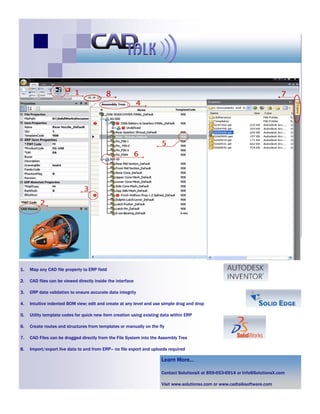
1.   Map any CAD file property to ERP field

2.   CAD files can be viewed directly inside the interface

3.   ERP data validation to ensure accurate data integrity

4.   Intuitive indented BOM view; edit and create at any level and use simple drag and drop

5.   Utility template codes for quick new item creation using existing data within ERP

6.   Create routes and structures from templates or manually on the fly

7.   CAD Files can be dragged directly from the File System into the Assembly Tree

8.   Import/export live data to and from ERP– no file export and uploads required

                                                                      Learn More...

                                                                      Contact SolutionsX at 859-653-6914 or Info@SolutionsX.com

                                                                      Visit www.solutionsx.com or www.cadtalksoftware.com

CADTalk - CAD to ERP Interface

  • 1.
    From CADTalk is anERP—CAD Integrated Solution working with SolidWorks, AutoCad, Inventor, and SolidEdge. CADTalk offers real-time integration between CAD Software and ERP databases allowing perfect synchro- nization of both data sets and completely eliminating redundant data entry. Unique in it’s solution; CADTalk is a complete integration of the ERP and CAD software, not relying on batch xml or other export files. All fields are fully mapped to ensure perfect data integrity with on-screen validation. CADTalk works with multiple levels of BOMs simultaneously in a fully indented BOM view allowing changes to routes , structures, and items at any level. CADTalk works will route, material, and item data within ERP. CADTalk can be an embedded application within your CAD Software or a standalone Viewer; this gives companies robust possibilities depending on their internal engineering processes. Key Features:  Fully integrated real-time solution  Manage multiple levels of BOMs simultaneously  Map any CAD file property to ERP field  Create and update items, routings and structures within ERP  Drag/drop and quick data entry all with graphical interface  View model and drawings from within application  Import and merge from CAD and/or from ERP data The Value of CADTalk:  Eliminate duplicate data entry and ensuing errors  Reduce Engineering to Production lead-time  Keep CAD Drawings and ERP data in sync and up to date  Keep people using the tools they know Learn More... Contact SolutionsX at 859-653-6914 or Info@SolutionsX.com Visit www.solutionsx.com or www.cadtalksoftware.com
  • 2.
    1. Map any CAD file property to ERP field 2. CAD files can be viewed directly inside the interface 3. ERP data validation to ensure accurate data integrity 4. Intuitive indented BOM view; edit and create at any level and use simple drag and drop 5. Utility template codes for quick new item creation using existing data within ERP 6. Create routes and structures from templates or manually on the fly 7. CAD Files can be dragged directly from the File System into the Assembly Tree 8. Import/export live data to and from ERP– no file export and uploads required Learn More... Contact SolutionsX at 859-653-6914 or Info@SolutionsX.com Visit www.solutionsx.com or www.cadtalksoftware.com