Data Modelling and Loading 
Data Modeling and Loading- First Steps Data Modeling ERM model MDM / Star Schema model BW Extended Star Schema BW Master Data InfoObjects Attributes Hierarchies Text Loading Master Data via Flat Files
5.  Transactional Data  
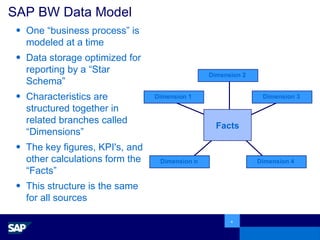
One “business process” is modeled at a time Data storage optimized for reporting by a “Star Schema”  Characteristics are structured together in related branches called “Dimensions”  The key figures, KPI's, and other calculations form the “Facts” This structure is the same for all sources SAP BW Data Model Dimension 2 Facts Dimension 1 Dimension 3 Dimension 4 Dimension n
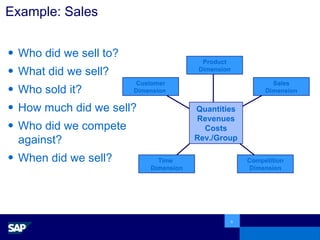
Example: Sales Who did we sell to? What did we sell? Who sold it?  How much did we sell? Who did we compete against? When did we sell? Product Dimension Quantities Revenues Costs Rev./Group Customer Dimension  Sales Dimension Competition Dimension Time Dimension
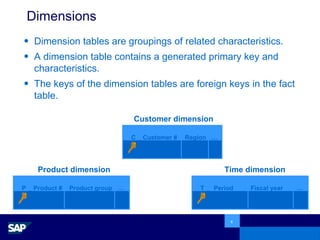
Dimensions Dimension tables are groupings of related characteristics. A dimension table contains a generated primary key and characteristics.  The keys of the dimension tables are foreign keys in the fact table. Time dimension Product dimension Customer dimension P  Product #  Product group …   2101004  Displays ... C  Customer #   Region   …   13970522   West   ... T   Period Fiscal year …   10 1999 ...
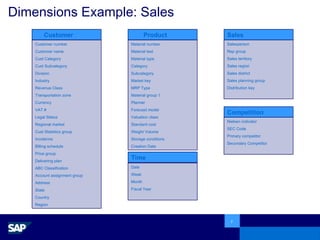
Dimensions Example: Sales Customer Customer number Customer name Cust Category Cust Subcategory Division Industry Revenue Class Transportation zone Currency VAT # Legal Status Regional market Cust Statistics group Incoterms Billing schedule Price group Delivering plan ABC Classification Account assignment group Address State Country Region Product Material number Material text Material type Category Subcategory Market key MRP Type Material group 1 Planner Forecast model Valuation class Standard cost Weight Volume Storage conditions Creation Date Sales Salesperson Rep group Sales territory Sales region Sales district Sales planning group Distribution key Competition Nielsen indicator SEC Code Primary competitor Secondary Competitor Time Date Week Month Fiscal Year
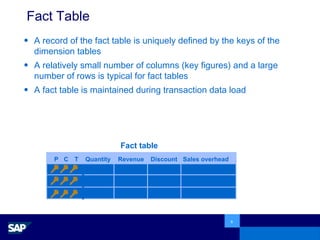
Fact Table A record of the fact table is uniquely defined by the keys of the dimension tables A relatively small number of columns (key figures) and a large number of rows is typical for fact tables A fact table is maintained during transaction data load P  C  T  Quantity Revenue Discount Sales overhead  250 500,000 $ 50,000 $ 280,000 $ 50 100,000 $ 7,500 $ 60,000 $ … … … ... Fact table
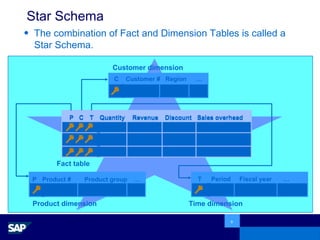
Star Schema The combination of Fact and Dimension Tables is called a Star Schema. C  Customer #  Region   …   13970522  west   ... P C T Quantity Revenue Discount Sales overhead  250 500,000 $ 50,000 $ 280,000 $ 50 100,000 $ 7,500 $ 60,000 $ … … … ... Time dimension Product dimension T   Period  Fiscal year   …   10  1999   ... P Product #  Product group   …   2101004  displays   ... Fact table Customer dimension P C T Quantity Revenue Discount Sales overhead  250 500,000 $ 50,000 $ 280,000 $ 50 100,000 $ 7,500 $ 60,000 $ … … … ...
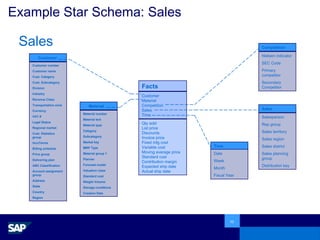
Example Star Schema: Sales Facts Qty sold List price Discounts Invoice price Fixed mfg cost Variable cost Moving average price Standard cost Contribution margin Expected ship date Actual ship date Customer Material Competition Sales Time Competition Nielsen indicator SEC Code Primary competitor Secondary Competitor Sales Salesperson Rep group Sales territory Sales region Sales district Sales planning group Distribution key Time Date Week Month Fiscal Year Customer Customer number Customer name Cust. Category Cust. Subcategory Division Industry Revenue Class Transportation zone Currency VAT # Legal Status Regional market Cust. Statistics group IncoTerms Billing schedule Price group Delivering plan ABC Classification Account assignment group Address State Country Region Material Material number Material text Material type Category Subcategory Market key MRP Type Material group 1 Planner Forecast model Valuation class Standard cost Weight Volume Storage conditions Creation Date Sales
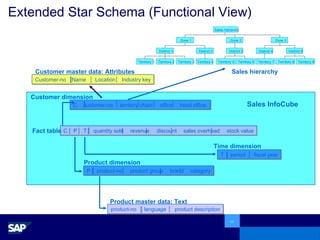
Extended Star Schema (Functional View) C customer-no territory  chain office head office  C P T quantity sold revenue discount sales overhead stock value T period fiscal year P product-no product group brand category product-no language product description Time dimension Product dimension Customer dimension Product master data: Text Fact table Territory 1 Territory 2 Territory 3 District 1 Territory 4 District 2 Zone 1 Territory 5 Territory 6 District 3 Zone 2 Territory 7 District 4 Territory 8 Territory 9 District 5 Zone 3 Sales hierarchy Sales InfoCube Customer-no Name Location Industry key Customer master data: Attributes Sales hierarchy
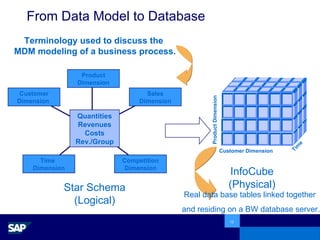
From Data Model to Database Star Schema (Logical) InfoCube (Physical) Terminology used to discuss the  MDM modeling of a business process. Real data base tables linked together  and residing on a BW database server. Time Customer Dimension Product Dimension Product Dimension Quantities Revenues Costs Rev./Group Customer Dimension  Sales Dimension Competition Dimension Time Dimension
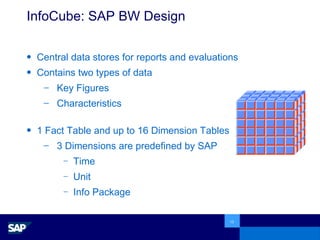
InfoCube: SAP BW Design Central data stores for reports and evaluations Contains two types of data  Key Figures  Characteristics 1 Fact Table and up to 16 Dimension Tables 3 Dimensions are predefined by SAP Time Unit Info Package
Data Granularity Data Granularity is defined as the “detail” of the database, the characteristics which describe our key figures.  Fundamental atomic level of data to be represented The “by” words -  for example, Sales by customer, by material It determines how far you can “drill down” on the data.  Example: Time Granularity Day versus Month A customer buys the same product 2 to 3 times a month With time granularity of Day :  2 or 3 fact table entries With time granularity of Month :  1 record in the fact table but a loss of information (i.e. number of orders on different weekdays).
Performance versus Disk Space The decision on granularity has the biggest impact on space and performance Reducing granularity means losing information  With ‘normal’ star schemas (i.e. big fact table and small dimension tables) the design of dimensions is primarily guided by analytical needs.  Large dimension tables have a big impact on performance
6.  Master Data  
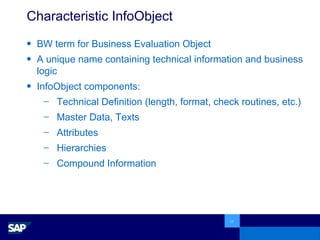
Characteristic InfoObject BW term for Business Evaluation Object A unique name containing technical information and business logic InfoObject components: Technical Definition (length, format, check routines, etc.) Master Data, Texts Attributes Hierarchies Compound Information
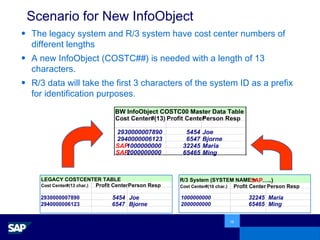
Scenario for New InfoObject The legacy system and R/3 system have cost center numbers of different lengths A new InfoObject (COSTC##) is needed with a length of 13 characters. R/3 data will take the first 3 characters of the system ID as a prefix for identification purposes. LEGACY COSTCENTER TABLE Cost Center#(13 char.) Profit Center Person Resp 2930000007890 5454 Joe 2940000006123 6547 Bjorne R/3 System (SYSTEM NAME =  SAP … ..) Cost Center#(10 char.) Profit Center Person Resp 1000000000 32245 Maria  2000000000 65465 Ming BW InfoObject COSTC00 Master Data Table Cost Center#(13) Profit Center Person Resp 2930000007890 5454 Joe 2940000006123 6547 Bjorne SAP 1000000000 32245 Maria  SAP 2000000000 65465 Ming
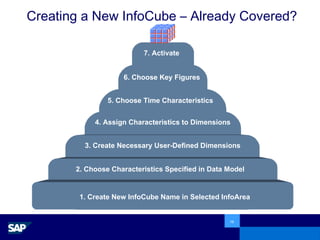
Creating a New InfoCube – Already Covered? 1. Create New InfoCube Name in Selected InfoArea 2. Choose Characteristics Specified in Data Model 4. Assign Characteristics to Dimensions 3. Create Necessary User-Defined Dimensions 5. Choose Time Characteristics 6. Choose Key Figures 7. Activate

Bw training 3 data modeling

  • 1.
    Data Modelling andLoading 
  • 2.
    Data Modeling andLoading- First Steps Data Modeling ERM model MDM / Star Schema model BW Extended Star Schema BW Master Data InfoObjects Attributes Hierarchies Text Loading Master Data via Flat Files
  • 3.
    5. TransactionalData 
  • 4.
    One “business process”is modeled at a time Data storage optimized for reporting by a “Star Schema” Characteristics are structured together in related branches called “Dimensions” The key figures, KPI's, and other calculations form the “Facts” This structure is the same for all sources SAP BW Data Model Dimension 2 Facts Dimension 1 Dimension 3 Dimension 4 Dimension n
  • 5.
    Example: Sales Whodid we sell to? What did we sell? Who sold it? How much did we sell? Who did we compete against? When did we sell? Product Dimension Quantities Revenues Costs Rev./Group Customer Dimension Sales Dimension Competition Dimension Time Dimension
  • 6.
    Dimensions Dimension tablesare groupings of related characteristics. A dimension table contains a generated primary key and characteristics. The keys of the dimension tables are foreign keys in the fact table. Time dimension Product dimension Customer dimension P Product # Product group … 2101004 Displays ... C Customer # Region … 13970522 West ... T Period Fiscal year … 10 1999 ...
  • 7.
    Dimensions Example: SalesCustomer Customer number Customer name Cust Category Cust Subcategory Division Industry Revenue Class Transportation zone Currency VAT # Legal Status Regional market Cust Statistics group Incoterms Billing schedule Price group Delivering plan ABC Classification Account assignment group Address State Country Region Product Material number Material text Material type Category Subcategory Market key MRP Type Material group 1 Planner Forecast model Valuation class Standard cost Weight Volume Storage conditions Creation Date Sales Salesperson Rep group Sales territory Sales region Sales district Sales planning group Distribution key Competition Nielsen indicator SEC Code Primary competitor Secondary Competitor Time Date Week Month Fiscal Year
  • 8.
    Fact Table Arecord of the fact table is uniquely defined by the keys of the dimension tables A relatively small number of columns (key figures) and a large number of rows is typical for fact tables A fact table is maintained during transaction data load P C T Quantity Revenue Discount Sales overhead 250 500,000 $ 50,000 $ 280,000 $ 50 100,000 $ 7,500 $ 60,000 $ … … … ... Fact table
  • 9.
    Star Schema Thecombination of Fact and Dimension Tables is called a Star Schema. C Customer # Region … 13970522 west ... P C T Quantity Revenue Discount Sales overhead 250 500,000 $ 50,000 $ 280,000 $ 50 100,000 $ 7,500 $ 60,000 $ … … … ... Time dimension Product dimension T Period Fiscal year … 10 1999 ... P Product # Product group … 2101004 displays ... Fact table Customer dimension P C T Quantity Revenue Discount Sales overhead 250 500,000 $ 50,000 $ 280,000 $ 50 100,000 $ 7,500 $ 60,000 $ … … … ...
  • 10.
    Example Star Schema:Sales Facts Qty sold List price Discounts Invoice price Fixed mfg cost Variable cost Moving average price Standard cost Contribution margin Expected ship date Actual ship date Customer Material Competition Sales Time Competition Nielsen indicator SEC Code Primary competitor Secondary Competitor Sales Salesperson Rep group Sales territory Sales region Sales district Sales planning group Distribution key Time Date Week Month Fiscal Year Customer Customer number Customer name Cust. Category Cust. Subcategory Division Industry Revenue Class Transportation zone Currency VAT # Legal Status Regional market Cust. Statistics group IncoTerms Billing schedule Price group Delivering plan ABC Classification Account assignment group Address State Country Region Material Material number Material text Material type Category Subcategory Market key MRP Type Material group 1 Planner Forecast model Valuation class Standard cost Weight Volume Storage conditions Creation Date Sales
  • 11.
    Extended Star Schema(Functional View) C customer-no territory chain office head office C P T quantity sold revenue discount sales overhead stock value T period fiscal year P product-no product group brand category product-no language product description Time dimension Product dimension Customer dimension Product master data: Text Fact table Territory 1 Territory 2 Territory 3 District 1 Territory 4 District 2 Zone 1 Territory 5 Territory 6 District 3 Zone 2 Territory 7 District 4 Territory 8 Territory 9 District 5 Zone 3 Sales hierarchy Sales InfoCube Customer-no Name Location Industry key Customer master data: Attributes Sales hierarchy
  • 12.
    From Data Modelto Database Star Schema (Logical) InfoCube (Physical) Terminology used to discuss the MDM modeling of a business process. Real data base tables linked together and residing on a BW database server. Time Customer Dimension Product Dimension Product Dimension Quantities Revenues Costs Rev./Group Customer Dimension Sales Dimension Competition Dimension Time Dimension
  • 13.
    InfoCube: SAP BWDesign Central data stores for reports and evaluations Contains two types of data Key Figures Characteristics 1 Fact Table and up to 16 Dimension Tables 3 Dimensions are predefined by SAP Time Unit Info Package
  • 14.
    Data Granularity DataGranularity is defined as the “detail” of the database, the characteristics which describe our key figures. Fundamental atomic level of data to be represented The “by” words - for example, Sales by customer, by material It determines how far you can “drill down” on the data. Example: Time Granularity Day versus Month A customer buys the same product 2 to 3 times a month With time granularity of Day : 2 or 3 fact table entries With time granularity of Month : 1 record in the fact table but a loss of information (i.e. number of orders on different weekdays).
  • 15.
    Performance versus DiskSpace The decision on granularity has the biggest impact on space and performance Reducing granularity means losing information With ‘normal’ star schemas (i.e. big fact table and small dimension tables) the design of dimensions is primarily guided by analytical needs. Large dimension tables have a big impact on performance
  • 16.
    6. MasterData 
  • 17.
    Characteristic InfoObject BWterm for Business Evaluation Object A unique name containing technical information and business logic InfoObject components: Technical Definition (length, format, check routines, etc.) Master Data, Texts Attributes Hierarchies Compound Information
  • 18.
    Scenario for NewInfoObject The legacy system and R/3 system have cost center numbers of different lengths A new InfoObject (COSTC##) is needed with a length of 13 characters. R/3 data will take the first 3 characters of the system ID as a prefix for identification purposes. LEGACY COSTCENTER TABLE Cost Center#(13 char.) Profit Center Person Resp 2930000007890 5454 Joe 2940000006123 6547 Bjorne R/3 System (SYSTEM NAME = SAP … ..) Cost Center#(10 char.) Profit Center Person Resp 1000000000 32245 Maria 2000000000 65465 Ming BW InfoObject COSTC00 Master Data Table Cost Center#(13) Profit Center Person Resp 2930000007890 5454 Joe 2940000006123 6547 Bjorne SAP 1000000000 32245 Maria SAP 2000000000 65465 Ming
  • 19.
    Creating a NewInfoCube – Already Covered? 1. Create New InfoCube Name in Selected InfoArea 2. Choose Characteristics Specified in Data Model 4. Assign Characteristics to Dimensions 3. Create Necessary User-Defined Dimensions 5. Choose Time Characteristics 6. Choose Key Figures 7. Activate