BUILDING
CLOUD-NATIVE
MICROSERVICES WITH
.NET 8 AND MINIMAL
APIS
.NET DEVELOPMENT
www.eminnecetechnology.com
Visit Our Website:
Agenda
Introduction to Cloud-Native Microservices
Why Choose .NET 8 for Microservices?
Overview of Minimal APIs
Step-by-Step Guide: Building Microservices with .NET 8
Deployment and Scaling in Cloud Environments
Unlock the potential of .NET solutions to drive innovation and
accelerate digital transformation. By integrating .NET 8's high
performance and cross-platform capabilities, businesses can
achieve resilient, secure, and agile architectures tailored for modern
cloud environments.
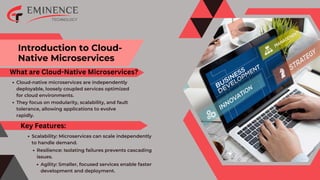
Introduction to Cloud-
Native Microservices
What are Cloud-Native Microservices?
Cloud-native microservices are independently
deployable, loosely coupled services optimized
for cloud environments.
They focus on modularity, scalability, and fault
tolerance, allowing applications to evolve
rapidly.
Key Features:
Scalability: Microservices can scale independently
to handle demand.
Resilience: Isolating failures prevents cascading
issues.
Agility: Smaller, focused services enable faster
development and deployment.
Why Choose .NET 8 for
Microservices?
Key Benefits of .NET 8:
High Performance: .NET 8 offers improved
runtime efficiency and faster APIs.
Unified Development: Build web, desktop,
mobile, and cloud-native apps with a single
framework.
Cross-Platform Support: Runs on Windows,
Linux, and macOS, making it ideal for diverse
environments.
Minimal APIs: Simplified approach for building
lightweight microservices.
Rich Ecosystem: Out-of-the-box support for
gRPC, REST APIs, and messaging systems like
RabbitMQ.
Overview of Minimal APIs
Lightweight approach to building HTTP APIs.
Simplified programming model with fewer files
and boilerplate code.
What Are Minimal APIs?
Faster development.
Advantages:
Ideal for microservices with focused
responsibilities.
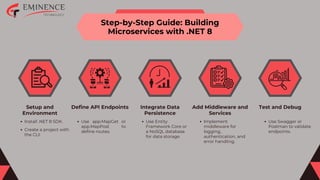
Step-by-Step Guide: Building
Microservices with .NET 8
Setup and
Environment
Define API Endpoints Integrate Data
Persistence
Add Middleware and
Services
Test and Debug
Install .NET 8 SDK.
Create a project with
the CLI:
Use app.MapGet or
app.MapPost to
define routes.
Use Entity
Framework Core or
a NoSQL database
for data storage.
Implement
middleware for
logging,
authentication, and
error handling.
Use Swagger or
Postman to validate
endpoints.
Deployment and Scaling in
Cloud Environments
Steps to Deploy Microservices:
Containerize the Service:
Use Docker to package the service.
Deploy to Cloud Platform:
Popular platforms include Azure Kubernetes
Service (AKS), AWS Elastic Kubernetes Service
(EKS), and Google Kubernetes Engine (GKE).
Implement Auto-Scaling:
Configure horizontal scaling with Kubernetes
or cloud-native scaling tools.
THANK YOU
LET'S BUILD THE FUTURE WITH
CLOUD-NATIVE MICROSERVICES!
DOT NET DEVELOPMENT
eminencetechnology.com
+1 978 913 8334

Building Cloud-Native Microservices with .NET 8 and Minimal APIs.pdf

  • 1.
    BUILDING CLOUD-NATIVE MICROSERVICES WITH .NET 8AND MINIMAL APIS .NET DEVELOPMENT www.eminnecetechnology.com Visit Our Website:
  • 2.
    Agenda Introduction to Cloud-NativeMicroservices Why Choose .NET 8 for Microservices? Overview of Minimal APIs Step-by-Step Guide: Building Microservices with .NET 8 Deployment and Scaling in Cloud Environments Unlock the potential of .NET solutions to drive innovation and accelerate digital transformation. By integrating .NET 8's high performance and cross-platform capabilities, businesses can achieve resilient, secure, and agile architectures tailored for modern cloud environments.
  • 3.
    Introduction to Cloud- NativeMicroservices What are Cloud-Native Microservices? Cloud-native microservices are independently deployable, loosely coupled services optimized for cloud environments. They focus on modularity, scalability, and fault tolerance, allowing applications to evolve rapidly. Key Features: Scalability: Microservices can scale independently to handle demand. Resilience: Isolating failures prevents cascading issues. Agility: Smaller, focused services enable faster development and deployment.
  • 4.
    Why Choose .NET8 for Microservices? Key Benefits of .NET 8: High Performance: .NET 8 offers improved runtime efficiency and faster APIs. Unified Development: Build web, desktop, mobile, and cloud-native apps with a single framework. Cross-Platform Support: Runs on Windows, Linux, and macOS, making it ideal for diverse environments. Minimal APIs: Simplified approach for building lightweight microservices. Rich Ecosystem: Out-of-the-box support for gRPC, REST APIs, and messaging systems like RabbitMQ.
  • 5.
    Overview of MinimalAPIs Lightweight approach to building HTTP APIs. Simplified programming model with fewer files and boilerplate code. What Are Minimal APIs? Faster development. Advantages: Ideal for microservices with focused responsibilities.
  • 6.
    Step-by-Step Guide: Building Microserviceswith .NET 8 Setup and Environment Define API Endpoints Integrate Data Persistence Add Middleware and Services Test and Debug Install .NET 8 SDK. Create a project with the CLI: Use app.MapGet or app.MapPost to define routes. Use Entity Framework Core or a NoSQL database for data storage. Implement middleware for logging, authentication, and error handling. Use Swagger or Postman to validate endpoints.
  • 7.
    Deployment and Scalingin Cloud Environments Steps to Deploy Microservices: Containerize the Service: Use Docker to package the service. Deploy to Cloud Platform: Popular platforms include Azure Kubernetes Service (AKS), AWS Elastic Kubernetes Service (EKS), and Google Kubernetes Engine (GKE). Implement Auto-Scaling: Configure horizontal scaling with Kubernetes or cloud-native scaling tools.
  • 8.
    THANK YOU LET'S BUILDTHE FUTURE WITH CLOUD-NATIVE MICROSERVICES! DOT NET DEVELOPMENT eminencetechnology.com +1 978 913 8334