Budget Simulation Assignment   FRIT 7132 Renée Jackson
1.  Prioritized List of Technology   Portable Interactive Whiteboard System Wireless Student Response System Document Camera Writing Software
2.  Reasons for Recommending these Items:   As a model for this Budget Simulation assignment, I used Sims Elementary School in Rockdale County. A comparison of Sims 2007-2008 CRCT scores with other elementary schools in the district showed that although Sims made adequate yearly progress, the student percentage that performed at Exceeds on both academic and grade levels were usually below the district performance. The Sims scores on the Georgia Writing Assessment given to fifth grade students and third grade students were also below district performance. To address the concern about writing scores, an assistant principal, a former literacy coach with extensive writing skills, was hired and a strategic plan was created that included several writing based actions. The class schedule for all grades K-5 call for 30 minutes of writing each day along with regular curriculum writing assignments. School-wide mock writing assessments are given throughout the year and students receive feedback before writing samples are chosen for their portfolios. Sims also has a high number of discipline referrals. After speaking with the media specialist, the assistant principal, and input from several teachers and one class of fifth grade students, I chose to spend the $3500 budget on technology that would help improve writing skills while keeping students engaged and focused.
1. Portable Interactive Whiteboard System While the majority of classrooms have interactive whiteboards, there are still some classrooms that do not. The media center does not have one. The media specialist said that this would be first item on her wish list of technology. As she said, students today are of the digital generation and expect this type of technology. It is really an important tool for presenting material to a class of students. It improves the ability for all students to see the material, and it helps keep the student’s interest focused on the presentation. Having a portable interactive system will serve the media center and classrooms because it can be mounted with suction cups and then removed, placed back in the carrying case, and returned to the media center. These systems can be used with existing whiteboards, easels or even a flat wall. Some systems offer software than can be accessed from computers outside the classroom so parents or homebound students could access the lesson. Others allow for information written on the whiteboard to be transmitted back to the computer to be saved and printed.
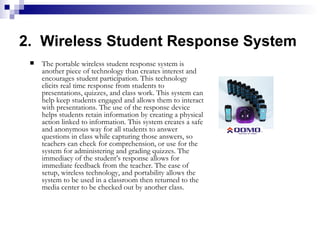
2.  Wireless Student Response System The portable wireless student response system is another piece of technology than creates interest and encourages student participation. This technology elicits real time response from students to presentations, quizzes, and class work. This system can help keep students engaged and allows them to interact with presentations. The use of the response device helps students retain information by creating a physical action linked to information. This system creates a safe and anonymous way for all students to answer questions in class while capturing those answers, so teachers can check for comprehension, or use for the system for administering and grading quizzes. The immediacy of the student’s response allows for immediate feedback from the teacher. The ease of setup, wireless technology, and portability allows the system to be used in a classroom then returned to the media center to be checked out by another class.
3. Document Camera A document camera is another classroom presentation component that helps capture the attention of students and satisfy the need of visual learners. A document camera can aid in displaying documents, 3D objects, and microscopic objects through monitors, TV, or projector. These cameras can isolate and enhance any area or detail of a document or object. This helps students see small documents and images better. Student work can be projected for class presentation and pages from books and other documents can be enlarged for sharing with an entire class. An added attachment will allow this camera to be used with microscopes. This technology allows teachers to present material in a visual way that students of today respond to best. This technology was also recommended by several education related blogs.
4. Writing Software Software to enhance student writing will help focus the students on skills and necessary components of writing different types of material. Examples of work and prompts will aid students in the process of learning to write. This offers the opportunity for students to be engaged by the use of technology while honing necessary writing skills.
3. – 6. Budget Summary Table   Including Purchase Specifications, Vendors, State Contract Information 1. Portable Interactive Whiteboard System 600-0050 mimio   Interactive + Capture Kit
mimio Portable Interactive Whiteboard System  Interactive + Capture Kit   Specifications Specifications  mimio Interactive   mimio Xi capture bar with linkUSB interface module  mimio Mouse Interactive stylus pen  USB mini-B cable – 16’ / 4.87m  ABS Plastic Snap-in mounting brackets (with 3M Command adhesive strips)  CD with mimio Studio (Win & Mac OSX) software. Video Set-up and Training  Tutorial, User Guide PDF files.  Quick Start Install guide booklets for Interactive and Ink Recording set up and use  (Win & Mac)  Interactive Demo Pack containing an assortment of interactive education software programs  mimio Capture Kit   Four (4) marker stylus pens with color smartCaps (Red, Green, Blue, Black)  Four (4) extended smartCaps (orange, brown, yellow, purple)  Marker stylus pen whiteboard holder  Eraser with holder (silver)  Four (4) Expo markers (Red, Green, Blue, Black)  Alkaline batteries for pens, & eraser (N cell (LR1) x 4, AAA x 1)  mimio Capture set-up guide Windows 98SE, ME, 2000, XP Home, XP Pro, Vista Macintosh OS X v. 10.3 or higher
mimio Portable Interactive Whiteboard System  Interactive + Capture Kit  Specifications Specifications On-board Data Storage  : ½ MB Flash memory stores 20 – 40 full boards of notes (depending on density of writing)  Automatically downloaded to computer when connected by USB cable or wireless upgrade kit. Power Options:  USB connection to the computer, 4 x AA batteries (40+ hours active use), Optional AC adapter (US 110v or Int’l 100-240v) Attachment Options:  ABS Plastic mounting brackets w/ removable adhesive strips for permanent & repeatable position snap-in attachment. 4 x suction cups for temporary attachment (up to 1 day on clean unscratched surface). Magnetic mounting brackets (optional accessory).  Optional mimio Xi wireless upgrade:  Wireless bi-directional interface module for Xi capture bar. Matched USB transmitter/receiver. AC Adapter (110 v only for North America / 100 – 240 v auto-switching for International w/ 4 plugs (EUR, AUSTRALIA/NZ, US and UK)). mimio Studio software CD and instruction booklet.  Optional Carry Case.
mimio Portable Interactive Whiteboard System  Interactive + Capture Kit  Vendors, Price, Contract Info Not available *Educational Grant Pricing  *$699.00 system $238.00 wireless $59.99 case Total: $997.00   Touchboards http://touchboards.com/mimio/mimio_xi_interactive_capture.asp Not available $787.00 system $248.00 wireless $55.00 case Total: $1090.00   Electronic Whiteboard Warehouse http://www.electronicwhiteboardswarehouse.com/portable.htm Not available   $799.00 system $295.00 wireless $59.00 case Total: $1153.00 Alliance Warehouse http:// alliancewarehouse.com/mimioxi.html State Contract Price Vendors for mimio Portable Whiteboard Interactive System
3. – 6. Budget Summary Table   Including Purchase Specifications, Vendors, State Contract Information 2. Wireless Student Response System   QOMO QClick QIR 232  Audience Response System *Only 2 vendors found for this product, so a similar product was also used for comparison   Quizdom Q2016PS Q2 32 Audience Response System
Qomo QClick QIR 232 Wireless Student Response System  Specifications Instructor Keypad Dimensions:  4" L x 1.2" W x0.6" H User Input: 11 Key Range:  Approximately 50 feet for one receiver Plug-in:  QClick software is Plug-in MS PowerPoint software Audience Keypad  Dimensions:  4" L x 1.2" W x0.6" H User Input:  7 Key Range:  Approximately 50 feet for one receiver Plug-in:  QClick software is Plug-in MS PowerPoint software QClick System Requirements  PC:  At least one Processor:  Intel Pentium II or higher Processor Ports:  One COM port 9 pin RS-232 RAM:  Minimum 64MB Hard Drive:  100 MB drive space for software Operating System:  Microsoft Windows ME/2000/xp Microsoft Office requirements:  Office 2000 or higher Screen Resolution:  At least 800x600
Qwizdom Q20 16PS Q2 32 Wireless Student Response System  Specifications Communication Type:  2-way Radio Frequency network system  designed not to interfere with other network standards (like wi-fi and Bluetooth). On-Device Feedback: Yes. Display shows feedback. Answer Entry Capabilities: Numeric, Multiple-Choice, True/False, Yes/No and Rating Scale Battery Type:  2 - AAA Batteries Communication Range:  100-300 meters
Qomo QClick QIR 232 Wireless Student Response System  Vendors, Price, Contract Info Not available Total: $1395.00   Touchboards http://touchboards.com/Qomo/Qomo_QIR200.asp Not available Total: $1589.00   Electronic Whiteboard Warehouse http://www.electronicwhiteboardswarehouse.com/ qomo/qomo_qir232.htm 2 Year Limited Warranty Ships in 1 Week State Contract Price Vendors for Qomo QIR 232 Wireless Student Response System
Qwizdom Q20 16PS Q2 32 Wireless Student Response System  Vendors, Price, Contract Info Not available Item# 502012636 Total: $1549.99   Camcor http://www.camcor.com/cgi-bin/cat/id=1197559284&cmd=print State Contract Price Vendor for Qwizdom Q2016PS Q2 32  Wireless Student Response System
3. – 6. Budget Summary Table   Including Purchase Specifications, Vendors, State Contract Information 3. Document Camera   AVerVision SPC 300  Standard Portable  Visual Presenter/Document Camera VISSPC3SD
AVerVision Portable Document Camera Specifications Input Voltage: 110 V AC, 220 V AC Platform Support: PC, Mac Dimensions: 9" x 16.9" x 19.2" - Operating  9" x 20" x 5.5" – Folded Video System: NTSC, PAL Focal Length: 7.3mm to 21.9mm Image Sensor: 0.5" Color CMOS Video System:  Composite Video, S-Video Resolution: 3.2 Megapixel Optical Zoom: 3x Digital Zoom: 8x Features: Picture-in-picture  Split screen  Image Freeze  Image Mirror  Negative/Positive Conversion  8" x 11" full A-4 page viewing  Image & Video Recording: USB to computer  Maximum Output Resolution: 1024 x 768  White balance and exposure: Auto/Manual  Negative/Positive Conversion  Frame Rate: 24 fps (maximum)  Image Capture: 80 Frames (maximum)  Built-in Flash Memory: 32 MB  Shooting Area: 380mm x 280mm (maximum)  Image Rotation: 90/180/270 degrees  Memory Card Support: Secure Digital (16-512MB)  Image Mode:   Text Graphics High Frame Microscope  Items Included in Package:   AVerVision SPC300 Unit Power Adapter & power cord  RCA cable  S-Video/RS232 adapter  S-Video cable VGA cable  USB cable  Remote control  Anti-glare Sheet  AVerVision software CD  User manual  Carrying bag
AVerVision Portable Document Camera   Vendors, Price, Contract Info Not available Total $652.50 Provantage Superstore http://www.provantage.com/avermedia-visspc3sd~7AVED01U.htm 5 Year Limited Warranty Not available Total $694.00 Today’s Classroom http://www.todaysclassroom.com/digital-multimedia-document-cameras-c-201_203.html Free Delivery 5 Year Limited Warranty Not available Total $747.14 Camcor http:// www.camcor.com/cgi -bin/cat/id=1175805414/Avervision _SPC300_Standard_Portable_Visual_Presenter_VISSPC3SD.html Ships 3 – 10 days 5 Year Limited Warranty State Contract Price   Vendors for AVerVision SPC 300 Document Camera
3. – 6. Budget Summary Table   Including Purchase Specifications, Vendors, State Contract Information 4. Writing Software   Writer’s Companion Version 2.6 Grade Levels 2 to 12 Published by: VISIONS Write On!™ Plus Steps to Better Writing Grade levels: 3rd to 6th Sunburst Technology
Writer’s Companion Version 2.6 Software Specifications Writer’s Companion Version 2.6 Grade Levels 2 to 12 Published by: VISIONS 10 User Pack Media:  CD ROM, Book System Requirements:  Windows: 64 MB RAM (128 MB recommended), Win 98, ME, 2000, XP  Mac: 64 MB RAM (128 MB recommended), System 9.2 or higher, OS X  QuickTime included   Improved spell checker  Easier networking  Training Videos  Ideal for :  Writing instruction: 2nd Grade - College  Title 1-Title 3-Title 7  Special Education: Fully Keyboard access/Section 508 compliant  Bilingual Education:  Spanish Language  3 Programs in 1 Graphic Organizer Word Processor Desktop Publisher Meets state and national writing standards. Enhances SAT and writing assessment readiness.
Writer’s Companion Version 2.6 Software   Vendors, Price, Contract Info Not available 10 User Pack Item#61605 Total: $349.95   Sunburst Technology http://store.sunburst.com/ProductInfo.aspx?itemid=179344 Not available 10 User Pack Item# 10049833 Total: $279.95   Software Express http://www.swexpress.com/item/ 9E430A5120FF2336852573E50054A04A! opendocument&title=Writer's+Companion Not available 10 User Pack Item#2687 Total: $280.95   K-12 Software http://www.k12software.com/view_details.php?PHPSESSID=33fed84295ee 3e0b20def9c1ffbec63f&ID=1044 State Contract Price   Vendors for Writer’s Companion Version 2.6 Software
Write On! Plus Steps to Better Writing Software Specifications 10 Lab Pack Media:  CD ROM Includes:  Teacher’s Guide Staff Development Program Evaluation & Assessment Rubric Clip Art Library Web resources Based on national standards.  System Requirements: Windows: 486 Win 95, Win 98, ME, 2000, NT 8 MB Mac: 68040 Mac 8.1, Mac 8.6, Mac 9.1  8 MB  Write On!™ Plus Steps to Better Writing Grade levels: 3rd to 6th Sunburst Technology
Write On! Steps to Better Writing Software  Vendors, Price, Contract Info Not available 10 User Pack Item#T3809  school pricing Total: $129.99   Smart Kids Software http:// www.smartkidssoftware.com/SunburstA.htm Not available 10 User Pack Item# 10070918 Total: $149.95   Software Express http:// www.swexpress.com /item/ 853FF92E6FBCA2CD852573E500549D62!  opendocument&title =Write+On!Plus+Steps+to+Better+Elementary+Writing+Grades+3-6 Not available 10 User Pack Item#1431 Total: $134.95   K-12 Software http://www.k12software.com/view_details.php?PHPSESSID= f6b085012b92837afc9c29726a83f0e7&ID=691 State Contract Price   Vendors for Write On! Steps to Better Writing Software
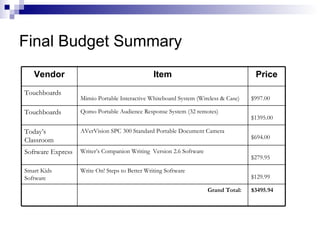
Final Budget Summary $3495.94 Grand Total: $129.99   Write On! Steps to Better Writing Software Smart Kids Software $279.95   Writer’s Companion Writing  Version 2.6 Software Software Express $694.00   AVerVision SPC 300 Standard Portable Document Camera  Today’s Classroom $1395.00   Qomo Portable Audience Response System (32 remotes)  Touchboards  $997.00   Mimio Portable Interactive Whiteboard System (Wireless & Case)   Touchboards  Price Item Vendor
Recommendation for purchase of the items: 1 .  I recommend the purchase of the  mimio  brand Interactive + Capture Portable Interactive Whiteboard System  by Virtual Ink because it will help encourage participation and focus student learning. The integration of technology will help the students see the material better but they can interact with the lesson. The technology will allow for better and varied presentation materials. This type of technology is needed to keep students interested and aid visual learners. It is also helpful for students with disabilities. The portable system makes it available not only for use in the various classrooms but also in the media center. This system is Mac and Windows compatible and is wireless. I chose  Touchboards  as the vendor because of the educational grant pricing.
Recommendation for purchase of the items: 2.   I recommend the  Qomo   QClick  QIR 232 Audience Response System  because it will also encourage student participation and allow for immediate assessment of student knowledge. It also creates a physical link between student action and retention of knowledge. It is a technology tool that can also aid students with disabilities and be used in a variety of ways. The portable system can be checked out and used in a classroom, then returned to the media center to be used by another class. There arev32 remotes so the system can accommodate a large class. I chose  Touchboards  again as the vendor because of price and because I can purchase multiple items from one vendor.
Recommendation for purchase of the items: 3. I recommend the  AVerVision  Visual Presenter/Document Camera  by AVerMedia because it will also aid students with disabilities, help all students see the material and focus attention on material being presented. Areas of a document can be isolated and presented. This technology is not only good for documents but can be used with a microscope for science lessons. AVerMedia customer service was highlighted on TeacherTube. I chose  Today’s Classroom  as the vendor because even though it is more expensive than one other vendor they offered free shipping and the vendor with the cheapest price had backordered the item.
Recommendation for purchase of the items: 4. I recommend the  Writer’s Companion Version 2.6  writing software because it will help students to organize their ideas from start to finish, step by step through the writing process. Using this software, students can then publish their work to a word processing program or page layout program. A spell-checker and Spanish dictionary is also included. This software is for 2nd grade to adult and is beneficial for students with disabilities and bilingual students. I chose  Software Express  because of the price. I recommend the  Write On! Plus Steps to Better Writing   software because it provides a combination of direct instruction of core skills and process writing. It is for grades 3 – 5 so it targets the grade levels that the writing assessments target. The activities teach and reinforce language and self expression in various forms. This software is based on national standards and balances the use of literature and skills lessons. Prompts can be used for individual, small group, or whole class lessons on sentences, paragraphs, poetry, stories, journals, and essays. Students can draft, revise, proofread and illustrate their work. Assessment rubrics, clip art, and web resources are included. This software will aid students and teachers with writing skills. I chose  Smart Kids Software  because of the price. All of the vendors had the same types of manufacturers warranty, customer service and similar return policies.

Budget Simulation Assignment Renee Jackson

  • 1.
    Budget Simulation Assignment FRIT 7132 Renée Jackson
  • 2.
    1. PrioritizedList of Technology Portable Interactive Whiteboard System Wireless Student Response System Document Camera Writing Software
  • 3.
    2. Reasonsfor Recommending these Items: As a model for this Budget Simulation assignment, I used Sims Elementary School in Rockdale County. A comparison of Sims 2007-2008 CRCT scores with other elementary schools in the district showed that although Sims made adequate yearly progress, the student percentage that performed at Exceeds on both academic and grade levels were usually below the district performance. The Sims scores on the Georgia Writing Assessment given to fifth grade students and third grade students were also below district performance. To address the concern about writing scores, an assistant principal, a former literacy coach with extensive writing skills, was hired and a strategic plan was created that included several writing based actions. The class schedule for all grades K-5 call for 30 minutes of writing each day along with regular curriculum writing assignments. School-wide mock writing assessments are given throughout the year and students receive feedback before writing samples are chosen for their portfolios. Sims also has a high number of discipline referrals. After speaking with the media specialist, the assistant principal, and input from several teachers and one class of fifth grade students, I chose to spend the $3500 budget on technology that would help improve writing skills while keeping students engaged and focused.
  • 4.
    1. Portable InteractiveWhiteboard System While the majority of classrooms have interactive whiteboards, there are still some classrooms that do not. The media center does not have one. The media specialist said that this would be first item on her wish list of technology. As she said, students today are of the digital generation and expect this type of technology. It is really an important tool for presenting material to a class of students. It improves the ability for all students to see the material, and it helps keep the student’s interest focused on the presentation. Having a portable interactive system will serve the media center and classrooms because it can be mounted with suction cups and then removed, placed back in the carrying case, and returned to the media center. These systems can be used with existing whiteboards, easels or even a flat wall. Some systems offer software than can be accessed from computers outside the classroom so parents or homebound students could access the lesson. Others allow for information written on the whiteboard to be transmitted back to the computer to be saved and printed.
  • 5.
    2. WirelessStudent Response System The portable wireless student response system is another piece of technology than creates interest and encourages student participation. This technology elicits real time response from students to presentations, quizzes, and class work. This system can help keep students engaged and allows them to interact with presentations. The use of the response device helps students retain information by creating a physical action linked to information. This system creates a safe and anonymous way for all students to answer questions in class while capturing those answers, so teachers can check for comprehension, or use for the system for administering and grading quizzes. The immediacy of the student’s response allows for immediate feedback from the teacher. The ease of setup, wireless technology, and portability allows the system to be used in a classroom then returned to the media center to be checked out by another class.
  • 6.
    3. Document CameraA document camera is another classroom presentation component that helps capture the attention of students and satisfy the need of visual learners. A document camera can aid in displaying documents, 3D objects, and microscopic objects through monitors, TV, or projector. These cameras can isolate and enhance any area or detail of a document or object. This helps students see small documents and images better. Student work can be projected for class presentation and pages from books and other documents can be enlarged for sharing with an entire class. An added attachment will allow this camera to be used with microscopes. This technology allows teachers to present material in a visual way that students of today respond to best. This technology was also recommended by several education related blogs.
  • 7.
    4. Writing SoftwareSoftware to enhance student writing will help focus the students on skills and necessary components of writing different types of material. Examples of work and prompts will aid students in the process of learning to write. This offers the opportunity for students to be engaged by the use of technology while honing necessary writing skills.
  • 8.
    3. – 6.Budget Summary Table Including Purchase Specifications, Vendors, State Contract Information 1. Portable Interactive Whiteboard System 600-0050 mimio Interactive + Capture Kit
  • 9.
    mimio Portable InteractiveWhiteboard System Interactive + Capture Kit Specifications Specifications mimio Interactive mimio Xi capture bar with linkUSB interface module mimio Mouse Interactive stylus pen USB mini-B cable – 16’ / 4.87m ABS Plastic Snap-in mounting brackets (with 3M Command adhesive strips) CD with mimio Studio (Win & Mac OSX) software. Video Set-up and Training Tutorial, User Guide PDF files. Quick Start Install guide booklets for Interactive and Ink Recording set up and use (Win & Mac) Interactive Demo Pack containing an assortment of interactive education software programs mimio Capture Kit Four (4) marker stylus pens with color smartCaps (Red, Green, Blue, Black) Four (4) extended smartCaps (orange, brown, yellow, purple) Marker stylus pen whiteboard holder Eraser with holder (silver) Four (4) Expo markers (Red, Green, Blue, Black) Alkaline batteries for pens, & eraser (N cell (LR1) x 4, AAA x 1) mimio Capture set-up guide Windows 98SE, ME, 2000, XP Home, XP Pro, Vista Macintosh OS X v. 10.3 or higher
  • 10.
    mimio Portable InteractiveWhiteboard System Interactive + Capture Kit Specifications Specifications On-board Data Storage : ½ MB Flash memory stores 20 – 40 full boards of notes (depending on density of writing) Automatically downloaded to computer when connected by USB cable or wireless upgrade kit. Power Options: USB connection to the computer, 4 x AA batteries (40+ hours active use), Optional AC adapter (US 110v or Int’l 100-240v) Attachment Options: ABS Plastic mounting brackets w/ removable adhesive strips for permanent & repeatable position snap-in attachment. 4 x suction cups for temporary attachment (up to 1 day on clean unscratched surface). Magnetic mounting brackets (optional accessory). Optional mimio Xi wireless upgrade: Wireless bi-directional interface module for Xi capture bar. Matched USB transmitter/receiver. AC Adapter (110 v only for North America / 100 – 240 v auto-switching for International w/ 4 plugs (EUR, AUSTRALIA/NZ, US and UK)). mimio Studio software CD and instruction booklet. Optional Carry Case.
  • 11.
    mimio Portable InteractiveWhiteboard System Interactive + Capture Kit Vendors, Price, Contract Info Not available *Educational Grant Pricing *$699.00 system $238.00 wireless $59.99 case Total: $997.00 Touchboards http://touchboards.com/mimio/mimio_xi_interactive_capture.asp Not available $787.00 system $248.00 wireless $55.00 case Total: $1090.00 Electronic Whiteboard Warehouse http://www.electronicwhiteboardswarehouse.com/portable.htm Not available $799.00 system $295.00 wireless $59.00 case Total: $1153.00 Alliance Warehouse http:// alliancewarehouse.com/mimioxi.html State Contract Price Vendors for mimio Portable Whiteboard Interactive System
  • 12.
    3. – 6.Budget Summary Table Including Purchase Specifications, Vendors, State Contract Information 2. Wireless Student Response System QOMO QClick QIR 232 Audience Response System *Only 2 vendors found for this product, so a similar product was also used for comparison Quizdom Q2016PS Q2 32 Audience Response System
  • 13.
    Qomo QClick QIR232 Wireless Student Response System Specifications Instructor Keypad Dimensions: 4" L x 1.2" W x0.6" H User Input: 11 Key Range: Approximately 50 feet for one receiver Plug-in: QClick software is Plug-in MS PowerPoint software Audience Keypad Dimensions: 4" L x 1.2" W x0.6" H User Input: 7 Key Range: Approximately 50 feet for one receiver Plug-in: QClick software is Plug-in MS PowerPoint software QClick System Requirements PC: At least one Processor: Intel Pentium II or higher Processor Ports: One COM port 9 pin RS-232 RAM: Minimum 64MB Hard Drive: 100 MB drive space for software Operating System: Microsoft Windows ME/2000/xp Microsoft Office requirements: Office 2000 or higher Screen Resolution: At least 800x600
  • 14.
    Qwizdom Q20 16PSQ2 32 Wireless Student Response System Specifications Communication Type: 2-way Radio Frequency network system designed not to interfere with other network standards (like wi-fi and Bluetooth). On-Device Feedback: Yes. Display shows feedback. Answer Entry Capabilities: Numeric, Multiple-Choice, True/False, Yes/No and Rating Scale Battery Type: 2 - AAA Batteries Communication Range: 100-300 meters
  • 15.
    Qomo QClick QIR232 Wireless Student Response System Vendors, Price, Contract Info Not available Total: $1395.00 Touchboards http://touchboards.com/Qomo/Qomo_QIR200.asp Not available Total: $1589.00 Electronic Whiteboard Warehouse http://www.electronicwhiteboardswarehouse.com/ qomo/qomo_qir232.htm 2 Year Limited Warranty Ships in 1 Week State Contract Price Vendors for Qomo QIR 232 Wireless Student Response System
  • 16.
    Qwizdom Q20 16PSQ2 32 Wireless Student Response System Vendors, Price, Contract Info Not available Item# 502012636 Total: $1549.99 Camcor http://www.camcor.com/cgi-bin/cat/id=1197559284&cmd=print State Contract Price Vendor for Qwizdom Q2016PS Q2 32 Wireless Student Response System
  • 17.
    3. – 6.Budget Summary Table Including Purchase Specifications, Vendors, State Contract Information 3. Document Camera AVerVision SPC 300 Standard Portable Visual Presenter/Document Camera VISSPC3SD
  • 18.
    AVerVision Portable DocumentCamera Specifications Input Voltage: 110 V AC, 220 V AC Platform Support: PC, Mac Dimensions: 9" x 16.9" x 19.2" - Operating 9" x 20" x 5.5" – Folded Video System: NTSC, PAL Focal Length: 7.3mm to 21.9mm Image Sensor: 0.5" Color CMOS Video System: Composite Video, S-Video Resolution: 3.2 Megapixel Optical Zoom: 3x Digital Zoom: 8x Features: Picture-in-picture Split screen Image Freeze Image Mirror Negative/Positive Conversion 8" x 11" full A-4 page viewing Image & Video Recording: USB to computer Maximum Output Resolution: 1024 x 768 White balance and exposure: Auto/Manual Negative/Positive Conversion Frame Rate: 24 fps (maximum) Image Capture: 80 Frames (maximum) Built-in Flash Memory: 32 MB Shooting Area: 380mm x 280mm (maximum) Image Rotation: 90/180/270 degrees Memory Card Support: Secure Digital (16-512MB) Image Mode: Text Graphics High Frame Microscope Items Included in Package: AVerVision SPC300 Unit Power Adapter & power cord RCA cable S-Video/RS232 adapter S-Video cable VGA cable USB cable Remote control Anti-glare Sheet AVerVision software CD User manual Carrying bag
  • 19.
    AVerVision Portable DocumentCamera Vendors, Price, Contract Info Not available Total $652.50 Provantage Superstore http://www.provantage.com/avermedia-visspc3sd~7AVED01U.htm 5 Year Limited Warranty Not available Total $694.00 Today’s Classroom http://www.todaysclassroom.com/digital-multimedia-document-cameras-c-201_203.html Free Delivery 5 Year Limited Warranty Not available Total $747.14 Camcor http:// www.camcor.com/cgi -bin/cat/id=1175805414/Avervision _SPC300_Standard_Portable_Visual_Presenter_VISSPC3SD.html Ships 3 – 10 days 5 Year Limited Warranty State Contract Price Vendors for AVerVision SPC 300 Document Camera
  • 20.
    3. – 6.Budget Summary Table Including Purchase Specifications, Vendors, State Contract Information 4. Writing Software Writer’s Companion Version 2.6 Grade Levels 2 to 12 Published by: VISIONS Write On!™ Plus Steps to Better Writing Grade levels: 3rd to 6th Sunburst Technology
  • 21.
    Writer’s Companion Version2.6 Software Specifications Writer’s Companion Version 2.6 Grade Levels 2 to 12 Published by: VISIONS 10 User Pack Media: CD ROM, Book System Requirements: Windows: 64 MB RAM (128 MB recommended), Win 98, ME, 2000, XP Mac: 64 MB RAM (128 MB recommended), System 9.2 or higher, OS X QuickTime included Improved spell checker Easier networking Training Videos Ideal for : Writing instruction: 2nd Grade - College Title 1-Title 3-Title 7 Special Education: Fully Keyboard access/Section 508 compliant Bilingual Education: Spanish Language 3 Programs in 1 Graphic Organizer Word Processor Desktop Publisher Meets state and national writing standards. Enhances SAT and writing assessment readiness.
  • 22.
    Writer’s Companion Version2.6 Software Vendors, Price, Contract Info Not available 10 User Pack Item#61605 Total: $349.95 Sunburst Technology http://store.sunburst.com/ProductInfo.aspx?itemid=179344 Not available 10 User Pack Item# 10049833 Total: $279.95 Software Express http://www.swexpress.com/item/ 9E430A5120FF2336852573E50054A04A! opendocument&title=Writer's+Companion Not available 10 User Pack Item#2687 Total: $280.95 K-12 Software http://www.k12software.com/view_details.php?PHPSESSID=33fed84295ee 3e0b20def9c1ffbec63f&ID=1044 State Contract Price Vendors for Writer’s Companion Version 2.6 Software
  • 23.
    Write On! PlusSteps to Better Writing Software Specifications 10 Lab Pack Media: CD ROM Includes: Teacher’s Guide Staff Development Program Evaluation & Assessment Rubric Clip Art Library Web resources Based on national standards. System Requirements: Windows: 486 Win 95, Win 98, ME, 2000, NT 8 MB Mac: 68040 Mac 8.1, Mac 8.6, Mac 9.1 8 MB Write On!™ Plus Steps to Better Writing Grade levels: 3rd to 6th Sunburst Technology
  • 24.
    Write On! Stepsto Better Writing Software Vendors, Price, Contract Info Not available 10 User Pack Item#T3809 school pricing Total: $129.99 Smart Kids Software http:// www.smartkidssoftware.com/SunburstA.htm Not available 10 User Pack Item# 10070918 Total: $149.95 Software Express http:// www.swexpress.com /item/ 853FF92E6FBCA2CD852573E500549D62! opendocument&title =Write+On!Plus+Steps+to+Better+Elementary+Writing+Grades+3-6 Not available 10 User Pack Item#1431 Total: $134.95 K-12 Software http://www.k12software.com/view_details.php?PHPSESSID= f6b085012b92837afc9c29726a83f0e7&ID=691 State Contract Price Vendors for Write On! Steps to Better Writing Software
  • 25.
    Final Budget Summary$3495.94 Grand Total: $129.99 Write On! Steps to Better Writing Software Smart Kids Software $279.95 Writer’s Companion Writing Version 2.6 Software Software Express $694.00 AVerVision SPC 300 Standard Portable Document Camera Today’s Classroom $1395.00 Qomo Portable Audience Response System (32 remotes) Touchboards $997.00 Mimio Portable Interactive Whiteboard System (Wireless & Case) Touchboards Price Item Vendor
  • 26.
    Recommendation for purchaseof the items: 1 . I recommend the purchase of the mimio brand Interactive + Capture Portable Interactive Whiteboard System by Virtual Ink because it will help encourage participation and focus student learning. The integration of technology will help the students see the material better but they can interact with the lesson. The technology will allow for better and varied presentation materials. This type of technology is needed to keep students interested and aid visual learners. It is also helpful for students with disabilities. The portable system makes it available not only for use in the various classrooms but also in the media center. This system is Mac and Windows compatible and is wireless. I chose Touchboards as the vendor because of the educational grant pricing.
  • 27.
    Recommendation for purchaseof the items: 2. I recommend the Qomo QClick QIR 232 Audience Response System because it will also encourage student participation and allow for immediate assessment of student knowledge. It also creates a physical link between student action and retention of knowledge. It is a technology tool that can also aid students with disabilities and be used in a variety of ways. The portable system can be checked out and used in a classroom, then returned to the media center to be used by another class. There arev32 remotes so the system can accommodate a large class. I chose Touchboards again as the vendor because of price and because I can purchase multiple items from one vendor.
  • 28.
    Recommendation for purchaseof the items: 3. I recommend the AVerVision Visual Presenter/Document Camera by AVerMedia because it will also aid students with disabilities, help all students see the material and focus attention on material being presented. Areas of a document can be isolated and presented. This technology is not only good for documents but can be used with a microscope for science lessons. AVerMedia customer service was highlighted on TeacherTube. I chose Today’s Classroom as the vendor because even though it is more expensive than one other vendor they offered free shipping and the vendor with the cheapest price had backordered the item.
  • 29.
    Recommendation for purchaseof the items: 4. I recommend the Writer’s Companion Version 2.6 writing software because it will help students to organize their ideas from start to finish, step by step through the writing process. Using this software, students can then publish their work to a word processing program or page layout program. A spell-checker and Spanish dictionary is also included. This software is for 2nd grade to adult and is beneficial for students with disabilities and bilingual students. I chose Software Express because of the price. I recommend the Write On! Plus Steps to Better Writing software because it provides a combination of direct instruction of core skills and process writing. It is for grades 3 – 5 so it targets the grade levels that the writing assessments target. The activities teach and reinforce language and self expression in various forms. This software is based on national standards and balances the use of literature and skills lessons. Prompts can be used for individual, small group, or whole class lessons on sentences, paragraphs, poetry, stories, journals, and essays. Students can draft, revise, proofread and illustrate their work. Assessment rubrics, clip art, and web resources are included. This software will aid students and teachers with writing skills. I chose Smart Kids Software because of the price. All of the vendors had the same types of manufacturers warranty, customer service and similar return policies.