This is the first thing that showed up after I
downloaded and opened the application.
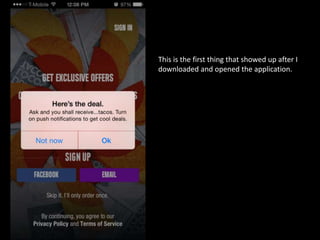
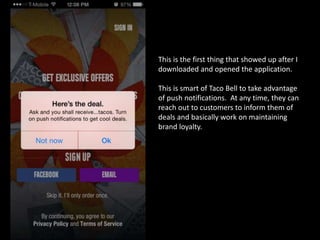
This is the first thing that showed up after I
downloaded and opened the application.
This is smart of Taco Bell to take advantage
of push notifications. At any time, they can
reach out to customers to inform them of
deals and basically work on maintaining
brand loyalty.
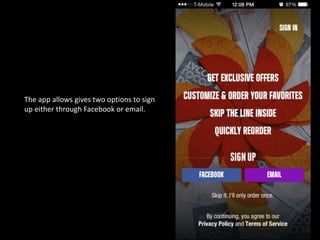
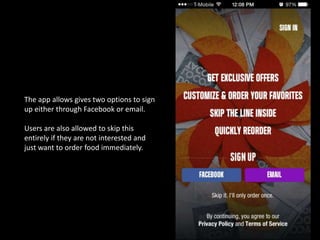
The app allows gives two options to sign
up either through Facebook or email.
The app allows gives two options to sign
up either through Facebook or email.
Users are also allowed to skip this
entirely if they are not interested and
just want to order food immediately.
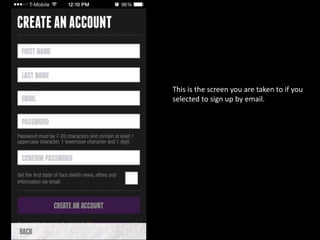
This is the screen you are taken to if you
selected to sign up by email.
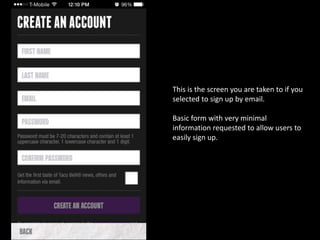
This is the screen you are taken to if you
selected to sign up by email.
Basic form with very minimal
information requested to allow users to
easily sign up.
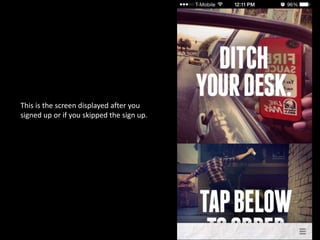
This is the screen displayed after you
signed up or if you skipped the sign up.
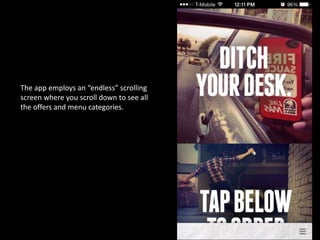
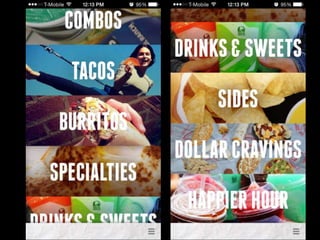
The app employs an “endless” scrolling
screen where you scroll down to see all
the offers and menu categories.
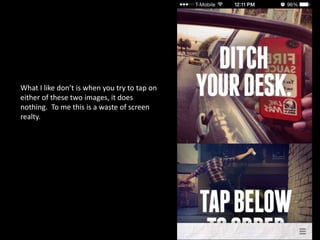
What I like don’t is when you try to tap on
either of these two images, it does
nothing. To me this is a waste of screen
realty.
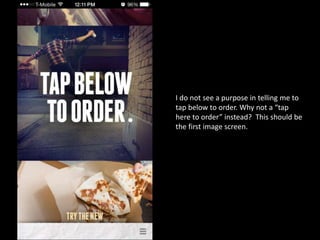
I do not see a purpose in telling me to
tap below to order. Why not a “tap
here to order” instead? This should be
the first image screen.
I do not see a purpose in telling me to
tap below to order. Why not a “tap
here to order” instead? This should be
the first image screen.
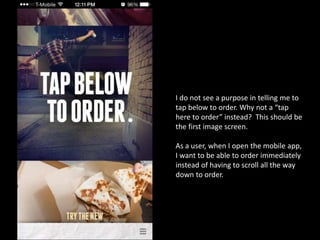
As a user, when I open the mobile app,
I want to be able to order immediately
instead of having to scroll all the way
down to order.
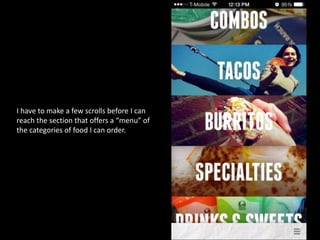
I have to make a few scrolls before I can
reach the section that offers a “menu” of
the categories of food I can order.
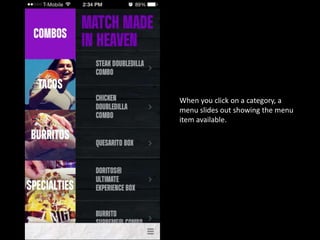
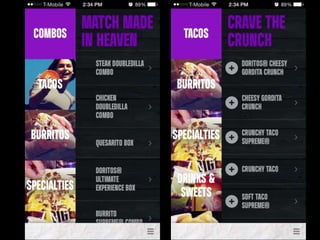
When you click on a category, a
menu slides out showing the menu
item available.
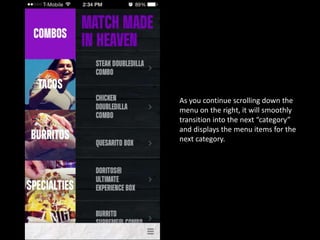
As you continue scrolling down the
menu on the right, it will smoothly
transition into the next “category”
and displays the menu items for the
next category.
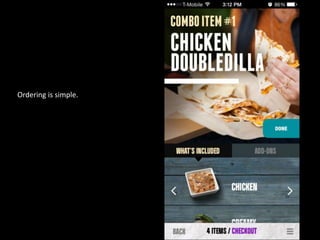
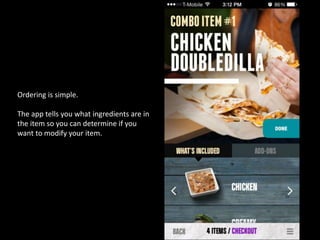
Ordering is simple.
Ordering is simple.
The app tells you what ingredients are in
the item so you can determine if you
want to modify your item.
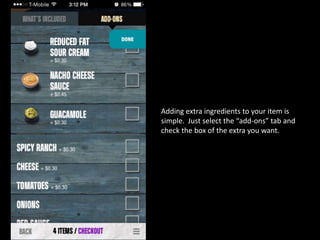
Adding extra ingredients to your item is
simple. Just select the “add-ons” tab and
check the box of the extra you want.
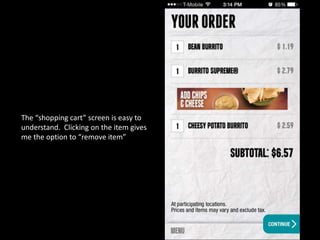
The “shopping cart” screen is easy to
understand. Clicking on the item gives
me the option to “remove item”
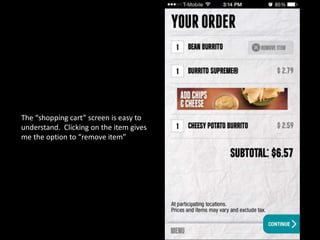
The “shopping cart” screen is easy to
understand. Clicking on the item gives
me the option to “remove item”
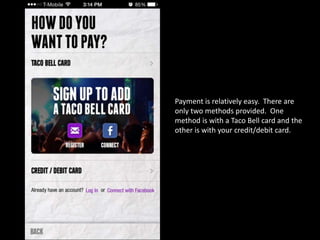
Payment is relatively easy. There are
only two methods provided. One
method is with a Taco Bell card and the
other is with your credit/debit card.
Conclusion
• The app made online ordering a breeze.
• I tested the ease of pick up through both the
drive-through and inside the restaurant. Both
transactions were quick.
• The app made online ordering a breeze.
• I tested the ease of pick up through both the
drive-through and inside the restaurant. Both
transactions were quick.
• The app takes the pain out of waiting in line to
order and you have the whole menu right in
the palm of your hand.
• The most important feature that I personally
liked is the fact that you get to see what
ingredients are in each item and you are able
to customize it by taking out or adding on
ingredients.

Breakdown & Review: Taco Bell Mobile App

  • 2.
    This is thefirst thing that showed up after I downloaded and opened the application.
  • 3.
    This is thefirst thing that showed up after I downloaded and opened the application. This is smart of Taco Bell to take advantage of push notifications. At any time, they can reach out to customers to inform them of deals and basically work on maintaining brand loyalty.
  • 4.
    The app allowsgives two options to sign up either through Facebook or email.
  • 5.
    The app allowsgives two options to sign up either through Facebook or email. Users are also allowed to skip this entirely if they are not interested and just want to order food immediately.
  • 6.
    This is thescreen you are taken to if you selected to sign up by email.
  • 7.
    This is thescreen you are taken to if you selected to sign up by email. Basic form with very minimal information requested to allow users to easily sign up.
  • 8.
    This is thescreen displayed after you signed up or if you skipped the sign up.
  • 9.
    The app employsan “endless” scrolling screen where you scroll down to see all the offers and menu categories.
  • 10.
    What I likedon’t is when you try to tap on either of these two images, it does nothing. To me this is a waste of screen realty.
  • 11.
    I do notsee a purpose in telling me to tap below to order. Why not a “tap here to order” instead? This should be the first image screen.
  • 12.
    I do notsee a purpose in telling me to tap below to order. Why not a “tap here to order” instead? This should be the first image screen. As a user, when I open the mobile app, I want to be able to order immediately instead of having to scroll all the way down to order.
  • 13.
    I have tomake a few scrolls before I can reach the section that offers a “menu” of the categories of food I can order.
  • 15.
    When you clickon a category, a menu slides out showing the menu item available.
  • 16.
    As you continuescrolling down the menu on the right, it will smoothly transition into the next “category” and displays the menu items for the next category.
  • 18.
  • 19.
    Ordering is simple. Theapp tells you what ingredients are in the item so you can determine if you want to modify your item.
  • 20.
    Adding extra ingredientsto your item is simple. Just select the “add-ons” tab and check the box of the extra you want.
  • 21.
    The “shopping cart”screen is easy to understand. Clicking on the item gives me the option to “remove item”
  • 22.
    The “shopping cart”screen is easy to understand. Clicking on the item gives me the option to “remove item”
  • 23.
    Payment is relativelyeasy. There are only two methods provided. One method is with a Taco Bell card and the other is with your credit/debit card.
  • 24.
  • 25.
    • The appmade online ordering a breeze.
  • 26.
    • The appmade online ordering a breeze. • I tested the ease of pick up through both the drive-through and inside the restaurant. Both transactions were quick.
  • 27.
    • The appmade online ordering a breeze. • I tested the ease of pick up through both the drive-through and inside the restaurant. Both transactions were quick. • The app takes the pain out of waiting in line to order and you have the whole menu right in the palm of your hand.
  • 28.
    • The mostimportant feature that I personally liked is the fact that you get to see what ingredients are in each item and you are able to customize it by taking out or adding on ingredients.