Robotics Process Automation – Travel Claims – Luggage Delay
Proof of Concept- Business Requirements & Understanding
V0.1
Prepared by Reviewed by Approved by
Name Harshit Sharma Ashraf, Aamina Thabassum
Role Business Analyst
Signature
Date 19/6/2017
Table of Contents
Contents
1.0 Introduction..................................................................................................................................3
1.1 Purpose of this document ....................................................................................................3
1.2 Business Case ......................................................................................................................3
1.3 Automation Objective..........................................................................................................3
2.0 Process Definition & Understanding .........................................................................................4
2.1 Current Process Landscape...................................................................................................4
2.2 Volumetric Summary ...........................................................................................................5
2.3 Applications accessed in the process.....................................................................................6
2.4 In Scope ..............................................................................................................................6
2.5 Out of Scope........................................................................................................................7
2.6 Agreements & Assumptions .................................................................................................7
2.7 Use Cases, Business Requirements & Exception Handling.......................................................9
2.8 Detailed steps andlist of Countries.....................................................................................13
3.0 Risks and Impacts..................................................................................................................14
3.1 Project Risks......................................................................................................................14
3.2 Impact on existing process flow due to proposed changes to the process..............................15
4.0 System Requirements............................................................................................................15
4.1 Application availability & Downtimes..................................................................................15
4.2 Hardware and Software Requirements................................................................................15
4.3 System Access Requirements..............................................................................................15
5.0 Field Mapping.......................................................................................................................16
6.0 Dependencies........................................................................................................................18
7.0 Appendix...............................................................................................................................18
8.0 Change Log ...........................................................................................................................18
1.0 Introduction
1.1 Purpose of this document
This document is aimed at:
 Capturing inputs acquired during the detailed requirements gathering phase
for FNOL and Claims handling processes for Travel- Luggage Delay.
 This document also serves to establish the traceability between the Business
Objectives and the requirements identified in the proposed solution and how
they satisfy the stated objectives.
 Serves as a formal template to guide the development of the solution.
1.2 Business Case
Tryg is one of the largest non-life insurance companies in the Nordic region with
activities in Denmark, Norway and Sweden. It is listed on Nasdaq OMX Copenhagen.
In the Claims business department there are various independent units handling
claims depending on the claim type. Travel department is one of the claims
departments which receives claims pertaining to sickness, cancellations, luggage
delay etc. happening during a travel.
The claims which can be classified as “one and done”, can be processed in one go,
do not need human intervention and can be handled automatically with defined
business rules. Luggage delay claims is one of them. A claim after being indexed is
processed will payment in a straight through set process by claim handlers. By
implementing Robotic Process Automation for this claim,human intervention can be
eliminated and thereby increase efficiency and quality of the process. The claim
handlers will thus have time to concentrate/focus on complex cases and other value
added activities.
1.3 Automation Objective
The objective is to create a Proof of Concept using Robotic Process Automation to
demonstrate handling of Travel Luggage Delay Claims, starting from picking up the
case in TOSCA to payment and intimation to the customer. It will showcase the
possibility of automation end to end.
2.0 Process Definition & Understanding
2.1 Current Process Landscape
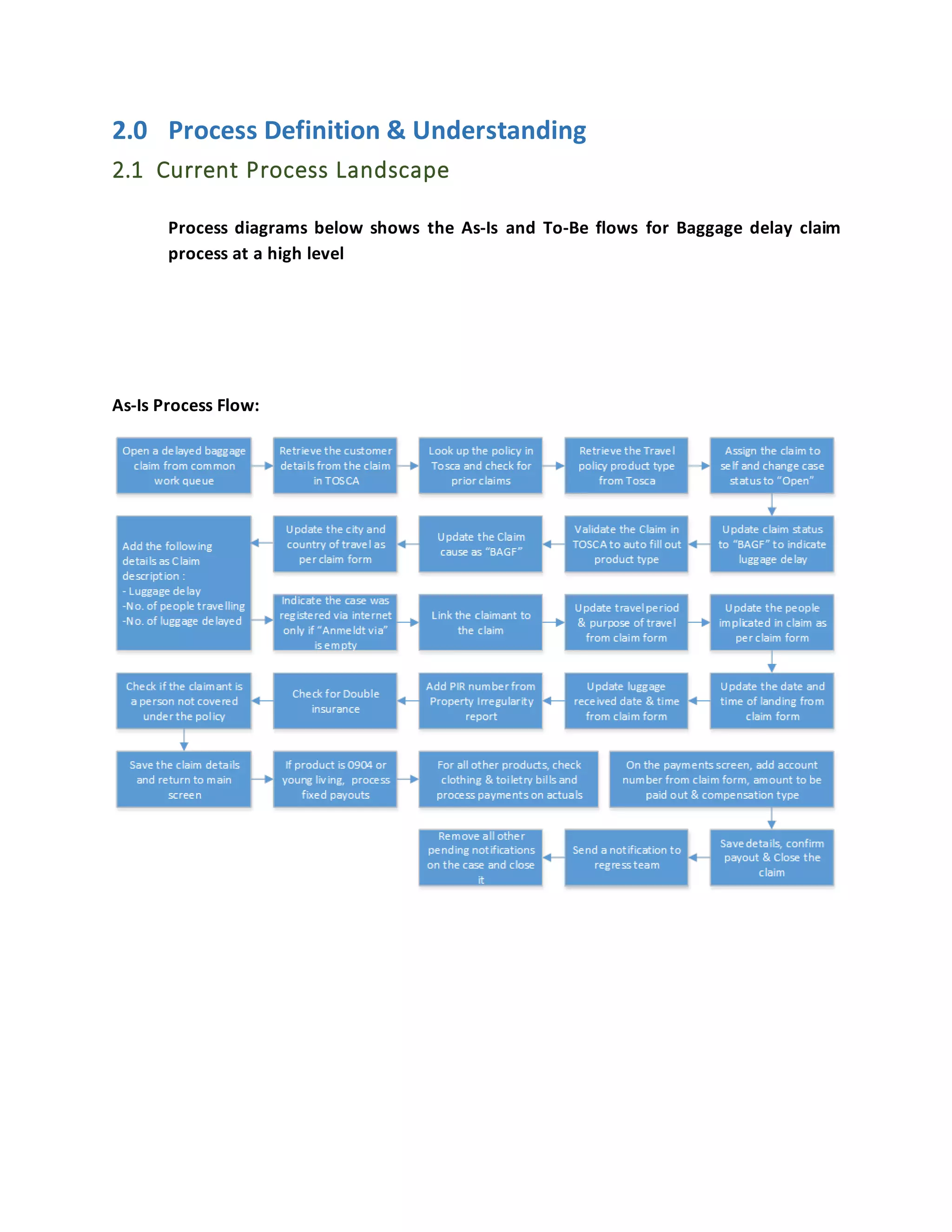
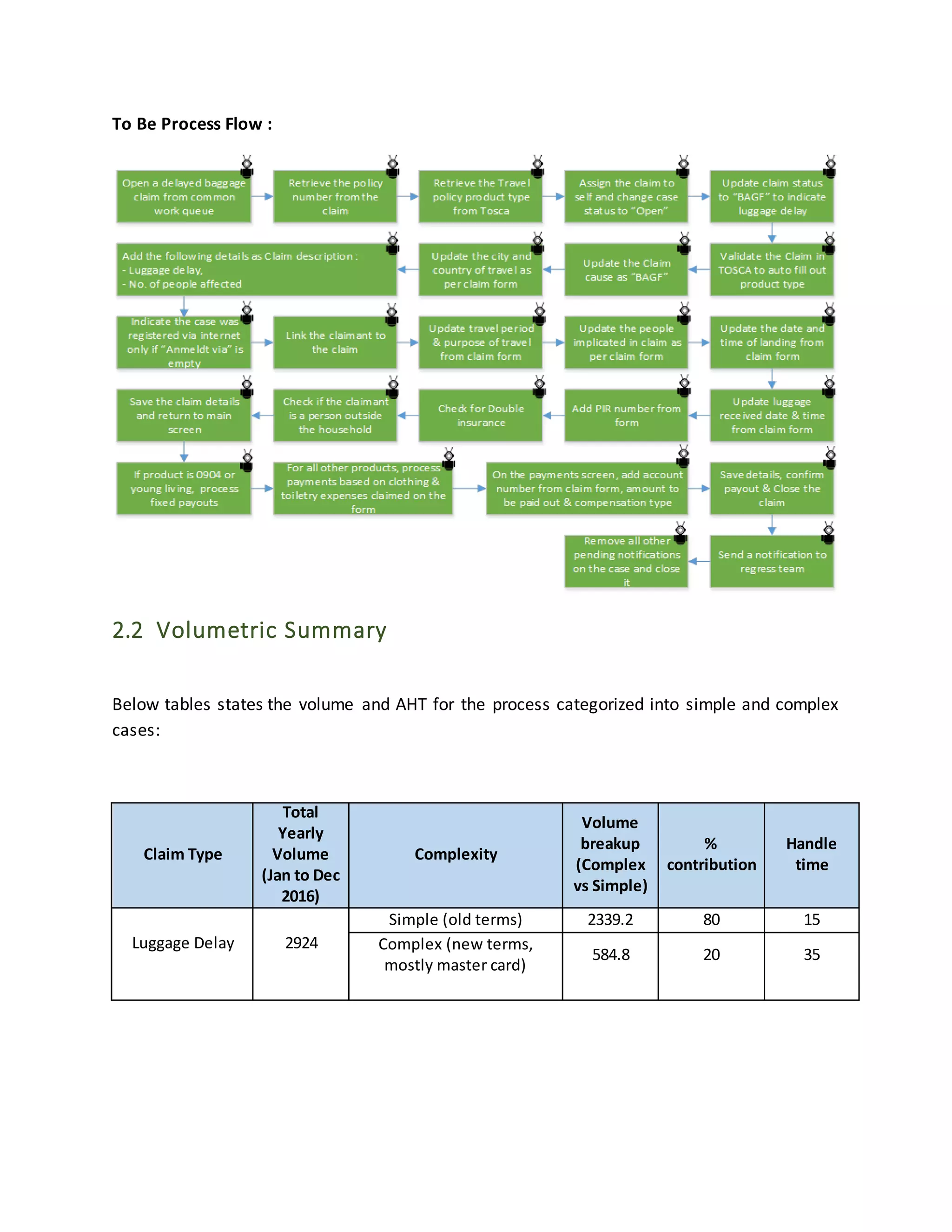
Process diagrams below shows the As-Is and To-Be flows for Baggage delay claim
process at a high level
As-Is Process Flow:
To Be Process Flow :
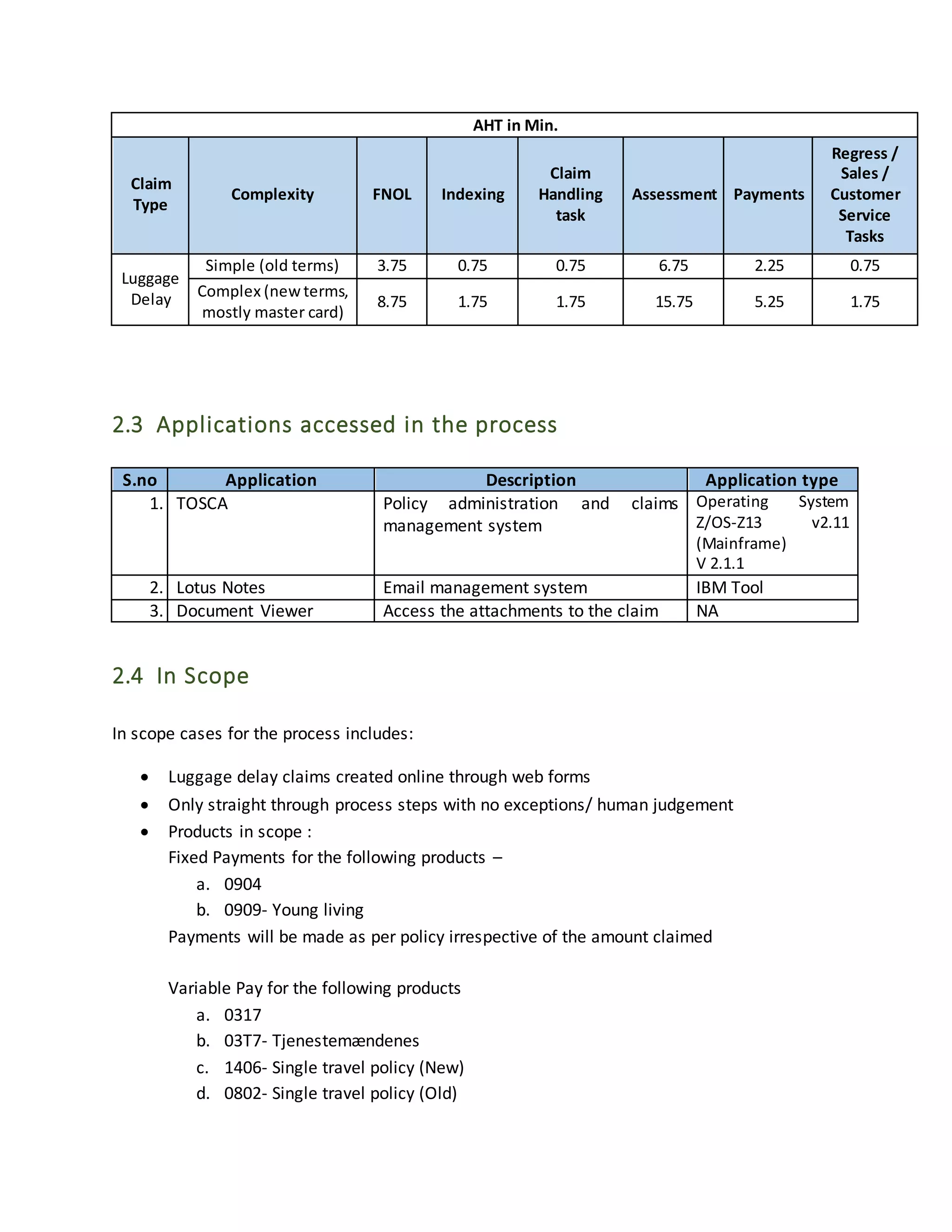
2.2 Volumetric Summary
Below tables states the volume and AHT for the process categorized into simple and complex
cases:
Claim Type
Total
Yearly
Volume
(Jan to Dec
2016)
Complexity
Volume
breakup
(Complex
vs Simple)
%
contribution
Handle
time
Luggage Delay 2924
Simple (old terms) 2339.2 80 15
Complex (new terms,
mostly master card)
584.8 20 35
AHT in Min.
Claim
Type
Complexity FNOL Indexing
Claim
Handling
task
Assessment Payments
Regress /
Sales /
Customer
Service
Tasks
Luggage
Delay
Simple (old terms) 3.75 0.75 0.75 6.75 2.25 0.75
Complex (new terms,
mostly master card)
8.75 1.75 1.75 15.75 5.25 1.75
2.3 Applications accessed in the process
2.4 In Scope
In scope cases for the process includes:
 Luggage delay claims created online through web forms
 Only straight through process steps with no exceptions/ human judgement
 Products in scope :
Fixed Payments for the following products –
a. 0904
b. 0909- Young living
Payments will be made as per policy irrespective of the amount claimed
Variable Pay for the following products
a. 0317
b. 03T7- Tjenestemændenes
c. 1406- Single travel policy (New)
d. 0802- Single travel policy (Old)
S.no Application Description Application type
1. TOSCA Policy administration and claims
management system
Operating System
Z/OS-Z13 v2.11
(Mainframe)
V 2.1.1
2. Lotus Notes Email management system IBM Tool
3. Document Viewer Access the attachments to the claim NA
Amount under Clothing and Toiletries will be paid out if it’s only one line item or if there
is a total amount populated in the amount form as per actual claims amount mentioned
irrespective of the bills submitted
2.5 Out of Scope
The following items / areas are out of scope:
 Cases which have insufficient or ambiguous information on forms will be pushed to
exception queue and should be handled manually (exceptions)
 All luggage delay claims which do not get registered through web forms
 Indexing of claims from Mailbox into Tosca
 Fraud Detection
 Processing according to the Profil Color, profil color will not be noted
 Adding new fields into web form
 Luggage delay claims for Nordea customers
 If there is an additional person accompanying the insured and the same cannot be verified
in the TOSCA system then the case will be manually processed
 PIR report checks and any invoices to be checked for payments
 Any other insurance products that has not been mentioned in the in-scope here is not
considered for automation.
 Procurement of any hardware or software licenses not related to the RPA platform
 IT support for infrastructure
 L1, L3 support (L1 to be provided by Tryg IT Helpdesk and L3 will be provided by RPA tool
vendor); Supplier will interface with the RPA Tool vendor for L3 support
 All exception scenarios detailed out in the user stories below.
2.6 Agreements & Assumptions
 Tryg will provide desktops / VDIs in for the Supplier’s consultant(s) to remotely develop
the RPA automated workflows from offshore in a Non-ODC Location. (Note – The ODC Is
under preparation for RPA COE)
 Access to business applications (TOSCA, Lotus Notes, Document Viewer) required for
executing RPA projects will be provided by Tryg
 Tryg will provide the Supplier’s consultant(s) with a Tryg user id and password with the
relevant permissions (similar to that of an operations user currently working on the POC
process) before the start of the project
 Tryg to provision user ids for each robot and setup necessary access controls similar to
the agent executing similar transactions in the pilot processes
 The Supplier’s consultant will help in configuring the robots and deploying automated
workflows to the robots.
 UiPath Studio would need to be installed in the Tryg desktop / persistent VDI that will be
used by the Supplier’s consultants to develop the automated workflows for the project
 We assume that a few fields – PIR check, Country codes and Total Claims check will be
added onto the web form to enable RPA
 Our assumption is that the luggage claim process for POC will begin only after the form is
indexed in TOSCA
 It is assumed that Tryg SMEs (both from line of business as well as technical personnel)
are identified before project kick-off. They will be required during design validation and
development stage for discussions on an “as-needed” basis and thereafter, to clarify
issues and queries.
 Process SMEs will be available for workshops during requirements finalization, testing,
UAT, demos and training
 Tryg will review and share feedback on deliverables without delay.
 Tryg will identify the authority responsible for signing off deliverables.
 Infrastructure and applications are assumed as available during the development of the
automation and potential downtime due to maintenance is shared with the Supplier
implementation team.
 Automated workflows will be built on stable application environments of the in-scope
applications. Any change required in the workflows deployed to the robots due to
changes in application functionality, and application user interface will be subject to the
change management process.
 Test data will be provided by Tryg SMEs during the Project life cycle (Test data for
development, Testing, UAT) for systems where testing environments exist.
 It is assumed that any exceptions and unexpected errors will be handled through human
intervention/ manual process.
 It is assumed that Tryg uses a standard source code repository (TFS, SVN) and access to
that repository will be provided to the Supplier consultant to manage the source code
related to the POC if applicable.
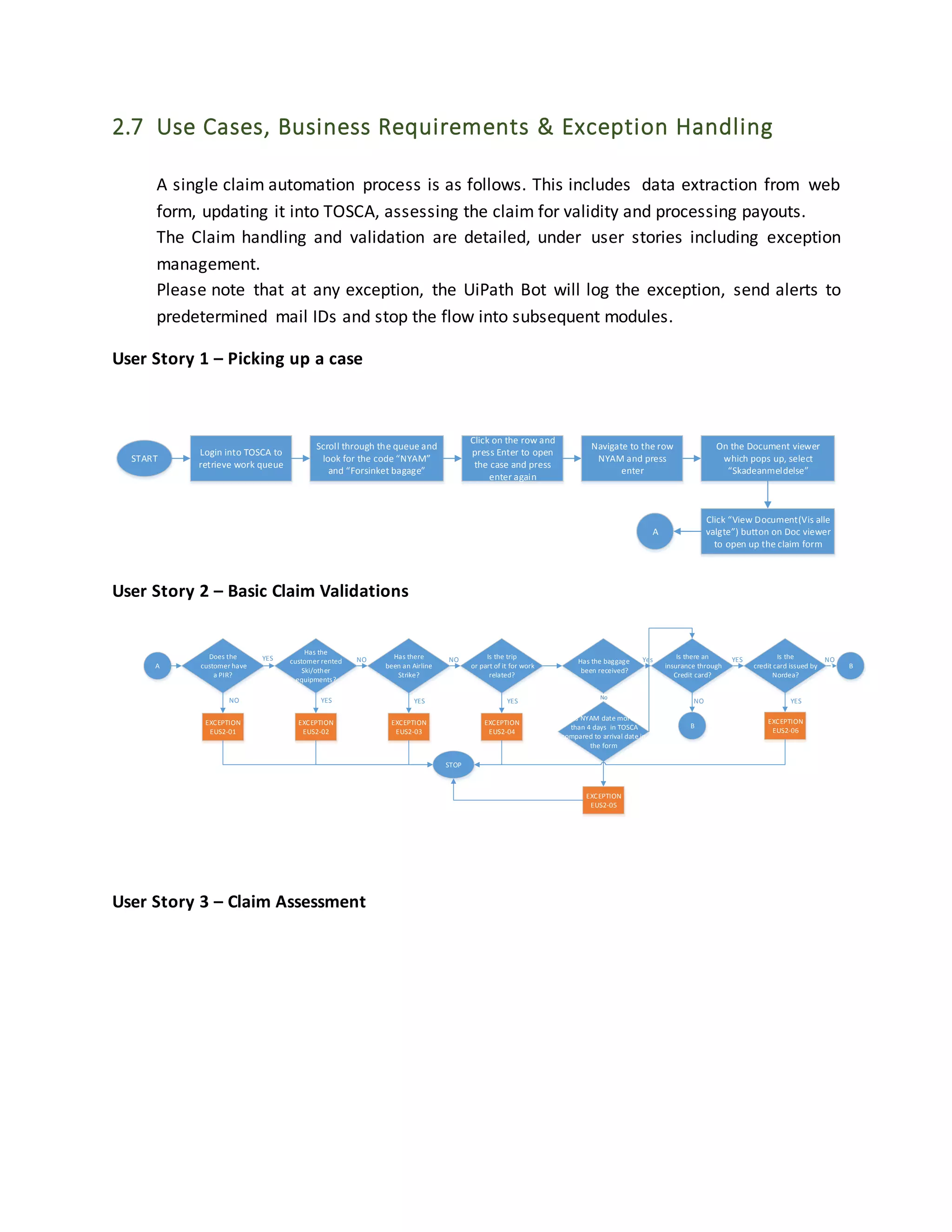
2.7 Use Cases, Business Requirements & Exception Handling
A single claim automation process is as follows. This includes data extraction from web
form, updating it into TOSCA, assessing the claim for validity and processing payouts.
The Claim handling and validation are detailed, under user stories including exception
management.
Please note that at any exception, the UiPath Bot will log the exception, send alerts to
predetermined mail IDs and stop the flow into subsequent modules.
User Story 1 – Picking up a case
START
Login into TOSCA to
retrieve work queue
Scroll through the queue and
look for the code “NYAM”
and “Forsinket bagage”
Click on the row and
press Enter to open
the case and press
enter again
Navigate to the row
NYAM and press
enter
On the Document viewer
which pops up, select
“Skadeanmeldelse”
Click “View Document(Vis alle
valgte”) button on Doc viewer
to open up the claim form
A
User Story 2 – Basic Claim Validations
A
Does the
customer have
a PIR?
Has the
customer rented
Ski/other
equipments?
Has there
been an Airline
Strike?
Is the trip
or part of it for work
related?
Is there an
insurance through
Credit card?
Is the
credit card issued by
Nordea?
B`
YES
YES NO NO Yes NOYES
EXCEPTION
EUS2-01
EXCEPTION
EUS2-02
EXCEPTION
EUS2-03
EXCEPTION
EUS2-04
EXCEPTION
EUS2-06
STOP
B
NOYES YES YES YESNO
Has the baggage
been received?
No
EXCEPTION
EUS2-05
Is NYAM date more
than 4 days in TOSCA
compared to arrival date in
the form
User Story 3 – Claim Assessment
B
On TOSCA, press
SHIFT + F11 + F6 to
get customer details
If product code is 856
press Shift + F10 else
press Shift + F11
Check if
“Rejseområde” is
“Verden” or ”EU/EØS”
Is the travel
outside EU for “EU/EØS”
cover? Checking in the form
“Rajsemal”
EXCEPTION
EUS3-01
Press Shift + F2 and
note down the code
on “Betingelsesnr”
Press F12 to exit the
screen
YES
Is
the policy status
“IKRAFT”
Is the
claim date(in the form)
after
the Policy inception
date ”Ikr./andr.dato”?
Retrieve AFGA activity
date
EXCEPTION
EUS3-02
Is the
AFGA date before Claim
date?
EXCEPTION
EUS3-03
Press F12 to exit the
screen
C
NO
Yes
No
NO
YES
YES
NO
For 0909, check if
More Travel is “Y”
User Story 4 – Claim Assessment
C
Change “Status” to
“Åben”
Change the “Sag
tilhorer” ID to Self
If Product is 0909 or 0904,
enter Claim
type”Skadetype” as “BAGF”
else enter “RBAG”
Press Shift + F2 to
complete the details
Enter “Årsag” as BAGF
Enter “Landekode”
from Country of
Travel on the form
Enter “Skadested”
from City of Travel on
the form
Enter “Beskrivelse” as
“Forsinket Bagage”+
No. of people
affected “x personar”
If “Anmeldt via” is
empty enter “I” else
leave as it is
Press enter, on the
Skadelite field input X
and enter again
Copy the email from the
form and put in TOSCA in
“Email field” or copy mobil
telefon from form and put in
“Tlf-nr” if details do not pop
up by email
Enter travel dates as per claim
form(Rejseperiode) in “ Udrejse”
and home coming date in
”Hjemkosmst”(last part of
(Rejseperiode)
Enter Rejsens Formal
as “Privat”
**If baggage has been
received, enter the customers
landing date and time
“Ankomst person” “ Kl” and
baggage arrival date and time
“Ankomst baggage “ “Kl”
Enter PIR number if
present on the form
or enter “XX”
If PIR number is more
than 10 digits, enter
the remaining digits
as comments
If there is another
insurance from
different company on
form, indicate J else N
in “Dobbelt fors”
If a person outside
household is affected,
indicate J else N in
“Ekstra ledsag”
Press F5 to save
details and F12 to exit
the screen
D
Type in “ ‘f ” and
press enter/ctrl
Check if the line
item with the
claim date mentioned
in“Skadedato” matching
in the form
yes
EXCEPTION
EUS4-01
No
In TOSCA, click on the
line item press enter
& Press Shift + F7
In “Implicernet” field type in the names
of the people affected from the
form”Valg rejsedeltagere fra
husstanden hvis baggage er blevet
forsinket”
**As in form: landing date- Hvornar
landede du/I & baggage arrival date “
Hvornar modtog du/I bagagen”
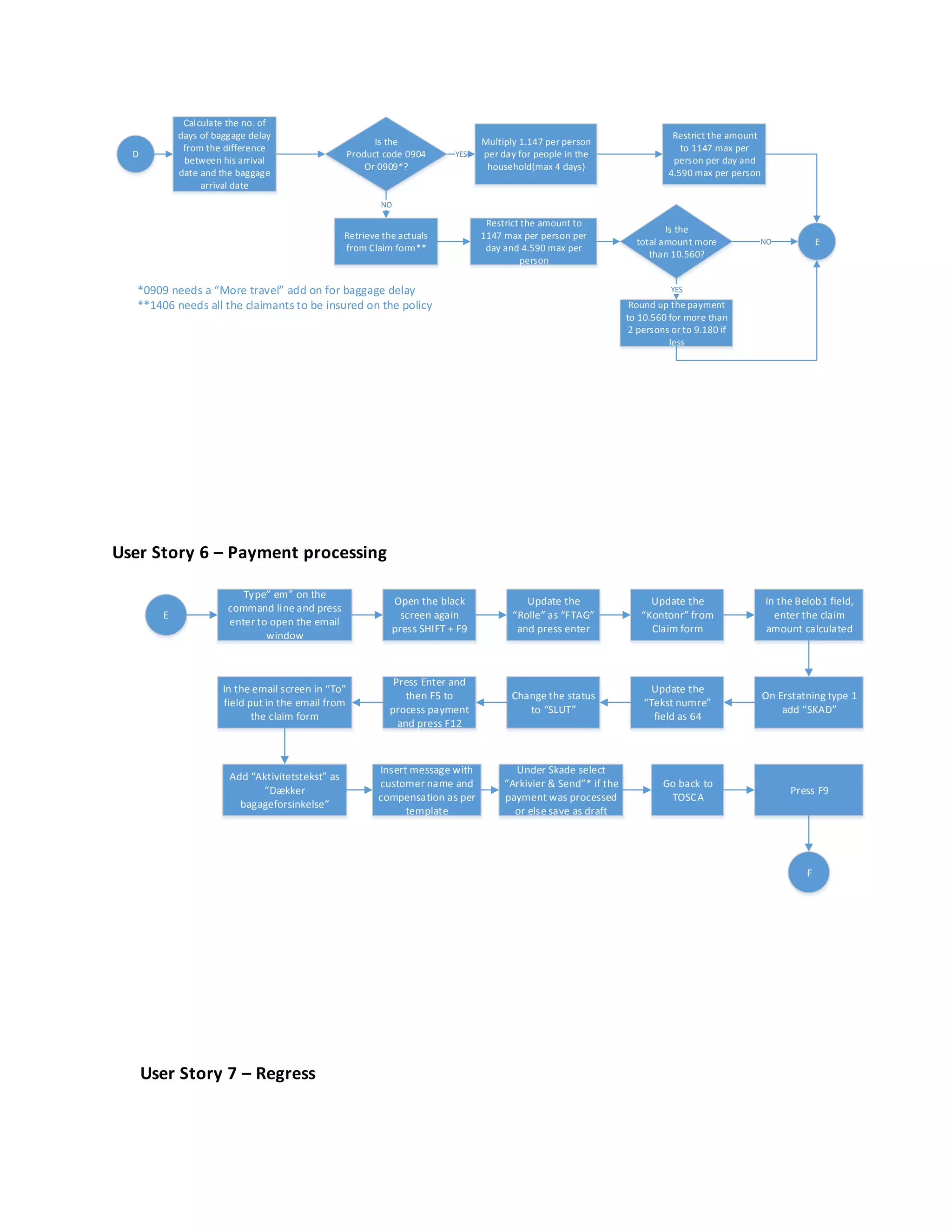
User Story 5 – Payment Calculation
*0909 needs a “More travel” add on for baggage delay
**1406 needs all the claimants to be insured on the policy
D
Multiply 1.147 per person
per day for people in the
household(max 4 days)
Is the
total amount more
than 10.560?
Round up the payment
to 10.560 for more than
2 persons or to 9.180 if
less
Is the
Product code 0904
Or 0909*?
E
Retrieve the actuals
from Claim form**
YES
Calculate the no. of
days of baggage delay
from the difference
between his arrival
date and the baggage
arrival date
NO
YES
Restrict the amount
to 1147 max per
person per day and
4.590 max per person
NO
Restrict the amount to
1147 max per person per
day and 4.590 max per
person
User Story 6 – Payment processing
E
Type” em” on the
command line and press
enter to open the email
window
Open the black
screen again
press SHIFT + F9
In the email screen in “To”
field put in the email from
the claim form
Update the
“Rolle” as “FTAG”
and press enter
Update the
“Kontonr” from
Claim form
In the Belob1 field,
enter the claim
amount calculated
On Erstatning type 1
add “SKAD”
Update the
“Tekst numre”
field as 64
Change the status
to “SLUT”
Press Enter and
then F5 to
process payment
and press F12
Add “Aktivitetstekst” as
“Dækker
bagageforsinkelse”
Insert message with
customer name and
compensation as per
template
Under Skade select
“Arkivier & Send”* if the
payment was processed
or else save as draft
Go back to
TOSCA
Press F9
F
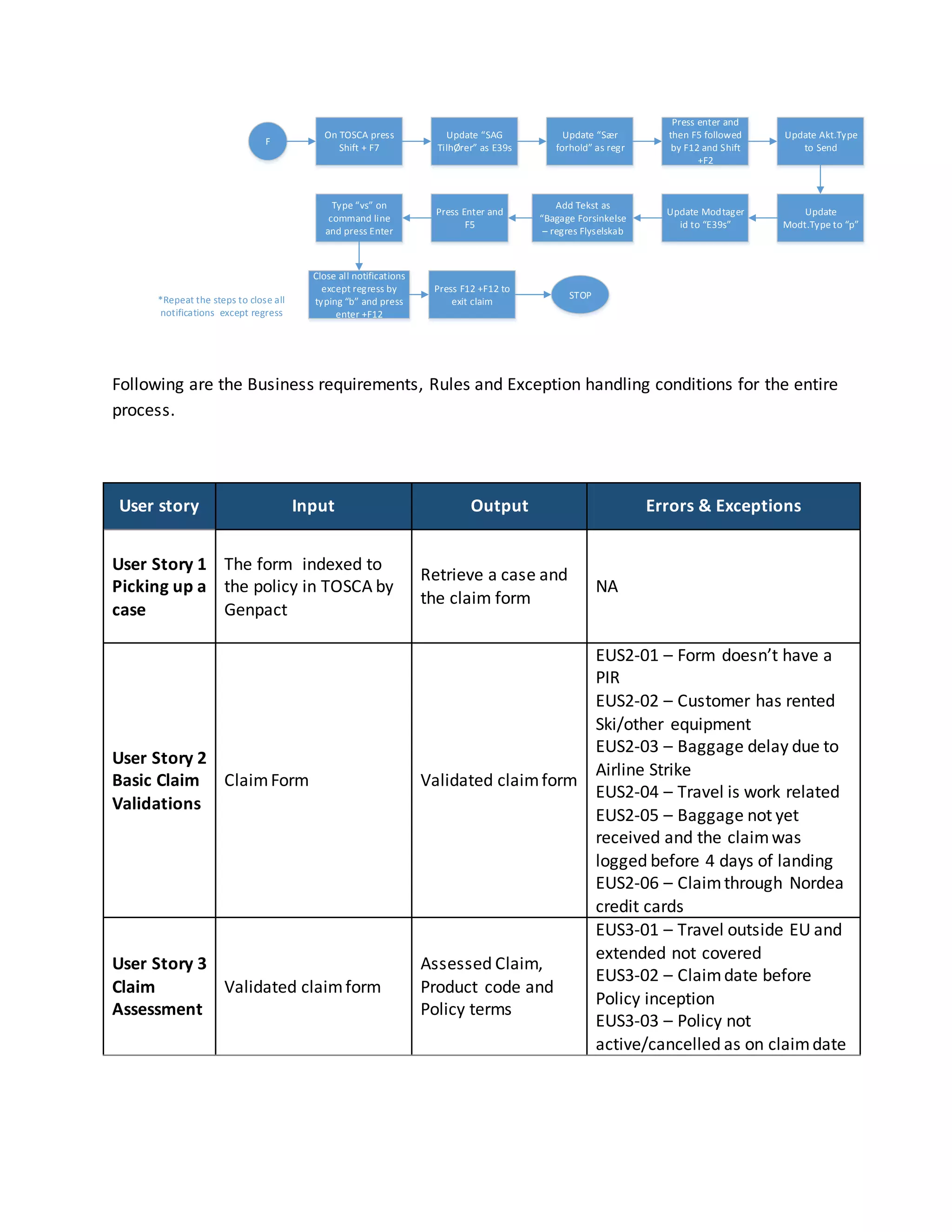
User Story 7 – Regress
F
On TOSCA press
Shift + F7
Update “SAG
TilhØrer” as E39s
Update “Sær
forhold” as regr
Press enter and
then F5 followed
by F12 and Shift
+F2
Update Akt.Type
to Send
Update
Modt.Type to “p”
Update Modtager
id to “E39s”
Add Tekst as
“Bagage Forsinkelse
– regres Flyselskab
Press Enter and
F5
Type “vs” on
command line
and press Enter
Close all notifications
except regress by
typing “b” and press
enter +F12
Press F12 +F12 to
exit claim
STOP*Repeat the steps to close all
notifications except regress
Following are the Business requirements, Rules and Exception handling conditions for the entire
process.
User story Input Output Errors & Exceptions
User Story 1
Picking up a
case
The form indexed to
the policy in TOSCA by
Genpact
Retrieve a case and
the claim form
NA
User Story 2
Basic Claim
Validations
ClaimForm Validated claimform
EUS2-01 – Form doesn’t have a
PIR
EUS2-02 – Customer has rented
Ski/other equipment
EUS2-03 – Baggage delay due to
Airline Strike
EUS2-04 – Travel is work related
EUS2-05 – Baggage not yet
received and the claimwas
logged before 4 days of landing
EUS2-06 – Claimthrough Nordea
credit cards
User Story 3
Claim
Assessment
Validated claimform
Assessed Claim,
Product code and
Policy terms
EUS3-01 – Travel outside EU and
extended not covered
EUS3-02 – Claimdate before
Policy inception
EUS3-03 – Policy not
active/cancelled as on claimdate
User Story 4
Updating
Claim
details into
TOSCA
Assessed Claim,
Product code and
Policy terms
Claimdetails
updated in TOSCA
EUS4-01 – More than one claim
registered on the same date
User Story 5
– Payment
Calculation
ClaimValidated,
assessed and updated
in TOSCA
Claimamount to be
paid out
NA
User Story 6
– Process
Payment
ClaimValidated,
assessed, updated in
TOSCA, Claimamount
to be paid out
Claimpaid NA
User Story 7
– Regress
Claimpaid with
potential regress from
airline for delay
Notification to
Regress team
NA
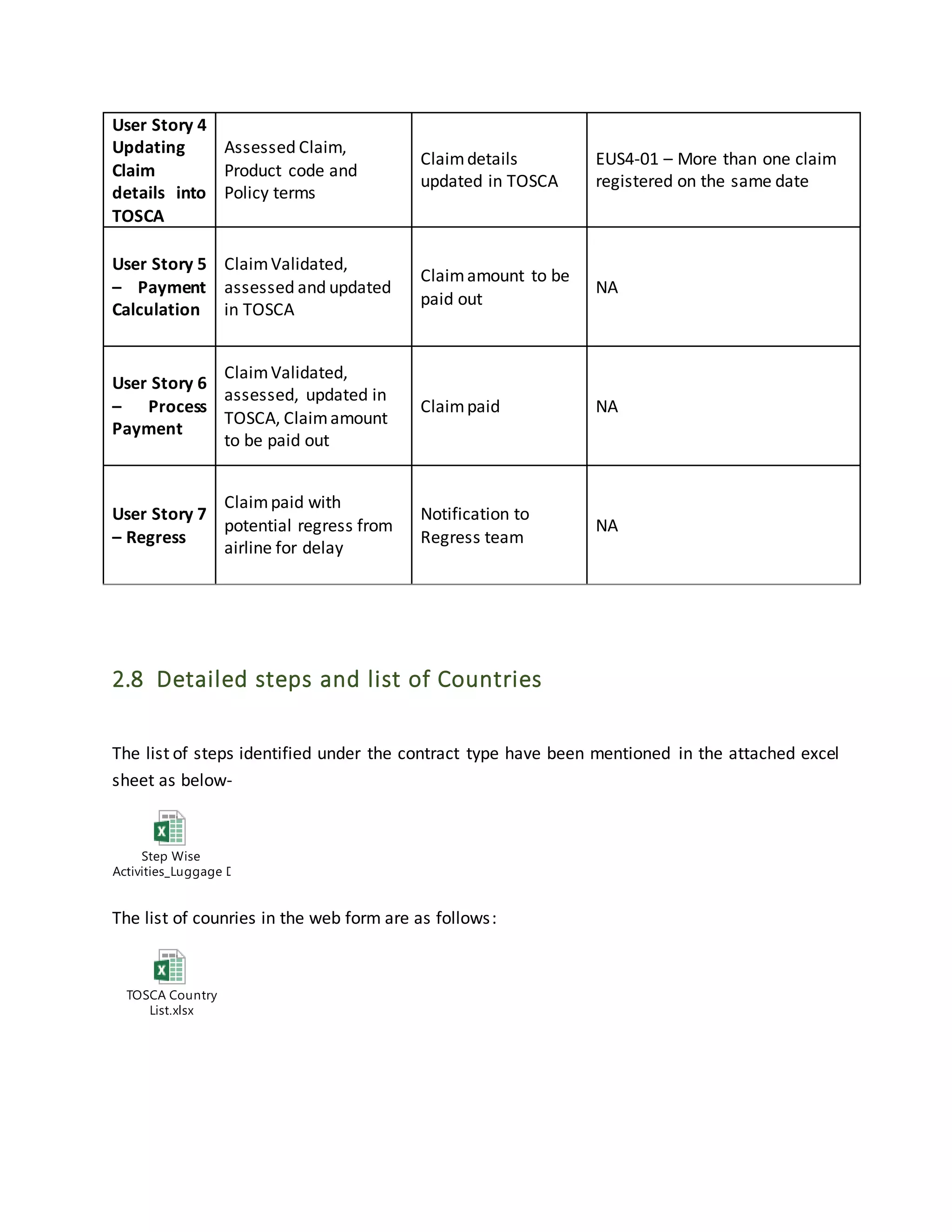
2.8 Detailed steps and list of Countries
The list of steps identified under the contract type have been mentioned in the attached excel
sheet as below-
Step Wise
Activities_Luggage Delay.xlsx
The list of counries in the web form are as follows:
TOSCA Country
List.xlsx
3.0 Risks and Impacts
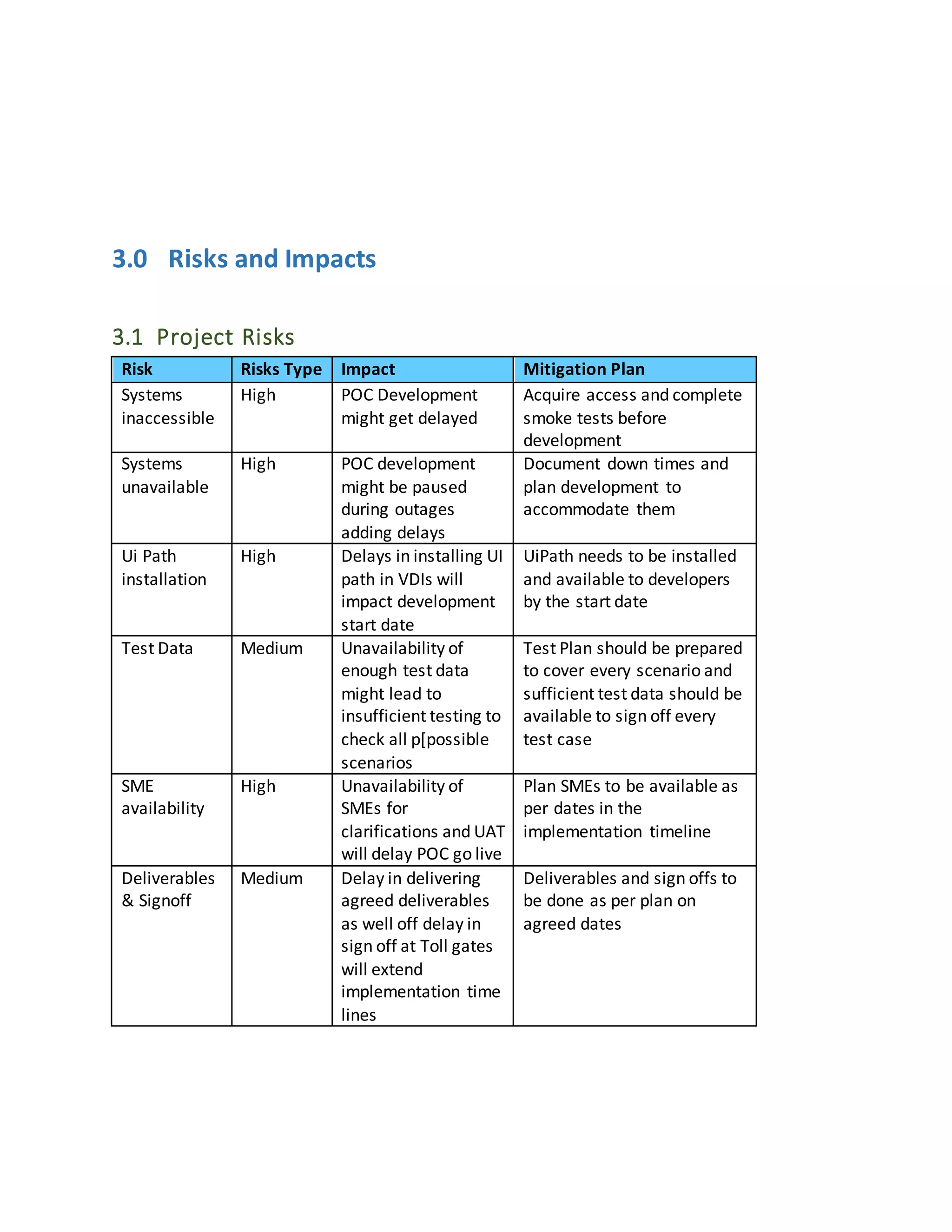
3.1 Project Risks
Risk Risks Type Impact Mitigation Plan
Systems
inaccessible
High POC Development
might get delayed
Acquire access and complete
smoke tests before
development
Systems
unavailable
High POC development
might be paused
during outages
adding delays
Document down times and
plan development to
accommodate them
Ui Path
installation
High Delays in installing UI
path in VDIs will
impact development
start date
UiPath needs to be installed
and available to developers
by the start date
Test Data Medium Unavailability of
enough test data
might lead to
insufficient testing to
check all p[possible
scenarios
Test Plan should be prepared
to cover every scenario and
sufficient test data should be
available to sign off every
test case
SME
availability
High Unavailability of
SMEs for
clarifications and UAT
will delay POC go live
Plan SMEs to be available as
per dates in the
implementation timeline
Deliverables
& Signoff
Medium Delay in delivering
agreed deliverables
as well off delay in
sign off at Toll gates
will extend
implementation time
lines
Deliverables and sign offs to
be done as per plan on
agreed dates
3.2 Impact on existing process flow due to proposed changes to the
process
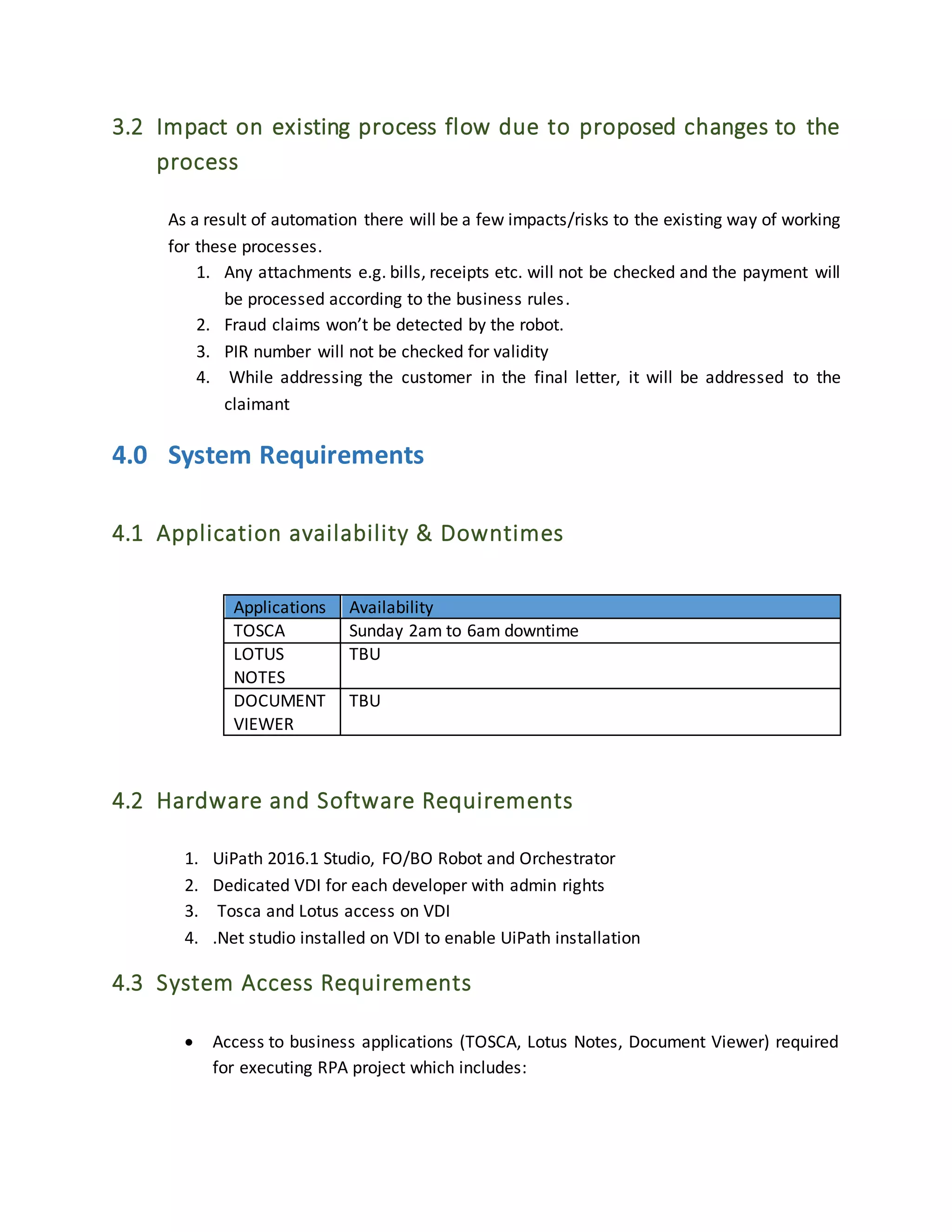
As a result of automation there will be a few impacts/risks to the existing way of working
for these processes.
1. Any attachments e.g. bills, receipts etc. will not be checked and the payment will
be processed according to the business rules.
2. Fraud claims won’t be detected by the robot.
3. PIR number will not be checked for validity
4. While addressing the customer in the final letter, it will be addressed to the
claimant
4.0 System Requirements
4.1 Application availability & Downtimes
Applications Availability
TOSCA Sunday 2am to 6am downtime
LOTUS
NOTES
TBU
DOCUMENT
VIEWER
TBU
4.2 Hardware and Software Requirements
1. UiPath 2016.1 Studio, FO/BO Robot and Orchestrator
2. Dedicated VDI for each developer with admin rights
3. Tosca and Lotus access on VDI
4. .Net studio installed on VDI to enable UiPath installation
4.3 System Access Requirements
 Access to business applications (TOSCA, Lotus Notes, Document Viewer) required
for executing RPA project which includes:
o Access rights for the Robot to create, modify and delete files on the network
folder.
o Access rights for the developers to create, modify and delete files on the
network folder and necessary application access.
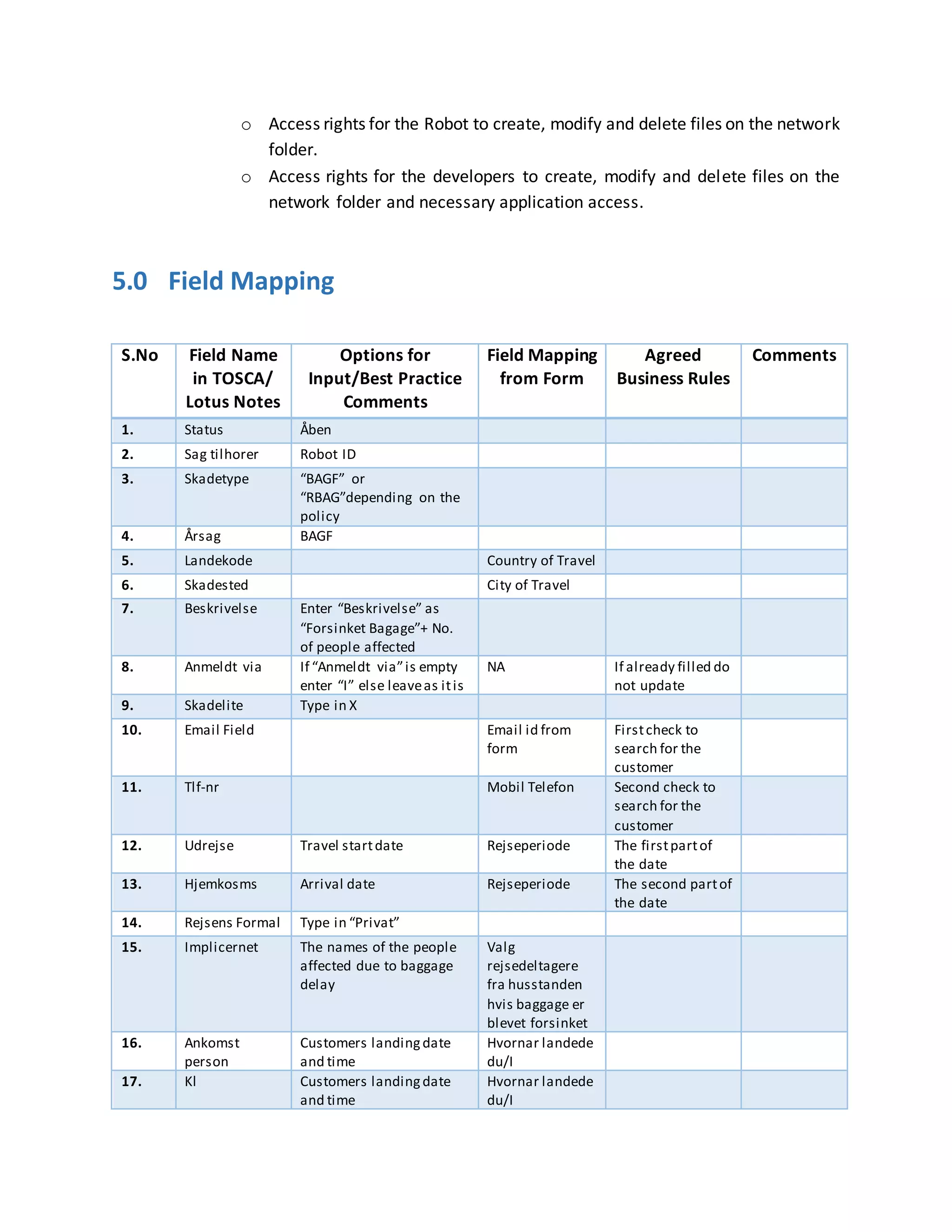
5.0 Field Mapping
S.No Field Name
in TOSCA/
Lotus Notes
Options for
Input/Best Practice
Comments
Field Mapping
from Form
Agreed
Business Rules
Comments
1. Status Åben
2. Sag tilhorer Robot ID
3. Skadetype “BAGF” or
“RBAG”depending on the
policy
4. Årsag BAGF
5. Landekode Country of Travel
6. Skadested City of Travel
7. Beskrivelse Enter “Beskrivelse” as
“Forsinket Bagage”+ No.
of people affected
8. Anmeldt via If “Anmeldt via”is empty
enter “I” else leaveas itis
NA If already filled do
not update
9. Skadelite Type in X
10. Email Field Email id from
form
Firstcheck to
search for the
customer
11. Tlf-nr Mobil Telefon Second check to
search for the
customer
12. Udrejse Travel startdate Rejseperiode The firstpartof
the date
13. Hjemkosms Arrival date Rejseperiode The second partof
the date
14. Rejsens Formal Type in “Privat”
15. Implicernet The names of the people
affected due to baggage
delay
Valg
rejsedeltagere
fra husstanden
hvis baggage er
blevet forsinket
16. Ankomst
person
Customers landingdate
and time
Hvornar landede
du/I
17. Kl Customers landingdate
and time
Hvornar landede
du/I
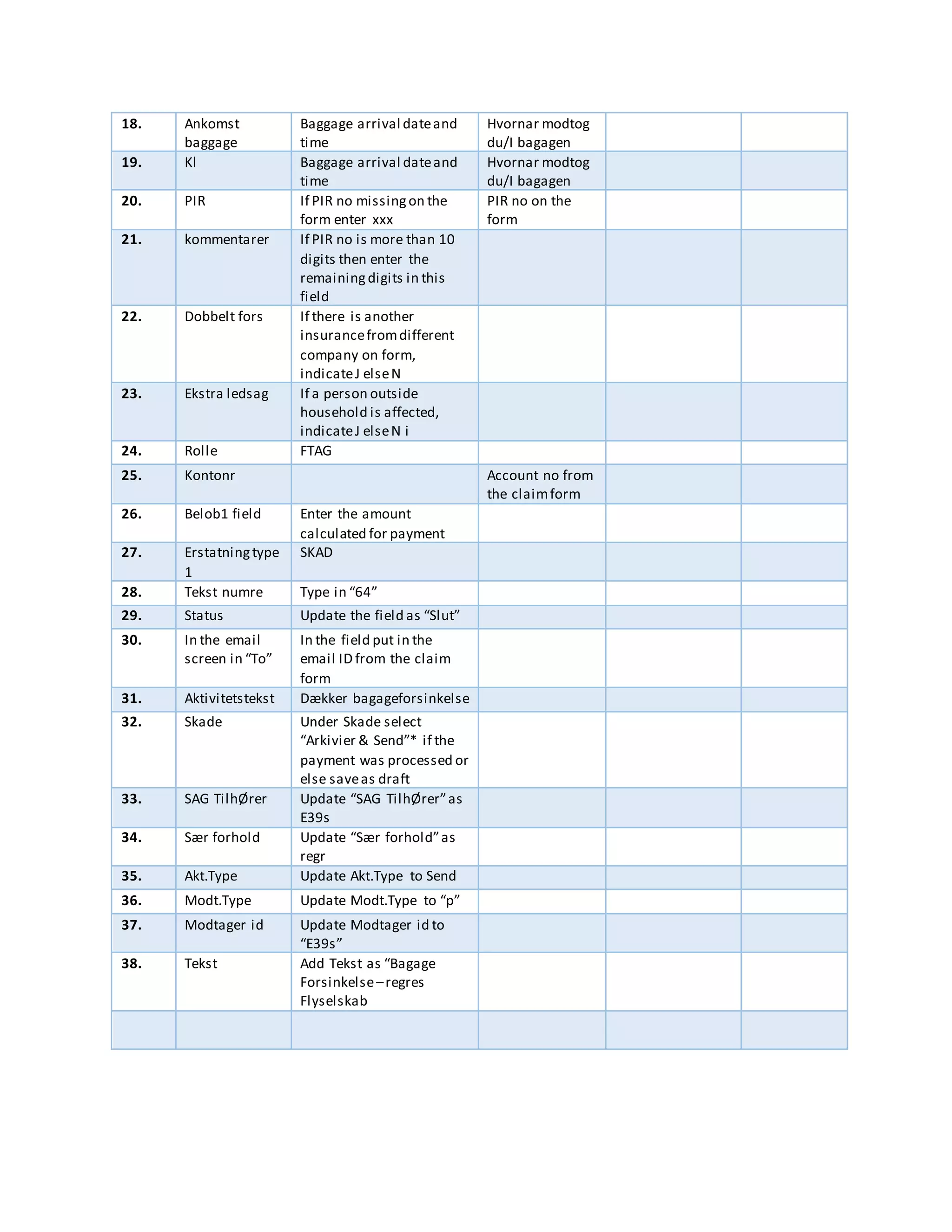
18. Ankomst
baggage
Baggage arrival dateand
time
Hvornar modtog
du/I bagagen
19. Kl Baggage arrival dateand
time
Hvornar modtog
du/I bagagen
20. PIR If PIR no missingon the
form enter xxx
PIR no on the
form
21. kommentarer If PIR no is more than 10
digits then enter the
remainingdigits in this
field
22. Dobbelt fors If there is another
insurancefromdifferent
company on form,
indicateJ elseN
23. Ekstra ledsag If a person outside
household is affected,
indicateJ elseN i
24. Rolle FTAG
25. Kontonr Account no from
the claimform
26. Belob1 field Enter the amount
calculated for payment
27. Erstatningtype
1
SKAD
28. Tekst numre Type in “64”
29. Status Update the field as “Slut”
30. In the email
screen in “To”
In the field put in the
email ID from the claim
form
31. Aktivitetstekst Dækker bagageforsinkelse
32. Skade Under Skade select
“Arkivier & Send”* if the
payment was processed or
else saveas draft
33. SAG TilhØrer Update “SAG TilhØrer”as
E39s
34. Sær forhold Update “Sær forhold”as
regr
35. Akt.Type Update Akt.Type to Send
36. Modt.Type Update Modt.Type to “p”
37. Modtager id Update Modtager id to
“E39s”
38. Tekst Add Tekst as “Bagage
Forsinkelse–regres
Flyselskab
6.0 Dependencies
1. Web form correctly indexed by Genpact to the claim.
2. Field addition/Updates in the web form wherein the customer logs in the claim
3. Access to business applications (TOSCA, Lotus Notes, Document Viewer) required for
executing RPA projects
7.0 Appendix
Refer to the following shared path link to access all the relevant documents
Reference Document Reference Path Document Name in the
Share Folder
Sharepoint link https://ch1hub.cognizant.com/sites/
SC5530/Tryg_Assessment/Shared%
20Documents/TRYG_Travel_POC
Query Tracker
8.0 Change Log
Version Date Changes Made By
V0.1 7/13/2017 Excel sheet for activities included,
Volumetrics & country list included, and other
minor business requirement changes
Harshit Sharma
V0.2
V0.3
V0.4

Brd sample for use

  • 1.
    Robotics Process Automation– Travel Claims – Luggage Delay Proof of Concept- Business Requirements & Understanding V0.1 Prepared by Reviewed by Approved by Name Harshit Sharma Ashraf, Aamina Thabassum Role Business Analyst Signature Date 19/6/2017
  • 2.
    Table of Contents Contents 1.0Introduction..................................................................................................................................3 1.1 Purpose of this document ....................................................................................................3 1.2 Business Case ......................................................................................................................3 1.3 Automation Objective..........................................................................................................3 2.0 Process Definition & Understanding .........................................................................................4 2.1 Current Process Landscape...................................................................................................4 2.2 Volumetric Summary ...........................................................................................................5 2.3 Applications accessed in the process.....................................................................................6 2.4 In Scope ..............................................................................................................................6 2.5 Out of Scope........................................................................................................................7 2.6 Agreements & Assumptions .................................................................................................7 2.7 Use Cases, Business Requirements & Exception Handling.......................................................9 2.8 Detailed steps andlist of Countries.....................................................................................13 3.0 Risks and Impacts..................................................................................................................14 3.1 Project Risks......................................................................................................................14 3.2 Impact on existing process flow due to proposed changes to the process..............................15 4.0 System Requirements............................................................................................................15 4.1 Application availability & Downtimes..................................................................................15 4.2 Hardware and Software Requirements................................................................................15 4.3 System Access Requirements..............................................................................................15 5.0 Field Mapping.......................................................................................................................16 6.0 Dependencies........................................................................................................................18 7.0 Appendix...............................................................................................................................18 8.0 Change Log ...........................................................................................................................18
  • 3.
    1.0 Introduction 1.1 Purposeof this document This document is aimed at:  Capturing inputs acquired during the detailed requirements gathering phase for FNOL and Claims handling processes for Travel- Luggage Delay.  This document also serves to establish the traceability between the Business Objectives and the requirements identified in the proposed solution and how they satisfy the stated objectives.  Serves as a formal template to guide the development of the solution. 1.2 Business Case Tryg is one of the largest non-life insurance companies in the Nordic region with activities in Denmark, Norway and Sweden. It is listed on Nasdaq OMX Copenhagen. In the Claims business department there are various independent units handling claims depending on the claim type. Travel department is one of the claims departments which receives claims pertaining to sickness, cancellations, luggage delay etc. happening during a travel. The claims which can be classified as “one and done”, can be processed in one go, do not need human intervention and can be handled automatically with defined business rules. Luggage delay claims is one of them. A claim after being indexed is processed will payment in a straight through set process by claim handlers. By implementing Robotic Process Automation for this claim,human intervention can be eliminated and thereby increase efficiency and quality of the process. The claim handlers will thus have time to concentrate/focus on complex cases and other value added activities. 1.3 Automation Objective The objective is to create a Proof of Concept using Robotic Process Automation to demonstrate handling of Travel Luggage Delay Claims, starting from picking up the case in TOSCA to payment and intimation to the customer. It will showcase the possibility of automation end to end.
  • 4.
    2.0 Process Definition& Understanding 2.1 Current Process Landscape Process diagrams below shows the As-Is and To-Be flows for Baggage delay claim process at a high level As-Is Process Flow:
  • 5.
    To Be ProcessFlow : 2.2 Volumetric Summary Below tables states the volume and AHT for the process categorized into simple and complex cases: Claim Type Total Yearly Volume (Jan to Dec 2016) Complexity Volume breakup (Complex vs Simple) % contribution Handle time Luggage Delay 2924 Simple (old terms) 2339.2 80 15 Complex (new terms, mostly master card) 584.8 20 35
  • 6.
    AHT in Min. Claim Type ComplexityFNOL Indexing Claim Handling task Assessment Payments Regress / Sales / Customer Service Tasks Luggage Delay Simple (old terms) 3.75 0.75 0.75 6.75 2.25 0.75 Complex (new terms, mostly master card) 8.75 1.75 1.75 15.75 5.25 1.75 2.3 Applications accessed in the process 2.4 In Scope In scope cases for the process includes:  Luggage delay claims created online through web forms  Only straight through process steps with no exceptions/ human judgement  Products in scope : Fixed Payments for the following products – a. 0904 b. 0909- Young living Payments will be made as per policy irrespective of the amount claimed Variable Pay for the following products a. 0317 b. 03T7- Tjenestemændenes c. 1406- Single travel policy (New) d. 0802- Single travel policy (Old) S.no Application Description Application type 1. TOSCA Policy administration and claims management system Operating System Z/OS-Z13 v2.11 (Mainframe) V 2.1.1 2. Lotus Notes Email management system IBM Tool 3. Document Viewer Access the attachments to the claim NA
  • 7.
    Amount under Clothingand Toiletries will be paid out if it’s only one line item or if there is a total amount populated in the amount form as per actual claims amount mentioned irrespective of the bills submitted 2.5 Out of Scope The following items / areas are out of scope:  Cases which have insufficient or ambiguous information on forms will be pushed to exception queue and should be handled manually (exceptions)  All luggage delay claims which do not get registered through web forms  Indexing of claims from Mailbox into Tosca  Fraud Detection  Processing according to the Profil Color, profil color will not be noted  Adding new fields into web form  Luggage delay claims for Nordea customers  If there is an additional person accompanying the insured and the same cannot be verified in the TOSCA system then the case will be manually processed  PIR report checks and any invoices to be checked for payments  Any other insurance products that has not been mentioned in the in-scope here is not considered for automation.  Procurement of any hardware or software licenses not related to the RPA platform  IT support for infrastructure  L1, L3 support (L1 to be provided by Tryg IT Helpdesk and L3 will be provided by RPA tool vendor); Supplier will interface with the RPA Tool vendor for L3 support  All exception scenarios detailed out in the user stories below. 2.6 Agreements & Assumptions  Tryg will provide desktops / VDIs in for the Supplier’s consultant(s) to remotely develop the RPA automated workflows from offshore in a Non-ODC Location. (Note – The ODC Is under preparation for RPA COE)  Access to business applications (TOSCA, Lotus Notes, Document Viewer) required for executing RPA projects will be provided by Tryg
  • 8.
     Tryg willprovide the Supplier’s consultant(s) with a Tryg user id and password with the relevant permissions (similar to that of an operations user currently working on the POC process) before the start of the project  Tryg to provision user ids for each robot and setup necessary access controls similar to the agent executing similar transactions in the pilot processes  The Supplier’s consultant will help in configuring the robots and deploying automated workflows to the robots.  UiPath Studio would need to be installed in the Tryg desktop / persistent VDI that will be used by the Supplier’s consultants to develop the automated workflows for the project  We assume that a few fields – PIR check, Country codes and Total Claims check will be added onto the web form to enable RPA  Our assumption is that the luggage claim process for POC will begin only after the form is indexed in TOSCA  It is assumed that Tryg SMEs (both from line of business as well as technical personnel) are identified before project kick-off. They will be required during design validation and development stage for discussions on an “as-needed” basis and thereafter, to clarify issues and queries.  Process SMEs will be available for workshops during requirements finalization, testing, UAT, demos and training  Tryg will review and share feedback on deliverables without delay.  Tryg will identify the authority responsible for signing off deliverables.  Infrastructure and applications are assumed as available during the development of the automation and potential downtime due to maintenance is shared with the Supplier implementation team.  Automated workflows will be built on stable application environments of the in-scope applications. Any change required in the workflows deployed to the robots due to changes in application functionality, and application user interface will be subject to the change management process.  Test data will be provided by Tryg SMEs during the Project life cycle (Test data for development, Testing, UAT) for systems where testing environments exist.  It is assumed that any exceptions and unexpected errors will be handled through human intervention/ manual process.  It is assumed that Tryg uses a standard source code repository (TFS, SVN) and access to that repository will be provided to the Supplier consultant to manage the source code related to the POC if applicable.
  • 9.
    2.7 Use Cases,Business Requirements & Exception Handling A single claim automation process is as follows. This includes data extraction from web form, updating it into TOSCA, assessing the claim for validity and processing payouts. The Claim handling and validation are detailed, under user stories including exception management. Please note that at any exception, the UiPath Bot will log the exception, send alerts to predetermined mail IDs and stop the flow into subsequent modules. User Story 1 – Picking up a case START Login into TOSCA to retrieve work queue Scroll through the queue and look for the code “NYAM” and “Forsinket bagage” Click on the row and press Enter to open the case and press enter again Navigate to the row NYAM and press enter On the Document viewer which pops up, select “Skadeanmeldelse” Click “View Document(Vis alle valgte”) button on Doc viewer to open up the claim form A User Story 2 – Basic Claim Validations A Does the customer have a PIR? Has the customer rented Ski/other equipments? Has there been an Airline Strike? Is the trip or part of it for work related? Is there an insurance through Credit card? Is the credit card issued by Nordea? B` YES YES NO NO Yes NOYES EXCEPTION EUS2-01 EXCEPTION EUS2-02 EXCEPTION EUS2-03 EXCEPTION EUS2-04 EXCEPTION EUS2-06 STOP B NOYES YES YES YESNO Has the baggage been received? No EXCEPTION EUS2-05 Is NYAM date more than 4 days in TOSCA compared to arrival date in the form User Story 3 – Claim Assessment
  • 10.
    B On TOSCA, press SHIFT+ F11 + F6 to get customer details If product code is 856 press Shift + F10 else press Shift + F11 Check if “Rejseområde” is “Verden” or ”EU/EØS” Is the travel outside EU for “EU/EØS” cover? Checking in the form “Rajsemal” EXCEPTION EUS3-01 Press Shift + F2 and note down the code on “Betingelsesnr” Press F12 to exit the screen YES Is the policy status “IKRAFT” Is the claim date(in the form) after the Policy inception date ”Ikr./andr.dato”? Retrieve AFGA activity date EXCEPTION EUS3-02 Is the AFGA date before Claim date? EXCEPTION EUS3-03 Press F12 to exit the screen C NO Yes No NO YES YES NO For 0909, check if More Travel is “Y” User Story 4 – Claim Assessment C Change “Status” to “Åben” Change the “Sag tilhorer” ID to Self If Product is 0909 or 0904, enter Claim type”Skadetype” as “BAGF” else enter “RBAG” Press Shift + F2 to complete the details Enter “Årsag” as BAGF Enter “Landekode” from Country of Travel on the form Enter “Skadested” from City of Travel on the form Enter “Beskrivelse” as “Forsinket Bagage”+ No. of people affected “x personar” If “Anmeldt via” is empty enter “I” else leave as it is Press enter, on the Skadelite field input X and enter again Copy the email from the form and put in TOSCA in “Email field” or copy mobil telefon from form and put in “Tlf-nr” if details do not pop up by email Enter travel dates as per claim form(Rejseperiode) in “ Udrejse” and home coming date in ”Hjemkosmst”(last part of (Rejseperiode) Enter Rejsens Formal as “Privat” **If baggage has been received, enter the customers landing date and time “Ankomst person” “ Kl” and baggage arrival date and time “Ankomst baggage “ “Kl” Enter PIR number if present on the form or enter “XX” If PIR number is more than 10 digits, enter the remaining digits as comments If there is another insurance from different company on form, indicate J else N in “Dobbelt fors” If a person outside household is affected, indicate J else N in “Ekstra ledsag” Press F5 to save details and F12 to exit the screen D Type in “ ‘f ” and press enter/ctrl Check if the line item with the claim date mentioned in“Skadedato” matching in the form yes EXCEPTION EUS4-01 No In TOSCA, click on the line item press enter & Press Shift + F7 In “Implicernet” field type in the names of the people affected from the form”Valg rejsedeltagere fra husstanden hvis baggage er blevet forsinket” **As in form: landing date- Hvornar landede du/I & baggage arrival date “ Hvornar modtog du/I bagagen” User Story 5 – Payment Calculation
  • 11.
    *0909 needs a“More travel” add on for baggage delay **1406 needs all the claimants to be insured on the policy D Multiply 1.147 per person per day for people in the household(max 4 days) Is the total amount more than 10.560? Round up the payment to 10.560 for more than 2 persons or to 9.180 if less Is the Product code 0904 Or 0909*? E Retrieve the actuals from Claim form** YES Calculate the no. of days of baggage delay from the difference between his arrival date and the baggage arrival date NO YES Restrict the amount to 1147 max per person per day and 4.590 max per person NO Restrict the amount to 1147 max per person per day and 4.590 max per person User Story 6 – Payment processing E Type” em” on the command line and press enter to open the email window Open the black screen again press SHIFT + F9 In the email screen in “To” field put in the email from the claim form Update the “Rolle” as “FTAG” and press enter Update the “Kontonr” from Claim form In the Belob1 field, enter the claim amount calculated On Erstatning type 1 add “SKAD” Update the “Tekst numre” field as 64 Change the status to “SLUT” Press Enter and then F5 to process payment and press F12 Add “Aktivitetstekst” as “Dækker bagageforsinkelse” Insert message with customer name and compensation as per template Under Skade select “Arkivier & Send”* if the payment was processed or else save as draft Go back to TOSCA Press F9 F User Story 7 – Regress
  • 12.
    F On TOSCA press Shift+ F7 Update “SAG TilhØrer” as E39s Update “Sær forhold” as regr Press enter and then F5 followed by F12 and Shift +F2 Update Akt.Type to Send Update Modt.Type to “p” Update Modtager id to “E39s” Add Tekst as “Bagage Forsinkelse – regres Flyselskab Press Enter and F5 Type “vs” on command line and press Enter Close all notifications except regress by typing “b” and press enter +F12 Press F12 +F12 to exit claim STOP*Repeat the steps to close all notifications except regress Following are the Business requirements, Rules and Exception handling conditions for the entire process. User story Input Output Errors & Exceptions User Story 1 Picking up a case The form indexed to the policy in TOSCA by Genpact Retrieve a case and the claim form NA User Story 2 Basic Claim Validations ClaimForm Validated claimform EUS2-01 – Form doesn’t have a PIR EUS2-02 – Customer has rented Ski/other equipment EUS2-03 – Baggage delay due to Airline Strike EUS2-04 – Travel is work related EUS2-05 – Baggage not yet received and the claimwas logged before 4 days of landing EUS2-06 – Claimthrough Nordea credit cards User Story 3 Claim Assessment Validated claimform Assessed Claim, Product code and Policy terms EUS3-01 – Travel outside EU and extended not covered EUS3-02 – Claimdate before Policy inception EUS3-03 – Policy not active/cancelled as on claimdate
  • 13.
    User Story 4 Updating Claim detailsinto TOSCA Assessed Claim, Product code and Policy terms Claimdetails updated in TOSCA EUS4-01 – More than one claim registered on the same date User Story 5 – Payment Calculation ClaimValidated, assessed and updated in TOSCA Claimamount to be paid out NA User Story 6 – Process Payment ClaimValidated, assessed, updated in TOSCA, Claimamount to be paid out Claimpaid NA User Story 7 – Regress Claimpaid with potential regress from airline for delay Notification to Regress team NA 2.8 Detailed steps and list of Countries The list of steps identified under the contract type have been mentioned in the attached excel sheet as below- Step Wise Activities_Luggage Delay.xlsx The list of counries in the web form are as follows: TOSCA Country List.xlsx
  • 14.
    3.0 Risks andImpacts 3.1 Project Risks Risk Risks Type Impact Mitigation Plan Systems inaccessible High POC Development might get delayed Acquire access and complete smoke tests before development Systems unavailable High POC development might be paused during outages adding delays Document down times and plan development to accommodate them Ui Path installation High Delays in installing UI path in VDIs will impact development start date UiPath needs to be installed and available to developers by the start date Test Data Medium Unavailability of enough test data might lead to insufficient testing to check all p[possible scenarios Test Plan should be prepared to cover every scenario and sufficient test data should be available to sign off every test case SME availability High Unavailability of SMEs for clarifications and UAT will delay POC go live Plan SMEs to be available as per dates in the implementation timeline Deliverables & Signoff Medium Delay in delivering agreed deliverables as well off delay in sign off at Toll gates will extend implementation time lines Deliverables and sign offs to be done as per plan on agreed dates
  • 15.
    3.2 Impact onexisting process flow due to proposed changes to the process As a result of automation there will be a few impacts/risks to the existing way of working for these processes. 1. Any attachments e.g. bills, receipts etc. will not be checked and the payment will be processed according to the business rules. 2. Fraud claims won’t be detected by the robot. 3. PIR number will not be checked for validity 4. While addressing the customer in the final letter, it will be addressed to the claimant 4.0 System Requirements 4.1 Application availability & Downtimes Applications Availability TOSCA Sunday 2am to 6am downtime LOTUS NOTES TBU DOCUMENT VIEWER TBU 4.2 Hardware and Software Requirements 1. UiPath 2016.1 Studio, FO/BO Robot and Orchestrator 2. Dedicated VDI for each developer with admin rights 3. Tosca and Lotus access on VDI 4. .Net studio installed on VDI to enable UiPath installation 4.3 System Access Requirements  Access to business applications (TOSCA, Lotus Notes, Document Viewer) required for executing RPA project which includes:
  • 16.
    o Access rightsfor the Robot to create, modify and delete files on the network folder. o Access rights for the developers to create, modify and delete files on the network folder and necessary application access. 5.0 Field Mapping S.No Field Name in TOSCA/ Lotus Notes Options for Input/Best Practice Comments Field Mapping from Form Agreed Business Rules Comments 1. Status Åben 2. Sag tilhorer Robot ID 3. Skadetype “BAGF” or “RBAG”depending on the policy 4. Årsag BAGF 5. Landekode Country of Travel 6. Skadested City of Travel 7. Beskrivelse Enter “Beskrivelse” as “Forsinket Bagage”+ No. of people affected 8. Anmeldt via If “Anmeldt via”is empty enter “I” else leaveas itis NA If already filled do not update 9. Skadelite Type in X 10. Email Field Email id from form Firstcheck to search for the customer 11. Tlf-nr Mobil Telefon Second check to search for the customer 12. Udrejse Travel startdate Rejseperiode The firstpartof the date 13. Hjemkosms Arrival date Rejseperiode The second partof the date 14. Rejsens Formal Type in “Privat” 15. Implicernet The names of the people affected due to baggage delay Valg rejsedeltagere fra husstanden hvis baggage er blevet forsinket 16. Ankomst person Customers landingdate and time Hvornar landede du/I 17. Kl Customers landingdate and time Hvornar landede du/I
  • 17.
    18. Ankomst baggage Baggage arrivaldateand time Hvornar modtog du/I bagagen 19. Kl Baggage arrival dateand time Hvornar modtog du/I bagagen 20. PIR If PIR no missingon the form enter xxx PIR no on the form 21. kommentarer If PIR no is more than 10 digits then enter the remainingdigits in this field 22. Dobbelt fors If there is another insurancefromdifferent company on form, indicateJ elseN 23. Ekstra ledsag If a person outside household is affected, indicateJ elseN i 24. Rolle FTAG 25. Kontonr Account no from the claimform 26. Belob1 field Enter the amount calculated for payment 27. Erstatningtype 1 SKAD 28. Tekst numre Type in “64” 29. Status Update the field as “Slut” 30. In the email screen in “To” In the field put in the email ID from the claim form 31. Aktivitetstekst Dækker bagageforsinkelse 32. Skade Under Skade select “Arkivier & Send”* if the payment was processed or else saveas draft 33. SAG TilhØrer Update “SAG TilhØrer”as E39s 34. Sær forhold Update “Sær forhold”as regr 35. Akt.Type Update Akt.Type to Send 36. Modt.Type Update Modt.Type to “p” 37. Modtager id Update Modtager id to “E39s” 38. Tekst Add Tekst as “Bagage Forsinkelse–regres Flyselskab
  • 18.
    6.0 Dependencies 1. Webform correctly indexed by Genpact to the claim. 2. Field addition/Updates in the web form wherein the customer logs in the claim 3. Access to business applications (TOSCA, Lotus Notes, Document Viewer) required for executing RPA projects 7.0 Appendix Refer to the following shared path link to access all the relevant documents Reference Document Reference Path Document Name in the Share Folder Sharepoint link https://ch1hub.cognizant.com/sites/ SC5530/Tryg_Assessment/Shared% 20Documents/TRYG_Travel_POC Query Tracker 8.0 Change Log Version Date Changes Made By V0.1 7/13/2017 Excel sheet for activities included, Volumetrics & country list included, and other minor business requirement changes Harshit Sharma V0.2 V0.3 V0.4