1


         Techie
Lab
Teacher’s

Boost
Your
Blog
Challenge


         – A
Fun
Blogging
Challenge
with
some
Ching!
Ching!


                      Your 3rd Blog Challenge Is Here!

Join
the
“Boost
Your
Blog
Challenge”
#3
–
Complete
the
Daily
Blog
Tasks


    and
try
Win
the
$50
Target
Gift
Certificate


Check your email daily OR the 157 Staff Dev. Blog for challenge instructions http://bit.ly/dXlJnu


Daily Blog Tasks
– Each pg. has a different daily task. Good Luck!


(Wed, July 13th)

Task #1     “Can You Follow EVERYBODY?”
---- Follow EVERY Johnson Teacher's Blog

Link: http://slidesha.re/raQSi6


                                                                                   Revised July 19, 2011


                                                                              2


      Techie
Lab
Teacher’s

Boost
Your
Blog
Challenge


      – A
Fun
Blogging
Challenge
with
some
Ching!
Ching!


(Thurs, July 14th)

Task # 2        “Link It Up!”

--- Make a new link category titled- Teacher Resources

Make the following (4) links to:

1. Techie Lab Teacher Blogspot - http://bit.ly/eR0GcT
Blog discusses free educational tools available to educators

2. Edublogs “Teacher Challenge- “Kick Start Your Blogging”
   http://bit.ly/pmlGZi
Blog provides helpful activities to help educator produce effective
classroom blogs.

3. Choose (2) other comprehensive websites/blogs/wikis that you think
would be useful to every teacher at our school site.

For example: (you can’t use it -Lol!)
Google Tools for Educators -
http://sites.google.com/site/toolsforeducators/Home


                                                            Revised July 19, 2011


                                                                              3


      Techie
Lab
Teacher’s

Boost
Your
Blog
Challenge


      – A
Fun
Blogging
Challenge
with
some
Ching!
Ching!


(Fri, July 14th)

Task # 3      “Say Something Nice”

1. Post comments on (7) of the Johnson Blogs –
Link: http://slidesha.re/raQSi6
    IMPORTANT:
     Notify R. Matthews by email which blogs you posted comments.

2. Post comments to the following Techie Lab Teacher Blogspot posts:

Post Title:
Check Out Schrock’s Google Apps Blooms Correlation Map
      http://kathyschrock.net/googleblooms/

Post Title: “Boost Your Blog” Challenge No. 1 Winner
      http://techielabteacher.blogspot.com/2011/02/boost-your-blog-
       winner.html

Post Title: Learn 2 Blog Effectively with Edublogs
      http://techielabteacher.blogspot.com/2011/01/learn-2-blog-
       effectively-with-edublog.html
      IMPORTANT: Must do for this task - Discuss your successes
       and challenges you have had since you began to blog.


                                                            Revised July 19, 2011


                                                                                      4


          Techie
Lab
Teacher’s

Boost
Your
Blog
Challenge


          – A
Fun
Blogging
Challenge
with
some
Ching!
Ching!


(Sat., July 15th)

Task #4     “Voki – The Mouthpiece”
Embed a “Voki” widget into your blog -
http://www.voki.com/create.php
Your “Voki” message MUST include:
     A “Welcome” to your visitors
     A short message of the purpose of your blog

    See these (6) “Voki” examples:
    1. 157 Staff Development Blog - http://157staffdevblog.blogspot.com/
    2. Nutrition and Wellness Biology 50- edublog
       http://nutrition.edublogs.org/2008/04/20/meet-professordoc-the-nutrition-
       course-voki/

    3. Voki Educaton Resource Link: http://blog.voki.com/2011/02/18/interviews-
       with-educators-lisa-nielsen/
    4. LibGuides Help & Documentation -
       http://help.springshare.com/content.php?pid=170792&sid=1474214
    5. History – Voki – Pbworks w=Wiki – Jennifer Whitmer
       http://innovations2010unco.pbworks.com/w/page/31340909/History%20-
       %20Voki
    6. World History – Great Voki by Kennedy Jones (A Student)
       http://www.7aworldhistory.com/4/post/2011/02/great-voki-by-kennedy-
       jones.html
                                                                    Revised July 19, 2011


                                                                                                  5


          Techie
Lab
Teacher’s

Boost
Your
Blog
Challenge


          – A
Fun
Blogging
Challenge
with
some
Ching!
Ching!


(Sun,
July
17th)


Task
#5


“From
My
Head
to
My
Feet”

1.
Add
a
sub‐heading
to
the
title
of
your
blog.

    As
an
example
‐
SEE
157
Staff
Dev.
Blog’s
header

      http://157staffdevblog.blogspot.com

    As
an
example
–
SEE
Techie
Lab
Teacher
Blogspot

      http://techielabteacher.blogspot.com/


    READ
the
sentences
under
the
title
of
blog.

    Sub‐headings
–
can
be
used
for
the
following:

      ‐‐‐
to
describe
the
blog

      ‐‐‐
to
direct
your
reader
to
a
particular
post

      ‐‐‐
to
inform
the
reader
of
the
sounds
or
vocals
they
are
hearing


2.
Add
a
fun
widget
“FISH”
in
the
footer
of
your
blog

     As
an
example
–
SEE
D.
Reels’
Blog
–
“B7’s
Happenings”

      http://b7happenings.blogspot.com/


     Directions
for
FISH
‐
When
you
click
you
mouse
on
an
empty
space

      it
leave
fish
food
and
the
fish
migrate
to
that
area
and
eat
the
food.


Resources
4
U


Edublog
–
Teacher
Challenge

“Kick
Start
Your
Blogging”

http://teacherchallenge.edublogs.org/challenges‐2/30‐days‐to‐kick‐start‐your‐blogging/


Free
blogging
icons

http://bloggeruniversity.blogspot.com/2008/08/round‐up‐of‐free‐blogging‐icons.html


                                                                                Revised July 19, 2011


                                                                                         6

        Techie
Lab
Teacher’s

Boost
Your
Blog
Challenge


        – A
Fun
Blogging
Challenge
with
some
Ching!
Ching!


(Mon, July 18th)
Task #6 - “Wordle Your Words”

“Wordle” is a Free Word Cloud Tool - http://www.wordle.net/
This tool is for generating “words clouds” from text you provide.
You may want to create:
    spelling words clouds
    personality clouds
    subject matter clouds
    character study clouds

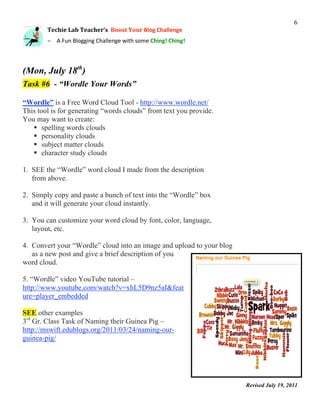
1. SEE the “Wordle” word cloud I made from the description
   from above.

2. Simply copy and paste a bunch of text into the “Wordle” box
   and it will generate your cloud instantly.

3. You can customize your word cloud by font, color, language,
   layout, etc.

4. Convert your “Wordle” cloud into an image and upload to your blog
   as a new post and give a brief description of you
word cloud.

5. “Wordle” video YouTube tutorial –
http://www.youtube.com/watch?v=xhL5D9nz5aI&feat
ure=player_embedded

SEE other examples
3rd Gr. Class Task of Naming their Guinea Pig –
http://mswift.edublogs.org/2011/03/24/naming-our-
guinea-pig/


                                                                       Revised July 19, 2011


                                                                                                           7


          Techie
Lab
Teacher’s

Boost
Your
Blog
Challenge


          – A
Fun
Blogging
Challenge
with
some
Ching!
Ching!


(Tues., July 19th)

Task #7        “Lights, Camera, Action”

1. Make a “short” screencast video for your students or parents to show them how to use a web tool (maybe
how to use “Wordle”- your choice).

2. Upload/ or embed the video into your blog using a FREE screen recording application. For example:
      SEE my demo of using Screenr - http://157staffdevblog.blogspot.com/p/boost-your-blog.html

        Screenr - http://www.screenr.com/
    
        My Blog’s Description of Screenr (super easy, but doesn’t display in district’s network)
        http://techielabteacher.blogspot.com/2011/01/screenr-web-based-screen-recorder.html


       ActivInspire’s Screen recorder feature
        Record a step in a lesson you are teaching.
        Notify me if you need help utilizing this feature

       Jing – http://www.techsmith.com/jing/
        Edublogs’ Description of Jing
         http://teacherchallenge.edublogs.org/2011/04/26/free-tools-challenge-18-the-powers-of-jing/

        Other screencasting applications:
        http://www.freetech4teachers.com/2009/05/four-free-tools-for-creating.html


IMPORTANT: Make the video (very short) – 2min or less. Blogs cannot handle large videos upload,
unless they are embedded from another video storage site. This task is a challenge.

Examples of educational screencasts in blogs:

Blog: Stretch You Digital Dollar (Scroll down to almost bottom of page) - YouTube
http://digitaldollar.edublogs.org/2010/03/08/screencasts-turn-students-into-digital-teachers/


                This was your last blog task for Challenge No. 3.
                                              Good Luck!
                                                                                         Revised July 19, 2011


Boost Your Blog Challenge No. 3 [Final]

  • 1.
    1
 
 Techie
Lab
Teacher’s

Boost
Your
Blog
Challenge
 
 – A
Fun
Blogging
Challenge
with
some
Ching!
Ching!
 
 Your 3rd Blog Challenge Is Here! Join
the
“Boost
Your
Blog
Challenge”
#3
–
Complete
the
Daily
Blog
Tasks


 and
try
Win
the
$50
Target
Gift
Certificate
 Check your email daily OR the 157 Staff Dev. Blog for challenge instructions http://bit.ly/dXlJnu Daily Blog Tasks – Each pg. has a different daily task. Good Luck! (Wed, July 13th) Task #1 “Can You Follow EVERYBODY?” ---- Follow EVERY Johnson Teacher's Blog Link: http://slidesha.re/raQSi6 Revised July 19, 2011 

  • 2.
    2
 
 Techie
Lab
Teacher’s

Boost
Your
Blog
Challenge
 
 – A
Fun
Blogging
Challenge
with
some
Ching!
Ching!
 (Thurs, July 14th) Task # 2 “Link It Up!” --- Make a new link category titled- Teacher Resources Make the following (4) links to: 1. Techie Lab Teacher Blogspot - http://bit.ly/eR0GcT Blog discusses free educational tools available to educators 2. Edublogs “Teacher Challenge- “Kick Start Your Blogging” http://bit.ly/pmlGZi Blog provides helpful activities to help educator produce effective classroom blogs. 3. Choose (2) other comprehensive websites/blogs/wikis that you think would be useful to every teacher at our school site. For example: (you can’t use it -Lol!) Google Tools for Educators - http://sites.google.com/site/toolsforeducators/Home Revised July 19, 2011 

  • 3.
    3
 Techie
Lab
Teacher’s

Boost
Your
Blog
Challenge
 
 – A
Fun
Blogging
Challenge
with
some
Ching!
Ching!
 (Fri, July 14th) Task # 3 “Say Something Nice” 1. Post comments on (7) of the Johnson Blogs – Link: http://slidesha.re/raQSi6  IMPORTANT: Notify R. Matthews by email which blogs you posted comments. 2. Post comments to the following Techie Lab Teacher Blogspot posts: Post Title: Check Out Schrock’s Google Apps Blooms Correlation Map  http://kathyschrock.net/googleblooms/ Post Title: “Boost Your Blog” Challenge No. 1 Winner  http://techielabteacher.blogspot.com/2011/02/boost-your-blog- winner.html Post Title: Learn 2 Blog Effectively with Edublogs  http://techielabteacher.blogspot.com/2011/01/learn-2-blog- effectively-with-edublog.html  IMPORTANT: Must do for this task - Discuss your successes and challenges you have had since you began to blog. Revised July 19, 2011 

  • 4.
    4
 
 Techie
Lab
Teacher’s

Boost
Your
Blog
Challenge
 
 – A
Fun
Blogging
Challenge
with
some
Ching!
Ching!
 (Sat., July 15th) Task #4 “Voki – The Mouthpiece” Embed a “Voki” widget into your blog - http://www.voki.com/create.php Your “Voki” message MUST include:  A “Welcome” to your visitors  A short message of the purpose of your blog See these (6) “Voki” examples: 1. 157 Staff Development Blog - http://157staffdevblog.blogspot.com/ 2. Nutrition and Wellness Biology 50- edublog http://nutrition.edublogs.org/2008/04/20/meet-professordoc-the-nutrition- course-voki/ 3. Voki Educaton Resource Link: http://blog.voki.com/2011/02/18/interviews- with-educators-lisa-nielsen/ 4. LibGuides Help & Documentation - http://help.springshare.com/content.php?pid=170792&sid=1474214 5. History – Voki – Pbworks w=Wiki – Jennifer Whitmer http://innovations2010unco.pbworks.com/w/page/31340909/History%20- %20Voki 6. World History – Great Voki by Kennedy Jones (A Student) http://www.7aworldhistory.com/4/post/2011/02/great-voki-by-kennedy- jones.html Revised July 19, 2011 

  • 5.
    5
 
 Techie
Lab
Teacher’s

Boost
Your
Blog
Challenge
 
 – A
Fun
Blogging
Challenge
with
some
Ching!
Ching!
 (Sun,
July
17th)
 
 Task
#5


“From
My
Head
to
My
Feet”
 1.
Add
a
sub‐heading
to
the
title
of
your
blog.
  As
an
example
‐
SEE
157
Staff
Dev.
Blog’s
header
 http://157staffdevblog.blogspot.com
  As
an
example
–
SEE
Techie
Lab
Teacher
Blogspot
 http://techielabteacher.blogspot.com/
 
  READ
the
sentences
under
the
title
of
blog.
  Sub‐headings
–
can
be
used
for
the
following:
 ‐‐‐
to
describe
the
blog
 ‐‐‐
to
direct
your
reader
to
a
particular
post
 ‐‐‐
to
inform
the
reader
of
the
sounds
or
vocals
they
are
hearing
 
 2.
Add
a
fun
widget
“FISH”
in
the
footer
of
your
blog
  As
an
example
–
SEE
D.
Reels’
Blog
–
“B7’s
Happenings”
 http://b7happenings.blogspot.com/
 
  Directions
for
FISH
‐
When
you
click
you
mouse
on
an
empty
space
 it
leave
fish
food
and
the
fish
migrate
to
that
area
and
eat
the
food. Resources
4
U
 
 Edublog
–
Teacher
Challenge

“Kick
Start
Your
Blogging”
 http://teacherchallenge.edublogs.org/challenges‐2/30‐days‐to‐kick‐start‐your‐blogging/
 
 Free
blogging
icons
 http://bloggeruniversity.blogspot.com/2008/08/round‐up‐of‐free‐blogging‐icons.html
 
 Revised July 19, 2011 

  • 6.
    6
 Techie
Lab
Teacher’s

Boost
Your
Blog
Challenge
 
 – A
Fun
Blogging
Challenge
with
some
Ching!
Ching!
 (Mon, July 18th) Task #6 - “Wordle Your Words” “Wordle” is a Free Word Cloud Tool - http://www.wordle.net/ This tool is for generating “words clouds” from text you provide. You may want to create:  spelling words clouds  personality clouds  subject matter clouds  character study clouds 1. SEE the “Wordle” word cloud I made from the description from above. 2. Simply copy and paste a bunch of text into the “Wordle” box and it will generate your cloud instantly. 3. You can customize your word cloud by font, color, language, layout, etc. 4. Convert your “Wordle” cloud into an image and upload to your blog as a new post and give a brief description of you word cloud. 5. “Wordle” video YouTube tutorial – http://www.youtube.com/watch?v=xhL5D9nz5aI&feat ure=player_embedded SEE other examples 3rd Gr. Class Task of Naming their Guinea Pig – http://mswift.edublogs.org/2011/03/24/naming-our- guinea-pig/ Revised July 19, 2011 

  • 7.
    7
 Techie
Lab
Teacher’s

Boost
Your
Blog
Challenge
 
 – A
Fun
Blogging
Challenge
with
some
Ching!
Ching!
 (Tues., July 19th) Task #7 “Lights, Camera, Action” 1. Make a “short” screencast video for your students or parents to show them how to use a web tool (maybe how to use “Wordle”- your choice). 2. Upload/ or embed the video into your blog using a FREE screen recording application. For example: SEE my demo of using Screenr - http://157staffdevblog.blogspot.com/p/boost-your-blog.html Screenr - http://www.screenr.com/  My Blog’s Description of Screenr (super easy, but doesn’t display in district’s network) http://techielabteacher.blogspot.com/2011/01/screenr-web-based-screen-recorder.html  ActivInspire’s Screen recorder feature Record a step in a lesson you are teaching. Notify me if you need help utilizing this feature  Jing – http://www.techsmith.com/jing/ Edublogs’ Description of Jing http://teacherchallenge.edublogs.org/2011/04/26/free-tools-challenge-18-the-powers-of-jing/ Other screencasting applications: http://www.freetech4teachers.com/2009/05/four-free-tools-for-creating.html IMPORTANT: Make the video (very short) – 2min or less. Blogs cannot handle large videos upload, unless they are embedded from another video storage site. This task is a challenge. Examples of educational screencasts in blogs: Blog: Stretch You Digital Dollar (Scroll down to almost bottom of page) - YouTube http://digitaldollar.edublogs.org/2010/03/08/screencasts-turn-students-into-digital-teachers/ This was your last blog task for Challenge No. 3. Good Luck! Revised July 19, 2011