Eva’s Bookstore
Management
System
‘’Come in and get lost in a book’’
Features
Introduction
Language and tools
Features
Overview of the project
Physical description
Database
Advantages
Limitations
Conclusion
Introduction
• The Book Shop Management
System is a computerized
application designed to automate
various activities within a book
shop.
• The main aim of this software is to
manage the books in the book
store.
• The software is deemed highly
advantageous in terms of
maintaining accurate sales records.
This system diligently documents
pertinent data, such as book
receipts, sales, inventory, and stock
inventory.
Objectives
• To search records of a book
efficiently.
• Processing a large amount of data
effectively and efficiently.
• To provide better service.
• It keeps database of book details,
price, sales record and Customer
record.
Language and
Tools
Java NetBeans MySQL
Features
• Startup ( The loading
page).
• Login Facility.
• Manage Books.
• Manage
Sellers(Users).
• Selling Books(Billing).
• Manage Customer
records.
Overview
Login Window
There are two user categories in
this system:
• The admin.
• The seller.
Upon selecting their desired role,
the user shall proceed to input
their respective username and
password. In the event of incorrect
login credentials, an error
message will be displayed.
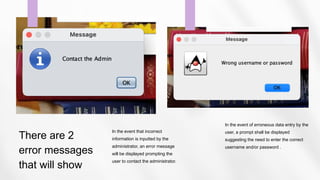
There are 2
error messages
that will show
In the event that incorrect
information is inputted by the
administrator, an error message
will be displayed prompting the
user to contact the administrator.
In the event of erroneous data entry by the
user, a prompt shall be displayed
suggesting the need to enter the correct
username and/or password .
Bookstore Management
System
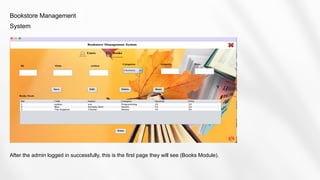
After the admin logged in successfully, this is the first page they will see (Books Module).
Books Module
• In this module the admin will save, edit or delete
books.
• To add a book, admin inputs its ID, title, author,
and category. Quantity and price must be
specified too.
• On the books stock table below, the user will just
click on the book they want to edit and all the
information will be displayed on top and all
changes can be entered.
• All the changes made on books information will
be automatically saved in the database.
Bookstore Management
System
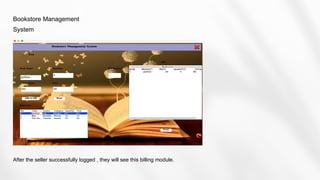
The admin can switch from the books module to the user module and make all the
necessary changes.
User’s Module
• In this module the admin will save, edit or delete
users.
• If the admin want to add a new user he/she has
to enter all the required information like the user
ID, the name, address, as well as the password.
• On the users table below, the user will just click
on the user they want to edit and all the
information will be displayed on top and all
changes can be entered.
• All the changes made on users information will
be automatically saved in the database.
Bookstore Management
System
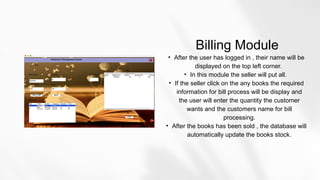
After the seller successfully logged , they will see this billing module.
Billing Module
• After the user has logged in , their name will be
displayed on the top left corner.
• In this module the seller will put all.
• If the seller click on the any books the required
information for bill process will be display and
the user will enter the quantity the customer
wants and the customers name for bill
processing.
• After the books has been sold , the database will
automatically update the books stock.
The system can add, update, and edit users and
books, with additional advantages:
I. It provides better and efficient services to
members.
II. Reduces the workload for employees.
III. Provides a facility for proper monitoring,
reduce paper work and provides data
security.
IV. It has more storage capacity and search
facility and faster access to database.
V. All details will be available on a click.
Advantages
Future
Enhancement
In the future, the objective is to
enhance the existing system by
incorporating credit card and laser-
based product detection technology.

Conclusion
This software exhibits high efficacy in the
management of customer details and
proficiently executes operations pertaining to
customer records. This software contributes to
a reduction in the workload of the shopkeeper
in terms of monitoring the inventory of books,
as well as maintaining accurate records of book
purchases and sales.
Thank You!

Bookstore Management System- java ?.pptx

  • 1.
  • 2.
    Features Introduction Language and tools Features Overviewof the project Physical description Database Advantages Limitations Conclusion
  • 3.
    Introduction • The BookShop Management System is a computerized application designed to automate various activities within a book shop. • The main aim of this software is to manage the books in the book store. • The software is deemed highly advantageous in terms of maintaining accurate sales records. This system diligently documents pertinent data, such as book receipts, sales, inventory, and stock inventory.
  • 4.
    Objectives • To searchrecords of a book efficiently. • Processing a large amount of data effectively and efficiently. • To provide better service. • It keeps database of book details, price, sales record and Customer record.
  • 5.
  • 6.
    Features • Startup (The loading page). • Login Facility. • Manage Books. • Manage Sellers(Users). • Selling Books(Billing). • Manage Customer records.
  • 7.
  • 8.
    Login Window There aretwo user categories in this system: • The admin. • The seller. Upon selecting their desired role, the user shall proceed to input their respective username and password. In the event of incorrect login credentials, an error message will be displayed.
  • 9.
    There are 2 errormessages that will show In the event that incorrect information is inputted by the administrator, an error message will be displayed prompting the user to contact the administrator. In the event of erroneous data entry by the user, a prompt shall be displayed suggesting the need to enter the correct username and/or password .
  • 10.
    Bookstore Management System After theadmin logged in successfully, this is the first page they will see (Books Module).
  • 11.
    Books Module • Inthis module the admin will save, edit or delete books. • To add a book, admin inputs its ID, title, author, and category. Quantity and price must be specified too. • On the books stock table below, the user will just click on the book they want to edit and all the information will be displayed on top and all changes can be entered. • All the changes made on books information will be automatically saved in the database.
  • 12.
    Bookstore Management System The admincan switch from the books module to the user module and make all the necessary changes.
  • 13.
    User’s Module • Inthis module the admin will save, edit or delete users. • If the admin want to add a new user he/she has to enter all the required information like the user ID, the name, address, as well as the password. • On the users table below, the user will just click on the user they want to edit and all the information will be displayed on top and all changes can be entered. • All the changes made on users information will be automatically saved in the database.
  • 14.
    Bookstore Management System After theseller successfully logged , they will see this billing module.
  • 15.
    Billing Module • Afterthe user has logged in , their name will be displayed on the top left corner. • In this module the seller will put all. • If the seller click on the any books the required information for bill process will be display and the user will enter the quantity the customer wants and the customers name for bill processing. • After the books has been sold , the database will automatically update the books stock.
  • 16.
    The system canadd, update, and edit users and books, with additional advantages: I. It provides better and efficient services to members. II. Reduces the workload for employees. III. Provides a facility for proper monitoring, reduce paper work and provides data security. IV. It has more storage capacity and search facility and faster access to database. V. All details will be available on a click. Advantages
  • 17.
    Future Enhancement In the future,the objective is to enhance the existing system by incorporating credit card and laser- based product detection technology.

  • 18.
    Conclusion This software exhibitshigh efficacy in the management of customer details and proficiently executes operations pertaining to customer records. This software contributes to a reduction in the workload of the shopkeeper in terms of monitoring the inventory of books, as well as maintaining accurate records of book purchases and sales.
  • 19.