UNIVERSE BEST PRACTICES
Rob Rohloff, OEM Sales Consultant
COPYRIGHT © 2007 BUSINESS OBJECTS S.A. ALL RIGHTS RESERVED.SLIDE 2
Universe Defined
Tips for Building the Universe
Advanced Object Creation Tips
Resolving Loops
Conclusion
AGENDA
COPYRIGHT © 2007 BUSINESS OBJECTS S.A. ALL RIGHTS RESERVED.SLIDE 3
Copyright © 2007 Business Objects S.A. All rights reserved.
WHAT IS A UNIVERSE?
The Universe is a semantic layer
that contains metadata (data
about data)
Translates the complexities of the
database into business-friendly
terms for end-users.
Allows for correct SQL generation
Allows manipulation of data
based on the metadata and on
the additional business logic in
the Universe
COPYRIGHT © 2007 BUSINESS OBJECTS S.A. ALL RIGHTS RESERVED.SLIDE 4
Copyright © 2007 Business Objects S.A. All rights reserved.
UNIVERSE:
WHAT DOES IT LET YOU DO?
Simple, intuitive data analysis
Report creation using business terms instead of
SQL
Reuse of business logic
Automatic report drilling (by defining hierarchies)
Multiple data provider synchronization
COPYRIGHT © 2007 BUSINESS OBJECTS S.A. ALL RIGHTS RESERVED.SLIDE 5
Copyright © 2007 Business Objects S.A. All rights reserved.
UNIVERSE:
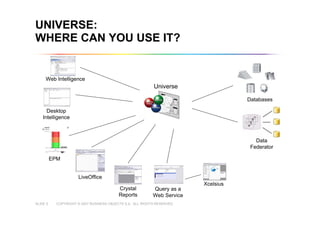
WHERE CAN YOU USE IT?
Crystal
Reports
Desktop
Intelligence
Web Intelligence
LiveOffice
EPM
Query as a
Web Service
Data
Federator
Universe
Xcelsius
Databases
COPYRIGHT © 2007 BUSINESS OBJECTS S.A. ALL RIGHTS RESERVED.SLIDE 6
Universe Defined
Tips for Building the Universe
Advanced Object Creation Tips
Resolving Loops
Conclusion
AGENDA
COPYRIGHT © 2007 BUSINESS OBJECTS S.A. ALL RIGHTS RESERVED.SLIDE 7
ADDING TABLES & JOINS
Build your universe piece-by-piece
Insert tables one at a time, that way it can be understood.
Do not use the automatic universe creation tool. Using
this wizard will build a universe that you do not
understand.
Take each table, join, cardinality etc one at a time.
COPYRIGHT © 2007 BUSINESS OBJECTS S.A. ALL RIGHTS RESERVED.SLIDE 8
DEFINING OBJECTS
Object and class naming
Name in business terms
Remember: you are trying to enable non-technical
people to build their own reports
Use object formatting
When there is a need to format an object in the same
way every time it is used.
COPYRIGHT © 2007 BUSINESS OBJECTS S.A. ALL RIGHTS RESERVED.SLIDE 9
DEFINING OBJECTS
Use complex objects
Concatenate descriptions
Translate codes
Build common calculations into the universe
whenever possible
Build logic into your objects
Use condition objects
Users don’t like to build conditions in the query
Define measure objects correctly
Not every number is a measure!
COPYRIGHT © 2007 BUSINESS OBJECTS S.A. ALL RIGHTS RESERVED.SLIDE 10
Universe Defined
Tips for Building the Universe
Advanced Object Creation Tips
Resolving Loops
Conclusion
AGENDA
COPYRIGHT © 2007 BUSINESS OBJECTS S.A. ALL RIGHTS RESERVED.SLIDE 11
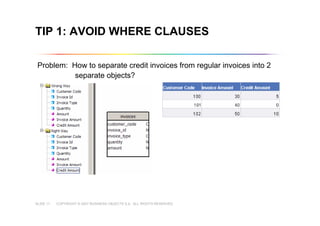
TIP 1: AVOID WHERE CLAUSES
Problem: How to separate credit invoices from regular invoices into 2
separate objects?
COPYRIGHT © 2007 BUSINESS OBJECTS S.A. ALL RIGHTS RESERVED.SLIDE 12
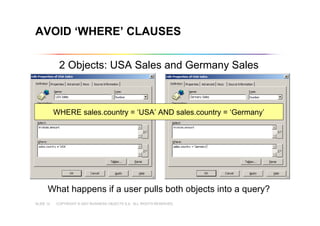
AVOID ‘WHERE’ CLAUSES
2 Objects: USA Sales and Germany Sales
What happens if a user pulls both objects into a query?
WHERE sales.country = ‘USA’ AND sales.country = ‘Germany’
COPYRIGHT © 2007 BUSINESS OBJECTS S.A. ALL RIGHTS RESERVED.SLIDE 13
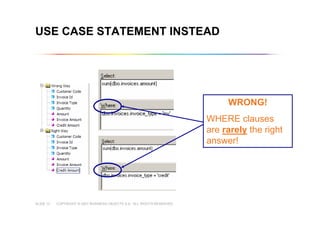
USE CASE STATEMENT INSTEAD
WRONG!
WHERE clauses
are rarely the right
answer!
COPYRIGHT © 2007 BUSINESS OBJECTS S.A. ALL RIGHTS RESERVED.SLIDE 14
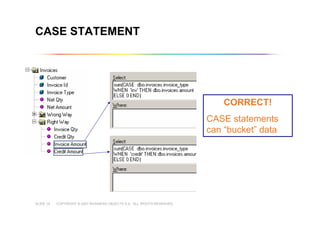
CASE STATEMENT
CORRECT!
CASE statements
can “bucket” data
COPYRIGHT © 2007 BUSINESS OBJECTS S.A. ALL RIGHTS RESERVED.SLIDE 15
CASE STATEMENT DEMO
Demonstration
COPYRIGHT © 2007 BUSINESS OBJECTS S.A. ALL RIGHTS RESERVED.SLIDE 16
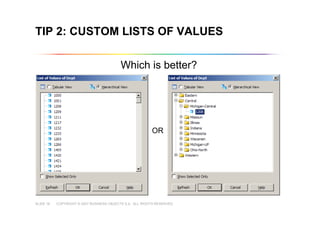
TIP 2: CUSTOM LISTS OF VALUES
Which is better?
OR
COPYRIGHT © 2007 BUSINESS OBJECTS S.A. ALL RIGHTS RESERVED.SLIDE 17
CUSTOM LISTS OF VALUES DEMO
Demonstration
COPYRIGHT © 2007 BUSINESS OBJECTS S.A. ALL RIGHTS RESERVED.SLIDE 18
TIP 3: USE AGGREGATION IN ALL
MEASURE OBJECTS
Always perform aggregation in a measure. Why?
Measures, by definition, are aggregated
Although WebIntelligence will aggregate measure objects
locally, the database is far more powerful.
If the object does not contain a SQL aggregate function
such as SUM stated in its SELECT clause, no GROUP
BY clause will be generated
SELECT invoices.amount vs. SELECT sum(invoices.amount)
COPYRIGHT © 2007 BUSINESS OBJECTS S.A. ALL RIGHTS RESERVED.SLIDE 19
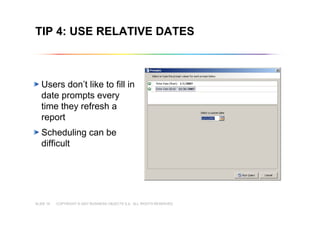
TIP 4: USE RELATIVE DATES
Users don’t like to fill in
date prompts every
time they refresh a
report
Scheduling can be
difficult
COPYRIGHT © 2007 BUSINESS OBJECTS S.A. ALL RIGHTS RESERVED.SLIDE 20
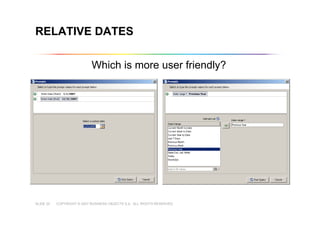
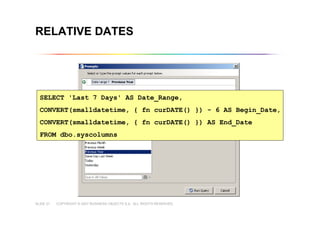
RELATIVE DATES
Which is more user friendly?
COPYRIGHT © 2007 BUSINESS OBJECTS S.A. ALL RIGHTS RESERVED.SLIDE 21
RELATIVE DATES
SELECT 'Last 7 Days' AS Date_Range,
CONVERT(smalldatetime, { fn curDATE() }) - 6 AS Begin_Date,
CONVERT(smalldatetime, { fn curDATE() }) AS End_Date
FROM dbo.syscolumns
COPYRIGHT © 2007 BUSINESS OBJECTS S.A. ALL RIGHTS RESERVED.SLIDE 22
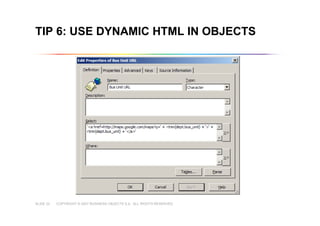
TIP 6: USE DYNAMIC HTML IN OBJECTS
COPYRIGHT © 2007 BUSINESS OBJECTS S.A. ALL RIGHTS RESERVED.SLIDE 23
DYNAMIC HTML DEMO
Demonstration
COPYRIGHT © 2007 BUSINESS OBJECTS S.A. ALL RIGHTS RESERVED.SLIDE 24
Universe Defined
Tips for Building the Universe
Advanced Object Creation Tips
Resolving Loops
Conclusion
AGENDA
COPYRIGHT © 2007 BUSINESS OBJECTS S.A. ALL RIGHTS RESERVED.SLIDE 25
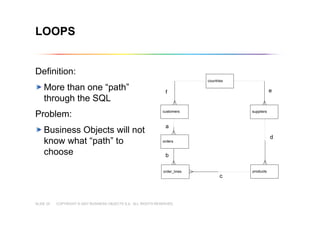
LOOPS
Definition:
More than one “path”
through the SQL
Problem:
Business Objects will not
know what “path” to
choose
countries
customers
orders
order_lines products
f
a
b
c
d
suppliers
e
COPYRIGHT © 2007 BUSINESS OBJECTS S.A. ALL RIGHTS RESERVED.SLIDE 26
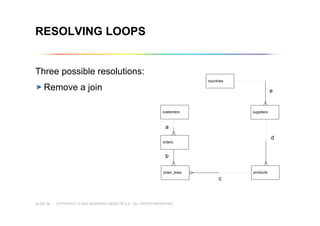
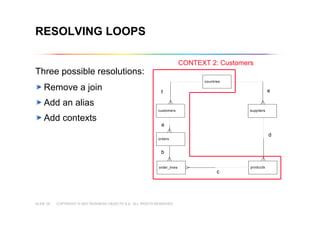
RESOLVING LOOPS
Three possible resolutions:
Remove a join
countries
customers
orders
order_lines products
f
a
b
c
d
suppliers
e
countries
customers
orders
order_lines products
a
b
c
d
suppliers
e
COPYRIGHT © 2007 BUSINESS OBJECTS S.A. ALL RIGHTS RESERVED.SLIDE 27
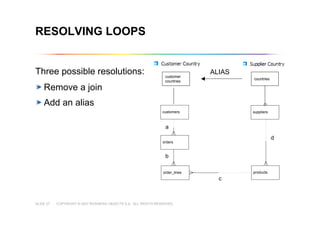
RESOLVING LOOPS
Three possible resolutions:
Remove a join
Add an alias
customers
orders
order_lines products
a
b
c
d
suppliers
countriescountries
ALIAS
customer
countries
COPYRIGHT © 2007 BUSINESS OBJECTS S.A. ALL RIGHTS RESERVED.SLIDE 28
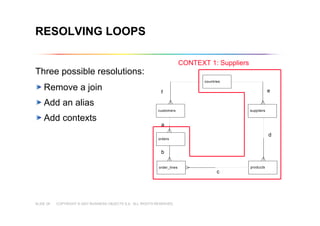
RESOLVING LOOPS
Three possible resolutions:
Remove a join
Add an alias
Add contexts
countries
customers
orders
order_lines products
f
a
b
c
d
suppliers
e
CONTEXT 1: Suppliers
COPYRIGHT © 2007 BUSINESS OBJECTS S.A. ALL RIGHTS RESERVED.SLIDE 29
RESOLVING LOOPS
Three possible resolutions:
Remove a join
Add an alias
Add contexts
countries
customers
orders
order_lines products
f
a
b
c
d
suppliers
e
CONTEXT 2: Customers
COPYRIGHT © 2007 BUSINESS OBJECTS S.A. ALL RIGHTS RESERVED.SLIDE 30
Universe Defined
Tips for Building the Universe
Advanced Object Creation Tips
Resolving Loops
Conclusion
AGENDA
COPYRIGHT © 2007 BUSINESS OBJECTS S.A. ALL RIGHTS RESERVED.SLIDE 31
Copyright © 2007 Business Objects S.A. All rights reserved.
CONCLUSION
The Universe is a powerful
semantic layer that translates the
database into business-friendly
terms
It is core to all Business Objects
Information & Delivery tools
Time should be taken to build it
correctly using best practices
Leverage the power of the Universe
to build complex objects that further
simplify the user experience
UNIVERSE BEST PRACTICES
End

BO Universe best practices

  • 1.
    UNIVERSE BEST PRACTICES RobRohloff, OEM Sales Consultant
  • 2.
    COPYRIGHT © 2007BUSINESS OBJECTS S.A. ALL RIGHTS RESERVED.SLIDE 2 Universe Defined Tips for Building the Universe Advanced Object Creation Tips Resolving Loops Conclusion AGENDA
  • 3.
    COPYRIGHT © 2007BUSINESS OBJECTS S.A. ALL RIGHTS RESERVED.SLIDE 3 Copyright © 2007 Business Objects S.A. All rights reserved. WHAT IS A UNIVERSE? The Universe is a semantic layer that contains metadata (data about data) Translates the complexities of the database into business-friendly terms for end-users. Allows for correct SQL generation Allows manipulation of data based on the metadata and on the additional business logic in the Universe
  • 4.
    COPYRIGHT © 2007BUSINESS OBJECTS S.A. ALL RIGHTS RESERVED.SLIDE 4 Copyright © 2007 Business Objects S.A. All rights reserved. UNIVERSE: WHAT DOES IT LET YOU DO? Simple, intuitive data analysis Report creation using business terms instead of SQL Reuse of business logic Automatic report drilling (by defining hierarchies) Multiple data provider synchronization
  • 5.
    COPYRIGHT © 2007BUSINESS OBJECTS S.A. ALL RIGHTS RESERVED.SLIDE 5 Copyright © 2007 Business Objects S.A. All rights reserved. UNIVERSE: WHERE CAN YOU USE IT? Crystal Reports Desktop Intelligence Web Intelligence LiveOffice EPM Query as a Web Service Data Federator Universe Xcelsius Databases
  • 6.
    COPYRIGHT © 2007BUSINESS OBJECTS S.A. ALL RIGHTS RESERVED.SLIDE 6 Universe Defined Tips for Building the Universe Advanced Object Creation Tips Resolving Loops Conclusion AGENDA
  • 7.
    COPYRIGHT © 2007BUSINESS OBJECTS S.A. ALL RIGHTS RESERVED.SLIDE 7 ADDING TABLES & JOINS Build your universe piece-by-piece Insert tables one at a time, that way it can be understood. Do not use the automatic universe creation tool. Using this wizard will build a universe that you do not understand. Take each table, join, cardinality etc one at a time.
  • 8.
    COPYRIGHT © 2007BUSINESS OBJECTS S.A. ALL RIGHTS RESERVED.SLIDE 8 DEFINING OBJECTS Object and class naming Name in business terms Remember: you are trying to enable non-technical people to build their own reports Use object formatting When there is a need to format an object in the same way every time it is used.
  • 9.
    COPYRIGHT © 2007BUSINESS OBJECTS S.A. ALL RIGHTS RESERVED.SLIDE 9 DEFINING OBJECTS Use complex objects Concatenate descriptions Translate codes Build common calculations into the universe whenever possible Build logic into your objects Use condition objects Users don’t like to build conditions in the query Define measure objects correctly Not every number is a measure!
  • 10.
    COPYRIGHT © 2007BUSINESS OBJECTS S.A. ALL RIGHTS RESERVED.SLIDE 10 Universe Defined Tips for Building the Universe Advanced Object Creation Tips Resolving Loops Conclusion AGENDA
  • 11.
    COPYRIGHT © 2007BUSINESS OBJECTS S.A. ALL RIGHTS RESERVED.SLIDE 11 TIP 1: AVOID WHERE CLAUSES Problem: How to separate credit invoices from regular invoices into 2 separate objects?
  • 12.
    COPYRIGHT © 2007BUSINESS OBJECTS S.A. ALL RIGHTS RESERVED.SLIDE 12 AVOID ‘WHERE’ CLAUSES 2 Objects: USA Sales and Germany Sales What happens if a user pulls both objects into a query? WHERE sales.country = ‘USA’ AND sales.country = ‘Germany’
  • 13.
    COPYRIGHT © 2007BUSINESS OBJECTS S.A. ALL RIGHTS RESERVED.SLIDE 13 USE CASE STATEMENT INSTEAD WRONG! WHERE clauses are rarely the right answer!
  • 14.
    COPYRIGHT © 2007BUSINESS OBJECTS S.A. ALL RIGHTS RESERVED.SLIDE 14 CASE STATEMENT CORRECT! CASE statements can “bucket” data
  • 15.
    COPYRIGHT © 2007BUSINESS OBJECTS S.A. ALL RIGHTS RESERVED.SLIDE 15 CASE STATEMENT DEMO Demonstration
  • 16.
    COPYRIGHT © 2007BUSINESS OBJECTS S.A. ALL RIGHTS RESERVED.SLIDE 16 TIP 2: CUSTOM LISTS OF VALUES Which is better? OR
  • 17.
    COPYRIGHT © 2007BUSINESS OBJECTS S.A. ALL RIGHTS RESERVED.SLIDE 17 CUSTOM LISTS OF VALUES DEMO Demonstration
  • 18.
    COPYRIGHT © 2007BUSINESS OBJECTS S.A. ALL RIGHTS RESERVED.SLIDE 18 TIP 3: USE AGGREGATION IN ALL MEASURE OBJECTS Always perform aggregation in a measure. Why? Measures, by definition, are aggregated Although WebIntelligence will aggregate measure objects locally, the database is far more powerful. If the object does not contain a SQL aggregate function such as SUM stated in its SELECT clause, no GROUP BY clause will be generated SELECT invoices.amount vs. SELECT sum(invoices.amount)
  • 19.
    COPYRIGHT © 2007BUSINESS OBJECTS S.A. ALL RIGHTS RESERVED.SLIDE 19 TIP 4: USE RELATIVE DATES Users don’t like to fill in date prompts every time they refresh a report Scheduling can be difficult
  • 20.
    COPYRIGHT © 2007BUSINESS OBJECTS S.A. ALL RIGHTS RESERVED.SLIDE 20 RELATIVE DATES Which is more user friendly?
  • 21.
    COPYRIGHT © 2007BUSINESS OBJECTS S.A. ALL RIGHTS RESERVED.SLIDE 21 RELATIVE DATES SELECT 'Last 7 Days' AS Date_Range, CONVERT(smalldatetime, { fn curDATE() }) - 6 AS Begin_Date, CONVERT(smalldatetime, { fn curDATE() }) AS End_Date FROM dbo.syscolumns
  • 22.
    COPYRIGHT © 2007BUSINESS OBJECTS S.A. ALL RIGHTS RESERVED.SLIDE 22 TIP 6: USE DYNAMIC HTML IN OBJECTS
  • 23.
    COPYRIGHT © 2007BUSINESS OBJECTS S.A. ALL RIGHTS RESERVED.SLIDE 23 DYNAMIC HTML DEMO Demonstration
  • 24.
    COPYRIGHT © 2007BUSINESS OBJECTS S.A. ALL RIGHTS RESERVED.SLIDE 24 Universe Defined Tips for Building the Universe Advanced Object Creation Tips Resolving Loops Conclusion AGENDA
  • 25.
    COPYRIGHT © 2007BUSINESS OBJECTS S.A. ALL RIGHTS RESERVED.SLIDE 25 LOOPS Definition: More than one “path” through the SQL Problem: Business Objects will not know what “path” to choose countries customers orders order_lines products f a b c d suppliers e
  • 26.
    COPYRIGHT © 2007BUSINESS OBJECTS S.A. ALL RIGHTS RESERVED.SLIDE 26 RESOLVING LOOPS Three possible resolutions: Remove a join countries customers orders order_lines products f a b c d suppliers e countries customers orders order_lines products a b c d suppliers e
  • 27.
    COPYRIGHT © 2007BUSINESS OBJECTS S.A. ALL RIGHTS RESERVED.SLIDE 27 RESOLVING LOOPS Three possible resolutions: Remove a join Add an alias customers orders order_lines products a b c d suppliers countriescountries ALIAS customer countries
  • 28.
    COPYRIGHT © 2007BUSINESS OBJECTS S.A. ALL RIGHTS RESERVED.SLIDE 28 RESOLVING LOOPS Three possible resolutions: Remove a join Add an alias Add contexts countries customers orders order_lines products f a b c d suppliers e CONTEXT 1: Suppliers
  • 29.
    COPYRIGHT © 2007BUSINESS OBJECTS S.A. ALL RIGHTS RESERVED.SLIDE 29 RESOLVING LOOPS Three possible resolutions: Remove a join Add an alias Add contexts countries customers orders order_lines products f a b c d suppliers e CONTEXT 2: Customers
  • 30.
    COPYRIGHT © 2007BUSINESS OBJECTS S.A. ALL RIGHTS RESERVED.SLIDE 30 Universe Defined Tips for Building the Universe Advanced Object Creation Tips Resolving Loops Conclusion AGENDA
  • 31.
    COPYRIGHT © 2007BUSINESS OBJECTS S.A. ALL RIGHTS RESERVED.SLIDE 31 Copyright © 2007 Business Objects S.A. All rights reserved. CONCLUSION The Universe is a powerful semantic layer that translates the database into business-friendly terms It is core to all Business Objects Information & Delivery tools Time should be taken to build it correctly using best practices Leverage the power of the Universe to build complex objects that further simplify the user experience
  • 32.