BLENDER PRODUCT ANIMATION
AND GAMES MODEL
• BY PIYUSH SOLANKI AND AISHWARYA CHIPLUNKAR
• DEPERMENT: SYBSCIT
• INSTITUTION: SMT KL TIWARI DEGREE COLLAGE
INTRODUCTION TO BLENDER
• • 3D computer graphics program available for free
• • Blender: An all-purpose 3D production software used for animation, design,
gaming, visual effects, and more.
• • Gaining expertise with Blender provides access to profitable online jobs and
professions.
• • Flexibility: Game development, modeling, animation, and rendering.
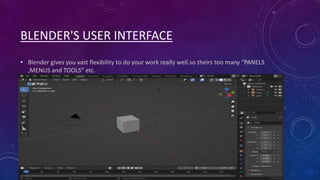
BLENDER'S USER INTERFACE
• Blender gives you vast flexibility to do your work really well.so theirs too many “PANELS
,MENUS and TOOLS” etc.
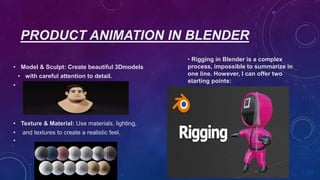
PRODUCT ANIMATION IN BLENDER
• Model & Sculpt: Create beautiful 3Dmodels
• with careful attention to detail.
•
• Texture & Material: Use materials, lighting,
• and textures to create a realistic feel.
•
• Rigging in Blender is a complex
process, impossible to summarize in
one line. However, I can offer two
starting points:
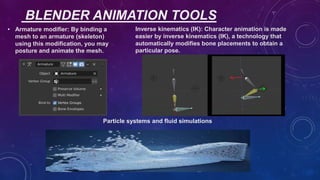
BLENDER ANIMATION TOOLS
• Armature modifier: By binding a
mesh to an armature (skeleton)
using this modification, you may
posture and animate the mesh.
Inverse kinematics (IK): Character animation is made
easier by inverse kinematics (IK), a technology that
automatically modifies bone placements to obtain a
particular pose.
Particle systems and fluid simulations
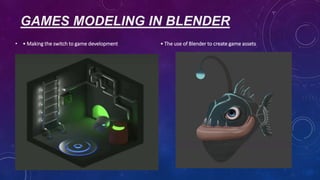
GAMES MODELING IN BLENDER
• • Making the switch to game development • The use of Blender to create game assets
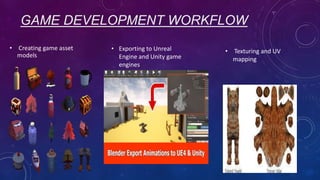
GAME DEVELOPMENT WORKFLOW
• Creating game asset
models
• Exporting to Unreal
Engine and Unity game
engines
• Texturing and UV
mapping
BLENDER SHOWCASE
• Showcase interesting creations made with
Blender.
• Add pictures or quick animation and
gaming samples.
TIPS FOR BLENDER PRODUCT ANIMATION
• Making efficient use of resources
and lighting
• Highlighting characteristics and
details
TIPS FOR BLENDER GAMES MODELING
• Optimize technology For performance, concentrate on a
clear, effective mesh structure. Simple designs require less
geometry, but high-poly models are used to bake details.
• Make batter Texture for models.
FUTURE IN BLENDER
• A vast community offers free add-ons, making Blender
crucial for graphic designers, video editors, VFX artists,
and game developers. The success of Blender Studio's
short films exemplifies the bright future that awaits
Blender.
Q&A
• The floor is open for any questions or comments from the
audience or interviewer
PROJECTS IN
BLENDER
•Made BY PIYUSH SOLANKI
THANK YOU
• PPT created by Piyush Solanki

BLENDER products PPT for competitions.pptx

  • 1.
    BLENDER PRODUCT ANIMATION ANDGAMES MODEL • BY PIYUSH SOLANKI AND AISHWARYA CHIPLUNKAR • DEPERMENT: SYBSCIT • INSTITUTION: SMT KL TIWARI DEGREE COLLAGE
  • 2.
    INTRODUCTION TO BLENDER •• 3D computer graphics program available for free • • Blender: An all-purpose 3D production software used for animation, design, gaming, visual effects, and more. • • Gaining expertise with Blender provides access to profitable online jobs and professions. • • Flexibility: Game development, modeling, animation, and rendering.
  • 3.
    BLENDER'S USER INTERFACE •Blender gives you vast flexibility to do your work really well.so theirs too many “PANELS ,MENUS and TOOLS” etc.
  • 4.
    PRODUCT ANIMATION INBLENDER • Model & Sculpt: Create beautiful 3Dmodels • with careful attention to detail. • • Texture & Material: Use materials, lighting, • and textures to create a realistic feel. • • Rigging in Blender is a complex process, impossible to summarize in one line. However, I can offer two starting points:
  • 5.
    BLENDER ANIMATION TOOLS •Armature modifier: By binding a mesh to an armature (skeleton) using this modification, you may posture and animate the mesh. Inverse kinematics (IK): Character animation is made easier by inverse kinematics (IK), a technology that automatically modifies bone placements to obtain a particular pose. Particle systems and fluid simulations
  • 6.
    GAMES MODELING INBLENDER • • Making the switch to game development • The use of Blender to create game assets
  • 7.
    GAME DEVELOPMENT WORKFLOW •Creating game asset models • Exporting to Unreal Engine and Unity game engines • Texturing and UV mapping
  • 8.
    BLENDER SHOWCASE • Showcaseinteresting creations made with Blender. • Add pictures or quick animation and gaming samples.
  • 9.
    TIPS FOR BLENDERPRODUCT ANIMATION • Making efficient use of resources and lighting • Highlighting characteristics and details
  • 10.
    TIPS FOR BLENDERGAMES MODELING • Optimize technology For performance, concentrate on a clear, effective mesh structure. Simple designs require less geometry, but high-poly models are used to bake details. • Make batter Texture for models.
  • 11.
    FUTURE IN BLENDER •A vast community offers free add-ons, making Blender crucial for graphic designers, video editors, VFX artists, and game developers. The success of Blender Studio's short films exemplifies the bright future that awaits Blender.
  • 12.
    Q&A • The flooris open for any questions or comments from the audience or interviewer
  • 13.
  • 14.
    THANK YOU • PPTcreated by Piyush Solanki