



















Sylvain Wallez
@bluxte
Software Engineer, Elastic Cloud
Managing your
Black Friday Logs
Elastic Stack

6.0 in orbit!
4
Agenda
Data Platform Architectures
Elasticsearch Cluster Sizing
Optimal Bulk Size
Distribute the Load
1
2
3
4
5 Optimizing Disk IO
6 Final Remarks
Data Platform
Architectures
life:universe
user:soulmate
_Search? outside the box
city:restaurant
car:model
fridge:leftovers
work:dreamjob
Logging
Metrics
Security Analytics
Security Analytics
APM
APM
17
Hosted Elasticsearch & Kibana
Includes X-Pack features
Starts at $45/mo
Available in
Amazon Web Service
Google Cloud Platform
18
Provision and manage multiple Elastic Stack
environments and provide
search-aaS, logging-aaS, BI-aaS, data-aaS
to your entire organization
26
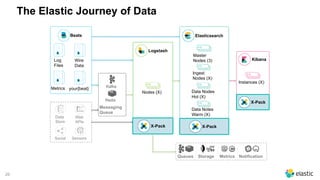
The Elastic Journey of Data
Beats
Log
Files
Metrics
Wire
Data
your{beat}
Data
Store
Web
APIs
Social Sensors
Elasticsearch
Master
Nodes (3)
Ingest
Nodes (X)
Data Nodes
Hot (X)
Data Notes
Warm (X)
Logstash
Nodes (X)
Kafka
Redis
Messaging
Queue
Kibana
Instances (X)
NotificationQueues Storage Metrics
X-Pack
X-PackX-Pack
Elasticsearch

Cluster Sizing
28
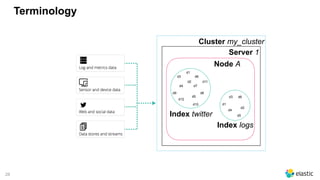
Terminology
Cluster my_cluster
Server 1
Node A
d1
d2
d3
d4
d5
d6
d7
d8d9
d10
d11
d12
Index twitter
d6d3
d2
d5
d1
d4
Index logs
29
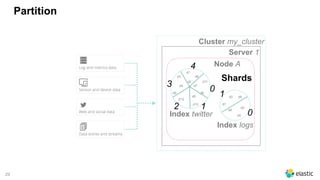
Partition
Cluster my_cluster
Server 1
Node A
d1
d2
d3
d4
d5
d6
d7
d8d9
d10
d11
d12
Index twitter
d6d3
d2
d5
d1
d4
Index logs
Shards
0
1
4
2
3
0
1
30
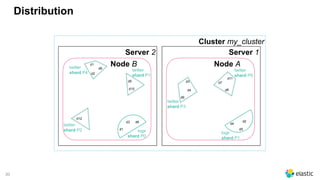
Distribution
Cluster my_cluster
Server 1
Node A
Server 2
Node Btwitter
shard P4
d1
d2
d6
d5
d10
d12
twitter
shard P2
twitter
shard P1
logs
shard P0
d2
d5
d4
logs
shard P1
d3
d4
d9
d7
d8
d11
twitter
shard P3
twitter
shard P0
d6d3
d1
31
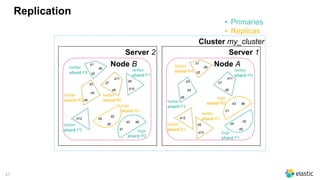
Replication
Cluster my_cluster
Server 1
Node A
Server 2
Node Btwitter
shard P4
d1
d2
d6
d5
d10
d12
twitter
shard P2
twitter
shard P1
logs
shard P0
d2
d5
d4
logs
shard P1
d3
d4
d9
d7
d8
d11
twitter
shard P3
twitter
shard P0
twitter
shard R4
d1
d2
d6
d12
twitter
shard R2
d5
d10
twitter
shard R1
d6d3
d1
d6d3
d1
logs
shard R0
d2
d5
d4
logs
shard R1
d3
d4
d9
d7
d8
d11
twitter
shard R3
twitter
shard R0
• Primaries
• Replicas
32
Scaling
Data
33
Scaling
Data
34
Scaling
Data
35
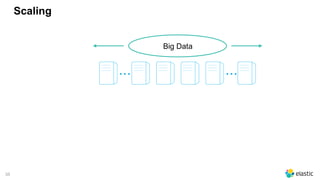
Scaling
Big Data
... ...
36
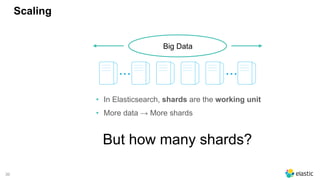
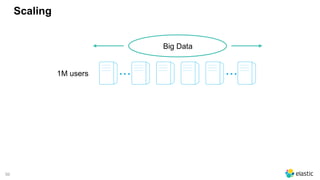
Scaling
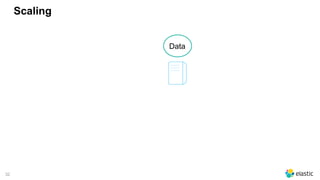
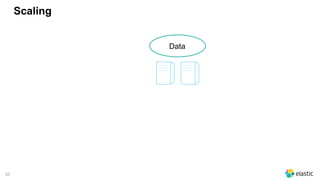
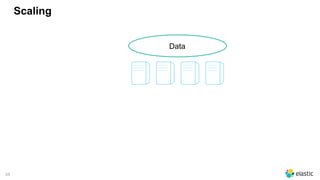
• In Elasticsearch, shards are the working unit
• More data → More shards
Big Data
... ...
But how many shards?
37
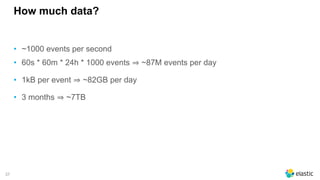
How much data?
• ~1000 events per second
• 60s * 60m * 24h * 1000 events ~87M events per day
• 1kB per event ~82GB per day
• 3 months ~7TB
38
Shard Size
• It depends on many different factors
‒ document size, mapping, use case, kinds of queries being executed,
desired response time, peak indexing rate, budget, ...
• After the shard sizing*, each shard should handle 45GB
• Up to 10 shards per machine
* https://www.elastic.co/elasticon/conf/2016/sf/quantitative-cluster-sizing
39
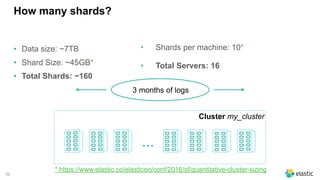
How many shards?
• Data size: ~7TB
• Shard Size: ~45GB*
• Total Shards: ~160
• Shards per machine: 10*
• Total Servers: 16
Cluster my_cluster
3 months of logs
...
* https://www.elastic.co/elasticon/conf/2016/sf/quantitative-cluster-sizing
40
But...
• How many indices?
• What do you do if the daily data grows?
• What do you do if you want to delete old data?
41
Time-Based Data
• Logs, social media streams, time-based events
• Timestamp + Data
• Do not change
• Typically search for recent events
• Older documents become less important
• Hard to predict the data size
42
Time-Based Data
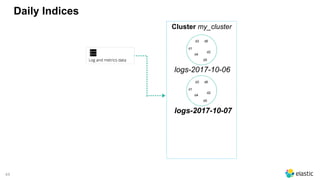
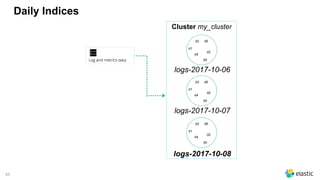
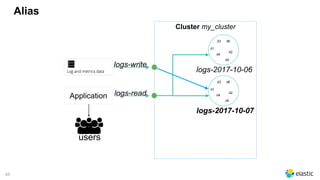
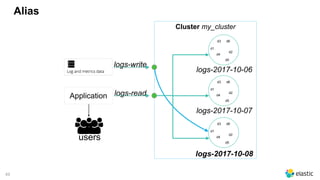
• Time-based Indices is the best option
‒ create a new index each day, week, month, year, ...
‒ search the indices you need in the same request
43
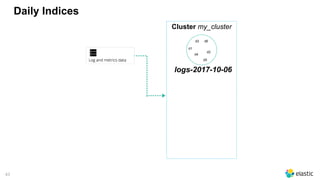
Daily Indices
Cluster my_cluster
d6d3
d2
d5
d1
d4
logs-2017-10-06
44
Daily Indices
Cluster my_cluster
d6d3
d2
d5
d1
d4
logs-2017-10-07
d6d3
d2
d5
d1
d4
logs-2017-10-06
45
Daily Indices
Cluster my_cluster
d6d3
d2
d5
d1
d4
logs-2017-10-06
d6d3
d2
d5
d1
d4
logs-2017-10-08
d6d3
d2
d5
d1
d4
logs-2017-10-07
46
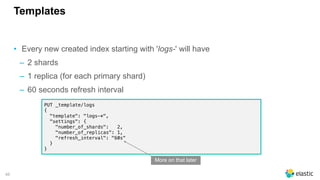
Templates
• Every new created index starting with 'logs-' will have
‒ 2 shards
‒ 1 replica (for each primary shard)
‒ 60 seconds refresh interval
PUT _template/logs
{
"template": "logs-*",
"settings": {
"number_of_shards": 2,
"number_of_replicas": 1,
"refresh_interval": "60s"
}
}
More on that later
47
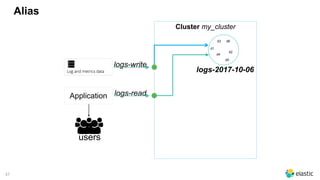
Alias
Cluster my_cluster
d6d3
d2
d5
d1
d4
logs-2017-10-06
users
Application
logs-write
logs-read
48
Alias
Cluster my_cluster
d6d3
d2
d5
d1
d4
logs-2017-10-06
users
Application
logs-write
logs-read
d6d3
d2
d5
d1
d4
logs-2017-10-07
49
Alias
Cluster my_cluster
d6d3
d2
d5
d1
d4
logs-2017-10-06
users
Application
logs-write
logs-read
d6d3
d2
d5
d1
d4
logs-2017-10-07
d6d3
d2
d5
d1
d4
logs-2017-10-08
Automating:

the Rollover API
https://www.elastic.co/guide/en/elasticsearch/reference/5.6/indices-rollover-index.html
https://www.elastic.co/blog/managing-time-based-indices-efficiently
Automating:

the Rollover API
https://www.elastic.co/guide/en/elasticsearch/reference/5.6/indices-rollover-index.html
https://www.elastic.co/blog/managing-time-based-indices-efficiently
51
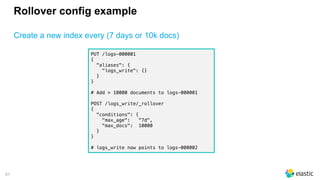
Rollover config example
Create a new index every (7 days or 10k docs)
PUT /logs-000001
{
"aliases": {
"logs_write": {}
}
}
# Add > 10000 documents to logs-000001
POST /logs_write/_rollover
{
"conditions": {
"max_age": "7d",
"max_docs": 10000
}
}
# logs_write now points to logs-000002
51
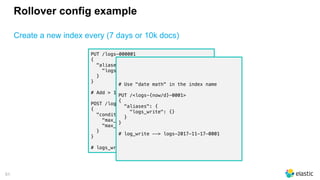
Rollover config example
Create a new index every (7 days or 10k docs)
PUT /logs-000001
{
"aliases": {
"logs_write": {}
}
}
# Add > 10000 documents to logs-000001
POST /logs_write/_rollover
{
"conditions": {
"max_age": "7d",
"max_docs": 10000
}
}
# logs_write now points to logs-000002
# Use "date math" in the index name
PUT /<logs-{now/d}-0001>
{
"aliases": {
"logs_write": {}
}
}
# log_write --> logs-2017-11-17-0001
52
Do not Overshard
• 3 different logs
• 1 index per day each
• 1GB each / day
• 5 shards (default): so 200mb / shard vs 45gb
• 6 months retention
• ~900 shards for ~180GB
• we needed ~4 shards!
don't keep default values! Cluster my_cluster
access-...
d6d3
d2
d5
d1
d4
application-...
d6d5
d9
d5
d1
d7
mysql-...
d10d59
d3
d5
d0
d4
Automating:

the Shrink API
https://www.elastic.co/guide/en/elasticsearch/reference/5.6/indices-shrink-index.html
https://www.elastic.co/blog/managing-time-based-indices-efficiently
55
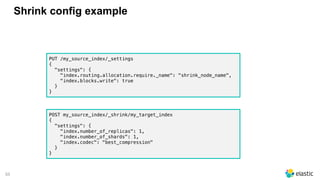
Shrink config example
PUT /my_source_index/_settings
{
"settings": {
"index.routing.allocation.require._name": "shrink_node_name",
"index.blocks.write": true
}
}
POST my_source_index/_shrink/my_target_index
{
"settings": {
"index.number_of_replicas": 1,
"index.number_of_shards": 1,
"index.codec": "best_compression"
}
}
56
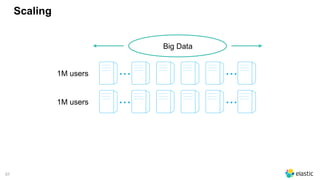
Scaling
Big Data
... ...1M users
56
Scaling
Big Data
... ...1M users
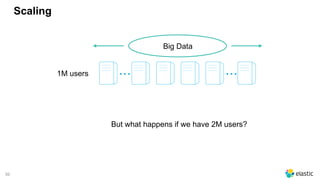
But what happens if we have 2M users?
57
Scaling
Big Data
... ...1M users
... ...1M users
58
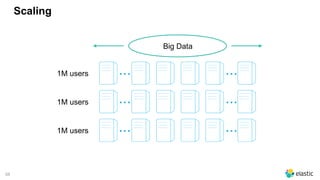
Scaling
Big Data
... ...1M users
... ...1M users
... ...1M users
59
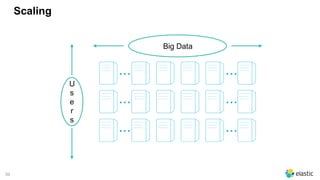
Scaling
Big Data
... ...
... ...
... ...
U
s
e
r
s
60
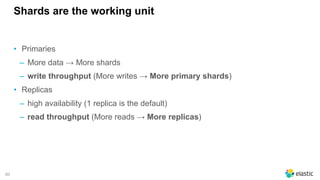
Shards are the working unit
• Primaries
‒ More data → More shards
‒ write throughput (More writes → More primary shards)
• Replicas
‒ high availability (1 replica is the default)
‒ read throughput (More reads → More replicas)
Optimal Bulk Size
62
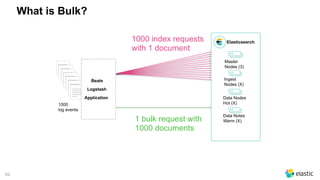
What is Bulk?
Elasticsearch
Master
Nodes (3)
Ingest
Nodes (X)
Data Nodes
Hot (X)
Data Notes
Warm (X)
__________
__________
__________
__________
__________
__________
__________
__________
__________
__________
__________
__________
__________
__________
__________
__________
__________
__________
__________
__________
__________
__________
__________
__________
__________
__________
__________
__________
__________
__________
__________
__________
__________
__________
__________
__________
__________
__________
__________
__________
_____
1000

log events
Beats
Logstash
Application
1000 index requests
with 1 document
1 bulk request with
1000 documents
63
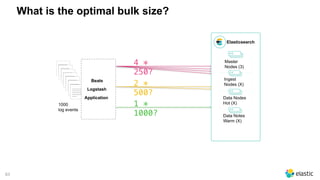
What is the optimal bulk size?
Elasticsearch
Master
Nodes (3)
Ingest
Nodes (X)
Data Nodes
Hot (X)
Data Notes
Warm (X)
__________
__________
__________
__________
__________
__________
__________
__________
__________
__________
__________
__________
__________
__________
__________
__________
__________
__________
__________
__________
__________
__________
__________
__________
__________
__________
__________
__________
__________
__________
__________
__________
__________
__________
__________
__________
__________
__________
__________
__________
_____
1000

log events
Beats
Logstash
Application
4 *
250?
1 *
1000?
2 *
500?
64
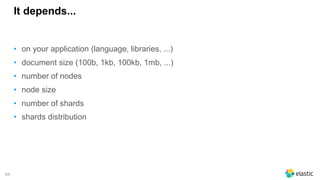
It depends...
• on your application (language, libraries, ...)
• document size (100b, 1kb, 100kb, 1mb, ...)
• number of nodes
• node size
• number of shards
• shards distribution
65
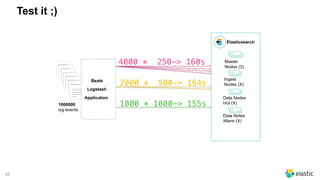
Test it ;)
Elasticsearch
Master
Nodes (3)
Ingest
Nodes (X)
Data Nodes
Hot (X)
Data Notes
Warm (X)
__________
__________
__________
__________
__________
__________
__________
__________
__________
__________
__________
__________
__________
__________
__________
__________
__________
__________
__________
__________
__________
__________
__________
__________
__________
__________
__________
__________
__________
__________
__________
__________
__________
__________
__________
__________
__________
__________
__________
__________
_____
1000000

log events
Beats
Logstash
Application
4000 * 250-> 160s
1000 * 1000-> 155s
2000 * 500-> 164s
66
Test it ;)
DATE=`date +%Y.%m.%d`
LOG=logs/logs.txt
exec_test () {
curl -s -XDELETE "http://USER:PASS@HOST:9200/logstash-$DATE"
sleep 10
export SIZE=$1
time cat $LOG | ./bin/logstash -f logstash.conf
}
for SIZE in 100 500 1000 3000 5000 10000; do
for i in {1..20}; do
exec_test $SIZE
done; done;
input { stdin{} }
filter {}
output {
elasticsearch {
hosts => ["10.12.145.189"]
flush_size => "${SIZE}"
} }
In Beats set "bulk_max_size"
in the output.elasticsearch
67
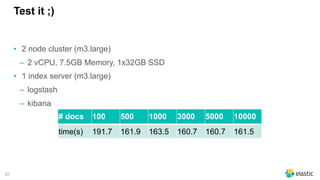
Test it ;)
• 2 node cluster (m3.large)
‒ 2 vCPU, 7.5GB Memory, 1x32GB SSD
• 1 index server (m3.large)
‒ logstash
‒ kibana
# docs 100 500 1000 3000 5000 10000
time(s) 191.7 161.9 163.5 160.7 160.7 161.5
Distribute the Load
69
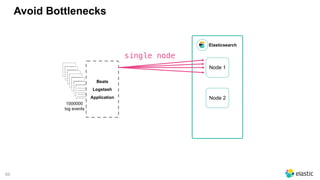
Avoid Bottlenecks
Elasticsearch
_________
_________
_________
_________
_________
_________
_________
_________
_________
_________
_________
_________
_________
_________
_________
_________
_________
_________
_________
_________
_________
_________
_________
_________
_________
_________
_________
_________
_________
_________
_________
_________
_________
_________
_________
1000000

log events
Beats
Logstash
Application
single node
Node 1
Node 2
69
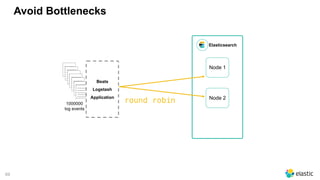
Avoid Bottlenecks
Elasticsearch
_________
_________
_________
_________
_________
_________
_________
_________
_________
_________
_________
_________
_________
_________
_________
_________
_________
_________
_________
_________
_________
_________
_________
_________
_________
_________
_________
_________
_________
_________
_________
_________
_________
_________
_________
1000000

log events
Beats
Logstash
Application
Node 1
Node 2
round robin
70
Clients
• Most clients implement round robin
‒ you specify a seed list
‒ the client sniffs the cluster
‒ the client implement different selectors
• Logstash allows an array (no sniffing)
• Beats allows an array (no sniffing)
• Kibana only connects to one single node
output {
elasticsearch {
hosts => ["node1","node2","node3"]
} }
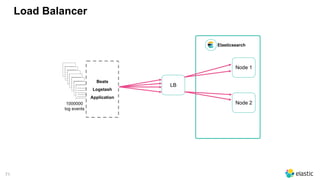
71
Load Balancer
Elasticsearch
_________
_________
_________
_________
_________
_________
_________
_________
_________
_________
_________
_________
_________
_________
_________
_________
_________
_________
_________
_________
_________
_________
_________
_________
_________
_________
_________
_________
_________
_________
_________
_________
_________
_________
_________
1000000

log events
Beats
Logstash
Application
LB
Node 2
Node 1
72
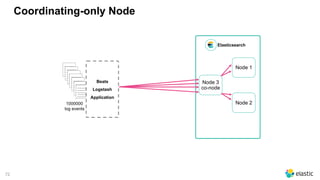
Coordinating-only Node
Elasticsearch
_________
_________
_________
_________
_________
_________
_________
_________
_________
_________
_________
_________
_________
_________
_________
_________
_________
_________
_________
_________
_________
_________
_________
_________
_________
_________
_________
_________
_________
_________
_________
_________
_________
_________
_________
1000000

log events
Beats
Logstash
Application
Node 3

co-node
Node 2
Node 1
73
Test it ;)
#docs
time(s)
100 500 1000
NO Round Robin 191.7 161.9 163.5
Round Robin 189.7 159.7 159.0
• 2 node cluster (m3.large)
‒ 2 vCPU, 7.5GB Memory, 1x32GB SSD
• 1 index server (m3.large)
‒ logstash (round robin configured)
‒ hosts => ["10.12.145.189", "10.121.140.167"]
‒ kibana
Optimizing Disk IO
75
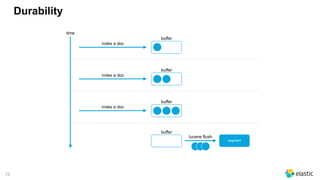
Durability
index a doc
time
lucene flush
buffer
index a doc
buffer
index a doc
buffer
buffer
segment
76
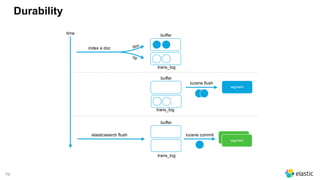
Durability
index a doc
time
lucene flush
buffer
segment
trans_log
buffer
trans_log
buffer
trans_log
elasticsearch flush
doc
op
lucene commit
segment
segment
77
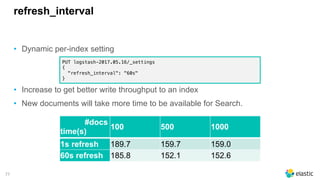
refresh_interval
• Dynamic per-index setting
• Increase to get better write throughput to an index
• New documents will take more time to be available for Search.
PUT logstash-2017.05.16/_settings
{
"refresh_interval": "60s"
}
#docs
time(s)
100 500 1000
1s refresh 189.7 159.7 159.0
60s refresh 185.8 152.1 152.6
78
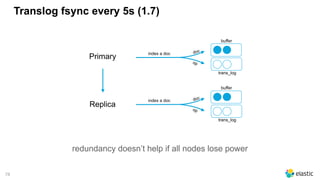
Translog fsync every 5s (1.7)
index a doc
buffer
trans_log
doc
op
index a doc
buffer
trans_log
doc
op
Primary
Replica
redundancy doesn’t help if all nodes lose power
79
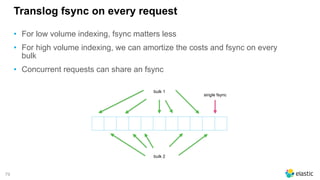
Translog fsync on every request
• For low volume indexing, fsync matters less
• For high volume indexing, we can amortize the costs and fsync on every
bulk
• Concurrent requests can share an fsync
bulk 1
bulk 2
single fsync
80
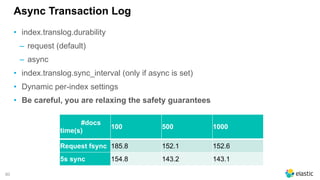
Async Transaction Log
• index.translog.durability
‒ request (default)
‒ async
• index.translog.sync_interval (only if async is set)
• Dynamic per-index settings
• Be careful, you are relaxing the safety guarantees
#docs
time(s)
100 500 1000
Request fsync 185.8 152.1 152.6
5s sync 154.8 143.2 143.1
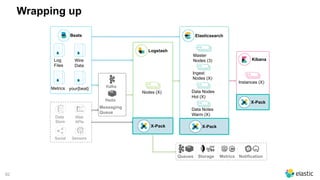
Wrapping up
82
Wrapping up
Beats
Log
Files
Metrics
Wire
Data
your{beat}
Data
Store
Web
APIs
Social Sensors
Elasticsearch
Master
Nodes (3)
Ingest
Nodes (X)
Data Nodes
Hot (X)
Data Notes
Warm (X)
Logstash
Nodes (X)
Kafka
Redis
Messaging
Queue
Kibana
Instances (X)
NotificationQueues Storage Metrics
X-Pack
X-PackX-Pack
83
Wrapping up
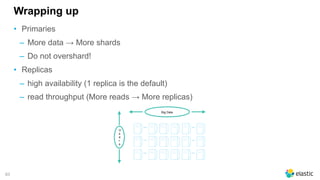
• Primaries
‒ More data → More shards
‒ Do not overshard!
• Replicas
‒ high availability (1 replica is the default)
‒ read throughput (More reads → More replicas)
Big Data
... ...
... ...
... ...
U
s
e
r
s
84
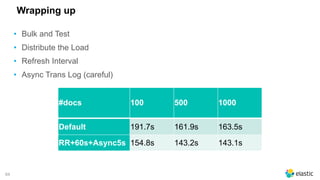
• Bulk and Test
• Distribute the Load
• Refresh Interval
• Async Trans Log (careful)
#docs 100 500 1000
Default 191.7s 161.9s 163.5s
RR+60s+Async5s 154.8s 143.2s 143.1s
Wrapping up
89
Sylvain Wallez
@bluxte
Software Engineer, Elastic Cloud
Thanks!
Questions?

Black friday logs - Scaling Elasticsearch