




SQLSaturday#429 Porto 2015
Senior Software Developer at DevScope
Microsoft Integration MVP since 2011
 Writer of numerous articles for Portuguese eMagazine “Programar”
 Author “Sandro Pereira BizTalk Blog” http://sandroaspbiztalkblog.wordpress.com
 Member of “BizTalkAdminsblogging.com” and “BizTalk Brasil” community
 Member NetPonto community
 MSDN BizTalk Forums Moderator
 TechNet Wiki author (Wiki Ninja)
 TechNet Gallery, Code Gallery and CodePlex contributor
 Public speaker
 Technical Reviewer PACKT Publishing
 BizTalk Server 2010 Cookbook (April 2012)
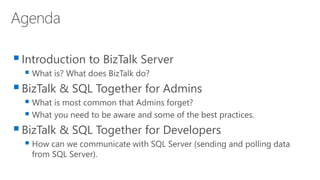
Introduction to BizTalk Server
 What is? What does BizTalk do?
BizTalk & SQL Together for Admins
 What is most common that Admins forget?
 What you need to be aware and some of the best practices.
BizTalk & SQL Together for Developers
 How can we communicate with SQL Server (sending and polling data
from SQL Server).
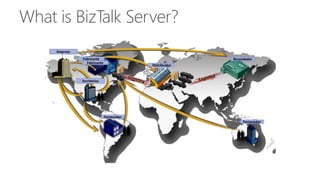
Escritórios
Fornecedor
Fornecedor
Fabricante
Distribuidor
Revendedor
Empresa
Fabricante
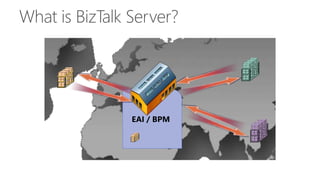
EAI / BPM
7
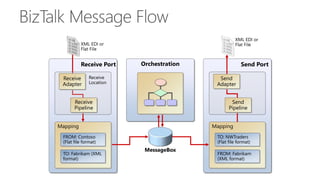
Receive Port Orchestration
XML EDI or
Flat File
XML EDI or
Flat File
Send Port
Send
Adapter
Send
Pipeline
MessageBox
Mapping
TO: NWTraders
(Flat file format)
FROM: Fabrikam
(XML format)
Mapping
FROM: Contoso
(Flat file format)
TO: Fabrikam (XML
format)
Receive
Location
Receive
Adapter
Receive
Pipeline
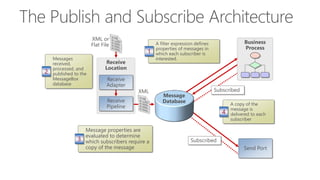
Receive
Location
Messages
received,
processed, and
published to the
MessageBox
database
2
A filter expression defines
properties of messages in
which each subscriber is
interested.
1
Message properties are
evaluated to determine
which subscribers require a
copy of the message
3
XML or
Flat File
A copy of the
message is
delivered to each
subscriber
4
Receive
Adapter
Receive
Pipeline
XML
Subscribed
Business
Process
Subscribed
Message
Database
Send Port
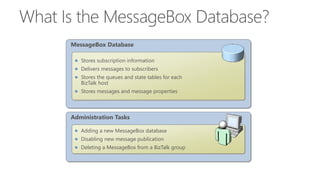
Administration Tasks
Adding a new MessageBox database
Disabling new message publication
Deleting a MessageBox from a BizTalk group
MessageBox Database
Stores subscription information
Delivers messages to subscribers
Stores the queues and state tables for each
BizTalk host
Stores messages and message properties












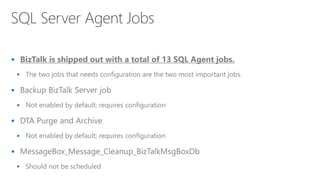
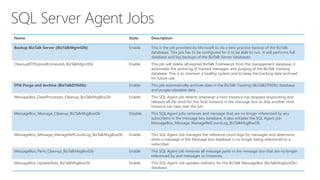
Name State Description
Backup BizTalk Server (BizTalkMgmtDb) Enable This is the job provided by Microsoft to do a best practice backup of the BizTalk
databases. This job has to be configured for it to be able to run.. It will performs full
database and log backups of the BizTalk Server databases.
CleanupBTFExpiredEntriesJob_BizTalkMgmtDb Enable This job will delete all expired BizTalk Framework from the management database, it
automates the archiving of tracked messages and purging of the BizTalk tracking
database. This is to maintain a healthy system and to keep the tracking data archived
for future use.
DTA Purge and Archive (BizTalkDTADb) Enable This job automatically archives data in the BizTalk Tracking (BizTalkDTADb) database
and purges obsolete data.
MessageBox_DeadProcesses_Cleanup_BizTalkMsgBoxDb Enable This SQL Agent job detects whenever a Host Instance has stopped responding and
releases all the work for this host instance in the message box so that another Host
Instance can take over the job.
MessageBox_Message_Cleanup_BizTalkMsgBoxDb Disable This SQL Agent jobs removes and message that are no longer referenced by any
subscribers in the message box database, it also initiates the SQL Agent job
MessageBox_Message_ManageRefCountLog_BizTalkMsgBoxDb.
MessageBox_Message_ManageRefCountLog_BizTalkMsgBoxDb Enable This SQL Agent Job manages the reference count logs for messages and determine
when a message in the Message box database is no longer being referenced to a
subscriber.
MessageBox_Parts_Cleanup_BizTalkMsgBoxDb Enable This SQL Agent job removes all message parts in the message box that are no longer
referenced by and messages or instances.
MessageBox_UpdateStats_BizTalkMsgBoxDb Enable This SQL Agent Job updates statistics for the BizTalk MessageBox (BizTalkMsgboxDb)
database.
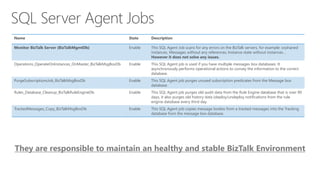
Name State Description
Monitor BizTalk Server (BizTalkMgmtDb) Enable This SQL Agent Job scans for any errors on the BizTalk servers, for example: orphaned
instances, Messages without any references, Instance state without instances…
However it does not solve any issues.
Operations_OperateOnInstances_OnMaster_BizTalkMsgBoxDb Enable This SQL Agent job is used if you have multiple messages box databases. It
asynchronously performs operational actions to convey the information to the correct
database.
PurgeSubscriptionsJob_BizTalkMsgBoxDb Enable This SQL Agent job purges unused subscription predicates from the Message box
database.
Rules_Database_Cleanup_BizTalkRuleEngineDb Enable This SQL Agent job purges old audit data from the Rule Engine database that is over 90
days, it also purges old history data (deploy/undeploy notifications from the rule
engine database every third day.
TrackedMessages_Copy_BizTalkMsgBoxDb Enable This SQL Agent job copies message bodies from a tracked messages into the Tracking
database from the message box database.













































Specific BizTalk SQL Configurations
& Performance tuning
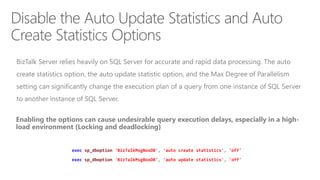
exec sp_dboption 'BizTalkMsgBoxDB', 'auto create statistics', 'off'
exec sp_dboption 'BizTalkMsgBoxDB', 'auto update statistics', 'off'
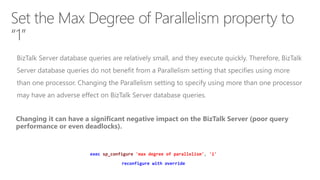
exec sp_configure 'max degree of parallelism', '1'
reconfigure with override
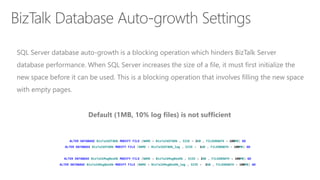
ALTER DATABASE BizTalkDTADb MODIFY FILE (NAME = BizTalkDTADb , SIZE = 2GB , FILEGROWTH = 100MB) GO
ALTER DATABASE BizTalkDTADb MODIFY FILE (NAME = BizTalkDTADb_log , SIZE = 1GB , FILEGROWTH = 100MB) GO
ALTER DATABASE BizTalkMsgBoxDb MODIFY FILE (NAME = BizTalkMsgBoxDb , SIZE = 2GB , FILEGROWTH = 100MB) GO
ALTER DATABASE BizTalkMsgBoxDb MODIFY FILE (NAME = BizTalkMsgBoxDb_log , SIZE = 2GB , FILEGROWTH = 100MB) GO
General SQL Considerations
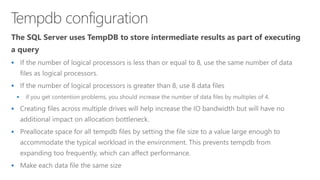
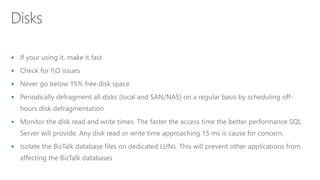
& Performance tuning


















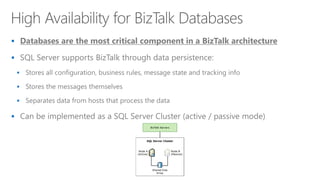
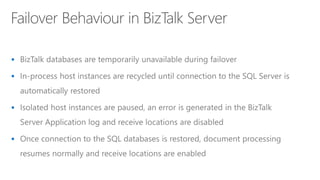
High Availability in BizTalk Server
















Restrictions





Demos
Sending and polling data from SQL Server. What is possible and how we can
do this.
www.devscope.net

BizTalk & SQL: Together for Developers & Admins

  • 1.
  • 2.
    Senior Software Developerat DevScope Microsoft Integration MVP since 2011  Writer of numerous articles for Portuguese eMagazine “Programar”  Author “Sandro Pereira BizTalk Blog” http://sandroaspbiztalkblog.wordpress.com  Member of “BizTalkAdminsblogging.com” and “BizTalk Brasil” community  Member NetPonto community  MSDN BizTalk Forums Moderator  TechNet Wiki author (Wiki Ninja)  TechNet Gallery, Code Gallery and CodePlex contributor  Public speaker  Technical Reviewer PACKT Publishing  BizTalk Server 2010 Cookbook (April 2012)
  • 3.
    Introduction to BizTalkServer  What is? What does BizTalk do? BizTalk & SQL Together for Admins  What is most common that Admins forget?  What you need to be aware and some of the best practices. BizTalk & SQL Together for Developers  How can we communicate with SQL Server (sending and polling data from SQL Server).
  • 5.
  • 6.
  • 7.
    7 Receive Port Orchestration XMLEDI or Flat File XML EDI or Flat File Send Port Send Adapter Send Pipeline MessageBox Mapping TO: NWTraders (Flat file format) FROM: Fabrikam (XML format) Mapping FROM: Contoso (Flat file format) TO: Fabrikam (XML format) Receive Location Receive Adapter Receive Pipeline
  • 8.
    Receive Location Messages received, processed, and published tothe MessageBox database 2 A filter expression defines properties of messages in which each subscriber is interested. 1 Message properties are evaluated to determine which subscribers require a copy of the message 3 XML or Flat File A copy of the message is delivered to each subscriber 4 Receive Adapter Receive Pipeline XML Subscribed Business Process Subscribed Message Database Send Port
  • 9.
    Administration Tasks Adding anew MessageBox database Disabling new message publication Deleting a MessageBox from a BizTalk group MessageBox Database Stores subscription information Delivers messages to subscribers Stores the queues and state tables for each BizTalk host Stores messages and message properties
  • 12.
  • 16.
  • 17.
    Name State Description BackupBizTalk Server (BizTalkMgmtDb) Enable This is the job provided by Microsoft to do a best practice backup of the BizTalk databases. This job has to be configured for it to be able to run.. It will performs full database and log backups of the BizTalk Server databases. CleanupBTFExpiredEntriesJob_BizTalkMgmtDb Enable This job will delete all expired BizTalk Framework from the management database, it automates the archiving of tracked messages and purging of the BizTalk tracking database. This is to maintain a healthy system and to keep the tracking data archived for future use. DTA Purge and Archive (BizTalkDTADb) Enable This job automatically archives data in the BizTalk Tracking (BizTalkDTADb) database and purges obsolete data. MessageBox_DeadProcesses_Cleanup_BizTalkMsgBoxDb Enable This SQL Agent job detects whenever a Host Instance has stopped responding and releases all the work for this host instance in the message box so that another Host Instance can take over the job. MessageBox_Message_Cleanup_BizTalkMsgBoxDb Disable This SQL Agent jobs removes and message that are no longer referenced by any subscribers in the message box database, it also initiates the SQL Agent job MessageBox_Message_ManageRefCountLog_BizTalkMsgBoxDb. MessageBox_Message_ManageRefCountLog_BizTalkMsgBoxDb Enable This SQL Agent Job manages the reference count logs for messages and determine when a message in the Message box database is no longer being referenced to a subscriber. MessageBox_Parts_Cleanup_BizTalkMsgBoxDb Enable This SQL Agent job removes all message parts in the message box that are no longer referenced by and messages or instances. MessageBox_UpdateStats_BizTalkMsgBoxDb Enable This SQL Agent Job updates statistics for the BizTalk MessageBox (BizTalkMsgboxDb) database.
  • 18.
    Name State Description MonitorBizTalk Server (BizTalkMgmtDb) Enable This SQL Agent Job scans for any errors on the BizTalk servers, for example: orphaned instances, Messages without any references, Instance state without instances… However it does not solve any issues. Operations_OperateOnInstances_OnMaster_BizTalkMsgBoxDb Enable This SQL Agent job is used if you have multiple messages box databases. It asynchronously performs operational actions to convey the information to the correct database. PurgeSubscriptionsJob_BizTalkMsgBoxDb Enable This SQL Agent job purges unused subscription predicates from the Message box database. Rules_Database_Cleanup_BizTalkRuleEngineDb Enable This SQL Agent job purges old audit data from the Rule Engine database that is over 90 days, it also purges old history data (deploy/undeploy notifications from the rule engine database every third day. TrackedMessages_Copy_BizTalkMsgBoxDb Enable This SQL Agent job copies message bodies from a tracked messages into the Tracking database from the message box database.
  • 21.
  • 22.
  • 23.
  • 25.
  • 26.
  • 27.
    Specific BizTalk SQLConfigurations & Performance tuning
  • 28.
    exec sp_dboption 'BizTalkMsgBoxDB','auto create statistics', 'off' exec sp_dboption 'BizTalkMsgBoxDB', 'auto update statistics', 'off'
  • 29.
    exec sp_configure 'maxdegree of parallelism', '1' reconfigure with override
  • 30.
    ALTER DATABASE BizTalkDTADbMODIFY FILE (NAME = BizTalkDTADb , SIZE = 2GB , FILEGROWTH = 100MB) GO ALTER DATABASE BizTalkDTADb MODIFY FILE (NAME = BizTalkDTADb_log , SIZE = 1GB , FILEGROWTH = 100MB) GO ALTER DATABASE BizTalkMsgBoxDb MODIFY FILE (NAME = BizTalkMsgBoxDb , SIZE = 2GB , FILEGROWTH = 100MB) GO ALTER DATABASE BizTalkMsgBoxDb MODIFY FILE (NAME = BizTalkMsgBoxDb_log , SIZE = 2GB , FILEGROWTH = 100MB) GO
  • 31.
    General SQL Considerations &Performance tuning
  • 33.
  • 34.
  • 35.
  • 36.
  • 37.
    High Availability inBizTalk Server
  • 38.
  • 39.
  • 40.
  • 41.
  • 42.
  • 44.
    Demos Sending and pollingdata from SQL Server. What is possible and how we can do this.
  • 45.