






Copyright © 2023 Bohemia Interactive Simulations | All other trademarks or copyrights are the property of their respective owners. All Rights Reserved.
Use or disclosure of the data contained on this sheet is subject to the restriction on the title page of this document.
IT²EC 2023
BISim Information Session
Oliver Arup
SVP Product Management
Copyright © 2023 Bohemia Interactive Simulations | All other trademarks or copyrights are the property of their respective owners. All Rights Reserved.
Use or disclosure of the data contained on this sheet is subject to the restriction on the title page of this document.
BISim IT²EC Headlines
• VBS Control AI – Legacy AI Replacement
• Thermal Imaging Improvements
Copyright © 2023 Bohemia Interactive Simulations | All other trademarks or copyrights are the property of their respective owners. All Rights Reserved.
Use or disclosure of the data contained on this sheet is subject to the restriction on the title page of this document.
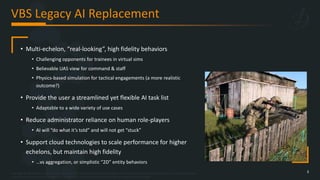
VBS Legacy AI Replacement
3
• Multi-echelon, “real-looking”, high fidelity behaviors
• Challenging opponents for trainees in virtual sims
• Believable UAS view for command & staff
• Physics-based simulation for tactical engagements (a more realistic
outcome?)
• Provide the user a streamlined yet flexible AI task list
• Adaptable to a wide variety of use cases
• Reduce administrator reliance on human role-players
• AI will “do what it’s told” and will not get “stuck”
• Support cloud technologies to scale performance for higher
echelons, but maintain high fidelity
• …vs aggregation, or simplistic “2D” entity behaviors
Copyright © 2023 Bohemia Interactive Simulations | All other trademarks or copyrights are the property of their respective owners. All Rights Reserved.
Use or disclosure of the data contained on this sheet is subject to the restriction on the title page of this document.
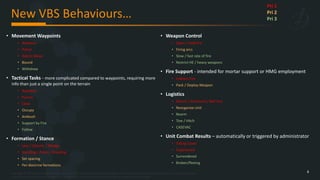
New VBS Behaviours…
4
• Movement Waypoints
• Advance
• Patrol
• Admin Move
• Bound
• Withdraw
• Tactical Tasks - more complicated compared to waypoints, requiring more
info than just a single point on the terrain
• Suppress
• Pursue
• Clear
• Occupy
• Ambush
• Support by Fire
• Follow
• Formation / Stance
• Line / Column / Wedge
• Standing / Prone / Kneeling
• Set spacing
• Per-doctrine formations
• Weapon Control
• Open / hold fire
• Firing arcs
• Slow / fast rate of fire
• Restrict HE / heavy weapons
• Fire Support - intended for mortar support or HMG employment
• Indirect Fire
• Pack / Deploy Weapon
• Logistics
• Mount / Dismount / Bail Out
• Reorganize Unit
• Rearm
• Tow / Hitch
• CASEVAC
• Unit Combat Results – automatically or triggered by administrator
• Taking Cover
• Suppressed
• Surrendered
• Broken/fleeing
Pri 1
Pri 2
Pri 3
Copyright © 2023 Bohemia Interactive Simulations | All other trademarks or copyrights are the property of their respective owners. All Rights Reserved.
Use or disclosure of the data contained on this sheet is subject to the restriction on the title page of this document.
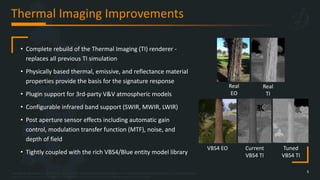
Thermal Imaging Improvements
5
• Complete rebuild of the Thermal Imaging (TI) renderer -
replaces all previous TI simulation
• Physically based thermal, emissive, and reflectance material
properties provide the basis for the signature response
• Plugin support for 3rd-party V&V atmospheric models
• Configurable infrared band support (SWIR, MWIR, LWIR)
• Post aperture sensor effects including automatic gain
control, modulation transfer function (MTF), noise, and
depth of field
• Tightly coupled with the rich VBS4/Blue entity model library
Real
EO
Real
TI
VBS4 EO Current
VBS4 TI
Tuned
VBS4 TI
Click to play this video on YouTube
Copyright © 2023 Bohemia Interactive Simulations | All other trademarks or copyrights are the property of their respective owners. All Rights Reserved.
Use or disclosure of the data contained on this sheet is subject to the restriction on the title page of this document.
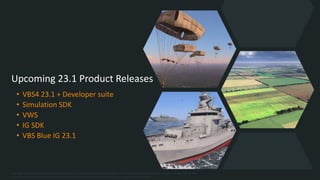
Upcoming 23.1 Product Releases
• VBS4 23.1 + Developer suite
• Simulation SDK
• VWS
• IG SDK
• VBS Blue IG 23.1
Copyright © 2023 Bohemia Interactive Simulations | All other trademarks or copyrights are the property of their respective owners. All Rights Reserved.
Use or disclosure of the data contained on this sheet is subject to the restriction on the title page of this document.
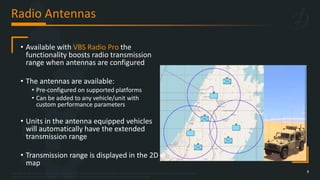
Radio Antennas
9
• Available with VBS Radio Pro the
functionality boosts radio transmission
range when antennas are configured
• The antennas are available:
• Pre-configured on supported platforms
• Can be added to any vehicle/unit with
custom performance parameters
• Units in the antenna equipped vehicles
will automatically have the extended
transmission range
• Transmission range is displayed in the 2D
map
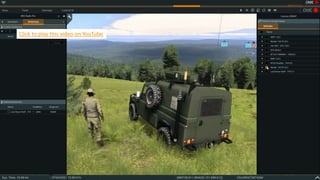
Click to play this video on YouTube
Copyright © 2023 Bohemia Interactive Simulations | All other trademarks or copyrights are the property of their respective owners. All Rights Reserved.
Use or disclosure of the data contained on this sheet is subject to the restriction on the title page of this document.
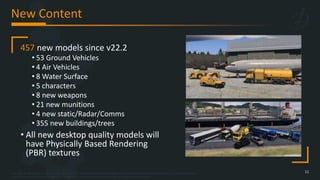
New Content
11
457 new models since v22.2
• 53 Ground Vehicles
• 4 Air Vehicles
• 8 Water Surface
• 5 characters
• 8 new weapons
• 21 new munitions
• 4 new static/Radar/Comms
• 355 new buildings/trees
• All new desktop quality models will
have Physically Based Rendering
(PBR) textures
Click to play this video on YouTube
Copyright © 2023 Bohemia Interactive Simulations | All other trademarks or copyrights are the property of their respective owners. All Rights Reserved.
Use or disclosure of the data contained on this sheet is subject to the restriction on the title page of this document.
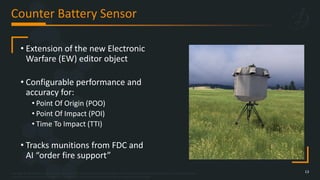
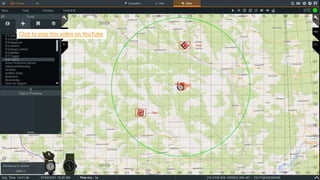
Counter Battery Sensor
13
• Extension of the new Electronic
Warfare (EW) editor object
• Configurable performance and
accuracy for:
• Point Of Origin (POO)
• Point Of Impact (POI)
• Time To Impact (TTI)
• Tracks munitions from FDC and
AI “order fire support”
Click to play this video on YouTube
Copyright © 2023 Bohemia Interactive Simulations | All other trademarks or copyrights are the property of their respective owners. All Rights Reserved.
Use or disclosure of the data contained on this sheet is subject to the restriction on the title page of this document.
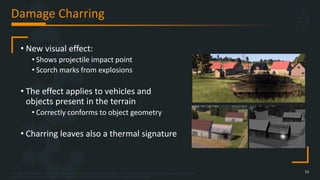
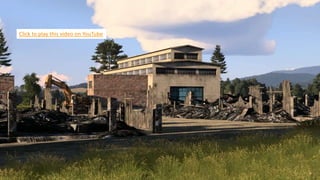
Damage Charring
15
• New visual effect:
• Shows projectile impact point
• Scorch marks from explosions
• The effect applies to vehicles and
objects present in the terrain
• Correctly conforms to object geometry
• Charring leaves also a thermal signature
Click to play this video on YouTube
Copyright © 2023 Bohemia Interactive Simulations | All other trademarks or copyrights are the property of their respective owners. All Rights Reserved.
Use or disclosure of the data contained on this sheet is subject to the restriction on the title page of this document.
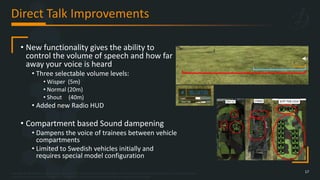
Direct Talk Improvements
17
• New functionality gives the ability to
control the volume of speech and how far
away your voice is heard
• Three selectable volume levels:
• Wisper (5m)
• Normal (20m)
• Shout (40m)
• Added new Radio HUD
• Compartment based Sound dampening
• Dampens the voice of trainees between vehicle
compartments
• Limited to Swedish vehicles initially and
requires special model configuration
Copyright © 2023 Bohemia Interactive Simulations | All other trademarks or copyrights are the property of their respective owners. All Rights Reserved.
Use or disclosure of the data contained on this sheet is subject to the restriction on the title page of this document.
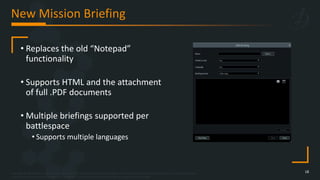
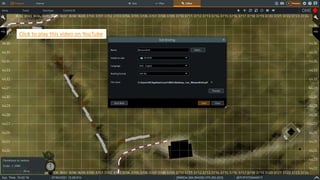
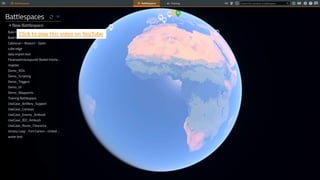
New Mission Briefing
18
• Replaces the old “Notepad”
functionality
• Supports HTML and the attachment
of full .PDF documents
• Multiple briefings supported per
battlespace
• Supports multiple languages
Click to play this video on YouTube
Copyright © 2023 Bohemia Interactive Simulations | All other trademarks or copyrights are the property of their respective owners. All Rights Reserved.
Use or disclosure of the data contained on this sheet is subject to the restriction on the title page of this document.
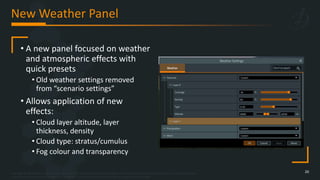
New Weather Panel
20
• A new panel focused on weather
and atmospheric effects with
quick presets
• Old weather settings removed
from “scenario settings”
• Allows application of new
effects:
• Cloud layer altitude, layer
thickness, density
• Cloud type: stratus/cumulus
• Fog colour and transparency
Click to play this video on YouTube
Copyright © 2023 Bohemia Interactive Simulations | All other trademarks or copyrights are the property of their respective owners. All Rights Reserved.
Use or disclosure of the data contained on this sheet is subject to the restriction on the title page of this document.
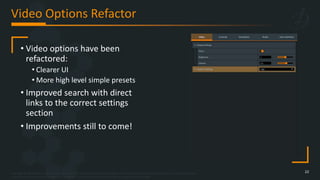
Video Options Refactor
22
• Video options have been
refactored:
• Clearer UI
• More high level simple presets
• Improved search with direct
links to the correct settings
section
• Improvements still to come!
Copyright © 2023 Bohemia Interactive Simulations | All other trademarks or copyrights are the property of their respective owners. All Rights Reserved.
Use or disclosure of the data contained on this sheet is subject to the restriction on the title page of this document.
Particle Effect Improvements
• New and improved particles for the
majority of current VBS4 effects
• Visually improved with little to no impact on
performance
• Ongoing work
• This latest iteration will continue to be improved
• All major effects improved for this release:
• Explosions
• Fire
• Smoke
• Dust
• Bullet impacts
Click to play this video on YouTube
Copyright © 2023 Bohemia Interactive Simulations | All other trademarks or copyrights are the property of their respective owners. All Rights Reserved.
Use or disclosure of the data contained on this sheet is subject to the restriction on the title page of this document.
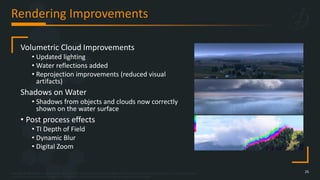
Rendering Improvements
25
Volumetric Cloud Improvements
• Updated lighting
• Water reflections added
• Reprojection improvements (reduced visual
artifacts)
Shadows on Water
• Shadows from objects and clouds now correctly
shown on the water surface
• Post process effects
• TI Depth of Field
• Dynamic Blur
• Digital Zoom
Click to play this video on YouTube
Copyright © 2023 Bohemia Interactive Simulations | All other trademarks or copyrights are the property of their respective owners. All Rights Reserved.
Use or disclosure of the data contained on this sheet is subject to the restriction on the title page of this document.
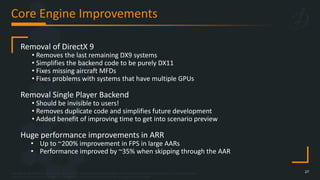
Core Engine Improvements
27
Removal of DirectX 9
• Removes the last remaining DX9 systems
• Simplifies the backend code to be purely DX11
• Fixes missing aircraft MFDs
• Fixes problems with systems that have multiple GPUs
Removal Single Player Backend
• Should be invisible to users!
• Removes duplicate code and simplifies future development
• Added benefit of improving time to get into scenario preview
Huge performance improvements in ARR
• Up to ~200% improvement in FPS in large AARs
• Performance improved by ~35% when skipping through the AAR
Copyright © 2023 Bohemia Interactive Simulations | All other trademarks or copyrights are the property of their respective owners. All Rights Reserved.
Use or disclosure of the data contained on this sheet is subject to the restriction on the title page of this document.
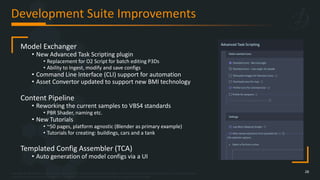
Development Suite Improvements
28
Model Exchanger
• New Advanced Task Scripting plugin
• Replacement for O2 Script for batch editing P3Ds
• Ability to Ingest, modify and save configs
• Command Line Interface (CLI) support for automation
• Asset Convertor updated to support new BMI technology
Content Pipeline
• Reworking the current samples to VBS4 standards
• PBR Shader, naming etc.
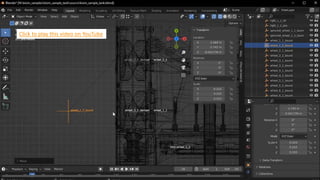
• New Tutorials
• ~50 pages, platform agnostic (Blender as primary example)
• Tutorials for creating: buildings, cars and a tank
Templated Config Assembler (TCA)
• Auto generation of model configs via a UI
Copyright © 2023 Bohemia Interactive Simulations | All other trademarks or copyrights are the property of their respective owners. All Rights Reserved.
Use or disclosure of the data contained on this sheet is subject to the restriction on the title page of this document.
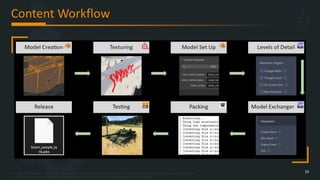
Content Workflow
29
Click to play this video on YouTube
Copyright © 2023 Bohemia Interactive Simulations | All other trademarks or copyrights are the property of their respective owners. All Rights Reserved.
Use or disclosure of the data contained on this sheet is subject to the restriction on the title page of this document.
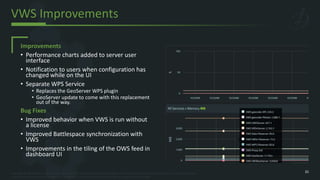
VWS Improvements
31
Improvements
• Performance charts added to server user
interface
• Notification to users when configuration has
changed while on the UI
• Separate WPS Service
• Replaces the GeoServer WPS plugin
• GeoServer update to come with this replacement
out of the way.
Bug Fixes
• Improved behavior when VWS is run without
a license
• Improved Battlespace synchronization with
VWS
• Improvements in the tiling of the OWS feed in
dashboard UI
Click to play this video on YouTube
Copyright © 2023 Bohemia Interactive Simulations | All other trademarks or copyrights are the property of their respective owners. All Rights Reserved.
Use or disclosure of the data contained on this sheet is subject to the restriction on the title page of this document.
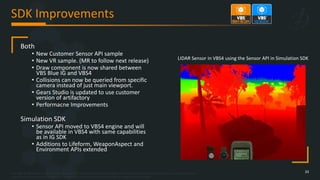
SDK Improvements
33
Both
• New Customer Sensor API sample
• New VR sample. (MR to follow next release)
• Draw component is now shared between
VBS Blue IG and VBS4
• Collisions can now be queried from specific
camera instead of just main viewport.
• Gears Studio is updated to use customer
version of artifactory
• Performacne Improvements
Simulation SDK
• Sensor API moved to VBS4 engine and will
be available in VBS4 with same capabilities
as in IG SDK
• Additions to Lifeform, WeaponAspect and
Environment APIs extended
LIDAR Sensor in VBS4 using the Sensor API in Simulation SDK
Copyright © 2023 Bohemia Interactive Simulations | All other trademarks or copyrights are the property of their respective owners. All Rights Reserved.
Use or disclosure of the data contained on this sheet is subject to the restriction on the title page of this document.
Distribution Improvements
34
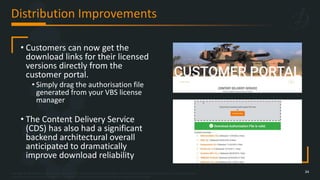
• Customers can now get the
download links for their licensed
versions directly from the
customer portal.
• Simply drag the authorisation file
generated from your VBS license
manager
• The Content Delivery Service
(CDS) has also had a significant
backend architectural overall
anticipated to dramatically
improve download reliability
Copyright © 2023 Bohemia Interactive Simulations | All other trademarks or copyrights are the property of their respective owners. All Rights Reserved.
Use or disclosure of the data contained on this sheet is subject to the restriction on the title page of this document.
Coming Soon
VBS4 23.2 +
35
Copyright © 2023 Bohemia Interactive Simulations | All other trademarks or copyrights are the property of their respective owners. All Rights Reserved.
Use or disclosure of the data contained on this sheet is subject to the restriction on the title page of this document.
Volumetric Snow
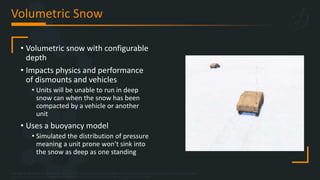
• Volumetric snow with configurable
depth
• Impacts physics and performance
of dismounts and vehicles
• Units will be unable to run in deep
snow can when the snow has been
compacted by a vehicle or another
unit
• Uses a buoyancy model
• Simulated the distribution of pressure
meaning a unit prone won’t sink into
the snow as deep as one standing
Click to play this video on YouTube
Copyright © 2023 Bohemia Interactive Simulations | All other trademarks or copyrights are the property of their respective owners. All Rights Reserved.
Use or disclosure of the data contained on this sheet is subject to the restriction on the title page of this document.
BMI
39
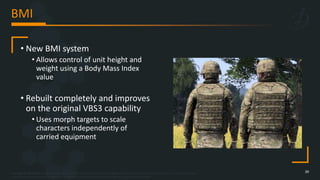
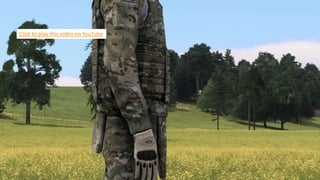
• New BMI system
• Allows control of unit height and
weight using a Body Mass Index
value
• Rebuilt completely and improves
on the original VBS3 capability
• Uses morph targets to scale
characters independently of
carried equipment
Click to play this video on YouTube
Copyright © 2023 Bohemia Interactive Simulations | All other trademarks or copyrights are the property of their respective owners. All Rights Reserved.
Use or disclosure of the data contained on this sheet is subject to the restriction on the title page of this document.
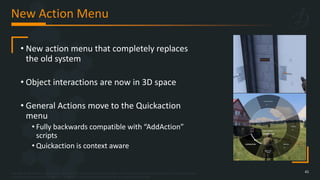
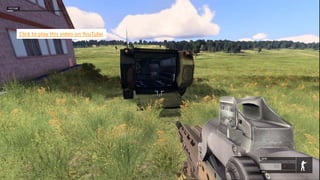
New Action Menu
41
• New action menu that completely replaces
the old system
• Object interactions are now in 3D space
• General Actions move to the Quickaction
menu
• Fully backwards compatible with “AddAction”
scripts
• Quickaction is context aware
Click to play this video on YouTube
Copyright © 2023 Bohemia Interactive Simulations | All other trademarks or copyrights are the property of their respective owners. All Rights Reserved.
Use or disclosure of the data contained on this sheet is subject to the restriction on the title page of this document.
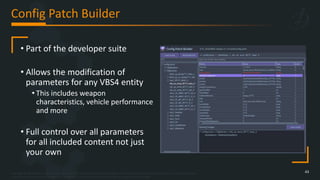
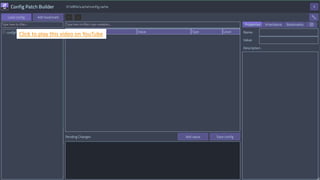
Config Patch Builder
43
• Part of the developer suite
• Allows the modification of
parameters for any VBS4 entity
• This includes weapon
characteristics, vehicle performance
and more
• Full control over all parameters
for all included content not just
your own
Click to play this video on YouTube
Copyright © 2023 Bohemia Interactive Simulations | All other trademarks or copyrights are the property of their respective owners. All Rights Reserved.
Use or disclosure of the data contained on this sheet is subject to the restriction on the title page of this document.
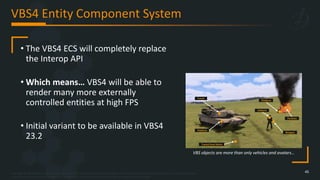
VBS4 Entity Component System
45
• The VBS4 ECS will completely replace
the Interop API
• Which means… VBS4 will be able to
render many more externally
controlled entities at high FPS
• Initial variant to be available in VBS4
23.2
Platform
Turret
Tracks/Heat Marks
Lifeform
Weapon
Platform
Particles
VBS objects are more than only vehicles and avatars…
Copyright © 2023 Bohemia Interactive Simulations | All other trademarks or copyrights are the property of their respective owners. All Rights Reserved.
Use or disclosure of the data contained on this sheet is subject to the restriction on the title page of this document.
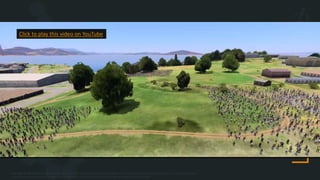
Click to play this video on YouTube
Copyright © 2023 Bohemia Interactive Simulations | All other trademarks or copyrights are the property of their respective owners. All Rights Reserved.
Use or disclosure of the data contained on this sheet is subject to the restriction on the title page of this document.
VBS Blue IG
As well as all the rendering improvements available to VBS4:
• CIGI 4.0, and remaining CIGI 3.x versions (3.0, 3.1, 3.2)
• Extends the currently supported CIGI 2.0, 2.1, 3.3
• Now support all CIGI versions (except 1.0)
• Allow for more compatibility with existing CIGI simulators
• Reliable VBS4 Host Networking
• Fixes occurrences of missed network updates from hosts which might result in:
• Missing entities, particle effects staying around, etc.
Copyright © 2023 Bohemia Interactive Simulations | All other trademarks or copyrights are the property of their respective owners. All Rights Reserved.
Use or disclosure of the data contained on this sheet is subject to the restriction on the title page of this document.
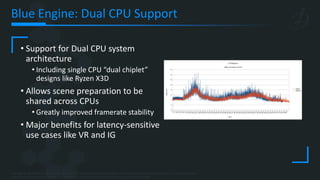
Blue Engine: Dual CPU Support
• Support for Dual CPU system
architecture
• Including single CPU “dual chiplet”
designs like Ryzen X3D
• Allows scene preparation to be
shared across CPUs
• Greatly improved framerate stability
• Major benefits for latency-sensitive
use cases like VR and IG
Copyright © 2023 Bohemia Interactive Simulations | All other trademarks or copyrights are the property of their respective owners. All Rights Reserved.
Use or disclosure of the data contained on this sheet is subject to the restriction on the title page of this document.
Thank you - Contact Us
49
Bohemia Interactive Simulations Inc.
3050 Technology Parkway, Suite 110
Orlando, Florida 32826
United States
+1 407 608 7000
For more information or to get in touch with us:
Email: sales@bisimulations.com
Visit our website: bisimulations.com

BISim's VBS4 simulation software new releases

  • 1.
    Copyright © 2023Bohemia Interactive Simulations | All other trademarks or copyrights are the property of their respective owners. All Rights Reserved. Use or disclosure of the data contained on this sheet is subject to the restriction on the title page of this document. IT²EC 2023 BISim Information Session Oliver Arup SVP Product Management
  • 2.
    Copyright © 2023Bohemia Interactive Simulations | All other trademarks or copyrights are the property of their respective owners. All Rights Reserved. Use or disclosure of the data contained on this sheet is subject to the restriction on the title page of this document. BISim IT²EC Headlines • VBS Control AI – Legacy AI Replacement • Thermal Imaging Improvements
  • 3.
    Copyright © 2023Bohemia Interactive Simulations | All other trademarks or copyrights are the property of their respective owners. All Rights Reserved. Use or disclosure of the data contained on this sheet is subject to the restriction on the title page of this document. VBS Legacy AI Replacement 3 • Multi-echelon, “real-looking”, high fidelity behaviors • Challenging opponents for trainees in virtual sims • Believable UAS view for command & staff • Physics-based simulation for tactical engagements (a more realistic outcome?) • Provide the user a streamlined yet flexible AI task list • Adaptable to a wide variety of use cases • Reduce administrator reliance on human role-players • AI will “do what it’s told” and will not get “stuck” • Support cloud technologies to scale performance for higher echelons, but maintain high fidelity • …vs aggregation, or simplistic “2D” entity behaviors
  • 4.
    Copyright © 2023Bohemia Interactive Simulations | All other trademarks or copyrights are the property of their respective owners. All Rights Reserved. Use or disclosure of the data contained on this sheet is subject to the restriction on the title page of this document. New VBS Behaviours… 4 • Movement Waypoints • Advance • Patrol • Admin Move • Bound • Withdraw • Tactical Tasks - more complicated compared to waypoints, requiring more info than just a single point on the terrain • Suppress • Pursue • Clear • Occupy • Ambush • Support by Fire • Follow • Formation / Stance • Line / Column / Wedge • Standing / Prone / Kneeling • Set spacing • Per-doctrine formations • Weapon Control • Open / hold fire • Firing arcs • Slow / fast rate of fire • Restrict HE / heavy weapons • Fire Support - intended for mortar support or HMG employment • Indirect Fire • Pack / Deploy Weapon • Logistics • Mount / Dismount / Bail Out • Reorganize Unit • Rearm • Tow / Hitch • CASEVAC • Unit Combat Results – automatically or triggered by administrator • Taking Cover • Suppressed • Surrendered • Broken/fleeing Pri 1 Pri 2 Pri 3
  • 5.
    Copyright © 2023Bohemia Interactive Simulations | All other trademarks or copyrights are the property of their respective owners. All Rights Reserved. Use or disclosure of the data contained on this sheet is subject to the restriction on the title page of this document. Thermal Imaging Improvements 5 • Complete rebuild of the Thermal Imaging (TI) renderer - replaces all previous TI simulation • Physically based thermal, emissive, and reflectance material properties provide the basis for the signature response • Plugin support for 3rd-party V&V atmospheric models • Configurable infrared band support (SWIR, MWIR, LWIR) • Post aperture sensor effects including automatic gain control, modulation transfer function (MTF), noise, and depth of field • Tightly coupled with the rich VBS4/Blue entity model library Real EO Real TI VBS4 EO Current VBS4 TI Tuned VBS4 TI
  • 6.
    Click to playthis video on YouTube
  • 7.
    Click to playthis video on YouTube
  • 8.
    Copyright © 2023Bohemia Interactive Simulations | All other trademarks or copyrights are the property of their respective owners. All Rights Reserved. Use or disclosure of the data contained on this sheet is subject to the restriction on the title page of this document. Upcoming 23.1 Product Releases • VBS4 23.1 + Developer suite • Simulation SDK • VWS • IG SDK • VBS Blue IG 23.1
  • 9.
    Copyright © 2023Bohemia Interactive Simulations | All other trademarks or copyrights are the property of their respective owners. All Rights Reserved. Use or disclosure of the data contained on this sheet is subject to the restriction on the title page of this document. Radio Antennas 9 • Available with VBS Radio Pro the functionality boosts radio transmission range when antennas are configured • The antennas are available: • Pre-configured on supported platforms • Can be added to any vehicle/unit with custom performance parameters • Units in the antenna equipped vehicles will automatically have the extended transmission range • Transmission range is displayed in the 2D map
  • 10.
    Click to playthis video on YouTube
  • 11.
    Copyright © 2023Bohemia Interactive Simulations | All other trademarks or copyrights are the property of their respective owners. All Rights Reserved. Use or disclosure of the data contained on this sheet is subject to the restriction on the title page of this document. New Content 11 457 new models since v22.2 • 53 Ground Vehicles • 4 Air Vehicles • 8 Water Surface • 5 characters • 8 new weapons • 21 new munitions • 4 new static/Radar/Comms • 355 new buildings/trees • All new desktop quality models will have Physically Based Rendering (PBR) textures
  • 12.
    Click to playthis video on YouTube
  • 13.
    Copyright © 2023Bohemia Interactive Simulations | All other trademarks or copyrights are the property of their respective owners. All Rights Reserved. Use or disclosure of the data contained on this sheet is subject to the restriction on the title page of this document. Counter Battery Sensor 13 • Extension of the new Electronic Warfare (EW) editor object • Configurable performance and accuracy for: • Point Of Origin (POO) • Point Of Impact (POI) • Time To Impact (TTI) • Tracks munitions from FDC and AI “order fire support”
  • 14.
    Click to playthis video on YouTube
  • 15.
    Copyright © 2023Bohemia Interactive Simulations | All other trademarks or copyrights are the property of their respective owners. All Rights Reserved. Use or disclosure of the data contained on this sheet is subject to the restriction on the title page of this document. Damage Charring 15 • New visual effect: • Shows projectile impact point • Scorch marks from explosions • The effect applies to vehicles and objects present in the terrain • Correctly conforms to object geometry • Charring leaves also a thermal signature
  • 16.
    Click to playthis video on YouTube
  • 17.
    Copyright © 2023Bohemia Interactive Simulations | All other trademarks or copyrights are the property of their respective owners. All Rights Reserved. Use or disclosure of the data contained on this sheet is subject to the restriction on the title page of this document. Direct Talk Improvements 17 • New functionality gives the ability to control the volume of speech and how far away your voice is heard • Three selectable volume levels: • Wisper (5m) • Normal (20m) • Shout (40m) • Added new Radio HUD • Compartment based Sound dampening • Dampens the voice of trainees between vehicle compartments • Limited to Swedish vehicles initially and requires special model configuration
  • 18.
    Copyright © 2023Bohemia Interactive Simulations | All other trademarks or copyrights are the property of their respective owners. All Rights Reserved. Use or disclosure of the data contained on this sheet is subject to the restriction on the title page of this document. New Mission Briefing 18 • Replaces the old “Notepad” functionality • Supports HTML and the attachment of full .PDF documents • Multiple briefings supported per battlespace • Supports multiple languages
  • 19.
    Click to playthis video on YouTube
  • 20.
    Copyright © 2023Bohemia Interactive Simulations | All other trademarks or copyrights are the property of their respective owners. All Rights Reserved. Use or disclosure of the data contained on this sheet is subject to the restriction on the title page of this document. New Weather Panel 20 • A new panel focused on weather and atmospheric effects with quick presets • Old weather settings removed from “scenario settings” • Allows application of new effects: • Cloud layer altitude, layer thickness, density • Cloud type: stratus/cumulus • Fog colour and transparency
  • 21.
    Click to playthis video on YouTube
  • 22.
    Copyright © 2023Bohemia Interactive Simulations | All other trademarks or copyrights are the property of their respective owners. All Rights Reserved. Use or disclosure of the data contained on this sheet is subject to the restriction on the title page of this document. Video Options Refactor 22 • Video options have been refactored: • Clearer UI • More high level simple presets • Improved search with direct links to the correct settings section • Improvements still to come!
  • 23.
    Copyright © 2023Bohemia Interactive Simulations | All other trademarks or copyrights are the property of their respective owners. All Rights Reserved. Use or disclosure of the data contained on this sheet is subject to the restriction on the title page of this document. Particle Effect Improvements • New and improved particles for the majority of current VBS4 effects • Visually improved with little to no impact on performance • Ongoing work • This latest iteration will continue to be improved • All major effects improved for this release: • Explosions • Fire • Smoke • Dust • Bullet impacts
  • 24.
    Click to playthis video on YouTube
  • 25.
    Copyright © 2023Bohemia Interactive Simulations | All other trademarks or copyrights are the property of their respective owners. All Rights Reserved. Use or disclosure of the data contained on this sheet is subject to the restriction on the title page of this document. Rendering Improvements 25 Volumetric Cloud Improvements • Updated lighting • Water reflections added • Reprojection improvements (reduced visual artifacts) Shadows on Water • Shadows from objects and clouds now correctly shown on the water surface • Post process effects • TI Depth of Field • Dynamic Blur • Digital Zoom
  • 26.
    Click to playthis video on YouTube
  • 27.
    Copyright © 2023Bohemia Interactive Simulations | All other trademarks or copyrights are the property of their respective owners. All Rights Reserved. Use or disclosure of the data contained on this sheet is subject to the restriction on the title page of this document. Core Engine Improvements 27 Removal of DirectX 9 • Removes the last remaining DX9 systems • Simplifies the backend code to be purely DX11 • Fixes missing aircraft MFDs • Fixes problems with systems that have multiple GPUs Removal Single Player Backend • Should be invisible to users! • Removes duplicate code and simplifies future development • Added benefit of improving time to get into scenario preview Huge performance improvements in ARR • Up to ~200% improvement in FPS in large AARs • Performance improved by ~35% when skipping through the AAR
  • 28.
    Copyright © 2023Bohemia Interactive Simulations | All other trademarks or copyrights are the property of their respective owners. All Rights Reserved. Use or disclosure of the data contained on this sheet is subject to the restriction on the title page of this document. Development Suite Improvements 28 Model Exchanger • New Advanced Task Scripting plugin • Replacement for O2 Script for batch editing P3Ds • Ability to Ingest, modify and save configs • Command Line Interface (CLI) support for automation • Asset Convertor updated to support new BMI technology Content Pipeline • Reworking the current samples to VBS4 standards • PBR Shader, naming etc. • New Tutorials • ~50 pages, platform agnostic (Blender as primary example) • Tutorials for creating: buildings, cars and a tank Templated Config Assembler (TCA) • Auto generation of model configs via a UI
  • 29.
    Copyright © 2023Bohemia Interactive Simulations | All other trademarks or copyrights are the property of their respective owners. All Rights Reserved. Use or disclosure of the data contained on this sheet is subject to the restriction on the title page of this document. Content Workflow 29
  • 30.
    Click to playthis video on YouTube
  • 31.
    Copyright © 2023Bohemia Interactive Simulations | All other trademarks or copyrights are the property of their respective owners. All Rights Reserved. Use or disclosure of the data contained on this sheet is subject to the restriction on the title page of this document. VWS Improvements 31 Improvements • Performance charts added to server user interface • Notification to users when configuration has changed while on the UI • Separate WPS Service • Replaces the GeoServer WPS plugin • GeoServer update to come with this replacement out of the way. Bug Fixes • Improved behavior when VWS is run without a license • Improved Battlespace synchronization with VWS • Improvements in the tiling of the OWS feed in dashboard UI
  • 32.
    Click to playthis video on YouTube
  • 33.
    Copyright © 2023Bohemia Interactive Simulations | All other trademarks or copyrights are the property of their respective owners. All Rights Reserved. Use or disclosure of the data contained on this sheet is subject to the restriction on the title page of this document. SDK Improvements 33 Both • New Customer Sensor API sample • New VR sample. (MR to follow next release) • Draw component is now shared between VBS Blue IG and VBS4 • Collisions can now be queried from specific camera instead of just main viewport. • Gears Studio is updated to use customer version of artifactory • Performacne Improvements Simulation SDK • Sensor API moved to VBS4 engine and will be available in VBS4 with same capabilities as in IG SDK • Additions to Lifeform, WeaponAspect and Environment APIs extended LIDAR Sensor in VBS4 using the Sensor API in Simulation SDK
  • 34.
    Copyright © 2023Bohemia Interactive Simulations | All other trademarks or copyrights are the property of their respective owners. All Rights Reserved. Use or disclosure of the data contained on this sheet is subject to the restriction on the title page of this document. Distribution Improvements 34 • Customers can now get the download links for their licensed versions directly from the customer portal. • Simply drag the authorisation file generated from your VBS license manager • The Content Delivery Service (CDS) has also had a significant backend architectural overall anticipated to dramatically improve download reliability
  • 35.
    Copyright © 2023Bohemia Interactive Simulations | All other trademarks or copyrights are the property of their respective owners. All Rights Reserved. Use or disclosure of the data contained on this sheet is subject to the restriction on the title page of this document. Coming Soon VBS4 23.2 + 35
  • 36.
    Copyright © 2023Bohemia Interactive Simulations | All other trademarks or copyrights are the property of their respective owners. All Rights Reserved. Use or disclosure of the data contained on this sheet is subject to the restriction on the title page of this document. Volumetric Snow • Volumetric snow with configurable depth • Impacts physics and performance of dismounts and vehicles • Units will be unable to run in deep snow can when the snow has been compacted by a vehicle or another unit • Uses a buoyancy model • Simulated the distribution of pressure meaning a unit prone won’t sink into the snow as deep as one standing
  • 37.
    Click to playthis video on YouTube
  • 38.
    Copyright © 2023Bohemia Interactive Simulations | All other trademarks or copyrights are the property of their respective owners. All Rights Reserved. Use or disclosure of the data contained on this sheet is subject to the restriction on the title page of this document. BMI 39 • New BMI system • Allows control of unit height and weight using a Body Mass Index value • Rebuilt completely and improves on the original VBS3 capability • Uses morph targets to scale characters independently of carried equipment
  • 39.
    Click to playthis video on YouTube
  • 40.
    Copyright © 2023Bohemia Interactive Simulations | All other trademarks or copyrights are the property of their respective owners. All Rights Reserved. Use or disclosure of the data contained on this sheet is subject to the restriction on the title page of this document. New Action Menu 41 • New action menu that completely replaces the old system • Object interactions are now in 3D space • General Actions move to the Quickaction menu • Fully backwards compatible with “AddAction” scripts • Quickaction is context aware
  • 41.
    Click to playthis video on YouTube
  • 42.
    Copyright © 2023Bohemia Interactive Simulations | All other trademarks or copyrights are the property of their respective owners. All Rights Reserved. Use or disclosure of the data contained on this sheet is subject to the restriction on the title page of this document. Config Patch Builder 43 • Part of the developer suite • Allows the modification of parameters for any VBS4 entity • This includes weapon characteristics, vehicle performance and more • Full control over all parameters for all included content not just your own
  • 43.
    Click to playthis video on YouTube
  • 44.
    Copyright © 2023Bohemia Interactive Simulations | All other trademarks or copyrights are the property of their respective owners. All Rights Reserved. Use or disclosure of the data contained on this sheet is subject to the restriction on the title page of this document. VBS4 Entity Component System 45 • The VBS4 ECS will completely replace the Interop API • Which means… VBS4 will be able to render many more externally controlled entities at high FPS • Initial variant to be available in VBS4 23.2 Platform Turret Tracks/Heat Marks Lifeform Weapon Platform Particles VBS objects are more than only vehicles and avatars…
  • 45.
    Copyright © 2023Bohemia Interactive Simulations | All other trademarks or copyrights are the property of their respective owners. All Rights Reserved. Use or disclosure of the data contained on this sheet is subject to the restriction on the title page of this document. Click to play this video on YouTube
  • 46.
    Copyright © 2023Bohemia Interactive Simulations | All other trademarks or copyrights are the property of their respective owners. All Rights Reserved. Use or disclosure of the data contained on this sheet is subject to the restriction on the title page of this document. VBS Blue IG As well as all the rendering improvements available to VBS4: • CIGI 4.0, and remaining CIGI 3.x versions (3.0, 3.1, 3.2) • Extends the currently supported CIGI 2.0, 2.1, 3.3 • Now support all CIGI versions (except 1.0) • Allow for more compatibility with existing CIGI simulators • Reliable VBS4 Host Networking • Fixes occurrences of missed network updates from hosts which might result in: • Missing entities, particle effects staying around, etc.
  • 47.
    Copyright © 2023Bohemia Interactive Simulations | All other trademarks or copyrights are the property of their respective owners. All Rights Reserved. Use or disclosure of the data contained on this sheet is subject to the restriction on the title page of this document. Blue Engine: Dual CPU Support • Support for Dual CPU system architecture • Including single CPU “dual chiplet” designs like Ryzen X3D • Allows scene preparation to be shared across CPUs • Greatly improved framerate stability • Major benefits for latency-sensitive use cases like VR and IG
  • 48.
    Copyright © 2023Bohemia Interactive Simulations | All other trademarks or copyrights are the property of their respective owners. All Rights Reserved. Use or disclosure of the data contained on this sheet is subject to the restriction on the title page of this document. Thank you - Contact Us 49 Bohemia Interactive Simulations Inc. 3050 Technology Parkway, Suite 110 Orlando, Florida 32826 United States +1 407 608 7000 For more information or to get in touch with us: Email: sales@bisimulations.com Visit our website: bisimulations.com