virus is a dangerous software for your system because it
replicate itself, degrade the processing of system, and lost your
precious data.
• Give allow permission without reading content.
• Install already virus infected software.
• Open e-mail attachment
• Make connection with infected disk or drive.
• Open unwanted link
• Use pirated software
• No using any antivirus program
• Browser Hijacker
• File Infector
• Macro Virus
• Polymorphic Virus
• Multipartite Virus
• Direct Action Virus
• Boot Sector Virus
• Web Scripting Virus
• Memory Resident Virus
• FAT Virus
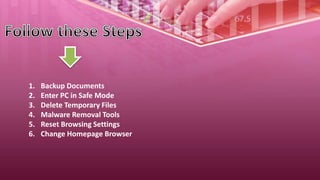
1. Backup Documents
2. Enter PC in Safe Mode
3. Delete Temporary Files
4. Malware Removal Tools
5. Reset Browsing Settings
6. Change Homepage Browser
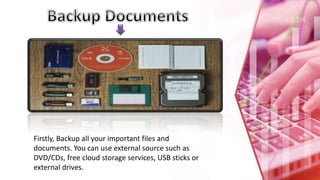
Firstly, Backup all your important files and
documents. You can use external source such as
DVD/CDs, free cloud storage services, USB sticks or
external drives.
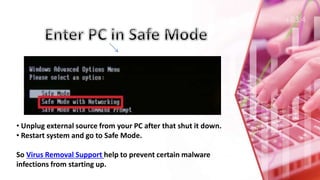
• Unplug external source from your PC after that shut it down.
• Restart system and go to Safe Mode.
So Virus Removal Support help to prevent certain malware
infections from starting up.
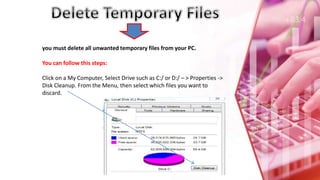
you must delete all unwanted temporary files from your PC.
You can follow this steps:
Click on a My Computer, Select Drive such as C:/ or D:/ – > Properties ->
Disk Cleanup. From the Menu, then select which files you want to
discard.
1. SUPER Antispyware malware tool help identify different
types of malicious software and spyware, and scan and remove
unnecessary files from PC.
2. Kaspersky TDSSKiller is a free edition removal tool, In the
virus removal process eliminate the malicious malware.
Root kit can use admin rights on an infected computer and
provide deep access to other types of malware. Online attackers
can maintain long-term infection and it is difficult to find and
remove them.
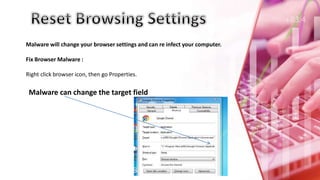
Malware will change your browser settings and can re infect your computer.
Fix Browser Malware :
Right click browser icon, then go Properties.
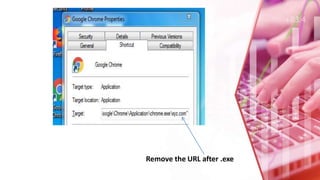
Malware can change the target field
Remove the URL after .exe
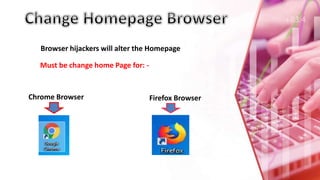
Browser hijackers will alter the Homepage
Must be change home Page for: -
Chrome Browser Firefox Browser
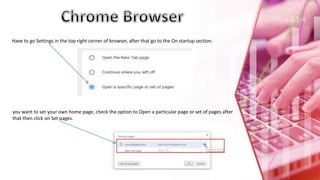
Have to go Settings in the top right corner of browser, after that go to the On startup section.
you want to set your own home page, check the option to Open a particular page or set of pages after
that then click on Set pages.
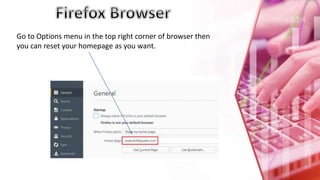
Go to Options menu in the top right corner of browser then
you can reset your homepage as you want.
If Any Query?
You can touch us
www.geekshields.com
support@geekshields.com

Best Virus Removal Process and Recover your data

  • 2.
    virus is adangerous software for your system because it replicate itself, degrade the processing of system, and lost your precious data.
  • 3.
    • Give allowpermission without reading content. • Install already virus infected software. • Open e-mail attachment • Make connection with infected disk or drive. • Open unwanted link • Use pirated software • No using any antivirus program
  • 4.
    • Browser Hijacker •File Infector • Macro Virus • Polymorphic Virus • Multipartite Virus • Direct Action Virus • Boot Sector Virus • Web Scripting Virus • Memory Resident Virus • FAT Virus
  • 5.
    1. Backup Documents 2.Enter PC in Safe Mode 3. Delete Temporary Files 4. Malware Removal Tools 5. Reset Browsing Settings 6. Change Homepage Browser
  • 6.
    Firstly, Backup allyour important files and documents. You can use external source such as DVD/CDs, free cloud storage services, USB sticks or external drives.
  • 7.
    • Unplug externalsource from your PC after that shut it down. • Restart system and go to Safe Mode. So Virus Removal Support help to prevent certain malware infections from starting up.
  • 8.
    you must deleteall unwanted temporary files from your PC. You can follow this steps: Click on a My Computer, Select Drive such as C:/ or D:/ – > Properties -> Disk Cleanup. From the Menu, then select which files you want to discard.
  • 9.
    1. SUPER Antispywaremalware tool help identify different types of malicious software and spyware, and scan and remove unnecessary files from PC. 2. Kaspersky TDSSKiller is a free edition removal tool, In the virus removal process eliminate the malicious malware. Root kit can use admin rights on an infected computer and provide deep access to other types of malware. Online attackers can maintain long-term infection and it is difficult to find and remove them.
  • 10.
    Malware will changeyour browser settings and can re infect your computer. Fix Browser Malware : Right click browser icon, then go Properties. Malware can change the target field
  • 11.
    Remove the URLafter .exe
  • 12.
    Browser hijackers willalter the Homepage Must be change home Page for: - Chrome Browser Firefox Browser
  • 13.
    Have to goSettings in the top right corner of browser, after that go to the On startup section. you want to set your own home page, check the option to Open a particular page or set of pages after that then click on Set pages.
  • 14.
    Go to Optionsmenu in the top right corner of browser then you can reset your homepage as you want.
  • 16.
    If Any Query? Youcan touch us www.geekshields.com support@geekshields.com