Best
Educational
Apps 2023
Kathy LaFerney
Introduction
In an ever evolving technological society,
making use of the latest available resources
to aid in student learning is an important idea
for educators to embrace.
Following, is a compilation of some of the best
educational apps for student use on their
phones, tablets, and laptops which can help
to supplement and reinforce current
curriculum.
If we teach today as we
taught yesterday, we rob our
children of tomorrow.
John Dewey
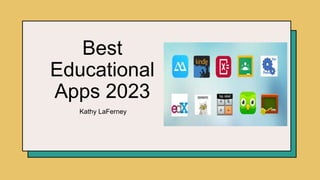
10 Best Educational Apps
1) Khan Academy
2) Quizlet
3) Kahoot!
4) Duolingo
5) PBS Kids Games
6) Quizizz
7) BrainPop
8) Flip (formerly Flipgrid)
9) Google Classroom
10) SplashLearn
Khan Academy
https://www.khanacademy.org/downloads
Khan Academy offers a wide range of courses for students from ages pre-school
through high school.
Engaging lessons utilizing videos, practice, and quizzes are available in everything
from math, science, and engineering to arts, humanities, and economics.
Students can improve comprehension using problem solving and critical thinking
skills.
More about Khan Academy
Intuitive and easy to use. Popular with students,
parents, and teachers.
Khan Academy does not sell personal information to
3rd parties. They are a non-profit whose mission is
to educate. There is no advertising on their site.
Khan Academy is free and comprehensive.
Skills taught and reinforced are highly aligned with
common core and current curriculum guides.
Quizlet
https://quizlet.com/latest
Helpful in preparation for quizzes and tests in a wide
variety of subjects in an engaging format.
Allows students to create, view, and complete flashcards, quizzes, interactive diagrams, and activities
in a wide variety of topics.
Limited features for free. Quizlet Plus needed for full usage at $35.99/year.
Quizlet does not sell personal information collected from children, but Quizlet and 3rd parties may
track and show advertisements to users based on sites used. Quizlet uses encryption such that is
protected by commonly accepted industry standards.
More about Quizlet
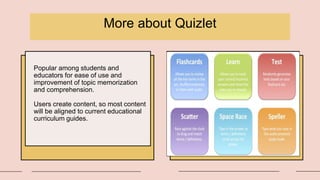
Popular among students and
educators for ease of use and
improvement of topic memorization
and comprehension.
Users create content, so most content
will be aligned to current educational
curriculum guides.
Kahoot!
https://kahoot.com
Fosters learning through
engaging and interactive
game play format.
Easy way for educators to
make reviewing for
quizzes and tests fun and
collaborative.
Flexible and easy to align
with curriculum goals.
.
Free app for teachers as
well as students.
Strong set of rules,
policies and procedures
in place to maintain
security during use.
Platform offers a wide
range of topic ideas
catering to different
subject areas and
interests.
Duolingo
https://www.duolingo.com
Useful in learning foreign languages. Available for approximately 25 foreign
languages.
Uses small, short, interactive, repetitive lessons to learn and reinforce new
language skills.
Helps improve comprehension and memory of language using visual and
auditory methods.
Extremely easy to use and intuitive.
Strong security measures in place to protect against cyber threats, but terms
do not say whether or not they sell user’s data to 3rd parties.
The app is completely free.
Can be used by educators to help students master new material being
covered in their current curriculum.
10
PBS Kids Games
https://pbskids.org
Offers many types of games for
fostering learning about nature, art,
animals, language, music, math,
vocabulary, science and more.
Appropriate for ages three through
elementary school.
Fun and engaging methods for
learning new material and increasing
comprehension.
Promotes cooperation, empathy, and
creative problem solving.
Easy to use. Offers voice instructions,
visual cues and closed captions.
Does not collect personal information
from children. Very safe with no chat
or web browsing features.
Free, interactive, colorful and fun.
Quizizz
https://quizizz.com
Large number of ready made quizzes by teachers are available in a wide array of
subjects.
Teachers can create interactive quizzes which can be shared with students and
used to track their progress.
Makes learning more fun by using an interactive format which allows for insertion
of audio clips, images, and open-ended responses.
Can be launched through Google Classroom.
Employs technical, operational, and logical security measures to keep student
data safe.
Completely free to students.
BrainPop
https://www.brainpop.com
Applicable to all age levels of students
through BrainPop and BrainPopJr.
Provides interactive and educational videos and games in a wide variety of subjects.
Vast array of learning tools and resources for teachers and students.
Cartoon video format can help make difficult subjects more interesting and relatable to a wider
audience of students.
Some material is free, but a fairly hefty $119/yr for BrainPopJr. or $129/yr for BrainPop is needed for
wide usage. (Combo plan available for $159/yr)
Data collected from students is limited to what is necessary for educational purposes of the site. No
sensitive data is collected and students cannot interact with others outside their school, classroom, or
family account.
Flip
https://info.flip.com/en-us.html
Great app for
allowing teachers to
create content that
aligns with the
curriculum.
Engages students
creatively with lessons.
Works well for online
learning.
Allows for asynchronous
learning.
Allows for creative
alternative to text-
only discussions as
students can create
videos to share with
their teacher and
classmates.
Free and easy
way to create
discussion in the
classroom and
support the
curriculum.
Flip is free and
safe to use.
Teachers can
make grids and
topics open to
only their
students.
Google Classroom
https://edu.google.com/intl/ALL_us/workspace-for-education/classroom
Platform that unites all Google Workspace tools together for easy use
by teachers and students.
Teachers can organize, disseminate, and store information and
materials to students without paper.
Easy to customize for individual students or small groups.
Flexible, easy to use and integrate into any classroom and for all
subjects.
Comprehensively useful if seeking to require as few apps as possible
for students to use.
Free and safe to use.
20XX
Comprehensive tool for math and reading which aligns with K-5 curriculum.
Uses game format to make learning fun and engaging.
Easy to use with interactive and adaptive user interface.
Valuable for strengthening math and closing learning gaps both in the
classroom or in an online setting.
Teachers can assign practice to individuals or a whole class and can
monitor progress.
Teachers can use for free. Inexpensive plans available for students starting
at $2.75/month.
The Children’s Online Privacy Protection Act is adhered to in promoting
security for users.
SplashLearn
https://www.splashlearn.com/

Best Educational Apps 2023.pptx

  • 1.
  • 2.
    Introduction In an everevolving technological society, making use of the latest available resources to aid in student learning is an important idea for educators to embrace. Following, is a compilation of some of the best educational apps for student use on their phones, tablets, and laptops which can help to supplement and reinforce current curriculum.
  • 3.
    If we teachtoday as we taught yesterday, we rob our children of tomorrow. John Dewey
  • 4.
    10 Best EducationalApps 1) Khan Academy 2) Quizlet 3) Kahoot! 4) Duolingo 5) PBS Kids Games 6) Quizizz 7) BrainPop 8) Flip (formerly Flipgrid) 9) Google Classroom 10) SplashLearn
  • 5.
    Khan Academy https://www.khanacademy.org/downloads Khan Academyoffers a wide range of courses for students from ages pre-school through high school. Engaging lessons utilizing videos, practice, and quizzes are available in everything from math, science, and engineering to arts, humanities, and economics. Students can improve comprehension using problem solving and critical thinking skills.
  • 6.
    More about KhanAcademy Intuitive and easy to use. Popular with students, parents, and teachers. Khan Academy does not sell personal information to 3rd parties. They are a non-profit whose mission is to educate. There is no advertising on their site. Khan Academy is free and comprehensive. Skills taught and reinforced are highly aligned with common core and current curriculum guides.
  • 7.
    Quizlet https://quizlet.com/latest Helpful in preparationfor quizzes and tests in a wide variety of subjects in an engaging format. Allows students to create, view, and complete flashcards, quizzes, interactive diagrams, and activities in a wide variety of topics. Limited features for free. Quizlet Plus needed for full usage at $35.99/year. Quizlet does not sell personal information collected from children, but Quizlet and 3rd parties may track and show advertisements to users based on sites used. Quizlet uses encryption such that is protected by commonly accepted industry standards.
  • 8.
    More about Quizlet Popularamong students and educators for ease of use and improvement of topic memorization and comprehension. Users create content, so most content will be aligned to current educational curriculum guides.
  • 9.
    Kahoot! https://kahoot.com Fosters learning through engagingand interactive game play format. Easy way for educators to make reviewing for quizzes and tests fun and collaborative. Flexible and easy to align with curriculum goals. . Free app for teachers as well as students. Strong set of rules, policies and procedures in place to maintain security during use. Platform offers a wide range of topic ideas catering to different subject areas and interests.
  • 10.
    Duolingo https://www.duolingo.com Useful in learningforeign languages. Available for approximately 25 foreign languages. Uses small, short, interactive, repetitive lessons to learn and reinforce new language skills. Helps improve comprehension and memory of language using visual and auditory methods. Extremely easy to use and intuitive. Strong security measures in place to protect against cyber threats, but terms do not say whether or not they sell user’s data to 3rd parties. The app is completely free. Can be used by educators to help students master new material being covered in their current curriculum. 10
  • 11.
    PBS Kids Games https://pbskids.org Offersmany types of games for fostering learning about nature, art, animals, language, music, math, vocabulary, science and more. Appropriate for ages three through elementary school. Fun and engaging methods for learning new material and increasing comprehension. Promotes cooperation, empathy, and creative problem solving. Easy to use. Offers voice instructions, visual cues and closed captions. Does not collect personal information from children. Very safe with no chat or web browsing features. Free, interactive, colorful and fun.
  • 12.
    Quizizz https://quizizz.com Large number ofready made quizzes by teachers are available in a wide array of subjects. Teachers can create interactive quizzes which can be shared with students and used to track their progress. Makes learning more fun by using an interactive format which allows for insertion of audio clips, images, and open-ended responses. Can be launched through Google Classroom. Employs technical, operational, and logical security measures to keep student data safe. Completely free to students.
  • 13.
    BrainPop https://www.brainpop.com Applicable to allage levels of students through BrainPop and BrainPopJr. Provides interactive and educational videos and games in a wide variety of subjects. Vast array of learning tools and resources for teachers and students. Cartoon video format can help make difficult subjects more interesting and relatable to a wider audience of students. Some material is free, but a fairly hefty $119/yr for BrainPopJr. or $129/yr for BrainPop is needed for wide usage. (Combo plan available for $159/yr) Data collected from students is limited to what is necessary for educational purposes of the site. No sensitive data is collected and students cannot interact with others outside their school, classroom, or family account.
  • 14.
    Flip https://info.flip.com/en-us.html Great app for allowingteachers to create content that aligns with the curriculum. Engages students creatively with lessons. Works well for online learning. Allows for asynchronous learning. Allows for creative alternative to text- only discussions as students can create videos to share with their teacher and classmates. Free and easy way to create discussion in the classroom and support the curriculum. Flip is free and safe to use. Teachers can make grids and topics open to only their students.
  • 15.
    Google Classroom https://edu.google.com/intl/ALL_us/workspace-for-education/classroom Platform thatunites all Google Workspace tools together for easy use by teachers and students. Teachers can organize, disseminate, and store information and materials to students without paper. Easy to customize for individual students or small groups. Flexible, easy to use and integrate into any classroom and for all subjects. Comprehensively useful if seeking to require as few apps as possible for students to use. Free and safe to use. 20XX
  • 16.
    Comprehensive tool formath and reading which aligns with K-5 curriculum. Uses game format to make learning fun and engaging. Easy to use with interactive and adaptive user interface. Valuable for strengthening math and closing learning gaps both in the classroom or in an online setting. Teachers can assign practice to individuals or a whole class and can monitor progress. Teachers can use for free. Inexpensive plans available for students starting at $2.75/month. The Children’s Online Privacy Protection Act is adhered to in promoting security for users. SplashLearn https://www.splashlearn.com/