Rui
Inocêncio
Outsystems Associate Mobile Developer
@
in
rui@globalsmartpro.com
/rui-inocencio
Speech Recognition
and
Optical Character Recognition
Using plugins that use google Artificial Intelligence software to
add some high-end feature to your applications
4 |
What is Speech Recognition and
how it relates to artificial
intelligence technology?
Speech Recognition and Optical Character Recognition
5 | Speech Recognition and Optical Character Recognition
• Speech Recognition is a generic name of the
software used to convert audio speech to text.
(the plugin used in this presentation use:
Google Cloud Speech-To-Text).
• “Powered by machine learning:
Apply the most advanced deep-learning neural
network algorithms to audio for speech
recognition with unparalleled accuracy. Accuracy
improves over time as Google improves the
internal speech recognition technology used by
Google products.”
https://cloud.google.com/speech-to-text/
6 |
What is OCR
(Optical Character Recognition)
and how it relates to artificial
intelligence technology?
Speech Recognition and Optical Character Recognition
7 | Speech Recognition and Optical Character Recognition
• OCR
It is a software which recognizes characters in an
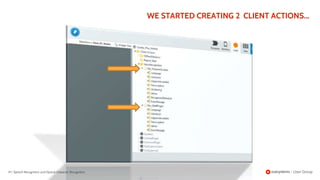
image and produces a string of characters
(the plugins used in this presentation use:
Cloud Vision AI from google).
• “Vision AI
Google Cloud’s Vision API offers powerful
pre-trained machine learning models through
REST and RPC APIs..”
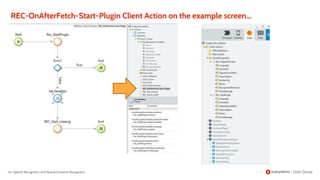
https://cloud.google.com/vision/
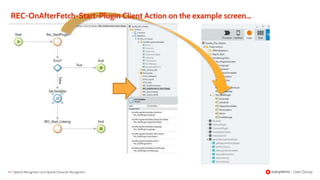
8 | Speech Recognition and Optical Character Recognition
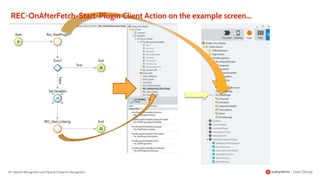
• “Vision AI
Google Cloud’s Vision API offers powerful
through
REST and RPC APIs..”
https://cloud.google.com/vision/
• “ :
Apply the most advanced
algorithms to audio for speech
recognition with unparalleled accuracy. Accuracy
improves over time as Google improves the
internal speech recognition technology used by
Google products.”
https://cloud.google.com/speech-to-text/
9 | Speech Recognition and Optical Character Recognition
• Machine Learning : is the learning in which
machine can learn by its own without being
explicitly programmed. It is an application of AI
that provide system the ability to automatically
learn and improve from experience.
https://www.geeksforgeeks.org/difference-between-machine-learning-and-
artificial-intelligence/
So, What is Machine
Learning?
10 |
What are an Artificial Neural Networks ?
Speech Recognition and Optical Character Recognition
Source: Wikipedia, the free encyclopedia
11 |
What are an Artificial Neural Networks ?
Speech Recognition and Optical Character Recognition
Source: Wikipedia, the free encyclopedia
12 |
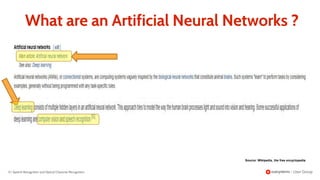
What are an Artificial Neural Networks ?
Speech Recognition and Optical Character Recognition
Source: Wikipedia, the free encyclopedia
13 |
Why should we use Voice
Recognition tecnology ?
Speech Recognition and Optical Character Recognition
14 | Speech Recognition and Optical Character Recognition
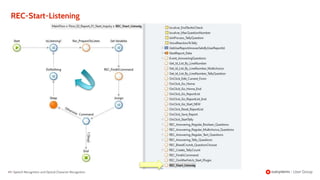
• for Convinience :
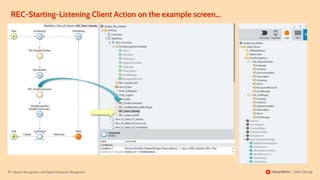
If you have a cooking application it would be very interesting if
you could give voice commands to turn the page, ask for
ingredients, cooking time, temperature and set alarms or
timers, instead of having to use your dirty finger over the
screen to do it.
If you are in your car, It would be nice to use the voice to open
the windows or turn on the radio.
• first of all it is fancy :
Who did not get amazed while interacting with Alexa and/or
Siri.
• for Necessity:
If you are a factory worker and have your hands
constantly busy and have to fill up a report, then having
the possibility to use the voice to do it will be a
differentiator factor (a much-appreciated feature).
15 |
Why should we use OCR
(Optical Character Recognition)
tecnology ?
Speech Recognition and Optical Character Recognition
16 | Speech Recognition and Optical Character Recognition
• Read printed and handwritten text and numbers
from an image.
• Automatically add labes to images.
• Automatically categorize images.
• Compare images.
17 |
What all this have to do with
outsystems?
Speech Recognition and Optical Character Recognition
18 | Speech Recognition and Optical Character Recognition
• You can use those APIs directly in your
applications or create a plugin that makes it
easier to access those APIs for a specific task.
• The Speech-To-Text and Cloud Vision AI
Software are available for developers through
APIs provided by google cloud services.
• Or you can use forge plugins already done by
someone that facilitates the utilization of those
APIs.
19 |
Outsystems Forge Plugins
Speech Recognition and Optical Character Recognition
The OutSystems Forge is a repository of reusable, open code modules,
connectors, and UI components to help speed up app delivery time.
20 |Speech Recognition and Optical Character Recognition
• Google Cloud Vision OCR
An extension that allows applications to use Google's
Cloud Vision API (https://cloud.google.com/vision/) to
perform OCR (Optical Character Recognition) on
images extracting those characters from the image
into a text.
• Speech Recognition Plugin:
An extension that allows applications to use
Google's voice recognition API
(https://cloud.google.com/speech-to-text/)
to transform speech into text.
21 | Speech Recognition and Optical Character Recognition
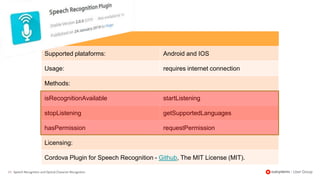
Supported plataforms: Android and IOS
Usage: requires internet connection
Methods:
isRecognitionAvailable startListening
stopListening getSupportedLanguages
hasPermission requestPermission
Licensing:
Cordova Plugin for Speech Recognition - Github, The MIT License (MIT).
22 | Speech Recognition and Optical Character Recognition
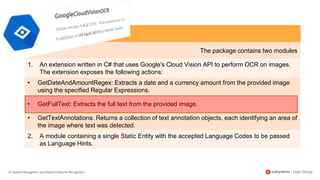
The package contains two modules
1. An extension written in C# that uses Google's Cloud Vision API to perform OCR on images.
The extension exposes the following actions:
• GetDateAndAmountRegex: Extracts a date and a currency amount from the provided image
using the specified Regular Expressions.
• GetFullText: Extracts the full text from the provided image.
• GetTextAnnotations: Returns a collection of text annotation objects, each identifying an area of
the image where text was detected.
2. A module containing a single Static Entity with the accepted Language Codes to be passed
as Language Hints.
23 | Speech Recognition and Optical Character Recognition
PoC (Prove of Concept):
Using Speech Recognition Plugin Into an application
(Quality Plus)
• It was intended to be used as a complete user interface (using the
voice) between the user and the application.
• The example application is a Report application and we can
subdivide the voice interface in 2 parts:
a) Navigation controls (to move around the menus
provided in the application)
b) Answering question (to select and/or answer the
questions presented in the reports)
24 | Speech Recognition and Optical Character Recognition
PoC:
Using Google Cloud Vision OCR Into an application
(Quality Plus)
• In our example case (a report application), during a report we
want to take a picture of a serial number or any other identification
number of a product and have the plugin retrieve the numbers and
characters to be added to the database.
So...
It is time to see what we
talking about.
26 | Speech Recognition and Optical Character Recognition
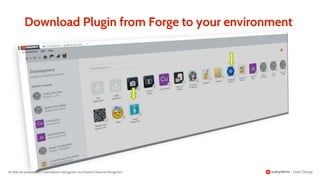
Go to Forge page and download the plugin or install
it directly in your outsystems environment:
Speech Recognition Plugin
https://www.outsystems.com/forge/component-
overview/2123/speech-recognition-plugin
So... How we do to use
these plugins?
27 | Speech Recognition and Optical Character Recognition
GoogleCloudVisionOCR
https://www.outsystems.com/forge/component-
overview/1572/googlecloudvisionocr
28 |
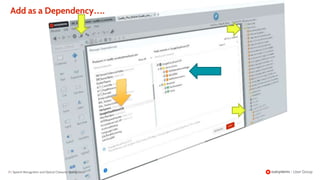
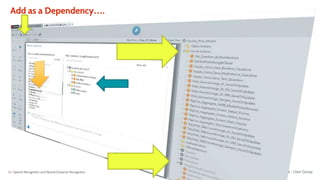
Download Plugin from Forge to your environment
Add the presentation’s nameSpeech Recognition and Optical Character Recognition
29 |
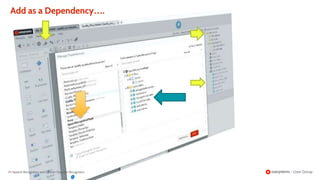
Add as a Dependency….
Speech Recognition and Optical Character Recognition
30 |
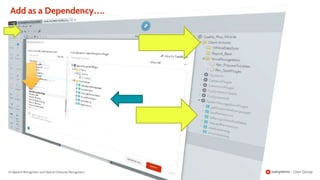
Add as a Dependency….
Speech Recognition and Optical Character Recognition
31 |
Add as a Dependency….
Speech Recognition and Optical Character Recognition
32 |
Add as a Dependency….
Speech Recognition and Optical Character Recognition
Next section
We gonna see some code...
Speech Recognition
Implementing Speech Recognition into an aplication
PoC implemtation:
- Quality Plus -
35 |
What is Quality Plus?
Speech Recognition and Optical Character Recognition
36 |
It is a Report Application...
Speech Recognition and Optical Character Recognition
37 |
That use Voice Recognition to:
Speech Recognition and Optical Character Recognition
• Answer questions.
• Navigate through the menus.
38 |
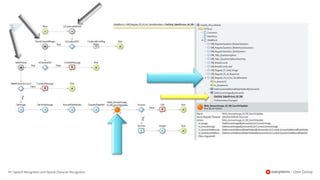
WE START CREATING SOME SCREEN ACTIONS THAT WILL BE USED TO:
- START AND CHECK IF PLUGIN CAN BE USED.
- USE THE PLUGIN TO CATCH USER SPEECH.
- ASSOCIATE ANY POSSIBLE ACTION THAT THE APPLICATION CAN
DO WITH THE GIVEN SPEECH COMMAND.
Speech Recognition and Optical Character Recognition
39 |
WE STARTED CREATING 2 CLIENT ACTIONS...
Speech Recognition and Optical Character Recognition
40 | Speech Recognition and Optical Character Recognition
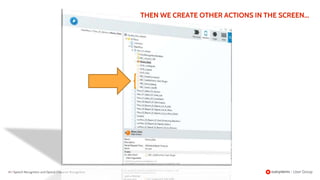
THEN WE CREATE OTHER ACTIONS IN THE SCREEN...
41 | Speech Recognition and Optical Character Recognition
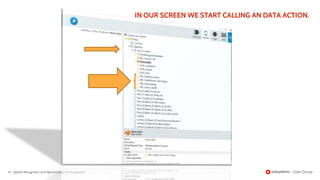
IN OUR SCREEN WE START CALLING AN DATA ACTION.
42 | Speech Recognition and Optical Character Recognition
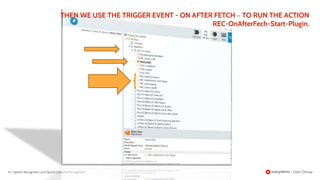
THEN WE USE THE TRIGGER EVENT - ON AFTER FETCH – TO RUN THE ACTION
REC-OnAfterFech-Start-Plugin.
43 | Speech Recognition and Optical Character Recognition
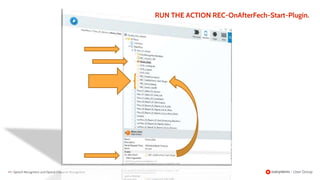
RUN THE ACTION REC-OnAfterFech-Start-Plugin.
44 |
INSIDE THE ACTIONS
Speech Recognition and Optical Character Recognition
45 |
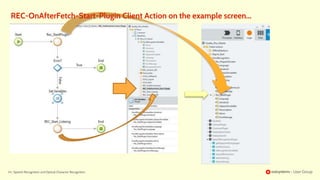
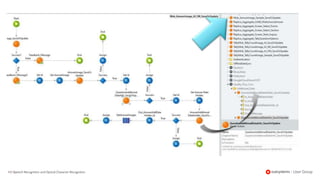
REC-OnAfterFetch-Start-Plugin
Client Action specific to the
target screen
Speech Recognition and Optical Character Recognition
46 | Speech Recognition and Optical Character Recognition
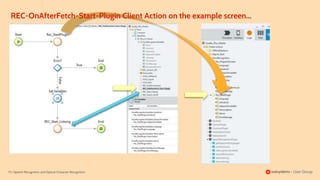
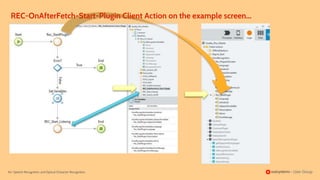
REC-OnAfterFetch-Start-Plugin Client Action on the example screen...
47 | Speech Recognition and Optical Character Recognition
REC-OnAfterFetch-Start-Plugin Client Action on the example screen...
48 | Speech Recognition and Optical Character Recognition
REC-OnAfterFetch-Start-Plugin Client Action on the example screen...
49 |
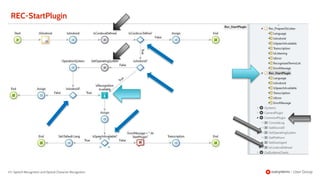
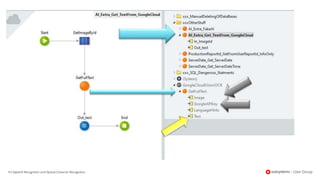
REC-Start-Plugin
Common Client Action
Speech Recognition and Optical Character Recognition
50 |
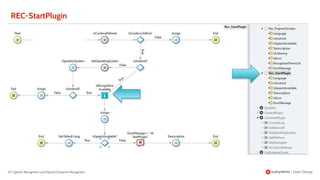
REC-StartPlugin
Speech Recognition and Optical Character Recognition
51 |
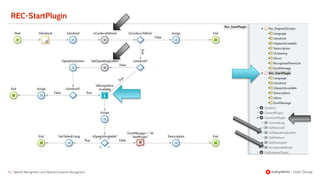
REC-StartPlugin
Speech Recognition and Optical Character Recognition
52 |
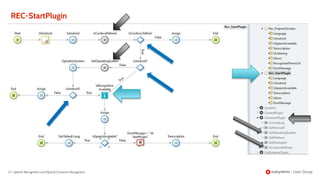
REC-StartPlugin
Speech Recognition and Optical Character Recognition
53 |
REC-StartPlugin
Speech Recognition and Optical Character Recognition
54 | Speech Recognition and Optical Character Recognition
REC-OnAfterFetch-Start-Plugin Client Action on the example screen...
55 |
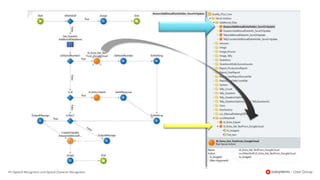
REC-Start-Listening
Client Action specific to the target
screen
Speech Recognition and Optical Character Recognition
56 | Speech Recognition and Optical Character Recognition
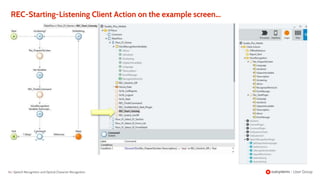
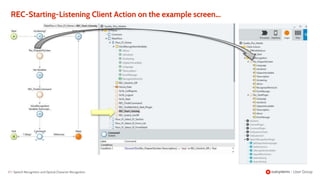
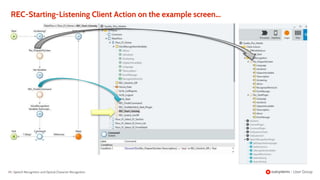
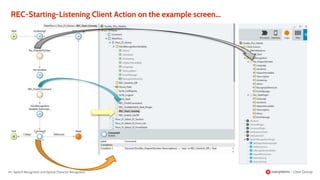
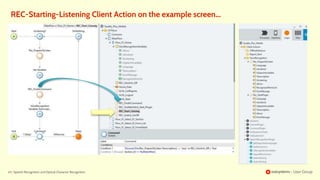
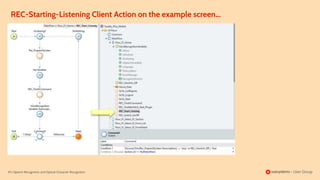
REC-Starting-Listening Client Action on the example screen...
57 | Speech Recognition and Optical Character Recognition
REC-Starting-Listening Client Action on the example screen...
58 | Speech Recognition and Optical Character Recognition
REC-Starting-Listening Client Action on the example screen...
59 | Speech Recognition and Optical Character Recognition
REC-Starting-Listening Client Action on the example screen...
60 |
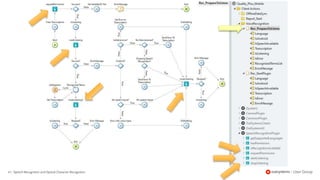
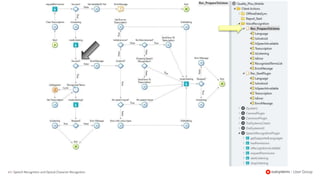
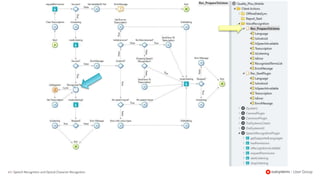
REC-PrepareToListen
Common Client Action
Speech Recognition and Optical Character Recognition
61 | Speech Recognition and Optical Character Recognition
62 | Speech Recognition and Optical Character Recognition
63 | Speech Recognition and Optical Character Recognition
64 | Speech Recognition and Optical Character Recognition
REC-Starting-Listening Client Action on the example screen...
65 |
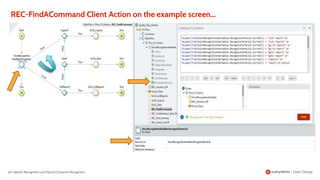
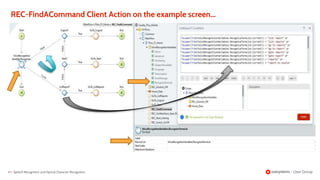
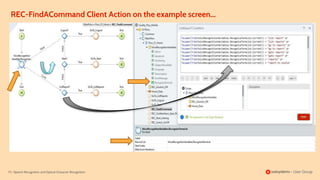
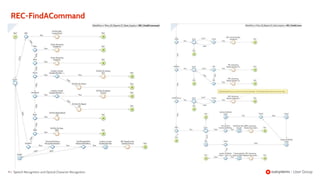
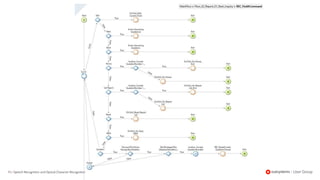
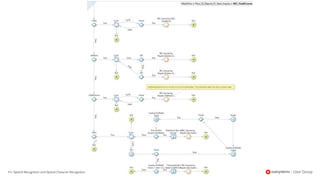
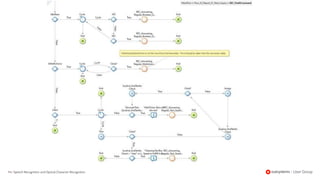
REC-FindACommand
Common Client Action
Speech Recognition and Optical Character Recognition
66 | Speech Recognition and Optical Character Recognition
REC-FindACommand Client Action on the example screen...
67 | Speech Recognition and Optical Character Recognition
REC-FindACommand Client Action on the example screen...
68 |
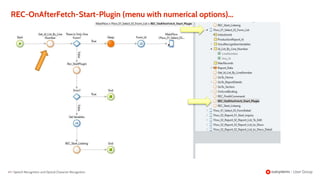
REC-OnAfterFetch-Start-Plugin
(menu with numerical options)
Speech Recognition and Optical Character Recognition
69 | Speech Recognition and Optical Character Recognition
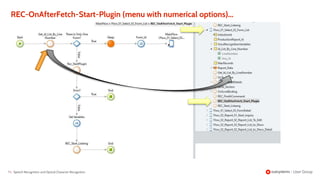
REC-OnAfterFetch-Start-Plugin (menu with numerical options)...
70 | Speech Recognition and Optical Character Recognition
REC-OnAfterFetch-Start-Plugin Client Action on the example screen...
71 | Speech Recognition and Optical Character Recognition
REC-OnAfterFetch-Start-Plugin (menu with numerical options)...
72 | Speech Recognition and Optical Character Recognition
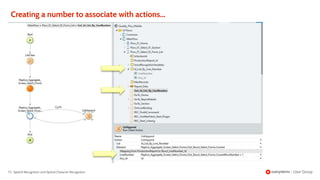
Creating a number to associate with actions...
73 |
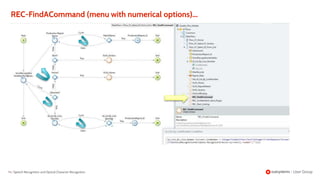
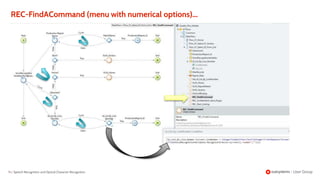
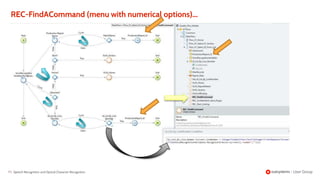
REC-FindACommand
(menu with numerical options)
Speech Recognition and Optical Character Recognition
74 | Speech Recognition and Optical Character Recognition
REC-FindACommand (menu with numerical options)...
75 | Speech Recognition and Optical Character Recognition
REC-FindACommand Client Action on the example screen...
76 | Speech Recognition and Optical Character Recognition
REC-FindACommand (menu with numerical options)...
77 | Speech Recognition and Optical Character Recognition
REC-FindACommand (menu with numerical options)...
78 |
REC-Start-Listening
(menu with numerical options)
Speech Recognition and Optical Character Recognition
79 | Speech Recognition and Optical Character Recognition
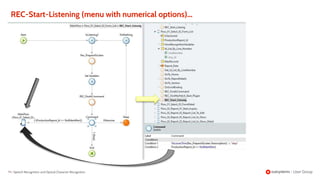
REC-Start-Listening (menu with numerical options)...
80 | Speech Recognition and Optical Character Recognition
REC-Starting-Listening Client Action on the example screen...
81 | Speech Recognition and Optical Character Recognition
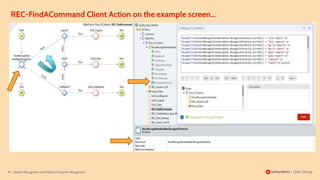
REC-FindACommand Client Action on the example screen...
82 |
WELL! AND IF WE WANNA
ANSWER SOME QUESTIONS?
Speech Recognition and Optical Character Recognition
83 |
THEN, THINGS STARTED TO
BECOME A LITTLE MORE
COMPLEX...
Speech Recognition and Optical Character Recognition
84 |
REC-OnAfterFetch-Start-Plugin
specific Client Action
answering questions
Speech Recognition and Optical Character Recognition
85 | Speech Recognition and Optical Character Recognition
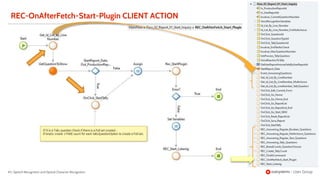
REC-OnAfterFetch-Start-Plugin CLIENT ACTION
86 | Speech Recognition and Optical Character Recognition
REC-OnAfterFetch-Start-Plugin Client Action on the example screen...
87 |
REC-Start-Listening
specific Client Action
answering questions
Speech Recognition and Optical Character Recognition
88 |
REC-Start-Listening
Speech Recognition and Optical Character Recognition
89 | Speech Recognition and Optical Character Recognition
REC-Starting-Listening Client Action on the example screen...
90 |
REC-FindACommand
specific Client Action
answering questions
Speech Recognition and Optical Character Recognition
91 |
REC-FindACommand
Speech Recognition and Optical Character Recognition
92 | Speech Recognition and Optical Character Recognition
93 | Speech Recognition and Optical Character Recognition
94 | Speech Recognition and Optical Character Recognition
And there is more…..
Using Cloud Vision AI
Our example application
-Quality Plus-
97 |
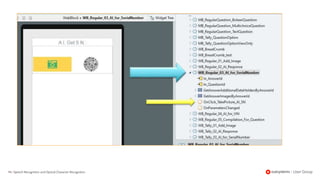
use OCR to:
Speech Recognition and Optical Character Recognition
Extract the Serial Number or
any other identification number
from a picture taken by the user
while doing a report.
98 | Speech Recognition and Optical Character Recognition
99 | Speech Recognition and Optical Character Recognition
100 |Speech Recognition and Optical Character Recognition
101 | Speech Recognition and Optical Character Recognition
102 |Speech Recognition and Optical Character Recognition
103 |
END
Speech Recognition and Optical Character Recognition

Belgium Outsystems user group speech recognition ocr

  • 2.
    Rui Inocêncio Outsystems Associate MobileDeveloper @ in rui@globalsmartpro.com /rui-inocencio
  • 3.
    Speech Recognition and Optical CharacterRecognition Using plugins that use google Artificial Intelligence software to add some high-end feature to your applications
  • 4.
    4 | What isSpeech Recognition and how it relates to artificial intelligence technology? Speech Recognition and Optical Character Recognition
  • 5.
    5 | SpeechRecognition and Optical Character Recognition • Speech Recognition is a generic name of the software used to convert audio speech to text. (the plugin used in this presentation use: Google Cloud Speech-To-Text). • “Powered by machine learning: Apply the most advanced deep-learning neural network algorithms to audio for speech recognition with unparalleled accuracy. Accuracy improves over time as Google improves the internal speech recognition technology used by Google products.” https://cloud.google.com/speech-to-text/
  • 6.
    6 | What isOCR (Optical Character Recognition) and how it relates to artificial intelligence technology? Speech Recognition and Optical Character Recognition
  • 7.
    7 | SpeechRecognition and Optical Character Recognition • OCR It is a software which recognizes characters in an image and produces a string of characters (the plugins used in this presentation use: Cloud Vision AI from google). • “Vision AI Google Cloud’s Vision API offers powerful pre-trained machine learning models through REST and RPC APIs..” https://cloud.google.com/vision/
  • 8.
    8 | SpeechRecognition and Optical Character Recognition • “Vision AI Google Cloud’s Vision API offers powerful through REST and RPC APIs..” https://cloud.google.com/vision/ • “ : Apply the most advanced algorithms to audio for speech recognition with unparalleled accuracy. Accuracy improves over time as Google improves the internal speech recognition technology used by Google products.” https://cloud.google.com/speech-to-text/
  • 9.
    9 | SpeechRecognition and Optical Character Recognition • Machine Learning : is the learning in which machine can learn by its own without being explicitly programmed. It is an application of AI that provide system the ability to automatically learn and improve from experience. https://www.geeksforgeeks.org/difference-between-machine-learning-and- artificial-intelligence/ So, What is Machine Learning?
  • 10.
    10 | What arean Artificial Neural Networks ? Speech Recognition and Optical Character Recognition Source: Wikipedia, the free encyclopedia
  • 11.
    11 | What arean Artificial Neural Networks ? Speech Recognition and Optical Character Recognition Source: Wikipedia, the free encyclopedia
  • 12.
    12 | What arean Artificial Neural Networks ? Speech Recognition and Optical Character Recognition Source: Wikipedia, the free encyclopedia
  • 13.
    13 | Why shouldwe use Voice Recognition tecnology ? Speech Recognition and Optical Character Recognition
  • 14.
    14 | SpeechRecognition and Optical Character Recognition • for Convinience : If you have a cooking application it would be very interesting if you could give voice commands to turn the page, ask for ingredients, cooking time, temperature and set alarms or timers, instead of having to use your dirty finger over the screen to do it. If you are in your car, It would be nice to use the voice to open the windows or turn on the radio. • first of all it is fancy : Who did not get amazed while interacting with Alexa and/or Siri. • for Necessity: If you are a factory worker and have your hands constantly busy and have to fill up a report, then having the possibility to use the voice to do it will be a differentiator factor (a much-appreciated feature).
  • 15.
    15 | Why shouldwe use OCR (Optical Character Recognition) tecnology ? Speech Recognition and Optical Character Recognition
  • 16.
    16 | SpeechRecognition and Optical Character Recognition • Read printed and handwritten text and numbers from an image. • Automatically add labes to images. • Automatically categorize images. • Compare images.
  • 17.
    17 | What allthis have to do with outsystems? Speech Recognition and Optical Character Recognition
  • 18.
    18 | SpeechRecognition and Optical Character Recognition • You can use those APIs directly in your applications or create a plugin that makes it easier to access those APIs for a specific task. • The Speech-To-Text and Cloud Vision AI Software are available for developers through APIs provided by google cloud services. • Or you can use forge plugins already done by someone that facilitates the utilization of those APIs.
  • 19.
    19 | Outsystems ForgePlugins Speech Recognition and Optical Character Recognition The OutSystems Forge is a repository of reusable, open code modules, connectors, and UI components to help speed up app delivery time.
  • 20.
    20 |Speech Recognitionand Optical Character Recognition • Google Cloud Vision OCR An extension that allows applications to use Google's Cloud Vision API (https://cloud.google.com/vision/) to perform OCR (Optical Character Recognition) on images extracting those characters from the image into a text. • Speech Recognition Plugin: An extension that allows applications to use Google's voice recognition API (https://cloud.google.com/speech-to-text/) to transform speech into text.
  • 21.
    21 | SpeechRecognition and Optical Character Recognition Supported plataforms: Android and IOS Usage: requires internet connection Methods: isRecognitionAvailable startListening stopListening getSupportedLanguages hasPermission requestPermission Licensing: Cordova Plugin for Speech Recognition - Github, The MIT License (MIT).
  • 22.
    22 | SpeechRecognition and Optical Character Recognition The package contains two modules 1. An extension written in C# that uses Google's Cloud Vision API to perform OCR on images. The extension exposes the following actions: • GetDateAndAmountRegex: Extracts a date and a currency amount from the provided image using the specified Regular Expressions. • GetFullText: Extracts the full text from the provided image. • GetTextAnnotations: Returns a collection of text annotation objects, each identifying an area of the image where text was detected. 2. A module containing a single Static Entity with the accepted Language Codes to be passed as Language Hints.
  • 23.
    23 | SpeechRecognition and Optical Character Recognition PoC (Prove of Concept): Using Speech Recognition Plugin Into an application (Quality Plus) • It was intended to be used as a complete user interface (using the voice) between the user and the application. • The example application is a Report application and we can subdivide the voice interface in 2 parts: a) Navigation controls (to move around the menus provided in the application) b) Answering question (to select and/or answer the questions presented in the reports)
  • 24.
    24 | SpeechRecognition and Optical Character Recognition PoC: Using Google Cloud Vision OCR Into an application (Quality Plus) • In our example case (a report application), during a report we want to take a picture of a serial number or any other identification number of a product and have the plugin retrieve the numbers and characters to be added to the database.
  • 25.
    So... It is timeto see what we talking about.
  • 26.
    26 | SpeechRecognition and Optical Character Recognition Go to Forge page and download the plugin or install it directly in your outsystems environment: Speech Recognition Plugin https://www.outsystems.com/forge/component- overview/2123/speech-recognition-plugin So... How we do to use these plugins?
  • 27.
    27 | SpeechRecognition and Optical Character Recognition GoogleCloudVisionOCR https://www.outsystems.com/forge/component- overview/1572/googlecloudvisionocr
  • 28.
    28 | Download Pluginfrom Forge to your environment Add the presentation’s nameSpeech Recognition and Optical Character Recognition
  • 29.
    29 | Add asa Dependency…. Speech Recognition and Optical Character Recognition
  • 30.
    30 | Add asa Dependency…. Speech Recognition and Optical Character Recognition
  • 31.
    31 | Add asa Dependency…. Speech Recognition and Optical Character Recognition
  • 32.
    32 | Add asa Dependency…. Speech Recognition and Optical Character Recognition
  • 33.
    Next section We gonnasee some code...
  • 34.
    Speech Recognition Implementing SpeechRecognition into an aplication PoC implemtation: - Quality Plus -
  • 35.
    35 | What isQuality Plus? Speech Recognition and Optical Character Recognition
  • 36.
    36 | It isa Report Application... Speech Recognition and Optical Character Recognition
  • 37.
    37 | That useVoice Recognition to: Speech Recognition and Optical Character Recognition • Answer questions. • Navigate through the menus.
  • 38.
    38 | WE STARTCREATING SOME SCREEN ACTIONS THAT WILL BE USED TO: - START AND CHECK IF PLUGIN CAN BE USED. - USE THE PLUGIN TO CATCH USER SPEECH. - ASSOCIATE ANY POSSIBLE ACTION THAT THE APPLICATION CAN DO WITH THE GIVEN SPEECH COMMAND. Speech Recognition and Optical Character Recognition
  • 39.
    39 | WE STARTEDCREATING 2 CLIENT ACTIONS... Speech Recognition and Optical Character Recognition
  • 40.
    40 | SpeechRecognition and Optical Character Recognition THEN WE CREATE OTHER ACTIONS IN THE SCREEN...
  • 41.
    41 | SpeechRecognition and Optical Character Recognition IN OUR SCREEN WE START CALLING AN DATA ACTION.
  • 42.
    42 | SpeechRecognition and Optical Character Recognition THEN WE USE THE TRIGGER EVENT - ON AFTER FETCH – TO RUN THE ACTION REC-OnAfterFech-Start-Plugin.
  • 43.
    43 | SpeechRecognition and Optical Character Recognition RUN THE ACTION REC-OnAfterFech-Start-Plugin.
  • 44.
    44 | INSIDE THEACTIONS Speech Recognition and Optical Character Recognition
  • 45.
    45 | REC-OnAfterFetch-Start-Plugin Client Actionspecific to the target screen Speech Recognition and Optical Character Recognition
  • 46.
    46 | SpeechRecognition and Optical Character Recognition REC-OnAfterFetch-Start-Plugin Client Action on the example screen...
  • 47.
    47 | SpeechRecognition and Optical Character Recognition REC-OnAfterFetch-Start-Plugin Client Action on the example screen...
  • 48.
    48 | SpeechRecognition and Optical Character Recognition REC-OnAfterFetch-Start-Plugin Client Action on the example screen...
  • 49.
    49 | REC-Start-Plugin Common ClientAction Speech Recognition and Optical Character Recognition
  • 50.
    50 | REC-StartPlugin Speech Recognitionand Optical Character Recognition
  • 51.
    51 | REC-StartPlugin Speech Recognitionand Optical Character Recognition
  • 52.
    52 | REC-StartPlugin Speech Recognitionand Optical Character Recognition
  • 53.
    53 | REC-StartPlugin Speech Recognitionand Optical Character Recognition
  • 54.
    54 | SpeechRecognition and Optical Character Recognition REC-OnAfterFetch-Start-Plugin Client Action on the example screen...
  • 55.
    55 | REC-Start-Listening Client Actionspecific to the target screen Speech Recognition and Optical Character Recognition
  • 56.
    56 | SpeechRecognition and Optical Character Recognition REC-Starting-Listening Client Action on the example screen...
  • 57.
    57 | SpeechRecognition and Optical Character Recognition REC-Starting-Listening Client Action on the example screen...
  • 58.
    58 | SpeechRecognition and Optical Character Recognition REC-Starting-Listening Client Action on the example screen...
  • 59.
    59 | SpeechRecognition and Optical Character Recognition REC-Starting-Listening Client Action on the example screen...
  • 60.
    60 | REC-PrepareToListen Common ClientAction Speech Recognition and Optical Character Recognition
  • 61.
    61 | SpeechRecognition and Optical Character Recognition
  • 62.
    62 | SpeechRecognition and Optical Character Recognition
  • 63.
    63 | SpeechRecognition and Optical Character Recognition
  • 64.
    64 | SpeechRecognition and Optical Character Recognition REC-Starting-Listening Client Action on the example screen...
  • 65.
    65 | REC-FindACommand Common ClientAction Speech Recognition and Optical Character Recognition
  • 66.
    66 | SpeechRecognition and Optical Character Recognition REC-FindACommand Client Action on the example screen...
  • 67.
    67 | SpeechRecognition and Optical Character Recognition REC-FindACommand Client Action on the example screen...
  • 68.
    68 | REC-OnAfterFetch-Start-Plugin (menu withnumerical options) Speech Recognition and Optical Character Recognition
  • 69.
    69 | SpeechRecognition and Optical Character Recognition REC-OnAfterFetch-Start-Plugin (menu with numerical options)...
  • 70.
    70 | SpeechRecognition and Optical Character Recognition REC-OnAfterFetch-Start-Plugin Client Action on the example screen...
  • 71.
    71 | SpeechRecognition and Optical Character Recognition REC-OnAfterFetch-Start-Plugin (menu with numerical options)...
  • 72.
    72 | SpeechRecognition and Optical Character Recognition Creating a number to associate with actions...
  • 73.
    73 | REC-FindACommand (menu withnumerical options) Speech Recognition and Optical Character Recognition
  • 74.
    74 | SpeechRecognition and Optical Character Recognition REC-FindACommand (menu with numerical options)...
  • 75.
    75 | SpeechRecognition and Optical Character Recognition REC-FindACommand Client Action on the example screen...
  • 76.
    76 | SpeechRecognition and Optical Character Recognition REC-FindACommand (menu with numerical options)...
  • 77.
    77 | SpeechRecognition and Optical Character Recognition REC-FindACommand (menu with numerical options)...
  • 78.
    78 | REC-Start-Listening (menu withnumerical options) Speech Recognition and Optical Character Recognition
  • 79.
    79 | SpeechRecognition and Optical Character Recognition REC-Start-Listening (menu with numerical options)...
  • 80.
    80 | SpeechRecognition and Optical Character Recognition REC-Starting-Listening Client Action on the example screen...
  • 81.
    81 | SpeechRecognition and Optical Character Recognition REC-FindACommand Client Action on the example screen...
  • 82.
    82 | WELL! ANDIF WE WANNA ANSWER SOME QUESTIONS? Speech Recognition and Optical Character Recognition
  • 83.
    83 | THEN, THINGSSTARTED TO BECOME A LITTLE MORE COMPLEX... Speech Recognition and Optical Character Recognition
  • 84.
    84 | REC-OnAfterFetch-Start-Plugin specific ClientAction answering questions Speech Recognition and Optical Character Recognition
  • 85.
    85 | SpeechRecognition and Optical Character Recognition REC-OnAfterFetch-Start-Plugin CLIENT ACTION
  • 86.
    86 | SpeechRecognition and Optical Character Recognition REC-OnAfterFetch-Start-Plugin Client Action on the example screen...
  • 87.
    87 | REC-Start-Listening specific ClientAction answering questions Speech Recognition and Optical Character Recognition
  • 88.
    88 | REC-Start-Listening Speech Recognitionand Optical Character Recognition
  • 89.
    89 | SpeechRecognition and Optical Character Recognition REC-Starting-Listening Client Action on the example screen...
  • 90.
    90 | REC-FindACommand specific ClientAction answering questions Speech Recognition and Optical Character Recognition
  • 91.
    91 | REC-FindACommand Speech Recognitionand Optical Character Recognition
  • 92.
    92 | SpeechRecognition and Optical Character Recognition
  • 93.
    93 | SpeechRecognition and Optical Character Recognition
  • 94.
    94 | SpeechRecognition and Optical Character Recognition
  • 95.
    And there ismore….. Using Cloud Vision AI
  • 96.
  • 97.
    97 | use OCRto: Speech Recognition and Optical Character Recognition Extract the Serial Number or any other identification number from a picture taken by the user while doing a report.
  • 98.
    98 | SpeechRecognition and Optical Character Recognition
  • 99.
    99 | SpeechRecognition and Optical Character Recognition
  • 100.
    100 |Speech Recognitionand Optical Character Recognition
  • 101.
    101 | SpeechRecognition and Optical Character Recognition
  • 102.
    102 |Speech Recognitionand Optical Character Recognition
  • 103.
    103 | END Speech Recognitionand Optical Character Recognition