Being a Good Data Provider  Alastair Dunning JISC Programme Manager - Digitisation a.dunning AT jisc.ac.uk , 0203 006 6065 March 2011, Oxford This presentation is intended to give some brief advice for those publishing digital content (digital images, cultural heritage, scholarly information etc.) on the Internet
Outline Being a Good Data Provider: A simple thing gets complex Cool URIs Being Friends with Google, Is Google Enough? International Portals Geographies Re-Use and APIs Licensing
Cool URIs http://www.ariadne.ac.uk/issue31/web-focus/ URI ( Uniform Resource Identifier ) refers to the "generic set of all names/addresses that are short strings that refer to resources" whereas URI ( Uniform Resource Locator ) is "an informal term (no longer used in technical specifications) associated with popular URI schemes: http, ftp, mailto, etc.“ Keep them  stable ,  memorable  and  consistent – develop a short URI policy
Cool URIs Where do URIs get quoted? – Often taken out of their environment Publicity material – expensive to reprint Academic Citations – damages scholarly trust (plus citation guidelines?) Bookmarks within browser or on social bookmarking sites Emails (therefore less than 76 characters, avoid underscores) Blogs and other URIs By search engines – loss will inhibit resource discovery  Guesswork – users make guesses at URIs – use redirects and good 404 pages Good Example – BBC website Bad Example …
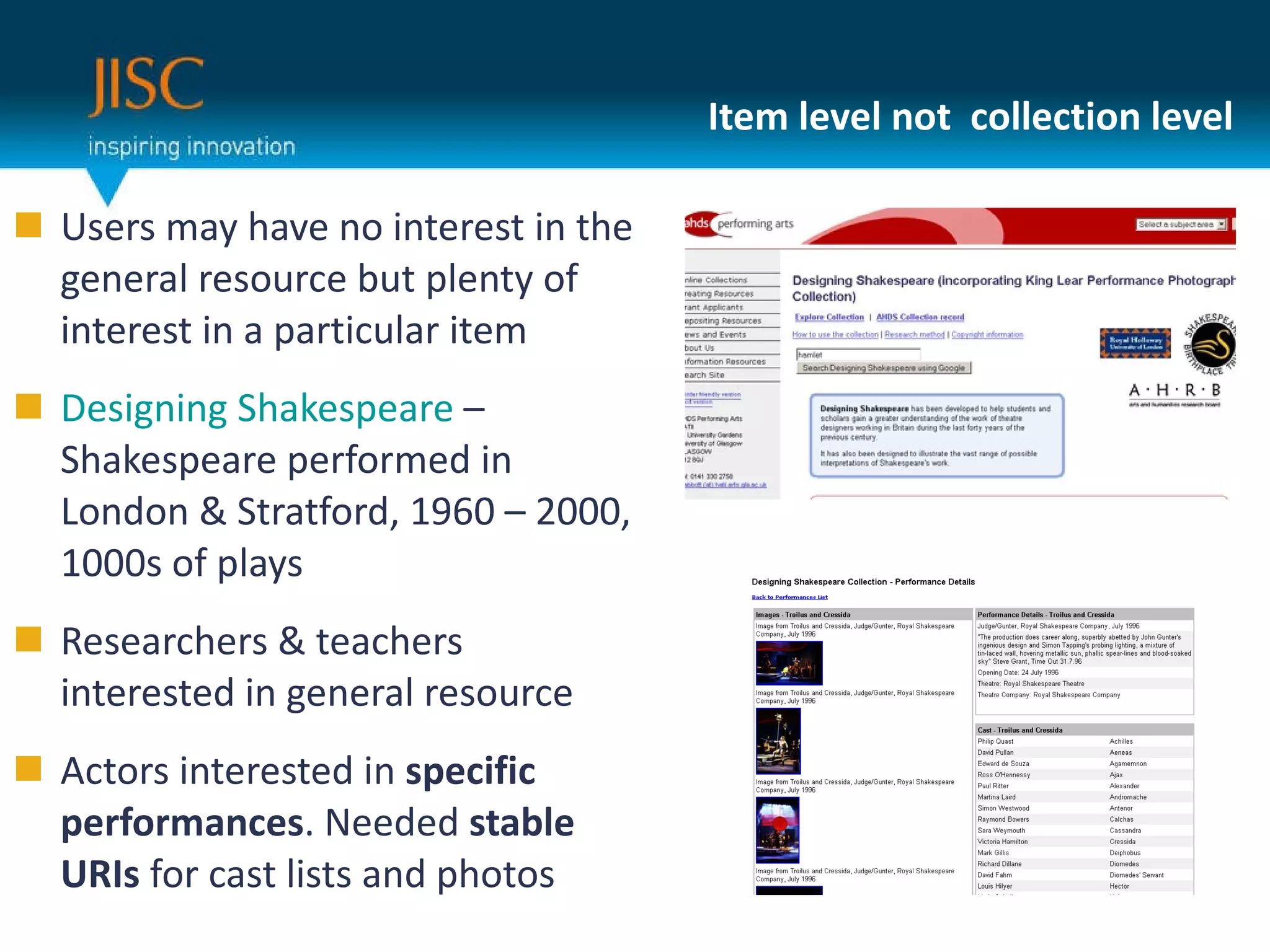
Item level not  collection level Users may have no interest in the general resource but plenty of interest in a particular item Designing Shakespeare  – Shakespeare performed in London & Stratford, 1960 – 2000, 1000s of plays Researchers & teachers interested in general resource Actors interested in  specific performances . Needed  stable URIs  for cast lists and photos
Being friends with Google No need to explain the importance in exposing content to metadata –  many users have Google as their principal springboard  for digital information Even if using authentication,  expose metadata Make sure your database is  easily queried by robots  like Google  Optimisation is complex and depends  on good communications process Use established URIs – Ensure your website is trusted Get incoming links from other trusted sources – this drives up traffic via Google and via the original sites themselves Strategic Content Alliance / Netskills training and documentation
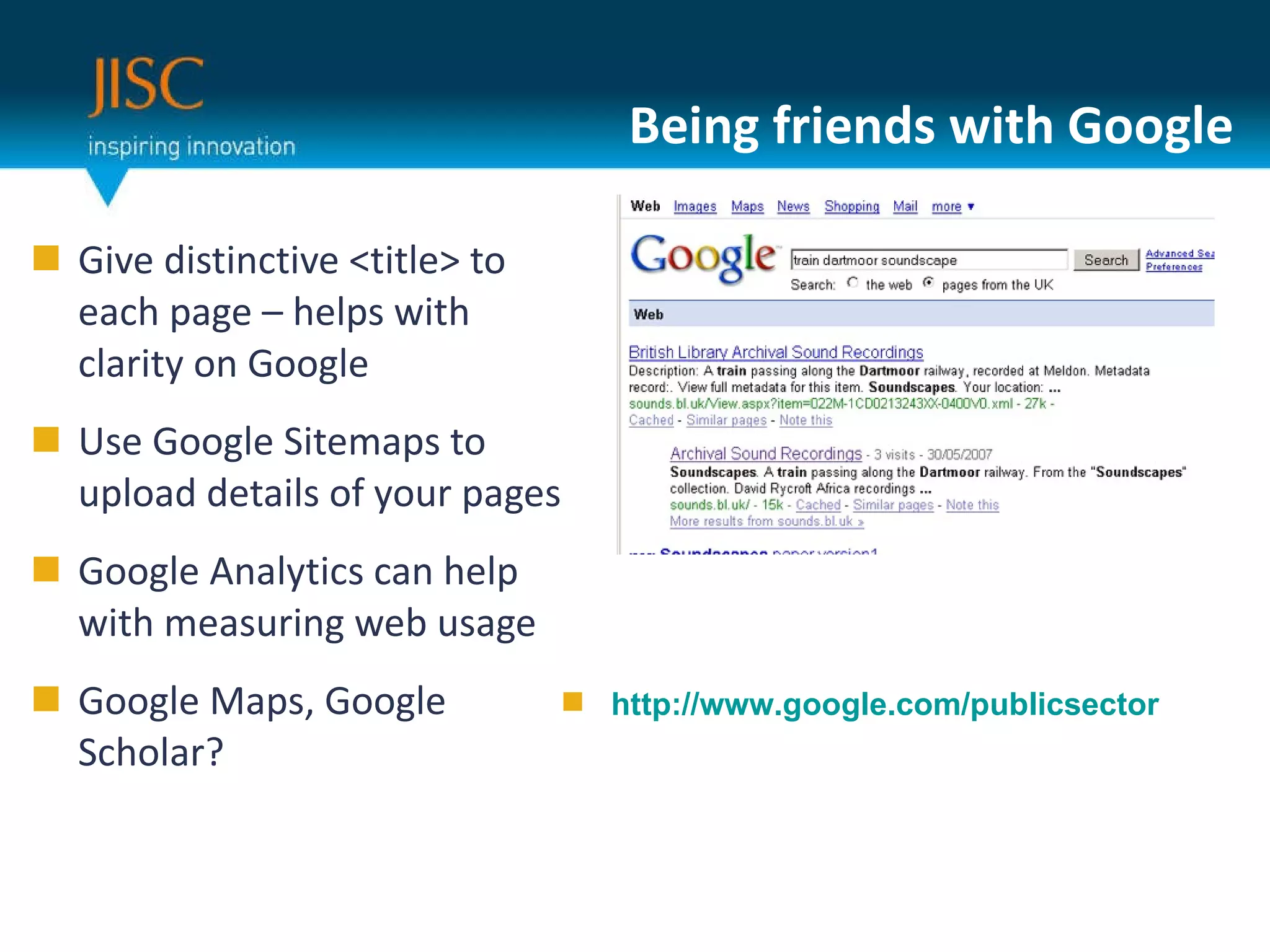
Being friends with Google Give distinctive <title> to each page – helps with clarity on Google Use Google Sitemaps to upload details of your pages Google Analytics can help with measuring web usage Google Maps, Google Scholar? http://www.google.com/publicsector
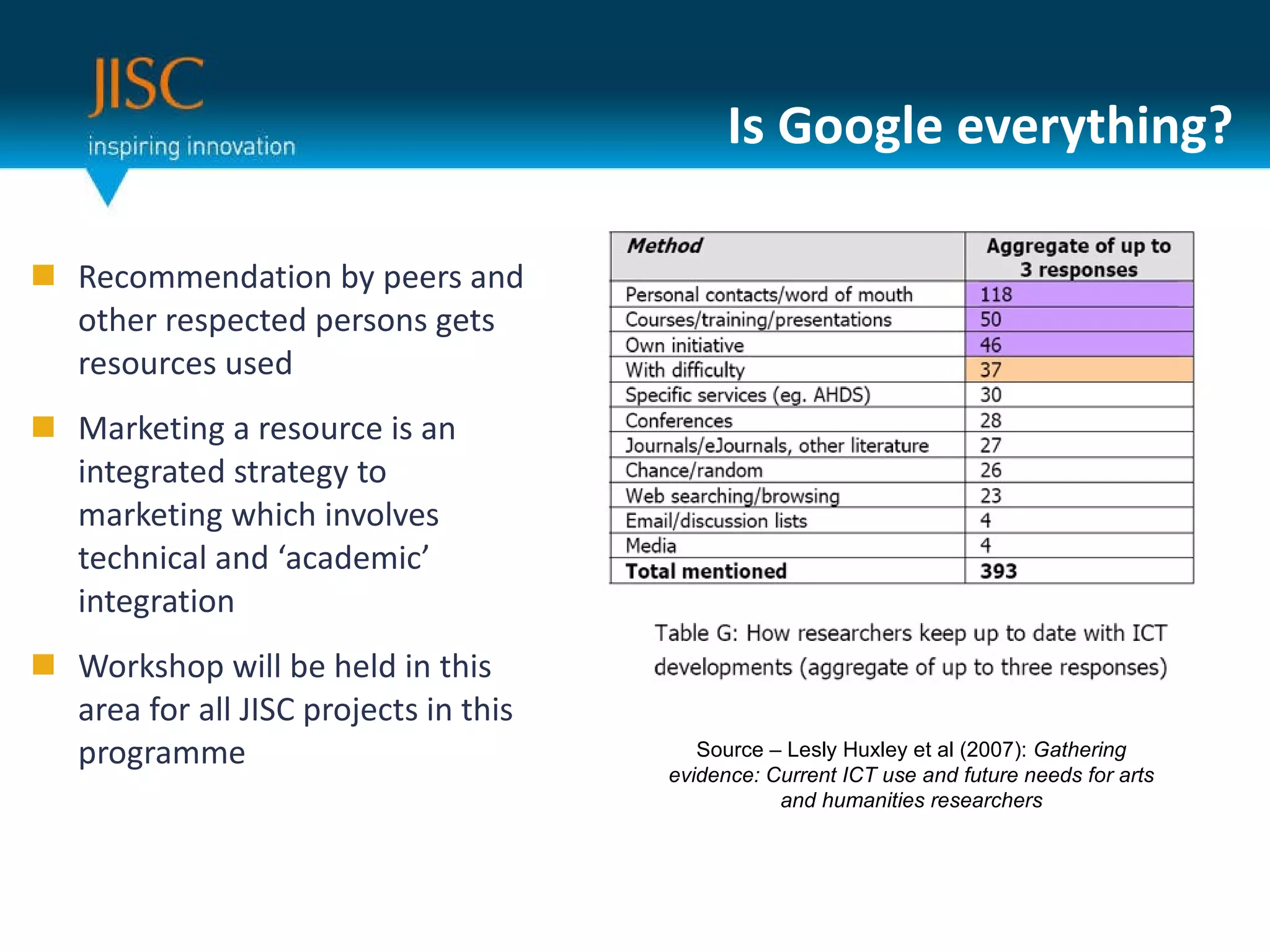
Is Google everything? Recommendation by peers and other respected persons gets resources used Marketing a resource is an integrated strategy to marketing which involves technical and ‘academic’ integration Workshop will be held in this area for all JISC projects in this programme Source – Lesly Huxley et al (2007):  Gathering evidence: Current ICT use and future needs for arts and humanities researchers
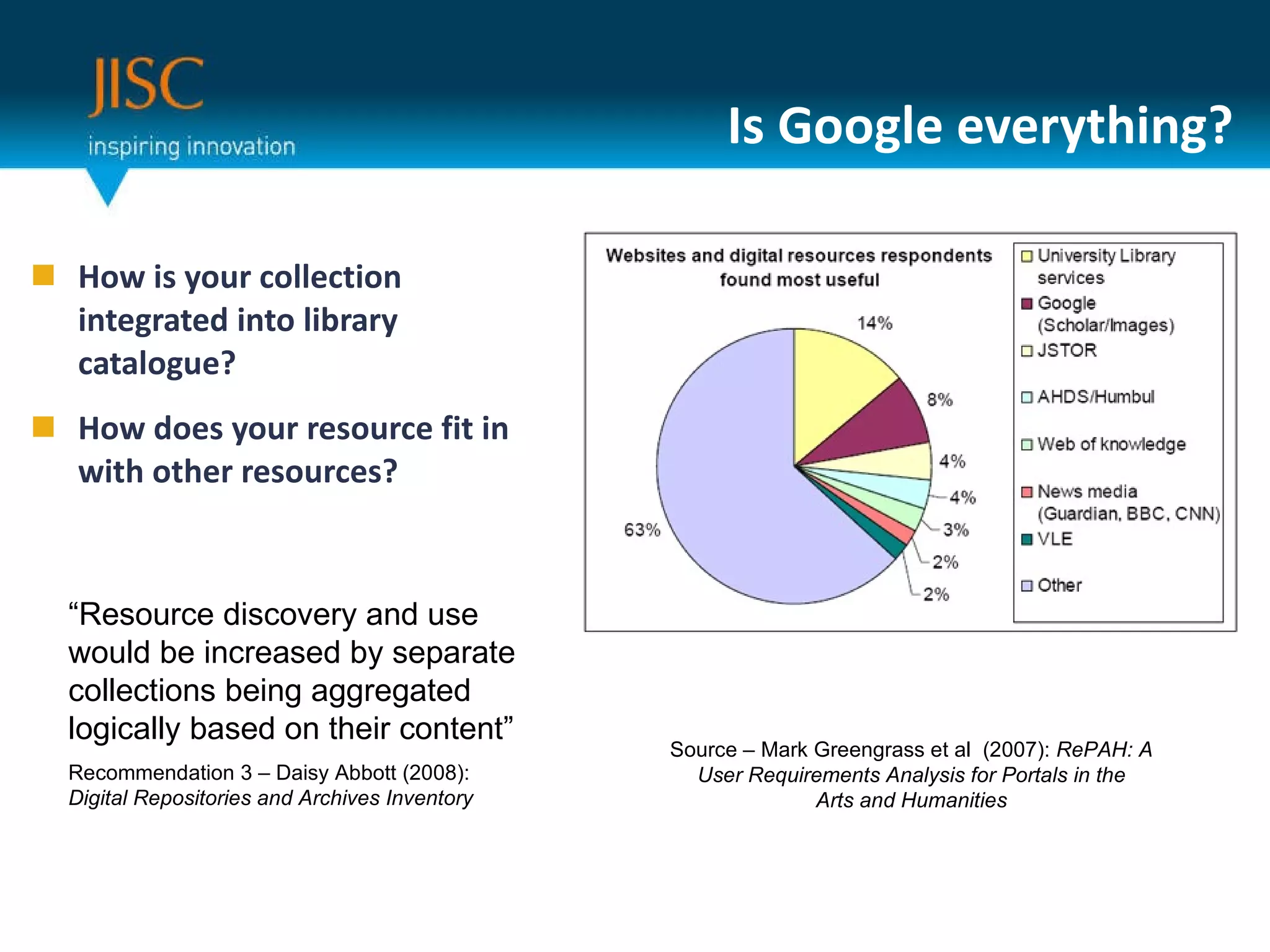
Is Google everything? How is your collection integrated into library catalogue? How does your resource fit in with other resources? Source – Mark Greengrass et al  (2007):  RePAH: A User Requirements Analysis for Portals in the Arts and Humanities “ Resource discovery and use would be increased by separate collections being aggregated logically based on their content” Recommendation 3 – Daisy Abbott (2008):  Digital Repositories and Archives Inventory
Working with Aggregators CultureGrid -  http://www.culturegrid.org.uk/ UK aggregator cultural heritage material Large-scale harvest of digital resources Works well for images and multimedia Culture grid then exposes metadata to Europeana WorldCat -  http://www.worldcat.org/librarians/default.jsp Bibliographic data  - both digital and not digital  Metadata exposed via Registry of Digital Masters Requires membership – so best done via institution
Aggregators Other options Archives Hub,  http://archiveshub.ac.uk/ Connected Histories , British History 1500 – 1900 JISC Historic Books, JISC MediaHub Other options exist and will emerge, particularly within specific subject fields and areas of interest.  Key is to have easily exposable or transferable metadata
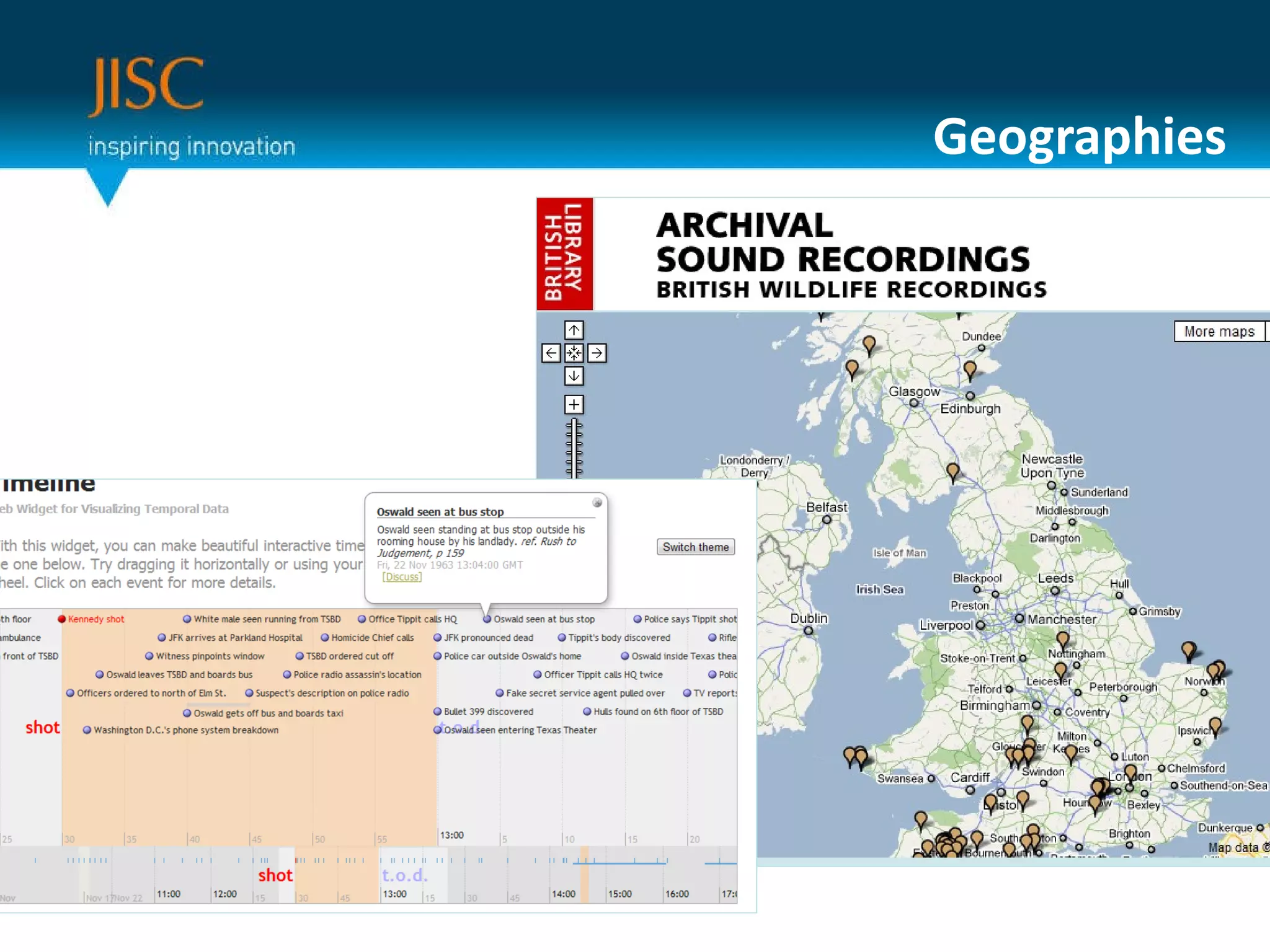
Geographies “ 80% of data has a geographical component” … possibly Lists, text, word can be confusing to navigate Maps have a simplicity which many, but not all, find engaging Examples - BL Sound Archive, Population Reports online, Flickr It’s about visualising your data in different ways … time is also a powerful metaphor
Geographies
Application Programming Interfaces (API) “ The best use of your data will be thought of by someone else” Separating data from its interface Publishing each strand of metadata as a separate URI Allows others to build interfaces over your data (and edit / annotate your data, if you want) Requires certain amount of technical knowledge in setting up and institutional belief Good example –  http://www.vam.ac.uk/api
Licensing A different challenge for re-use – making sure people know what they can do with your content Licensing in – clearing third party rights Licensing out – what can your users do Possibilities – re-use in educational context, remashing (including editing, cropping, rearranging), commercial use, anything, attribution Various existing licence s– worth exploring Creative Commons Other options may be required for third-party material Clarity over this is essential to avoid user confusion and legal ramifications But all JISC projects must indicate what can be done to their content
In Summary  Irrespective of the type of content  ... Cool URIs Being Friends with Google, Is Google Enough? International Portals Geographies Re-Use and APIs Licensing

Being A Good Data Provider

  • 1.
    Being a GoodData Provider Alastair Dunning JISC Programme Manager - Digitisation a.dunning AT jisc.ac.uk , 0203 006 6065 March 2011, Oxford This presentation is intended to give some brief advice for those publishing digital content (digital images, cultural heritage, scholarly information etc.) on the Internet
  • 2.
    Outline Being aGood Data Provider: A simple thing gets complex Cool URIs Being Friends with Google, Is Google Enough? International Portals Geographies Re-Use and APIs Licensing
  • 3.
    Cool URIs http://www.ariadne.ac.uk/issue31/web-focus/URI ( Uniform Resource Identifier ) refers to the &quot;generic set of all names/addresses that are short strings that refer to resources&quot; whereas URI ( Uniform Resource Locator ) is &quot;an informal term (no longer used in technical specifications) associated with popular URI schemes: http, ftp, mailto, etc.“ Keep them stable , memorable and consistent – develop a short URI policy
  • 4.
    Cool URIs Wheredo URIs get quoted? – Often taken out of their environment Publicity material – expensive to reprint Academic Citations – damages scholarly trust (plus citation guidelines?) Bookmarks within browser or on social bookmarking sites Emails (therefore less than 76 characters, avoid underscores) Blogs and other URIs By search engines – loss will inhibit resource discovery Guesswork – users make guesses at URIs – use redirects and good 404 pages Good Example – BBC website Bad Example …
  • 5.
    Item level not collection level Users may have no interest in the general resource but plenty of interest in a particular item Designing Shakespeare – Shakespeare performed in London & Stratford, 1960 – 2000, 1000s of plays Researchers & teachers interested in general resource Actors interested in specific performances . Needed stable URIs for cast lists and photos
  • 6.
    Being friends withGoogle No need to explain the importance in exposing content to metadata – many users have Google as their principal springboard for digital information Even if using authentication, expose metadata Make sure your database is easily queried by robots like Google Optimisation is complex and depends on good communications process Use established URIs – Ensure your website is trusted Get incoming links from other trusted sources – this drives up traffic via Google and via the original sites themselves Strategic Content Alliance / Netskills training and documentation
  • 7.
    Being friends withGoogle Give distinctive <title> to each page – helps with clarity on Google Use Google Sitemaps to upload details of your pages Google Analytics can help with measuring web usage Google Maps, Google Scholar? http://www.google.com/publicsector
  • 8.
    Is Google everything?Recommendation by peers and other respected persons gets resources used Marketing a resource is an integrated strategy to marketing which involves technical and ‘academic’ integration Workshop will be held in this area for all JISC projects in this programme Source – Lesly Huxley et al (2007): Gathering evidence: Current ICT use and future needs for arts and humanities researchers
  • 9.
    Is Google everything?How is your collection integrated into library catalogue? How does your resource fit in with other resources? Source – Mark Greengrass et al (2007): RePAH: A User Requirements Analysis for Portals in the Arts and Humanities “ Resource discovery and use would be increased by separate collections being aggregated logically based on their content” Recommendation 3 – Daisy Abbott (2008): Digital Repositories and Archives Inventory
  • 10.
    Working with AggregatorsCultureGrid - http://www.culturegrid.org.uk/ UK aggregator cultural heritage material Large-scale harvest of digital resources Works well for images and multimedia Culture grid then exposes metadata to Europeana WorldCat - http://www.worldcat.org/librarians/default.jsp Bibliographic data - both digital and not digital Metadata exposed via Registry of Digital Masters Requires membership – so best done via institution
  • 11.
    Aggregators Other optionsArchives Hub, http://archiveshub.ac.uk/ Connected Histories , British History 1500 – 1900 JISC Historic Books, JISC MediaHub Other options exist and will emerge, particularly within specific subject fields and areas of interest. Key is to have easily exposable or transferable metadata
  • 12.
    Geographies “ 80%of data has a geographical component” … possibly Lists, text, word can be confusing to navigate Maps have a simplicity which many, but not all, find engaging Examples - BL Sound Archive, Population Reports online, Flickr It’s about visualising your data in different ways … time is also a powerful metaphor
  • 13.
  • 14.
    Application Programming Interfaces(API) “ The best use of your data will be thought of by someone else” Separating data from its interface Publishing each strand of metadata as a separate URI Allows others to build interfaces over your data (and edit / annotate your data, if you want) Requires certain amount of technical knowledge in setting up and institutional belief Good example – http://www.vam.ac.uk/api
  • 15.
    Licensing A differentchallenge for re-use – making sure people know what they can do with your content Licensing in – clearing third party rights Licensing out – what can your users do Possibilities – re-use in educational context, remashing (including editing, cropping, rearranging), commercial use, anything, attribution Various existing licence s– worth exploring Creative Commons Other options may be required for third-party material Clarity over this is essential to avoid user confusion and legal ramifications But all JISC projects must indicate what can be done to their content
  • 16.
    In Summary Irrespective of the type of content ... Cool URIs Being Friends with Google, Is Google Enough? International Portals Geographies Re-Use and APIs Licensing