

Simple Unit Testing in
   Titanium Alloy
      Aaron K. Saunders
   CEO Clearly Innovative Inc
       @aaronksaunders
First Thing… "

•    Why Does Testing Even Matter?

       •    Find the bugs earlier and more often

       •    The automation of running the scripts
            help to ensure code changes don’t
            break things.

       •    Easier way of testing functionality
Setup behave.js

"     Create new “lib” folder in project if it does
      not exists

"     Create a new file in that folder called
      “behave.js”

"     Add the contents of this URL to the new file

      "     http://bit.ly/11IAjXB
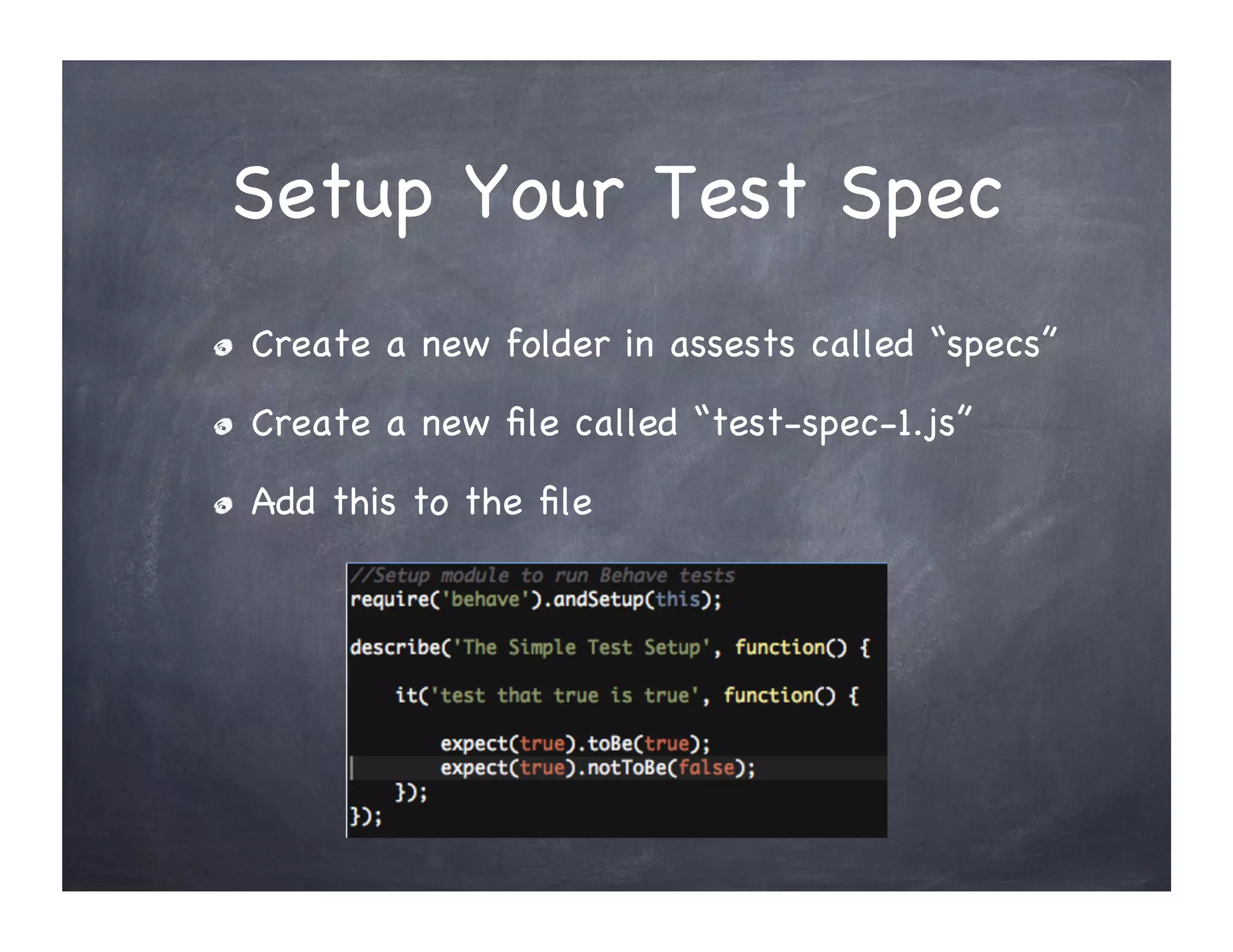
Setup Your Test Spec
"     Create a new folder in assests called “specs”

"     Create a new file called “test-spec-1.js”

"     Add this to the file
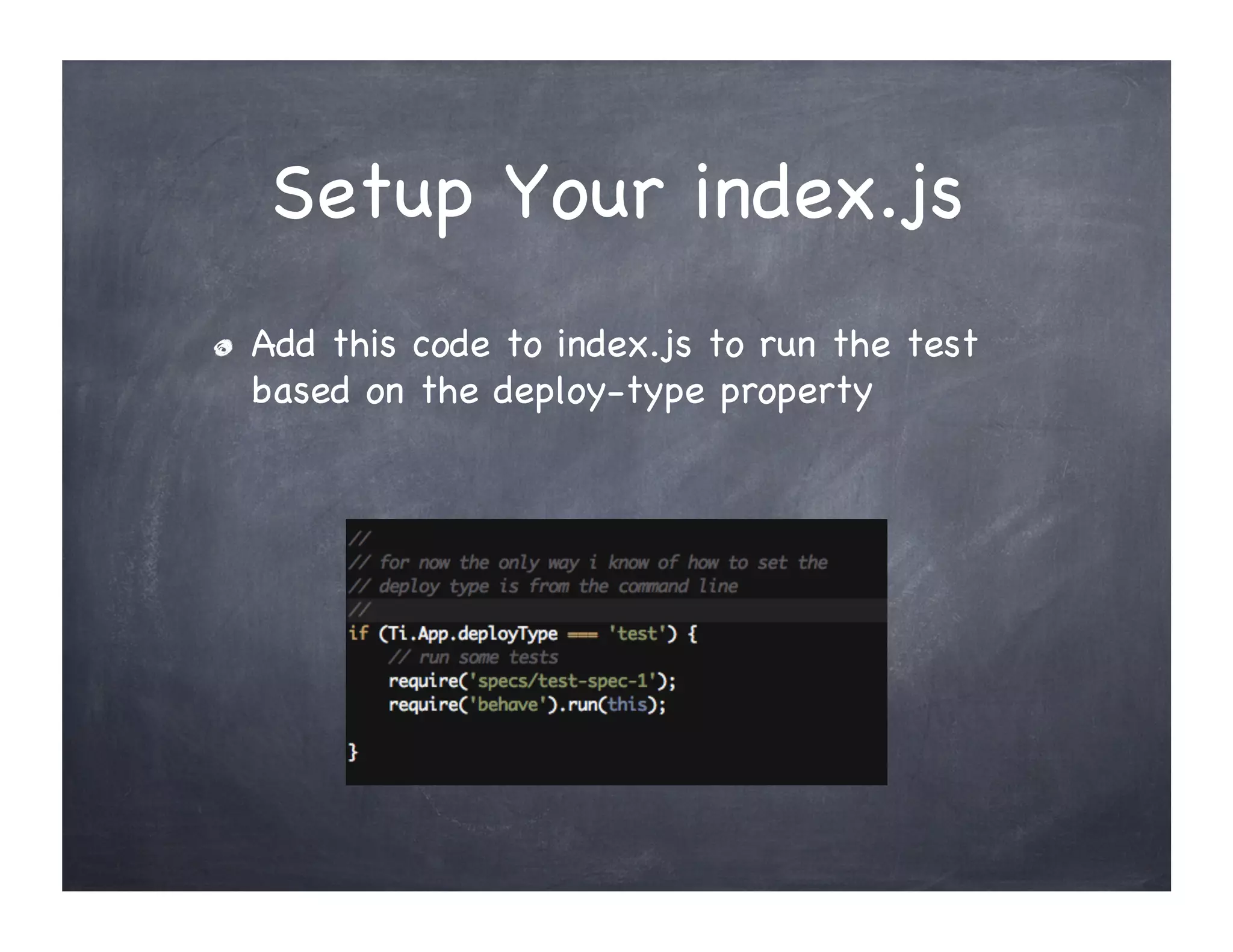
Setup Your index.js
"     Add this code to index.js to run the test
      based on the deploy-type property
Run the Titanium CLI

titanium build --platform ios --deploy-type test
  See Appcelerator documentation for more
"  
information
      "     http://docs.appcelerator.com/titanium/3.0/#!/
            guide/Titanium_Command-
            Line_Interface_Reference
References
"     CODESTRONG REPO
      "     https://github.com/appcelerator/
            Codestrong/tree/master/app/assets/spec

      "     https://github.com/appcelerator/
            Codestrong/blob/master/app/lib/behave.js

"     This posting explained a more complex
      approach IMHO
      "     https://github.com/denvers/unit-test-
            titanium-alloy-project
More Information

       Aaron K. Saunders

     Clearly Innovative Inc

  aaron@clearlyinnovative.com

        @aaronksaunders

http://blog.clearlyinnovative.com

Simple Unit Testing in Appcelerator Titanium Alloy

  • 1.
    Simple Unit Testingin Titanium Alloy Aaron K. Saunders CEO Clearly Innovative Inc @aaronksaunders
  • 2.
    First Thing… " •  Why Does Testing Even Matter? •  Find the bugs earlier and more often •  The automation of running the scripts help to ensure code changes don’t break things. •  Easier way of testing functionality
  • 3.
    Setup behave.js "   Create new “lib” folder in project if it does not exists "   Create a new file in that folder called “behave.js” "   Add the contents of this URL to the new file "   http://bit.ly/11IAjXB
  • 4.
    Setup Your TestSpec "   Create a new folder in assests called “specs” "   Create a new file called “test-spec-1.js” "   Add this to the file
  • 5.
    Setup Your index.js "  Add this code to index.js to run the test based on the deploy-type property
  • 6.
    Run the TitaniumCLI titanium build --platform ios --deploy-type test See Appcelerator documentation for more "   information "   http://docs.appcelerator.com/titanium/3.0/#!/ guide/Titanium_Command- Line_Interface_Reference
  • 7.
    References "   CODESTRONG REPO "   https://github.com/appcelerator/ Codestrong/tree/master/app/assets/spec "   https://github.com/appcelerator/ Codestrong/blob/master/app/lib/behave.js "   This posting explained a more complex approach IMHO "   https://github.com/denvers/unit-test- titanium-alloy-project
  • 8.
    More Information Aaron K. Saunders Clearly Innovative Inc aaron@clearlyinnovative.com @aaronksaunders http://blog.clearlyinnovative.com