VIDYAVIKAS INSTITUTION OF
ENGINEERING AND TECHNOLOGY
BE – 1 YEAR,
1 And 2 -SEM( CHEMISTRY CYCLE),
CBCS-2018-19.
60:40
C PROGRAMMING FOR PROBLEM
SOLVING-18CPS13
1
BY: Asstient Professor: KAVYA R
CSE Department.
ACADAMICS INTRODUCTION
 Regarding- 4-years, 8-sem, labs, theory.
 Subject-introduction.
2
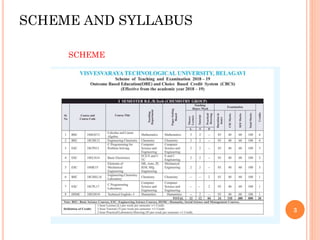
SCHEME AND SYLLABUS
3
SCHEME
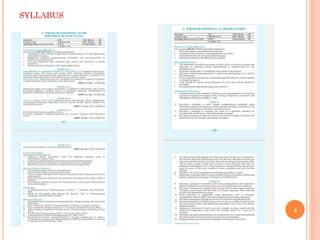
SYLLABUS
4
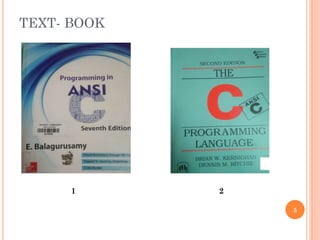
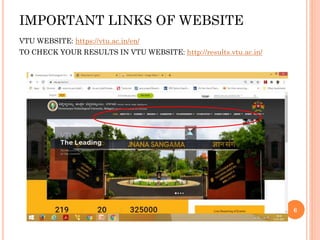
TEXT- BOOK
5
1 2
IMPORTANT LINKS OF WEBSITE
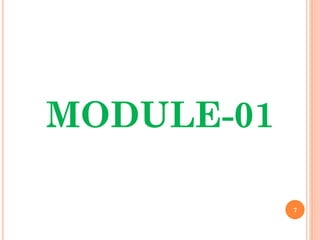
VTU WEBSITE: https://vtu.ac.in/en/
TO CHECK YOUR RESULTS IN VTU WEBSITE: http://results.vtu.ac.in/
6
7
MODULE-01
MODULE-1
8
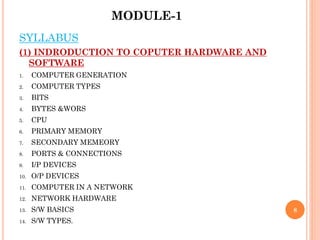
SYLLABUS
(1) INDRODUCTION TO COPUTER HARDWARE AND
SOFTWARE
1. COMPUTER GENERATION
2. COMPUTER TYPES
3. BITS
4. BYTES &WORS
5. CPU
6. PRIMARY MEMORY
7. SECONDARY MEMEORY
8. PORTS & CONNECTIONS
9. I/P DEVICES
10. O/P DEVICES
11. COMPUTER IN A NETWORK
12. NETWORK HARDWARE
13. S/W BASICS
14. S/W TYPES.
(2) OVERVIEW OF C :-
1. BASIC STRUCTURE OF C-PROGRAM
2. EXECUTING A C-PROGRAM
3. CONSTANT VARIABLE AND DATA TYPES
4. OPERATORS AND EXPRESSION.
9
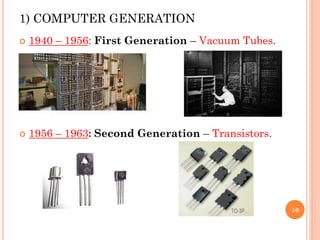
1) COMPUTER GENERATION
 1940 – 1956: First Generation – Vacuum Tubes.
 1956 – 1963: Second Generation – Transistors.
10
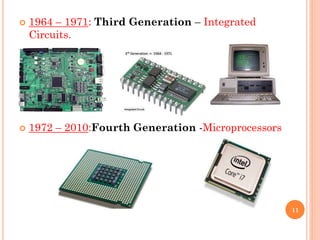
 1964 – 1971: Third Generation – Integrated
Circuits.
 1972 – 2010:Fourth Generation -Microprocessors
11
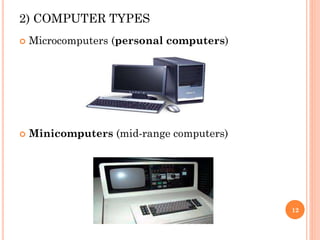
2) COMPUTER TYPES
 Microcomputers (personal computers)
 Minicomputers (mid-range computers)
12
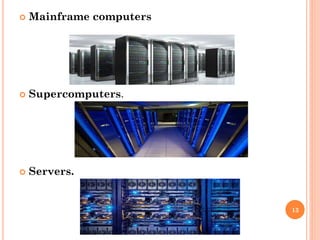
 Mainframe computers
 Supercomputers.
 Servers.
13
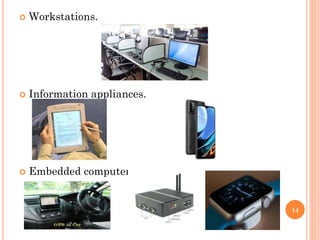
 Workstations.
 Information appliances.
 Embedded computers.
14
3) BITS
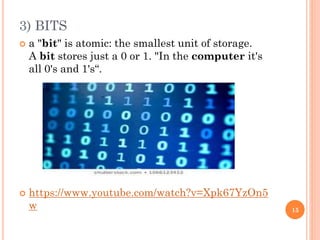
 a "bit" is atomic: the smallest unit of storage.
A bit stores just a 0 or 1. "In the computer it's
all 0's and 1's“.
 https://www.youtube.com/watch?v=Xpk67YzOn5
w 15
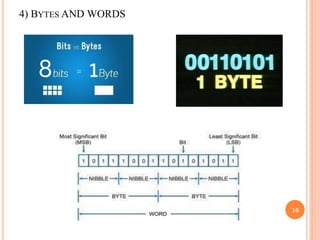
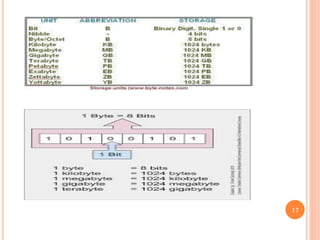
4) BYTES AND WORDS
16
17
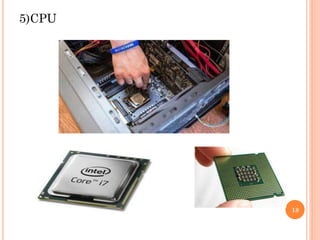
5)CPU
18
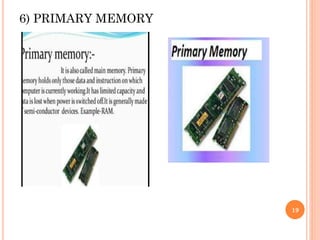
6) PRIMARY MEMORY
19
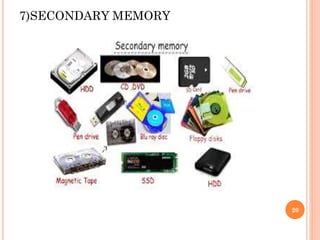
7)SECONDARY MEMORY
20
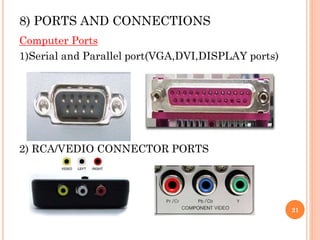
8) PORTS AND CONNECTIONS
Computer Ports
1)Serial and Parallel port(VGA,DVI,DISPLAY ports)
2) RCA/VEDIO CONNECTOR PORTS
21
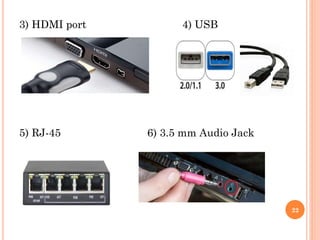
3) HDMI port 4) USB
5) RJ-45 6) 3.5 mm Audio Jack
22
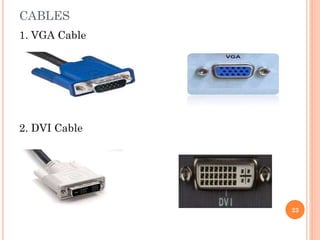
CABLES
1. VGA Cable
2. DVI Cable
23
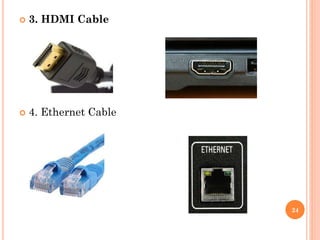
 3. HDMI Cable
 4. Ethernet Cable
24
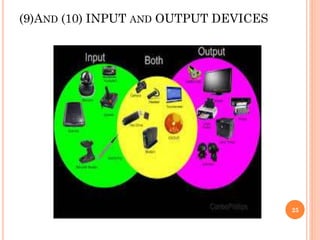
(9)AND (10) INPUT AND OUTPUT DEVICES
25
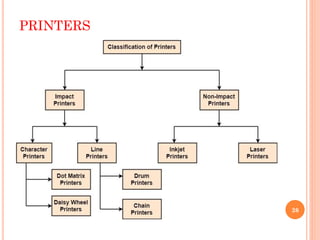
PRINTERS
26
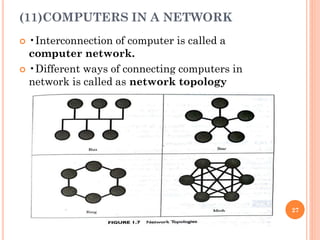
(11)COMPUTERS IN A NETWORK
 •Interconnection of computer is called a
computer network.
 •Different ways of connecting computers in
network is called as network topology
27
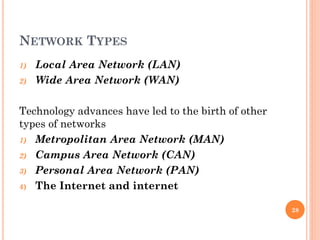
NETWORK TYPES
1) Local Area Network (LAN)
2) Wide Area Network (WAN)
Technology advances have led to the birth of other
types of networks
1) Metropolitan Area Network (MAN)
2) Campus Area Network (CAN)
3) Personal Area Network (PAN)
4) The Internet and internet
28
COMPUTER IN A NETWORK
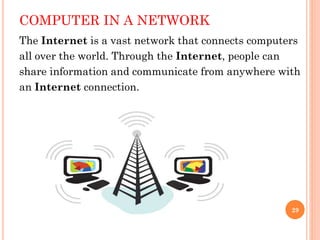
The Internet is a vast network that connects computers
all over the world. Through the Internet, people can
share information and communicate from anywhere with
an Internet connection.
29
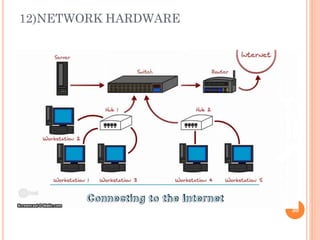
12)NETWORK HARDWARE
30
NETWORK HARDWARE
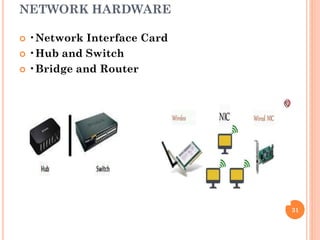
 •Network Interface Card
 •Hub and Switch
 •Bridge and Router
31
13) SOFTWARE BASICS
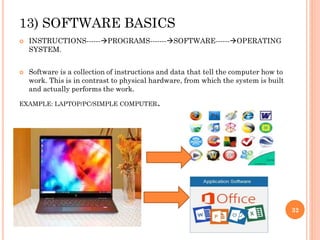
 INSTRUCTIONS------PROGRAMS-------SOFTWARE------OPERATING
SYSTEM.
 Software is a collection of instructions and data that tell the computer how to
work. This is in contrast to physical hardware, from which the system is built
and actually performs the work.
EXAMPLE: LAPTOP/PC/SIMPLE COMPUTER.
32
14) SOFTWARE TYPES
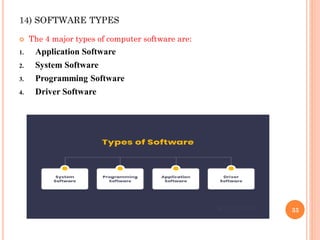
 The 4 major types of computer software are:
1. Application Software
2. System Software
3. Programming Software
4. Driver Software
33
1)Application Software
MS Excel: It is spreadsheet software that you can use for presenting and
analyzing data.
Photoshop: It is a photo editing application software by Adobe. You can
use it to visually enhance, catalogue and share your pictures.
Skype: It is an online communication app that you can use for video chat,
voice calling and instant messaging.
ZOOM APP, TEAMS APP, GOOGLE MEET...E.T.C
34
2) System Software
 For desktop computers, laptops and tablets:
Microsoft Windows
Mac (for Apple devices)
Linux
 For smartphones:
Apple’s iOS
Google’s Android
Windows Phone OS
35
3) Programming Software
 Eclipse – a Java language editor
 Coda – programming language editor for Mac
 Notepad++ – an open-source editor for windows
 Sublime Text – a cross-platform code editor for Mac,
Windows, and Linux
36
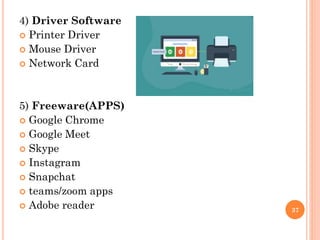
4) Driver Software
 Printer Driver
 Mouse Driver
 Network Card
5) Freeware(APPS)
 Google Chrome
 Google Meet
 Skype
 Instagram
 Snapchat
 teams/zoom apps
 Adobe reader 37
6)Shareware
 Adobe PhotoShop
 Adobe Illustrator
 Netflix App
 Matlab
 McAfee Antivirus
7)Open Source Software (for developing apps)
 Libre Office
 PHP
 GNU Image Manipulation Program (GIMP)
 LINUX/UNIX
38
8) Closed Source Software
 .NET
 Java
 Android
 Microsoft Office
 Adobe PhotoShop
9) Utility Software
 Antivirus and security software
 File compressor
 Disk cleaner
 Disk defragmentation software
 Data backup software 39
BASIC CONCEPTS ( BEFORE UNDERSTANDING
C-PROGRAME).
 ALGORITHM
 FLOWCHART
 ALGORITHM: Step by step procedure
explanisation of a process.
 FLOWCHART: diagram which shows the process
of a system.
40
41
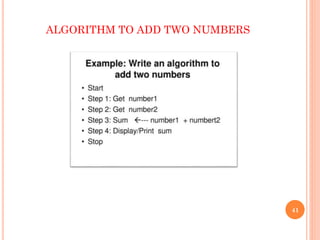
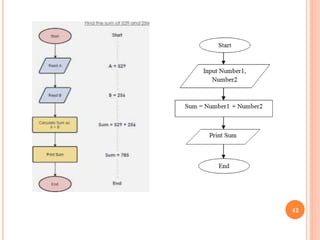
ALGORITHM TO ADD TWO NUMBERS
42
43
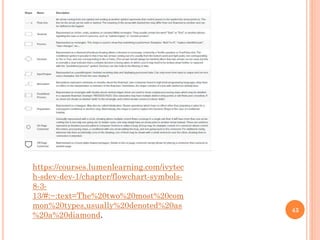
https://courses.lumenlearning.com/ivytec
h-sdev-dev-1/chapter/flowchart-symbols-
8-3-
13/#:~:text=The%20two%20most%20com
mon%20types,usually%20denoted%20as
%20a%20diamond.
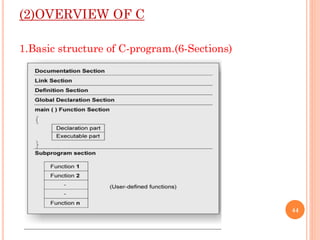
(2)OVERVIEW OF C
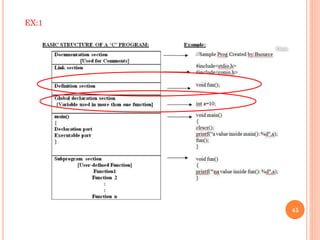
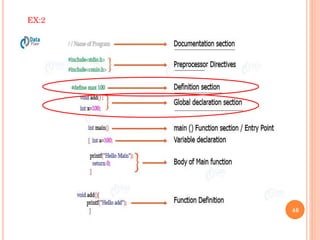
1.Basic structure of C-program.(6-Sections)
44
45
EX:1
46
EX:2
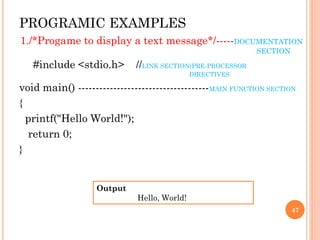
PROGRAMIC EXAMPLES
1./*Progame to display a text message*/-----DOCUMENTATION
SECTION
#include <stdio.h> //LINK SECTION(PRE-PROCESSOR
DIRECTIVES
void main() -------------------------------------MAIN FUNCTION SECTION
{
printf("Hello World!");
return 0;
}
47
Output
Hello, World!
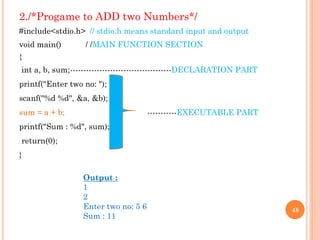
2./*Progame to ADD two Numbers*/
#include<stdio.h> // stdio.h means standard input and output
void main() / /MAIN FUNCTION SECTION
{
int a, b, sum;--------------------------------------DECLARATION PART
printf("Enter two no: ");
scanf("%d %d", &a, &b);
sum = a + b; -----------EXECUTABLE PART
printf("Sum : %d", sum);
return(0);
}
48
Output :
1
2
Enter two no: 5 6
Sum : 11
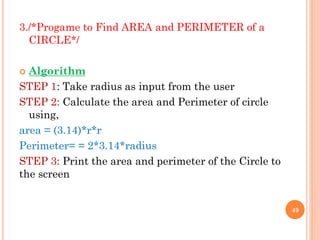
3./*Progame to Find AREA and PERIMETER of a
CIRCLE*/
 Algorithm
STEP 1: Take radius as input from the user
STEP 2: Calculate the area and Perimeter of circle
using,
area = (3.14)*r*r
Perimeter= = 2*3.14*radius
STEP 3: Print the area and perimeter of the Circle to
the screen
49
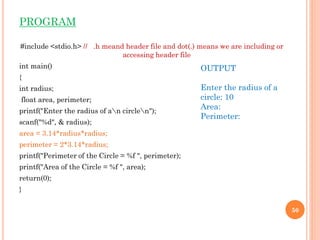
PROGRAM
#include <stdio.h> // .h meand header file and dot(.) means we are including or
accessing header file
int main()
{
int radius;
float area, perimeter;
printf("Enter the radius of an circlen");
scanf("%d", & radius);
area = 3.14*radius*radius;
perimeter = 2*3.14*radius;
printf("Perimeter of the Circle = %f ", perimeter);
printf("Area of the Circle = %f ", area);
return(0);
}
50
OUTPUT
Enter the radius of a
circle: 10
Area:
Perimeter:
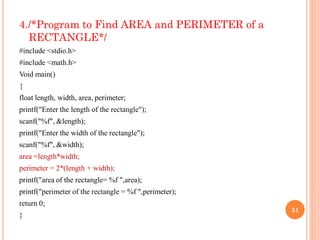
4./*Program to Find AREA and PERIMETER of a
RECTANGLE*/
#include <stdio.h>
#include <math.h>
Void main()
{
float length, width, area, perimeter;
printf("Enter the length of the rectangle");
scanf("%f", &length);
printf("Enter the width of the rectangle");
scanf("%f", &width);
area =length*width;
perimeter = 2*(length + width);
printf("area of the rectangle= %f ",area);
printf("perimeter of the rectangle = %f ",perimeter);
return 0;
}
51
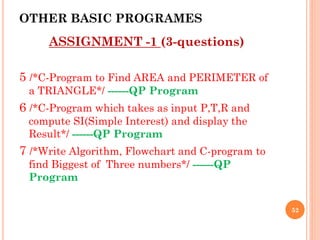
OTHER BASIC PROGRAMES
ASSIGNMENT -1 (3-questions)
5 /*C-Program to Find AREA and PERIMETER of
a TRIANGLE*/ ------QP Program
6 /*C-Program which takes as input P,T,R and
compute SI(Simple Interest) and display the
Result*/ ------QP Program
7 /*Write Algorithm, Flowchart and C-program to
find Biggest of Three numbers*/ ------QP
Program
52
53
https://www.programiz.com/c-
programming/online-compiler/
Best online C-program compiler platform
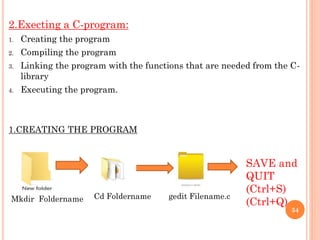
2.Execting a C-program:
1. Creating the program
2. Compiling the program
3. Linking the program with the functions that are needed from the C-
library
4. Executing the program.
1.CREATING THE PROGRAM
54
Mkdir Foldername Cd Foldername gedit Filename.c
SAVE and
QUIT
(Ctrl+S)
(Ctrl+Q)
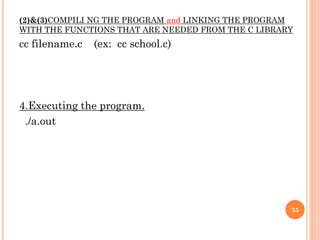
(2)&(3)COMPILI NG THE PROGRAM and LINKING THE PROGRAM
WITH THE FUNCTIONS THAT ARE NEEDED FROM THE C LIBRARY
cc filename.c (ex: cc school.c)
4.Executing the program.
./a.out
55
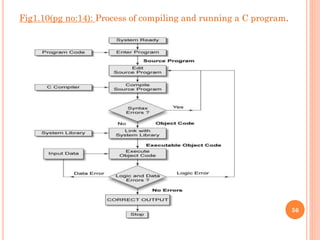
Fig1.10(pg no:14): Process of compiling and running a C program.
56
TOKENS(BASIC CONCEPTS)
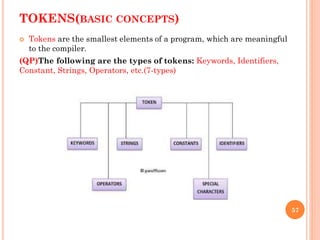
 Tokens are the smallest elements of a program, which are meaningful
to the compiler.
(QP)The following are the types of tokens: Keywords, Identifiers,
Constant, Strings, Operators, etc.(7-types)
57
58
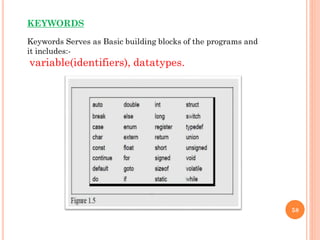
Keywords Serves as Basic building blocks of the programs and
it includes:-
variable(identifiers), datatypes.
KEYWORDS
3.Constant, Variable and Data-type.
Constant (Literals):
 A constant is a fixed value that cannot be changed after
defining. Ex :-pie value, a=10, sin45,tan 90,....etc
 They are also called literals.
WE are having many types in Constants and they are:
Integer
1) Enumeration Constants
2) Floating Point Constants
3) Character Constants
4) String Constants
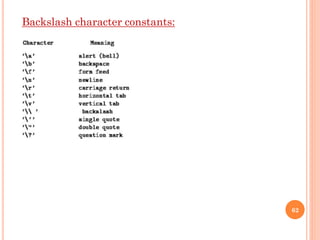
5) Backslash Character Constants
59
60
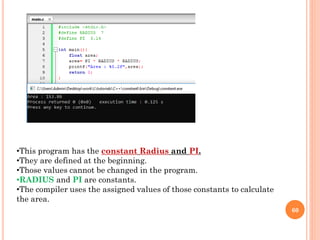
•This program has the constant Radius and PI.
•They are defined at the beginning.
•Those values cannot be changed in the program.
•RADIUS and PI are constants.
•The compiler uses the assigned values of those constants to calculate
the area.
61
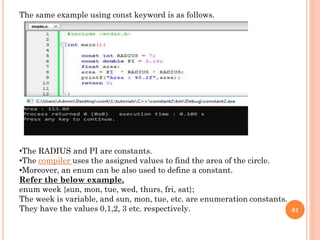
The same example using const keyword is as follows.
•The RADIUS and PI are constants.
•The compiler uses the assigned values to find the area of the circle.
•Moreover, an enum can be also used to define a constant.
Refer the below example.
enum week {sun, mon, tue, wed, thurs, fri, sat};
The week is variable, and sun, mon, tue, etc. are enumeration constants.
They have the values 0,1,2, 3 etc. respectively.
62
Backslash character constants:
VARIABLE (Identifiers)
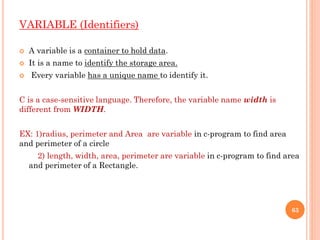
 A variable is a container to hold data.
 It is a name to identify the storage area.
 Every variable has a unique name to identify it.
C is a case-sensitive language. Therefore, the variable name width is
different from WIDTH.
EX: 1)radius, perimeter and Area are variable in c-program to find area
and perimeter of a circle
2) length, width, area, perimeter are variable in c-program to find area
and perimeter of a Rectangle.
63
64
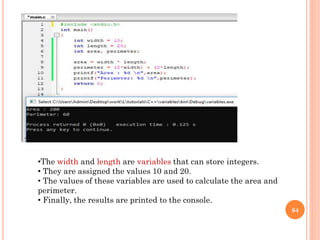
•The width and length are variables that can store integers.
• They are assigned the values 10 and 20.
• The values of these variables are used to calculate the area and
perimeter.
• Finally, the results are printed to the console.
65
66
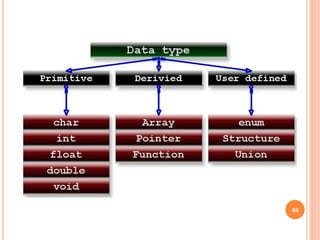
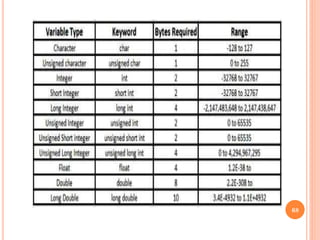
DATATYPES:
Variables in C are associated with data type. Each data type requires an
amount of memory and performs specific operations.
There are some common data types in C −
 int − Used to store an integer value.
 char − Used to store a single character.
 float − Used to store decimal numbers with single precision.
 double − Used to store decimal numbers with double precision.
Here is the syntax of datatypes in C
language
data_type variable_name;
67
68
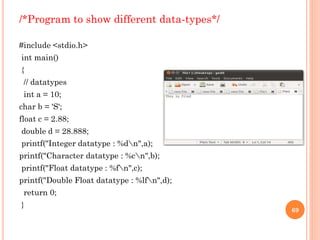
/*Program to show different data-types*/
#include <stdio.h>
int main()
{
// datatypes
int a = 10;
char b = 'S';
float c = 2.88;
double d = 28.888;
printf("Integer datatype : %dn",a);
printf("Character datatype : %cn",b);
printf("Float datatype : %fn",c);
printf("Double Float datatype : %lfn",d);
return 0;
}
69
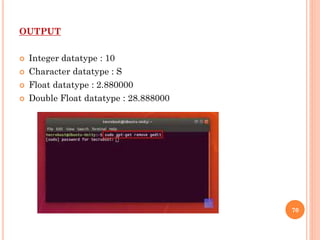
OUTPUT
 Integer datatype : 10
 Character datatype : S
 Float datatype : 2.880000
 Double Float datatype : 28.888000
70
4.Operators and Expression.
Operators:
DEFINITION:- An operator is a symbol that tells the compiler to perform a certain
mathematical or logical manipulation.
C operators can be classified into following types:
1) Arithmetic operators
2) Relational operators
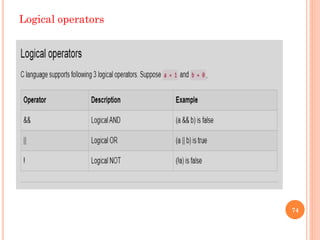
3) Logical operators
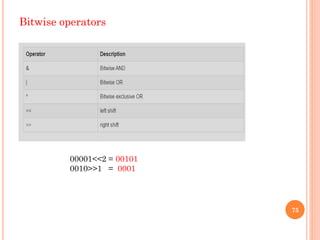
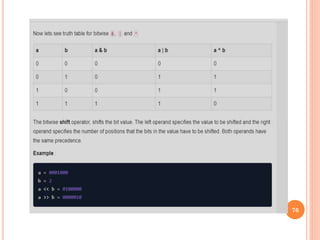
4) Bitwise operators
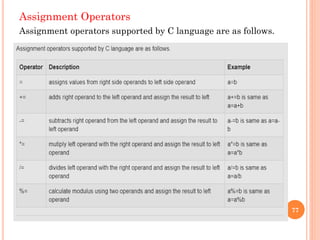
5) Assignment operators
6) Conditional operators
7) Special operators
71
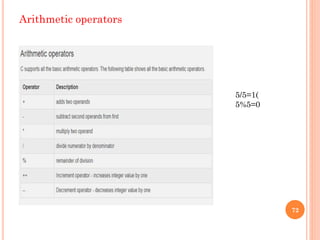
Arithmetic operators
72
5/5=1(
5%5=0
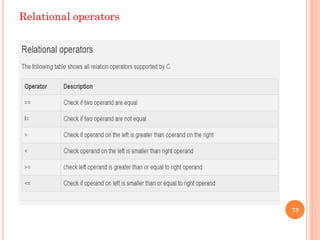
Relational operators
73
Logical operators
74
Bitwise operators
75
00001<<2 = 00101
0010>>1 = 0001
76
Assignment Operators
Assignment operators supported by C language are as follows.
77
Conditional operator
78
The conditional operators in C language are known by two more names
1) Ternary Operator
2) ? : Operator
It is actually the if condition that we use in C language decision making, but
using conditional operator, we turn the if condition statement into a short and
simple operator.
The syntax of a conditional operator is :
expression 1 ? expression 2: expression 3
Explanation:
 The question mark "?" in the syntax represents
the if part.
The first expression (expression 1) generally returns
either true or false, based on which it is decided
whether (expression 2) will be executed or (expression
3)
 If (expression 1) returns true then the
expression on the left side of " : " i.e (expression 2) is
executed.
 If (expression 1) returns false then the
expression on the right side of " : " i.e (expression 3)
is executed.
79
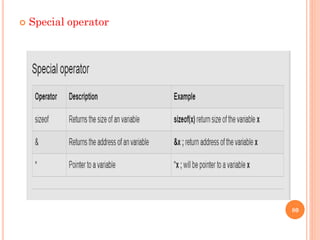
 Special operator
80
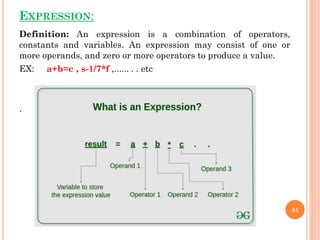
EXPRESSION:
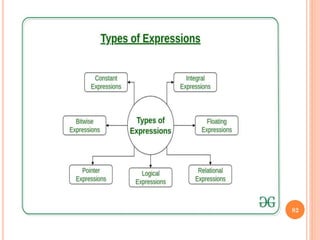
Definition: An expression is a combination of operators,
constants and variables. An expression may consist of one or
more operands, and zero or more operators to produce a value.
EX: a+b=c , s-1/7*f ,...... . . etc
.
81
82
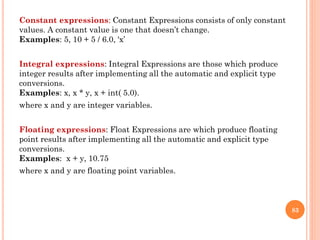
Constant expressions: Constant Expressions consists of only constant
values. A constant value is one that doesn’t change.
Examples: 5, 10 + 5 / 6.0, 'x’
Integral expressions: Integral Expressions are those which produce
integer results after implementing all the automatic and explicit type
conversions.
Examples: x, x * y, x + int( 5.0).
where x and y are integer variables.
Floating expressions: Float Expressions are which produce floating
point results after implementing all the automatic and explicit type
conversions.
Examples: x + y, 10.75
where x and y are floating point variables.
83
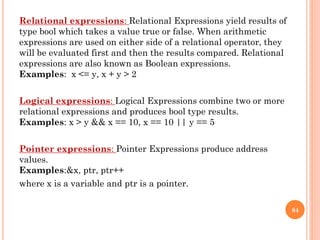
Relational expressions: Relational Expressions yield results of
type bool which takes a value true or false. When arithmetic
expressions are used on either side of a relational operator, they
will be evaluated first and then the results compared. Relational
expressions are also known as Boolean expressions.
Examples: x <= y, x + y > 2
Logical expressions: Logical Expressions combine two or more
relational expressions and produces bool type results.
Examples: x > y && x == 10, x == 10 || y == 5
Pointer expressions: Pointer Expressions produce address
values.
Examples:&x, ptr, ptr++
where x is a variable and ptr is a pointer.
84
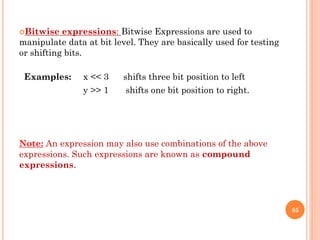
Bitwise expressions: Bitwise Expressions are used to
manipulate data at bit level. They are basically used for testing
or shifting bits.
Examples: x << 3 shifts three bit position to left
y >> 1 shifts one bit position to right.
Note: An expression may also use combinations of the above
expressions. Such expressions are known as compound
expressions.
85
PROGRAMATIC PROBLEMS
ON OPERATORS AND EXPRESSION
2-TYPES:-
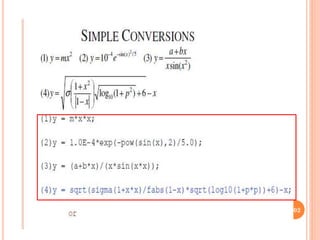
1. Convert Mathematical Expression into C Expression.
2.Evaluate the Expression
86
87
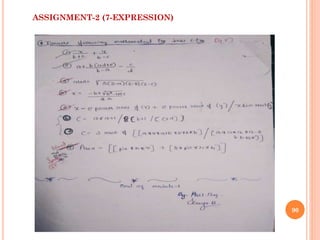
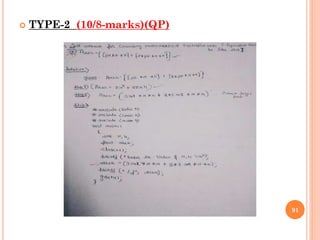
1. Convert Mathematical
Expression into C Expression.
88
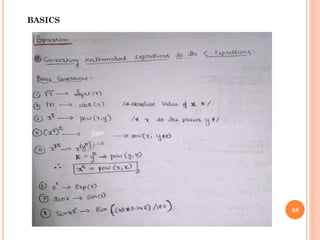
BASICS
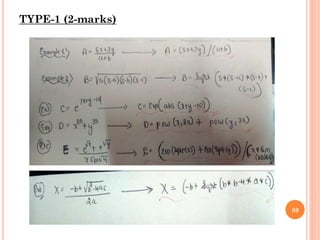
TYPE-1 (2-marks)
89
90
ASSIGNMENT-2 (7-EXPRESSION)
 TYPE-2 (10/8-marks)(QP)
91
92
2.Evaluate the Expression
93
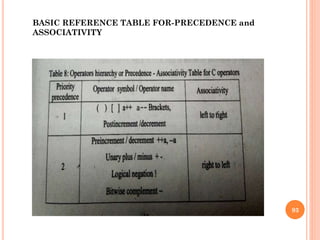
BASIC REFERENCE TABLE FOR-PRECEDENCE and
ASSOCIATIVITY
94
95
BASICS:
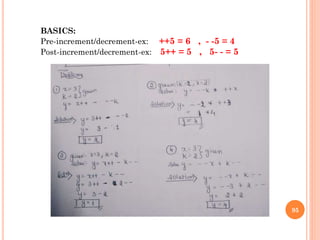
Pre-increment/decrement-ex: ++5 = 6 , - -5 = 4
Post-increment/decrement-ex: 5++ = 5 , 5- - = 5
96
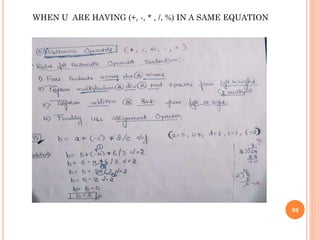
WHEN U ARE HAVING (+, -, * , /, %) IN A SAME EQUATION
97
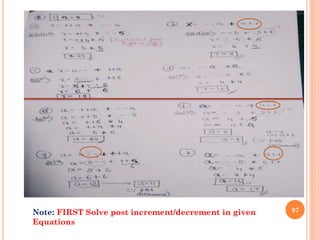
Note: FIRST Solve post increment/decrement in given
Equations
98
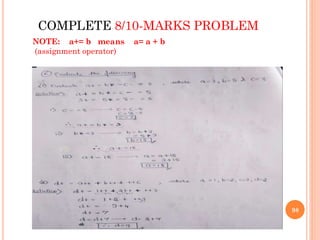
COMPLETE 8/10-MARKS PROBLEM
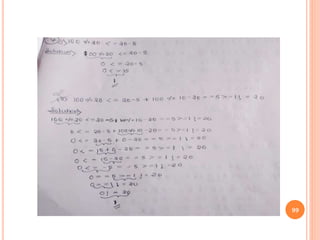
NOTE: a+= b means a= a + b
(assignment operator)
99
100
ASSIGNMENT-3
101
102
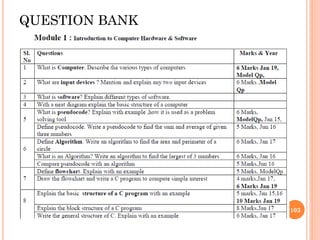
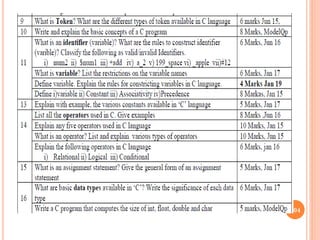
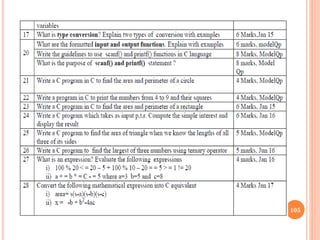
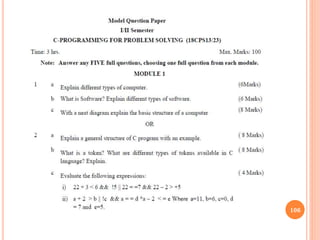
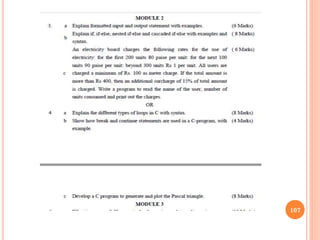
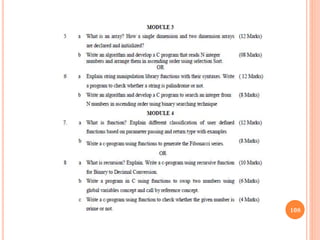
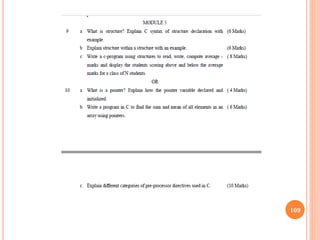
QUESTION BANK
103
104
105
106
107
108
109
110
END
Note:
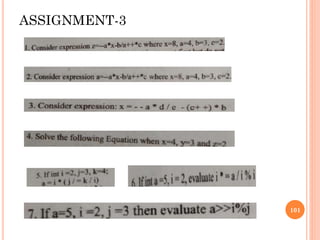
Everyone has to complete assignments given to you by this
time regarding Module-01.(it carries marks) (TOTAL-3
Assignment)
Assignment 1-Related to basic Programs( 3-Programs).
Assignment 2-Related to Problems 1.Converting
Mathematical expression into C expression for both 2 and 8-
marks (7 questions )
Assignment 3- Related to Problems ie Evaluating the
Expression ( 7-problems).
111

Be cps-18 cps13or23-module1

  • 1.
    VIDYAVIKAS INSTITUTION OF ENGINEERINGAND TECHNOLOGY BE – 1 YEAR, 1 And 2 -SEM( CHEMISTRY CYCLE), CBCS-2018-19. 60:40 C PROGRAMMING FOR PROBLEM SOLVING-18CPS13 1 BY: Asstient Professor: KAVYA R CSE Department.
  • 2.
    ACADAMICS INTRODUCTION  Regarding-4-years, 8-sem, labs, theory.  Subject-introduction. 2
  • 3.
  • 4.
  • 5.
  • 6.
    IMPORTANT LINKS OFWEBSITE VTU WEBSITE: https://vtu.ac.in/en/ TO CHECK YOUR RESULTS IN VTU WEBSITE: http://results.vtu.ac.in/ 6
  • 7.
  • 8.
    MODULE-1 8 SYLLABUS (1) INDRODUCTION TOCOPUTER HARDWARE AND SOFTWARE 1. COMPUTER GENERATION 2. COMPUTER TYPES 3. BITS 4. BYTES &WORS 5. CPU 6. PRIMARY MEMORY 7. SECONDARY MEMEORY 8. PORTS & CONNECTIONS 9. I/P DEVICES 10. O/P DEVICES 11. COMPUTER IN A NETWORK 12. NETWORK HARDWARE 13. S/W BASICS 14. S/W TYPES.
  • 9.
    (2) OVERVIEW OFC :- 1. BASIC STRUCTURE OF C-PROGRAM 2. EXECUTING A C-PROGRAM 3. CONSTANT VARIABLE AND DATA TYPES 4. OPERATORS AND EXPRESSION. 9
  • 10.
    1) COMPUTER GENERATION 1940 – 1956: First Generation – Vacuum Tubes.  1956 – 1963: Second Generation – Transistors. 10
  • 11.
     1964 –1971: Third Generation – Integrated Circuits.  1972 – 2010:Fourth Generation -Microprocessors 11
  • 12.
    2) COMPUTER TYPES Microcomputers (personal computers)  Minicomputers (mid-range computers) 12
  • 13.
     Mainframe computers Supercomputers.  Servers. 13
  • 14.
     Workstations.  Informationappliances.  Embedded computers. 14
  • 15.
    3) BITS  a"bit" is atomic: the smallest unit of storage. A bit stores just a 0 or 1. "In the computer it's all 0's and 1's“.  https://www.youtube.com/watch?v=Xpk67YzOn5 w 15
  • 16.
    4) BYTES ANDWORDS 16
  • 17.
  • 18.
  • 19.
  • 20.
  • 21.
    8) PORTS ANDCONNECTIONS Computer Ports 1)Serial and Parallel port(VGA,DVI,DISPLAY ports) 2) RCA/VEDIO CONNECTOR PORTS 21
  • 22.
    3) HDMI port4) USB 5) RJ-45 6) 3.5 mm Audio Jack 22
  • 23.
  • 24.
     3. HDMICable  4. Ethernet Cable 24
  • 25.
    (9)AND (10) INPUTAND OUTPUT DEVICES 25
  • 26.
  • 27.
    (11)COMPUTERS IN ANETWORK  •Interconnection of computer is called a computer network.  •Different ways of connecting computers in network is called as network topology 27
  • 28.
    NETWORK TYPES 1) LocalArea Network (LAN) 2) Wide Area Network (WAN) Technology advances have led to the birth of other types of networks 1) Metropolitan Area Network (MAN) 2) Campus Area Network (CAN) 3) Personal Area Network (PAN) 4) The Internet and internet 28
  • 29.
    COMPUTER IN ANETWORK The Internet is a vast network that connects computers all over the world. Through the Internet, people can share information and communicate from anywhere with an Internet connection. 29
  • 30.
  • 31.
    NETWORK HARDWARE  •NetworkInterface Card  •Hub and Switch  •Bridge and Router 31
  • 32.
    13) SOFTWARE BASICS INSTRUCTIONS------PROGRAMS-------SOFTWARE------OPERATING SYSTEM.  Software is a collection of instructions and data that tell the computer how to work. This is in contrast to physical hardware, from which the system is built and actually performs the work. EXAMPLE: LAPTOP/PC/SIMPLE COMPUTER. 32
  • 33.
    14) SOFTWARE TYPES The 4 major types of computer software are: 1. Application Software 2. System Software 3. Programming Software 4. Driver Software 33
  • 34.
    1)Application Software MS Excel:It is spreadsheet software that you can use for presenting and analyzing data. Photoshop: It is a photo editing application software by Adobe. You can use it to visually enhance, catalogue and share your pictures. Skype: It is an online communication app that you can use for video chat, voice calling and instant messaging. ZOOM APP, TEAMS APP, GOOGLE MEET...E.T.C 34
  • 35.
    2) System Software For desktop computers, laptops and tablets: Microsoft Windows Mac (for Apple devices) Linux  For smartphones: Apple’s iOS Google’s Android Windows Phone OS 35
  • 36.
    3) Programming Software Eclipse – a Java language editor  Coda – programming language editor for Mac  Notepad++ – an open-source editor for windows  Sublime Text – a cross-platform code editor for Mac, Windows, and Linux 36
  • 37.
    4) Driver Software Printer Driver  Mouse Driver  Network Card 5) Freeware(APPS)  Google Chrome  Google Meet  Skype  Instagram  Snapchat  teams/zoom apps  Adobe reader 37
  • 38.
    6)Shareware  Adobe PhotoShop Adobe Illustrator  Netflix App  Matlab  McAfee Antivirus 7)Open Source Software (for developing apps)  Libre Office  PHP  GNU Image Manipulation Program (GIMP)  LINUX/UNIX 38
  • 39.
    8) Closed SourceSoftware  .NET  Java  Android  Microsoft Office  Adobe PhotoShop 9) Utility Software  Antivirus and security software  File compressor  Disk cleaner  Disk defragmentation software  Data backup software 39
  • 40.
    BASIC CONCEPTS (BEFORE UNDERSTANDING C-PROGRAME).  ALGORITHM  FLOWCHART  ALGORITHM: Step by step procedure explanisation of a process.  FLOWCHART: diagram which shows the process of a system. 40
  • 41.
  • 42.
  • 43.
  • 44.
    (2)OVERVIEW OF C 1.Basicstructure of C-program.(6-Sections) 44
  • 45.
  • 46.
  • 47.
    PROGRAMIC EXAMPLES 1./*Progame todisplay a text message*/-----DOCUMENTATION SECTION #include <stdio.h> //LINK SECTION(PRE-PROCESSOR DIRECTIVES void main() -------------------------------------MAIN FUNCTION SECTION { printf("Hello World!"); return 0; } 47 Output Hello, World!
  • 48.
    2./*Progame to ADDtwo Numbers*/ #include<stdio.h> // stdio.h means standard input and output void main() / /MAIN FUNCTION SECTION { int a, b, sum;--------------------------------------DECLARATION PART printf("Enter two no: "); scanf("%d %d", &a, &b); sum = a + b; -----------EXECUTABLE PART printf("Sum : %d", sum); return(0); } 48 Output : 1 2 Enter two no: 5 6 Sum : 11
  • 49.
    3./*Progame to FindAREA and PERIMETER of a CIRCLE*/  Algorithm STEP 1: Take radius as input from the user STEP 2: Calculate the area and Perimeter of circle using, area = (3.14)*r*r Perimeter= = 2*3.14*radius STEP 3: Print the area and perimeter of the Circle to the screen 49
  • 50.
    PROGRAM #include <stdio.h> //.h meand header file and dot(.) means we are including or accessing header file int main() { int radius; float area, perimeter; printf("Enter the radius of an circlen"); scanf("%d", & radius); area = 3.14*radius*radius; perimeter = 2*3.14*radius; printf("Perimeter of the Circle = %f ", perimeter); printf("Area of the Circle = %f ", area); return(0); } 50 OUTPUT Enter the radius of a circle: 10 Area: Perimeter:
  • 51.
    4./*Program to FindAREA and PERIMETER of a RECTANGLE*/ #include <stdio.h> #include <math.h> Void main() { float length, width, area, perimeter; printf("Enter the length of the rectangle"); scanf("%f", &length); printf("Enter the width of the rectangle"); scanf("%f", &width); area =length*width; perimeter = 2*(length + width); printf("area of the rectangle= %f ",area); printf("perimeter of the rectangle = %f ",perimeter); return 0; } 51
  • 52.
    OTHER BASIC PROGRAMES ASSIGNMENT-1 (3-questions) 5 /*C-Program to Find AREA and PERIMETER of a TRIANGLE*/ ------QP Program 6 /*C-Program which takes as input P,T,R and compute SI(Simple Interest) and display the Result*/ ------QP Program 7 /*Write Algorithm, Flowchart and C-program to find Biggest of Three numbers*/ ------QP Program 52
  • 53.
  • 54.
    2.Execting a C-program: 1.Creating the program 2. Compiling the program 3. Linking the program with the functions that are needed from the C- library 4. Executing the program. 1.CREATING THE PROGRAM 54 Mkdir Foldername Cd Foldername gedit Filename.c SAVE and QUIT (Ctrl+S) (Ctrl+Q)
  • 55.
    (2)&(3)COMPILI NG THEPROGRAM and LINKING THE PROGRAM WITH THE FUNCTIONS THAT ARE NEEDED FROM THE C LIBRARY cc filename.c (ex: cc school.c) 4.Executing the program. ./a.out 55
  • 56.
    Fig1.10(pg no:14): Processof compiling and running a C program. 56
  • 57.
    TOKENS(BASIC CONCEPTS)  Tokensare the smallest elements of a program, which are meaningful to the compiler. (QP)The following are the types of tokens: Keywords, Identifiers, Constant, Strings, Operators, etc.(7-types) 57
  • 58.
    58 Keywords Serves asBasic building blocks of the programs and it includes:- variable(identifiers), datatypes. KEYWORDS
  • 59.
    3.Constant, Variable andData-type. Constant (Literals):  A constant is a fixed value that cannot be changed after defining. Ex :-pie value, a=10, sin45,tan 90,....etc  They are also called literals. WE are having many types in Constants and they are: Integer 1) Enumeration Constants 2) Floating Point Constants 3) Character Constants 4) String Constants 5) Backslash Character Constants 59
  • 60.
    60 •This program hasthe constant Radius and PI. •They are defined at the beginning. •Those values cannot be changed in the program. •RADIUS and PI are constants. •The compiler uses the assigned values of those constants to calculate the area.
  • 61.
    61 The same exampleusing const keyword is as follows. •The RADIUS and PI are constants. •The compiler uses the assigned values to find the area of the circle. •Moreover, an enum can be also used to define a constant. Refer the below example. enum week {sun, mon, tue, wed, thurs, fri, sat}; The week is variable, and sun, mon, tue, etc. are enumeration constants. They have the values 0,1,2, 3 etc. respectively.
  • 62.
  • 63.
    VARIABLE (Identifiers)  Avariable is a container to hold data.  It is a name to identify the storage area.  Every variable has a unique name to identify it. C is a case-sensitive language. Therefore, the variable name width is different from WIDTH. EX: 1)radius, perimeter and Area are variable in c-program to find area and perimeter of a circle 2) length, width, area, perimeter are variable in c-program to find area and perimeter of a Rectangle. 63
  • 64.
    64 •The width andlength are variables that can store integers. • They are assigned the values 10 and 20. • The values of these variables are used to calculate the area and perimeter. • Finally, the results are printed to the console.
  • 65.
  • 66.
  • 67.
    DATATYPES: Variables in Care associated with data type. Each data type requires an amount of memory and performs specific operations. There are some common data types in C −  int − Used to store an integer value.  char − Used to store a single character.  float − Used to store decimal numbers with single precision.  double − Used to store decimal numbers with double precision. Here is the syntax of datatypes in C language data_type variable_name; 67
  • 68.
  • 69.
    /*Program to showdifferent data-types*/ #include <stdio.h> int main() { // datatypes int a = 10; char b = 'S'; float c = 2.88; double d = 28.888; printf("Integer datatype : %dn",a); printf("Character datatype : %cn",b); printf("Float datatype : %fn",c); printf("Double Float datatype : %lfn",d); return 0; } 69
  • 70.
    OUTPUT  Integer datatype: 10  Character datatype : S  Float datatype : 2.880000  Double Float datatype : 28.888000 70
  • 71.
    4.Operators and Expression. Operators: DEFINITION:-An operator is a symbol that tells the compiler to perform a certain mathematical or logical manipulation. C operators can be classified into following types: 1) Arithmetic operators 2) Relational operators 3) Logical operators 4) Bitwise operators 5) Assignment operators 6) Conditional operators 7) Special operators 71
  • 72.
  • 73.
  • 74.
  • 75.
    Bitwise operators 75 00001<<2 =00101 0010>>1 = 0001
  • 76.
  • 77.
    Assignment Operators Assignment operatorssupported by C language are as follows. 77
  • 78.
    Conditional operator 78 The conditionaloperators in C language are known by two more names 1) Ternary Operator 2) ? : Operator It is actually the if condition that we use in C language decision making, but using conditional operator, we turn the if condition statement into a short and simple operator. The syntax of a conditional operator is : expression 1 ? expression 2: expression 3
  • 79.
    Explanation:  The questionmark "?" in the syntax represents the if part. The first expression (expression 1) generally returns either true or false, based on which it is decided whether (expression 2) will be executed or (expression 3)  If (expression 1) returns true then the expression on the left side of " : " i.e (expression 2) is executed.  If (expression 1) returns false then the expression on the right side of " : " i.e (expression 3) is executed. 79
  • 80.
  • 81.
    EXPRESSION: Definition: An expressionis a combination of operators, constants and variables. An expression may consist of one or more operands, and zero or more operators to produce a value. EX: a+b=c , s-1/7*f ,...... . . etc . 81
  • 82.
  • 83.
    Constant expressions: ConstantExpressions consists of only constant values. A constant value is one that doesn’t change. Examples: 5, 10 + 5 / 6.0, 'x’ Integral expressions: Integral Expressions are those which produce integer results after implementing all the automatic and explicit type conversions. Examples: x, x * y, x + int( 5.0). where x and y are integer variables. Floating expressions: Float Expressions are which produce floating point results after implementing all the automatic and explicit type conversions. Examples: x + y, 10.75 where x and y are floating point variables. 83
  • 84.
    Relational expressions: RelationalExpressions yield results of type bool which takes a value true or false. When arithmetic expressions are used on either side of a relational operator, they will be evaluated first and then the results compared. Relational expressions are also known as Boolean expressions. Examples: x <= y, x + y > 2 Logical expressions: Logical Expressions combine two or more relational expressions and produces bool type results. Examples: x > y && x == 10, x == 10 || y == 5 Pointer expressions: Pointer Expressions produce address values. Examples:&x, ptr, ptr++ where x is a variable and ptr is a pointer. 84
  • 85.
    Bitwise expressions: BitwiseExpressions are used to manipulate data at bit level. They are basically used for testing or shifting bits. Examples: x << 3 shifts three bit position to left y >> 1 shifts one bit position to right. Note: An expression may also use combinations of the above expressions. Such expressions are known as compound expressions. 85
  • 86.
    PROGRAMATIC PROBLEMS ON OPERATORSAND EXPRESSION 2-TYPES:- 1. Convert Mathematical Expression into C Expression. 2.Evaluate the Expression 86
  • 87.
  • 88.
  • 89.
  • 90.
  • 91.
  • 92.
  • 93.
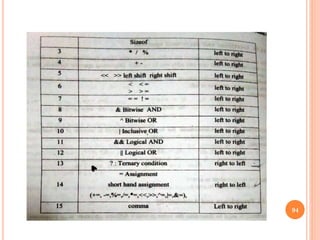
    93 BASIC REFERENCE TABLEFOR-PRECEDENCE and ASSOCIATIVITY
  • 94.
  • 95.
    95 BASICS: Pre-increment/decrement-ex: ++5 =6 , - -5 = 4 Post-increment/decrement-ex: 5++ = 5 , 5- - = 5
  • 96.
    96 WHEN U AREHAVING (+, -, * , /, %) IN A SAME EQUATION
  • 97.
    97 Note: FIRST Solvepost increment/decrement in given Equations
  • 98.
    98 COMPLETE 8/10-MARKS PROBLEM NOTE:a+= b means a= a + b (assignment operator)
  • 99.
  • 100.
  • 101.
  • 102.
  • 103.
  • 104.
  • 105.
  • 106.
  • 107.
  • 108.
  • 109.
  • 110.
    110 END Note: Everyone has tocomplete assignments given to you by this time regarding Module-01.(it carries marks) (TOTAL-3 Assignment) Assignment 1-Related to basic Programs( 3-Programs). Assignment 2-Related to Problems 1.Converting Mathematical expression into C expression for both 2 and 8- marks (7 questions ) Assignment 3- Related to Problems ie Evaluating the Expression ( 7-problems).
  • 111.