1 
Basics of Applet
2 
Objective 
On completion of this period, you will be able 
to learn 
• Basics of applet
3 
Recap 
In the previous classes, we have studied about 
• The various I/O streams and classes 
• How to write console based Java programs or 
applications
4 
Basics of Applets 
• Applets are small Java programs that are used 
in Internet computing 
• Applets 
• Transported over the Internet 
• Automatically installed in client machine 
• Run as part of a web document 
• Applets can be run using a tool ‘appletviewer’
5 
Basics of Applets contd.. 
• Applets interact with the user through the AWT, 
not through the console-based I/O classes 
• Clients download applets via Web browser 
• Browser runs applet in a Java Virtual Machine 
(JVM)
6 
Basics of Applets contd.. 
• Applets can be classified into two types 
• Local applets 
• Remote applets 
• Local applet 
• Developed and stored in local system 
• No need for internet connection for the local system 
• Local directories were searched to locate the 
specified applet
7 
Basics of Applets contd.. 
• Remote applet 
• Developed by someone else 
• Stored on a remote computer connected to the 
internet 
• Our system needs an internet connection 
• The applet is downloaded into our local system via 
internet 
• Run it on our system
8 
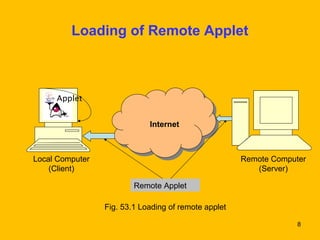
Loading of Remote Applet 
Internet 
Local Computer 
(Client) 
Remote Computer 
(Server) 
Remote Applet 
Fig. 53.1 Loading of remote applet 
Applet
9 
Web Browsers Requests Applet 
Client 
Computer 
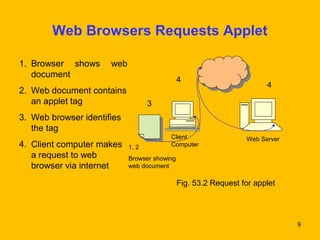
Fig. 53.2 Request for applet 
1. Browser shows web 
document 
2. Web document contains 
an applet tag 
3. Web browser identifies 
the tag 
4. Client computer makes 
a request to web 
browser via internet 
1, 2 
Browser showing 
web document 
Web Server 
3 
4 4
Web Server Transmits Applet along with HTML 
7 6 5 
10 
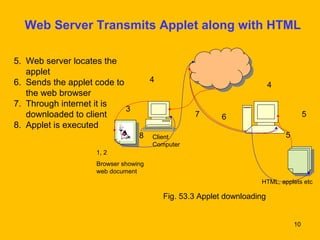
5. Web server locates the 
applet 
6. Sends the applet code to 
the web browser 
7. Through internet it is 
downloaded to client 
8. Applet is executed 
4 4 
Fig. 53.3 Applet downloading 
3 
1, 2 
Browser showing 
web document 
Client 
Computer 
5 
8 
HTML, applets etc
11 
Some Points About Applets 
• Applets do not use main() method 
• They run in a browser 
• They cannot read or write the files from the 
local system 
• Applets cannot run any other program from the 
local computer
Some Points About Applets contd.. 
• Applets are restricted from using libraries from 
other languages such as C or C++ 
• They cannot communicate with other servers 
on the local network 
12
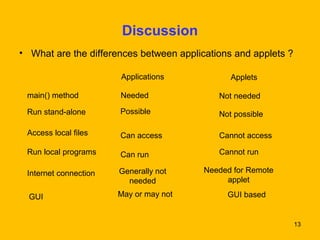
13 
Discussion 
• What are the differences between applications and applets ? 
main() method 
Run stand-alone Possible Not possible 
Access local files 
Applications Applets 
Needed Not needed 
Can access 
Cannot access 
Run local programs Can run Cannot run 
Internet connection Needed for Remote 
applet 
GUI based 
Generally not 
needed 
GUI May or may not
14 
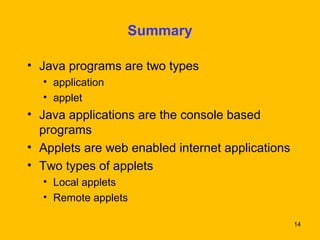
Summary 
• Java programs are two types 
• application 
• applet 
• Java applications are the console based 
programs 
• Applets are web enabled internet applications 
• Two types of applets 
• Local applets 
• Remote applets
15 
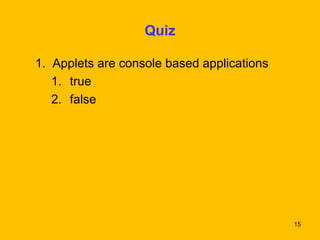
Quiz 
1. Applets are console based applications 
1. true 
2. false
16 
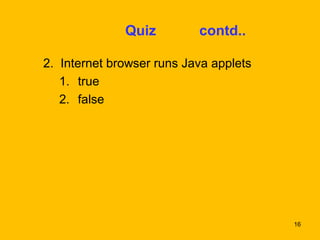
Quiz contd.. 
2. Internet browser runs Java applets 
1. true 
2. false
17 
3. Java applications are web enabled internet 
applications 
1. true 
2. false 
Quiz contd..
18 
Frequently Asked Questions 
• Explain about Java applets 
• List the differences between applets 
and applications

Basicsofapplets 53-130303003217-phpapp02

  • 1.
  • 2.
    2 Objective Oncompletion of this period, you will be able to learn • Basics of applet
  • 3.
    3 Recap Inthe previous classes, we have studied about • The various I/O streams and classes • How to write console based Java programs or applications
  • 4.
    4 Basics ofApplets • Applets are small Java programs that are used in Internet computing • Applets • Transported over the Internet • Automatically installed in client machine • Run as part of a web document • Applets can be run using a tool ‘appletviewer’
  • 5.
    5 Basics ofApplets contd.. • Applets interact with the user through the AWT, not through the console-based I/O classes • Clients download applets via Web browser • Browser runs applet in a Java Virtual Machine (JVM)
  • 6.
    6 Basics ofApplets contd.. • Applets can be classified into two types • Local applets • Remote applets • Local applet • Developed and stored in local system • No need for internet connection for the local system • Local directories were searched to locate the specified applet
  • 7.
    7 Basics ofApplets contd.. • Remote applet • Developed by someone else • Stored on a remote computer connected to the internet • Our system needs an internet connection • The applet is downloaded into our local system via internet • Run it on our system
  • 8.
    8 Loading ofRemote Applet Internet Local Computer (Client) Remote Computer (Server) Remote Applet Fig. 53.1 Loading of remote applet Applet
  • 9.
    9 Web BrowsersRequests Applet Client Computer Fig. 53.2 Request for applet 1. Browser shows web document 2. Web document contains an applet tag 3. Web browser identifies the tag 4. Client computer makes a request to web browser via internet 1, 2 Browser showing web document Web Server 3 4 4
  • 10.
    Web Server TransmitsApplet along with HTML 7 6 5 10 5. Web server locates the applet 6. Sends the applet code to the web browser 7. Through internet it is downloaded to client 8. Applet is executed 4 4 Fig. 53.3 Applet downloading 3 1, 2 Browser showing web document Client Computer 5 8 HTML, applets etc
  • 11.
    11 Some PointsAbout Applets • Applets do not use main() method • They run in a browser • They cannot read or write the files from the local system • Applets cannot run any other program from the local computer
  • 12.
    Some Points AboutApplets contd.. • Applets are restricted from using libraries from other languages such as C or C++ • They cannot communicate with other servers on the local network 12
  • 13.
    13 Discussion •What are the differences between applications and applets ? main() method Run stand-alone Possible Not possible Access local files Applications Applets Needed Not needed Can access Cannot access Run local programs Can run Cannot run Internet connection Needed for Remote applet GUI based Generally not needed GUI May or may not
  • 14.
    14 Summary •Java programs are two types • application • applet • Java applications are the console based programs • Applets are web enabled internet applications • Two types of applets • Local applets • Remote applets
  • 15.
    15 Quiz 1.Applets are console based applications 1. true 2. false
  • 16.
    16 Quiz contd.. 2. Internet browser runs Java applets 1. true 2. false
  • 17.
    17 3. Javaapplications are web enabled internet applications 1. true 2. false Quiz contd..
  • 18.
    18 Frequently AskedQuestions • Explain about Java applets • List the differences between applets and applications