Basics of Networking
Introduction to Networking
Concepts, Devices, and Protocols
What is Network?
• A network is a system of interconnected
devices that share resources and
communicate with each other.
• Networking is essential for modern
communication, enabling the Internet, cloud
services, and business operations.
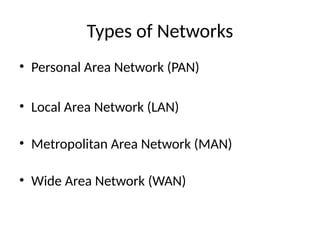
Types of Networks
• Personal Area Network (PAN)
• Local Area Network (LAN)
• Metropolitan Area Network (MAN)
• Wide Area Network (WAN)
Personal Area Network (PAN)
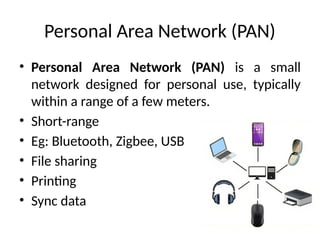
• Personal Area Network (PAN) is a small
network designed for personal use, typically
within a range of a few meters.
• Short-range
• Eg: Bluetooth, Zigbee, USB
• File sharing
• Printing
• Sync data
Local Area Network (LAN)
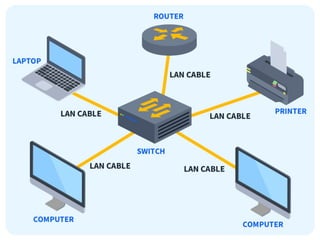
• Local Area Network (LAN) is a network that connects devices
within a limited geographical area, such as a home, office, or
campus.
Key features of a LAN include:
• High-speed communication: LANs typically operate at high
speeds, ranging from 100 Mbps to several Gbps, ensuring fast
data transfer within the network.
• Limited range: LANs cover small areas, usually up to a few
kilometers.
• Wired or wireless: LANs can use Ethernet cables (wired LANs)
or Wi-Fi (wireless LANs) for connectivity.
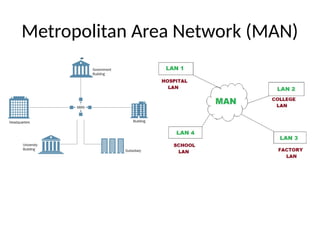
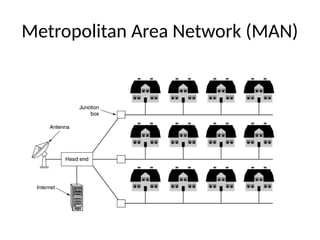
Metropolitan Area Network (MAN)
Wide Area Network (WAN)
• WAN (Wide Area Network) spans a large geographical area, often a country or
continent.
• WANs are used to connect smaller networks, such as LANs or MANs, allowing
devices in different locations to communicate and share resources over vast
distances.
Key features of a WAN include:
Lower speed compared to LAN: WANs generally have lower data transfer speeds
compared to LANs due to the long distances data needs to travel.
Variety of technologies: WANs use a combination of technologies like fiber optics,
satellite links, and microwave transmission for long-distance communication.
Networking Devices
• Router: Connects different networks and directs traffic.
• Switch: Connects devices within a LAN and forwards data.
• Hub: A basic device that broadcasts data to all devices.
• Modem: Converts digital data to analog for transmission.
• Access Points: Provides wireless connectivity.
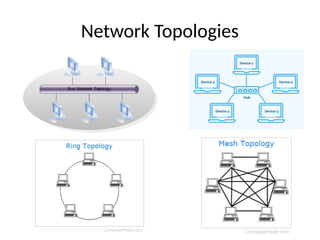
Network Topologies
• Bus Topology: Single central cable connects all
devices.
• Star Topology: All devices connect to a central hub.
• Ring Topology: Devices are connected in a circular
fashion.
• Mesh Topology: Devices are interconnected,
ensuring multiple data paths.
Network Topologies
IP Addressing
• IP Address: A unique identifier for a device on
a network.
• IPv4 vs IPv6: 32-bit vs 128-bit addressing
• Public vs Private IPs: Used for internet vs local
network communication.
• Static vs Dynamic IP: Permanent vs temporary
addresses.
Basic Networking Protocols
• • TCP/IP: Governs Internet communication.
• • HTTP/HTTPS: Web traffic protocols; HTTPS is secure.
• • DNS: Translates domain names to IP addresses.
• • FTP: Protocol for file transfer.
• • SMTP: Protocol for sending emails.
Network Security Basics
• • Firewalls: Control network traffic.
• • Encryption: Encodes data to protect it.
• • VPN: Provides secure communication over
public networks.
• • Common Threats: Malware, phishing, DDoS
attacks.

Basics_of_Networking_Lecture_for_IoT.pptx

  • 1.
    Basics of Networking Introductionto Networking Concepts, Devices, and Protocols
  • 2.
    What is Network? •A network is a system of interconnected devices that share resources and communicate with each other. • Networking is essential for modern communication, enabling the Internet, cloud services, and business operations.
  • 3.
    Types of Networks •Personal Area Network (PAN) • Local Area Network (LAN) • Metropolitan Area Network (MAN) • Wide Area Network (WAN)
  • 4.
    Personal Area Network(PAN) • Personal Area Network (PAN) is a small network designed for personal use, typically within a range of a few meters. • Short-range • Eg: Bluetooth, Zigbee, USB • File sharing • Printing • Sync data
  • 5.
    Local Area Network(LAN) • Local Area Network (LAN) is a network that connects devices within a limited geographical area, such as a home, office, or campus. Key features of a LAN include: • High-speed communication: LANs typically operate at high speeds, ranging from 100 Mbps to several Gbps, ensuring fast data transfer within the network. • Limited range: LANs cover small areas, usually up to a few kilometers. • Wired or wireless: LANs can use Ethernet cables (wired LANs) or Wi-Fi (wireless LANs) for connectivity.
  • 7.
  • 8.
  • 9.
    Wide Area Network(WAN) • WAN (Wide Area Network) spans a large geographical area, often a country or continent. • WANs are used to connect smaller networks, such as LANs or MANs, allowing devices in different locations to communicate and share resources over vast distances. Key features of a WAN include: Lower speed compared to LAN: WANs generally have lower data transfer speeds compared to LANs due to the long distances data needs to travel. Variety of technologies: WANs use a combination of technologies like fiber optics, satellite links, and microwave transmission for long-distance communication.
  • 10.
    Networking Devices • Router:Connects different networks and directs traffic. • Switch: Connects devices within a LAN and forwards data. • Hub: A basic device that broadcasts data to all devices. • Modem: Converts digital data to analog for transmission. • Access Points: Provides wireless connectivity.
  • 11.
    Network Topologies • BusTopology: Single central cable connects all devices. • Star Topology: All devices connect to a central hub. • Ring Topology: Devices are connected in a circular fashion. • Mesh Topology: Devices are interconnected, ensuring multiple data paths.
  • 12.
  • 13.
    IP Addressing • IPAddress: A unique identifier for a device on a network. • IPv4 vs IPv6: 32-bit vs 128-bit addressing • Public vs Private IPs: Used for internet vs local network communication. • Static vs Dynamic IP: Permanent vs temporary addresses.
  • 14.
    Basic Networking Protocols •• TCP/IP: Governs Internet communication. • • HTTP/HTTPS: Web traffic protocols; HTTPS is secure. • • DNS: Translates domain names to IP addresses. • • FTP: Protocol for file transfer. • • SMTP: Protocol for sending emails.
  • 15.
    Network Security Basics •• Firewalls: Control network traffic. • • Encryption: Encodes data to protect it. • • VPN: Provides secure communication over public networks. • • Common Threats: Malware, phishing, DDoS attacks.