Basic Structure of a C program with full starting to advance level learning
1.
Basic Structure ofC program, writing
and compiling your first program.
Session No.: 6
Course Name: Programming in C
Course Code:
Instructor Name: Ms. Fatima Ziya
Duration: 50min.
Date of Conduction of Class:xx/xx/2025
2.
• Setting upthe C environment
Review of the key concepts of session no. 5
3.
Opening Questions
1. Whathappens if we skip a step in instructions while making tea —
can the same happen in programming?
2. If the computer doesn’t understand human languages like Hindi or
English, what language do you think it understands?
3. Have you ever given instructions to someone to do a task step-by-
step? How is that similar to writing a computer program?
4.
Learning Outcomes
LO 1:Identify and explain the basic structure of a C program,
including headers, main() function, variable declarations,
statements and return values with some examples.
5.
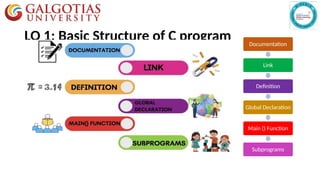
LO 1: BasicStructure of C program Documentation
Link
Definition
Global Declaration
Main () Function
Subprograms
6.
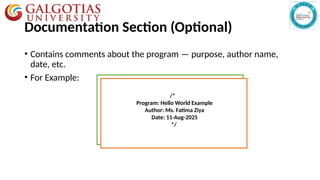
Documentation Section (Optional)
•Contains comments about the program — purpose, author name,
date, etc.
• For Example:
//---------------//
Single line comment
/*---------------------
------------------------*/
Multi-line comment
/*
Program: Hello World Example
Author: Ms. Fatima Ziya
Date: 11-Aug-2025
*/
7.
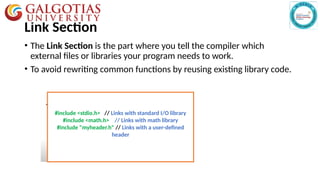
Link Section
• TheLink Section is the part where you tell the compiler which
external files or libraries your program needs to work.
• To avoid rewriting common functions by reusing existing library code.
#include <stdio.h> // Links with standard I/O library
#include <math.h> // Links with math library
#include "myheader.h" // Links with a user-defined
header
8.
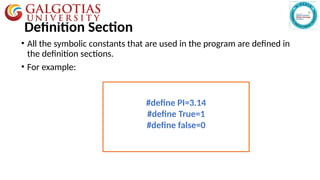
Definition Section
• Allthe symbolic constants that are used in the program are defined in
the definition sections.
• For example:
#define PI=3.14
#define True=1
#define false=0
9.
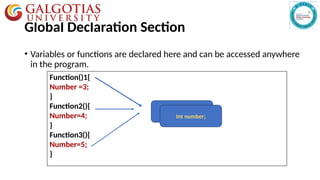
Global Declaration Section
•Variables or functions are declared here and can be accessed anywhere
in the program.
Function()1{
Number =3;
}
Function2(){
Number=4;
}
Function3(){
Number=5;
}
Global Variable
Int number;
10.
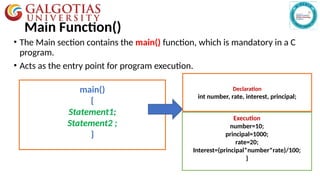
Main Function()
• TheMain section contains the main() function, which is mandatory in a C
program.
• Acts as the entry point for program execution.
main()
{
Statement1;
Statement2 ;
}
Declaration
int number, rate, interest, principal;
Execution
number=10;
principal=1000;
rate=20;
Interest=(principal*number*rate)/100;
}
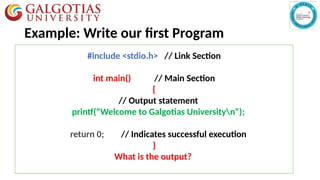
Example: Write ourfirst Program
#include <stdio.h> // Link Section
int main() // Main Section
{
// Output statement
printf("Welcome to Galgotias Universityn");
return 0; // Indicates successful execution
}
What is the output?
13.
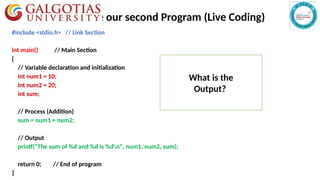
Activity 1 :Write our second Program (Live Coding)
#include <stdio.h> // Link Section
int main() // Main Section
{
// Variable declaration and initialization
int num1 = 10;
int num2 = 20;
int sum;
// Process (Addition)
sum = num1 + num2;
// Output
printf("The sum of %d and %d is %dn", num1, num2, sum);
return 0; // End of program
}
What is the
Output?
14.
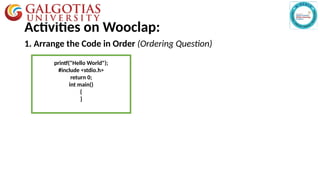
Activities on Wooclap:
1.Arrange the Code in Order (Ordering Question)
printf("Hello World");
#include <stdio.h>
return 0;
int main()
{
}
15.
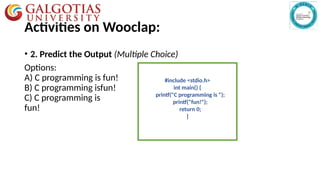
Activities on Wooclap:
•2. Predict the Output (Multiple Choice)
Options:
A) C programming is fun!
B) C programming isfun!
C) C programming is
fun!
#include <stdio.h>
int main() {
printf("C programming is ");
printf("fun!");
return 0;
}
16.
Post Assessment Questions:
•WAP in C to calculate the area of a Rectangle!
• WAP in C to print your name.
• WAP in C to Convert Celsius to Fahrenheit