GlobalLogic
Embedded Starter
Kit
Hello World Project
Training 01
Bare Metal
Trainings
Contents
 Assignments and Goals
 Theory
 Practice
 Individual task
19.10.2021 14:03 Bare Metal – Training 01 2
Assignments and Goals
• Create “Hello World” firmware for GLESK
(LED blinking)
• Learn GLESK HW basics
• Learn how to create, build, flash and debug
firmware using Keil IDE
19.10.2021 14:03 Bare Metal – Training 01 3
LEDs schematics
19.10.2021 14:03 Bare Metal – Training 01 4
Create “Hello World” Project
19.10.2021 14:03 Bare Metal – Training 01 5
Create “Hello World” Project
19.10.2021 14:03 Bare Metal – Training 01 6
Create “Hello World” Project
19.10.2021 14:03 Bare Metal – Training 01 7
Create “Hello World” Project
19.10.2021 14:03 Bare Metal – Training 01 8
Create “Hello World” Project
19.10.2021 14:03 Bare Metal – Training 01 9
Create “Hello World” Project
19.10.2021 14:03 Bare Metal – Training 01 10
Create “Hello World” Project
19.10.2021 14:03 Bare Metal – Training 01 11
Create “Hello World” Project
19.10.2021 14:03 Bare Metal – Training 01 12
Create “Hello World” Project
19.10.2021 14:03 Bare Metal – Training 01 13
Create “Hello World” Project
19.10.2021 14:03 14
Create “Hello World” Project
19.10.2021 14:03 Bare Metal – Training 01 15
Create “Hello World” Project
19.10.2021 14:03 Bare Metal – Training 01 16
Create “Hello World” Project
19.10.2021 14:03 Bare Metal – Training 01 17
Create “Hello World” Project
19.10.2021 14:03 Bare Metal – Training 01 18
Create “Hello World” Project
19.10.2021 14:03 Bare Metal – Training 01 19
Build sequence (classic)
19.10.2021 14:03 Bare Metal – Training 01 20
Build sequence (CubeMX)
19.10.2021 14:03 Bare Metal – Training 01 21
Source code tree
19.10.2021 14:03 Bare Metal – Training 01 22
Keil IDE introduction
19.10.2021 14:03 Bare Metal – Training 01 23
Individual task
• Add more LEDs to the project
(PD14, PD13, PD12)
• Implement custom blinking sequence
with 4 LEDs
(each group receive personal variant)
• Go through the code step-by-step with help
of debugger
19.10.2021 14:03 Bare Metal – Training 01 24

Bare metal training_01_hello_world

Editor's Notes

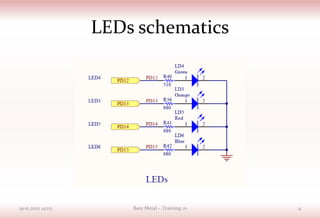
  • #5 Analyze schematics together with the students.
  • #6 Open Kiel IDE and create new project.
  • #7 Create folder for project. Go inside it. Type name of the project and press Save button.
  • #8 Select target microcontroller – STM32F407VGTx.
  • #9 Select basic components for the project (see picture for details).
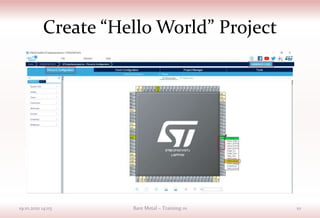
  • #10 Open CubeMX Framework to configure microcontroller settings.
  • #11 Configure pin PD15 as GPIO Output. And press Generate Code button. Close CubeMX. Include new files to the project (just press OK button).
  • #12 Open Main.c file and find main function inside it.
  • #13 Modify while loop with following code.
  • #14 Build application (press F7 button).
  • #15 Fix “stm32f4xx_hal_exti.h” file missing error. It is happens sometimes.
  • #16 Check that build completed with 0 errors or warnings. If errors are present – fix them.
  • #17 Open options window for project.
  • #18 Select ST-Link programmer.
  • #19 Download code to flash memory (F8 button).
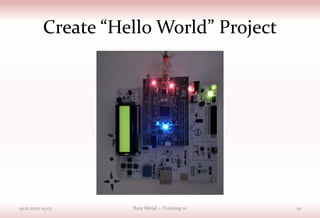
  • #20 Press “RESET” button on the Discovery (black one). Blue LED should blink. First program is ready!!! Congratulations! Show step-by-step code execution (live session).
  • #23 Go inside source code tree. Explain what is all about.
  • #25 Teacher should provide task for each group and control the result. Something like: blink 2 times red, one time – blue and green simultaneously, 3 times – all leds (in a cycle).