BANK MANAGEMENT SYSTEM
BY,
S.S.SURYAH
XII-A
6009
INTRODUCTION
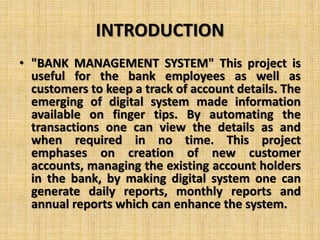
• "BANK MANAGEMENT SYSTEM" This project is
useful for the bank employees as well as
customers to keep a track of account details. The
emerging of digital system made information
available on finger tips. By automating the
transactions one can view the details as and
when required in no time. This project
emphases on creation of new customer
accounts, managing the existing account holders
in the bank, by making digital system one can
generate daily reports, monthly reports and
annual reports which can enhance the system.
SOURCE CODE
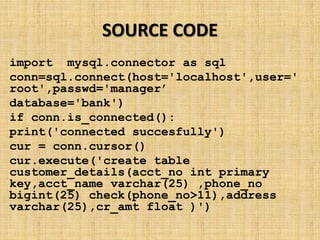
import mysql.connector as sql
conn=sql.connect(host='localhost',user='
root',passwd='manager’
database='bank')
if conn.is_connected():
print('connected succesfully')
cur = conn.cursor()
cur.execute('create table
customer_details(acct_no int primary
key,acct_name varchar(25) ,phone_no
bigint(25) check(phone_no>11),address
varchar(25),cr_amt float )')
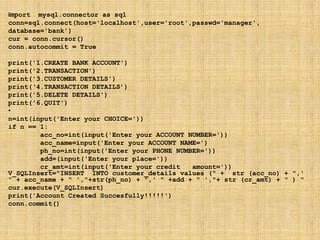
import mysql.connector as sql
conn=sql.connect(host='localhost',user='root',passwd='manager',
database='bank')
cur = conn.cursor()
conn.autocommit = True
print('1.CREATE BANK ACCOUNT')
print('2.TRANSACTION')
print('3.CUSTOMER DETAILS')
print(‘4.TRANSACTION DETAILS’)
print('5.DELETE DETAILS')
print('6.QUIT')
•
n=int(input('Enter your CHOICE='))
if n == 1:
acc_no=int(input('Enter your ACCOUNT NUMBER='))
acc_name=input('Enter your ACCOUNT NAME=')
ph_no=int(input('Enter your PHONE NUMBER='))
add=(input('Enter your place='))
cr_amt=int(input('Enter your credit amount='))
V_SQLInsert="INSERT INTO customer_details values (" + str (acc_no) + ",'
" + acc_name + " ',"+str(ph_no) + ",' " +add + " ',"+ str (cr_amt) + " ) "
cur.execute(V_SQLInsert)
print('Account Created Succesfully!!!!!')
conn.commit()
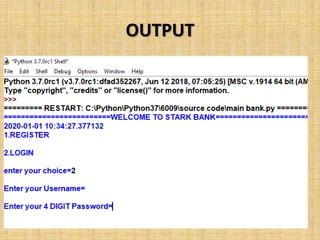
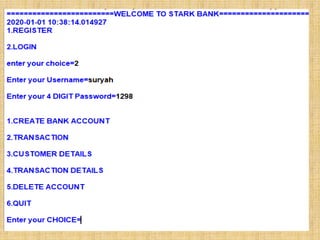
OUTPUT
INSTALLATION PROCEDURE
• Install python and my sql from the web.
• Open mysql and create the database bank
• Then run the table.py file.
• Next run the user_table.py file.
• Then the transactions_table.py file .
• Open the main bank file.
• Then register your account.
THANK YOU

BANK MANAGEMENT SYSTEM.pptx

  • 1.
  • 2.
    INTRODUCTION • "BANK MANAGEMENTSYSTEM" This project is useful for the bank employees as well as customers to keep a track of account details. The emerging of digital system made information available on finger tips. By automating the transactions one can view the details as and when required in no time. This project emphases on creation of new customer accounts, managing the existing account holders in the bank, by making digital system one can generate daily reports, monthly reports and annual reports which can enhance the system.
  • 3.
    SOURCE CODE import mysql.connectoras sql conn=sql.connect(host='localhost',user=' root',passwd='manager’ database='bank') if conn.is_connected(): print('connected succesfully') cur = conn.cursor() cur.execute('create table customer_details(acct_no int primary key,acct_name varchar(25) ,phone_no bigint(25) check(phone_no>11),address varchar(25),cr_amt float )')
  • 4.
    import mysql.connector assql conn=sql.connect(host='localhost',user='root',passwd='manager', database='bank') cur = conn.cursor() conn.autocommit = True print('1.CREATE BANK ACCOUNT') print('2.TRANSACTION') print('3.CUSTOMER DETAILS') print(‘4.TRANSACTION DETAILS’) print('5.DELETE DETAILS') print('6.QUIT') • n=int(input('Enter your CHOICE=')) if n == 1: acc_no=int(input('Enter your ACCOUNT NUMBER=')) acc_name=input('Enter your ACCOUNT NAME=') ph_no=int(input('Enter your PHONE NUMBER=')) add=(input('Enter your place=')) cr_amt=int(input('Enter your credit amount=')) V_SQLInsert="INSERT INTO customer_details values (" + str (acc_no) + ",' " + acc_name + " ',"+str(ph_no) + ",' " +add + " ',"+ str (cr_amt) + " ) " cur.execute(V_SQLInsert) print('Account Created Succesfully!!!!!') conn.commit()
  • 5.
  • 7.
    INSTALLATION PROCEDURE • Installpython and my sql from the web. • Open mysql and create the database bank • Then run the table.py file. • Next run the user_table.py file. • Then the transactions_table.py file . • Open the main bank file. • Then register your account.
  • 8.