BeagleBoard Basics
Activity Sheets
EEdutechdutech SSystemsystems
Activity : 0
About Beagle Board:
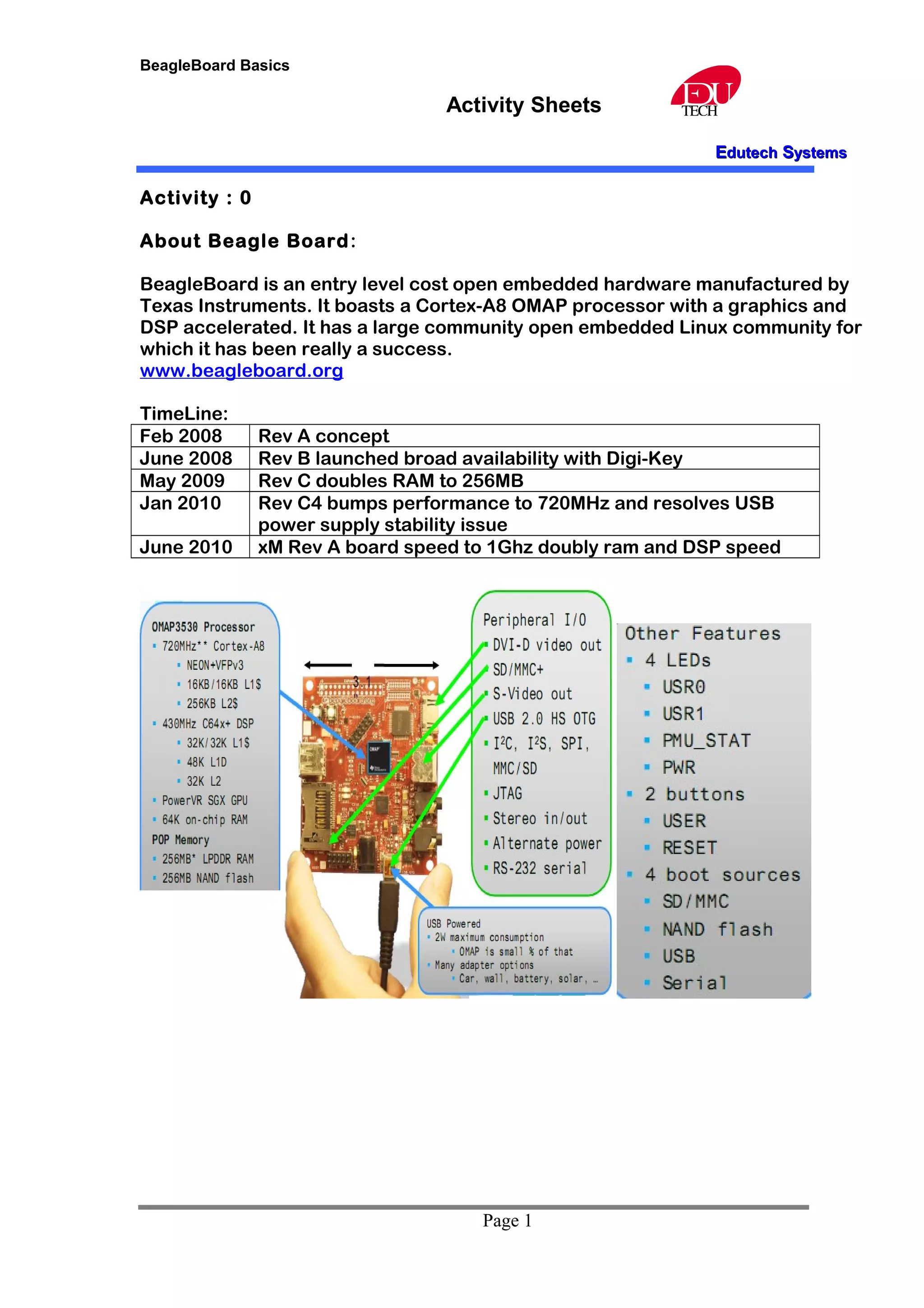
BeagleBoard is an entry level cost open embedded hardware manufactured by
Texas Instruments. It boasts a Cortex-A8 OMAP processor with a graphics and
DSP accelerated. It has a large community open embedded Linux community for
which it has been really a success.
www.beagleboard.org
TimeLine:
Feb 2008 Rev A concept
June 2008 Rev B launched broad availability with Digi-Key
May 2009 Rev C doubles RAM to 256MB
Jan 2010 Rev C4 bumps performance to 720MHz and resolves USB
power supply stability issue
June 2010 xM Rev A board speed to 1Ghz doubly ram and DSP speed
Page 1
BeagleBoard Basics
Activity Sheets
EEdutechdutech SSystemsystems
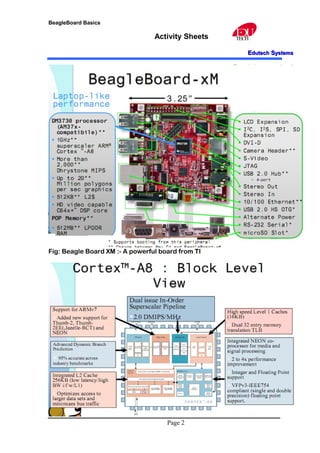
Fig: Beagle Board XM :- A powerful board from TI
Page 2
BeagleBoard Basics
Activity Sheets
EEdutechdutech SSystemsystems
Activity 1: Setting up BeagleBoard
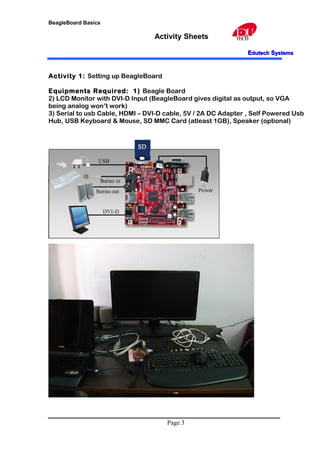
Equipments Required: 1) Beagle Board
2) LCD Monitor with DVI-D Input (BeagleBoard gives digital as output, so VGA
being analog won’t work)
3) Serial to usb Cable, HDMI – DVI-D cable, 5V / 2A DC Adapter , Self Powered Usb
Hub, USB Keyboard & Mouse, SD MMC Card (atleast 1GB), Speaker (optional)
Page 3
BeagleBoard Basics
Activity Sheets
EEdutechdutech SSystemsystems
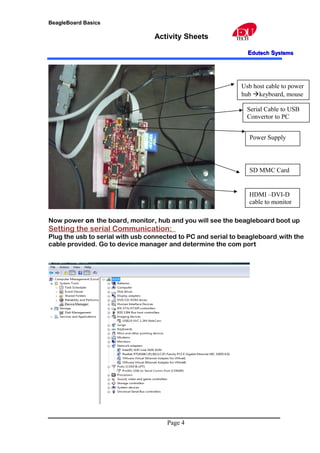
Now power on the board, monitor, hub and you will see the beagleboard boot up
Setting the serial Communication:
Plug the usb to serial with usb connected to PC and serial to beagleboard with the
cable provided. Go to device manager and determine the com port
Page 4
Serial Cable to USB
Convertor to PC
Usb host cable to power
hub keyboard, mouse
Power Supply
HDMI –DVI-D
cable to monitor
SD MMC Card
BeagleBoard Basics
Activity Sheets
EEdutechdutech SSystemsystems
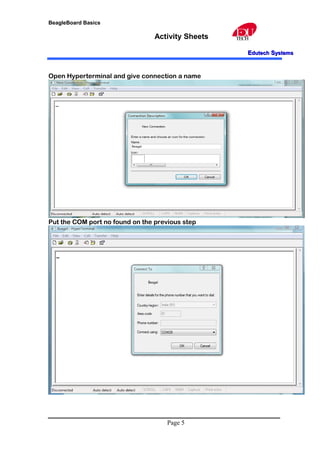
Open Hyperterminal and give connection a name
Put the COM port no found on the previous step
Page 5
BeagleBoard Basics
Activity Sheets
EEdutechdutech SSystemsystems
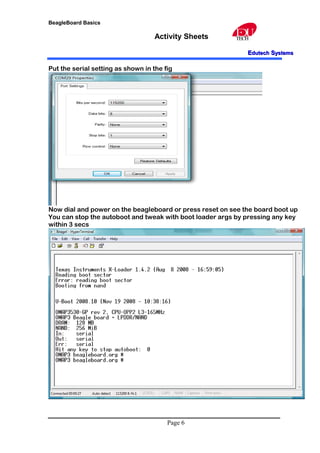
Put the serial setting as shown in the fig
Now dial and power on the beagleboard or press reset on see the board boot up
You can stop the autoboot and tweak with boot loader args by pressing any key
within 3 secs
Page 6
BeagleBoard Basics
Activity Sheets
EEdutechdutech SSystemsystems
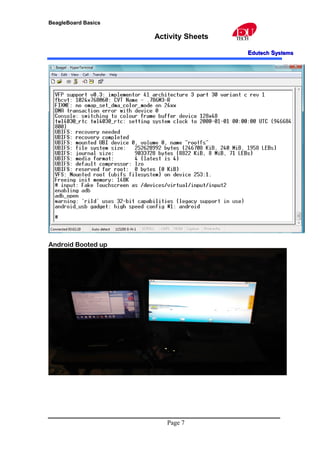
Android Booted up
Page 7

Bagle board activity

  • 1.
    BeagleBoard Basics Activity Sheets EEdutechdutechSSystemsystems Activity : 0 About Beagle Board: BeagleBoard is an entry level cost open embedded hardware manufactured by Texas Instruments. It boasts a Cortex-A8 OMAP processor with a graphics and DSP accelerated. It has a large community open embedded Linux community for which it has been really a success. www.beagleboard.org TimeLine: Feb 2008 Rev A concept June 2008 Rev B launched broad availability with Digi-Key May 2009 Rev C doubles RAM to 256MB Jan 2010 Rev C4 bumps performance to 720MHz and resolves USB power supply stability issue June 2010 xM Rev A board speed to 1Ghz doubly ram and DSP speed Page 1
  • 2.
    BeagleBoard Basics Activity Sheets EEdutechdutechSSystemsystems Fig: Beagle Board XM :- A powerful board from TI Page 2
  • 3.
    BeagleBoard Basics Activity Sheets EEdutechdutechSSystemsystems Activity 1: Setting up BeagleBoard Equipments Required: 1) Beagle Board 2) LCD Monitor with DVI-D Input (BeagleBoard gives digital as output, so VGA being analog won’t work) 3) Serial to usb Cable, HDMI – DVI-D cable, 5V / 2A DC Adapter , Self Powered Usb Hub, USB Keyboard & Mouse, SD MMC Card (atleast 1GB), Speaker (optional) Page 3
  • 4.
    BeagleBoard Basics Activity Sheets EEdutechdutechSSystemsystems Now power on the board, monitor, hub and you will see the beagleboard boot up Setting the serial Communication: Plug the usb to serial with usb connected to PC and serial to beagleboard with the cable provided. Go to device manager and determine the com port Page 4 Serial Cable to USB Convertor to PC Usb host cable to power hub keyboard, mouse Power Supply HDMI –DVI-D cable to monitor SD MMC Card
  • 5.
    BeagleBoard Basics Activity Sheets EEdutechdutechSSystemsystems Open Hyperterminal and give connection a name Put the COM port no found on the previous step Page 5
  • 6.
    BeagleBoard Basics Activity Sheets EEdutechdutechSSystemsystems Put the serial setting as shown in the fig Now dial and power on the beagleboard or press reset on see the board boot up You can stop the autoboot and tweak with boot loader args by pressing any key within 3 secs Page 6
  • 7.
    BeagleBoard Basics Activity Sheets EEdutechdutechSSystemsystems Android Booted up Page 7