The use of Azure Pipelines for
automatic deployment and automated
testing of FME content
Presenter
The
Peak
of
Data
Integration
20
23
Maarten
van Doornik
GIS consultant
Tensing - Avineon
The
Peak
of
Data
Integration
20
23
Introduction
The
Peak
of
Data
Integration
20
23
Working on a FME project
Common frustrations people face :
● Different versions of a workspace exist
● Environments are not equal
● Bugs exist due to lack of proper testing
The
Peak
of
Data
Integration
20
23
Working on a FME project
What is often encountered:
● No version control
● Deployment occurs manually
● No automated testing
The
Peak
of
Data
Integration
20
23
What is Azure Pipelines?
Azure Pipelines is a cloud service that we can use to build, test and deploy our code
project automatically.
CI/CD lifecycle
Continuous integration
- Build and publish an artifact from your source code using a build pipeline
Continuous deployment
- Deploy a published artifact using a release pipeline
The
Peak
of
Data
Integration
20
23
Deploy a FME project using
Azure Pipelines
The
Peak
of
Data
Integration
20
23
Our project (GAAS)
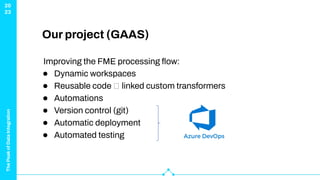
Improving the FME processing flow:
● Dynamic workspaces
● Reusable code 🡪 linked custom transformers
● Automations
● Version control (git)
● Automatic deployment
● Automated testing
The
Peak
of
Data
Integration
20
23
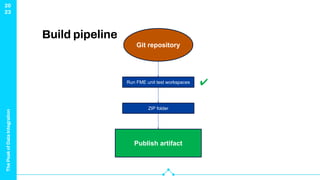
Build pipeline
Git repository
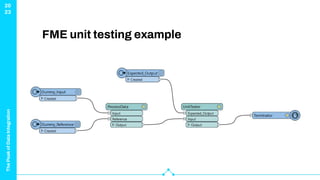
Run FME unit test workspaces
The
Peak
of
Data
Integration
20
23
FME unit testing example
The
Peak
of
Data
Integration
20
23
Build pipeline
Git repository
Run FME unit test workspaces
ZIP folder
Publish artifact
✔
The
Peak
of
Data
Integration
20
23
Release pipeline
Published
Artifact
Test Acceptance Production
✔
1) Extract ZIP file
2) Replace passwords in
Acceptance.ini
3) Run Install.py
• Arg: Acceptance.ini
1) Extract ZIP file
2) Replace passwords in
Test.ini
3) Run Install.py
• Arg: Test.ini
1) Extract ZIP file
2) Replace passwords in
Production.ini
3) Run Install.py
• Arg: Production.ini
The
Peak
of
Data
Integration
20
23
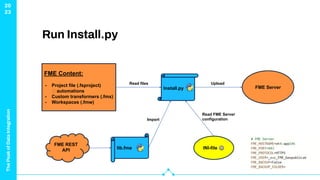
Run Install.py
FME Content:
- Project file (.fsproject)
🡪 automations
- Custom transformers (.fmx)
- Workspaces (.fmw)
FME REST
API
Install.py
lib.fme INI-file ⚙
FME Server
Read files
Import
Read FME Server
configuration
Upload
The
Peak
of
Data
Integration
20
23
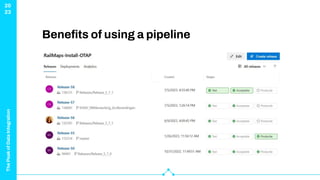
Benefits of using a pipeline
● Equal environments
● Insight in your deployment status
● Deploy only tested functionality
● Deployment is just a “push on the button”
The
Peak
of
Data
Integration
20
23
Conclusion
The
Peak
of
Data
Integration
20
23
Azure Pipelines is:
● Actually not that complicated
● Also very useful in FME projects
● A great tool to automate your deployment
● A great tool to incorporate automated tests
The
Peak
of
Data
Integration
20
23
Resources
● What is Azure Pipelines? - Azure Pipelines | Microsoft
Learn
● FMEFlow Rest API V3 (safe.com)
ThankYou!
mvandoornik@tensing.com

Azure Pipelines for Automatic Deployment