Azure Application Insights
とか
Takekazu Omi
takekazu.omi@kyrt.in
2018/01/27 R.1.0
.NET Fringe Japan 2018
New Year Party
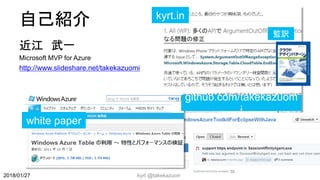
自己紹介
近江 武一
Microsoft MVP for Azure
http://www.slideshare.net/takekazuomi
kyrt @takekazuomi 2
kyrt.in
github.com/takekazuom
i
white paper
監訳
2018/01/27
What is Application Insights?
Application Insights とは何か?
2018/01/27 kyrt @takekazuomi 3
概要
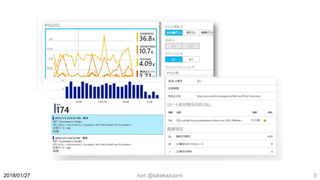
 Application Insights は、マルチのプラットフォームな
Web 開発者向けの拡張可能なアプリケーション パ
フォーマンス管理 (APM) サービス
 実行中の Web アプリケーションの監視
 パフォーマンスに異常の自動に検出
 強力な分析ツールで問題を診断
 パフォーマンス、ユーザビリティを継続的な向上
 .NET、Node.js、J2EE などのアプリに対応
kyrt @takekazuomi 42018/01/27
https://docs.microsoft.com/ja-jp/azure/application-insights/app-insights-overview
kyrt @takekazuomi 52018/01/27
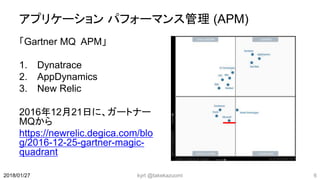
アプリケーション パフォーマンス管理 (APM)
「Gartner MQ APM」
1. Dynatrace
2. AppDynamics
3. New Relic
2016年12月21日に、ガートナー
MQから
https://newrelic.degica.com/blo
g/2016-12-25-gartner-magic-
quadrant
kyrt @takekazuomi 62018/01/27
kyrt @takekazuomi 72018/01/27
ツマラナイ…..
.NET Fringe っぽくない
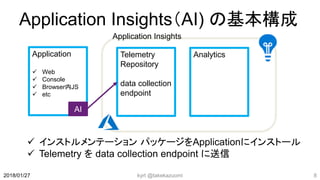
Application Insights(AI) の基本構成
 インストルメンテーション パッケージをApplicationにインストール
 Telemetry を data collection endpoint に送信
kyrt @takekazuomi 82018/01/27
Application
 Web
 Console
 Browser内JS
 etc
Telemetry
Repository
data collection
endpoint
AI
Analytics
Application Insights
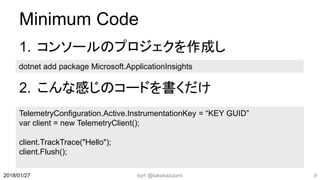
Minimum Code
1. コンソールのプロジェクを作成し
2. こんな感じのコードを書くだけ
kyrt @takekazuomi 92018/01/27
TelemetryConfiguration.Active.InstrumentationKey = “KEY GUID”
var client = new TelemetryClient();
client.TrackTrace("Hello");
client.Flush();
dotnet add package Microsoft.ApplicationInsights
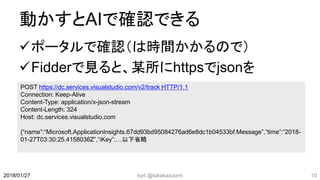
動かすとAIで確認できる
ポータルで確認(は時間かかるので)
Fidderで見ると、某所にhttpsでjsonを

kyrt @takekazuomi 102018/01/27
POST https://dc.services.visualstudio.com/v2/track HTTP/1.1
Connection: Keep-Alive
Content-Type: application/x-json-stream
Content-Length: 324
Host: dc.services.visualstudio.com
{“name”:“Microsoft.ApplicationInsights.67dd93bd95084276ad6e8dc1b04533bf.Message”,“time”:“2018-
01-27T03:30:25.4158036Z”,“iKey”:…以下省略
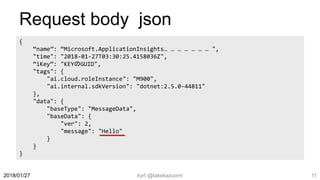
Request body json
kyrt @takekazuomi 112018/01/27
{
“name”: “Microsoft.ApplicationInsights… … … … … … … ",
"time": "2018-01-27T03:30:25.4158036Z",
“iKey”: "KEYのGUID",
"tags": {
"ai.cloud.roleInstance": "M900",
"ai.internal.sdkVersion": "dotnet:2.5.0-44811"
},
"data": {
"baseType": "MessageData",
"baseData": {
"ver": 2,
"message": "Hello"
}
}
}
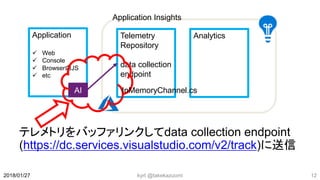
テレメトリをバッファリンクしてdata collection endpoint
(https://dc.services.visualstudio.com/v2/track)に送信
kyrt @takekazuomi 122018/01/27
Application
 Web
 Console
 Browser内JS
 etc
Telemetry
Repository
data collection
endpoint
AI
Analytics
Application Insights
InMemoryChannel.cs
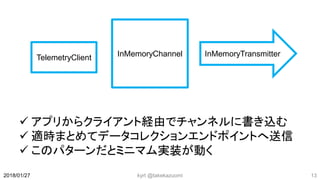
 アプリからクライアント経由でチャンネルに書き込む
 適時まとめてデータコレクションエンドポイントへ送信
 このパターンだとミニマム実装が動く
kyrt @takekazuomi 132018/01/27
TelemetryClient InMemoryChannel InMemoryTransmitter
GitHub - ApplicationInsights-dotnet
src/Microsoft.ApplicationInsights 当たりにだいたいある
 TelemetryClient
https://github.com/Microsoft/ApplicationInsights-
dotnet/blob/develop/src/Microsoft.ApplicationInsights/Telemetr
yClient.cs
 InMemoryChannel
https://github.com/Microsoft/ApplicationInsights-
dotnet/blob/develop/src/Microsoft.ApplicationInsights/Channel
/InMemoryChannel.cs
kyrt @takekazuomi 142018/01/27
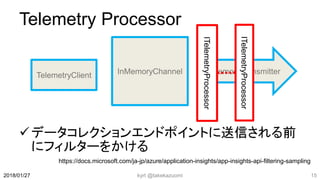
Telemetry Processor
データコレクションエンドポイントに送信される前
にフィルターをかける
kyrt @takekazuomi 152018/01/27
ITelemetryProcessor
https://docs.microsoft.com/ja-jp/azure/application-insights/app-insights-api-filtering-sampling
ITelemetryProcessor
SamplingTelemetryProcessor
 サンプリングでは、n 個のレコードのうちの 1 個が保
持され、残りは破棄される
 サンプリングの除数 (1/nのn)は itemCount に入る
https://github.com/Microsoft/ApplicationInsights-
dotnet/blob/develop/src/ServerTelemetryChannel/Sa
mplingTelemetryProcessor.cs
kyrt @takekazuomi 162018/01/27
AdaptiveSamplingTelemetryProcessor
 ASP.NET アプリの SDK から送信されるテレメトリの
量を自動的に調整
 指定した最大トラフィック レート以下に維持
 ASP.NET サーバーのみ対応
https://github.com/Microsoft/ApplicationInsights-
dotnet/blob/develop/src/ServerTelemetryChannel/Ad
aptiveSamplingTelemetryProcessor.cs
kyrt @takekazuomi 172018/01/27
Memo:Ingestion sampling
データコレクション側のサンプリング
テレメトリの一部を、設定したサンプリング
レートで破棄
サーバー側の容量制限回避
サンプリングは以上3種類ある
kyrt @takekazuomi 182018/01/27
テレメトリの収集
2018/01/27 kyrt @takekazuomi 19
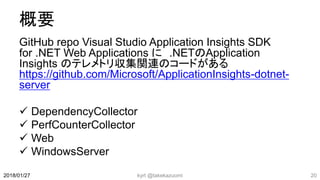
概要
GitHub repo Visual Studio Application Insights SDK
for .NET Web Applications に .NETのApplication
Insights のテレメトリ収集関連のコードがある
https://github.com/Microsoft/ApplicationInsights-dotnet-
server
 DependencyCollector
 PerfCounterCollector
 Web
 WindowsServer
kyrt @takekazuomi 202018/01/27
.NET Core はこっち
https://github.com/Microsoft/ApplicationInsig
hts-aspnetcore
kyrt @takekazuomi 212018/01/27
テレメトリ収集のSDK
Endpointの仕様やSDK作成に関する情報
https://github.com/Microsoft/ApplicationInsi
ghts-Home/tree/master/EndpointSpecs
kyrt @takekazuomi 222018/01/27
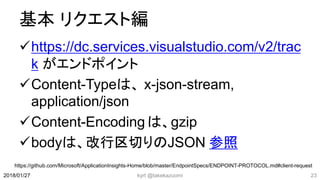
基本 リクエスト編
https://dc.services.visualstudio.com/v2/trac
k がエンドポイント
Content-Typeは、 x-json-stream,
application/json
Content-Encoding は、gzip
bodyは、改行区切りのJSON 参照
kyrt @takekazuomi 232018/01/27
https://github.com/Microsoft/ApplicationInsights-Home/blob/master/EndpointSpecs/ENDPOINT-PROTOCOL.md#client-request
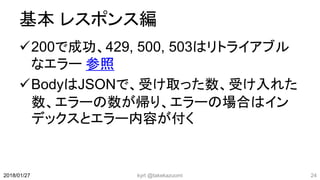
基本 レスポンス編
200で成功、429, 500, 503はリトライアブル
なエラー 参照
BodyはJSONで、受け取った数、受け入れた
数、エラーの数が帰り、エラーの場合はイン
デックスとエラー内容が付く
kyrt @takekazuomi 242018/01/27
レスポンス例
kyrt @takekazuomi 252018/01/27
{
"itemsReceived": 5,
"itemsAccepted": 3,
"errors": [
{
"index": 0,
"statusCode": 400,
"message": "103: Field 'time' on type 'Envelope' is older than the allowed min date. Expected: now
- 172800000ms, Actual: now - 226881806ms"
},
{
"index": 2,
"statusCode": 500,
"message": "Internal Server Error"
}
]
}
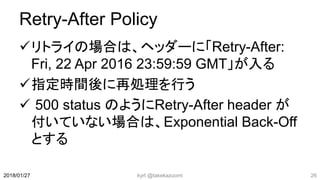
Retry-After Policy
リトライの場合は、ヘッダーに「Retry-After:
Fri, 22 Apr 2016 23:59:59 GMT」が入る
指定時間後に再処理を行う
 500 status のようにRetry-After header が
付いていない場合は、Exponential Back-Off
とする
kyrt @takekazuomi 262018/01/27
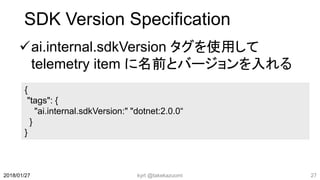
SDK Version Specification
ai.internal.sdkVersion タグを使用して
telemetry item に名前とバージョンを入れる
kyrt @takekazuomi 272018/01/27
{
"tags": {
"ai.internal.sdkVersion:" "dotnet:2.0.0“
}
}
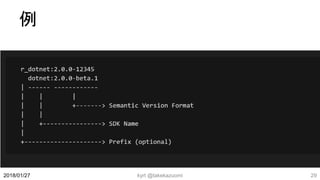
SDK Version Format
 [PREFIX_]SDKNAME:SEMVER
kyrt @takekazuomi 282018/01/27
例
kyrt @takekazuomi 292018/01/27
dotnet
基本の.NET SDK API で使われる Track
telemetry item。手動、もしくは独自のバー
ジョンを持たないSDKで使われます。
Public versions:
https://github.com/Microsoft/ApplicationInsi
ghts-dotnet/releases
kyrt @takekazuomi 302018/01/27
rddf
Framework instrumentation (Event
Source) によって収集されたRemote
dependency telemetry
Public versions:
https://github.com/Microsoft/ApplicationInsi
ghts-dotnet-server/releases
kyrt @takekazuomi 312018/01/27
web
telemetry は、AI Web SDK によって収集さ
れたものほとんどはリクエス由来
Public versions:
https://github.com/Microsoft/ApplicationInsi
ghts-dotnet-server/releases
kyrt @takekazuomi 322018/01/27
rddp
Profiler instrumentation 由来で収集された、
Remote dependency telemetry
Public versions:
https://github.com/Microsoft/ApplicationInsi
ghts-dotnet-server/releases
kyrt @takekazuomi 332018/01/27
rdddsd
Desktop framework の Diagnostic Source
instrumentation 由来で収集された、Remote
dependency teleme
Public versions:
https://github.com/Microsoft/ApplicationInsi
ghts-dotnet-server/releases
kyrt @takekazuomi 342018/01/27
rdddsc
.NET Core の Diagnostic Source 由来で収
集された、Remote dependency teleme
Public versions:
https://github.com/Microsoft/ApplicationInsi
ghts-dotnet-server/releases
kyrt @takekazuomi 352018/01/27
pc
performance counters
Public versions:
https://github.com/Microsoft/ApplicationInsi
ghts-dotnet-server/releases
kyrt @takekazuomi 362018/01/27
wcf
WCF package from
[labs](https://github.com/Microsoft/Applicatio
nInsights-sdk-labs) repository
kyrt @takekazuomi 372018/01/27
unobs
unobserved exceptions - part of web SDK
Public versions:
https://github.com/Microsoft/ApplicationInsi
ghts-dotnet-server/releases
kyrt @takekazuomi 382018/01/27
unhnd
unhandled exceptions – part of web SDK
Public versions:
https://github.com/Microsoft/ApplicationInsi
ghts-dotnet-server/releases
kyrt @takekazuomi 392018/01/27
azwapc
azure web app performance counters
kyrt @takekazuomi 402018/01/27
sd
System diagnostics trace
Public versions:
https://github.com/Microsoft/ApplicationInsi
ghts-dotnet-logging/releases
kyrt @takekazuomi 412018/01/27
nlog
.NET Logging adapter nuget package for
nlog
Public versions:
https://github.com/Microsoft/ApplicationInsi
ghts-dotnet-logging/releases
kyrt @takekazuomi 422018/01/27
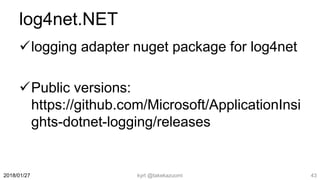
log4net.NET
logging adapter nuget package for log4net
Public versions:
https://github.com/Microsoft/ApplicationInsi
ghts-dotnet-logging/releases
kyrt @takekazuomi 432018/01/27
kyrt @takekazuomi 442018/01/27
終

Azure Application Insights とか

Editor's Notes

  • #2 2016/5/21 R.1.0
  • #7 MSには世界最大の開発者コミュニティがある Azureのインフラストラクチャーに完全に導入されると世界中に配置されるとか CodeLenseと統合できるだろう Cons BuildなどのMSのイベントでしか見ない オンプレのSystem Centerの実装からSaaSのAIへの移行には クロスプラットフォームが弱い