this ppt contains Savitribai phule pune university's third year computer subject 'cloud computing' unit 4 ppt and notes for endsem exam preparations .
the topic name is cloud platforms and cloud applications
“Cloud Platforms andCloud
Applications”
Prepared By
Prof. Swati B. Dhadake
(Assistant Professor)
Computer Engineering Departement
CLASS : TE COMPUTER 2019
SUBJECT : CC (SEM-II)
: IV
1
2.
SYLLABUS
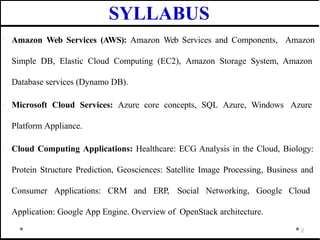
· Amazon WebServices (AWS): Amazon Web Services and Components, Amazon
Simple DB, Elastic Cloud Computing (EC2), Amazon Storage System, Amazon
Database services (Dynamo DB).
· Microsoft Cloud Services: Azure core concepts, SQL Azure, Windows Azure
Platform Appliance.
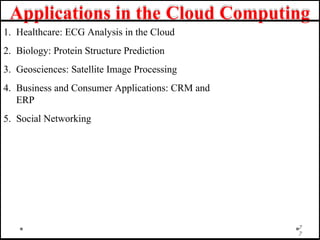
· Cloud Computing Applications: Healthcare: ECG Analysis in the Cloud, Biology:
Protein Structure Prediction, Geosciences: Satellite Image Processing, Business and
Consumer Applications: CRM and ERP, Social Networking, Google Cloud
Application: Google App Engine. Overview of OpenStack architecture.
2
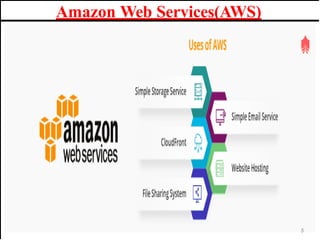
AWS stands forAmazon Web Services.
The AWS service is provided by the Amazon that uses
distributed IT infrastructure to provide different IT resources
available on demand. It provides different services such as
infrastructure as a service (IaaS), platform as a service
(PaaS) and packaged software as a service (SaaS).
Amazon launched AWS, a cloud computing platform to
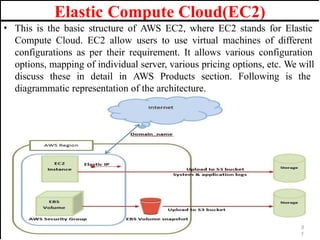
allow the different organizations to take advantage of
reliable IT infrastructure.
Amazon Web Services(AWS)
4
Uses of AWS:
• A small manufacturing organization uses their expertise to
expand their business by leaving their IT management to the
AWS.
• A large enterprise spread across the globe can utilize the AWS
to deliver the training to the distributed workforce.
• An architecture consulting company can use AWS to get
the high-compute rendering of construction prototype.
• A media company can use the AWS to provide different types
of content such as ebox or audio files to the worldwide files.
Amazon Web Services(AWS)
6
7.
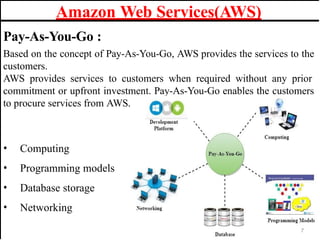
Pay-As-You-Go :
Based onthe concept of Pay-As-You-Go, AWS provides the services to the
customers.
AWS provides services to customers when required without any prior
commitment or upfront investment. Pay-As-You-Go enables the customers
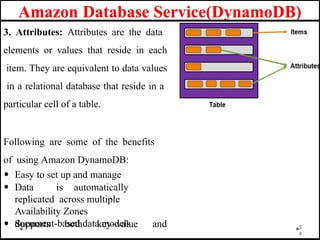
to procure services from AWS.
• Computing
• Programming models
• Database storage
• Networking
Amazon Web Services(AWS)
7
8.
Advantages of AWS:
1) Flexibility
• We can get more time for core business tasks due to the instant availability
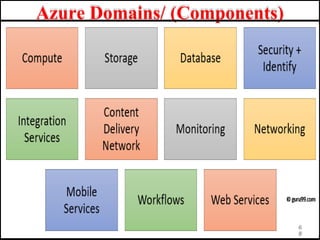
of new features and services in AWS.
• It provides effortless hosting of legacy applications. AWS does not require
learning new technologies and migration of applications to the AWS
provides the advanced computing and efficient storage.
• AWS also offers a choice that whether we want to run the applications and
services together or not. We can also choose to run a part of the IT
infrastructure in AWS and the remaining part in data centres.
2) Cost-effectiveness
AWS requires no upfront investment, long-term commitment, and minimum
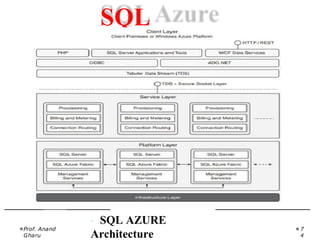
expense when compared to traditional IT infrastructure that requires a huge
investment.
Amazon Web Services(AWS)
8
9.
Amazon Web Services(AWS)
Advantagesof AWS :
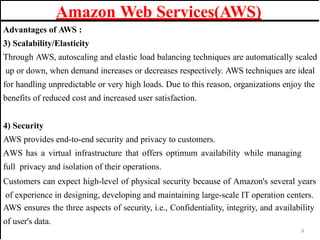
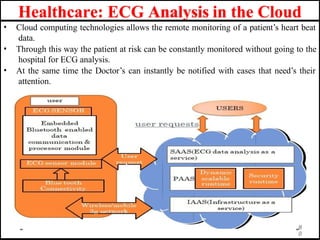
3) Scalability/Elasticity
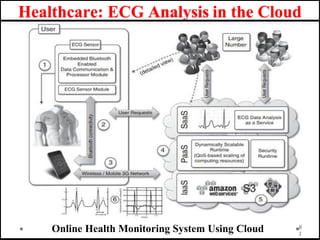
Through AWS, autoscaling and elastic load balancing techniques are automatically scaled
up or down, when demand increases or decreases respectively. AWS techniques are ideal
for handling unpredictable or very high loads. Due to this reason, organizations enjoy the
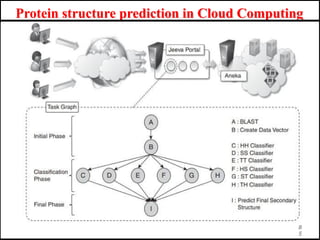
benefits of reduced cost and increased user satisfaction.
4) Security
AWS provides end-to-end security and privacy to customers.
AWS has a virtual infrastructure that offers optimum availability while managing
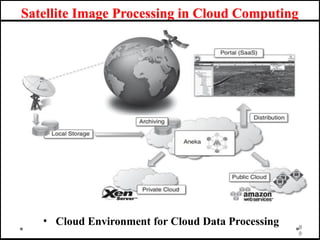
full privacy and isolation of their operations.
Customers can expect high-level of physical security because of Amazon's several years
of experience in designing, developing and maintaining large-scale IT operation centers.
AWS ensures the three aspects of security, i.e., Confidentiality, integrity, and availability
of user's data.
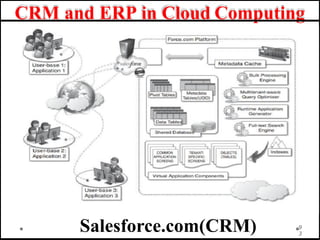
9
10.
History of AmazonWeb Services(AWS)
1
0
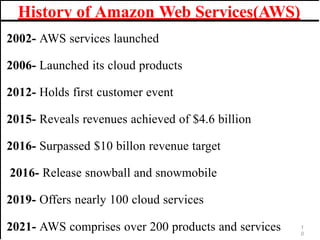
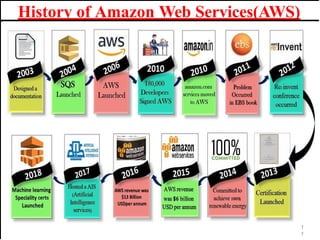
2002- AWS services launched
2006- Launched its cloud products
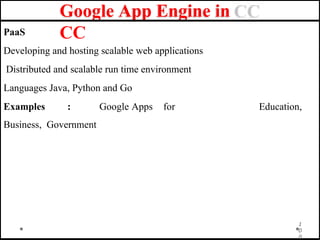
2012- Holds first customer event
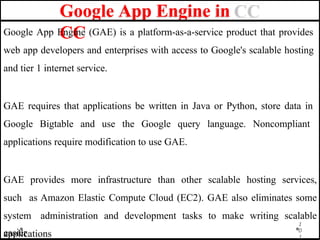
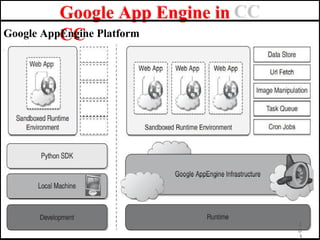
2015- Reveals revenues achieved of $4.6 billion
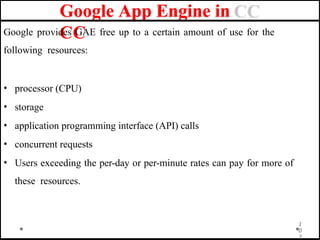
2016- Surpassed $10 billon revenue target
2016- Release snowball and snowmobile
2019- Offers nearly 100 cloud services
2021- AWS comprises over 200 products and services
Features of AmazonWeb Services(AWS)
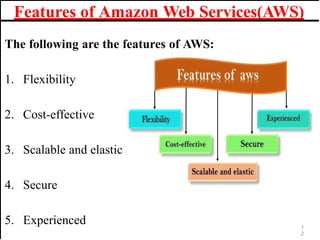
The following are the features of AWS:
1. Flexibility
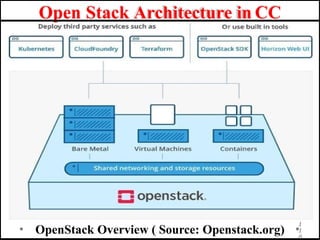
2. Cost-effective
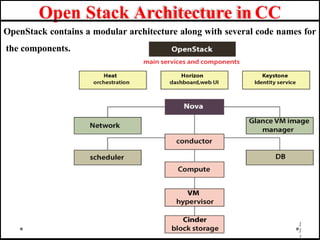
3. Scalable and elastic
4. Secure
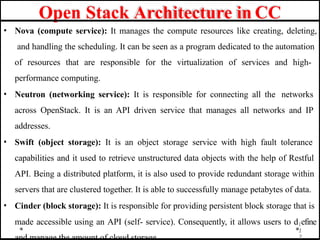
5. Experienced 1
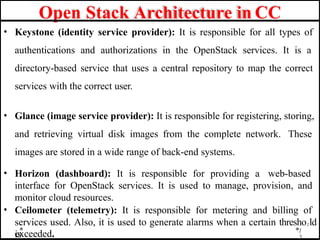
2
13.
Advantages of AmazonWeb Services(AWS)
1
3
1. AWS allows organizations to use the already familiar programming
models, operating systems, databases, and architectures.
2. It is a cost-effective service that allows you to pay only for what you use, without
any up-front or long-term commitments.
3. You will not require to spend money on running and maintaining data centers.
4. Offers fast deployments
5. You can easily add or remove capacity.
6. You are allowed cloud access quickly with limitless capacity.
7. Total Cost of Ownership is very low compared to any private/dedicated servers.
8. Offers Centralized Billing and management
9. Offers Hybrid Capabilities
10. Allows you to deploy your application in multiple regions around the world
14.
Disavantages of AmazonWeb Services(AWS)
1. If you need more immediate or intensive assistance, you’ll have
to opt for paid support packages.
2. Amazon Web Services may have some common cloud
computing issues when you move to a cloud. For example,
downtime, limited control, and backup protection.
3. AWS sets default limits on resources which differ from region to
region. These resources consist of images, volumes, and
snapshots.
4. Hardware-level changes happen to your application which may
not offer the best performance and usage of your applications.1
4
15.
Applications of AWS
Services
1
5
AmazonWeb services are widely used for various computing purposes
like:
1. Web site hosting
2. Application hosting/SaaS hosting
3. Media Sharing (Image/ Video)
4. Mobile and Social Applications
5. Content delivery and Media Distribution
6. Storage, backup, and disaster recovery
7. Development and test environments
8. Academic Computing
9.Search Engines
10.Social Networking
AWS Services andComponents
Basics of Cloud Computing
1. Cloud computing adopts scalable computing assets and users
have to pay as per use.
2. Users are able to access any of the assets that reside in the
‘cloud’ at any time and from any location over the Internet.
3. The user does not have to care about how things are being
sustained behind the scenes in the cloud.
4. Cloud computing is a paradigm move in how we architect
and consign scalable applications.
5. As compared to the previous traditional methods cloud utilize
the surplus computing capability and give it to the next consumers.
1
7
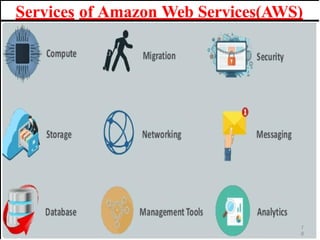
AWS offers anumber of cloud services in
separate domains and services, we have enlisted them below:
1. Networking: All networking related services are included in
this like security, faster access and other
eg. Virtual Private cloud, Elastic load balancing
2. Database: This domain is used to provide reliable relational
and non-relational database
Eg. Amazon simple DB,Relational Database service(RDS)
3. Management Tools: The services that are used to maintain
and monitor AWS instances are included in this.
Eg. Amazon cloud watch
Cloud services offered by the AWS
20.
4. Storage andContent Delivery: Storage is used to store cloud
data, but content delivery is about data caching at nearby place or
location.
Eg. S3,Elastic block storage,AWS Import/Exp,Amazon CloudFront
5. Application Services: Simple services like emailing, queuing and
notifications are included in these services
Eg. Amazon SES,Amazon SQS
6. Compute: It is used to process the cloud data that needs powerful
processors ahead to serve multiple instances together.
Eg. Elastic compute cloud(EC2),Elastic mapreduce,Auto scaling
Cloud services offered by the AWS
21.
AWS Components
2
1
a. AmazonS3(Storage)
Amazon Simple Storage Service (S3) provides a web service interface
for the storage and retrieval of data. Easily accessible over internet.
Provides storage with data security.
b.Amazon EC2 (Elastic Computing)
Amazon EC2 is a web service that provides virtual machines on demand.
EC2 is constructed on Xan hypervisor(VM) allows AMI(Amazon Machines
Images) to act as templates for the instances.EC2 scale up computing assets
and the servers vary from Single core x86 to eight core x86_64 servers
c.Amazon SQS (Simple Queue Services)
Amazon Simple Queue Service (SQS) gives access to messaging infra
structure. The user can send or receive messages by using
REST(REpresentational State Transfer) based HTTP request. SQS works
with other Amazon web services to coordinate the workflow and auto
scaling EC2.
22.
AWS Components
There arenumber of key components in AWS Cloud computing and
the main components are :
1. Simple E-mail Service: It allows sending e-mail using RESTFUL API
call or via regular SMTP.
2. Identity and Access Management: It provides enhanced security
and identity management for your AWS account.
3. Simple Storage Device or (S3): It is a storage device and the
most widely used AWS service.
2
2
23.
AWS Components
There arenumber of key components in AWS Cloud computing and
the main components are :
4. Elastic Compute Cloud (EC2): It provides on-demand computing
resources for hosting applications. It is very useful in case of
unpredictable workloads.
5. Elastic Block Store (EBS): It provides persistent storage volumes that
attach to EC2 to allow you to persist data past the lifespan of a single
EC2.
6. CloudWatch: To monitor AWS resources, It allows admins to view and
collect key Also, one can set a notification alarm in case of trouble.
2
3
24.
Amazon SimpleDB
· AmazonSimpleDB is a distributed database service developed by
Amazon.com in the Erlang programming language. Released on
December 13, 2007, Amazon SimpleDB is an Amazon Web Services
(AWS) component that works in conjunction with Amazon Simple Storage
Service (Amazon S3) and Amazon Elastic Compute Cloud (EC2).
· Amazon SimpleDB facilitates cloud storage, processing and query
processing. The service is easy to use and provides most core traditional
database features, including real-time processing and simplified structured
data queries.
2
4
25.
Features of Amazon
SimpleDB
·Amazon SimpleDB features include:
1. Flexibility: Allows for the easy addition of new attributes
without predefined data formats
2. Efficiency: Provides quick and easy data storage and retrieval
3. Scalability: Facilitates new domain creation to accommodate increases
in data volume
4. Easy integration: Designed for easy integration with other Amazon Web
services, such as Amazon EC2 and Amazon S3
5. Cost effective: Users only pay for actual consumed resources.
Amazon usage types include structured data storage, data
storage and machine
2
5
utilization.
26.
Benefits of Amazon
SimpleDB
·The following are Amazon SimpleDB benefits:
1. Operational complexity is eliminated.
2. No schema is required.
3. A simple application programming interface (API) is used for access
and storage.
4. Data is automatically indexed.
5. Administrative burden is reduced.
Amazon SimpleDB has several drawbacks, including weaker forms
of consistency and storage limitations.
2
6
27.
Elastic Compute Cloud(EC2)
•EC2 stands for Amazon Elastic Compute Cloud.
• Amazon EC2 is a web service that provides resizable compute capacity in
the cloud.
• Amazon Elastic Compute Cloud (Amazon EC2) provides scalable
computing capacity in the Amazon Web Services (AWS) Cloud. Using
Amazon EC2 eliminates your need to invest in hardware up front, so you
can develop and deploy applications faster. You can use Amazon EC2 to
launch as many or as few virtual servers as you need, configure security
and networking, and manage storage. Amazon EC2 enables you to scale
up or down to handle changes in requirements or spikes in popularity,
reducing your need to forecast traffic.
2
7
28.
Features of ElasticCompute Cloud(EC2)
• Virtual computing environments, known as instances
• Preconfigured templates for your instances, known as Amazon Machine
Images (AMIs), that package the bits you need for your server (including
the operating system and additional software)
• Various configurations of CPU, memory, storage, and networking
capacity for your instances, known as instance types
• Secure login information for your instances using key pairs (AWS stores
the public key, and you store the private key in a secure place)
• Storage volumes for temporary data that's deleted when you stop,
hibernate, or terminate your instance, known as instance store volumes
• Persistent storage volumes for your data using Amazon Elastic
Block 2
8
Store (Amazon EBS), known as Amazon EBS
29.
Features of ElasticCompute Cloud(EC2)
• Multiple physical locations for your resources, such as instances and
Amazon EBS volumes, known as Regions and Availability Zones
• A firewall that enables you to specify the protocols, ports, and source IP
ranges that can reach your instances using security groups
• Static IPv4 addresses for dynamic cloud computing, known as Elastic IP
addresses
• Metadata, known as tags, that you can create and assign to your Amazon
EC2 resources
• /Virtual networks you can create that are logically isolated from the rest of
the AWS Cloud, and that you can optionally connect to your own
network, known as virtual private clouds (VPCs)
2
9
30.
Why is AWSEC2important?
• You don’t require any hardware units
• Easily scalable (up or down)
• You only pay for what you use
• You have complete control
• Highly secure
• You can access your assets from anywhere in the world
3
9
31.
Elastic Compute Cloud(EC2)
•This is the basic structure of AWS EC2, where EC2 stands for Elastic
Compute Cloud. EC2 allow users to use virtual machines of different
configurations as per their requirement. It allows various configuration
options, mapping of individual server, various pricing options, etc. We will
discuss these in detail in AWS Products section. Following is the
diagrammatic representation of the architecture.
3
1
32.
Elastic Compute Cloud(EC2)
•Note − In the above diagram S3 stands for Simple Storage Service. It
allows the users to store and retrieve various types of data using API calls.
It doesn’t contain any computing element. We will discuss this topic in
detail in AWS products section.
• It is considered as the fundamental framework of AWS architecture or AWS EC2.
Simply, EC2 is also called an Elastic Compute cloud which will permit the clients
otherwise the customers of using various configurations in their own task or
technique according to their requirement. There are also various incredible options
such as price options, specific server mapping, arrangement server, and so on. S3
which is present in the AWS architecture is called Simple Storage Providers. By using
this S3, customers can easily get or else shop data through different data types using
Application Programs Interface calls. There will be no computing element for the
services as well.
3
2
33.
Components of ElasticCompute Cloud(EC2)
• Load Balancing
• Load balancing simply means to hardware or software load over web
servers, that improver's the efficiency of the server as well as the
application. Following is the diagrammatic representation of AWS
architecture with load balancing.
• Hardware load balancer is a very common network appliance used in
traditional web application architectures.
• AWS provides the Elastic Load Balancing service, it distributes the traffic
to EC2 instances across multiple available sources, and dynamic addition
and removal of Amazon EC2 hosts from the load-balancing rotation.
• Elastic Load Balancing can dynamically grow and shrink the load-
balancing capacity to adjust to traffic demands and also support sticky
sessions to address more advanced routing needs
3
3
34.
• Amazon Cloud-front
•It is responsible for content delivery, i.e. used to deliver website. It may
contain dynamic, static, and streaming content using a global network of
edge locations. Requests for content at the user's end are automatically
routed to the nearest edge location, which improves the performance.
• Amazon Cloud-front is optimized to work with other Amazon Web
Services, like Amazon S3 and Amazon EC2. It also works fine with any
non-AWS origin server and stores the original files in a similar manner.
• In Amazon Web Services, there are no contracts or monthly commitments.
We pay only for as much or as little content as we deliver through the
service.
3
4
Components of Elastic Compute Cloud(EC2)
35.
• Elastic LoadBalancer
• It is used to spread the traffic to web servers, which improves performance.
AWS provides the Elastic Load Balancing service, in which traffic is
distributed to EC2 instances over multiple available zones, and dynamic
addition and removal of Amazon EC2 hosts from the load-balancing
rotation.
• Elastic Load Balancing can dynamically grow and shrink the load-
balancing capacity as per the traffic conditions.
• Security Management
• Amazon’s Elastic Compute Cloud (EC2) provides a feature called security
groups, which is similar to an inbound network firewall, in which we have
to specify the protocols, ports, and source IP ranges that are allowed to
reach your EC2 instances.
• Each EC2 instance can be assigned one or more security groups, each of which routes the
appropriate traffic to each instance. Security groups can be configured using specific subnets or IP
3
5
addresses which limits access to EC2 instances.
Components of Elastic Compute Cloud(EC2)
36.
Elastic Compute Cloud(EC2)
•Elastic Caches
• Amazon Elastic Cache is a web service that manages the memory cache in
the cloud. In memory management, cache has a very important role and
helps to reduce the load on the services, improves the performance and
scalability on the database tier by caching frequently used information.
• Amazon RDS
• Amazon RDS (Relational Database Service) provides a similar access as
that of MySQL, Oracle, or Microsoft SQL Server database engine. The
same queries, applications, and tools can be used with Amazon RDS.
• It automatically patches the database software and manages backups as per
the user’s instruction. It also supports point-in-time recovery. There are no
up-front investments required, and we pay only for the resources we use
3
6
· Amazon ElasticCompute Cloud is a most important component of
Amazon.com’s cloud computing platforms as EC2 permits scalable
deployment of applications.
· Amazon Elastic Compute Cloud (EC2) is a world wide web service
that presents resizable computing capability , utilized to construct
and host software systems
Prof. Anand
Gharu
3
8
Elastic Compute Cloud(EC2)
39.
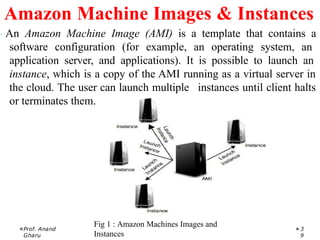
· An AmazonMachine Image (AMI) is a template that contains a
software configuration (for example, an operating system, an
application server, and applications). It is possible to launch an
instance, which is a copy of the AMI running as a virtual server in
the cloud. The user can launch multiple instances until client halts
or terminates them.
Fig 1 : Amazon Machines Images and
Instances
Prof. Anand
Gharu
3
9
Amazon Machine Images & Instances
40.
· Working withEC2 needstorage of data the two mostpopular
storage types are :
1. Amazon Simple Storage Service (Amazon S3)
2. Amazon Elastic Block Store (Amazon EBS) volumes
Prof. Anand
Gharu
40
Storage
41.
· Amazon S3is a storage for the internet, connected with WWW
service interface to ensure data accessibility over web.
· Amazon Elastic Block Store provides raw block-level storage that
can be attached to Amazon EC2 instances and is used by Amazon
Relational Database Service. Amazon EBS provides a range of
options for storage performance and cost.
Prof. Anand
Gharu
41
Amazon S3
42.
1. Amazon RelationalDatabase Service
(Amazon
RDS), provides organized relational
database in the cloud.
2. Launch an instance of a database AMI and use
that EC2 instance as the database.
Prof. Anand
Gharu
42
Databases
43.
· Web servicethat presents real-time supervising to Amazon’s EC2
clients on their asset utilization, such as CPU, computer disk and
network.
· CloudWatch does not supply any recollection, computer disk
space or load average metrics.
Prof. Anand
Gharu
43
· Data aggregated and supplied through
through
the
console
AWS
online
administration which is
accessed tools and web API’s
.
Amazon CloudWatch
44.
Amazon Storage System
AmazonSimple Storage Service (Amazon S3) is the most widely
used object storage service and used by most of the companies, even
startups to enterprise-level because of its scalability, data availability,
security and performance any data stored over S3 is protected, secure
and always available no matter what amount of data for a range of
use cases, such as websites, mobile applications that generate lots of
data, backups for applications, IoT devices, and big data analytics
and all these at a very minimal cost with 99.99999999999% of
durability, S3 is used as storage for many other AWS services like
code commit, Streaming service, and many others.
4
4
45.
Types of AmazonStorage System
1. Simple Storage Service (S3)
Amazon S3 is an object storage service that stores data of any type
and size. It can store data for any business such as web applications,
mobile applications, backup, archive, analytics. It also provides easy
access control management for all your specific requirements and is
almost 100% durable and by almost I mean 99.(11 nines)%. It can
also be used to store all kinds of file formats as you would with a
dropbox. S3 also allows a simple web-based file explorer to upload
files, create folders or delete them.
4
5
46.
Types of AmazonStorage System
2. Elastic Block Storage (EBS)
EBS provides block storage which is similar to hard drives to store
any kind of data persistently. This can be attached to any EC2
instance and used as block storage, which even allows you to install
any operating system. EBS volumes are placed in availability zones
so that they are replicated to prevent loss of data due to single
component failures. They provide absolute low-latency performance
and you can also scale up or down your resources as and when
required. EBS is available in both SSD and HDD formats depending
on your requirement of speed and volume.
4
6
47.
Types of AmazonStorage System
3. Elastic File System (EFS)
EFS is a managed network file system that is easy to set up right from the
amazon console or CLI. When you have multiple EC2 instances needed to
access the same file system EFS helps in providing just that. Unlike EBS, EFS
is built using the NFS4.x protocol on SSDs and have a much faster
throughput. This also means that EFS is much more expensive than EBS as it
can be used on very large analytical workloads. EFS scales up or down based
on the size of the files you store and is also accessible from multiple
availability zones. The distributed nature of the file system can tempt you to
use it as a CDN. But the costs of a CDN outweigh the benefits of using EFS.
Hence it is better to use a CDN and use EFS in conjunction with files
that
4
7
can’t be stored on a CDN.
48.
Types of AmazonStorage System
4. AWS Storage Gateway
Storage Gateway is a simple way to let your on-premise applications store,
access or archive the data into the AWS cloud. This is achieved by running on
a hypervisor on one of the machines in your data center which contains the
storage gateway and then is available on AWS to connect to S3, Glacier or
EBS. It provides a highly optimized, network resilient and low-cost way to
move your data from on-prem to the cloud. Local caching is also available on
your on-prem to allow for accessing the more active data. Storage gateway
also supports legacy backup stores such as tapes as virtual tapes backed up
directly into AWS Glacier.
4
8
49.
· Amazon SimpleStore Service (S3) is a service from
Amazon that permits the users to store documents into
dependable isolated storage for a very comparable price.
· S3 is utilized by businesses to store photographs and
videos of their clients, back up their own data and more.
· S3 has API for both SOAP and REST.
· S3 manages objects and buckets which is accessible with
permissions.
Prof. Anand
Gharu
49
Amazon Storage System
50.
· Running outof bandwidth
· Better scalability
· Store documents online
· Easier documents retrieval and sharing
Prof. Anand
Gharu
50
51.
Amazon Database Service(DynamoDB)
1
Databasesplay a crucial role in the functioning of an application. Also,
performance of an application is directly dependent on how the underlying
database performs for the application. AWS Database Services is a set of
databases offered by AWS on the cloud.
Amazon DynamoDB is a fast, fully managed, and flexible NoSQL database.
It also supports document-based data. AWS affirms that DynamoDB delivers
single-digit millisecond performance at any scale. DynamoDB comes with
built-in Security, Backup, and Restore features.
Since DynamoDB is a NoSQL database, it doesn’t require any schema.
In
DynamoDB, there are basically three core components:
52.
Features of DynamoDB
1.On-demand capacity mode: The applications using the on-demand
service, DynamoDB automatically scales up/down to accommodate the
traffic.
2. Built-in support for ACID transactions: DynamoDB provides native/
server-side support for transactions.
3. On-demand backup: This feature allows you to create a complete backup
of your work at any given point of time.
4. Point-in-time recovery: This feature helps you with the protection of your
data in case of accidental read/ write operations.
5. Encryption at rest: It keeps the data encrypted even when the table is not
in use. This enhances security with the help of encryption keys.
5
2
53.
Amazon Database Service(DynamoDB)
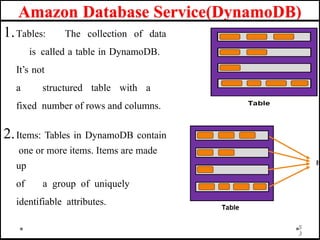
1.Tables:The collection of data
is called a table in DynamoDB.
It’s not
a structured table with a
fixed number of rows and columns.
2.Items: Tables in DynamoDB contain
one or more items. Items are made
up
of a group of uniquely
identifiable attributes.
5
3
54.
Amazon Database Service(DynamoDB)
3.Attributes: Attributes are the data
elements or values that reside in each
item. They are equivalent to data values
in a relational database that reside in a
particular cell of a table.
Following are some of the benefits
of using Amazon DynamoDB:
• Easy to set up and manage
• Data is automatically
replicated across multiple
Availability Zones
• Supports both key–value and
document-based data models 5
4
55.
Highly Scalable: Youcan scale your database as your application
grows without any downtime!
Fully Managed: Everything, from maintenance to hardware upgrades,
is managed by AWS.
Enterprise Class: You get the same world-class infrastructure used
by Amazon’s giant ecommerce platform.
Distributed: Now that your application and database exist on
separate machines, your application becomes highly fault-tolerant.
Workforce Reduction: Since everything is managed by AWS, you don’t need
a Database Maintenance team in your organization.
Advantages of Amazon Database
Service(DynamoDB)
5
5
56.
1. It hasfast and predictable performance.
2. It is highly scalable.
3. It offloads the administrative burden operation and scaling.
4. It offers encryption at REST for data protection.
5. Its scalability is highly flexible.
6. AWS Management Console can be used to monitor
resource utilization and performance metrics.
7. It provides on-demand backups.
8. It can be highly automated.
Advantages of Amazon Database
Service(DynamoDB)
5
6
57.
1.It has alow read capacity unit of 4kB per second and a write capacity
unit of 1KB per second.
2.All tables and global secondary indexes must have a minimum of one
read and one write capacity unit.
3. Table sizes have no limits, but accounts have a 256 table limit unless you
request a higher cap.
4.Only Five local and twenty global secondary (default quota) indexes
per table are permitted.
5.DynamoDB does not prevent the use of reserved words as names.
6.Partition key length and value minimum length sits at 1 byte,
and maximum at 2048 bytes, however, DynamoDB places no limit on
values.
Limitation of Amazon Database
Service(DynamoDB)
5
7
58.
· Amazon RelationalDatabase Service (Amazon RDS) is a
popular web service.
· It makes relational database setup, functions and scale
on cloud easier.
· It gives cost-efficient, resizable capability for multiple
industry-standard relational databases.
· It gives access of MySQL or Oracle database server to
users.
Prof. Anand
Gharu
58
Amazon Database Services
· Windows Azure: PaaS, it is a functioning system gives
scalable compute and storage facilities
· SQL Azure : A cloud based , scale out type of
SQL server
· Windows Azure AppFabric : An assemblage of
services carrying applications both in the cloud and on
Prof. Anand
Gharu
61
Microsoft Cloud Services
62.
· Microsoft WindowsAzure is Cloud operating system built on top
of
Microsoft data centers infrastructure and provides developers with
a collection of services for building application with the
Cloud technology.
· Supports computing, storage, and networking to application
connectivity, access control, and business intelligence.
Prof. Anand
Gharu
62
Window Azure
63.
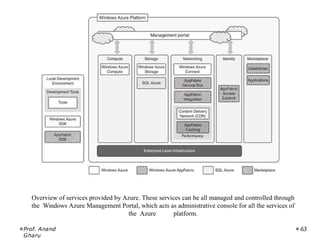
Overview of servicesprovided by Azure. These services can be all managed and controlled through
the Windows Azure Management Portal, which acts as administrative console for all the services of
the Azure platform.
Prof. Anand
Gharu
63
64.
Azure Core Concepts
MicrosoftAzure is a cloud computing platform that provides a wide variety of
services that we can use without purchasing and arranging our hardware. It
enables the fast development of solutions and provides the resources to
complete tasks that may not be achievable in an on-premises environment.
Azure Services like compute, storage, network, and application services allow
us to put our effort into building great solutions without worrying about the
assembly of physical infrastructure.
4
Definition :
“Microsoft Azure is a growing set of cloud computing services created by Microsoft
that hosts your existing applications, streamline the development of a new application,
and also enhances our on-premises applications. It helps the organizations in building,
Microsoft-
6
testing, deploying, and managing applications and services
through managed data centers.”
65.
Azure Core Concepts
•Compute services: It includes the Microsoft Azure Cloud
Services, Azure Virtual Machines, Azure Website, and Azure
Mobile Services, which processes the data on the cloud with the
help of powerful processors.
• Data services: This service is used to store data over the cloud
that can be scaled according to the requirements. It includes
Microsoft Azure Storage (Blob, Queue Table, and Azure File
services), Azure SQL Database, and the Redis Cache.
6
5
66.
Azure Core Concepts
•Application services: It includes services, which help us to build
and operate our application, like the Azure Active Directory,
Service Bus for connecting distributed systems, HDInsight for
processing big data, the Azure Scheduler, and the Azure Media
Services.
• Network services: It helps you to connect with the cloud and on-
premises infrastructure, which includes Virtual Networks, Azure
Content Delivery Network, and the Azure Traffic Manager.
6
6
67.
Azure Core Concepts
HowAzure works?
It is essential to understand the internal workings of Azure so that we can
design our applications on Azure effectively with high availability, data
residency, resilience, etc.
6
7
Applications of Microsoft
Azure
Nowin this Azure for beginners tutorial, we will learn the applications of
Azure.
Microsoft Azure is used in a broad spectrum of applications like:
1. Infrastructure Services
2. Mobile Apps
3. Web Applications
4. Cloud Services
5. Storage, Backup, and Recovery
6. Data Management
7. Media Services
6
9
70.
Advantages of Microsoft
Azure
7
0
1.Azure infrastructure will cost-effectively enhance your business continuity
strategy
2. It allows you to access the application without buying a license for
the individual machine
3. Windows Azure offers the best solution for your data needs, from
SQL database to blobs to tables
4. Offers scalability, flexibility, and cost-effectiveness
5. Helps you to maintain consistency across clouds with familiar tools
and
resources
71.
Advantages of Microsoft
Azure
1.You will not require processing power or hard disk space if you are using
Azure
2. Cloud computing offers virtually limitless storage.
6. Sharing documents leads directly to better collaboration
7. If you change your device your computers, applications and
documents follow you through the cloud.
8. You can deploy premium virtual machines in minutes which also include
Linux and Windows servers
9. Helps you to scale your IT resources up and down based on your needs7
1
72.
Disadvantages of Microsoft
Azure
7
2
1.Cloud computing is not possible if you can’t connect to the Internet
2. Azure is a web-based application which requires a lot of
bandwidth to download, as do large documents
3. Web-based applications can sometimes be slower compared to accessing a
similar software program on your desktop PC
73.
· SQL Azureis a relational database service hosted on Windows
Azure and built on the SQL Server technologies.
· It is fully compatible with the interface exposed by SQL server, so
that applications built for SQL server can transparently migrate to
SQLAzure.
Prof. Anand
Gharu
7
3
SQL
Azure
The WindowsAzure platform can also be deployed as an appliance on third-
party data centers and constitute the Cloud infrastructure governing the
physical servers of the data center.
Windows Azure Platform Appliance includes Windows Azure, SQL Azure,
and Microsoft-specified configuration of network, storage, and server
hardware.
Its goal is to replicate Azure on a third- party infrastructure and make
available its services beyond the boundaries of the Microsoft’s Cloud.
The appliance addresses two major scenarios: institutions that have very
large computing needs (such as government agencies) and those that cannot
afford to transfer their data outside their
premises 7
5
Window Azure Platform
Appliance
Applications in theCloud Computing
1. Healthcare: ECG Analysis in the Cloud
2. Biology: Protein Structure Prediction
3. Geosciences: Satellite Image Processing
4. Business and Consumer Applications: CRM and
ERP
5. Social Networking
7
7
78.
Healthcare: ECG Analysisin the Cloud
1. Healthcare is a field or domain or area or a region where the information
technology has found many of the applications.
2. These applications are getting involved to help business firms in assisting
the scientists to develop solutions to prevent the diseases.
3. Due to the invention of internet or we can say due to the availability of
internet cloud computing has came into the picture and represent itself as
a attractive option for developing health monitoring system.
4. Example of health monitoring system is ECG machine which is used to
measure the Heart-Beat of Human body and the output is get printed on
the graph paper.
5. The full form of ECG is Electrocardiogram
7
8
79.
Healthcare: ECG Analysisin the Cloud
• The analysis of the shape is used to identify arrhythmias, and it is the
most common way of detecting the heart diseases.
• Here the meaning of arrhythmias means “not having a steady rhythm”,
“an arrhythmic heartbeat” means a heart beat which is not in it’s rhythm.
7
9
80.
Healthcare: ECG Analysisin the Cloud
• Cloud computing technologies allows the remote monitoring of a patient’s heart beat
data.
• Through this way the patient at risk can be constantly monitored without going to the
hospital for ECG analysis.
• At the same time the Doctor’s can instantly be notified with cases that need’s their
attention.
8
0
Healthcare: ECG Analysisin the Cloud
• Here in this fig there are different types of computing devices
equipped
with ECG sensors to constantly monitor the patient’s heart beat.
• The respective information is transmitted to the patient’s mobile device
that will immediately forwarded to the cloud- hosted web services for
analysis.
• The entire web services from the front end of a platform that is completely
hosted in the cloud that consist of three layers:Saas,Paas,Iaas.
8
2
83.
Healthcare: ECG Analysisin the Cloud
• Advantages:
• The first advantage is elasticity of the cloud infrastructure that can
minimize and maximize according to the requests served.
• Second advantage is that cloud computing technologies are now become
easily accessible and also it promises to deliver the services with minimum
time.
• As a result the doctor’s has no need to invest in large computing
infrastructures.
8
3
84.
Protein structure predictionin Cloud Computing
• Cloud computing is an emerging technology that provides various
computing services on demand. It provides convenient access to a shared
pool of higher-level services and other system resources. Nowadays, cloud
computing has a great significance in the fields of geology, biology, and
other scientific research areas.
• Protein structure prediction is the best example in research area that makes
use of cloud applications for its computation and storage.
• A protein is composed of long chains of amino acids joined together by
peptide bonds. The various structures of protein help in the designing of
new drugs and the various sequences of proteins from its three-
dimensional structure in predictive form is known as a Protein
structure
8
4
prediction.
Protein structure predictionin Cloud Computing
• Firstly primary structures of proteins are formed and
then
prediction of the secondary, tertiary and quaternary structures are
done from the primary one. In this way predictions of protein
structures are done. Protein structure prediction also makes use of
various other technologies like artificial neural networks, artificial
intelligence, machine learning and probabilistic techniques, also
holds great importance in fields like theoretical chemistry and
bioinformatics. 8
6
87.
Protein structure predictionin Cloud Computing
• There are various algorithms and tools that exists for protein
structure prediction. CASP (Critical Assessment of Protein Structure
Prediction) is a well-known tool that provides methods for
automated web servers and the results of research work are placed
on clouds like CAMEO (Continuous Automated Model Evaluation)
server. These servers can be accessed by anyone as per their
requirements from any place. Some of the tools or servers used in
protein structure prediction are Phobius, FoldX, LOMETS, Prime,
Predict protein, SignalP, BBSP, EVfold, Biskit, HHpred, Phre,
ESyired3D. Using these tools new structures are predicted and the
results are placed on the cloud-based servers. 8
7
88.
Satellite Image Processingin Cloud Computing
8
• Satellite Image Processing is an important field in research
and
development and consists of the images of earth and satellites taken by the
means of artificial satellites. Firstly, the photographs are taken in digital
form and later are processed by the computers to extract the information.
Statistical methods are applied to the digital images and after processing
the various discrete surfaces are identified by analyzing the pixel values.
• The satellite imagery is widely used to plan the infrastructures or to
monitor the environmental conditions or to detect the responses of
upcoming disasters.
• In broader terms we can say that the Satellite Image Processing is a kind of
remote sensing which works on pixel resolutions to collect coherent
8
information about the earth surface.
Satellite Image Processingin Cloud Computing
• Majorly there are four kinds of resolutions associated with
satellite imagery. These are:
• Spatial resolution –
It is determined by the sensors Instantaneous Field of View(IFoV) and is
defined as the pixel size of an image that is visible to the human eye being
measured on the ground. Since it has high resolving power or the ability to
separate and hence is termed as Spatial Resolution.
• Spectral resolution –
This resolution measures the wavelength internal size and determines the
number of wavelength intervals that the sensor measures.
9
0
91.
Satellite Image Processingin Cloud Computing
• Temporal resolution –
The word temporal is associated with time or days and is defined as the time
that passes between various imagery cloud periods.
• Radiometric resolution –
This resolution provides the actual characteristics of the image and is
generally expressed in bits size. It gives the effective bit depth and records the
various levels of brightness of imaging system.
Thus, Satellite Image Processing has huge amount of applications in research and
development fields,in remote sensing, in astronomy and now
even in cloud
9
1
computing on a large scale.
92.
CRM and ERPin Cloud Computing
9
2
• What is CRM?
• CRM stands for Customer Relationship Management and is a software that
is hosted in cloud so that the users can access the information using
internet. CRM software provides high level of security and scalability to its
users and can be easily used on mobile phones to access the data.
• Now a days, many business vendors and service providers are using these
CRM software to manage the resources so that the user can access
them via internet. Moving the business computation from desktop to the
cloud is proving a beneficial step in both the IT and Non-IT fields. Some
of the major CRM vendors include Oracle Siebel, Mothernode CRM,
Microsoft
Dynamics CRM, Infor CRM, SAGE CRM, NetSuite CRM.
93.
CRM and ERPin Cloud Computing
9
3
Salesforce.com(CRM)
94.
CRM and ERPin Cloud Computing
• Advantages:
• Few advantages of using CRM are as follows:
• High reliability and scalability
• Easy to use
• Highly secured
• Provides flexibility to users and service providers
• Easily accessible
9
4
95.
CRM and ERPin Cloud Computing
• What is ERP?
ERP is an abbreviation for Entity Resource Planning and is a
software similar to CRM that is hosted on cloud servers which helps
the enterprises to manage and manipulate their business data as per
their needs and user requirements. ERP software follows pay per use
methodologies of payment, that is at the end of the month, the
enterprise pay the amount as per the cloud resources utilized by
them. There are various ERP vendors available like Oracle, SAP,
Epicor, SAGE, Microsoft Dynamics, Lawson Softwares and many
more.
9
5
96.
CRM and ERPin Cloud Computing
• Advantages:
• Few advantages of using ERP softwares are:
• Cost effective
• High mobility
• Increase in productivity
• No security issues
• Scalable and efficient
9
6
97.
Social Networking inCloud Computing
Social network platforms have rapidly changed the way that people
communicate and interact. They have enabled the participation in
digital communities as well as the representation, documentation and
exploration of social relationships.
I personally believe that as “apps” become more sophisticated, it will
become easier for users to share their own services, resources and
data via social networks. At the same time, social media sites have
large number of users all across the globe, and this makes them ideal
candidates for cloud adaptation.
9
7
98.
Social Networking inCloud Computing
9
8
Social networks help boost internet usability by storing heavy multimedia content in
cloud storage systems. Videos and photographs are the most popular content on social
media, which essentially use up the maximum space allocated to them. They have the
capacity to slow down applications and servers with all of their resource demands. Cloud
computing vendors such as Salesforce and Amazon nowadays provide varied services
including Customer Relationship Management (CRM) and Enterprise Resource Planning
(ERP). As they deliver these things through cloud servers, clients can use the flexibility
and scalability of the system without purchasing standalone software or hardware.
Apart from data storage, the social networks are now also using clouds for various other
tasks. For example, this can be ideal for big data analytics. One of the benefits of using
cloud systems is that users can access vast amount of structured and even non-structured
data easily. Just take a look at the much-improved analytics provided by sites like
Facebook, especially for its business users
99.
Social Networking inCloud Computing
Another way cloud computing becomes helpful is by reducing the cost of data
backup and recovery in case of a disaster. If the data is only stored in one
central location, it becomes much riskier. If something happens there, it is
almost impossible to recover the data. But through cloud they remain
accessible through shared resources across the globe. This is especially useful
for social networks as the store personal data of its users, and so cannot afford
to lose even one part of it.
Overall, it can be said that cloud computing has several usages, and some of
them are still being discovered. For instance, in the near future, personal
secure clouds are likely to gain ground. New age social networks and
messaging apps such as Snapchat thrive on privacy and they will eventually
utilize such resources to offer a more secure and faster service to its users.9
9
100.
Google App Enginein
CC
1
0
0
PaaS
Developing and hosting scalable web applications
Distributed and scalable run time environment
Languages Java, Python and Go
Education,
Examples : Google Apps for
Business, Government
101.
Google App Enginein
CC
Google App Engine (GAE) is a platform-as-a-service product that provides
web app developers and enterprises with access to Google's scalable hosting
and tier 1 internet service.
GAE requires that applications be written in Java or Python, store data in
Google Bigtable and use the Google query language. Noncompliant
applications require modification to use GAE.
GAE provides more infrastructure than other scalable hosting services,
such as Amazon Elastic Compute Cloud (EC2). GAE also eliminates some
system administration and development tasks to make writing scalable
applications
1
0
1
easier
102.
Google App Enginein
CC
Google provides GAE free up to a certain amount of use for the
following resources:
• processor (CPU)
• storage
• application programming interface (API) calls
• concurrent requests
• Users exceeding the per-day or per-minute rates can pay for more of
these resources.
1
0
2
Google App Enginein
CC
Google Applications utilizing
Cloud :
• Gmail
• Google Calendar
• Google Docs
• Google Sites
• Google Groups
• Google Video
1
0
4
105.
Google App Enginein
CC
How is GAE used?
GAE is a fully managed, serverless platform that is used to host, build and
deploy web applications. Users can create a GAE account, set up a software
development kit and write application source code. They can then use GAE to
test and deploy the code in the cloud.
One way to use GAE is building scalable mobile application back ends that
adapt to workloads as needed. Application testing is another way to use GAE.
Users can route traffic to different application versions to A/B test them and
see which version performs better under various workloads.
1
0
5
106.
Google App Enginein
CC
What are GAE's key features?
Key features of GAE include the following:
API selection. GAE has several built-in APIs, including the following five:
• Blobstore for serving large data objects;
• GAE Cloud Storage for storing data objects;
• Page Speed Service for automatically speeding up webpage load times;
• URL Fetch Service to issue HTTP requests and receive responses
for efficiency and scaling; and
• Memcache for a fully managed in-memory data store 1
0
6
107.
Google App Enginein
CC
Benefits of GAE :
Ease of setup and use. GAE is fully managed, so users can write code without
considering IT operations and back-end infrastructure. The built-in APIs enable
users to build different types of applications. Access to application logs also
facilitates debugging and monitoring in production.
Pay-per-use pricing. GAE's billing scheme only charges users daily for the
resources they use. Users can monitor their resource usage and bills on a
dashboard.
Scalability. Google App Engine automatically scales as workloads fluctuate,
adding and removing application instances or application resources as needed.
Security. GAE supports the ability to specify a range of acceptable Internet
Protocol (IP) addresses. Users can allowlist specific networks and services1
and
0
7
blocklist specific IP addresses.
108.
Google App Enginein
CC
0
8
GAE challenges
• Lack of control. Although a managed infrastructure has advantages, if a
problem occurs in the back-end infrastructure, the user is dependent on Google
to fix it.
• Performance limits. CPU-intensive operations are slow and expensive to
perform using GAE. This is because one physical server may be serving several
separate, unrelated app engine users at once who need to share the CPU.
• Limited access. Developers have limited, read-only access to the GAE
filesystem.
• Java limits. Java apps cannot create new threads and can only use a subset of
1
the Java runtime environment standard edition classes.
109.
Open Stack Architecturein CC
1
0
9
OpenStack is an open-standard and free platform for cloud computing. Mostly, it
is deployed as IaaS (Infrastructure-as-a-Service) in both private and public clouds
where various virtual servers and other types of resources are available for users.
This platform combines irrelated components that networking resources, storage
resources, multi-vendor hardware processing tools, and control diverse throughout
the data center. Various users manage it by the command-line tools, RESTful web
services, and web-based dashboard.
In 2010, OpenStack began as the joint project of NASA and Rackspace Hosting. It
was handled by the OpenStack Foundation which is a non-profit collective entity
developed in 2012 September for promoting the OpenStack community and
software. 50+ enterprises have joined this project.
Open Stack Architecturein CC
1
1
OpenStack contains a modular architecture along with several code names for
the components.
1
112.
Open Stack Architecturein CC
• Nova (compute service): It manages the compute resources like creating, deleting,
and handling the scheduling. It can be seen as a program dedicated to the automation
of resources that are responsible for the virtualization of services and high-
performance computing.
• Neutron (networking service): It is responsible for connecting all the networks
across OpenStack. It is an API driven service that manages all networks and IP
addresses.
• Swift (object storage): It is an object storage service with high fault tolerance
capabilities and it used to retrieve unstructured data objects with the help of Restful
API. Being a distributed platform, it is also used to provide redundant storage within
servers that are clustered together. It is able to successfully manage petabytes of data.
• Cinder (block storage): It is responsible for providing persistent block storage that is
made accessible using an API (self- service). Consequently, it allows users to d1efine
1
2
113.
Open Stack Architecturein CC
1
3
• Keystone (identity service provider): It is responsible for all types of
authentications and authorizations in the OpenStack services. It is a
directory-based service that uses a central repository to map the correct
services with the correct user.
• Glance (image service provider): It is responsible for registering, storing,
and retrieving virtual disk images from the complete network. These
images are stored in a wide range of back-end systems.
• Horizon (dashboard): It is responsible for providing a web-based
interface for OpenStack services. It is used to manage, provision, and
monitor cloud resources.
• Ceilometer (telemetry): It is responsible for metering and billing of
services used. Also, it is used to generate alarms when a certain thresho1ld
is
exceeded.
114.
Open Stack Architecturein CC
• Advantages of using OpenStack
• It boosts rapid provisioning of resources due to
which orchestration and scaling up and down of resources
becomes easy.
• Deployment of applications using OpenStack does not consume a
large amount of time.
• Since resources are scalable therefore they are used more
wisely and efficiently.
• The regulatory compliances associated with its usage
are manageable. 1
1
4
115.
Open Stack Architecturein CC
• Advantages of using OpenStack
• It boosts rapid provisioning of resources due to
which orchestration and scaling up and down of resources
becomes easy.
• Deployment of applications using OpenStack does not consume a
large amount of time.
• Since resources are scalable therefore they are used more
wisely and efficiently.
• The regulatory compliances associated with its usage
are manageable. 1
1
5