© 2017, Amazon Web Services, Inc. or its Affiliates. All rights reserved.
Tara E. Walker
Technical Evangelist | @taraw
June 21, 2017
Introducing AWS CodeStar
and the
AWS CI/CD workflow
Agenda
What’s Serverless Real-Time Data Processing?
Processing Streaming Data with Lambda and Kinesis
Streaming Data Processing Demo
Data Processing Pipeline with Lambda and MapReduce
Building a Big Data Processing Solution Demo
What is DevOps & AWS enabled DevOps
Introducing AWS CodeStar
AWS CodeStar and AWS Code Services
AWS CodeStar Issue Tracking with JIRA
Summary
What is DevOps?
Union of software development and operations
Migration of Agile continuous development into continuous
integration and continuous delivery
DevOps Model
• No Silos – Puts emphasis on communication, collaboration, and
cohesion between disciplines
• Best practices for change, configuration, and deployment automation
• Deliver apps/services at faster pace
• High speed product updates
Delivery Pipeline
Feedback Loop
COMPANY CUSTOMERS
• Integration
tests with
other systems
• Load testing
• UI tests
• Penetration
testing
DevOps Release Processes: Four major phases
Source Build Test Production
• Check-in
source code
such as .java
files.
• Peer review
new code
• Compile code
• Unit tests
• Style checkers
• Code metrics
• Create
container
images
• Deployment
to production
environments
Continuous Integration (CI) is…
DevOps software development practice
Refers to Build or Integration stage of the software release
process
Key Activities
 Code changes merged into a central repository
 Automated builds and tests are run
Goals
 Find and address bugs quickly
 Improve software quality
 Reduce time to release new software updates
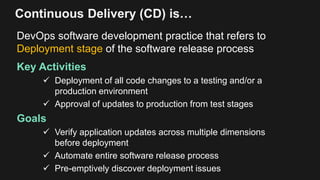
Continuous Delivery (CD) is…
DevOps software development practice that refers to
Deployment stage of the software release process
Key Activities
 Deployment of all code changes to a testing and/or a
production environment
 Approval of updates to production from test stages
Goals
 Verify application updates across multiple dimensions
before deployment
 Automate entire software release process
 Pre-emptively discover deployment issues
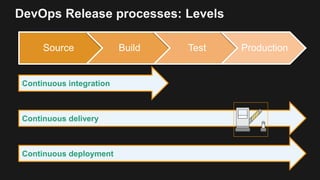
DevOps Release processes: Levels
Source Build Test Production
Continuous integration
Continuous delivery
Continuous deployment
AWS Continuous Integration & Delivery
AWS Code Services
AWS CodePipeline AWS CodeCommit AWS CodeBuildAWS CodeDeployAWS CodeStar
Introducing AWS CodeStar
Develop on AWS in minutes: Easily set up your entire
development environment and programming tools for
coding, building, testing, and deploying on AWS
Collaborate securely with your entire: Manage team
access, add team members to projects by role i.e.
owners, contributors
Integrated issue tracking and project management:
Integrates Atlassian JIRA Software to easily manage
issues directly from CodeStar dashboard and monitor
application progress and activity
Supported for popular programming languages: Develop
variety of applications using language of choice including
Java, JavaScript, PHP, Ruby, and Python.
Release code faster: Set up your entire continuous
delivery toolchain in minutes
AWS CodeStar – Implement AWS DevOps
Source Build Test Production
Third Party
Tooling
Software Development and Continuous Integration & Delivery Workflow
AWS CodeCommit AWS CodeBuild AWS CodeDeploy
AWS CodePipeline
AWS CodeStar
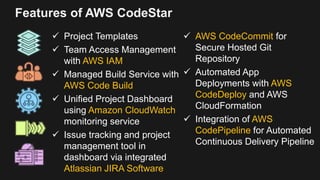
Features of AWS CodeStar
 Project Templates
 Team Access Management
with AWS IAM
 Managed Build Service with
AWS Code Build
 Unified Project Dashboard
using Amazon CloudWatch
monitoring service
 Issue tracking and project
management tool in
dashboard via integrated
Atlassian JIRA Software
 AWS CodeCommit for
Secure Hosted Git
Repository
 Automated App
Deployments with AWS
CodeDeploy and AWS
CloudFormation
 Integration of AWS
CodePipeline for Automated
Continuous Delivery Pipeline
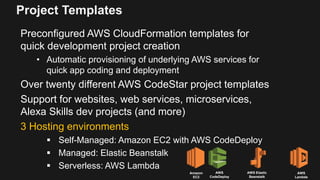
Project Templates
Preconfigured AWS CloudFormation templates for
quick development project creation
• Automatic provisioning of underlying AWS services for
quick app coding and deployment
Over twenty different AWS CodeStar project templates
Support for websites, web services, microservices,
Alexa Skills dev projects (and more)
3 Hosting environments
 Self-Managed: Amazon EC2 with AWS CodeDeploy
 Managed: Elastic Beanstalk
 Serverless: AWS Lambda
Amazon
EC2
AWS
CodeDeploy
AWS Elastic
Beanstalk
AWS
Lambda
Project Templates
Programming Languages
Java
JavaScript
Python
Ruby
PHP
CodeStar project templates support popular
programming languages and IDEs
IDE/Code Editors
Visual Studio
Eclipse
AWS CLI
AWS CLI
Demo: Project Creation & Templates
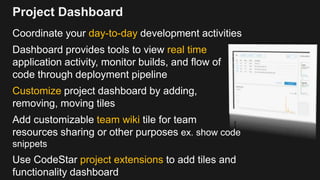
Project Dashboard
Coordinate your day-to-day development activities
Dashboard provides tools to view real time
application activity, monitor builds, and flow of
code through deployment pipeline
Customize project dashboard by adding,
removing, moving tiles
Add customizable team wiki tile for team
resources sharing or other purposes ex. show code
snippets
Use CodeStar project extensions to add tiles and
functionality dashboard
Working with Teams
Build project team by granting user access to
CodeStar project
Project Roles
 Owner: Ability to add & remove team members,
contribute code to project repo, grant or deny team
members remote access
 Contributor: Ability to add & remove dashboard
resources, contribute code to the project repository
 Viewer: Ability to view the project dashboard, code,
tiles, and project state
Project team members (users)
 Can have different CodeStar roles and permissions
 Can belong to multiple CodeStar projects
Automated Continuous Delivery Pipeline
Each CodeStar project creates and configures a
Continuous Delivery pipeline
Source Build Test Production
Third Party
Tooling
Software Release Steps:
AWS CodeCommit AWS CodeBuild AWS CodeDeploy
AWS CodePipeline
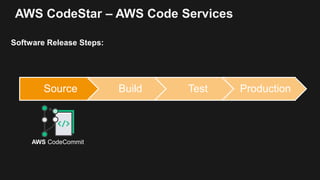
AWS CodeStar – AWS Code Services
Source Build Test Production
Software Release Steps:
AWS CodeCommit
AWS CodeStar – AWS Code Services
Source Build Test Production
Software Release Steps:
AWS CodeBuild
AWS CodeStar – AWS Code Services
Source Build Test Production
Software Release Steps:
Third Party
Tooling
AWS CodeStar – AWS Code Services
Source Build Test Production
Software Release Steps:
AWS CodeDeploy
Or
AWS Elastic BeanStalk
Or
AWS Lambda
AWS CodeStar – AWS Code Services
Source Build Test Production
Software Release Steps:
EC2 On-Prem
AWS CodeDeploy
AWS CodeStar – AWS Code Services
Source Build Test Production
Software Release Steps:
EC2
AWS Elastic Beanstalk
AWS CodeStar – AWS Code Services
Source Build Test Production
Software Release Steps:
AWS CloudFormation/AWS SAM
AWS Lambda Amazon API Gateway*
AWS CodeStar – AWS Code Services
Source Build Test Production
Software Release Steps:
AWS CodePipeline
Demo: Continuous Delivery Pipeline
Integrated Issue Tracking
Integrates with Atlassian JIRA Software – issue tracking
and project management tool
Easy JIRA and AWS CodeStar setup
 Log into JIRA and Copy URL from any project
 Enter JIRA URL field in the CodeStar Extensions
Monitor application activity and manage all JIRA issues in
CodeStar dashboard
Create new JIRA tickets for work items directly dashboard
Integrated Issue Tracking – Atlassian JIRA offer
First 2,000 CodeStar users to
sign up for JIRA Software
through AWS CodeStar -
Receive a free 5-person
license of JIRA
First time JIRA ever offers a
free version of software
Offer only available for a very
limited time
AWS
Only
Offer
Demo: Atlassian JIRA integration
AWS CodeStar Limits
CodeStar Feature Limit
# of projects. Maximum of 333 projects in an AWS account. Limits will vary
depending on other service dependencies
# of AWS CodeStar projects by IAM user Maximum of 10 per individual IAM user
Project IDs Must be unique within an AWS account.
Must be min 2 characters and max 15 characters. Only certain
characters allowed.
Project names Project names cannot exceed 100 characters in length, and
cannot begin or end with an empty space.
Project descriptions Optional. Any character combination between 0 and 1,024
length.
Number of team members in project 100 member max
User Profile display name Must include at least one character. Character cannot be a
space. Cannot begin or end with a space.
User profile email address Must include an @ and end in a valid domain extension.
Access: Federated, Root account, or
Temporary
Only supports IAM users, No federated users or temporary
access credentials. Using with a root account is not
recommended.
AWS CodeStar - Code integrated partners
Reliability
AWS CodeStar – Easily Gain Benefits of DevOps
SpeedScale
Rapid DeliveryImproved Collaboration
Security
Summary:
Learn more:
https://aws.amazon.com/codestar
Check out Blog Post: Introducing AWS CodeStar:
https://aws.amazon.com/blogs/aws/new-aws-codestar/
Get started with AWS CodeStar:
https://console.aws.amazon.com/codestar
© 2017, Amazon Web Services, Inc. or its Affiliates. All rights reserved.
Tara E. Walker
@taraw

AWS CodeStar - AWS TelAviv Summit 2017

  • 1.
    © 2017, AmazonWeb Services, Inc. or its Affiliates. All rights reserved. Tara E. Walker Technical Evangelist | @taraw June 21, 2017 Introducing AWS CodeStar and the AWS CI/CD workflow
  • 2.
    Agenda What’s Serverless Real-TimeData Processing? Processing Streaming Data with Lambda and Kinesis Streaming Data Processing Demo Data Processing Pipeline with Lambda and MapReduce Building a Big Data Processing Solution Demo What is DevOps & AWS enabled DevOps Introducing AWS CodeStar AWS CodeStar and AWS Code Services AWS CodeStar Issue Tracking with JIRA Summary
  • 3.
    What is DevOps? Unionof software development and operations Migration of Agile continuous development into continuous integration and continuous delivery DevOps Model • No Silos – Puts emphasis on communication, collaboration, and cohesion between disciplines • Best practices for change, configuration, and deployment automation • Deliver apps/services at faster pace • High speed product updates Delivery Pipeline Feedback Loop COMPANY CUSTOMERS
  • 4.
    • Integration tests with othersystems • Load testing • UI tests • Penetration testing DevOps Release Processes: Four major phases Source Build Test Production • Check-in source code such as .java files. • Peer review new code • Compile code • Unit tests • Style checkers • Code metrics • Create container images • Deployment to production environments
  • 5.
    Continuous Integration (CI)is… DevOps software development practice Refers to Build or Integration stage of the software release process Key Activities  Code changes merged into a central repository  Automated builds and tests are run Goals  Find and address bugs quickly  Improve software quality  Reduce time to release new software updates
  • 6.
    Continuous Delivery (CD)is… DevOps software development practice that refers to Deployment stage of the software release process Key Activities  Deployment of all code changes to a testing and/or a production environment  Approval of updates to production from test stages Goals  Verify application updates across multiple dimensions before deployment  Automate entire software release process  Pre-emptively discover deployment issues
  • 7.
    DevOps Release processes:Levels Source Build Test Production Continuous integration Continuous delivery Continuous deployment
  • 8.
    AWS Continuous Integration& Delivery AWS Code Services AWS CodePipeline AWS CodeCommit AWS CodeBuildAWS CodeDeployAWS CodeStar
  • 9.
    Introducing AWS CodeStar Developon AWS in minutes: Easily set up your entire development environment and programming tools for coding, building, testing, and deploying on AWS Collaborate securely with your entire: Manage team access, add team members to projects by role i.e. owners, contributors Integrated issue tracking and project management: Integrates Atlassian JIRA Software to easily manage issues directly from CodeStar dashboard and monitor application progress and activity Supported for popular programming languages: Develop variety of applications using language of choice including Java, JavaScript, PHP, Ruby, and Python. Release code faster: Set up your entire continuous delivery toolchain in minutes
  • 10.
    AWS CodeStar –Implement AWS DevOps Source Build Test Production Third Party Tooling Software Development and Continuous Integration & Delivery Workflow AWS CodeCommit AWS CodeBuild AWS CodeDeploy AWS CodePipeline AWS CodeStar
  • 11.
    Features of AWSCodeStar  Project Templates  Team Access Management with AWS IAM  Managed Build Service with AWS Code Build  Unified Project Dashboard using Amazon CloudWatch monitoring service  Issue tracking and project management tool in dashboard via integrated Atlassian JIRA Software  AWS CodeCommit for Secure Hosted Git Repository  Automated App Deployments with AWS CodeDeploy and AWS CloudFormation  Integration of AWS CodePipeline for Automated Continuous Delivery Pipeline
  • 12.
    Project Templates Preconfigured AWSCloudFormation templates for quick development project creation • Automatic provisioning of underlying AWS services for quick app coding and deployment Over twenty different AWS CodeStar project templates Support for websites, web services, microservices, Alexa Skills dev projects (and more) 3 Hosting environments  Self-Managed: Amazon EC2 with AWS CodeDeploy  Managed: Elastic Beanstalk  Serverless: AWS Lambda Amazon EC2 AWS CodeDeploy AWS Elastic Beanstalk AWS Lambda
  • 13.
    Project Templates Programming Languages Java JavaScript Python Ruby PHP CodeStarproject templates support popular programming languages and IDEs IDE/Code Editors Visual Studio Eclipse AWS CLI AWS CLI
  • 14.
  • 15.
    Project Dashboard Coordinate yourday-to-day development activities Dashboard provides tools to view real time application activity, monitor builds, and flow of code through deployment pipeline Customize project dashboard by adding, removing, moving tiles Add customizable team wiki tile for team resources sharing or other purposes ex. show code snippets Use CodeStar project extensions to add tiles and functionality dashboard
  • 16.
    Working with Teams Buildproject team by granting user access to CodeStar project Project Roles  Owner: Ability to add & remove team members, contribute code to project repo, grant or deny team members remote access  Contributor: Ability to add & remove dashboard resources, contribute code to the project repository  Viewer: Ability to view the project dashboard, code, tiles, and project state Project team members (users)  Can have different CodeStar roles and permissions  Can belong to multiple CodeStar projects
  • 17.
    Automated Continuous DeliveryPipeline Each CodeStar project creates and configures a Continuous Delivery pipeline Source Build Test Production Third Party Tooling Software Release Steps: AWS CodeCommit AWS CodeBuild AWS CodeDeploy AWS CodePipeline
  • 18.
    AWS CodeStar –AWS Code Services Source Build Test Production Software Release Steps: AWS CodeCommit
  • 19.
    AWS CodeStar –AWS Code Services Source Build Test Production Software Release Steps: AWS CodeBuild
  • 20.
    AWS CodeStar –AWS Code Services Source Build Test Production Software Release Steps: Third Party Tooling
  • 21.
    AWS CodeStar –AWS Code Services Source Build Test Production Software Release Steps: AWS CodeDeploy Or AWS Elastic BeanStalk Or AWS Lambda
  • 22.
    AWS CodeStar –AWS Code Services Source Build Test Production Software Release Steps: EC2 On-Prem AWS CodeDeploy
  • 23.
    AWS CodeStar –AWS Code Services Source Build Test Production Software Release Steps: EC2 AWS Elastic Beanstalk
  • 24.
    AWS CodeStar –AWS Code Services Source Build Test Production Software Release Steps: AWS CloudFormation/AWS SAM AWS Lambda Amazon API Gateway*
  • 25.
    AWS CodeStar –AWS Code Services Source Build Test Production Software Release Steps: AWS CodePipeline
  • 26.
  • 27.
    Integrated Issue Tracking Integrateswith Atlassian JIRA Software – issue tracking and project management tool Easy JIRA and AWS CodeStar setup  Log into JIRA and Copy URL from any project  Enter JIRA URL field in the CodeStar Extensions Monitor application activity and manage all JIRA issues in CodeStar dashboard Create new JIRA tickets for work items directly dashboard
  • 28.
    Integrated Issue Tracking– Atlassian JIRA offer First 2,000 CodeStar users to sign up for JIRA Software through AWS CodeStar - Receive a free 5-person license of JIRA First time JIRA ever offers a free version of software Offer only available for a very limited time AWS Only Offer
  • 29.
  • 30.
    AWS CodeStar Limits CodeStarFeature Limit # of projects. Maximum of 333 projects in an AWS account. Limits will vary depending on other service dependencies # of AWS CodeStar projects by IAM user Maximum of 10 per individual IAM user Project IDs Must be unique within an AWS account. Must be min 2 characters and max 15 characters. Only certain characters allowed. Project names Project names cannot exceed 100 characters in length, and cannot begin or end with an empty space. Project descriptions Optional. Any character combination between 0 and 1,024 length. Number of team members in project 100 member max User Profile display name Must include at least one character. Character cannot be a space. Cannot begin or end with a space. User profile email address Must include an @ and end in a valid domain extension. Access: Federated, Root account, or Temporary Only supports IAM users, No federated users or temporary access credentials. Using with a root account is not recommended.
  • 31.
    AWS CodeStar -Code integrated partners
  • 32.
    Reliability AWS CodeStar –Easily Gain Benefits of DevOps SpeedScale Rapid DeliveryImproved Collaboration Security
  • 33.
    Summary: Learn more: https://aws.amazon.com/codestar Check outBlog Post: Introducing AWS CodeStar: https://aws.amazon.com/blogs/aws/new-aws-codestar/ Get started with AWS CodeStar: https://console.aws.amazon.com/codestar
  • 34.
    © 2017, AmazonWeb Services, Inc. or its Affiliates. All rights reserved. Tara E. Walker @taraw