Training | Consulting | Cloud Services | Staffing
Automate deployment to Azure using Chef &
puppet
Anuprita Kumar
MCT, MCSE
Training | Consulting | Cloud Services | Staffing
Agenda
 Chef
 Puppet
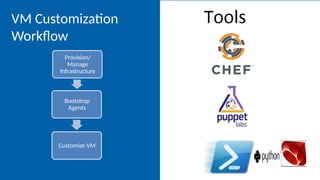
VM Customization
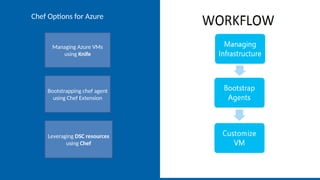
Workflow
Provision/
Manage
Infrastructure
Bootstrap
Agents
Customize VM
Training | Consulting | Cloud Services | Staffing
VM Extensions : Building block for Devops
 Software provided both Microsoft or by trusted third-party
providers for Azure VMs to extend the functionality of the
VM.
 Windows and Linux support.
 Deploy to a running or a new VM.
 Programmability support.
 Update life cycle that’s independent of the VM.
 Enables dynamic composition on a VM.
Training | Consulting | Cloud Services | Staffing
Chef
Training | Consulting | Cloud Services | Staffing
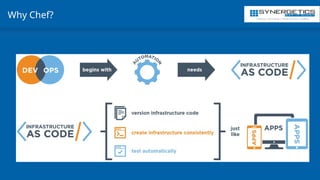
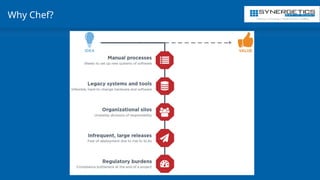
Why Chef?
Training | Consulting | Cloud Services | Staffing
Why Chef?
Training | Consulting | Cloud Services | Staffing
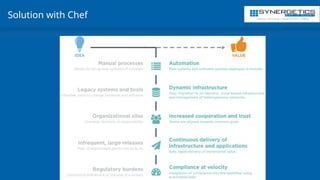
Solution with Chef
Training | Consulting | Cloud Services | Staffing
Chef on Azure
What is Chef? Chef is a configuration management tools for deploying &
managing infrastructure and applications.
- Infrastructure is code
- Declarative interface to resource
- Policy based configuration management.
Training | Consulting | Cloud Services | Staffing
Chef Helps Optimize Your Use of Azure
 High scalability. Manage 10,000+ VMs with a single Chef server, or use Chef’s
SaaS option.
 Advanced workflow. Use Chef to implement best practices such as A/B
testing and test-driven infrastructure.
 Flexible, policy-based configuration. Easily define recipes for complex cloud
use cases and for enterprise application delivery. The Chef server stores and
indexes the attributes of each node in your network for dynamic configuration.
 Reusable recipes. Reuse recipes with custom data for specific situations. Chef
lets you separate configuration policy from configuration state.
 Service-oriented interface for customization. All of Chef’s functionality is
exposed through consistent REST APIs. This gives you tremendous flexibility
when designing custom workflows.
Training | Consulting | Cloud Services | Staffing
Simplify and Speed Up Configuration Tasks
 You can use Chef to manage every aspect of your Microsoft Azure cloud
environment.
 For example, how often do you need to create storage containers whenever
you configure a new VM? With Chef, you can write code that makes this
common task a versionable, repeatable process.
 azure_storage_container container_name do storage_account stg_account
access_key stg_key action :create end
 This code creates a storage container named container_name, if it doesn't
already exist. It's a part of the Azure cookbook,
 There's also a Chef plug-in, made specifically for Microsoft Azure, called knife-
azure. With this plug-in you can, for example, set affinity groups, set the name
of a storage account, and set the host name of the VM. Download the plug–in,
add your security credentials, and you"re ready to go.
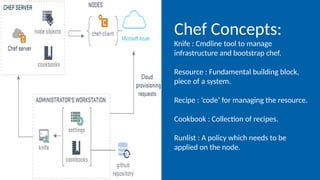
Chef Concepts:
Knife : Cmdline tool to manage
infrastructure and bootstrap chef.
Resource : Fundamental building block,
piece of a system.
Recipe : ‘code’ for managing the resource.
Cookbook : Collection of recipes.
Runlist : A policy which needs to be
applied on the node.
Managing Azure VMs
using Knife
Bootstrapping chef agent
using Chef Extension
Leveraging DSC resources
using Chef
Chef Options for Azure
Training | Consulting | Cloud Services | Staffing
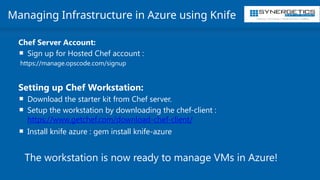
Managing Infrastructure in Azure using Knife
Chef Server Account:
 Sign up for Hosted Chef account :
https://manage.opscode.com/signup
Setting up Chef Workstation:
 Download the starter kit from Chef server.
 Setup the workstation by downloading the chef-client :
https://www.getchef.com/download-chef-client/
 Install knife azure : gem install knife-azure
The workstation is now ready to manage VMs in Azure!
Training | Consulting | Cloud Services | Staffing
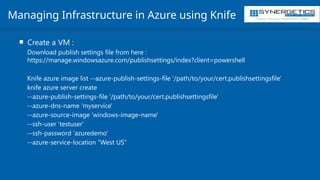
Managing Infrastructure in Azure using Knife
 Create a VM :
Download publish settings file from here :
https://manage.windowsazure.com/publishsettings/index?client=powershell
Knife azure image list --azure-publish-settings-file '/path/to/your/cert.publishsettingsfile'
knife azure server create
--azure-publish-settings-file '/path/to/your/cert.publishsettingsfile'
--azure-dns-name 'myservice'
--azure-source-image 'windows-image-name'
--ssh-user ‘testuser'
--ssh-password ‘azuredemo'
--azure-service-location "West US"
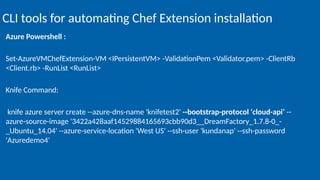
Azure Powershell :
Set-AzureVMChefExtension-VM <IPersistentVM> -ValidationPem <Validator.pem> -ClientRb
<Client.rb> -RunList <RunList>
Knife Command:
knife azure server create --azure-dns-name 'knifetest2' --bootstrap-protocol 'cloud-api‘ --
azure-source-image '3422a428aaf14529884165693cbb90d3__DreamFactory_1.7.8-0_-
_Ubuntu_14.04' --azure-service-location 'West US' --ssh-user 'kundanap' --ssh-password
'Azuredemo4'
CLI tools for automating Chef Extension installation
Training | Consulting | Cloud Services | Staffing
Ready to go!
Your existing Chef toolkit is now ready to manage resources on Azure
Resources for learning about Chef:
https://learn.chef.io/
Windows Azure for Chef:
https://www.chef.io/partners/microsoft/
– Admins who manage a mix of both windows and linux deployments can leverage DSC using Chef.
– Preview of DSC cookbook which exposes DSC resources as Chef resources is available :
https://supermarket.getchef.com/cookbooks/dsc
– All the DSC resources returned by get-dscresource can be managed by Chef using the cookbook.
– Simple rules for transforming DSC resource into Chef resource published here : https://github.com/opscode-
cookbooks/dsc/blob/master/README.md
Chef + DSC
Training | Consulting | Cloud Services | Staffing
Puppet
Training | Consulting | Cloud Services | Staffing
Puppet on Azure
What is Puppet? : Puppet is a configuration management system that
allows you to define the state of your IT infrastructure, then
automatically enforces the correct state.
Key Concepts:
- Supports easy to read declarative language.
- Enforces desired state on the system.
- Puppet Forge supports many ready to use modules.
- .
Training | Consulting | Cloud Services | Staffing
Automate your Microsoft Azure & Windows environments
 Deliver value to customers faster while keeping up with a relentless rate of
change, you need to automate your infrastructure all the way through — from
initial provisioning through application deployment, both on prem and in the
cloud.
 Puppet Enterprise lets you manage your infrastructure as code so you can
adopt DevOps practices, improving the speed, scale and reliability of your
systems.
Training | Consulting | Cloud Services | Staffing
Provision, configure & manage your Azure infrastructure
 Provision, configure & manage your Azure infrastructure
 Puppet Enterprise lets you automate the entire lifecycle of your Azure
infrastructure, from initial provisioning through application deployment.
 Our Azure module allows you to provision and manage Azure VMs, plus give
you consistency and visibility into your infrastructure.
 It's included in your Puppet Enterprise support package.
Training | Consulting | Cloud Services | Staffing
Enterprise-level support for Windows environments
 With thousands of modules available for free download from the Puppet Forge,
you don’t have to reinvent the wheel to automate critical tasks and services.
 For Puppet Enterprise customers who want extra assurance, we also
offer supported modules.
 Supported modules are rigorously tested, maintained for long term use, and
fully supported by Puppet.
 The Forge also offers approved modules for Windows that are fully tested and
meet our rigorous quality and usability requirements.
Training | Consulting | Cloud Services | Staffing
Puppet supported modules
 ACLs
 Azure
 PowerShell DSC
 PowerShell
 Registry
 Reboot
 SQL server
 WSUS Client
Training | Consulting | Cloud Services | Staffing
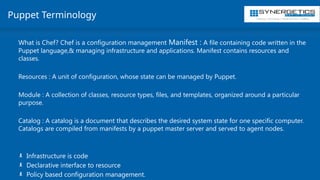
Puppet Terminology
What is Chef? Chef is a configuration management Manifest : A file containing code written in the
Puppet language,& managing infrastructure and applications. Manifest contains resources and
classes.
Resources : A unit of configuration, whose state can be managed by Puppet.
Module : A collection of classes, resource types, files, and templates, organized around a particular
purpose.
Catalog : A catalog is a document that describes the desired system state for one specific computer.
Catalogs are compiled from manifests by a puppet master server and served to agent nodes.
- Infrastructure is code
- Declarative interface to resource
- Policy based configuration management.
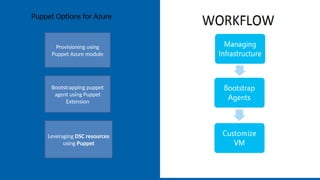
Provisioning using
Puppet Azure module
Bootstrapping puppet
agent using Puppet
Extension
Leveraging DSC resources
using Puppet
Puppet Options for Azure
Training | Consulting | Cloud Services | Staffing
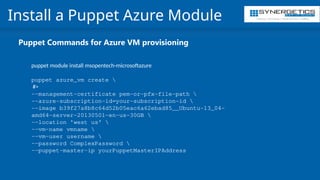
Install a Puppet Azure Module
Puppet Commands for Azure VM provisioning
puppet module install msopentech-microsoftazure
puppet azure_vm create 
#>
--management-certificate pem-or-pfx-file-path 
--azure-subscription-id=your-subscription-id 
--image b39f27a8b8c64d52b05eac6a62ebad85__Ubuntu-13_04-
amd64-server-20130501-en-us-30GB 
--location 'west us' 
--vm-name vmname 
--vm-user username 
--password ComplexPassword 
--puppet-master-ip yourPuppetMasterIPAddress
Training | Consulting | Cloud Services | Staffing
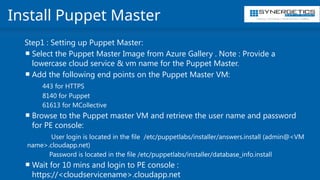
Install Puppet Master
Step1 : Setting up Puppet Master:
 Select the Puppet Master Image from Azure Gallery . Note : Provide a
lowercase cloud service & vm name for the Puppet Master.
 Add the following end points on the Puppet Master VM:
443 for HTTPS
8140 for Puppet
61613 for MCollective
 Browse to the Puppet master VM and retrieve the user name and password
for PE console:
User login is located in the file /etc/puppetlabs/installer/answers.install (admin@<VM
name>.cloudapp.net)
Password is located in the file /etc/puppetlabs/installer/database_info.install
 Wait for 10 mins and login to PE console :
https://<cloudservicename>.cloudapp.net
Training | Consulting | Cloud Services | Staffing
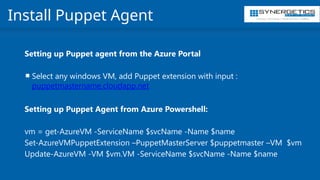
Install Puppet Agent
Setting up Puppet agent from the Azure Portal
 Select any windows VM, add Puppet extension with input :
puppetmastername.cloudapp.net
Setting up Puppet Agent from Azure Powershell:
vm = get-AzureVM -ServiceName $svcName -Name $name
Set-AzureVMPuppetExtension –PuppetMasterServer $puppetmaster –VM $vm
Update-AzureVM -VM $vm.VM -ServiceName $svcName -Name $name
Training | Consulting | Cloud Services | Staffing
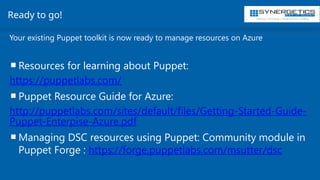
Ready to go!
Your existing Puppet toolkit is now ready to manage resources on Azure
Resources for learning about Puppet:
https://puppetlabs.com/
Puppet Resource Guide for Azure:
http://puppetlabs.com/sites/default/files/Getting-Started-Guide-
Puppet-Enterpise-Azure.pdf
Managing DSC resources using Puppet: Community module in
Puppet Forge : https://forge.puppetlabs.com/msutter/dsc

Automate deployment to Azure using Chef, puppet.pptx

  • 1.
    Training | Consulting| Cloud Services | Staffing Automate deployment to Azure using Chef & puppet Anuprita Kumar MCT, MCSE
  • 2.
    Training | Consulting| Cloud Services | Staffing Agenda  Chef  Puppet
  • 3.
  • 4.
    Training | Consulting| Cloud Services | Staffing VM Extensions : Building block for Devops  Software provided both Microsoft or by trusted third-party providers for Azure VMs to extend the functionality of the VM.  Windows and Linux support.  Deploy to a running or a new VM.  Programmability support.  Update life cycle that’s independent of the VM.  Enables dynamic composition on a VM.
  • 5.
    Training | Consulting| Cloud Services | Staffing Chef
  • 6.
    Training | Consulting| Cloud Services | Staffing Why Chef?
  • 7.
    Training | Consulting| Cloud Services | Staffing Why Chef?
  • 8.
    Training | Consulting| Cloud Services | Staffing Solution with Chef
  • 9.
    Training | Consulting| Cloud Services | Staffing Chef on Azure What is Chef? Chef is a configuration management tools for deploying & managing infrastructure and applications. - Infrastructure is code - Declarative interface to resource - Policy based configuration management.
  • 10.
    Training | Consulting| Cloud Services | Staffing Chef Helps Optimize Your Use of Azure  High scalability. Manage 10,000+ VMs with a single Chef server, or use Chef’s SaaS option.  Advanced workflow. Use Chef to implement best practices such as A/B testing and test-driven infrastructure.  Flexible, policy-based configuration. Easily define recipes for complex cloud use cases and for enterprise application delivery. The Chef server stores and indexes the attributes of each node in your network for dynamic configuration.  Reusable recipes. Reuse recipes with custom data for specific situations. Chef lets you separate configuration policy from configuration state.  Service-oriented interface for customization. All of Chef’s functionality is exposed through consistent REST APIs. This gives you tremendous flexibility when designing custom workflows.
  • 11.
    Training | Consulting| Cloud Services | Staffing Simplify and Speed Up Configuration Tasks  You can use Chef to manage every aspect of your Microsoft Azure cloud environment.  For example, how often do you need to create storage containers whenever you configure a new VM? With Chef, you can write code that makes this common task a versionable, repeatable process.  azure_storage_container container_name do storage_account stg_account access_key stg_key action :create end  This code creates a storage container named container_name, if it doesn't already exist. It's a part of the Azure cookbook,  There's also a Chef plug-in, made specifically for Microsoft Azure, called knife- azure. With this plug-in you can, for example, set affinity groups, set the name of a storage account, and set the host name of the VM. Download the plug–in, add your security credentials, and you"re ready to go.
  • 12.
    Chef Concepts: Knife :Cmdline tool to manage infrastructure and bootstrap chef. Resource : Fundamental building block, piece of a system. Recipe : ‘code’ for managing the resource. Cookbook : Collection of recipes. Runlist : A policy which needs to be applied on the node.
  • 13.
    Managing Azure VMs usingKnife Bootstrapping chef agent using Chef Extension Leveraging DSC resources using Chef Chef Options for Azure
  • 14.
    Training | Consulting| Cloud Services | Staffing Managing Infrastructure in Azure using Knife Chef Server Account:  Sign up for Hosted Chef account : https://manage.opscode.com/signup Setting up Chef Workstation:  Download the starter kit from Chef server.  Setup the workstation by downloading the chef-client : https://www.getchef.com/download-chef-client/  Install knife azure : gem install knife-azure The workstation is now ready to manage VMs in Azure!
  • 15.
    Training | Consulting| Cloud Services | Staffing Managing Infrastructure in Azure using Knife  Create a VM : Download publish settings file from here : https://manage.windowsazure.com/publishsettings/index?client=powershell Knife azure image list --azure-publish-settings-file '/path/to/your/cert.publishsettingsfile' knife azure server create --azure-publish-settings-file '/path/to/your/cert.publishsettingsfile' --azure-dns-name 'myservice' --azure-source-image 'windows-image-name' --ssh-user ‘testuser' --ssh-password ‘azuredemo' --azure-service-location "West US"
  • 16.
    Azure Powershell : Set-AzureVMChefExtension-VM<IPersistentVM> -ValidationPem <Validator.pem> -ClientRb <Client.rb> -RunList <RunList> Knife Command: knife azure server create --azure-dns-name 'knifetest2' --bootstrap-protocol 'cloud-api‘ -- azure-source-image '3422a428aaf14529884165693cbb90d3__DreamFactory_1.7.8-0_- _Ubuntu_14.04' --azure-service-location 'West US' --ssh-user 'kundanap' --ssh-password 'Azuredemo4' CLI tools for automating Chef Extension installation
  • 17.
    Training | Consulting| Cloud Services | Staffing Ready to go! Your existing Chef toolkit is now ready to manage resources on Azure Resources for learning about Chef: https://learn.chef.io/ Windows Azure for Chef: https://www.chef.io/partners/microsoft/
  • 18.
    – Admins whomanage a mix of both windows and linux deployments can leverage DSC using Chef. – Preview of DSC cookbook which exposes DSC resources as Chef resources is available : https://supermarket.getchef.com/cookbooks/dsc – All the DSC resources returned by get-dscresource can be managed by Chef using the cookbook. – Simple rules for transforming DSC resource into Chef resource published here : https://github.com/opscode- cookbooks/dsc/blob/master/README.md Chef + DSC
  • 19.
    Training | Consulting| Cloud Services | Staffing Puppet
  • 20.
    Training | Consulting| Cloud Services | Staffing Puppet on Azure What is Puppet? : Puppet is a configuration management system that allows you to define the state of your IT infrastructure, then automatically enforces the correct state. Key Concepts: - Supports easy to read declarative language. - Enforces desired state on the system. - Puppet Forge supports many ready to use modules. - .
  • 21.
    Training | Consulting| Cloud Services | Staffing Automate your Microsoft Azure & Windows environments  Deliver value to customers faster while keeping up with a relentless rate of change, you need to automate your infrastructure all the way through — from initial provisioning through application deployment, both on prem and in the cloud.  Puppet Enterprise lets you manage your infrastructure as code so you can adopt DevOps practices, improving the speed, scale and reliability of your systems.
  • 22.
    Training | Consulting| Cloud Services | Staffing Provision, configure & manage your Azure infrastructure  Provision, configure & manage your Azure infrastructure  Puppet Enterprise lets you automate the entire lifecycle of your Azure infrastructure, from initial provisioning through application deployment.  Our Azure module allows you to provision and manage Azure VMs, plus give you consistency and visibility into your infrastructure.  It's included in your Puppet Enterprise support package.
  • 23.
    Training | Consulting| Cloud Services | Staffing Enterprise-level support for Windows environments  With thousands of modules available for free download from the Puppet Forge, you don’t have to reinvent the wheel to automate critical tasks and services.  For Puppet Enterprise customers who want extra assurance, we also offer supported modules.  Supported modules are rigorously tested, maintained for long term use, and fully supported by Puppet.  The Forge also offers approved modules for Windows that are fully tested and meet our rigorous quality and usability requirements.
  • 24.
    Training | Consulting| Cloud Services | Staffing Puppet supported modules  ACLs  Azure  PowerShell DSC  PowerShell  Registry  Reboot  SQL server  WSUS Client
  • 25.
    Training | Consulting| Cloud Services | Staffing Puppet Terminology What is Chef? Chef is a configuration management Manifest : A file containing code written in the Puppet language,& managing infrastructure and applications. Manifest contains resources and classes. Resources : A unit of configuration, whose state can be managed by Puppet. Module : A collection of classes, resource types, files, and templates, organized around a particular purpose. Catalog : A catalog is a document that describes the desired system state for one specific computer. Catalogs are compiled from manifests by a puppet master server and served to agent nodes. - Infrastructure is code - Declarative interface to resource - Policy based configuration management.
  • 26.
    Provisioning using Puppet Azuremodule Bootstrapping puppet agent using Puppet Extension Leveraging DSC resources using Puppet Puppet Options for Azure
  • 27.
    Training | Consulting| Cloud Services | Staffing Install a Puppet Azure Module Puppet Commands for Azure VM provisioning puppet module install msopentech-microsoftazure puppet azure_vm create #> --management-certificate pem-or-pfx-file-path --azure-subscription-id=your-subscription-id --image b39f27a8b8c64d52b05eac6a62ebad85__Ubuntu-13_04- amd64-server-20130501-en-us-30GB --location 'west us' --vm-name vmname --vm-user username --password ComplexPassword --puppet-master-ip yourPuppetMasterIPAddress
  • 28.
    Training | Consulting| Cloud Services | Staffing Install Puppet Master Step1 : Setting up Puppet Master:  Select the Puppet Master Image from Azure Gallery . Note : Provide a lowercase cloud service & vm name for the Puppet Master.  Add the following end points on the Puppet Master VM: 443 for HTTPS 8140 for Puppet 61613 for MCollective  Browse to the Puppet master VM and retrieve the user name and password for PE console: User login is located in the file /etc/puppetlabs/installer/answers.install (admin@<VM name>.cloudapp.net) Password is located in the file /etc/puppetlabs/installer/database_info.install  Wait for 10 mins and login to PE console : https://<cloudservicename>.cloudapp.net
  • 29.
    Training | Consulting| Cloud Services | Staffing Install Puppet Agent Setting up Puppet agent from the Azure Portal  Select any windows VM, add Puppet extension with input : puppetmastername.cloudapp.net Setting up Puppet Agent from Azure Powershell: vm = get-AzureVM -ServiceName $svcName -Name $name Set-AzureVMPuppetExtension –PuppetMasterServer $puppetmaster –VM $vm Update-AzureVM -VM $vm.VM -ServiceName $svcName -Name $name
  • 30.
    Training | Consulting| Cloud Services | Staffing Ready to go! Your existing Puppet toolkit is now ready to manage resources on Azure Resources for learning about Puppet: https://puppetlabs.com/ Puppet Resource Guide for Azure: http://puppetlabs.com/sites/default/files/Getting-Started-Guide- Puppet-Enterpise-Azure.pdf Managing DSC resources using Puppet: Community module in Puppet Forge : https://forge.puppetlabs.com/msutter/dsc

Editor's Notes

  • #10 Problem : - Various simple environments grow huge, complex, rigid and fragile over a period of time. Replicating, Troubleshooting, bug finding becomes very difficult and sensitive affair. Things work in one environment but refuses to work on another. Why are things working or not working, there has to be an appropriate answer for it. Lot of updates installations, fixes would be responsible for things running successfully which we may not be aware about. Solution : - Imaging and snapshots of environment to test, repair and build which are common steps for DevOps. Chef – use existing Source Control, use resources already in existence. Lots of online resources no new learning of PowerShell cmdlets and new things. Chef supermarket for lot of existing resources. Gigantic community of Chef developers. Using Chef Provisioning you can use the existing on premise env. and replicate it on Azure. Changing few variables things can be pushed on Azure. Advantages : - What are advantages of using Chef on Azure? Reduce provisioning time, Automating provisioning of complex env. by scheduling and scripting resources. Walkthrough of sample Chef script for Azure provisioning https://www.chef.io/partners/azure/
  • #16 https://azure.microsoft.com/en-in/documentation/articles/virtual-machines-windows-chef-automation/ https://downloads.chef.io/chef-dk/windows/ http://stuartpreston.net/2015/02/chef-provisioning-with-microsoft-azure-part-1/ https://github.com/chef/chef-provisioning-azure
  • #23 Download the Getting Started Guide for Deploying Puppet Enterprise in Azure Download the Puppet Supported Azure module
  • #24 https://puppet.com/product/managed-technology/microsoft-windows-azure http://haishibai.blogspot.in/2014/02/walkthrough-puppet-master-in-action-on.html