Auto Testing!
2019 10
Code without tests is broken as designed.
Jacob Kaplan-Moss
pytest
pytest is a mature full-featured Python testing tool that helps you write better programs.
An example of a simple test:
pytest 란?
# content of test_sample.py
def inc(x):
return x + 1
def test_answer():
assert inc(3) == 5
$ pytest
=========================== test session starts ============================
test_sample.py F [100%]
================================= FAILURES =================================
_______________________________ test_answer ________________________________
def test_answer():
> assert inc(3) == 5
E assert 4 == 5
E + where 4 = inc(3)
test_sample.py:6: AssertionError
============================ 1 failed in 0.12s =============================
https://docs.pytest.org/en/latest/
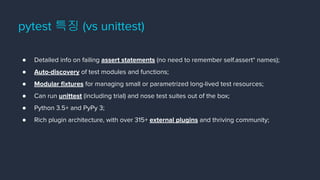
● Detailed info on failing assert statements (no need to remember self.assert* names);
● Auto-discovery of test modules and functions;
● Modular fixtures for managing small or parametrized long-lived test resources;
● Can run unittest (including trial) and nose test suites out of the box;
● Python 3.5+ and PyPy 3;
● Rich plugin architecture, with over 315+ external plugins and thriving community;
pytest 특징 (vs unittest)
pytest.ini - pytest 설정하기
[pytest]
DJANGO_SETTINGS_MODULE=core.settings
python_files = tests.py tests/*.py
http://doc.pytest.org/en/latest/reference.html#ini-options-ref
https://pytest-django.readthedocs.io/en/latest/configuring_django.html#pytest-ini-settings
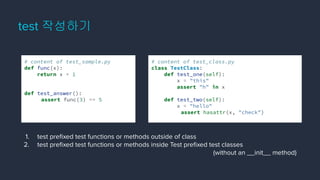
test 작성하기
# content of test_class.py
class TestClass:
def test_one(self):
x = "this"
assert "h" in x
def test_two(self):
x = "hello"
assert hasattr(x, "check")
# content of test_sample.py
def func(x):
return x + 1
def test_answer():
assert func(3) == 5
1. test prefixed test functions or methods outside of class
2. test prefixed test functions or methods inside Test prefixed test classes
(without an __init__ method)
fixture 란?
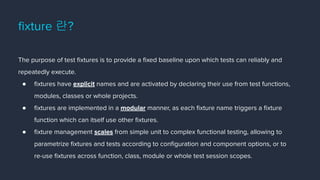
The purpose of test fixtures is to provide a fixed baseline upon which tests can reliably and
repeatedly execute.
● fixtures have explicit names and are activated by declaring their use from test functions,
modules, classes or whole projects.
● fixtures are implemented in a modular manner, as each fixture name triggers a fixture
function which can itself use other fixtures.
● fixture management scales from simple unit to complex functional testing, allowing to
parametrize fixtures and tests according to configuration and component options, or to
re-use fixtures across function, class, module or whole test session scopes.
fixture 예시
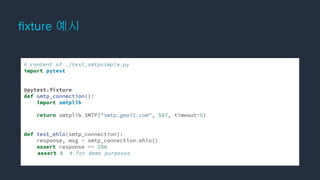
# content of ./test_smtpsimple.py
import pytest
@pytest.fixture
def smtp_connection():
import smtplib
return smtplib.SMTP("smtp.gmail.com", 587, timeout=5)
def test_ehlo(smtp_connection):
response, msg = smtp_connection.ehlo()
assert response == 250
assert 0 # for demo purposes
fixture 작성하기
scope / autouse / params
# content of conftest.py
import pytest
import smtplib
@pytest.fixture(scope="module", params=["smtp.gmail.com", "mail.python.org"])
def smtp_connection(request):
smtp_connection = smtplib.SMTP(request.param, 587, timeout=5)
yield smtp_connection
print("finalizing {}".format(smtp_connection))
smtp_connection.close()
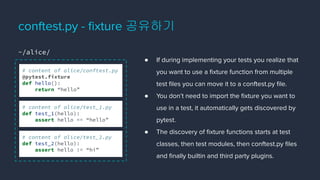
● If during implementing your tests you realize that
you want to use a fixture function from multiple
test files you can move it to a conftest.py file.
● You don’t need to import the fixture you want to
use in a test, it automatically gets discovered by
pytest.
● The discovery of fixture functions starts at test
classes, then test modules, then conftest.py files
and finally builtin and third party plugins.
conftest.py - fixture 공유하기
# content of alice/conftest.py
@pytest.fixture
def hello():
return “hello”
# content of alice/test_1.py
def test_1(hello):
assert hello == “hello”
# content of alice/test_2.py
def test_2(hello):
assert hello != “hi”
~/alice/
conftest.py - fixture 공유하기
# content of bob/test.py
def test_3(hello):
assert hello == “hello”
$ pytest
=========================== test session starts ============================
alice/test_1.py . [ 33%]
alice/test_2.py . [ 67%]
bob/test_3.py E [100%]
================================= FAILURES =================================
_______________________________ test_answer ________________________________
file /bob/test_3.py, line 2
def test_3(hello):
E fixture ‘hello’ not found
============================ 1 failed in 0.12s =============================
~/alice/ ~/bob/
# Conftest.py
@pytest.fixture
def hello():
# Test_1.py
def
test_1(hello):
# Test_2.py
def
test_2(hello):
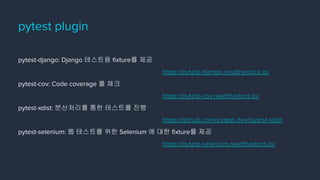
pytest-django: Django 테스트용 fixture를 제공
https://pytest-django.readthedocs.io/
pytest-cov: Code coverage 를 체크
https://pytest-cov.readthedocs.io/
pytest-xdist: 분산처리를 통한 테스트를 진행
https://github.com/pytest-dev/pytest-xdist
pytest-selenium: 웹 테스트를 위한 Selenium 에 대한 fixture를 제공
https://pytest-selenium.readthedocs.io/
pytest plugin
mocking request
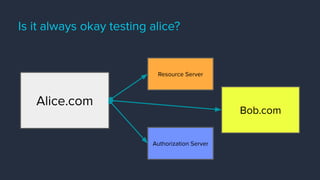
Is it always okay testing alice?
Alice.com
Resource Server
Authorization Server
Bob.com
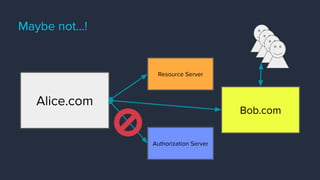
Maybe not…!
Alice.com
Resource Server
Authorization Server
Bob.com
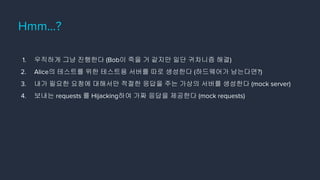
Hmm…?
1. 우직하게 그냥 진행한다 (Bob이 죽을 거 같지만 일단 귀차니즘 해결)
2. Alice의 테스트를 위한 테스트용 서버를 따로 생성한다 (하드웨어가 남는다면?)
3. 내가 필요한 요청에 대해서만 적절한 응답을 주는 가상의 서버를 생성한다 (mock server)
4. 보내는 requests 를 Hijacking하여 가짜 응답을 제공한다 (mock requests)
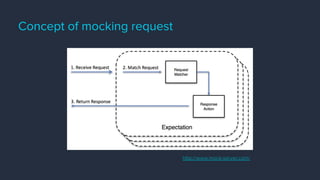
Concept of mocking request
http://www.mock-server.com/
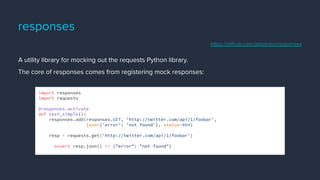
responses
A utility library for mocking out the requests Python library.
The core of responses comes from registering mock responses:
import responses
import requests
@responses.activate
def test_simple():
responses.add(responses.GET, 'http://twitter.com/api/1/foobar',
json={'error': 'not found'}, status=404)
resp = requests.get('http://twitter.com/api/1/foobar')
assert resp.json() == {"error": "not found"}
https://github.com/getsentry/responses
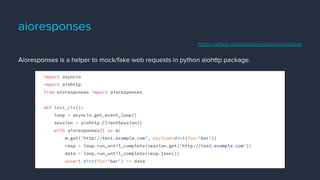
aioresponses
Aioresponses is a helper to mock/fake web requests in python aiohttp package.
import asyncio
import aiohttp
from aioresponses import aioresponses
def test_ctx():
loop = asyncio.get_event_loop()
session = aiohttp.ClientSession()
with aioresponses() as m:
m.get('http://test.example.com', payload=dict(foo='bar'))
resp = loop.run_until_complete(session.get('http://test.example.com'))
data = loop.run_until_complete(resp.json())
assert dict(foo='bar') == data
https://github.com/pnuckowski/aioresponses
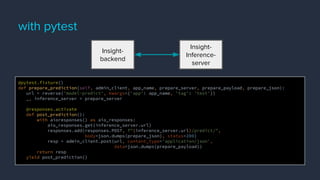
with pytest
@pytest.fixture()
def prepare_prediction(self, admin_client, app_name, prepare_server, prepare_payload, prepare_json):
url = reverse('model-predict', kwargs={'app': app_name, 'tag': 'test'})
_, inference_server = prepare_server
@responses.activate
def post_prediction():
with aioresponses() as aio_responses:
aio_responses.get(inference_server.url)
responses.add(responses.POST, f"{inference_server.url}/predict/",
body=json.dumps(prepare_json), status=200)
resp = admin_client.post(url, content_type='application/json',
data=json.dumps(prepare_payload))
return resp
yield post_prediction()
Insight-
backend
Insight-
Inference-
server
tox
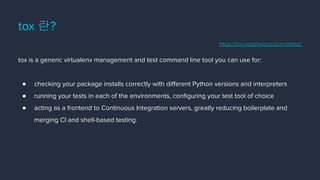
tox 란?
tox is a generic virtualenv management and test command line tool you can use for:
● checking your package installs correctly with different Python versions and interpreters
● running your tests in each of the environments, configuring your test tool of choice
● acting as a frontend to Continuous Integration servers, greatly reducing boilerplate and
merging CI and shell-based testing.
https://tox.readthedocs.io/en/latest/
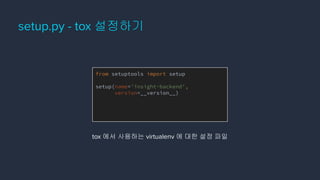
setup.py - tox 설정하기
from setuptools import setup
setup(name='insight-backend',
version=__version__)
tox 에서 사용하는 virtualenv 에 대한 설정 파일
tox.ini - tox 설정하기
# content of: tox.ini , put in same dir as setup.py
[tox]
envlist = py27,py36
[testenv]
# install pytest in the virtualenv where commands will be executed
deps = pytest
commands =
# NOTE: you can run any command line tool here - not just tests
pytest
https://tox.readthedocs.io/en/latest/config.html
tox 실행하기
$ tox
[lots of output from what tox does]
[lots of output from commands that were run]
__________________ summary _________________
py27: commands succeeded
py37: commands succeeded
congratulations :)
Q & A
Thank you.

Auto testing!

  • 1.
  • 2.
    Code without testsis broken as designed. Jacob Kaplan-Moss
  • 3.
  • 4.
    pytest is amature full-featured Python testing tool that helps you write better programs. An example of a simple test: pytest 란? # content of test_sample.py def inc(x): return x + 1 def test_answer(): assert inc(3) == 5 $ pytest =========================== test session starts ============================ test_sample.py F [100%] ================================= FAILURES ================================= _______________________________ test_answer ________________________________ def test_answer(): > assert inc(3) == 5 E assert 4 == 5 E + where 4 = inc(3) test_sample.py:6: AssertionError ============================ 1 failed in 0.12s ============================= https://docs.pytest.org/en/latest/
  • 5.
    ● Detailed infoon failing assert statements (no need to remember self.assert* names); ● Auto-discovery of test modules and functions; ● Modular fixtures for managing small or parametrized long-lived test resources; ● Can run unittest (including trial) and nose test suites out of the box; ● Python 3.5+ and PyPy 3; ● Rich plugin architecture, with over 315+ external plugins and thriving community; pytest 특징 (vs unittest)
  • 6.
    pytest.ini - pytest설정하기 [pytest] DJANGO_SETTINGS_MODULE=core.settings python_files = tests.py tests/*.py http://doc.pytest.org/en/latest/reference.html#ini-options-ref https://pytest-django.readthedocs.io/en/latest/configuring_django.html#pytest-ini-settings
  • 7.
    test 작성하기 # contentof test_class.py class TestClass: def test_one(self): x = "this" assert "h" in x def test_two(self): x = "hello" assert hasattr(x, "check") # content of test_sample.py def func(x): return x + 1 def test_answer(): assert func(3) == 5 1. test prefixed test functions or methods outside of class 2. test prefixed test functions or methods inside Test prefixed test classes (without an __init__ method)
  • 8.
    fixture 란? The purposeof test fixtures is to provide a fixed baseline upon which tests can reliably and repeatedly execute. ● fixtures have explicit names and are activated by declaring their use from test functions, modules, classes or whole projects. ● fixtures are implemented in a modular manner, as each fixture name triggers a fixture function which can itself use other fixtures. ● fixture management scales from simple unit to complex functional testing, allowing to parametrize fixtures and tests according to configuration and component options, or to re-use fixtures across function, class, module or whole test session scopes.
  • 9.
    fixture 예시 # contentof ./test_smtpsimple.py import pytest @pytest.fixture def smtp_connection(): import smtplib return smtplib.SMTP("smtp.gmail.com", 587, timeout=5) def test_ehlo(smtp_connection): response, msg = smtp_connection.ehlo() assert response == 250 assert 0 # for demo purposes
  • 10.
    fixture 작성하기 scope /autouse / params # content of conftest.py import pytest import smtplib @pytest.fixture(scope="module", params=["smtp.gmail.com", "mail.python.org"]) def smtp_connection(request): smtp_connection = smtplib.SMTP(request.param, 587, timeout=5) yield smtp_connection print("finalizing {}".format(smtp_connection)) smtp_connection.close()
  • 11.
    ● If duringimplementing your tests you realize that you want to use a fixture function from multiple test files you can move it to a conftest.py file. ● You don’t need to import the fixture you want to use in a test, it automatically gets discovered by pytest. ● The discovery of fixture functions starts at test classes, then test modules, then conftest.py files and finally builtin and third party plugins. conftest.py - fixture 공유하기 # content of alice/conftest.py @pytest.fixture def hello(): return “hello” # content of alice/test_1.py def test_1(hello): assert hello == “hello” # content of alice/test_2.py def test_2(hello): assert hello != “hi” ~/alice/
  • 12.
    conftest.py - fixture공유하기 # content of bob/test.py def test_3(hello): assert hello == “hello” $ pytest =========================== test session starts ============================ alice/test_1.py . [ 33%] alice/test_2.py . [ 67%] bob/test_3.py E [100%] ================================= FAILURES ================================= _______________________________ test_answer ________________________________ file /bob/test_3.py, line 2 def test_3(hello): E fixture ‘hello’ not found ============================ 1 failed in 0.12s ============================= ~/alice/ ~/bob/ # Conftest.py @pytest.fixture def hello(): # Test_1.py def test_1(hello): # Test_2.py def test_2(hello):
  • 13.
    pytest-django: Django 테스트용fixture를 제공 https://pytest-django.readthedocs.io/ pytest-cov: Code coverage 를 체크 https://pytest-cov.readthedocs.io/ pytest-xdist: 분산처리를 통한 테스트를 진행 https://github.com/pytest-dev/pytest-xdist pytest-selenium: 웹 테스트를 위한 Selenium 에 대한 fixture를 제공 https://pytest-selenium.readthedocs.io/ pytest plugin
  • 14.
  • 15.
    Is it alwaysokay testing alice? Alice.com Resource Server Authorization Server Bob.com
  • 16.
  • 17.
    Hmm…? 1. 우직하게 그냥진행한다 (Bob이 죽을 거 같지만 일단 귀차니즘 해결) 2. Alice의 테스트를 위한 테스트용 서버를 따로 생성한다 (하드웨어가 남는다면?) 3. 내가 필요한 요청에 대해서만 적절한 응답을 주는 가상의 서버를 생성한다 (mock server) 4. 보내는 requests 를 Hijacking하여 가짜 응답을 제공한다 (mock requests)
  • 18.
    Concept of mockingrequest http://www.mock-server.com/
  • 19.
    responses A utility libraryfor mocking out the requests Python library. The core of responses comes from registering mock responses: import responses import requests @responses.activate def test_simple(): responses.add(responses.GET, 'http://twitter.com/api/1/foobar', json={'error': 'not found'}, status=404) resp = requests.get('http://twitter.com/api/1/foobar') assert resp.json() == {"error": "not found"} https://github.com/getsentry/responses
  • 20.
    aioresponses Aioresponses is ahelper to mock/fake web requests in python aiohttp package. import asyncio import aiohttp from aioresponses import aioresponses def test_ctx(): loop = asyncio.get_event_loop() session = aiohttp.ClientSession() with aioresponses() as m: m.get('http://test.example.com', payload=dict(foo='bar')) resp = loop.run_until_complete(session.get('http://test.example.com')) data = loop.run_until_complete(resp.json()) assert dict(foo='bar') == data https://github.com/pnuckowski/aioresponses
  • 21.
    with pytest @pytest.fixture() def prepare_prediction(self,admin_client, app_name, prepare_server, prepare_payload, prepare_json): url = reverse('model-predict', kwargs={'app': app_name, 'tag': 'test'}) _, inference_server = prepare_server @responses.activate def post_prediction(): with aioresponses() as aio_responses: aio_responses.get(inference_server.url) responses.add(responses.POST, f"{inference_server.url}/predict/", body=json.dumps(prepare_json), status=200) resp = admin_client.post(url, content_type='application/json', data=json.dumps(prepare_payload)) return resp yield post_prediction() Insight- backend Insight- Inference- server
  • 22.
  • 23.
    tox 란? tox isa generic virtualenv management and test command line tool you can use for: ● checking your package installs correctly with different Python versions and interpreters ● running your tests in each of the environments, configuring your test tool of choice ● acting as a frontend to Continuous Integration servers, greatly reducing boilerplate and merging CI and shell-based testing. https://tox.readthedocs.io/en/latest/
  • 24.
    setup.py - tox설정하기 from setuptools import setup setup(name='insight-backend', version=__version__) tox 에서 사용하는 virtualenv 에 대한 설정 파일
  • 25.
    tox.ini - tox설정하기 # content of: tox.ini , put in same dir as setup.py [tox] envlist = py27,py36 [testenv] # install pytest in the virtualenv where commands will be executed deps = pytest commands = # NOTE: you can run any command line tool here - not just tests pytest https://tox.readthedocs.io/en/latest/config.html
  • 26.
    tox 실행하기 $ tox [lotsof output from what tox does] [lots of output from commands that were run] __________________ summary _________________ py27: commands succeeded py37: commands succeeded congratulations :)
  • 27.
  • 28.