Please read & follow:

• You need a pen/pencil today – anything
  except red or Sharpie.
• Put all of your things away.
• Please sit quietly in your seat. 


                                           1
Use of
Telecommunications
         &
      Network


                     2
SCHOOL DISTRICT OF CLAY COUNTY
       TELECOMMUNICATIONS NETWORK
                OVERVIEW
   1. SDCC provides opportunity for students to expand
      learning.
   2. Opportunity =
   3. Goal of school Internet
       a. Resource sharing
       b. Accessing outside information
       c. Research
       d. Encouraging technological innovation
       e. Worldwide communication


•Question: Compared to other schools around the country and
the world, what do you think our school would be like if we did
not have access to the Internet?


                                                                  3
INTERNET RESOURCES

4. Students will have access to:
   a. Worldwide electronic mail
      communication.
   b. Global information and news.
   c. Public domain and shareware computer
      software.
   d. Educational discussion groups.
   e. Access to many university libraries and
      other libraries.


                                                4
INTERNET WARNING
5.   Some materials on the Internet are not of educational value
     while at school.
6.   This material may not be suitable for students.
7.   The instructor will monitor student use of the Internet to
     prevent students from accessing unsuitable material.


                                                                   5
USER GUIDELINES
8.  Internet access is through an association of government,
    regional & state networks.
9. School district wants the network to be used in a             ,
    efficient, ethical and legal manner.
10. Operation of Internet relies on proper conduct of the users.


                                                                     6
USER GUIDELINES Continued
11. If you violate, your account will be terminated.
12. Serious violations may result in school disciplinary action or
    legal action.
13. A signature indicates that the user has read and understands.


                                                                     7
Acceptable Use
14. Internet use must support education and research.
15. Users are encouraged to take advantage of the network’s
    functions:
   a. electronic mail
   b. conferences
   c. bulletin boards
   d. databases
   e. access to the Internet


                                                              8
Privileges
16. Use of Internet = privilege
17. Inappropriate use = no privilege


   Question: Why do you think using the Internet at school is a
   privilege?


                                                                  9
“Netiquette”
18. Abide by the rules of network etiquette.
19. Be polite.
20. Do not use vulgar or obscene language.
21. Do not reveal your address or phone number or those of
    others.
22. Electronic mail is not guaranteed to be private.
23. Do not disrupt the network, the data, or other users.


                                                             10
24. Unacceptable Uses of Network
a.   Violating student or staff rights to privacy.
b.   Using the Internet without application of common sense.
c.   Using profanity, obscenity, or other language which may be
     offensive to another user.
d.   Sending or accessing pornographic text and/or graphics.
e.   Unauthorized games.
f.   Sending or receiving copyrighted materials.
g.   Reporting personal communications without the author’s prior
     consent.


 Question: What could happen to a person, whose private
 information such as a name, address and phone number,              11
 given out over the Internet without their permission?
Unacceptable Uses of Network Continued
h.   Using for commercial activities, product advertisement, or
     financial gain.
i.   Knowingly transmitting viruses.
j.   Spam.
k.   Chain letters.
l.   Unauthorized solicitations for goods and services.
m.   Posting personal views .
n.   Unauthorized streaming video or music – this ties up the
     bandwidth & slows down the network.


 Question: What would happen to the school Internet if a virus was sent
 in to infect the system?                                                 12
Warranties
25. SDCC makes no warranties.
26. SDCC will not be responsible for damages or loss of data.
27. SDCC will not be responsible for the accuracy or quality of
    information obtain on network.
28. Inappropriate Internet sites should be reported to teacher
    immediately.


                                                                  13
Security
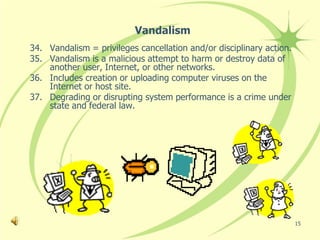
29. Security is a high priority.
30. Do not show or identify the problem to others.
31. Do not use another individual’s account.
32. Attempts to log on as another user will result in cancellation of
    your privileges.
33. Security risk users will be denied network access.


                                                                    14
Vandalism
34. Vandalism = privileges cancellation and/or disciplinary action.
35. Vandalism is a malicious attempt to harm or destroy data of
    another user, Internet, or other networks.
36. Includes creation or uploading computer viruses on the
    Internet or host site.
37. Degrading or disrupting system performance is a crime under
    state and federal law.


                                                                      15
Sponsors
38. Teachers are to make sure students:
   a. Know how to use the Internet correctly &
   b. Know what happens if they don’t!


                                                 16
Let’s Review
What is the main purpose and goal of having a school
Internet?
Why are there so many rules and guidelines for using the
school Internet?

What are some benefits of having Internet and network rules?
Why do you have your own personal user account when you
log onto the school Internet?

What are some benefits of having your own user account for
logging onto the school Internet?

What happens to the school Internet when you down load
unauthorized streaming videos and music?


                                                               17

Aup lesson for cbs students

  • 1.
    Please read &follow: • You need a pen/pencil today – anything except red or Sharpie. • Put all of your things away. • Please sit quietly in your seat.  1
  • 2.
  • 3.
    SCHOOL DISTRICT OFCLAY COUNTY TELECOMMUNICATIONS NETWORK OVERVIEW 1. SDCC provides opportunity for students to expand learning. 2. Opportunity = 3. Goal of school Internet a. Resource sharing b. Accessing outside information c. Research d. Encouraging technological innovation e. Worldwide communication •Question: Compared to other schools around the country and the world, what do you think our school would be like if we did not have access to the Internet? 3
  • 4.
    INTERNET RESOURCES 4. Studentswill have access to: a. Worldwide electronic mail communication. b. Global information and news. c. Public domain and shareware computer software. d. Educational discussion groups. e. Access to many university libraries and other libraries. 4
  • 5.
    INTERNET WARNING 5. Some materials on the Internet are not of educational value while at school. 6. This material may not be suitable for students. 7. The instructor will monitor student use of the Internet to prevent students from accessing unsuitable material. 5
  • 6.
    USER GUIDELINES 8. Internet access is through an association of government, regional & state networks. 9. School district wants the network to be used in a , efficient, ethical and legal manner. 10. Operation of Internet relies on proper conduct of the users. 6
  • 7.
    USER GUIDELINES Continued 11.If you violate, your account will be terminated. 12. Serious violations may result in school disciplinary action or legal action. 13. A signature indicates that the user has read and understands. 7
  • 8.
    Acceptable Use 14. Internetuse must support education and research. 15. Users are encouraged to take advantage of the network’s functions: a. electronic mail b. conferences c. bulletin boards d. databases e. access to the Internet 8
  • 9.
    Privileges 16. Use ofInternet = privilege 17. Inappropriate use = no privilege Question: Why do you think using the Internet at school is a privilege? 9
  • 10.
    “Netiquette” 18. Abide bythe rules of network etiquette. 19. Be polite. 20. Do not use vulgar or obscene language. 21. Do not reveal your address or phone number or those of others. 22. Electronic mail is not guaranteed to be private. 23. Do not disrupt the network, the data, or other users. 10
  • 11.
    24. Unacceptable Usesof Network a. Violating student or staff rights to privacy. b. Using the Internet without application of common sense. c. Using profanity, obscenity, or other language which may be offensive to another user. d. Sending or accessing pornographic text and/or graphics. e. Unauthorized games. f. Sending or receiving copyrighted materials. g. Reporting personal communications without the author’s prior consent. Question: What could happen to a person, whose private information such as a name, address and phone number, 11 given out over the Internet without their permission?
  • 12.
    Unacceptable Uses ofNetwork Continued h. Using for commercial activities, product advertisement, or financial gain. i. Knowingly transmitting viruses. j. Spam. k. Chain letters. l. Unauthorized solicitations for goods and services. m. Posting personal views . n. Unauthorized streaming video or music – this ties up the bandwidth & slows down the network. Question: What would happen to the school Internet if a virus was sent in to infect the system? 12
  • 13.
    Warranties 25. SDCC makesno warranties. 26. SDCC will not be responsible for damages or loss of data. 27. SDCC will not be responsible for the accuracy or quality of information obtain on network. 28. Inappropriate Internet sites should be reported to teacher immediately. 13
  • 14.
    Security 29. Security isa high priority. 30. Do not show or identify the problem to others. 31. Do not use another individual’s account. 32. Attempts to log on as another user will result in cancellation of your privileges. 33. Security risk users will be denied network access. 14
  • 15.
    Vandalism 34. Vandalism =privileges cancellation and/or disciplinary action. 35. Vandalism is a malicious attempt to harm or destroy data of another user, Internet, or other networks. 36. Includes creation or uploading computer viruses on the Internet or host site. 37. Degrading or disrupting system performance is a crime under state and federal law. 15
  • 16.
    Sponsors 38. Teachers areto make sure students: a. Know how to use the Internet correctly & b. Know what happens if they don’t! 16
  • 17.
    Let’s Review What isthe main purpose and goal of having a school Internet? Why are there so many rules and guidelines for using the school Internet? What are some benefits of having Internet and network rules? Why do you have your own personal user account when you log onto the school Internet? What are some benefits of having your own user account for logging onto the school Internet? What happens to the school Internet when you down load unauthorized streaming videos and music? 17