
ASP.NET 5 + Raspberry PI 2
Jürgen Gutsch
• Web Developer, Trainer, Consultant
• User group Leader
– .NET-Stammtisch Konstanz-Kreuzlingen
– .NET User Group Nordwest-Schweiz
• Blogger
– http://www.aspnetzone.de/blogs/juergengutsch/
• Author
– Dotnetpro
Agenda
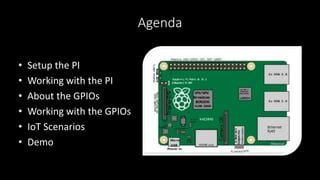
• Setup the PI
• Working with the PI
• About the GPIOs
• Working with the GPIOs
• IoT Scenarios
• Demo
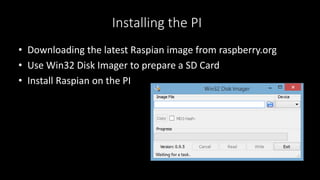
Installing the PI
• Downloading the latest Raspian image from raspberry.org
• Use Win32 Disk Imager to prepare a SD Card
• Install Raspian on the PI
Preparing the PI
• Add and configure a Network
• Connect to the PI via SSH e. g. via Putty
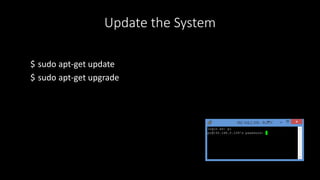
Update the System
$ sudo apt-get update
$ sudo apt-get upgrade
Install the latest Mono
$ sudo apt-key adv --keyserver keyserver.ubuntu.com --recv-keys
3FA7E0328081BFF6A14DA29AA6A19B38D3D831EF
$ echo "deb http://download.mono-project.com/repo/debian wheezy
main" | sudo tee /etc/apt/sources.list.d/mono-xamarin.list
$ sudo apt-get update
$ sudo apt-get install mono-complete
Test the Mono installation
$ mono -V
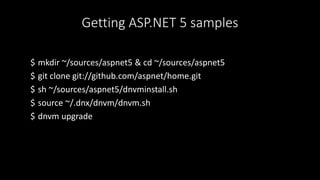
Getting ASP.NET 5 samples
$ mkdir ~/sources/aspnet5 & cd ~/sources/aspnet5
$ git clone git://github.com/aspnet/home.git
$ sh ~/sources/aspnet5/dnvminstall.sh
$ source ~/.dnx/dnvm/dnvm.sh
$ dnvm upgrade
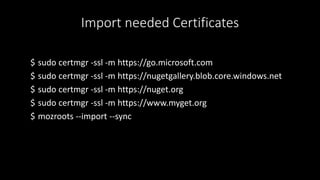
Import needed Certificates
$ sudo certmgr -ssl -m https://go.microsoft.com
$ sudo certmgr -ssl -m https://nugetgallery.blob.core.windows.net
$ sudo certmgr -ssl -m https://nuget.org
$ sudo certmgr -ssl -m https://www.myget.org
$ mozroots --import --sync
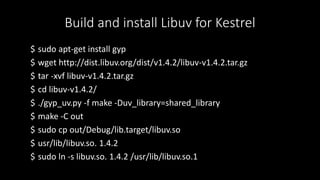
Build and install Libuv for Kestrel
$ sudo apt-get install gyp
$ wget http://dist.libuv.org/dist/v1.4.2/libuv-v1.4.2.tar.gz
$ tar -xvf libuv-v1.4.2.tar.gz
$ cd libuv-v1.4.2/
$ ./gyp_uv.py -f make -Duv_library=shared_library
$ make -C out
$ sudo cp out/Debug/lib.target/libuv.so
$ usr/lib/libuv.so. 1.4.2
$ sudo ln -s libuv.so. 1.4.2 /usr/lib/libuv.so.1
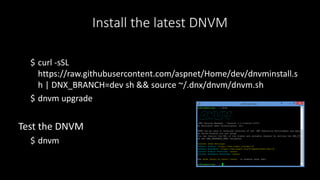
Install the latest DNVM
$ curl -sSL
https://raw.githubusercontent.com/aspnet/Home/dev/dnvminstall.s
h | DNX_BRANCH=dev sh && source ~/.dnx/dnvm/dnvm.sh
$ dnvm upgrade
Test the DNVM
$ dnvm
Install node.js
$ wget http://node-arm.herokuapp.com/node_latest_armhf.deb
$ sudo dpkg -i node_latest_armhf.deb
Install grunt & bower
$ sudo npm install -g grunt
$ sudo npm install -g bower
Possible IDEs
• Working on the PI
– vi Startup.cs
– Nano Startup.cs
• Working on Windows
– Visual Studio
– Visual Studio Code
Using Git
• Transfer files with Git
• Git is easy to use
• Git is integrated in Raspian
• Git is integrated in Visual Studio 2015
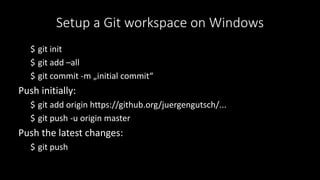
Setup a Git workspace on Windows
$ git init
$ git add –all
$ git commit -m „initial commit“
Push initially:
$ git add origin https://github.org/juergengutsch/...
$ git push -u origin master
Push the latest changes:
$ git push
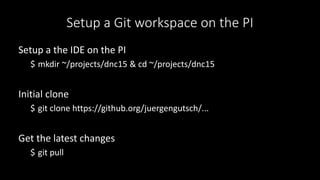
Setup a Git workspace on the PI
Setup a the IDE on the PI
$ mkdir ~/projects/dnc15 & cd ~/projects/dnc15
Initial clone
$ git clone https://github.org/juergengutsch/...
Get the latest changes
$ git pull
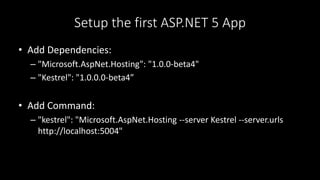
Setup the first ASP.NET 5 App
• Add Dependencies:
– "Microsoft.AspNet.Hosting": "1.0.0-beta4"
– "Kestrel": "1.0.0.0-beta4”
• Add Command:
– "kestrel": "Microsoft.AspNet.Hosting --server Kestrel --server.urls
http://localhost:5004"
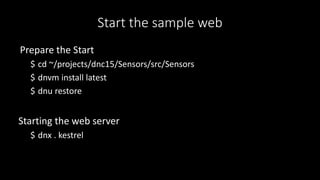
Start the sample web
Prepare the Start
$ cd ~/projects/dnc15/Sensors/src/Sensors
$ dnvm install latest
$ dnu restore
Starting the web server
$ dnx . kestrel
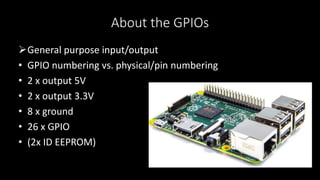
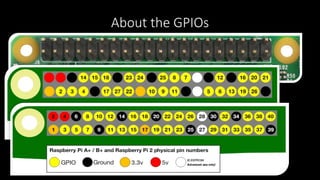
About the GPIOs
General purpose input/output
• GPIO numbering vs. physical/pin numbering
• 2 x output 5V
• 2 x output 3.3V
• 8 x ground
• 26 x GPIO
• (2x ID EEPROM)
About the GPIOs
Working with the GPIOs
• Calling the Raspian native API to connect the GPIOs
• Using existing C# libraries to access the pins:
– Raspberry.System
• https://github.com/raspberry-sharp/raspberry-sharp
– Raspberry.IO.GeneralPurpose
• https://github.com/raspberry-sharp/raspberry-sharp-io
– RPI.GPIO
• https://github.com/fatihboy/RPI.GPIO
Good to know: Be carefully
• Read carefully the GPIO specification
– Wrong connected pins can kill the sensor or the PI
• Read carefully the sensor specification
• Be carefully with external power
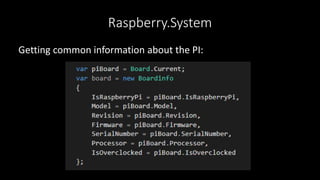
Raspberry.System
Getting common information about the PI:
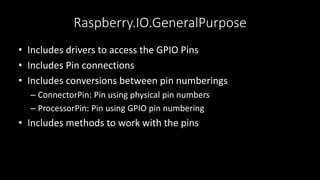
Raspberry.IO.GeneralPurpose
• Includes drivers to access the GPIO Pins
• Includes Pin connections
• Includes conversions between pin numberings
– ConnectorPin: Pin using physical pin numbers
– ProcessorPin: Pin using GPIO pin numbering
• Includes methods to work with the pins
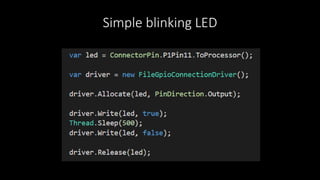
Simple blinking LED
Good to know: Cheat with node.js
• node.js is pretty cool on the PI 
• It‘s easy to write
• It runs fast
• many GPIO examples written in Javascript
• node.js is a pretty awesome tool to tryout things, you want to
implement with C#
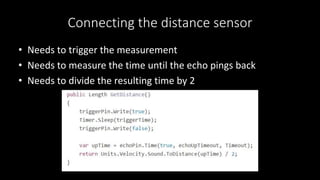
Connecting the distance sensor
• Needs to trigger the measurement
• Needs to measure the time until the echo pings back
• Needs to divide the resulting time by 2
TODO: Connecting the distance sensor
/* demo */
Mobile RC buggy
• Running a mobile web app on the PI
• The page fetches accelerator data from the mobile device
• The page controls one or more servos in the pi
• The page uses the accelerator data to control the servos
Plant watering system
• Get the weather forecast via network from weather API
• Get the current temperature via sensors
• Get the current pressure via sensors
• Control servos / switches to start watering plants
• Send text message on error / case of no water
• Provide mobile web app to show current information
Segway like vehicle
• Use accelerator sensor
• Control a servo on a two wheel vehicle
• Use the accelerator data to steer the servo
to keep the vehicle vertical

ASP.NET 5 on the Raspberry PI 2

  • 1.
    ASP.NET 5 +Raspberry PI 2
  • 2.
    Jürgen Gutsch • WebDeveloper, Trainer, Consultant • User group Leader – .NET-Stammtisch Konstanz-Kreuzlingen – .NET User Group Nordwest-Schweiz • Blogger – http://www.aspnetzone.de/blogs/juergengutsch/ • Author – Dotnetpro
  • 3.
    Agenda • Setup thePI • Working with the PI • About the GPIOs • Working with the GPIOs • IoT Scenarios • Demo
  • 4.
    Installing the PI •Downloading the latest Raspian image from raspberry.org • Use Win32 Disk Imager to prepare a SD Card • Install Raspian on the PI
  • 5.
    Preparing the PI •Add and configure a Network • Connect to the PI via SSH e. g. via Putty
  • 6.
    Update the System $sudo apt-get update $ sudo apt-get upgrade
  • 7.
    Install the latestMono $ sudo apt-key adv --keyserver keyserver.ubuntu.com --recv-keys 3FA7E0328081BFF6A14DA29AA6A19B38D3D831EF $ echo "deb http://download.mono-project.com/repo/debian wheezy main" | sudo tee /etc/apt/sources.list.d/mono-xamarin.list $ sudo apt-get update $ sudo apt-get install mono-complete
  • 8.
    Test the Monoinstallation $ mono -V
  • 9.
    Getting ASP.NET 5samples $ mkdir ~/sources/aspnet5 & cd ~/sources/aspnet5 $ git clone git://github.com/aspnet/home.git $ sh ~/sources/aspnet5/dnvminstall.sh $ source ~/.dnx/dnvm/dnvm.sh $ dnvm upgrade
  • 10.
    Import needed Certificates $sudo certmgr -ssl -m https://go.microsoft.com $ sudo certmgr -ssl -m https://nugetgallery.blob.core.windows.net $ sudo certmgr -ssl -m https://nuget.org $ sudo certmgr -ssl -m https://www.myget.org $ mozroots --import --sync
  • 11.
    Build and installLibuv for Kestrel $ sudo apt-get install gyp $ wget http://dist.libuv.org/dist/v1.4.2/libuv-v1.4.2.tar.gz $ tar -xvf libuv-v1.4.2.tar.gz $ cd libuv-v1.4.2/ $ ./gyp_uv.py -f make -Duv_library=shared_library $ make -C out $ sudo cp out/Debug/lib.target/libuv.so $ usr/lib/libuv.so. 1.4.2 $ sudo ln -s libuv.so. 1.4.2 /usr/lib/libuv.so.1
  • 12.
    Install the latestDNVM $ curl -sSL https://raw.githubusercontent.com/aspnet/Home/dev/dnvminstall.s h | DNX_BRANCH=dev sh && source ~/.dnx/dnvm/dnvm.sh $ dnvm upgrade Test the DNVM $ dnvm
  • 13.
    Install node.js $ wgethttp://node-arm.herokuapp.com/node_latest_armhf.deb $ sudo dpkg -i node_latest_armhf.deb
  • 14.
    Install grunt &bower $ sudo npm install -g grunt $ sudo npm install -g bower
  • 15.
    Possible IDEs • Workingon the PI – vi Startup.cs – Nano Startup.cs • Working on Windows – Visual Studio – Visual Studio Code
  • 16.
    Using Git • Transferfiles with Git • Git is easy to use • Git is integrated in Raspian • Git is integrated in Visual Studio 2015
  • 17.
    Setup a Gitworkspace on Windows $ git init $ git add –all $ git commit -m „initial commit“ Push initially: $ git add origin https://github.org/juergengutsch/... $ git push -u origin master Push the latest changes: $ git push
  • 18.
    Setup a Gitworkspace on the PI Setup a the IDE on the PI $ mkdir ~/projects/dnc15 & cd ~/projects/dnc15 Initial clone $ git clone https://github.org/juergengutsch/... Get the latest changes $ git pull
  • 19.
    Setup the firstASP.NET 5 App • Add Dependencies: – "Microsoft.AspNet.Hosting": "1.0.0-beta4" – "Kestrel": "1.0.0.0-beta4” • Add Command: – "kestrel": "Microsoft.AspNet.Hosting --server Kestrel --server.urls http://localhost:5004"
  • 20.
    Start the sampleweb Prepare the Start $ cd ~/projects/dnc15/Sensors/src/Sensors $ dnvm install latest $ dnu restore Starting the web server $ dnx . kestrel
  • 21.
    About the GPIOs Generalpurpose input/output • GPIO numbering vs. physical/pin numbering • 2 x output 5V • 2 x output 3.3V • 8 x ground • 26 x GPIO • (2x ID EEPROM)
  • 22.
  • 23.
    Working with theGPIOs • Calling the Raspian native API to connect the GPIOs • Using existing C# libraries to access the pins: – Raspberry.System • https://github.com/raspberry-sharp/raspberry-sharp – Raspberry.IO.GeneralPurpose • https://github.com/raspberry-sharp/raspberry-sharp-io – RPI.GPIO • https://github.com/fatihboy/RPI.GPIO
  • 24.
    Good to know:Be carefully • Read carefully the GPIO specification – Wrong connected pins can kill the sensor or the PI • Read carefully the sensor specification • Be carefully with external power
  • 25.
  • 26.
    Raspberry.IO.GeneralPurpose • Includes driversto access the GPIO Pins • Includes Pin connections • Includes conversions between pin numberings – ConnectorPin: Pin using physical pin numbers – ProcessorPin: Pin using GPIO pin numbering • Includes methods to work with the pins
  • 27.
  • 28.
    Good to know:Cheat with node.js • node.js is pretty cool on the PI  • It‘s easy to write • It runs fast • many GPIO examples written in Javascript • node.js is a pretty awesome tool to tryout things, you want to implement with C#
  • 29.
    Connecting the distancesensor • Needs to trigger the measurement • Needs to measure the time until the echo pings back • Needs to divide the resulting time by 2
  • 30.
    TODO: Connecting thedistance sensor /* demo */
  • 31.
    Mobile RC buggy •Running a mobile web app on the PI • The page fetches accelerator data from the mobile device • The page controls one or more servos in the pi • The page uses the accelerator data to control the servos
  • 32.
    Plant watering system •Get the weather forecast via network from weather API • Get the current temperature via sensors • Get the current pressure via sensors • Control servos / switches to start watering plants • Send text message on error / case of no water • Provide mobile web app to show current information
  • 33.
    Segway like vehicle •Use accelerator sensor • Control a servo on a two wheel vehicle • Use the accelerator data to steer the servo to keep the vehicle vertical

Editor's Notes

  • #8 apt-get mono ist zu alt aktuelles mono läuft nicht auf RPIB+ Speicherproblem MONO 4.0
  • #14 apt-get ist zu alt
  • #21 Demo?