Oracle8i Appliance 
An Oracle White Paper 
January 2000
Oracle8i Appliance 
INTRODUCTION 
With the proliferation of databases in nearly all corporations around the world, 
there is an increasing need to deploy database solutions quickly and easily on an 
operating system. 
Typically, configuring and administering a database and operating system are 
complicated tasks requiring the services of database administrators (DBAs) and 
systems administrators with expert knowledge. Acquiring such services is 
difficult due to a shortage of trained DBAs. In addition, many small-to-medium-sized 
businesses cannot afford DBA expertise. Employing an experienced 
systems administrator is an additional expense and may not seem practical 
because many operating system features are not required for the database to run. 
Thus, the need exists to provide an easily deployable, centrally manageable, and 
low-cost Oracle8i database solution for businesses with limited database or 
operating system administration expertise. 
This paper targets small-to-large-sized businesses, workgroups, Lines of 
Business, branch offices, and Internet Service Providers that: 
• Want a complete, ready-to-run, low-cost server platform that provides a 
dedicated solution to database management. 
• Do not have database administration expertise within their workgroup and 
prefer a service provider to assume DBA responsibilities from a single, 
remote, centralized location. 
• Want to deploy several database servers across their organization (possibly 
over a wide geographical area) and centrally manage the servers. 
• Do not want to purchase and maintain a general-purpose operating system 
(such as Windows NT) that includes many features not required for an 
Oracle8i database to run. 
Oracle8i Appliance 1 
The need exists to provide an easily 
deployable, centrally manageable, and 
low-cost Oracle8i database solution for 
businesses with limited database or 
operating system administration 
expertise.
THE SOLUTION: ORACLE8i APPLIANCE 
Oracle8i Appliance is the solution for these businesses. It is an integrated 
database appliance that simplifies the deployment of dedicated applications in 
hosted service or enterprise environments. 
Oracle8i Appliance is shipped fully integrated with the following components: 
• An Oracle8i database server that is preinstalled, preconfigured, and 
pretuned. 
• A seamlessly integrated, slimmed-down operating system with a limited 
user interface. The operating system is dedicated to the Oracle8i database 
only, and not to maintaining additional applications. 
• A standard hardware platform that has been optimally configured to run 
the Oracle8i database. The platform requires no additional peripherals and 
controllers (such as printers and sound cards) that are typically included 
with a general-purpose operating system. 
• One or more Redundant Array of Independent Disks (RAID) subsystems. 
• Oracle Enterprise Manager Console, a centralized management location 
from which remote database and operating system administration are 
performed. 
• Oracle8i Appliance Console, which enables you to locally perform a 
limited set of administration tasks. This character-based console appears 
on the monitor attached to the Oracle8i Appliance. 
• Oracle WebDB and Oracle JServer (included with the appliance), which 
enable Web-based and Java applications to run and be hosted from within 
the database. 
• Oracle interMedia, which enables storage of multimedia data in the 
database. 
• Additional third-party products¾for example, Legato NetWorker Client, 
which enables network-based backup of the Oracle8i Appliance. 
Appliance Computing: The New Technology Wave 
Oracle8i Appliance is part of a growing trend in the computer industry to treat 
products as “appliances” that can be easily “plugged in” and can operate without 
requiring complex configuration or administration procedures. 
Appliances run with slimmed-down software, making them simpler, faster, more 
accessible, and more reliable than traditional general-purpose products using a 
large-scale operating system such as Windows NT. This is the case with 
Oracle8i Appliance, which packages an Oracle8i database with a seamlessly 
integrated, slimmed-down operating system and an optimally configured 
hardware platform. 
Oracle8i Appliance 2 
Oracle8i Appliance offers a 
preconfigured, ready-to-run Oracle8i 
platform, a low total cost of ownership, 
remote administration capabilities from 
an integrated management console, 
and reliable, secure operations.
Because the Oracle8i Appliance is fully preconfigured and dedicated to just 
running the Oracle8i database, it can be thoroughly tested and tuned. This is in 
direct contrast to servers running general-purpose operating systems because of 
the uncertainty in their configuration and intended use. 
Appliances are dedicated to performing a single job, making them easier to 
upgrade or replace without interfering with other services. With Oracle8i 
Appliance, the slimmed-down operating system kernel is totally dedicated to the 
Oracle8i database. In addition, nearly all access to operating system interfaces is 
disabled, thus ensuring better security and reliability. 
For all of these reasons, system reliability and end-user performance are 
improved and costs are reduced. 
Lowering the Total Cost of Ownership 
Integrating the Oracle8i database with a slimmed-down operating system lowers 
the total cost of ownership by: 
• Eliminating the need to purchase an operating system or additional 
middleware 
• Eliminating the need to employ professional services for integration, 
tuning, and software installation 
• Eliminating the need to employ dedicated operators, DBAs, and systems 
administrators 
• Reducing periods of downtime, because higher availability means a 
reduction in costs associated with downtime (loss of operation, servicing 
needs, and so on) 
Oracle8i Appliance 3
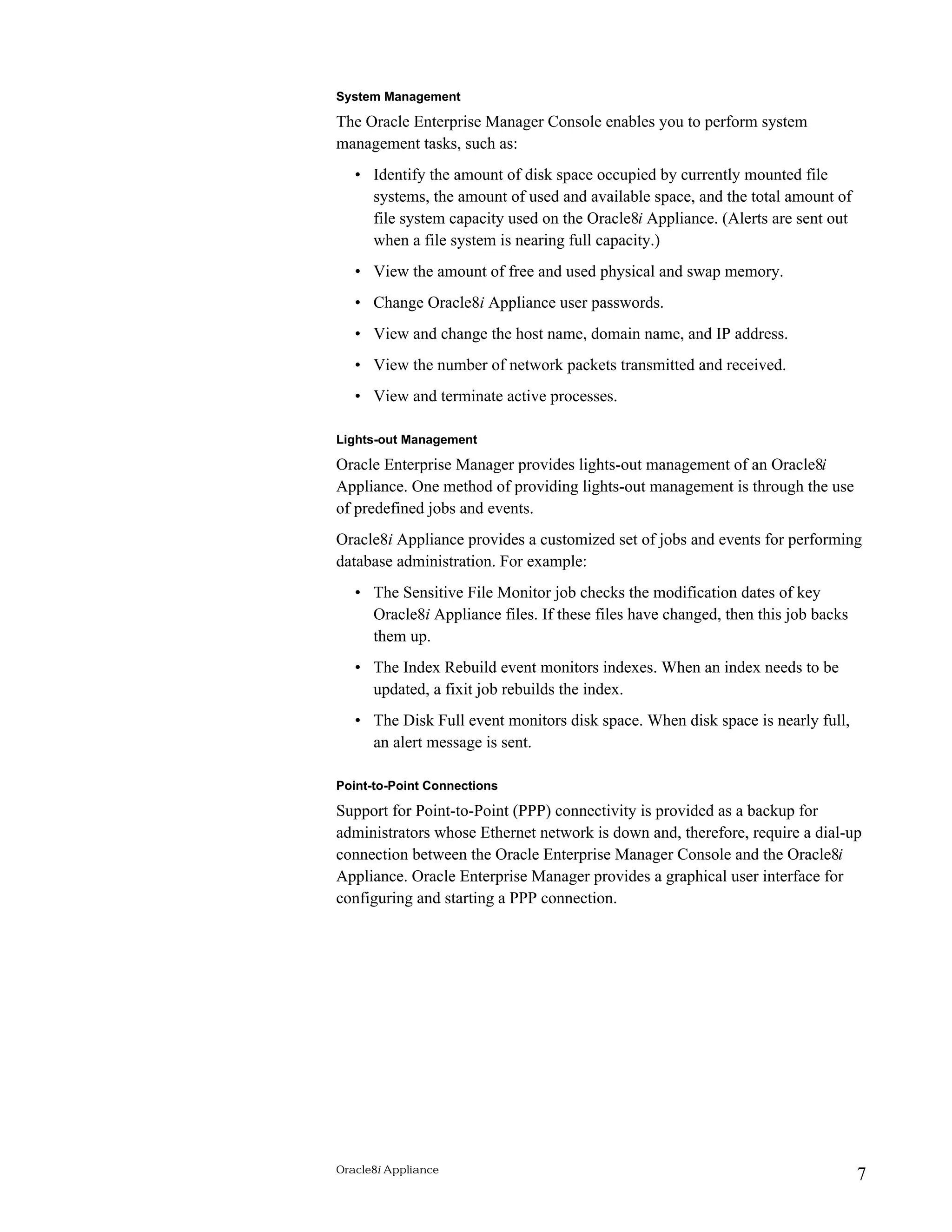
ORACLE8i APPLIANCE ARCHITECTURE 
This illustration shows a typical deployment scenario for Oracle8i Appliance: 
Clients Application 
Note that: 
Server 
Oracle8i 
Appliance 
• Client connections access Oracle8i Appliance through applications 
running on an application server. 
Backup 
Server 
Oracle 
Enterprise 
Manager 
• Oracle8i Appliance includes an Oracle8i database and a slimmed-down 
operating system kernel. 
• Oracle Enterprise Manager is used to remotely administer one or more 
Oracle8i Appliances. 
• Oracle8i Appliance data can be backed up to a local tape drive or across 
the network to a remote backup server. 
You can also deploy traditional client-server applications and host Web-based 
applications with Oracle8i Appliance. 
Oracle8i Appliance 4
ORACLE8i APPLIANCE FEATURES 
The following sections describe in more detail how Oracle8i Appliance meets 
the need for an easily deployable, centrally manageable, and low-cost Oracle8i 
database solution. 
Preconfigured Oracle8i Database 
Oracle8i Appliance comes packaged with an Oracle8i database that has been 
preinstalled and preconfigured to operate reliably and efficiently. This is 
achieved by making optimal use of disk space to store database objects and by 
configuring the database and operating system parameters to maximize system 
utilization. Oracle8i Appliance is available to users and applications through the 
following interfaces: 
• Net8, which enables a variety of client connections to the database, 
including PL/SQL, ODBC, JDBC, and OCI. 
• HTTP, which enables Web browser access to the database by connecting 
through Oracle WebDB. 
In addition, Oracle8i Appliance is preconfigured so that the Oracle8i database is 
up and running at system startup time. The Intelligent Agent is also up and 
running to provide for remote administration capabilities and lights-out 
management features such as backups and fixit jobs. 
Plug-and-Play Installation 
Oracle8i Appliance software is purchased completely preinstalled, 
preconfigured, and predefined on Intel-architecture-based hardware, making it 
an “out-of-the-box,” ready-to-run business solution. 
Oracle Corporation is partnering with several hardware vendors who will 
manufacture and sell the Oracle8i Appliance. The vendors will bundle their 
hardware with the Oracle8i Appliance software—database and operating 
system—fully integrated, tested, and tuned together. In so doing, compatibility 
and performance issues are eliminated, and the system is optimized to serve the 
functions for which it was designed: providing secure, reliable, and immediate 
database services. 
Oracle Enterprise Manager Integrated for Centralized Administration 
This section provides an overview of how Oracle Enterprise Manager is used to 
centrally manage Oracle8i Appliance. 
Remote Administration Through Oracle Enterprise Manager 
Database administration is performed from a centralized Oracle Enterprise 
Manager Console by your own systems administrator, or remotely by a service 
Oracle8i Appliance 5
provider. Multiple Oracle8i Appliances can be administered from this 
centralized Console. 
Management of Oracle8i Appliance Operating System Services 
Management of some operating system-related services is performed from the 
Oracle Enterprise Manager Console at a centralized location. These services 
manage Point-to-Point (PPP) network connections, Oracle WebDB 
configuration, and the Oracle8i Appliance internal clock connections (NTPD). 
All services are automatically started when the Oracle8i Appliance is started. 
You can remotely view, configure, and manage configuration components for 
all Oracle8i Appliances. 
Service management is protected by authentication methods that are integrated 
in Oracle Enterprise Manager for complete data security. 
Management of Reports, Logs, and Configuration Files 
The Oracle Enterprise Manager Console enables you to: 
• Generate reports that detail key operating system, networking, and 
database performance information. 
• View and delete log files such as trace files, syslog files, network files, and 
Intelligent Agent logs. 
• View and edit key network, Intelligent Agent, and Oracle WebDB 
configuration files. 
Remote Upgrades and Patch Installation 
Upgrades of software components and installation of patches within software 
components can be remotely applied from the Oracle Enterprise Manager 
Console. This enables you to download and automatically install component 
upgrades and patches on an Oracle8i Appliance from a remote server. 
Local or Remote Backup and Recovery 
The Oracle Enterprise Manager Backup Management components consist of the 
Backup Wizard, Recovery Wizard, Catalog Maintenance Wizard, Backup 
Configuration Library, and Create Backup Configuration property sheets. You 
use these components to schedule and configure local tape drive backups or 
remote network backups to a separate server. Various Legato components are 
included with Oracle8i Appliance; however, you need to license an additional 
Legato component to perform remote backups. 
Local recovery is performed from both the Oracle8i Appliance Console (which 
prompts you to insert tapes) and the Oracle Enterprise Manager Console. 
Remote recovery is performed from both the Oracle Enterprise Manager 
Console and the remote backup server. 
Oracle8i Appliance 6
System Management 
The Oracle Enterprise Manager Console enables you to perform system 
management tasks, such as: 
• Identify the amount of disk space occupied by currently mounted file 
systems, the amount of used and available space, and the total amount of 
file system capacity used on the Oracle8i Appliance. (Alerts are sent out 
when a file system is nearing full capacity.) 
• View the amount of free and used physical and swap memory. 
• Change Oracle8i Appliance user passwords. 
• View and change the host name, domain name, and IP address. 
• View the number of network packets transmitted and received. 
• View and terminate active processes. 
Lights-out Management 
Oracle Enterprise Manager provides lights-out management of an Oracle8i 
Appliance. One method of providing lights-out management is through the use 
of predefined jobs and events. 
Oracle8i Appliance provides a customized set of jobs and events for performing 
database administration. For example: 
• The Sensitive File Monitor job checks the modification dates of key 
Oracle8i Appliance files. If these files have changed, then this job backs 
them up. 
• The Index Rebuild event monitors indexes. When an index needs to be 
updated, a fixit job rebuilds the index. 
• The Disk Full event monitors disk space. When disk space is nearly full, 
an alert message is sent. 
Point-to-Point Connections 
Support for Point-to-Point (PPP) connectivity is provided as a backup for 
administrators whose Ethernet network is down and, therefore, require a dial-up 
connection between the Oracle Enterprise Manager Console and the Oracle8i 
Appliance. Oracle Enterprise Manager provides a graphical user interface for 
configuring and starting a PPP connection. 
Oracle8i Appliance 7
Automatic and Adaptive Configuration When Scaling Up Hardware 
As you add CPUs, RAM, and hard disks to respond to increasing system and 
user population demands, the Oracle8i Appliance adaptively reconfigures the 
database to reflect any scaled-up hardware. 
For example, as you add hard disks, database tablespaces are automatically 
reconfigured across those disks. Also, adding CPUs and RAM adaptively 
reconfigures your system and database initialization parameters. 
Backup Configurations 
Two types of backup configurations are available: 
Backups to a Local Tape Drive 
With this configuration, backups are performed to a tape drive attached locally 
to the Oracle8i Appliance. The DBA must create a backup configuration and 
submit a backup job using the Oracle Enterprise Manager Backup Management 
components. Since backups are performed locally, the DBA must respond to 
prompts on the local Oracle8i Appliance Console to insert and remove backup 
tapes. 
Backups to a Remote Legato Server 
With this configuration, backups are performed to a remote Legato NetWorker 
Server on the network. The DBA must create a backup configuration and submit 
a backup job using the Oracle Enterprise Manager Backup Management 
components. The DBA must also specify the remote Legato NetWorker Server 
to which to back up the Oracle8i Appliance. 
Data Recovery Methods 
Oracle8i Appliance provides protection against loss of data by providing a fail-safe 
method for restoring lost data. The method of recovery for an Oracle8i 
Appliance is determined by the degree of failure in the system. Three types of 
failures and the recovery methods are described below: 
System Disk Failure 
The system disk contains the system distribution and configuration files, the 
redo logs, and the control files. If the system disk fails, you use the provided 
Oracle8i Appliance CD-ROM to recover the files. As part of this process, you 
may need to remove the disk and replace it with a new one. 
Mirror Disk Failure 
The mirror disk contains swap space, a duplicate copy of the redo logs, and a 
duplicate copy of the control files. If the mirror disk fails, you replace the disk 
and then run a job from the Oracle Enterprise Manager Console. 
Oracle8i Appliance 8
RAID Disk Failure 
The RAID subsystem contains the SYSTEM tablespace, the database files, and 
the archive logs. If one RAID disk fails, the database continues to run. You can 
wait until a period of low database use to replace the disk. 
No Operating System Administration Experience Required 
There is limited need for users to interface with the slimmed-down operating 
system: 
• The entire Oracle8i Appliance software solution and computer hardware 
are seamlessly integrated, tested together, and fully tuned prior to being 
shipped. This eliminates the need to manually tune the system application 
in anticipation of an Oracle8i database or any applications. 
• Only the necessary components required to operate the platform are 
included in the software solution, thus enabling the system to be dedicated 
to secure, reliable database services. 
• Manual operating system upgrades are not required because the operating 
system is packaged with the Oracle8i database and any application. 
If a need arises for interfacing with the operating system, the Oracle Enterprise 
Manager Console enables you to manage the Oracle8i Appliance’s essential 
services. 
Slimmed-Down Operating System Performance 
Over the years, operating systems have grown in size, requiring more and more 
memory, processing power, and maintenance to remain running. In many ways, 
the operating system has become the bottleneck that prevents quick and easy 
access to data. 
All that is really required is the operating system kernel and a few essential 
services to provide basic functions such as CPU scheduling, memory 
management, hardware interaction, and security. 
The Oracle8i Appliance strategy focuses on identifying which operating system-related 
capabilities are absolutely required to run the Oracle8i Appliance and on 
slimming down the operating system to get rid of everything else. 
The Oracle8i Appliance solution is more open, more reliable, more efficient, 
simpler, and a faster way to store and access corporate data. 
Oracle8i Appliance 9
TYPICAL HARDWARE CONFIGURATION 
A typical Oracle8i Appliance hardware configuration includes: 
• One to four Pentium II or III Xeon processors 
• 1-4 GB of memory 
• 25-300 GB of disk space and a RAID controller 
• Ethernet connections 
• Floppy disk drive, CD-ROM drive, tape drive 
• Monitor, video card, keyboard 
• Network interface card, modem 
FUTURE APPLIANCES 
Oracle Corporation may expand the Oracle8i Appliance line to include the 
following capabilities: 
• A directory appliance to provide an LDAP repository for organizing and 
storing lists in a standardized format for network-based environments. 
• A file system appliance using iFS, which will enable users to store files 
easily into an Oracle8i database and will provide for easy IT management 
of those files. 
• A messaging appliance using the IMAP4 protocol for hosting and storing 
e-mail content for delivery via the Internet. 
CONCLUSION 
Oracle8i Appliance is a preconfigured, dedicated, Internet-enabled database 
server device. It is the ideal means of deploying Oracle Corporation’s Internet 
computing software platform to branch offices, remote locations, or small-to-medium- 
sized businesses or workgroups in a way that is low-cost, requires no 
on-site IT administration or management, and installs quickly and easily. 
Oracle8i Appliance provides: 
• A complete, preconfigured device ready for installation 
• Plug-and-play deployment 
• Centralized, network-based remote management 
• Performance optimized for the hardware device 
• Significant savings on total cost of ownership 
• Built-in capabilities for Web-based application deployment 
Oracle Corporation has partnered with several hardware vendors who will 
manufacture and sell Oracle8i Appliance. 
Oracle8i Appliance 10
Oracle8i Appliance 
January 2000 
Authors: Arvind Jain, Mark Kennedy, and Jeff Stein 
Copyright © Oracle Corporation 2000 
All Rights Reserved Printed in the U.S.A. 
This document is provided for informational purposes 
only and the information herein is subject to change 
without notice. Please report any errors herein to 
Oracle Corporation. Oracle Corporation does not 
provide any warranties covering and specifically 
disclaims any liability in connection with this document. 
Oracle is a registered trademark and Net8, Oracle8i, and 
PL/SQL are trademarks or registered trademarks of 
Oracle Corporation. All other company or product names 
mentioned are used for identification purposes only and 
may be trademarks of their respective owners. 
Oracle Corporation 
World Headquarters 
500 Oracle Parkway 
Redwood Shores, CA 94065 
U.S.A. 
Worldwide Inquiries: 
650.506.7000 
Fax 650.506.7200 
Copyright © Oracle Corporation 2000 
All Rights Reserved 
Oracle8i Appliance 11

Appliance whitepaper 8_i

  • 1.
    Oracle8i Appliance AnOracle White Paper January 2000
  • 2.
    Oracle8i Appliance INTRODUCTION With the proliferation of databases in nearly all corporations around the world, there is an increasing need to deploy database solutions quickly and easily on an operating system. Typically, configuring and administering a database and operating system are complicated tasks requiring the services of database administrators (DBAs) and systems administrators with expert knowledge. Acquiring such services is difficult due to a shortage of trained DBAs. In addition, many small-to-medium-sized businesses cannot afford DBA expertise. Employing an experienced systems administrator is an additional expense and may not seem practical because many operating system features are not required for the database to run. Thus, the need exists to provide an easily deployable, centrally manageable, and low-cost Oracle8i database solution for businesses with limited database or operating system administration expertise. This paper targets small-to-large-sized businesses, workgroups, Lines of Business, branch offices, and Internet Service Providers that: • Want a complete, ready-to-run, low-cost server platform that provides a dedicated solution to database management. • Do not have database administration expertise within their workgroup and prefer a service provider to assume DBA responsibilities from a single, remote, centralized location. • Want to deploy several database servers across their organization (possibly over a wide geographical area) and centrally manage the servers. • Do not want to purchase and maintain a general-purpose operating system (such as Windows NT) that includes many features not required for an Oracle8i database to run. Oracle8i Appliance 1 The need exists to provide an easily deployable, centrally manageable, and low-cost Oracle8i database solution for businesses with limited database or operating system administration expertise.
  • 3.
    THE SOLUTION: ORACLE8iAPPLIANCE Oracle8i Appliance is the solution for these businesses. It is an integrated database appliance that simplifies the deployment of dedicated applications in hosted service or enterprise environments. Oracle8i Appliance is shipped fully integrated with the following components: • An Oracle8i database server that is preinstalled, preconfigured, and pretuned. • A seamlessly integrated, slimmed-down operating system with a limited user interface. The operating system is dedicated to the Oracle8i database only, and not to maintaining additional applications. • A standard hardware platform that has been optimally configured to run the Oracle8i database. The platform requires no additional peripherals and controllers (such as printers and sound cards) that are typically included with a general-purpose operating system. • One or more Redundant Array of Independent Disks (RAID) subsystems. • Oracle Enterprise Manager Console, a centralized management location from which remote database and operating system administration are performed. • Oracle8i Appliance Console, which enables you to locally perform a limited set of administration tasks. This character-based console appears on the monitor attached to the Oracle8i Appliance. • Oracle WebDB and Oracle JServer (included with the appliance), which enable Web-based and Java applications to run and be hosted from within the database. • Oracle interMedia, which enables storage of multimedia data in the database. • Additional third-party products¾for example, Legato NetWorker Client, which enables network-based backup of the Oracle8i Appliance. Appliance Computing: The New Technology Wave Oracle8i Appliance is part of a growing trend in the computer industry to treat products as “appliances” that can be easily “plugged in” and can operate without requiring complex configuration or administration procedures. Appliances run with slimmed-down software, making them simpler, faster, more accessible, and more reliable than traditional general-purpose products using a large-scale operating system such as Windows NT. This is the case with Oracle8i Appliance, which packages an Oracle8i database with a seamlessly integrated, slimmed-down operating system and an optimally configured hardware platform. Oracle8i Appliance 2 Oracle8i Appliance offers a preconfigured, ready-to-run Oracle8i platform, a low total cost of ownership, remote administration capabilities from an integrated management console, and reliable, secure operations.
  • 4.
    Because the Oracle8iAppliance is fully preconfigured and dedicated to just running the Oracle8i database, it can be thoroughly tested and tuned. This is in direct contrast to servers running general-purpose operating systems because of the uncertainty in their configuration and intended use. Appliances are dedicated to performing a single job, making them easier to upgrade or replace without interfering with other services. With Oracle8i Appliance, the slimmed-down operating system kernel is totally dedicated to the Oracle8i database. In addition, nearly all access to operating system interfaces is disabled, thus ensuring better security and reliability. For all of these reasons, system reliability and end-user performance are improved and costs are reduced. Lowering the Total Cost of Ownership Integrating the Oracle8i database with a slimmed-down operating system lowers the total cost of ownership by: • Eliminating the need to purchase an operating system or additional middleware • Eliminating the need to employ professional services for integration, tuning, and software installation • Eliminating the need to employ dedicated operators, DBAs, and systems administrators • Reducing periods of downtime, because higher availability means a reduction in costs associated with downtime (loss of operation, servicing needs, and so on) Oracle8i Appliance 3
  • 5.
    ORACLE8i APPLIANCE ARCHITECTURE This illustration shows a typical deployment scenario for Oracle8i Appliance: Clients Application Note that: Server Oracle8i Appliance • Client connections access Oracle8i Appliance through applications running on an application server. Backup Server Oracle Enterprise Manager • Oracle8i Appliance includes an Oracle8i database and a slimmed-down operating system kernel. • Oracle Enterprise Manager is used to remotely administer one or more Oracle8i Appliances. • Oracle8i Appliance data can be backed up to a local tape drive or across the network to a remote backup server. You can also deploy traditional client-server applications and host Web-based applications with Oracle8i Appliance. Oracle8i Appliance 4
  • 6.
    ORACLE8i APPLIANCE FEATURES The following sections describe in more detail how Oracle8i Appliance meets the need for an easily deployable, centrally manageable, and low-cost Oracle8i database solution. Preconfigured Oracle8i Database Oracle8i Appliance comes packaged with an Oracle8i database that has been preinstalled and preconfigured to operate reliably and efficiently. This is achieved by making optimal use of disk space to store database objects and by configuring the database and operating system parameters to maximize system utilization. Oracle8i Appliance is available to users and applications through the following interfaces: • Net8, which enables a variety of client connections to the database, including PL/SQL, ODBC, JDBC, and OCI. • HTTP, which enables Web browser access to the database by connecting through Oracle WebDB. In addition, Oracle8i Appliance is preconfigured so that the Oracle8i database is up and running at system startup time. The Intelligent Agent is also up and running to provide for remote administration capabilities and lights-out management features such as backups and fixit jobs. Plug-and-Play Installation Oracle8i Appliance software is purchased completely preinstalled, preconfigured, and predefined on Intel-architecture-based hardware, making it an “out-of-the-box,” ready-to-run business solution. Oracle Corporation is partnering with several hardware vendors who will manufacture and sell the Oracle8i Appliance. The vendors will bundle their hardware with the Oracle8i Appliance software—database and operating system—fully integrated, tested, and tuned together. In so doing, compatibility and performance issues are eliminated, and the system is optimized to serve the functions for which it was designed: providing secure, reliable, and immediate database services. Oracle Enterprise Manager Integrated for Centralized Administration This section provides an overview of how Oracle Enterprise Manager is used to centrally manage Oracle8i Appliance. Remote Administration Through Oracle Enterprise Manager Database administration is performed from a centralized Oracle Enterprise Manager Console by your own systems administrator, or remotely by a service Oracle8i Appliance 5
  • 7.
    provider. Multiple Oracle8iAppliances can be administered from this centralized Console. Management of Oracle8i Appliance Operating System Services Management of some operating system-related services is performed from the Oracle Enterprise Manager Console at a centralized location. These services manage Point-to-Point (PPP) network connections, Oracle WebDB configuration, and the Oracle8i Appliance internal clock connections (NTPD). All services are automatically started when the Oracle8i Appliance is started. You can remotely view, configure, and manage configuration components for all Oracle8i Appliances. Service management is protected by authentication methods that are integrated in Oracle Enterprise Manager for complete data security. Management of Reports, Logs, and Configuration Files The Oracle Enterprise Manager Console enables you to: • Generate reports that detail key operating system, networking, and database performance information. • View and delete log files such as trace files, syslog files, network files, and Intelligent Agent logs. • View and edit key network, Intelligent Agent, and Oracle WebDB configuration files. Remote Upgrades and Patch Installation Upgrades of software components and installation of patches within software components can be remotely applied from the Oracle Enterprise Manager Console. This enables you to download and automatically install component upgrades and patches on an Oracle8i Appliance from a remote server. Local or Remote Backup and Recovery The Oracle Enterprise Manager Backup Management components consist of the Backup Wizard, Recovery Wizard, Catalog Maintenance Wizard, Backup Configuration Library, and Create Backup Configuration property sheets. You use these components to schedule and configure local tape drive backups or remote network backups to a separate server. Various Legato components are included with Oracle8i Appliance; however, you need to license an additional Legato component to perform remote backups. Local recovery is performed from both the Oracle8i Appliance Console (which prompts you to insert tapes) and the Oracle Enterprise Manager Console. Remote recovery is performed from both the Oracle Enterprise Manager Console and the remote backup server. Oracle8i Appliance 6
  • 8.
    System Management TheOracle Enterprise Manager Console enables you to perform system management tasks, such as: • Identify the amount of disk space occupied by currently mounted file systems, the amount of used and available space, and the total amount of file system capacity used on the Oracle8i Appliance. (Alerts are sent out when a file system is nearing full capacity.) • View the amount of free and used physical and swap memory. • Change Oracle8i Appliance user passwords. • View and change the host name, domain name, and IP address. • View the number of network packets transmitted and received. • View and terminate active processes. Lights-out Management Oracle Enterprise Manager provides lights-out management of an Oracle8i Appliance. One method of providing lights-out management is through the use of predefined jobs and events. Oracle8i Appliance provides a customized set of jobs and events for performing database administration. For example: • The Sensitive File Monitor job checks the modification dates of key Oracle8i Appliance files. If these files have changed, then this job backs them up. • The Index Rebuild event monitors indexes. When an index needs to be updated, a fixit job rebuilds the index. • The Disk Full event monitors disk space. When disk space is nearly full, an alert message is sent. Point-to-Point Connections Support for Point-to-Point (PPP) connectivity is provided as a backup for administrators whose Ethernet network is down and, therefore, require a dial-up connection between the Oracle Enterprise Manager Console and the Oracle8i Appliance. Oracle Enterprise Manager provides a graphical user interface for configuring and starting a PPP connection. Oracle8i Appliance 7
  • 9.
    Automatic and AdaptiveConfiguration When Scaling Up Hardware As you add CPUs, RAM, and hard disks to respond to increasing system and user population demands, the Oracle8i Appliance adaptively reconfigures the database to reflect any scaled-up hardware. For example, as you add hard disks, database tablespaces are automatically reconfigured across those disks. Also, adding CPUs and RAM adaptively reconfigures your system and database initialization parameters. Backup Configurations Two types of backup configurations are available: Backups to a Local Tape Drive With this configuration, backups are performed to a tape drive attached locally to the Oracle8i Appliance. The DBA must create a backup configuration and submit a backup job using the Oracle Enterprise Manager Backup Management components. Since backups are performed locally, the DBA must respond to prompts on the local Oracle8i Appliance Console to insert and remove backup tapes. Backups to a Remote Legato Server With this configuration, backups are performed to a remote Legato NetWorker Server on the network. The DBA must create a backup configuration and submit a backup job using the Oracle Enterprise Manager Backup Management components. The DBA must also specify the remote Legato NetWorker Server to which to back up the Oracle8i Appliance. Data Recovery Methods Oracle8i Appliance provides protection against loss of data by providing a fail-safe method for restoring lost data. The method of recovery for an Oracle8i Appliance is determined by the degree of failure in the system. Three types of failures and the recovery methods are described below: System Disk Failure The system disk contains the system distribution and configuration files, the redo logs, and the control files. If the system disk fails, you use the provided Oracle8i Appliance CD-ROM to recover the files. As part of this process, you may need to remove the disk and replace it with a new one. Mirror Disk Failure The mirror disk contains swap space, a duplicate copy of the redo logs, and a duplicate copy of the control files. If the mirror disk fails, you replace the disk and then run a job from the Oracle Enterprise Manager Console. Oracle8i Appliance 8
  • 10.
    RAID Disk Failure The RAID subsystem contains the SYSTEM tablespace, the database files, and the archive logs. If one RAID disk fails, the database continues to run. You can wait until a period of low database use to replace the disk. No Operating System Administration Experience Required There is limited need for users to interface with the slimmed-down operating system: • The entire Oracle8i Appliance software solution and computer hardware are seamlessly integrated, tested together, and fully tuned prior to being shipped. This eliminates the need to manually tune the system application in anticipation of an Oracle8i database or any applications. • Only the necessary components required to operate the platform are included in the software solution, thus enabling the system to be dedicated to secure, reliable database services. • Manual operating system upgrades are not required because the operating system is packaged with the Oracle8i database and any application. If a need arises for interfacing with the operating system, the Oracle Enterprise Manager Console enables you to manage the Oracle8i Appliance’s essential services. Slimmed-Down Operating System Performance Over the years, operating systems have grown in size, requiring more and more memory, processing power, and maintenance to remain running. In many ways, the operating system has become the bottleneck that prevents quick and easy access to data. All that is really required is the operating system kernel and a few essential services to provide basic functions such as CPU scheduling, memory management, hardware interaction, and security. The Oracle8i Appliance strategy focuses on identifying which operating system-related capabilities are absolutely required to run the Oracle8i Appliance and on slimming down the operating system to get rid of everything else. The Oracle8i Appliance solution is more open, more reliable, more efficient, simpler, and a faster way to store and access corporate data. Oracle8i Appliance 9
  • 11.
    TYPICAL HARDWARE CONFIGURATION A typical Oracle8i Appliance hardware configuration includes: • One to four Pentium II or III Xeon processors • 1-4 GB of memory • 25-300 GB of disk space and a RAID controller • Ethernet connections • Floppy disk drive, CD-ROM drive, tape drive • Monitor, video card, keyboard • Network interface card, modem FUTURE APPLIANCES Oracle Corporation may expand the Oracle8i Appliance line to include the following capabilities: • A directory appliance to provide an LDAP repository for organizing and storing lists in a standardized format for network-based environments. • A file system appliance using iFS, which will enable users to store files easily into an Oracle8i database and will provide for easy IT management of those files. • A messaging appliance using the IMAP4 protocol for hosting and storing e-mail content for delivery via the Internet. CONCLUSION Oracle8i Appliance is a preconfigured, dedicated, Internet-enabled database server device. It is the ideal means of deploying Oracle Corporation’s Internet computing software platform to branch offices, remote locations, or small-to-medium- sized businesses or workgroups in a way that is low-cost, requires no on-site IT administration or management, and installs quickly and easily. Oracle8i Appliance provides: • A complete, preconfigured device ready for installation • Plug-and-play deployment • Centralized, network-based remote management • Performance optimized for the hardware device • Significant savings on total cost of ownership • Built-in capabilities for Web-based application deployment Oracle Corporation has partnered with several hardware vendors who will manufacture and sell Oracle8i Appliance. Oracle8i Appliance 10
  • 12.
    Oracle8i Appliance January2000 Authors: Arvind Jain, Mark Kennedy, and Jeff Stein Copyright © Oracle Corporation 2000 All Rights Reserved Printed in the U.S.A. This document is provided for informational purposes only and the information herein is subject to change without notice. Please report any errors herein to Oracle Corporation. Oracle Corporation does not provide any warranties covering and specifically disclaims any liability in connection with this document. Oracle is a registered trademark and Net8, Oracle8i, and PL/SQL are trademarks or registered trademarks of Oracle Corporation. All other company or product names mentioned are used for identification purposes only and may be trademarks of their respective owners. Oracle Corporation World Headquarters 500 Oracle Parkway Redwood Shores, CA 94065 U.S.A. Worldwide Inquiries: 650.506.7000 Fax 650.506.7200 Copyright © Oracle Corporation 2000 All Rights Reserved Oracle8i Appliance 11