“
Switch on to tv
'Young Indiana Jones' was one of the happiest times I ever had, so I love television.
— George Lucas
Presenter: Ruptapas Chakraborty
not much have changed on tv apart from some fancy programs that tries hard
to make you smile or cry. Things have remained fairly static until the advent of
smart TV platform popularised by WebOS. WebOS is a Linux kernel-based
multitask operating system for smart devices like TVs. This can be see in the
latest televisions from LG. Other players in this space are Android TV, Amazon
FireTV, Samsung SmartTV powered by Tizen OS, Sony Android TV, Roku, Vizio
etc. But I think the notable of them all is the new kid in town, tv. The
potential is paramount and with tvOS SDK it makes the platform even more
exciting so as to prove that not only the time of Young Indiana Jones was
interesting but also the future will be one.
Introduction
tvOS is an operating system developed by Apple Inc. for their 4th generation
tv. The OS is based upon the iOS platform but at the same time it has it s
own distinctive features. Using the tvOS SDK developers like us can start
developing app for the App Store. To get started you will need:
- Xcode 7.x
- ObjectiveC or Swift 2.x or/and TVML & JavaScript ‒ These are the main
programming languages used for developing tvOS apps
- Parallax Previewer app ‒ This is an OS X app that is used for validating/
adjusting the layered image for your app icon
- and yes tv
tvOS
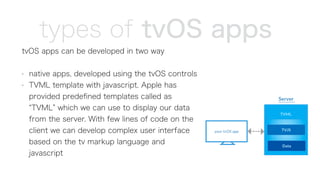
tvOS apps can be developed in two way
- native apps, developed using the tvOS controls
- TVML template with javascript. Apple has
provided predefined templates called as
TVML which we can use to display our data
from the server. With few lines of code on the
client we can develop complex user interface
based on the tv markup language and
javascript
types of tvOS apps
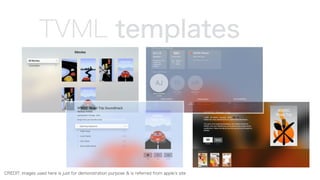
TVML templates
CREDIT: images used here is just for demonstration purpose & is referred from apple s site
let s create an app
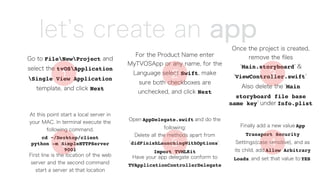
Go to FileNewProject and
select the tvOSApplication
Single View Application
template, and click Next
For the Product Name enter
MyTVOSApp or any name, for the
Language select Swift, make
sure both checkboxes are
unchecked, and click Next
Once the project is created,
remove the files
Main.storyboard &
ViewController.swift .
Also delete the Main
storyboard file base
name key under Info.plist
Finally add a new value App
Transport Security
Settings(case sensitive), and as
its child, add Allow Arbitrary
Loads, and set that value to YES.
Open AppDelegate.swift and do the
following:
Delete all the methods apart from
didFinishLaunchingWithOptions .
Import TVMLKit
Have your app delegate conform to
TVApplicationControllerDelegate
At this point start a local server in
your MAC. In terminal execute the
following command.
cd ~/Desktop/client
python -m SimpleHTTPServer
9001
First line is the location of the web
server and the second command
start a server at that location
1 2 3
456
little code
Create the following variables in the AppDelegate class:
var appController: TVApplicationController?
static let TVBASEURL = "http://localhost:9001/"
static let TVBOOTURL = "(AppDelegate.TVBASEURL)js/application.js"
Update the following method with the code
func application(application: UIApplication, didFinishLaunchingWithOptions launchOptions:
[NSObject: AnyObject]?) -> Bool {
window = UIWindow(frame: UIScreen.mainScreen().bounds)
let appControllerContext = TVApplicationControllerContext()
guard let javaScriptURL = NSURL(string: AppDelegate.TVBOOTURL) else {
fatalError("unable to create NSURL")
}
appControllerContext.javaScriptApplicationURL = javaScriptURL
appControllerContext.launchOptions["BASEURL"] = AppDelegate.TVBASEURL
appController = TVApplicationController(context: appControllerContext, window: window, delegate:
self)
return true
}
7
8
and some more…
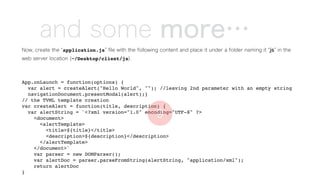
Now, create the application.js file with the following content and place it under a folder naming it js in the
web server location (~/Desktop/client/js).
App.onLaunch = function(options) {
var alert = createAlert("Hello World", ""); //leaving 2nd parameter with an empty string
navigationDocument.presentModal(alert);}
// the TVML template creation
var createAlert = function(title, description) {
var alertString = `<?xml version="1.0" encoding="UTF-8" ?>
<document>
<alertTemplate>
<title>${title}</title>
<description>${description}</description>
</alertTemplate>
</document>`
var parser = new DOMParser();
var alertDoc = parser.parseFromString(alertString, "application/xml");
return alertDoc
}
9
voila :)
10
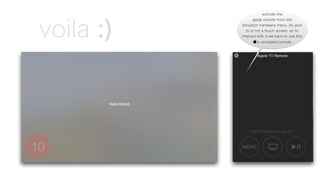
activate the
apple remote from the
simulator hardware menu. As your
tv is not a touch screen, so to
interact with it we have to use this
tv simulated remote
where to go from here
Sample tvOS native app human interface guideline
for tvOS
Current templates of TVML
tvOS space constraints and how
to overcome them tvOS app icon parallax effect
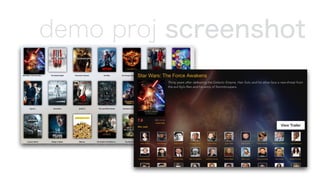
demo proj screenshot
more about the demo
for my native tvOS popular movies app demo I performed the following
steps:
- registered for the movie db api with [https://www.themoviedb.org/
documentation/api]. I also used [http://docs.themoviedb.apiary.io/] to
view and validate the response of my endpoints /movie/popular & /
movie/id/credits
- to fetch the data I used NSURLSession
- next was to bind the data with the UICollectionView and use the new
didUpdateFocusInContext delegate method to activate focus in the app
and which acts like a visual cue for the user
tv
The people who are crazy enough to think they can change the world, are the ones who do.
— Steve Jobs
Presenter: Ruptapas Chakraborty
“

Apple TV - a quick start guide

  • 1.
    “ Switch on totv 'Young Indiana Jones' was one of the happiest times I ever had, so I love television. — George Lucas Presenter: Ruptapas Chakraborty
  • 2.
    not much havechanged on tv apart from some fancy programs that tries hard to make you smile or cry. Things have remained fairly static until the advent of smart TV platform popularised by WebOS. WebOS is a Linux kernel-based multitask operating system for smart devices like TVs. This can be see in the latest televisions from LG. Other players in this space are Android TV, Amazon FireTV, Samsung SmartTV powered by Tizen OS, Sony Android TV, Roku, Vizio etc. But I think the notable of them all is the new kid in town, tv. The potential is paramount and with tvOS SDK it makes the platform even more exciting so as to prove that not only the time of Young Indiana Jones was interesting but also the future will be one. Introduction
  • 3.
    tvOS is anoperating system developed by Apple Inc. for their 4th generation tv. The OS is based upon the iOS platform but at the same time it has it s own distinctive features. Using the tvOS SDK developers like us can start developing app for the App Store. To get started you will need: - Xcode 7.x - ObjectiveC or Swift 2.x or/and TVML & JavaScript ‒ These are the main programming languages used for developing tvOS apps - Parallax Previewer app ‒ This is an OS X app that is used for validating/ adjusting the layered image for your app icon - and yes tv tvOS
  • 4.
    tvOS apps canbe developed in two way - native apps, developed using the tvOS controls - TVML template with javascript. Apple has provided predefined templates called as TVML which we can use to display our data from the server. With few lines of code on the client we can develop complex user interface based on the tv markup language and javascript types of tvOS apps
  • 5.
    TVML templates CREDIT: imagesused here is just for demonstration purpose & is referred from apple s site
  • 6.
    let s createan app Go to FileNewProject and select the tvOSApplication Single View Application template, and click Next For the Product Name enter MyTVOSApp or any name, for the Language select Swift, make sure both checkboxes are unchecked, and click Next Once the project is created, remove the files Main.storyboard & ViewController.swift . Also delete the Main storyboard file base name key under Info.plist Finally add a new value App Transport Security Settings(case sensitive), and as its child, add Allow Arbitrary Loads, and set that value to YES. Open AppDelegate.swift and do the following: Delete all the methods apart from didFinishLaunchingWithOptions . Import TVMLKit Have your app delegate conform to TVApplicationControllerDelegate At this point start a local server in your MAC. In terminal execute the following command. cd ~/Desktop/client python -m SimpleHTTPServer 9001 First line is the location of the web server and the second command start a server at that location 1 2 3 456
  • 7.
    little code Create thefollowing variables in the AppDelegate class: var appController: TVApplicationController? static let TVBASEURL = "http://localhost:9001/" static let TVBOOTURL = "(AppDelegate.TVBASEURL)js/application.js" Update the following method with the code func application(application: UIApplication, didFinishLaunchingWithOptions launchOptions: [NSObject: AnyObject]?) -> Bool { window = UIWindow(frame: UIScreen.mainScreen().bounds) let appControllerContext = TVApplicationControllerContext() guard let javaScriptURL = NSURL(string: AppDelegate.TVBOOTURL) else { fatalError("unable to create NSURL") } appControllerContext.javaScriptApplicationURL = javaScriptURL appControllerContext.launchOptions["BASEURL"] = AppDelegate.TVBASEURL appController = TVApplicationController(context: appControllerContext, window: window, delegate: self) return true } 7 8
  • 8.
    and some more… Now,create the application.js file with the following content and place it under a folder naming it js in the web server location (~/Desktop/client/js). App.onLaunch = function(options) { var alert = createAlert("Hello World", ""); //leaving 2nd parameter with an empty string navigationDocument.presentModal(alert);} // the TVML template creation var createAlert = function(title, description) { var alertString = `<?xml version="1.0" encoding="UTF-8" ?> <document> <alertTemplate> <title>${title}</title> <description>${description}</description> </alertTemplate> </document>` var parser = new DOMParser(); var alertDoc = parser.parseFromString(alertString, "application/xml"); return alertDoc } 9
  • 9.
    voila :) 10 activate the appleremote from the simulator hardware menu. As your tv is not a touch screen, so to interact with it we have to use this tv simulated remote
  • 10.
    where to gofrom here Sample tvOS native app human interface guideline for tvOS Current templates of TVML tvOS space constraints and how to overcome them tvOS app icon parallax effect
  • 11.
  • 12.
    more about thedemo for my native tvOS popular movies app demo I performed the following steps: - registered for the movie db api with [https://www.themoviedb.org/ documentation/api]. I also used [http://docs.themoviedb.apiary.io/] to view and validate the response of my endpoints /movie/popular & / movie/id/credits - to fetch the data I used NSURLSession - next was to bind the data with the UICollectionView and use the new didUpdateFocusInContext delegate method to activate focus in the app and which acts like a visual cue for the user
  • 13.
    tv The people whoare crazy enough to think they can change the world, are the ones who do. — Steve Jobs Presenter: Ruptapas Chakraborty “