1
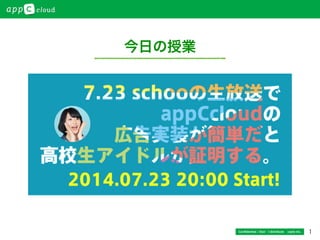
今日の授業
Confidential / Don’t distribute  cayto inc.
2
!
アプリ開発者の収益を最大限にするための!
バックエンドサービス!
とは、
Confidential / Don’t distribute  cayto inc.
3
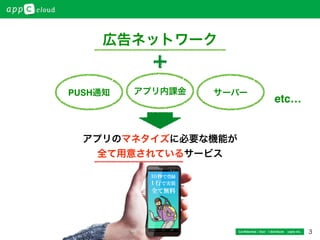
広告ネットワーク
アプリのマネタイズに必要な機能が!
全て用意されているサービス!
アプリ内課金PUSH通知 サーバー
etc…
Confidential / Don’t distribute  cayto inc.
4
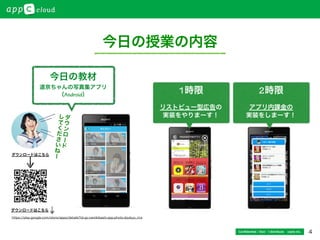
今日の授業の内容
1時限
リストビュー型広告の
実装をやりまーす!
2時限
アプリ内課金の
実装をしまーす!
Confidential / Don’t distribute  cayto inc.
今日の教材
道京ちゃんの写真集アプリ
(Android)
ダ
ウ
ン
ロ
ー
ド
し
て
く
だ
さ
い
ね
ー
https://play.google.com/store/apps/details?id=jp.namikibashi.app.photo.doukyo_rira
ダウンロードはこちら
ダウンロードはこちら
5
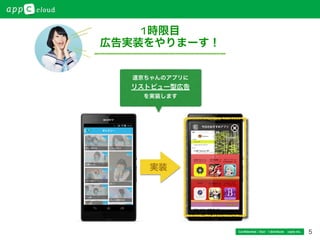
1時限目
広告実装をやりまーす!
Confidential / Don’t distribute  cayto inc.
道京ちゃんのアプリに
リストビュー型広告
を実装します
実装
6Confidential / Don’t distribute  cayto inc.
SDKのMainAc*vity.javaにCodeを記載していきます。
1.	
  初期化作業!
73行目へ下記Codeを追加する!
appCCloud	
  =	
  new	
  AppCCloud(this).on(API.PURCHASE).start();
2.	
  広告リストの追加!
271行目へ下記Codeを追加する!
appCCloud.Ad.callWebAc*vity();
1時限目
広告実装手順です
https://app-c.net/tutorial/android/sample/
https://app-c.net/tutorial/ios/sample/
1.サンプルSDKで試してみよう!
Android版
iOS版
https://app-c.net/
https://app-c.net/tutorial/android/listview/
https://app-c.net/tutorial/ios/listview/
Android版
iOS版
2.わからなくなったらチュートリアル
を見て試してね。
3.appC cloudへの登録を忘れないでね
あとで復習しよう!
できたー!
7
アプリ内課金
Confidential / Don’t distribute  cayto inc.
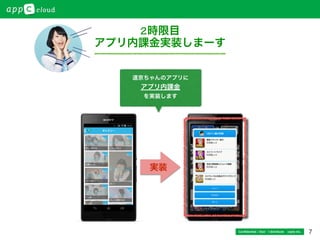
2時限目
アプリ内課金実装しまーす
道京ちゃんのアプリに
アプリ内課金
を実装します
実装
8
アプリ内課金を
実装してみよう!
Confidential / Don’t distribute  cayto inc.
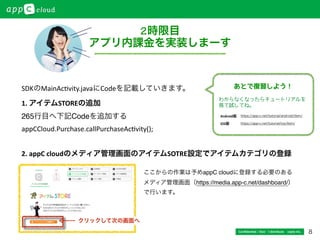
2時限目
アプリ内課金を実装しまーす
1.	
  アイテムSTOREの追加!
265行目へ下記Codeを追加する!
appCCloud.Purchase.callPurchaseAc*vity();	
  
2.	
  appC	
  cloudのメディア管理画面のアイテムSOTRE設定でアイテムカテゴリの登録
ここからの作業は予めappC cloudに登録する必要のある !
メディア管理画面(https://media.app-c.net/dashboard/)!
で行います。
SDKのMainAc*vity.javaにCodeを記載していきます。
クリックして次の画面へ
https://app-c.net/tutorial/android/item/
https://app-c.net/tutorial/ios/item/
Android版
iOS版
わからなくなったらチュートリアルを
見て試してね。
あとで復習しよう!
9Confidential / Don’t distribute  cayto inc.
2時限目
アプリ内課金を実装しまーす
3.	
  アイテムストア管理画面でカテゴリ登録	
  
カテゴリID	
  
カテゴリ名	
  
非消費型=カテゴリ	
  
カテゴリ画像をドラッグ&ドロップして「作成する」
4.	
  アイテムストア管理画面で販売アイテムの追加	
  
アイテムID	
  
カテゴリ名	
  
アイテム画像をドラッグ&ドロップして「販売アイテム
を追加する」
記入したらクリック!
画像登録・記入したらクリック!
できたー!
10Confidential / Don’t distribute  cayto inc.
お疲れさまでした
今日の授業はいかがでしたか?
!
もし、appC cloudに興味を持っていただけたら
         を覗いてみてください!
!
ここではご紹介しきれない
サービスが他にもたくさんありますよー。
https://app-c.net/
https://play.google.com/store/apps/details?id=jp.namikibashi.app.photo.doukyo_rira
私のアプリもよろしくお願いしまーす
11
カイト株式会社(cayto inc.)!
〒106-0047 東京都港区南麻布3-21-17 B City Tower Azabu Tokyo 7F !
Tel:03 5475 3385  設立:2008年4月1日!
業務内容:「giveApp」「appC cloud」の運営
@appC_official
https://www.facebook.com/appc.cloud
Confidential / Don’t distribute  cayto inc.

Appc schoo 0723 (1)

  • 1.
  • 2.
  • 3.
  • 4.
    4 今日の授業の内容 1時限 リストビュー型広告の 実装をやりまーす! 2時限 アプリ内課金の 実装をしまーす! Confidential / Don’tdistribute  cayto inc. 今日の教材 道京ちゃんの写真集アプリ (Android) ダ ウ ン ロ ー ド し て く だ さ い ね ー https://play.google.com/store/apps/details?id=jp.namikibashi.app.photo.doukyo_rira ダウンロードはこちら ダウンロードはこちら
  • 5.
    5 1時限目 広告実装をやりまーす! Confidential / Don’tdistribute  cayto inc. 道京ちゃんのアプリに リストビュー型広告 を実装します 実装
  • 6.
    6Confidential / Don’tdistribute  cayto inc. SDKのMainAc*vity.javaにCodeを記載していきます。 1.  初期化作業! 73行目へ下記Codeを追加する! appCCloud  =  new  AppCCloud(this).on(API.PURCHASE).start(); 2.  広告リストの追加! 271行目へ下記Codeを追加する! appCCloud.Ad.callWebAc*vity(); 1時限目 広告実装手順です https://app-c.net/tutorial/android/sample/ https://app-c.net/tutorial/ios/sample/ 1.サンプルSDKで試してみよう! Android版 iOS版 https://app-c.net/ https://app-c.net/tutorial/android/listview/ https://app-c.net/tutorial/ios/listview/ Android版 iOS版 2.わからなくなったらチュートリアル を見て試してね。 3.appC cloudへの登録を忘れないでね あとで復習しよう! できたー!
  • 7.
    7 アプリ内課金 Confidential / Don’tdistribute  cayto inc. 2時限目 アプリ内課金実装しまーす 道京ちゃんのアプリに アプリ内課金 を実装します 実装
  • 8.
    8 アプリ内課金を 実装してみよう! Confidential / Don’tdistribute  cayto inc. 2時限目 アプリ内課金を実装しまーす 1.  アイテムSTOREの追加! 265行目へ下記Codeを追加する! appCCloud.Purchase.callPurchaseAc*vity();   2.  appC  cloudのメディア管理画面のアイテムSOTRE設定でアイテムカテゴリの登録 ここからの作業は予めappC cloudに登録する必要のある ! メディア管理画面(https://media.app-c.net/dashboard/)! で行います。 SDKのMainAc*vity.javaにCodeを記載していきます。 クリックして次の画面へ https://app-c.net/tutorial/android/item/ https://app-c.net/tutorial/ios/item/ Android版 iOS版 わからなくなったらチュートリアルを 見て試してね。 あとで復習しよう!
  • 9.
    9Confidential / Don’tdistribute  cayto inc. 2時限目 アプリ内課金を実装しまーす 3.  アイテムストア管理画面でカテゴリ登録   カテゴリID   カテゴリ名   非消費型=カテゴリ   カテゴリ画像をドラッグ&ドロップして「作成する」 4.  アイテムストア管理画面で販売アイテムの追加   アイテムID   カテゴリ名   アイテム画像をドラッグ&ドロップして「販売アイテム を追加する」 記入したらクリック! 画像登録・記入したらクリック! できたー!
  • 10.
    10Confidential / Don’tdistribute  cayto inc. お疲れさまでした 今日の授業はいかがでしたか? ! もし、appC cloudに興味を持っていただけたら          を覗いてみてください! ! ここではご紹介しきれない サービスが他にもたくさんありますよー。 https://app-c.net/ https://play.google.com/store/apps/details?id=jp.namikibashi.app.photo.doukyo_rira 私のアプリもよろしくお願いしまーす
  • 11.
    11 カイト株式会社(cayto inc.)! 〒106-0047 東京都港区南麻布3-21-17B City Tower Azabu Tokyo 7F ! Tel:03 5475 3385  設立:2008年4月1日! 業務内容:「giveApp」「appC cloud」の運営 @appC_official https://www.facebook.com/appc.cloud Confidential / Don’t distribute  cayto inc.