Apache Maven
Volodymyr Ostapiv
Aug 2014
Agenda
▪ What is Maven, Project lifecycle
▪ Getting, installing, configuring Maven
▪ POM, GAV, Archetype
▪ pom.xml contents
– dependencies
– properties
– exclusions
– profiles
▪ Some useful plugins
What is Maven
▪Maven is a build automation tool used
primarily for Java projects.
▪ Maven addresses two aspects of building
software:
1. it describes how software is built
2. it describes its dependencies
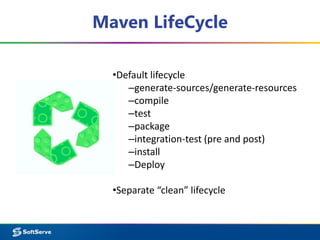
Maven LifeCycle
•Default lifecycle
–generate-sources/generate-resources
–compile
–test
–package
–integration-test (pre and post)
–install
–Deploy
•Separate “clean” lifecycle
History
– Maven 1 (2003)
– Maven 2 (2005)
▪ Not backwards Compatible
– Maven 3 (2010)
▪ Same as Maven 2 but more stable and with some
additional features
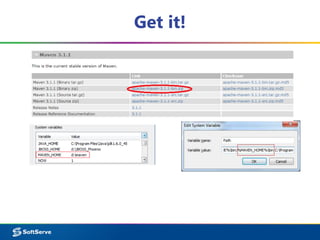
Get it!
Configure
Windows
Settings: %MAVEN_HOME%confsettings.xml
Repository Location: UserProfile.m2
Linux
Settings: /usr/local/maven/conf/settings.xml
Repository Location: ~/.m2/
Use your own temporary settings for maven:
mvn --settings=[PATH_TO_SETTINGS_FILE]
Adding a Local repository location:
mvn -Dmaven.repo.local=/path/to/local/repo
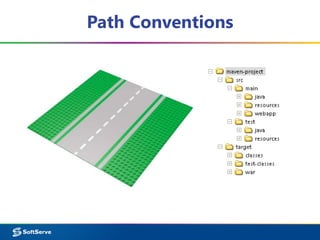
Path Conventions
Create simple project
mvn archetype:generate
-DgroupId=[myGroup]
-DartifactId=[myArtifact]
-DarchetypeArtifactId=maven-
archetype-archetype
OR
mvn archetype:generate
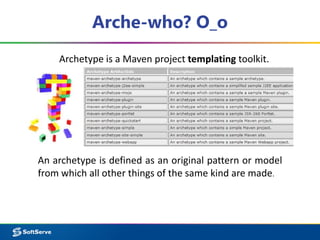
Arche-who? O_o
An archetype is defined as an original pattern or model
from which all other things of the same kind are made.
Archetype is a Maven project templating toolkit.
Maven + IDE
mvn idea:idea mvn eclipse:eclipse
Generate project files for the most popular IDEs
Maven Project Object Model (POM)
▪ Describes a project
– Name and Version
– Artifact Type
– Source Code Locations
– Dependencies
– Plugins
– Profiles (Alternate build config.)
▪ Uses XML by default
Project Name (GAV)
▪ Maven uniquely identifies a project using:
– groupID: project grouping identifier (no spaces
or colons)
▪ Usually loosely based on Java package
– artfiactId: name of project (no spaces or
colons)
– version: Version of project
▪ Format {Major}.{Minor}.{Maintanence}
▪ Add ‘-SNAPSHOT ‘ to identify in development
Project Name (GAV)
<?xml version="1.0" encoding="UTF-8"?>
<project>
<modelVersion>4.0.0</modelVersion>
<groupId>org.lds.training</groupId>
<artifactId>maven-training</artifactId>
<version>1.0</version>
<name>Windows 8</name>
<description>The best OS ever!</description>
<packaging>jar</packaging>
<properties>
<java.version>1.6</java.version>
<properties>
</project>
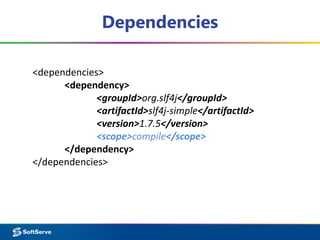
Dependencies
<dependencies>
<dependency>
<groupId>org.slf4j</groupId>
<artifactId>slf4j-simple</artifactId>
<version>1.7.5</version>
<scope>compile</scope>
</dependency>
</dependencies>
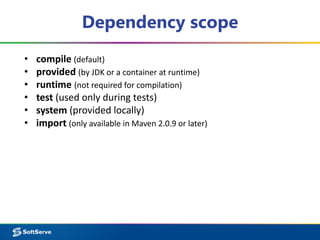
Dependency scope
• compile (default)
• provided (by JDK or a container at runtime)
• runtime (not required for compilation)
• test (used only during tests)
• system (provided locally)
• import (only available in Maven 2.0.9 or later)
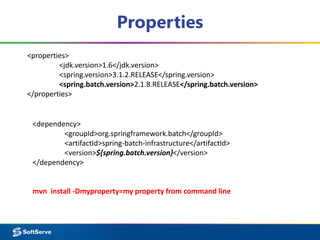
Properties
<properties>
<jdk.version>1.6</jdk.version>
<spring.version>3.1.2.RELEASE</spring.version>
<spring.batch.version>2.1.8.RELEASE</spring.batch.version>
</properties>
<dependency>
<groupId>org.springframework.batch</groupId>
<artifactId>spring-batch-infrastructure</artifactId>
<version>${spring.batch.version}</version>
</dependency>
mvn install -Dmyproperty=my property from command line
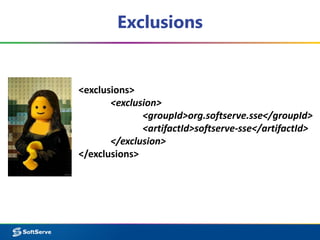
Exclusions
<exclusions>
<exclusion>
<groupId>org.softserve.sse</groupId>
<artifactId>softserve-sse</artifactId>
</exclusion>
</exclusions>
Profiles
<profile>
<id>default</id>
<activation>
<activeByDefault>true</activeByDefault>
</activation>
</profile>
(mvn install -Pprofilename)
Profile activation
Operating System based:
<activation>
<os>
<family>unix</family>
</os>
</activation>
<activation>
<os>
<name>Windows XP</name>
<family>Windows</family>
<arch>x86</arch>
<version>5.1.2600</version>
</os>
</activation>
JDK based:
<activation>
<jdk>1.4</jdk>
</activation>
<activation>
<jdk>[1.3,1.6)</jdk>
</activation>
Profile activation
System property based:
<activation>
<property>
<name>environment</name>
<value>test</value>
</property>
</activation>
File system state based:
<activation>
<file>
<missing>
target/maven/somefile
</missing>
</file>
</activation>
Plugins
Here real magic starts
maven-surefire-plugin
surefire:test
Surefire: configuration
<plugin>
<groupId>org.apache.maven.plugins</groupId>
<artifactId>maven-surefire-plugin</artifactId>
<version>2.16</version>
<configuration>
All stuff goes here
</configuration>
</plugin>
Surefire: execution
<skip>false</skip>
<includes>
<include>**/*Test.java</include>
</includes>
<excludes>
<exclude>**/TestToSkip.java</exclude>
</excludes>
<!-- parallel execution -->
<parallel>methods</parallel>
<threadCount>10</threadCount>
<useUnlimitedThreads>false</useUnlimitedThreads>
<forkCount>4</forkCount>
<reuseForks>true</reuseForks>
jetty-maven-plugin
mvn jetty:run
tomcat-maven-plugin
mvn tomcat:run
maven-antrun-plugin
mvn antrun:run
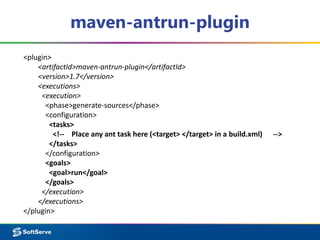
maven-antrun-plugin
<plugin>
<artifactId>maven-antrun-plugin</artifactId>
<version>1.7</version>
<executions>
<execution>
<phase>generate-sources</phase>
<configuration>
<tasks>
<!-- Place any ant task here (<target> </target> in a build.xml) -->
</tasks>
</configuration>
<goals>
<goal>run</goal>
</goals>
</execution>
</executions>
</plugin>
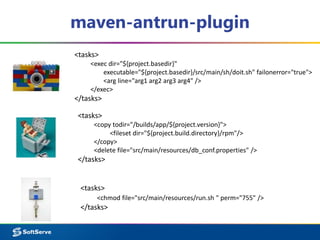
maven-antrun-plugin
<tasks>
<exec dir="${project.basedir}"
executable="${project.basedir}/src/main/sh/doit.sh" failonerror="true">
<arg line="arg1 arg2 arg3 arg4" />
</exec>
</tasks>
<tasks>
<copy todir="/builds/app/${project.version}">
<fileset dir="${project.build.directory}/rpm"/>
</copy>
<delete file="src/main/resources/db_conf.properties" />
</tasks>
<tasks>
<chmod file="src/main/resources/run.sh " perm="755" />
</tasks>
maven-compiler-plugin
mvn compiler:compile
mvn compiler:testCompile
maven-assembly-plugin
mvn assembly:single
maven-shade-plugin
mvn shade:shade
maven-dependency-plugin
mvn dependency:analyze
mvn dependency:tree
selenium-maven-plugin
selenium:start-server
selenium:stop-server
selenium:selenese
selenium:xvfb
That’s all

Apache Maven for AT/QC

Editor's Notes

  • #19 <dependency> <groupId>net.lightbody.bmp</groupId> <artifactId>browsermob-proxy</artifactId> <version>2.0-beta-8</version> <scope>test</scope> <exclusions> <exclusion> <groupId>org.softserve.sse</groupId> <artifactId>softserve-sse</artifactId> </exclusion> </exclusions> </dependency>
  • #20 <profiles> <profile> <id>default</id> <activation> <activeByDefault>true</activeByDefault> </activation> <build> <finalName>${name}</finalName> <plugins> <plugin>…</plugin> <plugins> </build> </profile> </profiles>