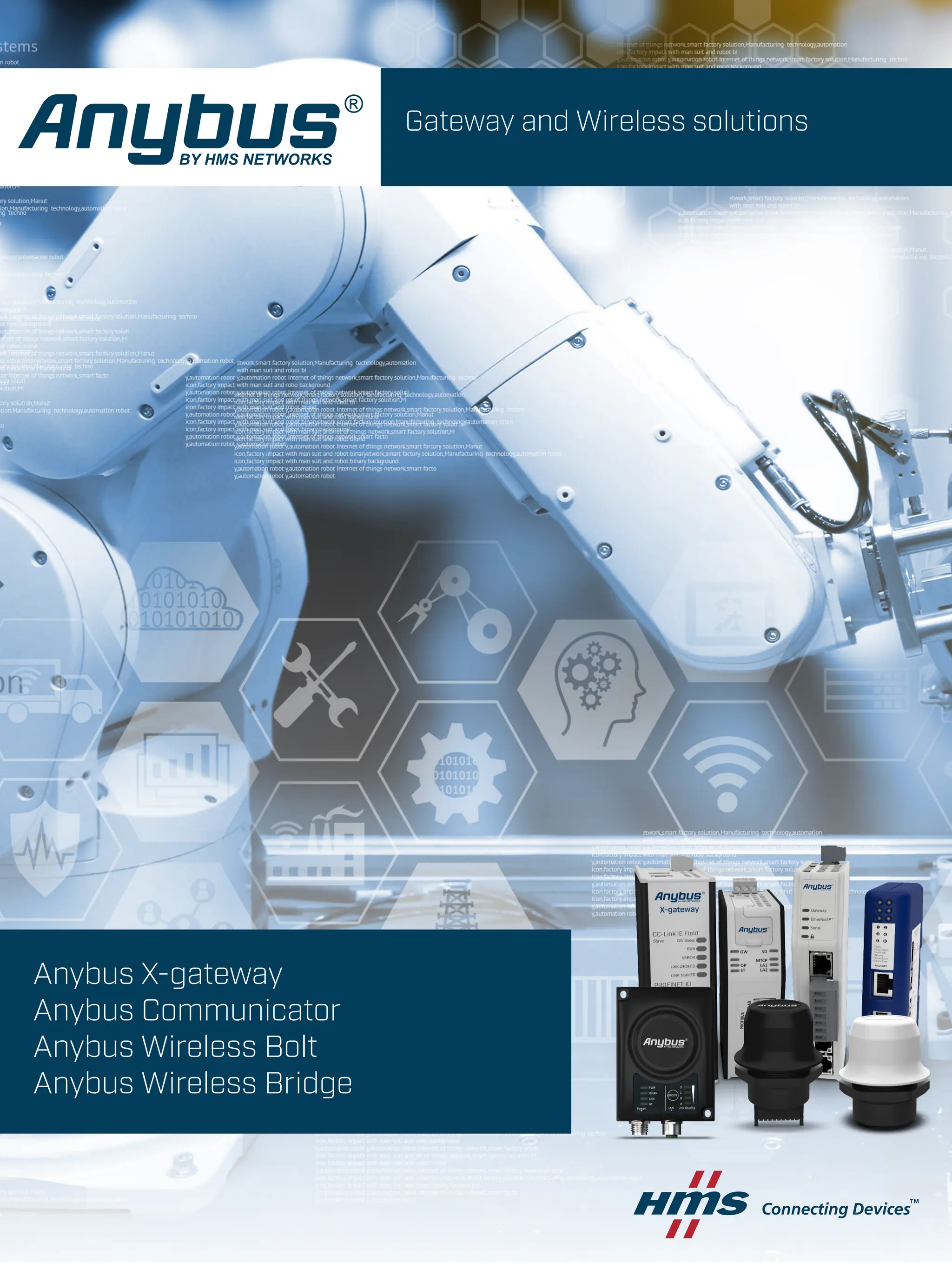
Gateway and Wireless solutions
Anybus X-gateway
Anybus Communicator
Anybus Wireless Bolt
Anybus Wireless Bridge
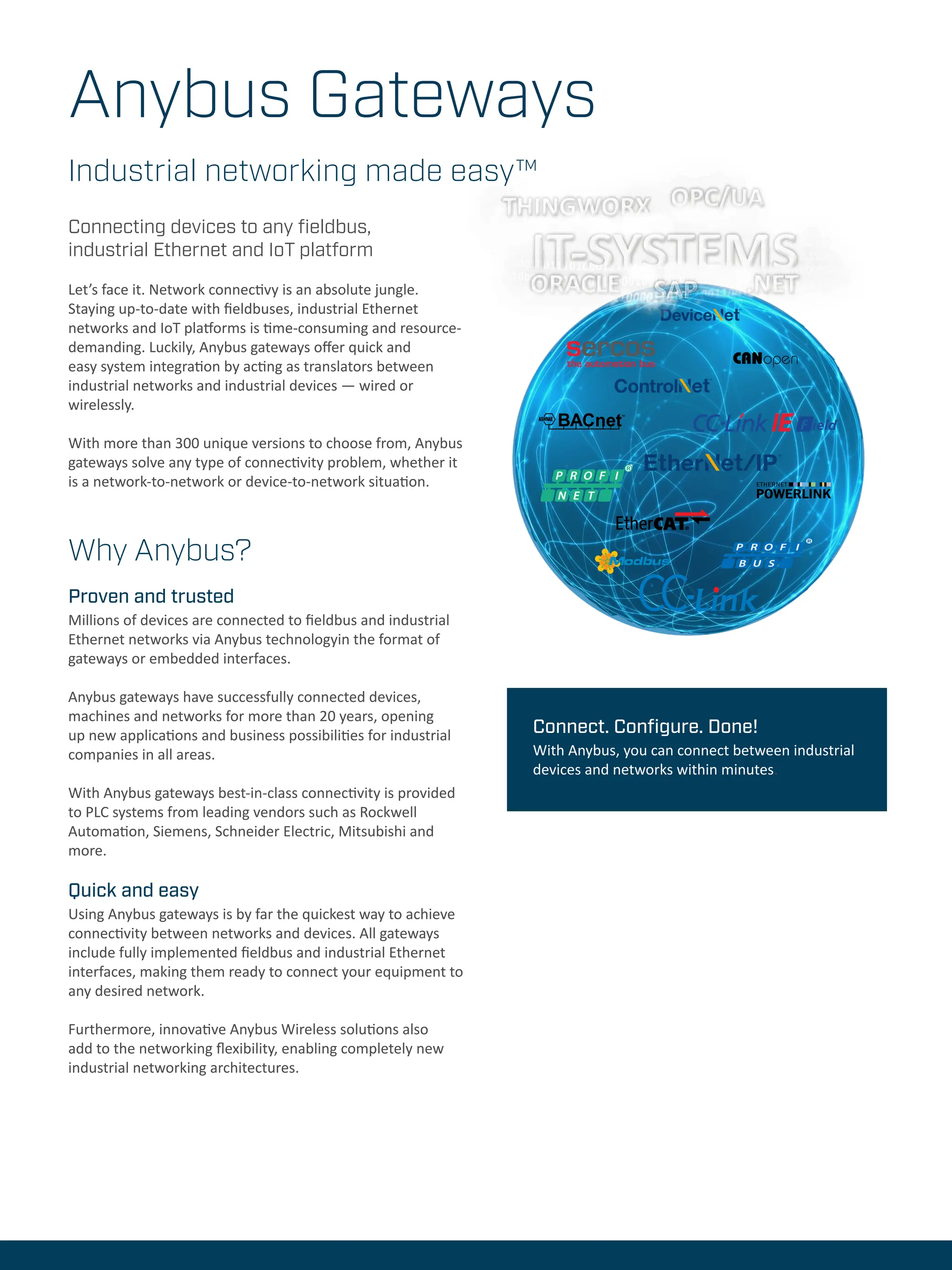
Anybus Gateways
Industrial networking made easy™
Why Anybus?
Proven and trusted
Millions of devices are connected to fieldbus and industrial
Ethernet networks via Anybus technologyin the format of
gateways or embedded interfaces.
Anybus gateways have successfully connected devices,
machines and networks for more than 20 years, opening
up new applications and business possibilities for industrial
companies in all areas.
With Anybus gateways best-in-class connectivity is provided
to PLC systems from leading vendors such as Rockwell
Automation, Siemens, Schneider Electric, Mitsubishi and
more.
Quick and easy
Using Anybus gateways is by far the quickest way to achieve
connectivity between networks and devices. All gateways
include fully implemented fieldbus and industrial Ethernet
interfaces, making them ready to connect your equipment to
any desired network.
Furthermore, innovative Anybus Wireless solutions also
add to the networking flexibility, enabling completely new
industrial networking architectures.
Connecting devices to any fieldbus,
industrial Ethernet and IoT platform
Let’s face it. Network connectivy is an absolute jungle.
Staying up-to-date with fieldbuses, industrial Ethernet
networks and IoT platforms is time-consuming and resource-
demanding. Luckily, Anybus gateways offer quick and
easy system integration by acting as translators between
industrial networks and industrial devices — wired or
wirelessly.
With more than 300 unique versions to choose from, Anybus
gateways solve any type of connectivity problem, whether it
is a network-to-network or device-to-network situation.
Connect. Configure. Done!
With Anybus, you can connect between industrial
devices and networks within minutes.
Wireless Technical Services
Let Anybus wireless experts help you in your project
The HMS Technical Services Team is here to help you make
the most out of your HMS products. We offer technical
assistance, training and consulting to help projects move
forward efficiently and successfully, from idea to fully
implemented and deployed solutions.
This saves time and money and increase quality of the
project.
Anybus Wireless Infrastructure
Solution Assistance
This service will help you to get a quick
start at understanding functionality and
configuration of the wireless and infra-
structure products. The service covers:
• Suggest products, based on the appli-
cation, useful functionality and how to
combine.
• Recommend wireless technology to
use.
• Recommend solutions for security and
redundancy.
• Recommendation of tools and docu-
mentation that will reduce configura-
tion time
• Guidance in configuration and instal-
lation
Time and location: Charged / hour via
Phone, Teams, Zoom or in Halmstad.
ORDERCODE: SA1250
Anybus Wireless & Infrastructure
Implementation Assistance
This service speeds up design and im-
plementation using Anybus products. It
includes:
• Assistance with configurations, based
on intended design and application.
• Application review and review of com-
munication logs.
• Guidance on best practice regarding
settings, timers etc.
• Guidance on wireless installation and
predictive site survey.
Time and location: Halmstad or at custom-
er. Charged / hour.
ORDERCODE: SA1251
Application Verification/Trou-
ble-shooting Assistance
This service gives important feedback of
the application design in order to verify the
hardware and software implementation.
Equipment from other vendors can be
brought or shipped to HMS. This can re-
duce development time and cost as well as
improve the solution to interface correctly
with different networks and PLC systems.
• Connect the complete solution as far
as possible. PLCs from major vendors
available to verify correct behaviours.
• Verify performance
• Give feedback on important things like
data-rates, timer setting.
Time and location: Halmstad. Charged
/ Day. Preferably at HMS in Halmstad as
there are several types PLCs available.
ORDERCODE: SA1252
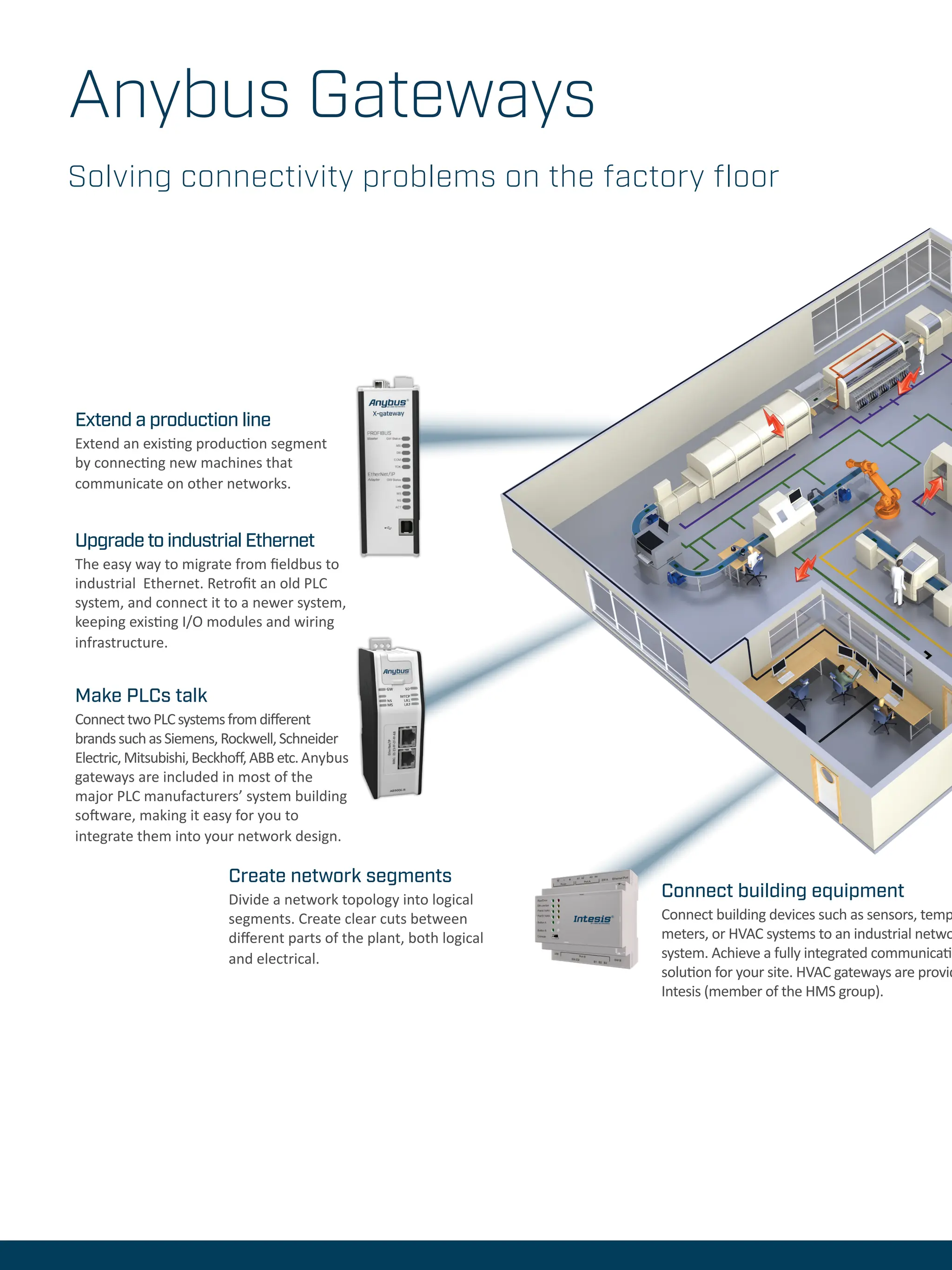
Solving connectivity problems on the factory floor
Extend a production line
Extend an existing production segment
by connecting new machines that
communicate on other networks.
Upgrade to industrial Ethernet
The easy way to migrate from fieldbus to
industrial Ethernet. Retrofit an old PLC
system, and connect it to a newer system,
keeping existing I/O modules and wiring
infrastructure.
Make PLCs talk
ConnecttwoPLCsystemsfromdifferent
brandssuchasSiemens,Rockwell,Schneider
Electric,Mitsubishi,Beckhoff,ABBetc.Anybus
gateways are included in most of the
major PLC manufacturers’ system building
software, making it easy for you to
integrate them into your network design.
Connect building equipment
Connect building devices such as sensors, temp
meters, or HVAC systems to an industrial netwo
system. Achieve a fully integrated communicatio
solution for your site. HVAC gateways are provid
Intesis (member of the HMS group).
Create network segments
Divide a network topology into logical
segments. Create clear cuts between
different parts of the plant, both logical
and electrical.
Anybus Gateways
perature
ork or IT
on
ded by
Connect any device to
networks
Connect serial or CAN-based devices
to fieldbus or industrial Ethernet
networks.
System integrators can retrofit
and connect existing machinery to
new networks and choose the best
automation device for your needs,
regardless of manufacturer.
Machine builders and device
manufacturers can make their
products compatible with any network
— the fastest and easiest way to
leverage new market opportunites.
6
Connect devices wirelessly
Create a robust wireless connection to an
industrial device, machine or system via
WLAN or Bluetooth. Ideal for communication
through hazardous areas or hard-to-reach
locations where cables are not desirable.
Connect to IoT platforms
Proven and secure solutions to integrate factory
floor data with IT technologies and protocols such as
OPC UA and MQTT and IoT systems
such as ThingWorx, Microsoft Azure, etc.
Bring your own device (BYOD)
Create innovative BYOD and IIoT solutions
by connecting machines wirelessly. Use your
laptop or smartphone as an alternative to an
HMI. A perfect solution for data aqcuisition
and monitoring.
Anybus Communicator
Connect - Configure - Done!
“No matter which gateway you choose, you configure
the network connection in the easy-to-use Graphical User
Interface from HMS, simply connect the Communicator,
create the configuration and you are done.”
Fredrik Brynolf
Product Manager OT Gateways, Anybus
Anybus Communicator
Anybus® Communicator™ is a family of protocol converters
that connect devices to all major industrial networks. The
Communicator is capable of converting almost any standard
or user specific and proprietary protocol. This means that
you do not have to worry about making any hardware
or software changes to your device. Simply connect a
Communicator and you will be able to connect to any
network.
Easy configuration
The device connection is configured using the easy to use
Anybus Configuration Manager software. Just connect,
configure, and you’re done.
Connect any device to a fieldbus or
industrial Ethernet network
Modbus RTU/ASCII/DF1/
CAN 2.0A/2.0B
Point to
point with
RS232
Up to 31
nodes with
RS422/485
and CAN
PLC
DeviceNet
Example: Single and multi-drop connectivity to DeviceNet
Communicator CAN
• Protocol converters with
flexible CAN frame building
• Connectivity to 11
networks
• For devices with CAN 2.0A
and 2.0B based protocols
Communicator Serial
RS232/422/485
• Protocol converters with
flexible serial frame building
• Connectivity to 13 networks
• Supports Modbus RTU/
DF1/ASCII or vendor-specific
protocols
• For Request/Response or
Produce/Consume protocols
Mounting DIN rail (35 x 7,5/15)
Dimensions 120 x 75 x 27 mm
Protection class IP20
Configuration Windows-based configuration manager
Material Plastic
Versions Communicator Serial:
CANopen
CC-Link
CC-Link IE Field
ControlNet
DeviceNet
EtherCAT
EtherNet/IP
FIPIO
Interbus
Modbus Plus
Modbus RTU
Modbus TCP
PROFIBUS
PROFINET IO
PROFINET IRT
Communicator CAN:
CANopen
CC-Link
ControlNet
DeviceNet
EtherCAT
EtherNet/IP
Modbus RTU
Modbus-TCP
PROFIBUS
PROFINET-IO 1-port
PROFINET-IRT 2-port
Anybus Communicator
Mounting DIN rail (35 * 7,5/15)
Dimensions 98 x 27 x 144 mm
3.85 x 1.06 x 5,67 in
Protection class IP20
Configuration Web based configuration
Material PC ABS, UL 94 VO
Versions Modbus TCP, EtherNet/IP, Profinet - Profi-
bus available in Q3-21
Connect any device to an industrial Ethernet network
or Profibus
The new generation
Anybus® Communicators provide an even better and easier
way to connect your device to the major industrial Ethernet
networks as well as Profibus. These products will co-exist
with the Communicator Classic offer in order to give access
to the latest Greenfield installations, as well as existing
Brownfield systems.
Easy configuration
The set-up and configuration of the Communicator is easily
done by using the Graphical user interface provided by HMS.
Simply connect the Communicator, create the configuration
and you are done!
…
Anybus X-gateway
Anybus® X-gateways™ help you to easily connect any two
networks, enabling a consistent information flow throughout
the entire plant. A fast transfer of cyclic I/O data is enabled
between the two networks, offloading the PLC from working
with additional complex calculations.
The X-gateways are tested and proven with equipment from
all leading manufacturers of PLCs such as Siemens, Allen
Bradley, Schneider Electric, Mitsubishi, ABB, Omron, Hitachi,
Beckhoff, Phoenix Contact, Bosch Rexroth and more.
Easy configuration
The connection between the two networks is quickly configured
using the Anybus Configuration Manager software, which
means that no programming is required. Just connect, configure,
and you’re done.
Anybus X-gateway
• Gateways for conversion between any two networks
• Over 250 versions covering most network combinations
• Easy configuration via the Anybus Configuration Manager
• Master/slave or slave/slave versions available
Connect any two industrial networks
— fieldbus or industrial Ethernet
Mounting DIN rail (35 x 7,5/15)
Dimensions 114 x 44 x 127 mm
Protection class IP20
Configuration Windows-based configuration manager
Material Aluminium and plastic
Master versions AS-Interface
DeviceNet
EtherNet/IP
PROFIBUS
Modbus-TCP
CANopen
Slave versions CANopen
CC-Link
CC-Link IE Field
ControlNet
DeviceNet
EtherCAT
EtherNet/IP
FIPIO
Interbus RS485 + Fiber Optic
J1939
LonWorks
Modbus Plus
Modbus RTU
Modbus-TCP
PROFIBUS
PROFINET IO
PROFINET IRT Copper + Fiber Optic
Modbus RTU to
TCP
Allows Modbus
RTU devices to
communicate on
a Modbus TCP
network.
Modbus to KNX or
BACnet
Allows building
devices such as
sensors, temperature
meters, or HVAC
systems to
communicate on a
Modbus network.
EtherNet/IP Linking Devices
Connect any PROFIBUS, Modbus-TCP or
serial device/network to ControlLogix™
and CompactLogix™ PLCs from
Rockwell Automation. The Linking
Devices are stand-alone gateways
offering seamless integration to
Studio5000 via EtherNet/IP.
Modbus-TCP
Specialized
X-gateway for
Modbus-TCP
connectivity.
Acts as Modbus-
TCP master/
client to 10 other
networks.
CANopen
Specialized
X-gateway
for CANopen
connectivity.
Acts as CANopen
master/client
to 10 other
networks.
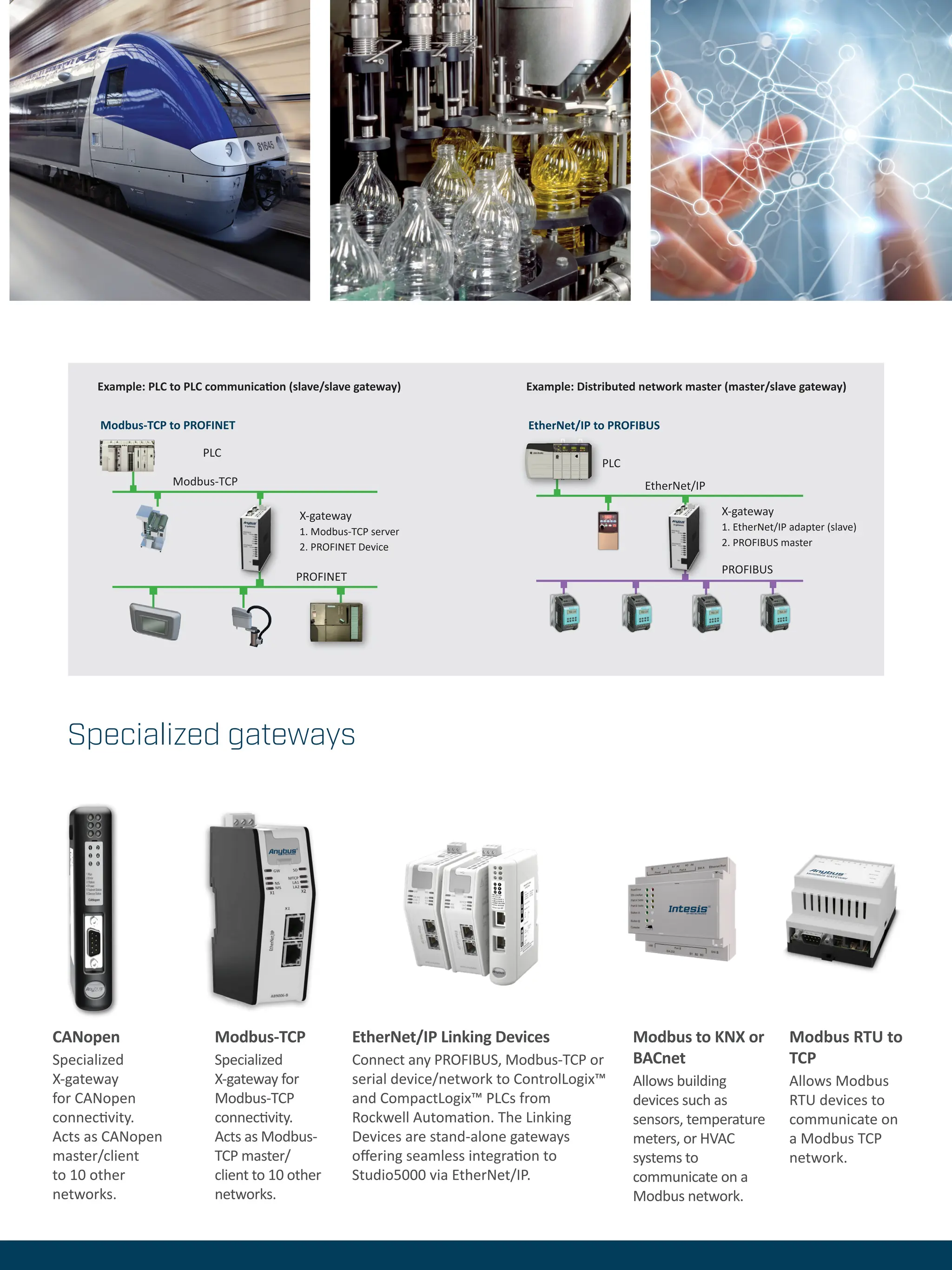
PLC
Modbus-TCP
X-gateway
1. Modbus-TCP server
2. PROFINET Device
PROFINET
EtherNet/IP to PROFIBUS
PLC
PROFIBUS
X-gateway
1. EtherNet/IP adapter (slave)
2. PROFIBUS master
EtherNet/IP
Modbus-TCP to PROFINET
Example: Distributed network master (master/slave gateway)
Example: PLC to PLC communication (slave/slave gateway)
Specialized gateways
Bridge and Bolt work
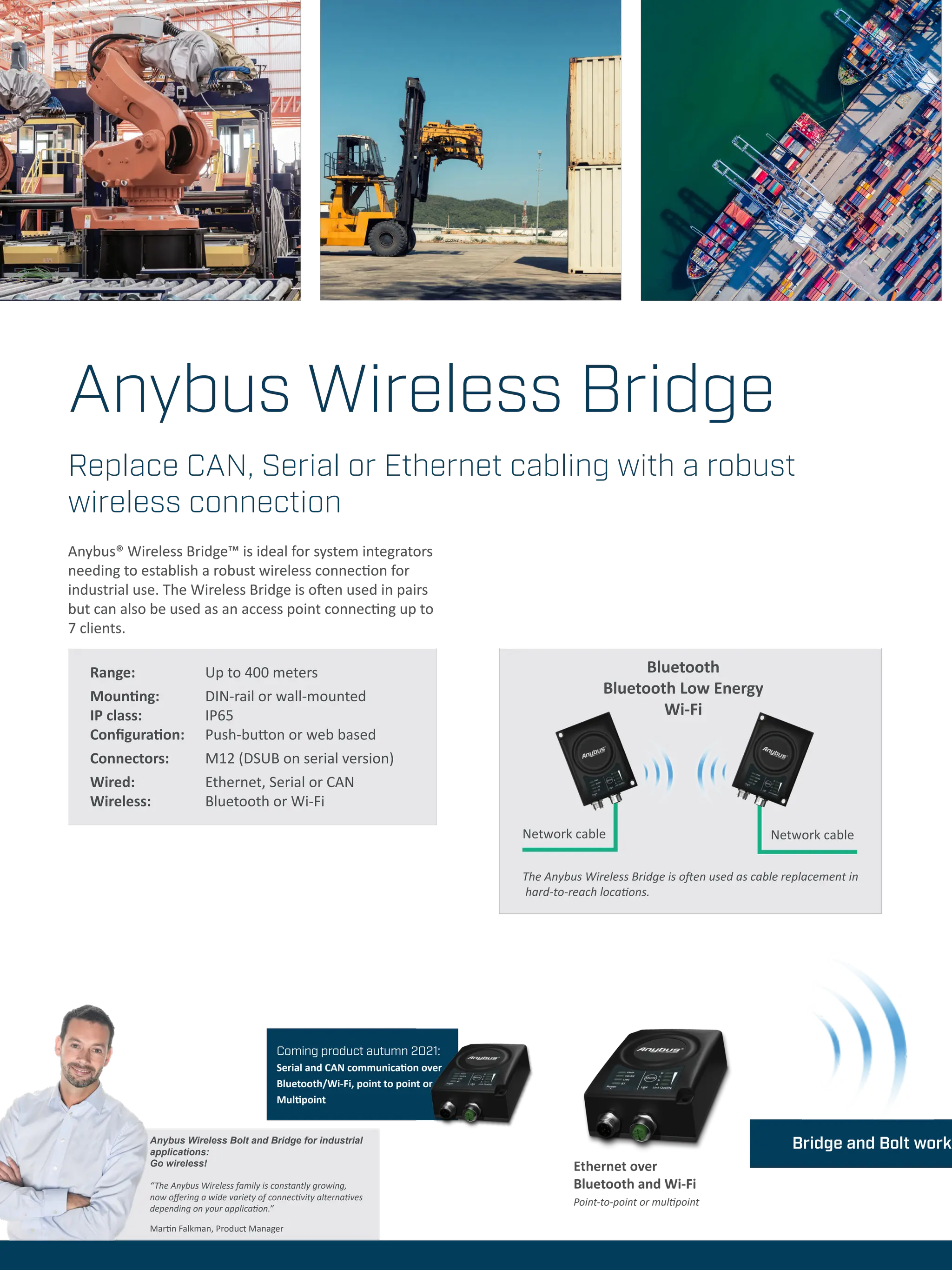
Range: 		 Up to 400 meters
Mounting: DIN-rail or wall-mounted
IP class: 		 IP65
Configuration: Push-button or web based
Connectors: M12 (DSUB on serial version)
Wired: Ethernet, Serial or CAN
Wireless: Bluetooth or Wi-Fi
Anybus Wireless Bridge
Anybus® Wireless Bridge™ is ideal for system integrators
needing to establish a robust wireless connection for
industrial use. The Wireless Bridge is often used in pairs
but can also be used as an access point connecting up to
7 clients.
The Anybus Wireless Bridge is often used as cable replacement in
hard-to-reach locations.
Network cable Network cable
Bluetooth
Bluetooth Low Energy
Wi-Fi
Replace CAN, Serial or Ethernet cabling with a robust
wireless connection
Ethernet over
Bluetooth and Wi-Fi
Point-to-point or multipoint
Coming product autumn 2021:
Serial and CAN communication over
Bluetooth/Wi-Fi, point to point or
Multipoint
Anybus Wireless Bolt and Bridge for industrial
applications:
Go wireless!
“The Anybus Wireless family is constantly growing,
now offering a wide variety of connectivity alternatives
depending on your application.”
Martin Falkman, Product Manager
together seamlessly
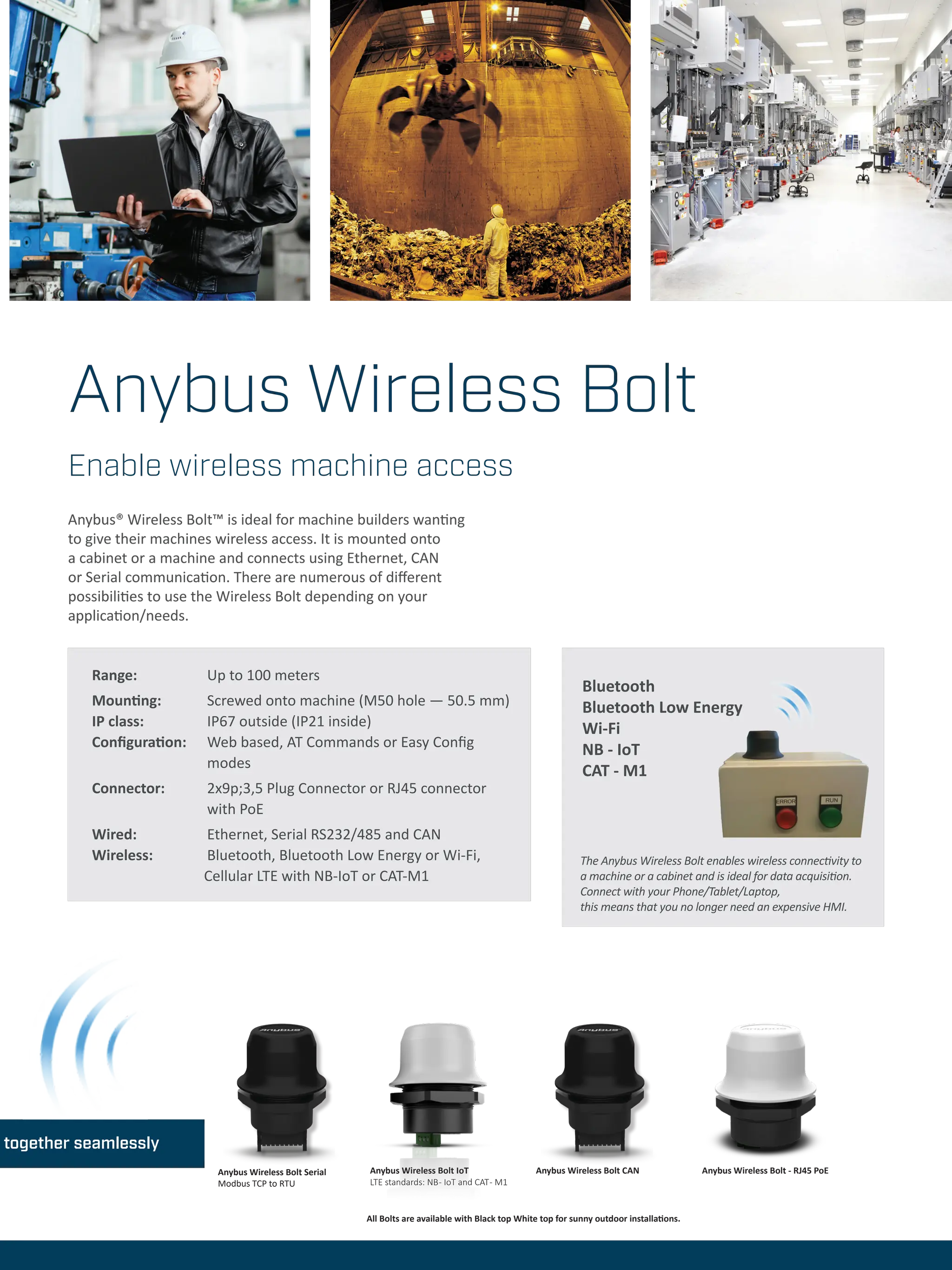
Anybus® Wireless Bolt™ is ideal for machine builders wanting
to give their machines wireless access. It is mounted onto
a cabinet or a machine and connects using Ethernet, CAN
or Serial communication. There are numerous of different
possibilities to use the Wireless Bolt depending on your
application/needs.
Enable wireless machine access
The Anybus Wireless Bolt enables wireless connectivity to
a machine or a cabinet and is ideal for data acquisition.
Connect with your Phone/Tablet/Laptop,
this means that you no longer need an expensive HMI.
Range: 		 Up to 100 meters
Mounting: Screwed onto machine (M50 hole — 50.5 mm)
IP class: 		 IP67 outside (IP21 inside)
Configuration: Web based, AT Commands or Easy Config 		
		 modes
Connector: 2x9p;3,5 Plug Connector or RJ45 connector 		
		with PoE
Wired: Ethernet, Serial RS232/485 and CAN
Wireless: Bluetooth, Bluetooth Low Energy or Wi-Fi,
Cellular LTE with NB-IoT or CAT-M1
Bluetooth
Bluetooth Low Energy
Wi-Fi
NB - IoT
CAT - M1
Anybus Wireless Bolt
Anybus Wireless Bolt Serial
Modbus TCP to RTU
Anybus Wireless Bolt CAN
Anybus Wireless Bolt IoT
LTE standards: NB- IoT and CAT- M1
Anybus Wireless Bolt - RJ45 PoE
All Bolts are available with Black top White top for sunny outdoor installations.
Anybus®
is a registered trademark of HMS Industrial Networks AB, Sweden, USA, Germany and other countries. Other marks and words belong to their respective companies. All other
product or service names mentioned in this document are trademarks of their respective companies.
Part No: MMA100 Version 10 06/2021 - © HMS Industrial Networks - All rights reserved - HMS reserves the right to make modifications without prior notice.
www.anybus.com
Work with HMS.
The number one choice for
Industrial ICT - Information and
Communication Technology.
HMS is represented all over the world.
Find your nearest contact here:
www.hms-networks.com/contact
HMS Networks - Contact

anybus-gateways-wireless-concept.pdf

  • 1.
    Gateway and Wirelesssolutions Anybus X-gateway Anybus Communicator Anybus Wireless Bolt Anybus Wireless Bridge
  • 2.
    Anybus Gateways Industrial networkingmade easy™ Why Anybus? Proven and trusted Millions of devices are connected to fieldbus and industrial Ethernet networks via Anybus technologyin the format of gateways or embedded interfaces. Anybus gateways have successfully connected devices, machines and networks for more than 20 years, opening up new applications and business possibilities for industrial companies in all areas. With Anybus gateways best-in-class connectivity is provided to PLC systems from leading vendors such as Rockwell Automation, Siemens, Schneider Electric, Mitsubishi and more. Quick and easy Using Anybus gateways is by far the quickest way to achieve connectivity between networks and devices. All gateways include fully implemented fieldbus and industrial Ethernet interfaces, making them ready to connect your equipment to any desired network. Furthermore, innovative Anybus Wireless solutions also add to the networking flexibility, enabling completely new industrial networking architectures. Connecting devices to any fieldbus, industrial Ethernet and IoT platform Let’s face it. Network connectivy is an absolute jungle. Staying up-to-date with fieldbuses, industrial Ethernet networks and IoT platforms is time-consuming and resource- demanding. Luckily, Anybus gateways offer quick and easy system integration by acting as translators between industrial networks and industrial devices — wired or wirelessly. With more than 300 unique versions to choose from, Anybus gateways solve any type of connectivity problem, whether it is a network-to-network or device-to-network situation. Connect. Configure. Done! With Anybus, you can connect between industrial devices and networks within minutes.
  • 3.
    Wireless Technical Services LetAnybus wireless experts help you in your project The HMS Technical Services Team is here to help you make the most out of your HMS products. We offer technical assistance, training and consulting to help projects move forward efficiently and successfully, from idea to fully implemented and deployed solutions. This saves time and money and increase quality of the project. Anybus Wireless Infrastructure Solution Assistance This service will help you to get a quick start at understanding functionality and configuration of the wireless and infra- structure products. The service covers: • Suggest products, based on the appli- cation, useful functionality and how to combine. • Recommend wireless technology to use. • Recommend solutions for security and redundancy. • Recommendation of tools and docu- mentation that will reduce configura- tion time • Guidance in configuration and instal- lation Time and location: Charged / hour via Phone, Teams, Zoom or in Halmstad. ORDERCODE: SA1250 Anybus Wireless & Infrastructure Implementation Assistance This service speeds up design and im- plementation using Anybus products. It includes: • Assistance with configurations, based on intended design and application. • Application review and review of com- munication logs. • Guidance on best practice regarding settings, timers etc. • Guidance on wireless installation and predictive site survey. Time and location: Halmstad or at custom- er. Charged / hour. ORDERCODE: SA1251 Application Verification/Trou- ble-shooting Assistance This service gives important feedback of the application design in order to verify the hardware and software implementation. Equipment from other vendors can be brought or shipped to HMS. This can re- duce development time and cost as well as improve the solution to interface correctly with different networks and PLC systems. • Connect the complete solution as far as possible. PLCs from major vendors available to verify correct behaviours. • Verify performance • Give feedback on important things like data-rates, timer setting. Time and location: Halmstad. Charged / Day. Preferably at HMS in Halmstad as there are several types PLCs available. ORDERCODE: SA1252
  • 4.
    Solving connectivity problemson the factory floor Extend a production line Extend an existing production segment by connecting new machines that communicate on other networks. Upgrade to industrial Ethernet The easy way to migrate from fieldbus to industrial Ethernet. Retrofit an old PLC system, and connect it to a newer system, keeping existing I/O modules and wiring infrastructure. Make PLCs talk ConnecttwoPLCsystemsfromdifferent brandssuchasSiemens,Rockwell,Schneider Electric,Mitsubishi,Beckhoff,ABBetc.Anybus gateways are included in most of the major PLC manufacturers’ system building software, making it easy for you to integrate them into your network design. Connect building equipment Connect building devices such as sensors, temp meters, or HVAC systems to an industrial netwo system. Achieve a fully integrated communicatio solution for your site. HVAC gateways are provid Intesis (member of the HMS group). Create network segments Divide a network topology into logical segments. Create clear cuts between different parts of the plant, both logical and electrical. Anybus Gateways
  • 5.
    perature ork or IT on dedby Connect any device to networks Connect serial or CAN-based devices to fieldbus or industrial Ethernet networks. System integrators can retrofit and connect existing machinery to new networks and choose the best automation device for your needs, regardless of manufacturer. Machine builders and device manufacturers can make their products compatible with any network — the fastest and easiest way to leverage new market opportunites. 6 Connect devices wirelessly Create a robust wireless connection to an industrial device, machine or system via WLAN or Bluetooth. Ideal for communication through hazardous areas or hard-to-reach locations where cables are not desirable. Connect to IoT platforms Proven and secure solutions to integrate factory floor data with IT technologies and protocols such as OPC UA and MQTT and IoT systems such as ThingWorx, Microsoft Azure, etc. Bring your own device (BYOD) Create innovative BYOD and IIoT solutions by connecting machines wirelessly. Use your laptop or smartphone as an alternative to an HMI. A perfect solution for data aqcuisition and monitoring. Anybus Communicator Connect - Configure - Done! “No matter which gateway you choose, you configure the network connection in the easy-to-use Graphical User Interface from HMS, simply connect the Communicator, create the configuration and you are done.” Fredrik Brynolf Product Manager OT Gateways, Anybus
  • 6.
    Anybus Communicator Anybus® Communicator™is a family of protocol converters that connect devices to all major industrial networks. The Communicator is capable of converting almost any standard or user specific and proprietary protocol. This means that you do not have to worry about making any hardware or software changes to your device. Simply connect a Communicator and you will be able to connect to any network. Easy configuration The device connection is configured using the easy to use Anybus Configuration Manager software. Just connect, configure, and you’re done. Connect any device to a fieldbus or industrial Ethernet network Modbus RTU/ASCII/DF1/ CAN 2.0A/2.0B Point to point with RS232 Up to 31 nodes with RS422/485 and CAN PLC DeviceNet Example: Single and multi-drop connectivity to DeviceNet Communicator CAN • Protocol converters with flexible CAN frame building • Connectivity to 11 networks • For devices with CAN 2.0A and 2.0B based protocols Communicator Serial RS232/422/485 • Protocol converters with flexible serial frame building • Connectivity to 13 networks • Supports Modbus RTU/ DF1/ASCII or vendor-specific protocols • For Request/Response or Produce/Consume protocols Mounting DIN rail (35 x 7,5/15) Dimensions 120 x 75 x 27 mm Protection class IP20 Configuration Windows-based configuration manager Material Plastic Versions Communicator Serial: CANopen CC-Link CC-Link IE Field ControlNet DeviceNet EtherCAT EtherNet/IP FIPIO Interbus Modbus Plus Modbus RTU Modbus TCP PROFIBUS PROFINET IO PROFINET IRT Communicator CAN: CANopen CC-Link ControlNet DeviceNet EtherCAT EtherNet/IP Modbus RTU Modbus-TCP PROFIBUS PROFINET-IO 1-port PROFINET-IRT 2-port
  • 7.
    Anybus Communicator Mounting DINrail (35 * 7,5/15) Dimensions 98 x 27 x 144 mm 3.85 x 1.06 x 5,67 in Protection class IP20 Configuration Web based configuration Material PC ABS, UL 94 VO Versions Modbus TCP, EtherNet/IP, Profinet - Profi- bus available in Q3-21 Connect any device to an industrial Ethernet network or Profibus The new generation Anybus® Communicators provide an even better and easier way to connect your device to the major industrial Ethernet networks as well as Profibus. These products will co-exist with the Communicator Classic offer in order to give access to the latest Greenfield installations, as well as existing Brownfield systems. Easy configuration The set-up and configuration of the Communicator is easily done by using the Graphical user interface provided by HMS. Simply connect the Communicator, create the configuration and you are done! …
  • 8.
    Anybus X-gateway Anybus® X-gateways™help you to easily connect any two networks, enabling a consistent information flow throughout the entire plant. A fast transfer of cyclic I/O data is enabled between the two networks, offloading the PLC from working with additional complex calculations. The X-gateways are tested and proven with equipment from all leading manufacturers of PLCs such as Siemens, Allen Bradley, Schneider Electric, Mitsubishi, ABB, Omron, Hitachi, Beckhoff, Phoenix Contact, Bosch Rexroth and more. Easy configuration The connection between the two networks is quickly configured using the Anybus Configuration Manager software, which means that no programming is required. Just connect, configure, and you’re done. Anybus X-gateway • Gateways for conversion between any two networks • Over 250 versions covering most network combinations • Easy configuration via the Anybus Configuration Manager • Master/slave or slave/slave versions available Connect any two industrial networks — fieldbus or industrial Ethernet Mounting DIN rail (35 x 7,5/15) Dimensions 114 x 44 x 127 mm Protection class IP20 Configuration Windows-based configuration manager Material Aluminium and plastic Master versions AS-Interface DeviceNet EtherNet/IP PROFIBUS Modbus-TCP CANopen Slave versions CANopen CC-Link CC-Link IE Field ControlNet DeviceNet EtherCAT EtherNet/IP FIPIO Interbus RS485 + Fiber Optic J1939 LonWorks Modbus Plus Modbus RTU Modbus-TCP PROFIBUS PROFINET IO PROFINET IRT Copper + Fiber Optic
  • 9.
    Modbus RTU to TCP AllowsModbus RTU devices to communicate on a Modbus TCP network. Modbus to KNX or BACnet Allows building devices such as sensors, temperature meters, or HVAC systems to communicate on a Modbus network. EtherNet/IP Linking Devices Connect any PROFIBUS, Modbus-TCP or serial device/network to ControlLogix™ and CompactLogix™ PLCs from Rockwell Automation. The Linking Devices are stand-alone gateways offering seamless integration to Studio5000 via EtherNet/IP. Modbus-TCP Specialized X-gateway for Modbus-TCP connectivity. Acts as Modbus- TCP master/ client to 10 other networks. CANopen Specialized X-gateway for CANopen connectivity. Acts as CANopen master/client to 10 other networks. PLC Modbus-TCP X-gateway 1. Modbus-TCP server 2. PROFINET Device PROFINET EtherNet/IP to PROFIBUS PLC PROFIBUS X-gateway 1. EtherNet/IP adapter (slave) 2. PROFIBUS master EtherNet/IP Modbus-TCP to PROFINET Example: Distributed network master (master/slave gateway) Example: PLC to PLC communication (slave/slave gateway) Specialized gateways
  • 10.
    Bridge and Boltwork Range: Up to 400 meters Mounting: DIN-rail or wall-mounted IP class: IP65 Configuration: Push-button or web based Connectors: M12 (DSUB on serial version) Wired: Ethernet, Serial or CAN Wireless: Bluetooth or Wi-Fi Anybus Wireless Bridge Anybus® Wireless Bridge™ is ideal for system integrators needing to establish a robust wireless connection for industrial use. The Wireless Bridge is often used in pairs but can also be used as an access point connecting up to 7 clients. The Anybus Wireless Bridge is often used as cable replacement in hard-to-reach locations. Network cable Network cable Bluetooth Bluetooth Low Energy Wi-Fi Replace CAN, Serial or Ethernet cabling with a robust wireless connection Ethernet over Bluetooth and Wi-Fi Point-to-point or multipoint Coming product autumn 2021: Serial and CAN communication over Bluetooth/Wi-Fi, point to point or Multipoint Anybus Wireless Bolt and Bridge for industrial applications: Go wireless! “The Anybus Wireless family is constantly growing, now offering a wide variety of connectivity alternatives depending on your application.” Martin Falkman, Product Manager
  • 11.
    together seamlessly Anybus® WirelessBolt™ is ideal for machine builders wanting to give their machines wireless access. It is mounted onto a cabinet or a machine and connects using Ethernet, CAN or Serial communication. There are numerous of different possibilities to use the Wireless Bolt depending on your application/needs. Enable wireless machine access The Anybus Wireless Bolt enables wireless connectivity to a machine or a cabinet and is ideal for data acquisition. Connect with your Phone/Tablet/Laptop, this means that you no longer need an expensive HMI. Range: Up to 100 meters Mounting: Screwed onto machine (M50 hole — 50.5 mm) IP class: IP67 outside (IP21 inside) Configuration: Web based, AT Commands or Easy Config modes Connector: 2x9p;3,5 Plug Connector or RJ45 connector with PoE Wired: Ethernet, Serial RS232/485 and CAN Wireless: Bluetooth, Bluetooth Low Energy or Wi-Fi, Cellular LTE with NB-IoT or CAT-M1 Bluetooth Bluetooth Low Energy Wi-Fi NB - IoT CAT - M1 Anybus Wireless Bolt Anybus Wireless Bolt Serial Modbus TCP to RTU Anybus Wireless Bolt CAN Anybus Wireless Bolt IoT LTE standards: NB- IoT and CAT- M1 Anybus Wireless Bolt - RJ45 PoE All Bolts are available with Black top White top for sunny outdoor installations.
  • 12.
    Anybus® is a registeredtrademark of HMS Industrial Networks AB, Sweden, USA, Germany and other countries. Other marks and words belong to their respective companies. All other product or service names mentioned in this document are trademarks of their respective companies. Part No: MMA100 Version 10 06/2021 - © HMS Industrial Networks - All rights reserved - HMS reserves the right to make modifications without prior notice. www.anybus.com Work with HMS. The number one choice for Industrial ICT - Information and Communication Technology. HMS is represented all over the world. Find your nearest contact here: www.hms-networks.com/contact HMS Networks - Contact