Presented By,
Ms.Daliya John
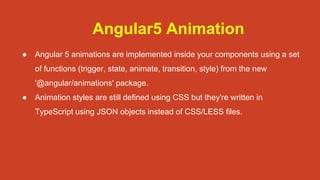
Angular5 Animation
● Angular 5 animations are implemented inside your components using a set
of functions (trigger, state, animate, transition, style) from the new
'@angular/animations' package.
● Animation styles are still defined using CSS but they're written in
TypeScript using JSON objects instead of CSS/LESS files.
Steps For Creating Animation
1. Install angular cli
2. npm install --save @angular/animations
3. Configure BrowserAnimationsModule in application module.
import { BrowserAnimationsModule } from '@angular/platform-browser/animations';
@NgModule({
imports: [BrowserAnimationsModule]
})
export class AppModule { }
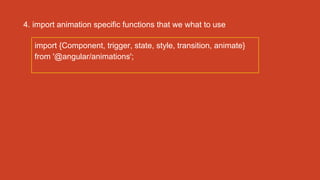
4. import animation specific functions that we what to use
import {Component, trigger, state, style, transition, animate}
from '@angular/animations';
Animation Triggers
● The trigger animation function is the starting point .
● The first argument accepts the name of the animation, and the second
argument accepts all of the other animation functions that we imported.
animations: [
trigger('myAwesomeAnimation', [
]),
]
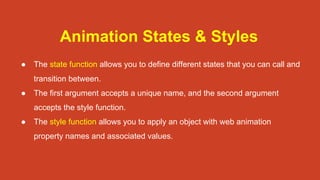
Animation States & Styles
● The state function allows you to define different states that you can call and
transition between.
● The first argument accepts a unique name, and the second argument
accepts the style function.
● The style function allows you to apply an object with web animation
property names and associated values.
animations: [
trigger('myAwesomeAnimation', [
state('small', style({
transform: 'scale(1)',
})),
state('large', style({
transform: 'scale(1.2)',
})),
]),
]
Animation Transitions
● The transition function is what makes the actual animation occur.
● The first argument accepts the direction between 2 different states, and the
second argument accepts the animate function.
● The animate function allows you to define the length, delay, and easing of a
transition.
animations: [
trigger('myAwesomeAnimation', [
state('small', style({
transform: 'scale(1)',
})),
state('large', style({
transform: 'scale(1.2)',
})),
transition('small => large', animate('100ms ease-in')),
]),
]
Attaching the Animation in the
Template
● To attach an animation to an HTML element, you wrap brackets around
the trigger name, preceded by an @.
<p [@myAwesomeAnimation]='state' >I will animate</p>
Adding Keyframe Animations
● The second argument of the animate function also accepts the
keyframes function. This allows you to create elaborate,
sequence-based animations.
● The keyframes function accepts an array of style functions, which
includes animation properties and an offset.
● The offset designates the point at which the next style function begins
during the animation. 0 is the beginning and 1 is the end.
transition('small <=> large', animate('300ms ease-in', keyframes([
style({opacity: 0, transform: 'translateY(-75%)', offset: 0}),
style({opacity: 1, transform: 'translateY(35px)', offset: 0.5}),
style({opacity: 1, transform: 'translateY(0)', offset: 1.0})
]))),
Conclusion
Following angular animation in angular project is a good practice.
Thank You

Neoito — Animations in Angular 5

  • 1.
  • 2.
    Angular5 Animation ● Angular5 animations are implemented inside your components using a set of functions (trigger, state, animate, transition, style) from the new '@angular/animations' package. ● Animation styles are still defined using CSS but they're written in TypeScript using JSON objects instead of CSS/LESS files.
  • 3.
    Steps For CreatingAnimation 1. Install angular cli 2. npm install --save @angular/animations 3. Configure BrowserAnimationsModule in application module. import { BrowserAnimationsModule } from '@angular/platform-browser/animations'; @NgModule({ imports: [BrowserAnimationsModule] }) export class AppModule { }
  • 4.
    4. import animationspecific functions that we what to use import {Component, trigger, state, style, transition, animate} from '@angular/animations';
  • 5.
    Animation Triggers ● Thetrigger animation function is the starting point . ● The first argument accepts the name of the animation, and the second argument accepts all of the other animation functions that we imported. animations: [ trigger('myAwesomeAnimation', [ ]), ]
  • 6.
    Animation States &Styles ● The state function allows you to define different states that you can call and transition between. ● The first argument accepts a unique name, and the second argument accepts the style function. ● The style function allows you to apply an object with web animation property names and associated values.
  • 7.
    animations: [ trigger('myAwesomeAnimation', [ state('small',style({ transform: 'scale(1)', })), state('large', style({ transform: 'scale(1.2)', })), ]), ]
  • 8.
    Animation Transitions ● Thetransition function is what makes the actual animation occur. ● The first argument accepts the direction between 2 different states, and the second argument accepts the animate function. ● The animate function allows you to define the length, delay, and easing of a transition.
  • 9.
    animations: [ trigger('myAwesomeAnimation', [ state('small',style({ transform: 'scale(1)', })), state('large', style({ transform: 'scale(1.2)', })), transition('small => large', animate('100ms ease-in')), ]), ]
  • 10.
    Attaching the Animationin the Template ● To attach an animation to an HTML element, you wrap brackets around the trigger name, preceded by an @. <p [@myAwesomeAnimation]='state' >I will animate</p>
  • 11.
    Adding Keyframe Animations ●The second argument of the animate function also accepts the keyframes function. This allows you to create elaborate, sequence-based animations. ● The keyframes function accepts an array of style functions, which includes animation properties and an offset. ● The offset designates the point at which the next style function begins during the animation. 0 is the beginning and 1 is the end.
  • 12.
    transition('small <=> large',animate('300ms ease-in', keyframes([ style({opacity: 0, transform: 'translateY(-75%)', offset: 0}), style({opacity: 1, transform: 'translateY(35px)', offset: 0.5}), style({opacity: 1, transform: 'translateY(0)', offset: 1.0}) ]))),
  • 13.
    Conclusion Following angular animationin angular project is a good practice.
  • 14.