Syam kumar KK
Sr.Software Engineer |
www.ecreationsindia.com
syam@ecreationsindia.com
What Is Angular?
 A JavaScript MVW framework (development started in 2009 by a Google
employee Misko hevery and released in 2012)
 Good for single page applications
 AngularJS extends HTML with new attributes.
 AngularJS is a structural framework for dynamic web apps
 AngularJS was built with the CRUD application in mind
 Anjular Js uses Declarative Data-Binding ( Vs imperative
data binding )
 Anjular Js uses the concept two-way data binding
Why You Should Use
AngularJS
 MVC done right
 A declarative user interface
 Data models are POJO
 Behavior with directives
 Flexibility with filters
 Write less code
 Unit testing ready : Angular already has a mock HTTP provider
to inject fake server responses into controllers
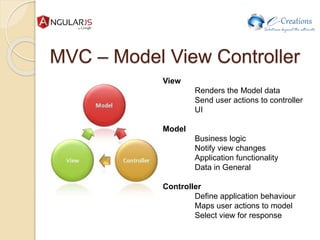
MVC – Model View Controller
View
Renders the Model data
Send user actions to controller
UI
Model
Business logic
Notify view changes
Application functionality
Data in General
Controller
Define application behaviour
Maps user actions to model
Select view for response
Directives -special ng attributes
ng-app
 Determines which part of the page will use AngularJS
 If given a value it will load that application module
ng-controller
 Determines which Javascript Controller should be used
for that part of the page
ng-model
 Determines what model the value of an input field will
be bound to
 Used for two-way binding
ng-directives (basic use directives)
AngularJS extends HTML with ng-directives.
 The ng-bind directive binds application data
to the HTML view.
 The ng-show directive shows or hides the
given HTML element based on the
expression provided to the ngShow attribute.
 The ngClick directive allows you to specify
custom behavior when an element is clicked.
AngularJS starts automatically when the web page has loaded
Egg:
<div ng-app="">
<p>Name: <input type="text" ng-
model="name"></p>
<p ng-bind="name"></p>
</div>
Egg:
<div ng-app="" ng-init="firstName='John'">
<p>The name is <span ng-
bind="firstName"></span></p>
</div>
AngularJS Expressions
AngularJS expressions are much like JavaScript
expressions: They can contain literals, operators, and
variables.
Example {{ 5 + 5 }} or {{ firstName + " " + lastName }}
Egg:
<div ng-app="">
<p>My first expression: {{ 5 + 5 }}</p>
</div>
Egg:
<div ng-app="" ng-init="quantity=1;cost=5">
<p>Total in dollar: {{ quantity * cost }}</p>
</div>
AngularJS Objects
 <div ng-app="" ng-init="person={firstName:'John',lastName:'Doe'}">
 <p>The name is {{ person.lastName }}</p>
 </div>
AngularJS Arrays
 <div ng-app="" ng-init="points=[1,15,19,2,40]">
 <p>The points are {{ points[2] }}</p>
 </div>
AngularJS Controllers
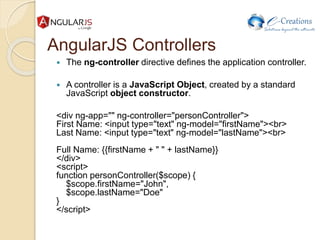
 The ng-controller directive defines the application controller.
 A controller is a JavaScript Object, created by a standard
JavaScript object constructor.
<div ng-app="" ng-controller="personController">
First Name: <input type="text" ng-model="firstName"><br>
Last Name: <input type="text" ng-model="lastName"><br>
Full Name: {{firstName + " " + lastName}}
</div>
<script>
function personController($scope) {
$scope.firstName="John",
$scope.lastName="Doe"
}
</script>
<div ng-app="" ng-controller="namesController">
<ul>
<li ng-repeat="x in names">
{{ x.name + ', ' + x.country }}
</li>
</ul>
</div>
<script>
function namesController($scope) {
$scope.names = [
{name:'Jani',country:'Norway'},
{name:'Hege',country:'Sweden'},
{name:'Kai',country:'Denmark'}
];
}
</script>
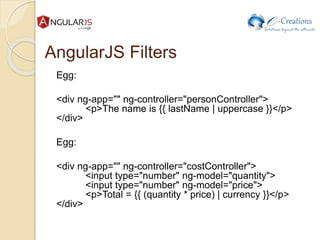
AngularJS Filters
Egg:
<div ng-app="" ng-controller="personController">
<p>The name is {{ lastName | uppercase }}</p>
</div>
Egg:
<div ng-app="" ng-controller="costController">
<input type="number" ng-model="quantity">
<input type="number" ng-model="price">
<p>Total = {{ (quantity * price) | currency }}</p>
</div>
AnjularJs services
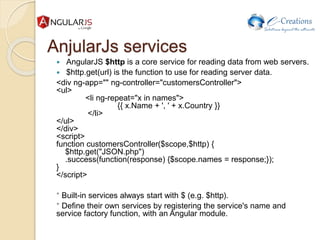
 AngularJS $http is a core service for reading data from web servers.
 $http.get(url) is the function to use for reading server data.
<div ng-app="" ng-controller="customersController">
<ul>
<li ng-repeat="x in names">
{{ x.Name + ', ' + x.Country }}
</li>
</ul>
</div>
<script>
function customersController($scope,$http) {
$http.get("JSON.php")
.success(function(response) {$scope.names = response;});
}
</script>
* Built-in services always start with $ (e.g. $http).
* Define their own services by registering the service's name and
service factory function, with an Angular module.
AnjularJs Scopes
 scope is an object that refers to the application model.
 Scope is the glue between application controller and the view.
angular.module('scopeExample', [])
.controller('MyController', ['$scope', function($scope) {
$scope.username = 'World';
$scope.sayHello = function() {
$scope.greeting = 'Hello ' + $scope.username + '!';
};
}]);
* $rootScope
Dependency Injection
Dependency Injection is software
design pattern that deals with how code
gets hold of its dependencies.
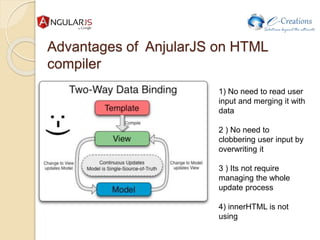
Advantages of AnjularJS on HTML
compiler
1) No need to read user
input and merging it with
data
2 ) No need to
clobbering user input by
overwriting it
3 ) Its not require
managing the whole
update process
4) innerHTML is not
using
Please, please, please !!!
A hammer is an excellent tool,
but it’s not used for everything !!!
Resources
 https://docs.angularjs.org/guide
 https://docs.angularjs.org/api
 http://www.sitepoint.com/10-reasons-use-angularjs/
 http://www.w3schools.com/angular/
Thank you for listening !

AngularJs

  • 1.
    Syam kumar KK Sr.SoftwareEngineer | www.ecreationsindia.com syam@ecreationsindia.com
  • 2.
    What Is Angular? A JavaScript MVW framework (development started in 2009 by a Google employee Misko hevery and released in 2012)  Good for single page applications  AngularJS extends HTML with new attributes.  AngularJS is a structural framework for dynamic web apps  AngularJS was built with the CRUD application in mind  Anjular Js uses Declarative Data-Binding ( Vs imperative data binding )  Anjular Js uses the concept two-way data binding
  • 3.
    Why You ShouldUse AngularJS  MVC done right  A declarative user interface  Data models are POJO  Behavior with directives  Flexibility with filters  Write less code  Unit testing ready : Angular already has a mock HTTP provider to inject fake server responses into controllers
  • 4.
    MVC – ModelView Controller View Renders the Model data Send user actions to controller UI Model Business logic Notify view changes Application functionality Data in General Controller Define application behaviour Maps user actions to model Select view for response
  • 5.
    Directives -special ngattributes ng-app  Determines which part of the page will use AngularJS  If given a value it will load that application module ng-controller  Determines which Javascript Controller should be used for that part of the page ng-model  Determines what model the value of an input field will be bound to  Used for two-way binding
  • 6.
    ng-directives (basic usedirectives) AngularJS extends HTML with ng-directives.  The ng-bind directive binds application data to the HTML view.  The ng-show directive shows or hides the given HTML element based on the expression provided to the ngShow attribute.  The ngClick directive allows you to specify custom behavior when an element is clicked.
  • 7.
    AngularJS starts automaticallywhen the web page has loaded Egg: <div ng-app=""> <p>Name: <input type="text" ng- model="name"></p> <p ng-bind="name"></p> </div> Egg: <div ng-app="" ng-init="firstName='John'"> <p>The name is <span ng- bind="firstName"></span></p> </div>
  • 8.
    AngularJS Expressions AngularJS expressionsare much like JavaScript expressions: They can contain literals, operators, and variables. Example {{ 5 + 5 }} or {{ firstName + " " + lastName }} Egg: <div ng-app=""> <p>My first expression: {{ 5 + 5 }}</p> </div> Egg: <div ng-app="" ng-init="quantity=1;cost=5"> <p>Total in dollar: {{ quantity * cost }}</p> </div>
  • 9.
    AngularJS Objects  <divng-app="" ng-init="person={firstName:'John',lastName:'Doe'}">  <p>The name is {{ person.lastName }}</p>  </div> AngularJS Arrays  <div ng-app="" ng-init="points=[1,15,19,2,40]">  <p>The points are {{ points[2] }}</p>  </div>
  • 10.
    AngularJS Controllers  Theng-controller directive defines the application controller.  A controller is a JavaScript Object, created by a standard JavaScript object constructor. <div ng-app="" ng-controller="personController"> First Name: <input type="text" ng-model="firstName"><br> Last Name: <input type="text" ng-model="lastName"><br> Full Name: {{firstName + " " + lastName}} </div> <script> function personController($scope) { $scope.firstName="John", $scope.lastName="Doe" } </script>
  • 11.
    <div ng-app="" ng-controller="namesController"> <ul> <ling-repeat="x in names"> {{ x.name + ', ' + x.country }} </li> </ul> </div> <script> function namesController($scope) { $scope.names = [ {name:'Jani',country:'Norway'}, {name:'Hege',country:'Sweden'}, {name:'Kai',country:'Denmark'} ]; } </script>
  • 12.
    AngularJS Filters Egg: <div ng-app=""ng-controller="personController"> <p>The name is {{ lastName | uppercase }}</p> </div> Egg: <div ng-app="" ng-controller="costController"> <input type="number" ng-model="quantity"> <input type="number" ng-model="price"> <p>Total = {{ (quantity * price) | currency }}</p> </div>
  • 13.
    AnjularJs services  AngularJS$http is a core service for reading data from web servers.  $http.get(url) is the function to use for reading server data. <div ng-app="" ng-controller="customersController"> <ul> <li ng-repeat="x in names"> {{ x.Name + ', ' + x.Country }} </li> </ul> </div> <script> function customersController($scope,$http) { $http.get("JSON.php") .success(function(response) {$scope.names = response;}); } </script> * Built-in services always start with $ (e.g. $http). * Define their own services by registering the service's name and service factory function, with an Angular module.
  • 14.
    AnjularJs Scopes  scopeis an object that refers to the application model.  Scope is the glue between application controller and the view. angular.module('scopeExample', []) .controller('MyController', ['$scope', function($scope) { $scope.username = 'World'; $scope.sayHello = function() { $scope.greeting = 'Hello ' + $scope.username + '!'; }; }]); * $rootScope
  • 15.
    Dependency Injection Dependency Injectionis software design pattern that deals with how code gets hold of its dependencies.
  • 16.
    Advantages of AnjularJSon HTML compiler 1) No need to read user input and merging it with data 2 ) No need to clobbering user input by overwriting it 3 ) Its not require managing the whole update process 4) innerHTML is not using
  • 17.
    Please, please, please!!! A hammer is an excellent tool, but it’s not used for everything !!!
  • 18.
    Resources  https://docs.angularjs.org/guide  https://docs.angularjs.org/api http://www.sitepoint.com/10-reasons-use-angularjs/  http://www.w3schools.com/angular/
  • 19.
    Thank you forlistening !