Angular 2 and Wijmo 5
Next generation of Google’s
Development Framework
with integrated Wijmo components
Angular 2
• Angular 2 Alpha - first requests for Wijmo integration.
• Angular 2 Beta – first customers started development
of their LOB applications.
• Angular RC – there are customers in the middle or
end of their app development.
What is Angular 2 application?
• Consists of Components
– application component
– view components
– UI control components
What is Component?
•?
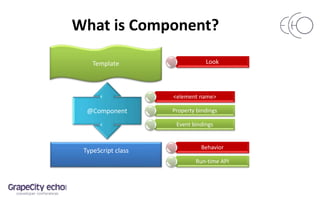
What is Component?
<element name>
Property bindings
Event bindings
TypeScript class
Template
@Component
Behavior
Run-time API
Look
Component example
@Component({
selector: 'date-time-view',
template: `
<wj-input-date #date [(value)]="dateTime" [format]="'d'"></wj-input-date>
<wj-input-time #time [(value)]="dateTime" [format]="'t'"></wj-input-time>
<b>Date, Time:</b> {{dateTime}}`,
directives: [WjInputDate, WjInputTime]
})
export class DateTimeView {
dateTime = new Date();
increment(days: number) {
this.dateTime = new Date(this.dateTime.getTime() + days * 24*60*60*1000);
}
}
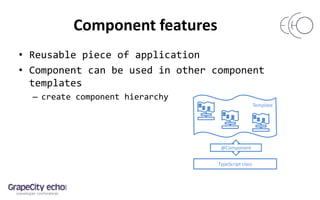
Component features
• Reusable piece of application
• Component can be used in other component
templates
– create component hierarchy
Template
TypeScript class
@Component
Root application component
• Is a regular component
• Specific functionality:
– Bootstrap
– SPA navigation - Router
Root component - navigation
<a [routerLink]="['/DateTimePureJsView']">
Date Time Pure JS</a>
<router-outlet></router-outlet>
Create and
insert
Component
click
Find Route
Definition
@RouteConfig([
{component: DateTimePureJsView,
name: 'DateTimePureJsView',
path: '/UsingWijmo/DateTimePureJsView'},
……
])
Root component class
@Component({ selector: 'app-cmp', ... })
@RouteConfig([
{ path: '/', redirectTo: ['DateTimePureJsView'] },
{ path: '/UsingWijmo/DateTimePureJsView',
component: DateTimePureJsView, name: 'DateTimePureJsView' },
{ path: '/UsingWijmo/dateTimeView',
component: DateTimeView, name: 'DateTimeView' },
...
])
export class AppCmp {
}
bootstrap(AppCmp);
Root component template
<ul class="flatList">
<li>
<a [routerLink]="['/DateTimePureJsView']">Date Time Pure JS</a>
</li>
<li >
<a [routerLink]="['/DateTimeView']">Date Time Angular 2</a>
</li>
</ul>
...
<div class="col-md-9" >
<router-outlet></router-outlet>
</div>
What is Wijmo Interop?
•?
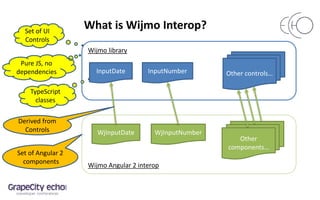
What is Wijmo Interop?
Wijmo library
Wijmo Angular 2 interop
InputDate InputNumber Other controls…
WjInputDate WjInputNumber
Other
components…
Set of UI
Controls
Pure JS, no
dependencies
TypeScript
classes
Derived from
Controls
Set of Angular 2
components
Controls vs. Components - templates
Control
<div id="date"></div>
<div id="time"></div>
Date, Time: {{dateTime}}
Component
<wj-input-date #date
[(value)]="dateTime"
[format]="'d'">
</wj-input-date>
<wj-input-time #time
[(value)]="dateTime"
[format]="'t'">
</wj-input-time>
Date, Time: {{dateTime}}
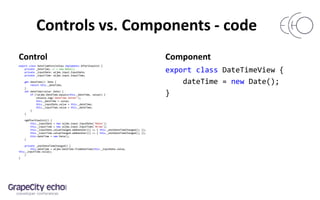
Controls vs. Components - code
Control
export class DateTimePureJsView implements AfterViewInit {
private _dateTime; // = new Date();
private _inputDate: wijmo.input.InputDate;
private _inputTime: wijmo.input.InputTime;
get dateTime(): Date {
return this._dateTime;
}
set dateTime(value: Date) {
if (!wijmo.DateTime.equals(this._dateTime, value)) {
console.log('dateTime setter');
this._dateTime = value;
this._inputDate.value = this._dateTime;
this._inputTime.value = this._dateTime;
}
}
ngAfterViewInit() {
this._inputDate = new wijmo.input.InputDate('#date');
this._inputTime = new wijmo.input.InputTime('#time');
this._inputDate.valueChanged.addHandler(() => { this._onUiDateTimeChanged(); });
this._inputTime.valueChanged.addHandler(() => { this._onUiDateTimeChanged(); });
this.dateTime = new Date();
}
private _onUiDateTimeChanged() {
this.dateTime = wijmo.DateTime.fromDateTime(this._inputDate.value,
this._inputTime.value);
}
}
Component
export class DateTimeView {
dateTime = new Date();
}
Wijmo Component implementation – key steps
<my-input-number
[step]="1"
(valueChanged)=“onChange()“
[(value)]=“amount"
>
</my-input-number>
two-way bindings
event bindings
property bindings
element name
translate
Wijmo
events
splits to property + event bindings:
[value]=“amount”
(valueChange)=“amount=$event”
Wijmo Component implementation example
@Component({
selector: 'my-input-number', template: '',
inputs: ['isRequired', 'value', 'format', 'step', 'placeholder'],
outputs: ['valueChangedImpl: valueChanged', 'valueChange'],
})
export class MyInputNumber extends wijmo.input.InputNumber {
valueChangedImpl = new EventEmitter(false);
valueChange = new EventEmitter(false);
constructor( @Inject(ElementRef) elRef: ElementRef) {
super(elRef.nativeElement);
}
onValueChanged(e?: wijmo.EventArgs) {
super.onValueChanged(e);
this.valueChangedImpl.emit(e);
this.valueChange.emit(this.value);
}
}
Wijmo Component implementation
• Lightweight
• Minimal code overhead
• No performance penalties
Complex components - FlexGrid
• Create grid with columns declaratively
• wj-flex-grid component for FlexGrid
• wj-flex-grid-column child components
for grid Columns
FlexGrid with columns
<wj-flex-grid #grid [itemsSource]="reservations" [allowAddNew]="true">
<wj-flex-grid-column [header]="'Check-in'" [binding]="'checkIn'“
[width]="130"></wj-flex-grid-column>
<wj-flex-grid-column [header]="'Check-out'" [binding]="'checkOut'"
[width]="130"></wj-flex-grid-column>
<wj-flex-grid-column [header]="'Price per Night'" [binding]="'pricePerNight'"
[format]="'c2'" [width]="140"></wj-flex-grid-column>
<wj-flex-grid-column [header]="'Discount'" [binding]="'discount'" [format]="'p2'"
[width]="140"></wj-flex-grid-column>
</wj-flex-grid>
FlexGrid with cell templates
• Customize cell content using templates
• Allows any valid Angular markup
– components with bindings
– interpolation expressions
• Customize any kind of cells
– data cells
– cell editors
– column/row/group headers
– any others
Data cell template
<wj-flex-grid #grid [itemsSource]="reservations" [allowAddNew]="true">
<wj-flex-grid-column [header]="'Discount'" [binding]="'discount'"
[format]="'p2'" [width]="140">
<template wjFlexGridCellTemplate [cellType]="'Cell'" let-cell="cell">
<span [ngStyle]="cell.item.discount > 0.1 ?
{color: 'red', textDecoration: 'underline'} : {}">
{{grid.getCellData(cell.row.index, cell.col.index, true)}}
</span>
</template>
</wj-flex-grid-column>
</wj-flex-grid>
Cell editor template
<wj-flex-grid #grid [itemsSource]="reservations" [allowAddNew]="true">
<wj-flex-grid-column [header]="'Check-in'" [binding]="'checkIn'“
[width]="130">
<template wjFlexGridCellTemplate [cellType]="'CellEdit'" let-cell="cell">
<wj-input-date [(value)]="cell.value" [isRequired]="false"></wj-input-date>
</template>
</wj-flex-grid-column>
</wj-flex-grid>
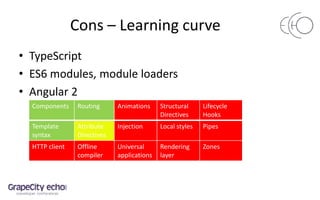
Cons – Learning curve
• TypeScript
• ES6 modules, module loaders
• Angular 2
Components Routing Animations Structural
Directives
Lifecycle
Hooks
Template
syntax
Attribute
Directives
Injection Local styles Pipes
HTTP client Offline
compiler
Universal
applications
Rendering
layer
Zones
Pros - Solid foundation
• Solid foundation for app development
• Covers all the application aspects – view, controller,
app wide services, client-server interaction
• Uses modern OOP language – TypeScript
• Forces you to build app from reusable units,
components, that provide a highest level of
maintainability and testability.
Thank You!
Angular 2 and Typescript:
• https://angular.io
• https://angular.io/docs/ts/latest/quickstart.html
• https://www.typescriptlang.org/index.html
Wijmo for Angular 2
• http://wijmo.com/angular2/
• http://demos.wijmo.com/5/SampleExplorer/SampleExplorer/Sample/Explorer
• http://wijmo.com/blog/best-angular-2-data-grid-flexgrid/
• http://wijmo.com/blog/angular-2-first-impressions-the-wijmo-dev-team/
Angular 2 and Wijmo 5 - GrapeCity Echo 2016 Tokyo

Angular 2 and Wijmo 5 - GrapeCity Echo 2016 Tokyo

  • 2.
    Angular 2 andWijmo 5 Next generation of Google’s Development Framework with integrated Wijmo components
  • 3.
    Angular 2 • Angular2 Alpha - first requests for Wijmo integration. • Angular 2 Beta – first customers started development of their LOB applications. • Angular RC – there are customers in the middle or end of their app development.
  • 4.
    What is Angular2 application? • Consists of Components – application component – view components – UI control components
  • 5.
  • 6.
    What is Component? <elementname> Property bindings Event bindings TypeScript class Template @Component Behavior Run-time API Look
  • 7.
    Component example @Component({ selector: 'date-time-view', template:` <wj-input-date #date [(value)]="dateTime" [format]="'d'"></wj-input-date> <wj-input-time #time [(value)]="dateTime" [format]="'t'"></wj-input-time> <b>Date, Time:</b> {{dateTime}}`, directives: [WjInputDate, WjInputTime] }) export class DateTimeView { dateTime = new Date(); increment(days: number) { this.dateTime = new Date(this.dateTime.getTime() + days * 24*60*60*1000); } }
  • 8.
    Component features • Reusablepiece of application • Component can be used in other component templates – create component hierarchy Template TypeScript class @Component
  • 9.
    Root application component •Is a regular component • Specific functionality: – Bootstrap – SPA navigation - Router
  • 10.
    Root component -navigation <a [routerLink]="['/DateTimePureJsView']"> Date Time Pure JS</a> <router-outlet></router-outlet> Create and insert Component click Find Route Definition @RouteConfig([ {component: DateTimePureJsView, name: 'DateTimePureJsView', path: '/UsingWijmo/DateTimePureJsView'}, …… ])
  • 11.
    Root component class @Component({selector: 'app-cmp', ... }) @RouteConfig([ { path: '/', redirectTo: ['DateTimePureJsView'] }, { path: '/UsingWijmo/DateTimePureJsView', component: DateTimePureJsView, name: 'DateTimePureJsView' }, { path: '/UsingWijmo/dateTimeView', component: DateTimeView, name: 'DateTimeView' }, ... ]) export class AppCmp { } bootstrap(AppCmp);
  • 12.
    Root component template <ulclass="flatList"> <li> <a [routerLink]="['/DateTimePureJsView']">Date Time Pure JS</a> </li> <li > <a [routerLink]="['/DateTimeView']">Date Time Angular 2</a> </li> </ul> ... <div class="col-md-9" > <router-outlet></router-outlet> </div>
  • 13.
    What is WijmoInterop? •?
  • 14.
    What is WijmoInterop? Wijmo library Wijmo Angular 2 interop InputDate InputNumber Other controls… WjInputDate WjInputNumber Other components… Set of UI Controls Pure JS, no dependencies TypeScript classes Derived from Controls Set of Angular 2 components
  • 15.
    Controls vs. Components- templates Control <div id="date"></div> <div id="time"></div> Date, Time: {{dateTime}} Component <wj-input-date #date [(value)]="dateTime" [format]="'d'"> </wj-input-date> <wj-input-time #time [(value)]="dateTime" [format]="'t'"> </wj-input-time> Date, Time: {{dateTime}}
  • 16.
    Controls vs. Components- code Control export class DateTimePureJsView implements AfterViewInit { private _dateTime; // = new Date(); private _inputDate: wijmo.input.InputDate; private _inputTime: wijmo.input.InputTime; get dateTime(): Date { return this._dateTime; } set dateTime(value: Date) { if (!wijmo.DateTime.equals(this._dateTime, value)) { console.log('dateTime setter'); this._dateTime = value; this._inputDate.value = this._dateTime; this._inputTime.value = this._dateTime; } } ngAfterViewInit() { this._inputDate = new wijmo.input.InputDate('#date'); this._inputTime = new wijmo.input.InputTime('#time'); this._inputDate.valueChanged.addHandler(() => { this._onUiDateTimeChanged(); }); this._inputTime.valueChanged.addHandler(() => { this._onUiDateTimeChanged(); }); this.dateTime = new Date(); } private _onUiDateTimeChanged() { this.dateTime = wijmo.DateTime.fromDateTime(this._inputDate.value, this._inputTime.value); } } Component export class DateTimeView { dateTime = new Date(); }
  • 17.
    Wijmo Component implementation– key steps <my-input-number [step]="1" (valueChanged)=“onChange()“ [(value)]=“amount" > </my-input-number> two-way bindings event bindings property bindings element name translate Wijmo events splits to property + event bindings: [value]=“amount” (valueChange)=“amount=$event”
  • 18.
    Wijmo Component implementationexample @Component({ selector: 'my-input-number', template: '', inputs: ['isRequired', 'value', 'format', 'step', 'placeholder'], outputs: ['valueChangedImpl: valueChanged', 'valueChange'], }) export class MyInputNumber extends wijmo.input.InputNumber { valueChangedImpl = new EventEmitter(false); valueChange = new EventEmitter(false); constructor( @Inject(ElementRef) elRef: ElementRef) { super(elRef.nativeElement); } onValueChanged(e?: wijmo.EventArgs) { super.onValueChanged(e); this.valueChangedImpl.emit(e); this.valueChange.emit(this.value); } }
  • 19.
    Wijmo Component implementation •Lightweight • Minimal code overhead • No performance penalties
  • 20.
    Complex components -FlexGrid • Create grid with columns declaratively • wj-flex-grid component for FlexGrid • wj-flex-grid-column child components for grid Columns
  • 21.
    FlexGrid with columns <wj-flex-grid#grid [itemsSource]="reservations" [allowAddNew]="true"> <wj-flex-grid-column [header]="'Check-in'" [binding]="'checkIn'“ [width]="130"></wj-flex-grid-column> <wj-flex-grid-column [header]="'Check-out'" [binding]="'checkOut'" [width]="130"></wj-flex-grid-column> <wj-flex-grid-column [header]="'Price per Night'" [binding]="'pricePerNight'" [format]="'c2'" [width]="140"></wj-flex-grid-column> <wj-flex-grid-column [header]="'Discount'" [binding]="'discount'" [format]="'p2'" [width]="140"></wj-flex-grid-column> </wj-flex-grid>
  • 22.
    FlexGrid with celltemplates • Customize cell content using templates • Allows any valid Angular markup – components with bindings – interpolation expressions • Customize any kind of cells – data cells – cell editors – column/row/group headers – any others
  • 23.
    Data cell template <wj-flex-grid#grid [itemsSource]="reservations" [allowAddNew]="true"> <wj-flex-grid-column [header]="'Discount'" [binding]="'discount'" [format]="'p2'" [width]="140"> <template wjFlexGridCellTemplate [cellType]="'Cell'" let-cell="cell"> <span [ngStyle]="cell.item.discount > 0.1 ? {color: 'red', textDecoration: 'underline'} : {}"> {{grid.getCellData(cell.row.index, cell.col.index, true)}} </span> </template> </wj-flex-grid-column> </wj-flex-grid>
  • 24.
    Cell editor template <wj-flex-grid#grid [itemsSource]="reservations" [allowAddNew]="true"> <wj-flex-grid-column [header]="'Check-in'" [binding]="'checkIn'“ [width]="130"> <template wjFlexGridCellTemplate [cellType]="'CellEdit'" let-cell="cell"> <wj-input-date [(value)]="cell.value" [isRequired]="false"></wj-input-date> </template> </wj-flex-grid-column> </wj-flex-grid>
  • 25.
    Cons – Learningcurve • TypeScript • ES6 modules, module loaders • Angular 2 Components Routing Animations Structural Directives Lifecycle Hooks Template syntax Attribute Directives Injection Local styles Pipes HTTP client Offline compiler Universal applications Rendering layer Zones
  • 26.
    Pros - Solidfoundation • Solid foundation for app development • Covers all the application aspects – view, controller, app wide services, client-server interaction • Uses modern OOP language – TypeScript • Forces you to build app from reusable units, components, that provide a highest level of maintainability and testability.
  • 27.
    Thank You! Angular 2and Typescript: • https://angular.io • https://angular.io/docs/ts/latest/quickstart.html • https://www.typescriptlang.org/index.html Wijmo for Angular 2 • http://wijmo.com/angular2/ • http://demos.wijmo.com/5/SampleExplorer/SampleExplorer/Sample/Explorer • http://wijmo.com/blog/best-angular-2-data-grid-flexgrid/ • http://wijmo.com/blog/angular-2-first-impressions-the-wijmo-dev-team/

Editor's Notes

  • #3 Good morning, thanks for coming. My name is Bernardo de Castilho. I am a co-founder and CTO of ComponentOne (a division of GrapeCity). We have been developing commercial components for 25 years, and today we will talk about AngularJS, Google’s JavaScript application framework.
  • #4 AngularJS is an open-source web application framework maintained by Google and by a community of individual developers and corporations to address many of the challenges encountered in developing single-page applications. It aims to simplify both the development and the testing of such applications by providing a framework for client-side model–view–controller (MVC) and model-view-viewmodel (MVVM) architectures, along with components commonly used in rich Internet applications.
  • #5 AngularJS is an open-source web application framework maintained by Google and by a community of individual developers and corporations to address many of the challenges encountered in developing single-page applications. It aims to simplify both the development and the testing of such applications by providing a framework for client-side model–view–controller (MVC) and model-view-viewmodel (MVVM) architectures, along with components commonly used in rich Internet applications.
  • #8 AngularJS is an open-source web application framework maintained by Google and by a community of individual developers and corporations to address many of the challenges encountered in developing single-page applications. It aims to simplify both the development and the testing of such applications by providing a framework for client-side model–view–controller (MVC) and model-view-viewmodel (MVVM) architectures, along with components commonly used in rich Internet applications.
  • #9 AngularJS is an open-source web application framework maintained by Google and by a community of individual developers and corporations to address many of the challenges encountered in developing single-page applications. It aims to simplify both the development and the testing of such applications by providing a framework for client-side model–view–controller (MVC) and model-view-viewmodel (MVVM) architectures, along with components commonly used in rich Internet applications.
  • #10 AngularJS is an open-source web application framework maintained by Google and by a community of individual developers and corporations to address many of the challenges encountered in developing single-page applications. It aims to simplify both the development and the testing of such applications by providing a framework for client-side model–view–controller (MVC) and model-view-viewmodel (MVVM) architectures, along with components commonly used in rich Internet applications.
  • #11 AngularJS is an open-source web application framework maintained by Google and by a community of individual developers and corporations to address many of the challenges encountered in developing single-page applications. It aims to simplify both the development and the testing of such applications by providing a framework for client-side model–view–controller (MVC) and model-view-viewmodel (MVVM) architectures, along with components commonly used in rich Internet applications.
  • #12 AngularJS is an open-source web application framework maintained by Google and by a community of individual developers and corporations to address many of the challenges encountered in developing single-page applications. It aims to simplify both the development and the testing of such applications by providing a framework for client-side model–view–controller (MVC) and model-view-viewmodel (MVVM) architectures, along with components commonly used in rich Internet applications.
  • #13 AngularJS is an open-source web application framework maintained by Google and by a community of individual developers and corporations to address many of the challenges encountered in developing single-page applications. It aims to simplify both the development and the testing of such applications by providing a framework for client-side model–view–controller (MVC) and model-view-viewmodel (MVVM) architectures, along with components commonly used in rich Internet applications.
  • #15 AngularJS is an open-source web application framework maintained by Google and by a community of individual developers and corporations to address many of the challenges encountered in developing single-page applications. It aims to simplify both the development and the testing of such applications by providing a framework for client-side model–view–controller (MVC) and model-view-viewmodel (MVVM) architectures, along with components commonly used in rich Internet applications.
  • #16 AngularJS is an open-source web application framework maintained by Google and by a community of individual developers and corporations to address many of the challenges encountered in developing single-page applications. It aims to simplify both the development and the testing of such applications by providing a framework for client-side model–view–controller (MVC) and model-view-viewmodel (MVVM) architectures, along with components commonly used in rich Internet applications.
  • #17 AngularJS is an open-source web application framework maintained by Google and by a community of individual developers and corporations to address many of the challenges encountered in developing single-page applications. It aims to simplify both the development and the testing of such applications by providing a framework for client-side model–view–controller (MVC) and model-view-viewmodel (MVVM) architectures, along with components commonly used in rich Internet applications.
  • #18 AngularJS is an open-source web application framework maintained by Google and by a community of individual developers and corporations to address many of the challenges encountered in developing single-page applications. It aims to simplify both the development and the testing of such applications by providing a framework for client-side model–view–controller (MVC) and model-view-viewmodel (MVVM) architectures, along with components commonly used in rich Internet applications.
  • #19 AngularJS is an open-source web application framework maintained by Google and by a community of individual developers and corporations to address many of the challenges encountered in developing single-page applications. It aims to simplify both the development and the testing of such applications by providing a framework for client-side model–view–controller (MVC) and model-view-viewmodel (MVVM) architectures, along with components commonly used in rich Internet applications.
  • #20 AngularJS is an open-source web application framework maintained by Google and by a community of individual developers and corporations to address many of the challenges encountered in developing single-page applications. It aims to simplify both the development and the testing of such applications by providing a framework for client-side model–view–controller (MVC) and model-view-viewmodel (MVVM) architectures, along with components commonly used in rich Internet applications.
  • #21 AngularJS is an open-source web application framework maintained by Google and by a community of individual developers and corporations to address many of the challenges encountered in developing single-page applications. It aims to simplify both the development and the testing of such applications by providing a framework for client-side model–view–controller (MVC) and model-view-viewmodel (MVVM) architectures, along with components commonly used in rich Internet applications.
  • #22 AngularJS is an open-source web application framework maintained by Google and by a community of individual developers and corporations to address many of the challenges encountered in developing single-page applications. It aims to simplify both the development and the testing of such applications by providing a framework for client-side model–view–controller (MVC) and model-view-viewmodel (MVVM) architectures, along with components commonly used in rich Internet applications.
  • #23 AngularJS is an open-source web application framework maintained by Google and by a community of individual developers and corporations to address many of the challenges encountered in developing single-page applications. It aims to simplify both the development and the testing of such applications by providing a framework for client-side model–view–controller (MVC) and model-view-viewmodel (MVVM) architectures, along with components commonly used in rich Internet applications.
  • #24 AngularJS is an open-source web application framework maintained by Google and by a community of individual developers and corporations to address many of the challenges encountered in developing single-page applications. It aims to simplify both the development and the testing of such applications by providing a framework for client-side model–view–controller (MVC) and model-view-viewmodel (MVVM) architectures, along with components commonly used in rich Internet applications.
  • #25 AngularJS is an open-source web application framework maintained by Google and by a community of individual developers and corporations to address many of the challenges encountered in developing single-page applications. It aims to simplify both the development and the testing of such applications by providing a framework for client-side model–view–controller (MVC) and model-view-viewmodel (MVVM) architectures, along with components commonly used in rich Internet applications.