AndroidJUnitRunner で
JUnit 4 形式のテストに移行
id:nobuoka
株式会社はてな
2015-08-26
関西モバイルアプリ研究会 #5
id:nobuoka です。
Android アプリ 「はてなブックマーク」 の
開発をしています。
最近 JUnit 4 形式に移行したのでその話。
基本
AndroidJUnitRunner と使い方
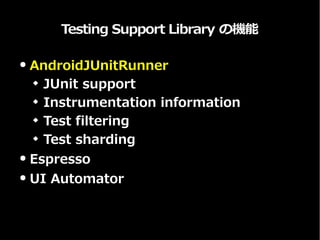
Testing Support Library の機能
● AndroidJUnitRunner
 JUnit support
 Instrumentation information
 Test filtering
 Test sharding
● Espresso
● UI Automator
AndroidJUnitRunner を使うメリット
● JUnit 4 サポート
 assertThat が使える! (もちろん他にも)
● Instrumentation 終了時に、その
Instrumentation で生成されたすべての
Activity が終了されることを保証
● テストのフィルタリングとかできる
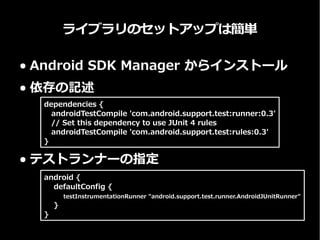
ライブラリのセットアップは簡単
● Android SDK Manager からインストール
● 依存の記述
● テストランナーの指定
Dependencies {
// Android JUnit Runner
androidTestCompile 'com.android.support.test:runner:0.4.1'
// JUnit 4 rules
androidTestCompile 'com.android.support.test:rules:0.4.1'
android {
defaultConfig {
testInstrumentationRunner "android.support.test.runner.AndroidJUnitRunner"
}
}
実践編
JUnit 4 形式への移行
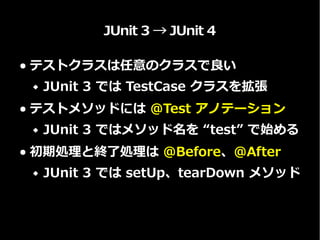
JUnit 3 → JUnit 4
● テストクラスは任意のクラスで良い
 JUnit 3 では TestCase クラスを拡張
● テストメソッドには @Test アノテーション
 JUnit 3 ではメソッド名を “test” で始める
● 初期処理と終了処理は @Before、@After
 JUnit 3 では setUp、tearDown メソッド
Instrumentation
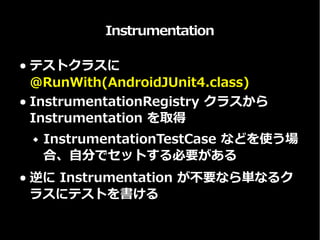
● テストクラスに
@RunWith(AndroidJUnit4.class)
● InstrumentationRegistry クラスから
Instrumentation を取得
 InstrumentationTestCase などを使う場
合、自分でセットする必要がある
● 逆に Instrumentation が不要なら単なるク
ラスにテストを書ける
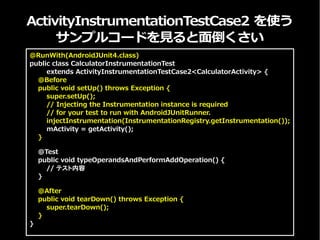
ActivityInstrumentationTestCase2 を使う
サンプルコードを見ると面倒くさい
@RunWith(AndroidJUnit4.class)
public class CalculatorInstrumentationTest
extends ActivityInstrumentationTestCase2<CalculatorActivity> {
@Before
public void setUp() throws Exception {
super.setUp();
// Injecting the Instrumentation instance is required
// for your test to run with AndroidJUnitRunner.
injectInstrumentation(InstrumentationRegistry.getInstrumentation());
mActivity = getActivity();
}
@Test
public void typeOperandsAndPerformAddOperation() {
// テスト内容
}
@After
public void tearDown() throws Exception {
super.tearDown();
}
}
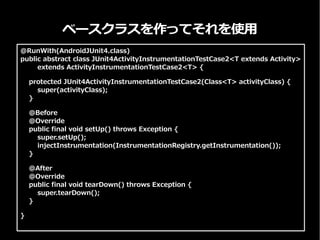
ベースクラスを作ってそれを使用
@RunWith(AndroidJUnit4.class)
public abstract class JUnit4ActivityInstrumentationTestCase2<T extends Activity>
extends ActivityInstrumentationTestCase2<T> {
protected JUnit4ActivityInstrumentationTestCase2(Class<T> activityClass) {
super(activityClass);
}
@Before
@Override
public final void setUp() throws Exception {
super.setUp();
injectInstrumentation(InstrumentationRegistry.getInstrumentation());
}
@After
@Override
public final void tearDown() throws Exception {
super.tearDown();
}
}

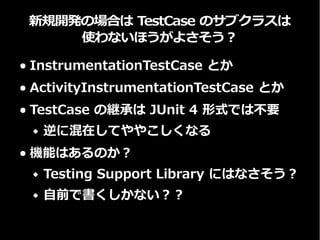
新規開発では TestCase のサブクラスではなく
JUnit rule を使うのが良さそう
● ActivityInstrumentationTestCase2 や
ServiceTestCase の代わり
● TestCase の継承は JUnit 4 形式では不要
 逆に混在してややこしくなる
● 代わりに JUnit rule を使う
 ActivityTestRule
 ServiceTestRule
See: JUnit 4 Rules with the ATSL
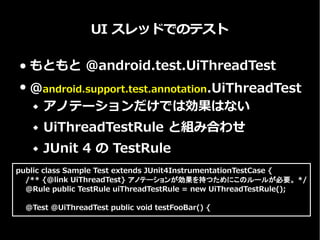
UI スレッドでのテスト
● もともとは @android.test.UiThreadTest
● @android.support.test.annotation.UiThreadTest
 アノテーションだけでは効果はない
 UiThreadTestRule と組み合わせ
 JUnit 4 の TestRule
public class Sample Test extends JUnit4InstrumentationTestCase {
/** {@link UiThreadTest} アノテーションが効果を持つためにこのルールが必要。 */
@Rule public TestRule uiThreadTestRule = new UiThreadTestRule();
@Test @UiThreadTest public void testFooBar() {
まとめ
理解できればそこそこ移行しやすい。
AndroidJUnitRunner を使おう!

AndroidJUnitRunner で JUnit 4 形式のテストに移行

  • 1.
    AndroidJUnitRunner で JUnit 4形式のテストに移行 id:nobuoka 株式会社はてな 2015-08-26 関西モバイルアプリ研究会 #5
  • 2.
    id:nobuoka です。 Android アプリ「はてなブックマーク」 の 開発をしています。 最近 JUnit 4 形式に移行したのでその話。
  • 3.
  • 4.
    Testing Support Libraryの機能 ● AndroidJUnitRunner  JUnit support  Instrumentation information  Test filtering  Test sharding ● Espresso ● UI Automator
  • 5.
    AndroidJUnitRunner を使うメリット ● JUnit4 サポート  assertThat が使える! (もちろん他にも) ● Instrumentation 終了時に、その Instrumentation で生成されたすべての Activity が終了されることを保証 ● テストのフィルタリングとかできる
  • 6.
    ライブラリのセットアップは簡単 ● Android SDKManager からインストール ● 依存の記述 ● テストランナーの指定 Dependencies { // Android JUnit Runner androidTestCompile 'com.android.support.test:runner:0.4.1' // JUnit 4 rules androidTestCompile 'com.android.support.test:rules:0.4.1' android { defaultConfig { testInstrumentationRunner "android.support.test.runner.AndroidJUnitRunner" } }
  • 7.
  • 8.
    JUnit 3 →JUnit 4 ● テストクラスは任意のクラスで良い  JUnit 3 では TestCase クラスを拡張 ● テストメソッドには @Test アノテーション  JUnit 3 ではメソッド名を “test” で始める ● 初期処理と終了処理は @Before、@After  JUnit 3 では setUp、tearDown メソッド
  • 9.
    Instrumentation ● テストクラスに @RunWith(AndroidJUnit4.class) ● InstrumentationRegistryクラスから Instrumentation を取得  InstrumentationTestCase などを使う場 合、自分でセットする必要がある ● 逆に Instrumentation が不要なら単なるク ラスにテストを書ける
  • 10.
    ActivityInstrumentationTestCase2 を使う サンプルコードを見ると面倒くさい @RunWith(AndroidJUnit4.class) public classCalculatorInstrumentationTest extends ActivityInstrumentationTestCase2<CalculatorActivity> { @Before public void setUp() throws Exception { super.setUp(); // Injecting the Instrumentation instance is required // for your test to run with AndroidJUnitRunner. injectInstrumentation(InstrumentationRegistry.getInstrumentation()); mActivity = getActivity(); } @Test public void typeOperandsAndPerformAddOperation() { // テスト内容 } @After public void tearDown() throws Exception { super.tearDown(); } }
  • 11.
    ベースクラスを作ってそれを使用 @RunWith(AndroidJUnit4.class) public abstract classJUnit4ActivityInstrumentationTestCase2<T extends Activity> extends ActivityInstrumentationTestCase2<T> { protected JUnit4ActivityInstrumentationTestCase2(Class<T> activityClass) { super(activityClass); } @Before @Override public final void setUp() throws Exception { super.setUp(); injectInstrumentation(InstrumentationRegistry.getInstrumentation()); } @After @Override public final void tearDown() throws Exception { super.tearDown(); } }

  • 12.
    新規開発では TestCase のサブクラスではなく JUnitrule を使うのが良さそう ● ActivityInstrumentationTestCase2 や ServiceTestCase の代わり ● TestCase の継承は JUnit 4 形式では不要  逆に混在してややこしくなる ● 代わりに JUnit rule を使う  ActivityTestRule  ServiceTestRule See: JUnit 4 Rules with the ATSL
  • 13.
    UI スレッドでのテスト ● もともとは@android.test.UiThreadTest ● @android.support.test.annotation.UiThreadTest  アノテーションだけでは効果はない  UiThreadTestRule と組み合わせ  JUnit 4 の TestRule public class Sample Test extends JUnit4InstrumentationTestCase { /** {@link UiThreadTest} アノテーションが効果を持つためにこのルールが必要。 */ @Rule public TestRule uiThreadTestRule = new UiThreadTestRule(); @Test @UiThreadTest public void testFooBar() {
  • 14.