






• Philip Tellis

•                    .com
• philip@lognormal.com
• @bluesmoon
• geek paranoid speedfreak
• http://bluesmoon.info/


              Web-5 / 2012-04-04   Messing with JS & the DOM to analyse the Network   1
I <3 JavaScript


Web-5 / 2012-04-04   Messing with JS & the DOM to analyse the Network   2
So much that I wore Mustache socks to my wedding


               Web-5 / 2012-04-04   Messing with JS & the DOM to analyse the Network   3
I’m also a Web Speedfreak


Web-5 / 2012-04-04   Messing with JS & the DOM to analyse the Network   4
We measure real user website performance


    Web-5 / 2012-04-04   Messing with JS & the DOM to analyse the Network   5
This talk is (mostly) about how we abuse JavaScript to do it


             Web-5 / 2012-04-04   Messing with JS & the DOM to analyse the Network   6
Messing with JS & the DOM to analyse the
                Network

     Philip Tellis / philip@lognormal.com


                  Web-5 / 2012-04-04


        Web-5 / 2012-04-04   Messing with JS & the DOM to analyse the Network   7
1
              Latency


Web-5 / 2012-04-04   Messing with JS & the DOM to analyse the Network   8
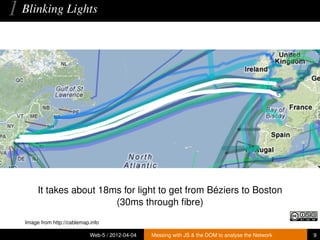
1 Blinking Lights


        It takes about 18ms for light to get from Béziers to Boston
                          (30ms through fibre)
   Image from http://cablemap.info

                              Web-5 / 2012-04-04   Messing with JS & the DOM to analyse the Network   9
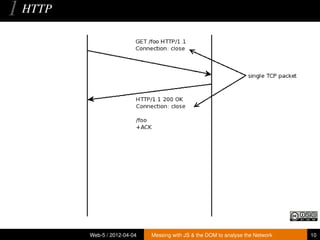
1 HTTP


         Web-5 / 2012-04-04   Messing with JS & the DOM to analyse the Network   10
So to measure latency, we need to send 1 packet each way, and
                           time it


             Web-5 / 2012-04-04   Messing with JS & the DOM to analyse the Network   11
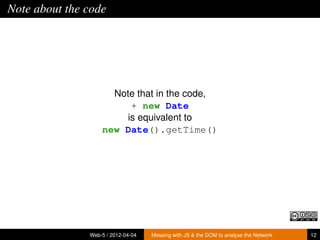
Note about the code


                     Note that in the code,
                         + new Date
                        is equivalent to
                   new Date().getTime()


               Web-5 / 2012-04-04   Messing with JS & the DOM to analyse the Network   12
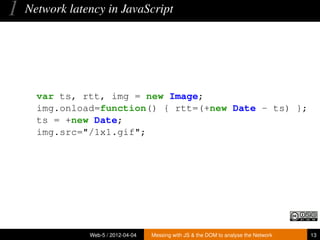
1   Network latency in JavaScript


      var ts, rtt, img = new Image;
      img.onload=function() { rtt=(+new Date - ts) };
      ts = +new Date;
      img.src="/1x1.gif";


                Web-5 / 2012-04-04   Messing with JS & the DOM to analyse the Network   13
2
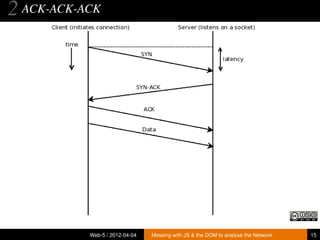
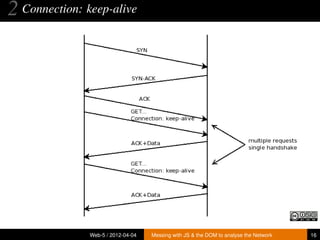
   TCP handshake


Web-5 / 2012-04-04   Messing with JS & the DOM to analyse the Network   14
2 ACK-ACK-ACK


           Web-5 / 2012-04-04   Messing with JS & the DOM to analyse the Network   15
2 Connection: keep-alive


               Web-5 / 2012-04-04   Messing with JS & the DOM to analyse the Network   16
2   Network latency & TCP handshake in JavaScript
    var t=[], tcp, rtt;
    var ld = function() {
        t.push(+new Date);
        if(t.length > 2) // run 2 times
          done();
        else {
          var img = new Image;
          img.onload = ld;
          img.src="/1x1.gif?" + Math.random()
                               + ’=’ + new Date;
        }
    };
    var done = function() {
       rtt=t[2]-t[1];
       tcp=t[1]-t[0]-rtt;
    };
    ld();
                Web-5 / 2012-04-04   Messing with JS & the DOM to analyse the Network   17
Notice that we’ve ignored DNS lookup time here... how would
                      you measure it?


             Web-5 / 2012-04-04   Messing with JS & the DOM to analyse the Network   18
1 Notes


    • 1x1 gif is 35 bytes
    • including HTTP headers, is smaller than a TCP packet
    • Fires onload on all browsers
    • 0 byte image fires onerror
    • which is indistinguishable from network error


                 Web-5 / 2012-04-04   Messing with JS & the DOM to analyse the Network   19
3
Network Throughput


 Web-5 / 2012-04-04   Messing with JS & the DOM to analyse the Network   20
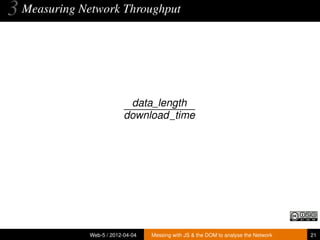
3 Measuring Network Throughput


                            data_length
                           download_time


              Web-5 / 2012-04-04   Messing with JS & the DOM to analyse the Network   21
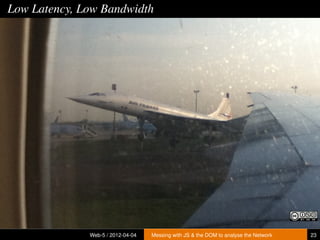
Should you fly a 747 or a 737?


       • A 747 seats 400+ passengers
       • A 737 seats about 150
       • Both take about the same time to fly from CDG to MPL
       • A 747 takes longer to load and unload


   The best selling aircraft to date is the 737

   This analogy would have been much cooler if the Concorde still flew


                                Web-5 / 2012-04-04     Messing with JS & the DOM to analyse the Network   22
Low Latency, Low Bandwidth


              Web-5 / 2012-04-04   Messing with JS & the DOM to analyse the Network   23
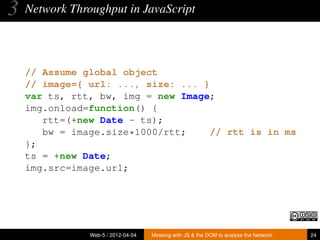
3   Network Throughput in JavaScript


    // Assume global object
    // image={ url: ..., size: ... }
    var ts, rtt, bw, img = new Image;
    img.onload=function() {
       rtt=(+new Date - ts);
       bw = image.size*1000/rtt;     // rtt is in ms
    };
    ts = +new Date;
    img.src=image.url;


                Web-5 / 2012-04-04   Messing with JS & the DOM to analyse the Network   24
3 Measuring Network Throughput


    If it were that simple, I wouldn’t be doing a talk at @web-5


                 Web-5 / 2012-04-04   Messing with JS & the DOM to analyse the Network   25
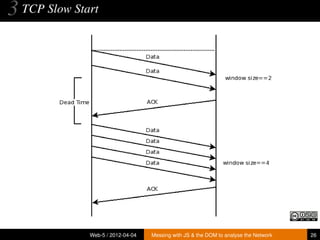
3 TCP Slow Start


              Web-5 / 2012-04-04   Messing with JS & the DOM to analyse the Network   26
3 Measuring Network Throughput


   So to make the best use of bandwidth, we need resources that fit
                         in a TCP window


                 Web-5 / 2012-04-04   Messing with JS & the DOM to analyse the Network   27
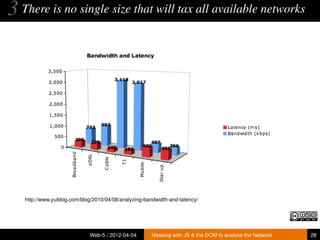
3 There is no single size that will tax all available networks


   http://www.yuiblog.com/blog/2010/04/08/analyzing-bandwidth-and-latency/


                             Web-5 / 2012-04-04       Messing with JS & the DOM to analyse the Network   28
3   Network Throughput in JavaScript – Take 2

    // image object is now an array of multiple images
    var i=0;
    var ld = function() {
       if(i>0)
          image[i-1].end = +new Date;
       if(i >= image.length)
          done();
       else {
          var img = new Image;
          img.onload = ld;
          image[i].start = +new Date;
          img.src=image[i].url;
       }
       i++;
    };

                Web-5 / 2012-04-04   Messing with JS & the DOM to analyse the Network   29
3 Measuring Network Throughput


        Slow network connection, meet really huge image


               Web-5 / 2012-04-04   Messing with JS & the DOM to analyse the Network   30
3   Network Throughput in JavaScript – Take 3


       var img = new Image;
       img.onload = ld;
       image[i].start = +new Date;
       image[i].timer =
             setTimeout(function() {
                            image[i].expired=true
                        },
                        image[i].timeout);
       img.src=image[i].url;


                Web-5 / 2012-04-04   Messing with JS & the DOM to analyse the Network   31
3   Network Throughput in JavaScript – Take 3


    if(i>0) {
       image[i-1].end = +new Date;
       clearTimeout(image[i-1].timer);
    }


                Web-5 / 2012-04-04   Messing with JS & the DOM to analyse the Network   32
3   Network Throughput in JavaScript – Take 3


    if(i >= image.length
          || (i > 0 && image[i-1].expired)) {
       done();
    }


                Web-5 / 2012-04-04   Messing with JS & the DOM to analyse the Network   33
3 Measuring Network Throughput


                           Are we done yet?


              Web-5 / 2012-04-04   Messing with JS & the DOM to analyse the Network   34
3 Measuring Network Throughput


                           Are we done yet?
                               sure...


              Web-5 / 2012-04-04   Messing with JS & the DOM to analyse the Network   34
3 Measuring Network Throughput


    Except network throughput is different every time you test it


                 Web-5 / 2012-04-04   Messing with JS & the DOM to analyse the Network   35
Statistics to the Rescue


flickr/sophistechate/4264466015/
                                  Web-5 / 2012-04-04   Messing with JS & the DOM to analyse the Network   36
3 Measuring Network Throughput


          The code for that is NOT gonna fit on a slide


               Web-5 / 2012-04-04   Messing with JS & the DOM to analyse the Network   37
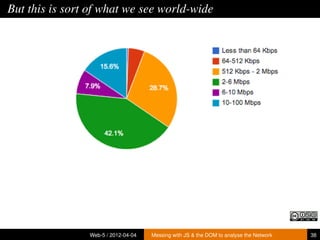
But this is sort of what we see world-wide


                Web-5 / 2012-04-04   Messing with JS & the DOM to analyse the Network   38
4     DNS


Web-5 / 2012-04-04    Messing with JS & the DOM to analyse the Network   39
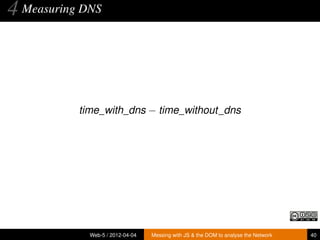
4 Measuring DNS


           time_with_dns − time_without_dns


             Web-5 / 2012-04-04   Messing with JS & the DOM to analyse the Network   40
4   Measuring DNS in JavaScript
    var t=[], dns, ip, hosts=[’http://hostname.com/’,
                               ’http://ip.ad.dr.ess/’];
    var ld = function() {
        t.push(+new Date);
        if(t.length > hosts.length)
          done();
        else {
          var img = new Image;
          img.onload = ld;
          img.src=hosts[t.length-1] + "/1x1.gif";
        }
    };
    var done = function() {
       ip=t[2]-t[1];
       dns=t[1]-t[0]-ip;
    };
    ld();
               Web-5 / 2012-04-04   Messing with JS & the DOM to analyse the Network   41
4 Measuring DNS


            What if DNS were already cached?


             Web-5 / 2012-04-04   Messing with JS & the DOM to analyse the Network   42
4 Measuring DNS


            What if DNS were already cached?
              Use a wildcard DNS entry


             Web-5 / 2012-04-04   Messing with JS & the DOM to analyse the Network   42
4 Measuring DNS


         What if you map DNS based on geo location?


              Web-5 / 2012-04-04   Messing with JS & the DOM to analyse the Network   43
4 Measuring DNS


         What if you map DNS based on geo location?
           A little more complicated, but doable


              Web-5 / 2012-04-04   Messing with JS & the DOM to analyse the Network   43
4 Measuring DNS


           Full code in boomerang’s DNS plugin


             Web-5 / 2012-04-04   Messing with JS & the DOM to analyse the Network   44
5     IPv6


Web-5 / 2012-04-04    Messing with JS & the DOM to analyse the Network   45
5 Measuring IPv6 support and latency


    1   Try to load image from IPv6 host
          • If timeout or error, then no IPv6 support
          • If successful, then calculate latency and proceed
    2   Try to load image from hostname that resolves only to IPv6
        host
          • If timeout or error, then DNS server doesn’t support IPv6
          • If successful, calculate latency


                   Web-5 / 2012-04-04   Messing with JS & the DOM to analyse the Network   46
5 Measuring IPv6 support and latency


             Full code in boomerang’s IPv6 plugin


               Web-5 / 2012-04-04   Messing with JS & the DOM to analyse the Network   47
6
Private Network Scanning


   Web-5 / 2012-04-04   Messing with JS & the DOM to analyse the Network   48
6 Private Network Scanning


      JavaScript in the browser runs with the User’s Security
                            Privileges


                Web-5 / 2012-04-04   Messing with JS & the DOM to analyse the Network   49
6 Private Network Scanning


         This means you can see the user’s private LAN


               Web-5 / 2012-04-04   Messing with JS & the DOM to analyse the Network   50
6 Private Network Scanning – Gateways


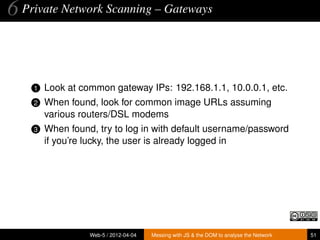
    1   Look at common gateway IPs: 192.168.1.1, 10.0.0.1, etc.
    2   When found, look for common image URLs assuming
        various routers/DSL modems
    3   When found, try to log in with default username/password
        if you’re lucky, the user is already logged in


                  Web-5 / 2012-04-04   Messing with JS & the DOM to analyse the Network   51
6 Private Network Scanning – Services


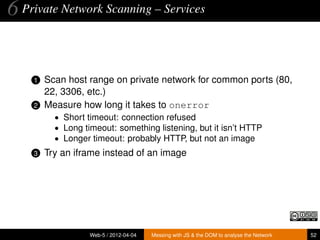
    1   Scan host range on private network for common ports (80,
        22, 3306, etc.)
    2   Measure how long it takes to onerror
          • Short timeout: connection refused
          • Long timeout: something listening, but it isn’t HTTP
          • Longer timeout: probably HTTP, but not an image
    3   Try an iframe instead of an image


                   Web-5 / 2012-04-04   Messing with JS & the DOM to analyse the Network   52
–
               .done()


Web-5 / 2012-04-04   Messing with JS & the DOM to analyse the Network   53
Code/References


    • http://github.com/bluesmoon/boomerang
    • http://samy.pl/mapxss/


              Web-5 / 2012-04-04   Messing with JS & the DOM to analyse the Network   54
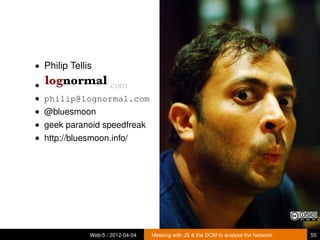
• Philip Tellis

•                    .com
• philip@lognormal.com
• @bluesmoon
• geek paranoid speedfreak
• http://bluesmoon.info/


              Web-5 / 2012-04-04   Messing with JS & the DOM to analyse the Network   55
Thank you


Web-5 / 2012-04-04   Messing with JS & the DOM to analyse the Network   56

Analysing network characteristics with JavaScript

  • 1.
    • Philip Tellis • .com • philip@lognormal.com • @bluesmoon • geek paranoid speedfreak • http://bluesmoon.info/ Web-5 / 2012-04-04 Messing with JS & the DOM to analyse the Network 1
  • 2.
    I <3 JavaScript Web-5/ 2012-04-04 Messing with JS & the DOM to analyse the Network 2
  • 3.
    So much thatI wore Mustache socks to my wedding Web-5 / 2012-04-04 Messing with JS & the DOM to analyse the Network 3
  • 4.
    I’m also aWeb Speedfreak Web-5 / 2012-04-04 Messing with JS & the DOM to analyse the Network 4
  • 5.
    We measure realuser website performance Web-5 / 2012-04-04 Messing with JS & the DOM to analyse the Network 5
  • 6.
    This talk is(mostly) about how we abuse JavaScript to do it Web-5 / 2012-04-04 Messing with JS & the DOM to analyse the Network 6
  • 7.
    Messing with JS& the DOM to analyse the Network Philip Tellis / philip@lognormal.com Web-5 / 2012-04-04 Web-5 / 2012-04-04 Messing with JS & the DOM to analyse the Network 7
  • 8.
    1 Latency Web-5 / 2012-04-04 Messing with JS & the DOM to analyse the Network 8
  • 9.
    1 Blinking Lights It takes about 18ms for light to get from Béziers to Boston (30ms through fibre) Image from http://cablemap.info Web-5 / 2012-04-04 Messing with JS & the DOM to analyse the Network 9
  • 10.
    1 HTTP Web-5 / 2012-04-04 Messing with JS & the DOM to analyse the Network 10
  • 11.
    So to measurelatency, we need to send 1 packet each way, and time it Web-5 / 2012-04-04 Messing with JS & the DOM to analyse the Network 11
  • 12.
    Note about thecode Note that in the code, + new Date is equivalent to new Date().getTime() Web-5 / 2012-04-04 Messing with JS & the DOM to analyse the Network 12
  • 13.
    1 Network latency in JavaScript var ts, rtt, img = new Image; img.onload=function() { rtt=(+new Date - ts) }; ts = +new Date; img.src="/1x1.gif"; Web-5 / 2012-04-04 Messing with JS & the DOM to analyse the Network 13
  • 14.
    2 TCP handshake Web-5 / 2012-04-04 Messing with JS & the DOM to analyse the Network 14
  • 15.
    2 ACK-ACK-ACK Web-5 / 2012-04-04 Messing with JS & the DOM to analyse the Network 15
  • 16.
    2 Connection: keep-alive Web-5 / 2012-04-04 Messing with JS & the DOM to analyse the Network 16
  • 17.
    2 Network latency & TCP handshake in JavaScript var t=[], tcp, rtt; var ld = function() { t.push(+new Date); if(t.length > 2) // run 2 times done(); else { var img = new Image; img.onload = ld; img.src="/1x1.gif?" + Math.random() + ’=’ + new Date; } }; var done = function() { rtt=t[2]-t[1]; tcp=t[1]-t[0]-rtt; }; ld(); Web-5 / 2012-04-04 Messing with JS & the DOM to analyse the Network 17
  • 18.
    Notice that we’veignored DNS lookup time here... how would you measure it? Web-5 / 2012-04-04 Messing with JS & the DOM to analyse the Network 18
  • 19.
    1 Notes • 1x1 gif is 35 bytes • including HTTP headers, is smaller than a TCP packet • Fires onload on all browsers • 0 byte image fires onerror • which is indistinguishable from network error Web-5 / 2012-04-04 Messing with JS & the DOM to analyse the Network 19
  • 20.
    3 Network Throughput Web-5/ 2012-04-04 Messing with JS & the DOM to analyse the Network 20
  • 21.
    3 Measuring NetworkThroughput data_length download_time Web-5 / 2012-04-04 Messing with JS & the DOM to analyse the Network 21
  • 22.
    Should you flya 747 or a 737? • A 747 seats 400+ passengers • A 737 seats about 150 • Both take about the same time to fly from CDG to MPL • A 747 takes longer to load and unload The best selling aircraft to date is the 737 This analogy would have been much cooler if the Concorde still flew Web-5 / 2012-04-04 Messing with JS & the DOM to analyse the Network 22
  • 23.
    Low Latency, LowBandwidth Web-5 / 2012-04-04 Messing with JS & the DOM to analyse the Network 23
  • 24.
    3 Network Throughput in JavaScript // Assume global object // image={ url: ..., size: ... } var ts, rtt, bw, img = new Image; img.onload=function() { rtt=(+new Date - ts); bw = image.size*1000/rtt; // rtt is in ms }; ts = +new Date; img.src=image.url; Web-5 / 2012-04-04 Messing with JS & the DOM to analyse the Network 24
  • 25.
    3 Measuring NetworkThroughput If it were that simple, I wouldn’t be doing a talk at @web-5 Web-5 / 2012-04-04 Messing with JS & the DOM to analyse the Network 25
  • 26.
    3 TCP SlowStart Web-5 / 2012-04-04 Messing with JS & the DOM to analyse the Network 26
  • 27.
    3 Measuring NetworkThroughput So to make the best use of bandwidth, we need resources that fit in a TCP window Web-5 / 2012-04-04 Messing with JS & the DOM to analyse the Network 27
  • 28.
    3 There isno single size that will tax all available networks http://www.yuiblog.com/blog/2010/04/08/analyzing-bandwidth-and-latency/ Web-5 / 2012-04-04 Messing with JS & the DOM to analyse the Network 28
  • 29.
    3 Network Throughput in JavaScript – Take 2 // image object is now an array of multiple images var i=0; var ld = function() { if(i>0) image[i-1].end = +new Date; if(i >= image.length) done(); else { var img = new Image; img.onload = ld; image[i].start = +new Date; img.src=image[i].url; } i++; }; Web-5 / 2012-04-04 Messing with JS & the DOM to analyse the Network 29
  • 30.
    3 Measuring NetworkThroughput Slow network connection, meet really huge image Web-5 / 2012-04-04 Messing with JS & the DOM to analyse the Network 30
  • 31.
    3 Network Throughput in JavaScript – Take 3 var img = new Image; img.onload = ld; image[i].start = +new Date; image[i].timer = setTimeout(function() { image[i].expired=true }, image[i].timeout); img.src=image[i].url; Web-5 / 2012-04-04 Messing with JS & the DOM to analyse the Network 31
  • 32.
    3 Network Throughput in JavaScript – Take 3 if(i>0) { image[i-1].end = +new Date; clearTimeout(image[i-1].timer); } Web-5 / 2012-04-04 Messing with JS & the DOM to analyse the Network 32
  • 33.
    3 Network Throughput in JavaScript – Take 3 if(i >= image.length || (i > 0 && image[i-1].expired)) { done(); } Web-5 / 2012-04-04 Messing with JS & the DOM to analyse the Network 33
  • 34.
    3 Measuring NetworkThroughput Are we done yet? Web-5 / 2012-04-04 Messing with JS & the DOM to analyse the Network 34
  • 35.
    3 Measuring NetworkThroughput Are we done yet? sure... Web-5 / 2012-04-04 Messing with JS & the DOM to analyse the Network 34
  • 36.
    3 Measuring NetworkThroughput Except network throughput is different every time you test it Web-5 / 2012-04-04 Messing with JS & the DOM to analyse the Network 35
  • 37.
    Statistics to theRescue flickr/sophistechate/4264466015/ Web-5 / 2012-04-04 Messing with JS & the DOM to analyse the Network 36
  • 38.
    3 Measuring NetworkThroughput The code for that is NOT gonna fit on a slide Web-5 / 2012-04-04 Messing with JS & the DOM to analyse the Network 37
  • 39.
    But this issort of what we see world-wide Web-5 / 2012-04-04 Messing with JS & the DOM to analyse the Network 38
  • 40.
    4 DNS Web-5 / 2012-04-04 Messing with JS & the DOM to analyse the Network 39
  • 41.
    4 Measuring DNS time_with_dns − time_without_dns Web-5 / 2012-04-04 Messing with JS & the DOM to analyse the Network 40
  • 42.
    4 Measuring DNS in JavaScript var t=[], dns, ip, hosts=[’http://hostname.com/’, ’http://ip.ad.dr.ess/’]; var ld = function() { t.push(+new Date); if(t.length > hosts.length) done(); else { var img = new Image; img.onload = ld; img.src=hosts[t.length-1] + "/1x1.gif"; } }; var done = function() { ip=t[2]-t[1]; dns=t[1]-t[0]-ip; }; ld(); Web-5 / 2012-04-04 Messing with JS & the DOM to analyse the Network 41
  • 43.
    4 Measuring DNS What if DNS were already cached? Web-5 / 2012-04-04 Messing with JS & the DOM to analyse the Network 42
  • 44.
    4 Measuring DNS What if DNS were already cached? Use a wildcard DNS entry Web-5 / 2012-04-04 Messing with JS & the DOM to analyse the Network 42
  • 45.
    4 Measuring DNS What if you map DNS based on geo location? Web-5 / 2012-04-04 Messing with JS & the DOM to analyse the Network 43
  • 46.
    4 Measuring DNS What if you map DNS based on geo location? A little more complicated, but doable Web-5 / 2012-04-04 Messing with JS & the DOM to analyse the Network 43
  • 47.
    4 Measuring DNS Full code in boomerang’s DNS plugin Web-5 / 2012-04-04 Messing with JS & the DOM to analyse the Network 44
  • 48.
    5 IPv6 Web-5 / 2012-04-04 Messing with JS & the DOM to analyse the Network 45
  • 49.
    5 Measuring IPv6support and latency 1 Try to load image from IPv6 host • If timeout or error, then no IPv6 support • If successful, then calculate latency and proceed 2 Try to load image from hostname that resolves only to IPv6 host • If timeout or error, then DNS server doesn’t support IPv6 • If successful, calculate latency Web-5 / 2012-04-04 Messing with JS & the DOM to analyse the Network 46
  • 50.
    5 Measuring IPv6support and latency Full code in boomerang’s IPv6 plugin Web-5 / 2012-04-04 Messing with JS & the DOM to analyse the Network 47
  • 51.
    6 Private Network Scanning Web-5 / 2012-04-04 Messing with JS & the DOM to analyse the Network 48
  • 52.
    6 Private NetworkScanning JavaScript in the browser runs with the User’s Security Privileges Web-5 / 2012-04-04 Messing with JS & the DOM to analyse the Network 49
  • 53.
    6 Private NetworkScanning This means you can see the user’s private LAN Web-5 / 2012-04-04 Messing with JS & the DOM to analyse the Network 50
  • 54.
    6 Private NetworkScanning – Gateways 1 Look at common gateway IPs: 192.168.1.1, 10.0.0.1, etc. 2 When found, look for common image URLs assuming various routers/DSL modems 3 When found, try to log in with default username/password if you’re lucky, the user is already logged in Web-5 / 2012-04-04 Messing with JS & the DOM to analyse the Network 51
  • 55.
    6 Private NetworkScanning – Services 1 Scan host range on private network for common ports (80, 22, 3306, etc.) 2 Measure how long it takes to onerror • Short timeout: connection refused • Long timeout: something listening, but it isn’t HTTP • Longer timeout: probably HTTP, but not an image 3 Try an iframe instead of an image Web-5 / 2012-04-04 Messing with JS & the DOM to analyse the Network 52
  • 56.
    .done() Web-5 / 2012-04-04 Messing with JS & the DOM to analyse the Network 53
  • 57.
    Code/References • http://github.com/bluesmoon/boomerang • http://samy.pl/mapxss/ Web-5 / 2012-04-04 Messing with JS & the DOM to analyse the Network 54
  • 58.
    • Philip Tellis • .com • philip@lognormal.com • @bluesmoon • geek paranoid speedfreak • http://bluesmoon.info/ Web-5 / 2012-04-04 Messing with JS & the DOM to analyse the Network 55
  • 59.
    Thank you Web-5 /2012-04-04 Messing with JS & the DOM to analyse the Network 56